




























Lenovo ThinkSystem SR675 V3 and SR675i V3 Servers: технические характеристики и документация
Abstract
The Lenovo ThinkSystem SR675 V3 is a versatile GPU-rich 3U rack server that supports up to eight double-wide and single-wide GPUs including the new NVIDIA H200 and L40S Tensor Core GPUs, or the NVIDIA HGX H200 4-GPU offering with NVLink and Lenovo Neptune hybrid liquid-to-air cooling. The server is based on the AMD EPYC 9004 Series processors (formerly codenamed "Genoa", “Genoa-X” and “Bergamo”) and on the new 5th Gen AMD EPYC 9005 Series processors (formerly codenamed “Turin”).
The ThinkSystem SR675i V3 is a specific configuration of the SR675 V3 that is designed for AI inferencing workloads.
This product guide provides essential pre-sales information to understand the ThinkSystem SR675 V3 server, its key features and specifications, components and options, and configuration guidelines. This guide is intended for technical specialists, sales specialists, sales engineers, IT architects, and other IT professionals who want to learn more about the SR675 V3 and consider its use in IT solutions.
Change History
Changes in the August 25, 2026 update:
- Added the VMware ESXi 9.1 preload for CTO orders - Operating system support section
- VMware ESXi 9.1 (Factory Installed), CHGN
Overview of the ThinkSystem SR675 V3 server
Introduction
The Lenovo ThinkSystem SR675 V3 is a versatile GPU-rich 3U rack server that supports up to eight double-wide and single-wide GPUs including the new NVIDIA H200 and L40S Tensor Core GPUs, or the NVIDIA HGX H200 4-GPU offering with NVLink and Lenovo Neptune hybrid liquid-to-air cooling. The server is based on the AMD EPYC 9004 Series processors (formerly codenamed "Genoa", “Genoa-X” and “Bergamo”) and on the new 5th Gen AMD EPYC 9005 Series processors (formerly codenamed “Turin”).
The server delivers optimal performance for Artificial Intelligence (AI), High Performance Computing (HPC) and graphical workloads across an array of industries. Retail, manufacturing, financial services and healthcare industries can leverage the processing power of the GPUs in the SR675 V3 to extract greater insights and drive innovation utilizing machine learning (ML) and deep learning (DL). The ThinkSystem SR675i V3 is a specific configuration of the SR675 V3 that is designed for AI inferencing workloads.
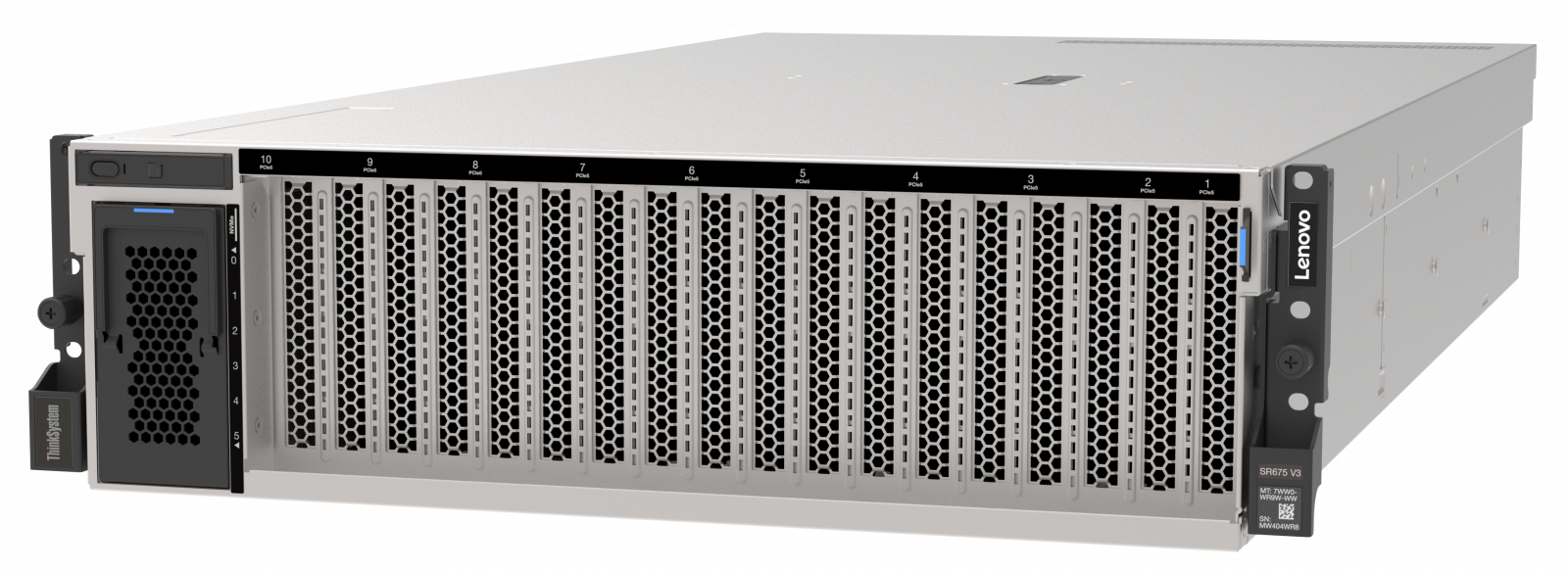
Figure 1. Lenovo ThinkSystem SR675 V3 configured to support eight double-wide GPUs
360° View Full 3D Tour
Did you know?
Traditional air-cooling methods are reaching critical limits. Increases in component power especially on CPU and GPU have resulted in higher energy and infrastructure costs, extremely loud systems and heightened carbon footprints. To combat these challenges and dissipate heat quickly, the SR675 V3 employs Lenovo Neptune liquid-to-air (L2A) hybrid cooling technology. The heat of the NVIDIA HGX H200 GPUs is removed through a unique closed loop liquid-to-air heat exchanger that delivers the benefits of liquid cooling such as higher density, lower power consumption, quiet operation and higher performance without adding plumbing.
Lenovo ThinkSystem SR675 V3 provides the advanced capabilities of two of the new 5th Gen AMD EPYC processors plus support for up to eight high-performance PCIe double-wide or single-wide GPUs. This combination gives you significant processing power in one server.
The SR675 V3 supports NVIDIA NVLink, which offers a GPU-to-GPU direct connection of up to 900 GB/s bandwidth and supported in both double-wide or single-wide PCIe GPU configurations. NVLink also allows for a larger combined memory footprint for bigger batch sizes or the processing of larger images.
Key features
The SR675 V3 features a modular design for ultimate flexibility. Multiple configurations are supported, including:
- One or two 4th or 5th Generation AMD EPYC™ Processors
- Up to eight double-wide or single-wide GPUs with NVLink bridges
- NVIDIA HGX H200 4-GPU with NVLink and Lenovo Neptune hybrid liquid cooling
- AMD Instinct™ MI Series Accelerators
- Choice of front or rear high-speed networking
- Choice of local high speed NVMe storage
There are three or two different base configurations of the SR675 V3 as shown in the following figure. The configurations determine the type and quantity of GPUs supported as well as the supported drive bays.
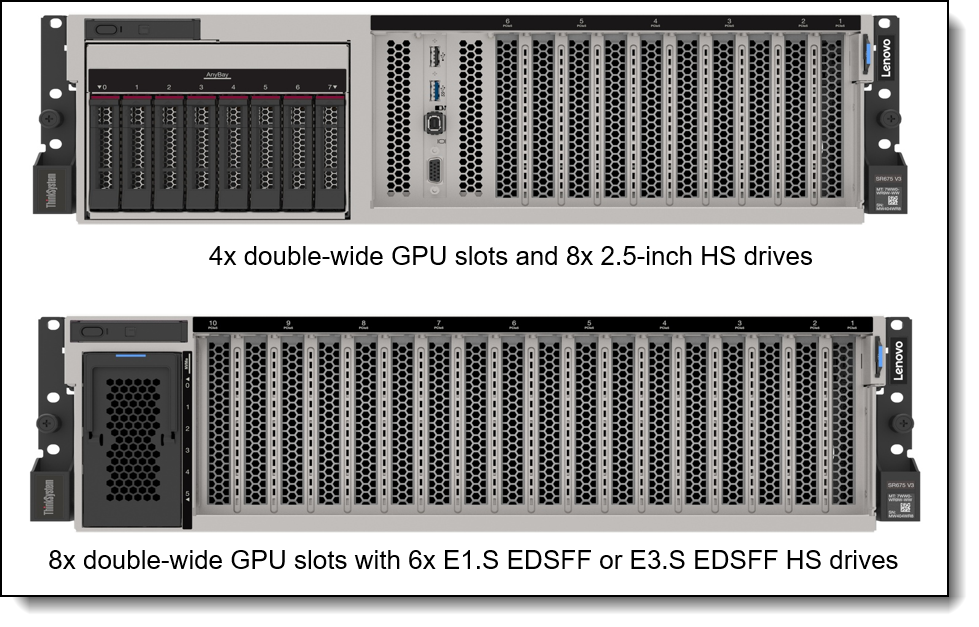
Figure 2. Two base configurations of the ThinkSystem SR675 V3
The following is the third base configuration.
- 4x SXM5 GPUs with 4x 2.5-inch HS drives or 4x ES.S EDSFF HS drives
The SR675 V3 is built on up to two AMD EPYC 9004 and 9005 Series processors and is designed to support the vast NVIDIA Hooper and Ampere datacenter portfolio and AMD Instinct™ MI Series Accelerators. The SR675 V3 delivers performance optimized for your workload, be it visualization, rendering or computationally intensive HPC and AI.
Scalability and performance
The SR675 V3 offers numerous features to boost performance, improve scalability and reduce costs:
- Supports up to eight high-performance PCIe double-wide or single-wide GPUs including the new NVIDIA H200 and L40S Tensor Core GPUs.
- Supports the NVIDIA HGX H200 4-GPU complex with NVLink and Lenovo Neptune hybrid liquid cooling.
- Supports NVIDIA NVLink, which offers a GPU-to-GPU direct connection of up to 900 GB/s bandwidth and supported in both SXM5 and double-wide or single-wide PCIe GPU configurations. NVLink also allows for a larger combined memory footprint for bigger batch sizes or the processing of larger images.
- Supports up to two fourth-generation AMD EPYC 9005 processors
- Up to 160 cores and 320 threads
- Core speed of up to 4.1 GHz
- Nominal TDP rating of up to 400 W
- Supports up to 24 DDR5 memory DIMMs operating at up to 6400 MHz to maximize the performance of the memory subsystem. Memory rated at 6400 MHz is only supported with 5th Gen processors.
- Using 256GB 3DS RDIMMs, the server supports up to 6TB of system memory
- Supports GPU Direct RDMA I/O where high-speed network adapters are directly connected to the GPUs, to maximize I/O performance.
- Supports GPU Direct Storage where NVMe drives are directly connected to the GPUs, to maximize storage performance.
- A variety of slot configurations available, depending on the GPU and NVMe storage configuration selected:
- Two front PCIe 5.0 x16 slots
- Four rear PCIe 5.0 x16 slots (configuration dependent)
- One rear OCP 3.0 slot, PCIe 4.0 x8 or x16
- Supports a variety of internal storage configurations:
- 8x 2.5-inch hot-swap SSDs, with SAS, SATA or NVMe interfaces
- 6x EDSFF E1.S hot-swap NVMe SSDs
- 4x EDSFF E3.S hot-swap NVMe SSDs
- Supports NVMe drives without oversubscription of PCIe lanes (1:1 connectivity). The use of NVMe drives maximizes drive I/O performance, in terms of throughput, bandwidth, and latency.
- Supports high-speed RAID controllers from Lenovo and Broadcom providing 12 Gb SAS connectivity to the drive backplanes. A variety of PCIe 3.0 and PCIe 4.0 RAID adapters are available.
- Supports M.2 drives for convenient operating system boot functions. Available M.2 adapters support either one M.2 drive or two M.2 drives in a RAID 1 configuration for performance and reliability.
- The server has an industry-standard OCP 3.0 small form factor (SFF) slot, with a PCIe 4.0 interface, up to x16, supporting a variety of Ethernet network adapters. A simple-swap mechanism with a thumbscrew and pull-tab enables tool-less installation and removal of the adapter. The adapter supports shared BMC network sideband connectivity to enable out-of-band systems management.
- The server offers PCI Express 5.0 I/O expansion capabilities that doubles the theoretical maximum bandwidth of PCIe 4.0 (32GT/s in each direction for PCIe 5.0, compared to 16 GT/s with PCIe 4.0). A PCIe 5.0 x16 slot provides 63 GB/s bandwidth, enough to support a 200GbE network connection.
- The server offers a choice of PCIe 5.0 x16 full-height slots, depending on the GPU and NVMe connections selected. Available slots are two front slots and four rear slots, plus the slot dedicated to the OCP adapter. The flexibility of configuration ensures you can get the PCIe resources you need for a high-performance HPC/AI implementation.
Availability and serviceability
The SR675 V3 provides many features to simplify serviceability and increase system uptime:
- Designed to run 24 hours a day, 7 days a week.
- The server offers hot-swap drives, supporting RAID redundancy for data protection and greater system uptime.
- Available M.2 RAID Boot Adapters support RAID-1 which can enable two NVMe M.2 drives to be configured as a redundant pair.
- The server has four hot-swap power supplies and five simple-swap redundant fans to provide availability for business-critical applications. N+N, N+0 (non-redundant), N+1 configurations available.
- The Liquid Assisted Cooling Module on the configuration with SXM5 GPUs employs four redundant low-pressure pumps to circulate the liquid to cool the GPUs.
- The light path diagnostics feature uses LEDs to lead the technician to failed (or failing) components, which simplifies servicing, speeds up problem resolution, and helps improve system availability.
- Solid-state drives (SSDs) offer more reliability and performance than traditional mechanical HDDs for greater uptime.
- Proactive Platform Alerts (including PFA and SMART alerts): Processors, voltage regulators, memory, internal storage (SAS/SATA SSDs, NVMe SSDs, M.2 storage, flash storage adapters), fans, power supplies, RAID controllers, server ambient and subcomponent temperatures. Alerts can be surfaced through the XClarity Controller to managers such as Lenovo XClarity Administrator, VMware vCenter, and Microsoft System Center. These proactive alerts let you take appropriate actions in advance of possible failure, thereby increasing server uptime and application availability.
- The built-in XClarity Controller continuously monitors system parameters, triggers alerts, and performs recovery actions in case of failures to minimize downtime.
- Built-in diagnostics in UEFI, using Lenovo XClarity Provisioning Manager, speed up troubleshooting tasks to reduce service time.
- Lenovo XClarity Provisioning Manager supports diagnostics and can save service data to a USB key drive or remote CIFS share folder for troubleshooting and reduce service time.
- Auto restart in the event of a momentary loss of AC power (based on power policy setting in the XClarity Controller service processor)
- Offers a diagnostics port on the front of the server to allow you to attach an external diagnostics handset for enhanced systems management capabilities.
- Support for the XClarity Administrator Mobile app running on a supported smartphone or tablet and connected to the server through the service-enabled USB port, enables additional local systems management functions.
- Three-year or one-year customer-replaceable unit and onsite limited warranty (varies by geography), 9 x 5 next business day. Optional service upgrades are available.
Manageability and security
Systems management features simplify local and remote management of the SR675 V3:
- Lenovo XClarity Controller 2 (XCC2) monitors server availability and performs remote management. XCC2 Platinum is standard, which enables remote KVM, the mounting of remote media files (ISO and IMG image files), and boot capture.
- Lenovo XClarity Administrator offers comprehensive hardware management tools that help to increase uptime, reduce costs and improve productivity through advanced server management capabilities.
- UEFI-based Lenovo XClarity Provisioning Manager, accessible from F1 during boot, provides system inventory information, graphical UEFI Setup, platform update function, RAID Setup wizard, operating system installation function, and diagnostic functions.
- Support for Lenovo XClarity Energy Manager, which captures real-time power and temperature data from the server and provides automated controls to lower energy costs.
- Lenovo EveryScale HPC & AI Software Stack is a modular software stack tailored to our customer's needs. Thoroughly tested, supported and periodically updated, it combines the latest open-source HPC software releases to enable organizations with an agile and scalable IT infrastructure.
- Lenovo HPC & AI Software Stack provides our HPC customers you with a fully tested and supported open-source software stack to enable your administrators and users with for the most effective and environmentally sustainable consumption of Lenovo supercomputing capabilities.
- Our software stack is built on the most widely adopted and maintained HPC community software for orchestration and management. It integrates third party components especially around programming environments and performance optimization to complement and enhance the capabilities, creating the organic umbrella in software and service to add value.
- Our Confluent management system and Lenovo Intelligent Computing Orchestration (LiCO) web portal provides an interface designed to abstract the users from the complexity of HPC cluster orchestration and AI workloads management, making open-source HPC software consumable for every customer.
- An integrated industry-standard Unified Extensible Firmware Interface (UEFI) enables improved setup, configuration, and updates, and simplifies error handling.
- Support for industry standard management protocols, IPMI 2.0, SNMP 3.0, Redfish REST API, serial console via IPMI.
- An integrated hardware Trusted Platform Module (TPM) supporting TPM 2.0 enables advanced cryptographic functionality, such as digital signatures and remote attestation.
- Administrator and power-on passwords help protect from unauthorized access to the server.
- Supports Secure Boot to ensure only a digitally signed operating system can be used. Supported with SSDs, as well as M.2 drives.
- Industry-standard Advanced Encryption Standard (AES) NI support for faster, stronger encryption.
- An included chassis intrusion switch provides an additional physical security feature.
Energy efficiency
The SR675 V3 offers the following energy-efficiency features to save energy, reduce operational costs, and increase energy availability:
- Energy-efficient system board components help lower operational costs.
- High-efficiency power supplies with 80 PLUS Titanium or Platinum certification.
- Solid-state drives (SSDs) consume as much as 80% less power than traditional spinning 2.5-inch HDDs.
- Optional Lenovo XClarity Energy Manager provides advanced data center power notification, analysis, and policy-based management to help achieve lower heat output and reduced cooling needs.
Performance benchmarks
At Lenovo, we know customers care most about how their workloads perform in real-world environments, which is why we carefully tune our server hardware, firmware, and drivers to help deliver strong benchmark results that reflect practical business needs. The goal is simple: to help customers run their critical applications more efficiently and achieve better outcomes.
The following table lists the current world record performance benchmarks that Lenovo performance engineers have achieved on the SR675 V3. This reinforces that the server is an excellent choice for a server to run wide range of application workloads.
The SR675 V3 has a total of 43 current performance benchmark world records.
Results referenced are current as of September 1, 2026.
| Benchmark | Sub-benchmark | Benchmark metric | Current world records |
Lenovo result | Link |
|---|---|---|---|---|---|
| SPECpower 2008 | SPECpower_ssj2008 | overall ssj_ops/watt | 3 | Best 2P 3U Windows, Best 2P 3U, & Best 3U scores | SPECpower link |
| SPECpower 2008 | SPECpower_ssj2008 | overall ssj_ops/watt | 1 | Best 2P 3U Linux score | SPECpower link |
| SPEChpc 2021 | Tiny Suite | SPEChpc 2021_tny_base, SPEChpc 2021_tny_peak | 2 | Best 1-node 2P 5GPU base and peak ACC scores | SPEChpc link |
| SPEChpc 2021 | Tiny Suite | SPEChpc 2021_tny_base, SPEChpc 2021_tny_peak | 2 | Best 1-node 2P 6GPU base and peak ACC scores | SPEChpc link |
| SPEChpc 2021 | Tiny Suite | SPEChpc 2021_tny_base, SPEChpc 2021_tny_peak | 2 | Best 1-node 2P 7GPU base and peak ACC scores | SPEChpc link |
| SPEChpc 2021 | Tiny Suite | SPEChpc 2021_tny_base, SPEChpc 2021_tny_peak | 4 | Best 1-node 2P 8GPU base and peak ACC scores & Best 1-node base and peak ACC scores | SPEChpc link |
| SPEChpc 2021 | Small Suite | SPEChpc 2021_sml_base, SPEChpc 2021_sml_peak | 2 | Best 1-node 2P 7GPU base and peak ACC scores | SPEChpc link |
| MLperf Training v3.1 Closed Division | Image Classification (ResNet50) | Latency (min) | 1 | #1 Performance for Available configurations with 4 GPUs | MLperf link |
| MLperf Training v3.1 Closed Division | Medical Image Segmentation (3D-UNet) | Latency (min) | 1 | #1 Performance for Available configurations with 4 GPUs | MLperf link |
| MLperf Training v3.1 Closed Division | Object Detection, heavy weight (Mask R-CNN) | Latency (min) | 1 | #1 Performance for Available configurations with 4 GPUs | MLperf link |
| MLperf Training v3.1 Closed Division | Object Detection, light weight (SSD) | Latency (min) | 1 | #1 Performance for Available configurations with 4 GPUs | MLperf link |
| MLperf Training v3.1 Closed Division | Speech Recognition (RNN-T) | Latency (min) | 1 | #1 Performance for Available configurations with 4 GPUs | MLperf link |
| MLperf Training v3.1 Closed Division | Natural Language Processing (BERT-large) | Latency (min) | 1 | #1 Performance for Available configurations with 4 GPUs | MLperf link |
| MLperf Inference v3.1 Closed Datacenter Division | Natural Language Processing, 99% Accuracy, Offline (Bert) | Samples/s | 1 | #1 Performance for Available configurations with 8 GPUs | MLperf link |
| MLperf Inference v3.1 Closed Datacenter Division | Object detection, 99% Accuracy, Offline (RetinaNet) | Samples/s | 1 | #1 Performance for Available configurations with 8 GPUs | MLperf link |
| MLperf Inference v3.1 Closed Datacenter Division | Speech-to-text, 99.0% Accuracy, Server Scenario (RNN-T) | Queries/s | 1 | #1 Performance for Available configurations with 8 GPUs | MLperf link |
| MLperf Inference v5.0 Closed Datacenter Division | Medical Imaging, 99% Accuracy, Offline Scenario (3d-unet) | Samples/s | 1 | #1 Performance for Available configurations with 4 GPUs | MLperf link |
| MLperf Inference v5.0 Closed Datacenter Division | Medical Imaging, 99.9% Accuracy, Offline Scenario (3d-unet) | Samples/s | 1 | #1 Performance for Available configurations with 4 GPUs | MLperf link |
| MLperf Inference v5.0 Closed Datacenter Division | Small LLM, 99% Accuracy, Offline Scenario (GPT-J) | Tokens/s | 1 | #1 Performance for Available configurations with 4 GPUs | MLperf link |
| MLperf Inference v5.0 Closed Datacenter Division | Small LLM, 99% Accuracy, Server Scenario (GPT-J) | Tokens/s | 1 | #1 Performance for Available configurations with 4 GPUs | MLperf link |
| MLperf Inference v5.0 Closed Datacenter Division | Small LLM, 99.9% Accuracy, Offline Scenario (GPT-J) | Tokens/s | 1 | #1 Performance for Available configurations with 4 GPUs | MLperf link |
| MLperf Inference v5.0 Closed Datacenter Division | Small LLM, 99.9% Accuracy, Server Scenario (GPT-J) | Tokens/s | 1 | #1 Performance for Available configurations with 4 GPUs | MLperf link |
| MLperf Inference v5.0 Closed Datacenter Division | LLM, 99% Accuracy, Offline Scenario (llama2-70b) | Tokens/s | 1 | #1 Performance for Available configurations with 4 GPUs | MLperf link |
| MLperf Inference v5.0 Closed Datacenter Division | LLM, 99% Accuracy, Server Scenario (llama2-70b) | Tokens/s | 1 | #1 Performance for Available configurations with 4 GPUs | MLperf link |
| MLperf Inference v5.0 Closed Datacenter Division | LLM, 99.9% Accuracy, Offline Scenario (llama2-70b) | Tokens/s | 1 | #1 Performance for Available configurations with 4 GPUs | MLperf link |
| MLperf Inference v5.0 Closed Datacenter Division | LLM, 99.9% Accuracy, Server Scenario (llama2-70b) | Tokens/s | 1 | #1 Performance for Available configurations with 4 GPUs | MLperf link |
| MLperf Inference v5.0 Closed Datacenter Division | Mixture-of-Experts, Offline Scenario (mixral-8x7b) | Tokens/s | 1 | #1 Performance for Available configurations with 4 GPUs | MLperf link |
| MLperf Inference v5.0 Closed Datacenter Division | Mixture-of-Experts, Server Scenario (mixral-8x7b) | Tokens/s | 1 | #1 Performance for Available configurations with 4 GPUs | MLperf link |
| MLperf Inference v5.0 Closed Datacenter Division | Image classification, Offline Scenario (ResNet50-v1.5) | Samples/s | 1 | #1 Performance for Available configurations with 4 GPUs | MLperf link |
| MLperf Inference v5.0 Closed Datacenter Division | Image classification, Server Scenario (ResNet50-v1.5) | Queries/s | 1 | #1 Performance for Available configurations with 4 GPUs | MLperf link |
| MLperf Inference v5.0 Closed Datacenter Division | Object Detection, Offline Scenario (RetinaNet) | Samples/s | 1 | #1 Performance for Available configurations with 4 GPUs | MLperf link |
| MLperf Inference v5.0 Closed Datacenter Division | Object Detection, Server Scenario (RetinaNet) | Queries/s | 1 | #1 Performance for Available configurations with 4 GPUs | MLperf link |
| MLperf Inference v5.0 Closed Datacenter Division | Text-to-Image, Offline Scenario (Stable-Diffusion-XL) | Samples/s | 1 | #1 Performance for Available configurations with 4 GPUs | MLperf link |
| MLperf Inference v5.0 Closed Datacenter Division | Text-to-Image, Server Scenario (Stable-Diffusion-XL) | Queries/s | 1 | #1 Performance for Available configurations with 4 GPUs | MLperf link |
See the complete list of current world records in the Lenovo Press article Performance Benchmark World Record Summary for Lenovo ThinkSystem Servers.
The Lenovo Server Performance Team also publishes reports on key performance world records at the time the world record is announced. See all published Performance Benchmark Reports.
Components and connectors
The following figure shows the main components on the front of the configuration with 4x double-wide PCIe GPUs and 8x 2.5-inch hot-swap drives.
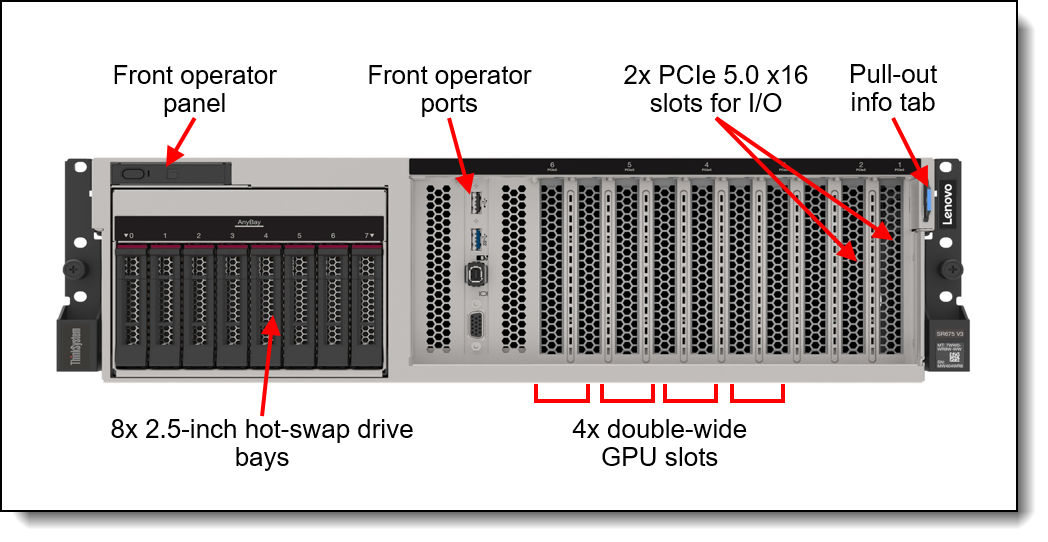
Figure 3. Front view of the SR675 V3 with 4x double-wide PCIe GPUs and 8x 2.5-inch hot-swap drives
The following figure shows the main components on the front of the configuration with 8x double-wide PCIe GPUs and 6x E1.S EDSFF hot-swap drives. In this configuration, there are two front I/O PCIe slots.
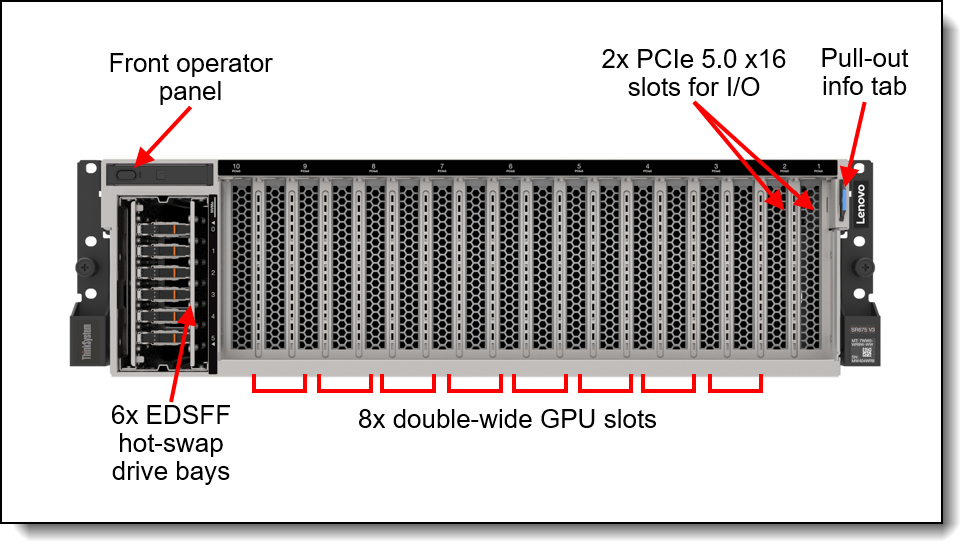
Figure 4. Front view of the SR675 V3 with 8x double-wide PCIe GPUs, 6x E1.S EDSFF hot-swap drives, and front I/O
The following figure shows the components visible from the rear of the server. Note that not all configurations support PCIe slots at the rear of the server
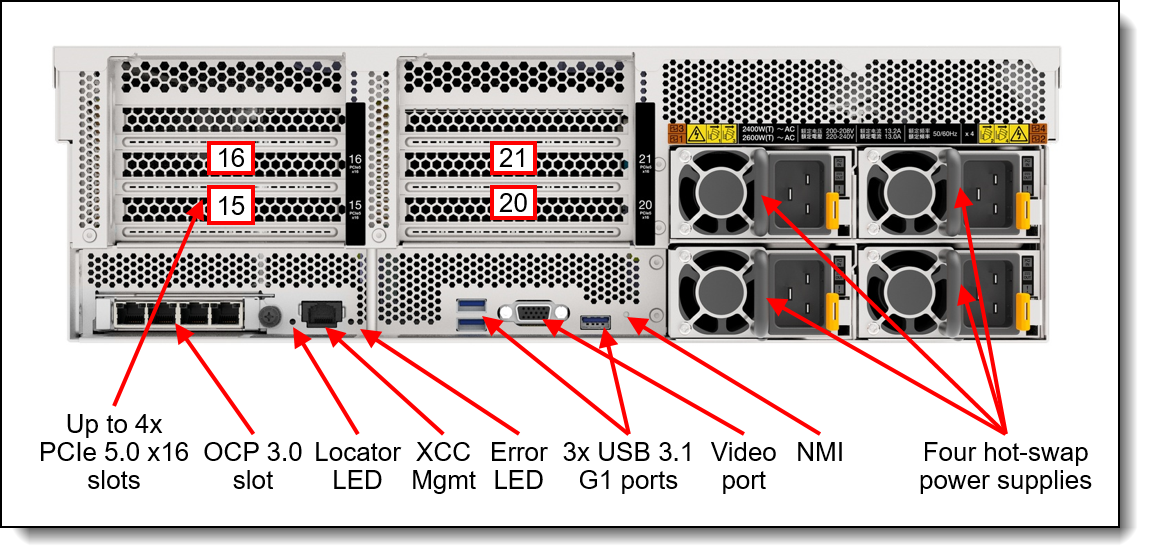
Figure 5. Rear view of the ThinkSystem SR675 V3
The following figure shows the internals of the server with four double-wide GPUs installed.
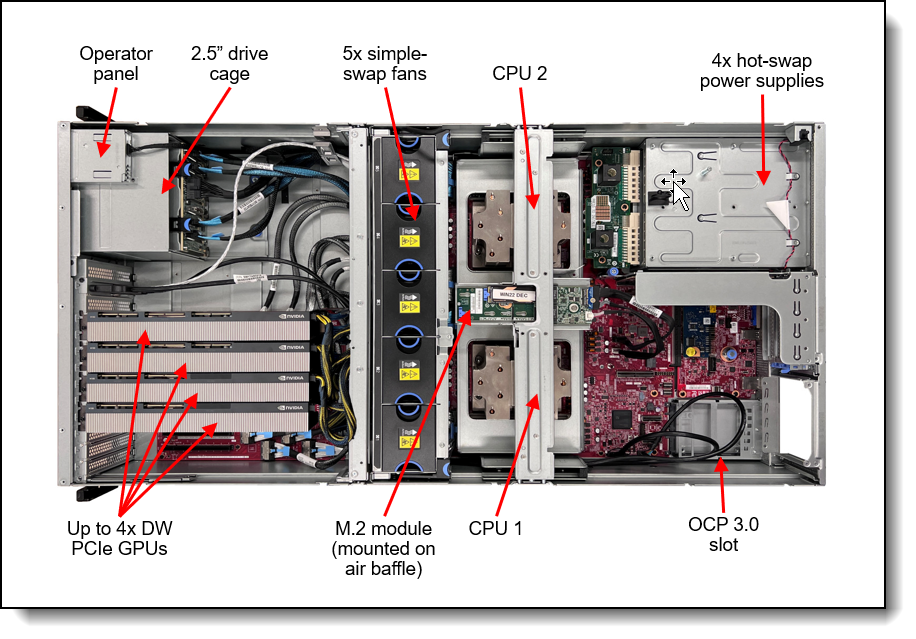
Figure 6. Internal view of the SR675 V3 with 4x double-wide PCIe GPUs and 8x 2.5-inch drives
The following figure shows the internals of the server with eight double-wide GPUs installed (four removed to show the PCIe switch board underneath).
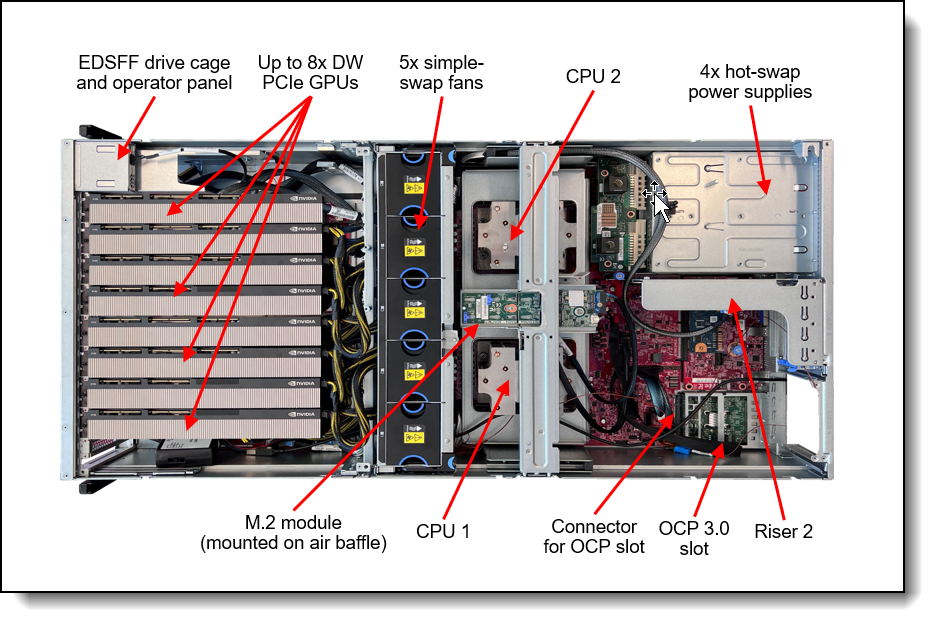
Figure 7. Internal view of the SR675 V3 with 8x double-wide PCIe GPUs and 6x EDSFF hot-swap drives
System architecture
The following figure shows the architectural block diagram of the SR675 V3, showing the major components and their connections.
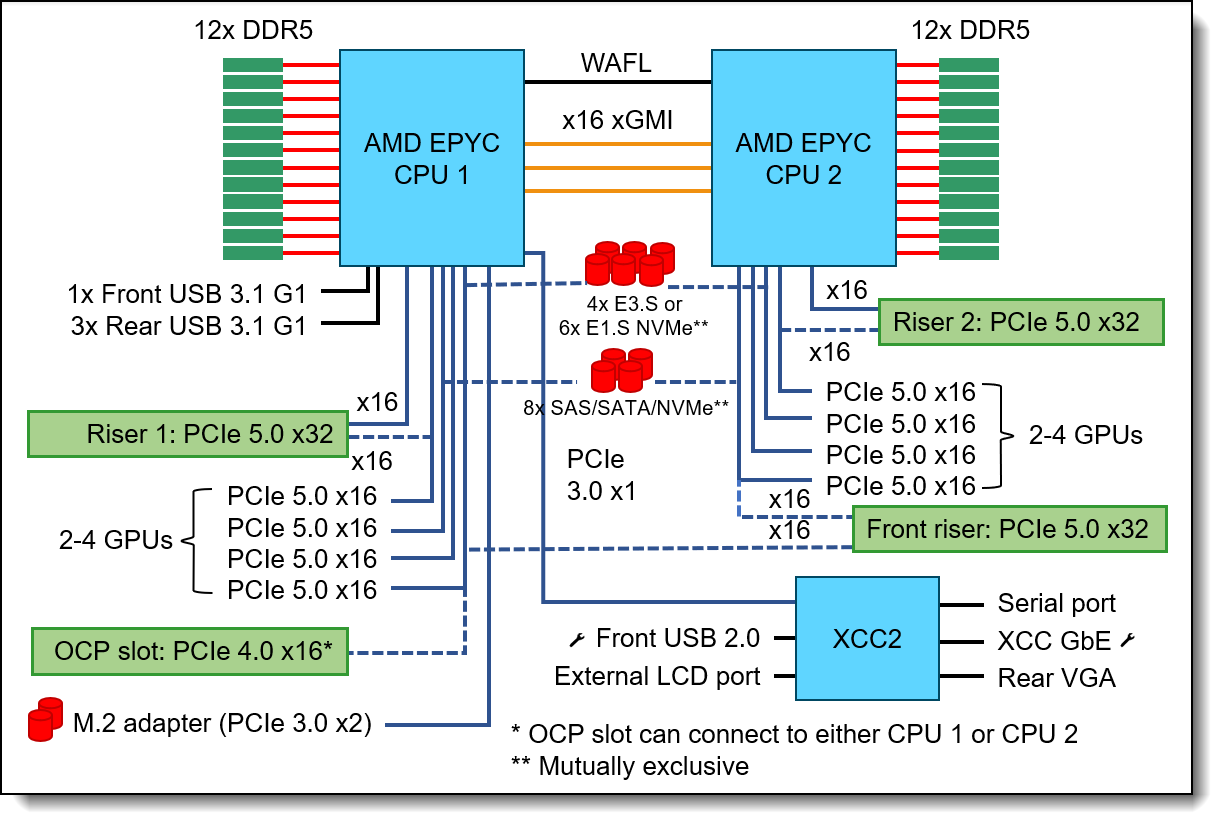
Figure 8. SR675 V3 system architectural block diagram
Standard specifications
The following table lists the standard specifications.
| Components | Specification |
|---|---|
| Machine types | 7D9Q - 1 year warranty 7D9R - 3 year warranty |
| Form factor | 3U rack |
| Processor |
Up to two AMD EPYC processors, either 5th Gen 9005 ("Turin") or 4th Gen 9004 ("Genoa"). Supported processors up to 160 cores, core speeds of up to 4.1 GHz, and TDP ratings of up to 400W. Supports PCIe 5.0 for high performance I/O. |
| Chipset |
Not applicable |
| Memory |
24 DIMM slots with two processors (12 DIMM slots per processor) per node. Each processor has 12 memory channels, with 1 DIMM per channel (DPC). Lenovo TruDDR5 RDIMMs, 3DS RDIMMs, and Optimized DIMMs are supported, up to 6400 MHz. Memory rated at 6400 MHz is only supported with 5th Gen processors. |
| Persistent memory |
Not supported |
| Memory maximum |
Up to 3TB per node with 24x 128GB 3DS RDIMMs |
| Memory RAS |
Chipkill (with x4 DIMM), ECC, DRAM patrol + redirect scrubbers, DRAM address/command parity, DRAM read and write data CRC, DRAM runtime post-package repair, failed DIMM identification, DRAM leaky bucket error counters. |
| Disk drive bays |
Either 2.5-inch or EDSFF drives, depending on the configuration:
The server also supports an internal M.2 adapter supporting up to two M.2 drives. (optional RAID). See the Internal storage section for details. |
| Maximum internal storage |
|
| Storage controller |
|
| Optical drive bays | No internal optical drive. |
| Tape drive bays | No internal backup drive. |
| Network interfaces |
OCP 3.0 SFF slot with flexible PCIe 4.0 x8 or x16 host interface, available depending on the server configurations:
The OCP slot supports a variety of 2-port and 4-port adapters with 1GbE, 10GbE and 25GbE network connectivity. One port can optionally be shared with the XClarity Controller 2 (XCC2) management processor for Wake-on-LAN and NC-SI support. |
| PCI Expansion slots |
Maximum 14 expansion slots + 1 OCP (limited by available PCIe lanes), depending on the GPU and drive bay configuration selected.
|
| GPU support |
Supports up to 8x double-wide or single-wide PCIe GPUs or 4x SXM5 GPUs, depending on the configuration:
|
| Ports |
Front:
Rear:
|
| Cooling | 5x dual-rotor simple-swap 80 mm fans, configuration dependent. Fans are N+1 rotor redundant, tolerating a single-rotor failure. One fan integrated in each power supply. |
| Power supply |
Up to four 1U hot-swap CFFv4 AC power supplies with 80 PLUS Titanium or 80 PLUS Platinum certification. 1800 W, 2400 W or 2600 W AC options, supporting 220 V AC. In China only, power supplies also support 240 V DC. Minimum two power supply configuration. Supports N+N, N+0, N+1 policies with OVS always ON.
Note: Redundancy is not a user selectable option but it is preset based on number of power supplies and configuration. |
| Video |
Graphics controller embedded in BMC (AST2600)
|
| Hot-swap parts | Drives and power supplies. |
| Systems management | Operator panel with status LEDs. On SXM5 and 4-DW GPU models, External Diagnostics Handset with LCD display (not available in 8-DW GPU models). XClarity Controller 2 (XCC2) embedded management, XClarity Administrator centralized infrastructure delivery, XClarity Integrator plugins, and XClarity Energy Manager centralized server power management. XCC Platinum which enables remote control functions and other features. |
| Security features | Chassis intrusion switch, Power-on password, administrator's password, Trusted Platform Module (TPM), supporting TPM 2.0. In China only, optional Nationz TPM 2.0. |
| Operating systems supported |
Microsoft Windows Server, Red Hat Enterprise Linux, SUSE Linux Enterprise Server, VMware ESXi, Canonical Ubuntu. See the Operating system support section for specifics. |
| Limited warranty | Three-year or one-year (model dependent) customer-replaceable unit and onsite limited warranty with 9x5 next business day (NBD). |
| Service and support | Optional service upgrades are available through Lenovo Services: 4-hour or 2-hour response time, 6-hour fix time, 1-year or 2-year warranty extension, software support for Lenovo hardware and some third-party applications. |
| Dimensions | Width: 448 mm (17.6 in.), height: 131 mm (5.2 in.), depth: 892 mm (35.1 in.). See Physical and electrical specifications for details. |
| Weight |
Approximate weight, dependent on the configuration selected:
|
Models
ThinkSystem SR675 V3 models can be configured by using the Lenovo Data Center Solution Configurator (DCSC).
Configure-to-order (CTO) models are used to create models with factory-integrated server customizations. For CTO models, two types of base CTO models are available for the SR675 V3 as listed in the columns in the following table:
- General purpose base CTO models are for general business (non-HPC) and is selectable by choosing General Purpose mode in DCSC.
- AI and HPC base models are intended for Artificial Intelligence (AI) and High Performance Computing (HPC) configurations and solutions are enabled using the AI & HPC Hardware - ThinkSystem Hardware mode in DCSC. These configurations, along with Lenovo EveryScale Solutions, can also be built using System x and Cluster Solutions Configurator (x-config). Tip: Some HPC and AI models are not listed in DCSC and can only be configured in x-config.
"For AI" models: The base CTO models listed in the table with "for AI" in the names are the only base models that support high-performance GPUs and accelerators (Controlled GPUs). These models are classified under US Government ECCN regulations and have limited market and customer availability. All other base models do not support high-performance GPUs.
Preconfigured server models may also be available for the SR675 V3, however these are region-specific; that is, each region may define their own server models, and not all server models are available in every region.
The following table lists the base CTO models of the ThinkSystem SR675 V3 server.
| Machine Type/Model General purpose |
Machine Type/Model for AI and HPC |
Description |
|---|---|---|
| 7D9RCTO1WW | 7D9RCTOLWW | ThinkSystem SR675 V3 - 3yr Warranty for AI |
| 7D9RCTO2WW | 7D9RCTOHWW | ThinkSystem SR675 V3 - 3yr Warranty |
| 7D9QCTO1WW | 7D9QCTOLWW | ThinkSystem SR675 V3 - 1yr Warranty for AI |
Models of the SR675 V3 are defined based on the type of GPUs installed in the front portion of the server. For models, the feature codes for these chassis bases are as listed in the following table.
| Feature code | Description | Purpose |
|---|---|---|
| BR7E | ThinkSystem SR675 V3 HGX NVLink GPU Base | SXM5 model (4x SXM5 module GPUs with 4x 2.5-inch or 4x E3.S EDFFS drive bays) |
| BR7G | ThinkSystem SR675 V3 4DW PCIe GPU Base | 4-DW GPU model (4x double-wide or single-wide PCIe GPUs with 8x 2.5-inch drive bays) |
| BR7F | ThinkSystem SR675 V3 8DW PCIe GPU Base | 8-DW GPU model (8x double-wide or single-wide PCIe GPUs with EDSFF drive bays) |
Preconfigured models
The following tables list the available models, grouped by region.
- Models for Canada and US
Refer to the Specifications section for information about standard features of the server.
Models for Canada and US
The following table lists the models for Canada and US
| Model | AMD processors† |
Memory | Drive Contr |
Drive bays Drives |
OCP | Add'l Cards |
Power supply |
Pwr cord |
Base | GPU | Rail kit |
|---|---|---|---|---|---|---|---|---|---|---|---|
| Standard models with a 3-year warranty (machine type 7D9R) | |||||||||||
| 7D9RA00TNA | 2x EPYC 9555 64C 360W 3.2GHz | 24x 64GB | Non RAID, E3.S Backplane | 4x E3 HS: 4x E3.S 1T VA 3.84TB, 2x M.2 SATA/NVMe: 2x 960G NVMe NHS | 1x 25G OCP 2pt (BCD4) | 1x CX7 200NDR/200G 2pt (BQBN) | 4x 2400W | Yes | 8DW (BR7F) | 8x RTX PRO 6000 (CBK8) | toolless |
† Processor description: Processor model, number of cores, thermal design power (TDP), core frequency
Inference Model
The ThinkSystem SR675i V3 Inference Model is a configuration tailored to maximize the inferencing capabilities of the SR675 V3 server. This configuration is designed to run any AI model workload efficiently, leveraging the robust hardware and optimized software stack of SR675 V3. By focusing on inference workloads, the SR675i V3 Inference Model ensures that AI models can process data quickly and accurately, making it an ideal solution for a wide range of AI applications.
The SR675i V3 Inference Model is comprised of the following configuration:
- 2x AMD EPYC 9535 64C 300W 2.4GHz Processor
- 8x ThinkSystem NVIDIA RTX PRO 6000 Blackwell Server Edition 96GB PCIe Gen5 Passive GPU
- 1.5 TB memory (24x 64GB)
- 2x E3.S 1T VA 3.84TB Read Intensive NVMe PCIe 5.0 x4 HS SSD v2 drives
- 2x M.2 VA 960GB Read Intensive NVMe PCIe 4.0 x4 NHS SSD with the M.2 SATA/x4 NVMe 2-Bay Adapter
- 1x NVIDIA BlueField-3 B3220 VPI QSFP112 2P 200G PCIe Gen5 x16 Adapter
- 4x NVIDIA BlueField-3 B3140H VPI QSFP112 1P 400G PCIe Gen5 x16 Adapter
- 4x 2600W 230V Titanium Hot-Swap Gen2 Power Supply
The figure below shows the SR675i V3 server with eight NVIDIA RTX PRO 6000 Blackwell Server Edition GPUs installed.
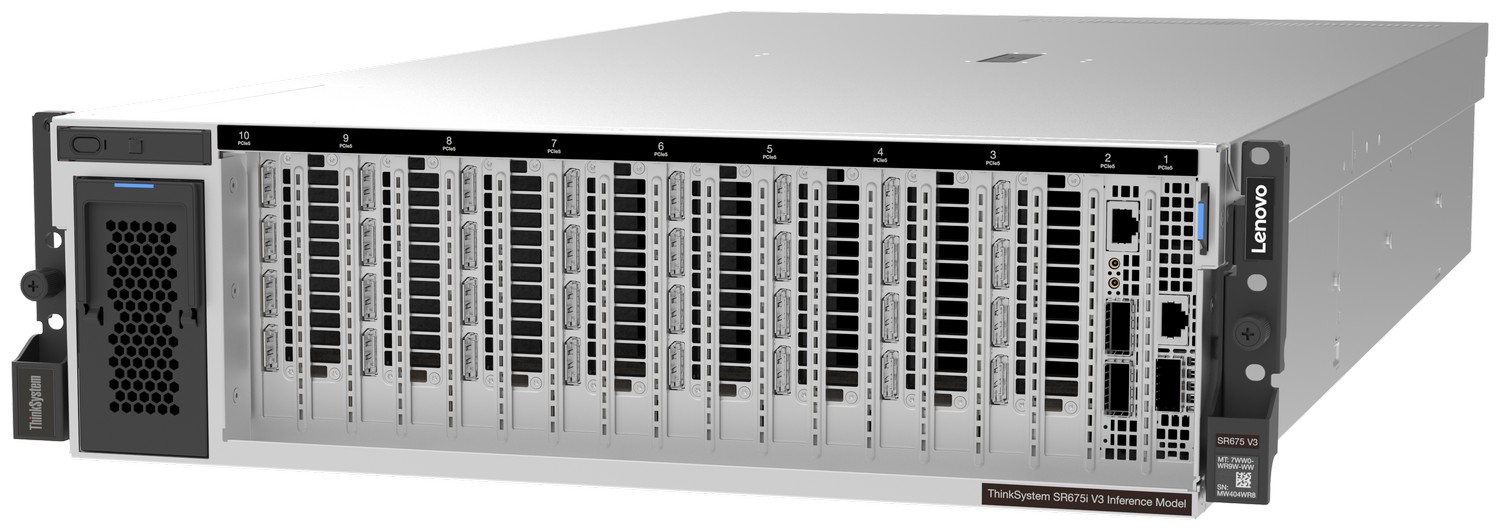
Figure 9. ThinkSystem SR675i V3 Inference Model
The following table lists the detailed components of the SR675i V3 Inference Model.
Configuration notes:
- To select the Inference Model in DCSC, configure an SR675 V3 server in DCSC Configure to Order (7D9RCTO1WW), then from the Base tab, select feature code CF3F (ThinkSystem SR675i V3 Inference Configuration)
- Once feature code CF3F is selected, all other components are automatically added to the configuration
- All major components (CPU, GPUs, memory, drives and adapters) are fixed and cannot be changed in the CTO order
| Feature code | Description | Quantity |
|---|---|---|
| 7D9RCTO1WW | Server : ThinkSystem SR675 V3-3yr Base Warranty for AI | 1 |
| CF3F | ThinkSystem SR675i V3 Inference Configuration | 1 |
| BR7F | ThinkSystem SR675 V3 8DW PCIe GPU Base | 1 |
| BFYB | Operating mode selection for: "Maximum Performance Mode" | 1 |
| C2AL | AMD EPYC 9535 64C 300W 2.4GHz Processor | 2 |
| CA1L | ThinkSystem 64GB TruDDR5 6400MHz (2Rx4) RDIMM-A v2 | 24 |
| C1W9 | ThinkSystem E3.S 1T VA 3.84TB Read Intensive NVMe PCIe 5.0 x4 HS SSD v2 | 2 |
| BTMB | ThinkSystem 1x4 E3.S Backplane | 1 |
| BM8X | ThinkSystem M.2 SATA/x4 NVMe 2-Bay Adapter | 1 |
| CBT0 | ThinkSystem M.2 VA 960GB Read Intensive NVMe PCIe 4.0 x4 NHS SSD | 2 |
| C0Q4 | ThinkSystem NVIDIA BlueField-3 B3140H VPI QSFP112 1P 400G PCIe Gen5 x16 Adapter | 4 |
| BVBG | ThinkSystem NVIDIA BlueField-3 B3220 VPI QSFP112 2P 200G PCIe Gen5 x16 Adapter | 1 |
| CBK8 | ThinkSystem NVIDIA RTX PRO 6000 Blackwell Server Edition 96GB PCIe Gen5 Passive GPU | 8 |
| BR7H | ThinkSystem SR675 V3 2x16 PCIe Front IO Riser | 1 |
| BR7L | ThinkSystem SR675 V3 x16/x16 PCIe Riser Option Kit | 2 |
| BK1E | ThinkSystem SR670 V2/ SR675 V3 OCP Enablement Kit | 1 |
| BR7S | ThinkSystem SR675 V3 Switched 4x16 PCIe DW GPU Direct RDMA Riser | 2 |
| BKTJ | ThinkSystem 2600W 230V Titanium Hot-Swap Gen2 Power Supply | 4 |
| 6252 | 2.5m, 16A/100-250V, C19 to C20 Jumper Cord | 4 |
| C3KA | ThinkSystem SR670 V2/SR675 V3 Heavy Systems Toolless Slide Rail Kit | 1 |
| B7XZ | Disable IPMI-over-LAN | 1 |
For more information about the, see the SR675i V3 datasheet.
For planning & implementation guidance on Inferencing topics, see the following list of Lenovo Press documents: https://lenovopress.lenovo.com/software/ai#term=inferencing&resource_type=planning-implementation&sort=relevance
Configurations
The SR675 V3 supports specific combinations of GPUs, riser cards and internal storage, as listed in the following table.
Additional combinations may be supported via the Special Bid process (or CORE request). Contact your Lenovo representative for more information. The following tables list supported configurations.
| Configuration | Config Number | CPU | GPU | Storage | I/O Front | I/O Rear |
| 4DW x16 GPU Gen5 Pass-through, Front I/O, & 8x SAS/SATA/NVMe Storage | 1 | 2P | 4DW x16 FHFL PCIe Gen5 - Riser, BR7Q | 8x SATA 6Gbps / SAS 12Gbps / NVMe PCIe Gen5 - BLL2 | 2 x16 PCIe Gen5 (FHFL) - Front I/O Riser, BR7H |
OCP (x16 PCIe Gen4) -BK1E |
| 2 | 2P | 4DW x16 FHFL PCIe Gen5 - Riser, BR7Q | 8x SATA 6Gbps / SAS 12Gbps / NVMe PCIe Gen5 - BLL2 | 2 x16 PCIe Gen5 (FHFL) - Front I/O Riser, BR7H | Riser 1: 1 x16 PCIe Gen5 - BR7N, Riser 2: 1 x16 PCIe Gen5 (RAID/HBA for SAS/SATA) - BR7N | |
| 4DW x16 GPU with PCIe Switch: Front & Rear I/O, & Tri-Mode or AnyBay Storage | 5 | 1P | 4DW x16 FHFL PCIe Gen5 - Riser, BR7S | 8x SATA 6Gbps / SAS 12Gbps / U.3 (Tri-mode) - BLL2 | 2 x16 PCIe Gen5 (FHFL) - Front I/O Riser, BR7H | OCP (x16 PCIe Gen4) -BK1E, Riser 1: 1 x16 PCIe Gen5, 1 x16 PCIe Gen5 (RAID/HBA for Tri-Mode) - BR7L |
| 14 | 1P | 4DW x16 FHFL PCIe Gen5 - Riser, BR7S | 8x SATA 6Gbps / SAS 12Gbps / 4x NVMe PCIe Gen5 - BLL2 | 2 x16 PCIe Gen5 (FHFL) - Front I/O Riser, BR7H |
OCP (x16 PCIe Gen4) -BK1E, Riser 1: 1 x16 PCIe Gen5, 1 x16 PCIe Gen5 (RAID/HBA) - BR7L |
| Configuration | Config Number | CPU | GPU | Storage | I/O Front | I/O Rear |
| 8DW x8 FHFL PCIe Gen5, Front I/O, & EDSFF Storage | 3 | 2P | 8DW x8 FHFL PCIe Gen5 - GPU Riser, BR7R | 6x E1.S (5.9mm) (PCIe Gen4) - Backplane, BFTQ | 2 x16 PCIe Gen5 (FHFL) -Front I/O Riser, BR7H | OCP (x16 PCIe Gen4) -BK1E, Riser 2: 1 x16 PCIe Gen5, 1 x8 PCIe Gen4 (Slot 21) - BR7M |
| 4 | 2P | 8DW x8 FHFL PCIe Gen5 - GPU Riser, BR7R | 6x E1.S (5.9mm) (PCIe Gen4) - Backplane, BFTQ | 2 x16 PCIe Gen5 (FHFL) -Front I/O Riser, BR7H | Riser 1: 1 x16 PCIe Gen5 -BR7N, Riser 2: 1 x16 PCIe Gen5, 1 x8 PCIe Gen4 (Slot 21) - BR7M | |
| 8DW x16 GPU with Gen5 Switch, Front I/O, & EDSFF Storage | 6 | 2P | 8DW x16 FHFL PCIe Gen5 - GPU Riser, BR7S | 6x E1.S (5.9mm) (PCIe Gen4) - Backplane, BFTQ | 2 x16 PCIe Gen5 (FHFL) -Front I/O Riser, BR7H | OCP (x16 PCIe Gen4) - BK1E, Riser 1: 1 x16 PCIe Gen5, 1 x16 PCIe Gen5 - BR7L, Riser 2: 1 x16 PCIe Gen5, 1 x16 PCIe Gen5 - BR7L |
| 8DW x8 FHFL PCIe Gen5, Front I/O, & EDSFF Storage | 22 | 2P | 8DW x8 FHFL PCIe Gen5 - GPU Riser, BR7R | 4x E3.S 1T (PCIe Gen5) - Backplane, BTMB | 2x x16 PCIe Gen5 (FHFL) - Front I/O Riser, BR7H | OCP (x16 PCIe Gen4) -BK1E, Riser 2: 1x x16 PCIe Gen 5, 1x x8 PCIe Gen4 (Slot 21) - BR7M |
| 23 | 2P | 8DW x8 FHFL PCIe Gen5 - GPU Riser, BR7R | 4x E3.S 1T (PCIe Gen5) - Backplane, BTMB | 2x x16 PCIe Gen5 (FHFL) -Front I/O Riser, BR7H | Riser 1: One x16 PCIe Gen5 - BR7N, Riser 2: 1x x16 PCIe Gen 5, 1x x8 PCIe Gen4 (Slot 21) - BR7M | |
| 8DW x16 GPU w/ Gen5 Switch, Front I/O, & EDSFF Storage | 24 | 2P | 8x DW x16 FHFL PCIe Gen5 - GPU Riser, BR7S | 4x E3.S 1T (PCIe Gen5) - Backplane, BTMB | 2x x16 PCIe Gen5 (FHFL) - Front I/O Riser, BR7H | OCP (x16 PCIe Gen4) - BK1E, Riser 1: 1x x16 PCIe Gen5, 1x x16 PCIe Gen5 - BR7L, Riser 2: 1x x16 PCIe Gen5, 1x x16 PCIe Gen5 - BR7L |
| 8DW x16 GPU w/ Gen5 Switch, BF3 Front I/O, & EDSFF Storage | 38 | 2P | 8x DW x16 FHFL 400W PCIe Gen5 - GPU Riser, BR7S | 6x E1.S (5.9mm) (PCIe Gen4) - Backplane, BFTQ | 1x BF-3 Slot 1 1x x16 PCIe Gen5 (FHFL) Slot 2 - Front I/O Riser, BR7H | OCP (x16 PCIe Gen4) - BK1E, Riser 1: 2x CX-7 or 2x BF-3 (75W) 1x x16 PCIe Gen5, 1x x16 PCIe Gen5 - C2RK, Riser 2: 2x CX-7 or 2x BF-3 (75W) 1x x16 PCIe Gen5, 1x x16 PCIe Gen5 - C2RK |
| 39 | 2P | 8x DW x16 FHFL 400W PCIe Gen5 - GPU Riser, BR7S | 4x E3.S 1T (PCIe Gen5) - Backplane, BTMB | 1x BF-3 Slot 1 1x x16 PCIe Gen5 (FHFL) Slot 2 - Front I/O Riser, BR7H | OCP (x16 PCIe Gen4) - BK1E, Riser 1: 2x CX-7 or 2x BF-3 (75W) 1x x16 PCIe Gen5, 1x x16 PCIe Gen5 - C2RK, Riser 2: 2x CX-7 or 2x BF-3 (75W) 1x x16 PCIe Gen5, 1x x16 PCIe Gen5 - C2RK |
| Configuration | Config Number | CPU | GPU | Storage | I/O Front | I/O Rear |
| 4-Way SXM5 GPU with Switch: GPU Direct Front I/O, & 4x U.2/U.3 Storage | 8 | 2P | 4-Way SXM5 GPU Baseboard PCIe Gen5 - GPU Riser, BR9D | 4x U.2/U.3 (PCIe Gen4) - Backplane, BV8J | 2 x16 PCIe Gen5 (FHHL) -Front I/O Riser, BR7J | OCP (x16 PCIe Gen4) -BK1E, Riser 1: 1 x16 PCIe Gen5, 1 x16 PCIe Gen5 - BR7L, Riser 2: 1 x16 PCIe Gen5, 1 x16 PCIe Gen4 (Slot 21) - BR7L |
| 4-Way SXM5 GPU w/ Switch: GPU Direct Front I/O, & 4x U.2/U.3/E3.S Storage | 26 | 2P | 4-Way SXM5 GPU Baseboard PCIe Gen5 - GPU Riser, BR9D | 4x E3.S 1T (PCIe Gen5) - Backplane, BTMB | 2x x16 PCIe Gen5 (FHHL) -Front I/O Riser, BR7J | OCP (x16 PCIe Gen4) -BK1E, Riser 1: 1x x16 PCIe Gen5, 1x x16 PCIe Gen5 - BR7L, Riser 2: 1x x16 PCIe Gen5, 1x x16 PCIe Gen4 (slot 21) - BR7L |
| Configuration | Config Number | CPU | GPU | Storage | I/O Front | I/O Rear |
| Single Socket with 4x drives, Front IO only | 9 (/15 / 27 / 30) | 1P | 4-Way SXM5 GPU Baseboard PCIe Gen5 - GPU Riser, BR9D | 4x U.2/U.3 (PCIe Gen3) -BV8J or 4x E3.S 1T (PCIe Gen4) - BTMB |
2x OSFP 800 Gbps -BR7K or 2x OSFP 400 Gbps -BRUH | Not supported |
| Single Socket with 2 drives, Front IO and limited OCP rear IO | 13 (/29 / 19 / 32) | 1P | 4-Way SXM5 GPU Baseboard PCIe Gen5 - GPU Riser, BR7P | 2x U.2/U.3 (PCIe Gen3) -BV8J or 2x E3.S 1T (PCIe Gen4) - BTMB |
2x OSFP 800 Gbps -BR7K or 2x OSFP 400 Gbps -BRUH | OCP (x8 PCIe Gen4) - BK1E |
| Single Socket without drives, Front IO and choice of rear IO | 10 (/11 / 16 / 17) | 1P | 4-Way SXM5 GPU Baseboard PCIe Gen5 - GPU Riser, BR7P | Not supported | 2x OSFP 800 Gbps -BR7K or 2x OSFP 400 Gbps -BRUH | OCP (x16 PCIe Gen4) - BK1E or Riser 1: 1 x16 PCIe Gen5 - BR7N |
| Dual Socket with 4x drives, Front IO and Rear IO | 12 (/28 /18 /31) | 2P | 4-Way SXM5 GPU Baseboard PCIe Gen5 - GPU Riser, BR7P |
4x U.2/U.3 (PCIe Gen4)- BV8J or 4x E3.S 1T (PCIe Gen5)- BTMB | 2x OSFP 800 Gbps -BR7K or 2x OSFP 400 Gbps -BRUH | OCP (x16 PCIe Gen4) -BK1E, Riser 1: 1 x16 PCIe Gen5 -BR7N, Riser 2: 1 x16 PCIe Gen5, 1 x16 PCIe Gen4 (slot 21) -BR7L |
Processors
The SR675 V3 supports AMD EPYC processors. The server supports up to two processors. Configurations with a single processor are supported.
Topics in this section:
- Processor options
- Processor features
- UEFI operating modes
The figure shows the SR675 V3 on a Two Socket Platform.
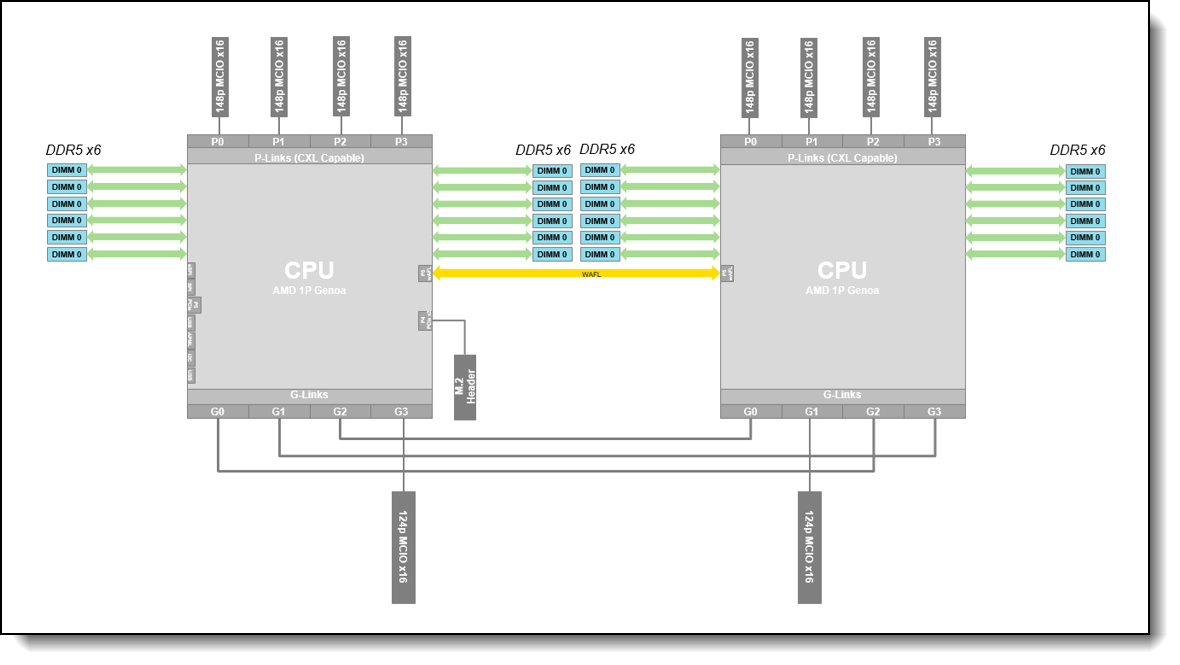
Figure 10. AMD Genoa DDR5 Processor on Two Socket Platform
Processor options
The SR675 V3 supports the following processor families:
- 5th Gen AMD EPYC processors (formerly codenamed "Turin"):
- Processors with Zen 5 architecture, with high per-core performance
- Processors with Zen 5c architecture, with high core density and best power efficiency
- 4th Gen AMD EPYC processors:
- 4th Gen AMD EPYC processors (formerly codenamed "Genoa")
- 4th Gen AMD EPYC processors with AMD 3D V-Cache (formerly codenamed "Genoa-X"), with larger L3 caches, suitable for engineering workloads like EDA and CFD
- 4th Gen AMD EPYC processors with Zen 4c architecture (formerly codenamed "Bergamo"), with higher core counts, suitable for workloads like cloud-native applications
All supported processors have the following characteristics:
- 12 DDR5 memory channels
- 128 PCIe 5.0 I/O lanes, 64 lanes available for PCIe and NVMe devices
Configuration notes:
- All 5th Gen processors support a 6400 MHz memory bus speed provided specific memory DIMMs are installed in the server and the latest system firmware is applied. See the table in the Memory options section to see which DIMMs support 6400 MHz. For all other DIMMs, the memory bus operates at 6000 MHz.
The following table lists the 5th Gen AMD EPYC processors supported by the SR675 V3.
| Feature code |
SKU | Description | Quantity supported |
|||||||
|---|---|---|---|---|---|---|---|---|---|---|
| 5th AMD EPYC processors ("Turin") with Zen 5 architecture | ||||||||||
| C2AF | 9015 | AMD EPYC 9015 8C 125W 3.6GHz Processor | 1 or 2 | |||||||
| C2AG | 9115 | AMD EPYC 9115 16C 125W 2.6GHz Processor | 1 or 2 | |||||||
| C2AK | 9135 | AMD EPYC 9135 16C 200W 3.65GHz Processor | 1 or 2 | |||||||
| C2AR | 9175F | AMD EPYC 9175F 16C 320W 4.2GHz Processor | 1 or 2 | |||||||
| C2AP | 9255 | AMD EPYC 9255 24C 200W 3.25GHz Processor | 1 or 2 | |||||||
| C2AT | 9275F | AMD EPYC 9275F 24C 320W 4.1GHz Processor | 1 or 2 | |||||||
| C2AQ | 9335 | AMD EPYC 9335 32C 210W 3.0GHz Processor | 1 or 2 | |||||||
| C2AZ | 9355 | AMD EPYC 9355 32C 280W 3.55GHz Processor | 1 or 2 | |||||||
| C2AM | 9365 | AMD EPYC 9365 36C 300W 3.4GHz Processor | 1 or 2 | |||||||
| C2AJ | 9375F | AMD EPYC 9375F 32C 320W 3.8GHz Processor | 1 or 2 | |||||||
| C2ND | 9455 | AMD EPYC 9455 48C 300W 3.15GHz Processor | 1 or 2 | |||||||
| C2A3 | 9475F | AMD EPYC 9475F 48C 400W 3.65GHz Processor | 1 or 2 | |||||||
| C2AL | 9535 | AMD EPYC 9535 64C 300W 2.4GHz Processor | 1 or 2 | |||||||
| C2AY | 9555 | AMD EPYC 9555 64C 360W 3.2GHz Processor | 1 or 2 | |||||||
| C2AS | 9565 | AMD EPYC 9565 72C 400W 3.15GHz Processor | 1 or 2 | |||||||
| C4H8 | 9575F | AMD EPYC 9575F 64C 400W 3.3GHz Processor | 1 or 2 | |||||||
| C2AU | 9655 | AMD EPYC 9655 96C 400W 2.6GHz Processor | 1 or 2 | |||||||
| 5th AMD EPYC processors ("Turin") with Zen 5c architecture | ||||||||||
| C2AN | 9645 | AMD EPYC 9645 96C 320W 2.3GHz Processor | 1 or 2 | |||||||
| C2AE | 9745 | AMD EPYC 9745 128C 400W 2.4GHz Processor | 1 or 2 | |||||||
| C2AH | 9825 | AMD EPYC 9825 144C 390W 2.2GHz Processor | 1 or 2 | |||||||
| C2TD | 9845 | AMD EPYC 9845 160C 390W 2.1GHz Processor | 1 or 2 | |||||||
The following table lists the 4th Gen AMD EPYC processors supported by the SR675 V3.
| Feature code |
SKU | Description | Quantity supported |
|||||||
|---|---|---|---|---|---|---|---|---|---|---|
| 4th Gen AMD EPYC processors ("Genoa") | ||||||||||
| BREE | 9124 | AMD EPYC 9124 16C 200W 3.0GHz Processor | 1 or 2 | |||||||
| BREJ | 9174F | AMD EPYC 9174F 16C 320W 4.1GHz Processor | 1 or 2 | |||||||
| BREH | 9224 | AMD EPYC 9224 24C 200W 2.5GHz Processor | 1 or 2 | |||||||
| BRED | 9254 | AMD EPYC 9254 24C 200W 2.9GHz Processor | 1 or 2 | |||||||
| BREF | 9274F | AMD EPYC 9274F 24C 320W 4.05GHz Processor | 1 or 2 | |||||||
| BREC | 9334 | AMD EPYC 9334 32C 210W 2.7GHz Processor | 1 or 2 | |||||||
| BR30 | 9354 | AMD EPYC 9354 32C 280W 3.25GHz Processor | 1 or 2 | |||||||
| BR32 | 9374F | AMD EPYC 9374F 32C 320W 3.85GHz Processor | 1 or 2 | |||||||
| BREB | 9454 | AMD EPYC 9454 48C 290W 2.75GHz Processor | 1 or 2 | |||||||
| BR31 | 9474F | AMD EPYC 9474F 48C 360W 3.6GHz Processor | 1 or 2 | |||||||
| BREA | 9534 | AMD EPYC 9534 64C 280W 2.45GHz Processor | 1 or 2 | |||||||
| BPVJ | 9554 | AMD EPYC 9554 64C 360W 3.1GHz Processor | 1 or 2 | |||||||
| BR2Z | 9634 | AMD EPYC 9634 84C 290W 2.25GHz Processor | 1 or 2 | |||||||
| BPVK | 9654 | AMD EPYC 9654 96C 360W 2.4GHz Processor | 1 or 2 | |||||||
| 4th AMD EPYC processors with AMD 3D V-Cache ("Genoa-X") | ||||||||||
| BXFT | 9184X | AMD EPYC 9184X 16C 320W 3.55GHz Processor | 1 or 2 | |||||||
| BW9V | 9384X | AMD EPYC 9384X 32C 320W 3.1GHz Processor | 1 or 2 | |||||||
| BW9U | 9684X | AMD EPYC 9684X 96C 400W 2.55GHz Processor | 1 or 2 | |||||||
| 4th Gen AMD EPYC processors with Zen 4c architecture ("Bergamo") | ||||||||||
| BW9S | 9734 | AMD EPYC 9734 112C 340W 2.2GHz Processor | 1 or 2 | |||||||
| BW9T | 9754 | AMD EPYC 9754 128C 360W 2.25GHz Processor | 1 or 2 | |||||||
Processor features
The following table lists the features of the supported 5th Gen AMD EPYC processors.
6400 MHz memory support: The processors support memory up to 6400 MHz provided that specific memory DIMMs are installed in the server and the latest system firmware is applied. See the table in the Memory options section to see which DIMMs support 6400 MHz.
| EPYC model |
Cores / Threads |
Base Frequency |
Max Boost Frequency† |
L3 Cache | Memory channels |
Memory bus |
TDP |
|---|---|---|---|---|---|---|---|
| 5th AMD EPYC processors ("Turin") with Zen 5 architecture | |||||||
| 9015 | 8 / 16 | 3.6 GHz | 4.1 GHz | 64 MB | 12 | 6400 MHz | 125W |
| 9115 | 16 / 32 | 2.6 GHz | 4.4 GHz | 64 MB | 12 | 6400 MHz | 125W |
| 9135 | 16 / 32 | 3.65 GHz | 4.3 GHz | 64 MB | 12 | 6400 MHz | 200W |
| 9175F | 16 / 32 | 4.2 GHz | 5 GHz | 512 MB | 12 | 6400 MHz | 320W |
| 9255 | 24 / 48 | 3.25 GHz | 4.3 GHz | 128 MB | 12 | 6400 MHz | 200W |
| 9275F | 24 / 48 | 4.1 GHz | 4.8 GHz | 256 MB | 12 | 6400 MHz | 320W |
| 9335 | 32 / 64 | 3 GHz | 4.4 GHz | 128 MB | 12 | 6400 MHz | 210W |
| 9355 | 32 / 64 | 3.55 GHz | 4.4 GHz | 256 MB | 12 | 6400 MHz | 280W |
| 9365 | 36 / 72 | 3.4 GHz | 4.3 GHz | 192 MB | 12 | 6400 MHz | 300W |
| 9375F | 32 / 64 | 3.8 GHz | 4.8 GHz | 256 MB | 12 | 6400 MHz | 320W |
| 9455 | 48 / 96 | 3.15 GHz | 4.4 GHz | 256 MB | 12 | 6400 MHz | 300W |
| 9475F | 48 / 96 | 3.65 GHz | 4.8 GHz | 256 MB | 12 | 6400 MHz | 400W |
| 9535 | 64 / 128 | 2.4 GHz | 4.3 GHz | 256 MB | 12 | 6400 MHz | 300W |
| 9555 | 64 / 128 | 3.2 GHz | 4.4 GHz | 256 MB | 12 | 6400 MHz | 360W |
| 9565 | 72 / 144 | 3.15 GHz | 4.3 GHz | 384 MB | 12 | 6400 MHz | 400W |
| 9575F | 64 / 128 | 3.3 GHz | 5 GHz | 256 MB | 12 | 6400 MHz | 400W |
| 9655 | 96 / 192 | 2.6 GHz | 4.5 GHz | 384 MB | 12 | 6400 MHz | 400W |
| 5th AMD EPYC processors ("Turin") with Zen5c architecture | |||||||
| 9645 | 96 / 192 | 2.3 GHz | 3.7 GHz | 256 MB | 12 | 6400 MHz | 320W |
| 9745 | 128 / 256 | 2.4 GHz | 3.7 GHz | 256 MB | 12 | 6400 MHz | 400W |
| 9825 | 144 / 288 | 2.2 GHz | 3.7 GHz | 384 MB | 12 | 6400 MHz | 390W |
| 9845 | 160 / 320 | 2.1 GHz | 3.7 GHz | 320 MB | 12 | 6400 MHz | 390W |
† The maximum single-core frequency that the processor is capable of operating
The following table lists the features of the supported 4th Gen AMD EPYC processors.
| EPYC model |
Cores / Threads |
Base Frequency |
Max Boost Frequency† |
L3 Cache | Memory channels |
Memory bus |
TDP |
|---|---|---|---|---|---|---|---|
| 4th Gen AMD EPYC processors ("Genoa") | |||||||
| 9124 | 16 / 32 | 3.0 GHz | 3.7 GHz | 64 MB | 12 | 4800 MHz | 200W |
| 9174F | 16 / 32 | 4.1 GHz | 4.4 GHz | 256 MB | 12 | 4800 MHz | 320W |
| 9224 | 24 / 48 | 2.5 GHz | 3.7 GHz | 64 MB | 12 | 4800 MHz | 200W |
| 9254 | 24 / 48 | 2.9 GHz | 4.15 GHz | 128 MB | 12 | 4800 MHz | 200W |
| 9274F | 24 / 48 | 4.05 GHz | 4.3 GHz | 256 MB | 12 | 4800 MHz | 320W |
| 9334 | 32 / 64 | 2.7 GHz | 3.9 GHz | 128 MB | 12 | 4800 MHz | 210W |
| 9354 | 32 / 64 | 3.25 GHz | 3.8 GHz | 256 MB | 12 | 4800 MHz | 280W |
| 9374F | 32 / 64 | 3.85 GHz | 4.3 GHz | 256 MB | 12 | 4800 MHz | 320W |
| 9454 | 48 / 96 | 2.75 GHz | 3.8 GHz | 256 MB | 12 | 4800 MHz | 290W |
| 9474F | 48 / 96 | 3.6 GHz | 4.1 GHz | 256 MB | 12 | 4800 MHz | 360W |
| 9534 | 64 / 128 | 2.45 GHz | 3.7 GHz | 256 MB | 12 | 4800 MHz | 280W |
| 9554 | 64 / 128 | 3.1 GHz | 3.75 GHz | 256 MB | 12 | 4800 MHz | 360W |
| 9634 | 84 / 168 | 2.25 GHz | 3.7 GHz | 384 MB | 12 | 4800 MHz | 290W |
| 9654 | 96 / 192 | 2.4 GHz | 3.7 GHz | 384 MB | 12 | 4800 MHz | 360W |
| 4th AMD EPYC processors with AMD 3D V-Cache ("Genoa-X") | |||||||
| 9184X | 16 / 32 | 3.55 GHz | 4.20 GHz | 768 MB | 12 | 4800 MHz | 320W |
| 9384X | 32 / 64 | 3.1 GHz | 3.9 GHz | 768 MB | 12 | 4800 MHz | 320W |
| 9684X | 96 / 192 | 2.55 GHz | 3.7 GHz | 1150 MB | 12 | 4800 MHz | 400W |
| 4th Gen AMD EPYC processors with Zen 4c architecture ("Bergamo") | |||||||
| 9734 | 112 / 224 | 2.2 GHz | 3.0 GHz | 256 MB | 12 | 4800 MHz | 340W |
| 9754 | 128 / 256 | 2.25 GHz | 3.2 GHz | 256 MB | 12 | 4800 MHz | 360W |
† The maximum single-core frequency that the processor is capable of operating
UEFI operating modes
The SR675 V3 offers preset operating modes that affect energy consumption and performance. These modes are a collection of predefined low-level UEFI settings that simplify the task of tuning the server to suit your business and workload requirements.
The following table lists the feature codes that allow you to specify the mode you wish to preset in the factory for CTO orders.
UK and EU customers: For compliance with the ERP Lot9 regulation, you should select feature BFYA. For some systems, you may not be able to make a selection, in which case, it will be automatically derived by the configurator.
| Feature code | Description | Top Choice Express |
|---|---|---|
| BFYA | Operating mode selection for: "Maximum Efficiency Mode" | - |
| BFYB | Operating mode selection for: "Maximum Performance Mode" | - |
The preset modes for the SR675 V3 are as follows:
- Maximum Efficiency Mode (feature BFYA): Maximizes performance/watt efficiency while maintaining reasonable performance
- Maximum Performance Mode (feature BFYB): Achieves maximum performance but with higher power consumption and lower energy efficiency.
For details about these preset modes, and all other performance and power efficiency UEFI settings offered in the SR675 V3, see the paper "Tuning UEFI Settings for Performance and Energy Efficiency on AMD Processor-Based ThinkSystem Servers", available from https://lenovopress.lenovo.com/lp1267.
Memory options
The SR675 V3 uses Lenovo TruDDR5 memory operating at up to 6400 MHz with 5th Gen AMD EPYC processors, and up to 4800 MHz with 4th Gen AMD EPYC processors. The server supports up to 24 DIMMs with 2 processors. The processors have 12 memory channels and support 1 DIMM per channel. The server supports up to 6TB of memory using 24x 256GB 3DS RDIMMs and two processors.
Lenovo TruDDR5 memory uses the highest quality components that are sourced from Tier 1 DRAM suppliers and only memory that meets the strict requirements of Lenovo is selected. It is compatibility tested and tuned to maximize performance and reliability. From a service and support standpoint, Lenovo TruDDR5 memory automatically assumes the system warranty, and Lenovo provides service and support worldwide.
The following table lists the memory options supported in the SR675 V3 with 5th Gen AMD EPYC processors.
| Part number |
Feature code |
Description | Maximum speed |
DRAM technology |
||
|---|---|---|---|---|---|---|
| x4 RDIMMs | ||||||
| 4X77A93528 | C0CK | ThinkSystem 64GB TruDDR5 6400MHz (2Rx4) RDIMM-A | 6400 MHz | 16Gb | ||
| 4X77A93533 | C0CP | ThinkSystem 96GB TruDDR5 6400MHz (2Rx4) RDIMM-A | 6400 MHz | 24Gb | ||
| 4X77A93529 | C0CL | ThinkSystem 128GB TruDDR5 6400MHz (2Rx4) RDIMM-A | 6400 MHz | 32Gb | ||
| 4X77B07420 | CA1L | ThinkSystem 64GB TruDDR5 6400MHz (2Rx4) RDIMM-A v2 | 6400 MHz | 16Gb | ||
| 4X77B07424 | CA1Q | ThinkSystem 96GB TruDDR5 6400MHz (2Rx4) RDIMM-A v2 | 6400 MHz | 24Gb | ||
| 4X77B07421 | CA1M | ThinkSystem 128GB TruDDR5 6400MHz (2Rx4) RDIMM-A v2 | 6400 MHz | 32Gb | ||
| x8 RDIMMs | ||||||
| 4X77A93525 | C0CH | ThinkSystem 16GB TruDDR5 6400MHz (1Rx8) RDIMM-A | 6400 MHz | 16Gb | ||
| 4X77A93527 | C0CJ | ThinkSystem 32GB TruDDR5 6400MHz (2Rx8) RDIMM-A | 6400 MHz | 16Gb | ||
| 4X77A93532 | C0CN | ThinkSystem 48GB TruDDR5 6400MHz (2Rx8) RDIMM-A | 6000 MHz | 24Gb | ||
| 4X77B07417 | CA1H | ThinkSystem 16GB TruDDR5 6400MHz (1Rx8) RDIMM-A v2 | 6400 MHz | 16Gb | ||
| 4X77B07419 | CA1K | ThinkSystem 32GB TruDDR5 6400MHz (2Rx8) RDIMM-A v2 | 6400 MHz | 16Gb | ||
| 10x4 3DS RDIMMs | ||||||
| 4X77B07422 | CA1N | ThinkSystem 256GB TruDDR5 6400MHz (4Rx4) 3DS RDIMM-A | 6400 MHz | 32Gb | ||
The following table lists the memory options supported in the SR675 V3 with 4th Gen AMD EPYC processors.
| Part number |
Feature code |
Description | Maximum speed |
DRAM technology |
||
|---|---|---|---|---|---|---|
| 9x4 RDIMMs | ||||||
| 4X77A81442 | BQ36 | ThinkSystem 64GB TruDDR5 4800MHz (2Rx4) 9x4 RDIMM-A | 4800 MHz | 16Gb | ||
| 10x4 RDIMMs | ||||||
| 4X77A81441 | BQ3D | ThinkSystem 64GB TruDDR5 4800MHz (2Rx4) 10x4 RDIMM-A | 4800 MHz | 16Gb | ||
| 4X77A81448 | BUVV | ThinkSystem 96GB TruDDR5 4800MHz (2Rx4) 10x4 RDIMM-A | 4800 MHz | 24Gb | ||
| 4X77A96982 | C467 | ThinkSystem 128GB TruDDR5 5600MHz (2Rx4) RDIMM-A | 4800 MHz | 32Gb | ||
| x8 RDIMMs | ||||||
| 4X77A81437 | BQ3C | ThinkSystem 16GB TruDDR5 4800MHz (1Rx8) RDIMM-A | 4800 MHz | 16Gb | ||
| 4X77A81440 | BQ37 | ThinkSystem 32GB TruDDR5 4800MHz (2Rx8) RDIMM-A | 4800 MHz | 16Gb | ||
| 4X77A81447 | BUVU | ThinkSystem 48GB TruDDR5 4800MHz (2Rx8) RDIMM-A | 4800 MHz | 24Gb | ||
| 10x4 3DS RDIMMs | ||||||
| 4X77A81443 | BQ3A | ThinkSystem 128GB TruDDR5 4800MHz (4Rx4) 3DS RDIMM-A v2 | 4800 MHz | 16Gb | ||
9x4 RDIMMs (also known as Optimized or EC4 RDIMMs) are a lower-cost DDR5 memory option supported in ThinkSystem V3 servers. 9x4 DIMMs offer the same performance as standard RDIMMs (known as 10x4 or EC8 modules), however they support lower fault-tolerance characteristics. Standard RDIMMs and 3DS RDIMMs support two 40-bit subchannels (that is, a total of 80 bits), whereas 9x4 RDIMMs support two 36-bit subchannels (a total of 72 bits). The extra bits in the subchannels allow standard RDIMMs and 3DS RDIMMs to support Single Device Data Correction (SDDC), however 9x4 RDIMMs do not support SDDC. Note, however, that all DDR5 DIMMs, including 9x4 RDIMMs, support Bounded Fault correction, which enables the server to correct most common types of DRAM failures.
For more information on DDR5 memory, see the Lenovo Press paper, Introduction to DDR5 Memory, available from https://lenovopress.com/lp1618.
The following rules apply when selecting the memory configuration:
- Memory rated at 4800 MHz is only supported with 4th Gen processors. Memory rated at 6400 MHz memory is only supported with 5th Gen processors (and operates at 6000 MHz or 6400 MHz as indicated in the table).
- The SR675 V3 supports quantities 1, 2, 4, 6, 8, 10, 12 DIMMs per processor; other quantities not supported
- The server supports four types of DIMMs: 9x4 RDIMMs, 10x4 RDIMMs, x8 RDIMMs and 3DS RDIMMs
- UDIMMs and LRDIMMs are not supported
- All memory DIMMs must be identical part numbers
- Memory operates at the speed of the memory bus of the processor (see the Processor features section for specifics), or the maximum speed that the memory DIMMs support (see the above tables), whichever is lower
- SXM5 configurations with the NVIDIA HGX H100 80GB 700W 4-GPU Board (feature BQQV) have minimum memory requirements. For SXM5 configurations, the following rules apply:
- With 1 CPU installed, only the following memory configurations are supported:
- 10x or 12x 64GB RDIMMs (feature BQ36 or BQ3D)
- 8x, 10x, or 12x 96GB 3DS RDIMMs (feature BUVV)
- 8x, 10x, or 12x 128GB 3DS RDIMMs (feature BQ3A)
- With 2 CPUs installed, only the following memory configurations are supported:
- 16x, 20x, or 24x 32GB DIMMs (feature BQ37)
- 16x, 20x, or 24x 64GB DIMMs (feature BQ36 or BQ3D)
- 16x, 20x, or 24x 96GB DIMMs (feature BUVV)
- 16x, 20x, or 24x 128GB DIMMs (feature BQ3A)
- With 1 CPU installed, only the following memory configurations are supported:
- When adding the ThinkSystem 256GB TruDDR5 6400MHz (4Rx4) 3DS RDIMM-A (4X77B07422) as a field upgrade, follow the instructions in Support tip TT3220
Note: Memory mirroring and memory rank sparing are not supported.
For best performance, consider the following:
- Ensure the memory installed is at least the same speed as the memory bus of the selected processor.
- Populate all 12 memory channels with identical DIMMs (same Lenovo part number)
The following memory protection technologies are supported:
- ECC detection/correction
- Bounded Fault detection/correction
- SDDC (for x4-based memory DIMMs; look for "x4" in the DIMM description. Not supported with 9x4 RDIMMs)
- Patrol/Demand Scrubbing
- DRAM Address Command Parity with Replay
- DRAM Uncorrected ECC Error Retry
- On-die ECC
- ECC Error Check and Scrub (ECS)
- Post Package Repair
Internal storage
The SR675 V3 supports drives at the front of the server as shown in the Components and connectors section. The choice of drive bays depends on the GPU configuration selected, as described in Configurations section:
- SXM5 model - choice of:
- 4x 2.5-inch hot-swap NVMe drive bays
- 4x E3.S 1T EDSFF hot-swap drives
- 4-DW GPU model - choice of:
- 8x 2.5-inch hot-swap AnyBay drive bays supporting SAS, SATA or NVMe drives
- 8-DW GPU model:
- 6x EDSFF E1.S 5.9 mm hot-swap NVMe drive bays
- 4x EDSFF E3.S 1T hot-swap drives
All drives are hot-swap and are accessible from the front of the server.
Where NVMe drives are supported, they are all connected using four PCIe lanes which means there is no NVMe oversubscription.
The server also supports one or two M.2 drives for OS boot functions, installed in an M.2 adapter internal to the server.
In this section:
- Backplanes
- RAID flash power module (supercap) support
- M.2 drives
- E1.S EDSFF drives
- E3.S EDSFF drives
- Encryption Enablement
Backplanes
The backplanes used to provide the drive bays are listed in the following table. The table lists the feature codes for ordering CTO - the required cables are derived by the configurator.
The table also lists the option part numbers for field upgrades. Part numbers include:
- Backplane
- Drive bay fillers
- Data cables to connect drives to controllers
- Power cables
| Part number | Feature code |
Description | Maximum supported |
|---|---|---|---|
| SXM5 model | |||
| 4XB7A69399 | BV8J | ThinkSystem V3 1U 4x2.5" Gen4 NVMe Backplane with 4x2.5" Chassis | 1 |
| 4XB7A86722 | BTMB | ThinkSystem 1x4 E3.S Backplane | 1 |
| 4-DW GPU model | |||
| CTO only | B8LM | ThinkSystem SR670 V2 8x2.5" SAS/SATA/NVMe Backplane | 1 |
| 4XB7A83673 | BLL2 | ThinkSystem SR675 V3 8x2.5" AnyBay Backplane Option Kit | 1 |
| 8-DW GPU model | |||
| 4XB7A69398 | BFTQ | ThinkSystem SR675 V3 6xEDSFF Backplane Option Kit | 1 |
| 4XB7A86723 | BTMB | ThinkSystem SR675 V3 1x4 E3.S Backplane for 8DW PCIe GPU Base Option Kit | 1 |
RAID flash power module (supercap) support
If you plan to add one of the RAID adapters that includes a RAID flash power module (supercap) as a field upgrade, then you will also need to order a Supercap installation kit for the supercap. For CTO orders, the components needed are automatically derived when you select the RAID adapter.
The SR675 V3 supports up to two supercap holders. SR675 V3 supports 2x rear risers and each of them can support one supercap holder on the top slot. Note that the serial port cable is placed at the same slot. If the slot is occupied by the supercap holder, then the serial port cable needs to be assigned to a different port.
Serial port is disabled for the 2x supercap configuration.
The following figure shows the RAID flash power module in SR675 V3.
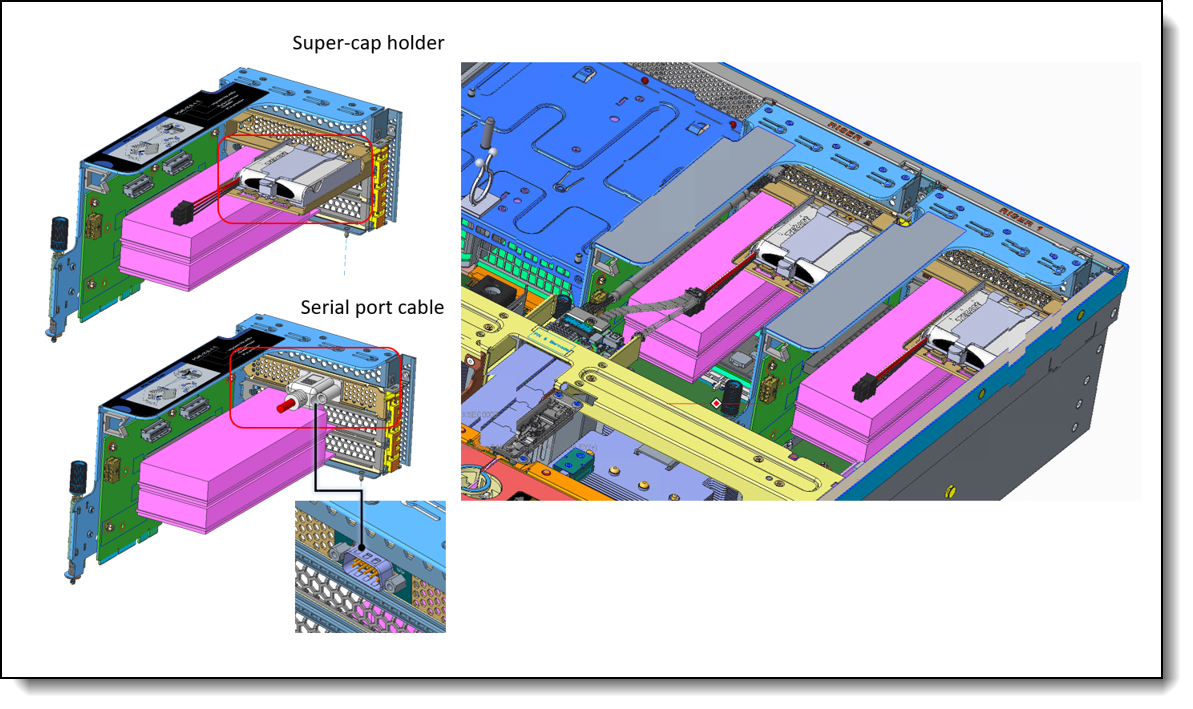
Figure 11. RAID flash power module (supercap) support in SR675 V3
The RAID adapters that require a supercap holder are as follows:
- ThinkSystem RAID 940-8i 4GB Flash PCIe Gen4 12Gb Adapter (PN: 4Y37A09728)
- ThinkSystem RAID 940-8e 4GB Flash PCIe Gen4 12Gb Adapter (PN: 4Y37A78836)
- ThinkSystem RAID 940-16i 8GB Flash PCIe Gen4 12Gb Adapter (PN: 4Y37A09730)
The supercap mounts in a bracket that goes into the top slot of a rear PCIe riser. Ordering information is in the following table.
| Part number | Feature | Description | Maximum supported |
|---|---|---|---|
| CTO only | BFH0 | SR670 V2/ SR675 V3 Supercap Holder | 2 |
M.2 drives
The SR675 V3 supports only NVMe M.2 boot devices. SATA M.2 is not supported. The system support M.2 boot backplanes attached to the P4 link of CPU1. Depending on the boot backplane that is attached, the system will support either two non-RAID x1 devices via direct connect or two x1 RAID NVMe M.2 devices behind a NVMe RAID controller. The system will detect the M.2 adapter installed and bifurcate the link accordingly
There is a M.2 modules supported, as listed in the following table.
| Part number |
Feature code |
Description | SATA drives |
NVMe drives |
RAID | Maximum supported |
|---|---|---|---|---|---|---|
| 4Y37A09738 | B5XJ | ThinkSystem M.2 SATA/NVMe 2-Bay Enablement Kit | No | Yes | No | 2 |
| 4Y37A79663 | BM8X | ThinkSystem M.2 SATA/x4 NVMe 2-Bay Enablement Kit | No | Yes | Optional* | 2 |
| 4Y37A09750 | B8P9 | ThinkSystem M.2 NVMe 2-Bay RAID Enablement Kit | No | Yes | Yes | 2 |
BM8X support RAID with cabling to external RAID adapter.
Supported drives are listed in the Internal drive options section.
The M.2 SATA/NVMe 2-Bay Enablement Kit (B5XJ) has the following features:
- Supports one or two M.2 NVMe drives
- When two drives installed, they must be both NVMe
- No native support (attached to motherboard) for SATA drives due to no SATA support on the motherboard
- Support 42mm, 60mm, 80mm and 110mm drive form factors (2242, 2260, 2280 and 22110)
- JBOD native support; no built-in RAID support
- Either 6Gbps SATA or PCIe 3.0 x1 interface to the drives depending on the drives installed
- Supports monitoring and reporting of events and temperature through I2C
- Firmware update via Lenovo firmware update tools
The M.2 SATA/x4 NVMe 2-Bay Enablement Kit (BM8X) has the following features:
- Supports one or two M.2 NVMe drives
- Supports one or two M.2 drives, either SATA or NVMe
- No native support (attached to motherboard) for SATA drives due to no SATA support on the motherboard
- When two drives installed, they must be either both SATA or both NVMe
- Support 42mm, 60mm, 80mm and 110mm drive form factors (2242, 2260, 2280 and 22110)
- No onboard RAID; RAID functionality is provided by a separate adapter (SATA or NVMe)
- Either 6Gbps SATA or PCIe 4.0 x4 interface to the drives depending on the drives installed
- Supports monitoring and reporting of events and temperature through I2C
- Firmware update via Lenovo firmware update tools
The M.2 NVMe 2-Bay RAID Enablement Kit (B8P9) has the following features:
- Supports one or two NVMe M.2 drives
- Support 42mm, 60mm, 80mm and 110mm drive form factors (2242, 2260, 2280 and 22110)
- RAID support via an onboard Marvell 88NR2241 NVMe RAID Controller
- With 1 drive, supports single-drive RAID-0
- With 2 drives, supports 2-drive RAID-0, 2-drive RAID-1, or two single-drive RAID-0 arrays
- PCIe 3.0 x2 host interface; PCIe 3.0 x1 connection to each drive
- Management and configuration support via UEFI and OS-based tools
- Supports monitoring and reporting of events and temperature through I2C
- Firmware update via Lenovo firmware update tools
For field upgrades, the SR675 V3 and M.2 SATA/NVMe 2-Bay Enablement Kit (B5XJ) do require an additional M.2 cable kit. Ordering information is listed in the following table.
| Part number | Description |
|---|---|
| 4X97A69394 |
ThinkSystem SR670 V2/ SR675 V3/ SN550 V2 M.2 SATA/NVMe Cable
|
For further details about M.2 components, see the ThinkSystem M.2 Drives and M.2 Adapters product guide:
https://lenovopress.com/lp0769-thinksystem-m2-drives-adapters
E1.S EDSFF drives
The 8-DW GPU model of the SR675 V3 supports E1.S EDSFF (Enterprise & Datacenter SSD Form Factor) drives with the E1.S (short) form factor. Up to 6 hot-swap EDSFF drives can be installed in the server.
EDSFF drives are a new type of NVMe solid-state drive and have the following characteristics:
- NVMe SSD with PCIe 4.0 x4 host interface
- Hot-swap drive tray
- E1.S form factor defined by SNIA specification SFF-TA-1006
- 112 mm (4.4 inches) long x 32 mm (1.2 inches) tall
The SR675 V3 in the 8-DW GPU configuration supports 6x EDSFF drives, as shown in the following figure.
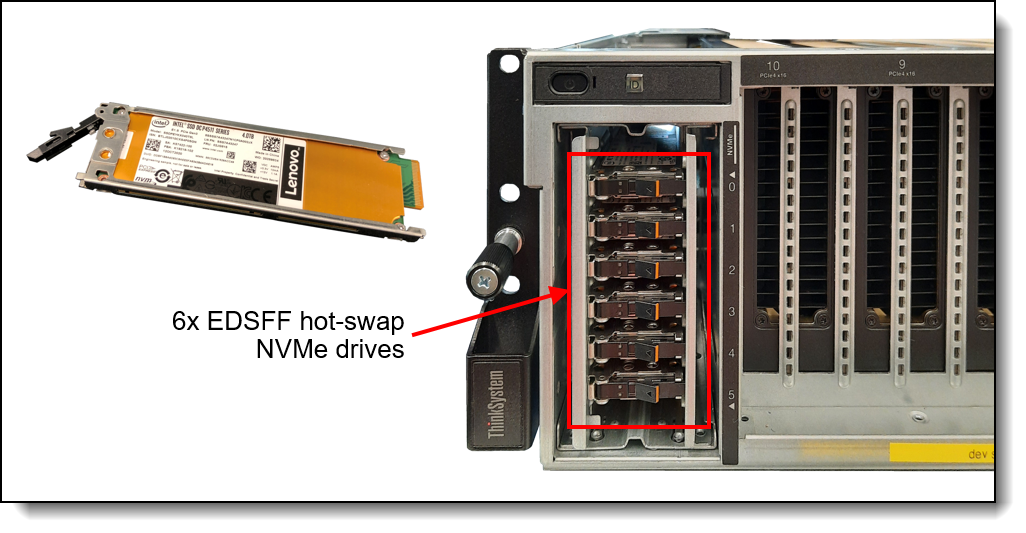
Figure 12. SR675 V3 E1.S EDSFF drive bays (8-DW GPU configuration only)
E3.S EDSFF drives
The 8-DW GPU model and SXM model of the SR675 V3 supports E3.S 1T EDSFF (Enterprise & Datacenter SSD Form Factor) drives with the E1.S (short) form factor. Up to 4 hot-swap EDSFF drives can be installed in the server.
EDSFF drives are a new type of NVMe solid-state drive and have the following characteristics:
- NVMe SSD with PCIe 5.0 x4, 2x2 host interface
- Hot-swap drive tray
- S form factor defined by SNIA specification SFF-TA-1008 Rev 2.0 and SFF-TA-1023
- 113 mm (4.4 inches) long x 7.5 mm (0.3 inches) tall
For more information about E3.S 1T drives installation in 8-DW model and on the SXM model, refer to the following resources:
- 8-DW model:
https://pubs.lenovo.com/sr675-v3/server_front_view_8dw_model#server_front_view_8dw_model__server_front_view_e3s_section - SXM model:
https://pubs.lenovo.com/sr675-v3/server_front_view_sxm_model
Encryption Enablement
For CTO orders, the configurator allows you to specify that you want to create an "encryption-ready" server, and to ensure that only components that support encryption are selectable in the configurator. This is done in DCSC and x-config configurator tools by selecting the feature code listed in the following table.
| Part number | Feature code | Description |
|---|---|---|
| CTO only | CES1* | Drive Encryption Enablement (not supported with vSAN) |
* In DCSC, this feature is in Storage > Internal Storage under the heading "Encryption Enablement"
Tip: This feature will not be selectable until an SED-capable drive is selected.
By selecting this feature code, the following requirements will be enabled in the configurator:
- SED drives will be required
- XCC2 Platinum will be required
- The ThinkSystem M.2 NVMe 2-Bay RAID Adapter (B8P9) cannot be selected
- 440-8i and 440-16i HBAs cannot be selected
Configuration notes:
- Do not use this feature code for VMware vSAN or Nutanix servers, since these virtualization offerings do not support HW RAID adapter-based encryption
- Selecting this feature code does not enable encryption at the factory
- If you don't select this feature code, you will still be able to enable encryption in your server, however you will need to ensure that you have suitable storage controllers and drives installed in the server
Controllers for internal storage
The SR675 V3 offers a variety of controller options for internal drives:
- For front-mount drives:
- RAID adapters and HBAs for SAS/SATA drives (PCIe slot-based)
- For M.2 drives internal to the server (see M.2 drives section)
- NVMe controller integrated on the M.2 SATA/NVMe 2-Bay RAID Enablement Kit ( BDY4 )
The following table lists the adapters used for the internal storage of the server.
| Part number |
Feature code |
Description | RAID levels | Power module (supercap) |
Maximum supported |
Slots supported |
|
|---|---|---|---|---|---|---|---|
| RAID Adapter - PCIe 3.0 | |||||||
| 4Y37A72482 | BJHK | ThinkSystem RAID 5350-8i PCIe 12Gb Adapter | 0, 1, 10, 5 | No | 1 | 16, 20 | |
| 4Y37A72483 | BJHL | ThinkSystem RAID 9350-8i 2GB Flash PCIe 12Gb Adapter | 0, 1, 10, 5, 50, 6, 60, 1 Triple, 10 Triple | No | 1 | 16, 20 | |
| RAID Adapter - PCIe 4.0 (RAID 940 adapters support Tri-Mode) | |||||||
| 4Y37A78834 | BMFT | ThinkSystem RAID 540-8i PCIe Gen4 12Gb Adapter | 0, 1, 10 | No | 2 | 16, 20 | |
| 4Y37A09728 | B8NY | ThinkSystem RAID 940-8i 4GB Flash PCIe Gen4 12Gb Adapter | 0, 1, 10, 5, 50, 6, 60 | Included | 1 | 16, 20 | |
| 4Y37A09729 | B8NW | ThinkSystem RAID 940-8i 8GB Flash PCIe Gen4 12Gb Adapter | 0, 1, 10, 5, 50, 6, 60 | Included | 1 | 16, 20 | |
| 4Y37A97935 | C6UH* | ThinkSystem RAID 9450-8i 4GB Flash PCIe Gen4 24Gb Adapter | 0, 1, 10, 5, 50, 6, 60, 1 Triple, 10 Triple | Included | 1 | 16, 20 | |
| 4Y37A09730 | B8NZ | ThinkSystem RAID 940-16i 8GB Flash PCIe Gen4 12Gb Adapter | 0, 1, 10, 5, 50, 6, 60 | Included | 1 | 16, 20 | |
| CTO only | BCYV | ThinkSystem RAID 940-16i 8GB Flash PCIe Gen4 12Gb Adapter for U.2 | 0, 1, 10, 5, 6 | Included | 1 | 16, 20 | |
| 4Y37A97940 | C6UN* | ThinkSystem RAID 9450-32i 8GB Flash PCIe Gen4 24Gb Adapter (x4 NVMe U.2/U.3 only) | 0, 1, 10, 5, 50, 6, 60, 1 Triple, 10 Triple | Included | 1 | 16, 20 | |
| SAS/SATA HBA | |||||||
| 4Y37A72480 | BJHH** | ThinkSystem 4350-8i SAS/SATA 12Gb HBA | None | No | 1 | 16, 20 | |
| 4Y37A78601 | BM51 | ThinkSystem 440-8i SAS/SATA PCIe Gen4 12Gb HBA | None | No | 1 | 16, 20 | |
| NVMe using Tri-Mode (deprecated - use SAS/SATA adapters B8NY or B8NW, combined with CH5Z; see Tri-Mode section) | |||||||
| 4Y37A09728† | BGM1 | ThinkSystem RAID 940-8i 4GB Flash PCIe Gen4 12Gb Adapter for U.3 | 0, 1, 10, 5, 50, 6, 60 | Included | 1 | 16, 20 | |
| 4Y37A09729† | BGM0 | ThinkSystem RAID 940-8i 8GB Flash PCIe Gen4 12Gb Adapter for U.3 | 0, 1, 10, 5, 50, 6, 60 | Included | 1 | 16, 20 | |
| 4Y37A97935 | CBMY | ThinkSystem RAID 9450-8i 4GB Flash PCIe Gen4 24Gb Adapter for U.3 | 0, 1, 10, 5, 50, 6, 60, 1 Triple, 10 Triple | Included | 1 | 16, 20 | |
† Adapter also supports PCIe 4.0 x1 connectivity to NVMe drives (requires NVMe drives with U.3 interface)
** This adapter is currently not available for CTO orders; it is only available as an option part number for field upgrades * Supported under 4DW Base (BR7G) and AnyBay Backplane (BLL2), slot 16, 20
For specifications about the RAID adapters and HBAs supported by the SR675 V3, see the ThinkSystem RAID Adapter and HBA Comparison, available from:
https://lenovopress.lenovo.com/lp1288-thinksystem-raid-adapter-and-hba-reference#sr675-v3-support=SR675%2520V3
Configuration notes:
- RAID adapters are not supported in the front risers PCIe slots.
- Supercap support: The table lists whether the adapter includes a power module (supercap) to power the flash memory. The server supports only 1 supercap as described in the RAID flash power module (supercap) support section. The number of supercaps supported also determines the maximum number of RAID adapters with flash that can be installed in the server, both for internal drive connectivity and external drive connectivity.
- Field upgrades: If you are adding a RAID adapter with supercap to the server as a field upgrade, you may need a supercap holder as described in the RAID flash power module (supercap) support section.
For SXM configurations, the supported adapter is ThinkSystem RAID 940-16i 8GB Flash PCIe Gen4 12Gb Adapter for U.2 (BCYV). In this setting this adapter supports NVMe U.2 drives only. Additionally, support for the NVMe U.2 drives connected via a PCIe x4 link to the controller is available with SXM configurations 8, 11, 12, 17, and 18.
- E810 Ethernet and X350 RAID/HBAs: The use of both an Intel E810 network adapter and an X350 HBA/RAID adapter (9350, 5350 and 4350) is supported, however E810 firmware CVL4.3 or later is required. For details, see Support Tip HT513226.
Tri-Mode support - RAID 940 and RAID 9450 adapters
The RAID 940 and RAID 9450 adapters support NVMe through a feature named Tri-Mode support (or Trimode support). This feature enables the use of NVMe U.3 drives at the same time as SAS and SATA drives. Tri-Mode requires an AnyBay backplane. Cabling of the controller to the backplanes is the same as with SAS/SATA drives, and the NVMe drives are connected via a PCIe x1 link to the controller.
NVMe drives connected using Tri-Mode support provide better performance than SAS or SATA drives: A SATA SSD has a data rate of 6Gbps, a SAS SSD has a data rate of 12Gbps, whereas an NVMe U.3 Gen 4 SSD with a PCIe x1 link will have a data rate of 16Gbps. NVMe drives typically also have lower latency and higher IOPS compared to SAS and SATA drives. Tri-Mode is supported with U.3 NVMe drives and requires an AnyBay backplane.
Tri-Mode requires U.3 drives: Only NVMe drives with a U.3 interface are supported. U.2 drives are not supported. See the Internal drive options section for the U.3 drives supported by the server.
NVMe x4 support (not Tri-Mode): As an alternative to Tri-Mode support, the RAID 9450-32i adapter supports connectivity to either NVMe U.2 and U.3 drives using a PCIe Gen4 x4 connection. A x4 connection to each drive enables maximum performance from the NVMe drives. Note that a x4 connection requires different cabling than a Tri-Mode connection. Only NVMe drives are supported; SAS and SATA drives are not supported.
New as of July 2026: To enable Tri-Mode in CTO orders of the SR675 V3, use the following feature code:
| Feature code | Description |
|---|---|
| CH5Z | Tri-Mode Enablement |
The process to configure Tri-Mode for a CTO order in DCSC is as follows:
- In the Storage tab, select one of the 940-8i or 940-16i controllers from the SAS/SATA RAID Controller group
- In the Internal Storage tab, select select Tri-Mode Enablement (feature CH5Z)
- You can then select either NVMe or SATA or SATA drives or any combination of these drives, up to the number supported by the server and the backplanes selected.
Tips:
- Feature CH5Z is not selectable until one of the 940-8i or 940-16i adapters in SAS/SATA RAID Controller group is selected.
- Feature CH5Z is not selectable if Non RAID NVMe (BC4V) is selected.
- The existing Tri-Mode "for U.3" adapter feature codes (features BGM1, BGM0, BM36, BDY4) in the Tri-Mode Controller group are for existing orders only and are being phased out (deprecated)
For details about these adapters, see the relevant product guide:
- SAS HBAs: https://lenovopress.com/servers/options/hba
- RAID adapters: https://lenovopress.com/servers/options/raid
Internal drive options
The following tables list the drive options for internal storage of the server.
2.5-inch hot-swap drives:
- 2.5-inch hot-swap 24 Gb SAS SSDs
- 2.5-inch hot-swap 6 Gb SATA SSDs
- 2.5-inch hot-swap PCIe 5.0 NVMe SSDs
- 2.5-inch hot-swap PCIe 4.0 NVMe SSDs
EDSFF hot-swap drives:
- E3.S 1T EDSFF hot-swap PCIe 5.0 NVMe SSDs
- E1.S EDSFF hot-swap PCIe 4.0 NVMe SSDs
M.2 drives (for M.2 adapters except B350/B550):
- M.2 PCIe 4.0 NVMe non-hot-swap drives
M.2 drive support: The use of M.2 drives requires an additional adapter as described in the M.2 drives subsection.
SED support: The tables include a column to indicate which drives support SED encryption. The encryption functionality can be disabled if needed. Note: Not all SED-enabled drives have "SED" in the description.
| Part number | Feature code |
Description | SED support |
Max Qty |
|
|---|---|---|---|---|---|
| 2.5-inch hot-swap SSDs - 24 Gb SAS - Mixed Use (3-5 DWPD) | |||||
| 4XB7B07612 | CABL | ThinkSystem 2.5" VA 800GB Mixed Use SAS 24Gb HS SSD | Support | 8 | |
| 4XB7B07613 | CABR | ThinkSystem 2.5" VA 1.6TB Mixed Use SAS 24Gb HS SSD | Support | 8 | |
| 4XB7B07614 | CABQ | ThinkSystem 2.5" VA 3.2TB Mixed Use SAS 24Gb HS SSD | Support | 8 | |
| 4XB7B07615 | CABK | ThinkSystem 2.5" VA 6.4TB Mixed Use SAS 24Gb HS SSD | Support | 8 | |
| 2.5-inch hot-swap SSDs - 24 Gb SAS - Read Intensive (<3 DWPD) | |||||
| 4XB7B07600 | CABS | ThinkSystem 2.5" VA 960GB Read Intensive SAS 24Gb HS SSD | Support | 8 | |
| 4XB7B07601 | CABV | ThinkSystem 2.5" VA 1.92TB Read Intensive SAS 24Gb HS SSD | Support | 8 | |
| 4XB7B07602 | CABT | ThinkSystem 2.5" VA 3.84TB Read Intensive SAS 24Gb HS SSD | Support | 8 | |
| 4XB7B07603 | CABY | ThinkSystem 2.5" VA 7.68TB Read Intensive SAS 24Gb HS SSD | Support | 8 | |
| 4XB7B07604 | CABX | ThinkSystem 2.5" VA 15.36TB Read Intensive SAS 24Gb HS SSD | Support | 8 | |
| 4XB7B07605 | CABW | ThinkSystem 2.5" VA 30.72TB Read Intensive SAS 24Gb HS SSD | Support | 8 | |
| Part number | Feature code |
Description | SED support |
Max Qty |
|
|---|---|---|---|---|---|
| 2.5-inch hot-swap SSDs - 6 Gb SATA - Mixed Use (3-5 DWPD) | |||||
| 4XB7B09972 | CBV9 | ThinkSystem 2.5" VA 480GB Mixed Use SATA 6Gb HS SSD SED | Support | 8 | |
| 4XB7B09973 | CBV8 | ThinkSystem 2.5" VA 960GB Mixed Use SATA 6Gb HS SSD SED | Support | 8 | |
| 4XB7B09974 | CBV7 | ThinkSystem 2.5" VA 1.92TB Mixed Use SATA 6Gb HS SSD SED | Support | 8 | |
| 4XB7B09975 | CBV6 | ThinkSystem 2.5" VA 3.84TB Mixed Use SATA 6Gb HS SSD SED | Support | 8 | |
| 4XB7A90884 | BYM2 | ThinkSystem 2.5" VA 480GB Mixed Use SATA 6Gb HS SSD v2 | No | 8 | |
| 4XB7A90885 | BYM4 | ThinkSystem 2.5" VA 960GB Mixed Use SATA 6Gb HS SSD v2 | No | 8 | |
| 4XB7A90886 | BYM5 | ThinkSystem 2.5" VA 1.92TB Mixed Use SATA 6Gb HS SSD v2 | No | 8 | |
| 4XB7A90887 | BYM6 | ThinkSystem 2.5" VA 3.84TB Mixed Use SATA 6Gb HS SSD v2 | No | 8 | |
| 2.5-inch hot-swap SSDs - 6 Gb SATA - Read Intensive (<3 DWPD) | |||||
| 4XB7B09967 | CBVE | ThinkSystem 2.5" VA 480GB Read Intensive SATA 6Gb HS SSD SED | Support | 8 | |
| 4XB7B09968 | CBVD | ThinkSystem 2.5" VA 960GB Read Intensive SATA 6Gb HS SSD SED | Support | 8 | |
| 4XB7B09969 | CBVC | ThinkSystem 2.5" VA 1.92TB Read Intensive SATA 6Gb HS SSD SED | Support | 8 | |
| 4XB7B09970 | CBVB | ThinkSystem 2.5" VA 3.84TB Read Intensive SATA 6Gb HS SSD SED | Support | 8 | |
| 4XB7B09971 | CBVA | ThinkSystem 2.5" VA 7.68TB Read Intensive SATA 6Gb HS SSD SED | Support | 8 | |
| 4XB7A90872 | BYLQ | ThinkSystem 2.5" VA 240GB Read Intensive SATA 6Gb HS SSD v2 | No | 8 | |
| 4XB7A90873 | BYLR | ThinkSystem 2.5" VA 480GB Read Intensive SATA 6Gb HS SSD v2 | No | 8 | |
| 4XB7A90874 | BYLS | ThinkSystem 2.5" VA 960GB Read Intensive SATA 6Gb HS SSD v2 | No | 8 | |
| 4XB7A90875 | BYLT | ThinkSystem 2.5" VA 1.92TB Read Intensive SATA 6Gb HS SSD v2 | No | 8 | |
| 4XB7A90876 | BYLU | ThinkSystem 2.5" VA 3.84TB Read Intensive SATA 6Gb HS SSD v2 | No | 8 | |
| 4XB7A90877 | BYLV | ThinkSystem 2.5" VA 7.68TB Read Intensive SATA 6Gb HS SSD v2 | No | 8 | |
| 4XB7A82258 | BQ1Q | ThinkSystem 2.5" 5400 PRO 240GB Read Intensive SATA 6Gb HS SSD | Support | 8 | |
| 4XB7A72438 | BM8B | ThinkSystem 2.5" PM893 480GB Read Intensive SATA 6Gb HS SSD | No | 8 | |
| 4XB7A72439 | BM8A | ThinkSystem 2.5" PM893 960GB Read Intensive SATA 6Gb HS SSD | No | 8 | |
| 4XB7A72440 | BM89 | ThinkSystem 2.5" PM893 1.92TB Read Intensive SATA 6Gb HS SSD | No | 8 | |
| 4XB7A72441 | BM88 | ThinkSystem 2.5" PM893 3.84TB Read Intensive SATA 6Gb HS SSD | No | 8 | |
| 4XB7A72442 | BM87 | ThinkSystem 2.5" PM893 7.68TB Read Intensive SATA 6Gb HS SSD | No | 8 | |
| 4XB7A17072 | B99D | ThinkSystem 2.5" S4520 240GB Read Intensive SATA 6Gb HS SSD | No | 8 | |
| Part number | Feature code |
Description | SED support |
Max Qty |
|
|---|---|---|---|---|---|
| 2.5-inch SSDs - U.2 PCIe 5.0 NVMe - Mixed Use (3-5 DWPD) | |||||
| 4XB7A93097 | C1WM | ThinkSystem 2.5" U.2 PM9D5a 800GB Mixed Use NVMe PCIe 5.0 x4 HS SSD | Support | 8 | |
| 4XB7A93127 | C0ZR | ThinkSystem 2.5" U.2 VA 1.6TB Mixed Use NVMe PCIe 5.0 x4 HS SSD | Support | 8 | |
| 4XB7A93128 | C0ZQ | ThinkSystem 2.5" U.2 VA 3.2TB Mixed Use NVMe PCIe 5.0 x4 HS SSD | Support | 8 | |
| 4XB7A93129 | C0ZP | ThinkSystem 2.5" U.2 VA 6.4TB Mixed Use NVMe PCIe 5.0 x4 HS SSD | Support | 8 | |
| 4XB7A93130 | C0ZN | ThinkSystem 2.5" U.2 VA 12.8TB Mixed Use NVMe PCIe 5.0 x4 HS SSD | Support | 8 | |
| 2.5-inch SSDs - U.2 PCIe 5.0 NVMe - Read Intensive (<3 DWPD) | |||||
| 4XB7B10396 | CFD6 | ThinkSystem 2.5" U.2 SN861 1.92TB Read Intensive NVMe PCIe 5.0 x4 HS SSD | Support | 8 | |
| 4XB7B10397 | CFD5 | ThinkSystem 2.5" U.2 SN861 3.84TB Read Intensive NVMe PCIe 5.0 x4 HS SSD | Support | 8 | |
| 4XB7B10398 | CFD4 | ThinkSystem 2.5" U.2 SN861 7.68TB Read Intensive NVMe PCIe 5.0 x4 HS SSD | Support | 8 | |
| 4XB7B10399 | CFD3 | ThinkSystem 2.5" U.2 SN861 15.36TB Read Intensive NVMe PCIe 5.0 x4 HS SSD | Support | 8 | |
| 4XB7B02475 | C8DH | ThinkSystem 2.5" U.2 BM1743 15.36TB Read Intensive NVMe PCIe 5.0 x4 HS SSD | Support | 8 | |
| 4XB7B02406 | C8DK | ThinkSystem 2.5" U.2 BM1743 30.72TB Read Intensive NVMe PCIe 5.0 x4 HS SSD | Support | 8 | |
| 4XB7B02407 | C8DJ | ThinkSystem 2.5" U.2 BM1743 61.44TB Read Intensive NVMe PCIe 5.0 x4 HS SSD | Support | 8 | |
| 4XB7B14460 | CGP5 | ThinkSystem 2.5" U.2 CD9P 61.44TB Read Intensive NVMe PCIe 5.0 x4 HS SSD | Support | 8 | |
| 4XB7B09031 | CBSY | ThinkSystem 2.5" U.2 BM1743 122.88TB Read Intensive NVMe PCIe 5.0 x4 HS SSD | Support | 8 | |
| 4XB7A93066 | C0GK | ThinkSystem 2.5" U.2 PM9D3a 960GB Read Intensive NVMe PCIe 5.0 x4 HS SSD | Support | 8 | |
| 4XB7B04552 | CA3Q | ThinkSystem 2.5" PM9D3a 30.72TB Read Intensive NVMe PCIe 5.0 x4 HS SSD | Support | 8 | |
| 4XB7A93122 | C0ZV | ThinkSystem 2.5" U.2 VA 1.92TB Read Intensive NVMe PCIe 5.0 x4 HS SSD | Support | 8 | |
| 4XB7A93123 | C0ZU | ThinkSystem 2.5" U.2 VA 3.84TB Read Intensive NVMe PCIe 5.0 x4 HS SSD | Support | 8 | |
| 4XB7A93124 | C0ZT | ThinkSystem 2.5" U.2 VA 7.68TB Read Intensive NVMe PCIe 5.0 x4 HS SSD | Support | 8 | |
| 4XB7A93125 | C0ZS | ThinkSystem 2.5" U.2 VA 15.36TB Read Intensive NVMe PCIe 5.0 x4 HS SSD | Support | 8 | |
| 4XB7A93126 | C1W7 | ThinkSystem 2.5" U.2 VA 30.72TB Read Intensive NVMe PCIe 5.0 x4 HS SSD | Support | 8 | |
| 2.5-inch SSDs - U.3 PCIe 5.0 NVMe - Read Intensive (<3 DWPD) | |||||
| 4XB7A82366 | BTPZ | ThinkSystem 2.5" U.3 PM1743 1.92TB Read Intensive NVMe PCIe 5.0 x4 HS SSD | Support | 8 | |
| 4XB7A82367 | BTQ0 | ThinkSystem 2.5" U.3 PM1743 3.84TB Read Intensive NVMe PCIe 5.0 x4 HS SSD | Support | 8 | |
| 4XB7A82368 | BTQ1 | ThinkSystem 2.5" U.3 PM1743 7.68TB Read Intensive NVMe PCIe 5.0 x4 HS SSD | Support | 8 | |
| 4XB7A82369 | BTQ2 | ThinkSystem 2.5" U.3 PM1743 15.36TB Read Intensive NVMe PCIe 5.0 x4 HS SSD | Support | 8 | |
| Part number | Feature code |
Description | SED support |
Max Qty |
|
|---|---|---|---|---|---|
| 2.5-inch SSDs - U.2 PCIe 4.0 NVMe - Write Intensive (10+ DWPD) | |||||
| 4XB7A17158 | BKKY | ThinkSystem 2.5" U.2 P5800X 400GB Write Intensive NVMe PCIe 4.0 x4 HS SSD | No | 8 | |
| 4XB7A17159 | BKKZ | ThinkSystem 2.5" U.2 P5800X 800GB Write Intensive NVMe PCIe 4.0 x4 HS SSD | No | 8 | |
| 4XB7A17160 | BMM8 | ThinkSystem 2.5" U.2 P5800X 1.6TB Write Intensive NVMe PCIe 4.0 x4 HS SSD | No | 8 | |
| 2.5-inch SSDs - U.2 PCIe 4.0 NVMe - Mixed Use (3-5 DWPD) | |||||
| 4XB7B11682 | CCZE | ThinkSystem 2.5" U.2 VA 800GB Mixed Use NVMe PCIe 4.0 x4 HS SSD | Support | 8 | |
| 4XB7A93896 | C18J | ThinkSystem 2.5" U.2 VA 1.6TB Mixed Use NVMe PCIe 4.0 x4 HS SSD | Support | 8 | |
| 4XB7A93897 | C18H | ThinkSystem 2.5" U.2 VA 3.2TB Mixed Use NVMe PCIe 4.0 x4 HS SSD | Support | 8 | |
| 4XB7A93898 | C18G | ThinkSystem 2.5" U.2 VA 6.4TB Mixed Use NVMe PCIe 4.0 x4 HS SSD | Support | 8 | |
| 4XB7A93899 | C18F | ThinkSystem 2.5" U.2 VA 12.8TB Mixed Use NVMe PCIe 4.0 x4 HS SSD | Support | 8 | |
| 4XB7A17129 | BNEG | ThinkSystem 2.5" U.2 P5620 1.6TB Mixed Use NVMe PCIe 4.0 x4 HS SSD | Support | 8 | |
| 4XB7A17130 | BNEH | ThinkSystem 2.5" U.2 P5620 3.2TB Mixed Use NVMe PCIe 4.0 x4 HS SSD | Support | 8 | |
| 4XB7A17133 | BNEZ | ThinkSystem 2.5" U.2 P5620 6.4TB Mixed Use NVMe PCIe 4.0 x4 HS SSD | Support | 8 | |
| 4XB7A17136 | BA4V | ThinkSystem 2.5" U.2 P5620 12.8TB Mixed Use NVMe PCIe 4.0 x4 HS SSD | Support | 8 | |
| 2.5-inch SSDs - U.3 PCIe 4.0 NVMe - Mixed Use (3-5 DWPD) | |||||
| 4XB7A95054 | C2BG | ThinkSystem 2.5" U.3 7500 MAX 800GB Mixed Use NVMe PCIe 4.0 x4 HS SSD | Support | 8 | |
| 4XB7A95055 | C2BV | ThinkSystem 2.5" U.3 7500 MAX 1.6TB Mixed Use NVMe PCIe 4.0 x4 HS SSD | Support | 8 | |
| 4XB7A95056 | C2BW | ThinkSystem 2.5" U.3 7500 MAX 3.2TB Mixed Use NVMe PCIe 4.0 x4 HS SSD | Support | 8 | |
| 4XB7A95057 | C2BF | ThinkSystem 2.5" U.3 7500 MAX 6.4TB Mixed Use NVMe PCIe 4.0 x4 HS SSD | Support | 8 | |
| 4XB7A95058 | C2BX | ThinkSystem 2.5" U.3 7500 MAX 12.8TB Mixed Use NVMe PCIe 4.0 x4 HS SSD | Support | 8 | |
| 4XB7A79639 | BNF1 | ThinkSystem 2.5" U.3 7450 MAX 800GB Mixed Use NVMe PCIe 4.0 x4 HS SSD | Support | 8 | |
| 4XB7A13967 | BNEJ | ThinkSystem 2.5" U.3 7450 MAX 1.6TB Mixed Use NVMe PCIe 4.0 x4 HS SSD | Support | 8 | |
| 4XB7A13970 | BNEY | ThinkSystem 2.5" U.3 7450 MAX 3.2TB Mixed Use NVMe PCIe 4.0 x4 HS SSD | Support | 8 | |
| 4XB7A13971 | BNEL | ThinkSystem 2.5" U.3 7450 MAX 6.4TB Mixed Use NVMe PCIe 4.0 x4 HS SSD | Support | 8 | |
| 2.5-inch SSDs - U.2 PCIe 4.0 NVMe - Read Intensive (<3 DWPD) | |||||
| 4XB7A95047 | C2BL | ThinkSystem 2.5" U.2 P5336 7.68TB Read Intensive NVMe PCIe 4.0 x4 HS SSD | Support | 8 | |
| 4XB7A95048 | C2BK | ThinkSystem 2.5" U.2 P5336 15.36TB Read Intensive NVMe PCIe 4.0 x4 HS SSD | Support | 8 | |
| 4XB7A93075 | C1WJ | ThinkSystem 2.5" U.2 P5336 30.72TB Read Intensive NVMe PCIe 4.0 x4 HS SSD | Support | 8 | |
| 4XB7A93076 | C1WK | ThinkSystem 2.5" U.2 P5336 61.44TB Read Intensive NVMe PCIe 4.0 x4 HS SSD | Support | 8 | |
| 4XB7B11683 | CCZF | ThinkSystem 2.5" U.2 VA 960GB Read Intensive NVMe PCIe 4.0 x4 HS SSD | Support | 8 | |
| 4XB7A93892 | C18N | ThinkSystem 2.5" U.2 VA 1.92TB Read Intensive NVMe PCIe 4.0 x4 HS SSD | Support | 8 | |
| 4XB7A93893 | C18M | ThinkSystem 2.5" U.2 VA 3.84TB Read Intensive NVMe PCIe 4.0 x4 HS SSD | Support | 8 | |
| 4XB7A93894 | C18L | ThinkSystem 2.5" U.2 VA 7.68TB Read Intensive NVMe PCIe 4.0 x4 HS SSD | Support | 8 | |
| 4XB7A93895 | C18K | ThinkSystem 2.5" U.2 VA 15.36TB Read Intensive NVMe PCIe 4.0 x4 HS SSD | Support | 8 | |
| 4XB7A13941 | BMGD | ThinkSystem 2.5" U.2 P5520 1.92TB Read Intensive NVMe PCIe 4.0 x4 HS SSD | Support | 8 | |
| 4XB7A13942 | BMGE | ThinkSystem 2.5" U.2 P5520 3.84TB Read Intensive NVMe PCIe 4.0 x4 HS SSD | Support | 8 | |
| 4XB7A13943 | BNEF | ThinkSystem 2.5" U.2 P5520 7.68TB Read Intensive NVMe PCIe 4.0 x4 HS SSD | Support | 8 | |
| 4XB7A13631 | BNEQ | ThinkSystem 2.5" U.2 P5520 15.36TB Read Intensive NVMe PCIe 4.0 x4 HS SSD | Support | 8 | |
| 2.5-inch SSDs - U.3 PCIe 4.0 NVMe - Read Intensive (<3 DWPD) | |||||
| 4XB7A95049 | C2BY | ThinkSystem 2.5" U.3 7500 PRO 960GB Read Intensive NVMe PCIe 4.0 x4 HS SSD | Support | 8 | |
| 4XB7A95050 | C2BR | ThinkSystem 2.5" U.3 7500 PRO 1.92TB Read Intensive NVMe PCIe 4.0 x4 HS SSD | Support | 8 | |
| 4XB7A95051 | C2BS | ThinkSystem 2.5" U.3 7500 PRO 3.84TB Read Intensive NVMe PCIe 4.0 x4 HS SSD | Support | 8 | |
| 4XB7A95052 | C2BT | ThinkSystem 2.5" U.3 7500 PRO 7.68TB Read Intensive NVMe PCIe 4.0 x4 HS SSD | Support | 8 | |
| 4XB7A95053 | C2BU | ThinkSystem 2.5" U.3 7500 PRO 15.36TB Read Intensive NVMe PCIe 4.0 x4 HS SSD | Support | 8 | |
| 4XB7A81952 | BPKY | ThinkSystem 2.5" U.3 PM1733a 3.84TB Read Intensive NVMe PCIe 4.0 x4 HS SSD | Support | 8 | |
| 4XB7A81954 | BPL0 | ThinkSystem 2.5" U.3 PM1733a 15.36TB Read Intensive NVMe PCIe 4.0 x4 HS SSD | Support | 8 | |
| 4XB7A79646 | BNF3 | ThinkSystem 2.5" U.3 7450 PRO 960GB Read Intensive NVMe PCIe 4.0 x4 HS SSD | Support | 8 | |
| 4XB7A79647 | BNF2 | ThinkSystem 2.5" U.3 7450 PRO 1.92TB Read Intensive NVMe PCIe 4.0 x4 HS SSD | Support | 8 | |
| 4XB7A79648 | BNF5 | ThinkSystem 2.5" U.3 7450 PRO 3.84TB Read Intensive NVMe PCIe 4.0 x4 HS SSD | Support | 8 | |
| 4XB7A79649 | BNF4 | ThinkSystem 2.5" U.3 7450 PRO 7.68TB Read Intensive NVMe PCIe 4.0 x4 HS SSD | Support | 8 | |
| Part number | Feature code |
Description | SED support |
Max Qty |
|
|---|---|---|---|---|---|
| E3.S 1T hot-swap SSDs - PCIe 5.0 NVMe - Mixed Use (3-5 DWPD) | |||||
| 4XB7A93136 | C1WD | ThinkSystem E3.S 1T VA 1.6TB Mixed Use NVMe PCIe 5.0 x4 HS SSD v2 | Support | 4 | |
| 4XB7A93137 | C1WE | ThinkSystem E3.S 1T VA 3.2TB Mixed Use NVMe PCIe 5.0 x4 HS SSD v2 | Support | 4 | |
| 4XB7A93138 | C1WF | ThinkSystem E3.S 1T VA 6.4TB Mixed Use NVMe PCIe 5.0 x4 HS SSD v2 | Support | 4 | |
| 4XB7A93139 | C1WG | ThinkSystem E3.S 1T VA 12.8TB Mixed Use NVMe PCIe 5.0 x4 HS SSD v2 | Support | 4 | |
| E3.S 1T hot-swap SSDs - PCIe 5.0 NVMe - Read Intensive (<3 DWPD) | |||||
| 4XB7A93131 | C1W8 | ThinkSystem E3.S 1T VA 1.92TB Read Intensive NVMe PCIe 5.0 x4 HS SSD v2 | Support | 4 | |
| 4XB7A93132 | C1W9 | ThinkSystem E3.S 1T VA 3.84TB Read Intensive NVMe PCIe 5.0 x4 HS SSD v2 | Support | 4 | |
| 4XB7A93133 | C1WA | ThinkSystem E3.S 1T VA 7.68TB Read Intensive NVMe PCIe 5.0 x4 HS SSD v2 | Support | 4 | |
| 4XB7A93134 | C1WB | ThinkSystem E3.S 1T VA 15.36TB Read Intensive NVMe PCIe 5.0 x4 HS SSD v2 | Support | 4 | |
| 4XB7B11623 | CCZR | ThinkSystem E3.S 1T 6550 30.72TB Read Intensive NVMe PCIe 5.0 x4 HS SSD v2 | Support | 4 | |
| 4XB7B11624 | CCZQ | ThinkSystem E3.S 1T 6550 61.44TB Read Intensive NVMe PCIe 5.0 x4 HS SSD v2 | Support | 4 | |
| 4XB7A93079 | C1AE | ThinkSystem E3.S PM9D3a 3.84TB Read Intensive NVMe PCIe 5.0 x4 HS SSD | Support | 4 | |
| 4XB7A93811 | C0R3 | ThinkSystem E3.S CD8P 3.84TB Read Intensive NVMe PCIe 5.0 x4 HS SSD | Support | 4 | |
| 4XB7A84130 | BVEJ | ThinkSystem E3.S PM1743 3.84TB Read Intensive NVMe PCIe 5.0 x4 HS SSD | Support | 4 | |
| 4XB7A84131 | BVEK | ThinkSystem E3.S PM1743 7.68TB Read Intensive NVMe PCIe 5.0 x4 HS SSD | Support | 4 | |
| 4XB7A84132 | BVEL | ThinkSystem E3.S PM1743 15.36TB Read Intensive NVMe PCIe 5.0 x4 HS SSD | Support | 4 | |
| Part number | Feature code |
Description | SED support |
Max Qty |
|
|---|---|---|---|---|---|
| E1.S hot-swap SSDs - PCIe 4.0 NVMe - Read Intensive (<3 DWPD) | |||||
| 4XB7A91177 | BZ7R | ThinkSystem E1.S 5.9mm DC4800 3.84TB Read Intensive NVMe PCIe 4.0 x4 HS SSD v2 | Support | 6 | |
| 4XB7A91178 | BZ7S | ThinkSystem E1.S 5.9mm DC4800 7.68TB Read Intensive NVMe PCIe 4.0 x4 HS SSD v2 | Support | 6 | |
| 4XB7A13998 | BP3L | ThinkSystem E1.S 5.9mm 7450 PRO 3.84TB Read Intensive NVMe PCIe 4.0 x4 HS SSD | Support | 6 | |
| 4XB7A80499 | BPKW | ThinkSystem E1.S 5.9mm 7450 PRO 7.68TB Read Intensive NVMe PCIe 4.0 x4 HS SSD | Support | 6 | |
| Part number | Feature code |
Description | SED support |
Max Qty |
|
|---|---|---|---|---|---|
| M.2 SSDs - PCIe 4.0 NVMe - Read Intensive (<3 DWPD) | |||||
| 4XB7B09650 | CBSZ | ThinkSystem M.2 VA 480GB Read Intensive NVMe PCIe 4.0 x4 NHS SSD | Support | 2 | |
| 4XB7B09651 | CBT0 | ThinkSystem M.2 VA 960GB Read Intensive NVMe PCIe 4.0 x4 NHS SSD | Support | 2 | |
| 4XB7B09652 | CBT1 | ThinkSystem M.2 VA 1.92TB Read Intensive NVMe PCIe 4.0 x4 NHS SSD | Support | 2 | |
| 4XB7A90102 | BXMH | ThinkSystem M.2 PM9A3 960GB Read Intensive NVMe PCIe 4.0 x4 NHS SSD | Support | 2 | |
Optical drives
The server supports the external USB optical drive listed in the following table.
| Part number | Feature code | Description | Top Choice Express |
|---|---|---|---|
| 7XA7A05926 | AVV8 | ThinkSystem External USB DVD RW Optical Disk Drive | - |
The drive is based on the Lenovo Slim DVD Burner DB65 drive and supports the following formats: DVD-RAM, DVD-RW, DVD+RW, DVD+R, DVD-R, DVD-ROM, DVD-R DL, CD-RW, CD-R, CD-ROM.
I/O expansion
The SR675 V3 supports up to eight GPUs:
- SXM5 model: 4x PCIe 5.0 x16 connections for GPUs
- 4-DW GPU model: 4x PCIe 5.0 x16 slots for double-wide or single-wide GPUs
- 8-DW GPU model: 8x PCIe 5.0 x16 slots for double-wide or single-wide GPUs
The server also supports, for networking or storage adapters, up to four PCIe 5.0 x16 slots plus an OCP slot, depending on the GPU and drive bay configuration selected.
Topics in this section:
- Slot support
- Riser cards
- Serial port
- OCP slot filler
Slot support
The SR675 V3 server supports PCIe 4.0 and PCIe 5.0 slots to suit the needs of installed applications.
Slot selection is a subset of the following slots:
- Front slots
- Slot 1: PCIe 5.0 x16 slot, full-height; half-length in SXM5 model, full-length in 4-DW GPU and 8-DW GPU models
- Slot 2: PCIe 5.0 x16 slot, full-height; half-length in SXM5 model, full-length in 4-DW GPU and 8-DW GPU models
- Rear riser slot 1
- Slot 15: PCIe 5.0 x16 or x8 slot, full-height, half-length
- Slot 16: PCIe 5.0 x16 slot, full-height, half-length
- Rear riser slot 2
- Slot 20: PCIe 5.0 x16 slot, full-height, half-length
- Slot 21: PCIe 5.0 x16 slot, full-height, half-length*
- OCP slot
- Slot 27: PCIe 4.0 x16 or x8 slot, OCP 3.0 form factor
*Slot 21 exhibits a maximum compatibility with Gen4 in select configurations: 3, 4, 8, 12, 18, 22, 23, 26, 28, and 31
The locations of these slots are shown in the following figure.
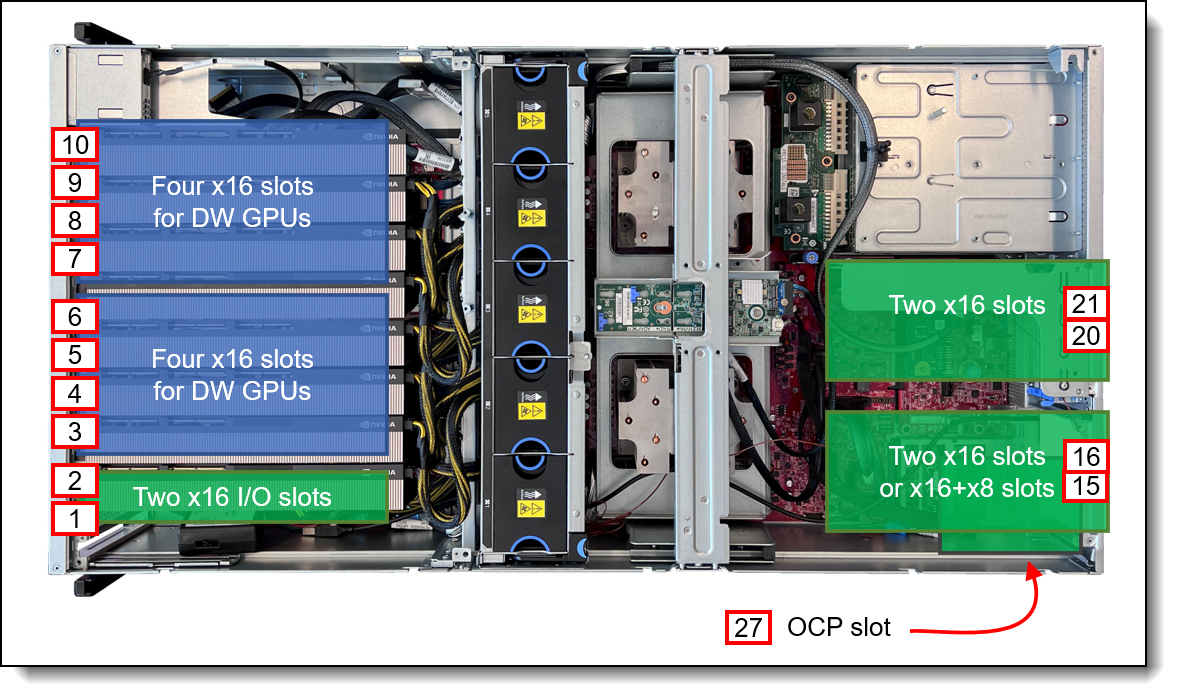
Figure 13. Locations of slots
Riser cards
The SR675 V3 server supports riser cards to accommodate needed PCIe slots.
All GPU and I/O slots are enabled using plug-in or cabled riser cards. Ordering information is shown in the following table.
| Part number | Feature code |
Description | Maximum supported |
|---|---|---|---|
| GPU Risers | |||
| CTO only | BR7Q | ThinkSystem SR675 V3 Direct 4x16 PCIe DW GPU Riser | 1 |
| CTO only | BR7S | ThinkSystem SR675 V3 Switched 4x16 PCIe DW GPU Direct RDMA Riser | 2 |
| CTO only | BR7R | ThinkSystem SR675 V3 Direct 4x8 PCIe DW GPU Riser | 2 |
| CTO only | BR7P | ThinkSystem SR675 V3 NVIDIA SXM5 CX7 Mezz Carrier Board | 1 |
| CTO only | BR9D | ThinkSystem SR675 V3 NVIDIA SXM5 PCIe Switch Board | 1 |
| Front I/O Riser | |||
| CTO only | BR7J | ThinkSystem SR675 V3 2x16 PCIe Front IO Riser for HGX NVLink GPU Base | 1 |
| CTO only | BR7H | ThinkSystem SR675 V3 2x16 PCIe Front IO Riser | 1 |
| Rear I/O Riser | |||
| CTO only | BR7N | ThinkSystem SR675 V3 x16 PCIe Gen5 Rear IO Riser | 2 |
| 4XC7A83674 | BR7L | ThinkSystem SR675 V3 x16/x16 PCIe Riser Option Kit | 2 |
| CTO only | BR7M | ThinkSystem SR675 V3 x16/x8 Cabled PCIe Rear IO Riser | 1 |
| CTO only | C2RK | ThinkSystem SR675 V3 2 x16 Switch Cabled PCIe Rear IO Riser | 2 |
Note: The front risers are specifically designed to accommodate network adapters. RAID adapters are supported only in the rear slots.
As listed in the table, there are three PCIe GPU risers, one x8 riser and two x16 risers. The x8 riser offers four x8 slots for double-wideand single-wide GPUs with direct uplinks to the processors. The two x16 offer four x16 slots for double-wide and single-wide GPUs, however the difference is the uplink (host) connection.
- The direct x16 riser (feature BR7Q) has four x16 connections (64 lanes total, implemented using eight x8 cables) for connecting to the system processors. This provides a direct 1:1 connection to all four GPUs.
- The switched riser with GPUDirect RDMA (feature BR7S) it allows the implementation of NVIDIA GPUDirect RDMA. Designed specifically for the needs of GPU acceleration, GPUDirect RDMA provides direct communication between NVIDIA GPUs in remote systems. This eliminates the system CPUs and the required buffer copies of data via the system memory, resulting in 10X better performance. The riser provides a x16 connection directly to I/O slots.
- The direct x8 riser (feature BR7R) has four x8 connections (32 lanes total, implemented using four x8 cables) for connecting to the system processors. This provides a direct 1:1 connection to all eight GPUs.
- The NVIDIA SXM5 CX7 Mezz Carrier Board (feature BR7P) provides a networking interface including four NVIDIA ConnectX-7 VPI network controllers for the Nvidia SXM5 baseboard. This provides an OSFP connection to the Front IO riser. The riser allows GPU direct connections for the network only.
- The SXM5 PCIe Switch Riser (feature BR9D) supports 4-Way SXM5 4-GPU baseboard. The switched riser allows the implementation of NVIDIA GPU Direct. This eliminates the system CPUs and the required buffer copies of data via the system memory, resulting in better performance. BR9D provides two x16 connection to the Front IO riser that are NVIDIA GPU Direct.
In a dual socket configuration, the riser provides four x16 connections to the CPUs (a 1:1 connection for GPU to CPU), but no direct rear I/O connections. No additional GPU Direct connections.
Use of the GPU risers is as follows:
- The 8-DW GPU model uses 2 switched GPU risers or 2 direct GPU risers.
- The switched GPU riser configuration provides x16 connection for eight GPUs using a 1:2 subscription.
- The direct GPU riser configuration provides x8 connection for eight GPUs using a 1:1 subscription.
- The 4-DW GPU model can use either
- A direct x16 riser (1:1) or a switched x16 riser (1:2) to provide connections for four GPUs. Each GPU gets a x16 connection. The choice of GPU riser is based on what other I/O risers are used in the configuration.
- The SXM GPU model can use either:
- A PCIe switch riser or a ConnectX-7 4-chip VPI PCIe Gen5 Mezz Controller to provide connection to the NVIDIA HGX H100 80GB 700W 4-GPU Board. The HGX 4-GPU board gets four x16 connection. The choice of GPU riser is based on the need for NVIDIA GPU Direct and the I/O Front network connections.
The slots at the rear of the server are 2-slot risers. The mechanical cage has a third slot at the top which does not support an adapter, but is instead of use either for a serial port or for a RAID adapter supercap. Adapter slots are as follows:
- Riser BR7N has one PCIe 5.0 x16 slots
- Riser BR7L has two PCIe 5.0 x16 slots. It supports PCIe 5.0 on the bottom slot (slot 15 and slot 20). It supports PCIe 5.0 on top slot depending on configuration*
- Riser BR7M has one PCIe 5.0 x16 slot (bottom slot) and one PCIe 4.0 x8 slot (top slot - slot 21)
*Slot 21 exhibits a maximum compatibility with Gen4 in select configurations: 3, 4, 8, 12, 18, 22, 23, 26, 28, and 31
The following figure shows the rear riser.
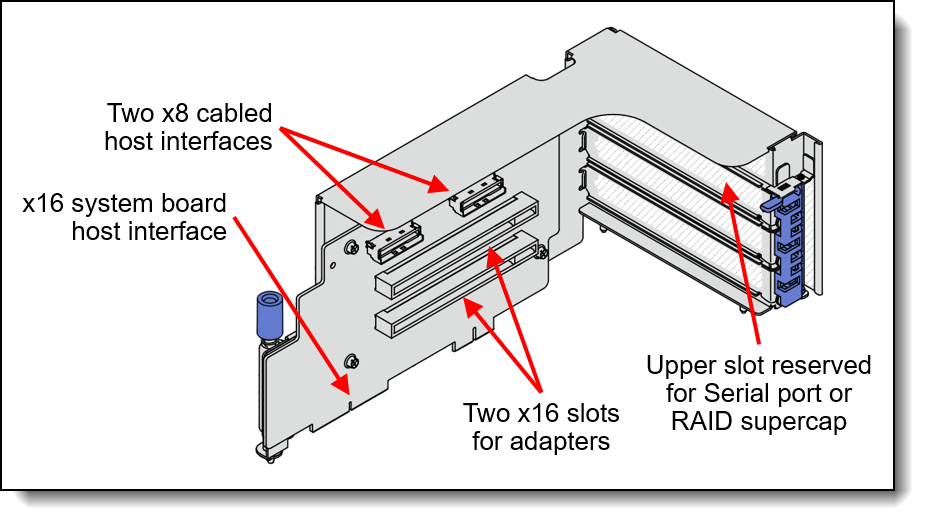
Figure 14. Rear riser
Serial port
The SR675 V3 optionally supports an RS-232 serial port by adding a COM port bracket to either rear riser cage in the top slot position. This position is not used by any adapter so there is no loss of PCIe slot availability, however the location is shared with the RAID supercap.
Note: The serial port is only supported in configurations with rear slots. The table in the Configurations section indicates which configurations have rear slots.
| Part number | Feature code | Description | Maximum supported |
|---|---|---|---|
| CTO only | BFGR | ThinkSystem SR670 V2 / SR675 V3 Rear Serial Port | 1 |
OCP slot filler
If customers or partners remove an OCP adapter from the server, we recommend that a slot cover (slot filler) be installed in its place to ensure proper airflow in the server. Ordering information is listed in the following table.
Tip: For CTO orders and preconfigured models, slot fillers are automatically installed in slots where an OCP adapter is not installed.
| Part number | Description |
|---|---|
| 4XF7B06188 | ThinkSystem OCP3 FILLER |
GPU adapters
The SR675 V3 supports the following graphics processing units (GPUs), depending on the front shuttle selected. All GPUs installed must be identical.
| Option PN | FC Name | Long Description | Controlled GPU | Form factor | SR675 V3 support | ||
|---|---|---|---|---|---|---|---|
| SXM5 model | 4-DW GPU model | 8-DW GPU model | |||||
| CTO only | BQQV | ThinkSystem NVIDIA H100 SXM5 700W 80G HBM3 GPU Board | Controlled | SXM5 | 1 | No support | No support |
| CTO only | C3V2 | ThinkSystem NVIDIA HGX H200 141GB 700W 4-GPU Board | Controlled | SXM5 | 1 | No support | No support |
| 4X67A97315 | C3V3 | ThinkSystem NVIDIA H200 NVL 141GB PCIe GPU Gen5 Passive GPU | Controlled | Double wide | No support | 4 | 8 |
| 4X67B09287 | CBK8 | ThinkSystem NVIDIA RTX PRO 6000 Blackwell Server Edition 96GB PCIe Gen5 Passive GPU | Controlled | Double wide | No support | 4 | 8 |
| 4X67A82257 | BR9U | ThinkSystem NVIDIA H100 80GB PCIe Gen5 Passive GPU | Controlled | Double wide | No support | 4 | 8 |
| 4X67A76715 | BLK1 | ThinkSystem NVIDIA A100 80GB PCIe Gen4 Passive GPU w/o CEC | Controlled | Double wide | No support | 4 | 8 |
| CTO only | BQZP | ThinkSystem NVIDIA A100 80GB PCIe Gen4 Passive GPU w/o CEC | Controlled | Double wide | No support | 4 | 8 |
| 4X67A81102 | BP04 | ThinkSystem AMD Instinct MI210 PCIe Gen4 Passive Accelerator | Controlled | Double wide | No support | 4 | 8 |
| 4X67A72593 | BEL4 | ThinkSystem NVIDIA A40 48GB PCIe Gen4 Passive GPU w/o CEC | Controlled | Double wide | No support | 4 | 8 |
| CTO only | BJHG | ThinkSystem NVIDIA A30 24GB PCIe Gen4 Passive GPU w/o CEC | Controlled | Double wide | No support | 4 | 8 |
| 4X67A76581 | BQZR | ThinkSystem NVIDIA A30 24GB PCIe Gen4 Passive GPU w/o CEC | Controlled | Double wide | No support | 4 | 8 |
| 4X67A72593 | BQZQ | ThinkSystem NVIDIA A40 48GB PCIe Gen4 Passive GPU w/o CEC | Controlled | Double wide | No support | 4 | 8 |
| CTO only | BEL4 | ThinkSystem NVIDIA A40 48GB PCIe 4.0 Passive GPU w/o CEC | Controlled | Double wide | No support | 4 | 8 |
| 4X67A90669 | BYFH | ThinkSystem NVIDIA L40S 48GB PCIe Gen4 Passive GPU | Controlled | Double wide | No support | 4 | 8 |
| 4X67A84823 | BT87 | ThinkSystem NVIDIA L40 48GB PCIe Gen4 Passive GPU | Controlled | Double wide | No support | 4 | 8 |
| 4X67A86324 | BUGD | ThinkSystem NVIDIA A800 80GB PCIe Gen4 Passive GPU* | Controlled | Double wide | No support | 4 | 8 |
| 4X67A86451 | BUJW | ThinkSystem NVIDIA H800 80GB PCIe Gen5 Passive GPU | Controlled | Double wide | No support | 4 | 8 |
| 4X67A89326 | BXEJ | ThinkSystem NVIDIA H800 NVL 94GB PCIe Gen5 Passive GPU | Controlled | Double wide | No support | 4 | 8 |
| 4X67A89325 | BXAK | ThinkSystem NVIDIA H100 NVL 94GB PCIe Gen5 Passive GPU | Controlled | Double wide | No support | 4 | 8 |
| 4X67A84824 | BS2C | ThinkSystem NVIDIA L4 24GB PCIe Gen4 Passive GPU | Controlled | Single wide | No support | 4 | 8 |
| 4X67A84009 | BS49 | ThinkSystem Qualcomm Cloud AI 100 | Controlled | Single wide | No support | 4 | 8 |
*CN, Hong Kong and Macao only
Configuration rules:
- Some NVIDIA A Series GPUs are available as two feature codes, one with a CEC chip and one without a CEC chip (ones without the CEC chip have "w/o CEC" in the name). The CEC is a secondary Hardware Root of Trust (RoT) module that provides an additional layer of security, which can be used by customers who have high regulatory requirements or high security standards. NVIDIA uses a multi-layered security model and hence the protection offered by the primary Root of Trust embedded in the GPU is expected to be sufficient for most customers. The CEC defeatured products still offer Secure Boot, Secure Firmware Update, Firmware Rollback Protection, and In-Band Firmware Update Disable. Specifically, without the CEC chip, the GPU does not support Key Revocation or Firmware Attestation. CEC and non-CEC GPUs of the same type of GPU can be mixed in field upgrades.
- The table includes a Controlled GPU column. If a GPU is listed as Controlled, that means the GPU is not offered in certain markets, as determined by the US Government. If a GPU is listed as No, that means the GPU is not controlled and is available in all markets.
- The double-wide GPUs also support the installation of an NVLink bridge between adjacent pairs of GPUs. H200 NVL GPUs use either one NVLink 2-way bridge per pair or one NVLink 4-way bridge per set of 4 GPUs. H100 GPUs use three NVLink bridges per pair. A40 and A30 GPUs support one NVLink bridge per pair. Ordering information in the following table.
- The H200 (C3V2, C3V3) and RTX PRO 6000 (CBK8) GPUs are available with the 5th Gen AMD EPYC processors (Turin) server models only.
- The H200 (C3V2, C3V3) and RTX PRO 6000 (CBK8) GPUs are available with the Dual Rotor System High Performance Fan (C5WW) only. The fans are added automatically in the configurator when the GPUs are selected.
- Information about H200 and H100 memory rules available at:
https://pubs.lenovo.com/sr675-v3/memory_module_installation_order_independent
| Part number | Feature code | Description | Quantity supported |
|---|---|---|---|
| 4X67A71309 | BG3F | ThinkSystem NVIDIA Ampere NVLink 2-Slot Bridge | 12 H100, A100: 3 per pair of GPUs A40, A30: 1 per pair |
| 4X67A97320 | C3V1 | ThinkSystem NVIDIA 2-way bridge for H200 NVL | H200 NVL: 1 per pair of GPUs |
| 4X67A97322 | C3V0 | ThinkSystem NVIDIA 4-way bridge for H200 NVL | H200 NVL: 1 per 4 x GPUs |
| 4X67A82325 | BRMD | ThinkSystem AMD Instinct MI210 4x Infinity Fabric Link Bridge Card | MI210 (BP04): 1 per 4x GPUs |
For information about these GPUs, see the ThinkSystem GPU Summary, available at:
https://lenovopress.com/lp0768-thinksystem-thinkagile-gpu-summary
A field upgrade with H200 (C3V2, C3V3) and RTX PRO 6000 (CBK8) GPUs is supported only if the server in the field is configured with the 5th Gen AMD EPYC processors (Turin) and Dual Rotor System High Performance Fan (C5WW).
When adding a double-wide GPU as a field upgrade, you will need an additional GPU auxiliary power cable as listed in the following table.
| Part number |
Feature code |
Description | Purpose | Maximum supported |
|---|---|---|---|---|
| 4X97A84509 | BRGU | ThinkSystem SR675 V3 GPU Power Cable Kit | Auxiliary power cable for A100 (BLK1), MI210 (BP04) and A30 (BJHG) and A40 (BQZQ) PCIe GPUs | 8 |
| 4X97A84510 | BSD2 |
ThinkSystem SR675 V3 GPU Supplemental Power Cable 4 |
H100 80GB (BR9U)
Auxiliary power cable for the RTX PRO 6000 (CBK8), H200 NVL (C3V3), H100 NVL (BXAK), L40S (BYFH) and L40 (BT87) PCIe GPUs |
8 |
Network adapters
The server has a dedicated OCP 3.0 SFF slot with either a PCIe 4.0 x8 or x16 host interface, depending on the server configuration as described in the Configurations section. See Figure 3 for the location of the OCP slot.
Note: Some configurations do not include connectivity to the OCP slot. See the Configurations section for details.
The following table lists the supported OCP adapters. One port can optionally be shared with the XCC management processor for Wake-on-LAN and NC-SI support. Only 1 OCP card can be installed in the server.
| Part number |
Feature code |
Description | Maximum supported |
PCIe interface |
|
|---|---|---|---|---|---|
| Gigabit Ethernet | |||||
| 4XC7A08277 | B93E | ThinkSystem Intel I350 1GbE RJ45 4-port OCP Ethernet Adapter | 1 | PCIe 4.0 x8 | |
| 4XC7A88428 | BW97 | ThinkSystem Intel I350 1GbE RJ45 4-Port OCP Ethernet Adapter V2 | 1 | PCIe 4.0 x8 | |
| 10 Gb Ethernet RJ45 Adapters | |||||
| 4XC7A08278 | BCD5 | ThinkSystem Intel X710-T2L 10GBASE-T 2-port OCP Ethernet Adapter | 1 | PCIe 4.0 x16 | |
| 4XC7A80268 | BPPY | ThinkSystem Intel X710-T4L 10GBase-T 4-Port OCP Ethernet Adapter | 1 | PCIe 4.0 x16 | |
| 4XC7A95696 | C4GB | ThinkSystem Broadcom 57412 10GBase-T 4-Port OCP Ethernet Adapter | 1 | PCIe 4.0 x16 | |
| 25 Gb Ethernet | |||||
| 4XC7A80567 | BPPW | ThinkSystem Broadcom 57504 10/25GbE SFP28 4-Port OCP Ethernet Adapter | 1 | PCIe 4.0 x16 | |
| 4XC7A08294 | BCD4 | ThinkSystem Intel E810-DA2 10/25GbE SFP28 2-Port OCP Ethernet Adapter | 1 | PCIe 4.0 x8 | |
| 4XC7A80269 | BP8L | ThinkSystem Intel E810-DA4 10/25GbE SFP28 4-Port OCP Ethernet Adapter | 1 | PCIe 4.0 x16 | |
| 4XC7A62582 | BE4T | ThinkSystem Mellanox ConnectX-6 Lx 10/25GbE SFP28 2-port OCP Ethernet Adapter | 1 | PCIe 4.0 x8 | |
| 100 Gb Ethernet | |||||
| 4XC7A08243 | BPPX | ThinkSystem Broadcom 57508 100GbE QSFP56 2-Port OCP Ethernet Adapter | 1 | PCIe 4.0 x16 | |
For more information, including the transceivers and cables that each adapter supports, see the list of Lenovo Press Product Guides in the Networking adapters category:
https://lenovopress.com/servers/options/ethernet
The following table lists additional supported network adapters that can be installed in the regular PCIe slots (not the GPU slots).
| Part number |
Feature code |
Description | Maximum supported |
Slots supported |
|---|---|---|---|---|
| Gigabit Ethernet | ||||
| 7ZT7A00535 | AUZW | ThinkSystem I350-T4 PCIe 1Gb 4-Port RJ45 Ethernet Adapter | 4 | 1, 2, 15, 16, 20, 21 |
| 10 Gb Ethernet | ||||
| 4XC7A95697 | C4GC | ThinkSystem Broadcom 57412 10GBase-T 4-Port PCIe Ethernet Adapter | 4 | 15, 16, 20, 21 |
| 25 Gb Ethernet | ||||
| 4XC7A80566 | BNWM | ThinkSystem Broadcom 57504 10/25GbE SFP28 4-port PCIe Ethernet Adapter | 4 | 1, 2, 16, 21, 15, 20 |
| 4XC7A08295 | BCD6 | ThinkSystem Intel E810-DA2 10/25GbE SFP28 2-Port PCIe Ethernet Adapter | 4 | 1, 2, 15, 16, 20, 21 |
| 4XC7A80267 | BP8M | ThinkSystem Intel E810-DA4 10/25GbE SFP28 4-Port PCIe Ethernet Adapter | 4 | 1, 2, 16, 21, 15, 20 |
| 4XC7A62580 | BE4U | ThinkSystem Mellanox ConnectX-6 Lx 10/25GbE SFP28 2-port PCIe Ethernet Adapter | 4 | 1, 2, 15, 16, 20, 21 |
| 100 Gb Ethernet | ||||
| 4XC7A08297 | BK1J | ThinkSystem Broadcom 57508 100GbE QSFP56 2-Port PCIe 4 Ethernet Adapter | 6 | 1, 2, 16, 21, 15, 20 |
| 4XC7A08248 | B8PP | ThinkSystem Mellanox ConnectX-6 Dx 100GbE QSFP56 2-port PCIe Ethernet Adapter | 6 | 1, 2, 16, 21, 15, 20 |
| 200 Gb Ethernet / Data Processing Units (DPUs) | ||||
| 4XC7A87752** | BVBG | ThinkSystem NVIDIA BlueField-3 B3220 VPI QSFP112 2P 200G PCIe Gen5 x16 Adapter | 2 | 1, 2 |
| 200 Gb Ethernet / Infiniband HDR | ||||
| 4XC7B08942** | CCVX | ThinkSystem NVIDIA BlueField-3 B3220 VPI QSFP112 2P 200G PCIe Gen5 x16 with Tin Plating Connector | 2 | 1, 2 |
| 4C57A15326* | B4RC | ThinkSystem Mellanox ConnectX-6 HDR/200GbE QSFP56 1-port PCIe 4 VPI Adapter | 6 | 1, 2, 16, 21, 15, 20 |
| 4C57A80293* | BNDQ | ThinkSystem NVIDIA PCIe Gen4 x16 Passive Aux Kit | 1 | 2, 15* |
| 4XC7A81883 | BQBN | ThinkSystem NVIDIA ConnectX-7 NDR200/200GbE QSFP112 2-port PCIe Gen5 x16 InfiniBand Adapter | 6 | 1, 2, 16, 21, 15, 20 |
| 400 Gb NDR InfiniBand | ||||
| 4XC7A95508 | C51C | ThinkSystem NVIDIA ConnectX-7 NDR400 OSFP 1-port PCIe Gen5 VPI Adapter | 6 | 1, 2, 16, 21, 15, 20 |
| 4XC7A80289 | BQ1N | ThinkSystem NVIDIA ConnectX-7 NDR OSFP400 1-Port PCIe Gen5 x16 InfiniBand Adapter | 6 | 1, 2, 16, 21, 15, 20 |
| 4C57B14694 | CG70 | ThinkSystem NVIDIA CX8 PCIe Gen4 x16 Passive Aux Kit | 3 | 2, 16, 21 |
| 4XC7B03668 | C9AQ | ThinkSystem NVIDIA ConnectX-8 8240 400GbE / 400Gb/s IB QSFP112 2-port PCIe Gen6 x16 (Generic FW) | 3 | 1, 15, 20 |
| 400 Gb Ethernet | ||||
| 4XC7A93809† | C0Q4 | ThinkSystem NVIDIA BlueField-3 B3140H VPI QSFP112 1P 400G PCIe Gen5 x16 Adapter | 6 | 1, 2, 16, 21, 15, 20 |
| 400 Gb Omni-Path Architecture | ||||
| 4XC7B00020 | C5MY | ThinkSystem Cornelis CN5000 Omni-Path 1-Port QSFP112 HFI SuperNIC (Generic FW) | 6 | 1, 2, 16, 21, 15, 20 |
† Regardless of the configuration (8DW/4DW or CPU type), BlueField-3 B3140H cannot be supported in the rear with Active Optical Cable. Only DAC/active copper cable
Configuration requirements:
* Mellanox NDR PCIe Aux Kit: The combination of the Mellanox Aux adapter (BNDQ) and Mellanox ConnectX-6 HDR/200GbE VPI adapter (B4RC) implements SharedIO. The Aux adapter installs in either slot 2, 16 or 21 and the HDR adapter installs in slot 1, 15 or 20 respectively.
**Auxiliary power cable is required to provide power for the adapter reference the following table.
| Part number |
Feature code |
Description | Purpose | Maximum supported |
|---|---|---|---|---|
| 4X97A91527 | BXB6 | ThinkSystem SR675 V3 BlueField-3 Power Cable Kit | Supports 200G adapter (BVBG) | 2 |
| 4X97B13363 | CEAJ | ThinkSystem NVIDIA BlueField-3 B3220 VPI QSFP112 2P 200G PCIe Gen5 x16 with Tin Plating Connector Power Cable | Supports 200G adapter (CCVX) | 2 |
Note: NVIDIA NICs and CN5000 are not compatible and cannot be configured in the same configuration
For more information, including the transceivers and cables that each adapter supports, see the list of Lenovo Press Product Guides in the Networking adapters category:
https://lenovopress.com/servers/options/ethernet
OSFP800 ports
The SR675 V3 includes an I/O mezzanine board containing four NVIDIA ConnectX-7 VPI network controllers. The board is automatically included in the order.
| Part number | Feature code | Description |
|---|---|---|
| CTO only | BQQU | ThinkSystem NVIDIA ConnectX-7 4-chip VPI PCIe Gen5 Mezz Controller |
The mezzanine board has two connectors where an OSFP board is attached via cables as shown in the following figure. The server makes use of OSFP-DD (double-density) connections to double the bandwidth from 400 Gb/s to 800 Gb/s per physical port.
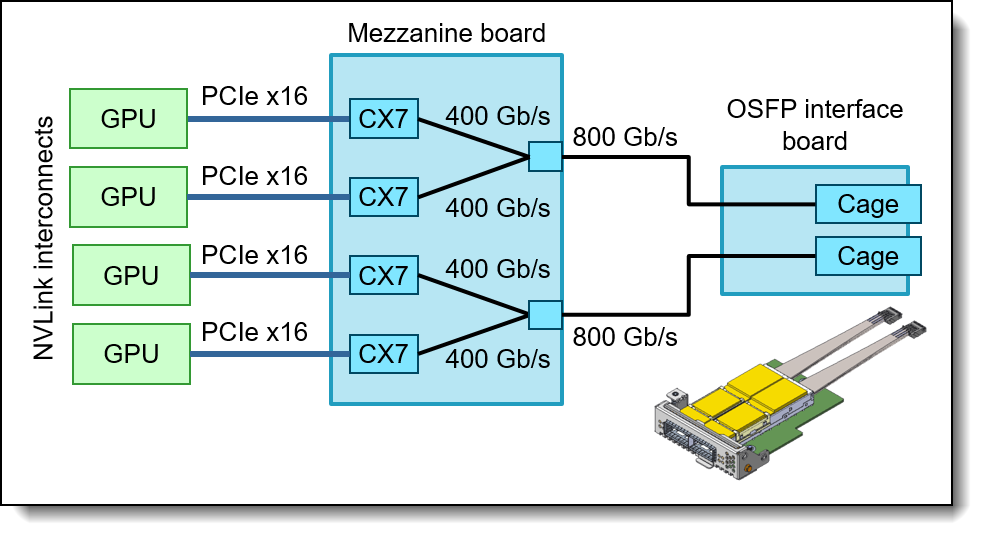
Figure 15. GPU Direct connectivity in the SR675 V3
The SR675 V3 supports OSFP boards with either two double-400 Gb/s interfaces or two 400 Gb/s interfaces, resulting in full NDR InfiniBand or NDR200 InfiniBand bandwidth per GPU. The choices areas listed in the following table.
| Part number | Feature code | Description | Bandwidth per cage |
Max Qty |
|---|---|---|---|---|
| CTO only | BRUH | ThinkSystem SR675 V3 400Gb OSFP Port Card | 400 Gb/s | 1 |
| CTO only | BR7K | ThinkSystem SR675 V3 800Gb OSFP Port Card | 800 Gb/s | 1 |
The following table lists the supported optical cables.
| Part number |
Feature code |
Description |
|---|---|---|
| NVIDIA NDR Multi Mode Fibre Optical Cables | ||
| 4X97A81748 | BQJN | Lenovo 3m NVIDIA NDR Multi Mode Optical Cable |
| 4X97A81749 | BQJP | Lenovo 5m NVIDIA NDR Multi Mode Optical Cable |
| 4X97A81750 | BQJQ | Lenovo 7m NVIDIA NDR Multi Mode MPO12 APC Optical Cable |
| 4X97A81751 | BQJR | Lenovo 10m NVIDIA NDR Multi Mode Optical Cable |
| 4X97A81752 | BQJS | Lenovo 20m NVIDIA NDR Multi Mode Optical Cable |
The following table lists the supported direct-attach copper (DAC) cables.
| Part number |
Feature code |
Description |
|---|---|---|
| NVIDIA NDRx2 OSFP800 Finned to NDRx2 OSFP800 Flat Copper Cables | ||
| 4X97A84581 | BRKC | Lenovo 1M NVIDIA NDRx2 OSFP800 Finned to NDRx2 OSFP800 Flat Top Passive Copper Cable |
| 4X97A84582 | BRKD | Lenovo 1.5M NVIDIA NDRx2 OSFP800 Finned to NDRx2 OSFP800 Flat Top Passive Copper Cable |
| 4X97A84583 | BRKE | Lenovo 2M NVIDIA NDRx2 OSFP800 Finned to NDRx2 OSFP800 Flat Top Passive Copper Cable |
| 4X97A84584 | BRKF | Lenovo 3M NVIDIA NDRx2 OSFP800 Finned to NDRx2 OSFP800 Flat Top Active Copper Cable |
| NVIDIA NDRx2 OSFP800 to 2x NDR OSFP400 Splitter Copper Cables | ||
| 4X97A81827 | BQJV | Lenovo 1m NVIDIA NDRx2 OSFP800 to 2x NDR OSFP400 Passive Copper Splitter Cable |
| 4X97A81828 | BQJW | Lenovo 1.5m NVIDIA NDRx2 OSFP800 to 2x NDR OSFP400 Passive Copper Splitter Cable |
| 4X97A81829 | BQJX | Lenovo 2m NVIDIA NDRx2 OSFP800 to 2x NDR OSFP400 Passive Copper Splitter Cable |
| 4X97A81830 | BQJY | Lenovo 3m NVIDIA NDRx2 OSFP800 to 2x NDR OSFP400 Passive Copper Splitter Cable |
| 4X97B08450 | CAGF | Lenovo 4M NVIDIA NDRx2 OSFP800 to 2x NDR OSFP400 Active Copper Splitter Cable Generic |
| CTO only | CAGD | Lenovo 4m NVIDIA NDRx2 OSFP800 to 4x NDR200 QSFP112 Active Copper Splitter Cable Generic |
| 4X97B08451 | CAGG | Lenovo 5M NVIDIA NDRx2 OSFP800 to 2x NDR OSFP400 Active Copper Splitter Cable Generic |
| 4X97B08449 | CAGR | Lenovo 5M NVIDIA NDRx2 OSFP800 to 4x NDR200 QSFP112 Active Copper Splitter Cable Generic |
Fibre Channel host bus adapters
The following table lists the Fibre Channel HBAs supported by the SR675 V3
| Part number |
Feature code |
Description | Maximum supported |
Slots supported |
|---|---|---|---|---|
| 32 Gb Fibre Channel HBAs | ||||
| 4XC7A76525 | BJ3H | ThinkSystem Emulex LPe35002 32Gb 2-port PCIe Fibre Channel Adapter V2 | 6 | 1, 2, 15, 16, 20, 21 |
For more information, see the list of Lenovo Press Product Guides in the Host bus adapters category:
https://lenovopress.com/servers/options/hba
SAS adapters for external storage
The following table lists SAS HBAs and RAID adapters supported by SR675 V3 server for use with external storage.
| Part number |
Feature code |
Description | Maximum supported |
Slots supported |
|---|---|---|---|---|
| SAS HBAs | ||||
| 4Y37A78837 | BNWK | ThinkSystem 440-8e SAS/SATA PCIe Gen4 12Gb HBA | 6 | 1, 2, 15, 16, 20, 21 |
| 4Y37A09724 | B8P7 | ThinkSystem 440-16e SAS/SATA PCIe Gen4 12Gb HBA | 6 | 1, 2, 15, 16, 20, 21 |
| External RAID adapters | ||||
| 4Y37A78836 | BNWJ | ThinkSystem RAID 940-8e 4GB Flash PCIe Gen4 12Gb Adapter | 1* | 15, 16, 20, 21 |
* See below regarding supercap requirements
For a comparison of the functions of the supported external storage adapters, see the ThinkSystem RAID Adapter and HBA Reference:
https://lenovopress.com/lp1288#sr675-v3-support=SR675%20V3&internal-or-external-ports=External
The RAID 940-8e use a flash power module (supercap), however the server only supports the installation of 1 supercap as described in the RAID flash power module (supercap) support section. As a result, if the internal storage is connected to a RAID 9350 or 940 adapter with supercap, then the use of a RAID 940-8e is not supported.
For more information, see the list of Lenovo Press Product Guides in the Host bus adapters and RAID adapters categories:
https://lenovopress.com/servers/options/hba
https://lenovopress.com/servers/options/raid
Cooling
The SR675 V3 server has up to five 80 mm dual-rotor variable-speed simple-swap fans. Fans are N+1 rotor redundant, tolerating a single-rotor failure. The server also has one or two additional fans integrated in each of the four power supplies.
System fan choices are as follows:
- Standard fans
- Dual-rotor, max RPM (+/- 10% tolerance) 16000 (inlet) and 14000 (outlet)
- High performance fans
- Dual-rotor, max RPM (+/- 10% tolerance) 19500 (inlet) and 16700 (outlet)
Fan selection is configuration dependent, as follows:
- Standard fans may be used under the following conditions:
- Single wide GPUs
- Double wide GPUs up to 600W
- High Performance fans are required under the following conditions:
- Double wide GPUs ≥ 600W
These fans have the following electrical input, monitoring, and control connections.
- 12V DC Power
- DC Power Return
- Tachometer Output
- Pulse Width Modulation Control
Ordering information for the fans is listed in the following table.
| Part number | Feature code |
Description | Qty 1 CPU |
Qty 2 CPUs |
|---|---|---|---|---|
| CTO only | C5WV | ThinkSystem SR675 V3 Dual Rotor System Standard Fan | 5 | 5 |
| 4F17B14664 | C5WW | ThinkSystem SR675 V3 Dual Rotor System High Performance Fan | 5 | 5 |
Configuration notes:
- High Performance Fans (C5WW) are supported with 5th Gen AMD EPYC processors only.
- All 600W GPU configurations require 5th Gen AMD EPYC processors and High Performance Fans (C5WW).
Power supplies
The SR675 V3 has two or four redundant hot-swap power supplies depending on the configuration, as listed in the following table.
| Configuration | Required power supply capacity and quantity | ||
|---|---|---|---|
| 1800W | 2400W | 2600W | |
| SXM5 model | 4 (N+0) | 3 (N+0) 4 (N+N)* |
3 (N+0) 4 (N+N)* |
| 4-DW GPU model | 3 (N+0) 4 (N+1) |
2 (N+0) 3 (N+1) 4 (N+N) |
2 (N+0) 3 (N+1) 4 (N+N) |
| 8-DW GPU model | 4 (N+0) | 3 (N+0) 4 (N+1) |
3 (N+0) 4 (N+1) |
*Power Redundancy – N+N for SXM5 configuration available by mid Q3 2024
SR675 V3 will support the following power policies:
- Power non-redundant – N+0
- Power Redundancy – N+N, N+1
- Power Restore Policy – Always Off, Restore, Always On
- Determine how the system behaves when AC power is applied based on state before power was removed.
- Note:
- Power capping is not a supported feature
- Zero output mode is not supported
The power supply choices are listed in the following table.
Tip: When configuring a server in the DCSC configurator, power consumption is calculated precisely by interfacing with Lenovo Capacity Planner. You can therefore select the appropriate power supply for your configuration. However, do consider future upgrades that may require additional power needs.
| Part number | Feature | Description | Connector | Quantity supported |
110V AC | 220V AC | 240V DC China only |
|---|---|---|---|---|---|---|---|
| CTO only | C7Y9 | ThinkSystem 1800W 230V Titanium Hot-Swap Gen2 Power Supply v4 | C14 | 4 | No | Yes | Yes |
| 4P57A78362 | BMUF | ThinkSystem 1800W 230V Platinum Hot-Swap Gen2 Power Supply v2 | C14 | 4 | No | Yes | Yes |
| 4P57A78359 | BPK9 | ThinkSystem 1800W 230V Titanium Hot-Swap Gen2 Power Supply | C14 | 4 | No | Yes | Yes |
| 4P57A70040 | BFPT | ThinkSystem 2400W 230V Platinum Hot-Swap Gen2 Power Supply v2 | C20 | 2 - 4 | No | Yes | Yes |
| 4P57A26295 | B962 | ThinkSystem 2400W 230V Platinum Hot-Swap Gen2 Power Supply | C20 | 2 - 4 | No | Yes | Yes |
| 4P57A72667 | BKTJ | ThinkSystem 2600W 230V Titanium Hot-Swap Gen2 Power Supply v4 | C20 | 2 - 4 | No | Yes | Yes |
Power supply options do not include a line cord. For server configurations, the inclusion of a power cord is model dependent. Configure-to-order models can be configured without power cords if desired.
Power cords (C13 connectors)
Line cords and rack power cables with C13 connectors can be ordered as listed in the following table.
| Market/region | Part number | Feature code | Description | |
|---|---|---|---|---|
| Rack cables - C13 to C14 | ||||
| Worldwide | 00Y3043 | A4VP | 1.0m, 10A/100-250V, C13 to C14 Jumper Cord | |
| Worldwide | 4L67A08367 | B0N5 | 1.0m, 13A/100-250V, C13 to C14 Jumper Cord | |
| Worldwide | 39Y7937 | 6201 | 1.5m, 10A/100-250V, C13 to C14 Jumper Cord | |
| Worldwide | 4L67A08368 | B0N6 | 1.5m, 13A/100-250V, C13 to C14 Jumper Cord | |
| Worldwide | 4L67A08365 | B0N4 | 2.0m, 10A/100-250V, C13 to C14 Jumper Cord | |
| Worldwide | 4L67A08369 | 6570 | 2.0m, 13A/100-250V, C13 to C14 Jumper Cord | |
| Worldwide | 4L67A08366 | 6311 | 2.8m, 10A/100-250V, C13 to C14 Jumper Cord | |
| Worldwide | 4L67A08370 | 6400 | 2.8m, 13A/100-250V, C13 to C14 Jumper Cord | |
| Worldwide | 39Y7932 | 6263 | 4.3m, 10A/100-250V, C13 to C14 Jumper Cord | |
| Worldwide | 4L67A08371 | 6583 | 4.3m, 13A/100-250V, C13 to C14 Rack Power Cable | |
| Rack cables - C13 to C20 | ||||
| Worldwide | 39Y7938 | 6204 | 2.8m, 10A/100-250V, C13 to IEC 320-C20 Rack Power Cable | |
| Line cords | ||||
| Argentina | 39Y7930 | 6222 | 2.8m, 10A/250V, C13 to IRAM 2073 (Argentina) Line Cord | |
| Argentina | 81Y2384 | 6492 | 4.3m,10A/250V, C13/IRAM 2073 (Argentina) Line Cord | |
| Australia/NZ | 39Y7924 | 6211 | Australia/NZ 10A line C13 to SAA-AS C112 (2.8M) | |
| Australia/NZ | 81Y2383 | 6574 | 4.3m,10A/250V, C13/AS/NZS 3112/2000 (Australia) Line Cord | |
| Brazil | 69Y1988 | 6532 | 2.8m, 10A/250V, C13 to NBR 14136 (Brazil) Line Cord | |
| Brazil | 81Y2387 | 6404 | 4.3m,10A/250V, C13/NBR 14136 (Brazil) Line Cord | |
| China | 39Y7928 | 6210 | 2.8m, 10A/220V, C13 to GB 2099.1 (China) Line Cord | |
| China | 81Y2378 | 6580 | 4.3m,10A/250V, C13/GB2099.1 (China) Line Cord | |
| Europe | 39Y7917 | 6212 | European 10A line C13 to CEE 7/7 (2.8M) | |
| Europe | 81Y2376 | 6572 | 4.3m,10A/230V, C13 to CEE7-VII (Europe) Line Cord | |
| India | 39Y7927 | 6269 | 2.8m, 6A Line C13 to Fig 68 (India) Line Cord | |
| India | CTO only | 5353 | 4.3m, 10A/240V, C13 to IS 6538 (India) Line Cord | |
| Israel | 39Y7920 | 6218 | Israel 10A line C13 to SI 32 (2.8M) | |
| Italy/Chile | 39Y7921 | 6217 | Italy 10A line C13 to CEE 7/7 (2.8M) | |
| Italy/Chile | 81Y2380 | 6493 | 4.3m,10A/250V, C13/CEI 23-16 (IT) Line cord | |
| South Africa | 39Y7922 | 6214 | South Africa 10A line C13 to SABS 164/1 (2.8M) | |
| South Africa | 81Y2379 | 6576 | 4.3m,10A/250V, C13/SANS 164-1 (South Africa) Line Cord | |
| South Korea | 39Y7925 | 6219 | Korea 7A line C13 to KETI 15A/250V (2.8M) | |
| South Korea | 81Y2385 | 6494 | 4.3m, 12A/250V C13/KSC 8305 (Korea) Line Cord | |
| Switzerland | 39Y7919 | 6216 | Switzerland 10A line C13 to SEV 1011 (2.8M) | |
| Switzerland | 81Y2390 | 6578 | 4.3m,10A/250V, C13/SEV 1011 (Switzerland)Line Cord | |
| Taiwan | 81Y2375 | 6317 | Taiwan 10A/250V C13/CNS 10917 2.8m line cord | |
| Taiwan | 81Y2389 | 6531 | 4.3m, 10A/250V, C13/CNS 10917 (Taiwan) Line Cord | |
| UK | 39Y7923 | 6215 | United Kingdom 10A line C13 to BS 1363 (2.8M) | |
| UK | 81Y2377 | 6577 | 4.3m,10A/230V, C13 to BS 1363/A (UK) Line Cord | |
| USA/Canada | 46M2592 | A1RF | 10A/250V C13 to NEMA 6-15P 2.8m line cord | |
| USA/Canada | 4L67A08361 | 6373 | 4.3m, 10A/250V, C13 to NEMA 6-15P (US) Line Cord | |
Power cords (C19 connectors)
Line cords and rack power cables with C19 connectors can be ordered as listed in the following table.
| Part number | Feature code | Description | Top Choice Express |
|---|---|---|---|
| C19 to C20 Rack cables | |||
| 4L67A86677 | BV8K | 0.5m, 16A/100-250V, C19 to C20 Jumper Cord | - |
| 4L67A86678 | B4L0 | 1.0m, 16A/100-250V, C19 to C20 Jumper Cord | - |
| 4L67A86679 | B4L1 | 1.5m, 16A/100-250V, C19 to C20 Jumper Cord | - |
| 4L67A86680 | B4L2 | 2.0m, 16A/100-250V, C19 to C20 Jumper Cord | - |
| 39Y7916 | 6252 | 2.5m, 16A/100-240V, C19 to IEC 320-C20 Rack Power Cable | - |
| 4L67A86681 | B4L3 | 4.3m, 16A/100-250V, C19 to C20 Jumper Cord | - |
| C19 to C20 Rack cables for India | |||
| 4L67B10323 | CC6N | 2.0m, 16A/100-250V, C19 to C20 Jumper Cord (India) | - |
| 4L67B10324 | CC6P | 2.8m, 16A/100-250V, C19 to C20 Jumper Cord (India) | - |
| 4L67B10325 | CC6Q | 4.3m, 16A/100-250V, C19 to C20 Jumper Cord (India) | - |
| C19 Line cords | |||
| 40K9777 | 6525 | C19 4.3 meter Line Cord - Argentina | - |
| 40K9773 | 6521 | C19 4.3 meter Line Cord - Australia/NZ | - |
| 40K9775 | 6523 | C19 4.3 meter Line Cord - Brazil | - |
| 40K9774 | 6522 | C19 4.3 meter Line Cord - China | - |
| 40K9766 | 6514 | C19 4.3 meter Line Cord - Europe | - |
| 40K9776 | 6524 | C19 4.3 meter Line Cord - India | - |
| 40K9768 | 6516 | C19 4.3 meter Line Cord - Italy | - |
| 41Y9231 | 6289 | 4.3m, 15A/250V, C19 to KSC 8305 (S. Korea) Line Cord | - |
| 41Y9230 | 6287 | 4.3m, 16A/250V, C19 to CNS 10917-3 (Taiwan) Line Cord | - |
| 40K9767 | 6515 | C19 4.3 meter Line Cord - UK | - |
| 40K9772 | 6275 | C19 4.3m cord - NEMA L6-20P | - |
| 00D7197 | A1NV | 4.3m, 15A/250V, C19 to NEMA 6-15P (US) Line Cord | - |
Systems management
The SR675 V3 contains an integrated service processor, XClarity Controller 2 (XCC), which provides advanced control, monitoring, and alerting functions. The XCC2 is based on the AST2600 baseboard management controller (BMC) using a dual-core ARM Cortex A9 service processor.
Topics in this section:
- System I/O Board
- Local management
- System status with XClarity One Mobile
- Remote management
- XCC2 Platinum
- Lenovo XClarity Provisioning Manager
- Lenovo XClarity Administrator
- Lenovo XClarity Integrators
- Lenovo XClarity Essentials
- Lenovo XClarity Energy Manager
- Lenovo Capacity Planner
- Lenovo EveryScale HPC & AI Software Stack
System I/O Board
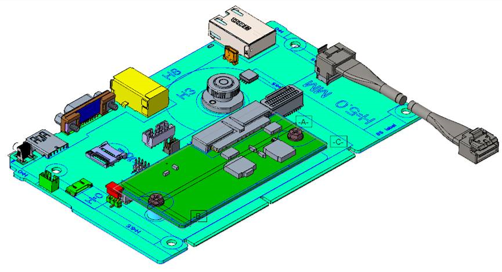
Figure 16. SR675 V3 System I/O Board
The board also has the following components:
- Root of Trust (RoT) module - an optional daughter card that implements Platform Firmware Resiliency (PFR) hardware Root of Trust (RoT) which enables the server to be NIST SP800-193 compliant. For more details about PFR, see the Security section.
- Connector to enable an additional redundant Ethernet connection to the XCC2 controller. The connector is used in conjuction with the ThinkSystem Redundant System Management Port Adapter. For details, see the Remote management section.
- MicroSD card port to enable the use of a MicroSD card for additional storage for use with the XCC2 controller. XCC2 can use the storage as a Remote Disc on Card (RDOC) device (up to 4GB of storage). It can also be used to store firmware updates (including N-1 firmware history) for ease of deployment.
Tip: Without a MicroSD card installed, the XCC2 controller will have 100MB of available RDOC storage.
Ordering information for the supported USB drive and Micro SD card are listed in the following table.
| Part number |
Feature code |
Description |
|---|---|---|
| 4X77A77065 | BNWN | ThinkSystem USB 32GB USB 3.0 Flash Drive |
| 4X77A77064 | BNWP | ThinkSystem MicroSD 32GB Class 10 Flash Memory Card |
Local management
The SR675 V3 offers a front operator panel with key LED status indicators, as shown in the following figure. Note that the Network LED only shows network activity of the installed OCP network adapter.
Most configurations support front operator ports, mounted in a slot, for local management. The ports are the following:
- USB 2.0 port with support for XClarity Mobile through a tablet or smart phone
- USB 3.1 G1 port
- External diagnostics port
- VGA port
The only configuration that does not support the front operator ports is the one with 8x double-wide GPUs and front I/O slots, since there is no physical space for the operator ports. See the Components and connectors section for the location of the front operator ports in each configuration.
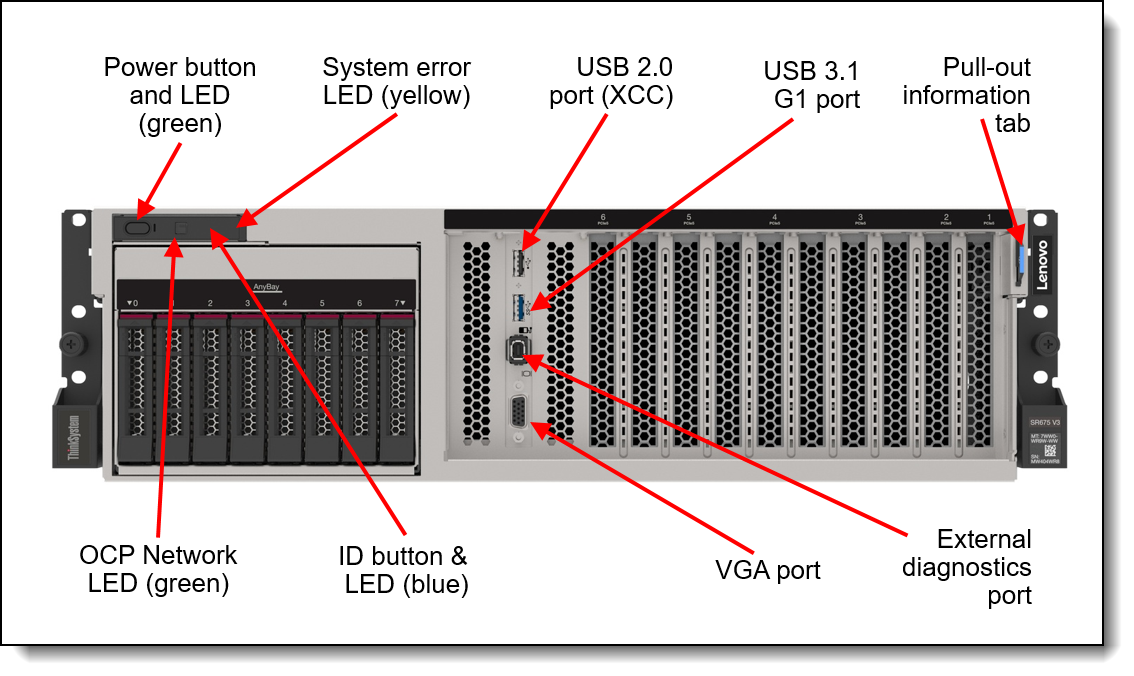
Figure 17. SR675 V3 operator controls
The front operator ports are optional. Ordering information is listed in the following table.
| Part number |
Feature code |
Description | SXM5 model |
4-DW GPU model |
8-DW GPU model Rear I/O |
8-DW GPU model Front I/O |
|---|---|---|---|---|---|---|
| CTO only | BRUD |
ThinkSystem SR675 V3 Front Video/USB/Diagnostic for 4-DW GPU model |
No | Supported | No | No |
| CTO only | BRUE |
ThinkSystem SR675 V3 Front Video/USB/Diagnostic for SXM5 and 8-DW GPU Rear IO model |
Supported | No | Supported | No |
Light path diagnostics
The server offers light path diagnostics. If an environmental condition exceeds a threshold or if a system component fails, XCC lights LEDs inside the server to help you diagnose the problem and find the failing part. The server has fault LEDs next to the following components:
- Each processor
- Each memory DIMM
- Each drive bay
- Each system fan
- Each power supply
External Diagnostics Handset
SXM5 models and 4-DW GPU model of the SR675 V3 have a port to connect an External Diagnostics Handset as shown in the following figure. The External Diagnostics Handset has the same functions as the Integrated Diagnostics Panel but has the advantages of not consuming space on the front of the server plus it can be shared amongst many servers in your data center. The handset has a magnet on the back of it to allow you to easily mount it on a convenient place on any rack cabinet.
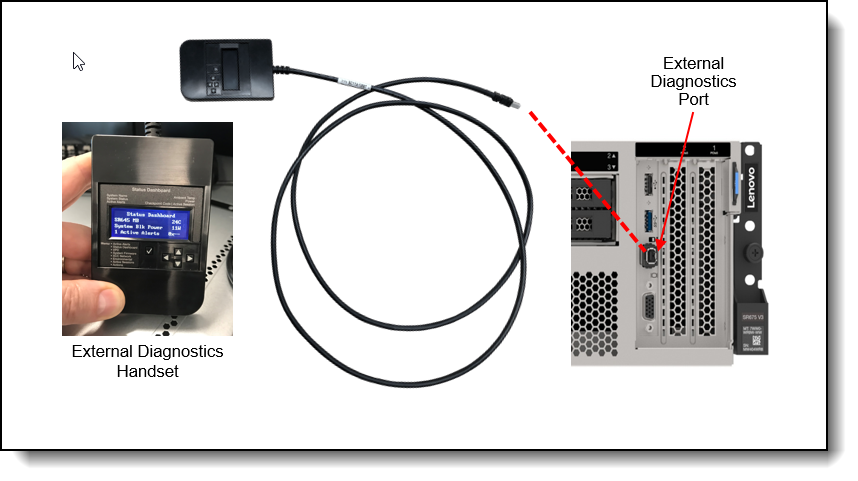
Figure 18. External Diagnostics Handset
Ordering information for the External Diagnostics Handset with is listed in the following table.
Note: The External Diagnostics Handset is not available with configurations supporting 8x double-wide GPUs (8-DW GPU model).
| Part number | Feature code | Description |
|---|---|---|
| 4TA7A64874 | BEUX | ThinkSystem External Diagnostics Handset |
The front of the server also houses an information pull-out tab (also known as the network access tag). See Figures 3 - 5 for the location. A label on the tab shows the network information (MAC address and other data) to remotely access the service processor.
System status with XClarity One Mobile
The XClarity One Mobile app includes a tethering function where you can connect your Android or iOS device to the server via USB to see the status of the server.
Download the XClarity One Mobile app from these sites:
- Google Play Store
- Apple App Store
The steps to connect the mobile device to the server are as follows:
- Enable USB Management on the server, by holding down the ID button for 3 seconds (or pressing the dedicated USB management button if one is present)
- Connect the mobile device via a USB cable to the server's USB port with the management symbol

- In iOS or Android settings, enable Personal Hotspot or USB Tethering
- Launch the Lenovo XClarity Mobile app
Once connected you can see the following information:
- Server status including error logs (read only, no login required)
- Server management functions (XClarity login credentials required)
Remote management
The server offers a dedicated RJ45 port at the rear of the server for remote management via the XClarity Controller management processor. The port supports 10/100/1000 Mbps speeds.
Remote server management is provided through industry-standard interfaces:
- Intelligent Platform Management Interface (IPMI) Version 2.0
- Simple Network Management Protocol (SNMP) Version 3 (no SET commands; no SNMP v1)
- Common Information Model (CIM-XML)
- Representational State Transfer (REST) support
- Redfish support (DMTF compliant)
- Web browser - HTML 5-based browser interface (Java and ActiveX not required) using a responsive design (content optimized for device being used - laptop, tablet, phone) with NLS support
IPMI via the Ethernet port (IPMI over LAN) is supported, however it is disabled by default. For CTO orders you can specify whether you want to the feature enabled or disabled in the factory, using the feature codes listed in the following table.
| Feature code | Description | Top Choice Express |
|---|---|---|
| B7XZ | Disable IPMI-over-LAN (default) | - |
| B7Y0 | Enable IPMI-over-LAN | - |
XCC2 Platinum
In the SR675 V3, XCC2 has the Platinum level of features built into the server. Compared to the XCC functions of ThinkSystem V2 and earlier systems, Platinum offers the same features as Enterprise and Advanced levels in ThinkSystem V2, plus additional features.
DCSC tip: Even though XCC2 Platinum is a standard feature of the SR675 V3, it does not appear in the list of feature codes for the configuration in DCSC.
XCC2 Platinum includes the following Enterprise and Advanced functions:
- Remotely viewing video with graphics resolutions up to 1600x1200 at 75 Hz with up to 23 bits per pixel, regardless of the system state
- Remotely accessing the server using the keyboard and mouse from a remote client
- International keyboard mapping support
- Syslog alerting
- Redirecting serial console via SSH
- Component replacement log (Maintenance History log)
- Access restriction (IP address blocking)
- Lenovo SED security key management
- Displaying graphics for real-time and historical power usage data and temperature
- Boot video capture and crash video capture
- Virtual console collaboration - Ability for up to 6 remote users to be log into the remote session simultaneously
- Remote console Java client
- Mapping the ISO and image files located on the local client as virtual drives for use by the server
- Mounting the remote ISO and image files via HTTPS, SFTP, CIFS, and NFS
- System utilization data and graphic view
- Single sign on with Lenovo XClarity Administrator
- Update firmware from a repository
- License for XClarity Energy Manager
Note: The SR675 V3 does not support Power capping.
XCC2 Platinum also includes the following features that are new to XCC2:
- System Guard - Monitor hardware inventory for unexpected component changes, and simply log the event or prevent booting
- Enterprise Strict Security mode - Enforces CNSA 1.0 level security
- Neighbor Group - Enables administrators to manage and synchronize configurations and firmware level across multiple servers
With XCC2 Platinum, for CTO orders, you can request that System Guard be enabled in the factory and the first configuration snapshot be recorded. To add this to an order, select feature code listed in the following table. The selection is made in the Security tab of the DCSC configurator.
| Feature code | Description | Top Choice Express |
|---|---|---|
| BUT2 | Install System Guard | - |
For more information about System Guard, see https://pubs.lenovo.com/xcc2/NN1ia_c_systemguard
Lenovo XClarity Provisioning Manager
Lenovo XClarity Provisioning Manager (LXPM) is a UEFI-based application embedded in ThinkSystem servers and accessible via the F1 key during system boot.
LXPM provides the following functions:
- Graphical UEFI Setup
- System inventory information and VPD update
- System firmware updates (UEFI and XCC)
- RAID setup wizard
- OS installation wizard (including unattended OS installation)
- Diagnostics functions
Lenovo XClarity Administrator
Lenovo XClarity Administrator is a centralized resource management solution designed to reduce complexity, speed response, and enhance the availability of Lenovo systems and solutions. It provides agent-free hardware management for ThinkSystem servers. The administration dashboard is based on HTML 5 and allows fast location of resources so tasks can be run quickly.
Because Lenovo XClarity Administrator does not require any agent software to be installed on the managed endpoints, there are no CPU cycles spent on agent execution, and no memory is used, which means that up to 1GB of RAM and 1 - 2% CPU usage is saved, compared to a typical managed system where an agent is required.
Lenovo XClarity Administrator is an optional software component for the SR675 V3. The software can be downloaded and used at no charge to discover and monitor the SR675 V3 and to manage firmware upgrades.
If software support is required for Lenovo XClarity Administrator, or premium features such as configuration management and operating system deployment are required, Lenovo XClarity Pro software subscription should be ordered. Lenovo XClarity Pro is licensed on a per managed system basis, that is, each managed Lenovo system requires a license.
The following table lists the Lenovo XClarity software license options.
| Part number | Feature code | Description |
|---|---|---|
| 00MT201 | 1339 | Lenovo XClarity Pro, per Managed Endpoint w/1 Yr SW S&S |
| 00MT202 | 1340 | Lenovo XClarity Pro, per Managed Endpoint w/3 Yr SW S&S |
| 00MT203 | 1341 | Lenovo XClarity Pro, per Managed Endpoint w/5 Yr SW S&S |
| 7S0X000HWW | SAYV | Lenovo XClarity Pro, per Managed Endpoint w/6 Yr SW S&S |
| 7S0X000JWW | SAYW | Lenovo XClarity Pro, per Managed Endpoint w/7 Yr SW S&S |
Lenovo XClarity Administrator offers the following standard features that are available at no charge:
- Auto-discovery and monitoring of Lenovo systems
- Firmware updates and compliance enforcement
- External alerts and notifications via SNMP traps, syslog remote logging, and e-mail
- Secure connections to managed endpoints
- NIST 800-131A or FIPS 140-3 compliant cryptographic standards between the management solution and managed endpoints
- Integration into existing higher-level management systems such as cloud automation and orchestration tools through REST APIs, providing extensive external visibility and control over hardware resources
- An intuitive, easy-to-use GUI
- Scripting with Windows PowerShell, providing command-line visibility and control over hardware resources
Lenovo XClarity Administrator offers the following premium features that require an optional Pro license:
- Pattern-based configuration management that allows to define configurations once and apply repeatedly without errors when deploying new servers or redeploying existing servers without disrupting the fabric
- Bare-metal deployment of operating systems and hypervisors to streamline infrastructure provisioning
For more information, refer to the Lenovo XClarity Administrator Product Guide:
http://lenovopress.com/tips1200
Lenovo XClarity Integrators
Lenovo also offers software plug-in modules, Lenovo XClarity Integrators, to manage physical infrastructure from leading external virtualization management software tools including those from Microsoft and VMware.
These integrators are offered at no charge, however if software support is required, a Lenovo XClarity Pro software subscription license should be ordered.
Lenovo XClarity Integrators offer the following additional features:
- Ability to discover, manage, and monitor Lenovo server hardware from VMware vCenter or Microsoft System Center
- Deployment of firmware updates and configuration patterns to Lenovo x86 rack servers and Flex System from the virtualization management tool
- Non-disruptive server maintenance in clustered environments that reduces workload downtime by dynamically migrating workloads from affected hosts during rolling server updates or reboots
- Greater service level uptime and assurance in clustered environments during unplanned hardware events by dynamically triggering workload migration from impacted hosts when impending hardware failures are predicted
For more information about all the available Lenovo XClarity Integrators, see the Lenovo XClarity Administrator Product Guide: https://lenovopress.com/tips1200-lenovo-xclarity-administrator
Lenovo XClarity Essentials
Lenovo offers the following XClarity Essentials software tools that can help you set up, use, and maintain the server at no additional cost:
- Lenovo Essentials OneCLI
OneCLI is a collection of server management tools that uses a command line interface program to manage firmware, hardware, and operating systems. It provides functions to collect full system health information (including health status), configure system settings, and update system firmware and drivers.
- Lenovo Essentials UpdateXpress
The UpdateXpress tool is a standalone GUI application for firmware and device driver updates that enables you to maintain your server firmware and device drivers up-to-date and help you avoid unnecessary server outages. The tool acquires and deploys individual updates and UpdateXpress System Packs (UXSPs) which are integration-tested bundles.
- Lenovo Essentials Bootable Media Creator
The Bootable Media Creator (BOMC) tool is used to create bootable media for offline firmware update.
For more information and downloads, visit the Lenovo XClarity Essentials web page:
http://support.lenovo.com/us/en/documents/LNVO-center
Lenovo XClarity Energy Manager
Lenovo XClarity Energy Manager (LXEM) is a power and temperature management solution for data centers. It is an agent-free, web-based console that enables you to monitor and manage power consumption and temperature in your data center through the management console.
LXEM is a licensed product. A single-node LXEM license is included with the XClarity Controller Platinum version. Because the Platinum version of XCC is standard in the SR675 V3, a license for XClarity Energy Manager is included.
Note: The SR675 V3 does not support the following Energy Manager functions:
- Power capping
- Policy-based management
For more information about XClarity Energy Manager, see the following resources:
- Lenovo Support page:
https://datacentersupport.lenovo.com/us/en/solutions/lnvo-lxem - User Guide for XClarity Energy Manager:
https://pubs.lenovo.com/lxem/
Lenovo Capacity Planner
Lenovo Capacity Planner is a power consumption evaluation tool that enhances data center planning by enabling IT administrators and pre-sales professionals to understand various power characteristics of racks, servers, and other devices. Capacity Planner can dynamically calculate the power consumption, current, British Thermal Unit (BTU), and volt-ampere (VA) rating at the rack level, improving the planning efficiency for large scale deployments.
For more information, refer to the Capacity Planner web page:
http://datacentersupport.lenovo.com/us/en/solutions/lnvo-lcp
Lenovo EveryScale HPC & AI Software Stack
The Lenovo EveryScale HPC & AI Software Stack combines open-source with proprietary best-of-breed Supercomputing software to provide the most consumable open-source HPC software stack embraced by all Lenovo HPC customers.
It provides a fully tested and supported, complete but customizable HPC software stack to enable the administrators and users in optimally and environmentally sustainable utilizing their Lenovo Supercomputers.
The Lenovo EveryScale HPC & AI Software Stack is built on the most widely adopted and maintained HPC community software for orchestration and management. It integrates third party components especially around programming environments and performance optimization to complement and enhance the capabilities, creating the organic umbrella in software and service to add value for our customers.
The key open-source components of the software stack are:
- Confluent Management
Confluent is Lenovo-developed open-source software designed to discover, provision, and manage HPC clusters and the nodes that comprise them. Confluent provides powerful tooling to deploy and update software and firmware to multiple nodes simultaneously, with simple and readable modern software syntax.
- SLURM Orchestration
Slurm is integrated as an open source, flexible, and modern choice to manage complex workloads for faster processing and optimal utilization of the large-scale and specialized high-performance and AI resource capabilities needed per workload provided by Lenovo systems. Lenovo provides support in partnership with SchedMD.
- LiCO Webportal
Lenovo Intelligent Computing Orchestration (LiCO) is a Lenovo-developed consolidated Graphical User Interface (GUI) for monitoring, managing and using cluster resources. The webportal provides workflows for both AI and HPC, and supports multiple AI frameworks, including TensorFlow, Caffe, Neon, and MXNet, allowing you to leverage a single cluster for diverse workload requirements.
- Energy Aware Runtime
EAR is a powerful European open-source energy management suite supporting live-optimization during the application runtime. Lenovo is collaborating with Barcelona Supercomputing Centre (BSC) and EAS4DC on the continuous development and support and offers three versions with differentiating capabilities.
For more information and the many more packages and choices, see the Lenovo HPC & AI Software Stack product guide.
Security
The server offers the following electronic security features:
- Administrator and power-on password
- Trusted Platform Module (TPM) supporting TPM 2.0 (no support for TPM 1.2)
- Optional Nationz TPM 2.0, available only in China (CTO only)
The server is NIST SP 800-147B compliant.
The SR675 V3 server also includes the following physical security features:
- Chassis intrusion switch
The following table lists the security features for the SR675 V3.
| Feature code | Description |
|---|---|
| BFNU | ThinkSystem SR670 V2/ SR675 V3 Intrusion Cable |
Platform Firmware Resiliency - Lenovo ThinkShield
Lenovo's ThinkShield Security is a transparent and comprehensive approach to security that extends to all dimensions of our data center products: from development, to supply chain, and through the entire product lifecycle.
The ThinkSystem SR675 V3 includes Platform Firmware Resiliency (PFR) hardware Root of Trust (RoT) which enables the system to be NIST SP800-193 compliant. This offering further enhances key platform subsystem protections against unauthorized firmware updates and corruption, to restore firmware to an integral state, and to closely monitor firmware for possible compromise from cyber-attacks.
PFR operates upon the following server components:
- UEFI image – the low-level server firmware that connects the operating system to the server hardware
- XCC image – the management “engine” software that controls and reports on the server status separate from the server operating system
- FPGA image – the code that runs the server’s lowest level hardware controller on the motherboard
The Lenovo Platform Root of Trust Hardware performs the following three main functions:
- Detection – Measures the firmware and updates for authenticity
- Recovery – Recovers a corrupted image to a known-safe image
- Protection – Monitors the system to ensure the known-good firmware is not maliciously written
These enhanced protection capabilities are implemented using a dedicated, discrete security processor whose implementation has been rigorously validated by leading third-party security firms. Security evaluation results and design details are available for customer review – providing unprecedented transparency and assurance.
The SR675 V3 includes support for Secure Boot, a UEFI firmware security feature developed by the UEFI Consortium that ensures only immutable and signed software are loaded during the boot time. The use of Secure Boot helps prevent malicious code from being loaded and helps prevent attacks, such as the installation of rootkits. Lenovo offers the capability to enable secure boot in the factory, to ensure end-to-end protection.
The following table lists the relevant feature code(s).
| Part number | Feature code | Description | Top Choice Express | Purpose |
|---|---|---|---|---|
| CTO only | BPKQ | TPM 2.0 with Secure Boot | - | Configure the system in the factory with Secure Boot enabled. |
Security standards
The SR675 V3 supports the following security standards and capabilities:
- Industry Standard Security Capabilities
- AMD CPU Enablement
- AES-NI (Advanced Encryption Standard New Instructions)
- GMET (Guest Mode Execute Trap)
- Hardware-based side channel attack resilience enhancements
- NX (No eXecute)
- PSB (Platform Secure Boot)
- Shadow Stack
- SEV (Secure Encrypted Virtualization)
- SEV-ES (Encrypted State register encryption)
- SEV-SNP (Secure Nested Paging)
- TSME (Transparent Secure Memory Encryption)
- SVM (Secure Virtual Machine)
- UMIP (User Mode Instruction Prevention)
- Microsoft Windows Security Enablement
- Credential Guard
- Device Guard
- Host Guardian Service
- TPM 2.0 (Trusted Platform Module 2.0)
- UEFI (Unified Extensible Firmware Interface) Forum Secure Boot
- AMD CPU Enablement
- Hardware Root of Trust and Security
- Independent security subsystem providing platform-wide NIST SP800-193 compliant Platform Firmware Resilience (PFR)
- Host domain RoT supplemented by AMD Platform Secure Boot (PSB)
- Management domain RoT provided by the Secure Boot feature of the AST2600 Baseboard Management Controller (BMC)
- Platform Security
- Boot and run-time firmware integrity monitoring with rollback to known-good firmware (e.g., “self-healing”)
- Non-volatile storage bus security monitoring and filtering
- Resilient firmware implementation, such as to detect and defeat unauthorized flash writes or SMM (System Management Mode) memory incursions
- Patented IPMI KCS channel privileged access authorization (USPTO Patent# 11,256,810)
- Host and management domain authorization, including integration with CyberArk for enterprise password management
- KMIP (Key Management Interoperability Protocol) compliant, including support for IBM SKLM and Thales KeySecure
- Reduced “out of box” attack surface
- Configurable network services
- FIPS 140-3 (in progress) validated cryptography for XCC
- CNSA Suite 1.0 Quantum-resistant cryptography for XCC
For more information on platform security, see the paper “How to Harden the Security of your ThinkSystem Server and Management Applications” available from https://lenovopress.com/lp1260-how-to-harden-the-security-of-your-thinksystem-server.
- Standards Compliance and/or Support
- NIST SP800-131A rev 2 “Transitioning the Use of Cryptographic Algorithms and Key Lengths”
- NIST SP800-147B “BIOS Protection Guidelines for Servers”
- NIST SP800-193 “Platform Firmware Resiliency Guidelines”
- ISO/IEC 11889 “Trusted Platform Module Library”
- Common Criteria TCG Protection Profile for “PC Client Specific TPM 2.0”
- European Union Commission Regulation 2019/424 (“ErP Lot 9”) “Ecodesign Requirements for Servers and Data Storage Products” Secure Data Deletion
- Optional FIPS 140-2 validated Self-Encrypting Disks (SEDs) with external KMIP-based key management
- Product and Supply Chain Security
- Suppliers validated through Lenovo’s Trusted Supplier Program
- Developed in accordance with Lenovo’s Secure Development Lifecycle (LSDL)
- Continuous firmware security validation through automated testing, including static code analysis, dynamic network and web vulnerability testing, software composition analysis, and subsystem-specific testing, such as UEFI security configuration validation
- Ongoing security reviews by US-based security experts, with attestation letters available from our third-party security partners
- Digitally signed firmware, stored and built on US-based infrastructure and signed on US-based Hardware Security Modules (HSMs)
- TAA (Trade Agreements Act) compliant manufacturing, by default in Mexico for North American markets with additional US and EU manufacturing options
- US 2019 NDAA (National Defense Authorization Act) Section 889 compliant
Rack installation
The following table lists the rack installation options that are available for the SR675 V3.
| Option | Feature Code | Description |
|---|---|---|
| Rail Kits | ||
| 4M17A69408 | BFTL | ThinkSystem SR670 V2/ SR675 V3 Toolless Slide Rail (contains left & right rails and a screw kit) |
| CTO only | C3KA | ThinkSystem SR670 V2/SR675 V3 Heavy Systems Toolless Slide Rail Kit |
The Slide Rail has the following specifications:
- Rail travel distance is 920 mm (36.22 inches)
- Can be installed in both square hole and round hole rack
- Rack cabinet requirements:
- Minimum depth of 150 mm (5.9 inches) between the front mounting flanges and inside of the front door.
- Minimum depth of 125 mm (4.9 inches) between the chassis rear wall and inside of the rear door.
- The maximum distance between the front and rear mounting flanges is 813 mm (32 inches).
- If you want to install the rails and a 0U PDU into the same rack, the rack must be at least 1185mm (46.7 inches) deep
The following figure shows the SR675 V3 Toolless Slide Rail.
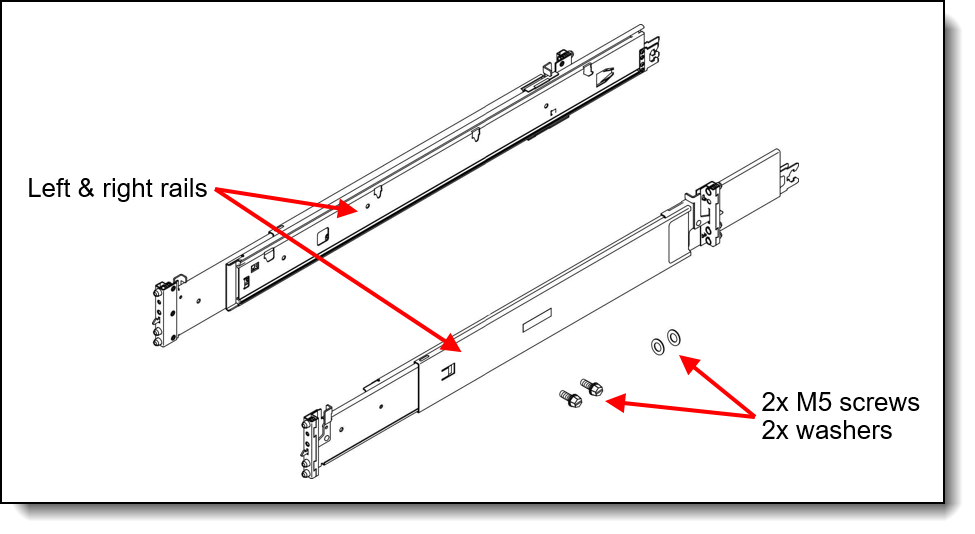
Figure 19. ThinkSystem SR675 V3 Toolless Slide Rail contents
Operating system support
The SR675 V3 with 5th Gen AMD EPYC processors supports the following operating systems:
- Microsoft Windows Server 2019
- Microsoft Windows Server 2022
- Microsoft Windows Server 2025
- Red Hat Enterprise Linux 8.10
- Red Hat Enterprise Linux 9.4
- Red Hat Enterprise Linux 9.5
- Red Hat Enterprise Linux 9.6
- Red Hat Enterprise Linux 9.8
- Red Hat Enterprise Linux 10.0
- Red Hat Enterprise Linux 10.2
- SUSE Linux Enterprise Server 15 SP6
- SUSE Linux Enterprise Server 15 SP7
- SUSE Linux Enterprise Server 16
- Ubuntu 22.04 LTS 64-bit
- Ubuntu 24.04 LTS 64-bit
- Ubuntu 26.04 LTS 64-bit
- VMware ESXi 8.0 U3
- VMware ESXi 9.0
- VMware ESXi 9.1
The SR675 V3 with 4th Gen AMD EPYC processors supports the following operating systems:
- Microsoft Windows Server 2019
- Microsoft Windows Server 2022
- Microsoft Windows Server 2025
- Red Hat Enterprise Linux 8.6
- Red Hat Enterprise Linux 8.7
- Red Hat Enterprise Linux 8.8
- Red Hat Enterprise Linux 8.9
- Red Hat Enterprise Linux 8.10
- Red Hat Enterprise Linux 9.0
- Red Hat Enterprise Linux 9.1
- Red Hat Enterprise Linux 9.2
- Red Hat Enterprise Linux 9.3
- Red Hat Enterprise Linux 9.4
- Red Hat Enterprise Linux 9.5
- Red Hat Enterprise Linux 9.6
- Red Hat Enterprise Linux 9.8
- Red Hat Enterprise Linux 10.0
- Red Hat Enterprise Linux 10.2
- SUSE Linux Enterprise Server 15 SP4
- SUSE Linux Enterprise Server 15 SP5
- SUSE Linux Enterprise Server 15 SP6
- SUSE Linux Enterprise Server 15 SP7
- SUSE Linux Enterprise Server 15 Xen SP4
- SUSE Linux Enterprise Server 15 Xen SP5
- SUSE Linux Enterprise Server 16
- Ubuntu 20.04 LTS 64-bit
- Ubuntu 22.04 LTS 64-bit
- Ubuntu 24.04 LTS 64-bit
- Ubuntu 26.04 LTS 64-bit
- VMware ESXi 7.0 U3
- VMware ESXi 8.0
- VMware ESXi 8.0 U2
- VMware ESXi 8.0 U3
- VMware ESXi 9.0
- VMware ESXi 9.1
The SR675 V3 node is also tested with Rocky Linux and Alma Linux.
For a complete list of supported, certified and tested operating systems, plus additional details and links to relevant web sites, see the Operating System Interoperability Guide:
- 5th Gen AMD EPYC: https://lenovopress.lenovo.com/osig#servers=sr675-v3-5th-gen-epyc-7d9q-7d9r&support=all
- 4th Gen AMD EPYC: https://lenovopress.lenovo.com/osig#servers=sr675-v3-4th-gen-epyc-7d9q-7d9r&support=all
For configure-to-order configurations, the SR675 V3 can be preloaded with VMware ESXi. Ordering information is listed in the following table.
| Part number | Feature code | Description | Top Choice Express |
|---|---|---|---|
| CTO only | BMEY | VMware ESXi 7.0 U3 (Factory Installed) | - |
| CTO only | BQ8S | VMware ESXi 8.0 U1 (Factory Installed) | - |
| CTO only | BZ97 | VMware ESXi 8.0 U3 (Factory Installed) | - |
| CTO only | C91V | VMware ESXi 9.0 (Factory Installed) | - |
| CTO only | CHGN | VMware ESXi 9.1 (Factory Installed) | - |
Configuration rule:
- An ESXi preload cannot be selected if the configuration includes an NVIDIA GPU (ESXi preload cannot include the NVIDIA driver)
You can download supported VMware vSphere hypervisor images from the following web page and install it using the instructions provided:
https://vmware.lenovo.com/content/custom_iso/
Physical and electrical specifications
The SR675 V3 has the following overall physical dimensions, excluding components that extend outside the standard chassis, such as EIA flanges, front security bezel (if any), and power supply handles:
- Width: 448 mm (17.6 inches)
- Height: 131 mm (5.2 inches) (3U)
- Depth: 892 mm (35.1 inches)
The following table lists the detailed dimensions. See the figure below for the definition of each dimension.
| Dimension | Description |
|---|---|
| 483 mm | Xa = Width, to the outsides of the front EIA flanges |
| 434.3 mm | Xb = Width, to the rack rail mating surfaces |
| 447.7 mm | Xc = Width, to the outer most chassis body feature |
| 131 mm | Ya = Height, from the bottom of chassis to the top of the chassis |
| 825 mm | Za = Depth, from the rack flange mating surface to the rearmost I/O port surface |
| 856 mm | Zb = Depth, from the rack flange mating surface to the rearmost feature of the chassis body |
|
884 mm (1800W PSU) |
Zc = Depth, from the rack flange mating surface to the rearmost feature such as power supply handle |
| 36 mm | Zd = Depth, from the forwardmost feature on front of EIA flange to the rack flange mating surface |
| 39 mm | Ze = Depth, from the front of security bezel (if applicable) or forwardmost feature to the rack flange mating surface |
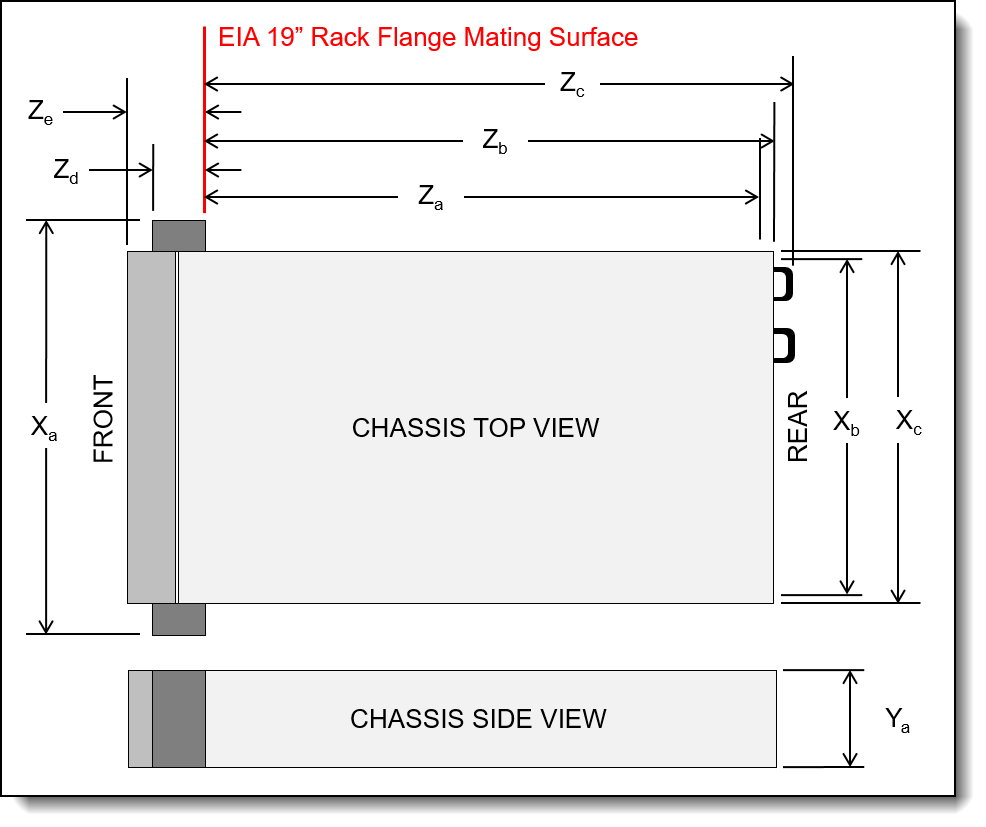
Figure 20. Server dimensions
The shipping (cardboard packaging) dimensions of the SR675 V3 are as follows:
- Width: 590 mm (23.2 inches)
- Height: 329 mm (13.0 inches)
- Depth: 1159 mm (45.6 inches)
The server has the following approximate weight, dependent on the configuration selected:
- SXM5 model: 39.5 kg (87 lb)
- 4-DW GPU model: 36.7 kg (81 lb)
- 8-DW GPU model: 39 kg (86 lb)
Electrical specifications for AC input power supplies:
- Input voltage:
- 200 to 240 (nominal) Vac, 50 Hz or 60 Hz
- 180 to 300 Vdc (China only)
- Inlet current:
- 1800W power supply: 10 A
- 2400W power supply: 14 A
- 2600W power supply: 13.2 A
Operating environment
The SR675 V3 server complies with ASHRAE Class A2 specifications. System performance may be impacted when operating temperature is outside ASHRAE A2 specification.
Depending on the hardware configuration, the SR675 V3 server also complies with ASHRAE Class H1 specification. System performance may be impacted when operating temperature is outside ASHRAE H1 specification.
Configuration restrictions
- With NVIDIA HGX H100 80GB 700W 4-GPU Board (feature BQQV) installed, if the ambient temperature is above 30°C, the GPUs may be instructed by the system to enter an emergency power reduction state whereby GPU performance will be impacted.
- Keep ambient temperature to 30°C or lower when one or more of the following components are installed.
- NVIDIA H100 PCIe GPU adapter
- NVIDIA ConnectX-7 dual-port NDR200 or single-port NDR400 with Active Optical Cable installed in the PCIe slot 15, 16, 20, or 21
Temperature and humidity
The server is supported in the following environment:
- Air temperature:
- Operating:
- ASHRAE Class A2: 10°C to 35°C (50°F to 95°F); the maximum ambient temperature decreases by 1°C for every 300 m (984 ft) increase in altitude above 900 m (2,953 ft).
- ASHRAE Class H1: 5 °C to 25 °C (41 °F to 77 °F); Decrease the maximum ambient temperature by 1°C for every 500 m (1640 ft) increase in altitude above 900 m (2,953 ft).
- Server off: 5°C to 45°C (41°F to 113°F)
- Shipment/storage: -40°C to 60°C (-40°F to 140°F)
- Operating:
- Maximum altitude: 3,050 m (10,000 ft)
- Relative Humidity (non-condensing):
- Operating:
- ASHRAE Class A2: 8% to 80%; maximum dew point: 21°C (70°F)
- ASHRAE Class H1: 8% to 80%; Maximum dew point: 17°C (63°F)
- Shipment/storage: 8% to 90%
- Operating:
Heat output
The server generates the following heat:
- Heat/thermal output:
- 2x 1800W power supplies: 8164 BTU/hr, 2394 W
- 4x 1800W power supplies: 16327 BTU/hr, 4788 W
- 2x 2400W power supplies: 8802 BTU/hr, 2580 W
- 4x 2400W power supplies: 17609 BTU/hr, 5161 W
- 2x 2600W power supplies: 10656 BTU/hr, 3128 W
- 4x 2600W power supplies: 21313 BTU/hr, 6250 W
Acoustical noise emissions
The server has the following acoustic noise emissions declaration:
- Sound power level (LWAd):
- Idling: 8.4 Bel (GPU Typical), 8.4 Bel (GPU Max)
- Operating: 8.4 Bel (GPU Typical), 8.6 Bel (GPU Max)
- Sound pressure level (LpAm):
- Idling: 68 dBA (GPU Typical), 68 dBA (GPU Max)
- Operating: 68 dBA (GPU Typical), 71.3 dBA (GPU Max)
Notes:
- These sound levels were measured in controlled acoustical environments according to procedures specified by ISO7779 and are reported in accordance with ISO 9296.
- The declared acoustic sound levels are based on the following configurations, which may change slightly depending on configuration/conditions.
- GPU Max configuration: 2x 360W processors, 4x NVIDIA H100 80 GB GPU adapters, 24x 128 GB 3DS RDIMMs, 8x 2.5-inch NVMe SSDs or 6x E1.S 5.9mm NVMe SSDs, 1x ThinkSystem Broadcom 57508 100GbE QSFP56 2-Port OCP Ethernet Adapter, 6x 1P NDR (NVIDIA ConnectX-7 card)
- The declared acoustic noise levels may increase greatly, if high-power components are installed such as high-power NICs, high-power processors and GPUs.
- Government regulations (such as those prescribed by OSHA or European Community Directives) may govern noise level exposure in the workplace and may apply to you and your server installation. The actual sound pressure levels in your installation depend upon a variety of factors, including the number of racks in the installation; the size, materials, and configuration of the room; the noise levels from other equipment; the room ambient temperature, and employee's location in relation to the equipment. Further, compliance with such government regulations depends on a variety of additional factors, including the duration of employees' exposure and whether employees wear hearing protection. Lenovo recommends that you consult with qualified experts in this field to determine whether you are in compliance with the applicable regulations.
Shock and vibration
The server has the following vibration and shock limits:
- Vibration:
- Operating: 0.21 G rms at 5 Hz to 500 Hz for 15 minutes across 3 axes
- Non-operating: 1.04 G rms at 2 Hz to 200 Hz for 15 minutes across 6 surfaces
- Shock:
- Operating: 15 G for 3 milliseconds in each direction (positive and negative X, Y, and Z axes)
- Non-operating:
- 23 kg - 31 kg: 35 G for 152 in./sec velocity change across 6 surfaces
- 32 kg - 68 kg: 35 G for 136 in./sec velocity change across 6 surfaces
Particulate contamination
Airborne particulates (including metal flakes or particles) and reactive gases acting alone or in combination with other environmental factors such as humidity or temperature might damage the system that might cause the system to malfunction or stop working altogether.
The following specifications indicate the limits of particulates that the system can tolerate:
- Reactive gases:
- The copper reactivity level shall be less than 200 Angstroms per month (Å/month)
- The silver reactivity level shall be less than 200 Å/month
- Airborne particulates:
- The room air should be continuously filtered with MERV 8 filters.
- Air entering a data center should be filtered with MERV 11 or preferably MERV 13 filters.
- The deliquescent relative humidity of the particulate contamination should be more than 60% RH
- Environment must be free of zinc whiskers
For additional information, see the Specifications section of the documentation for the server, available from the Lenovo Documents site, https://pubs.lenovo.com/
Warranty upgrades and post-warranty support
The SR675 V3 has a 1-year or 3-year warranty based on the machine type of the system:
- 7D9Q - 1 year warranty
- 7D9R - 3 year warranty
Our global network of regional support centers offers consistent, local-language support enabling you to vary response times and level of service* to match the criticality of your support needs:
- Standard Next Business Day – Best choice for non-essential systems requiring simple maintenance.
- Premier Next Business Day – Best choice for essential systems requiring technical expertise from senior-level Lenovo engineers.
- Premier 24x7 4-Hour Response – Best choice for systems where maximum uptime is critical.
For more information, consult the brochure Lenovo Operational Support Services for Data Centers Services.
GPU-related onsite support requests for the SR675 V3: Onsite Service Level targets (e.g. Next Business Day or 4 hours) normally apply after problem determination has been completed; however, these services levels do not apply for GPU-related service requests on the SR675 V3. Where a service agreement is in place, onsite service levels for GPU-related issues will be provided on a commercially reasonable endeavor's basis where applicable. Where customers require higher service levels for GPUs, purchasing onsite spare parts may improve target response times. For more information, see the Lenovo ISG Services Agreement.
* Some service levels may not be available in all markets. Contact your sales representative for more information.
Services
Lenovo Data Center Services empower you at every stage of your IT lifecycle. From expert advisory and strategic planning to seamless deployment and ongoing support, we ensure your infrastructure is built for success. Our comprehensive services accelerate time to value, minimize downtime, and free your IT staff to focus on driving innovation and business growth.
Note: Some service options may not be available in all markets or regions. For more information, go to https://lenovolocator.com/. For information about Lenovo service upgrade offerings that are available in your region, contact your local Lenovo sales representative or business partner.
In this section:
- Lenovo Advisory Services
- Lenovo Plan & Design Services
- Lenovo Deployment, Migration, and Configuration Services
- Lenovo Support Services
- Lenovo Managed Services
- Lenovo Sustainability Services
Lenovo Advisory Services
Lenovo Advisory Services simplify the planning process, enabling customers to build future-proofed strategies in as little as six weeks. Consultants provide guidance on projects including VM migration, storage, backup and recovery, and cost management to accelerate time to value, improve cost efficiency, and build a flexibly scalable foundation.
- Assessment Services
An Assessment helps solve your IT challenges through an onsite, multi-day session with a Lenovo technology expert. We perform a tools-based assessment which provides a comprehensive and thorough review of a company's environment and technology systems. In addition to the technology based functional requirements, the consultant also discusses and records the non-functional business requirements, challenges, and constraints. Assessments help organizations like yours, no matter how large or small, get a better return on your IT investment and overcome challenges in the ever-changing technology landscape.
- Design Services
Professional Services consultants perform infrastructure design and implementation planning to support your strategy. The high-level architectures provided by the assessment service are turned into low level designs and wiring diagrams, which are reviewed and approved prior to implementation. The implementation plan will demonstrate an outcome-based proposal to provide business capabilities through infrastructure with a risk-mitigated project plan.
Lenovo Plan & Design Services
Unlock faster time to market with our tailored, strategic design workshops to align solution approaches with your business goals and technical requirements. Leverage our deep solution expertise and end-to-end delivery partnership to meet your goals efficiently and effectively.
Lenovo Deployment, Migration, and Configuration Services
Optimize your IT operations by shifting labor-intensive functions to Lenovo's skilled technicians for seamless on-site or remote deployment, configuration, and migration. Enjoy peace of mind, faster time to value, and comprehensive knowledge sharing with your IT staff, backed by our best-practice methodology.
- Deployment Services for Storage and ThinkAgile
A comprehensive range of remote and onsite options tailored specifically for your business needs to ensure your storage and ThinkAgile hardware are fully operational from the start.
- Hardware Installation Services
A full-range, comprehensive setup for your hardware, including unpacking, inspecting, and positioning components to ensure your equipment is operational and error-free for the most seamless and efficient installation experience, so you can quickly benefit from your investments.
- DM/DG File Migration Services
Take the burden of file migration from your IT’s shoulders. Our experts will align your requirements and business objectives to the migration plans while coordinating with your team to plan and safely execute the data migration to your storage platforms.
- DM/DG/DE Health Check Services
Our experts perform proactive checks of your Firmware and system health to ensure your machines are operating at peak and optimal efficiency to maximize up-time, avoid system failures, ensure the security of IT solutions and simplify maintenance.
- Factory Integrated Services
A suite of value-added offerings provided during the manufacturing phase of a server or storage system that reduces time to value. These services aim at improving your hardware deployment experience and enhance the quality of a standard configuration before it arrives at your facility.
Lenovo Support Services
In addition to response time options for hardware parts, repairs, and labor, Lenovo offers a wide array of additional support services to ensure your business is positioned for success and longevity. Our goal is to reduce your capital outlays, mitigate your IT risks, and accelerate your time to productivity.
Our commitment to ensuring the fastest, most seamless resolution times for mission-critical systems that require immediate attention to ensure minimal downtime and risk for your business. This service is only available for machines under the Premier 4-Hour Response SLA.
- Premier Support for Data Centers
Your direct line to the solution that promises the best, most comprehensive level of support to help you fully unlock the potential of your data center.
- Premier Support Plus (PSP) for Servers 24x7 4-Hour Response
Helping customers reduce unplanned downtime by moving from reactive support to proactive and preventative care
- Premier Support Plus (PSP) for Storage 24x7 4-Hour Response
Helping storage customers reduce unplanned downtime by moving from reactive support to proactive and preventative care
- Committed Service Repair (CSR)
Our commitment to ensuring the fastest, most seamless resolution times for mission-critical systems that require immediate attention to ensure minimal downtime and risk for your business. This service is only available for machines under the Premier 4-Hour Response SLA.
- Multivendor Support Services (MVS)
Your single point of accountability for resolution support across vast range of leading Server, Storage, and Networking OEMs, allowing you to manage all your supported infrastructure devices seamlessly from a single source.
- Keep Your Drive (KYD)
Protect sensitive data and maintain compliance with corporate retention and disposal policies to ensure your data is always under your control, regardless of the number of drives that are installed in your Lenovo server.
- Technical Account Manager (TAM)
Your single point of contact to expedite service requests, provide status updates, and furnish reports to track incidents over time, ensuring smooth operations and optimized performance as your business grows.
- Enterprise Software Support (ESS)
Gain comprehensive, single-source, and global support for a wide range of server operating systems and Microsoft server applications.
For more information, consult the brochure Lenovo Operational Support Services for Data Centers.
Lenovo Managed Services
Achieve peak efficiency, high security, and minimal disruption with Lenovo's always-on Managed Services. Our real-time monitoring, 24x7 incident response, and problem resolution ensure your infrastructure operates seamlessly. With quarterly health checks for ongoing optimization and innovation, Lenovo's remote active monitoring boosts end-user experience and productivity by keeping your data center's hardware performing at its best.
Lenovo Managed Services provides continuous 24x7 remote monitoring (plus 24x7 call center availability) and proactive management of your data center using state-of-the-art tools, systems, and practices by a team of highly skilled and experienced Lenovo services professionals.
Quarterly reviews check error logs, verify firmware & OS device driver levels, and software as needed. We’ll also maintain records of latest patches, critical updates, and firmware levels, to ensure you systems are providing business value through optimized performance.
Lenovo Sustainability Services
- Asset Recovery Services
Lenovo Asset Recovery Services (ARS) provides a secure, seamless solution for managing end-of-life IT assets, ensuring data is safely sanitized while contributing to a more circular IT lifecycle. By maximizing the reuse or responsible recycling of devices, ARS helps businesses meet sustainability goals while recovering potential value from their retired equipment. For more information, see the Asset Recovery Services offering page.
- CO2 Offset Services
Lenovo’s CO2 Offset Services offer a simple and transparent way for businesses to take tangible action on their IT footprint. By integrating CO2 offsets directly into device purchases, customers can easily support verified climate projects and track their contributions, making meaningful progress toward their sustainability goals without added complexity.
- Lenovo Certified Refurbished
Lenovo Certified Refurbished offers a cost-effective way to support IT circularity without compromising on quality and performance. Each device undergoes rigorous testing and certification, ensuring reliable performance and extending its lifecycle. With Lenovo’s trusted certification, you gain peace of mind while making a more sustainable IT choice.
Lenovo TruScale
Lenovo TruScale XaaS is your set of flexible IT services that makes everything easier. Streamline IT procurement, simplify infrastructure and device management, and pay only for what you use – so your business is free to grow and go anywhere.
Lenovo TruScale is the unified solution that gives you simplified access to:
- The industry’s broadest portfolio – from pocket to cloud – all delivered as a service
- A single-contract framework for full visibility and accountability
- The global scale to rapidly and securely build teams from anywhere
- Flexible fixed and metered pay-as-you-go models with minimal upfront cost
- The growth-driving combination of hardware, software, infrastructure, and solutions – all from one single provider with one point of accountability.
For information about Lenovo TruScale offerings that are available in your region, contact your local Lenovo sales representative or business partner.
Regulatory compliance
The SR675 V3 conforms to the following standards:
- ANSI/UL 62368-1
- IEC 62368-1 (CB Certificate and CB Test Report)
- CSA C22.2 No. 62368-1
- Argentina IEC 60950-1
- Mexico NOM-019
- India BIS 13252 (Part 1)
- Germany GS
- Brazil INMETRO
- South Africa NRCS LOA
- Ukraine UkrCEPRO
- Morocco CMIM Certification (CM)
- Russia, Belorussia and Kazakhstan, TP EAC 037/2016 (for RoHS)
- Russia, Belorussia and Kazakhstan, EAC: TP TC 004/2011 (for Safety); TP TC 020/2011 (for EMC)
- CE, UKCA Mark (EN55032 Class A, EN62368-1, EN55024, EN55035, EN61000-3-2, EN61000-3-3, (EU) 2019/424, and EN IEC 63000 (RoHS))
- FCC - Verified to comply with Part 15 of the FCC Rules, Class A
- Canada ICES-003, issue 7, Class A
- CISPR 32, Class A, CISPR 35
- Korea KN32, Class A, KN35
- Japan VCCI, Class A
- Taiwan BSMI CNS15936, Class A; CNS15598-1; Section 5 of CNS15663
- Australia/New Zealand AS/NZS CISPR 32, Class A; AS/NZS 62368.1
- UL Green Guard, UL2819
- Energy Star 4.0
- EPEAT (NSF/ ANSI 426) Bronze
- Japanese Energy-Saving Act
- EU2019/424 Energy Related Product (ErP Lot9)
- China CCC certificate, GB17625.1; GB4943.1; GB/T9254
- China CECP certificate, CQC3135
- China CELP certificate, HJ 2507-2011
External drive enclosures
The server supports attachment to external drive enclosures using a RAID controller with external ports or a SAS host bus adapter. Adapters supported by the server are listed in the SAS adapters for external storage section.
Note: Information provided in this section is for ordering reference purposes only. For the operating system and adapter support details, refer to the interoperability matrix for a particular storage enclosure that can be found on the Lenovo Data Center Support web site:
http://datacentersupport.lenovo.com
| Model | Description |
|---|---|
| 4587HC1 | Lenovo Storage D1212 Disk Expansion Enclosure (2U enclosure with 12x LFF drive bays) |
| 4587HC2 | Lenovo Storage D1224 Disk Expansion Enclosure (2U enclosure with 24x SFF drive bays) |
| 6413HC1 | Lenovo Storage D3284 High Density Expansion Enclosure (5U enclosure with 84x LFF drive bays) |
| 7DAHCTO1WW | Lenovo ThinkSystem D4390 Direct Attached Storage (4U enclosure with 90x LFF drive bays) |
For details about supported drives, adapters, and cables, see the following Lenovo Press Product Guides:
- Lenovo Storage D1212 and D1224
http://lenovopress.lenovo.com/lp0512 - Lenovo Storage D3284
http://lenovopress.lenovo.com/lp0513 - Lenovo ThinkSystem D4390
https://lenovopress.lenovo.com/lp1681
External storage systems
Lenovo offers the ThinkSystem DE Series, ThinkSystem DG Series, ThinkSystem DM Series and ThinkSystem DS Series external storage systems for high-performance storage. See the DE Series, DG Series and DM Series product guides for specific controller models, expansion enclosures and configuration options:
- ThinkSystem DE Series Storage
https://lenovopress.com/storage/thinksystem/de-series#rt=product-guide - ThinkSystem DS Series Storage
https://lenovopress.lenovo.com/storage/thinksystem/ds-series - ThinkSystem DM Series Storage
https://lenovopress.com/storage/thinksystem/dm-series#rt=product-guide - ThinkSystem DG Series Storage
https://lenovopress.com/storage/thinksystem/dg-series#rt=product-guide
External backup units
The server supports both USB-attached RDX backup units and SAS-attached tape drives.
The following table lists the available external SAS tape backup options.
Tip: Verify the end-to-end support of an IBM tape backup solution through the IBM System Storage Interoperation Center (SSIC): http://www.ibm.com/systems/support/storage/ssic
| Part number | Description |
|---|---|
| External SAS tape backup drives | |
| 6160S6E | IBM TS2260 Tape Drive Model H6S |
| 6160S7E | IBM TS2270 Tape Drive Model H7S |
| 6160S8E | IBM TS2280 Tape Drive Model H8S |
| 6160S9E | IBM TS2290 Tape Drive Model H9S |
| External SAS tape backup autoloaders | |
| 6171S6R | IBM TS2900 Tape Autoloader w/LTO6 HH SAS |
| 6171S7R | IBM TS2900 Tape Autoloader w/LTO7 HH SAS |
| 6171S8R | IBM TS2900 Tape Autoloader w/LTO8 HH SAS |
| 6171S9R | IBM TS2900 Tape Autoloader w/LTO9 HH SAS |
| External tape backup libraries | |
| 6741A1F | IBM TS4300 3U Tape Library Base Unit |
| 6741B1F | IBM TS4300 3U Tape Library Base Unit - Max 48U |
| 6741A3F | TS4300 Tape Library Expansion Unit |
| 6741B3F | IBM TS4300 3U Tape Library Expansion Unit - Max 48U |
| SAS backup drives for TS4300 Tape Library | |
| 01KP934 | LTO 6 HH SAS Drive |
| 01KP937 | LTO 7 HH SAS Drive |
| 01KP953 | LTO 8 HH SAS Drive |
| 02JH836 | LTO 9 HH SAS Drive |
For more information, see the list of Product Guides in the Backup units category:
https://lenovopress.com/servers/options/backup
The following table lists the external RDX backup options available.
| Part number | Feature code | Description |
|---|---|---|
| External RDX docks | ||
| 4T27A10725 | B32R | ThinkSystem RDX External USB 3.0 Dock (No cartridge included with the drive) |
| Cartridges | ||
| 7TP7A01601 | AVF8 | ThinkSystem RDX 500GB Cartridge |
| 7TP7A01602 | AVF1 | ThinkSystem RDX 1TB Cartridge |
| 7TP7A01603 | AVF0 | ThinkSystem RDX 2TB Cartridge |
| 7TP7A04318 | AXD1 | ThinkSystem RDX 4TB Cartridge |
For more information, see the Lenovo RDX USB 3.0 Disk Backup Solution product guide:
https://lenovopress.com/tips0894-rdx-usb-30
Uninterruptible power supply units
The following table lists the uninterruptible power supply (UPS) units that are offered by Lenovo.
| Part number | Description |
|---|---|
| Rack-mounted or tower UPS units - 200-240VAC | |
| 7DD5A002WW | RT1.5kVA 2U Rack or Tower UPS-G2 (200-240VAC) |
| 55941KX | RT1.5kVA 2U Rack or Tower UPS (200-240VAC) |
| 55942KX | RT2.2kVA 2U Rack or Tower UPS (200-240VAC) |
| 7DD5A005WW | RT3kVA 2U Rack or Tower UPS-G2 (200-240VAC) |
| 55943KX | RT3kVA 2U Rack or Tower UPS (200-240VAC) |
| 7DD5A007WW | RT5kVA 3U Rack or Tower UPS-G2 (200-240VAC) |
| 55945KX | RT5kVA 3U Rack or Tower UPS (200-240VAC) |
| 7DD5A008WW | RT6kVA 3U Rack or Tower UPS-G2 (200-240VAC) |
| 55946KX | RT6kVA 3U Rack or Tower UPS (200-240VAC) |
| 55948KX | RT8kVA 6U Rack or Tower UPS (200-240VAC) |
| 7DD5A00AWW | RT11kVA 6U Rack or Tower UPS-G2 (200-240VAC) |
| 55949KX | RT11kVA 6U Rack or Tower UPS (200-240VAC) |
| 55943KT† | ThinkSystem RT3kVA 2U Standard UPS (200-230VAC) (2x C13 10A, 2x GB 10A, 1x C19 16A outlets) |
| 55943LT† | ThinkSystem RT3kVA 2U Long Backup UPS (200-230VAC) (2x C13 10A, 2x GB 10A, 1x C19 16A outlets) |
| 55946KT† | ThinkSystem RT6kVA 5U UPS (200-230VAC) (2x C13 10A outlets, 1x Terminal Block output) |
| 5594XKT† | ThinkSystem RT10kVA 5U UPS (200-230VAC) (2x C13 10A outlets, 1x Terminal Block output) |
| Rack-mounted or tower UPS units - 380-415VAC | |
| 55948PX | RT8kVA 6U 3:1 Phase Rack or Tower UPS (380-415VAC) |
| 55949PX | RT11kVA 6U 3:1 Phase Rack or Tower UPS (380-415VAC) |
† Only available in China and the Asia Pacific market.
For more information, see the list of Product Guides in the UPS category:
https://lenovopress.com/servers/options/ups
Power distribution units
The following table lists the power distribution units (PDUs) that are offered by Lenovo.
| Part number |
Feature code |
Description |
ANZ
|
ASEAN
|
Brazil
|
EET
|
MEA
|
RUCIS
|
WE
|
HTK
|
INDIA
|
JAPAN
|
LA
|
NA
|
PRC
|
|---|---|---|---|---|---|---|---|---|---|---|---|---|---|---|---|
| 0U Basic PDUs | |||||||||||||||
| 4PU7A93176 | C0DA | 0U 36 C13 and 6 C19 Basic 32A 1 Phase PDU | Y | Y | Y | Y | Y | Y | Y | Y | Y | N | Y | Y | Y |
| 4PU7A93177 | C0D9 | 0U 24 C13/C15 and 24 C13/C15/C19 Basic 32A 3 Phase WYE PDU v2 | Y | Y | Y | Y | Y | Y | Y | Y | Y | Y | Y | Y | Y |
| 00YJ776 | ATZY | 0U 36 C13/6 C19 24A 1 Phase PDU | N | Y | Y | N | N | N | N | N | N | Y | Y | Y | N |
| 00YJ779 | ATZX | 0U 21 C13/12 C19 48A 3 Phase PDU | N | N | Y | N | N | N | Y | N | N | Y | Y | Y | N |
| 00YJ777 | ATZZ | 0U 36 C13/6 C19 32A 1 Phase PDU | Y | Y | Y | Y | Y | Y | Y | Y | Y | N | N | Y | Y |
| 00YJ778 | AU00 | 0U 21 C13/12 C19 32A 3 Phase PDU | Y | Y | N | Y | Y | Y | Y | Y | Y | N | N | Y | Y |
| 0U Switched and Monitored PDUs | |||||||||||||||
| 4PU7B08148 | CD15 | 0U 3 C13 and 18 C19 Monitored 48A 3 Phase WYE PDU | N | N | N | N | N | N | N | N | N | N | N | Y | N |
| 4PU7B08149 | CD16 | 0U 3 C13 and 18 C19 Monitored 63A 3 Phase WYE PDU | N | N | N | Y | N | N | Y | Y | N | N | N | N | N |
| 4PU7A93181 | C0D5 | 0U 21 C13/C15 and 21 C13/C15/C19 Switched and Monitored 60A 3 Phase Delta PDU v2 | N | Y | N | N | Y | N | N | Y | N | Y | N | Y | N |
| 4PU7A93178 | C0D8 | 0U 20 C13 and 4 C19 Switched and Monitored 32A 1 Phase PDU | Y | Y | Y | Y | Y | Y | Y | Y | Y | N | Y | Y | Y |
| 4PU7A93182 | C0CS | 0U 18 C13/C15 and 18 C13/C15/C19 Switched and Monitored 63A 3 Phase WYE PDU | Y | Y | Y | Y | Y | Y | Y | Y | Y | Y | Y | Y | Y |
| 4PU7A93180 | C0D6 | 0U 18 C13/C15 and 18 C13/C15/C19 Switched and Monitored 32A 3 Phase WYE PDU v2 | Y | Y | Y | Y | Y | Y | Y | Y | Y | Y | Y | Y | Y |
| 4PU7A93179 | C0D7 | 0U 16 C13/C15 and 16 C13/C15/C19 Switched and Monitored 30A 1 Phase PDU v2 | N | Y | N | N | N | N | N | Y | N | Y | Y | Y | N |
| 00YJ783 | AU04 | 0U 12 C13/12 C19 Switched and Monitored 48A 3 Phase PDU | N | N | Y | N | N | N | Y | N | N | Y | Y | Y | N |
| 00YJ781 | AU03 | 0U 20 C13/4 C19 Switched and Monitored 24A 1 Phase PDU | N | N | Y | N | Y | N | Y | N | N | Y | Y | Y | N |
| 00YJ782 | AU02 | 0U 18 C13/6 C19 Switched and Monitored 32A 3 Phase PDU | Y | Y | Y | Y | Y | Y | Y | Y | Y | N | Y | N | Y |
| 00YJ780 | AU01 | 0U 20 C13/4 C19 Switched and Monitored 32A 1 Phase PDU | Y | Y | Y | Y | Y | Y | Y | Y | Y | N | Y | N | Y |
| 1U Basic PDUs | |||||||||||||||
| 4PU7B12339 | CE6L | 1U Basic 16A 1 Phase PDU | Y | Y | Y | Y | Y | Y | Y | Y | Y | N | Y | Y | Y |
| 1U Switched and Monitored PDUs | |||||||||||||||
| 4PU7A90808 | C0D4 | 1U 18 C19/C13 Switched and monitored 48A 3P WYE PDU V2 ETL | N | N | N | N | N | N | N | Y | N | Y | Y | Y | N |
| 4PU7A81117 | BNDV | 1U 18 C19/C13 switched and monitored 48A 3P WYE PDU - ETL | N | N | N | N | N | N | N | N | N | N | N | Y | N |
| 4PU7A90809 | C0DE | 1U 18 C19/C13 Switched and monitored 48A 3P WYE PDU V2 CE | Y | Y | Y | Y | Y | Y | Y | Y | Y | Y | Y | N | Y |
| 4PU7A81118 | BNDW | 1U 18 C19/C13 switched and monitored 48A 3P WYE PDU – CE | Y | Y | Y | Y | Y | Y | Y | Y | Y | Y | Y | N | Y |
| 4PU7A90810 | C0DD | 1U 18 C19/C13 Switched and monitored 80A 3P Delta PDU V2 | N | N | N | N | N | N | N | Y | N | Y | Y | Y | N |
| 4PU7A77467 | BLC4 | 1U 18 C19/C13 Switched and Monitored 80A 3P Delta PDU | N | N | N | N | N | N | N | N | N | Y | N | Y | N |
| 4PU7A90811 | C0DC | 1U 12 C19/C13 Switched and monitored 32A 3P WYE PDU V2 | Y | Y | Y | Y | Y | Y | Y | Y | Y | Y | Y | Y | Y |
| 4PU7A77468 | BLC5 | 1U 12 C19/C13 switched and monitored 32A 3P WYE PDU | Y | Y | Y | Y | Y | Y | Y | Y | Y | Y | Y | Y | Y |
| 4PU7A90812 | C0DB | 1U 12 C19/C13 Switched and monitored 60A 3P Delta PDU V2 | N | N | Y | N | N | N | N | Y | N | Y | Y | Y | N |
| 4PU7A77469 | BLC6 | 1U 12 C19/C13 switched and monitored 60A 3P Delta PDU | N | N | N | N | N | N | N | N | N | N | N | Y | N |
| 46M4002 | 5896 | 1U 9 C19/3 C13 Switched and Monitored DPI PDU | Y | Y | Y | Y | Y | Y | Y | Y | Y | Y | Y | Y | Y |
| 46M4004 | 5894 | 1U 12 C13 Switched and Monitored DPI PDU | Y | Y | Y | Y | Y | Y | Y | Y | Y | Y | Y | Y | Y |
| 46M4003 | 5897 | 1U 9 C19/3 C13 Switched and Monitored 60A 3 Phase PDU | Y | Y | Y | Y | Y | Y | Y | Y | Y | Y | Y | Y | Y |
| 46M4005 | 5895 | 1U 12 C13 Switched and Monitored 60A 3 Phase PDU | Y | Y | Y | Y | Y | Y | Y | Y | Y | Y | Y | Y | Y |
| 1U C13 Enterprise PDUs (12x IEC 320 C13 outlets) | |||||||||||||||
| 39M2816 | 6030 | DPI C13 PDU+ | Y | Y | Y | Y | Y | Y | Y | Y | Y | Y | Y | Y | Y |
| 39Y8941 | 6010 | Enterprise C13 PDU | Y | Y | Y | Y | Y | Y | Y | Y | Y | Y | Y | Y | Y |
| 1U C19 Enterprise PDUs (6x IEC 320 C19 outlets) | |||||||||||||||
| 39Y8948 | 6060 | Enterprise C19 PDU | Y | Y | Y | Y | Y | Y | Y | Y | Y | Y | Y | Y | Y |
| 39Y8923 | 6061 | Enterprise C19 3 phase PDU (60a) | N | N | Y | N | N | N | Y | N | N | N | Y | Y | N |
| 1U Front-end PDUs (3x IEC 320 C19 outlets) | |||||||||||||||
| 39Y8938 | 6002 | DPI 30amp/125V Front-end PDU with NEMA L5-30P | Y | Y | Y | Y | Y | Y | Y | Y | Y | Y | Y | Y | Y |
| 39Y8939 | 6003 | DPI 30amp/250V Front-end PDU with NEMA L6-30P | Y | Y | Y | Y | Y | Y | Y | Y | Y | Y | Y | Y | Y |
| 39Y8934 | 6005 | DPI 32amp/250V Front-end PDU with IEC 309 2P+Gnd | Y | Y | Y | Y | Y | Y | Y | Y | Y | Y | Y | Y | Y |
| 39Y8940 | 6004 | DPI 60amp/250V Front-end PDU with IEC 309 2P+Gnd connector | Y | N | Y | Y | Y | Y | Y | N | N | Y | Y | Y | N |
| 39Y8935 | 6006 | DPI 63amp/250V Front-end PDU with IEC 309 2P+Gnd connector | Y | Y | Y | Y | Y | Y | Y | Y | Y | Y | Y | Y | Y |
| 1U NEMA PDUs (6x NEMA 5-15R outlets) | |||||||||||||||
| 39Y8905 | 5900 | DPI 100-127v PDU with Fixed Nema L5-15P line cord | Y | Y | Y | Y | Y | Y | Y | Y | Y | Y | Y | Y | Y |
| Line cords for 1U PDUs that ship without a line cord | |||||||||||||||
| 40K9611 | 6504 | 4.3m, 32A/380-415V, EPDU/IEC 309 3P+N+G 3ph wye (non-US) Line Cord | Y | Y | Y | Y | Y | Y | Y | Y | Y | Y | Y | Y | Y |
| 40K9612 | 6502 | 4.3m, 32A/230V, EPDU to IEC 309 P+N+G (non-US) Line Cord | Y | Y | Y | Y | Y | Y | Y | Y | Y | Y | Y | Y | Y |
| 40K9613 | 6503 | 4.3m, 63A/230V, EPDU to IEC 309 P+N+G (non-US) Line Cord | Y | Y | Y | Y | Y | Y | Y | Y | Y | Y | Y | Y | Y |
| 40K9614 | 6500 | 4.3m, 30A/208V, EPDU to NEMA L6-30P (US) Line Cord | Y | Y | Y | Y | Y | Y | Y | Y | Y | Y | Y | Y | Y |
| 40K9615 | 6501 | 4.3m, 60A/208V, EPDU to IEC 309 2P+G (US) Line Cord | N | N | Y | N | N | N | Y | N | N | Y | Y | Y | N |
| 40K9617 | 6505 | 4.3m, 32A/230V, Souriau UTG to AS/NZS 3112 (Aus/NZ) Line Cord | Y | Y | Y | Y | Y | Y | Y | Y | Y | Y | Y | Y | Y |
| 40K9618 | 6506 | 4.3m, 32A/250V, Souriau UTG Female to KSC 8305 (S. Korea) Line Cord | Y | Y | Y | Y | Y | Y | Y | Y | Y | Y | Y | Y | Y |
For more information, see the Lenovo Press documents in the PDU category:
https://lenovopress.com/servers/options/pdu
Rack cabinets
To use the SR675 V3 and rail kit with 0U PDUs, the rack cabinet needs to be at least 1185mm (46.7 inches) deep. 1100mm rack cabinets are only supported with an extension kit.
The following table lists the supported rack cabinets.
| Model | Description |
|---|---|
| 7D2NCTO1WW | 12U 1200mm Deep Micro Datacenter Rack |
| 7D2PCTO1WW | 18U 1200mm Deep Micro Datacenter Rack |
| 7D6DA007WW | ThinkSystem 42U Onyx Primary Heavy Duty Rack Cabinet (1200mm) |
| 7D6DA008WW | ThinkSystem 42U Pearl Primary Heavy Duty Rack Cabinet (1200mm) |
| 7D6EA009WW | ThinkSystem 48U Onyx Primary Heavy Duty Rack Cabinet (1200mm) |
| 7D6EA00AWW | ThinkSystem 48U Pearl Primary Heavy Duty Rack Cabinet (1200mm) |
| 1410O42 | Lenovo EveryScale 42U Onyx Heavy Duty Rack Cabinet |
| 1410P42 | Lenovo EveryScale 42U Pearl Heavy Duty Rack Cabinet |
| 1410O48 | Lenovo EveryScale 48U Onyx Heavy Duty Rack Cabinet |
| 1410P48 | Lenovo EveryScale 48U Pearl Heavy Duty Rack Cabinet |
| 93604PX | 42U 1200mm Deep Dynamic Rack |
| 93614PX | 42U 1200mm Deep Static Rack |
| 93634PX | 42U 1100mm Dynamic Rack |
| 93084PX | 42U Enterprise Rack |
For specifications about these racks, see the Lenovo Rack Cabinet Reference, available from:
https://lenovopress.com/lp1287-lenovo-rack-cabinet-reference
For more information, see the list of Product Guides in the Rack cabinets category:
https://lenovopress.com/servers/options/racks
KVM console options
The following table lists the supported KVM consoles.
| Part number | Description |
|---|---|
| Consoles | |
| 4XF7A84188 | ThinkSystem 18.5" LCD console (with US English keyboard) |
| 4XF7A73009 | ThinkSystem 18.5" LCD console (with US English keyboard) |
| 17238BX | 1U 18.5" Standard Console (without keyboard - see the next table) |
The following table lists the keyboards supported with the 1U 18.5" Standard Console (now withdrawn).
Note: These keyboards are not supported with the ThinkSystem 18.5" LCD Console.
| Part number | Description |
|---|---|
| 7ZB7A05469 | ThinkSystem Keyboard w/ Int.Pointing Device USB - Arabic 253 RoHS v2 |
| 7ZB7A05468 | ThinkSystem Keyboard w/ Int. Pointing Device USB - Belg/UK 120 RoHS v2 |
| 7ZB7A05206 | ThinkSystem Keyboard w/ Int. Pointing Device USB - Czech 489 RoHS v2 |
| 7ZB7A05207 | ThinkSystem Keyboard w/ Int. Pointing Device USB - Danish 159 RoHS v2 |
| 7ZB7A05208 | ThinkSystem Keyboard w/ Int. Pointing Device USB - Dutch 143 RoHS v2 |
| 7ZB7A05210 | ThinkSystem Keyboard w/ Int. Pointing Device USB - Fr/Canada 445 RoHS v2 |
| 7ZB7A05209 | ThinkSystem Keyboard w/ Int. Pointing Device USB - French 189 RoHS v2 |
| 7ZB7A05211 | ThinkSystem Keyboard w/ Int. Pointing Device USB - German 129 RoHS v2 |
| 7ZB7A05212 | ThinkSystem Keyboard w/ Int. Pointing Device USB - Greek 219 RoHS v2 |
| 7ZB7A05213 | ThinkSystem Keyboard w/ Int. Pointing Device USB - Hebrew 212 RoHS v2 |
| 7ZB7A05214 | ThinkSystem Keyboard w/ Int. Pointing Device USB - Hungarian 208 RoHS v2 |
| 7ZB7A05215 | ThinkSystem Keyboard w/ Int. Pointing Device USB - Italian 141 RoHS v2 |
| 7ZB7A05216 | ThinkSystem Keyboard w/ Int. Pointing Device USB - Japanese 194 RoHS v2 |
| 7ZB7A05217 | ThinkSystem Keyboard w/ Int. Pointing Device USB - Korean 413 RoHS v2 |
| 7ZB7A05218 | ThinkSystem Keyboard w/ Int. Pointing Device USB - LA Span 171 RoHS v2 |
| 7ZB7A05219 | ThinkSystem Keyboard w/ Int. Pointing Device USB - Norwegian 155 RoHS v2 |
| 7ZB7A05220 | ThinkSystem Keyboard w/ Int. Pointing Device USB - Polish 214 RoHS v2 |
| 7ZB7A05221 | ThinkSystem Keyboard w/ Int. Pointing Device USB - Portugese 163 RoHS v2 |
| 7ZB7A05222 | ThinkSystem Keyboard w/ Int. Pointing Device USB - Russian 441 RoHS v2 |
| 7ZB7A05223 | ThinkSystem Keyboard w/ Int. Pointing Device USB - Slovak 245 RoHS v2 |
| 7ZB7A05231 | ThinkSystem Keyboard w/ Int. Pointing Device USB - Slovenian 234 RoHS v2 |
| 7ZB7A05224 | ThinkSystem Keyboard w/ Int. Pointing Device USB - Spanish 172 RoHS v2 |
| 7ZB7A05225 | ThinkSystem Keyboard w/ Int. Pointing Device USB - Swed/Finn 153 RoHS v2 |
| 7ZB7A05226 | ThinkSystem Keyboard w/ Int. Pointing Device USB - Swiss F/G 150 RoHS v2 |
| 7ZB7A05227 | ThinkSystem Keyboard w/ Int. Pointing Device USB - Thai 191 RoHS v2 |
| 7ZB7A05467 | ThinkSystem Keyboard with Int. Pointing Device USB - Trad Chinese/US 467 RoHS v2 |
| 7ZB7A05228 | ThinkSystem Keyboard w/ Int. Pointing Device USB - Turkish 179 RoHS v2 |
| 7ZB7A05229 | ThinkSystem Keyboard w/ Int. Pointing Device USB - UK Eng 166 RoHS v2 |
| 7ZB7A05470 | ThinkSystem Keyboard w/ Int. Pointing Device USB - US Eng 103P RoHS v2 |
| 7ZB7A05230 | ThinkSystem Keyboard w/ Int. Pointing Device USB - US Euro 103P RoHS v2 |
The following table lists the available KVM switches and the options that are supported with them.
| Part number | Description |
|---|---|
| KVM Console switches | |
| 1754D1T | ThinkSystem Digital 2x1x16 KVM Switch (DVI video output port) |
| 1754A1T | ThinkSystem Analog 1x8 KVM Switch (DVI video output port) |
| 1754D2X | Global 4x2x32 Console Manager (GCM32) |
| 1754D1X | Global 2x2x16 Console Manager (GCM16) |
| 1754A2X | Local 2x16 Console Manager (LCM16) |
| 1754A1X | Local 1x8 Console Manager (LCM8) |
| Cables for ThinkSystem Digital and Analog KVM Console switches | |
| 4X97A11108 | ThinkSystem VGA to DVI Conversion Cable |
| 4X97A11109 | ThinkSystem Single-USB Conversion Cable for Digital KVM |
| 4X97A11107 | ThinkSystem Dual-USB Conversion Cable for Digital KVM |
| 4X97A11106 | ThinkSystem USB Conversion Cable for Analog KVM |
| Cables for GCM and LCM Console switches | |
| 43V6147 | Single Cable USB Conversion Option (UCO) |
| 39M2895 | USB Conversion Option Pack |
| 46M5383 | Virtual Media Conversion Option Gen2 (VCO2) |
| 46M5382 | Serial Conversion Option (SCO) |
For more information, see the list of Product Guides in the KVM Switches and Consoles category:
http://lenovopress.com/servers/options/kvm
Seller training courses
The following sales training courses are offered for employees and partners (login required). Courses are listed in date order.
-
Partner Technical Webinar: Intel Xeon 6 & Ethernet NIC update
2026-07-14 | 60 minutes | Employees and Partners
DetailsPartner Technical Webinar: Intel Xeon 6 & Ethernet NIC update
In this 60 minute replay, Madhu Bramharouthu and Raj Pathak from Intel presented the latest information on Xeon 6 processors and Intel Ethernet adapters.
Published: 2026-07-14
Length: 60 minutes
Course code: JUL1026Start the training:
Employee link: Grow@Lenovo
Partner link: Lenovo 360 Learning Center
-
Lenovo Data Center Sales Certification Exam Study Guide
2026-07-13 | 10 minutes | Employees and Partners
DetailsLenovo Data Center Sales Certification Exam Study Guide
This guide includes information to help candidates prepare and register for the Data Center Sales practice and certification exams.
Published: 2026-07-13
Length: 10 minutes
Course code: LENU-122C-SGStart the training:
Employee link: Grow@Lenovo
Partner link: Lenovo 360 Learning Center
-
Lenovo Data Center Technical Certification Exam Study Guide
2026-07-13 | 10 minutes | Employees and Partners
DetailsLenovo Data Center Technical Certification Exam Study Guide
This guide includes information to help candidates prepare and register for the Data Center Technical practice and certification exams.
Published: 2026-07-13
Length: 10 minutes
Course code: LENU-322C-SGStart the training:
Employee link: Grow@Lenovo
Partner link: Lenovo 360 Learning Center
-
Think AI Weekly: AI Inference Servers
2026-06-23 | 25 minutes | Employees Only
DetailsThink AI Weekly: AI Inference Servers
Please watch this session to hear Traci Parker, WW Senior Solutions Marketing, as she walks us through the exciting AI Inference Servers.
Published: 2026-06-23
Topics include:
-Why AI Inference Servers?
-Target use cases and industries
-Resources for customer conversations
Length: 25 minutes
Course code: DTAIW177Start the training:
Employee link: Grow@Lenovo
-
Partner Technical Webinar - TCE, DCSC, Enterprise Solutions, & LBPe ISG Financing
2026-06-09 | 60 minutes | Employees and Partners
DetailsPartner Technical Webinar - TCE, DCSC, Enterprise Solutions, & LBPe ISG Financing
In this 60‑minute replay, we received updates from George Scarbrough on TCE, Amit Chandok on the DCSC, Tracie Heath Garcia on LBPe ISG Financing, and Alejandro Perez Quintero on Enterprise IT Solutions.
Published: 2026-06-09
Length: 60 minutes
Course code: JUN0526Start the training:
Employee link: Grow@Lenovo
Partner link: Lenovo 360 Learning Center
-
Partner Technical Webinar - mAInstream Volume Enterprise AI
2026-05-11 | 45 minutes | Employees and Partners
DetailsPartner Technical Webinar - mAInstream Volume Enterprise AI
In this 45 minute replay, Alex “Doc” Docherty, Lenovo AI Technology for NA Channel, discussed Mainstream and volume Servers for enterprise AI solutions. He talked about the need, the supply and some new programs for the channel.
Published: 2026-05-11
Length: 45 minutes
Course code: MAY0826Start the training:
Employee link: Grow@Lenovo
Partner link: Lenovo 360 Learning Center
-
Partner Technical Webinar - AI Servers
2026-04-20 | 30 minutes | Employees and Partners
DetailsPartner Technical Webinar - AI Servers
In this 30 minute replay, Mark Bica, Lenovo NA ISG Server Product Manager, presented the Lenovo AI Servers. Mark also gave an update on M.2 changes the latest with TCE (Top Choice Express).
Published: 2026-04-20
Length: 30 minutes
Course code: APR1726Start the training:
Employee link: Grow@Lenovo
Partner link: Lenovo 360 Learning Center
-
Partner Technical Webinar - Server Review Racks, Towers & Edge
2026-03-16 | 60 minutes | Employees and Partners
DetailsPartner Technical Webinar - Server Review Racks, Towers & Edge
In this 60-minute replay, the Channel Solution Architect team provides an overview of the Lenovo ISG server portfolio. Eugene Grandberry, Ian Sloan, and Chris Laffey cover Towers, Racks, Edge, and TCE.
Published: 2026-03-16
Length: 60 minutes
Course code: MAR1326Start the training:
Employee link: Grow@Lenovo
Partner link: Lenovo 360 Learning Center
-
ISG Smarter Tools, Faster Deals and Better Outcomes
2026-02-27 | 40 minutes | Employees and Partners
DetailsISG Smarter Tools, Faster Deals and Better Outcomes
In this 40-minute video, we review several tools and programs from Lenovo ISG to help our Partners’ Data Center selling efforts: Smarter Tools / Faster Deals / Better Outcomes. We cover Top Choice Express, our premier program for supply optimized solutions. We next demonstrated DCSC, the Data Center Solution Configurator, Compete Tool for comparisons with our competition, and XClarity One, the next evolution of our XClarity Systems Management tool.
Published: 2026-02-27
Tags: DataCenter Products
Length: 40 minutes
Course code: FEB2426Start the training:
Employee link: Grow@Lenovo
Partner link: Lenovo 360 Learning Center
-
ThinkSystem Rackmount and Tower Servers powered by AMD
2026-02-23 | 25 minutes | Employees and Partners
DetailsThinkSystem Rackmount and Tower Servers powered by AMD
This course presents the key products and features of the ThinkSystem Rackmount and Tower server family powered by AMD processors. It describes customer benefits and will help you recognize when a specific product should be selected.
Published: 2026-02-23
By the end of this course, you should be able to:
- Identify products and features within the family
- Describe customer benefits offered by this family
- Recognize when a specific product should be selected
Last updated: 2/24/2026
Tags: Server, ThinkSystem
Length: 25 minutes
Course code: SXXW1216r11Start the training:
Employee link: Grow@Lenovo
Partner link: Lenovo 360 Learning Center
-
OneIQ Overview and Demo
2026-02-10 | 35 minutes | Employees and Partners
DetailsOneIQ Overview and Demo
In this 35-minute video, Peter Grant, Head of Customer Experience for OneIQ, presents and overview and demo of OneIQ for Lenovo Partners.
Published: 2026-02-10
Tags: Sales Tools
Length: 35 minutes
Course code: ONEIQ101Start the training:
Employee link: Grow@Lenovo
Partner link: Lenovo 360 Learning Center
-
Family Portfolio: ThinkSystem Rack and Tower Servers Powered by Intel
2026-02-04 | 25 minutes | Employees and Partners
DetailsFamily Portfolio: ThinkSystem Rack and Tower Servers Powered by Intel
This course is designed to give Lenovo sales and partner representatives a foundation of the ThinkSystem Intel Rackmount and Tower server family.
Published: 2026-02-04
After completing this course, you will be able to:
- Identify products within this ThinkSystem server family
- Describe features of this family
- Recognize when a specific product should be selected
Tags: Server, ThinkSystem
Length: 25 minutes
Course code: SXXW1204r15Start the training:
Employee link: Grow@Lenovo
Partner link: Lenovo 360 Learning Center
-
FY26Q4 Solutions Launch Tech World Quick Hit
2026-01-16 | 10 minutes | Employees and Partners
DetailsFY26Q4 Solutions Launch Tech World Quick Hit
This Quick Hit focuses on Lenovo’s announcement of a family of servers specifically configured for AI inferencing. These servers are proven and optimized, featuring GPUs, CPUs, and memory combinations designed to deliver the highest inferencing performance.
Published: 2026-01-16
Tags: Artificial Intelligence (AI), Server, Storage, ThinkEdge, ThinkSystem
Length: 10 minutes
Course code: DAIQ100Start the training:
Employee link: Grow@Lenovo
Partner link: Lenovo 360 Learning Center
-
ThinkSystem Rack & Tower Server Primer - Module 2
2025-12-17 | 45 minutes | Employees Only
DetailsThinkSystem Rack & Tower Server Primer - Module 2
This course builds on the foundational concepts from the prework modules, helping Client Managers deepen their understanding of ThinkSystem Rack and Tower Servers and apply that knowledge to confidently initiate value-driven customer conversations. Please Note: The videos in this course are taken from the Module 2 live session led by Tikiri Wandregala.
Published: 2025-12-17
By the end of this course, you will be able to:
- Demonstrate the ability to initiate a data center discussion with a customer.
- Analyze and evaluate potential data center opportunities.
- Apply criteria to effectively qualify an opportunity.
- Locate and differentiate key resources and contacts.
Tags: DataCenter Products, ThinkSystem
Length: 45 minutes
Course code: DSRTB101Start the training:
Employee link: Grow@Lenovo
-
Partner Technical Webinar - Mainstream CPUs
2025-09-29 | 40 minutes | Employees and Partners
DetailsPartner Technical Webinar - Mainstream CPUs
In this 40-minute replay, Brad Violand, Lenovo ISG Category team, reviewed the strategy to optimize the CPU portfolio and ensuing changes to DCSC planned for October 1, 2025.
Published: 2025-09-29
Tags: Server
Length: 40 minutes
Course code: SEP2625Start the training:
Employee link: Grow@Lenovo
Partner link: Lenovo 360 Learning Center
-
Partner Technical Webinar - ISG Portfolio - Wayne's World
2025-09-25 | 60 minutes | Employees and Partners
DetailsPartner Technical Webinar - ISG Portfolio - Wayne's World
In this 60-minute replay, Wayne Pecht, Lenovo Channel SA, shared his extensive experience and unique approach to the ISG Portfolio "Wayne's World for Lenovo ISG"!
Published: 2025-09-25
Tags: Channel, Technical Sales
Length: 60 minutes
Course code: SEP1925Start the training:
Employee link: Grow@Lenovo
Partner link: Lenovo 360 Learning Center
-
Think AI Weekly: ISG & SSG Better Together: Uniting AI Solutions & Services for Smarter Outcomes
2025-08-01 | 55 minutes | Employees Only
DetailsThink AI Weekly: ISG & SSG Better Together: Uniting AI Solutions & Services for Smarter Outcomes
View this session to hear from our speakers Allen Holmes, AI Technologist, ISG and Balaji Subramaniam, AI Regional Leader-Americas, SSG.
Published: 2025-08-01
Topics include:
• An overview of ISG & SSG AI CoE Offerings with Customer Case Studies
• The Enterprise AI Deal Engagement Flow with ISG and SSG
• How sellers can leverage this partnership to differentiate with Enterprise clients.
• NEW COURSE: From Inception to Execution: Evolution of an AI Deal
Tags: Artificial Intelligence (AI), Sales, Services, Technology Solutions, TruScale Infrastructure as a Service
Length: 55 minutes
Course code: DTAIW145Start the training:
Employee link: Grow@Lenovo
-
VTT-HPC: Explaining HPC Benchmarking: Processes, Standards and Best Practices
2025-07-30 | 87 minutes | Employees Only
DetailsVTT-HPC: Explaining HPC Benchmarking: Processes, Standards and Best Practices
Please join us as Eric Michel, HPC & AI Performance Team Coordinator and Kevin Dean, Sr Manager, HPC Performance, Projection & Operations speak with us about HPC Benchmarking.
Published: 2025-07-30
Topics will include:
• Why sellers need to request benchmarks
• How to request benchmarks
• How the team performs a benchmark
• The performance database
• Demonstration of the tool
Tags: Advanced Data Center, High Performance Computing (HPC), Technical Sales
Length: 87 minutes
Course code: DVHPC224Start the training:
Employee link: Grow@Lenovo
-
Family Portfolio: Server Component Options
2025-07-21 | 20 minutes | Employees and Partners
DetailsFamily Portfolio: Server Component Options
This course covers opportunities that are available to upsell server components. By upselling the correct components, you can increase the size and revenue of the original sale.
Published: 2025-07-21
After completing this course, you should be able to:
• Identify the opportunities for an upsell
• Recognize when specific products should be discussed
• Emphasize how a product benefits the customer
• Identify keywords that indicate upsell opportunities
Tags: Server, Storage
Length: 20 minutes
Course code: SXXW1109r2Start the training:
Employee link: Grow@Lenovo
Partner link: Lenovo 360 Learning Center
-
ThinkSystem Rack and Tower Introduction for ISO Client Managers
2025-06-16 | 20 minutes | Employees Only
DetailsThinkSystem Rack and Tower Introduction for ISO Client Managers
In this course, you will learn about Lenovo’s Data Center Portfolio, its ThinkSystem Family and the key features of the Rack and Tower servers. It will equip you with foundational knowledge which you can then expand upon by participating in the facilitated session of the curriculum.
Published: 2025-06-16
Tags: Server, ThinkSystem
Length: 20 minutes
Course code: DSRTO101r2_JPStart the training:
Employee link: Grow@Lenovo
-
VTT HPC: AI and the Impact on the Environment
2025-06-11 | 58 minutes | Employees Only
DetailsVTT HPC: AI and the Impact on the Environment
Please join us as Matthew Ziegler, Director of Lenovo Neptune and Sustainability speaks with us about AI and the Impact on the Environment.
Published: 2025-06-11
Topics will include:
- Why is ESG essential for your customer?
- How to find and read an eco declaration
- What is a product carbon footprint?
- Demo of the Lenovo Capacity Planner
Tags: Advanced DataCenter, Artificial Intelligence (AI), Environmental Social Governance (ESG), High-Performance Computing (HPC), Server
Length: 58 minutes
Course code: DVHPC223Start the training:
Employee link: Grow@Lenovo
-
Lenovo Data Center Product Portfolio
2025-06-11 | 20 minutes | Employees and Partners
DetailsLenovo Data Center Product Portfolio
This course introduces the Lenovo data center portfolio, and covers servers, storage, storage networking, and software-defined infrastructure products. After completing this course about Lenovo data center products, you will be able to identify product types within each data center family, describe Lenovo innovations that this product family or category uses, and recognize when a specific product should be selected.
Published: 2025-06-11
Course objectives:
1.Identify product types within each data center family
2.Describe the features of the product family or category
3.Recognize when a specific product should be selected
Tags: Advanced DataCenter, DataCenter Products, Server, ThinkAgile, ThinkEdge, ThinkSystem
Length: 20 minutes
Course code: SXXW1110r8Start the training:
Employee link: Grow@Lenovo
Partner link: Lenovo 360 Learning Center
-
VTT AI: Introducing the Lenovo Hybrid AI 285 Platform April 2025
2025-04-30 | 60 minutes | Employees Only
DetailsVTT AI: Introducing the Lenovo Hybrid AI 285 Platform April 2025
The Lenovo Hybrid AI 285 Platform enables enterprises of all sizes to quickly deploy AI infrastructures supporting use cases as either new greenfield environments or as an extension to current infrastructures. The 285 Platform enables the use of the NVIDIA AI Enterprise software stack. The AI Hybrid 285 platform is the perfect foundation supporting Lenovo Validated Designs.
Published: 2025-04-30
• Technical overview of the Hybrid AI 285 platform
• AI Hybrid platforms as infrastructure frameworks for LVDs addressing data center-based AI solutions.
• Accelerate AI adoption and reduce deployment risks
Tags: Artificial Intelligence (AI), Nvidia, Technical Sales, Lenovo Hybrid AI 285
Length: 60 minutes
Course code: DVAI215Start the training:
Employee link: Grow@Lenovo
-
Family Portfolio: Storage Controller Options
2025-03-03 | 25 minutes | Employees and Partners
DetailsFamily Portfolio: Storage Controller Options
This course covers the storage controller options available for use in Lenovo servers. The classes of storage controller are discussed, along with a discussion of where they are used, and which to choose.
Published: 2025-03-03
After completing this course, you will be able to:
• Describe the classes of storage controllers
• Discuss where each controller class is used
• Describe the available options in each controller class
Tags: Sales, Storage
Length: 25 minutes
Course code: SXXW1111r2Start the training:
Employee link: Grow@Lenovo
Partner link: Lenovo 360 Learning Center
-
ThinkSystem Rack and Tower Introduction for ISO Client Managers
2024-12-10 | 20 minutes | Employees Only
DetailsThinkSystem Rack and Tower Introduction for ISO Client Managers
In this course, you will learn about Lenovo’s Data Center Portfolio, its ThinkSystem Family and the key features of the Rack and Tower servers. It will equip you with foundational knowledge which you can then expand upon by participating in the facilitated session of the curriculum.
Published: 2024-12-10
Course Objectives:
• By the end of this course, you should be able to:
• Identify Lenovo’s main data center brands.
• Describe the key components of the ThinkSystem Family servers.
• Differentiate between the Rack and Tower servers of the ThinkSystem Family.
• Understand the value Rack and Tower servers can provide to customers.
Tags: Server, ThinkSystem
Length: 20 minutes
Course code: DSRTO101r2Start the training:
Employee link: Grow@Lenovo
-
Q3 Solutions Launch AMD EPYC Gen5 Quick Hit
2024-10-09 | 6 minutes | Employees and Partners
DetailsQ3 Solutions Launch AMD EPYC Gen5 Quick Hit
Lenovo announces upgrades to a wide range of ThinkSystem V3 servers powered by AMD processors. Support for the AMD EPYC 9005 Series processors and faster DDR5 memory will enhance the performance and power efficiency of these servers as well as the ThinkAgile systems based on them
Published: 2024-10-09
Tags: Artificial Intelligence (AI), Server, ThinkAgile, ThinkSystem
Length: 6 minutes
Course code: SXXW1216r9aStart the training:
Employee link: Grow@Lenovo
Partner link: Lenovo 360 Learning Center
-
VTT AI: The NetApp AIPod with Lenovo for NVIDIA OVX
2024-08-13 | 38 minutes | Employees and Partners
DetailsVTT AI: The NetApp AIPod with Lenovo for NVIDIA OVX
AI, for some organizations, is out of reach, due to cost, integration complexity, and time to deployment. Previously, organizations relied on frequently retraining their LLMs with the latest data, a costly and time-consuming process. The NetApp AIPod with Lenovo for NVIDIA OVX combines NVIDIA-Certified OVX Lenovo ThinkSystem SR675 V3 servers with validated NetApp storage to create a converged infrastructure specifically designed for AI workloads. Using this solution, customers will be able to conduct AI RAG and inferencing operations for use cases like chatbots, knowledge management, and object recognition.
Published: 2024-08-13
Topics covered in this VTT session include:
•Where Lenovo fits in the solution
•NetApp AIPod with Lenovo for NVIDIA OVX Solution Overview
•Challenges/pain points that this solution solves for enterprises deploying AI
•Solution value/benefits of the combined NetApp, Lenovo, and NVIDIA OVX-Certified Solution
Tags: Artificial Intelligence (AI), Nvidia, Sales, Technical Sales, ThinkSystem
Length: 38 minutes
Course code: DVAI206Start the training:
Employee link: Grow@Lenovo
Partner link: Lenovo 360 Learning Center
-
SAP Webinar for Lenovo Sellers: Lenovo Portfolio Update for SAP Landscapes
2024-06-04 | 60 minutes | Employees Only
DetailsSAP Webinar for Lenovo Sellers: Lenovo Portfolio Update for SAP Landscapes
Join Mark Kelly, Advisory IT Architect with the Lenovo Global SAP Center of Competence as he discusses:
Published: 2024-06-04
•Challenges in the SAP environment
•Lenovo On-premise Solutions for SAP
•Lenovo support resources for SAP solutions
Tags: SAP, ThinkAgile, ThinkEdge, ThinkSystem
Length: 60 minutes
Course code: DSAPF101Start the training:
Employee link: Grow@Lenovo
-
Introduction to DDR5 Memory
2022-08-23 | 10 minutes | Employees and Partners
DetailsIntroduction to DDR5 Memory
This course introduces DDR5 memory, describes new features of this memory generation, and discusses the advantages to customers of this new memory generation.
Published: 2022-08-23
Tags: Server, Technology solutions
Length: 10 minutes
Course code: SXXW2502Start the training:
Employee link: Grow@Lenovo
Partner link: Lenovo 360 Learning Center
1-10 of 29 courses.
Lenovo Financial Services
Why wait to obtain the technology you need now? No payments for 90 days and predictable, low monthly payments make it easy to budget for your Lenovo solution.
- Flexible
Our in-depth knowledge of the products, services and various market segments allows us to offer greater flexibility in structures, documentation and end of lease options.
- 100% Solution Financing
Financing your entire solution including hardware, software, and services, ensures more predictability in your project planning with fixed, manageable payments and low monthly payments.
- Device as a Service (DaaS)
Leverage latest technology to advance your business. Customized solutions aligned to your needs. Flexibility to add equipment to support growth. Protect your technology with Lenovo's Premier Support service.
- 24/7 Asset management
Manage your financed solutions with electronic access to your lease documents, payment histories, invoices and asset information.
- Fair Market Value (FMV) and $1 Purchase Option Leases
Maximize your purchasing power with our lowest cost option. An FMV lease offers lower monthly payments than loans or lease-to-own financing. Think of an FMV lease as a rental. You have the flexibility at the end of the lease term to return the equipment, continue leasing it, or purchase it for the fair market value. In a $1 Out Purchase Option lease, you own the equipment. It is a good option when you are confident you will use the equipment for an extended period beyond the finance term. Both lease types have merits depending on your needs. We can help you determine which option will best meet your technological and budgetary goals.
Ask your Lenovo Financial Services representative about this promotion and how to submit a credit application. For the majority of credit applicants, we have enough information to deliver an instant decision and send a notification within minutes.
Related product families
Product families related to this document are the following:
- 2-Socket Rack Servers
- AI Servers
- High Performance Computing
- ThinkSystem SR675 V3 Server
Trademarks
Lenovo and the Lenovo logo are trademarks or registered trademarks of Lenovo in the United States, other countries, or both. A current list of Lenovo trademarks is available on the Web at https://www.lenovo.com/us/en/legal/copytrade/.
The following terms are trademarks of Lenovo in the United States, other countries, or both:
Lenovo®
AnyBay®
Lenovo TruScale®
Neptune®
ServerProven®
System x®
ThinkAgile®
ThinkShield®
ThinkSystem®
TruScale®
XClarity®
The following terms are trademarks of other companies:
AMD®, 3D V-Cache®, AMD EPYC®, AMD Instinct®, EPYC®, and Infinity Fabric® are trademarks of Advanced Micro Devices, Inc.
Intel®, the Intel logo, Intel Core®, and Xeon® are trademarks of Intel Corporation or its subsidiaries.
Linux® is the trademark of Linus Torvalds in the U.S. and other countries.
Microsoft®, ActiveX®, PowerPoint®, PowerShell®, SharePoint®, Windows Server®, and Windows® are trademarks of Microsoft Corporation in the United States, other countries, or both.
TPC® is a trademark of Transaction Processing Performance Council.
SPEC®, SPEC ACCEL®, SPEC CPU®, SPEC MPI®, SPEC OMP®, SPEChpc™, SPECjbb®, SPECpower®, SPECrate®, and SPECspeed® are trademarks of the Standard Performance Evaluation Corporation (SPEC).
IBM® and ibm.com® are trademarks of IBM in the United States, other countries, or both.
NVIDIA®, NVIDIA HGX®, NVIDIA RTX®, and NVLink® are trademarks of NVIDIA Corporation.
Other company, product, or service names may be trademarks or service marks of others.