




























Lenovo ThinkSystem NVIDIA L40S 48GB PCIe Gen4 Passive GPU: технические характеристики и документация
Abstract
The ThinkSystem NVIDIA L40S 48GB PCIe Gen4 Passive GPU is a powerful universal GPU for the data center, delivering breakthrough multi-workload acceleration for Generative AI and large language model (LLM) inference and training, graphics, and video applications.
This product guide provides essential presales information to understand the NVIDIA L40S GPU and its key features, specifications, and compatibility. This guide is intended for technical specialists, sales specialists, sales engineers, IT architects, and other IT professionals who want to learn more about the NVIDIA L40S GPU and consider its use in IT solutions.
Change History
Changes in the July 1, 2025 update:
- The L40S GPU is now supported in the SR850 V4 and SR860 V4 - Server support section
- Added the power cable required for the SR850 V4 and SR860 V4 - Auxiliary power cables section
- Added the power cable required for the SR650 V4 and SR650a V4 - Auxiliary power cables section
Introduction
The ThinkSystem NVIDIA L40S 48GB PCIe Gen4 Passive GPU based on the Ada Lovelace architecture, is a powerful universal GPU for the data center, delivering breakthrough multi-workload acceleration for large language model (LLM) inference and training, graphics, and video applications. As the premier platform for multi-modal generative AI, the L40S GPU provides end-to-end acceleration for inference, training, graphics, and video workflows to power the next generation of AI-enabled audio, speech, 2D, video, and 3D applications.
The following figure shows the ThinkSystem NVIDIA L40S 48GB PCIe Gen4 Passive GPU.
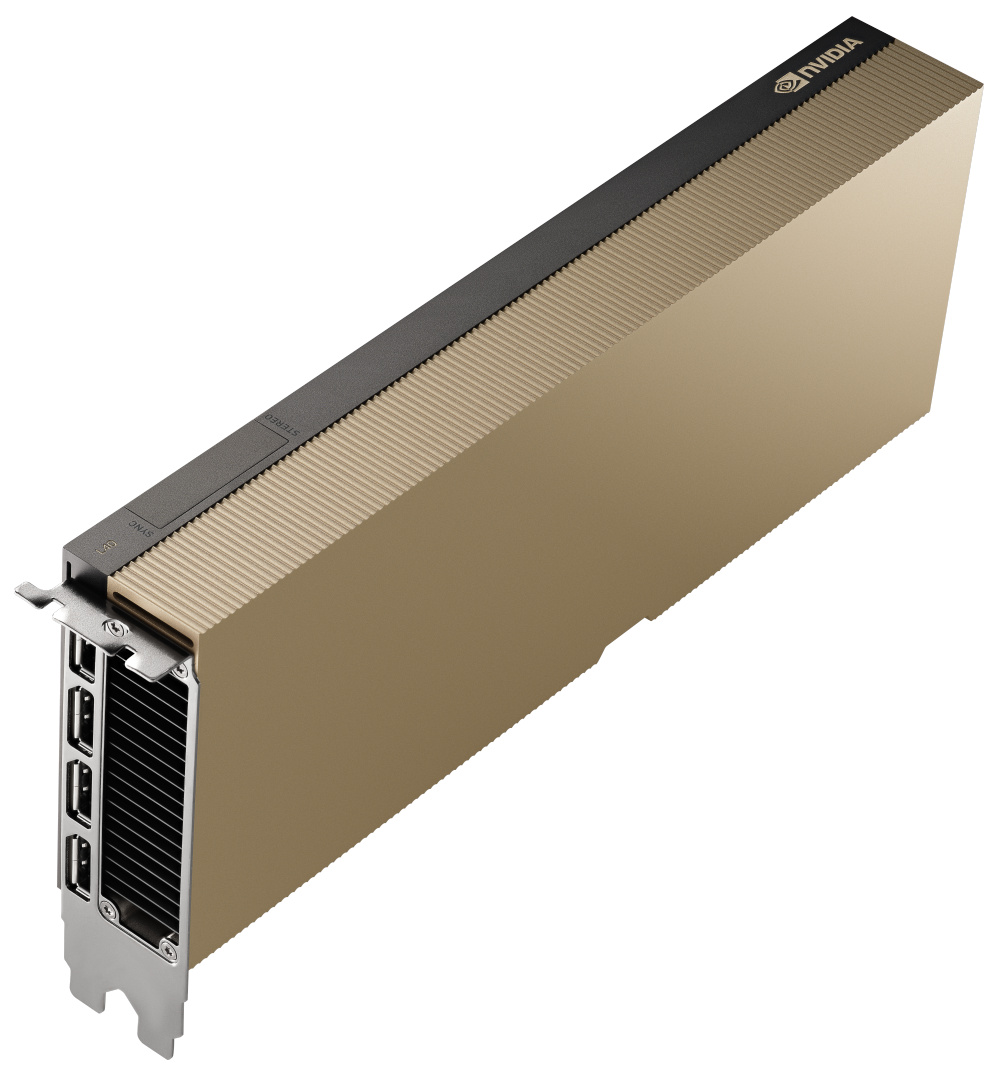
Figure 1. ThinkSystem NVIDIA L40S 48GB PCIe Gen4 Passive GPU
Did you know?
AI models are exploding in complexity and popularity with the disruption led by large language models (LLMs) such as ChatGPT and generative AI diffusion models. L40S’s fourth-generation Tensor Cores with the Transformer Engine and new FP8 data format enable AI performance that exceeds the NVIDIA A100 Tensor Core GPUs for many AI training and inference workloads.
Part number information
The following table shows the ordering information for the NVIDIA L40S GPU.
| Part number | Feature code | Description | NVIDIA part number | Controlled GPU status |
|---|---|---|---|---|
| 4X67A90669 | BYFH | ThinkSystem NVIDIA L40S 48GB PCIe Gen4 Passive GPU | 900-2G133-2780-030 | Controlled |
The NVIDIA L40S GPU is Controlled which means the GPU is not offered in certain markets, as determined by the US Government.
The option part number includes the following:
- One NVIDIA L40S GPU with full-height (3U) adapter bracket attached
- Documentation
Features
Generative AI is fueling transformative change, unlocking a new frontier of opportunities for enterprises across every industry. To transform with AI, enterprises need more compute resources, greater scale, and a broad set of capabilities to meet the demands of an ever-increasing set of diverse and complex workloads.
The NVIDIA L40S GPU is the most powerful universal GPU for the data center, delivering end-to-end acceleration for the next generation of AI-enabled applications—from generative AI and model training and inference to 3D graphics, rendering, and video applications.
Enterprises are looking to use mainstream infrastructure to satisfy their compute needs, but training state-of-the-art models requires massive compute capability. For LLM models, eight L40S’s in mainstream servers bring up to 1.7X the training performance of an NVIDIA HGX™ A100 8-GPU system, giving enterprises fast time to solution with traditional infrastructure. When compared to the A100 80GB SXM for inference, the L40S delivers up to 1.2X more generative AI inference performance using StableDiffusion and up to 1.5X inference performance on popular networks, such as those included within the MLPerf benchmark.
Key use cases of the NVIDIA L40S GPU:
- Generative AI
The AI, graphics, and media acceleration capabilities of the L40S GPU make it the premier platform for multi-modal generative AI pipelines. With powerful inferencing capabilities, combined with NVIDIA RTX™-accelerated ray tracing and dedicated encode and decode engines, the L40S accelerates AI-enabled audio, speech, 2D, video, and 3D generative AI applications.
For image generative AI inference, the L40S GPU delivers more than 5X higher performance than the previous-generation NVIDIA A40 GPU and 1.2X more performance than the HGX A100. This breakthrough performance, combined with 48GB of memory capacity, makes the L40S GPU the ideal generative AI platform for high-quality images and immersive visual content.
- LLM Inference and Training
Accelerate training, fine tuning, and inference workloads with powerful throughput and floating-point performance to build and deploy state-of-the-art AI models. Powerful NVIDIA-Certified Systems™ with eight L40 GPUs can train foundational models with up to 175 billion parameters to convergence and accelerate fine-tuning and retraining of existing large-scale models to adapt them for new tasks.
Combining NVIDIA’s full stack of inference serving software with the compute capabilities of the L40S provides a powerful platform for trained models ready for inference. With support for structural sparsity and a broad range of precisions, including TF32, INT8, and FP8, the L40S delivers over 1 petaFLOPS of inference operation performance, delivering actionable insights with speed and precision.
- AI-Ready Development Platform with NVIDIA AI Enterprise
Enterprise adoption of AI is now mainstream and leading to an increased demand for skilled AI developers and data scientists. Organizations require a flexible, high-performance platform consisting of optimized hardware and software to maximize productivity and accelerate AI development.
NVIDIA AI Enterprise is an end-to-end, enterprise-grade AI software platform that offers 100+ frameworks, pretrained models, and libraries to streamline development and deployment of production AI, including generative AI, computer vision, and speech AI. Optimized and certified for reliable performance, NVIDIA AI Enterprise, together with the L40S, provides a unified platform to develop applications once and deploy anywhere, reducing the risks involved with moving from pilot to production.
- Rendering and 3D Graphics
Running professional 3D visualization applications with NVIDIA L40S enables creative professionals to iterate more, render faster, and unlock tremendous performance advantages that increase productivity and speed up project completion. The NVIDIA L40S's third-generation RT Cores and industry-leading 48GB of GDDR6 memory deliver up to 2X the real-time ray-tracing performance of the previous generation.
With these capabilities, artists and designers can work with complex geometry and high-resolution textures in real time to generate photorealistic designs and power full-fidelity creative workflows, from interactive rendering to virtual production.
- NVIDIA Omniverse
NVIDIA Omniverse is a multi-GPU-enabled open platform for Universal Scene Description (USD)-based collaboration and real-time photorealistic simulation. The full-stack platform based on USD and NVIDIA RTX is the powerful culmination of NVIDIA's core graphics, compute, and AI technologies. NVIDIA L40S GPUs bring powerful AI and RTX capabilities to accelerate 3D content creation and industrial digitalization.
For the most complex Omniverse workloads like extended reality (XR), multi-user design collaboration, and digital twins, the NVIDIA L40S enables ray-traced and path-traced rendering of materials, physically accurate simulations, and generation of photorealistic 3D synthetic data.
- Streaming and Video Content
The NVIDIA L40S takes streaming and video content workloads to the next level, delivering breakthrough media acceleration capabilities with three video encode and three video decode engines. With the addition of AV1 encoding, the L40S delivers up to 2X the performance and improved TCO for broadcast streaming, video production, and transcription workloads.
- Virtual Workstations
When combined with NVIDIA RTX Virtual Workstation (vWS) software, the NVIDIA L40S can be virtualized to deliver high-performance workstation instances to remote users for high-end design, AI, and compute workloads. With 48GB of GPU memory, the NVIDIA L40S with vWS enables flexible, work-from-anywhere solutions for GPU memory-intensive workloads.
Technical specifications
The NVIDIA L40S GPU has the following specifications:
- Form factor
- PCIe Full Height Full Length adapter (4.4-in x 10.5-in), Double-width (dual slot)
- NVIDIA Form Factor 5.5
- Host interface:
- PCIe 4.0 x16
- MSI-X interrupt messaging protocol (MSI not supported)
- PCIe Lane Polarity Inversion and Lane Reversal
- Single Root I/O Virtualization (SR-IOV) support
- 256 virtual functions (VFs)
- ARI Forwarding
- Hardware Root of Trust
- Secure boot
- Secure firmware upgrade
- Firmware rollback protection
- Support for in-band firmware update disable (established after each GPU reset)
- Secure application processor recovery
The following table lists the GPU processing specifications and performance of the NVIDIA L40S GPU.
| Feature | Specification |
|---|---|
| GPU Architecture | NVIDIA Ada Lovelace |
| NVIDIA CUDA Parallel Processing Cores | 18,176 |
| NVIDIA Tensor Cores (4th gen) | 568 |
| NVIDIA RT Cores (3rd Gen) | 142 |
| Peak FP32 performance (non-Tensor) | 91.6 TFLOPS |
| Peak FP16 Tensor performance | 362.05 TFLOPS, 733 TFLOPS* |
| Peak Tensor Float 32 (TF32) performance | 183 TFLOPS, 366 TFLOPS* |
| Peak Bfloat16 (BF16) Tensor performance | 362.05 TFLOPS, 733 TFLOPS* |
| Peak FP8 Tensor performance | 733 TFLOPS, 1466 TFLOPS* |
| Peak INT8 Integer Performance | 733 TOPS, 1466 TOPS* |
| Peak INT4 Integer Performance | 733 TOPS, 1466 TOPS* |
| RT Core performance | 209 TFLOPS |
| GPU Memory | 48 GB GDDR6 |
| Memory Bandwidth | 864 GB/s |
| ECC | Yes |
| NVIDIA NVLink | No support |
| System Interface | PCIe Gen 4, x16 lanes |
| Form Factor | PCIe full height/length, double width (10.5" x 4.4") |
| Multi-Instance GPU (MIG) | No support |
| Max Power Consumption | 350 W |
| Thermal Solution | Passive |
| vGPU Software Support | NVIDIA vPC/vApps, NVIDIA RTX Virtual Workstation (vWS) |
| Display connectors | 4x DisplayPort 1.4a (disabled by default**) |
| Max Simultaneous Displays | Up to four 5K Monitors at 60Hz per card or dual 8K displays @ 60Hz (requires DisplayPort 1.4 DSC); Each display port can support 4K at 120 Hz with 30-bit color |
| Graphics APIs | DirectX 12 Ultimate, Shader Model 6.6, OpenGL 4.6, Vulkan 1.3 |
| Compute APIs | CUDA 12.0, Direct Compute, OpenCL 3.0 |
* With structural sparsity enabled
** To enable the DisplayPort ports, see https://developer.nvidia.com/displaymodeselector
Server support
The following tables list the ThinkSystem servers that are compatible.
| Part Number | Description | AMD V3 | 2S Intel V3/V4 | 1S V3 | 4S 8S Intel V3/V4 | ||||||||||||||||
|---|---|---|---|---|---|---|---|---|---|---|---|---|---|---|---|---|---|---|---|---|---|
SR635 V3 (7D9H / 7D9G) |
SR655 V3 (7D9F / 7D9E) |
SR645 V3 (7D9D / 7D9C) |
SR665 V3 (7D9B / 7D9A) |
SD535 V3 (7DD8 / 7DD1) |
ST650 V3 (7D7B / 7D7A) |
SR630 V3 (7D72 / 7D73) |
SR650 V3 (7D75 / 7D76) |
SR630 V4 (7DG8 / 7DG9) |
SR650 V4 (7DGC / 7DGD) |
SR650a V4 (7DGC / 7DGD) |
ST45 V3 (7DH4 / 7DH5) |
ST50 V3 (7DF4 / 7DF3) |
ST250 V3 (7DCF / 7DCE) |
SR250 V3 (7DCM / 7DCL) |
SR850 V3 (7D97 / 7D96) |
SR860 V3 (7D94 / 7D93) |
SR950 V3 (7DC5 / 7DC4) |
SR850 V4 (7DJT / 7DJS) |
SR860 V4 (7DJQ / 7DJN) |
||
| 4X67A90669 | ThinkSystem NVIDIA L40S 48GB PCIe Gen4 Passive GPU | N | 3 | N | 3 | N | N | N | 3 | N | 2 | 4 | N | N | N | N | N | N | N | 2 | 4 |
| Part Number | Description | AI Servers | Edge | Super computing | |||||||
|---|---|---|---|---|---|---|---|---|---|---|---|
SR675 V3 (7D9Q / 7D9R) |
SR680a V3 B200 (7DM9) |
SR685a V3 (7DHC) |
SR780a V3 (7DJ5) |
SR680a V4 (7DMK) |
SE100 (7DGR) |
SE455 V3 (7DBY) |
SC750 V4 (7DDJ) |
SC777 V4 (7DKA) |
SD665 V3 (7D9P) |
||
| 4X67A90669 | ThinkSystem NVIDIA L40S 48GB PCIe Gen4 Passive GPU | 8 | N | N | N | N | N | 2 | N | N | N |
| Part Number | Description | Edge | 1S Intel V2 | 2S Intel V2 | AMD V1 | Multi node | AI | ||||||||||||
|---|---|---|---|---|---|---|---|---|---|---|---|---|---|---|---|---|---|---|---|
SE350 (7Z46 / 7D1X) |
SE350 V2 (7DA9) |
SE360 V2 (7DAM) |
SE450 (7D8T) |
ST50 V2 (7D8K / 7D8J) |
ST250 V2 (7D8G / 7D8F) |
SR250 V2 (7D7R / 7D7Q) |
ST650 V2 (7Z75 / 7Z74) |
SR630 V2 (7Z70 / 7Z71) |
SR650 V2 (7Z72 / 7Z73) |
SR635 (7Y98 / 7Y99) |
SR655 (7Y00 / 7Z01) |
SR645 (7D2Y / 7D2X) |
SR665 (7D2W / 7D2V) |
SD530 V3 (7DDA / 7DD3) |
SD550 V3 (7DD9 / 7DD2) |
SR670 V2 (7Z22 / 7Z23) |
SR680a V3 (7DHE) |
||
| 4X67A90669 | ThinkSystem NVIDIA L40S 48GB PCIe Gen4 Passive GPU | N | N | N | N | N | N | N | N | N | N | N | N | N | N | N | N | 8 | N |
| Part Number | Description | SC | Dense V2 | 4S V2 | 8S | 4S V1 | 1S Intel V1 | ||||||||||||
|---|---|---|---|---|---|---|---|---|---|---|---|---|---|---|---|---|---|---|---|
SD665-N V3 (7DAZ) |
SD650 V3 (7D7M) |
SD650-I V3 (7D7L) |
SD650-N V3 (7D7N) |
SD630 V2 (7D1K) |
SD650 V2 (7D1M) |
SD650-N V2 (7D1N) |
SN550 V2 (7Z69) |
SR850 V2 (7D31 / 7D32) |
SR860 V2 (7Z59 / 7Z60) |
SR950 (7X11 / 7X12) |
SR850 (7X18 / 7X19) |
SR850P (7D2F / 2D2G) |
SR860 (7X69 / 7X70) |
ST50 (7Y48 / 7Y50) |
ST250 (7Y45 / 7Y46) |
SR150 (7Y54) |
SR250 (7Y52 / 7Y51) |
||
| 4X67A90669 | ThinkSystem NVIDIA L40S 48GB PCIe Gen4 Passive GPU | N | N | N | N | N | N | N | N | N | N | N | N | N | N | N | N | N | N |
| Part Number | Description | 2S Intel V1 | Dense V1 | ||||||||||
|---|---|---|---|---|---|---|---|---|---|---|---|---|---|
ST550 (7X09 / 7X10) |
SR530 (7X07 / 7X08) |
SR550 (7X03 / 7X04) |
SR570 (7Y02 / 7Y03) |
SR590 (7X98 / 7X99) |
SR630 (7X01 / 7X02) |
SR650 (7X05 / 7X06) |
SR670 (7Y36 / 7Y37) |
SD530 (7X21) |
SD650 (7X58) |
SN550 (7X16) |
SN850 (7X15) |
||
| 4X67A90669 | ThinkSystem NVIDIA L40S 48GB PCIe Gen4 Passive GPU | N | N | N | N | N | N | N | N | N | N | N | N |
Operating system support
The following table lists the supported operating systems.
Tip: These tables are automatically generated based on data from Lenovo ServerProven.
| Operating systems | SR665 V3 |
SR670 V2 |
SR650 V3 (4th Gen Xeon) |
SR655 V3 |
SR675 V3 |
SE455 V3 |
SR650 V3 (5th Gen Xeon) |
SR650 V4/SR650a V4 |
SR850 V4 |
SR860 V4 |
|---|---|---|---|---|---|---|---|---|---|---|
| Microsoft Windows 10 | Y | N | Y | Y | N | N | Y | N | N | N |
| Microsoft Windows 11 | Y | N | Y | Y | N | N | Y | N | N | N |
| Microsoft Windows Server 2019 | Y | Y | Y | Y | Y | Y | Y | N | N | N |
| Microsoft Windows Server 2022 | Y | Y | Y | Y | Y | Y | Y | Y | N | N |
| Microsoft Windows Server 2025 | Y | Y | Y | Y | Y | Y | N | Y | N | N |
| Red Hat Enterprise Linux 8.6 | Y | Y | Y | Y | Y | Y | N | N | N | N |
| Red Hat Enterprise Linux 8.7 | Y | Y | Y | Y | Y | N | N | N | N | N |
| Red Hat Enterprise Linux 8.8 | Y | Y | Y | Y | Y | Y | Y | N | N | N |
| Red Hat Enterprise Linux 8.9 | Y | Y | Y | Y | N | Y | Y | N | N | N |
| Red Hat Enterprise Linux 8.10 | Y | Y | Y | Y | Y | Y | N | N | N | N |
| Red Hat Enterprise Linux 9.0 | Y | Y | Y | Y | Y | Y | N | N | N | N |
| Red Hat Enterprise Linux 9.1 | Y | Y | Y | Y | Y | N | N | N | N | N |
| Red Hat Enterprise Linux 9.2 | Y | Y | Y | Y | Y | Y | Y | N | N | N |
| Red Hat Enterprise Linux 9.3 | Y | Y | Y | Y | N | Y | Y | N | N | N |
| Red Hat Enterprise Linux 9.4 | Y | Y | Y | Y | Y | Y | N | Y | N | N |
| Red Hat Enterprise Linux 9.5 | Y | Y | Y | Y | Y | Y | N | Y | N | N |
| Red Hat Enterprise Linux 9.6 | Y | Y | Y | Y | Y | Y | N | N | N | N |
| Red Hat Enterprise Linux 9.7 | Y | Y | Y | Y | N | Y | N | Y | Y | Y |
| Red Hat Enterprise Linux 10.0 | Y | Y | Y | Y | Y | Y | N | N | N | N |
| Red Hat Enterprise Linux 10.1 | Y | Y | Y | Y | N | Y | N | Y | Y | Y |
| SUSE Linux Enterprise Server 15 SP4 | Y | Y | Y | Y | Y | Y | N | N | N | N |
| SUSE Linux Enterprise Server 15 SP5 | Y | Y | Y | Y | N | Y | Y | N | N | N |
| SUSE Linux Enterprise Server 15 SP6 | Y | Y | Y | Y | Y | Y | N | N | N | N |
| SUSE Linux Enterprise Server 15 SP7 | Y | Y | Y | Y | Y | Y | N | Y | Y | Y |
| SUSE Linux Enterprise Server 16 | Y | N | Y | Y | N | Y | N | Y | Y | Y |
| Ubuntu 18.04.5 LTS or later with HWE kernel | N | Y | N | N | N | N | N | N | N | N |
| Ubuntu 20.04.5 LTS or later with HWE kernel | Y | N | N | Y | Y | Y | N | N | N | N |
| Ubuntu 22.04.2 LTS or later with HWE kernel | N | N | N | N | N | Y | N | N | N | N |
| Ubuntu 22.04.5 LTS or later with HWE kernel | Y | N | N | N | Y | N | N | Y | N | N |
| Ubuntu 22.04 LTS or later with HWE kernel | Y | Y | Y | Y | Y | N | Y 1 | N | N | N |
| Ubuntu 24.04 LTS or later with HWE kernel | Y | Y | Y | Y | Y | Y | N | Y | N | N |
| VMware vSphere Hypervisor (ESXi) 8.0 U1 | Y | Y | Y | Y | Y | Y | N | N | N | N |
| VMware vSphere Hypervisor (ESXi) 8.0 U2 | Y | Y | Y | Y | Y | Y | Y | N | N | N |
| VMware vSphere Hypervisor (ESXi) 8.0 U3 | Y | N | Y | Y | N | Y | N | Y | N | N |
| VMware vSphere Hypervisor (ESXi) 9.0 | Y | N | Y | Y | N | Y | N | Y | Y | Y |
1 Ubuntu 22.04.3 LTS/Ubuntu 22.04.4 LTS
NVIDIA GPU software
This section lists the NVIDIA software that is available from Lenovo.
- NVIDIA vGPU Software (vApps, vPC, RTX vWS)
- NVIDIA Enterprise Software
- NVIDIA HPC Compiler Software
NVIDIA vGPU Software (vApps, vPC, RTX vWS)
Lenovo offers the following virtualization software for NVIDIA GPUs:
- Virtual Applications (vApps)
For organizations deploying Citrix XenApp, VMware Horizon RDSH or other RDSH solutions. Designed to deliver PC Windows applications at full performance. NVIDIA Virtual Applications allows users to access any Windows application at full performance on any device, anywhere. This edition is suited for users who would like to virtualize applications using XenApp or other RDSH solutions. Windows Server hosted RDSH desktops are also supported by vApps.
- Virtual PC (vPC)
This product is ideal for users who want a virtual desktop but need great user experience leveraging PC Windows® applications, browsers and high-definition video. NVIDIA Virtual PC delivers a native experience to users in a virtual environment, allowing them to run all their PC applications at full performance.
- NVIDIA RTX Virtual Workstation (RTX vWS)
NVIDIA RTX vWS is the only virtual workstation that supports NVIDIA RTX technology, bringing advanced features like ray tracing, AI-denoising, and Deep Learning Super Sampling (DLSS) to a virtual environment. Supporting the latest generation of NVIDIA GPUs unlocks the best performance possible, so designers and engineers can create their best work faster. IT can virtualize any application from the data center with an experience that is indistinguishable from a physical workstation — enabling workstation performance from any device.
The following license types are offered:
- Perpetual license
A non-expiring, permanent software license that can be used on a perpetual basis without the need to renew. For each perpetual license, customers are also required to purchase a 5-year SUMS support contract. Without this contract, the perpetual license cannot be ordered.
- Annual subscription
A software license that is active for a fixed period as defined by the terms of the subscription license, typically yearly. The subscription includes Support, Upgrade and Maintenance (SUMS) for the duration of the license term.
- Concurrent User (CCU)
A method of counting licenses based on active user VMs. If the VM is active and the NVIDIA vGPU software is running, then this counts as one CCU. A vGPU CCU is independent of the connection to the VM.
The following table lists the ordering part numbers and feature codes.
| Part number | Feature code 7S02CTO1WW |
NVIDIA part number | Description |
|---|---|---|---|
| NVIDIA vApps offerings | |||
| 7S02005TWW | SEGS | 711-VAP001+P3CMI00 | vAPPS Perpetual License 1CCU + 5 Years SUMS 1CCU |
| 7S020046WW | SDHB | 711-VAP001+P3CMI00 | NVIDIA vApps Perpetual License, 1 CCU |
| 7S020003WW | B1MP | 712-VAP003+P3CMI60 | NVIDIA vApps SUMS ONLY 5Yr, 1 CCU |
| 7S020004WW | B1MQ | 711-VAP002+P3CMI12 | NVIDIA vApps Subscription License 1 Year, 1 CCU |
| 7S020005WW | B1MR | 711-VAP002+P3CMI36 | NVIDIA vApps Subscription License 3 Years, 1 CCU |
| 7S02003DWW | S832 | 711-VAP002+P3CMI48 | NVIDIA vApps Subscription License 4 Years, 1 CCU |
| 7S02003EWW | S833 | 711-VAP002+P3CMI60 | NVIDIA vApps Subscription License 5 Years, 1 CCU |
| NVIDIA vPC offerings | |||
| 7S02005UWW | SEGT | 711-VPC021+P3CMI00 | vPC Perpetual License 1CCU + 5 Years SUMS 1CCU |
| 7S020047WW | SDHC | 711-VPC021+P3CMI00 | NVIDIA vPC Perpetual License, 1 CCU |
| 7S020009WW | B1MV | 712-VPC003+P3CMI60 | NVIDIA vPC SUMS 5Yr ONLY, 1 CCU |
| 7S02000AWW | B1MW | 711-VPC022+P3CMI12 | NVIDIA vPC Subscription License 1 Year, 1 CCU |
| 7S02000BWW | B1MX | 711-VPC022+P3CMI36 | NVIDIA vPC Subscription License 3 Years, 1 CCU |
| 7S02003FWW | S834 | 711-VPC022+P3CMI48 | NVIDIA vPC Subscription License 4 Years, 1 CCU |
| 7S02003GWW | S835 | 711-VPC022+P3CMI60 | NVIDIA vPC Subscription License 5 Years, 1 CCU |
| NVIDIA RTX vWS offerings | |||
| 7S02005VWW | SEGU | 711-DWS021+P3CMI00 | vWS Perpetual License 1CCU + 5 Years SUMS 1CCU |
| 7S02005WWW | SEGV | 711-DWS021+P3EDI00 | vWS EDU Perpetual License 1CCU + 5 Years EDU SUMS 1CCU |
| 7S020048WW | SDHD | 711-DWS021+P3CMI00 | NVIDIA RTX vWS Perpetual License, 1 CCU |
| 7S02000FWW | B1N1 | 712-DWS003+P3CMI60 | NVIDIA RTX vWS SUMS ONLY 5Yr, 1 CCU |
| 7S020049WW | SDHE | 711-DWS021+P3EDI00 | NVIDIA RTX vWS EDU Perpetual License, 1 CCU |
| 7S02000LWW | B1N6 | 712-DWS003+P3EDI60 | NVIDIA RTX vWS EDU SUMS ONLY 5Y, 1CCU |
| 7S02000GWW | B1N2 | 711-DWS022+P3CMI12 | NVIDIA RTX vWS Subsc Lic 1Yr 1 CCU |
| 7S02000HWW | B1N3 | 711-DWS022+P3CMI36 | NVIDIA RTX vWS Subscription License 3 Years, 1 CCU |
| 7S02000XWW | S6YJ | 711-DWS022+P3CMI48 | NVIDIA RTX vWS Subscription License 4 Years, 1 CCU |
| 7S02000YWW | S6YK | 711-DWS022+P3CMI60 | NVIDIA RTX vWS Subscription License 5 Years, 1 CCU |
| 7S02000MWW | B1N7 | 711-DWS022+P3EDI12 | NVIDIA RTX vWS EDU Subscription License 1 Year, 1 CCU |
| 7S02000NWW | B1N8 | 711-DWS022+P3EDI36 | NVIDIA RTX vWS EDU Subscription License 3 Years, 1 CCU |
| 7S02003BWW | S830 | 711-DWS022+P3EDI48 | NVIDIA RTX vWS EDU Subscription License 4 Years, 1 CCU |
| 7S02003CWW | S831 | 711-DWS022+P3EDI60 | NVIDIA RTX vWS EDU Subscription License 5 Years, 1 CCU |
| NVIDIA RTX vWS Support & Services | |||
| 7S020015WW | S6YS | 712-DWSA24+P3CMI12 | 24X7 Support Services for NVIDIA RTX vWS Production SUMS, 1CCU, 1 Year |
| 7S02005CWW | SDZB | 712-DWSA24+P3CMI60 | 24X7 Support Services for NVIDIA RTX vWS Production SUMS 1CCU 5 Years |
| 7S020016WW | S6YT | 712-DWSA24+P3EDI12 | 24X7 Support Services for NVIDIA RTX vWS Production SUMS, 1CCU, EDU, 1 Year |
| 7S02005DWW | SDZC | 712-DWSA24+P3EDI60 | 24X7 Support Services for NVIDIA RTX vWS Production SUMS 1CCU EDU 5 Years |
| 7S02005EWW | SDZD | 712-DWSB24+P3CMI12 | 24X7 Support Services for NVIDIA RTX vWS SUMS 4 CCU 1 Year |
| 7S020017WW | S6YU | 712-DWSD24+P3CMI12 | 24X7 Support Services for NVIDIA RTX vWS Subscription License, 1CCU, 1 Year |
NVIDIA Enterprise Software
Lenovo offers the NVIDIA Enterprise cloud-native enterprise software, comprised of NVIDIA AI Enterprise (NVAIE) and NVIDIA Omniverse Enterprise. NVIDIA Enterprise is an end-to-end, cloud-native suite of AI and data analytics software, optimized, certified, and supported by NVIDIA to run on VMware vSphere and bare-metal with NVIDIA-Certified Systems™. It includes key enabling technologies from NVIDIA for rapid deployment, management, and scaling of AI workloads in the modern hybrid cloud.
NVIDIA Enterprise is licensed on a per-GPU basis. NVIDIA Enterprise products can be purchased as either a perpetual license with support services, or as an annual or multi-year subscription.
- The perpetual license provides the right to use the NVIDIA Enterprise software indefinitely, with no expiration. NVIDIA Enterprise with perpetual licenses must be purchased in conjunction with one-year, three-year, or five-year support services. A one-year support service is also available for renewals.
- The subscription offerings are an affordable option to allow IT departments to better manage the flexibility of license volumes. NVIDIA Enterprise software products with subscription includes support services for the duration of the software’s subscription license
The following table lists NVIDIA Enterprise license part numbers and feature codes.
For more information, see the NVIDIA Enterprise Sizing Guide.
| Part number | Feature code 7S02CTO1WW |
Description | NVIDIA part number |
|---|---|---|---|
| AI Enterprise Perpetual License | |||
| 7S02001BWW | S6YY | NVIDIA Enterprise (NVIDIA AI Enterprise and NVIDIA Omniverse Enterprise) Perpetual License & Support per GPU, 5 Years | 731-AI7004+P3CMI60 |
| 7S02001EWW | S6Z1 | NVIDIA Enterprise (NVIDIA AI Enterprise and NVIDIA Omniverse Enterprise) Perpetual License & Support per GPU, EDU, 5 Years | 731-AI7004+P3EDI60 |
| AI Enterprise Subscription License | |||
| 7S02001FWW | S6Z2 | NVIDIA Enterprise (NVIDIA AI Enterprise and NVIDIA Omniverse Enterprise) Subscription per GPU, 1 Year | 731-AI7003+P3CMI12 |
| 7S02005XWW | SENY | NVIDIA Enterprise (NVIDIA AI Enterprise and NVIDIA Omniverse Enterprise) Subscription per GPU, 2 Years | 731-AI7003+P3CMI24 |
| 7S02001GWW | S6Z3 | NVIDIA Enterprise (NVIDIA AI Enterprise and NVIDIA Omniverse Enterprise) Subscription per GPU, 3 Year | 731-AI7003+P3CMI36 |
| 7S02005YWW | SENZ | NVIDIA Enterprise (NVIDIA AI Enterprise and NVIDIA Omniverse Enterprise) Subscription per GPU, 4 Years | 731-AI7003+P3CMI48 |
| 7S02001HWW | S6Z4 | NVIDIA Enterprise (NVIDIA AI Enterprise and NVIDIA Omniverse Enterprise) Subscription per GPU, 5 Year | 731-AI7003+P3CMI60 |
| 7S02001JWW | S6Z5 | NVIDIA Enterprise (NVIDIA AI Enterprise and NVIDIA Omniverse Enterprise) Subscription per GPU, EDU, 1 Year | 731-AI7003+P3EDI12 |
| 7S02005ZWW | SEP0 | NVIDIA Enterprise (NVIDIA AI Enterprise and NVIDIA Omniverse Enterprise) Subscription per GPU, EDU, 2 Years | 731-AI7003+P3EDI24 |
| 7S02001KWW | S6Z6 | NVIDIA Enterprise (NVIDIA AI Enterprise and NVIDIA Omniverse Enterprise) Subscription per GPU, EDU, 3 Year | 731-AI7003+P3EDI36 |
| 7S020060WW | SEP1 | NVIDIA Enterprise (NVIDIA AI Enterprise and NVIDIA Omniverse Enterprise) Subscription per GPU, EDU, 4 Years | 731-AI7003+P3EDI48 |
| 7S02001LWW | S6Z7 | NVIDIA Enterprise (NVIDIA AI Enterprise and NVIDIA Omniverse Enterprise) Subscription per GPU, EDU, 5 Year | 731-AI7003+P3EDI60 |
| Business Critical Support Services for NVIDIA Enterprise | |||
| 7S02001MWW | S6Z8 | Business Critical Support Services for NVIDIA Enterprise (NVIDIA AI Enterprise and Omniverse Enterprise) per GPU, 1 Year | 731-AI7007+P3CMI12 |
| 7S02001NWW | S6Z9 | Business Critical Support Services for NVIDIA Enterprise (NVIDIA AI Enterprise and Omniverse Enterprise) per GPU, 3 Year | 731-AI7007+P3CMI36 |
| 7S020061WW | SEP2 | Business Critical Support Services for NVIDIA Enterprise (NVIDIA AI Enterprise and Omniverse Enterprise) per GPU, 4 Years | 731-AI7007+P3CMI48 |
| 7S02001PWW | S6ZA | Business Critical Support Services for NVIDIA Enterprise (NVIDIA AI Enterprise and Omniverse Enterprise) per GPU, 5 Year | 731-AI7007+P3CMI60 |
| 7S02001QWW | S6ZB | Business Critical Support Services for NVIDIA Enterprise (NVIDIA AI Enterprise and Omniverse Enterprise) per GPU, EDU, 1 Year | 731-AI7007+P3EDI12 |
| 7S02001RWW | S6ZC | Business Critical Support Services for NVIDIA Enterprise (NVIDIA AI Enterprise and Omniverse Enterprise) per GPU, EDU, 3 Year | 731-AI7007+P3EDI36 |
| 7S020062WW | SEP3 | Business Critical Support Services for NVIDIA Enterprise (NVIDIA AI Enterprise and Omniverse Enterprise) per GPU, EDU, 4 Years | 731-AI7007+P3EDI48 |
| 7S02001SWW | S6ZD | Business Critical Support Services for NVIDIA Enterprise (NVIDIA AI Enterprise and Omniverse Enterprise) per GPU, EDU, 5 Year | 731-AI7007+P3EDI60 |
NVIDIA HPC Compiler Software
| Part number | Feature code 7S09CTO6WW |
Description |
|---|---|---|
| HPC Compiler Support Services | ||
| 7S090014WW | S924 | NVIDIA HPC Compiler Support Services, 1 Year |
| 7S090015WW | S925 | NVIDIA HPC Compiler Support Services, 3 Years |
| 7S09002GWW | S9UQ | NVIDIA HPC Compiler Support Services, 5 Years |
| 7S090016WW | S926 | NVIDIA HPC Compiler Support Services, EDU, 1 Year |
| 7S090017WW | S927 | NVIDIA HPC Compiler Support Services, EDU, 3 Years |
| 7S09002HWW | S9UR | NVIDIA HPC Compiler Support Services, EDU, 5 Years |
| 7S090018WW | S928 | NVIDIA HPC Compiler Support Services - Additional Contact, 1 Year |
| 7S09002JWW | S9US | NVIDIA HPC Compiler Support Services - Additional Contact, 3 Years |
| 7S09002KWW | S9UT | NVIDIA HPC Compiler Support Services - Additional Contact, 5 Years |
| 7S090019WW | S929 | NVIDIA HPC Compiler Support Services - Additional Contact, EDU, 1 Year |
| 7S09002LWW | S9UU | NVIDIA HPC Compiler Support Services - Additional Contact, EDU, 3 Years |
| 7S09002MWW | S9UV | NVIDIA HPC Compiler Support Services - Additional Contact, EDU, 5 Years |
| HPC Compiler Premier Support Services | ||
| 7S09001AWW | S92A | NVIDIA HPC Compiler Premier Support Services, 1 Year |
| 7S09002NWW | S9UW | NVIDIA HPC Compiler Premier Support Services, 3 Years |
| 7S09002PWW | S9UX | NVIDIA HPC Compiler Premier Support Services, 5 Years |
| 7S09001BWW | S92B | NVIDIA HPC Compiler Premier Support Services, EDU, 1 Year |
| 7S09002QWW | S9UY | NVIDIA HPC Compiler Premier Support Services, EDU, 3 Years |
| 7S09002RWW | S9UZ | NVIDIA HPC Compiler Premier Support Services, EDU, 5 Years |
| 7S09001CWW | S92C | NVIDIA HPC Compiler Premier Support Services - Additional Contact, 1 Year |
| 7S09002SWW | S9V0 | NVIDIA HPC Compiler Premier Support Services - Additional Contact, 3 Years |
| 7S09002TWW | S9V1 | NVIDIA HPC Compiler Premier Support Services - Additional Contact, 5 Years |
| 7S09001DWW | S92D | NVIDIA HPC Compiler Premier Support Services - Additional Contact, EDU, 1 Year |
| 7S09002UWW | S9V2 | NVIDIA HPC Compiler Premier Support Services - Additional Contact, EDU, 3 Years |
| 7S09002VWW | S9V3 | NVIDIA HPC Compiler Premier Support Services - Additional Contact, EDU, 5 Years |
Auxiliary power cables
The GPU option part number does not ship with auxiliary power cables. Cables are server-specific due to length requirements and the connector on the server end of the cable. For CTO orders, auxiliary power cables are derived by the configurator. For field upgrades, cables will need to be ordered separately as listed in the table below.
Tip: The names of the cable options below may only include the H100 or L40 GPU, however these cables are also supported with the L40S.
| Auxiliary power cable needed with the SE455 V3 |
| 450mm 16-pin (2x6+4) cable Feature: C8DD SBB: SBB7A97850 Option: 4X97B04477, ThinkEdge NVIDIA L40S GPU Power Cable Kit Base: SC17C02807 FRU: 03NY843 |
| Auxiliary power cable needed with the SR650 V3, SR655 V3, SR665 V3 |
|
Base: SC17B33047 * The option part number is for the thermal kit and includes other components needed to install the GPU. See the relevant server product guide for details. |
| Auxiliary power cable needed with the SR675 V3 |
 235mm 16-pin (2x6+4) cable 235mm 16-pin (2x6+4) cableFeature: BSD2 SBB: SBB7A65299 Option: 4X97A84510, ThinkSystem SR675 V3 Supplemental Power Cable for H100 GPU Option Base: SC17B39301 FRU: 03LE554 |
| Auxiliary power cable needed with the SR670 V2 |
 215mm 16-pin (2x6+4) cable 215mm 16-pin (2x6+4) cableFeature: BRWL SBB: SBB7A66339 Option: 4X97A85027, ThinkSystem SR670 V2 H100/L40 GPU Option Power Cable Base: SC17B33046 FRU: 03KM845 |
| Auxiliary power cable needed with the SR850 V4, SR860 V4 |

200mm 16-pin (2x6+4) cable
Base: SC17B40604 |
| Auxiliary power cable needed with the SR650 V4, SR650a V4 |

320mm 16-pin (2x6+4) cable
Base: SC17B82781 |

Regulatory approvals
The NVIDIA L40S GPU has the following regulatory approvals:
- RCM
- BSMI
- CE
- FCC
- ICES
- KCC
- cUL, UL
- VCCI
Operating environment
The NVIDIA L40S GPU has the following operating characteristics:
- Ambient temperature
- Operational: 0°C to 50°C (-5°C to 55°C for short term*)
- Storage: -40°C to 75°C
- Relative humidity:
- Operational: 5 to 85% (5 to 93% short term*)
- Storage: 5 to 95%
* A period not more than 96 hours consecutive, not to exceed 15 days per year.
Warranty
One year limited warranty. When installed in a Lenovo server, the GPU assumes the server’s base warranty and any warranty upgrades.
Seller training courses
The following sales training courses are offered for employees and partners (login required). Courses are listed in date order.
-
Think AI Weekly: Accelerating your Server Sales with the RTX Pro 6000
2026-03-10 | 29 minutes | Employees Only
DetailsThink AI Weekly: Accelerating your Server Sales with the RTX Pro 6000
Join this session as Simone Larsson, Head of Enterprise AI, EMEA, Lenovo and Jason Knudsen, GAM, Global Sales and Channel for Lenovo with NVIDIA as they talk about the RTX Pro 6000.
Published: 2026-03-10
Topics include:
Market trends
Why the RTX Pro 6000 matters
Lenovo GTM details
Length: 29 minutes
Course code: DTAIW165Start the training:
Employee link: Grow@Lenovo
-
Edge VTT - NVIDIA Robotics Platform
2026-01-08 | 67 minutes | Employees Only
DetailsEdge VTT - NVIDIA Robotics Platform
In this session we feature speakers from both NVIDIA and Lenovo. Attendees will learn about NVIDIA’s platform stack for Robotics and what Lenovo is doing in the field of robotics.
Published: 2026-01-08
During this session we will dive into NVIDIA’s three-computer stack for Physical AI. Our speaker will explore libraries and workflows to develop, train, simulate, deploy, operate, and optimize AI robot systems and software. This session will cover the basics of the technical platform, how to get started and case studies from some NVIDIA's ecosystem.
Objectives:
Discuss acceleration libraries
Describe simulation workflows
List foundational models for robotics
Tags: Artificial Intelligence (AI), Sales, Software Platforms, Technical Sales
Length: 67 minutes
Course code: DVEDG223Start the training:
Employee link: Grow@Lenovo
-
Lenovo VTT Cloud Architecture: Empowering AI Innovation with NVIDIA RTX Pro 6000 and Lenovo Hybrid AI Services
2025-09-18 | 68 minutes | Employees Only
DetailsLenovo VTT Cloud Architecture: Empowering AI Innovation with NVIDIA RTX Pro 6000 and Lenovo Hybrid AI Services
Join Dinesh Tripathi, Lenovo Technical Team Lead for GenAI and Jose Carlos Huescas, Lenovo HPC & AI Product Manager for an in-depth, interactive technical webinar. This session will explore how to effectively position the NVIDIA RTX PRO 6000 Blackwell Server Edition in AI and visualization workflows, with a focus on real-world applications and customer value.
Published: 2025-09-18
We’ll cover:
- NVIDIA RTX PRO 6000 Blackwell Overview: Key specs, performance benchmarks, and use cases in AI, rendering, and simulation.
- Positioning Strategy: How to align NVIDIA RTX PRO 6000 with customer needs across industries like healthcare, manufacturing, and media.
- Lenovo Hybrid AI 285 Services: Dive into Lenovo’s Hybrid AI 285 architecture and learn how it supports scalable AI deployments from edge to cloud.
Whether you're enabling AI solutions or guiding customers through infrastructure decisions, this session will equip you with the insights and tools to drive impactful conversations.
Tags: Industry solutions, SMB, Services, Technical Sales, Technology solutions
Length: 68 minutes
Course code: DVCLD227Start the training:
Employee link: Grow@Lenovo
-
Think AI Weekly: ISG & SSG Better Together: Uniting AI Solutions & Services for Smarter Outcomes
2025-08-01 | 55 minutes | Employees Only
DetailsThink AI Weekly: ISG & SSG Better Together: Uniting AI Solutions & Services for Smarter Outcomes
View this session to hear from our speakers Allen Holmes, AI Technologist, ISG and Balaji Subramaniam, AI Regional Leader-Americas, SSG.
Published: 2025-08-01
Topics include:
• An overview of ISG & SSG AI CoE Offerings with Customer Case Studies
• The Enterprise AI Deal Engagement Flow with ISG and SSG
• How sellers can leverage this partnership to differentiate with Enterprise clients.
• NEW COURSE: From Inception to Execution: Evolution of an AI Deal
Tags: Artificial Intelligence (AI), Sales, Services, Technology Solutions, TruScale Infrastructure as a Service
Length: 55 minutes
Course code: DTAIW145Start the training:
Employee link: Grow@Lenovo
-
Think AI Weekly: Third-Party Due Diligence Requirements for GPU Opportunities
2025-07-24 | 46 minutes | Employees Only
DetailsThink AI Weekly: Third-Party Due Diligence Requirements for GPU Opportunities
View this session to hear from Tanya Roychowdhury, Legal Counsel Director and Andrea Fazio, Third-party Due Diligence Project Manager as the explain:
Published: 2025-07-24
- What are the requirements?
- Why are they important?
- What this means to sales
Tags: Artificial Intelligence (AI), DataCenter Products, NVIDIA, Sales, Technical Sales
Length: 46 minutes
Course code: DTAIW143Start the training:
Employee link: Grow@Lenovo
-
ThinkSystem Supercomputing Servers Powered by NVIDIA
2025-06-27 | 30 minutes | Employees and Partners
DetailsThinkSystem Supercomputing Servers Powered by NVIDIA
This course offers you information about the Lenovo SC777 V4 Neptune server, the first Lenovo server to use an Arm processor from NVIDIA. By the end of this course, you’ll be able to list three features of the ThinkSystem SC777 V4 Neptune server, list three features of the ThinkSystem N1380 Neptune enclosure, describe two customer benefits of the ThinkSystem SC777 V4 Neptune server, and list four workload environments to which the SC777 V4 server is well suited.
Published: 2025-06-27
Tags: DataCenter Products, NVIDIA, ThinkSystem
Length: 30 minutes
Course code: SXXW2545Start the training:
Employee link: Grow@Lenovo
Partner link: Lenovo 360 Learning Center
-
VTT AI: NVIDIA and Lenovo: Data Center Platform Overview
2025-06-10 | 77 minutes | Employees Only
DetailsVTT AI: NVIDIA and Lenovo: Data Center Platform Overview
Please join this session to hear Steve Stein, Senior Product Marketing Manager, NVIDIA and Naman Malhotra, Senior Product Manager, Lenovo as they present these topics:
Published: 2025-06-10
•NVIDIA Accelerated Computing Portfolio
•Use Cases and Positioning
•Lenovo Platforms and Solutions
Tags: Artificial Intelligence (AI), Nvidia, Server
Length: 77 minutes
Course code: DVAI216Start the training:
Employee link: Grow@Lenovo
-
VTT AI: Introducing the Lenovo Hybrid AI 285 Platform April 2025
2025-04-30 | 60 minutes | Employees Only
DetailsVTT AI: Introducing the Lenovo Hybrid AI 285 Platform April 2025
The Lenovo Hybrid AI 285 Platform enables enterprises of all sizes to quickly deploy AI infrastructures supporting use cases as either new greenfield environments or as an extension to current infrastructures. The 285 Platform enables the use of the NVIDIA AI Enterprise software stack. The AI Hybrid 285 platform is the perfect foundation supporting Lenovo Validated Designs.
Published: 2025-04-30
• Technical overview of the Hybrid AI 285 platform
• AI Hybrid platforms as infrastructure frameworks for LVDs addressing data center-based AI solutions.
• Accelerate AI adoption and reduce deployment risks
Tags: Artificial Intelligence (AI), Nvidia, Technical Sales, Lenovo Hybrid AI 285
Length: 60 minutes
Course code: DVAI215Start the training:
Employee link: Grow@Lenovo
-
Lenovo Cloud Architecture VTT: Supercharge Your Enterprise AI with NVIDIA AI Enterprise on Lenovo Hybrid AI Platform
2025-04-17 | 75 minutes | Employees and Partners
DetailsLenovo Cloud Architecture VTT: Supercharge Your Enterprise AI with NVIDIA AI Enterprise on Lenovo Hybrid AI Platform
Join us for an in-depth webinar with Justin King, Principal Product Marketing Manager for Enterprise AI exploring the power of NVIDIA AI Enterprise, delivering Generative and Agentic AI outcomes deployed with Lenovo Hybrid AI platform environments.
Published: 2025-04-17
In today’s data-driven landscape, AI is evolving at high speed, with new techniques delivering more accurate responses. Enterprises are seeking not just an understanding but also how they can achieve AI-driven business outcomes.
With this, the demand for secure, scalable, and high-performing AI operations-and the skills to deliver them-is top of mind for many. Learn how NVIDIA AI Enterprise, a comprehensive software suite optimized for NVIDIA GPUs, provides the tools and frameworks, including NVIDIA NIM, NeMo, and Blueprints, to accelerate AI development and deployment while reducing risk-all within the control and security of your Lenovo customer’s hybrid AI environment.
Tags: Artificial Intelligence (AI), Cloud, Data Management, Nvidia, Technical Sales
Length: 75 minutes
Course code: DVCLD221Start the training:
Employee link: Grow@Lenovo
Partner link: Lenovo 360 Learning Center
-
AI VTT: GTC Update and The Lenovo LLM Sizing Guide
2025-03-12 | 86 minutes | Employees Only
DetailsAI VTT: GTC Update and The Lenovo LLM Sizing Guide
Please view this session that is two parts. Part one is Robert Daigle, Director, Global AI Solutions and Hande Sahin-Bahceci, AI Solutions Marketing Leader explaining the upcoming announcements for NVIDIA GTC. Part Two is Sachin Wani, AI Data Scientist explaining the Lenovo LLM Sizing Guide with these topics:
Published: 2025-03-12
• Minimum GPU requirements for fine-tuning/training and inference
• Gathering requirements for the customer's use case
• LLMs from a technical perspective
Tags: Artificial Intelligence (AI), Technical Sales
Length: 86 minutes
Course code: DVAI214Start the training:
Employee link: Grow@Lenovo
-
Q2 Solutions Launch TruScale GPU Next Generation Management in the AI Era Quick Hit
2024-09-10 | 6 minutes | Employees and Partners
DetailsQ2 Solutions Launch TruScale GPU Next Generation Management in the AI Era Quick Hit
This Quick Hit focuses on Lenovo announcing additional ways to help you build, scale, and evolve your customer’s private AI faster for improved ROI with TruScale GPU as a Service, AI-driven systems management, and infrastructure transformation services.
Published: 2024-09-10
Tags: Artificial Intelligence (AI), Services, TruScale
Length: 6 minutes
Course code: SXXW2543aStart the training:
Employee link: Grow@Lenovo
Partner link: Lenovo 360 Learning Center
-
VTT AI: The NetApp AIPod with Lenovo for NVIDIA OVX
2024-08-13 | 38 minutes | Employees and Partners
DetailsVTT AI: The NetApp AIPod with Lenovo for NVIDIA OVX
AI, for some organizations, is out of reach, due to cost, integration complexity, and time to deployment. Previously, organizations relied on frequently retraining their LLMs with the latest data, a costly and time-consuming process. The NetApp AIPod with Lenovo for NVIDIA OVX combines NVIDIA-Certified OVX Lenovo ThinkSystem SR675 V3 servers with validated NetApp storage to create a converged infrastructure specifically designed for AI workloads. Using this solution, customers will be able to conduct AI RAG and inferencing operations for use cases like chatbots, knowledge management, and object recognition.
Published: 2024-08-13
Topics covered in this VTT session include:
•Where Lenovo fits in the solution
•NetApp AIPod with Lenovo for NVIDIA OVX Solution Overview
•Challenges/pain points that this solution solves for enterprises deploying AI
•Solution value/benefits of the combined NetApp, Lenovo, and NVIDIA OVX-Certified Solution
Tags: Artificial Intelligence (AI), Nvidia, Sales, Technical Sales, ThinkSystem
Length: 38 minutes
Course code: DVAI206Start the training:
Employee link: Grow@Lenovo
Partner link: Lenovo 360 Learning Center
-
Guidance for Selling NVIDIA Products at Lenovo for ISG
2024-07-01 | 25 minutes | Employees and Partners
DetailsGuidance for Selling NVIDIA Products at Lenovo for ISG
This course gives key talking points about the Lenovo and NVIDIA partnership in the Data Center. Details are included on where to find the products that are included in the partnership and what to do if NVIDIA products are needed that are not included in the partnership. Contact information is included if help is needed in choosing which product is best for your customer. At the end of this session sellers should be able to explain the Lenovo and NVIDIA partnership, describe the products Lenovo can sell through the partnership with NVIDIA, help a customer purchase other NVIDIA product, and get assistance with choosing NVIDIA products to fit customer needs.
Published: 2024-07-01
Tags: Artificial Intelligence (AI), Nvidia
Length: 25 minutes
Course code: DNVIS102Start the training:
Employee link: Grow@Lenovo
Partner link: Lenovo 360 Learning Center
-
Think AI Weekly: Lenovo AI PCs & AI Workstations
2024-05-23 | 60 minutes | Employees Only
DetailsThink AI Weekly: Lenovo AI PCs & AI Workstations
Join Mike Leach, Sr. Manager, Workstations Solutions and Pooja Sathe, Director Commercial AI PCs as they discuss why Lenovo AI Developer Workstations and AI PCs are the most powerful, where they fit into the device to cloud ecosystem, and this week’s Microsoft announcement, Copilot+PC
Published: 2024-05-23
Tags: Artificial Intelligence (AI), ThinkStation
Length: 60 minutes
Course code: DTAIW105Start the training:
Employee link: Grow@Lenovo
Related product families
Product families related to this document are the following:
- GPU adapters
Trademarks
Lenovo and the Lenovo logo are trademarks or registered trademarks of Lenovo in the United States, other countries, or both. A current list of Lenovo trademarks is available on the Web at https://www.lenovo.com/us/en/legal/copytrade/.
The following terms are trademarks of Lenovo in the United States, other countries, or both:
Lenovo®
ServerProven®
ThinkAgile®
ThinkSystem®
The following terms are trademarks of other companies:
AMD® is a trademark of Advanced Micro Devices, Inc.
Intel®, the Intel logo and Xeon® are trademarks of Intel Corporation or its subsidiaries.
Linux® is the trademark of Linus Torvalds in the U.S. and other countries.
Microsoft®, DirectX®, Windows 11™, Windows Server®, and Windows® are trademarks of Microsoft Corporation in the United States, other countries, or both.
NVIDIA®, CUDA®, NVIDIA HGX®, NVIDIA Omniverse®, NVIDIA RTX®, and NVLink® are trademarks of NVIDIA Corporation.
Other company, product, or service names may be trademarks or service marks of others.