




























Lenovo ThinkSystem DE6600F and DE6600H Storage Arrays: технические характеристики и документация
Abstract
Lenovo ThinkSystem DE6600F and DE6600H are scalable, all flash and hybrid mid-range storage systems designed to provide high performance, simplicity, capacity, security, and high availability. Ideal for enterprise customers wanting to take advantage of the latest technology in flash to turbo charge their environment. The DE6600F and DE6600H deliver enterprise-class storage management capabilities in performance-optimized systems with a wide choice of host connectivity options, flexible drive configurations, and enhanced data management features.
This product guide provides essential technical and pre-sales information on the Lenovo ThinkSystem DE6600F and DE6600H Storage Arrays, their key features and specifications, components, options, and configuration guidelines.
This guide is intended for technical specialists, sales specialists, sales engineers, and IT architects who want to learn more about the DE6600F and DE6600H Storage Arrays and consider their use in their solutions.
Change History
Changes in the September 14, 2026 update:
- Removed the following under - Services section
- Premier Enhanced Storage Support (PESS)
Introduction
Lenovo ThinkSystem DE6600F and DE6600H are industry-leading end to end NVMe Storage solutions designed to provide high performance, simplicity, capacity, security, and high availability for midrange to highend block NVMe large segment.
The DE6600F and DE6600H deliver enterprise-class storage management capabilities in performance-optimized systems with a wide choice of host connectivity options, flexible drive configurations, and enhanced data management features. The DE6600F all-flash and DE6600H hybrid arrays deliver superior price for performance with sub-100 microsecond response for your most-demanding enterprise applications. For target markets such as: Artificial Intelligence, Big Data Analysts, Oracle/SQL databases, high-performance computing (HPC) and real-time analytics.
DE6600F and DE6600H models are available in a 2U rack form-factor with 24 small form-factor (2.5-inch SFF) NVMe drives and include two controllers, each with 32 GB or 128 GB system memory for a system total of 64 GB or 256 GB. Host interface cards provide 10/25Gb iSCSI, 16/32Gb FC/NVMe-FC, 100Gb IB/NVMe-RoCE host connections and 12Gb SAS expansions.
The Lenovo DE6600F 2U24 SFF enclosure is shown in the following figure. DE6600H looks just like it.
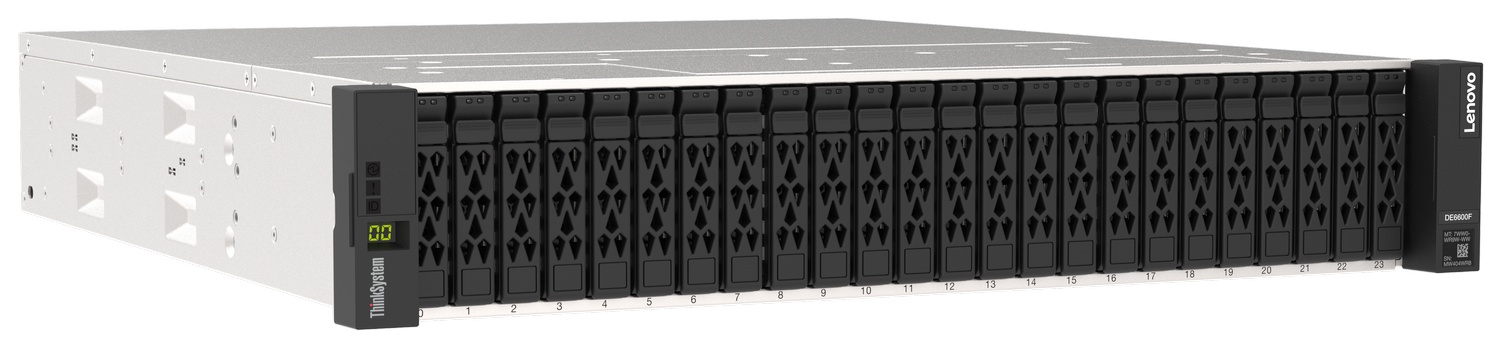
Figure 1. Lenovo DE6600F enclosure controller
Full 3D Tour
Did you know?
The DE6600F and DE6600H are the new NVME offerings under the Lenovo enterprise flash storage systems. With unmatched value on performance and price.
A single DE6600F or DE6600H scales up to 367TB (NVMe) of raw storage capacity, expandable to 1.798 PiB all-SSD for an all-flash system and expandable to 7.741 PiB for a hybrid system.
The DE6600F and DE6600H are entry all-flash and hybrid systems ideal for midsized businesses and remote offices that stream media and run-data analytics.
The DE6600F and DE6600H support multiple storage connectivity protocols with a choice of iSCSI, Fibre Channel, NVMe over Fibre Channel, or NVMe over RoCE.
Key features
The ThinkSystem DE6600F and DE6600H offer the following key features and benefits:
- Scalable, high performance mid-range all-flash and hybrid storage with dual active/active controller configurations with 32 GB or 128 GB system memory per controller for high availability and performance.
- Faster application response times with support for NVMe over Fabrics.
- Improved performance and data protection with Dynamic Disk Pools (DDP) technology, as well as support for traditional RAID 0, 1, 3, 5, 6, and 10.
- Flexible storage protocols to match diverse client needs with support for 10/25Gb iSCSI, 16/32Gb FC/NVMe-FC, 100Gb IB/NVMe-RoCE host connectivity.
- The dual controller enclosure scales up to 367TB (NVMe).
- SAS expansion connectivity to expand scalability and capacity.
- 12 Gb SAS drive-side connectivity with support for up to 24x 2.5-inch small form factor (SFF) drives in the 2U24 SFF expansion enclosure, up to 12x 3.5-inch large form factor (LFF) drives in the 2U12 LFF expansion enclosure, or up to 60x 3.5-inch LFF drives in the 4U60 LFF expansion enclosure.
- For "All-Flash" a maximum scalability to up 120 SFF drives by attaching up to four ThinkSystem DE240S 2U24 SFF expansion enclosures.
- For "Hybrid" a maximum scalability to up 444 drives by attaching up to seven ThinkSystem DE600S 4U60 LFF expansion enclosures to satisfy growing needs.
- Rich set of standard storage management functions available at no extra cost, including Dynamic Disk Pools, snapshots, volume copy and encryption.
- Optional licensed functions, including higher number of drives and snapshots for greater scalability for continuous data availability.
- Intuitive, web-based GUI for easy system setup and management.
- Designed for 99.9999% availability with redundant hot-swap components, including controllers and I/O modules, power supplies, cooling modules (4U60 LFF enclosures only), proactive maintenance, and non-disruptive firmware upgrades.
The ThinkSystem DE6600F and DE6600H support the complete range of data storage requirements, from highly used applications to high-capacity, low usage applications.
The DE6600F and DE6600H 2U24 SFF expansion enclosure and expansion enclosures offer a variety of drives. Refer to the drives section for a list of supported drives. All drives are dual-port and hot-swappable. For the DE6600F system HDD Intermix (within enclosure) is not supported. For the DE6600H system HDD Intermix (within enclosure) is supported which provides the flexibility to address performance and capacity needs within a single enclosure.
Customers can intermix 2U24 SFF, 2U12 LFF, and 4U60 LFF expansion enclosures behind a 2U24 SFF controller enclosure. This configuration delivers the added flexibility to mix 3.5-inch and 2.5-inch drives within a single system.
More drives and expansion enclosures are designed to be dynamically added with virtually no downtime, which helps to quickly and seamlessly respond to ever-growing capacity demands.
The ThinkSystem DE6600F and DE6600H offer high levels of system and data availability with the following technologies:
- Dual-active controller modules with automatic load balancing and failover
- Mirrored data cache with flash backup (battery-backed destaging to flash)
- Dual-port SAS HDDs and SSDs with automatic drive failure detection and rebuild with global hot spares
- Redundant, hot-swappable and customer replaceable hardware components, including SFP/SFP+ transceivers, controller and I/O modules, power supplies, cooling modules (4U60 LFF only), and drives
- Automated path failover support for the data path between the host and the drives with multipathing software
- Non-disruptive controller and drive firmware upgrades
Note: HDD SAS 10k rpm are not supported for the ThinkSystem DE6600F and DE6600H.
Comparing the DE6600F and DE6600H to the previous generation
This section compares the Lenovo ThinkSystem DE6600F and DE6600H to the DE6400, as well as the previous generation DE6000.
| Feature | DE6000F | DE6400F | DE6600F | Benefits |
|---|---|---|---|---|
| Segment |
Entry midrange AFA |
Midrange NVMe |
High-end NVMe |
|
| Controller |
SAS base |
NVMe base |
NVMe base |
|
| Expansions |
DE240S SAS |
DE240S SAS |
DE240S SAS |
|
| IOPS |
Up to 1M IOPS |
Up to 670K IOPS |
Up to 2M IOPS |
|
| Networking |
Flexible IO (100 Gb NVMe/IB) |
Flexible IO (Up to 100 Gb NVMe/IB) |
Flexible IO (Up to 200 Gb NVMe/IB) |
|
| Scale up |
Up to 120 drives (4xDE240S SAS SSD+ 1 enclosure controller SAS SSD) |
Up to 120 drives (4xDE240S SAS SSD+ 1 enclosure controller SAS SSD) |
Up to 120 drives (4xDE240S SAS SSD+ 1 enclosure controller SAS SSD) |
|
| Feature | DE6000H | DE6400H | DE6600H | Benefits |
|---|---|---|---|---|
| Segment |
Entry midrange AFA |
Midrange NVMe |
High-end NVMe |
|
| Controller |
SAS base |
NVMe base |
NVMe base |
|
| Expansions |
DE240S SAS |
DE240S SAS DE120S SAS DE600S SAS |
DE240S SAS |
|
| IOPS |
Up to 1M IOPS |
Up to 670K IOPS |
Up to 2M IOPS |
|
| Networking |
Flexible IO (100 Gb NVMe/IB) |
Flexible IO (Up to 100 Gb NVMe/IB) |
Flexible IO (Up to 100 Gb NVMe/IB) |
|
| Scale up | Up to 480 drives (3xDE240S SAS SSD+ 1 enclosure controller SAS 4U60) | Up to 264 drives (4xDE600S SAS + 1 enclosure controller NVMe) | Up to 444 drives (7xDE600S SAS + 1 enclosure controller NVMe) |
|
Components and connectors
The following figure shows the front of the DE6600F enclosure controller and DE6600H looks just like it with DE6600H label.
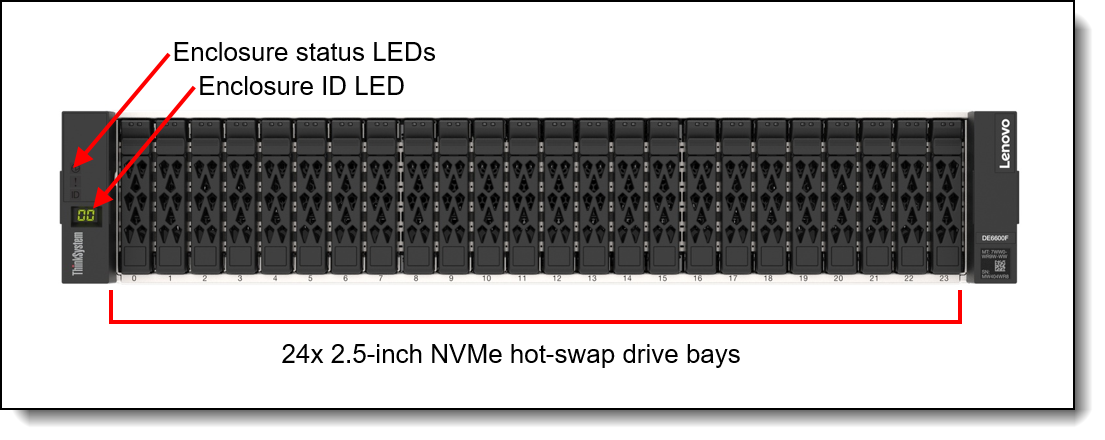
Figure 2. DE6600F enclosure controller front view.
The following figure shows the rear of the ThinkSystem DE6600F and DE6600H 2U SFF controller enclosure.
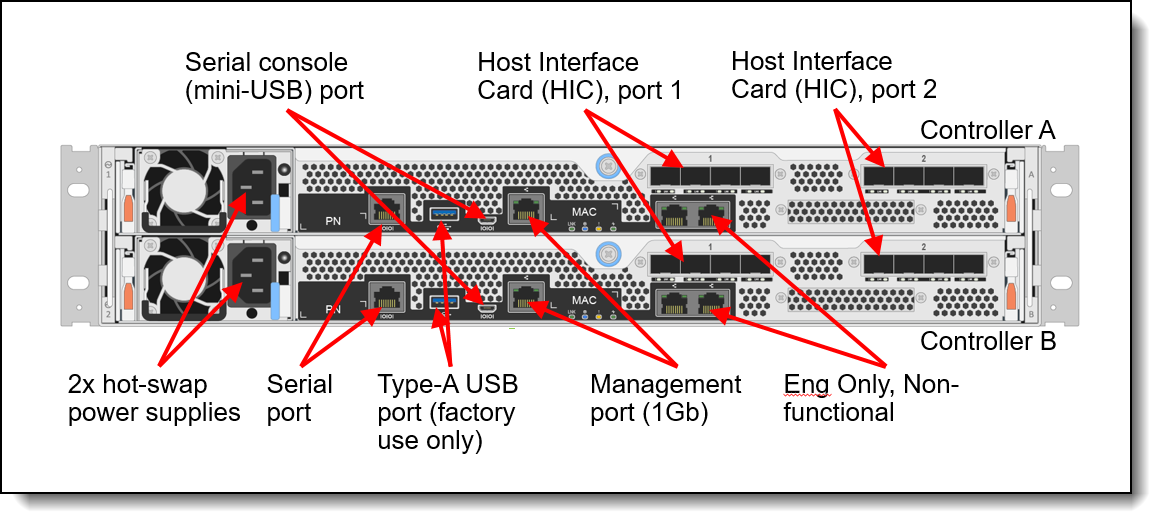
Figure 3. ThinkSystem DE6600F and DE6600H 2U SFF controller enclosure rear view
The rear of the ThinkSystem DE6600F and DE6600H 2U SFF controller enclosure includes the following components:
- Two controllers. Each controller with the following ports:
- One Serial (RS-232) port.
Note: The DE6600F and DE6600H controllers no longer offers base ports - One service (USB) (Not functional) port.
- One serial console (mini-USB) port.
- One management (1GbE) port.
- Eng only (Not functional) ports.
- Bay 1/port 1 for HIC host connections (FC, iSCSI, IB) and optional SAS expansion card.
- Bay 2/port 2 for HIC host connections (FC, iSCSI, IB)
- One Serial (RS-232) port.
- Two redundant hot-swap 1181W AC (220V) power supplies (IEC 320-C14 power connector).
- PSU and system fans are installed in the controller enclosure (not chassis).
The following figure shows the front of the DE240S 2U SFF expansion enclosure.
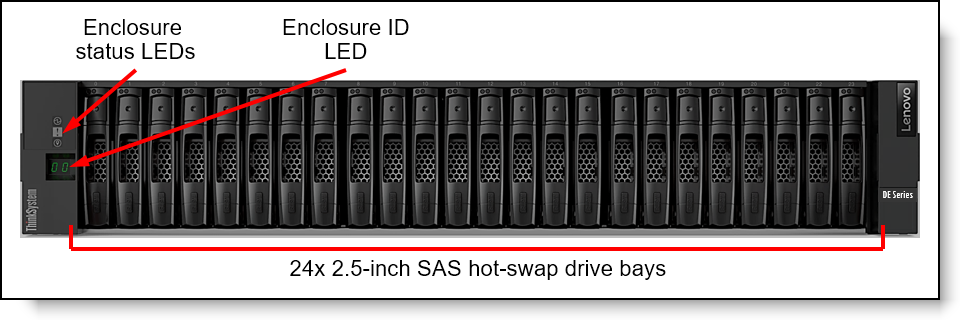
Figure 4. DE240S 2U SFF expansion enclosure front view.
The front of the DE240S 2U SFF expansion enclosure includes the following components:
- 24 SFF hot-swap drive bays
- Enclosure status LEDs
- Enclosure ID LED
The following figure shows the front of the ThinkSystem DE120S 2U LFF expansion enclosure.
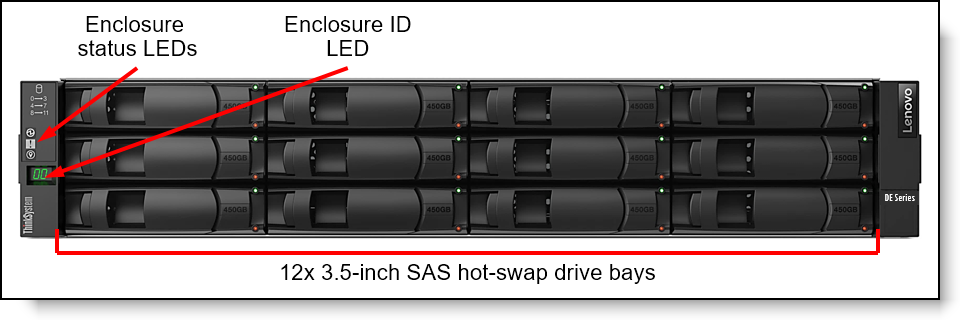
Figure 5. ThinkSystem DE120S 2U LFF expansion enclosure front view.
The front of the ThinkSystem DE120S 2U LFF expansion enclosure includes the following components:
- 12 LFF hot-swap drive bays
- Enclosure status LEDs
- Enclosure ID LED
The following figure shows the rear of the ThinkSystem DE240S and DE120S 2U expansion enclosures.
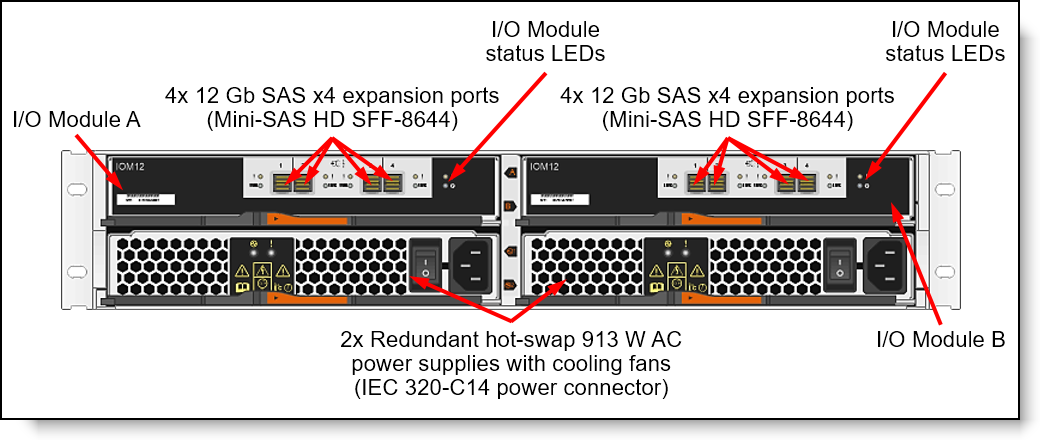
Figure 6. ThinkSystem DE240S and DE120S 2U expansion enclosures rear view
The rear of the ThinkSystem DE240S and DE120S 2U expansion enclosures includes the following components:
- Two redundant hot-swap I/O Modules; each I/O Module provides four 12 Gb SAS x4 expansion ports (Mini-SAS HD SFF-8644) for connections to the controller enclosures and for connecting the expansion enclosures between each other.
- Two redundant hot-swap 913 W AC (100 - 240 V) power supplies (IEC 320-C14 power connector) with integrated cooling fans.
The following figure shows the rear of the ThinkSystem DE600S 4U LFF expansion enclosure.
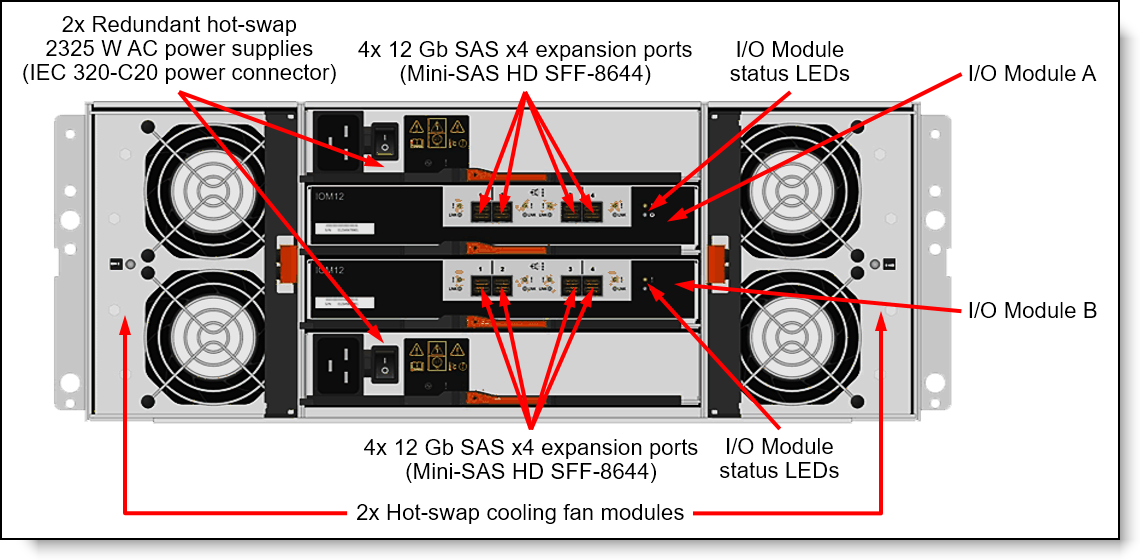
Figure 7. ThinkSystem DE600S 4U LFF expansion enclosure rear view
The rear of the ThinkSystem DE600S 4U LFF expansion enclosure includes the following components:
- Two redundant hot-swap I/O Modules; each I/O Module provides four 12 Gb SAS x4 expansion ports (Mini-SAS HD SFF-8644) for connections to the controller enclosures and for connecting the expansion enclosures between each other.
- Two redundant hot-swap 2325 W AC (200 - 240 V) power supplies (IEC 320-C20 power connector)
- Two hot-swap cooling fan modules; each module has two fans.
Note: The failed cooling module should be replaced as soon as possible.
System specifications
The following table lists the DE6600F and DE6600H storage system specifications.
Note: The supported hardware options, software features, and interoperability listed in this product guide are based on the Lenovo SAN OS 11.80. For details about specific software releases that introduced support for certain hardware options and software features, refer to the Release notes of the particular software release that can be found at:
http://datacentersupport.lenovo.com
| Attribute | DE6600F (All-flash) | DE6600H (Hybrid) |
|---|---|---|
| Machine type |
Controller enclosure: 7DB7 Expansion enclosure:
|
Controller enclosure: 7DB7 Expansion enclosures:
|
| Form factor |
Controller enclosure: 2U rack mount Expansion enclosure:
|
Controller enclosure: 2U rack mount Expansion enclosures:
|
| Controller configuration | Dual active-active controller configuration with automatic load balancing. | |
| RAID levels | RAID 0, 1, 3, 5, 6 and 10; Dynamic Disk Pools.
|
|
| Controller system memory | 64 GB or 256 GB per system (32 GB or 128 GB per controller). Cache mirroring between the controllers. Flash-backed cache protection (includes battery for destaging to flash). | |
| Expansion enclosure support |
|
|
| Drive bays |
|
|
|
Drive technology
|
Controller enclosure
|
|
| Drive expansion connectivity |
|
|
| Drives | Controller enclosure: 2U24 SFF drives:
DE240S Expansion enclosure: 2U24 SFF drives**:
|
Controller enclosure: 2U24 SFF drives:
DE240S Expansion enclosure: 2U24 SFF drives**:
DE120S Expansion enclosure: 2U12 LFF drives:
DE600S Expansion enclosure: 4U60 LFF drives:
|
| Storage capacity |
|
|
| Storage protocols | SAN (Block access): FC, iSCSI, iSER/IB, NVMe/FC, NVMe/IB, NVMe/RoCE, and SRP/IB. | |
| Host connectivity |
Host connectivity ports provided using host interface cards (HICs). A controller enclosure has two controllers. Supported HICs are:
|
|
| Host operating systems |
Microsoft Windows Server, Red Hat Enterprise Linux (RHEL), SUSE Linux Enterprise Server (SLES), VMware vSphere. Reference LSIC for details. |
|
| Performance (NVMe drives only)* |
|
|
| Configuration maximums |
|
|
| Cooling |
Controller enclosure: Five cooling fans per enclosure controller. DE600S expansion: Redundant cooling with two cooling modules |
|
| Power supply | Two redundant hot-swap 1181 W (220 V) 2U24 controller enclosure. Each expansion enclosure also supports 2 power supply. | |
| Hot-swap parts | Controllers, I/O modules, drives, power supplies and SFP+/SFP28/QSFP28 transceivers. | |
| Management ports |
|
|
| Management interfaces | System Manager web-based GUI; SAN Manager standalone GUI; SSH CLI for service only; SMcli; SMI-S Provider; SNMP, email, and syslog alerts; XClarity integration supporting storage alerts. | |
| Security features | Secure Socket Layer (SSL), Secure Shell (SSH) for service only, user level security, role-based access control (RBAC), LDAP authentication. | |
| Warranty and support | Three-year customer-replaceable unit and onsite limited warranty with 9x5 next business day (NBD) parts delivered. Also available are 9x5 NBD onsite response, 24x7 coverage with 2-hour or 4-hour onsite response, or 6-hour or 24-hour committed repair (select areas), YourDrive YourData, Premier Support, and 1-year or 2-year post-warranty extensions. | |
| Software maintenance | Included in the base warranty and any Lenovo warranty extensions. | |
| Dimension (controller enclosure) | 2U24 SFF enclosure: Height: 87 mm, Width: 447 mm, Depth: 543 mm (3.4 x 17.6 x 21.4 inches) | |
| Dimension (expansion enclosure) |
|
|
| Weight |
|
|
* Estimated performance based on internal measurements
** There is no support for 10k SAS drives.
Top Choice
Lenovo offers the “quick-ship” program Top Choice Express (TCE) to make it easy for our customers to get quick delivery of our products. With TCE, a Configure-to-Order (CTO) model contains a "best of" subset of components, which allows for customization while maintaining significantly faster lead times than standard CTO.
Top Choice Express (TCE) is the way to get custom configurations as quickly as possible. It allows DCSC configurator users to configure systems in CTO Mode, selecting the required hardware components while still benefiting from faster turnaround than traditional CTO. These configurations are built and fully integrated by Lenovo Manufacturing, with simple configuration steps, instant pricing, and quicker delivery.
To see which components are TCE, check the TCE column in the various component tables in this product guide. Green cells mean that the component is enabled for ordering with Top Choice Express in all regions world-wide. Orange cells with the symbol mean that the component is enable for Top Choice Express in only some regions. Mouse over or tap on the cell to see which regions have it enabled for TCE.
Notes:
- Top Choice Express is for configure-to-order builds only, not for standalone option part numbers.
- Ship dates are estimates only; actual ship times may vary based on platform and component availability, order processing, logistics, and external factors beyond Lenovo’s control. Lenovo is not liable for delays.
Controller enclosures
The following table lists the CTO base models for the ThinkSystem DE6600F and DE6600H.
| Machine Type/Model | Base feature | Description | Top Choice Express |
|---|---|---|---|
| 7DB7CTO1WW | 7DB7 | Lenovo ThinkSystem DE6600 All Flash NVMe 2U24 | - |
| 7DB7CTO2WW | 7DB7 | Lenovo ThinkSystem DE6600 Hybrid NVMe 2U24 | - |
Configuration notes:
- Note: No mixing of host protocols
The models of the ThinkSystem DE6600F and DE6600H ship with the following items:
- One chassis with the following components:
- Two controllers
- Two power supplies
- Two host interface cards
- Rack Mount Kit
- 2 m USB Cable (USB Type A to Micro-USB)
- Two power cables:
- Relationship models listed in this section:
- 2U24 SFF: 1.5 m, 10A/100-250V, C13 to IEC 320-C14 rack power cables
- CTO models: Customer-configured power cables
- Relationship models listed in this section:
Controllers
The ThinkSystem DE6600F and DE6600H enclosures ship with two controllers, and each controller provides 32 GB or 128 GB system memory for a system total of 64 GB or 256 GB respectively. A controller provides interfaces for host connectivity, management, and internal drives, and it runs storage management software.
- Each controller has two bays or ports for host interface card (HIC).
- Each controller supports 1 x (optional) SAS expansion card in bay1/port1 (mini-SAS HD SFF-8644 connectors) for the attachment of the ThinkSystem DE Series expansion units. 4 ports per controller.
The following host interfaces can be added to the ThinkSystem DE6600F and DE6600H controller enclosures with HICs:
- 8x 10/25 GbE SFP28 ports (4 ports per HIC) for 10/25 Gb iSCSI connectivity (require optical transceivers or DAC cables that should be purchased for the HICs).
- 8x 16/32 Gb FC SFP+ ports (4 ports per HIC) for FC or NVMe/FC connectivity (require optical transceivers that should be purchased for the HICs).
- 2x 100Gb NVMe-IB/RoCE, SRP, QSFP28 ports (2 ports per HIC in port 2 only ) for NVMe/RoCE connectivity (require optical transceivers or DAC cables that should be purchased for the HIC).
Configuration notes:
- Both controllers must have the same system memory: 32 GB or 128 GB.
- Two or four host interface cards are required for selection in bay 1/port 1 and bay 2/port 2 (per controller).
- No mixing of host protocols
- Both controllers must have the same type of the host interface card installed (16/32 Gb FC SFP+, 10/25 Gb iSCSI SFP28, or 100 GbE NVMe/RoCE QSFP28), and both cards must have SFP+/SFP28/QSFP28 media of the same type (either optical transceivers or DAC cables, but not both types).
The following table lists the DE6600F and DE6600H controllers and supported connectivity options.
| Part number | Feature code | Description | Top Choice Express | Maximum quantity per enclosure |
|---|---|---|---|---|
| Controllers | ||||
| None* | 7DB7 | Lenovo ThinkSystem DE6600 Controller 32GB or 128 GB | - | 2 |
| SAS expansion card | ||||
| 4C57A72918 | BHL2 | Lenovo ThinkSystem DE6400/6600 HIC, 12Gb SAS EXP,4-ports | - | 2 |
| Host interface cards | ||||
| 4C57A85945 | BT4B | Lenovo ThinkSystem DE 6400/6600 HIC, 10/25GbE iSCSI,4-ports | - | 4 |
| 4C57A14374 | B6WA | Lenovo ThinkSystem DE6400/6600 HIC, 16/32Gb NVMe Over FC,4-ports | - | 4 |
| 4XC7A85322 | BS3G | Lenovo ThinkSystem DE6400/6600 HIC, 100Gb NVMe Over ROCE,2-Ports | - | 2** |
| CTO only | BUY7† | Lenovo ThinkSystem DE6600 HIC, 200Gb NVMe Over ROCE/IB,2-Ports | - | 2*** |
| Transceiver options | ||||
| 4M17A13527 | B4B2 | Lenovo 10Gb iSCSI/16Gb FC Universal SFP+ Module | - | 16 |
| 4M17A13529 | B4B4 | Lenovo 10/25GbE iSCSI SFP28 Module (for 10/25 Gb iSCSI HIC ports) | - | 16 |
| 4M17A13528 | B4B3 | Lenovo 32Gb FC SFP+ Transceiver (for 32 Gb FC HIC ports) | - | 16 |
| OM4 cables for 16/32 Gb FC and 10/25 Gb iSCSI SW SFP+/SFP28 optical transceivers | ||||
| 4Z57A10845 | B2P9 | Lenovo 0.5m LC-LC OM4 MMF Cable | - | 16 |
| 4Z57A10846 | B2PA | Lenovo 1m LC-LC OM4 MMF Cable | - | 16 |
| 4Z57A10847 | B2PB | Lenovo 3m LC-LC OM4 MMF Cable | - | 16 |
| 4Z57A10848 | B2PC | Lenovo 5m LC-LC OM4 MMF Cable | - | 16 |
| 4Z57A10849 | B2PD | Lenovo 10m LC-LC OM4 MMF Cable | - | 16 |
| 4Z57A10850 | B2PE | Lenovo 15m LC-LC OM4 MMF Cable | - | 16 |
| 4Z57A10851 | B2PF | Lenovo 25m LC-LC OM4 MMF Cable | - | 16 |
| 4Z57A10852 | B2PG | Lenovo 30m LC-LC OM4 MMF Cable | - | 16 |
| OM3 cables for 16/32 Gb FC and 10/25 Gb iSCSI SW SFP+/SFP28 optical transceivers | ||||
| 00MN499 | ASR5 | Lenovo 0.5m LC-LC OM3 MMF Cable | - | 16 |
| 00MN502 | ASR6 | Lenovo 1m LC-LC OM3 MMF Cable | - | 16 |
| 00MN505 | ASR7 | Lenovo 3m LC-LC OM3 MMF Cable | - | 16 |
| 00MN508 | ASR8 | Lenovo 5m LC-LC OM3 MMF Cable | - | 16 |
| 00MN511 | ASR9 | Lenovo 10m LC-LC OM3 MMF Cable | - | 16 |
| 00MN514 | ASRA | Lenovo 15m LC-LC OM3 MMF Cable | - | 16 |
| 00MN517 | ASRB | Lenovo 25m LC-LC OM3 MMF Cable | - | 16 |
| 00MN520 | ASRC | Lenovo 30m LC-LC OM3 MMF Cable | - | 16 |
| DAC cables for iSCSI HIC ports | ||||
| 00D6288 | A3RG | 0.5m Passive DAC SFP+ Cable | - | 16 |
| 90Y9427 | A1PH | 1m Passive DAC SFP+ Cable | - | 16 |
| 00AY764 | A51N | 1.5m Passive DAC SFP+ Cable | - | 16 |
| 00AY765 | A51P | 2m Passive DAC SFP+ Cable | - | 16 |
| 90Y9430 | A1PJ | 3m Passive DAC SFP+ Cable | - | 16 |
| 90Y9433 | A1PK | 5m Passive DAC SFP+ Cable | - | 16 |
| 00D6151 | A3RH | 7m Passive DAC SFP+ Cable | - | 16 |
| DAC cables for 25 Gb iSCSI SFP28 HIC ports | ||||
| 7Z57A03557 | AV1W | Lenovo 1m Passive 25G SFP28 DAC Cable | - | 16 |
| 7Z57A03558 | AV1X | Lenovo 3m Passive 25G SFP28 DAC Cable | - | 16 |
| 7Z57A03559 | AV1Y | Lenovo 5m Passive 25G SFP28 DAC Cable | - | 16 |
| DAC cables for 100 Gb NVMe/RoCE QSFP28 HIC ports | ||||
| 7Z57A03561 | AV1Z | Lenovo 1m Passive 100G QSFP28 DAC Cable | - | 4 |
| 7Z57A03562 | AV20 | Lenovo 3m Passive 100G QSFP28 DAC Cable | - | 4 |
| 7Z57A03563 | AV21 | Lenovo 5m Passive 100G QSFP28 DAC Cable | - | 4 |
| HDR IB Passive Copper QSFP56 cables | ||||
| 4Z57A14182 | B4QQ | 0.5m Mellanox HDR IB Passive Copper QSFP56 Cable | - | 8 |
| 4Z57A14183 | B4QR | 1m Mellanox HDR IB Passive Copper QSFP56 Cable | - | 8 |
| 4Z57A14184 | B4QS | 1.5m Mellanox HDR IB Passive Copper QSFP56 Cable | - | 8 |
| 4Z57A14185 | B4QT | 2m Mellanox HDR IB Passive Copper QSFP56 Cable | - | 8 |
| DAC cables for 200 Gb QSFP56 Ethernet | ||||
| 4X97A11113 | BF6W | Lenovo 1m Passive 200G QSFP56 Ethernet DAC Cable | - | 4 |
| SAS host connectivity cables: Mini-SAS HD (controller) to Mini-SAS HD (host) | ||||
| 00YL847 | AU16 | 0.5m External MiniSAS HD 8644/MiniSAS HD 8644 Cable | - | 8 |
| 00YL848 | AU17 | 1m External MiniSAS HD 8644/MiniSAS HD 8644 Cable | - | 8 |
| 00YL849 | AU18 | 2m External MiniSAS HD 8644/MiniSAS HD 8644 Cable | - | 8 |
| 00YL850 | AU19 | 3m External MiniSAS HD 8644/MiniSAS HD 8644 Cable | - | 8 |
| 1 GbE management ports | ||||
| 00WE123 | AVFW | 0.75m Green Cat6 Cable | - | 2 |
| 00WE127 | AVFX | 1.0m Green Cat6 Cable | - | 2 |
| 00WE131 | AVFY | 1.25m Green Cat6 Cable | - | 2 |
| 00WE135 | AVFZ | 1.5m Green Cat6 Cable | - | 2 |
| 00WE139 | AVG0 | 3m Green Cat6 Cable | - | 2 |
| 90Y3718 | A1MT | 10m Green Cat6 Cable | - | 2 |
| 90Y3727 | A1MW | 25m Green Cat6 Cable | - | 2 |
* Factory-installed only.
** For current Lenovo SAN OS 11.80 – max qty 2 - in bay2/port2 only.
*** No field upgrade available.
† There is no support for HIC (BUY7) in the DE6600H controller.
Expansion enclosures
In the base configuration, the ThinkSystem DE6600F and DE6600H supports attachment of up to four expansions: 4xDE600S 4U60 LFF, or 4xDE240S 2U24 SFF, or 4xDE120S 2U12 LFF. These expansions can be mixed up to the aforementioned maximums.
Maximum drives:
- All Flash- 120 (1 x DE6600F controller NVMe + 4xDE240S SAS, SSD)
- Hybrid- 444 (1 x DE6600H controller NVMe + 7xDE600S SAS, SSD)
Note: DE120S and DE600S are not supported with All Flash controller.
The following table lists the CTO base models for the ThinkSystem DE Series expansion enclosures.
| Machine Type/Model | Description | Feature code | |||
|---|---|---|---|---|---|
| Top Choice Express |
European Union | Other markets | Top Choice Express |
||
| 7Y63CTO1WW | Lenovo ThinkSystem DE 120S 2U12 LFF Expansion Enclosure | BEY6 | TCE | B38M | TCE |
| 7Y68CTO1WW | Lenovo ThinkSystem DE 240S 2U24 SFF Expansion Enclosure | BEY7 | TCE | B38L | TCE |
| 7Y69CTO2WW | Lenovo ThinkSystem DE600S 4U60 LFF Expansion Enclosure Gen 2 | BQ9W | - | BQ9W | - |
Configuration notes:
- For CTO models, two I/O expansion modules are selected by default in the configurator, and the selection cannot be changed
- DE 120S/ DE 240S - feature code B4BS
- DE600S - feature code BQ9X
The models of the ThinkSystem DE240S, DE120S, and DE600S ship with the following items:
- One chassis with the following components:
- Two I/O modules
- Two power supplies
- Two cooling modules (4U60 LFF only)
- Four 1 m MiniSAS HD 8644/MiniSAS HD 8644 cables (Models listed in Tables 6 and 7)
- Rack Mount Kit
- Quick Installation Guide
- Electronic Publications Flyer
- Two power cables:
- CTO models: Customer-configured power cables
Each ThinkSystem DE Series expansion enclosure ships with two SAS I/O expansion modules. Each I/O expansion module provides four external 12 Gb SAS x4 ports (Mini-SAS HD SFF-8644 connectors labelled Port 1-4) that are used for connections to the ThinkSystem DE6600F and DE6600H and for daisy chaining the expansion enclosures between each other.
Two expansion ports on the Controller A are connected to the Ports 1 and 2 on the I/O Module A in the first expansion enclosure in the chain, and the Ports 3 and 4 on the I/O Module A in the first expansion enclosure are connected to the Ports 1 and 2 on the I/O Module A in the adjacent expansion enclosure, and so on.
Two expansion ports on the Controller B are connected to the Ports 1 and 2 on the I/O Module B in the last expansion enclosure in the chain, and the Ports 3 and 4 on the I/O Module B in the expansion enclosure are connected to the Ports 1 and 2 on the I/O Module B in the adjacent expansion enclosure, and so on.
The connectivity topology for the DE Series expansion enclosures is shown in the following figure.
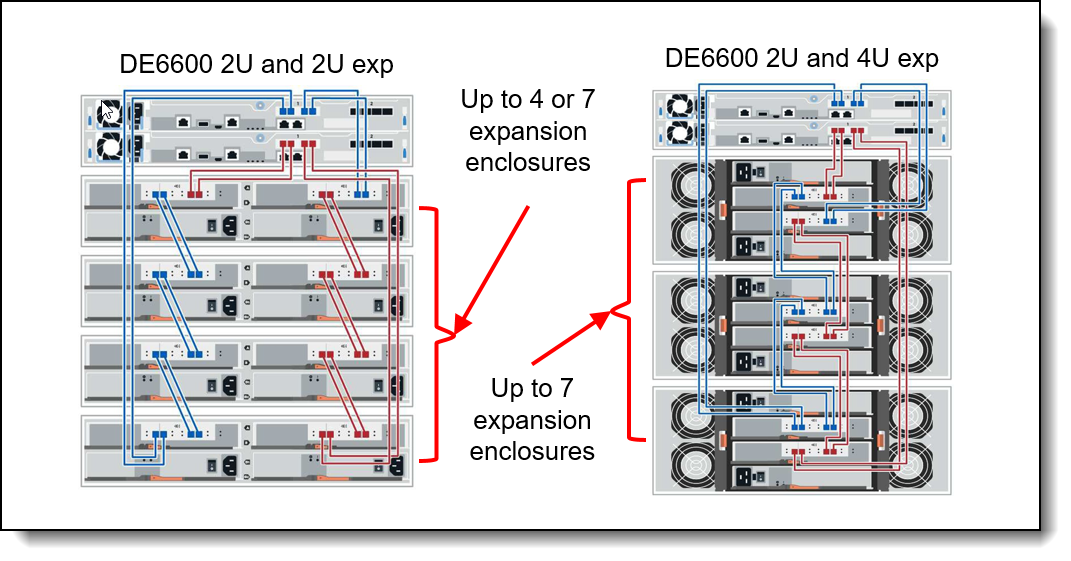
Figure 8. ThinkSystem DE6600F and DE6600H expansion enclosure connectivity topology
The following table lists ordering information for the supported expansion enclosure connectivity options.
| Part number | Feature code | Description | Top Choice Express | Quantity per one expansion enclosure |
|---|---|---|---|---|
| SAS connectivity cables | ||||
| 00YL847 | AU16 | External MiniSAS HD 8644/MiniSAS HD 8644 0.5M Cable | - | 8 |
| 00YL848 | AU17 | External MiniSAS HD 8644/MiniSAS HD 8644 1M Cable | - | 8 |
| 00YL849 | AU18 | External MiniSAS HD 8644/MiniSAS HD 8644 2M Cable | - | 8 |
| 00YL850 | AU19 | External MiniSAS HD 8644/MiniSAS HD 8644 3M Cable | - | 8 |
Configuration notes:
- Eight SAS cables are needed per each expansion enclosure (two SAS cables per I/O Module) for connections to the controller enclosure and for daisy chaining of the expansion enclosures.
- The length of the SAS cables that connect a 2U24 or 2U12 enclosure to an adjacent 4U60 enclosure should be at least 1 meter.
Drives
All drives are dual-port and hot-swappable. Drives of the same form factor can be intermixed within the appropriate enclosure, which provides the flexibility to address performance and capacity needs within a single enclosure.
More drives and expansion enclosures are designed to be dynamically added with virtually no downtime, which helps to quickly and seamlessly respond to ever-growing capacity demands.
The following table lists the specifications for drives in the DE6600F and DE6600H storage systems
| Product Name | DE6600F SFF (7DB7) (All-flash) | DE6600H SFF (7DB7) (Hybrid) |
|---|---|---|
| HDD Bay Type | 2.5" | 2.5" |
| HDD Type | NVMe | NVMe |
| HDD Bay Quantity | 24 | 24 |
| Hot-Swap HDD Bays (Y/N) | Y | Y |
| Solid State Disk (SSD) Support | Y | Y |
| HDD Intermix (within enclosure) | Y | Y |
| Maximum HDDs per System (System = Controller plus expansion enclosures) |
120* | 444** |
*All Flash: 120 (1 x DE6600F + 4xDE240S )
** Hybrid: 444 (1 x DE6600H + 7xDE600S)
The following tables list the drive options for internal storage for each base enclosure and expansions.
The Lenovo ThinkSystem DE6600F and DE6600H enclosures:
- DE6600F All Flash and DE6600H Hybrid
ThinkSystem Expansion enclosures:
- ThinkSystem DE120S 2U12 Exp
- ThinkSystem DE240S 2U24 Exp
- Thinksystem DE600S 4U60 Exp v2
| Part number | Feature code |
Description | Top Choice Express | Max Qty |
|---|---|---|---|---|
| SFF drive options | ||||
| 4XB7A38085 | B6WC | Lenovo ThinkSystem DE 1.9TB 1DWD 2.5" NVME SED 2U24 | - | 24 |
| 4XB7A38087 | B6WE | Lenovo ThinkSystem DE 3.8TB 1DWD 2.5" NVME SED 2U24 | - | 24 |
| 4XB7A38093 | B6WL | Lenovo ThinkSystem DE 7.6TB 1DWD 2.5" NVME SED 2U24 | - | 24 |
| 4XB7A38095 | B6WN | Lenovo ThinkSystem DE 15.3TB 1DWD 2.5" NVME SED 2U24 | - | 24 |
| 2.5" NVME SED FIPS | ||||
| 4XB7A38089 | B6WG | Lenovo ThinkSystem DE 3.8TB 1DWD 2.5" NVME SED FIPS 2U24 | - | 24 |
| Single 1DWD 2.5" NVME non-SED | ||||
| 4XB7A38097 | B7F5 | Lenovo ThinkSystem DE 1.9TB 1DWD 2.5" NVME non-SED 2U24 | - | 24 |
| 4XB7A38091 | B6WJ | Lenovo ThinkSystem DE 3.8TB 1DWD 2.5" NVME non SED 2U24 | - | 24 |
| Drive packs 2.5" NVME SED | ||||
| 4XB7A38086 | B6WD | Lenovo ThinkSystem DE 11.4TB Pack (6x 1.9TB NVME SED) | - | 4 |
| 4XB7A38094 | B6WM | Lenovo ThinkSystem DE 45.6TB Pack (6x 7.6TB NVME SED) | - | 4 |
| 4XB7A38096 | B6WP | Lenovo ThinkSystem DE 91.8TB Pack (6x 15.3TB NVME SED) | - | 4 |
| 4XB7A38088 | B6WF | Lenovo ThinkSystem DE 22.8TB Pack (6x 3.8TB NVME SED) | - | 4 |
| Six drive packs 2.5" NVME non SED | ||||
| 4XB7A38098 | B7F6 | Lenovo ThinkSystem DE 11.4TB Pack (6x 1.9TB NVME non-SED) | - | 4 |
| 4XB7A38092 | B6WK | Lenovo ThinkSystem DE 22.8TB Pack (6x 3.8TB NVME non SED) | - | 4 |
| Drive packs 2.5" NVME SED FIPS | ||||
| 4XB7A38090 | B6WH | Lenovo ThinkSystem DE 22.8TB Pack (6x 3.8TB NVME SED FIPS) | - | 4 |
| Part number | Feature code |
Description | Top Choice Express | Max Qty |
|---|---|---|---|---|
| LFF drive HDD options | ||||
| 4XB7A14099 | B4C3 | Lenovo ThinkSystem DE Series 4TB 7.2K 3.5" HDD 2U12 | TCE | 12 |
| 4XB7A14101 | B4C5 | Lenovo ThinkSystem DE Series 8TB 7.2K 3.5" HDD 2U12 | Not TCE | 12 |
| 4XB7A14102 | B4C6 | Lenovo ThinkSystem DE Series 10TB 7.2K 3.5" HDD 2U12 | TCE | 12 |
| 4XB7A14104 | B4C8 | Lenovo ThinkSystem DE Series 12TB 7.2K 3.5" HDD 2U12 | Not TCE | 12 |
| 4XB7A64875 | BCVY | Lenovo ThinkSystem DE Series 16TB 7.2K 3.5" HDD 2U12 | Not TCE | 12 |
| 4XB7A74942 | BHDP | Lenovo ThinkSystem DE Series 18TB 7.2K 3.5" HDD 2U12 | Not TCE | 12 |
| 4XB7A88027 | BW1W | Lenovo ThinkSystem DE Series 22TB 7.2K 3.5" HDD 2U12 | TCE | 12 |
| 4XB7B03838 | C7XS | Lenovo ThinkSystem DE Series 24TB 7.2K 3.5" HDD 2U12 | TCE | 12 |
| 4XB7B13111 | CE5B | Lenovo ThinkSystem DE Series 24TB 7.2K 3.5" SED HDD 2U12 | Not TCE | 12 |
| LFF drive SSD options | ||||
| 4XB7A14097 | B4C1 | Lenovo ThinkSystem DE Series 800GB 3DWD 2.5" SSD 2U12 (2.5" drive in a 3.5" tray) | Not TCE | 12 |
| 4XB7A74946 | BKUN | Lenovo ThinkSystem DE Series 960GB 1DWD 2.5" SSD 2U12 (2.5" drive in a 3.5" tray) | TCE | 12 |
| 4XB7A74947 | BKUP | Lenovo ThinkSystem DE Series 1.92TB 1DWD 2.5" SSD 2U12 (2.5" drive in a 3.5" tray) | TCE | 12 |
| 4XB7A74954 | BKUJ | Lenovo ThinkSystem DE Series 3.84TB 1DWD 2.5" SSD 2U12 (2.5" drive in a 3.5" tray) | TCE | 12 |
| LFF drive FIPS HDDs (SED HDDs) | ||||
| 4XB7A14100 | B4C4 | Lenovo ThinkSystem DE Series 6TB 7.2K 3.5" HDD SED FIPS 2U12 | Not TCE | 12 |
| 4XB7A14103 | B4C7 | Lenovo ThinkSystem DE Series 10TB 7.2K 3.5" HDD SED FIPS 2U12 | Not TCE | 12 |
| LFF drive FIPS SSDs | ||||
| 4XB7A14098 | B4C2 | Lenovo ThinkSystem DE Series 1.6TB 3DWD 2.5" SSD FIPS 2U12 (2.5" drive in a 3.5" tray) | Not TCE | 12 |
| 4XB7A88501 | BWCI | Lenovo ThinkSystem DE Series 3.84TB 1DWD 2.5" SSD FIPS 2U12 (2.5" drive in a 3.5" tray) | Not TCE | 12 |
| Part number | Feature code |
Description | Top Choice Express | Max Qty |
|---|---|---|---|---|
| SFF drive SSD options | ||||
| 4XB7A14105 | B4BT | Lenovo ThinkSystem DE Series 800GB 3DWD 2.5" SSD 2U24 | Not TCE | 24 |
| 4XB7A74948 | BKUQ | Lenovo ThinkSystem DE Series 960GB 1DWD 2.5" SSD 2U24 | TCE | 24 |
| 4XB7A14106 | B4BU | Lenovo ThinkSystem DE Series 1.6TB 3DWD 2.5" SSD 2U24 | Not TCE | 24 |
| 4XB7A74951 | BKUT | Lenovo ThinkSystem DE Series 1.92TB 1DWD 2.5" SSD 2U24 | TCE | 24 |
| 4XB7A14108 | B4BW | Lenovo ThinkSystem DE Series 3.2TB 3DWD 2.5" SSD 2U24 | Not TCE | 24 |
| 4XB7A14173 | B4RX | Lenovo ThinkSystem DE Series 3.84TB 1DWD 2.5" SSD 2U24 | Not TCE | 24 |
| 4XB7A74955 | BKUK | Lenovo ThinkSystem DE Series 3.84TB 1DWD 2.5" SSD 2U24 | TCE | 24 |
| 4XB7A14176 | B4RY | Lenovo DE Series 7.68TB 1DWD 2.5" SSD 2U24 | TCE | 24 |
| 4XB7A14110 | B4CD | Lenovo ThinkSystem DE Series 15.36TB 1DWD 2.5" SSD 2U24 | Not TCE | 24 |
| SFF drive SSD (SED SSDs) | ||||
| 4XB7A88466 | BW2B | Lenovo ThinkSystem DE Series 15.36TB 1DWD 2.5" SSD SED 2U24 | Not TCE | 24 |
| SFF drive FIPS SSDs | ||||
| 4XB7A88469 | BWCJ | Lenovo ThinkSystem DE Series 3.84TB 1DWD 2.5" SSD FIPS 2U24 | Not TCE | 24 |
| Drive pack options | ||||
| 4XB7A74949 | BKUR | Lenovo ThinkSystem DE Series 11.52TB Pack (12x 960GB SSD) | Not TCE | 2 |
| 4XB7A74952 | BKUU | Lenovo ThinkSystem DE Series 23.04TB Pack (12x 1.92TB SSD) | Not TCE | 2 |
| 4XB7A74956 | BKUL | Lenovo ThinkSystem DE Series 46.08TB Pack (12x 3.84TB SSD) | Not TCE | 2 |
| 4XB7A14238 | B4RW | Lenovo ThinkSystem DE Series 92TB SSD Pack (12x 7.68TB SSD) | TCE | 2 |
| 4XB7A88467 | BW2C | Lenovo ThinkSystem DE Series 184.3TB Pack (12x 15.36TB SED SSD) | Not TCE | 2 |
| 4XB7A88470 | BWCK | Lenovo ThinkSystem DE Series 46TB FIPS Pack (12x 3.84TB FIPS SSDs) | Not TCE | 2 |
| Part number | Feature code |
Description | Top Choice Express | Max Qty |
|---|---|---|---|---|
| LFF drive HDD options | ||||
| 4XB7A14124 | B4GG | Lenovo ThinkSystem DE Series 4TB 7.2K 3.5" HDD 4U60 | - | 60 |
| 4XB7A14126 | B4GJ | Lenovo ThinkSystem DE Series 10TB 7.2K 3.5" HDD 4U60 | - | 60 |
| 4XB7A14125 | B4GH | Lenovo ThinkSystem DE Series 8TB 7.2K 3.5" HDD 4U60 | - | 60 |
| 4XB7A14128 | B4GL | Lenovo ThinkSystem DE Series 12TB 7.2K 3.5" HDD 4U60 | - | 60 |
| 4XB7A74943 | BHDQ | Lenovo ThinkSystem DE Series 18TB 7.2K 3.5" HDD 4U60 | - | 60 |
| 4XB7A88038 | BW1Y | Lenovo ThinkSystem DE Series 22TB 7.2K 3.5" HDD 4U60 | - | 60 |
| 4XB7B03894 | C7XT | Lenovo ThinkSystem DE Series 24TB 7.2K 3.5" HDD 4U60 | - | 60 |
| 4XB7B13112 | CE5C | Lenovo ThinkSystem DE Series 24TB 7.2K 3.5" SED HDD 4U60 | - | 60 |
| LFF drive SSD options | ||||
| 4XB7A86719 | BUC8 | Lenovo ThinkSystem DE Series 1.92TB 1DWD SAS SSD 4U60 (2.5" drive in a 3.5" tray) | - | 60 |
| LFF drive FIPS (SED HDDs) | ||||
| 4XB7A14127 | B4GK | Lenovo ThinkSystem DE Series 10TB 7.2K 3.5" HDD SED FIPS 4U60 | - | 60 |
| LFF drive FIPS SSDs | ||||
| 4XB7A88506 | BWCM | Lenovo ThinkSystem DE Series 3.84TB 1DWD 2.5" SSD FIPS 4U60 (2.5" drive in a 3.5" tray) | - | 60 |
| Drive pack options | ||||
| 4XB7A14163 | B4GN | Lenovo ThinkSystem DE Series 80TB HDD Pack (20x 4TB HDD) | - | 3 |
| 4XB7A14165 | B4GP | Lenovo ThinkSystem DE Series 160TB HDD Pack (20x 8TB HDD) | - | 3 |
| 4XB7A14167 | B4GQ | Lenovo ThinkSystem DE Series 200TB HDD Pack (20x 10TB HDD) | - | 3 |
| 4XB7A14171 | B4GS | Lenovo ThinkSystem DE Series 240TB HDD Pack (20x 12TB HDD) | - | 3 |
| 4XB7A74944 | BHDR | Lenovo ThinkSystem DE Series 360TB HDD Pack (20x 18TB HDDs) | - | 3 |
| 4XB7A88042 | BW1K | Lenovo ThinkSystem DE Series 440TB HDD Pack (20x 22TB) | - | 3 |
| 4XB7B03895 | C7XU | Lenovo ThinkSystem DE Series 480TB HDD Pack (20x 24TB HDDs) | - | 3 |
| 4XB7A86720 | BUC9 | Lenovo ThinkSystem DE Series 38.4TB Pack (20x 1.92TB SAS SSDs) (2.5" drive in a 3.5" tray) | - | 3 |
| 4XB7A14169 | B4GR | Lenovo ThinkSystem DE Series 200TB HDD SED FIPS Pack (20x 10TB HDD) | - | 3 |
| 4XB7A88507 | BWCN | Lenovo ThinkSystem DE Series 76.8TB FIPS Pack (20x 3.84TB FIPS SSDs) (2.5" drive in a 3.5" tray) | - | 3 |
Shipping requirement: 2U12 and 2U24 enclosures can be shipped with all drive bays populated, however the 4U60 enclosures must be shipped with drives removed.
Configuration notes:
- For hybrid (HDDs and SSDs) and all flash (SSDs only) storage configurations, a single ThinkSystem DE6600F storage system can support a maximum of 120 SSDs.
- A minimum of 20 drives is required for each 4U60 LFF enclosure (the front row of each drawer must be populated with four drives).
- Intermix of FIPS drives and non-FIPS drives is supported within the system.
- FIPS drives are not available in the following countries:
- Belarus
- Kazakhstan
- People's Republic of China
- Russia
Software
The following functions are included with every ThinkSystem DE6600F and DE6600H:
- RAID levels 0, 1, 3, 5, 6, and 10: Provide the flexibility to choose the level of performance and data protection required.
- Dynamic Disk Pools (DDP) technology: Helps improve performance and availability with significantly faster rebuild time and reduced exposure to multiple drive failures by allowing data and built-in spare capacity to be distributed across all physical drives in the storage pool.
- All Flash Array (AFA) capability: Meets the demand for higher speed storage and provide higher IOPS and bandwidth with lower power usage and total cost of ownership than hybrid or HDD-based solutions.
- Snapshots: Enables creation of copies of data for backup, parallel processing, testing, and development, and have the copies available almost immediately
- Encryption: Provides encryption for data at rest for enhanced data security with the optional FIPS 140-2 Level 2 drives and embedded key management (AES-256) or an external key management server.
- Automatic load balancing: Provides automated I/O workload balancing of I/O traffic from the hosts across both controllers.
- Data assurance: Ensures industry-standard T10-PI end-to-end data integrity in the storage system (from the host ports to the drives).
- Dynamic volume and capacity expansion: Allows the capacity of a volume to be expanded by adding new physical drives or making use of unused space on existing drives.
Software maintenance is included in the ThinkSystem DE6600F and DE6600H base warranty and optional warranty extensions, which provides 3-year software support with the option to extend it up to 5 years in 1-year or 2-year increments (see Warranty and support for details).
The following additional features in SAN OS 11.80 are supported with every ThinkSystem DE6600F and DE6600H:
- Increase SSD Read Cache maximum (60% increase from 5TB to 8TB)
- Increase max from 5 to 8 TB (based on two 3.8TB) at a minimum on all platforms.
- Strengthen digital signature method for SAN OS package
- All downloadable firmware is bundled in the same format (an RCB file).
- Support SSD Read Cache
- With HDD expansion, allow SSD read cache to be configured.
- Using the NVMe drives as the SSD read cache for HDDs in the SAS expansion.
- iSCSi/FC async remote mirroring
- Support ARVM on DE6400/DE6600, both NVMe and SAS based volumes.
- Basic target is another DE6400 or DE6600 system. Include mirroring SAS expansion drives to existing DE SAS drives.
- Like block size mirrors to like block size. i.e.NVMe 4Kn volumes mirror only to another 4Kn volume, and 512e to 512e.
- iSCSi/FC is the only host connection.
- Optimization of DDP Error overhead calculation algorithm
- Cap the number of error overhead stripes to 300 from the percentage-based calculation we do today.
Management
The DE6600F and DE6600H supports the following management interfaces:
- ThinkSystem System Manager, a web-based interface via HTTPS for single-system management, that runs on the storage system itself and requires only a supported browser, so there is no need for a separate console or plug-in. For more information, see the System Manager Online Help.
- ThinkSystem SAN Manager, a host-installed GUI-based application, for centralized management of multiple storage systems. For more information, see the SAN Manager Online Help.
- ThinkSystem DE Series Storage Plugin for vCenter. For more information, see the DE Series vCenter Plugin Online Help.
- Command line interface (CLI) via SSH or through serial console. For more information, see the CLI Online Help.
- Syslog, SNMP, and e-mail notifications.
- Optional Lenovo XClarity Administrator support for discovery, inventory, and monitoring.
The following table lists the SAN Manager Async and Sync supported features
| DE Series | Async (iSCSI) | Async (FC) | Sync (FC) |
|---|---|---|---|
| ThinkSystem DE6600 | Yes | Yes | No |
Power supplies and cables
The ThinkSystem DE Series 2U24 SFF and 2U12 LFF enclosures ship with two redundant hot-swap 913W (200 - 240V) Platinum AC power supplies, each with an IEC 320-C14 connector:
The ThinkSystem DE Series 4U60 LFF enclosures ship with two redundant hot-swap 2325 W (200 - 240 V) Platinum AC power supplies, each with an IEC 320-C20 connector.
The CTO models require the selection of two power cables.
The following table lists the rack power cable and line cord options that can be ordered for the DE Series 2U12 LFF and the DE Series 2U24 SFF enclosures (two power cords per enclosure).
| Part number | Feature code | Description | Top Choice Express | ||
|---|---|---|---|---|---|
| Rack power cables | |||||
| 00Y3043 | A4VP | 1.0m, 10A/100-250V, C13 to C14 Jumper Cord | TCE | ||
| 4L67A08367 | B0N5 | 1.0m, 13A/100-250V, C13 to C14 Jumper Cord | TCE | ||
| 39Y7937 | 6201 | 1.5m, 10A/100-250V, C13 to C14 Jumper Cord | TCE | ||
| 4L67A08368 | B0N6 | 1.5m, 13A/100-250V, C13 to C14 Jumper Cord | TCE | ||
| 4L67A08365 | B0N4 | 2.0m, 10A/100-250V, C13 to C14 Jumper Cord | TCE | ||
| 4L67A08369 | 6570 | 2.0m, 13A/100-250V, C13 to C14 Jumper Cord | TCE | ||
| 4L67A08366 | 6311 | 2.8m, 10A/100-250V, C13 to C14 Jumper Cord | TCE | ||
| 4L67A08370 | 6400 | 2.8m, 13A/100-250V, C13 to C14 Jumper Cord | TCE | ||
| 39Y7938 | 6204 | 2.8m, 10A/100-250V, C13 to IEC 320-C20 Rack Power Cable | TCE | ||
| 39Y7932 | 6263 | 4.3m, 10A/100-250V, C13 to C14 Jumper Cord | TCE | ||
| 4L67A08371 | 6583 | 4.3m, 13A/100-250V, C13 to C14 Rack Power Cable | TCE | ||
| Line cords | |||||
| 39Y7930 | 6222 | 2.8m, 10A/250V, C13 to IRAM 2073 (Argentina) Line Cord | TCE | ||
| 81Y2384 | 6492 | 4.3m,10A/250V, C13/IRAM 2073 (Argentina) Line Cord | TCE | ||
| 39Y7924 | 6211 | Australia/NZ 10A line C13 to SAA-AS C112 (2.8M) | TCE | ||
| 81Y2383 | 6574 | 4.3m,10A/250V, C13/AS/NZS 3112/2000 (Australia) Line Cord | TCE | ||
| 69Y1988 | 6532 | 2.8m, 10A/250V, C13 to NBR 14136 (Brazil) Line Cord | TCE | ||
| 81Y2387 | 6404 | 4.3m,10A/250V, C13/NBR 14136 (Brazil) Line Cord | TCE | ||
| 39Y7928 | 6210 | 2.8m, 10A/220V, C13 to GB 2099.1 (China) Line Cord | Not TCE | ||
| 81Y2378 | 6580 | 4.3m,10A/250V, C13/GB2099.1 (China) Line Cord | Not TCE | ||
| 39Y7918 | 6213 | Line cord - 2.8m, 10A/250V, C13 to DK2-5a (Denmark) | Not TCE | ||
| 81Y2382 | 6575 | 4.3m,10A/250V, C13/SB107-2-DI (Denmark) Line Cord | Not TCE | ||
| 39Y7917 | 6212 | European 10A line C13 to CEE 7/7 (2.8M) | TCE | ||
| 81Y2376 | 6572 | 4.3m,10A/230V, C13 to CEE7-VII (Europe) Line Cord | Not TCE | ||
| 39Y7927 | 6269 | 2.8m, 6A Line C13 to Fig 68 (India) Line Cord | TCE | ||
| 81Y2386 | 6567 | 4.3m, 10A/250V, C13 to IS 6538 (India) Line Cord | TCE | ||
| 39Y7920 | 6218 | Israel 10A line C13 to SI 32 (2.8M) | TCE | ||
| 81Y2381 | 6579 | 4.3m,10A/250V, C13/SI 32 (Israel) Line Cord | Not TCE | ||
| 39Y7921 | 6217 | Italy 10A line C13 to CEE 7/7 (2.8M) | TCE | ||
| 81Y2380 | 6493 | 4.3m,10A/250V, C13/CEI 23-16 (IT) Line cord | TCE | ||
| 46M2593 | A1RE | Japan 12A/125V C13 to JIS C-8303 2.8m line cord | TCE | ||
| 4L67A08357 | 6533 | 2.8m, 12A/200V, C13 to JIS C-8303 (Japan) Line Cord | Not TCE | ||
| 39Y7926 | 6335 | 4.3m, 12A/100V, C13 to JIS C-8303 (Japan) Line Cord | TCE | ||
| 4L67A08362 | 6495 | 4.3m, 12A/200V, C13 to JIS C-8303 (Japan) Line Cord | Not TCE | ||
| 39Y7925 | 6219 | Korea 7A line C13 to KETI 15A/250V (2.8M) | TCE | ||
| 81Y2385 | 6494 | 4.3m, 12A/250V C13/KSC 8305 (Korea) Line Cord | TCE | ||
| 39Y7922 | 6214 | South Africa 10A line C13 to SABS 164/1 (2.8M) | TCE | ||
| 81Y2379 | 6576 | 4.3m,10A/250V, C13/SANS 164-1 (South Africa) Line Cord | TCE | ||
| 39Y7919 | 6216 | Switzerland 10A line C13 to SEV 1011 (2.8M) | TCE | ||
| 81Y2390 | 6578 | 4.3m,10A/250V, C13/SEV 1011 (Switzerland)Line Cord | Not TCE | ||
| 23R7158 | 6386 | Line cord - 2.8m, 10A/125V, C13 to CNS 10917-3 (Taiwan) | TCE | ||
| 81Y2375 | 6317 | Taiwan 10A/250V C13/CNS 10917 2.8m line cord | TCE | ||
| 81Y2374 | 6402 | 2.8m, 13A/125V, C13 to CNS 60799 (Taiwan) Line Cord | TCE | ||
| 4L67A08363 | AX8B | 4.3m, 10A/125V, C13 to CNS 10917 (Taiwan) Line Cord | TCE | ||
| 81Y2389 | 6531 | 4.3m, 10A/250V, C13/CNS 10917 (Taiwan) Line Cord | TCE | ||
| 81Y2388 | 6530 | Taiwan 13A/125V C13/CNS 10917 4.3m line cord | TCE | ||
| 39Y7923 | 6215 | United Kingdom 10A line C13 to BS 1363 (2.8M) | TCE | ||
| 81Y2377 | 6577 | 4.3m,10A/230V, C13 to BS 1363/A (UK) Line Cord | TCE | ||
| 90Y3016 | 6313 | 2.8m, 10A/120V, C13 to NEMA 5-15P (US) Line Cord | TCE | ||
| 46M2592 | A1RF | 10A/250V C13 to NEMA 6-15P 2.8m line cord | TCE | ||
| 00WH545 | 6401 | 2.8m, 13A/120V, C13 to NEMA 5-15P (US) Line Cord | TCE | ||
| 4L67A08359 | 6370 | 4.3M, 10A/125V, C13 to NEMA 5-15P (US) Line Cord | TCE | ||
| 4L67A08361 | 6373 | 4.3m, 10A/250V, C13 to NEMA 6-15P (US) Line Cord | TCE | ||
| 4L67A08360 | AX8A | 4.3m, 13A/125V, C13 to NEMA 5-15P (US) Line Cord | TCE | ||
The following table lists the rack power cable and line cord options that can be ordered for the DE Series 4U60 LFF enclosures (two power cords per enclosure).
| Part number | Feature code | Description | Top Choice Express | ||
|---|---|---|---|---|---|
| Rack power cables | |||||
| 4L67A86680 | B4L2 | 2.0m, 16A/100-250V, C19 to C20 Jumper Cord | - | ||
| 39Y7916 | 6252 | 2.5m, 16A/100-240V, C19 to IEC 320-C20 Rack Power Cable | - | ||
| Line cords | |||||
| 40K9777 | 6276 | C19 4.3 meter Line Cord - Argentina | - | ||
| 40K9773 | 6284 | C19 4.3 meter Line Cord - Australia/NZ | - | ||
| 40K9775 | 6277 | C19 4.3 meter Line Cord - Brazil | - | ||
| 40K9774 | 6288 | C19 4.3 meter Line Cord - China | - | ||
| 40K9769 | 6283 | C19 4.3 meter Line Cord - Dmk/Swiss | - | ||
| 40K9766 | 6279 | C19 4.3 meter Line Cord - Europe | - | ||
| 40K9776 | 6285 | C19 4.3 meter Line Cord - India | - | ||
| 40K9771 | 6282 | C19 4.3 meter Line Cord - Israel | - | ||
| 40K9768 | 6281 | C19 4.3 meter Line Cord - Italy | - | ||
| 41Y9233 | 6291 | Japan 15A/200V C19/JIS C-8303 4.3m line cord | - | ||
| 41Y9231 | 6289 | 4.3m, 15A/250V, C19 to KSC 8305 (S. Korea) Line Cord | - | ||
| 40K9770 | 6280 | C19 4.3 meter Line Cord - S Africa | - | ||
| 81Y2391 | 6549 | Switzerland 16A / 250V C19/SEV 1011 T23 4.3m line cord | - | ||
| 41Y9230 | 6287 | 4.3m, 16A/250V, C19 to CNS 10917-3 (Taiwan) Line Cord | - | ||
| 40K9767 | 6278 | C19 4.3 meter Line Cord - UK | - | ||
| 00D7197 | A1NV | 4.3m, 15A/250V, C19 to NEMA 6-15P (US) Line Cord | - | ||
| 40K9772 | 6275 | C19 4.3m cord - NEMA L6-20P | - | ||
Rack installation
The individually shipped ThinkSystem DE Series 2U12 enclosures come with the ThinkSystem Storage Rack Mount Kit 2U12, and the individually shipped ThinkSystem DE Series 2U24 and 4U60 enclosures come with the ThinkSystem Storage Rack Mount Kit 2U24/4U60. These rack mount kits are listed in the following table.
| Description | Feature code | Quantity |
|---|---|---|
| Lenovo ThinkSystem Storage Rack Mount Kit 2U12 | B38X | 1 |
When the ThinkSystem DE Series enclosures are factory-integrated and shipped installed in a rack cabinet, the rack mount kits that support Ship-in-Rack (SIR) capabilities are derived by the configurator. The SIR-capable rack mount kits are listed in the following table.
| Description | Feature code | Quantity |
|---|---|---|
| Lenovo ThinkSystem Storage Rack Mount Kit 2U12 | B38X | 1 |
| Lenovo ThinkSystem Storage SIR Rack Mount Kit (for 2U24 enclosures) | B6TH | 1 |
| DE 4U Adjustable Rail Kit (SIR) | B742 | 1 |
The following table summarizes the rack mount kit features and specifications.
| Attribute | Screw-in fixed rail with adjustable depth | |||
|---|---|---|---|---|
| 2U12 | 2U24/4U60 | 2U24 SIR | 4U SIR | |
| Feature code | B38X | B38Y | B6TH | B742 |
| Enclosure support | DE120S | DE6600F and DE6600H 2U DE240S DE600S‡ |
DE6600F and DE6600H 2U DE240S |
DE600S‡ |
| Rail type | Fixed (static) with adjustable depth | Fixed (static) with adjustable depth | Fixed (static) with adjustable depth | Fixed (static) with adjustable depth |
| Tool-less installation | No | No | No | No |
| In-rack maintenance | Yes* | Yes* | Yes* | Yes* |
| Ship-in-rack (SIR) support | Yes | No | Yes | Yes |
| 1U PDU support | Yes | Yes | Yes | Yes |
| 0U PDU support | Limited** | Limited** | Limited** | Limited** |
| Rack type | IBM or Lenovo 4-post, IEC standard-compliant | IBM or Lenovo 4-post, IEC standard-compliant | IBM or Lenovo 4-post, IEC standard-compliant | IBM or Lenovo 4-post, IEC standard-compliant |
| Mounting holes | Square or round | Square or round | Square or round | Square or round |
| Mounting flange thickness | 2 mm (0.08 in.) – 3.3 mm (0.13 in.) |
2 mm (0.08 in.) – 3.3 mm (0.13 in.) |
2 mm (0.08 in.) – 3.3 mm (0.13 in.) |
2 mm (0.08 in.) – 3.3 mm (0.13 in.) |
| Distance between front and rear mounting flanges^ | 605 mm (23.8 in.) – 812.8 mm (32 in.) |
605 mm (23.8 in.) – 812.8 mm (32 in.) |
605 mm (23.8 in.) – 812.8 mm (32 in.) |
605 mm (23.8 in.) – 812.8 mm (32 in.) |
‡ The rack cabinet must be at least 1100 mm (43.31 in.) deep for 4U60 enclosures.
* The majority of the enclosure components can be serviced from the front or rear of the enclosure, which does not require the removal of the enclosure from the rack cabinet.
** If a 0U PDU is used, the rack cabinet must be at least 1000 mm (39.37 in.) deep for 2U12 and 2U24 enclosures, or at least 1200 mm (47.24 in.) deep for 4U60 enclosures.
^ Measured when mounted on the rack, from the front surface of the front mounting flange to the rear most point of the rail.
Physical specifications
The DE6600F and DE6600H 2U24 SFF enclosure:
- Height: 87 mm (3.4 in.)
- Width: 447 mm (17.6 in.)
- Depth: 543 mm (21.4 in.)
The ThinkSystem DE Series 2U12 LFF enclosures have the following dimensions:
- Height: 87 mm (3.4 in.)
- Width: 447 mm (17.6 in.)
- Depth: 536 mm (21.1 in.)
The ThinkSystem DE Series 2U24 SFF enclosures have the following dimensions:
- Height: 85 mm (3.3 in.)
- Width: 447 mm (17.6 in.)
- Depth: 511 mm (20.1 in.)
The ThinkSystem DE Series 4U60 LFF enclosures have the following dimensions:
- Height: 174 mm (6.9 in.)
- Width: 449 mm (17.7 in.)
- Depth: 922 mm (36.3 in.)
Weights of enclosures (fully configured):
- DE6600F and DE6600H 2U24 SFF controller enclosure (7DB7): 25.07 kg (55.3 lb)
- DE120S 2U12 LFF expansion enclosure (7Y63): 27.12 kg (59.8 lb)
- DE240S 2U24 SFF expansion enclosure (7Y68): 24.59 kg (54.2 lb)
- DE600S 4U60 LFF expansion enclosure (7Y69): 112.2 kg (247.4 lb)
Operating environment
The ThinkSystem DE Series 2U24 SFF and 4U60 LFF enclosures are supported in the following environment:
- Air temperature:
- Operating:
- DE240S 2U24 SFF: 5 °C - 45 °C (41 °F - 113 °F)
- DE120S 2U12 LFF: 10 °C - 40 °C (50 °F - 104 °F)
- Non-operating: -10 °C - +50 °C (14 °F - 122 °F)
- Maximum altitude: 3050 m (10,000 ft)
- Operating:
- Relative humidity:
- Operating: 8% - 90% (non-condensing)
- Non-operating: 10% - 90% (non-condensing)
- Electrical power:
- 200 to 240 V AC (nominal); 50 Hz / 60 Hz
- Acoustical noise emission:
- DE600S 4U60 SFF: 7.2 bels
- DE240S 2U24 SFF and DE120S 2U12 LFF: 6.6 bels
The following table lists the maximum enclosure power load, inlet current, and heat output based on the source voltage.
| Enclosure | Source voltage (nominal) |
Maximum power load |
Current per inlet |
Heat output |
|---|---|---|---|---|
| DE6600F and DE6600H 2U24 SFF | 200 - 220 V AC | 1150 W | 5.48 A | 4030 BTU/hour |
| DE240S 2U24 SFF | ||||
| 200 - 240 V AC | 382 W | 2.02 A | 1304 BTU/hour | |
| DE120S 2U12 LFF | ||||
| 200 - 240 V AC | 300 W | 1.58 A | 1024 BTU/hour | |
| DE600S 4U60 LFF | 200 - 240 V AC | 1446 W | 7.62 A | 4934 BTU/hour |
Warranty and support
The ThinkSystem DE Series enclosures have a three-year customer-replaceable unit (CRU) and onsite limited (for field-replaceable units [FRUs] only) warranty with standard call center support during normal business hours and 9x5 Next Business Day Parts Delivered.
Lenovo’s additional support services provide a sophisticated, unified support structure for a customer's data center, with an experience consistently ranked number one in customer satisfaction worldwide.
The following Lenovo support services are available:
- Premier Support provides a Lenovo-owned customer experience and delivers direct access to technicians skilled in hardware, software, and advanced troubleshooting, in addition to the following capabilities:
- Direct technician-to-technician access through a dedicated phone line.
- 24x7x365 remote support.
- Single point of contact service.
- End to end case management.
- 3rd Party collaborative software support.
- Online case tools and live chat support.
- On-demand remote system analysis.
- Warranty Upgrades (Preconfigured Support) are available to meet the on-site response time targets that match the criticality of customer's systems:
- 3, 4, or 5 years of service coverage.
- 1-year or 2-year post-warranty extensions.
- Foundation Service: 9x5 service coverage with next business day onsite response, with optional YourDrive YourData.
- Essential Service: 24x7 service coverage with 4-hour onsite response or 24-hour committed repair (available only in select regions), with optional YourDrive YourData.
- Advanced Service: 24x7 service coverage with 2-hour onsite response or 6-hour committed repair (available only in select regions), with optional YourDrive YourData.
- Managed Services
Lenovo Managed Services provide continuous 24x7 remote monitoring (plus 24x7 call center availability) and proactive management of a customer's data center using state of the art tools, systems, and practices by a team of highly skilled and experienced Lenovo services professionals.
Quarterly reviews check error logs, verify firmware and operating system device driver levels, and software as needed. Lenovo will also maintain records of latest patches, critical updates, and firmware levels, to ensure customer's systems are providing business value through optimized performance.
- Technical Account Management (TAM)
A Lenovo Technical Account Manager helps customers optimize operations of their data centers based on a deep understanding of customer's business. Customers gain direct access to a Lenovo TAM, who serves as their single point of contact to expedite service requests, provide status updates, and furnish reports to track incidents over time. Also, a TAM helps proactively make service recommendations and manage service relationship with Lenovo to make certain that customer's needs are met.
- YourDrive YourData
Lenovo’s YourDrive YourData service is a multi-drive retention offering that ensures that customer's data is always under their control, regardless of the number of drives that are installed in their Lenovo system. In the unlikely event of a drive failure, customers retain possession of their drive while Lenovo replaces the failed drive part. Customer's data stays safely on customer premises, in their hands. The YourDrive YourData service can be purchased in convenient bundles with Foundation, Essential, or Advanced Service upgrades and extensions.
- Health Check
Having a trusted partner who can perform regular and detailed health checks is central to maintaining efficiency and ensuring that customer systems and business are always running at their best. Health Check supports Lenovo-branded server, storage, and networking devices, as well as select Lenovo-supported products from other vendors that are sold by Lenovo or a Lenovo-Authorized Reseller.
Some regions might have different warranty terms and conditions than the standard warranty. This is due to local business practices or laws in the specific region. Local service teams can assist in explaining region-specific terms when needed. Examples of region-specific warranty terms are second or longer business day parts delivery or parts-only base warranty.
If warranty terms and conditions include onsite labor for repair or replacement of parts, Lenovo will dispatch a service technician to the customer site to perform the replacement. Onsite labor under base warranty is limited to labor for replacement of parts that have been determined to be field-replaceable units (FRUs). Parts that are determined to be customer-replaceable units (CRUs) do not include onsite labor under base warranty.
If warranty terms include parts-only base warranty, Lenovo is responsible for delivering only replacement parts that are under base warranty (including FRUs) that will be sent to a requested location for self-service. Parts-only service does not include a service technician being dispatched onsite. Parts must be changed at customer’s own cost and labor and defective parts must be returned following the instructions supplied with the spare parts.
Lenovo support services are region-specific. Not all support services are available in every region. For information about Lenovo support services that are available in a specific region, refer to the following resources:
- Service part numbers in Data Center Solution Configurator (DCSC):
http://dcsc.lenovo.com/#/services - Lenovo Services Availability Locator
https://lenovolocator.com/
For service definitions, region-specific details, and service limitations, refer to the following documents:
- Lenovo Statement of Limited Warranty for Infrastructure Solutions Group (ISG) Servers and System Storage
http://pcsupport.lenovo.com/us/en/solutions/ht503310 - Lenovo Data Center Services Agreement
http://support.lenovo.com/us/en/solutions/ht116628
Services
Lenovo Data Center Services empower you at every stage of your IT lifecycle. From expert advisory and strategic planning to seamless deployment and ongoing support, we ensure your infrastructure is built for success. Our comprehensive services accelerate time to value, minimize downtime, and free your IT staff to focus on driving innovation and business growth.
Note: Some service options may not be available in all markets or regions. For more information, go to https://lenovolocator.com/. For information about Lenovo service upgrade offerings that are available in your region, contact your local Lenovo sales representative or business partner.
In this section:
- Lenovo Advisory Services
- Lenovo Plan & Design Services
- Lenovo Deployment, Migration, and Configuration Services
- Lenovo Support Services
- Lenovo Managed Services
- Lenovo Sustainability Services
Lenovo Advisory Services
Lenovo Advisory Services simplify the planning process, enabling customers to build future-proofed strategies in as little as six weeks. Consultants provide guidance on projects including VM migration, storage, backup and recovery, and cost management to accelerate time to value, improve cost efficiency, and build a flexibly scalable foundation.
- Assessment Services
An Assessment helps solve your IT challenges through an onsite, multi-day session with a Lenovo technology expert. We perform a tools-based assessment which provides a comprehensive and thorough review of a company's environment and technology systems. In addition to the technology based functional requirements, the consultant also discusses and records the non-functional business requirements, challenges, and constraints. Assessments help organizations like yours, no matter how large or small, get a better return on your IT investment and overcome challenges in the ever-changing technology landscape.
- Design Services
Professional Services consultants perform infrastructure design and implementation planning to support your strategy. The high-level architectures provided by the assessment service are turned into low level designs and wiring diagrams, which are reviewed and approved prior to implementation. The implementation plan will demonstrate an outcome-based proposal to provide business capabilities through infrastructure with a risk-mitigated project plan.
Lenovo Plan & Design Services
Unlock faster time to market with our tailored, strategic design workshops to align solution approaches with your business goals and technical requirements. Leverage our deep solution expertise and end-to-end delivery partnership to meet your goals efficiently and effectively.
Lenovo Deployment, Migration, and Configuration Services
Optimize your IT operations by shifting labor-intensive functions to Lenovo's skilled technicians for seamless on-site or remote deployment, configuration, and migration. Enjoy peace of mind, faster time to value, and comprehensive knowledge sharing with your IT staff, backed by our best-practice methodology.
- Deployment Services for Storage and ThinkAgile
A comprehensive range of remote and onsite options tailored specifically for your business needs to ensure your storage and ThinkAgile hardware are fully operational from the start.
- Hardware Installation Services
A full-range, comprehensive setup for your hardware, including unpacking, inspecting, and positioning components to ensure your equipment is operational and error-free for the most seamless and efficient installation experience, so you can quickly benefit from your investments.
- DM/DG File Migration Services
Take the burden of file migration from your IT’s shoulders. Our experts will align your requirements and business objectives to the migration plans while coordinating with your team to plan and safely execute the data migration to your storage platforms.
- DM/DG/DE Health Check Services
Our experts perform proactive checks of your Firmware and system health to ensure your machines are operating at peak and optimal efficiency to maximize up-time, avoid system failures, ensure the security of IT solutions and simplify maintenance.
- Factory Integrated Services
A suite of value-added offerings provided during the manufacturing phase of a server or storage system that reduces time to value. These services aim at improving your hardware deployment experience and enhance the quality of a standard configuration before it arrives at your facility.
Lenovo Support Services
In addition to response time options for hardware parts, repairs, and labor, Lenovo offers a wide array of additional support services to ensure your business is positioned for success and longevity. Our goal is to reduce your capital outlays, mitigate your IT risks, and accelerate your time to productivity.
Our commitment to ensuring the fastest, most seamless resolution times for mission-critical systems that require immediate attention to ensure minimal downtime and risk for your business. This service is only available for machines under the Premier 4-Hour Response SLA.
- Premier Support for Data Centers
Your direct line to the solution that promises the best, most comprehensive level of support to help you fully unlock the potential of your data center.
- Premier Support Plus (PSP) for Servers 24x7 4-Hour Response
Helping customers reduce unplanned downtime by moving from reactive support to proactive and preventative care
- Premier Support Plus (PSP) for Storage 24x7 4-Hour Response
Helping storage customers reduce unplanned downtime by moving from reactive support to proactive and preventative care
- Committed Service Repair (CSR)
Our commitment to ensuring the fastest, most seamless resolution times for mission-critical systems that require immediate attention to ensure minimal downtime and risk for your business. This service is only available for machines under the Premier 4-Hour Response SLA.
- Multivendor Support Services (MVS)
Your single point of accountability for resolution support across vast range of leading Server, Storage, and Networking OEMs, allowing you to manage all your supported infrastructure devices seamlessly from a single source.
- Keep Your Drive (KYD)
Protect sensitive data and maintain compliance with corporate retention and disposal policies to ensure your data is always under your control, regardless of the number of drives that are installed in your Lenovo server.
- Technical Account Manager (TAM)
Your single point of contact to expedite service requests, provide status updates, and furnish reports to track incidents over time, ensuring smooth operations and optimized performance as your business grows.
- Enterprise Software Support (ESS)
Gain comprehensive, single-source, and global support for a wide range of server operating systems and Microsoft server applications.
For more information, consult the brochure Lenovo Operational Support Services for Data Centers.
Lenovo Managed Services
Achieve peak efficiency, high security, and minimal disruption with Lenovo's always-on Managed Services. Our real-time monitoring, 24x7 incident response, and problem resolution ensure your infrastructure operates seamlessly. With quarterly health checks for ongoing optimization and innovation, Lenovo's remote active monitoring boosts end-user experience and productivity by keeping your data center's hardware performing at its best.
Lenovo Managed Services provides continuous 24x7 remote monitoring (plus 24x7 call center availability) and proactive management of your data center using state-of-the-art tools, systems, and practices by a team of highly skilled and experienced Lenovo services professionals.
Quarterly reviews check error logs, verify firmware & OS device driver levels, and software as needed. We’ll also maintain records of latest patches, critical updates, and firmware levels, to ensure you systems are providing business value through optimized performance.
Lenovo Sustainability Services
- Asset Recovery Services
Lenovo Asset Recovery Services (ARS) provides a secure, seamless solution for managing end-of-life IT assets, ensuring data is safely sanitized while contributing to a more circular IT lifecycle. By maximizing the reuse or responsible recycling of devices, ARS helps businesses meet sustainability goals while recovering potential value from their retired equipment. For more information, see the Asset Recovery Services offering page.
- CO2 Offset Services
Lenovo’s CO2 Offset Services offer a simple and transparent way for businesses to take tangible action on their IT footprint. By integrating CO2 offsets directly into device purchases, customers can easily support verified climate projects and track their contributions, making meaningful progress toward their sustainability goals without added complexity.
- Lenovo Certified Refurbished
Lenovo Certified Refurbished offers a cost-effective way to support IT circularity without compromising on quality and performance. Each device undergoes rigorous testing and certification, ensuring reliable performance and extending its lifecycle. With Lenovo’s trusted certification, you gain peace of mind while making a more sustainable IT choice.
Regulatory compliance
The ThinkSystem DE Series enclosures conform to the following regulations:
- United States: FCC Part 15, Class A; UL 60950-1 and 62368-1
- Canada: ICES-003, Class A; CAN/CSA-C22.2 60950-1 and 62368-1
- Argentina: IEC60950-1
- Mexico NOM
- European Union: CE Mark (EN55032 Class A, EN55024, IEC/EN60950-1 and 62368-1); ROHS Directive 2011/65/EU
- Russia, Kazakhstan, Belarus: EAC
- China: CCC GB 4943.1, GB 17625.1, GB 9254 Class A; CELP; CECP
- India: BIS
- Japan: VCCI, Class A
- Taiwan: BSMI CNS 13438, Class A; CNS 14336-1
- Korea KN32/35, Class A
- Australia/New Zealand: AS/NZS CISPR 22 Class A
Interoperability
Lenovo provides end-to-end storage compatibility testing to deliver interoperability throughout the network. The ThinkSystem DE6600F and DE6600H Hybrid Storage Array supports attachment to Lenovo ThinkSystem, System x, and Flex System hosts by using SAS, iSCSI, Fibre Channel, NVMe over Fibre Channel (NVMe/FC), or NVMe over RoCE (RDMA over Converged Ethernet) (NVMe/RoCE) storage connectivity protocols.
For end-to-end storage configuration support, refer to the Lenovo Storage Interoperation Center (LSIC):
https://datacentersupport.lenovo.com/us/en/lsic
Use the LSIC to select the known components of your configuration and then get a list all other supported combinations, with details about supported hardware, firmware, operating systems, and drivers, plus any additional configuration notes. View results on screen or export them to Excel.
Fibre Channel SAN switches
Lenovo offers the ThinkSystem DB Series of Fibre Channel SAN switches for high-performance storage expansion. See the DB Series product guides for models and configuration options:
- ThinkSystem DB Series SAN Switches:
https://lenovopress.com/storage/switches#rt=product-guide
Lenovo Financial Services
Why wait to obtain the technology you need now? No payments for 90 days and predictable, low monthly payments make it easy to budget for your Lenovo solution.
- Flexible
Our in-depth knowledge of the products, services and various market segments allows us to offer greater flexibility in structures, documentation and end of lease options.
- 100% Solution Financing
Financing your entire solution including hardware, software, and services, ensures more predictability in your project planning with fixed, manageable payments and low monthly payments.
- Device as a Service (DaaS)
Leverage latest technology to advance your business. Customized solutions aligned to your needs. Flexibility to add equipment to support growth. Protect your technology with Lenovo's Premier Support service.
- 24/7 Asset management
Manage your financed solutions with electronic access to your lease documents, payment histories, invoices and asset information.
- Fair Market Value (FMV) and $1 Purchase Option Leases
Maximize your purchasing power with our lowest cost option. An FMV lease offers lower monthly payments than loans or lease-to-own financing. Think of an FMV lease as a rental. You have the flexibility at the end of the lease term to return the equipment, continue leasing it, or purchase it for the fair market value. In a $1 Out Purchase Option lease, you own the equipment. It is a good option when you are confident you will use the equipment for an extended period beyond the finance term. Both lease types have merits depending on your needs. We can help you determine which option will best meet your technological and budgetary goals.
Ask your Lenovo Financial Services representative about this promotion and how to submit a credit application. For the majority of credit applicants, we have enough information to deliver an instant decision and send a notification within minutes.
Seller training courses
The following sales training courses are offered for employees and partners (login required). Courses are listed in date order.
-
Partner Technical Webinar - Storage Battlecards and TCE Update
2026-08-18 | 35 minutes | Employees and Partners
DetailsPartner Technical Webinar - Storage Battlecards and TCE Update
Storage Battlecards, Storage Promotion and TCE Updates
Published: 2026-08-18
Length: 35 minutes
Course code: AUG1426Start the training:
Employee link: Grow@Lenovo
Partner link: Lenovo 360 Learning Center
-
Data Storage Solutions Primer
2026-07-30 | 45 minutes | Employees Only
DetailsData Storage Solutions Primer
This course is part of the Lenovo ISG (Infrastructure Solutions Group) Primer Series - a learning program designed to help Client Managers build foundational knowledge, strengthen customer conversations, and recognize opportunities with greater confidence.
Published: 2026-07-30
By the end of this course, you will be able to:
- Understand how storage connects to modern IT and business outcomes
- Explain the importance of storage in data‑centric environments
- Identify opportunities and align storage solutions to customer needs
Last Update: July 30, 2026
Length: 45 minutes
Course code: DSTOO104Start the training:
Employee link: Grow@Lenovo
-
Guide d'étude pour l'examen de certification technique Lenovo Data Center
2026-07-13 | 10 minutes | Employees and Partners
DetailsGuide d'étude pour l'examen de certification technique Lenovo Data Center
Ce guide contient des informations pour aider les candidats à se préparer et à s'inscrire aux examens pratiques et de certification Data Center Technical.
Published: 2026-07-13
Tags: Data Center
Length: 10 minutes
Course code: LENU-322C-SG-FRStart the training:
Employee link: Grow@Lenovo
Partner link: Lenovo 360 Learning Center
-
Guide d'étude pour l'examen de certification des ventes de Lenovo Data Center
2026-07-13 | 10 minutes | Employees and Partners
DetailsGuide d'étude pour l'examen de certification des ventes de Lenovo Data Center
Ce guide contient des informations destinées à aider les candidats à se préparer et à s'inscrire aux examens pratiques et de certification en vente de centres de données.
Published: 2026-07-13
Tags: Cloud
Length: 10 minutes
Course code: LENU-122C-SG-FRStart the training:
Employee link: Grow@Lenovo
Partner link: Lenovo 360 Learning Center
-
Lenovoデータセンターセールス認定試験学習ガイド
2026-07-13 | 10 minutes | Employees and Partners
DetailsLenovoデータセンターセールス認定試験学習ガイド
このガイドには、データセンターセールスの実技試験および認定試験の準備と登録に役立つ情報が含まれています。
Published: 2026-07-13
Tags: Data Center
Length: 10 minutes
Course code: LENU-122C-SG-AJPStart the training:
Employee link: Grow@Lenovo
Partner link: Lenovo 360 Learning Center
-
Lenovoデータセンター技術認定試験学習ガイド(LENU-322C-SG-AJP)
2026-07-13 | 10 minutes | Employees and Partners
DetailsLenovoデータセンター技術認定試験学習ガイド(LENU-322C-SG-AJP)
このガイドには、受験者がLenovoデータセンター技術実技試験および認定試験の準備と登録を行う際に役立つ情報が含まれています。
Published: 2026-07-13
Tags: Data Center
Length: 10 minutes
Course code: LENU-322C-SG-AJPStart the training:
Employee link: Grow@Lenovo
Partner link: Lenovo 360 Learning Center
-
Partner Technical Webinar - Storage 101
2026-04-30 | 60 minutes | Employees and Partners
DetailsPartner Technical Webinar - Storage 101
In this 60 minute replay, Dan Beins, Lenovo Storage Architect, took us “back to basics” with a Storage Portfolio Overview 101.
Published: 2026-04-30
Length: 60 minutes
Course code: APR2426Start the training:
Employee link: Grow@Lenovo
Partner link: Lenovo 360 Learning Center
-
Family Portfolio: Storage
2026-02-13 | 50 minutes | Employees and Partners
DetailsFamily Portfolio: Storage
This course covers the Lenovo storage portfolio, from tape drives used for backups and archiving all the way through high-performance storage systems. After completing this course about the Storage family, the learner will be able to identify products and features within the family, describe the features of this Product Family, and recognize when a specific product should be selected.
Published: 2026-02-13
Tags: Storage, ThinkSystem
Length: 50 minutes
Course code: SXSW1201r18Start the training:
Employee link: Grow@Lenovo
Partner link: Lenovo 360 Learning Center
-
Lenovo ThinkSystem DE Series Technical Positioning
2025-11-18 | 15 minutes | Employees and Partners
DetailsLenovo ThinkSystem DE Series Technical Positioning
This course provides details on how to position DE series storage systems. Course DDMO101 – Lenovo ThinkSystem DM & DE Series Overview is a prerequisite.
Published: 2025-11-18
This course focuses on enabling you to:
• Position the DE Series within Lenovo’s storage portfolio
• Match models to specific customer requirements
• Understand DE Series architecture and management tools
Tags: Storage Management, Storage Systems, Storage Technology
Length: 15 minutes
Course code: DDEP201Start the training:
Employee link: Grow@Lenovo
Partner link: Lenovo 360 Learning Center
-
How to Order DM and DE Services Through DCSC
2025-08-28 | 35 minutes | Employees and Partners
DetailsHow to Order DM and DE Services Through DCSC
The goal of this training is to provide Lenovo sellers and business partners with an overview of the available services for ThinkSystem DM and DE.
Published: 2025-08-28
Learning Objectives:
- Review what is included in each service
- Describe the benefits of each service
- Demonstrate how to order
- Discover where to go for more details
Tags: Services
Length: 35 minutes
Course code: DSVC134r4Start the training:
Employee link: Grow@Lenovo
Partner link: Lenovo 360 Learning Center
-
Partner Technical Webinar - Commvault
2025-08-11 | 60 minutes | Employees and Partners
DetailsPartner Technical Webinar - Commvault
In this 60-minute replay, Commvault provided an in-depth look into Hyperscale X, Bundles, IntelliSnap and licensing.
Published: 2025-08-11
Tags: Data Management
Length: 60 minutes
Course code: AUG0825Start the training:
Employee link: Grow@Lenovo
Partner link: Lenovo 360 Learning Center
-
ThinkSystem DE Series Portfolio Overview
2025-06-20 | 30 minutes | Employees and Partners
DetailsThinkSystem DE Series Portfolio Overview
This course builds on the Data Storage Solutions Overview (DSTOO102) course by introducing you to the DE Series Portfolio. After completing this course, you will be able to position the Lenovo ThinkSystem DE Series products and features based on the needs of your customers, correlate the Lenovo ThinkSystem DE Series Portfolio with Lenovo’s comprehensive Data Management Portfolio, and use the qualifying questions to identify customer needs during conversations.
Published: 2025-06-20
Tags: Data Management, Storage, ThinkSystem
Length: 30 minutes
Course code: DDEO101Start the training:
Employee link: Grow@Lenovo
Partner link: Lenovo 360 Learning Center
-
Data Storage Solutions Overview
2025-06-18 | 25 minutes | Employees and Partners
DetailsData Storage Solutions Overview
After completing this course you will be able to:
Published: 2025-06-18
1. Know more about the data management trends and challenges
2. Understand the data storage solutions portfolio
3. Find out how data drives business value
Tags: Storage
Length: 25 minutes
Course code: DSTOO102Start the training:
Employee link: Grow@Lenovo
Partner link: Lenovo 360 Learning Center
-
Lenovo Data Center Product Portfolio
2025-06-11 | 20 minutes | Employees and Partners
DetailsLenovo Data Center Product Portfolio
This course introduces the Lenovo data center portfolio, and covers servers, storage, storage networking, and software-defined infrastructure products. After completing this course about Lenovo data center products, you will be able to identify product types within each data center family, describe Lenovo innovations that this product family or category uses, and recognize when a specific product should be selected.
Published: 2025-06-11
Course objectives:
1.Identify product types within each data center family
2.Describe the features of the product family or category
3.Recognize when a specific product should be selected
Tags: Advanced DataCenter, DataCenter Products, Server, ThinkAgile, ThinkEdge, ThinkSystem
Length: 20 minutes
Course code: SXXW1110r8Start the training:
Employee link: Grow@Lenovo
Partner link: Lenovo 360 Learning Center
-
ThinkSystem DM and DE Series Technical Overview
2024-10-15 | 30 minutes | Employees and Partners
DetailsThinkSystem DM and DE Series Technical Overview
This course provides a technical overview of the ThinkSystem DM and DE series products. Course DDMO101 – Lenovo ThinkSystem DM & DE Series Overview is recommended prior to this course.
Published: 2024-10-15
By the end of this course, you should be able to:
- Describe the Lenovo portfolio for the DM and DE storage systems
- Explain features of the DM series ONTAP software
- Explain features of the ThinkSystem SAN Manager
Tags: Data Management, Storage
Length: 30 minutes
Course code: DDMT100r2Start the training:
Employee link: Grow@Lenovo
Partner link: Lenovo 360 Learning Center
-
VTT Data Management How to sell storage - April 2024
2024-04-10 | 60 minutes | Employees and Partners
DetailsVTT Data Management How to sell storage - April 2024
In this course, you will know:
Published: 2024-04-10
- Why do we sell storage?
- What are the basics you need to get an opportunity rolling?
- Why Lenovo for Storage?
- What is happening in the market today?
- How to determine traction?
Tags: Data Management, Storage
Length: 60 minutes
Course code: DVDAT209Start the training:
Employee link: Grow@Lenovo
Partner link: Lenovo 360 Learning Center
-
Lenovo Data Backup and Recovery Solution Overview
2024-03-25 | 40 minutes | Employees and Partners
DetailsLenovo Data Backup and Recovery Solution Overview
The goal of this course is to give Lenovo sellers and business partners an overview of the Data Backup and Recovery solution. This course includes general information about backup, archive, disaster, nomenclature and key terms for back and recovery, and Lenovo features and alliance partners software.
Published: 2024-03-25
Tags: Data Management
Length: 40 minutes
Course code: DSOLO200Start the training:
Employee link: Grow@Lenovo
Partner link: Lenovo 360 Learning Center
-
Positioning ThinkSystem DE Series
2024-02-01 | 12 minutes | Employees and Partners
DetailsPositioning ThinkSystem DE Series
This course provides details on how to position DE series storage systems. Course DDMO101 – Lenovo ThinkSystem DM & DE Series Overview is a prerequisite.
Published: 2024-02-01
This course focuses on enabling you to:
• Describe the features and business value of DE Series products
• Identify customer problems that DE Series products can solve
• Position the appropriate DE Series product for each customer
Tags: Storage, ThinkSystem
Length: 12 minutes
Course code: DDET200r2Start the training:
Employee link: Grow@Lenovo
Partner link: Lenovo 360 Learning Center
-
Using VEEAM with ThinkSystem DE Series
2023-10-03 | 10 minutes | Employees and Partners
DetailsUsing VEEAM with ThinkSystem DE Series
In this course you will learn about VEEAM Availability Suite for ThinkSystem DE Series. By the end of this course, you will identify the advantages of using Veeam Availability Suite and Lenovo DE Series, describe the Veeam Cloud Connect Backup with Lenovo DE Series, and explain how to use Veeam’s capabilities to provide deduplication and Compression with DE Series. Last updated on September, 29th, 2023.
Published: 2023-10-03
Tags: ThinkSystem
Length: 10 minutes
Course code: DSTOO200Start the training:
Employee link: Grow@Lenovo
Partner link: Lenovo 360 Learning Center
-
Assessment for Lenovo ThinkSystem DM and DE Series Technical Overview 100
2023-10-02 | 30 minutes | Partners Only
DetailsAssessment for Lenovo ThinkSystem DM and DE Series Technical Overview 100
This is the online assessment for the virtual-live course Lenovo ThinkSystem DM and DE Series Technical Overview 100 (DDMT100).
Published: 2023-10-02
Your objective for this assessment is to complete the 15-question quiz with the minimum passing score of 80%.
Tags: Technical Sales
Length: 30 minutes
Course code: DDMT101Start the training:
Partner link: Lenovo 360 Learning Center
-
ThinkSystem DE Series: SSD Cache
2023-09-28 | 15 minutes | Employees and Partners
DetailsThinkSystem DE Series: SSD Cache
This course describes the SSD Cache feature and how SSD Cache helps to optimize read operations. Course DDET202 ThinkSystem DE Series: Storage System Configuration is a prerequisite.
Published: 2023-09-28
Upon completion of this training, you will be able to:
• Describe the SSD Cache feature
• Explain how SSD Cache helps you optimize solid-state disk (SSD) read cache in a DE Series storage system
Tags: Data Management, Storage, Technical Sales, ThinkSystem
Length: 15 minutes
Course code: DDET203Start the training:
Employee link: Grow@Lenovo
Partner link: Lenovo 360 Learning Center
-
ThinkSystem DE Series: Storage System Configuration
2023-09-28 | 23 minutes | Employees and Partners
DetailsThinkSystem DE Series: Storage System Configuration
This course describes the differences between the Volume Groups and Dynamic Disk Pools technologies, as well as the benefits and tradeoffs of using each. Course DDET201 ThinkSystem DE Series: Hardware Specifications is a prerequisite.
Published: 2023-09-28
Upon completion of this training, you will be able to:
• Distinguish volume groups from dynamic disk pools
• Determine when to use volume groups and when to use Dynamic Disk Pools (DDP) technology
• Describe DDP technology and its benefits
• Describe volume groups and their benefits
• Explain how the thin-provisioning feature provides value
Tags: Data Management, Storage, Technical Sales, ThinkSystem
Length: 23 minutes
Course code: DDET202Start the training:
Employee link: Grow@Lenovo
Partner link: Lenovo 360 Learning Center
-
ThinkSystem DE Series: Technical Overview Assessment 200
2023-09-28 | 10 minutes | Employees and Partners
DetailsThinkSystem DE Series: Technical Overview Assessment 200
This document contains assessment questions that focus on ThinkSystem DE Series technology. The questions are based on the Lenovo ThinkSystem DE Series Technical Overview curriculum.
Published: 2023-09-28
Tags: Sales, Storage, Technical Sales, ThinkSystem
Length: 10 minutes
Course code: DDET207Start the training:
Employee link: Grow@Lenovo
Partner link: Lenovo 360 Learning Center
-
VEEAM Solutions Sales Training
2023-09-27 | 20 minutes | Employees and Partners
DetailsVEEAM Solutions Sales Training
In this course you will learn about Hyper-availability for the Always-On Enterprise.
Published: 2023-09-27
By the end of this training, you should be able to:
Identify and explain the core products and solutions offered by Veeam.
Explain the key benefits and value propositions of integrating Veeam solutions with Lenovo products.
Tags: Sales
Length: 20 minutes
Course code: DSTOO100Start the training:
Employee link: Grow@Lenovo
Partner link: Lenovo 360 Learning Center
-
ThinkSystem DE Series: Disaster Recovery
2023-09-21 | 28 minutes | Employees and Partners
DetailsThinkSystem DE Series: Disaster Recovery
This course describes technologies for disaster recovery and how DE series features can contribute in substantial ways to any disaster-recovery plan for storage.
Published: 2023-09-21
Tags: ThinkSystem
Length: 28 minutes
Course code: DDET204Start the training:
Employee link: Grow@Lenovo
Partner link: Lenovo 360 Learning Center
-
Selling ThinkSystem DE Series
2022-09-15 | 15 minutes | Employees and Partners
DetailsSelling ThinkSystem DE Series
This course discusses common selling scenarios that describe where and how to sell Thinksystem DE series storage systems.
Published: 2022-09-15
This course focuses on enabling you to:
•Discuss storage configurations and the advantages of each configuration
•Review use cases to identify what customers need from storage systems
•Suggest storage configurations that meet customer needs
Tags: Sales, Storage, Technical Sales, ThinkSystem
Length: 15 minutes
Course code: DDET206r2Start the training:
Employee link: Grow@Lenovo
Partner link: Lenovo 360 Learning Center
1-10 of 26 courses.
Related product families
Product families related to this document are the following:
- DE Series Storage
- Lenovo SAN Storage
Trademarks
Lenovo and the Lenovo logo are trademarks or registered trademarks of Lenovo in the United States, other countries, or both. A current list of Lenovo trademarks is available on the Web at https://www.lenovo.com/us/en/legal/copytrade/.
The following terms are trademarks of Lenovo in the United States, other countries, or both:
Lenovo®
System x®
ThinkAgile®
ThinkSystem®
XClarity®
The following terms are trademarks of other companies:
Linux® is the trademark of Linus Torvalds in the U.S. and other countries.
Microsoft®, Excel®, Windows Server®, and Windows® are trademarks of Microsoft Corporation in the United States, other countries, or both.
IBM® is a trademark of IBM in the United States, other countries, or both.
Other company, product, or service names may be trademarks or service marks of others.