




























Lenovo ThinkSystem DB710S FC SAN Switch: технические характеристики и документация
Abstract
The Lenovo ThinkSystem DB710S is purpose-built for small to mid-sized businesses that provides low-cost access to Brocade® Gen 7 Fibre Channel technology. The DB710S is an affordable Gen 7 entry point that starts at just eight ports, with the ability to scale on demand up to 24 ports as client environments grow, while also providing organizations high-performance and secure access to industry-leading Lenovo storage technology.
Change History
Changes in the May 26, 2025 update:
- Updated the following model under Models section
- 7DHNA000WW
Introduction
In today's data-driven world, where the value of data and its protection are paramount, IT organizations face increasing pressure to ensure their systems are secure, reliable, and efficient. The challenge lies not only in securing continuous, non-stop access to data but also in optimizing critical applications and resources to improve productivity. To address these demands, a simple, always-available infrastructure is essential—one that supports high throughput and low-latency requirements for critical applications. Brocade Gen 7 Fibre Channel is key to helping organizations meet these challenges. By integrating this robust, high-performance network into their storage ecosystem, small and mid-sized businesses can effectively handle large volumes of data with minimal overhead. This enables faster decision making, improved operational efficiency, and a competitive edge, all without the complexity or cost typically associated with large enterprise-level solutions.
The following figure shows the Lenovo ThinkSystem DB710S Gen 7 FC SAN Switch.

Figure 1. Lenovo ThinkSystem DB710S Gen 7 FC SAN Switch
360° View Full 3D Tour
Did you know?
The DB710S comes standard with a lifetime warranty, which allows customers to get hardware support and access to FOS support and more importantly access to the latest FOS releases until the end of life of the DB710S switch. Software Entitlement to the latest FOS software provides users: Receive the latest safeguards against security threats; fixes for bugs and performance improvements; improve compatibility with latest technologies; and improve operational efficiency with the latest features and fixes.
The DB710S can be deployed in a full-fabric switch mode or in the Brocade Access Gateway mode, which simplifies connecting the switch to existing storage area networks. By utilizing the Fibre Channel N_Port ID Virtualization (NPIV) standard, Brocade Access Gateway mode can connect to the core SAN switches as a transparent edge switch, simplifying SAN fabric configuration and management, while connecting physical and virtual servers directly to larger SAN fabrics. Key benefits of Brocade Access Gateway mode include the following:
- Improved scalability for large or rapidly growing server and virtual server environments.
- Reduced management of the network edge, since Brocade Access Gateway does not have a domain identity and appears transparent to the core fabric.
- Support for heterogeneous SAN configurations without reduced functionality for server connectivity.
Key features
The DB710S in Brocade Access Gateway mode connects servers to NPIV-enabled SAN fabrics. Organizations can enable Brocade Access Gateway through Command Line, Web Tools, or Brocade SANnav™ Management Portal.
Key benefits of the Lenovo ThinkSystem DB710S include the following:
Reliable: With a worry-free, reliable network, organizations can count on continuous uptime and optimal performance, regardless of the challenges that may arise. Designed for maximum reliability, the Lenovo DB710S offers six nines (99.9999%) availability, ensuring the network stays operational with minimal downtime. Automatic congestion management keeps network traffic flowing smoothly, preventing slowdowns and ensuring consistent performance. With “set-and-forget” network management, once the switch is in place, organizations will not need constant monitoring or manual intervention to maintain operations or resolve issues. Self-healing capabilities of the switch ensure that the network will remain operational and maintain performance, even when issues occur, providing organizations peace of mind. Automating routine tasks frees up time typically spent troubleshooting and optimizing performance, allowing teams to focus on initiatives that are key to the organization’s strategic objectives.
Secure: The DB710S Switch is designed with a cyber-resilient architecture that ensures robust, high-level security for organizations’ critical data and applications. It secures storage traffic through controlled access and network isolation, effectively protecting data from unauthorized users. By utilizing a hardened operating system and hardware, the switch minimizes potential vulnerabilities and strengthens the overall security posture. The switch also validates both hardware and software roots of trust, ensuring that only trusted components are active within the system. Additionally, with the included lifetime warranty, organizations gain access to security patches and firmware updates throughout the lifetime of the product, ensuring their system remains up-to-date and protected against emerging threats throughout its entire lifecycle.
Affordable: The DB710S brings enterprise-class Brocade Gen 7 technology to organizations in an entry-level package, offering fast, easy, and cost-effective scaling from 8 to 24 ports to support on-demand growth. It includes all supported enterprise software features in the base product, without any additional costs or complex configurations. This switch also eliminates support costs with a built-in lifetime warranty, ensuring long-term reliability and peace of mind while protecting the organization’s investment. With this switch, organizations can achieve enterprise-level performance and capabilities without the high price tag, making it an ideal choice for businesses seeking value with high-end performance and availability.
Additionally, the ThinkSystem DB710S FC SAN Switch offers the following features and benefits:
- Provides an affordable entry point for Brocade® Gen 7 Fibre Channel technology.
- Scales from 8 ports up to 24 ports for on-demand “pay-as-you-grow” flexibility
- Leverages industry-leading reliability and an unprecedented lifetime warranty.
- Accelerates critical workloads with 64G links.
- Maximizes the performance of storage with 50% lower switching latency than Gen 6.
- Automates repetitive tasks to simplify management, save time, and eliminate human error.
- Safeguards mission-critical workloads from vulnerabilities with integrated Gen 7 security features.
- Optimizes fabric behavior and ensure sufficient bandwidth for mission-critical applications with advanced traffic management capabilities and adaptive networking.
- Provides proactive, non-intrusive, real-time monitoring and alerting of VM health and performance with VM Insight feature using integrated network sensors.
- Protects existing device investments with auto-sensing 8, 16, 32 and 64 Gbit/sec capabilities and native operation with Brocade fabrics.
For details on the latest features supported with the DB710S FC SAN Switch see the Administration Guide for the latest available Fabric OS version 9.2.2 and above:
https://www.broadcom.com/products/fibre-channel-networking/software/fabric-operating-system
Components and connectors
The following figure shows the port-side view of the DB710S FC SAN Switch.
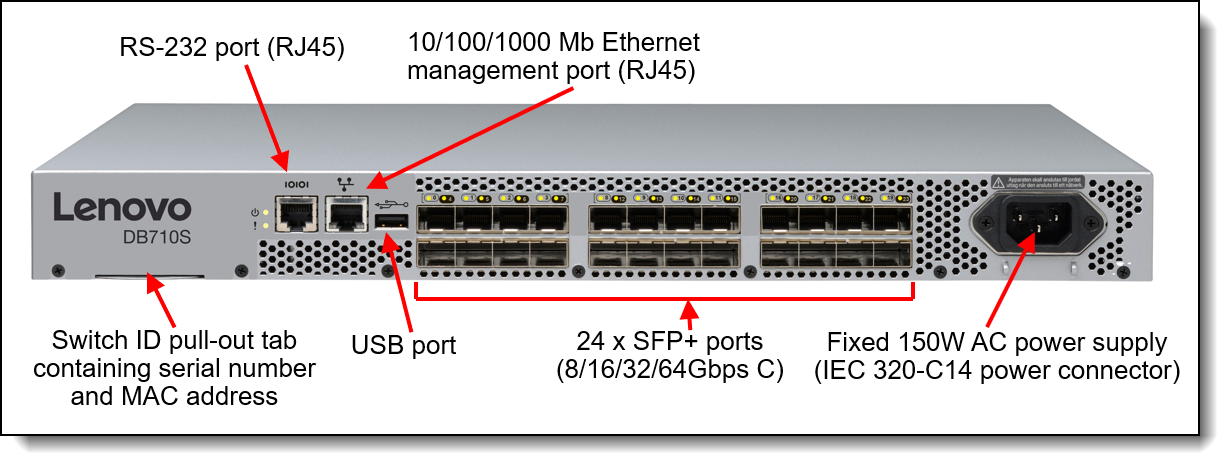
Figure 2. DB710S FC SAN Switch port-side view
The following figure shows the non-port side view of the DB710S FC SAN Switch.
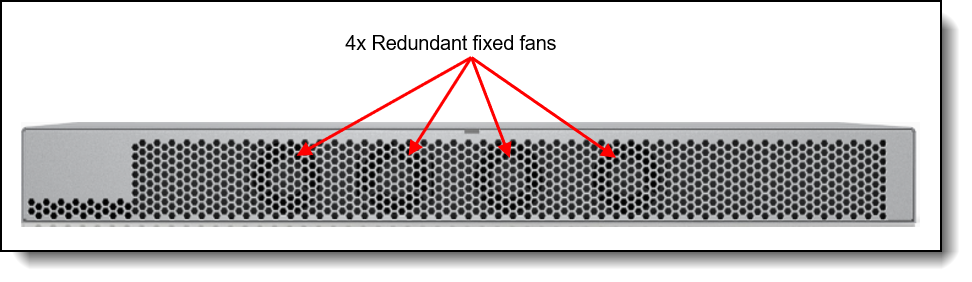
Figure 3. DB710S FC SAN Switch non-port-side view
System specifications
The following table lists the ThinkSystem DB710S system specifications.
| Component | Specification |
|---|---|
| Machine type | 7DHN (Lifetime warranty) |
| System Architecture | |
| Fibre Channel Ports |
Switch mode (default): 24 ports 64G SFP+ ports, each supporting E_Ports, F_Ports, M_Ports, D_Ports, and EX_Ports. 8-port base configuration: additional ports are enabled with two 8-port SFP+ PODs (Ports on Demand), scaling the switch from 8 ports to 24 ports. Brocade Access Gateway default port mapping: 16 F_Ports, 8 N_Ports. |
| Scalability | Full-fabric architecture with a maximum of 239 switches |
| Certified maximum |
6000 active nodes; 56 switches, 19 hops in Brocade Fabric OS® fabrics; larger fabrics certified as required |
| Performance |
Fibre Channel:
|
| ISL Trunking |
Frame-based trunking with up to eight SFP+ ports per ISL trunk; up to 512Gb/s per ISL trunk. Exchange-based load balancing across ISLs with Dynamic Path Selection (DPS) included in Brocade Fabric OS |
| Aggregate bandwidth | 1.536 Tb/s |
| Maximum fabric latency | Latency for locally switched ports is 460 ns including Forward Error Correction (FEC) |
| Maximum frame size | 2112-byte payload |
| Frame buffers | 2000 dynamically allocated buffer credits |
| Classes of service | Class 2, Class 3, Class F (inter-switch frames) |
| Port types |
|
| Data traffic types | Fabric switches supporting unicast |
| Media types |
|
| USB | One USB port for system log file downloads or firmware upgrades |
| Fabric Services Note: Some fabric services do not apply or are unavailable in Brocade Access Gateway mode |
BB Credit Recovery; Brocade Advanced Zoning (Default Zoning, Port/WWN Zoning, Peer Zoning); Congestion Signaling; Dynamic Path Selection (DPS); Extended Fabrics; Fabric Performance Impact Notification (FPIN); Fabric Vision; FDMI; Flow Vision; F_Port Trunking; FSPF; ISL Trunking; Management Server; Name Server; NPIV; NTP v3; Port Decommission/Fencing; QoS; Registered State Change Notification (RSCN); Slow Drain Device Quarantine (SDDQ); Target-Driven Zoning; Traffic Optimizer; Virtual Fabrics (Logical Switch, Logical Fabric); VMID+ and AppServer |
| Management | |
| Management | Brocade Advanced Web Tools; Brocade SANnav Management Portal and SANnav Global View; Command Line Interface (CLI); HTTP/HTTPS; RESTful API; SNMP v1/v3 (FE MIB, FC Management MIB); SSH |
| Security | DH-CHAP (between switches and end devices); FCAP switch authentication; HTTPS; IP filtering; LDAP with IPv6; OpenLDAP; Port Binding; RADIUS; TACACS+; user-defined Role-Based Access Control (RBAC); Secure Boot; Secure Copy (SCP); Secure Syslog; SFTP; SSH v2; SSL; Switch Binding; Trusted Switch |
| Management access | 1000Mb/s Ethernet (RJ-45) port, in-band over Fibre Channel, RJ-45 serial console port, and one USB port |
| Diagnostics | Active Support Connectivity (ASC) and Brocade Support Link (BSL); built-in flow generator; ClearLink optics and cable diagnostics, including electrical/optical loopback, link traffic/latency/distance; Fabric Performance Impact Monitoring (FPI); flow mirroring; Forward Error Correction (FEC); frame viewer; IO Insight for SCSI and NVMe monitoring; Monitoring and Alerting Policy Suite (MAPS); non-disruptive daemon restart; optics health monitoring; POST and embedded online/offline diagnostics, including environmental monitoring, FCping, and Pathinfo (FC traceroute); power monitoring; RAStrace logging; Rolling Reboot Detection (RRD); Syslog/Audit Log; VM Insight |
| Mechanical | |
| Enclosure | Back-to-front airflow (non-port-side intake); power from front, 1U |
| Dimensions | Width: 42.88 cm (16.88 in.) Height: 4.29 cm (1.69 in.) Depth: 30.66 cm (12.07 in.) |
| System Weight |
|
| Environment | |
| Operating Environment | Temperature: 0°C to 40°C (32°F to 104°F) Humidity: 10% to 85% (non-condensing) |
| Non-operating Environment | Temperature: -25°C to 70°C (-13°F to 158°F) Humidity: 10% to 90% (non-condensing) |
| Operating Altitude | Up to 3000m (9842 ft) |
| Storage Altitude | Up to 12 km (39,370 ft) |
| Shock | Operating: Up to 10G, 11 ms half-sine Non-operating: Trapezoidal wave, 60G, 18 ms, 3G axis |
| Vibration | Operating: 1.0g sine, 0.4 grms random, 5 Hz to 500 Hz Non-operating: 2.4g sine, 1.1 grms random, 5 Hz to 500 Hz |
| Heat Dissipation | Typical: 185 BTU/hr Max: 350 BTU/hr |
| Power | |
| Power Supply | Base switch includes a single, fixed power supply with four integrated system cooling fans |
| AC Input | 100V to 240V, maximum input current 2A |
| AC Input Line Frequency | 50 Hz to 60 Hz nominal, 47 Hz to 63 Hz range |
| AC Power Consumption |
Maximum power draw:
Typical power draw:
|
| Support | |
| Hardware Warranty | Machine type 7DHN: Lifetime non-transferrable warranty, customer-replaceable unit with 9x5 next business day parts delivered |
| Service and support | Optional service upgrades are available through Lenovo Services: 9x5 next business day onsite response, 24x7 2-hour or 4-hour onsite response, 24x7 6-hour or 24-hour committed service repair, up to 5 years of warranty coverage, 1-year or 2-year post-warranty extensions, and Basic Hardware Installation Services. |
| Fabric OS Entitlement | Machine type 7DHN: Lifetime firmware entitlement and support license are standard |
Models
The following table lists the ThinkSystem DB710S FC SAN Switch models.
| Part number | Machine Type-Model |
Feature code | Description |
|---|---|---|---|
| Lifetime warranty and lifetime firmware support | |||
| 7DHNA001WW | 7DHNCTO1WW | C1FM | Lenovo ThinkSystem DB710S, 8-Port License, 8 x 32GB SWL SFPs, Enterprise Bundle, Rail Kit, Lifetime HW Warranty & FW maintenance |
| 7DHNA000WW | 7DHNCTO2WW | C1FN | Lenovo ThinkSystem DB710S, 8-Port License, 8 x 64GB SWL SFPs, Enterprise Bundle, Rail Kit, Lifetime HW Warranty & FW maintenance |
The DB710S FC SAN Switch part numbers include the following physical components:
- One FC SAN Switch - with transceivers included and ports activated as listed in the Port activation licenses section
- Serial cable (DB-9/RJ-45 to RJ-45)
- Fixed rack mount kit.
- Online Documentation web pointer card
- SANNav web pointer card
Note: The switch comes standard without a power cord; one power cable must be purchased together with the switch. (see Power supplies and cables section for details).
Port activation licenses
The DB710S FC SAN Switch models ship with port licenses (port activations) and transceivers as listed in the following table.
| Part number | Feature code | Ports activated (maximum 24) | Transceivers included |
|---|---|---|---|
| 7DHNA001WW | 7DHNCTO1WW | 8 | 8x 32Gb FC SWL SFP+ |
| 7DHNA000WW | 7DHNCTO2WW | 8 | 8x 64Gb FC SWL SFP+ |
The remaining ports can be activated by purchasing and installing Ports on Demand (POD) licenses. Port licenses and transceiver bundles, are sold in 8-port increments. The following table lists the ordering information and licenses with 32G and 64 transceivers is supported
| Part number | Feature code | Description | Transceivers included | Maximum quantity |
|---|---|---|---|---|
| Electronic authorization licenses and bundles | ||||
| 4XF7A94634 | C1FP | Lenovo DB710S 8 PORT-ON-DEMAND License with 8 X 32G SWL SFPs | 8x 32Gb FC SWL SFP+ | 2 POD's per switch |
| 4XF7A94635 | C1FQ | Lenovo DB710S 8 PORT-ON-DEMAND License with 8 X 64G SWL SFPs | 8x 64Gb FC SWL SFP+ | |
Transceivers and cables
With the flexibility of the DB710S FC SAN Switch, customers can choose the following connectivity technologies:
- For 64 Gbps FC links, customers can use 64 Gb FC SFP+ SWL optical transceivers for distances up to 100 meters on OM4 or up to 70 meters on OM3 50 µ MMF cables. For longer distances, the 64 Gb FC LWL SFP+ optical transceivers can support up to 10 km on SMF cables. These transceivers can operate at 64 Gbps, 32 Gbps, or 16 Gbps speeds.
- For 32 Gbps FC links, customers can use 32 Gb FC SFP+ SWL optical transceivers for distances up to 100 meters on OM4 or up to 70 meters on OM3 50 µ MMF cables. For longer distances, the 32 Gb FC LWL SFP+ optical transceivers can support up to 10 km on SMF cables. For extended distances, the 32 Gb FC ELWL SFP+ optical transceivers can support up to 25 kilometers on SMF cables. These transceivers can operate at 32 Gbps, 16 Gbps, or 8 Gbps speeds. (Except ELWL part number 4M27A65431 which can only operate at 32Gbps and 16 Gbps).
- For the 1 GbE RJ-45 management port, customers can use UTP cables for distances up to 100 meters.
The DB710S FC SAN Switch models ship with 8x SWL transceivers as listed in the table in the Port activation licenses subsection. Additional SWL, LWL, and ELWL SFP+ transceivers can be ordered for the switch, if needed.
The following table lists the supported SFP+ options and cables.
Brocade secure transceivers: These transceivers have features to ensure that you are using genuine Brocade components to maximize performance and reliability and to help avoid issues related to counterfeit products.
| Part number | Feature code | Description | Maximum quantity |
|---|---|---|---|
| 64 Gb FC SFP+ transceivers | |||
| 4M27A65425 | BF6J | Brocade Secure 64Gb SWL SFP+ Transceiver | 24 |
| 4M27A65426 | BF6K | Brocade Secure 64Gb SWL SFP+ Transceiver 8-pack | 3 |
| 4M27A65433* | BQQG | Brocade Secure 64Gb LWL SFP+ Transceiver (10 km) | 24 |
| 4M27A65434* | BQQH | Brocade Secure 64Gb LWL SFP+ Transceiver (10 km) 8-pack | 3 |
| 32 Gb FC SFP+ transceivers | |||
| 4M27A65416 | BF69 | Brocade Secure 32Gb SWL SFP+ Transceiver | 24 |
| 4M27A65417 | BF6A | Brocade Secure 32Gb SWL SFP+ Transceiver 8-pack | 3 |
| 4M27A65418 | BF6B | Brocade Secure 32Gb LWL SFP+ Transceiver (10 km) | 24 |
| 4M27A65419 | BF6C | Brocade Secure 32Gb LWL SFP+ Transceiver (10 km) 8-pack | 3 |
| 4M27A65431** | BQQE | Brocade Secure 32Gb ELWL SFP+ V2 Transceiver (25 km) | 24 |
| OM3 optical cables for 32 Gb and 64 Gb FC SW SFP+ transceivers | |||
| 00MN499 | ASR5 | Lenovo 0.5m LC-LC OM3 MMF Cable | 24 |
| 00MN502 | ASR6 | Lenovo 1m LC-LC OM3 MMF Cable | 24 |
| 00MN505 | ASR7 | Lenovo 3m LC-LC OM3 MMF Cable | 24 |
| 00MN508 | ASR8 | Lenovo 5m LC-LC OM3 MMF Cable | 24 |
| 00MN511 | ASR9 | Lenovo 10m LC-LC OM3 MMF Cable | 24 |
| 00MN514 | ASRA | Lenovo 15m LC-LC OM3 MMF Cable | 24 |
| 00MN517 | ASRB | Lenovo 25m LC-LC OM3 MMF Cable | 24 |
| 00MN520 | ASRC | Lenovo 30m LC-LC OM3 MMF Cable | 24 |
| OM4 optical cables for 32 Gb and 64 Gb FC SW SFP+ transceivers | |||
| 4Z57A10845 | B2P9 | Lenovo 0.5m LC-LC OM4 MMF Cable | 24 |
| 4Z57A10846 | B2PA | Lenovo 1m LC-LC OM4 MMF Cable | 24 |
| 4Z57A10847 | B2PB | Lenovo 3m LC-LC OM4 MMF Cable | 24 |
| 4Z57A10848 | B2PC | Lenovo 5m LC-LC OM4 MMF Cable | 24 |
| 4Z57A10849 | B2PD | Lenovo 10m LC-LC OM4 MMF Cable | 24 |
| 4Z57A10850 | B2PE | Lenovo 15m LC-LC OM4 MMF Cable | 24 |
| 4Z57A10851 | B2PF | Lenovo 25m LC-LC OM4 MMF Cable | 24 |
| 4Z57A10852 | B2PG | Lenovo 30m LC-LC OM4 MMF Cable | 24 |
| UTP Category 6 cables (Green) for the 1 GbE RJ-45 management port | |||
| 00WE123 | AVFW | 0.75m Green Cat6 Cable | 1 |
| 00WE127 | AVFX | 1.0m Green Cat6 Cable | 1 |
| 00WE131 | AVFY | 1.25m Green Cat6 Cable | 1 |
| 00WE135 | AVFZ | 1.5m Green Cat6 Cable | 1 |
| 00WE139 | AVG0 | 3m Green Cat6 Cable | 1 |
| 90Y3718 | A1MT | 10m Green Cat6 Cable | 1 |
| 90Y3727 | A1MW | 25m Green Cat6 Cable | 1 |
| UTP Category 5e cables (Blue) for the 1 GbE RJ-45 management port | |||
| 40K5679 | 3801 | e1350 .6 Meter Blue Ethernet Cable | 1 |
| 40K8785 | 3802 | 1.5 Meter Blue Ethernet Cable | 1 |
| 40K5581 | 3803 | 3m Blue Cat5e Cableupdate | 1 |
| 40K8927 | 3804 | e1350 10 Meter Blue Ethernet Cable | 1 |
| 40K8930 | 3805 | 25m Blue Cat5e Cable | 1 |
* Limited to two 64G at 10KM per switch.
** Limited to two 32G at 25KM per switch. This transceiver is also limited to 16G and 32G connection speeds.
The following table lists the cabling requirements for the switch.
| Transceiver | Standard | Cable | Connector |
|---|---|---|---|
| 64 Gb Fibre Channel | |||
| 64 Gb FC SWL SFP+ (4M27A65425, 4M27A65426) | FC-PI-6 |
Up to 30 m with LC-LC MMF cables supplied by Lenovo (see Table 4) or the following 850 nm 50 µ MMF cables:
|
LC |
| 64 Gb FC LWL SFP+ (4M27A65433, 4M27A65434) | FC-PI-6 |
1310 nm 9 µ SMF cable:
|
LC |
| 32 Gb Fibre Channel | |||
| 32 Gb FC SWL SFP+ (4M27A65416, 4M27A65417) | FC-PI-6 |
Up to 30 m with LC-LC MMF cables supplied by Lenovo (see Table 4), or the following 850 nm 50 µ MMF cables:
|
LC |
| 32 Gb FC LWL SFP+ (4M27A65418, 4M27A65419) | FC-PI-6 |
1310 nm 9 µ SMF cable:
|
LC |
| 32 Gb FC ELWL SFP+ (4M27A65431) | FC-PI-6 |
1310 nm 9 µ SMF cable:
|
LC |
| Management ports | |||
| 10/100/1000 Mb Ethernet port | 1000BASE-T |
Up to 25 m with UTP cables supplied by Lenovo (see Table 4) or other UTP Category 5, 5E, and 6 up to 100 meters. |
RJ45 |
| Serial console port (mini-USB). | RS-232 | Mini-USB console cable to DB-9/RJ-45 (included with the switch). | RJ45 |
Enterprise Bundle
The Enterprise Bundle comes standard and is comprised of the following features:
- ISL Trunking (TRK): Allows frame-based consolidation of up to 8 inter-switch links (ISLs) into fault-tolerant and load-balanced trunks with bandwidth of up to 256 Gbps.
- Fabric Vision (FV)
- Monitoring and Alerting Policy Suite (MAPS): Provides a policy-based, fabric-wide threshold monitoring and alerting tool.
- Flow Vision: Enables administrators to identify, monitor, and analyze specific application flows in order to simplify troubleshooting, maximize performance, avoid congestion, and optimize resources. Flow Vision includes:
- Flow Monitor: Provides comprehensive visibility, automatic learning, and non-disruptive monitoring of a flow’s performance. Administrators can monitor all flows from a specific host to multiple targets or volumes, from multiple hosts to a specific target/volume, or across a specific ISL. Additionally, they can perform volume-level monitoring of specific frame types to identify resource contention or congestion that is impacting application performance. With VM Insight, administrators can monitor network throughput statistics for each VM.
- Flow Learning: Enables administrators to non-disruptively discover all flows that go to or come from a specific host port or a storage port, or traverse ISLs/IFLs (Inter-Fabric Links) or Fibre Channel over Internet Protocol (FCIP) tunnels, to monitor fabric-wide application performance. In addition, administrators can discover top and bottom bandwidth-consuming devices and manage capacity planning.
- Flow Generator: Provides a built-in traffic generator for pretesting and validating the data center infrastructure for robustness—including route verification and integrity of optics, cables, ports, back-end connections, and ISLs—before deploying applications.
- Flow Mirroring: Provides the ability to non-disruptively create copies of specific application and data flows or frame types that can be captured for in-depth analysis.
- VM Insight: Seamlessly monitors health and performance of individual Virtual Machines (VMs) to quickly identify abnormal VM behavior and enable administrators to proactively facilitate troubleshooting and fault isolation, helping to ensure performance and operational stability.
- Fabric Performance Impact (FPI) Monitoring: Leverages predefined MAPS policies to automatically identify and isolate devices that cause network performance issues by detecting different latency severity levels, and to alert administrators.
- Extended Fabric (EF): Extends Fibre Channel SANs beyond 10 km distance limitations for replication and backup at full bandwidth.
Management software
Lenovo offers optional Brocade SANnav™ Management Portal and SANnav Global View software license subscriptions that provide comprehensive visibility into the SAN environment, allow administrators to quickly identify, isolate, and correct problems, and accelerate administrative tasks by simplifying and automating workflows.
SANnav Management Portal is a next-generation SAN management application with a simple browser-based user interface (UI) and with a focus on streamlining common workflows, such as configuration, zoning, deployment, monitoring, troubleshooting, reporting, and analytics.
Lenovo offers the following SANnav Management Portal subscriptions:
- SANnav Management Portal Base: Designed for mid-sized SANs to manage up to 600 SAN switch ports only (SAN director ports can only be managed with the Enterprise edition).
- SANnav Management Portal Enterprise: Designed for enterprise-class SANs to manage up to 15,000 SAN switch and director ports.
SANnav Management Portal supports all Brocade SAN switches and platforms that run the Fabric OS® version 7.4 or above, including Lenovo DB610S, DB620S, DB630S, DB400D, DB710S, DB720S, DB730S, DB820S, DB800D, Brocade Directors X7 and X8. SANNav Version 3.X to manage Gen 8 switches.
With SANnav Global View, administrators can quickly visualize the health, performance, and inventory of multiple SANnav Management Portal instances using a simple, intelligent dashboard and can easily navigate from a global view down to local environments to investigate points of interest. SANnav Global View is designed to manage up to 20 SANnav Management Portal instances.
For more information, refer to the SANnav Management Portal documentation:
http://www.broadcom.com/products/fibre-channel-networking/software/sannav-management-portal#documentation
The following table lists ordering information for the optional SANnav Management Portal and SANnav Global View management tools. After a client has an active SANnav license, Lenovo offers a “license extension/renewal”. This offering provides our clients the flexible to extend their subscription down to a specific end date. This allows clients the ability to align to your company’s budget or align with warranty of your FC SAN switches/directors. Please engage directly with your Lenovo sales representative for more details.
| Part number | Feature code | Description |
|---|---|---|
| SANnav Management Portal electronic authorization licenses | ||
| 7S0C0010WW | S1K6 | Brocade SANnav Mgmt Portal Base Edition - 1YR License 600 ports |
| 7S0C0013WW | S1K8 | Brocade SANnav Mgmt Portal Base Edition - 3YR License 600 ports |
| 7S0C001KWW | S4MB | Brocade SANnav Mgmt Portal Base Edition - 5YR License 600 ports |
| 7S0C0011WW | S1K7 | Brocade SANnav Mgmt Portal Enterprise Edition - 1YR License 15K ports |
| 7S0C0014WW | S1K9 | Brocade SANnav Mgmt Portal Enterprise Edition - 3YR License 15K ports |
| 7S0C001LWW | S4MC | Brocade SANnav Mgmt Portal Enterprise Edition - 5YR License 15K ports |
| SANnav Global View electronic authorization licenses | ||
| 7S0C0012WW | S1D8 | Brocade SANnav Global View - 1YR License |
| 7S0C0015WW | S1D9 | Brocade SANnav Global View - 3YR License |
| 7S0C001JWW | S4MA | Brocade SANnav Global View - 5YR License |
The SANnav licenses are subscription-based with 1-year, 3-year, or 5-year software entitlement and support.
Fibre Channel standards
The DB710S FC SAN Switch supports the standards listed at the following web page:
https://www.broadcom.com/support/fibre-channel-networking/san-standards/standards-compliance
Power supplies and cables
The switch comes standard without a power cord; one rack power cables or line cords must be ordered together with the switch (see the following table).
| Part number | Feature code | Description |
|---|---|---|
| Rack power cables | ||
| 39Y7937 | 6201 | 1.5m, 10A/100-250V, C13 to C14 Jumper Cord |
| None* | 6568 | 1.8m, 10A/100-250V, 2xC13PM to IEC 320-C14 Rack Power Cable |
| 4L67A08366 | 6311 | 2.8m, 10A/100-250V, C13 to C14 Jumper Cord |
| 39Y7938 | 6204 | 2.8m, 10A/100-250V, C13 to IEC 320-C20 Rack Power Cable |
| 39Y7932 | 6263 | 4.3m, 10A/100-250V, C13 to C14 Jumper Cord |
| Line cords | ||
| 39Y7931 | 6207 | Power Cable - C13 / NEMA 5-15P 14ft |
| 46M2592 | A1RF | 10A/250V C13 to NEMA 6-15P 2.8m line cord |
| 39Y7930 | 6222 | 2.8m, 10A/250V, C13 to IRAM 2073 (Argentina) Line Cord |
| 39Y7924 | 6211 | Australia/NZ 10A line C13 to SAA-AS C112 (2.8M) |
| 39Y7929 | 6223 | Brazil 10A line C13 to NBR 6147 (2.8M) |
| 39Y7928 | 6210 | 2.8m, 10A/220V, C13 to GB 2099.1 (China) Line Cord |
| 39Y7918 | 6213 | Line cord - 2.8m, 10A/250V, C13 to DK2-5a (Denmark) |
| 39Y7917 | 6212 | European 10A line C13 to CEE 7/7 (2.8M) |
| 39Y7927 | 6269 | 2.8m, 6A Line C13 to Fig 68 (India) Line Cord |
| 39Y7920 | 6218 | Israel 10A line C13 to SI 32 (2.8M) |
| 39Y7921 | 6217 | Italy 10A line C13 to CEE 7/7 (2.8M) |
| 46M2593 | A1RE | Japan 12A/125V C13 to JIS C-8303 2.8m line cord |
| 39Y7925 | 6219 | Korea 7A line C13 to KETI 15A/250V (2.8M) |
| 39Y7922 | 6214 | South Africa 10A line C13 to SABS 164/1 (2.8M) |
| 39Y7919 | 6216 | Switzerland 10A line C13 to SEV 1011 (2.8M) |
| 00CG265 | A53E | Power Cord Taiwan AC plug 10A/250V 2.8M OPT |
| 00CG267 | A53F | Power Cord Taiwan AC plug 15A/125V 2.8M OPT |
| 39Y7923 | 6215 | United Kingdom 10A line C13 to BS 1363 (2.8M) |
* Available for factory-built custom configurations and solutions only.
Rack installation
The DB710S FC SAN Switch comes standard with the fixed rack mount kit that can be used for 4-post rack installations. If needed, the DB710S FC SAN Switch can be mounted in a 2-post rack cabinet by using the optional mid-mount rack kit or a slide rack mount kit in a 19-in. (48.3 cm) EIA cabinet (min. distance of 71.76 cm & max 75.90 cm between front and back rails) which are listed in the following table.
| Part number | Feature code | Description | Maximum quantity supported |
|---|---|---|---|
| 01KP847 | AX4D | Lenovo Mid-mount (Telco) Rack Kit | 1 |
| 00MY794 | ASKK | Lenovo Slide Rack Mount Kit | 1 |
The optional mid-mount rack kit for the DB710S FC SAN Switch is shown in the following figure.
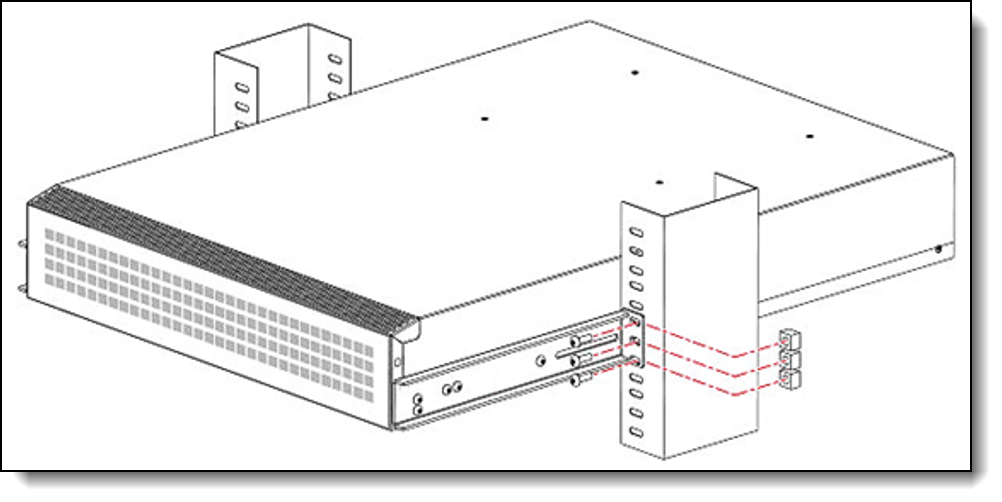
Figure 4. Lenovo Mid-mount (Telco) Rack Kit
The optional slide rack kit for the DB710S FC SAN Switch is shown in the following figure.
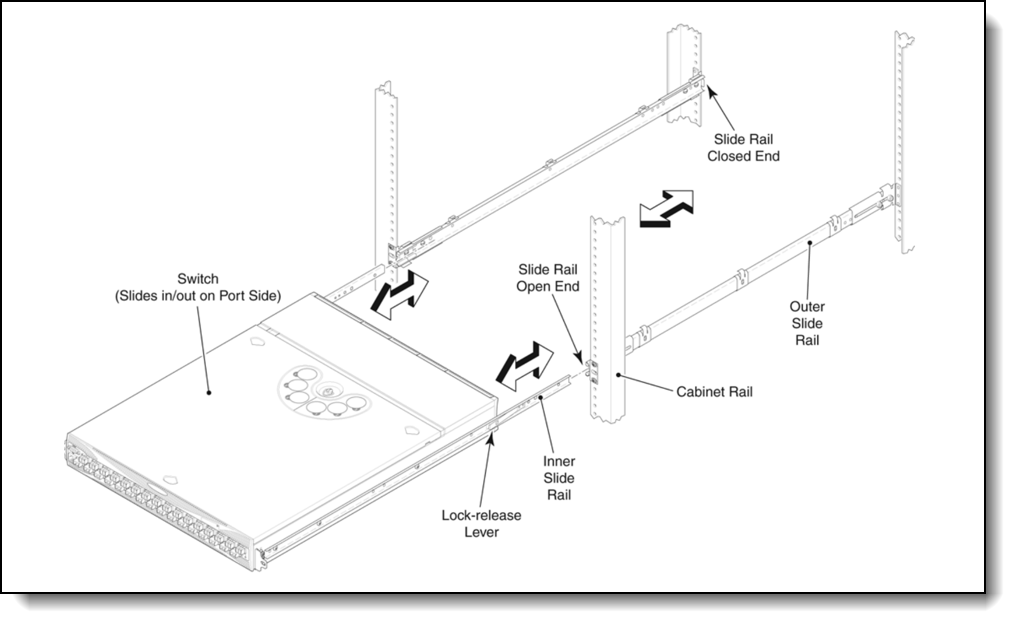
Figure 5. Lenovo Slide Rack Kit
Warranty upgrades and post-warranty support
The DB710S FC SAN Switch has the following warranty term:
- Machine type 7DHC: Lifetime non-transferrable warranty
Note: For machine type 7DHC, the limited lifetime warranty is active until the SAN switch reaches its end of service date announced by Lenovo. Lenovo typically provides support for at least five years following the last order date of a product.
Our global network of regional support centers offers consistent, local-language support enabling you to vary response times and level of service* to match the criticality of your support needs:
- Standard Next Business Day – Best choice for non-essential systems requiring simple maintenance.
- Premier Next Business Day – Best choice for essential systems requiring technical expertise from senior-level Lenovo engineers.
- Premier 24x7 4-Hour Response – Best choice for systems where maximum uptime is critical.
For more information, consult the brochure Lenovo Operational Support Services for Data Centers Services.
* Some service levels may not be available in all markets. Contact your sales representative for more information.
Services
Lenovo Data Center Services empower you at every stage of your IT lifecycle. From expert advisory and strategic planning to seamless deployment and ongoing support, we ensure your infrastructure is built for success. Our comprehensive services accelerate time to value, minimize downtime, and free your IT staff to focus on driving innovation and business growth.
Note: Some service options may not be available in all markets or regions. For more information, go to https://lenovolocator.com/. For information about Lenovo service upgrade offerings that are available in your region, contact your local Lenovo sales representative or business partner.
In this section:
- Lenovo Advisory Services
- Lenovo Plan & Design Services
- Lenovo Deployment, Migration, and Configuration Services
- Lenovo Support Services
- Lenovo Managed Services
- Lenovo Sustainability Services
Lenovo Advisory Services
Lenovo Advisory Services simplify the planning process, enabling customers to build future-proofed strategies in as little as six weeks. Consultants provide guidance on projects including VM migration, storage, backup and recovery, and cost management to accelerate time to value, improve cost efficiency, and build a flexibly scalable foundation.
- Assessment Services
An Assessment helps solve your IT challenges through an onsite, multi-day session with a Lenovo technology expert. We perform a tools-based assessment which provides a comprehensive and thorough review of a company's environment and technology systems. In addition to the technology based functional requirements, the consultant also discusses and records the non-functional business requirements, challenges, and constraints. Assessments help organizations like yours, no matter how large or small, get a better return on your IT investment and overcome challenges in the ever-changing technology landscape.
- Design Services
Professional Services consultants perform infrastructure design and implementation planning to support your strategy. The high-level architectures provided by the assessment service are turned into low level designs and wiring diagrams, which are reviewed and approved prior to implementation. The implementation plan will demonstrate an outcome-based proposal to provide business capabilities through infrastructure with a risk-mitigated project plan.
Lenovo Plan & Design Services
Unlock faster time to market with our tailored, strategic design workshops to align solution approaches with your business goals and technical requirements. Leverage our deep solution expertise and end-to-end delivery partnership to meet your goals efficiently and effectively.
Lenovo Deployment, Migration, and Configuration Services
Optimize your IT operations by shifting labor-intensive functions to Lenovo's skilled technicians for seamless on-site or remote deployment, configuration, and migration. Enjoy peace of mind, faster time to value, and comprehensive knowledge sharing with your IT staff, backed by our best-practice methodology.
- Deployment Services for Storage and ThinkAgile
A comprehensive range of remote and onsite options tailored specifically for your business needs to ensure your storage and ThinkAgile hardware are fully operational from the start.
- Hardware Installation Services
A full-range, comprehensive setup for your hardware, including unpacking, inspecting, and positioning components to ensure your equipment is operational and error-free for the most seamless and efficient installation experience, so you can quickly benefit from your investments.
- DM/DG File Migration Services
Take the burden of file migration from your IT’s shoulders. Our experts will align your requirements and business objectives to the migration plans while coordinating with your team to plan and safely execute the data migration to your storage platforms.
- DM/DG/DE Health Check Services
Our experts perform proactive checks of your Firmware and system health to ensure your machines are operating at peak and optimal efficiency to maximize up-time, avoid system failures, ensure the security of IT solutions and simplify maintenance.
- Factory Integrated Services
A suite of value-added offerings provided during the manufacturing phase of a server or storage system that reduces time to value. These services aim at improving your hardware deployment experience and enhance the quality of a standard configuration before it arrives at your facility.
Lenovo Support Services
In addition to response time options for hardware parts, repairs, and labor, Lenovo offers a wide array of additional support services to ensure your business is positioned for success and longevity. Our goal is to reduce your capital outlays, mitigate your IT risks, and accelerate your time to productivity.
Our commitment to ensuring the fastest, most seamless resolution times for mission-critical systems that require immediate attention to ensure minimal downtime and risk for your business. This service is only available for machines under the Premier 4-Hour Response SLA.
- Premier Support for Data Centers
Your direct line to the solution that promises the best, most comprehensive level of support to help you fully unlock the potential of your data center.
- Premier Support Plus (PSP) for Servers 24x7 4-Hour Response
Helping customers reduce unplanned downtime by moving from reactive support to proactive and preventative care
- Premier Support Plus (PSP) for Storage 24x7 4-Hour Response
Helping storage customers reduce unplanned downtime by moving from reactive support to proactive and preventative care
- Committed Service Repair (CSR)
Our commitment to ensuring the fastest, most seamless resolution times for mission-critical systems that require immediate attention to ensure minimal downtime and risk for your business. This service is only available for machines under the Premier 4-Hour Response SLA.
- Multivendor Support Services (MVS)
Your single point of accountability for resolution support across vast range of leading Server, Storage, and Networking OEMs, allowing you to manage all your supported infrastructure devices seamlessly from a single source.
- Keep Your Drive (KYD)
Protect sensitive data and maintain compliance with corporate retention and disposal policies to ensure your data is always under your control, regardless of the number of drives that are installed in your Lenovo server.
- Technical Account Manager (TAM)
Your single point of contact to expedite service requests, provide status updates, and furnish reports to track incidents over time, ensuring smooth operations and optimized performance as your business grows.
- Enterprise Software Support (ESS)
Gain comprehensive, single-source, and global support for a wide range of server operating systems and Microsoft server applications.
For more information, consult the brochure Lenovo Operational Support Services for Data Centers.
Lenovo Managed Services
Achieve peak efficiency, high security, and minimal disruption with Lenovo's always-on Managed Services. Our real-time monitoring, 24x7 incident response, and problem resolution ensure your infrastructure operates seamlessly. With quarterly health checks for ongoing optimization and innovation, Lenovo's remote active monitoring boosts end-user experience and productivity by keeping your data center's hardware performing at its best.
Lenovo Managed Services provides continuous 24x7 remote monitoring (plus 24x7 call center availability) and proactive management of your data center using state-of-the-art tools, systems, and practices by a team of highly skilled and experienced Lenovo services professionals.
Quarterly reviews check error logs, verify firmware & OS device driver levels, and software as needed. We’ll also maintain records of latest patches, critical updates, and firmware levels, to ensure you systems are providing business value through optimized performance.
Lenovo Sustainability Services
- Asset Recovery Services
Lenovo Asset Recovery Services (ARS) provides a secure, seamless solution for managing end-of-life IT assets, ensuring data is safely sanitized while contributing to a more circular IT lifecycle. By maximizing the reuse or responsible recycling of devices, ARS helps businesses meet sustainability goals while recovering potential value from their retired equipment. For more information, see the Asset Recovery Services offering page.
- CO2 Offset Services
Lenovo’s CO2 Offset Services offer a simple and transparent way for businesses to take tangible action on their IT footprint. By integrating CO2 offsets directly into device purchases, customers can easily support verified climate projects and track their contributions, making meaningful progress toward their sustainability goals without added complexity.
- Lenovo Certified Refurbished
Lenovo Certified Refurbished offers a cost-effective way to support IT circularity without compromising on quality and performance. Each device undergoes rigorous testing and certification, ensuring reliable performance and extending its lifecycle. With Lenovo’s trusted certification, you gain peace of mind while making a more sustainable IT choice.
Lenovo TruScale
Lenovo TruScale XaaS is your set of flexible IT services that makes everything easier. Streamline IT procurement, simplify infrastructure and device management, and pay only for what you use – so your business is free to grow and go anywhere.
Lenovo TruScale is the unified solution that gives you simplified access to:
- The industry’s broadest portfolio – from pocket to cloud – all delivered as a service
- A single-contract framework for full visibility and accountability
- The global scale to rapidly and securely build teams from anywhere
- Flexible fixed and metered pay-as-you-go models with minimal upfront cost
- The growth-driving combination of hardware, software, infrastructure, and solutions – all from one single provider with one point of accountability.
For information about Lenovo TruScale offerings that are available in your region, contact your local Lenovo sales representative or business partner.
Regulatory compliance
The DB710S FC SAN Switch conforms to the following regulations which can be found in the Hardware Installation Guide, available from the following web page:
https://www.broadcom.com/products/fibre-channel-networking/switches/g710-switch
Interoperability
For end-to-end storage configuration support, refer to the Lenovo Storage Interoperation Center (LSIC):
https://datacentersupport.lenovo.com/us/en/lsic
Use the LSIC to select the known components of your configuration and then get a list all other supported combinations, with details about supported hardware, firmware, operating systems, and drivers, plus any additional configuration notes. View results on screen or export them to Excel.
External storage systems
Lenovo offers the ThinkSystem DE Series, ThinkSystem DG Series, ThinkSystem DM Series and ThinkSystem DS Series external storage systems for high-performance storage. See the DE Series, DG Series and DM Series product guides for specific controller models, expansion enclosures and configuration options:
- ThinkSystem DE Series Storage
https://lenovopress.com/storage/thinksystem/de-series#rt=product-guide - ThinkSystem DS Series Storage
https://lenovopress.lenovo.com/storage/thinksystem/ds-series - ThinkSystem DM Series Storage
https://lenovopress.com/storage/thinksystem/dm-series#rt=product-guide - ThinkSystem DG Series Storage
https://lenovopress.com/storage/thinksystem/dg-series#rt=product-guide
External backup units
The following table lists the external backup options that are offered by Lenovo that can be used in Lenovo FC SAN solutions.
Note: Information provided in this section is for ordering reference purposes only. End-to-end LTO Ultrium configuration support for a particular tape backup unit must be verified through the System Storage Interoperation Center (SSIC):
http://www.ibm.com/systems/support/storage/ssic
| Part number | Description |
|---|---|
| External tape backup libraries | |
| 6741A1F | IBM TS4300 3U Tape Library-Base Unit |
| 6741B1F | IBM TS4300 3U Tape Lib Base - Max 48U |
| 6741A3F | IBM TS4300 3U Tape Library-Expansion Unit |
| 6741B3F | IBM TS4300 3U Tape Library Exp - Max to 48U |
| Full High 8 Gb Fibre Channel for TS4300 | |
| 01KP938 | LTO 7 FH Fibre Channel Drive |
| 01KP954 | LTO 8 FH Fibre Channel Drive |
| 02JH837 | LTO 9 FH Fibre Channel Drive |
| Half High 8 Gb Fibre Channel for TS4300 | |
| 01KP936 | LTO 7 HH Fibre Channel Drive |
| 01KP952 | LTO 8 HH Fibre Channel Drive |
| 02JH835 | LTO 9 HH Fibre Channel Drive |
For more information, see the list of Product Guides in the Tape Autoloaders and Libraries category:
https://lenovopress.com/storage/tape/library
Rack cabinets
The following table lists the supported rack cabinets.
| Model | Description |
|---|---|
| 7D6DA007WW | ThinkSystem 42U Onyx Primary Heavy Duty Rack Cabinet (1200mm) |
| 7D6DA008WW | ThinkSystem 42U Pearl Primary Heavy Duty Rack Cabinet (1200mm) |
| 7D6EA009WW | ThinkSystem 48U Onyx Primary Heavy Duty Rack Cabinet (1200mm) |
| 7D6EA00AWW | ThinkSystem 48U Pearl Primary Heavy Duty Rack Cabinet (1200mm) |
| 93074RX | 42U Standard Rack (1000mm) |
| 93604PX | 42U 1200mm Deep Dynamic Rack |
| 93604EX | 42U 1200mm Deep Dynamic Expansion Rack |
| 93614PX | 42U 1200mm Deep Static Rack |
| 93614EX | 42U 1200mm Deep Static Expansion Rack |
| 93634PX | 42U 1100mm Dynamic Rack |
| 93634EX | 42U 1100mm Dynamic Expansion Rack |
| 93084PX | 42U Enterprise Rack |
| 93084EX | 42U Enterprise Expansion Rack |
For specifications about these racks, see the Lenovo Rack Cabinet Reference, available from:
https://lenovopress.com/lp1287-lenovo-rack-cabinet-reference
For more information, see the list of Product Guides in the Rack cabinets category:
https://lenovopress.com/servers/options/racks
Power distribution units
The following table lists the power distribution units (PDUs) that are offered by Lenovo.
| Part number |
Feature code |
Description |
ANZ
|
ASEAN
|
Brazil
|
EET
|
MEA
|
RUCIS
|
WE
|
HTK
|
INDIA
|
JAPAN
|
LA
|
NA
|
PRC
|
|---|---|---|---|---|---|---|---|---|---|---|---|---|---|---|---|
| 0U Basic PDUs | |||||||||||||||
| 4PU7A93176 | C0DA | 0U 36 C13 and 6 C19 Basic 32A 1 Phase PDU | Y | Y | Y | Y | Y | Y | Y | Y | Y | N | Y | Y | Y |
| 4PU7A93177 | C0D9 | 0U 24 C13/C15 and 24 C13/C15/C19 Basic 32A 3 Phase WYE PDU v2 | Y | Y | Y | Y | Y | Y | Y | Y | Y | Y | Y | Y | Y |
| 00YJ776 | ATZY | 0U 36 C13/6 C19 24A 1 Phase PDU | N | Y | Y | N | N | N | N | N | N | Y | Y | Y | N |
| 00YJ779 | ATZX | 0U 21 C13/12 C19 48A 3 Phase PDU | N | N | Y | N | N | N | Y | N | N | Y | Y | Y | N |
| 00YJ777 | ATZZ | 0U 36 C13/6 C19 32A 1 Phase PDU | Y | Y | Y | Y | Y | Y | Y | Y | Y | N | N | Y | Y |
| 00YJ778 | AU00 | 0U 21 C13/12 C19 32A 3 Phase PDU | Y | Y | N | Y | Y | Y | Y | Y | Y | N | N | Y | Y |
| 0U Switched and Monitored PDUs | |||||||||||||||
| 4PU7B08148 | CD15 | 0U 3 C13 and 18 C19 Monitored 48A 3 Phase WYE PDU | N | N | N | N | N | N | N | N | N | N | N | Y | N |
| 4PU7B08149 | CD16 | 0U 3 C13 and 18 C19 Monitored 63A 3 Phase WYE PDU | N | N | N | Y | N | N | Y | Y | N | N | N | N | N |
| 4PU7A93181 | C0D5 | 0U 21 C13/C15 and 21 C13/C15/C19 Switched and Monitored 60A 3 Phase Delta PDU v2 | N | Y | N | N | Y | N | N | Y | N | Y | N | Y | N |
| 4PU7A93178 | C0D8 | 0U 20 C13 and 4 C19 Switched and Monitored 32A 1 Phase PDU | Y | Y | Y | Y | Y | Y | Y | Y | Y | N | Y | Y | Y |
| 4PU7A93182 | C0CS | 0U 18 C13/C15 and 18 C13/C15/C19 Switched and Monitored 63A 3 Phase WYE PDU | Y | Y | Y | Y | Y | Y | Y | Y | Y | Y | Y | Y | Y |
| 4PU7A93180 | C0D6 | 0U 18 C13/C15 and 18 C13/C15/C19 Switched and Monitored 32A 3 Phase WYE PDU v2 | Y | Y | Y | Y | Y | Y | Y | Y | Y | Y | Y | Y | Y |
| 4PU7A93179 | C0D7 | 0U 16 C13/C15 and 16 C13/C15/C19 Switched and Monitored 30A 1 Phase PDU v2 | N | Y | N | N | N | N | N | Y | N | Y | Y | Y | N |
| 00YJ783 | AU04 | 0U 12 C13/12 C19 Switched and Monitored 48A 3 Phase PDU | N | N | Y | N | N | N | Y | N | N | Y | Y | Y | N |
| 00YJ781 | AU03 | 0U 20 C13/4 C19 Switched and Monitored 24A 1 Phase PDU | N | N | Y | N | Y | N | Y | N | N | Y | Y | Y | N |
| 00YJ782 | AU02 | 0U 18 C13/6 C19 Switched and Monitored 32A 3 Phase PDU | Y | Y | Y | Y | Y | Y | Y | Y | Y | N | Y | N | Y |
| 00YJ780 | AU01 | 0U 20 C13/4 C19 Switched and Monitored 32A 1 Phase PDU | Y | Y | Y | Y | Y | Y | Y | Y | Y | N | Y | N | Y |
| 1U Basic PDUs | |||||||||||||||
| 4PU7B12339 | CE6L | 1U Basic 16A 1 Phase PDU | Y | Y | Y | Y | Y | Y | Y | Y | Y | N | Y | Y | Y |
| 1U Switched and Monitored PDUs | |||||||||||||||
| 4PU7A90808 | C0D4 | 1U 18 C19/C13 Switched and monitored 48A 3P WYE PDU V2 ETL | N | N | N | N | N | N | N | Y | N | Y | Y | Y | N |
| 4PU7A81117 | BNDV | 1U 18 C19/C13 switched and monitored 48A 3P WYE PDU - ETL | N | N | N | N | N | N | N | N | N | N | N | Y | N |
| 4PU7A90809 | C0DE | 1U 18 C19/C13 Switched and monitored 48A 3P WYE PDU V2 CE | Y | Y | Y | Y | Y | Y | Y | Y | Y | Y | Y | N | Y |
| 4PU7A81118 | BNDW | 1U 18 C19/C13 switched and monitored 48A 3P WYE PDU – CE | Y | Y | Y | Y | Y | Y | Y | Y | Y | Y | Y | N | Y |
| 4PU7A90810 | C0DD | 1U 18 C19/C13 Switched and monitored 80A 3P Delta PDU V2 | N | N | N | N | N | N | N | Y | N | Y | Y | Y | N |
| 4PU7A77467 | BLC4 | 1U 18 C19/C13 Switched and Monitored 80A 3P Delta PDU | N | N | N | N | N | N | N | N | N | Y | N | Y | N |
| 4PU7A90811 | C0DC | 1U 12 C19/C13 Switched and monitored 32A 3P WYE PDU V2 | Y | Y | Y | Y | Y | Y | Y | Y | Y | Y | Y | Y | Y |
| 4PU7A77468 | BLC5 | 1U 12 C19/C13 switched and monitored 32A 3P WYE PDU | Y | Y | Y | Y | Y | Y | Y | Y | Y | Y | Y | Y | Y |
| 4PU7A90812 | C0DB | 1U 12 C19/C13 Switched and monitored 60A 3P Delta PDU V2 | N | N | Y | N | N | N | N | Y | N | Y | Y | Y | N |
| 4PU7A77469 | BLC6 | 1U 12 C19/C13 switched and monitored 60A 3P Delta PDU | N | N | N | N | N | N | N | N | N | N | N | Y | N |
| 46M4002 | 5896 | 1U 9 C19/3 C13 Switched and Monitored DPI PDU | Y | Y | Y | Y | Y | Y | Y | Y | Y | Y | Y | Y | Y |
| 46M4004 | 5894 | 1U 12 C13 Switched and Monitored DPI PDU | Y | Y | Y | Y | Y | Y | Y | Y | Y | Y | Y | Y | Y |
| 46M4003 | 5897 | 1U 9 C19/3 C13 Switched and Monitored 60A 3 Phase PDU | Y | Y | Y | Y | Y | Y | Y | Y | Y | Y | Y | Y | Y |
| 46M4005 | 5895 | 1U 12 C13 Switched and Monitored 60A 3 Phase PDU | Y | Y | Y | Y | Y | Y | Y | Y | Y | Y | Y | Y | Y |
| 1U C13 Enterprise PDUs (12x IEC 320 C13 outlets) | |||||||||||||||
| 39M2816 | 6030 | DPI C13 PDU+ | Y | Y | Y | Y | Y | Y | Y | Y | Y | Y | Y | Y | Y |
| 39Y8941 | 6010 | Enterprise C13 PDU | Y | Y | Y | Y | Y | Y | Y | Y | Y | Y | Y | Y | Y |
| 1U C19 Enterprise PDUs (6x IEC 320 C19 outlets) | |||||||||||||||
| 39Y8948 | 6060 | Enterprise C19 PDU | Y | Y | Y | Y | Y | Y | Y | Y | Y | Y | Y | Y | Y |
| 39Y8923 | 6061 | Enterprise C19 3 phase PDU (60a) | N | N | Y | N | N | N | Y | N | N | N | Y | Y | N |
| 1U Front-end PDUs (3x IEC 320 C19 outlets) | |||||||||||||||
| 39Y8938 | 6002 | DPI 30amp/125V Front-end PDU with NEMA L5-30P | Y | Y | Y | Y | Y | Y | Y | Y | Y | Y | Y | Y | Y |
| 39Y8939 | 6003 | DPI 30amp/250V Front-end PDU with NEMA L6-30P | Y | Y | Y | Y | Y | Y | Y | Y | Y | Y | Y | Y | Y |
| 39Y8934 | 6005 | DPI 32amp/250V Front-end PDU with IEC 309 2P+Gnd | Y | Y | Y | Y | Y | Y | Y | Y | Y | Y | Y | Y | Y |
| 39Y8940 | 6004 | DPI 60amp/250V Front-end PDU with IEC 309 2P+Gnd connector | Y | N | Y | Y | Y | Y | Y | N | N | Y | Y | Y | N |
| 39Y8935 | 6006 | DPI 63amp/250V Front-end PDU with IEC 309 2P+Gnd connector | Y | Y | Y | Y | Y | Y | Y | Y | Y | Y | Y | Y | Y |
| 1U NEMA PDUs (6x NEMA 5-15R outlets) | |||||||||||||||
| 39Y8905 | 5900 | DPI 100-127v PDU with Fixed Nema L5-15P line cord | Y | Y | Y | Y | Y | Y | Y | Y | Y | Y | Y | Y | Y |
| Line cords for 1U PDUs that ship without a line cord | |||||||||||||||
| 40K9611 | 6504 | 4.3m, 32A/380-415V, EPDU/IEC 309 3P+N+G 3ph wye (non-US) Line Cord | Y | Y | Y | Y | Y | Y | Y | Y | Y | Y | Y | Y | Y |
| 40K9612 | 6502 | 4.3m, 32A/230V, EPDU to IEC 309 P+N+G (non-US) Line Cord | Y | Y | Y | Y | Y | Y | Y | Y | Y | Y | Y | Y | Y |
| 40K9613 | 6503 | 4.3m, 63A/230V, EPDU to IEC 309 P+N+G (non-US) Line Cord | Y | Y | Y | Y | Y | Y | Y | Y | Y | Y | Y | Y | Y |
| 40K9614 | 6500 | 4.3m, 30A/208V, EPDU to NEMA L6-30P (US) Line Cord | Y | Y | Y | Y | Y | Y | Y | Y | Y | Y | Y | Y | Y |
| 40K9615 | 6501 | 4.3m, 60A/208V, EPDU to IEC 309 2P+G (US) Line Cord | N | N | Y | N | N | N | Y | N | N | Y | Y | Y | N |
| 40K9617 | 6505 | 4.3m, 32A/230V, Souriau UTG to AS/NZS 3112 (Aus/NZ) Line Cord | Y | Y | Y | Y | Y | Y | Y | Y | Y | Y | Y | Y | Y |
| 40K9618 | 6506 | 4.3m, 32A/250V, Souriau UTG Female to KSC 8305 (S. Korea) Line Cord | Y | Y | Y | Y | Y | Y | Y | Y | Y | Y | Y | Y | Y |
For more information, see the Lenovo Press documents in the PDU category:
https://lenovopress.com/servers/options/pdu
Uninterruptible power supply units
The following table lists the uninterruptible power supply (UPS) units that are offered by Lenovo.
| Part number | Description |
|---|---|
| Rack-mounted or tower UPS units - 100-125VAC | |
| 7DD5A001WW | RT1.5kVA 2U Rack or Tower UPS-G2 (100-125VAC) |
| 55941AX | RT1.5kVA 2U Rack or Tower UPS (100-125VAC) |
| 55942AX | RT2.2kVA 2U Rack or Tower UPS (100-125VAC) |
| 7DD5A003WW | RT3kVA 2U Rack or Tower UPS-G2 (100-125VAC) |
| 55943AX | RT3kVA 2U Rack or Tower UPS (100-125VAC) |
| Rack-mounted or tower UPS units - 200-240VAC | |
| 7DD5A002WW | RT1.5kVA 2U Rack or Tower UPS-G2 (200-240VAC) |
| 55941KX | RT1.5kVA 2U Rack or Tower UPS (200-240VAC) |
| 55942KX | RT2.2kVA 2U Rack or Tower UPS (200-240VAC) |
| 7DD5A005WW | RT3kVA 2U Rack or Tower UPS-G2 (200-240VAC) |
| 55943KX | RT3kVA 2U Rack or Tower UPS (200-240VAC) |
| 7DD5A007WW | RT5kVA 3U Rack or Tower UPS-G2 (200-240VAC) |
| 55945KX | RT5kVA 3U Rack or Tower UPS (200-240VAC) |
| 7DD5A008WW | RT6kVA 3U Rack or Tower UPS-G2 (200-240VAC) |
| 55946KX | RT6kVA 3U Rack or Tower UPS (200-240VAC) |
| 55948KX | RT8kVA 6U Rack or Tower UPS (200-240VAC) |
| 7DD5A00AWW | RT11kVA 6U Rack or Tower UPS-G2 (200-240VAC) |
| 55949KX | RT11kVA 6U Rack or Tower UPS (200-240VAC) |
| 55943KT† | ThinkSystem RT3kVA 2U Standard UPS (200-230VAC) (2x C13 10A, 2x GB 10A, 1x C19 16A outlets) |
| 55943LT† | ThinkSystem RT3kVA 2U Long Backup UPS (200-230VAC) (2x C13 10A, 2x GB 10A, 1x C19 16A outlets) |
| 55946KT† | ThinkSystem RT6kVA 5U UPS (200-230VAC) (2x C13 10A outlets, 1x Terminal Block output) |
| 5594XKT† | ThinkSystem RT10kVA 5U UPS (200-230VAC) (2x C13 10A outlets, 1x Terminal Block output) |
| Rack-mounted or tower UPS units - 380-415VAC | |
| 55948PX | RT8kVA 6U 3:1 Phase Rack or Tower UPS (380-415VAC) |
| 55949PX | RT11kVA 6U 3:1 Phase Rack or Tower UPS (380-415VAC) |
† Only available in China and the Asia Pacific market.
For more information, see the list of Product Guides in the UPS category:
https://lenovopress.com/servers/options/ups
Seller training courses
The following sales training courses are offered for employees and partners (login required). Courses are listed in date order.
-
Lenovoデータセンター技術認定試験学習ガイド(LENU-322C-SG-AJP)
2026-07-13 | 10 minutes | Employees and Partners
DetailsLenovoデータセンター技術認定試験学習ガイド(LENU-322C-SG-AJP)
このガイドには、受験者がLenovoデータセンター技術実技試験および認定試験の準備と登録を行う際に役立つ情報が含まれています。
Published: 2026-07-13
Tags: Data Center
Length: 10 minutes
Course code: LENU-322C-SG-AJPStart the training:
Employee link: Grow@Lenovo
Partner link: Lenovo 360 Learning Center
-
Lenovoデータセンターセールス認定試験学習ガイド
2026-07-13 | 10 minutes | Employees and Partners
DetailsLenovoデータセンターセールス認定試験学習ガイド
このガイドには、データセンターセールスの実技試験および認定試験の準備と登録に役立つ情報が含まれています。
Published: 2026-07-13
Tags: Data Center
Length: 10 minutes
Course code: LENU-122C-SG-AJPStart the training:
Employee link: Grow@Lenovo
Partner link: Lenovo 360 Learning Center
-
Guide d'étude pour l'examen de certification des ventes de Lenovo Data Center
2026-07-13 | 10 minutes | Employees and Partners
DetailsGuide d'étude pour l'examen de certification des ventes de Lenovo Data Center
Ce guide contient des informations destinées à aider les candidats à se préparer et à s'inscrire aux examens pratiques et de certification en vente de centres de données.
Published: 2026-07-13
Tags: Cloud
Length: 10 minutes
Course code: LENU-122C-SG-FRStart the training:
Employee link: Grow@Lenovo
Partner link: Lenovo 360 Learning Center
-
Guide d'étude pour l'examen de certification technique Lenovo Data Center
2026-07-13 | 10 minutes | Employees and Partners
DetailsGuide d'étude pour l'examen de certification technique Lenovo Data Center
Ce guide contient des informations pour aider les candidats à se préparer et à s'inscrire aux examens pratiques et de certification Data Center Technical.
Published: 2026-07-13
Tags: Data Center
Length: 10 minutes
Course code: LENU-322C-SG-FRStart the training:
Employee link: Grow@Lenovo
Partner link: Lenovo 360 Learning Center
-
Family Portfolio Storage Networking
2026-06-18 | 15 minutes | Employees and Partners
DetailsFamily Portfolio Storage Networking
This course will provide you with an overview of the Storage Networking family. After completing this course, you should be able to identify the products in the Storage Networking portfolio and their features, describe product family benefits, and recognize when a specific product should be used.
Published: 2026-06-18
Last update: June 19th 2026
Length: 15 minutes
Course code: SXXW1113r10Start the training:
Employee link: Grow@Lenovo
Partner link: Lenovo 360 Learning Center
-
VTT Data Storage Solutions - ThinkSystem DB Series Updates & Broadcom Insights - February 2026
2026-03-03 | 60 minutes | Employees and Partners
DetailsVTT Data Storage Solutions - ThinkSystem DB Series Updates & Broadcom Insights - February 2026
By the end of the course, you will learn more about:
Published: 2026-03-03
- Market trends and Fiber Channel industry outlook
- Lenovo ThinkSystem DB Series portfolio overview (Gen6, Gen7, Gen8)
- Deep dive into Gen8 enhancements (performance, security, automation)
- SANnav management updates and best practices
- Security requirements and CNSA 2.0 preparedness
- Customer migration & refresh guidance (Gen5 → Gen6/7/8)
- DB Series optics, transceivers, and connectivity updates
- Sales strategies: “Ride the Wire” & identifying FC opportunities
Length: 60 minutes
Course code: DVDAT221Start the training:
Employee link: Grow@Lenovo
Partner link: Lenovo 360 Learning Center
-
Lenovo Data Center Product Portfolio
2025-06-11 | 20 minutes | Employees and Partners
DetailsLenovo Data Center Product Portfolio
This course introduces the Lenovo data center portfolio, and covers servers, storage, storage networking, and software-defined infrastructure products. After completing this course about Lenovo data center products, you will be able to identify product types within each data center family, describe Lenovo innovations that this product family or category uses, and recognize when a specific product should be selected.
Published: 2025-06-11
Course objectives:
1.Identify product types within each data center family
2.Describe the features of the product family or category
3.Recognize when a specific product should be selected
Tags: Advanced DataCenter, DataCenter Products, Server, ThinkAgile, ThinkEdge, ThinkSystem
Length: 20 minutes
Course code: SXXW1110r8Start the training:
Employee link: Grow@Lenovo
Partner link: Lenovo 360 Learning Center
-
Lenovo ThinkSystem DB710S
2025-02-27 | 5 minutes | Employees and Partners
DetailsLenovo ThinkSystem DB710S
The DB710S rounds out the final piece of the Gen 7 Switch family. Complete this course to understand the features and typical customers as well as differences between the Gen6 and Gen7 Fibre Channel switches. Jan 2025
Published: 2025-02-27
Tags: Storage
Length: 5 minutes
Course code: DDBO106Start the training:
Employee link: Grow@Lenovo
Partner link: Lenovo 360 Learning Center
-
Simplify Selling Fibre Channel Storage Solutions
2024-04-23 | 45 minutes | Employees and Partners
DetailsSimplify Selling Fibre Channel Storage Solutions
In this session we look at the benefits of Fibre Channel and the benefits to you and your customers of bundling FC networking with your storage arrays.
Published: 2024-04-23
Plus, we will take a closer look at some of the changes Lenovo has made to the Data Center Solutions Configurator to help you and the clients build bundled FC solutions.
Course Objectives:
1.Learn the benefits of Fibre Channel
2.Understand the benefits of bundling FC networking with your storage arrays
3.Discover the latest updates in DCSC (Data Center Solutions Configurator)
Tags: DataCenter Products, Sales, Storage
Length: 45 minutes
Course code: DNFP101Start the training:
Employee link: Grow@Lenovo
Partner link: Lenovo 360 Learning Center
-
VTT Data Management How to sell storage - April 2024
2024-04-10 | 60 minutes | Employees and Partners
DetailsVTT Data Management How to sell storage - April 2024
In this course, you will know:
Published: 2024-04-10
- Why do we sell storage?
- What are the basics you need to get an opportunity rolling?
- Why Lenovo for Storage?
- What is happening in the market today?
- How to determine traction?
Tags: Data Management, Storage
Length: 60 minutes
Course code: DVDAT209Start the training:
Employee link: Grow@Lenovo
Partner link: Lenovo 360 Learning Center
Related product families
Product families related to this document are the following:
- DB Series SAN Switches
- SAN Fibre Channel Switches
Trademarks
Lenovo and the Lenovo logo are trademarks or registered trademarks of Lenovo in the United States, other countries, or both. A current list of Lenovo trademarks is available on the Web at https://www.lenovo.com/us/en/legal/copytrade/.
The following terms are trademarks of Lenovo in the United States, other countries, or both:
Lenovo®
Lenovo TruScale®
ThinkAgile®
ThinkSystem®
TruScale®
The following terms are trademarks of other companies:
Microsoft® and Excel® are trademarks of Microsoft Corporation in the United States, other countries, or both.
IBM® and ibm.com® are trademarks of IBM in the United States, other countries, or both.
Other company, product, or service names may be trademarks or service marks of others.