HPE Aruba Networking 740 Series Campus Access Points: технические характеристики и документация
|
Have feedback on QuickSpecs? We're listening | |
|
HPE Aruba Networking 740 Series Campus Access Points QuickSpecs
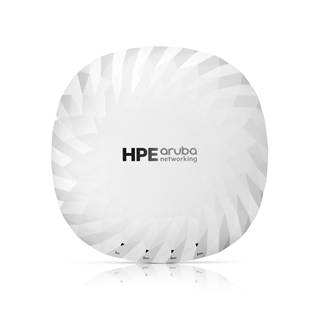
Rightsized Wi-Fi 7 access points for high-capacity and secure wireless connectivity The HPE Aruba Networking 740 Series Campus Access Points are rightsized Wi-Fi 7 access points designed to deliver high-capacity and secure Wi-Fi connectivity ideal for a wide range of indoor use cases. Leveraging the latest Wi-Fi 7 standard, these access points enhance security across both wired and wireless networks, support IoT devices, and provide accurate location-aware capabilities. HPE Aruba Networking Central helps drive efficient operations and provides AI-automation and machine learning (ML) insights for fine-tuned wireless connectivity across diverse environments. |
|
|
Future-proof with the HPE Aruba Networking 740 Series Campus Access Points that deliver up to 9 Gbps maximum tri-band aggregate data rate and go beyond the standard with built-in flexible IoT radio that supports Bluetooth or 802.15.4/Zigbee, a fast 5GbE wired port, and AI-powered dynamic power save mode that helps reduce energy consumption. Like all the HPE Aruba Networking access points, this series is Wi-Fi Certified and includes a limited lifetime warranty for investment protection. | |
|
| |
|
|
|
|
HPE Aruba Networking 740 Series Campus Access Points
| |
|
| |
|
Key Features - Wi-Fi 7 (802.11be) brings multilink operation (MLO) for channel aggregation, 4K QAM for higher throughput and lower latency, and the 6 GHz band for more than double the available capacity - Three MIMO radios (2x2:2.4 GHz + 4x4:5 GHz + 4x4:6 GHz), provide tri-band coverage across 2.4 GHz, 5 GHz, and 6 GHz to deliver 9 Gbps maximum tri-band aggregate data rate - IoT-ready platform with integrated Bluetooth and 802.15.4/Zigbee radios - Fast wired connectivity with 5GbE port - AI-powered dynamic power-save mode helps reduce energy use
| |
|
| |
|
AI-driven Wi-Fi 7 Managing Wi-Fi 7 access points is easier with HPE Aruba Networking Central, which provides intelligent automation, AI insights, and unified infrastructure management. HPE Aruba Networking access points work in tandem with the HPE Aruba Networking Central network management system to securely orchestrate users, apps, and IoT connections. HPE Aruba Networking Central provides observability that extends to third-party devices and management of campus wired and wireless assets, powered by purpose-built AI. The HPE Aruba Networking 740 Series Campus Access Points are supported by HPE Aruba Networking Central running HPE Aruba Networking Wireless Operating System (OS 10). | |||||||||||||||
|
| |||||||||||||||
|
More Capacity The HPE Aruba Networking 740 Series Campus Access Points are designed to take advantage of every bit of available spectrum using three dedicated radios, which translates into high speeds, wider channels for multi-gigabit traffic, and less interference. Supporting up to 160 MHz wide channels, the series delivers up to 9 Gbps maximum tri-band aggregate data rate, using up to 4x4 MIMO radios (2x2: 2.4 GHz, 4x4: 5 GHz, and 4x4: 6 GHz).
| |||||||||||||||
| |||||||||||||||
|
| |||||||||||||||
|
Powerful 4x4 MIMO Radios The HPE Aruba Networking 740 Series Campus Access Points can sustain 3- and 4-spatial stream data rates with supported clients. It also supports 4-spatial stream MU-MIMO with two 2SS client devices and adds MIMO redundancy when using 2SS client devices to increase the likelihood of 2SS rates versus slower 1SS data rate.
Wi-Fi 7 for faster speeds, more capacity The Wi-Fi 7 standard (802.11be) extends the capabilities of Wi-Fi 6E, including the use of the 6 GHz band. New capabilities include multilink operation (MLO) for channel aggregation across different bands and failover, 4096 QAM (4K QAM) modulation for higher peak data rates, and spectrum puncturing to avoid interference or incumbent users of the 6 GHz band. The Wi-Fi 7 standard also includes optional support for wide 320 MHz channels, which are supported on the HPE Aruba Networking 750 Series Campus Access Points and the HPE Aruba Networking 730 Series Campus Access Points.
Advantages of 6 GHz Wi-Fi 7 takes advantage of up to 1200 MHz in the 6 GHz band for higher throughput and improved application performance. The HPE Aruba Networking 740 Series Campus Access Points support up to seven 160 MHz channels or fourteen 80 MHz channels, enabling improved support of low-latency, bandwidth-hungry applications such as high-definition video and artificial reality/virtual reality applications. Only Wi-Fi 6E or Wi-Fi 7 capable devices can use the 6 GHz band, so there is no interference or slowdowns due to legacy devices.
Device Class Support HPE Aruba Networking 740 Series Campus Access Points with integrated antennas are part of the Low Power Indoor (LPI) device class. This fixed indoor-only class uses lower power levels and does not require an Automated Frequency Coordination service (AFC) to manage incumbent outdoor services, which is required for standard class access points.
Global Readiness While the need for more Wi-Fi capacity is recognized across the globe, countries are approaching 6 GHz differently. The HPE Aruba Networking 740 Series Campus Access Points are set up to automatically update regulatory rules once Wi-Fi 7 regulations have been approved and certified.
Extends the benefits of Wi-Fi 6 The HPE Aruba Networking 740 Series Campus Access Points provide high availability with two 10GbE ports for hitless failover for both data and power. Configurable to 1, 2.5, 5, or 10 Gbps (or 100 Mbps), these dual ports provide business continuity for mission-critical applications.
Advantages of OFDMA This capability allows HPE Aruba Networking access points to handle multiple 802.11be capable clients on each channel simultaneously, regardless of device or traffic type. Channel utilization is optimized by handling each transaction through smaller subcarriers or resource units (RUs), which means that clients are sharing a channel and not competing for airtime and bandwidth. | |||||||||||||||
|
| |||||||||||||||
|
Wi-Fi Optimization
Client optimization The patented AI-powered HPE Aruba Networking Central ClientMatch technology helps reduce sticky client issues by steering a client to the access point where it receives the best radio signal. It steers traffic from the noisy 2.4 GHz band to the preferred 5 GHz or 6 GHz band, depending on client capabilities. It also dynamically steers traffic to load balance access points to improve the user experience.
Automated Wi-Fi radio frequency management To help optimize the user experience and provide greater stability, HPE Aruba Networking AirMatch allows organizations to automate network optimization using machine learning. It provides dynamic bandwidth adjustments to support changing device density, enhanced roaming using an even distribution of Effective Isotropic Radiated Power (EIRP) to radios, and real-time channel assignments to mitigate co-channel interference.
Reduce Interference Unique HPE Aruba Networking Advanced Cellular Coexistence (ACC) uses built-in filtering to automatically reduce the impact of interference from cellular networks, distributed antenna systems (DAS), and commercial small cell or femtocell equipment.
AI-powered Dynamic Power Save mode Access points switch into a dynamic power save mode and automatically wake up at a schedule when connectivity demand arises, reducing power demands and saving money in alignment with the organization's sustainability initiatives.
Intelligent Power Monitoring (IPM) For better insights into energy consumption, HPE Aruba Networking access points continuously monitor and report hardware energy usage. Unlike other vendor's access points, HPE Aruba Networking access points can also be configured to enable or disable capabilities based on available Power over Ethernet (PoE) power - ideal when wired switches have exhausted their power budget. Enterprises can deploy Wi-Fi 7 access points and update switching and power later if needed based on their actual usage.
Location-aware services Indoor location shouldn't require guesswork or costly or complex overlay technologies. HPE Aruba Networking Wi-Fi 6, Wi-Fi 6E, and Wi-Fi 7 access points help organizations leverage their wireless investment to deliver indoor location capabilities everywhere.
As part of HPE Aruba Networking indoor location solutions, they serve as reference points for client devices and other technologies using fine time measurement and Bluetooth. This makes it easier and faster to develop location-aware services to support use cases such as wayfinding, asset tracking, and proximity marketing.
Open Locate, an emerging standard that allows access points to share their location over the air and through cloud-based APIs, enables mobile devices to locate themselves and applications to support network analytics. | |||||||||||||||
|
| |||||||||||||||
|
Access Points as flexible and Secure IoT Platform By combining the IoT radio with a zero-trust network framework, the HPE Aruba Networking 740 Series Campus Access Points can serve as flexible IoT platforms that bolster network security, provide coverage for a broad range of IoT devices, and reduce the need for network overlays just for IoT devices.
The HPE Aruba Networking 740 Series Campus Access Points include an integrated Bluetooth 5.4 and 802.15.4 radio for Zigbee support to simplify deploying and managing IoT-based location services, asset tracking services, security solutions, and IoT sensors. There is also a USB port to provide IoT connectivity to a wider range of devices. These IoT capabilities allow organizations to leverage the access point as an IoT platform, which eliminates the need for an overlay infrastructure and additional IT resources and can accelerate IoT initiatives.
In addition, Target Wake Time (TWT) establishes a schedule for when clients need to communicate with an access point. This helps improve client power savings and reduces airtime contention with other clients, which is ideal for IoT.
Streamline IoT Operations HPE Aruba Networking Central IoT Operations unifies visibility of IT and OT infrastructure within the network health dashboard by extending network monitoring and insights to BLE, Zigbee, and other non-IP IoT devices. It helps streamline non-Wi-Fi device onboarding and data collection.
AI Client Insights AI-based classification of all clients and IoT devices through HPE Aruba Networking Central Client Insights uses deep packet inspection to provide additional context and behavioral information that help ensure devices receive proper policy enforcement and continuously monitor for rogue devices.
Technology Partnerships A broad ecosystem of technology partners provides interoperability for easier installations and operations, and certified solutions are available to help digital transformation and extend capabilities of network infrastructure. | |||||||||||||||
|
| |||||||||||||||
|
Security - Built-in The HPE Aruba Networking 740 Series Campus Access Points include security capabilities such as:
WPA3 and Enhanced Open Support for stronger encryption and authentication is provided via the latest version of WPA for enterprise-protected networks. Enhanced Open offers seamless new protection for users connecting to open networks where each session is automatically encrypted to protect user passwords and data on guest networks.
WPA2-MPSK MPSK enables simpler passkey management for WPA2 devices - should the Wi-Fi password on one device or device type change, no additional changes are needed for other devices. This capability requires ClearPass Policy Manager.
Trusted Platform Module (TPM) For enhanced device assurance, all HPE Aruba Networking APs include an installed TPM for secure storage of credentials and keys, and boot code.
User and Device Authentication Cloud-native Network Access Control (NAC) provided by HPE Aruba Networking Central further simplifies how IT controls network access while providing a frictionless experience for end users. Global policy automation and orchestration enables IT to define and maintain global policies at scale with ease, using UI-driven, intuitive workflows that automatically translate security intent into policy design and map user roles for employees, contractors, guests, and devices to their proper access privileges.
Intrusion Detection HPE Aruba Networking Central utilizes the Rogue AP Intrusion Detection Service (RAPIDS) to identify and resolve issues caused by rogue APs and clients. Wired and wireless data is automatically correlated to identify potential threats, thereby strengthening network security and improving incident response processes by reducing false positives.
Web Content Filtering Web Content Classification (WebCC) classifies websites by content category and rates them by reputation and risk score, enabling IT to block malicious sites to help prevent phishing, DDoS, botnets, and other common attacks. | |||||||||||||||
|
|
|
Simple and Secure Access
To improve security and ease of management, IT can centrally configure and automatically enforce role-based policies that define proper access privileges for employees, guests, contractors, and other user groups - no matter where users connect on wired and WLANs. Dynamic Segmentation helps eliminate the time-consuming and error-prone task of managing complex and static VLANs, ACLs, and subnets by dynamically assigning policies and keeping traffic secure and separated.
|
|
|
|
Seamless Handoffs to Cellular Built on the technical foundations of Passpoint® and Wi-Fi Calling, HPE Aruba Networking Air Pass creates a roaming network across the HPE Aruba Networking enterprise customer footprint, extending cellular coverage and enhancing the visitor and subscriber experience to deliver a great experience for your guests while helping to reduce costs and management overhead for DAS. |
|
|
|
HPE Aruba Networking Wireless Operating System Cloud-native HPE Aruba Networking Wireless Operating System (OS-10) is the distributed network operating system working with HPE Aruba Networking Central that acts as the control layer for HPE Aruba Networking access points and gateways.
With its flexible architecture, IT can deliver reliable and secure wireless connectivity for small offices, midsized branches, large campus environments, and remote workers. |
|
|
|
Flexible Operation and simplified deployment Our unified access points can operate as stand-alone access points or with a gateway for greater scalability, security, and manageability. HPE Aruba Networking access points can be managed by AI-powered HPE Aruba Networking Central that provides a single pane of glass for overseeing every aspect of wired and wireless LANs, WANs, and SD-WAN. AI-powered analytics, end-to-end orchestration and automation, and advanced security features are built natively into the solution.
HPE Aruba Networking access points can be managed using cloudbased solutions for any campus, branch, or remote work environment. HPE Aruba Networking Central provides a single pane of glass for overseeing every aspect of wired and wireless LANs, WANs, and VPNs. AI-powered analytics, end-to-end orchestration and automation, and advanced security features are built natively into the solution.
Zero touch provisioning With HPE Aruba Networking Central, onboarding, configuring, and provisioning are simpler and require no manual CLI configuration or maintenance windows. Access points can be deployed using zero touch provisioning - without on-site technical expertise - for ease of implementation in branch offices and for remote work.
Simplified, flexible consumption The HPE Aruba Networking 740 Series Campus Access Points require HPE Aruba Networking Central subscription-based licenses, which are purchased on a per-device basis for access points. Licenses are available in 1-, 3-, 5-, 7-, and 10-year increments, making it easy to align requirements for AIOps, security, and other desired management features. HPE Aruba Networking Wireless Operating System (OS-10) is included in the subscription.
Learn more about HPE Aruba Networking Central. |
|
|
|
Summary: HPE Aruba Networking Wi-Fi solutions Wherever Wi-Fi is needed, HPE Aruba Networking Wi-Fi 7, Wi-Fi 6E, and Wi-Fi 6 access points are ready to provide fast, reliable, and secure coverage. Our access points provide broad network observability, improve mobile client coverage, optimize Wi-Fi bandwidth, and increase operational efficiencies with a choice of cloud or on-premises deployment options. Our portfolio includes Wi-Fi-certified indoor, outdoor, ruggedized, and remote Wi-Fi access points to address a wide range of enterprise use cases and price points, with solutions backed by a limited lifetime warranty.
As part of a full portfolio of Wi-Fi 7 access points, the HPE Aruba Networking 740 Series Campus Access Points offer a rightsized solution for high performance, high-capacity, and secure Wi-Fi 7 connectivity for campus networks. Supported by HPE Aruba Networking Central, this series helps deliver an AI-driven, security-first network. |
|
|
|
740 Series Campus Access Points
|
| |
|
BTO Models |
||
|
745 Unified Access Points |
||
|
Notes: |
Add Mount Kit (not included) |
|
|
Rule # |
Description |
SKU |
|
1 |
HPE Aruba Networking AP-745 (EG) Tri Radio 4x4/2x2 Wi-Fi 7 Internal Antennas Campus Access Point |
S5Q94A |
|
2 |
HPE Aruba Networking AP-745 (IL) Tri Radio 4x4/2x2 Wi-Fi 7 Internal Antennas Campus Access Point |
S5Q95A |
|
3 |
HPE Aruba Networking AP-745 (JP) Tri Radio 4x4/2x2 Wi-Fi 7 Internal Antennas Campus Access Point |
S5Q96A |
|
4 |
HPE Aruba Networking AP-745 (ID) Tri Radio 4x4/2x2 Wi-Fi 7 Internal Antennas Campus Access Point |
S5Q97A |
|
5, 8 |
HPE Aruba Networking AP-745 (RW) Tri Radio 4x4/2x2 Wi-Fi 7 Internal Antennas Campus Access Point |
S5Q98A |
|
6 |
HPE Aruba Networking AP-745 (RW1) Tri Radio 4x4/2x2 Wi-Fi 7 Internal Antennas Campus Access Point |
S5Q99A |
|
7, 9 |
HPE Aruba Networking AP-745 (US) Tri Radio 4x4/2x2 Wi-Fi 7 Internal Antennas Campus Access Point |
S5R01A |
|
745 Unified Access Points - 5-Pack Eco-Friendly Bundle |
||
|
Notes: |
Add 5 mount kits; eco-pack includes one JY728A console adapter cable |
|
|
Rule # |
Description |
SKU |
|
5 |
HPE Aruba Networking AP-745 (RW) Tri Radio 4x4/2x2 Wi-Fi 7 Internal Antennas 5pk Campus Access Point |
S5R00A |
|
7 |
HPE Aruba Networking AP-745 (US) Tri Radio 4x4/2x2 Wi-Fi 7 Internal Antennas 5pk Campus Access Point |
S5R02A |
|
Configuration Rules |
||
|
Rule # |
Description |
|
|
1 |
Available in Egypt only. Partners must have an SOT (Cross border agreement). |
|
|
2 |
Available in Israel only. Partners must have an SOT (Cross border agreement). |
|
|
3 |
Available in Japan only. Partners must have an SOT (Cross border agreement). |
|
|
4 |
Available in Indonesia only. Partners must have an SOT (Cross border agreement). |
|
|
5 |
Available everywhere except US, Israel, Egypt, India, Indonesia and Japan. Partners must have an SOT (Cross border agreement). |
|
|
6 |
Available everywhere except US, Israel, Egypt, Indonesia and Japan. Partners must have an SOT (Cross border agreement). |
|
|
7 |
Available in US only. Partners must have an SOT (Cross border agreement). |
|
|
8 |
If the ordered qty of this AP is greater than or equal to 5, then the default will be the following Eco-Friendly 5-Pack(s) with the remainder as individual packs. Allow user to change the full quantity easily back to individual packs; |
|
|
9 |
If the ordered qty of this AP is greater than or equal to 5, then the default will be the following Eco-Friendly 5-Pack(s) with the remainder as individual packs. Allow user to change the full quantity easily back to individual packs; |
|
|
Notes: |
OCA Only Model Selection Form - HPE Aruba Networking > Access Points > Indoor Campus: 740 Series Campus AP |
|
|
| ||
|
Mount Accessories |
||
|
AP Mount Kits |
||
|
Rule # |
Description |
SKU |
|
HPE Aruba Networking AP-MNT-U Campus Access Point Type U Universal Mount Bracket Kit |
S4K79A | |
|
1 |
HPE Aruba Networking AP-MNT-MP10-U Campus AP Universal 10-pack Mount Bracket Kit |
S0J40A |
|
HPE Aruba Networking AP-MNT-A Campus AP Type A Suspended Ceiling Rail Flat 9/16 Mount Bracket Kit |
R3J15A | |
|
1 |
HPE Aruba Networking AP-MNT-MP10-A Campus AP 10-Pack 9/16 Flat Ceiling Rail Mount Bracket Kit |
JZ370A |
|
HPE Aruba Networking AP-MNT-B Campus AP Type B Suspended Ceiling Rail Flat 15/16 Mount Bracket Kit |
R3J16A | |
|
1 |
HPE Aruba Networking AP-MNT-MP10-B Campus AP 10-Pack 15/16 Flat Ceiling Rail Mount Bracket Kit |
Q9G69A |
|
1 |
HPE Aruba Networking AP-MNT-MP10-B1 Campus AP 10-Pack 15/16 Adj Flat Ceiling Rail Mount Bracket Kit |
R6T34A |
|
HPE Aruba Networking AP-MNT-C Campus AP Type C Suspended Ceiling Rail 9/16 Profile Mnt Bracket Kit |
R3J17A | |
|
1 |
HPE Aruba Networking AP-MNT-MP10-C Campus AP 10-Pack Profile 9/16 Ceiling Rail Mount Bracket Kit |
Q9G70A |
|
HPE Aruba Networking AP-MNT-D Campus AP Type D Solid Surface Mount Bracket Kit |
R3J18A | |
|
1 |
HPE Aruba Networking AP-MNT-MP10-D Campus AP 10-Pack Solid Surface Mount Bracket Kit |
Q9G71A |
|
HPE Aruba Networking AP-MNT-E Campus AP Type E Wall-Box Mount Bracket Kit |
R3J19A | |
|
1 |
HPE Aruba Networking AP-MNT-MP10-E Campus AP 10-Pack Wall-box Mount Bracket Kit |
R1C72A |
|
|
|
|
|
Configuration Rules |
||
|
Rule # |
Description |
|
|
1 |
Kit contains mounts for 10 access points |
|
|
Notes: |
Access Points do not include a Mount. Qty 1 Mount kits should be selected. |
|
|
| ||
|
Power Options |
||
|
Rule # |
Description |
SKU |
|
1 |
HPE Aruba Networking AP-POE-ATSR 1-Port Smart Rate 802.3at 30W Midspan Injector |
R6P67A |
|
1 |
HPE Aruba Networking AP-POE-BT10 1-port 10G 60W Midspan 802.3bt PoE Injector |
S3J26A |
|
Configuration Rules |
||
|
Rule # |
Description |
|
|
1 |
If this Power Supply is selected, bring in (Min 1 // Max 1) Localized power cord based on the Aruba Wireless Power Cord Table Menu |
|
|
Notes: |
If this Power Supply is selected, bring in (Min 1 // Max 1) Localized power cord based on the Aruba Wireless Power Cord Table Menu |
|
|
| ||
|
Accessories |
||
|
Snap-on Covers |
||
|
Rule # |
Description |
SKU |
|
HPE Aruba Networking AP-730-CVR-20 Access Point 20-pack White Non-Glossy Snap-On Covers |
S1H25A | |
|
Notes: |
Kit contains 20 optional snap-on covers |
|
|
| ||
|
Other Accessories |
||
|
Rule # |
Description |
SKU |
|
HPE Aruba Networking AP-CBL-EXT10 10-pack CAT6A Ethernet Extension Cables |
R8L34A | |
|
Notes: |
10-pack Extension Cables |
|
|
HPE Aruba Networking AP-CBL-SERU Micro-USB TTL3.3V to USB2.0 AP Console Adapter Cable |
JY728A | |
|
Notes: |
Drivers available on the Aruba Support Center |
|
|
HPE Aruba Networking AP-MOD-SERU Micro-USB TTL3.3V to RJ45 RS232 AP Console Adapter Module |
R6Q99A | |
|
HPE Aruba Networking AP-MNT-MP10-AP Campus AP 10-Pack Mount Brace Spare Kit |
S0J39A | |
|
| ||
|
Hardware Variants - AP-745: Internal antenna models. | ||
|
| ||
|
Wi-Fi Antennas - AP type: Indoor, tri-radio, 2x2: 2.4 GHz, 4x4: 5 GHz, and 4x4: 6 GHz - 2.4 GHz radio: Two spatial stream single user (SU) MIMO for up to 344 Mbps wireless data rate with 2SS EHT20 802.11be client devices - 5 GHz radio: Four spatial stream SU MIMO for up to 2.88 Gbps wireless data rate with 4SS EHT80 802.11be client devices - 6 GHz radio: Four spatial stream SU MIMO for up to 5.76 Gbps wireless data rate with 4SS EHT160 802.11be client devices - MU-MIMO (downlink, uplink) is supported on all radios - Up to 512 associated client devices per radio and up to 16 BSSIDs per radio - Supported frequency bands (country-specific restrictions apply):
- Available bands and channels: Dependent on the configured regulatory domain (country) - Dynamic frequency selection (DFS) optimizes the use of available RF spectrum in the 5 GHz band - Including zero-wait DFS (ZWDFS) to accelerate channel changes - Supported radio technologies:
- Supported modulation types:
- QPSK, 16-QAM, 64-QAM and 256-QAM (proprietary extension)
- Supported data rates (Mbps):
- 802.11n/ac packet aggregation: A-MPDU, A-MSDU - Transmit power: Configurable in increments of 0.5 dBm - Maximum (aggregate, conducted total) transmit power (limited by local regulatory requirements)
- ACC removes the impact of interference from cellular networks - Maximum ratio combining (MRC) for improved receiver performance - Cyclic delay/shift diversity (CDD/CSD) for improved downlink RF performance - Space-time block coding (STBC) for increased range and improved reception - Low-density parity check (LDPC) for high-efficiency error correction and increased throughput - Transmit beamforming (TxBF) for increased signal reliability and range - 802.11ax TWT to support low-power client devices - 802.11mc/az FTM for precision distance ranging Wi-Fi antennas - Integrated downtilt omnidirectional antennas for 4x4 (2x2 on 2.4 GHz) MIMO with peak antenna gain of 5.9 dBi in 2.4 GHz, 5.9 dBi in 5 GHz, and 5.4 dBi in 6 GHz. Built-in antennas are optimized for horizontal ceiling-mounted orientation of the AP. The downtilt angle for maximum gain is roughly 30° to 40°.
- Final antenna gain pending regulatory certification completion |
||
|
| ||
|
Other Interfaces and Features - E0: Ethernet wired network port (RJ-45)
- U0: USB 2.0 host interface (Type A connector)
- Flexible integrated IoT radio that can be configured for BLE or 802.15.4/Zigbee:
- Built-in TPM for enhanced security and anti-counterfeiting - Visual indicators (four multicolor LEDs): For system (1x) and radio (3x) status - Reset button: factory reset, LED mode control (normal/off) - Serial console interface (proprietary, Micro-B USB physical jack) (AP-CBL-SERU)
- Automatic thermal shutdown and recovery function |
||
|
| ||
|
Power sources and power consumption - Power sources are sold separately - When powered by 802.3bt (class 6) PoE, the AP will operate without restrictions - When powered by 802.3at (class 4) PoE with the IPM feature disabled, the access point will disable the USB ports - Operating the AP with a single 802.3af (class 3 or lower) PoE source is not supported, regardless of IPM status (except for AP staging) - With IPM enabled, the AP will start up in unrestricted mode but may dynamically apply restrictions depending on the available power budget and actual consumption. The feature restrictions and order in which these get applied are configurable - Maximum (worst-case) power consumption (without/with USB devices attached):
- Maximum (worst case) power consumption in idle mode (without/with USB devices attached:
- Maximum (worst-case) power consumption in deep-sleep mode:
|
||
|
| ||
|
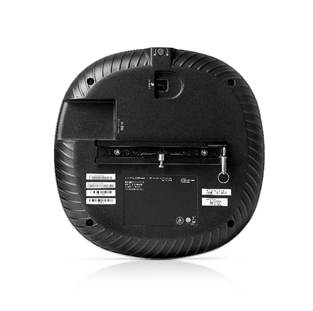
Mounting details A mounting bracket has been preinstalled on the back of the access point. This bracket is used to secure the access point to any of the mount kits (sold separately). | ||
|
| ||
|
Mechanical specifications AP-745 Unit without Mounting Brace - Dimensions
- Weight: 1.3Kg
AP-745 Single-pack - Dimension: 252mm x 267mm x 86.9mm - weight w/o APs= 0.23kg - weight only with APs= 1.53kg
AP-745 Multi-pack - Dimension: 462mm x 269mm 296mm - weight w/o APs= 0.795kg - weight only with APs= 9.6kg |
||
|
| ||
|
Environmental specifications - Operating conditions
- Transportation conditions
Reliability - MTBF: 964,054 hrs (Telcordia SR-332, Issue 3, @ 25°C, Ground Benign, Controlled) |
||
|
| ||
|
General regulatory statements HPE Aruba Networking WLAN access points comply with all regulatory rules that apply in the country they are configured for. In most countries, these products may not be allowed to enable all available radios and channels, and various restrictions may apply (RF transmit power levels, radar detection, and so on). Hewlett Packard Enterprise continues to upgrade the software and regulatory restrictions that apply to these products to help ensure they remain in compliance with the latest regulatory rules in the country of operation.
However, this does not imply a promise or commitment to enable all radios in all countries where we ship these products, and/or enabling all deployment scenarios (indoor/outdoor, for example) that they can be configured for.
Consult your HPE representative to confirm the latest regulatory status for each product in the country of operation and any anticipated future enhancements or other changes, as well as check the regulatory rules through the host country's regulatory agencies for more information. | ||
|
| ||
|
Regulatory Compliance - FCC/ISED - CE Marked - Low Voltage Directive 2014/35/EU - UL/IEC/EN 62368-1 - EN60601-1-2
For more country-specific regulatory information and approvals, please see your HPE Aruba Networking representative. | ||
|
| ||
|
Regulatory Model Numbers - HPE Aruba Networking AP-745 (all models): APIN0745 | ||
|
| ||
|
Certifications - UL2043 plenum rating - Wi-Fi Alliance (WFA):
- Bluetooth SIG - Ethernet Alliance (PoE, PD device, class 6) |
| |
|
|
| |
|
Warranty HPE Aruba Networking's hardware limited lifetime warranty.
|
| |
|
|
| |
|
Minimum Operating System Software Versions HPE Aruba Networking Wireless Operating System AOS 10.8.0.0 |
| |
|
|
| |
|
2.4 GHz Radios | ||
|
Mode/ Data Rate |
20 MHz Bandwidth | |
|
802.11b, all rates |
18dBm | |
|
802.11g, 6Mbps |
18dBm | |
|
802.11g, 54Mbps |
18dBm | |
|
802.11n/ax/be, MCS0 |
18dBm | |
|
802.11n/ax/be, MCS7 |
16dBm | |
|
802.11ax/be, MCS9 |
14dBm | |
|
802.11ax/be, MCS11 |
12dBm | |
|
802.11be, MCS13 |
10dBm | |
|
|
|
5GHz Radios |
|
Mode/ Data Rate |
20 MHz Bandwidth |
40 MHz Bandwidth |
80 MHz Bandwidth |
|
802.11a, 6Mbps |
18dBm |
NA |
NA |
|
802.11a, 54Mbps |
18dBm |
NA |
NA |
|
802.11n/ac/ax/be, MCS0 |
18dBm |
18dBm |
18dBm |
|
802.11n/ac/ax/be, MCS7 |
16dBm |
16dBm |
16dBm |
|
802.11ac/ax/be, MCS9 |
14dBm |
14dBm |
14dBm |
|
802.11ax/be, MCS11 |
12dBm |
12dBm |
12dBm |
|
802.11be, MCS13 |
10dBm |
10dBm |
10dBm |
|
| |
|
6GHz Radios |
|
|
6GHz Radios |
|
|
Mode/ Data Rate |
20 MHz Bandwidth |
40 MHz Bandwidth |
80 MHz Bandwidth |
160 MHz Bandwidth |
|
802.11ax/be, MCS0 |
18dBm |
18dBm |
18dBm |
18dBm |
|
802.11ax/be, MCS9 |
14dBm |
14dBm |
14dBm |
14dBm |
|
802.11ax/be, MCS11 |
12dBm |
12dBm |
12dBm |
12dBm |
|
802.11be, MCS13 |
10dBm |
10dBm |
10dBm |
10dBm |
|
|
|
|
|
RX Performance
|
|
2.4 GHz Radios |
|
Mode/ Data Rate |
20 MHz Bandwidth |
|
802.11b, 1Mbps |
-95dBm |
|
802.11b, 11Mbps |
-87dBm |
|
802.11g, 6Mbps |
-91dBm |
|
802.11g, 54Mbps |
-73dBm |
|
802.11n/ax/be, MCS0 |
-91dBm |
|
802.11n/ax/be, MCS7 |
-72dBm |
|
802.11ax/be, MCS9 |
-68dBm |
|
802.11ax/be, MCS11 |
-61dBm |
|
802.11be, MCS13 |
-55dBm |
|
|
|
5GHz Radios |
|
Mode/ Data Rate |
20 MHz Bandwidth |
40 MHz Bandwidth |
80 MHz Bandwidth |
|
802.11a, 6Mbps |
-91dBm |
NA |
NA |
|
802.11a, 54Mbps |
-73dBm |
NA |
NA |
|
802.11n/ac/ax/be, MCS0 |
-91dBm |
-88dBm |
-85dBm |
|
802.11n/ac/ax/be, MCS7 |
-70dBm |
-67dBm |
-64dBm |
|
802.11ac/ax/be, MCS9 |
-66dBm |
-63dBm |
-60dBm |
|
802.11ax/be, MCS11 |
-61dBm |
-58dBm |
-55dBm |
|
802.11be, MCS13 |
-53dBm |
-50dBm |
-47dBm |
|
|
|
6GHz Radios |
|
Mode/ Data Rate |
20 MHz Bandwidth |
40 MHz Bandwidth |
80 MHz Bandwidth |
160 MHz Bandwidth |
|
802.11ax/be, MCS0 |
-92dBm |
-89dBm |
-86dBm |
-83dBm |
|
802.11ax/be, MCS9 |
-68dBm |
-65dBm |
-62dBm |
-59dBm |
|
802.11ax/be, MCS11 |
-62dBm |
-59dBm |
-56dBm |
-53dBm |
|
802.11be, MCS13 |
-56dBm |
-53dBm |
-50dBm |
-47dBm |
|
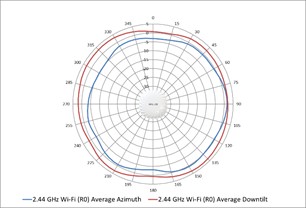
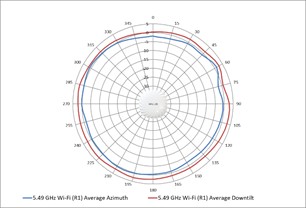
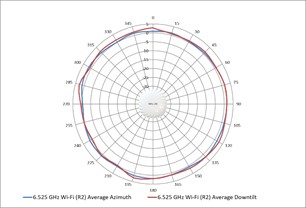
Wi-Fi antenna patterns AP-745
Horizontal planes (top view) Showing both azimuth (0 degrees) and 30 degrees downtilt patterns (averaged patterns for all applicable antennas)
|
|
|
|
2.45 GHz Wi-Fi antenna patterns (horizontal)
|
|
|
|
5.55 GHz Wi-Fi antenna patterns (horizontal)
|
|
|
|
6.56 GHz Wi-Fi antenna patterns (horizontal)
|
|
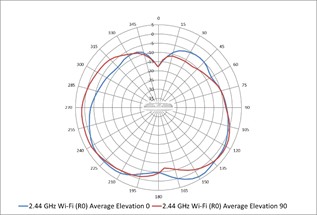
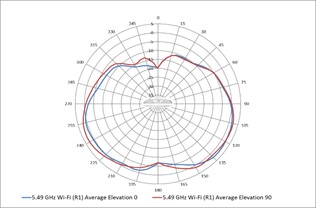
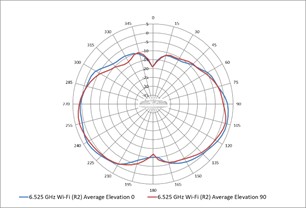
Vertical (elevation) planes (side view, AP facing down) Showing side view with AP rotated 0 and 90 degrees (averaged patterns for all applicable antennas)
|
|
|
|
2.45 GHz Wi-Fi antennas patterns (vertical)
|
|
|
|
5.55 GHz Wi-Fi antenna patterns (vertical)
|
|
|
|
6.56 GHz Wi-Fi antennas patterns (vertical)
|
|
|
|
Date |
Version History |
Action |
Description of Change |
|
15-Jun-2026 |
Version 3 |
Changed |
Internal QS Updates: Survey Text link |
|
02-Feb-2026 |
Version 2 |
Changed |
Standard Features and Technical Specifications sections were updated. |
|
03-Nov-2025 |
Version 1 |
New |
New QuickSpecs |
|
|
|
Have feedback on QuickSpecs? We're listening | |
|
|
|
| |
|
|
|
Chat now | |
|
|
|
© Copyright 2026 Hewlett Packard Enterprise Development LP. The information contained herein is subject to change without notice. The only warranties for Hewlett Packard Enterprise products and services are set forth in the express warranty statements accompanying such products and services. Nothing herein should be construed as constituting an additional warranty. Hewlett Packard Enterprise shall not be liable for technical or editorial errors or omissions contained herein.
To learn more, visit: http://www.hpe.com/networking
a50009243enw - 17275 - Worldwide - V3 - 15-June-2026 | |
|
|
|
HEWLETT PACKARD ENTERPRISE HPE.com |
|