HPE Aruba Networking 550 Series Campus Access Points: технические характеристики и документация
|
Shape the Future of QuickSpecs - Your Input Matters | |
|
HPE Aruba Networking 550 Series Campus Access Points QuickSpecs
Extreme Wi-Fi 6 (802.11ax) Performance with Tri-Radios
HPE Aruba Networking Wi-Fi 6 access points provide high performance connectivity for any organization experiencing growing numbers of Internet of Things (IoT) and mobility requirements. With a combined peak data rate of up to 5.37 Gbps, the HPE Aruba Networking 550 Series Campus Access Points delivers the speed and reliability needed for any enterprise. |
|
|
|
|
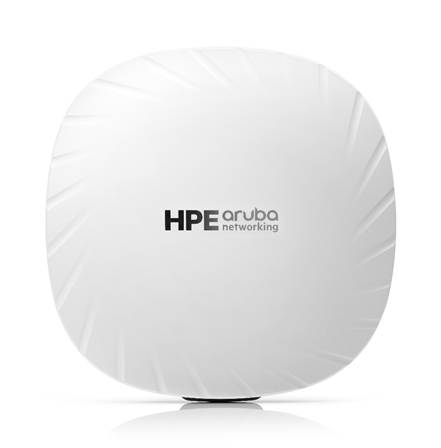
HPE Aruba Networking 550 Series - Front View
|
|
|
|
Key Features - Up to 5.37 Gbps combined peak data rate - Wi-Fi Protected Access version 3 (WPA3) and Enhanced Open security - Built-in technology that resolves sticky client device issues - OFDMA and MU-MIMO for enhanced multiuser efficiency - IoT-ready Bluetooth 5, Near Field Communication (NFC), and Zigbee support - Optional tri-radio mode with two 5 GHz and one 2.4 GHz radio (4x4 MIMO) - Embedded ranging technology for accurate indoor location measurements |
|
|
|
Incredible Efficiency The HPE Aruba Networking 550 Series Campus Access Points are also designed to optimize user experience by maximizing Wi-Fi efficiency and dramatically reducing airtime contention between clients device.
Features include orthogonal frequency-division multiple access (OFDMA), bidirectional multiuser MIMO (MU-MIMO), and cellular optimization. With optional tri-radios, up to four spatial streams (4SS) and 160 MHz channel bandwidth, the 550 series provides groundbreaking wireless capabilities for any enterprise.
Advantages of OFDMA This capability allows HPE Aruba Networking access points to handle multiple Wi-Fi 6 capable clients device concurrently in a single transmit or receive time slot regardless of device or traffic type. Channel utilization is optimized by handling each transaction through smaller subcarriers or resource units (RUs), which means that clients device are sharing a time slot in the frequency domain and not competing for airtime and bandwidth.
Bidirectional MU-MIMO Similar to downlink MU-MIMO in Wi-Fi 5 (802.11ac Wave 2), the 550 Series can simultaneously connect clients device using downlink—and now—uplink spatial streams. The added benefit is the ability to multiply the number of clients device that can now send traffic, thus optimizing client-to-access point spatial stream diversity.
Wi-Fi 6 and MU-MIMO aware client device optimization HPE Aruba Networking patented AI-powered ClientMatch technology helps eliminate sticky client device issues by placing Wi-Fi 6 capable devices on the best available access point. Session metrics are used to steer mobile devices to the best access point based on available bandwidth, types of applications being used, and traffic type—even as users roam.
HPE Aruba Networking Advanced Cellular Coexistence (ACC) This feature uses built-in filtering to automatically helps minimize the impact of interference from cellular networks, distributed antenna systems (DAS), and commercial small-cell or femtocell equipment.
Intelligent power monitoring HPE Aruba Networking access points continuously monitor and report hardware energy consumption. They can also be configured to enable or disable capabilities based on available Power over Ethernet (PoE) power—ideal when wired switches have exhausted their power budget. |
|
|
|
IoT Platform Capabilities Like all HPE Aruba Networking Wi-Fi 6 access points, the 550 series includes an integrated Bluetooth 5 and 802.15.4 radio (for Zigbee support) to simplify deploying and managing IoT-based location services, asset tracking services, security solutions, and IoT sensors. It also enables NFC to easily display access point status information and streamline deployment. This allows organizations to leverage the 550 series as an IoT platform, which helps eliminate the need for an overlay infrastructure and additional IT resources.
Target Wake Time Ideal for IoT devices that communicate infrequently, Target Wake Time (TWT) establishes a schedule when clients device need to communicate with an access point. This helps improve client device power savings and reduces airtime contention with other clients device. |
|
|
|
Foundation for Accurate Indoor Location HPE Aruba Networking access points act as a foundation for accurate indoor location so that location-aware services can be deployed at scale. Using embedded GPS receivers, HPE Aruba Networking Wi-Fi 6E access points are able to self-locate and work with Wi-Fi 6 access points to establish reference points that can be used to accurately determine indoor client device location.
Because they use universal latitude and longitude coordinates, there is no need for custom map development or to create separate applications for indoor and outdoor environments. |
|
|
|
HPE Aruba Networking Secure Infrastructure The HPE Aruba Networking 550 Series Campus Access Points:
WPA3 and Enhanced Open Support for stronger encryption and authentication is provided through the latest version of WPA for enterprise-protected networks.
Enhanced Open offers seamless new protection for users connecting to open networks where each session is automatically encrypted to protect user passwords and data on guest networks.
WPA2-MPSK MPSK enables simpler passkey management for WPA2 devices—should the Wi-Fi password on one device or device type change; no additional changes are needed for other devices. It requires HPE Aruba Networking ClearPass Policy Manager.
VPN tunnels In remote access point (RAP) and IAP-VPN deployments, the HPE Aruba Networking 550 Series Campus Access Point can be used to establish a secure SSL / Internet Protocol Security (IPSec) VPN tunnel to a Mobility Controller that is acting as a VPN concentrator.
Trusted Platform Module For enhanced device assurance, all HPE Aruba Networking access points have an installed Trusted Platform Module (TPM) for secure storage of credentials and keys and boot code.
|
|
|
|
Simple and Secure Access To simplify policy enforcement, the HPE Aruba Networking 550 Series Campus Access Point uses HPE Aruba Networking Policy Enforcement Firewall (PEF) feature to encapsulate all traffic from the access point to the Mobility Controller (or Gateway) for end-to-end encryption and inspection. Policies are applied based on user role, device type, applications, and location. This reduces the manual configuration of service set identifiers (SSIDs), VLANs, and access control lists (ACLs). PEF also serves as the underlying technology for HPE Aruba Networking Dynamic Segmentation.
|
|
|
|
Flexible Operation and Management Our unified access points can operate as stand-alone access points or with a gateway for greater scalability, security, and manageability. APs can be deployed using Zero Touch Provisioning—without on-site technical expertise—for ease of implementation in branch offices and for remote work.
HPE Aruba Networking access points can be managed using cloud-based or on-premises solutions for any campus, branch, or remote work environment.
HPE Aruba Networking Central provides a single pane of glass for overseeing every aspect of wired and wireless LANs, WANs, and VPNs. AI-powered analytics, end-to-end orchestration and automation, and advanced security features are built natively into the solution. |
|
|
|
Additional Wi-Fi features Each access point also includes the following standards-based technologies: - Transmit beamforming - Dynamic Frequency Selection (DFS) - Maximum ratio combining - Cyclic delay / shift diversity - Space-time block coding -
Low-density
parity check |
|
|
|
BTO Model |
| |
|
Remarks |
Description |
SKU |
|
Notes: |
Add Mount Kit OCA Only Model Selection Form - HPE Offering > HPE Aruba Networking > Wireless > Access Points > Campus: HPE Aruba Networking 550 Series Campus Access Points |
|
|
|
555 Internal Antenna Access Points |
|
|
3 |
HPE Aruba Networking AP-555 (EG) Dual Radio 8x8/4x4 802.11ax Internal Antennas Unified Campus AP |
JZ353A |
|
4 |
HPE Aruba Networking AP-555 (IL) Dual Radio 8x8/4x4 802.11ax Internal Antennas Unified Campus AP |
JZ354A |
|
5 |
HPE Aruba Networking AP-555 (JP) Dual Radio 8x8/4x4 802.11ax Internal Antennas Unified Campus AP |
JZ355A |
|
1 |
HPE Aruba Networking AP-555 (RW) Dual Radio 8x8/4x4 802.11ax Internal Antennas Unified Campus AP |
JZ356A |
|
2 |
HPE Aruba Networking AP-555 (US) Dual Radio 8x8/4x4 802.11ax Internal Ants Unified Campus AP |
JZ357A |
|
6 |
HPE Aruba Networking AP-555 (ID) Dual Radio 8x8/4x4 802.11ax Internal Antennas Campus Access Point |
S5D88A |
|
|
|
|
|
|
555 Internal Antenna Access Points - TAA Models |
|
|
3 |
HPE Aruba Networking AP-555 (EG) TAA Dual Radio 8x8/4x4 802.11ax Internal Ants Unified Campus AP |
JZ363A |
|
4 |
HPE Aruba Networking AP-555 (IL) TAA Dual Radio 8x8/4x4 802.11ax Internal Ants Unified Campus AP |
JZ364A |
|
5 |
HPE Aruba Networking AP-555 (JP) TAA Dual Radio 8x8/4x4 802.11ax Internal Ants Unified Campus AP |
JZ365A |
|
1 |
HPE Aruba Networking AP-555 (RW) TAA Dual Radio 8x8/4x4 802.11ax Internal Ants Unified Campus AP |
JZ366A |
|
2 |
HPE Aruba Networking AP-555 (US) TAA Dual Radio 8x8/4x4 802.11ax Internal Ants Unified Campus AP |
JZ367A |
|
|
|
|
|
|
Configuration Rules |
|
|
Rule# |
Description |
|
|
1 |
Available everywhere except US, Israel, Egypt, Indonesia and Japan. Partners must have an SOT (Cross border agreement). |
|
|
2 |
Available in US only. Partners must have an SOT (Cross border agreement). |
|
|
3 |
Available in Egypt only. Partners must have an SOT (Cross border agreement). |
|
|
4 |
Available in Israel only. Partners must have an SOT (Cross border agreement). |
|
|
5 |
Available in Japan only. Partners must have an SOT (Cross border agreement). |
|
|
6 |
Available in Indonesia only. Partners must have an SOT (Cross border agreement). |
|
|
Notes: |
OCA Only Model Selection Form - HPE Aruba Networking > Access Points > Indoor Campus: 550 Series Campus AP |
|
|
| ||
|
Mount Accessories | ||
|
Remarks |
Description |
SKU |
|
|
AP Mount Kits For 555, Series Std (Min 0 // max 99) User Selection (min 0 // max 99) |
|
|
|
HPE Aruba Networking AP-MNT-A Campus AP Type A Suspended Ceiling Rail Flat 9/16 Mount Bracket Kit |
R3J15A |
|
* |
HPE Aruba Networking AP-MNT-MP10-A Campus AP 10-Pack 9/16 Flat Ceiling Rail Mount Bracket Kit |
JZ370A |
|
|
HPE Aruba Networking AP-MNT-B Campus AP Type B Suspended Ceiling Rail Flat 15/16 Mount Bracket Kit |
R3J16A |
|
* |
HPE Aruba Networking AP-MNT-MP10-B Campus AP 10-Pack 15/16 Flat Ceiling Rail Mount Bracket Kit |
Q9G69A |
|
* |
HPE Aruba Networking AP-MNT-MP10-B1 Campus AP 10-Pack 15/16 Adj Flat Ceiling Rail Mount Bracket Kit |
R6T34A |
|
|
HPE Aruba Networking AP-MNT-C Campus AP Type C Suspended Ceiling Rail 9/16 Profile Mnt Bracket Kit |
R3J17A |
|
* |
HPE Aruba Networking AP-MNT-MP10-C Campus AP 10-Pack Profile 9/16 Ceiling Rail Mount Bracket Kit |
Q9G70A |
|
|
HPE Aruba Networking AP-MNT-D Campus AP Type D Solid Surface Mount Bracket Kit |
R3J18A |
|
* |
HPE Aruba Networking AP-MNT-MP10-D Campus AP 10-Pack Solid Surface Mount Bracket Kit |
Q9G71A |
|
|
HPE Aruba Networking AP-MNT-E Campus AP Type E Wall-Box Mount Bracket Kit |
R3J19A |
|
* |
HPE Aruba Networking AP-MNT-MP10-E Campus AP 10-Pack Wall-box Mount Bracket Kit |
R1C72A |
|
|
HPE Aruba Networking AP-MNT-U Campus Access Point Type U Universal Mount Bracket Kit |
S4K79A |
|
* |
HPE Aruba Networking AP-MNT-MP10-U Campus AP Universal 10-pack Mount Bracket Kit |
S0J40A |
|
* |
HPE Aruba Networking AP-MNT-MP10-X Campus AP 10-Pack Mount Adapter Kit |
R3T20A |
|
Notes: |
- *Kit contains mounts for 10 access points - Access Points do not include a Mount. Qty 1 Mount kits should be selected |
|
|
| ||
|
Power Options For 555 Series Std (Min 0 // max 1) User Selection (min 0 // max 1) |
| |
|
Remarks |
Description |
SKU |
|
Notes: |
- If this Power Supply is selected, bring in (Min 1 // Max 1) Localized power cord based on the HPE Aruba Networking Localization Menu - Most devices are PoE powered from switch so these are optional |
|
|
|
Compatible with 555 AP models |
|
|
|
HPE Aruba Networking AP-POE-BTSR 1-Port Smart Rate 802.3bt 60W Midspan Injector |
R1C73A |
|
|
HPE Aruba Networking AP-POE-BT10 1-port 10G 60W Midspan 802.3bt PoE Injector |
S3J26A |
|
|
HPE Aruba Networking AP-AC2-48C 48V/50W AC/DC Desktop Style Power Adapter with 1.35/3.5mm Connector |
R3K01A |
|
| ||
|
Accesories |
| |
|
Remarks |
Description |
SKU |
|
|
Snap-on Covers For 555 Series Std (Min 0 // max 99) User Selection (min 0 // max 99) |
|
|
|
HPE Aruba Networking AP-555-CVR-20 20pk for AP-555 White Non-glossy Snap-On Covers |
JZ369A |
|
Notes: |
Kit contains 20 optional snap-on covers |
|
|
|
|
|
|
|
Other Accessories (Optional) For 555 Series Std (Min 0 // max 99) User Selection (min 0 // max 99) |
|
|
Remarks |
Description |
SKU |
|
|
Compatible with 555 AP models |
|
|
|
HPE Aruba Networking AP-MOD-SERU Micro-USB TTL3.3V to RJ45 RS232 AP Console Adapter Module |
R6Q99A |
|
|
HPE Aruba Networking AP-CBL-SERU Micro-USB TTL3.3V to USB2.0 AP Console Adapter Cable |
JY728A |
|
|
HPE Aruba Networking USB LTE Modem for Access Points and Gateways |
R8F34A |
|
|
HPE Aruba Networking USB Extender Cable Kit |
R8G76A |
|
|
|
|
|
| ||
|
Software |
| |
|
|
Central |
|
|
|
Cloud Services / Access Point Foundation Subscriptions |
|
|
2, 8 |
HPE Aruba Networking Central AP Foundation 1-year Subscription E-STU |
Q9Y58AAE |
|
2, 8 |
HPE Aruba Networking Central AP Foundation 3 year Subscription E-STU |
Q9Y59AAE |
|
2, 8 |
HPE Aruba Networking Central AP Foundation 5 year Subscription E-STU |
Q9Y60AAE |
|
2, 8 |
HPE Aruba Networking Central AP Foundation 7 year Subscription E-STU |
Q9Y61AAE |
|
2, 8 |
HPE Aruba Networking Central AP Foundation 10 year Subscription E-STU |
Q9Y62AAE |
|
|
|
|
|
|
Cloud Services / Access Point Advanced Subscriptions |
|
|
2, 8 |
HPE Aruba Networking Central AP Advanced 1 year Subscription E-STU |
Q9Y63AAE |
|
2, 8 |
HPE Aruba Networking Central AP Advanced 3 year Subscription E-STU |
Q9Y64AAE |
|
2, 8 |
HPE Aruba Networking Central AP Advanced 5 year Subscription E-STU |
Q9Y65AAE |
|
2, 8 |
HPE Aruba Networking Central AP Advanced 7 year Subscription E-STU |
Q9Y66AAE |
|
2, 8 |
HPE Aruba Networking Central AP Advanced 10 year Subscription E-STU |
Q9Y67AAE |
|
|
|
|
|
|
On-Prem Services / Access Point Foundation Subscriptions |
|
|
3, 8 |
HPE Aruba Networking Central on Prem AP Foundation 1 year Subscription E-STU |
R6U63AAE |
|
3, 8 |
HPE Aruba Networking Central on Prem AP Foundation 3 year Subscription E-STU |
R6U64AAE |
|
3, 8 |
HPE Aruba Networking Central on Prem AP Foundation 5 year Subscription E-STU |
R6U65AAE |
|
3, 8 |
HPE Aruba Networking Central on Prem AP Foundation 7 year Subscription E-STU |
R6U66AAE |
|
3, 8 |
HPE Aruba Networking Central on Prem AP Foundation 10 year Subscription E-STU |
R6U67AAE |
|
|
|
|
|
|
Configuration Rules |
|
|
Rule # |
Description |
SKU |
|
2 |
Add the Central Cloud Skus to the HPE Aruba Networking Catalog as Standalone: HPE Aruba Networking > Network Management > Central > Cloud Services |
|
|
3 |
Add the Central On-Prem Skus to the HPE Aruba Networking Catalog as Standalone: HPE Aruba Networking > Network Management > Central > On-Prem Services |
|
|
6 |
Add the Central FedRAMP Service Skus to the HPE Aruba Networking Catalog as Standalone: HPE Aruba Networking > Network Management > Central > FedRAMP |
|
|
8 |
For OCA: When configuring the following AP 10-Pack, selection condition for this Subscription should be 0(default) or 10 |
|
|
|
HPE Aruba Networking AP-503 (RW) 10-Pack Dual Radio 2x2:2 Wi-Fi 6 Campus Access Point |
S1E83A |
|
|
HPE Aruba Networking AP-503 (US) 10-Pack Dual Radio 2x2:2 Wi-Fi 6 Campus Access Point |
S1E84A |
|
|
|
|
|
| ||
|
As-a-Service |
| |
|
|
Cloud Services / Access Point Foundation Subscriptions |
|
|
7 |
HPE Aruba Networking Central AP Foundation 1 year Subscription SaaS |
Q9Y58AAS |
|
7 |
HPE Aruba Networking Central AP Foundation 3 year Subscription SaaS |
Q9Y59AAS |
|
7 |
HPE Aruba Networking Central AP Foundation 5 year Subscription SaaS |
Q9Y60AAS |
|
7 |
HPE Aruba Networking Central AP Foundation 7 year Subscription SaaS |
Q9Y61AAS |
|
7 |
HPE Aruba Networking Central AP Foundation 10 year Subscription SaaS |
Q9Y62AAS |
|
|
|
|
|
|
Cloud Services / Access Point Advanced Subscriptions |
|
|
7 |
HPE Aruba Networking Central AP Advanced 1 year Subscription SaaS |
Q9Y63AAS |
|
7 |
HPE Aruba Networking Central AP Advanced 3 year Subscription SaaS |
Q9Y64AAS |
|
7 |
HPE Aruba Networking Central AP Advanced 5 year Subscription SaaS |
Q9Y65AAS |
|
7 |
HPE Aruba Networking Central AP Advanced 7 year Subscription SaaS |
Q9Y66AAS |
|
7 |
HPE Aruba Networking Central AP Advanced 10 year Subscription SaaS |
Q9Y67AAS |
|
|
|
|
|
|
Configuration Rules |
|
|
Rule# |
Description |
SKU |
|
7 |
For IRIS reference only. No action required for OCX and Clic |
|
|
| ||
|
RF Performance Table | ||
|
Band, rate |
Maximum transmit power (dBm) per transmit chain6 |
Receiver sensitivity (dBm) per receive chain6 |
|
2.4GHz, 802.11b | ||
|
1Mbps |
18 |
-98 |
|
11Mbps |
18 |
-89 |
|
2.4GHz, 802.11g | ||
|
6Mbps |
18 |
-92 |
|
54Mbps |
16 |
-75 |
|
2.4GHz, 802.11n HT20 | ||
|
MCS0 |
18 |
-92 |
|
MCS7 |
14 |
-73 |
|
2.4GHz, 802.11ax HE20 | ||
|
MCS0 |
18 |
-92 |
|
MCS11 |
10 |
-64 |
|
5GHz, 802.11a | ||
|
6Mbps |
18 |
-91 |
|
54Mbps |
16 |
-74 |
|
5GHz, 802.11n HT20 | ||
|
MCS0 |
18 |
-91 |
|
MCS7 |
14 |
-72 |
|
5GHz, 802.11n HT40 | ||
|
MCS0 |
18 |
-88 |
|
MCS7 |
14 |
-69 |
|
5GHz, 802.11ac VHT20 | ||
|
MCS0 |
18 |
-91 |
|
MCS9 |
12 |
-68 |
|
5GHz, 802.11ac VHT40 | ||
|
MCS0 |
18 |
-88 |
|
MCS9 |
12 |
-65 |
|
5GHz, 802.11ac VHT80 | ||
|
MCS0 |
18 |
-85 |
|
MCS9 |
12 |
-62 |
|
5GHz, 802.11ac VHT160 | ||
|
MCS0 |
18 |
-82 |
|
MCS9 |
12 |
-59 |
|
5GHz, 802.11ax HE20 | ||
|
MCS0 |
18 |
-91 |
|
MCS11 |
10 |
-62 |
|
5GHz, 802.11ax HE40 | ||
|
MCS0 |
18 |
-88 |
|
MCS11 |
10 |
-58 |
|
5GHz, 802.11ax HE80 | ||
|
MCS0 |
18 |
-85 |
|
MCS11 |
10 |
-56 |
|
5GHz, 802.11ax HE160 | ||
|
MCS0 |
18 |
-82 |
|
MCS11 |
10 |
-53 |
|
| ||
|
Hardware Variants - AP-555: Internal antenna models |
|
|
|
Wi-Fi Radio Specifications - AP type: Indoor, dual/tri-radio, 5 GHz and 2.4 GHz 802.11ax 4x4 MIMO - 5 GHz radio (dual-radio operation): Eight spatial stream HE80 (or 4SS HE160) MIMO for up to 4.8 Gbps wireless data rate - 5 GHz radio (tri-radio operation): Four spatial stream HE80 (or 2SS HE160) MIMO for up to 2.4 Gbps wireless data rate - 2.4 GHz radio: Four spatial stream HE40 (HE20) MIMO for up to 1147 Mbps (574 Mbps) - Both downlink and uplink MU-MIMO in 5 GHz, downlink only in 2.4 GHz - Support for up to 1024 associated client devices per radio, and up to 16 BSSIDs per radio - Supported frequency bands (country-specific restrictions apply):
- Available channels: Dependent on configured regulatory domain - Dynamic frequency selection (DFS) optimizes the use of available RF spectrum
- Supported radio technologies:
- Supported modulation types:
- 802.11n high-throughput (HT) support: HT20/40 - 802.11ac very high-throughput (VHT) support: VHT20/40/80/160 - 802.11ax high-efficiency (HE) support: HE20/40/80/160 - Supported data rates (Mbps):
- 802.11n/ac/ax packet aggregation: A-MPDU, A-MSDU - Transmit power: Configurable in increments of 0.5 dBm - Maximum (aggregate, conducted total) transmit power (limited by local regulatory requirements):
Notes: Conducted transmit power levels exclude antenna gain. For total (EIRP) transmit power, add antenna gain. - HPE Aruba Networking Advanced Cellular Coexistence (ACC) helps minimize the impact of interference from cellular networks - Maximum ratio combining (MRC) for improved receiver performance - Cyclic delay / shift diversity (CDD/CSD) for improved downlink RF performance - Space-time block coding (STBC) for increased range and improved reception - Low-density parity check (LDPC) for high-efficiency error correction and increased throughput - Transmit beamforming (TxBF) for increased signal reliability and range - 802.11ax TWT to support low-power client devices
|
|
|
|
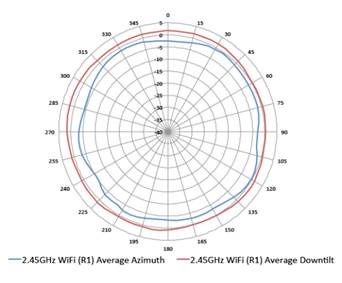
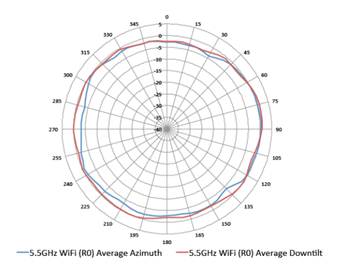
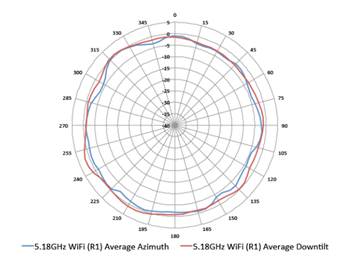
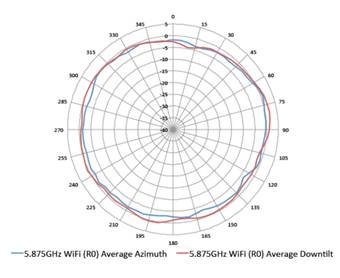
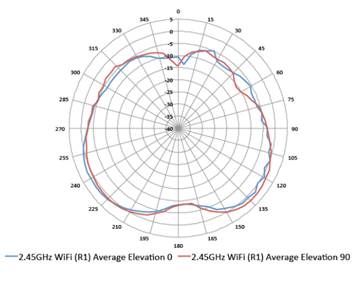
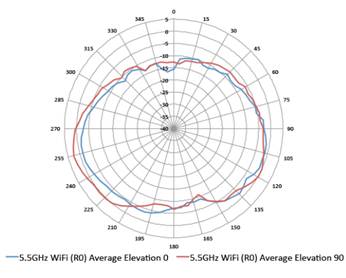
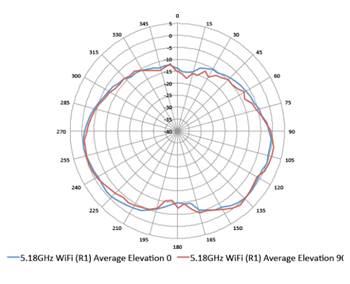
Wi-Fi Antennas - Integrated downtilt omnidirectional antennas for 4x4 MIMO in 2.4 GHz with a peak antenna gain of 4.3 dBi, and 8x8 MIMO in 5 GHz with a peak antenna gain of 5.8 dBi in 5 GHz. In tri-radio mode, the peak gain of the antennas for each of the 4x4 5 GHz radios is 5.5 dBi (radio 0L, lower half of 5 GHz) and 5.6 dBi (radio 0U, upper half of 5 GHz). Built-in antennas are optimized for horizontal ceiling-mounted orientation of the access point. The downtilt angle for maximum gain is roughly 30°.
|
|
|
|
Other interfaces - E0, E1: HPE SmartRate port (RJ-45, maximum negotiated speed 5 Gbps)
- Link Aggregation Control Protocol (LACP) support between both network ports for redundancy and increased capacity - PoE power can be drawn from either port (single source, or set to prioritize) or both ports simultaneously (set to combine). When set to prioritize, the AP draws power from E0 and may failover to E1 - DC power interface: 48 Vdc (nominal, +/- 5%), accepts 1.35mm / 3.5 mm center-positive circular plug with 9.5 mm length - USB 2.0 host interface (Type A connector)
- Bluetooth Low Energy (BLE5.0) and Zigbee (802.15.4) radio (2.4 GHz)
- Visual indicators (two multicolor LEDs): For system and radio status - Reset button: Factory reset, LED mode control (normal/off) - Serial console interface (proprietary, micro-B USB physical jack) - Kensington security slot |
|
|
|
Power Sources and Power Consumption - The access point supports direct DC power and PoE; (on port E0 and/or E1) - When PoE power is supplied to both Ethernet ports, the access point can be configured to combine or prioritize power sources - When both DC and PoE power sources are available, DC power takes priority over PoE - Power sources are sold separately - When powered by DC, 802.3bt (class 5) PoE, or 2x 802.3at (class 4) PoE, the access point will operate without restrictions - When powered by 1x 802.3at (class 4) PoE and with the intelligent power monitoring (IPM) feature disabled, the access point will disable the USB port, disable the other Ethernet port, operate the 5 GHz radio in 4x4 mode, and disable tri-radio operation - No other restrictions will be applied in this case (IPM disabled) - In the same situation but with IPM enabled, the access point will start up in fully unrestricted mode, but may dynamically apply restrictions depending on the PoE budget and actual power - When using IPM, the actual restrictions that are applied by the feature and the order in which they're applied are configurable - Operating the access point with an 802.3af (class 3 or lower) PoE source is not supported - Maximum (worst-case) power consumption (dual-radio operation):
- Maximum (worst-case) power consumption in idle mode (dual-radio operation): 15.0W (PoE) or 15.1W (DC) - Maximum (worst-case) power consumption in deep-sleep mode: 3.8W (PoE) or 3.6W (DC) |
|
|
|
Mounting Details - A mounting bracket has been preinstalled on the back of the access point. This bracket is used to secure the access point to any of the HPE Aruba Networking mount kits (sold separately). |
|
|
|
Mechanical Specifications - Dimensions/weight (AP-555; unit, excluding mount bracket):
- Dimensions/weight (AP-555; shipping):
|
|
|
|
Environmental specifications - Operating conditions
- Storage and transportation conditions
|
|
|
|
Reliability - Mean time between failure (MTBF): 855,000 hours (98 years) at +25°C operating temperature
|
|
|
|
Regulatory compliance - FCC/ISED - CE Marked - Radio Equipment Directive (RED) 2014/53/EU - Electromagnetic compatibility (EMC) Directive 2014/30/EU - Low Voltage Directive 2014/35/EU - UL/IEC/EN 62368-1 - EN 60601-1-1, EN60601-1-2
For more country-specific regulatory information and approvals, contact your HPE Aruba Networking representative. |
|
|
|
Regulatory model numbers - AP-555: APIN0555 |
|
|
|
Certifications - UL2043 plenum rating - Wi-Fi alliance:
|
|
|
|
Warranty HPE Aruba Networking hardware limited lifetime warranty. |
|
|
|
Minimum operating system software versions - HPE Aruba Networking Wireless Operating System and HPE Aruba Networking Instant OS 8.5.0.0 (with some restrictions). For unrestricted operation, use 8.6.0.0 or later. - HPE Aruba Networking Wireless Operating System 10.0.0.0 |
|
|
|
Antenna Patterns | |
|
Horizontal Planes (Top View) | |
|
Showing azimuth (0°) and 30° downtilt patterns (averaged patterns for all applicable antennas) | |
|
|
|
|
|
|
|
2.45GHz Wi-Fi (Radio 1) |
5.5GHz Wi-Fi (Dual-Radio Mode, Radio 0) |
|
|
|
|
|
|
|
5.18GHz Wi-Fi (Radio 0L, Tri-Radio Mode) |
5.875GHz Wi-Fi (Radio 0U, Tri-Radio Mode) |
|
|
|
|
| |
|
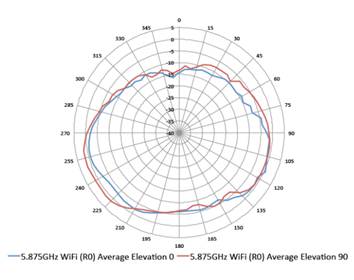
Vertical Elevation Planes (Side View, AP Facing Down) | |
|
Showing side view with access point rotated 0 and 90 degrees (averaged patterns for all applicable antennas) | |
|
|
|
|
|
|
|
2.45GHz Wi-Fi (Radio 1) |
5.5GHz Wi-Fi (Dual-Radio Mode, Radio 0) |
|
|
|
|
|
|
|
5.18GHz Wi-Fi (Radio 0L, Tri-Radio Mode) |
5.875GHz Wi-Fi (Radio 0U, Tri-Radio Mode) |
|
|
|
|
| |
|
Date |
Version History |
Action |
Description of Change |
|
27-Feb-2026 |
Version 19 |
Changed |
Rebranding update applied to QuickSpecs |
|
28-Jul-2025 |
Version 18 |
Changed |
Update survey link. |
|
07-Apr-2025 |
Version 17 |
Changed |
Overview, Standard Features, Configuration Information, Technical Specifications sections were updated |
|
21-Jan-2025 |
Version 16 |
Changed |
Standard Features section was updated |
|
16-Dec-2024 |
Version 15 |
Changed |
Overview, Standard Features and Configuration Information sections were updated |
|
19-Aug-2024 |
Version 14 |
Changed |
Configuration Information section was updated |
|
15-Jul-2024 |
Version 13 |
Changed |
Configuration Information section was updated |
|
04-Dec-2023 |
Version 12 |
Changed |
Series name was updated. |
|
07-Aug-2023 |
Version 11 |
Changed |
Configuration Information section was updated |
|
01-May-2023 |
Version 10 |
Changed |
Configuration Information section was updated, new SKU was added. |
|
05-Jul-2022 |
Version 9 |
Changed |
Configuration Information section was updated, new SKUS were added. |
|
06-Dec-2021 |
Version 8 |
Changed |
SKUs were added in Configuration Information section was updated. |
|
15-Mar-2021 |
Version 7 |
Changed |
SKUs were added in Configuration Information section was updated. |
|
08-Sep-2020 |
Version 6 |
Changed |
Configuration Information section was updated New SKUS were added Obsolete SKUs were removed |
|
09-Dec-2019 |
Version 5 |
Changed |
Standard Features section was updated |
|
04-Nov-2019 |
Version 4 |
Changed |
Configuration Information section was updated New SKUS were added |
|
07-Oct-2019 |
Version 3 |
Changed |
Overview, Standard Features and Configuration Information sections were updated New SKUS were added |
|
03-Jun-2019 |
Version 2 |
Changed |
Configuration Information Section was updated. New SKUs were added. |
|
02-Apr-2019 |
Version 1 |
New |
New QuickSpecs |
|
|
|
Shape the Future of QuickSpecs - Your Input Matters | |
|
|
|
| |
|
|
|
Chat now | |
|
|
|
© Copyright 2026 Hewlett Packard Enterprise Development LP. The information contained herein is subject to change without notice. The only warranties for Hewlett Packard Enterprise products and services are set forth in the express warranty statements accompanying such products and services. Nothing herein should be construed as constituting an additional warranty. Hewlett Packard Enterprise shall not be liable for technical or editorial errors or omissions contained herein.
To learn more, visit: http://www.hpe.com/networking
a00060236enw - 16365 - Worldwide - V19 - 27-February-2026 | |
|
|
|
HEWLETT PACKARD ENTERPRISE HPE.com |
|