HPE Aruba Networking 518 Series Hardened Access Points: технические характеристики и документация
|
Shape the Future of QuickSpecs - Your Input Matters | |
|
HPE Aruba Networking 518 Series Hardened Access Points QuickSpecs
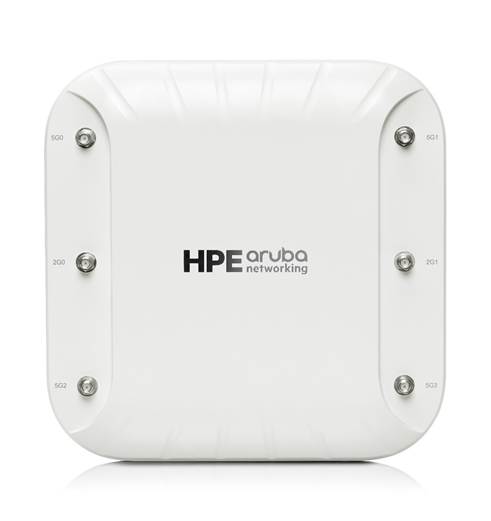
The hardened, HPE Aruba Networking 518 Series access point delivers high Wi-Fi 6 performance in harsh, weather-protected environments such as warehouses, industrial freezers or enclosures in extreme environments such as stadiums.
It delivers 4x4:4SS MU-MIMO capability, HPE Aruba Networking's advanced ClientMatch and integrated Bluetooth to enable HPE Aruba Networking location services.
Purpose-built to survive in the harshest outdoor environments, 518 Series APs withstand exposure to extreme high and low temperatures, persistent (non-precipitant) moisture, and are sealed to keep out airborne contaminants. |
|
|
All electrical interfaces include industrial strength surge protection.
HPE Aruba Networking Wi-Fi 6 access points provide high-performance connectivity for any organization experiencing growing numbers of IoT and mobility requirements. With maximum aggregate on air data rate of 3 Gbps (HE80/HE40) the 518 Series delivers the speed and reliability needed for any environment. |
|
|
|
High-performance Wi-Fi 6 (802.11ax) for harsh weather environments
|
|
|
|
Incredible Efficiency The 518 Series APs are also designed to optimize user experience by maximizing Wi-Fi efficiency and dramatically reducing airtime contention between clients.
Features include Uplink and Downlink Orthogonal Frequency Division Multiple Access (OFDMA), Downlink Multi-User MIMO (MU MIMO) and cellular co-location. With up to 4 spatial stream and 160 MHz channel capability the 518 provides groundbreaking wireless capabilities for any application.
Read the Multi-User 802.11ax white paper for further information. |
|
|
|
Advantages of OFDMA This capability allows Wi-Fi 6 APs to handle multiple Wi-Fi 6 enabled client simultaneously on a single radio. Channel utilization is optimized by handling each transaction by matching allocated bandwidth in a channel to the offered user load. These sub divisions of the channel are referred to as Resource Units (RU). |
|
|
|
HPE Aruba Networking Air Slice for Extended OFDMA Assurance APs in controller-less mode (Instant) can provide SLA-grade performance by allocating RUs to specific traffic types. By combining Policy Enforcement Firewall (PEF) and Layer 7 deep packet inspection (DPI) to identify user roles and applications, the APs will dynamically allocate the bandwidth needed. Non-Wi-Fi 6 clients can also benefit. |
|
|
|
Multi-User MIMO (MU-MIMO) The 518 Series APs support downlink MU-MIMO similar to Wi-Fi 5 (802.11ac Wave 2) APs. With the introduction OFDMA in Wi-Fi 6 the overhead for this capability is reduced and MU-MIMO effectiveness is substantially improved for large client counts. |
|
|
|
Wi-Fi 6 and MU-MIMO aware client optimization HPE Aruba Networking's patented AI-powered ClientMatch technology ensures that all clients are attached to their best serving access point. Session metrics, network metrics, applications, client type, are used to identify and maintain best connection. |
|
|
|
HPE Aruba Networking Advanced Cellular Coexistence (ACC) This feature uses built in filtering to automatically minimize the impact of interference of high power cellular base stations, in building distributed antenna systems as well as small cell and femtocell equipment. |
|
|
|
Intelligent Power Monitoring (IPM) APs continuously monitor and report hardware energy consumption. APs can be configured to enable or disable capabilities based on the available PoE power - ideal when wired switches have exhausted their power budget. |
|
|
|
Green AP energy efficiency Wi-Fi 6 APs utilize analytics from HPE Aruba Networking Central to automatically transition in and out of a sleep mode. |
|
|
|
IoT Platform Capabilities Wi-Fi 6 APs include an integrated Bluetooth 5 and 802.15.4 radio (for Zigbee support) to simplify deploying and managing IoT-based location services, asset tracking services, security solutions and IoT sensors. This allow organizations to leverage the 518 as an IoT platform, which eliminates the need for an overlay infrastructure and additional IT resources. |
|
|
|
Target Wake Time (TWT) Ideal for IoT solutions that communicate infrequently, this Wi-Fi 6 capability allows IoT devices to use 802.11ax protocol. TWT coordinates with client devices to allow them to sleep for extended periods use shorter wake times to communicate before returning to sleep. This substantially extends the useful operating life of Wi-Fi 6 based battery powered sensors. |
|
|
|
HPE Aruba Networking Secure Infrastructure The 518 Series is an integral part of HPE Aruba Networking's 360 Secure Fabric to help protect user authentication and wireless traffic. Select capabilities include: |
|
WPA3 and Enhanced Open With the introduction of WPA3 and Enhanced open a Wi-Fi 6 certified client will never send unencrypted traffic over the air. Even with an open authenticated network enhanced open still provides strong encryption over the air.
In all Wi-Fi 6 user sessions each user is uniquely encrypted and if they disconnect and reconnect the encryption changes from session to session. |
|
|
|
WPA2-MPSK MPSK enables simpler passkey management for WPA 2 devices - should the Wi-Fi password on one device change, no additional changes are needed for other devices. This feature is enabled when networks are deployed with ClearPass Policy Manager. |
|
|
|
VPN Tunnels In Remote AP (RAP) and IAP-VPN deployments, the 518 can be used to establish a secure SSL/IPSec VPN tunnel to a Mobility Controller that is configured as a VPN concentrator. |
|
|
|
Trusted Platform Module (TPM) For enhanced device assurance, all APs have an installed TPM for secure storage of credentials, keys and boot code. |
|
|
|
Simple and Secure Access To simplify policy enforcement, the 518 uses policy enforcement firewall (PEF) features to encapsulate all traffic from the AP to the Mobility Controller (Gateway) for end-to-end encryption and inspection. Policies are applied based on context including: user role, device type, application, and location. This reduces the manual configuration of SSIDs, VLANs, and ACLs. PEF also serves as the underlying technology for dynamic segmentation. |
|
|
|
High-Density Connectivity Each 518 Series AP provides connectivity for a maximum of 512 associated clients per radio (1,024 total). |
|
|
|
Flexible Operation and Management A unique feature of APs is the ability to operate in either controller less or controller-based mode.
|
|
|
|
Controller-less (Instant) Mode In controller-less mode, one AP serves as a virtual controller for the entire network. Learn more about Instant mode in this technology brief. |
|
|
|
Mobility Controller Mode For optimized network performance, roaming and security, APs tunnel all traffic to a mobility controller for central management of traffic forwarding, segmentation, encryption, and policy enforcement. |
|
|
|
Management Options Available management solution include HPE Aruba Networking Central, cloud based, or HPE Aruba Networking Management Software (AirWave), a multi-vendor, on-premises, management solution.
For large installations across multiple sites, HPE Aruba Networking APs can be shipped and activated with Zero Touch Provisioning through HPE Aruba Networking Central or AirWave. This reduces deployment time, centralizes configuration, and provide inventory visibility. |
|
|
|
Additional Wi-Fi Features - Transmit Beamforming (TxBF): Increased signal reliability and range - Passpoint Release 2: Seamless cellular-to-Wi-Fi carryover for guests - Dynamic Frequency Selection (DFS): Optimized use of available RF spectrum - Maximal Ratio Combining (MRC): Improved receiver performance for multi antenna access points. - Cyclic Delay/Shift Diversity (CDD/CSD): Enable use of multiple transmit antennas - Space-Time Block Coding (STBC): Increased connection robustness - Low-Density Parity Check (LDPC): High performance error detection and correction coding for enhanced receiver performance. |
|
|
|
BTO Models |
| ||
|
Remarks |
Description |
SKU | |
|
|
518 Unified Hardened Access Points |
| |
|
|
HPE Aruba Networking AP-518 (RW) Dual Radio 4x4/2x2 Wi-Fi 6 6xRPSMA Connectors Hardened AP |
R4H02A | |
|
|
HPE Aruba Networking AP-518 (US) Dual Radio 4x4/2x2 Wi-Fi 6 6xRPSMA Connectors Hardened AP |
R4H03A | |
|
|
HPE Aruba Networking AP-518 (EG) Dual Radio 4x4/2x2 Wi-Fi 6 6xRPSMA Connectors Hardened AP |
R4G99A | |
|
|
HPE Aruba Networking AP-518 (IL) Dual Radio 4x4/2x2 Wi-Fi 6 6xRPSMA Connectors Hardened AP |
R4H00A | |
|
|
HPE Aruba Networking AP-518 (JP) Dual Radio 4x4/2x2 Wi-Fi 6 6xRPSMA Connectors Hardened AP |
R4H01A | |
|
|
|
| |
|
|
518 Unified Hardened Access Points TAA |
| |
|
|
HPE Aruba Networking AP-518 (RWF1) Dual Radio 4x4/2x2 Wi-Fi 6 6xRPSMA Connectors Hardened TAA AP |
R4H07A | |
|
|
HPE Aruba Networking AP-518 (USF1) Dual Radio 4x4/2x2 Wi-Fi 6 6xRPSMA Connectors Hardened TAA AP |
R4H08A | |
|
|
HPE Aruba Networking AP-518 (EGF1) Dual Radio 4x4/2x2 Wi-Fi 6 6xRPSMA Connectors Hardened TAA AP |
R4H04A | |
|
|
HPE Aruba Networking AP-518 (ILF1) Dual Radio 4x4/2x2 Wi-Fi 6 6xRPSMA Connectors Hardened TAA AP |
R4H05A | |
|
|
HPE Aruba Networking AP-518 (JPF1) Dual Radio 4x4/2x2 Wi-Fi 6 6xRPSMA Connectors Hardened TAA AP |
R4H06A | |
|
Notes: |
OCA Only Model Selection Form - HPE Aruba Networking > Wireless > Access Points > Outdoor / Rugged: HPE Aruba Networking 518 Series Access Points |
| |
|
|
|
| |
|
| |||
|
Mounting Accessories |
| ||
|
|
AP Mount Kits For 518 Series Std (Min 0 // max 1) User Selection (min 0 // max 1) |
| |
|
Rule # |
Description |
SKU | |
|
|
HPE Aruba Networking AP-MNT-A Campus AP Type A Suspended Ceiling Rail Flat 9/16 Mount Bracket Kit |
R3J15A | |
|
|
HPE Aruba Networking AP-MNT-B Campus AP Type B Suspended Ceiling Rail Flat 15/16 Mount Bracket Kit |
R3J16A | |
|
|
HPE Aruba Networking AP-MNT-C Campus AP Type C Suspended Ceiling Rail 9/16 Profile Mnt Bracket Kit |
R3J17A | |
|
|
HPE Aruba Networking AP-MNT-D Campus AP Type D Solid Surface Mount Bracket Kit |
R3J18A | |
|
|
HPE Aruba Networking AP-MNT-E Campus AP Type E Wall-Box Mount Bracket Kit |
R3J19A | |
|
|
HPE Aruba Networking AP-270-MNT-ADP AP-228 to AP-270-MNT-XX Outdoor Mount Adapter |
JW056A | |
|
* |
HPE Aruba Networking AP-OUT-MNT-V1A Outdoor AP Long Arm Pole/Wall Mounting Bracket |
R9H97A | |
|
* |
HPE Aruba Networking AP-270-MNT-V2 Outdoor AP Short Arm Pole/Wall Mounting Bracket |
JW053A | |
|
* |
HPE Aruba Networking AP-270-MNT-H1 Outdoor AP Hanging One-Way Tilt Pole/Wall Mounting Bracket |
JW054A | |
|
* |
HPE Aruba Networking AP-270-MNT-H2 Outdoor AP Flush Wall Mounting Bracket |
JW055A | |
|
|
HPE Aruba Networking AP-270-MNT-H3 Outdoor AP Hanging Dual-Tilt Pole/Wall Mounting Bracket |
R6W11A | |
|
|
|
| |
|
|
Configuration Rules |
| |
|
Notes: |
- *If this AP Mount is selected, then add Qty 1 of JW056A - AP-270-MNT-XX or AP-OUT-MNT-XX requires that AP-270-MNT-ADP (JW056A) be ordered. - AP-270-MNT-XX or AP-OUT-MNT-XX requires that the common rail be removed before attaching the AP AP-270-MNT-ADP (JW056A).
|
| |
|
| |||
|
Power Options |
| ||
|
Rule # |
Description |
SKU | |
|
|
PoE Power Options For 518 Series Std (Min 0 // max 1) User Selection (min 0 // max 1) |
| |
|
|
HPE Aruba Networking PD-9501-5GCO-AC 60W 802.3bt Smart Rate Otdr Surge Protection Midspan Injector |
R7T40A | |
|
|
HPE Aruba Networking PD-9501-5GCO-DC 60W 802.3bt Smart Rate Otdr Surge Protection Midspan Injector |
R7T41A | |
|
* |
HPE Aruba Networking AP-POE-ATSR 1-Port Smart Rate 802.3at 30W Midspan Injector |
R6P67A | |
|
* |
HPE Aruba Networking AP-POE-BTSR 1-Port Smart Rate 802.3bt 60W Midspan Injector |
R1C73A | |
|
Notes: |
*If this Power Supply is selected, bring in (Min 1 // Max 1) Localized power cord based on the HPE Aruba Networking Localization Menu Indoor Injector provides no surge protection Indoor injector requires indoor AC power cord AP-518 may be powered by PoE Only Power Cord for JW630A, R7T40A, R7T41A should be provided by installer R7T40A and R7T41A do not include a power cord, power cord must be constructed by installer using the included power connector parts and assembled per the user guide by a certified installer |
| |
|
|
|
| |
|
|
Power Injector Mounts |
| |
|
|
For 518 Std (Min 0 // max 1) User Selection (min 0 // max 1) |
| |
|
|
HPE Aruba Networking PD-MOUNT-OD Outdoor PoE Midspan Injectors Pole/Mast Mount Kit |
JW620A | |
|
Notes: |
This is optional but recommended for outdoor injectors |
| |
|
|
|
| |
|
| |||
|
Antennas |
| ||
|
Rule # |
Description |
SKU | |
|
|
5 GHz Antennas |
| |
|
|
For 518 Std (Min 0 // max 1) User Selection (min 0 // max 1) |
| |
|
2 |
HPE Aruba Networking AP-ANT-22 Dual Band 2/4dBi Omni RPSMA Low Profile 2-pk Omni Antenna |
Q8N49A | |
|
|
HPE Aruba Networking ANT-4x4-5314 5.15-5.9GHz 14dBi Dual Pol MIMO Hi Gain Dir N-Type Outdoor Ant |
JX988A | |
|
|
|
| |
|
|
Configuration Rules |
| |
|
1 |
Must select Qty 0 or Qty 4 |
| |
|
2 |
Must select Qty 0 or Qty 2 |
| |
|
Notes: |
AP-ANT-1W, AP-ANT-20W and AP-ANT-22 are usually direct connect to the chassis AP-ANT-40 ships with its mounting bracket AP-ANT-45,-48 ship only with hardware for flush mount to a flat surface AP-518 has 4x RPSMA female for 5 GHz ANT-3x3-5712 (JW033A) requires qty3 of AFCSJMTM-00 (JW067A) ANT-4x4-5314 (JX988A) requires qty4 of AFCSJMTM-00 (JW067A) |
| |
|
|
|
| |
|
|
2.4 GHz Antennas |
| |
|
|
For 518 Std (Min 0 // max 1) User Selection (min 0 // max 1) |
| |
|
|
HPE Aruba Networking AP-ANT-22 Dual Band 2/4dBi Omni RPSMA Low Profile 2-pk Omni Antenna |
Q8N49A | |
|
|
HPE Aruba Networking ANT-2x2-2314 2.4GHz 14dBi Dual Pol MIMO High Gain Dir N-Type Outdoor Antennas |
JW024A | |
|
Notes: |
*Must select Qty 0 or Qty 2 AP-ANT-1W, AP-ANT-20W and AP-ANT-22 are usually direct connect to the chassis AP-ANT-25A,-28 ship only with hardware for flush mount to a flat surface AP-518 has 2x RPSMA female for 2.4 GHz ANT-2x2-2314 (JW024A) requires qty2 of AFCSJMTM-00 (JW067A) |
| |
|
|
|
| |
|
|
Antenna Mount Kits |
| |
|
|
For 518 Series Std (Min 0 // max 1) User Selection (min 0 // max 1) |
| |
|
2 |
HPE Aruba Networking AP-ANT-MNT-4 AZ/EL Adjustable Antennas Pole/Wall Mount Kit |
JW021A | |
|
Notes: |
Only compatible with JW018A |
| |
|
Notes: |
- AP-ANT-MNT-3 compatible with AP-ANT-25A and AP-ANT-28 - AP-ANT-MNT-4 compatible with AP-ANT-48 - AP-ANT-MNT-5 compatible with AP-ANT-45 |
| |
|
| |||
|
Cables |
| ||
|
|
RF Jumper Cables |
| |
|
|
For 518 Series Std (Min 0 // max 6) User Selection (min 0 // max 6) |
| |
|
|
HPE Aruba Networking AFC2DL60-00 Indoor AP RPSMAm to Nf 60cm Flexible Indoor Rated RF Cable |
JW066A | |
|
1, 2, 3 |
HPE Aruba Networking AFCSJMTM-00 Indoor AP RPSMAm to Nm 60cm Flexible Indoor Rated RF Cable |
JW067A | |
|
|
|
| |
|
|
Configuration Rules |
| ||
|
1 |
For Antenna JW024A - ANT-2x2-2314 2.4G 14dBi Panel is selected, then must select qty 0 or qty 2 of this jumper cable. |
| ||
|
2 |
For Antenna JW033A - ANT-3x3-5712 5G 12dBi Sector is selected, then must select qty 0 or qty 3 of this jumper cable. |
| ||
|
3 |
For Antenna JX988A - ANT-4x4-5314 5G 14dBi Panel is selected, then must select qty 0 or qty 4 of this jumper cable. |
| ||
|
Notes: |
- Not usually required - Radio 0 (5 GHz) has 4 connectors - Radio 1 (2.4 GHz) has 2 connectors - No cables required for direct connect omnis or antennas with pigtails - AFC2DL60-00 used to adapt from RPSMA to Nf for connection to longer Nm to Nm jumpers - AFCSJMTM-00 used to adapt from RPSMA to Nm for connection to antennas with Nf connectors |
| ||
|
| ||||
|
Accessories |
| |||
|
|
Spare Items |
| ||
|
|
For 518 Series Std (Min 0 // max 99) User Selection (min 0 // max 99) |
| ||
|
|
HPE Aruba Networking AP-MNT-MP10-A Campus AP 10-Pack 9/16 Flat Ceiling Rail Mount Bracket Kit |
JZ370A | ||
|
|
HPE Aruba Networking AP-MNT-MP10-B Campus AP 10-Pack 15/16 Flat Ceiling Rail Mount Bracket Kit |
Q9G69A | ||
|
|
HPE Aruba Networking AP-MNT-MP10-C Campus AP 10-Pack Profile 9/16 Ceiling Rail Mount Bracket Kit |
Q9G70A | ||
|
|
HPE Aruba Networking AP-MNT-MP10-D Campus AP 10-Pack Solid Surface Mount Bracket Kit |
Q9G71A | ||
|
|
HPE Aruba Networking AP-MNT-MP10-E Campus AP 10-Pack Wall-box Mount Bracket Kit |
R1C72A | ||
|
|
HPE Aruba Networking AP-MNT-MP10-X Campus AP 10-Pack Mount Adapter Kit |
R3T20A | ||
|
|
HPE Aruba Networking AP-MNT-MP10-B1 Campus AP 10-Pack 15/16 Adj Flat Ceiling Rail Mount Bracket Kit |
R6T34A | ||
|
|
|
| ||
|
| ||||
|
Software |
| |||
|
|
Central |
| ||
|
|
Cloud Services / Access Point Foundation Subscriptions |
| ||
|
2, 8 |
HPE Aruba Networking Central AP Foundation 1-year Subscription E-STU |
Q9Y58AAE | ||
|
2, 8 |
HPE Aruba Networking Central AP Foundation 3 year Subscription E-STU |
Q9Y59AAE | ||
|
2, 8 |
HPE Aruba Networking Central AP Foundation 5 year Subscription E-STU |
Q9Y60AAE | ||
|
2, 8 |
HPE Aruba Networking Central AP Foundation 7 year Subscription E-STU |
Q9Y61AAE | ||
|
2, 8 |
HPE Aruba Networking Central AP Foundation 10 year Subscription E-STU |
Q9Y62AAE | ||
|
|
|
| ||
|
|
Cloud Services / Access Point Advanced Subscriptions |
| ||
|
2, 8 |
HPE Aruba Networking Central AP Advanced 1 year Subscription E-STU |
Q9Y63AAE | ||
|
2, 8 |
HPE Aruba Networking Central AP Advanced 3 year Subscription E-STU |
Q9Y64AAE | ||
|
2, 8 |
HPE Aruba Networking Central AP Advanced 5 year Subscription E-STU |
Q9Y65AAE | ||
|
2, 8 |
HPE Aruba Networking Central AP Advanced 7 year Subscription E-STU |
Q9Y66AAE | ||
|
2, 8 |
HPE Aruba Networking Central AP Advanced 10 year Subscription E-STU |
Q9Y67AAE | ||
|
|
|
|
| |
|
|
On-Prem Services / Access Point Foundation Subscriptions |
|
| |
|
3, 8 |
HPE Aruba Networking Central on Prem AP Foundation 1 year Subscription E-STU |
R6U63AAE |
| |
|
3, 8 |
HPE Aruba Networking Central on Prem AP Foundation 3 year Subscription E-STU |
R6U64AAE |
| |
|
3, 8 |
HPE Aruba Networking Central on Prem AP Foundation 5 year Subscription E-STU |
R6U65AAE |
| |
|
3, 8 |
HPE Aruba Networking Central on Prem AP Foundation 7 year Subscription E-STU |
R6U66AAE |
| |
|
3, 8 |
HPE Aruba Networking Central on Prem AP Foundation 10 year Subscription E-STU |
R6U67AAE |
| |
|
|
|
|
| |
|
|
On-Prem Services / Access Point Foundation Government Subscriptions |
|
| |
|
3 |
HPE Aruba Networking COP AP Foundation Government 1-year Subscription E-STU |
S1P56AAE |
| |
|
3 |
HPE Aruba Networking COP AP Foundation Government 3-year Subscription E-STU |
S1P57AAE |
| |
|
3 |
HPE Aruba Networking COP AP Foundation Government 5-year Subscription E-STU |
S1P58AAE |
| |
|
3 |
HPE Aruba Networking COP AP Foundation 7-year Government Subscription E-STU |
S1P59AAE |
| |
|
3 |
HPE Aruba Networking COP AP Foundation 10-year Government Subscription E-STU |
S1P60AAE |
| |
|
|
|
|
| |
|
|
Configuration Rules |
|
| |
|
Rule # |
Description |
SKU |
| |
|
2 |
Add the Central Cloud Skus to the HPE Aruba Networking Catalog as Standalone: HPE Aruba Networking > Network Management > Central > Cloud Services |
|
| |
|
3 |
Add the Central On-Prem Skus to the HPE Aruba Networking Catalog as Standalone: HPE Aruba Networking > Network Management > Central > On-Prem Services |
|
| |
|
6 |
Add the Central FedRAMP Service Skus to the HPE Aruba Networking Catalog as Standalone: HPE Aruba Networking > Network Management > Central > FedRAMP |
|
| |
|
8 |
For OCA: When configuring the following AP 10-Pack, selection condition for this Subscription should be 0(default) or 10 |
|
| |
|
|
HPE Aruba Networking AP-503 (RW) 10-Pack Dual Radio 2x2:2 Wi-Fi 6 Campus Access Point |
S1E83A |
| |
|
|
HPE Aruba Networking AP-503 (US) 10-Pack Dual Radio 2x2:2 Wi-Fi 6 Campus Access Point |
S1E84A |
| |
|
|
|
|
| |
|
|
| |||
|
As-a-Service |
|
| ||
|
|
Cloud Services / Access Point Foundation Subscriptions |
|
| |
|
7 |
HPE Aruba Networking Central AP Foundation 1 year Subscription SaaS |
Q9Y58AAS |
| |
|
7 |
HPE Aruba Networking Central AP Foundation 3 year Subscription SaaS |
Q9Y59AAS |
| |
|
7 |
HPE Aruba Networking Central AP Foundation 5 year Subscription SaaS |
Q9Y60AAS |
| |
|
7 |
HPE Aruba Networking Central AP Foundation 7 year Subscription SaaS |
Q9Y61AAS |
| |
|
7 |
HPE Aruba Networking Central AP Foundation 10 year Subscription SaaS |
Q9Y62AAS |
| |
|
|
Cloud Services / Access Point Advanced Subscriptions |
|
| |
|
7 |
HPE Aruba Networking Central AP Advanced 1 year Subscription SaaS |
Q9Y63AAS |
| |
|
7 |
HPE Aruba Networking Central AP Advanced 3 year Subscription SaaS |
Q9Y64AAS |
| |
|
7 |
HPE Aruba Networking Central AP Advanced 5 year Subscription SaaS |
Q9Y65AAS |
| |
|
7 |
HPE Aruba Networking Central AP Advanced 7 year Subscription SaaS |
Q9Y66AAS |
| |
|
7 |
HPE Aruba Networking Central AP Advanced 10 year Subscription SaaS |
Q9Y67AAS |
| |
|
|
|
|
| |
|
|
Configuration Rules |
|
| |
|
Rule# |
Description |
SKU |
| |
|
7 |
For IRIS reference only. No action required for OCX and Clic |
|
| |
|
|
| |||
|
HPE Aruba Networking 518 Series Specifications - 5 GHz: Four RP-SMA connectors for external antenna operation - 2.4 GHz: Two RP-SMA connectors for external antenna operation |
|
|
|
Dimensions and weight - 220 (W) x 220 (D) x 75 mm (H) / 8.5 (W) x 8.5 (D) x 2.5 in (H) - 1.5 kg / 3.3 lbs |
|
|
|
Mounting - Optional mounting kits:
|
|
|
|
Power - Worst-case power consumption from the AP: 25.6W - Power sources sold separately - Power over Ethernet (PoE+): 802.3at-compliant |
|
|
|
Certifications - CB Scheme Safety, cTUVus - UL2043 plenum rating - Wi-Fi Alliance certified 802.11a/b/g/n - Wi-Fi CERTIFIEDTM 6 (802.11ax) - Wi-Fi CERTIFIEDTM ac (with Wave 2 features) - Passpoint® (Release 2) with HPE Aruba Networking OS and Instant |
|
|
|
Environmental - Operating:
- Storage and transportation:
- Operating altitude: 3,000 m - Water and dust: IP55 - Shock and vibration: ETSI 300-19-2-4 |
|
|
|
WI-FI Radio Specifications - AP type: Indoor hardened, Wi-Fi 6 dual-radio, 5 GHz 4x4 MIMO and 2.4 GHz 2x2 MIMO - Software-configurable dual radio supports 5 GHz (Radio 0) and 2.4 GHz (Radio 1) 5 GHz
2.4 GHz
- Support for up to 512 associated client devices per radio, and up to 16 BSSIDs per radio - Supported frequency bands (country-specific restrictions apply):
- Available channels: Dependent on configured regulatory domain - Dynamic frequency selection (DFS) optimizes the use of available RF spectrum - Supported radio technologies:
- 802.11n high-throughput (HT) support: HT 20/40 - 802.11ac very high throughput (VHT) support: VHT 20/40/80/160 - 802.11ax high efficiency (HE) support: HE20/40/80/160 - Supported data rates (Mbps):
- 802.11n/ac packet aggregation: A-MPDU, A-MSDU - Transmit power: Configurable in increments of 0.5 dBm - Maximum (conducted) transmit power (limited by local regulatory requirements):
- Maximum EIRP (limited by local regulatory requirements):
- Advanced Cellular Coexistence (ACC) minimizes interference from cellular networks - Maximum ratio combining (MRC) for improved receiver performance - Cyclic delay/shift diversity (CDD/CSD) to enable the use of multiple transmit antennas - Short guard interval for 20-MHz, 40-MHz, 80-MHz and 160-MHz channels - Space-time block coding (STBC) for increased range and improved reception - Low-density parity check (LDPC) for high-efficiency error correction and increased throughput - Transmit beam-forming (TxBF) for increased signal reliability and range |
|
|
|
Additional interfaces - E0: HPE SmartRate port (RJ-45) Auto-sensing link speed (100/1000/2500BASE-T) and MDI/MDX 2.5Gbps speed complies with NBase-T and 802.3bz specifications PoE-PD: 48Vdc (nominal) 802.3af/at/bt (Class 3 or higher) 802.3az Energy Efficient Ethernet (EEE) - E1: 10/100/1000BASE-T (RJ-45) Auto-sensing link speed and MDI/MDX 802.3az Energy Efficient Ethernet (EEE) - Link Aggregation (LACP)support between both network ports for redundancy and increased capacity - Bluetooth 5 and 802.15.4 radio 2.4 GHz Bluetooth 5: up to 8dBm transmit power and -95dBm receive sensitivity Zigbee: up to 8 dBm transmit power and -97dBm receive sensitivity Up to 4dBm transmit power (class 2) and -91 dBm receive sensitivity - Visual indicator (multi-color LED): For system and radio status - Reset button: Factory reset (during device power up) - USB-C console interface |
|
|
|
Regulatory - FCC/ISED - CE Marked - RED Directive 2014/53/EU - EMC Directive 2014/30/EU - Low Voltage Directive 2014/35/EU - UL/IEC/EN 60950 - EN 60601-1-1, EN60601-1-2
For more country-specific regulatory information and approvals, please see your HPE Aruba Networking representative. |
|
|
|
Regulatory Model Numbers - APIN0518 |
|
|
|
Warranty - Limited lifetime warranty |
|
|
|
Minimum Operating System Software - HPE Aruba Networking OS and HPE Aruba Networking InstantOS 8.7.0.0 |
|
|
|
RF Performance Table | ||
|
|
Maximum transmit power (dBm) per transmit chain |
Receiver sensitivity (dBm) per receive chain |
|
2.4GHz, 802.11b | ||
|
1 Mbps |
22 |
-97 |
|
11 Mbps |
22 |
-89 |
|
2.4GHz, 802.11g | ||
|
6 Mbps |
22 |
-94 |
|
54 Mbps |
20 |
-76 |
|
2.4GHz, 802.11n/ac HT20 | ||
|
MCS0 |
22 |
-93 |
|
MCS8 |
19 |
-72 |
|
2.4GHz, 802.11ax HE20 | ||
|
MCS0 |
22 |
-93 |
|
MCS11 |
17 |
-62 |
|
5GHz, 802.11a | ||
|
6 Mbps |
22 |
-95 |
|
54 Mbps |
20 |
-76 |
|
5GHz, 802.11n/ac HT20/VHT20 | ||
|
MCS0 |
22 |
-94 |
|
MCS8 |
19 |
-72 |
|
5GHz, 802.11n/ac HT40/VHT40 | ||
|
MCS0 |
22 |
-92 |
|
MCS9 |
19 |
-68 |
|
5GHz, 802.11ac VHT80 | ||
|
MCS0 |
22 |
-90 |
|
MCS9 |
19 |
-65 |
|
5GHz, 802.11ac VHT160 | ||
|
MCS0 |
22 |
-84 |
|
MCS9 |
19 |
-59 |
|
5GHz, 802.11ax HE20 | ||
|
MCS0 |
22 |
-94 |
|
MCS11 |
17 |
-62 |
|
5GHz, 802.11ax HE40 | ||
|
MCS0 |
22 |
-91 |
|
MCS11 |
17 |
-60 |
|
5GHz, 802.11ax HE80 | ||
|
MCS0 |
22 |
-87 |
|
MCS11 |
17 |
-57 |
|
5GHz, 802.11ax HE160 | ||
|
MCS0 |
22 |
-85 |
|
MCS11 |
17 |
-53 |
|
Notes: Maximum capability of the hardware provided (excluding antenna gain). Maximum transmit power is limited by local regulatory settings. | ||
|
Date |
Version History |
Action |
Description of Change |
|
27-Feb-2026 |
Version 13 |
Changed |
Rebranding update applied to QuickSpecs |
|
21-Jan-2025 |
Version 12 |
Changed |
QuickSpecs was updated. |
|
16-Dec-2024 |
Version 11 |
Changed |
QuickSpecs was updated. |
|
04-Dec-2023 |
Version 10 |
Changed |
Series name was updated. |
|
16-Oct-2023 |
Version 9 |
Changed |
Configuration Information section was updated |
|
07-Aug-2023 |
Version 8 |
Changed |
Configuration Information section was updated. |
|
21-Nov-2022 |
Version 7 |
Changed |
Configuration Information section was updated. |
|
01-Aug-2022 |
Version 6 |
Changed |
Configuration Information section was updated. |
|
06-Dec-2021 |
Version 5 |
Changed |
SKUs were added in Configuration Information section. |
|
15-Mar-2021 |
Version 4 |
Changed |
SKUs were added in Configuration Information section. |
|
02-Nov-2020 |
Version 3 |
Changed |
Configuration Information section was updated. New SKUs were added. |
|
08-Sep-2020 |
Version 2 |
Changed |
Configuration Information section was updated. New SKUs were added. |
|
04-May-2020 |
Version 1 |
New |
New QuickSpecs |
|
|
|
Shape the Future of QuickSpecs - Your Input Matters | |
|
|
|
| |
|
|
|
Chat now | |
|
|
|
© Copyright 2026 Hewlett Packard Enterprise Development LP. The information contained herein is subject to change without notice. The only warranties for Hewlett Packard Enterprise products and services are set forth in the express warranty statements accompanying such products and services. Nothing herein should be construed as constituting an additional warranty. Hewlett Packard Enterprise shall not be liable for technical or editorial errors or omissions contained herein.
To learn more, visit: http://www.hpe.com/networking
a00056657enw - 16339 - Worldwide - V13 - 27-February-2026 | |
|
|
|
HEWLETT PACKARD ENTERPRISE HPE.com |
|