




























HPE Aruba Networking Service Assurance: технические характеристики и документация
В архивеOverview
|
User-perspective network and application performance analytics |
|
With today's reliance on Wi-Fi for SaaS Enterprise and IoT applications, IT departments are facing new challenges to deliver the best user and client experience possible. To provide a consistent level of performance, the Aruba Service Assurance solution enables IT to proactively simulate real-world user and client experiences. IT can continuously monitor network connectivity and the performance of wireless and Ethernet connections in critical, high-value locations like office spaces, retail, education, healthcare, and similar types of environments. Customizable test scripts and easy to deploy sensors provide application assurance and network insights for any vendor-agnostic wireless and wired network dealing with the influx of mobile and IoT devices. In addition, this allows IT to get in front of service issues before they occur. |
|
|
|
|
|
|
|
Unique features |
|
|
|
|
|
|
How it works |
|
|
|
The Aruba Service Assurance solution includes simple to deploy sensors, cloud-based data processing and an easy to learn web-based administrative dashboard that can be accessed from anywhere using either Chrome or Safari. It's ideal for any organization and IT team tasked with delivering the best possible network experience with their user's connectivity and app performance in mind. |
|
|
|
|
|
|
|
The Purpose-built Sensor |
|
|
|
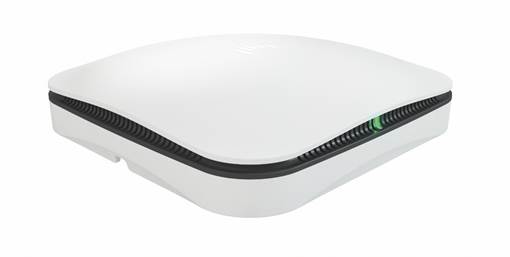
Aruba LTE sensors can be placed within any area where users or IoT devices are located to reduce the time to identify and resolve application responsiveness and user experience issues. The sensor is placed at the same height where user's devices are placed or held, to run accurate simulated tests over Wi-Fi. Wired connections are also supported. Tests can be set up for LAN and WLAN connectivity, DHCP, DNS, authentication, captive portal response, cloud and internal applications. Installation of the sensor, even in extremely remote locations is easy due to built-in out-of-band cellular connectivity. This reduces the time and effort normally required to go on-site, diagnose a problem and put a resolution into action. |
|
|
|
|
|
Figure 1: Aruba LTE sensor |
|
|
|
|
|
Configuration and visibility |
|
|
|
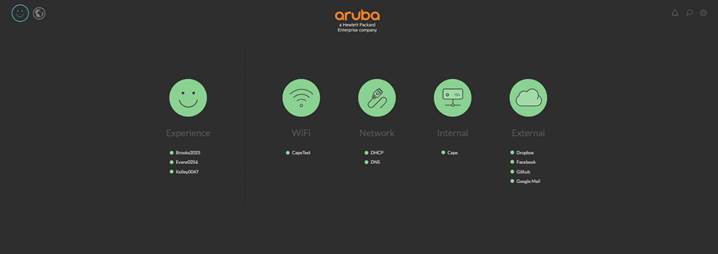
The cloud-based analytics and insights engine provides a robust and scalable model that allows IT to centrally configure and run tests for today's emerging SaaS or internal applications. Pre-configured templates or custom defined tests can monitor the most important apps and services. For example, tests can automatically ping a server to confirm responsiveness, or run a script through a headless browser to see how an application is performing before users encounter a problem. The web-based service assurance dashboard is designed with simplicity and one-glance visibility in mind. It changes how an assurance dashboard should work. A unique, five-column traffic light model easily lets you see when things are working great and when they're not. The status of each sensor, SSID, service and application being tested are highlighted under each of the traffic light icons. This provides IT a good understanding of overall user experience, Wi-Fi connectivity and quality, responsiveness of core network services, and the reachability of internal and external services. Smart notifications help keep you informed when you're on the run. |
|
|
|
|
|
Figure 2: Web-based dashboard |
|
|
Configuration
|
Ordering information | |
|
| |
|
The service assurance solution consists of a physical sensor and software subscriptions. The subscriptions include the use of the cloud engine and web-based dashboard. There is also an optional unlimited cellular subscription. When ordering a sensor, you must also choose a 1-3, or 5-year software subscription for each sensor. The 5 MB per month of cellular data communications included with every subscription enables Ethernet-free setup and backup connectivity to the sensor if WI-FI and Ethernet connectivity is lost.
The optional unlimited cellular subscription provides customers with additional cellular service beyond the 5 MB per month. This optional subscription is recommended for locations when the cellular connection is needed to consistently send packet captures from the sensor to the cloud. | |
|
| |
|
Deployment Guidelines | |
|
| |
|
Multiple sensors can be placed within an environment to monitor performance within different areas. This number is dependent on many factors, including the density of both the end-users and APs. Guidance:
|
|
|
| |
|
Description |
Part Number |
|
|
|
|
Sensors |
|
|
Aruba Service Assurance Sensor (US-Canada) |
Q9X65A |
|
Aruba Service Assurance Sensor (APJ Other-EMEA) |
Q9X66A |
|
Aruba Service Assurance Sensor (APJ Australia-New Zealand-Taiwan-Latin America) |
Q9X67A |
|
Aruba Service Assurance Sensor (Japan) |
Q9X68A |
|
|
|
|
Service Subscriptions |
|
|
Aruba 1yr Service Assurance Sensor Subscription + 5 MB Cellular Data E-STU |
Q9X69AAE |
|
Aruba 3yr Service Assurance Sensor Subscription + 5 MB Cellular Data E-STU |
Q9X70AAE |
|
Aruba 5yr Service Assurance Sensor Subscription + 5 MB Cellular Data E-STU |
Q9X71AAE |
|
Aruba 1yr Service Assurance Sensor Cellular Data Unlimited Subscription E-STU |
Q9X72AAE |
|
Aruba 3yr Service Assurance Sensor Cellular Data Unlimited Subscription E-STU |
Q9X73AAE |
|
Aruba 5yr Service Assurance Sensor Cellular Data Unlimited Subscription E-STU |
Q9X74AAE |
|
|
|
|
| |
|
|
|
|
|
|
|
|
|
|
|
|
Technical Specifications
|
Specifications |
|
|
|
Sensor operating mode
Electronic security
Supported interfaces
Power
Mounting
Mechanical
- 152 mm x 152 mm x 40 mm (W x D x H), 6 in x 6 in x 1.6 in - 318 grams, 11.2 ounces Environmental
- Temperature: +14° F to +113° F (-10° C to +45° C) - Humidity: 5% to 93% non-condensing
- Temperature: -40° F to +158° F (-40° C to +70° C) Reliability
Regulatory
Warranty
|
|
|
|
|
Summary of Changes
|
Date |
Version History |
Action |
Description of Change | ||||||||||||||||||
|
07-Jan-2019 |
Version 3 |
Changed |
Entire document revised. | ||||||||||||||||||
|
01-Oct-2018 |
Version 2 |
Added |
SKUs added: Q9X64A, Q9X65A, Q9X66A, Q9X67A, Q9X68A | ||||||||||||||||||
|
04-Jun-2018 |
Version 1 |
Created |
Document creation. | ||||||||||||||||||
| |||||||||||||||||||||


