




























HPE Aruba Virtual Intranet Access Client: технические характеристики и документация
В архивеOverview
|
Aruba Virtual Intranet Access Client |
|
Provides Secure Remote Network Connectivity |
|
|
|
Remote Networking Solution
|
|
|
|
Product overview |
|
|
|
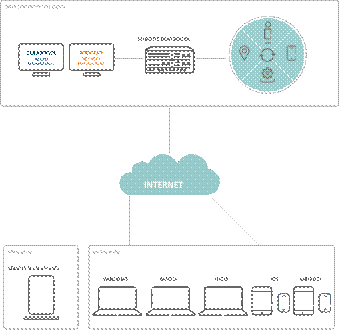
The Virtual Intranet Access (VIA) client from Aruba provides secure remote network connectivity for Android, Apple iOS, Mac OS X, Linux and Windows devices. A hybrid IPsec/SSL VPN, VIA automatically scans and selects the best secure connection to the corporate network. Unlike traditional VPN software, VIA offers a zero-touch end-user experience and automatically configures wireless LAN (WLAN) settings on client devices. For military-grade security, VIA supports Suite B cryptography when used with the ArubaOS Advanced Cryptography (ACR) module. With ACR, mobile devices with VIA can securely access networks that handle controlled unclassified, confidential and classified information. |
|
|
|
Features and Benefits |
|
Integrated Solution Orderable through the Policy Enforcement Firewall (PEF) license, VIA can be downloaded directly from the Mobility Controller, or pushed out from an existing software management platform. VIA connects to and receives both software and configuration updates directly from the Mobility Controller with no additional hardware required. Automatic IPSEC Connection Frequent business travelers often connect through hotels, airports, coffee shops, 4G/LTE and 3G cellular networks, which require secure links to access internal corporate resources. Legacy VPNs often require users to start additional software and undergo a complicated log in process. IPSEC with SSL Fallback Encapsulation VIA uses the standard IPsec protocol suite to secure communications between VIA-enabled devices and an Aruba Mobility Controller in the data center. This ensures the fastest connections possible where clients can connect via native IPsec. If a firewall blocks direct IPsec connections, VIA can wrap IPsec packets in an SSL header to allow secure connectivity through corporate firewalls. Leveraging Single Sign-On The same mobile device credentials that authenticate users to wireless LANs (WLANs) can also be used to authenticate VIA users. Leveraging these credentials, VIA automatically connects users in the background without prompting them for a username and password. User Role Support VIA client software leverages the same role-based and stateful firewall policies for local and remote network access to ensure a consistent end-user experience, regardless of location. It can also be configured to allow separate access roles and policies on the same end point, depending on where the user logs into the network. Extensive Troubleshooting Support VIA's built-in logging and diagnostic capabilities enable remote troubleshooting of connectivity issues without requiring users to navigate through a complex set of tools. If required, client logs can be emailed to support teams for more detailed troubleshooting. The diagnostic tools include connection logs, system info, detected WLAN networks, and detailed connectivity tests. Corporate, Home Office And Road Access VIA operates with Aruba 7200 Series, 7000 Series, 6000, 3000 Series and 600 Series Mobility Controllers. No additional VPN head-end servers or appliances are needed. With VIA, users have the same experience as when they connect to the headquarters or branch office network, creating a seamless end-user experience whether accessing network resources locally or remotely. Security Protocols Supported
Authentication Options
Forwarding Modes
Supported Client Operating Systems
- Ubuntu 12.04,14.04,16.04 (32 and 64 bit variants) - CentOS 6.3+ - RHEL 6.3+ - Debian 7 NOTE: Any device running one of the above operating systems is supported. i.e. Microsoft Surface Pro and Amazon Tablet running Android are supported but Microsoft Surface or Amazon Kindle devices are not. Hardware Requirements
RAM
Supported Aruba Mobility Controllers
Via with Suite B Cryptography For classified or highly sensitive network deployments, VIA has been enhanced to support RFC 4869 (Suite B Cryptographic Suites for IPSec). VIA with Suite B is enabled with the optional ArubaOS ACR module. |
|
|
|
|
Configuration
|
Ordering Information1 | |
|
|
|
|
Description |
Part Number |
|
Must be applied to an Aruba Mobility Controller as listed below |
|
|
Aruba LIC-620-PEFV Controller Policy Enforcement Firewall for Aruba 620 License E-LTU Controller |
JW488AAE |
|
Aruba LIC-650-PEFV Controller Policy Enforcement Firewall for Aruba 650 Cntrlr License E-LTU |
JW489AAE |
|
Aruba LIC-651 PEFV Controller Policy Enforcement Firewall for Aruba 651 Cntrlr License E-LTU |
JW490AAE |
|
Aruba LIC-3200-PEFV Controller Policy Enforcement Firewall for Aruba 3200 Cntrlr License E-LTU |
JW491AAE |
|
Aruba LIC-3400-PEFV Controller Policy Enforcement Firewall for Aruba 3400 Cntrlr License E-LTU |
JW492AAE |
|
Aruba LIC-3600-PEFV Controller Policy Enforcement Firewall for Aruba 3600 Cntrlr License E-LTU |
JW493AAE |
|
Aruba LIC-M3-PEFV Controller Policy Enforcement Firewall for Aruba M3 Cntrlr License E-LTU |
JW494AAE |
|
Aruba LIC-7005-PEFV Controller Policy Enforcement Firewall for Aruba 7005 Cntrlr License E-LTU |
JW495AAE |
|
Aruba LIC-7010-PEFV Controller Policy Enforcement Firewall for Aruba 7010 Cntrlr License E-LTU |
JW496AAE |
|
Aruba LIC-7024-PEFV Controller Policy Enforcement Firewall for Aruba 7024 Cntrlr License E-LTU |
JW497AAE |
|
Aruba LIC-7030-PEFV Controller Policy Enforcement Firewall for Aruba 7030 Cntrlr License E-LTU |
JW498AAE |
|
Aruba LIC-7205-PEFV Controller Policy Enforcement Firewall for Aruba 7205 Cntrlr License E-LTU |
JW499AAE |
|
Aruba LIC-7210-PEFV Controller Policy Enforcement Firewall for Aruba 7210 Cntrlr License E-LTU |
JW500AAE |
|
Aruba LIC-7220-PEFV Controller Policy Enforcement Firewall for Aruba 7220 Cntrlr License E-LTU |
JW501AAE |
|
Aruba LIC-7240-PEFV Controller Policy Enforcement Firewall for Aruba 7240 Cntrlr License E-LTU |
JW502AAE |
|
Aruba LIC-ACR-8 Controller Advanced Cryptography 8 Session License E-LTU |
JW538AAE |
|
Aruba LIC-ACR-32 Controller Advanced Cryptography 32 Session E-LTU |
JW539AAE |
|
Aruba LIC-ACR-64 Controller Advanced Cryptography 64 Session License E-LTU |
JW540AAE |
|
Aruba LIC-ACR-128 Controller Advanced Cryptography 128 Session License E-LTU |
JW541AAE |
|
Aruba LIC-ACR-256 Controller Advanced Cryptography 256 Session License E-LTU |
JW542AAE |
|
Aruba LIC-ACR-512 Controller Advanced Cryptography 512 Session License E-LTU |
JW543AAE |
|
Aruba LIC-ACR-1024 Controller Advanced Cryptography 1024 Session License E-LTU |
JW544AAE |
|
Aruba TACT-PEFV Virtual Mobility Controller Policy Enforcement Firewall License E-LTU |
JW334AAE |
|
|
|
|
1 Software: 90 days service; can be extended with support contract | |
|
|
|
|
|
|
Summary of Changes
|
Date |
Version History |
Action |
Description of Change | ||||||||||||||||||
|
23-Oct-2017 |
From Version 1 to 2 |
Changed |
Aruba information updated | ||||||||||||||||||
|
01-Nov-2016 |
Version 1 |
Created |
Document creation. | ||||||||||||||||||
| |||||||||||||||||||||


