




























HPE Aruba RAP-3 Series Remote Access Points: технические характеристики и документация
В архивеOverview
|
Aruba RAP-3 Series Remote Access Points |
|
High-performance wireless and wired networking for branch offices and teleworkers |
|
|
|
|
|
|
|
Product overview |
|
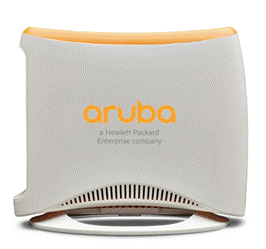
The multifunctional Aruba RAP-3 delivers secure 802.11n wireless and wired network access to corporate resources from branch and home offices. Centrally managed by Aruba Mobility Controllers, the RAP-3 extends corporate resources to remote locations by establishing site-to-site VPN tunnels to the data center. To eliminate client stickiness, the RAP-3 includes integrated ClientMatch technology, which continuously gathers session performance metrics and uses this data to every device to the best AP and radio on the WLAN, even while users roam and RF conditions change. The RAP-3 also offers a variety of enterprise-class features, including role-based network access, policy-based forwarding, and Adaptive Radio Management (ARM), which gives remote workers the same high-quality Wi-Fi experience they get at corporate headquarters. Delivering a wireless data rate of up to 300 Mbps, the RAP-3 has three 10/100BASE-T Ethernet ports and one USB port for connecting to 3G and 4G networks. It is also available with an 802.3af power-over-Ethernet (PoE) port (RAP-3WNP model) for IP phones or other devices. At locations that require greater coverage, the RAP-3 can join an Aruba Instant WLAN cluster. Simply install additional RAP-3s or any Instant AP and the entire cluster is managed as one. If one Instant AP fails, another AP automatically takes over with no disruption. For large installations across multiple sites, the Aruba Activate service significantly reduces deployment time by automating device provisioning, firmware upgrades, and inventory management. With Aruba Activate, Instant APs are factory-shipped to any site and configure themselves when powered up. |
|
|
|
Features and Benefits |
|
|
|
Advanced Features
- With a WebCC subscription, Aruba Instant RAPs deliver integrated web filtering to every device connected to the WLAN - Integrated Trusted Platform Module (TPM) for secure storage of credentials and keys - SecureJack-capable for secure tunneling of wired Ethernet traffic Operating Modes
- 802.11b/g/n Mobility Controller-managed RAP - 802.11b/g/n Aruba Instant AP - 802.11b/g/n air monitor - Hybrid WLAN and air monitor - Configurable to support 802.11n HT 20/40 channels or mixed-mode deployment IEEE 802.11b/g/n
- 10/100BASE-T Ethernet, PoE capable - User authentication: 802.1X, captive portal, MAC authentication or open access - Policy-based forwarding for local resource access Wireless Radio Specifications
- 802.11b: Direct-sequence spread-spectrum (DSSS) - 802.11g/n: Orthogonal frequency-division multiplexing (OFDM) - 802.11n: 2x2 MIMO with two spatial streams
- 802.11b: BPSK, QPSK, CCK - 802.11g/n: BPSK, QPSK, 16-QAM, 64-QAM
- 802.11b: 1, 2, 5.5, 11 - 802.11g: 6, 9, 12, 18, 24, 36, 48, 54 - 802.11n: MCS0 to MCS15 (6.5 Mbps to 300 Mbps)
Power In AC-to-DC power adapter (included)
- AC input: 100-240 volts AC/0.5 A - DC output: 12 volts DC/1.5 A
- AC input: 100-240 volts AC/0.75 A - DC output: 48 volts DC/0.75 A Maximum Power Consumption:
- Maximum (excluding USB): 4.0 watts - Maximum (using USB): 6.5 watts
- Maximum (excluding USB and PoE): 5.5 watts - Maximum (using USB, no PoE): 8.0 watts - Maximum (using USB, full PoE): 26 watts Encrypted Throughput
Antennas
Interfaces
- E0 (WAN): One 10/100BASE-T Ethernet (RJ-45), auto-sensing link speed and MDI/MDX - E1-E2 (LAN): Two 10/100BASE-T Ethernet (RJ-45), auto-sensing link speed and MDI/MDX - Optional 802.3af PoE (15.4 watts) on the E2 port for IP phones and other equipment
Mounting
Mechanical
- 129 mm x 109 mm x 64 mm (5.1” x 4.3” x 2.5”) - 180 g (6.6 oz)
- 218 mm x 150 mm x 64 mm (8.6” x 5.9” x 2.5”) - RAP-3WN: 510 g (1.1 lb) - RAP-3WNP: 620 g (1.4 lb) Environmental
- Temperature: 0° C to +40° C (+32° F to +104° F) - Humidity: 5% to 95% non-condensing
- Temperature: -40° C to +70° C (-40° F to +158° F) Regulatory
Regulatory Model Numbers
Certifications
Warranty
Minimum software Versions
|
Configuration
|
Ordering Guide |
| ||
|
|
| ||
|
Step 1: Select RAP-3 Model |
| ||
|
Description |
Part Number | ||
|
Instant Access Points |
| ||
|
Aruba RAP-3WN (RW) Wireless 3x10/100Base-T USB Remote AP |
JW288A | ||
|
Aruba RAP-3WN (US) Wireless 3x10/100Base-T USB Remote AP |
JW291A | ||
|
Aruba RAP-3WN (JP) Wireless 3x10/100Base-T USB Remote AP |
JW290A | ||
|
Aruba RAP-3WN (IL) Wireless 3x10/100Base-T USB Remote AP |
JW289A | ||
|
Aruba RAP-3WN (RW) FIPS/TAA-compliant Wireless 3x10/100Base-T USB Remote AP |
JW292A | ||
|
Aruba RAP-3WN (US) FIPS/TAA-compliant Wireless 3x10/100Base-T USB Remote AP |
JW293A | ||
|
Aruba RAP-3WNP (RW) Wireless 3x10/100Base-T USB PoE Out Remote AP |
JW294A | ||
|
Aruba RAP-3WNP (US) Wireless 3x10/100Base-T USB PoE Out Remote AP |
JW297A | ||
|
Aruba RAP-3WNP (JP) Wireless 3x10/100Base-T USB PoE Out Remote AP |
JW296A | ||
|
Aruba RAP-3WN (JP) FIPS/TAA-compliant Wireless 3x10/100Base-T USB Remote AP |
JY757A | ||
|
Aruba RAP-3WNP (JP) FIPS/TAA-compliant Wireless 3x10/100Base-T USB PoE Out Remote AP |
JY758A | ||
|
Aruba RAP-3WNP (IL) Wireless 3x10/100Base-T USB PoE Out Remote AP |
JW295A | ||
|
Aruba RAP-3WNP (RW) FIPS/TAA-compliant Wireless 3x10/100Base-T USB PoE Out Remote AP |
JW298A | ||
|
Aruba RAP-3WNP (US) FIPS/TAA-compliant Wireless 3x10/100Base-T USB PoE Out Remote AP |
JW299A | ||
|
NOTE: All units ship with compatible AC-to-DC power adapter. |
| ||
|
NOTE: The RAP-3WNP models ship without AC power cord (add separately below) |
| ||
|
|
| ||
|
Step 2: Add AC Power Cord (RAP-3WNP Models Only) |
| ||
|
Description |
Part Number | ||
|
Select one of the following: |
| ||
|
PC-AC-ARG Argentina 220V AC 10A 2-meter AC Power Cord |
JW113A | ||
|
PC-AC-AUS Australian AC Power Cord |
JW114A | ||
|
PC-AC-BR Brazil AC Power Cord |
JW115A | ||
|
PC-AC-CHN China AC Power Cord |
JW116A | ||
|
PC-AC-DEN Denmark 220V AC 10A 2-meter AC Power Cord |
JW117A | ||
|
PC-AC-EC Continental European/Schuko AC Power Cord |
JW118A | ||
|
PC-AC-IN India AC Power Cord |
JW119A | ||
|
PC-AC-IL Israel 250V AC 10A 2-meter AC Power Cord |
JW120A | ||
|
PC-AC-IT Italian AC Power Cord |
JW121A | ||
|
PC-AC-JP Japanese AC Power Cord |
JW122A | ||
|
PC-AC-KOR Korea AC Power Cord |
JW123A | ||
|
PC-AC-NA North America AC Power Cord |
JW124A | ||
|
PC-AC-SWI Switzerland 220V AC 10A 2-meter AC Power Cord |
JW125A | ||
|
PC-AC-TW Taiwan AC Power Cord |
JW126A | ||
|
PC-AC-UK UK AC Power Cord |
JW127A | ||
|
PC-AC-ZA South Africa 250V AC 10A 2-meter AC Power Cord |
JW128A | ||
|
|
| ||
|
Step 3: Add Accessories (Optional) |
| ||
|
Description |
Part Number |
| |
|
Mount Kit |
| ||
|
RAP-3WN-MNT RAP-3 Series Wall Mount Kit |
JW058A |
| |
|
|
| ||
|
Power Adapters |
| ||
|
Description |
Part Number |
Configuration Impact | |
|
AP-AC-12V30A 12V/30W AC/DC Desktop Style 1.7/4.0/9.5mm Circular 90 Deg Plug DoE Level VI Adapter |
JX989A |
Spare adapter for RAP-3WN(-xx), desktop style. Add AC power cord (PC-AC-xx). | |
|
AP-AC-48V36C 48V/36W AC/DC Desktop Style 1.35/3.5/9.5mm Circular 90 Deg Plug DoE Level VI Adapter |
JX991A |
Spare adapter for RAP-3WNP(-xx), desktop style. Add AC power cord (PC-AC-xx) | |
|
AP-DC-CAR 12V/18W Indoor AP Car Power US Only Adapter Kit |
JW631A |
For US and Japan only Optional accessory for RAP-3WN models Only compatible with the RAP-3WN variants, not RAP-3WNP | |
|
|
| ||
|
Serial Cable |
| ||
|
Description |
Part Number |
| |
|
AP-CBL-SER AP Proprietary DB9 Female Serial Adapter Cable |
JW071A |
| |
|
| |||
Technical Specifications
Maximum capability of the hardware provided. Maximum transmit power will be limited by local regulatory settings | |||||||||||||||||||||||||||||||||||||||||||||||||||||||||||||||||||||||||
|
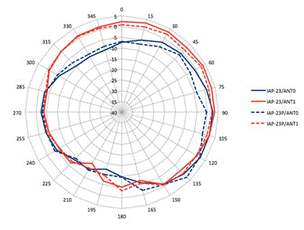
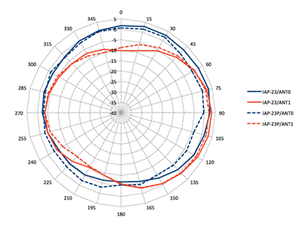
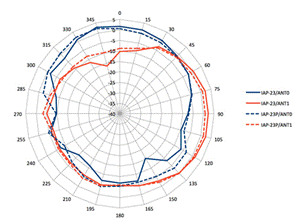
Antenna Gain Plots | |
|
All plots are for Channel 6 (2,462 MHz) |
|
|
|
|
|
Azimuth (top) view |
Elevation (front) view |
|
|
|
|
|
|
|
Elevation (side) view |
|
|
|
|
|
| |
Summary of Changes
|
Date |
Version History |
Action |
Description of Change | ||||||||||||||||||
|
06-Mar-2017 |
From Version 2 to 3 |
Changed |
Updates made on Configuration section | ||||||||||||||||||
|
07-Nov-2016 |
From Version 1 to 2 |
Added |
Models added: JY757A, JY758A | ||||||||||||||||||
|
01-Nov-2016 |
Version 1 |
Created |
Document creation. | ||||||||||||||||||
| |||||||||||||||||||||


