HPE Aruba Instant On AP11D Desk/Wall Access Points: технические характеристики и документация
В архивеOverview
|
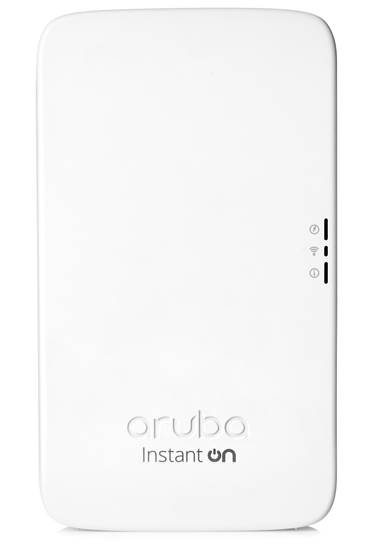
Aruba Instant On AP11D Desk/Wall Access Points |
|
Designed for flexible and easy deployments which require an enhanced in-room Wi-Fi experience such as boutique hotels, small offices or doctor's offices. Small businesses are facing a number of challenges due to new and emerging technology, making it pretty overwhelming to keep up. Mobile devices and cloud-based applications such as Microsoft Office 365 are changing the way you engage with customers, suppliers and staff. Since it's tough enough to set up a new payroll system or choose the most effective point of sale solution - we believe choosing the best Wi-Fi solution for your business should be simple. Whether you own a small law office or a trendy boutique hotel, your employees and customers are relying on the network for almost everything they do. And because Wi-Fi plays such a crucial role today, you need a purpose-built solution that keeps your business on the go. Aruba Instant On Access Points (APs) are easy to deploy and manage-with a quality look and feel at an attractive price point. |
|
|
|
|
|
Aruba Instant On AP11D Desk/Wall Access Points |
|
|
|
Models |
| |
|
Aruba Instant On AP11D (US) 2x2 11ac Wave2 Desk/Wall Access Point |
R2X15A |
|
|
Aruba Instant On AP11D (RW) 2x2 11ac Wave2 Desk/Wall Access Point |
R2X16A |
|
|
Aruba Instant On AP11D (EG) 2x2 11ac Wave2 Desk/Wall Access Point |
R2X17A |
|
|
Aruba Instant On AP11D (IL) 2x2 11ac Wave2 Desk/Wall Access Point |
R2X18A |
|
|
Aruba Instant On AP11D (JP) 2x2 11ac Wave2 Desk/Wall Access Point |
R2X19A |
|
|
Aruba Instant On AP 11D Access Point and PSU Bundle US |
R3J25A |
|
|
Aruba Instant On AP 11D Access Point and PSU Bundle EU |
R3J26A |
|
|
|
| |
|
Key Features
|
||
|
| ||
|
In the box
|
||
|
| ||
Standard Features
|
Product highlights Simplicity at its best
Security you can count on
We've got you covered
|
|
|
|
Antennas Integrated directional antennas with maximum individual antenna gain of 4.3dBi in 2.4GHz and 6.2dBi in 5GHz |
|
|
|
Mounting The access point ships with single gang wall-box mount kit and desk mount kit |
|
|
|
Warranty and Support Aruba Instant On 2-Year warranty with 24X7 phone support for first 90 days and chat support for the entire warranty period. Community support as long as you own the products. Should you require longer support, please purchase a Foundation Care contract for your APs. The SKUs are HK1Y0E (3 years) and H30GZE (5 years). |
|
|
Configuration Information
|
Build To Order: BTO is a standalone unit with no integration. BTO products ship standalone are not part of a CTO or Rack-Shippable solution.
| ||
|
BTO Base Models | ||
|
Rule # |
Description |
SKU |
|
|
APP11D |
|
|
|
Aruba Instant On AP11D (US) 2x2 11ac Wave2 Desk/Wall Access Point |
R2X15A |
|
|
Aruba Instant On AP11D (RW) 2x2 11ac Wave2 Desk/Wall Access Point |
R2X16A |
|
|
Aruba Instant On AP11D (EG) 2x2 11ac Wave2 Desk/Wall Access Point |
R2X17A |
|
|
Aruba Instant On AP11D (IL) 2x2 11ac Wave2 Desk/Wall Access Point |
R2X18A |
|
|
Aruba Instant On AP11D (JP) 2x2 11ac Wave2 Desk/Wall Access Point |
R2X19A |
|
Notes: |
OCA Only Model Selection Form - Aruba > Instant On > Wireless Access Points: AP11D |
|
|
|
|
|
|
|
APP11D Bundle |
|
|
|
Aruba Instant On AP11D Access Point and PSU Bundle Base WW |
R6K64A |
|
|
|
|
|
Notes: |
If this Access Point is selected, bring in (Min 1 // Max 1) Localized Wall Power Cord Option based on the HPN Localization Menu. Drop down under Included Power Adapter should offer the following selections: No Localized Power Cord - #AC3 Option OCA Display Note - WW Instant On Bundle is not availabe in Israel, Japan or Egypt at this time. They must be manually configured. Please go back to the Instant On Catalog and select the Standalone Container OCA Only Model Selection Form -Aruba > Instant On > Wireless Access Points: Desk/Wall AP11D Bundles |
|
|
|
Aruba Instant On AP 11D Access Point and PSU Bundle US |
R3J25A |
|
|
|
|
|
|
Aruba Instant On AP 11D Access Point and PSU Bundle EU |
R3J26A |
|
|
|
|
|
| ||
|
Power Options | ||
|
Remarks |
Description |
SKU |
|
|
For AP11D Std (Min 0 // max 1) User Selection (min 0 // max 1) |
|
|
|
Aruba Instant On 802.3af 15.4W POE Midspan Injector |
R8W31A |
|
|
Aruba Instant On 48V/50W PSU Power Adaptor |
R3X86A |
|
Notes: |
If this Power Supply is selected, bring in (Min 1 // Max 1) Localized power cord based on the Aruba Localization Menu. Most devices are PoE powered from switch so these are optional. |
|
|
| ||
|
Spares | ||
|
Remarks |
Description |
SKU |
|
|
Mount Kits |
|
|
|
For AP11D Std (Min 0 // max 99) User Selection (min 0 // max 99) |
|
|
|
AP-303H-MNT1 Kit with Spare Single-gang Wall-box Mount Adapter for 303H Series AP |
JY686A |
|
|
AP-303H-MNTD Kit with Optional Desk Mount Adapter for 303H Series AP |
JY689A |
|
Notes: |
11D AP Unit ships with a Single Gang Mount Bracket and a Desk Mount Kit |
|
|
| ||
Technical Specifications
|
Radios
|
|
|
|
Interfaces
|
|
|
|
Physical characteristics
|
|
|
|
Power
Notes: Power sources are sold separately |
|
|
|
Environmental and reliability
|
|
|
|
Management
|
|
|
|
Industry certifications
|
|
|
Summary of Changes
|
Date |
Version History |
Action |
Description of Change |
|
07-Nov-2022 |
Version 7 |
Changed |
Configuration Information section was updated. |
|
13-Sep-2022 |
Version 6 |
Changed |
Configuration Information section was updated. |
|
07-Sep-2021 |
Version 5 |
Changed |
Service and Support and Configuration Information sections were updated. |
|
14-Jun-2021 |
Version 4 |
Changed |
Standard Features section was updated. |
|
01-Jun-2020 |
Version 3 |
Changed |
Configuration Information section was updated. New SKUs were added. |
|
04-Nov-2019 |
Version 2 |
Changed |
Overview, Standard Features and Configuration Information sections were updated |
|
01-Jul-2019 |
Version 1 |
New |
New QuickSpecs |
Copyright
|
|
| |||||
|
|
|
© Copyright 2022 Hewlett Packard Enterprise Development LP. The information contained herein is subject to change without notice. The only warranties for Hewlett Packard Enterprise products and services are set forth in the express warranty statements accompanying such products and services. Nothing herein should be construed as constituting an additional warranty. Hewlett Packard Enterprise shall not be liable for technical or editorial errors or omissions contained herein.
sFlow is a registered trademark of InMon Corp. All other third-party trademark(s) is/are property of their respective owner(s).
To learn more, visit: http://www.hpe.com/networking
a00062188enw - 16388 - Worldwide - V7 - 07-November-2022 |