




























HPE Aruba ClearPass QuickConnect: технические характеристики и документация
В архивеOverview
|
Aruba ClearPass QuickConnectTM | ||||
|
Simple, automated 802.1X device configuration for wired and wireless | ||||
|
| ||||
|
| ||||
|
| ||||
|
Product overview | ||||
|
| ||||
|
Support for bring-your-own-device (BYOD) initiatives in enterprise, education, retail and other verticals is a necessity today as smart phones and tablets use gain in popularity. Expectations by users to connect from anywhere to secure 802.1X wireless and wired networks at work or on campus is just as popular. One of the most complicated parts is device configuration to support 802.1X, as it is a challenge to reach all users and devices in a timely manner. ClearPass QuickConnect changes this by dramatically simplifying device configuration by providing a user-driven configuration wizard that can be reached from anywhere. The user is prompted for login credentials and then follows a step-by-step procedure to configure SSIDs, wired attributes and 802.1X settings on Windows, Mac OS X, iOS, and Android devices. Minutes later, the device is ready to go. This uniquely simplified workflow, facilitates and accelerates bring-your-own-device (BYOD) initiatives, propagates the deployment of more secure 802.1X network access, and reduces helpdesk calls and IT overhead. | ||||
|
| ||||
|
Key Features | ||||
|
| ||||
|
Cloud-hosted provisioning utility makes it easy to create 802.1X deployment packages for endpoint devices.
- Windows Vista and 7 - Mac OS X - iOS - iPhone, iPad and iPod - Android 2.2 and above
| ||||
|
| ||||
|
The Clearpass Difference | ||||
|
| ||||
|
QuickConnect employs a cloud-hosted IT provisioning utility and user-driven wizard to automate the configuration and onboarding of devices on any network. The cloud-hosted provisioning utility makes it easy for IT to create, manage and distribute secure 802.1X device configurations. The IT staff can quickly update existing setting requirements and publish new device packages to support new SSID's or security settings. Simple user-driven wizard The IT staff simply publishes a url that users can reach while on campus or from home, and the end users are guided through the configuration process, ensuring painless network connectivity. Parameters for Windows, Mac OS X, iOS and Android devices are automatically configured, which includes wireless and wired attributes as well as 802.1X supplicant settings on computers, smart phones and tablets. Incremental or mandated security configuration updates or fixes can be made on the fly with no helpdesk assistance. QuickConnect can also push and install a health agent and applications to computers. | ||||
|
| ||||
|
| ||||
|
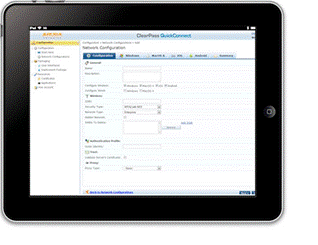
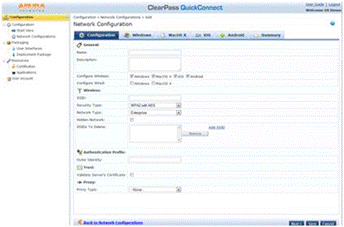
Easy-to-use IT interface makes it easy to deploy BYOD. | ||||
|
The QuickConnect advantage
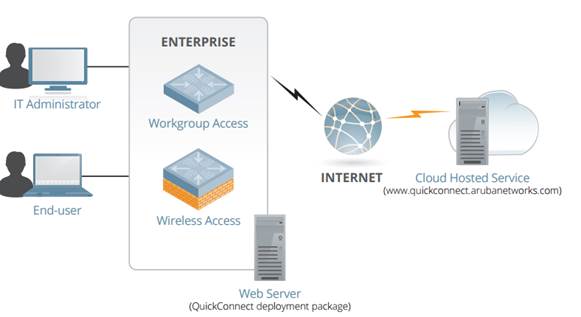
How it works Aruba's exclusive cloud-hosted provisioning utility lets IT create a ClearPass QuickConnect deployment package with all necessary endpoint variables. It can then be run from a web server or distributed via a USB storage device or CD. The cloud-hosted utility also lets IT quickly create and distribute new packages that contain configuration changes as your network changes. For example, IT can quickly push out SSID changes and support new features in a timely and transparent manner.
| ||||
|
| ||||
|
A cloud-hosted IT management utility simplifies device onboarding | ||||
|
| ||||
|
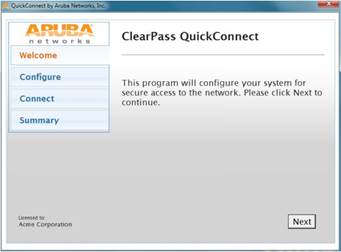
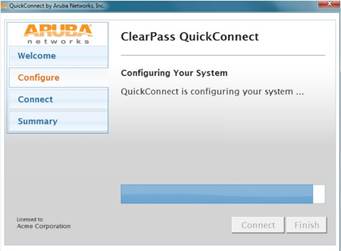
To install the ClearPass QuickConnect deployment package, the user simply runs the configuration wizard, which prompts the user to enter login and password credentials. It's as simple as that. A complete install and configuration log is available for IT and the end user when the update is done | ||||
|
|
| |||
|
ClearPass QuickConnect features a user-driven device configuration wizard | ||||
|
| ||||
|
Supported supplicants
Supported EaP methods*
* This is a universal set of all methods; some supplicants may not support all of these methods. | ||||
Summary of Changes
|
Date |
Version History |
Action |
Description of Change | ||||||||||||||||||
|
02-Oct-2017 |
From Version 1 to 2 |
Changed |
Aruba information updated | ||||||||||||||||||
|
01-Nov-2016 |
Version 1 |
Created |
Document creation. | ||||||||||||||||||
| |||||||||||||||||||||


