




























HPE Aruba AS-100 Series Wireless Location Sensors: технические характеристики и документация
В архивеOverview
|
Aruba AS-100 Series Wireless Location Sensors | ||
|
Multivendor, Remote Management for Aruba Bluetooth Low Energy Beacons | ||
|
| ||
|
| ||
|
| ||
|
Product overview | ||
|
| ||
|
Aruba Mobile Engagement enables venues to engage with visitors' mobile devices using Aruba Beacons powered by Bluetooth Low Energy (BLE) and the Meridian mobile-app platform. With Aruba Sensor (AS-100), Aruba, a Hewlett Packard Enterprise company, is now opening up its solution to additional Wi-Fi networks to create a complete offering for all public-venue customers. The Aruba Sensor is a small, dual-band 802.11n client radio and a BLE radio that can act as an additional Aruba Beacon to power mobile engagement applications without battery power. Aruba Sensor also allows all enterprises - whether they are Aruba Wi-Fi customers or not - to remotely manage their Aruba Beacon deployments over their existing Wi-Fi infrastructure. | ||
|
| ||
|
Features and Benefits | ||
|
| ||
|
Unique Benefits
| ||
|
| ||
|
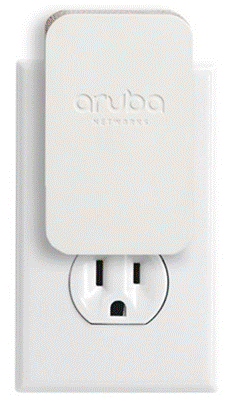
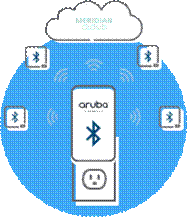
Aruba Sensor The Aruba Sensor plugs directly into an AC outlet and can hear other Aruba Beacons within a 25-meter range and reports relevant data over Wi-Fi to a cloud-based management system (called the Meridian Editor). Aruba AS-100 enables the capability to centrally manage Aruba Beacons available to any venue, regardless of their wireless network vendor, so that they can manage an Aruba Beacon-based Mobile Engagement solution quickly and easily from a convenient location. The multivendor Aruba Sensor allows larger venues with an extensive Aruba Beacon deployment to easily manage all of these devices without having to go on-location to individually check each beacon or alter their existing wireless infrastructure. | ||
|
| ||
|
|
|
|
|
|
|
|
|
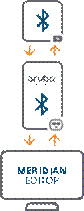
Plug Aruba sensor into a power outlet and configure it with the Aruba beacons iOS app. |
Aruba sensor manages any Aruba beacons within a 25 meter radius, and syncs data with the meridian cloud over your Wi-Fi network. |
Log into meridian editor to remotely monitor and manage your Aruba beacons. |
|
| ||
|
How it Works After initially configuring Aruba Sensor and plugging it into a venue's AC outlet, Aruba Sensor automatically sends the data of all Aruba Beacons within range to the Meridian cloud server over the venue's existing Wi-Fi connection. Aruba Sensor automatically sends updated data on a beacon's battery life, status, settings such as power level, and campaigns to one centralized location - the cloud-hosted Meridian Editor. This means that venues can simply log in to the same cloud-based content management system to both manage their app content and change the nature of their physical beacon hardware. | ||
|
| ||
|
Configuring the Aruba Sensor Venues use the same tool to configure their Aruba Beacons and Aruba Sensors - a mobile app called the Aruba Beacons App. The Aruba Beacons App can be downloaded for free to an iOS device. There, venues simply log in using their existing Meridian Editor account credentials.
The Aruba Beacons App associates the Aruba Sensor with the appropriate Meridian account's venue maps so that you can place the Sensor on a digital map that corresponds with its physical location. The app also provides an interface to connect the Aruba Sensor device to the venue's existing Wi-Fi network.
After the initial one-time configuration, the Aruba Sensor will then automatically send Aruba Beacon data at regular intervals over the Wi-Fi to the Meridian Editor where venues can remotely access it. | ||
|
| ||
|
Enterprise-Grade Beacon Management Large Aruba Beacon deployments require centralized management tools that reduce operating expenses and allow public-facing venues - regardless of their existing wireless infrastructure - to engage in a BLE beacon-based mobile engagement strategy. | ||
|
| ||
|
| ||
|
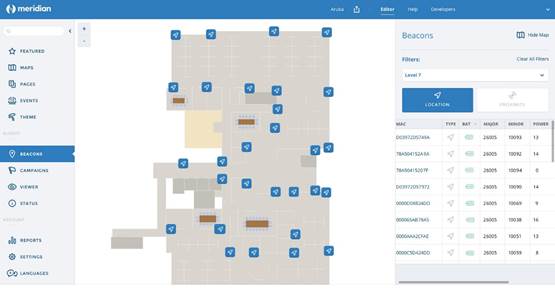
Beacons management dashboard | ||
|
The multivendor Aruba Sensor works together with the Meridian mobile app platform, Aruba Beacons app, and Aruba Beacon hardware to provide venues with a complete, enterprise-grade Mobile Engagement solution that is easy and intuitive to deploy and maintain. | ||
|
| ||


Configuration
|
Ordering Information |
|
|
|
|
|
Description |
Part Number |
|
Aruba AS-100 Series Wireless Location Sensors |
|
|
Aruba AS-100 (NA) 802.11n Dual Band Single Concurrent 1x1:1 BLE Wireless Sensor |
JW791A |
|
Aruba AS-100 (EU) 802.11n Dual Band Single Concurrent 1x1:1 BLE Wireless Sensor |
JW792A |
|
Aruba AS-100 (UK) 802.11n Dual Band Single Concurrent 1x1:1 BLE Wireless Sensor |
JW793A |
|
Aruba AS-100 (CN) 802.11n Dual Band Single Concurrent 1x1:1 BLE Wireless Sensor |
JW794A |
|
Aruba AS-100 (BR) 802.11n Dual Band Single Concurrent 1x1:1 BLE Wireless Sensor |
JZ108A |
|
Aruba AS-100 (AU) 802.11n Dual Band Single Concurrent 1x1:1 BLE Wireless Sensor |
JZ109A |
Technical Specifications
|
Product Models
Operating Modes
Wi-Fi Radio Specifications
- 2.400 GHz to 2.4835 GHz - 5.150 GHz to 5.250 GHz (U-NII-1) - 5.250 GHz to 5.350 GHz (U-NII-2) - 5.470 GHz to 5.725 GHz (U-NII-2E) - 5.725 GHz to 5.850 GHz (U-NII-3 / ISM)
- 802.11b: Direct-sequence spread-spectrum (DSSS) - 802.11a/g/n: Orthogonal frequency-division multiplexing (OFDM)
- 802.11b: BPSK, QPSK, CCK - 802.11a/g/n: BPSK, QPSK, 16-QAM, 64-QAM
- Excludes antenna gain (2.3 dBi/3.7 dBi for 2.4 GHz/5 GHz) - Power may be restricted to comply with local regulatory requirements
- 802.11b: 1, 2, 5.5, 11 - 802.11a/g: 6, 9, 12, 18, 24, 36, 48, 54 - 802.11n: 6.5 to 150 (MCS0 to MCS7)
Other Interfaces
- Plug shipping with unit defined by part number - AC power voltage range: 90V - 265V - AC power frequency range: 47 Hz - 63 Hz
- Up to 4dBm transmit power (class 2) and -94 dBm receive sensitivity - Integrated antenna, 0.3 dBi gain
Power
Mounting
Mechanical
- 80 mm x 48 mm x 29 mm (W x D x H) - 65g
- 160 mm x 120 mm x 58 mm (W x D x H) - 240g
Environmental
- Temperature: 0° C to +50° C (+32° F to +122° F) - Humidity: 5% to 95% non-condensing
- Temperature: -40° C to +70° C (-40° F to +158° F)
Regulatory
For more country-specific regulatory information and approvals, please see your Aruba representative.
Reliability
Regulatory Model Number
Certifications
Warranty
Minimum Software Versions
|
| |||||||||||||||||||||||||||||||||||||||||||||||||||||||||||||||||||||
|
|
| |||||||||||||||||||||||||||||||||||||||||||||||||||||||||||||||||||||
| ||||||||||||||||||||||||||||||||||||||||||||||||||||||||||||||||||||||
|
| ||||||||||||||||||||||||||||||||||||||||||||||||||||||||||||||||||||||
|
Maximum capability of the hardware provided (excluding antenna gain). Maximum transmit power is limited by local regulatory settings | ||||||||||||||||||||||||||||||||||||||||||||||||||||||||||||||||||||||
Summary of Changes
|
Date |
Version History |
Action |
Description of Change | ||||||||||||||||||
|
05-June-2017 |
From Version 1 to 2 |
Added |
SKUs added: JZ108A, JZ109A | ||||||||||||||||||
|
01-Nov-2016 |
Version 1 |
Created |
Document creation. | ||||||||||||||||||
| |||||||||||||||||||||


