




























HPE Aruba 340 Series Access Points: технические характеристики и документация
В архивеOverview
|
Aruba 340 Series Access Points |
|
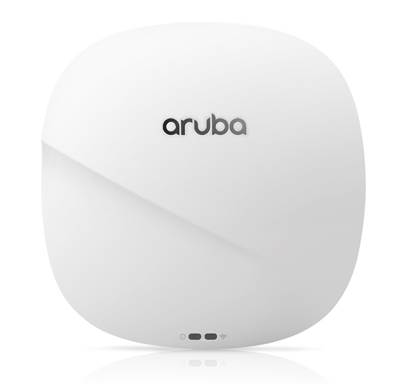
Extreme performance 802.11ac wave 2 aps with dual-5 GHz and multi-gig Ethernet Support The Aruba 340 series access points provide the fastest 802.11ac gigabit data speeds and superb user experience for mobile devices and applications in a digital workplace. Designed with an integrated, 802.3bz Compliant, HPE SmartRate multi-gig Ethernet port to eliminate wired bottlenecks, these APs offer unmatched wireless performance and capacity. The unique and flexible dual-5 GHz architecture of the 340 series offers a way to double 5 GHz capacity where needed, without compromise or restrictions.
Thanks to Aruba's advanced ClientMatch technology, the 340 series can automatically detect and classify 802.11ac Wave 2 capable mobile devices. This allows ClientMatch to automatically group Wave 2 capable devices onto a single Wave 2 radio so that performance benefits of multi-user MIMO can be realized - without the adverse effects of slower 802.11ac and traditional 802.11n capable mobile devices. This means increased network capacity and a boost in network efficiency.
With maximum data rates of 2,166 Mbps in the 5 GHz band1 and 800 Mbps in the 2.4 GHz band (for an aggregate peak data rate of 3.0 Gbps in dual-band mode and 4.3 Gbps in dual-5 GHz mode), the 340 series APs deliver a best-in-class, next-generation 802.11ac Wi-Fi infrastructure that is ideal for lecture halls, auditoriums, public venues, and high-density office environments.
These high performance and high density 340 Series 802.11ac access points support up to 160 MHz channel bandwidth (VHT160), and 4 spatial streams (4SS) for both SU- and MU-MIMO communications.
Notes:: 1 Initially, the 5 GHz radio will be limited to 1,733 Mbps. The proprietary extension (1024-QAM support) to enable MCS10 and MCS11 and rates up to 2,166 Mbps will be introduced in a later SW release. Please check SW release notes for this upgrade. With 1,733 Mbps, the aggregate peak numbers drop to 2.5 Gbps (dual-radio) and 3.5 Gbps (dual-5 GHz). |
|
|
|
|
|
Aruba 340 Series Access Points |
|
|
Standard Features
|
Unique Benefits
- The 340 Series APs can be deployed in either controllerbased (ArubaOS) or controllerless (InstantOS) deployment mode
- Supports up to 2,166 Mbps per radio in the 5 GHz band (with 4SS/VHT80 or 2SS/VHT160 clients) and up to 800 Mbps in the 2.4 GHz band (with 4SS/VHT40 clients) - Antenna polarization diversity (fixed) for optimized RF performance
- Both 5 GHz radios providing full coverage, doubling the performance and capacity - Unlike competitive solutions, the 340 Series is designed to isolate the two 5 GHz transmitters for higher performance - Conversion can be manual/fixed, or automatic and dynamic (software controlled, under-the hood), based on system-wide capacity and load in both bands
- Supports up to 2.5 Gbps with NBase-T and IEEE 802.3bz Ethernet compatibility - Backwards compatible with 100/1000Base-T
- Enables location-based services with BLE-enabled mobile devices receiving signals from multiple Aruba Beacons at the same time - Enables asset tracking when used with Aruba Asset Tags
- Minimizes interference from 3G/4G cellular networks, distributed antenna systems and commercial small cell/femtocell equipment
- Integrated AirMatch technology manages the 2.4-GHz and 5-GHz radio bands and actively optimizes the RF environment including channel width, channel selection and transmit power - Adaptive Radio Management (ARM) technology provides airtime fairness and ensures that APs stay clear of all sources of RF interference to deliver reliable, highperformance WLANs
- Capable of part-time or dedicated air monitoring, the spectrum analyzer remotely scans the 2.4 GHz and 5 GHz radio bands to identify sources of RF interference from HT20 through VHT160 operation
- Device assurance: Use of Trusted Platform Module (TPM) for secure storage of credentials and keys as well as secure boot - Integrated wireless intrusion protection2 offers threat protection and mitigation, and eliminates the need for separate RF sensors and security appliances Notes: 2Not supported in dual-5 GHz mode - IP reputation and security services identify, classify, and block malicious files, URLs and IPs, providing comprehensive protection against advanced online threats - SecureJack-capable for secure tunneling of wired Ethernet traffic |
- Enables the AP to continuously monitor and report its actual power consumption and optionally make autonomous decisions to disable certain capabilities based on the amount of power available to the unit - Software configurable to disable capabilities in certain orders. For the 340 Series Access Points, by default, the USB interface will be the first feature to turn off if the AP power consumption exceeds the available power budget |
|
|
|
IoT Platform Capabilities Like all Aruba Wi-Fi 6 APs, the 340 Series provides integrated Bluetooth capabilities to enable Meridian and IoT-based location services, asset tracking, and mobile engagement services. For expanded use cases, an IoT expansion radio can be added to support the Zigbee protocol. These features allow organizations to leverage the AP as an IoT platform, which eliminates the need for an overlay infrastructure and additional IT resources. |
|
|
Specifications - Hardware Variants
|
|
|
|
Choose your operating mode The Aruba 340 Series APs offer a choice of deployment and operating modes to meet your unique management and deployment requirements:.
For large installations across multiple sites, the Aruba Activate service significantly reduces deployment time by automating device provisioning, firmware upgrades, and inventory management. With Aruba Activate, the Instant APs are factory-shipped to any site and configure themselves when powered up. |
|
|
|
Other Interfaces
- Auto-sensing link speed (100/1000/2500BASE-T) and MDI/MDX - 2.5 Gbps speed complies with NBase-T and 802.3bz specifications - PoE-PD: 48Vdc (nominal) 802.3at PoE
- Auto-sensing link speed and MDI/MDX - PoE-PD: 48Vdc (nominal) 802.3at PoE
- Up to 4 dBm transmit power (class 2) and -91 dBm receive sensitivity - Integrated vertically polarized omnidirectional antenna with roughly 30 degrees downtilt and peak gain of 4.9 dBi (AP-345) or 3.1 dBi (AP-344)
|
|
|
|
Wi-Fi Antennas AP-344 External antenna models Two sets of four RP-SMA antenna connectors:
- With AP in dual-radio mode: dual-band interfaces, diplexing signals to/from radio 0 (full 5 GHz) and radio 1 (2.4 GHz) - With AP in dual-5 GHz mode: 5 GHz interfaces from radio 0 (upper 5 GHz)
- With AP in dual-radio mode: not used - With AP in dual-5 GHz mode: 5 GHz interfaces from radio 1 (lower 5 GHz)
- With AP in dual-radio mode: 2.0 dB for 5 GHz, 2.0 dB for 2.4 GHz - With AP in dual-5 GHz mode: 2.0 dB for upper 5 GHz, 1.7 dB for lower 5 GHz AP-345 Internal antenna models A total of eight internal omni-directional downtilt antennas
- With AP in dual-radio mode: used for 2.4 GHz only - With AP in dual-5 GHz mode: used for lower 5 GHz only
- With AP in dual-radio mode: used for full 5 GHz only - With AP in dual-5 GHz mode: used for upper 5 GHz only
- Radio 1: 3.1 dBi in 2.4 GHz and 2.7 dBi in 5 GHz - Radio 0: 2.2 dBi in 5 GHz |
|
|
|
Mounting
|
|
|
|
Warranty
|
|
|
|
Minimum Operating System Software
|
|
|
Configuration Information
|
Step 1: Select AP Model |
| |
|
Remarks |
Description |
SKU |
|
|
344 Unified Access Points |
|
|
|
Aruba AP-344 (RW) Dual 4x4:4 MU-MIMO Radio Antenna Connectors Smart Rate Unified Campus AP |
JZ021A |
|
|
Aruba AP-344 (RW) TAA Dual 4x4:4 MU-MIMO Radio Antenna Connectors Smart Rate Unified Campus AP |
JZ022A |
|
|
Aruba AP-344 (US) Dual 4x4:4 MU-MIMO Radio Antenna Connectors Smart Rate Unified Campus AP |
JZ023A |
|
|
Aruba AP-344 (US) TAA Dual 4x4:4 MU-MIMO Radio Antenna Connectors Smart Rate Unified Campus AP |
JZ024A |
|
|
Aruba AP-344 (JP) Dual 4x4:4 MU-MIMO Radio Antenna Connectors Smart Rate Unified Campus AP |
JZ025A |
|
|
Aruba AP-344 (JP) TAA Dual 4x4:4 MU-MIMO Radio Antenna Connectors Smart Rate Unified Campus AP |
JZ026A |
|
|
Aruba AP-344 (IL) Dual 4x4:4 MU-MIMO Radio Antenna Connectors Smart Rate Unified Campus AP |
JZ027A |
|
|
Aruba AP-344 (IL) TAA Dual 4x4:4 MU-MIMO Radio Antenna Connectors Smart Rate Unified Campus AP |
JZ028A |
|
|
Aruba AP-344 (EG) Dual 4x4:4 MU-MIMO Radio Antenna Connectors Smart Rate Unified Campus AP |
JZ029A |
|
|
Aruba AP-344 (EG) TAA Dual 4x4:4 MU-MIMO Radio Antenna Connectors Smart Rate Unified Campus AP |
JZ030A |
|
|
345 Unified Access Points |
|
|
|
Aruba AP-345 (RW) Dual 4x4:4 MU-MIMO Radio Internal Antennas Smart Rate Unified Campus AP |
JZ031A |
|
|
Aruba AP-345 (RW) TAA Dual 4x4:4 MU-MIMO Radio Internal Antenna Smart Rate Unified Campus AP |
JZ032A |
|
|
Aruba AP-345 (US) Dual 4x4:4 MU-MIMO Radio Internal Antennas Smart Rate Unified Campus AP |
JZ033A |
|
|
Aruba AP-345 (US) TAA Dual 4x4:4 MU-MIMO Radio Internal Antenna Smart Rate Unified Campus AP |
JZ034A |
|
|
Aruba AP-345 (JP) Dual 4x4:4 MU-MIMO Radio Internal Antennas Smart Rate Unified Campus AP |
JZ035A |
|
|
Aruba AP-345 (JP) TAA Dual 4x4:4 MU-MIMO Radio Internal Antenna Smart Rate Unified Campus AP |
JZ036A |
|
|
Aruba AP-345 (IL) Dual 4x4:4 MU-MIMO Radio Internal Antennas Smart Rate Unified Campus AP |
JZ037A |
|
|
Aruba AP-345 (IL) TAA Dual 4x4:4 MU-MIMO Radio Internal Antenna Smart Rate Unified Campus AP |
JZ038A |
|
|
Aruba AP-345 (EG) Dual 4x4:4 MU-MIMO Radio Internal Antennas Smart Rate Unified Campus AP |
JZ039A |
|
|
Aruba AP-345 (EG) TAA Dual 4x4:4 MU-MIMO Radio Internal Antenna Smart Rate Unified Campus AP |
JZ040A |
|
|
345 Central Managed Unified Access Points |
|
|
|
Aruba CM AP-345 (RW) Dual 4x4:4 MU-MIMO Radio Internal Antennas Smart Rate Unified Campus AP |
JZ031ACM |
|
|
Aruba CM AP-345 (US) Dual 4x4:4 MU-MIMO Radio Internal Antennas Smart Rate Unified Campus AP |
JZ033ACM |
|
Notes: |
All models ship with ceiling rail adapters (for flat rails) in the box. Add PoE injector or AC adapter Add antenas if they are not integrated |
|
|
| ||
|
Step 2: Add Powering Accessories (Optional) |
| |
|
Remarks |
Description |
SKU |
|
|
Compatible with the 344/345 AP models |
|
|
|
AP-POE-ATSR 1-Port Smart Rate 802.3at 30W midspan injector |
R6P67A |
|
|
Aruba PD-9001GR-AC 30W 802.3at PoE+ 10/100/1000 Ethernet Indoor Rated Midspan Injector |
JW629A |
|
|
AP-AC2-48C 48V/50W AC/DC desktop style power adapter with 1.35/3.5mm connector |
R3K01A |
|
|
Compatible with the 345C AP models |
|
|
|
Aruba CM PD-9001GR-AC 802.3at PoE+ 10/100/1000 Ethernet Indoor Rated Midspan Injector |
JW629ACM |
|
|
Aruba CM AP-AC2-48C 48V/50W AC/DC desktop style power adapter with 1.35/3.5mm connector |
R3K01ACM |
|
Notes: |
Most devices are PoE powered from switch so these are optional Add AC power cable If this Power Supply is selected, bring in (Min 1 // Max 1) Localized power cord based on the Aruba Localization Menu |
|
|
|
Select three-prong AC power cord for injector or AC adapter |
|
|
|
PC-AC-ARG AC power cord 250V/10A 1.8m C13 to IRAM 2073 |
JW113A |
|
|
PC-AC-AUS AC power cord 250V/10A 1.8m C13 to AS3112 |
JW114A |
|
|
PC-AC-BR AC power cord 250V/10A 1.8m C13 to NBR 14136 |
JW115A |
|
|
PC-AC-CHN AC power cord 250V/10A 1.8m C13 to GB2099 |
JW116A |
|
|
PC-AC-DEN AC power cord 250V/10A 1.8m C13 to AFSNIT 107-2-D1 |
JW117A |
|
|
PC-AC-EC AC power cord 250V/10A 1.8m C13 to CEE7/7 |
JW118A |
|
|
PC-AC-IN AC power cord 250V/6A 1.8m C13 to IS1293 |
JW119A |
|
|
PC-AC-IL AC power cord 250V/10A 1.8m C13 to SI32 |
JW120A |
|
|
PC-AC-IT AC power cord 250V/10A 1.8m C13 to CEI 23-50 |
JW121A |
|
|
PC-AC-JPN AC power cord 125V/12A 1.8m C13 to JISC 8303 |
JW122A |
|
|
PC-AC-KOR AC power cord 250V/7A 1.8m C13 to KSC 8305 |
JW123A |
|
|
PC-AC-NA AC power cord 125V/10A 1.8m C13 to NEMA 5-15P |
JW124A |
|
|
PC-AC-SWI AC power cord 220V/10A 1.8m C13 to SEV 1011 |
JW125A |
|
|
PC-AC-TW AC power cord 125V/7A 1.8m C13 to CNS 10917 |
JW126A |
|
|
PC-AC-UK AC power cord 250V/10A 1.8m C13 to BS1363 |
JW127A |
|
|
PC-AC-ZA AC power cord 250V/10A 1.8m C13 to SANS 164-1 |
JW128A |
|
| ||
|
Step 3: Add Mount Accessories (Optional) |
| |
|
|
Compatible with the 344, 345 AP models |
|
|
|
AP-220-MNT-C2 2x Ceiling Grid Rail Adapter for Interlude and Silhouette Mt Kit |
JW045A |
|
|
AP-MNT-CM1 Industrial Grade Indoor Access Point Metal Suspended Ceiling Rail Mount Kit |
JX961A |
|
|
AP-220-MNT-W1 Flat Surface Wall/Ceiling Black AP Basic Flat Surface Mount Kit |
JW046A |
|
|
AP-220-MNT-W1W Flat Surface Wall/Ceiling White AP Basic Flat Surface Mount Kit |
JW047A |
|
|
AP-220-MNT-W3 White Low Profile Box Style Secure Large Indoor AP Flat Surface Mount Kit |
JY706A |
|
|
AP-MNT-W4 White Low Profile Basic AP Flat Surface Mount Kit |
Q9U25A |
|
Remarks |
Description |
SKU | ||||||||||||||||||||||||||||||||||||||||||||||||
|
|
Compatible with the 345C AP models |
| ||||||||||||||||||||||||||||||||||||||||||||||||
|
|
Aruba CM AP-220-MNT-W1 Flat Surface Wall/Ceiling Black AP Basic Flat Surface Mount Kit |
JW046ACM | ||||||||||||||||||||||||||||||||||||||||||||||||
|
|
Aruba CM AP-220-MNT-W1W Flat Surface Wall/Ceiling White AP Basic Flat Surface Mount Kit |
JW047ACM | ||||||||||||||||||||||||||||||||||||||||||||||||
|
|
Aruba CM AP-220-MNT-W3 White Low Profile Box Style Secure Large AP Flat Surface Mount Kit |
JY706ACM | ||||||||||||||||||||||||||||||||||||||||||||||||
|
|
Aruba CM AP-220-MNT-C2 2x Ceiling Grid Rail Adapter for Interlude and Silhouette Mt Kit |
JW045ACM | ||||||||||||||||||||||||||||||||||||||||||||||||
|
|
Aruba CM AP-MNT-CM1 Metal Suspended Ceiling Rail Mount Kit |
JX961ACM | ||||||||||||||||||||||||||||||||||||||||||||||||
|
|
Aruba CM AP-MNT-W4 White Low Profile Basic AP Flat Surface Mount Kit |
Q9U25ACM | ||||||||||||||||||||||||||||||||||||||||||||||||
|
Notes: |
Unit ships with basic suspended ceiling rail clips (JW044A) |
| ||||||||||||||||||||||||||||||||||||||||||||||||
|
| ||||||||||||||||||||||||||||||||||||||||||||||||||
|
Step 4: Select Primary Dual-Band Antennas (AP-344 only) For 344 Series Std (Min 0 // max 1) User Selection (min 0 // max 1) | ||||||||||||||||||||||||||||||||||||||||||||||||||
| ||||||||||||||||||||||||||||||||||||||||||||||||||
|
Notes: AP-ANT-1W, and AP-ANT-20W are usually direct connect to the chassis AP-ANT-45 and AP-ANT-48 ship with hardware for flush mount to a flat surface AP-344 has 4x RPSMA female dual band connections (primary) | ||||||||||||||||||||||||||||||||||||||||||||||||||
|
| ||||||||||||||||||||||||||||||||||||||||||||||||||
|
Step 5: Select Secondary 5GHZ Antennas (AP-344 only) AP-344 antenna interface: 4x RP-SMA female, 5GHz band, top. | ||||||||||||||||||||||||||||||||||||||
| ||||||||||||||||||||||||||||||||||||||
|
Notes: Direct-connect antennas not supported for second 5GHz radio AP-ANT-45 and AP-ANT-48 ship with hardware for flush mount to a flat surface AP-344 has 4x RPSMA female dual band connections (secondary) | ||||||||||||||||||||||||||||||||||||||
|
| ||||||||||||||||||||||||||||||||||||||
|
Step 6: Add Antenna Mount Kit (optional) For 344 Series Std (Min 0 // max 99) User Selection (min 0 // max 99) | ||||||||||||||||||||||||||||||||||||||
|
Remarks |
Description |
SKU | ||||||||||||||||||||||||||||||||||||
|
|
AP-ANT-MNT-4 AP-ANT-48 Azimuth and Elevation Adjustable Mount Kit |
JW021A | ||||||||||||||||||||||||||||||||||||
|
Notes: |
Compatible with antenna AP-ANT-48 |
| ||||||||||||||||||||||||||||||||||||
|
|
AP-ANT-MNT-5 AP-ANT-45 Azimuth and Elevation Adjustable Mount Kit |
JW022A | ||||||||||||||||||||||||||||||||||||
|
Notes: |
Compatible with antenna AP-ANT-45 |
| ||||||||||||||||||||||||||||||||||||
|
| ||||||||||||||||||||||||||||||||||||||
|
Step 7: Add Cosmetic Snap-On Cover (AP-345 only, optional) For 345 Series Std (Min 0 // max 99) User Selection (min 0 // max 99) | ||||||||||||||||||||||||||||||||||||||
|
|
AP-335-CVR-20 20pk for AP-335 with Holes for LED Indicators White Non-glossy Snap-on Covers |
JW828A | ||||||||||||||||||||||||||||||||||||
|
Notes: |
One kit per 20 access points Compatible with the 345 AP models |
| ||||||||||||||||||||||||||||||||||||
|
|
Aruba CM AP-335-CVR-20 20-pk White Non-glossy Snap-on Covers |
JW828ACM | ||||||||||||||||||||||||||||||||||||
|
Notes: |
One kit per 20 access points Compatible with the 345C AP models |
| ||||||||||||||||||||||||||||||||||||
|
| ||||||||||||||||||||||||||||||||||||||
|
Step 8: Add Other Accessories (optional) | ||||||||||||||||||||||||||||||||||||||
|
|
AP-MOD-SERU Micro-USB TTL3.3V to RJ45 RS232 AP Console Adapter Module |
R6Q99A | ||||||||||||||||||||||||||||||||||||
|
|
AP-CBL-SERU Micro-USB TTL3.3V to USB2.0 AP Console Adapter Cable |
JY728A | ||||||||||||||||||||||||||||||||||||
|
Notes: |
Compatible with the 345 AP Adapter cable for custom micro-USB AP console interface. Software driver is available on the HPE Aruba Support website |
| ||||||||||||||||||||||||||||||||||||
|
|
Aruba CM AP-CBL-SERU AP console adapter cable for custom micro-USB console port |
JY728ACM | ||||||||||||||||||||||||||||||||||||
|
Notes: |
Compatible with the 345C AP |
| ||||||||||||||||||||||||||||||||||||
|
|
AP-220-MNT-C1 2x Ceiling Grid Rail Adapter for Basic Flat Rails Mount Kit |
JW044A | ||||||||||||||||||||||||||||||||||||
|
Notes: |
Compatible with the 344, 345 AP Same two ceiling rail adapters as the ones that ship with the AP |
| ||||||||||||||||||||||||||||||||||||
|
Remarks |
Description |
SKU | ||
|
|
Aruba CM AP-220-MNT-C1 2x Ceiling Grid Rail Adapter for Basic Flat Rails Mount Kit |
JW044ACM | ||
|
Notes: |
Compatible with the 345C AP Same two ceiling rail adapters as the ones that ship with the AP |
| ||
|
|
Aruba AP-USB-ZB External USB based Dongle with Zigbee and BLE for AP |
R2X45A | ||
|
Notes: |
Single pack |
| ||
|
|
Aruba AP-USB-ZB 10-pk External USB based Dongle with Zigbee and BLE for AP |
R2Y09A | ||
|
Notes: |
10-pack |
| ||
|
|
Aruba AP-USB-ZB 50-pk External USB based Dongle with Zigbee and BLE for AP |
R2Y10A | ||
|
Notes: |
50-pack |
| ||
|
| ||||
|
Step 9: Add Software (Optional) | ||||
|
Remarks |
Description |
SKU | ||
|
|
Aruba Central AP Foundation 1 year Subscription E-STU |
Q9Y58AAE | ||
|
|
Aruba Central AP Foundation 3 year Subscription E-STU |
Q9Y59AAE | ||
|
|
Aruba Central AP Foundation 5 year Subscription E-STU |
Q9Y60AAE | ||
|
|
Aruba Central AP Foundation 7 year Subscription E-STU |
Q9Y61AAE | ||
|
|
Aruba Central AP Foundation 10 year Subscription E-STU |
Q9Y62AAE | ||
|
|
Aruba Central AP Advanced 1yr Subscription E-STU |
Q9Y63AAE | ||
|
|
Aruba Central AP Advanced 3yr Subscription E-STU |
Q9Y64AAE | ||
|
|
Aruba Central AP Advanced 5yr Subscription E-STU |
Q9Y65AAE | ||
|
|
Aruba Central AP Advanced 7yr Subscription E-STU |
Q9Y66AAE | ||
|
|
Aruba Central AP Advanced 10yr Subscription E-STU |
Q9Y67AAE | ||
|
Notes: |
Add the Central Cloud Skus to the Aruba Catalog as Standalone: |
| ||
|
|
Aruba Central On-Premises AP Foundation 1 year Subscription E-STU |
R6U63AAE | ||
|
|
Aruba Central On-Premises AP Foundation 3 year Subscription E-STU |
R6U64AAE | ||
|
|
Aruba Central On-Premises AP Foundation 5 year Subscription E-STU |
R6U65AAE | ||
|
|
Aruba Central On-Premises AP Foundation 7 year Subscription E-STU |
R6U66AAE | ||
|
|
Aruba Central On-Premises AP Foundation 10 year Subscription E-STU |
R6U67AAE | ||
|
Notes: |
Add the Central On-Prem Skus to the Aruba Catalog as Standalone: |
| ||
|
| ||||
Technical Specifications
| ||||||||||||||||||||||||||||||||||||||||||||||||||||||||||||||||||||||||||||||||||||||||||||||||||||||||||||||||||||||||
|
| ||||||||||||||||||||||||||||||||||||||||||||||||||||||||||||||||||||||||||||||||||||||||||||||||||||||||||||||||||||||||
|
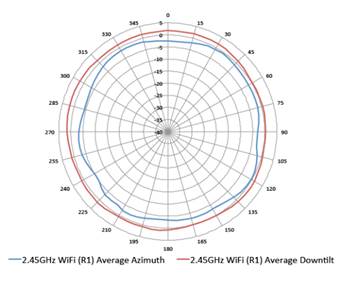
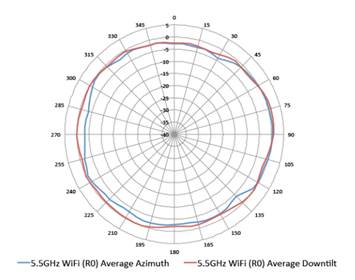
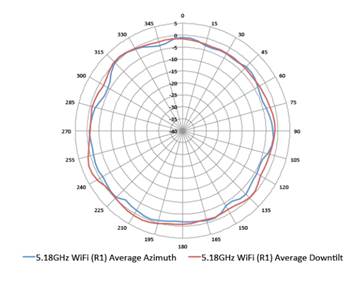
Antenna Pattern Plots | |
|
| |
|
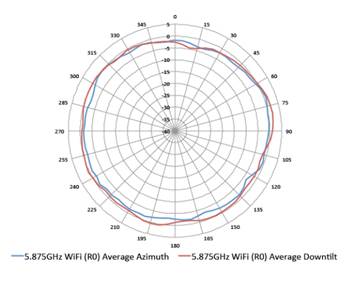
Horizontal planes (top view, AP facing forward) | |
|
Showing both azimuth (0 degrees) and 30 degrees downtilt patterns | |
|
|
|
|
|
|
|
2.45GHz Wi-Fi (dual-radio mode, radio 1) |
5.5GHz Wi-Fi (dual-radio mode, radio 0) |
|
|
|
|
|
|
|
5.18GHz Wi-Fi (dual-5GHz mode, radio 1) |
5.875GHz Wi-Fi (dual-5GHz mode, radio 0) |
|
|
|
|
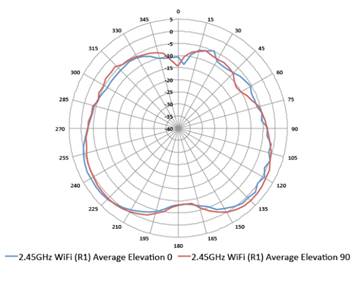
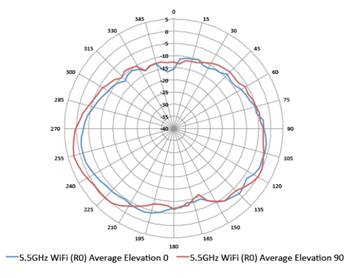
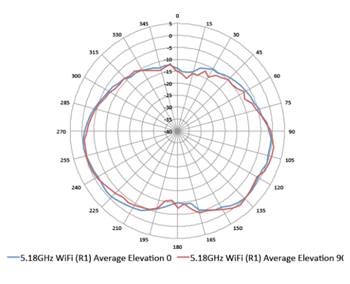
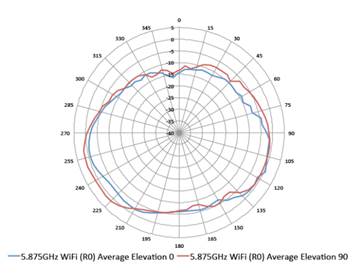
Elevation planes (side view, AP facing down) | |
|
Showing side view with AP rotated both 0 and 90 degrees | |
|
|
|
|
|
|
|
2.45GHz Wi-Fi (dual-radio mode, radio 1) |
5.5GHz Wi-Fi (dual-radio mode, radio 0) |
|
|
|
|
|
|
|
5.18GHz Wi-Fi (dual-5GHz mode, radio 1) |
5.875GHz Wi-Fi (dual-5GHz mode, radio 0) |
|
|
|
|
| |
|
WI-FI Radio Specifications
- The 2.4 GHz radio supports all 802.11ac rates as well (proprietary extension)
- Dual-radio mode: 5 GHz (Radio 0) and 2.4 GHz (Radio 1)
- Four spatial stream Single User (SU) MIMO for up to 1,733 Mbps wireless data rate to individual 4SS VHT80 or 2SS VHT160 client devices - Four spatial stream Multi User (MU) MIMO for up to 1,733 Mbps wireless data rate to up to four 1SS or two 2SS MU-MIMO capable client devices simultaneously - Peak datarate increases to 2,166 Mbps when using 1024-QAM modulation (proprietary extension)
- Four spatial stream Single User (SU) MIMO for up to 600 Mbps wireless data rate to individual 4SS HT40 client devices, and up to 800 Mbps to individual 4SS VHT40 devices (proprietary extension)
- 2.400 to 2.4835 GHz - 5.150 to 5.250 GHz3 - 5.250 to 5.350 GHz3 - 5.470 to 5.725 GHz4 - 5.725 to 5.850 GHz4
- 802.11b: Direct-sequence spread-spectrum (DSSS) - 802.11a/g/n/ac: Orthogonal frequency-division multiplexing (OFDM)
- 802.11b: BPSK, QPSK, CCK - 802.11a/g/n/ac: BPSK, QPSK, 16-QAM, 64-QAM, 256-QAM, 1024-QAM (proprietary extension)
- 2.4 GHz band: +24 dBm (18dBm per chain) 5 - 5 GHz band: +24 dBm (18 dBm per chain) 5 Notes: Conducted transmit power levels exclude antenna gain. For total (EIRP) transmit power, add antenna gain.
- 802.11b: 1, 2, 5.5, 11 - 802.11a/g: 6, 9, 12, 18, 24, 36, 48, 54 - 802.11n: 6.5 to 600 (MCS0 to MCS31) - 802.11ac: 6.5 to 1,733 (MCS0 to MCS9, NSS = 1 to 4 for VHT20/40/80, NSS = 1 to 2 for VHT160) - 802.11ac: 1,950 and 2,166 (MCS10 and MCS11, NSS = 1 to 4 for VHT20/40/80, NSS = 1 to 2 for VHT160) 6 - 802.11n high-throughput (HT) support: HT20/40 - 802.11ac very high throughput (VHT) support: VHT20/40/80/160 - 802.11n/ac packet aggregation: A-MPDU, A-MSDU |
|
Notes: 3 Not supported on radio 0 in dual-5 GHz mode 4 Not supported on radio 1 in dual-5 GHz mode 5 Reduced by 2 dB in dual-5 GHz mode 6 Proprietary extension; shown rates shown are for the highest NSS only; additional rates for lower NSS values are supported as well. |
|
|
|
Power Sources and Consumption
- The USB interface is disabled when using an 802.3at PoE power source - The USB interface and second Ethernet port (E1 if E0 is used, otherwise E0) are disabled, and both radios are restricted to 2x2 operation (AP in dual-radio mode) or 1x1 operation (AP in dual-5 GHz mode) when using an 802.3af PoE power source
- DC powered: 20.0W (AP in dual-radio mode), 22.8W (AP in dual-5 GHz mode) - PoE powered (802.3at): 21.9W (AP in dual-radio mode), 25.1W (AP in dual-5 GHz mode) - PoE powered (802.3af): 13.5W - All numbers above are without an external USB device connected. When sourcing the full 5W power budget to such a device, the incremental (worst-case) power consumption for the AP is up to 6W (DC) or 6.6W (PoE)
|
|
|
|
Mechanical
- 22.5 cm (W) x 22.4 cm (D) x 5.2 cm (H) - 8.9" (W) x 8.9" (D) x 2.0" (H) - 1.05 kg or 2.31 lbs
- 33.9 cm (W) x 29 cm (D) x 8.8 cm (H) - 13.3" (W) x 11.4" (D) x 3.5" (H) - 1.65 kg or 3.63 lbs |
|
|
|
Environmental
- Temperature: 0° C to +50° C (+32° F to +122° F) - Humidity: 5% to 93% non-condensing
- Temperature: -40° C to +70° C (-40° F to +158° F) |
|
|
|
Reliability
|
|
|
|
Certifications
|
|
Regulatory
For more country-specific regulatory information and approvals, please see your Aruba representative. |
|
|
|
Regulatory Model Numbers
|
|
|
Summary of Changes
|
Date |
Version History |
Action |
Description of Change |
|
15-Mar-2021 |
Version 10 |
Changed |
SKUs were added in Configuration Information section. |
|
08-Sep-2020 |
Version 9 |
Changed |
Configuration Information section was updated New SKUs were added. Obsolete SKUs were removed. |
|
09-Dec-2019 |
Version 8 |
Changed |
Standard Features section was updated. |
|
04-Nov-2019 |
Version 7 |
Changed |
Configuration Information section was updated New SKUs were added. |
|
07-Oct-2019 |
Version 6 |
Changed |
Standard Features and Configuration Information sections were updated New SKUs were added. |
|
04-Mar-2019 |
Version 5 |
Changed |
Configuration section was updated. |
|
01-Oct-2018 |
Version 4 |
Changed |
SKU descriptions updated. |
|
07-May-2018 |
Version 3 |
Added |
SKU added: Q9U25A |
|
18-Dec-2017 |
Version 2 |
Changed |
Minor changes made on Features and Benefits |
|
06-Nov-2017 |
Version 1 |
New |
New QuickSpecs |
Copyright
|
|
| ||||||||||||
|
|
|
© Copyright 2021 Hewlett Packard Enterprise Development LP. The information contained herein is subject to change without notice. The only warranties for Hewlett Packard Enterprise products and services are set forth in the express warranty statements accompanying such products and services. Nothing herein should be construed as constituting an additional warranty. Hewlett Packard Enterprise shall not be liable for technical or editorial errors or omissions contained herein.
To learn more, visit: http://www.hpe.com/networking
a00027233enw - 16090 - Worldwide - V10 - 15-March-2021 | ||||||||||||



