HPE Aruba 318 Series Access Points: технические характеристики и документация
В архивеOverview
|
Aruba 318 Series Access Points |
|
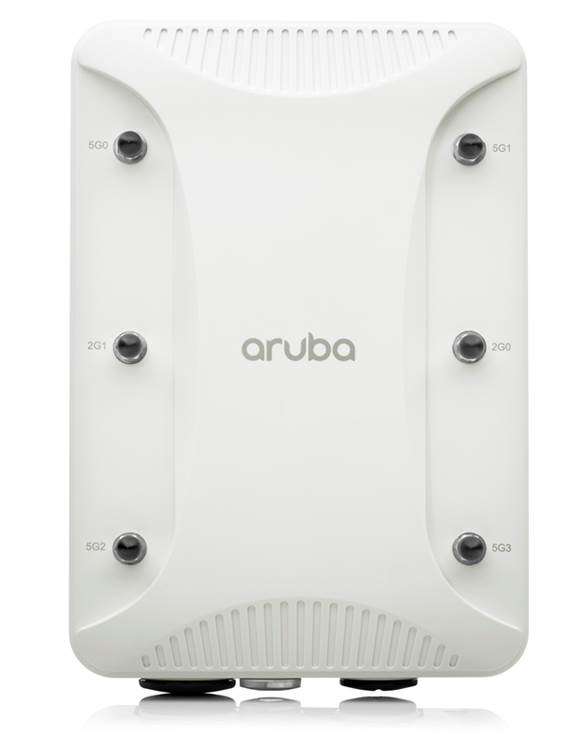
The ruggedized Aruba 318 Series access points deliver Wi-Fi 5 (802.11ac Wave 2) gigabit performance for client devices in harsh, weather-protected environments such as warehouses, industrial freezers or stadiums.
With a maximum concurrent data rate of 2 Gbps (5GHz: 1,733 Mbps and 2.4GHz: 300 Mbps), the 318 Series can quickly add capacity to existing or new wireless networks in temperature-sensitive, dust-ridden, or other extreme environments. The 318 Series also comes with multi-user MIMO (MU-MIMO), 4 spatial streams (4SS), and optional 160 MHz channel bandwidth (VHT160) for the highest performance and density applications. |
|
|
|
|
|
802.11ac Wave 2 for harsh, weather-protected environments |
|
|
Standard Features
|
Unique Benefits
- Support for stronger encryption and authentication is provided via the latest version of WPA for enterprise protected networks. - Enhanced Open offers seamless new protection for users connecting to open networks where each session is automatically encrypted to protect user passwords and data on guest networks.
- MPSK enables simpler passkey management for WPA2 devices - should the Wi-Fi password on one device or device type change, no additional changes are needed for other devices. Requires ClearPass Policy Manager.
- In Remote AP (RAP) and IAP-VPN deployments, the Aruba 318 Series can be used to establish a secure SSL/IPSec VPN tunnel to a Mobility Controller that is acting as a VPN concentrator.
- For enhanced device assurance, all Aruba APs have an installed TPM for secure storage of credentials and keys, and boot code.
- Controller-less (Instant) mode - For enhanced device assurance, all Aruba APs have an installed TPM for secure storage of credentials and keys, and boot code. - Mobility Controller mode - For optimized network performance, roaming and security, APs tunnel all traffic to a mobility controller for centrally managed traffic forwarding and segmentation, data encryption, and policy enforcement. - Other management options - Available management solutions include Aruba Central (cloud-managed) or Aruba AirWave - a multi-vendor on-premises management solution. For large installations across multiple sites, APs can be factory-shipped and can be activated with Zero Touch Provisioning through Aruba Central or AirWave. This reduces deployment time, centralizes configuration, and helps manage inventory. |
|
|
|
MU-MIMO aware client optimization The 318 Series includes Aruba's patented ClientMatch technology to eliminate sticky client issues while optimizing 802.11ac Wave 2 performance. These APs continuously gather session performance metrics to steer mobile devices to the best-available AP - even while users roam. With MU-MIMO awareness, ClientMatch can group MU-MIMO capable devices together to increase network capacity and efficiency. ClientMatch also participates in Aruba's AI-powered Mobility solution. |
|
|
|
IoT-ready Like all Aruba Wi-Fi 6 APs, the 318 Series includes an integrated Bluetooth Low Energy radio to simplify the deployment and management of location services, asset tracking services, security solutions and IoT sensors. This allows organizations to leverage the 318 Series as an IoT platform, which eliminates the need for an overlay infrastructure and additional IT resources. |
|
|
|
Simple and secure access To simplify policy enforcement, the Aruba 318 Series uses Aruba's policy enforcement firewall (PEF) feature to encapsulate all traffic from the AP to the Mobility Controller (or Gateway) for end-to-end encryption and inspection. Policies are applied based on user role, device type, applications, and location. This reduces the manual configuration of SSIDs, VLANs and ACLs. PEF also serves as the underlying technology for Aruba Dynamic Segmentation.. |
|
|
|
Zero Touch Provisioning APs can be factory-shipped and zero-touch provisioned through Aruba Central or AirWave using a cloud-based service to reduce deployment time, centralize configuration, and manage inventory. |
|
|
|
Advanced Cellular Coexistence (ACC) Minimizes interference from 3G/4G LTE cellular networks, distributed antenna systems (DAS), and commercial small cell or femtocell equipment. |
|
|
Hardened, industrial design Extends the temperature range capabilities of indoor access points for environments that lack heating and cooling. It also provides sealed connector interfaces to protect against dust and moisture. |
|
|
Configuration Information
|
BTO Models |
| |
|
Remarks |
Description |
SKU |
|
|
318 Unified Hardened Access Points |
|
|
|
Aruba AP-318 (EG) 802.11n/ac Dual 2x2:2/4x4:4 Radio 6xRPSMA Connectors Indoor Hardened AP |
JZ149A |
|
|
Aruba AP-318 (IL) 802.11n/ac Dual 2x2:2/4x4:4 Radio 6xRPSMA Connectors Indoor Hardened AP |
JZ150A |
|
|
Aruba AP-318 (JP) 802.11n/ac Dual 2x2:2/4x4:4 Radio 6xRPSMA Connectors Indoor Hardened AP |
JZ151A |
|
|
Aruba AP-318 (RW) 802.11n/ac Dual 2x2:2/4x4:4 Radio 6xRPSMA Connectors Indoor Hardened AP |
JZ152A |
|
|
Aruba AP-318 (US) 802.11n/ac Dual 2x2:2/4x4:4 Radio 6xRPSMA Connectors Indoor Hardened AP |
JZ153A |
|
|
318 Unified Hardened Access Points TAA |
|
|
|
Aruba AP-318 (EG) FIPS/TAA 802.11n/ac Dual 2x2:2/4x4:4 Radio 6xRPSMA Connectors Indoor Hardened AP |
JZ154A |
|
|
Aruba AP-318 (IL) FIPS/TAA 802.11n/ac Dual 2x2:2/4x4:4 Radio 6xRPSMA Connectors Indoor Hardened AP |
JZ155A |
|
|
Aruba AP-318 (JP) FIPS/TAA 802.11n/ac Dual 2x2:2/4x4:4 Radio 6xRPSMA Connectors Indoor Hardened AP |
JZ156A |
|
|
Aruba AP-318 (RW) FIPS/TAA 802.11n/ac Dual 2x2:2/4x4:4 Radio 6xRPSMA Connectors Indoor Hardened AP |
JZ157A |
|
|
Aruba AP-318 (US) FIPS/TAA 802.11n/ac Dual 2x2:2/4x4:4 Radio 6xRPSMA Connectors Indoor Hardened AP |
JZ158A |
|
Notes: |
OCA Only Model Selection Form - HPE Offering > Aruba > Access Points - Outdoor / Rugged: 318 Series Access Points |
|
|
| ||
|
Mounting Accessories |
| |
|
|
AP Mount Kits For 318 Series Std (Min 0 // max 1) User Selection (min 0 // max 1) |
|
|
|
AP-220-MNT-W1 Flat Surface Wall/Ceiling Black AP Basic Flat Surface Mount Kit |
JW046A |
|
|
AP-220-MNT-W1W Flat Surface Wall/Ceiling White AP Basic Flat Surface Mount Kit |
JW047A |
|
1 |
Aruba AP-OUT-MNT-V1A Outdoor AP Long Arm Pole/Wall Mounting Bracket |
R9H97A |
|
1, 2 |
Aruba AP-270-MNT-V2 Outdoor AP Short Arm Pole/Wall Mounting Bracket |
JW053A |
|
1 |
Aruba AP-270-MNT-H1 Outdoor AP Hanging or One-Way Tilt Pole/Wall Mounting Bracket |
JW054A |
|
1 |
Aruba AP-270-MNT-H2 Outdoor AP Flush Wall Mounting Bracket |
JW055A |
|
1 |
Aruba AP-270-MNT-H3 Outdoor AP Hanging or Dual-Tilt Pole/Wall Mounting Bracket |
R6W11A |
|
|
Configuration Rules |
|
|
Rule # |
Description |
SKU |
|
1 |
Add Qty 1 of JW056A if this AP Mount is selected |
|
|
2 |
This Mount Kit is not valid if the unit is operated with an SFP module |
|
|
Notes: |
AP-270-MNT-XX or AP-OUT-MNT-XX requires that AP-270-MNT-ADP (JW056A) be ordered. |
|
|
| ||
|
Transceivers |
| |
|
|
SFP |
|
|
|
SFP-LX Extended Temperature 1000BASE-LX SFP 1310nm LC Connector Pluggable GbE XCVR |
Q8N52A |
|
|
SFP-SX Extended Temperature 1000BASE-SX SFP 850nm LC Connector Pluggable GbE XCVR |
Q8N53A |
|
Notes: |
Add Qty 1 of Q8N54A if this XCVR is selected If this XCVR is selected, then the following Mount Kit is not compatible: JW053A - AP-270-MNT-V2 270 Series Mt Kit Q8N54A is a mandatory item if an SFP will be used. |
|
|
| ||
|
Power Options |
| |
|
Remarks |
Description |
SKU |
|
|
PoE Power Options For 318 Series Std (Min 0 // max 1) User Selection (min 0 // max 1) |
|
|
|
PD-9501-5GCO-AC 60W 802.3bt Smart Rate Outdoor Surge Protection Midspan Injector |
R7T40A |
|
|
PD-9501-5GCO-DC 60W 802.3bt Smart Rate Outdoor Surge Protection Midspan Injector |
R7T41A |
|
* |
AP-POE-ATSR 1-Port Smart Rate 802.3at 30W midspan injector |
R6P67A |
|
Notes: |
- *If this Power Supply is selected, bring in (Min 1 // Max 1) Localized power cord based on the Aruba Wireless Power Cord Table. - AP-318 requires 802.3at power - PD-9001GR-AC is an indoor grade device - If powered from a switch an injector is not needed - Power Cord for JW630A, R7T40A, R7T41A should be provided by installer - R7T40A and R7T41A do not include a power cord, power cord must be constructed by installer using the included power connector parts and assembled per the user guide by a certified installer |
|
|
|
Power Injector Mounts For 318 Std (Min 0 // max 1) User Selection (min 0 // max 1) |
|
|
|
Aruba PD-MOUNT-OD Outdoor PoE Midspan Injectors Pole/Mast Mount Kit |
JW620A |
|
Notes: |
This is optional but recommended for outdoor injectors |
|
|
| ||
|
Antennas | ||
|
|
5 GHz Antennas For 318 Std (Min 0 // max 1) User Selection (min 0 // max 1) |
|
|
* |
AP-ANT-1W 2.4-2.5GHz (4dBi)/4.9-5.875GHz (6dBi) Hi Gain Dual-band Omni-Dir Indoor Antenna |
JW009A |
|
* |
AP-ANT-13B 2.4-2.5GHz (2.3dBi)/4.9-5.9GHz (4.0dBi) Downtilt Smallest Omni-Dir Single Ant |
JW001A |
|
* |
AP-ANT-19 2.4/5G Dual Band Omni-Dir 3dBi/6dBi Indr/Otdr RPSMA Cnctr Ant w/36in Intgrtd Cable |
JW004A |
|
* |
AP-ANT-20W 2.4-2.5GHz (2dBi)/4.9-5.875GHz (2dBi) Compact Omni-Dir DMt Indr White Antenna |
JW011A |
|
** |
AP-ANT-22 Dual Band 2/4dBi Omni RPSMA Low Profile 2-pk Omni Antenna |
Q8N49A |
|
|
AP-ANT-40 Dual Band Downtilt Omni 4dBi 4 Elmt MIMO Ceiling Mount 4xRPSMA Pigtail Antenna |
JW017A |
|
|
AP-ANT-45 Dual Band 90x90deg 5dBi 4 Element MIMO 4xRPSMA Pigtail Antenna |
JW018A |
|
|
AP-ANT-48 Dual Band 60x60deg 8.5dBi 4 Element MIMO 4xRPSMA Pigtail Antenna |
JW019A |
|
|
ANT-3x3-5712 4.9-5.9GHz 12.0dBi 75x25deg +/- 45deg and V Pol 3 MIMO High Gain Dir Antenna |
JW033A |
|
|
ANT-4x4-5314 5.15-5.9GHz 14dBi 30x30deg Dual Pol MIMO Hi Gain Dir N-Type Outdoor Antenna |
JX988A |
|
Notes: |
- *Must select Qty 0 or Qty 4 - **Must select Qty 0 or Qty 2 - AP-ANT-1W, AP-ANT-20W and AP-ANT-22 are usually direct connect to the chassis - AP-ANT-40 ships with its mounting bracket - AP-ANT-45,-48 ship only with hardware for flush mount to a flat surface - AP-318 has 4x RPSMA female for 5 GHz |
|
|
|
2.4 GHz Antennas |
|
|
* |
AP-ANT-1W 2.4-2.5GHz (4dBi)/4.9-5.875GHz (6dBi) Hi Gain Dual-band Omni-Dir Indoor Antenna |
JW009A |
|
* |
AP-ANT-13B 2.4-2.5GHz (2.3dBi)/4.9-5.9GHz (4.0dBi) Downtilt Smallest Omni-Dir Single Ant |
JW001A |
|
|
AP-ANT-16 2.4-2.5Ghz (3.9dBi)/4.9-5.9GHz (4.7dBi) 3 Elmt MIMO Ant w/Downtilt Omni-Dir Antenna |
JW003A |
|
* |
AP-ANT-19 2.4/5G Dual Band Omni-Dir 3dBi/6dBi Indr/Otdr RPSMA Cnctr Ant w/36in Intgrtd Cable |
JW004A |
|
* |
AP-ANT-20W 2.4-2.5GHz (2dBi)/4.9-5.875GHz (2dBi) Compact Omni-Dir DMt Indr White Antenna |
JW011A |
|
|
AP-ANT-22 Dual Band 2/4dBi Omni RPSMA Low Profile 2-pk Omni Antenna |
Q8N49A |
|
|
AP-ANT-25A Dual Band 90x90deg 5dBi +/- 45 Pol 2 Element MIMO 2xRPSMA Pigtail Antenna |
JW012A |
|
|
Aruba AP-ANT-28a Dual Band 7dBi +/- 45 2 Element MIMO 2xRPSMA Pigtail Antenna |
S0A66A |
|
|
ANT-2x2-2314 2.4 GHz 14dBi 30x30deg Dual Pol MIMO High Gain Dir N-Type Outdoor Antenna |
JW024A |
|
Notes: |
- Must select Qty 0 or Qty 2 - AP-ANT-1W, AP-ANT-20W and AP-ANT-22 are usually direct connect to the chassis - AP-ANT-25A,-28 ship only with hardware for flush mount to a flat surface - AP-318 has 4x RPSMA female for 2.4 GHz |
|
|
|
Antenna Mount Kits |
|
|
Remarks |
Description |
SKU |
|
|
Aruba AP-ANT-MNT-3 AZ/EL Adjustable Antenna Pole/Wall Mount Kit |
JW020A |
|
Notes: |
Only compatible with JW017A |
|
|
|
Aruba AP-ANT-MNT-4 AZ/EL Adjustable Antenna Pole/Wall Mount Kit |
JW021A |
|
Notes: |
Only compatible with JW018A |
|
|
|
Aruba AP-ANT-MNT-5 AZ/EL Adjustable Antenna Pole/Wall Mount Kit |
JW022A |
|
Notes: |
Only compatible with JW019A
|
|
|
Notes: |
- AP-ANT-MNT-3 compatible with AP-ANT-25A and AP-ANT-28 - AP-ANT-MNT-4 compatible with AP-ANT-48 - AP-ANT-MNT-5 compatible with AP-ANT-45 |
|
|
| ||
|
Cables |
| |
|
|
RF Jumper Cables For 318 Series Std (Min 0 // max 1) User Selection (min 0 // max 1) |
|
|
|
AFC2DL60-00 Indoor AP RPSMAm to Nf 60cm Flexible Indoor Rated RF Cable |
JW066A |
|
|
AFCSJMTM-00 Indoor AP RPSMAm to Nm 60cm Flexible Indoor Rated RF Cable |
JW067A |
|
Notes: |
Only compatible with the following Antenna: JW024A, JX988A, JW033A. Not usually required Radio 0 (5 GHz) has 4 connectors Radio 1 (2.4 GHz) has 2 connectors No cables required for direct connect omnis or antennas with pigtails AFC2DL60-00 used to adapt from RPSMA to Nf for connection to longer Nm to Nm jumpers AFCSJMTM-00 used to adapt from RPSMA to Nm for connection to antennas with Nf connectors |
|
|
| ||
|
Accesories |
| |
|
|
Spare Items For 318 Series Std (Min 0 // max 99) User Selection (min 0 // max 99) |
|
|
|
Outdoor AP Covers and Glands 1-pk M25/5-pk M20 Cover/2-pk M16 Cover/5-pk M20 Gland/2-pk Ground Kit |
Q8N47A |
|
|
Outdoor AP Metric to Standard M20 to 1/2 inch NPT 5-pk Thread Adapter |
Q8N48A |
|
|
AP-270-MNT-ADP AP-228 to AP-270-MNT-XX Outdoor Mount Adapter |
JW056A |
|
* |
Outdoor SFP Weathertight Strain Relief Kit |
Q8N54A |
|
Notes: |
*This Accessory Kit cannot be used in conjunction with the following AP Mount Kit: JW053A - AP-270-MNT-V2 270 Series Mt Kit Spares of items that are shipped with the AP-318 chassis. |
|
|
| ||
|
Software |
| |
|
|
Central |
|
|
|
Cloud Services / Access Point Foundation Subscriptions |
|
|
2, 8 |
Aruba Central AP Foundation 1 year Subscription E-STU |
Q9Y58AAE |
|
2, 8 |
Aruba Central AP Foundation 3 year Subscription E-STU |
Q9Y59AAE |
|
2, 8 |
Aruba Central AP Foundation 5 year Subscription E-STU |
Q9Y60AAE |
|
2, 8 |
Aruba Central AP Foundation 7 year Subscription E-STU |
Q9Y61AAE |
|
2, 8 |
Aruba Central AP Foundation 10 year Subscription E-STU |
Q9Y62AAE |
|
|
Cloud Services / Access Point Advanced Subscriptions |
|
|
2, 8 |
Aruba Central AP Advanced 1yr Subscription E-STU |
Q9Y63AAE |
|
2, 8 |
Aruba Central AP Advanced 3yr Subscription E-STU |
Q9Y64AAE |
|
2, 8 |
Aruba Central AP Advanced 5yr Subscription E-STU |
Q9Y65AAE |
|
2, 8 |
HPE Aruba Networking Central AP Advanced 7 year Subscription E-STU |
Q9Y66AAE |
|
2, 8 |
Aruba Central AP Advanced 10yr Subscription E-STU |
Q9Y67AAE |
|
|
On-Prem Services / Access Point Foundation Subscriptions |
|
|
3, 8 |
HPE Aruba Networking Central on Prem AP Foundation 1 year Subscription E-STU |
R6U63AAE |
|
3, 8 |
HPE Aruba Networking Central on Prem AP Foundation 3 year Subscription E-STU |
R6U64AAE |
|
3, 8 |
Aruba Central On-Premises AP Foundation 5 year Subscription E-STU |
R6U65AAE |
|
3, 8 |
Aruba Central On-Premises AP Foundation 7 year Subscription E-STU |
R6U66AAE |
|
3, 8 |
Aruba Central On-Premises AP Foundation 10 year Subscription E-STU |
R6U67AAE |
|
|
FedRAMP Services / Access Point Advanced Subscriptions |
|
|
6, 8 |
Aruba Central AP Advanced 1yr Subscription Government E-STU |
R8K84AAE |
|
6, 8 |
Aruba Central AP Advanced 3yr Subscription Government E-STU |
R8K85AAE |
|
6, 8 |
Aruba Central AP Advanced 5yr Subscription Government E-STU |
R8K86AAE |
|
6, 8 |
Aruba Central AP Advanced 7yr SubscriptionGovernment E-STU |
R8K87AAE |
|
6, 8 |
Aruba Central AP Advanced 10yr Subscription Government E-STU |
R8K88AAE |
|
|
On-Prem Services / Access Point Foundation Government Subscriptions |
|
|
3 |
Aruba COP AP Foundation 1 year Government Subscription E-STU |
S1P56AAE |
|
3 |
Aruba COP AP Foundation 3 year Government Subscription E-STU |
S1P57AAE |
|
3 |
Aruba COP AP Foundation 5 year Government Subscription E-STU |
S1P58AAE |
|
3 |
Aruba COP AP Foundation 7 year Government Subscription E-STU |
S1P59AAE |
|
3 |
Aruba COP AP Foundation 10 year Government Subscription E-STU |
S1P60AAE |
|
|
Configuration Rules |
|
|
Rule # |
Description |
SKU |
|
2 |
Add the Central Cloud Skus to the Aruba Catalog as Standalone: Aruba > Network Management > Central > Cloud Services |
|
|
3 |
Add the Central On-Prem Skus to the Aruba Catalog as Standalone: Aruba > Network Management > Central > On-Prem Services |
|
|
6 |
Add the Central FedRAMP Service Skus to the Aruba Catalog as Standalone: Aruba > Network Management > Central > FedRAMP |
|
|
8 |
For OCA: When configuring the following AP 10-Pack, selection condition for this Subscription should be 0(default) or 10 |
|
|
|
Aruba Access Point-503 (RW) 10-Pack Dual Radio 2x2:2 802.11ax Wi-Fi 6 Campus Access Point |
S1E83A |
|
|
Aruba Access Point-503 (US) 10-Pack Dual Radio 2x2:2 802.11ax Wi-Fi 6 Campus Access Point |
S1E84A |
|
| ||
|
As-a-Service |
| |
|
|
Cloud Services / Access Point Foundation Subscriptions |
|
|
7 |
Aruba Central AP Foundation 1-year Subscription SaaS |
Q9Y58AAS |
|
7 |
Aruba Central AP Foundation 3-year Subscription SaaS |
Q9Y59AAS |
|
7 |
HPE Aruba Networking Central AP Foundation 5 year Subscription SaaS |
Q9Y60AAS |
|
7 |
HPE Aruba Networking Central AP Foundation 7 year Subscription SaaS |
Q9Y61AAS |
|
7 |
Aruba Central AP Foundation 10-year Subscription SaaS |
Q9Y62AAS |
|
|
Cloud Services / Access Point Advanced Subscriptions |
|
|
7 |
Aruba Central AP Advanced 1-year Subscription SaaS |
Q9Y63AAS |
|
7 |
Aruba Central AP Advanced 3-year Subscription SaaS |
Q9Y64AAS |
|
7 |
Aruba Central AP Advanced 5-year Subscription SaaS |
Q9Y65AAS |
|
7 |
Aruba Central AP Advanced 7-year Subscription SaaS |
Q9Y66AAS |
|
7 |
Aruba Central AP Advanced 10-year Subscription SaaS |
Q9Y67AAS |
|
|
Configuration Rules |
|
|
Rule# |
Description |
SKU |
|
7 |
For IRIS reference only. No action required for OCX and Clic |
|
|
| ||
Technical Specifications
| ||||||||||||||||||||||||||||||||||||||||||||||||||||||||||||||||||||||||||||||||||||
|
Notes: Maximum capability of the hardware provided (excluding antenna gain). Maximum transmit power is limited by local regulatory settings. | ||||||||||||||||||||||||||||||||||||||||||||||||||||||||||||||||||||||||||||||||||||
|
| ||||||||||||||||||||||||||||||||||||||||||||||||||||||||||||||||||||||||||||||||||||
|
Mechanical Dimensions/weight (unit, excluding mount accessories):
|
||||||||||||||||||||||||||||||||||||||||||||||||||||||||||||||||||||||||||||||||||||
|
| ||||||||||||||||||||||||||||||||||||||||||||||||||||||||||||||||||||||||||||||||||||
|
Power
|
||||||||||||||||||||||||||||||||||||||||||||||||||||||||||||||||||||||||||||||||||||
|
| ||||||||||||||||||||||||||||||||||||||||||||||||||||||||||||||||||||||||||||||||||||
|
Minimum Operating System Software
|
||||||||||||||||||||||||||||||||||||||||||||||||||||||||||||||||||||||||||||||||||||
|
| ||||||||||||||||||||||||||||||||||||||||||||||||||||||||||||||||||||||||||||||||||||
|
Aruba 318 Series Specifications
- Four RP-SMA connectors for external antenna operation
- Two RP-SMA connectors for external antenna operation at 2.4 GHz |
|
|
|
WI-FI Radio Specifications
2.400 to 2.4835 GHz 5.150 to 5.250 GHz 5.250 to 5.350 GHz 5.470 to 5.725 GHz 5.725 to 5.850 GHz
802.11b: Direct-sequence spread-spectrum (DSSS) 802.11a/g/n/ac: Orthogonal frequency-division multiplexing (OFDM)
802.11b: BPSK, QPSK, CCK 802.11a/g/n/ac: BPSK, QPSK, 16-QAM, 64-QAM, 256-QAM
2.4 GHz band: +22 dBm per chain, +25dBm aggregate (2x2) 5 GHz band: +22 dBm per chain, +28dBm aggregate (4x4) Notes: Conducted transmit power levels exclude antenna gain. For total (EIRP) transmit power, add antenna gain.
802.11b: 1, 2, 5.5, 11 802.11a/g: 6, 9, 12, 18, 24, 36, 48, 54 802.11n (2.4GHz): 6.5 to 300 (MCS0 to MCS15) 802.11n (5GHz): 6.5 to 600 (MCS0 to MCS31) 802.11ac: 6.5 to 1,733 (MCS0 to MCS9, NSS = 1 to 4 for VHT20/40/80, NSS = 1 to 2 for VHT160)
|
|
|
|
WI-FI antenna ports
Four RP-SMA connectors for external antenna operation
Two RP-SMA connectors for external antenna operation |
|
|
|
Other Interfaces
Auto-sensing link speed and MDI/MDX 802.3az Energy Efficient Ethernet (EEE)
Up to 4 dBm transmit power (class 2) and -91 dBm receive sensitivity
|
|
|
|
Mounting
AP-220-MNT-W1 are directly compatible 270 Series outdoor AP mounts (AP-270-MNT-V1, AP-270-MNT-V2, AP-270-MNT-H1, AP-270-MNT-H2) are compatible when the AP-270-MNT-ADP adapter is utilized |
|
|
|
Environmental
Temperature: -40° C to +60° C (-40° F to +140° F) Humidity: 5% to 95% non-condensing
Temperature: -40° C to +70° C (-40° F to +158° F)
IP55 |
|
|
|
Regulatory
For more country-specific regulatory information and approvals, please see your Aruba representative. |
|
|
|
Regulatory Model Numbers
|
|
|
|
Certifications
|
|
|
|
Warranty
|
|
|
Summary of Changes
|
Date |
Version History |
Action |
Description of Change |
|
16-Oct-2023 |
Version 12 |
Changed |
Configuration Information section was updated |
|
07-Aug-2023 |
Version 11 |
Changed |
Configuration Information section was updated. |
|
21-Nov-2022 |
Version 10 |
Changed |
Configuration Information section was updated. |
|
01-Aug-2022 |
Version 9 |
Changed |
Configuration Information section was updated. |
|
06-Dec-2021 |
Version 8 |
Changed |
SKUs were added in Configuration Information section. |
|
15-Mar-2021 |
Version 7 |
Changed |
SKUs were added in Configuration Information section. |
|
02-Nov-2020 |
Version 6 |
Changed |
Configuration Information section was updated. New SKUs were added. |
|
08-Sep-2020 |
Version 5 |
Changed |
Configuration section was updated. New SKUs were added. |
|
09-Dec-2019 |
Version 4 |
Changed |
Overview, Standard Features and Technical Specification sections were updated. |
|
04-Mar-2019 |
Version 3 |
Changed |
Configuration section was updated. |
|
18-Dec-2017 |
Version 2 |
Changed |
Minor changes made on Features and Benefits |
|
06-Nov-2017 |
Version 1 |
New |
New QuickSpecs. |
Copyright
|
|
| |||||
|
|
|
© Copyright 2023 Hewlett Packard Enterprise Development LP. The information contained herein is subject to change without notice. The only warranties for Hewlett Packard Enterprise products and services are set forth in the express warranty statements accompanying such products and services. Nothing herein should be construed as constituting an additional warranty. Hewlett Packard Enterprise shall not be liable for technical or editorial errors or omissions contained herein.
To learn more, visit: http://www.hpe.com/networking
a00027232enw - 16089 - Worldwide - V12 - 16-October-2023 |