HPE Aruba 310 Series Access Points: технические характеристики и документация
В архивеOverview
|
Aruba 310 Series Access Points |
|
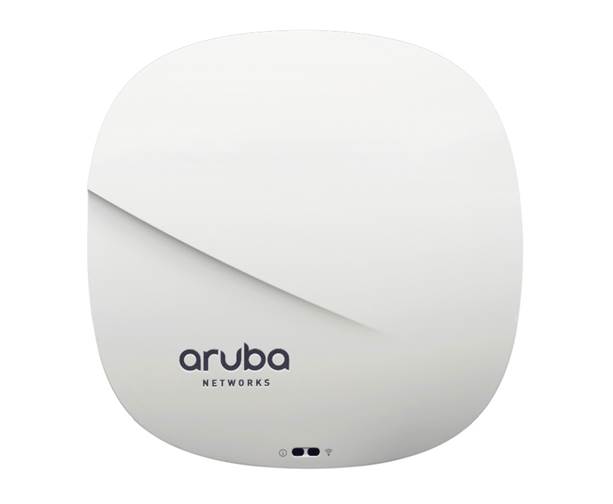
The Aruba 310 Series access points deliver high performance and superb user experience for mobile devices, Internet of Things (IoT) devices, and applications in dense office environments. Featuring the 4x4:4SS MU-MIMO capability, advanced Aruba ClientMatch radio management, and Aruba Beacon technologies, the 310 Series enables an all-wireless digital work environment in a cost-effective manner.
With a maximum concurrent data rate of 1,733 Mbps in the 5 GHz band and 300 Mbps in the 2.4 GHz band (for an aggregate peak data rate of 2.0 Gbps), the 310 Series.
APs can quickly add required capacities to your existing or new wireless networks. The mid-range 310 Series, with its single gigabit Ethernet uplink, is ideal for high device density environments, such as schools, retail branches, hotels and enterprise offices, where the organization is cost sensitive.
The high performance and high density 802.11ac 310 Series supports 160 MHz channel bandwidth (VHT160), multi-user MIMO (MU-MIMO) and 4 spatial streams (4SS). It provides simultaneous multicast data transmission to multiple devices, maximizing data throughput and improving network efficiency.
The 310 Series includes the enhanced ClientMatch technology that extends the client steering technology with MU-MIMO client awareness. It automatically identifies MU-MIMO capable mobile devices and steers those devices to the closest MU-MIMO capable Aruba access point. By grouping MU-MIMO capable mobile devices together, the network starts taking advantage of the simultaneous transmission to these devices, increasing its overall capacity. These dynamic roaming policies that are based on device types, help users achieve the best WLAN performance in a mixed device environment during the technology transition period. |
|
|
|
|
|
Aruba 310 Series Access Points |
|
|
Standard Features
|
IoT Platform Capabilities Like all Aruba Wi-Fi 6 APs, the 310 Series provides integrated Bluetooth capabilities to enable Meridian and IoT-based location services, asset tracking, and mobile engagement services. For expanded use cases, an IoT expansion radio can be added to support the Zigbee protocol. These features allow organizations to leverage the AP as an IoT platform, which eliminates the need for an overlay infrastructure and additional IT resources. |
|
|
|
Unique Benefits
- Supports up to 1,733Mbps in the 5GHz band (with 4SS/VHT80 or 2SS/VHT160 clients) and up to 300 Mbps in the 2.4 GHz band (with 2SS/HT40 clients).
- Enables location based services with BLE-enabled mobile devices receiving signals from multiple Aruba Beacons at the same time.
- Minimizes interference from 3G/4G cellular networks, distributed antenna systems, and commercial small cell/femtocell equipment.
- Supports priority handling and policy enforcement for unified communication apps, including Microsoft Skype for Business with encrypted videoconferencing, voice, chat, and desktop sharing
- Adaptive Radio Management (ARM) technology automatically assigns channel and power settings, provides airtime fairness, and ensures that APs stay clear of all sources of RF interference to deliver reliable, high-performance WLANs. - The Aruba 310 series APs can be configured to provide part-time or dedicated air monitoring for spectrum analysis and wireless intrusion protection, VPN tunnels to extend remote locations to corporate resources, and wireless mesh connections where Ethernet drops are not available.
- Supports software upgrade to enable additional 5 GHz spectrums when governments expand available frequencies.
- AppRF technology leverages deep packet inspection to classify and block, prioritize, or limit bandwidth for thousands of applications in a range of categories.
- Integrated wireless intrusion protection offers threat protection and mitigation, and eliminates the need for separate RF sensors and security appliances. - IP reputation and security services identify, classify, and block malicious files, URLs and IPs, providing comprehensive protection against advanced online threats. - Integrated Trusted Platform Module (TPM) for secure storage of credentials and keys.
- Enables the AP to continuously monitor and report its actual power consumption and optionally make autonomous decisions to disable certain capabilities - For the 310 Series Access Points, the IPM power-save feature applies when the unit is powered by an 802.3af PoE source. By default, the USB interface will be the first feature to turn off if AP power consumption will exceed the available power budget. In rare cases it may be necessary to take additional power saving measures, but in most cases, the 310 Series APs will operate in unrestricted mode |
|
|
|
Choose your Operating Mode Aruba 310 series APs offer a choice of operating modes to meet your unique management and deployment requirements.
For large installations across multiple sites, the Aruba Activate service significantly reduces deployment time by automating device provisioning, firmware upgrades, and inventory management. With Aruba Activate, Instant APs are factory- shipped to any site and configure themselves when powered up. |
|
|
|
310 Series Specifications
- 5GHz 802.11ac 4x4 MIMO (1,733 Mbps max rate) and 2.4 GHz 802.11n 2x2 MIMO (300 Mbps max rate) radios, with a total of four integrated omni-directional downtilt dual-band antennas |
|
|
|
WI-FI Antennas
- Combining the patterns of each of the antennas of the MIMO radios, the peak gain of the effective per-antenna pattern is 3.1dBi in 2.4 GHz and 3.8dBi in 5 GHz. |
|
|
|
Other Interfaces
- Auto-sensing link speed and MDI/MDX - 802.3az Energy Efficient Ethernet (EEE)
- Up to 4dBm transmit power (class 2) and -91dBm receive sensitivity - Integrated antenna with roughly 30 degrees downtilt and peak gain of 3.4dBi (AP-314/IAP-314) or 1.5dBi (AP-315/IAP-315)
|
|
|
|
Power Sources and Consumption
- Interface accepts 2.1/5.5-mm center-positive circular plug with 9.5-mm length
- Unrestricted functionality with 802.3at PoE - When using IPM, the AP may enter power-save mode with reduced functionality when powered by an 802.3af PoE source (see details on Intelligent Power Monitoring elsewhere in this datasheet) - Without IPM, the USB port is disabled and transmit power of the 2.4 GHz radio chains is reduced by 3dB to 15dBm max when the AP is powered by and 802.3af PoE source
- Excludes power consumed by external USB device (and internal overhead); this could add up to 6.3W (PoE) or 5.9W (DC) for a 5W/1A USB device
|
|
|
|
Mounting
|
|
|
|
Warranty
|
|
|
|
Minimum Operating System Software Versions
|
|
|
Configuration Information
|
Step 1: Select AP Model |
| |||||||||||||||||||||||||||||||||||||||||||||||||||||||||
|
Remarks |
Description |
SKU | ||||||||||||||||||||||||||||||||||||||||||||||||||||||||
|
|
314/315 Controller-Managed Access Points |
| ||||||||||||||||||||||||||||||||||||||||||||||||||||||||
|
|
Aruba AP-315 802.11n/ac 2x2:2/4x4:4 MU-MIMO Dual Radio Integrated Antenna AP |
JW797A | ||||||||||||||||||||||||||||||||||||||||||||||||||||||||
|
|
314/315 TAA Controller Based Access Points |
| ||||||||||||||||||||||||||||||||||||||||||||||||||||||||
|
|
Aruba AP-315 TAA-compliant 802.11n/ac Dual 2x2:2/4x4:4 MU-MIMO Dual Radio Integrated Antenna AP |
JW798A | ||||||||||||||||||||||||||||||||||||||||||||||||||||||||
|
|
314/315 Instant Access Points |
| ||||||||||||||||||||||||||||||||||||||||||||||||||||||||
|
|
Aruba Instant IAP-315 (RW) 802.11n/ac Dual 2x2:2/4x4:4 MU-MIMO Radio Integrated Antenna AP |
JW811A | ||||||||||||||||||||||||||||||||||||||||||||||||||||||||
|
|
Aruba Instant IAP-315 (US) 802.11n/ac Dual 2x2:2/4x4:4 MU-MIMO Radio Integrated Antenna AP |
JW813A | ||||||||||||||||||||||||||||||||||||||||||||||||||||||||
|
|
Aruba Instant IAP-315 (JP) 802.11n/ac Dual 2x2:2/4x4:4 MU-MIMO Radio Integrated Antenna AP |
JW810A | ||||||||||||||||||||||||||||||||||||||||||||||||||||||||
|
|
314/315 TAA Instant Access Points |
| ||||||||||||||||||||||||||||||||||||||||||||||||||||||||
|
|
Aruba Instant IAP-315 (RW) TAA 802.11n/ac Dual 2x2:2/4x4:4 MU-MIMO Radio Integrated Ant AP |
JW812A | ||||||||||||||||||||||||||||||||||||||||||||||||||||||||
|
|
Aruba Instant IAP-315 (US) TAA 802.11n/ac Dual 2x2:2/4x4:4 MU-MIMO Radio Integrated Ant AP |
JW814A | ||||||||||||||||||||||||||||||||||||||||||||||||||||||||
|
Notes: |
All models ship with ceiling rail adapters (for flat rails) in the box. Add PoE injector or AC adapter Add antenas if it is not integrated |
| ||||||||||||||||||||||||||||||||||||||||||||||||||||||||
|
| ||||||||||||||||||||||||||||||||||||||||||||||||||||||||||
|
Step 2: Add Powering Accessories (Optional) |
| |||||||||||||||||||||||||||||||||||||||||||||||||||||||||
|
Notes: |
If this Power Supply is selected, bring in (Min 1 // Max 1) Localized power cord based on the Aruba Localization Menu. Most devices are PoE powered from switch so these are optional |
| ||||||||||||||||||||||||||||||||||||||||||||||||||||||||
|
|
Compatible with the 314/315 AP |
| ||||||||||||||||||||||||||||||||||||||||||||||||||||||||
|
|
AP-POE-ATSR 1-Port Smart Rate 802.3at 30W midspan injector |
R6P67A | ||||||||||||||||||||||||||||||||||||||||||||||||||||||||
|
|
AP-POE-AFGE 1-Port GbE 802.3af 15.4W midspan injector |
R6P68A | ||||||||||||||||||||||||||||||||||||||||||||||||||||||||
|
|
AP-AC2-12B 12V/48W AC/DC desktop style power adapter with 2.1/5.5mm connector |
R3K00A | ||||||||||||||||||||||||||||||||||||||||||||||||||||||||
|
|
Add 3-prong AC power cord for injector or AC adapter |
| ||||||||||||||||||||||||||||||||||||||||||||||||||||||||
|
Remarks |
Description |
SKU | ||||||||||||||||||||||||||||||||||||||||||||||||||||||||
|
|
PC-AC-ARG AC Power Cord (Argentina) 250V/10A 1.8m C13 to IRAM 2073 |
JW113A | ||||||||||||||||||||||||||||||||||||||||||||||||||||||||
|
|
PC-AC-AUS AC Power Cord (Australia) 250V/10A 1.8m C13 to AS3112 |
JW114A | ||||||||||||||||||||||||||||||||||||||||||||||||||||||||
|
|
PC-AC-BR AC Power Cord (Brazil) 250V/10A 1.8m C13 to NBR 14136 |
JW115A | ||||||||||||||||||||||||||||||||||||||||||||||||||||||||
|
|
PC-AC-CHN AC Power Cord (China) 250V/10A 1.8m C13 to GB2099 |
JW116A | ||||||||||||||||||||||||||||||||||||||||||||||||||||||||
|
|
PC-AC-DEN AC Power Cord (Denmark) 250V/10A 1.8m C13 to AFSNIT 107-2-D1 |
JW117A | ||||||||||||||||||||||||||||||||||||||||||||||||||||||||
|
|
PC-AC-EC AC Power Cord (Europe) 250V/10A 1.8m C13 to CEE7/7 |
JW118A | ||||||||||||||||||||||||||||||||||||||||||||||||||||||||
|
|
PC-AC-IN AC Power Cord (India) 250V/6A 1.8m C13 to IS1293 |
JW119A | ||||||||||||||||||||||||||||||||||||||||||||||||||||||||
|
|
PC-AC-IL AC Power Cord (Israel) 250V/10A 1.8m C13 to SI32 |
JW120A | ||||||||||||||||||||||||||||||||||||||||||||||||||||||||
|
|
PC-AC-IT AC Power Cord (Italy) 250V/10A 1.8m C13 to CEI 23-50 |
JW121A | ||||||||||||||||||||||||||||||||||||||||||||||||||||||||
|
|
PC-AC-JPN AC Power Cord (Japan) 125V/12A 1.8m C13 to JISC 8303 |
JW122A | ||||||||||||||||||||||||||||||||||||||||||||||||||||||||
|
|
PC-AC-KOR AC Power Cord (Korea) 250V/7A 1.8m C13 to KSC 8305 |
JW123A | ||||||||||||||||||||||||||||||||||||||||||||||||||||||||
|
|
PC-AC-NA AC Power Cord (North America) 125V/10A 1.8m C13 to NEMA 5-15P |
JW124A | ||||||||||||||||||||||||||||||||||||||||||||||||||||||||
|
|
PC-AC-SWI AC Power Cord (Switzerland) 220V/10A 1.8m C13 to SEV 1011 |
JW125A | ||||||||||||||||||||||||||||||||||||||||||||||||||||||||
|
|
PC-AC-TW AC Power Cord (Taiwan) 125V/7A 1.8m C13 to CNS 10917 |
JW126A | ||||||||||||||||||||||||||||||||||||||||||||||||||||||||
|
|
PC-AC-UK AC Power Cord (United Kingdom) 250V/10A 1.8m C13 to BS1363 |
JW127A | ||||||||||||||||||||||||||||||||||||||||||||||||||||||||
|
|
PC-AC-ZA AC Power Cord (South Africa) 250V/10A 1.8m C13 to SANS 164-1 |
JW128A | ||||||||||||||||||||||||||||||||||||||||||||||||||||||||
|
| ||||||||||||||||||||||||||||||||||||||||||||||||||||||||||
|
Step 3: Add Mount Accessories (Optional) | ||||||||||||||||||||||||||||||||||||||||||||||||||||||||||
|
Notes: |
Unit ships with basic suspended ceiling rail clips. |
| ||||||||||||||||||||||||||||||||||||||||||||||||||||||||
|
|
Compatible with the 314, 315 AP |
| ||||||||||||||||||||||||||||||||||||||||||||||||||||||||
|
|
AP-220-MNT-C2 2x Ceiling Grid Rail Adapter for Interlude and Silhouette Mt Kit |
JW045A | ||||||||||||||||||||||||||||||||||||||||||||||||||||||||
|
|
AP-MNT-CM1 Industrial Grade Indoor Access Point Metal Suspended Ceiling Rail Mount Kit |
JX961A | ||||||||||||||||||||||||||||||||||||||||||||||||||||||||
|
|
AP-220-MNT-W1 Flat Surface Wall/Ceiling Black AP Basic Flat Surface Mount Kit |
JW046A | ||||||||||||||||||||||||||||||||||||||||||||||||||||||||
|
|
AP-220-MNT-W1W Flat Surface Wall/Ceiling White AP Basic Flat Surface Mount Kit |
JW047A | ||||||||||||||||||||||||||||||||||||||||||||||||||||||||
|
|
AP-MNT-W4 White Low Profile Basic AP Flat Surface Mount Kit |
Q9U25A | ||||||||||||||||||||||||||||||||||||||||||||||||||||||||
|
| ||||||||||||||||||||||||||||||||||||||||||||||||||||||||||
|
Step 4: Select Antennas (AP-314 Only) | ||||||||||||||||||||||||||||||||||||||||||||||||||||||||||
| ||||||||||||||||||||||||||||||||||||||||||||||||||||||||||
|
Notes: |
AP-ANT-1W, and AP-ANT-20W are usually direct connect to the chassis AP-ANT-45,AP-ANT-48 ship with hardware for flush mount to a flat surface AP-314 has 4x RPSMA female, concurrent dual-band connections |
| ||||||||||||||||||||||||||||||||||||||||||||||||||||||||
|
| ||||||||||||||||||||||||||||||||||||||||||||||||||||||||||
|
Step 5: Add Antenna Mount Kit (Optional) | ||||||||||||||||||||||||||||||||||||||||||||||||||||||||||
|
Remarks |
Description |
SKU | ||||||||||||||||||||||||||||||||||||||||||||||||||||||||
|
|
Aruba AP-ANT-MNT-4 AZ/EL Adjustable Antenna Pole/Wall Mount Kit |
JW021A | ||||||||||||||||||||||||||||||||||||||||||||||||||||||||
|
Notes: |
Compatible with antenna AP-ANT-48 |
| ||||||||||||||||||||||||||||||||||||||||||||||||||||||||
|
|
Aruba AP-ANT-MNT-5 AZ/EL Adjustable Antenna Pole/Wall Mount Kit |
JW022A | ||||||||||||||||||||||||||||||||||||||||||||||||||||||||
|
Notes: |
Compatible with antenna AP-ANT-45 |
| ||||||||||||||||||||||||||||||||||||||||||||||||||||||||
|
| ||||||||||||||||||||||||||||||||||||||||||||||||||||||||||
|
Step 6: Add other (Optional) | ||||||||||||||||||||||||||||||||||||||||||||||||||||||||||
|
|
Aruba AP-USB-ZB External USB based Dongle with Zigbee and BLE for AP |
R2X45A | ||||||||||||||||||||||||||||||||||||||||||||||||||||||||
|
|
Aruba AP-USB-ZB 10-pk External USB based Dongle with Zigbee and BLE for AP |
R2Y09A | ||||||||||||||||||||||||||||||||||||||||||||||||||||||||
|
|
Aruba AP-USB-ZB 50-pk External USB based Dongle with Zigbee and BLE for AP |
R2Y10A | ||||||||||||||||||||||||||||||||||||||||||||||||||||||||
|
| ||||||||||||||||||||||||||||||||||||||||||||||||||||||||||
|
Software (Optional) | ||
|
Remarks |
Description |
SKU |
|
|
Central |
|
|
|
Cloud Services / Access Point Foundation Subscriptions |
|
|
2, 8 |
Aruba Central AP Foundation 1 year Subscription E-STU |
Q9Y58AAE |
|
2, 8 |
Aruba Central AP Foundation 3 year Subscription E-STU |
Q9Y59AAE |
|
2, 8 |
Aruba Central AP Foundation 5 year Subscription E-STU |
Q9Y60AAE |
|
2, 8 |
Aruba Central AP Foundation 7 year Subscription E-STU |
Q9Y61AAE |
|
2, 8 |
Aruba Central AP Foundation 10 year Subscription E-STU |
Q9Y62AAE |
|
|
Cloud Services / Access Point Advanced Subscriptions |
|
|
2, 8 |
Aruba Central AP Advanced 1yr Subscription E-STU |
Q9Y63AAE |
|
2, 8 |
Aruba Central AP Advanced 3yr Subscription E-STU |
Q9Y64AAE |
|
2, 8 |
Aruba Central AP Advanced 5yr Subscription E-STU |
Q9Y65AAE |
|
2, 8 |
Aruba Central AP Advanced 7yr Subscription E-STU |
Q9Y66AAE |
|
2, 8 |
Aruba Central AP Advanced 10yr Subscription E-STU |
Q9Y67AAE |
|
|
On-Prem Services / Access Point Foundation Subscriptions |
|
|
3, 8 |
Aruba Central On-Premises AP Foundation 1 year Subscription E-STU |
R6U63AAE |
|
3, 8 |
Aruba Central On-Premises AP Foundation 3 year Subscription E-STU |
R6U64AAE |
|
3, 8 |
Aruba Central On-Premises AP Foundation 5 year Subscription E-STU |
R6U65AAE |
|
3, 8 |
Aruba Central On-Premises AP Foundation 7 year Subscription E-STU |
R6U66AAE |
|
3, 8 |
Aruba Central On-Premises AP Foundation 10 year Subscription E-STU |
R6U67AAE |
|
|
On-Prem Services / Access Point Foundation Subscriptions |
|
|
3, 8 |
Aruba Central On-Premises AP Foundation 1 year Subscription E-STU |
R6U63AAE |
|
3, 8 |
Aruba Central On-Premises AP Foundation 3 year Subscription E-STU |
R6U64AAE |
|
3, 8 |
Aruba Central On-Premises AP Foundation 5 year Subscription E-STU |
R6U65AAE |
|
3, 8 |
Aruba Central On-Premises AP Foundation 7 year Subscription E-STU |
R6U66AAE |
|
3, 8 |
Aruba Central On-Premises AP Foundation 10 year Subscription E-STU |
R6U67AAE |
|
|
FedRAMP Services / Access Point Advanced Subscriptions |
|
|
6, 8 |
Aruba Central AP Advanced 1yr Subscription Government E-STU |
R8K84AAE |
|
6, 8 |
Aruba Central AP Advanced 3yr Subscription Government E-STU |
R8K85AAE |
|
6, 8 |
Aruba Central AP Advanced 5yr Subscription Government E-STU |
R8K86AAE |
|
6, 8 |
Aruba Central AP Advanced 7yr SubscriptionGovernment E-STU |
R8K87AAE |
|
6, 8 |
Aruba Central AP Advanced 10yr Subscription Government E-STU |
R8K88AAE |
|
|
Configuration Rules |
|
|
Rule# |
Description |
SKU |
|
2 |
Add the Central Cloud Skus to the Aruba Catalog as Standalone: Aruba > Network Management > Central > Cloud Services |
|
|
3 |
Add the Central On-Prem Skus to the Aruba Catalog as Standalone: |
|
|
6 |
Add the Central FedRAMP Service Skus to the Aruba Catalog as Standalone: |
|
|
8 |
For OCA: When configuring the following AP 10-Pack, selection condition for this Subscription should be 0(default) or 10 |
|
|
|
Aruba Access Point-503 (RW) 10-Pack Dual Radio 2x2:2 802.11ax Wi-Fi 6 Campus Access Point |
S1E83A |
|
|
Aruba Access Point-503 (US) 10-Pack Dual Radio 2x2:2 802.11ax Wi-Fi 6 Campus Access Point |
S1E84A |
|
| ||
|
As-a-Service |
| |
|
|
Central |
|
|
|
Cloud Services / Access Point Foundation Subscriptions |
|
|
7 |
Aruba Central AP Foundation 1-year Subscription SaaS |
Q9Y58AAS |
|
7 |
Aruba Central AP Foundation 3-year Subscription SaaS |
Q9Y59AAS |
|
7 |
Aruba Central AP Foundation 5-year Subscription SaaS |
Q9Y60AAS |
|
7 |
Aruba Central AP Foundation 7-year Subscription SaaS |
Q9Y61AAS |
|
7 |
Aruba Central AP Foundation 10-year Subscription SaaS |
Q9Y62AAS |
|
|
Cloud Services / Access Point Advanced Subscriptions |
|
|
7 |
Aruba Central AP Advanced 1-year Subscription SaaS |
Q9Y63AAS |
|
7 |
Aruba Central AP Advanced 3-year Subscription SaaS |
Q9Y64AAS |
|
7 |
Aruba Central AP Advanced 5-year Subscription SaaS |
Q9Y65AAS |
|
7 |
Aruba Central AP Advanced 7-year Subscription SaaS |
Q9Y66AAS |
|
7 |
Aruba Central AP Advanced 10-year Subscription SaaS |
Q9Y67AAS |
|
|
Configuration Rules |
|
|
Rule# |
Description |
SKU |
|
7 |
For IRIS reference only. No action required for OCX and Clic |
|
|
| ||
Technical Specifications
| |||||||||||||||||||||||||||||||||||||||||||||||||||||||||||||||||||||||||||||||||||||||||||||||||||||||||
|
| |||||||||||||||||||||||||||||||||||||||||||||||||||||||||||||||||||||||||||||||||||||||||||||||||||||||||
|
Notes: Maximum capability of the hardware provided (excluding antenna gain). Maximum transmit power is limited by local regulatory settings. | |||||||||||||||||||||||||||||||||||||||||||||||||||||||||||||||||||||||||||||||||||||||||||||||||||||||||
|
| |||||||||||||||||||||||||||||||||||||||||||||||||||||||||||||||||||||||||||||||||||||||||||||||||||||||||
|
WI-FI Radio Specifications
- 2.400 to 2.4835 GHz - 5.150 to 5.250 GHz - 5.250 to 5.350 GHz - 5.470 to 5.725 GHz - 5.725 to 5.850 GHz
- 802.11b: Direct-sequence spread-spectrum (DSSS) - 802.11a/g/n/ac: Orthogonal frequency-division multiplexing (OFDM)
- 802.11b: BPSK, QPSK, CCK - 802.11a/g/n/ac: BPSK, QPSK, 16-QAM, 64-QAM, 256-QAM
- 2.4 GHz band: +18 dBm per chain,+21dBm aggregate (2x2) - 5 GHz band: +18 dBm per chain, +24dBm aggregate (4x4 Notes: Conducted transmit power levels exclude antenna gain. For total (EIRP) transmit power, add antenna gain.
- 802.11b: 1, 2, 5.5, 11 - 802.11a/g: 6, 9, 12, 18, 24, 36, 48, 54 - 802.11n (5GHz): 6.5 to 600 (MCS0 to MCS31) - 802.11n (2.45GHz): 6.5 to 300 (MCS0 to MCS15) - 802.11ac: 6.5 to 1,733 (MCS0 to MCS9, NSS = 1 to 4 for VHT20/40/80, NSS = 1 to 2 for VHT160)
|
|
|
|
Mechanical
- 182mm (W) x 180mm (D) x 48mm (H) - 650g/23oz
- 223mm (W) x 218mm (D) x 55mm (H) - 850g/30oz |
|
|
|
Environmental
- Temperature: 0° C to +50° C (+32° F to +122° F) - Humidity: 5% to 95% non-condensing
- Temperature: -40° C to +70° C (-40° F to +158° F) |
|
|
|
Regulatory
For more country-specific regulatory information and approvals, please see your Aruba representative. |
|
|
|
Reliability
|
|
|
|
Regulatory Model Numbers
|
|
|
|
Certifications
|
|
|
Summary of Changes
|
Date |
Version History |
Action |
Description of Change |
|
07-Aug-2023 |
Version 16 |
Changed |
Configuration Information section was updated. |
|
15-Mar-2021 |
Version 15 |
Changed |
Central Software SKUs were added in Configuration Information section. |
|
08-Sep-2020 |
Version 14 |
Changed |
Configuration Information section was updated. New SKUs were added. |
|
09-Dec-2019 |
Version 13 |
Changed |
Overview section was updated. |
|
04-Nov-2019 |
Version 12 |
Changed |
Configuration Information section was updated. New SKUs were added. |
|
07-Oct-2019 |
Version 11 |
Changed |
Overview, Standard Features and Configuration Information sections were updated. New SKUs were added. |
|
15-Apr-2019 |
Version 10 |
Changed |
Standard Features section was updated. |
|
04-Mar-2019 |
Version 9 |
Changed |
Configuration section was updated. |
|
01-Oct-2018 |
Version 8 |
Changed |
SKU descriptions updated. |
|
04-Jun-2018 |
Version 7 |
Added |
SKU added: R0G64A |
|
07-May-2018 |
Version 6 |
Added |
SKU added: Q9U25A |
|
18-Dec-2017 |
Version 5 |
Changed |
Minor changes made on Features and Benefits |
|
23-Oct-2017 |
Version 4 |
Changed |
Updates made on Features and Benefits |
|
06-Mar-2017 |
Version 3 |
Changed |
Updates made on Configuration section |
|
13-Feb-2017 |
Version 2 |
Changed |
Updates made on Configuration section |
|
01-Nov-2016 |
Version 1 |
New |
New QuickSpecs |
Copyright
|
|
| |||||
|
|
|
© Copyright 2023 Hewlett Packard Enterprise Development LP. The information contained herein is subject to change without notice. The only warranties for Hewlett Packard Enterprise products and services are set forth in the express warranty statements accompanying such products and services. Nothing herein should be construed as constituting an additional warranty. Hewlett Packard Enterprise shall not be liable for technical or editorial errors or omissions contained herein.
To learn more, visit: http://www.hpe.com/networking
c05272671 - 15692 - Worldwide - V16 - 07-August-2023 |