




























HPE Aruba 228 Series Access Points: технические характеристики и документация
В архивеOverview
|
Aruba 228 Series Access Points |
|
802.11ac for harsh, weather-protected areas |
|
|
|
|
|
|
|
Product overview |
|
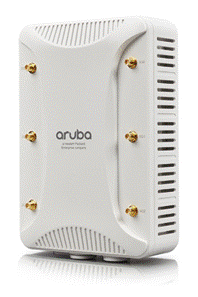
Rugged Aruba 228 wireless APs deliver gigabit Wi-Fi performance to 802.11ac mobile devices in harsh, weather-protected environments such as warehouses, industrial freezers or enclosures in extreme environments such as stadiums. With a maximum data rate of 1.3 Gbps in the 5-GHz band and 600 Mbps in the 2.4-GHz band, Aruba 228 APs are three-times faster than 802.11n APs and provide performance similar to a wired connection. The 228 APs include ClientMatch technology, which eliminates sticky clients by continuously gathering session performance metrics from mobile devices. This information is then used to steer each mobile device to the best AP and radio on the WLAN. Proactive and deterministic, ClientMatch dynamically optimizes Wi-Fi client performance as users roam and RF conditions change. If a mobile device moves out of range of an AP or RF interference impedes performance, ClientMatch automatically steers it to a better AP. With ClientMatch, 228 APs load web pages faster, deliver video streams with improved quality and support high densities of mobile devices. An 802.11ac network without ClientMatch performs no different than an 802.11n WLAN. The rugged 228 APs additionally support priority handling and policy enforcement for individual Microsoft Lync media on the same device, including encrypted videoconferencing, voice, chat and desktop sharing. |
|
|
|
Features and Benefits |
|
|
|
Unique Benefits
- Extends temperature range for indoor environments that lack heating and cooling - Sealed connector interfaces to lock out dust and moisture - Connectorized antenna ports support high gain large public venue antennas - Designed for enhanced physical security.
- EtherChannel link aggregation on two Gigabit Ethernet ports provides 1.9 Gbps throughput.
- 802.11ac transmit beam-forming to enhance signal, throughput and multi stream operation - Supports 1.3 Gbps rates in the 5 GHz band for 802.11ac clients - Supports up to 600 Mbps for TurboQAM-enabled mobile devices operating in the 2.4 GHz band
- Integrated Adaptive Radio Management technology manages the 2.4-GHz and 5-GHz radio bands and ensures that APs stay clear of RF interference.
- Capable of part-time or dedicated air monitoring, the spectrum analyzer remotely scans the 2.4-GHz and
- Wireless mesh connections are convenient where Ethernet drops are not available.
- Integrated wireless intrusion protection offers threat protection and mitigation and eliminates the need for separate RF sensors and security appliances. - With an OpenDNS service subscription, Aruba Instant APs delivers integrated web filtering, malware and botnet protection to every device connected to the WLAN. - Encrypted IPsec VPN tunnels securely connect remote users to corporate network resources. - Integrated Trusted Platform Module (TPM) for secure storage of credentials and keys. - SecureJack-capable for secure tunneling of wired Ethernet traffic Choose your Operating Mode The 228 APs offer a choice of operating modes to meet your unique management and deployment requirements.
For large installations across multiple sites, the Aruba Activate service significantly reduces deployment time by automating device provisioning, firmware upgrades, and inventory management. With Aruba Activate, Instant APs are factory-shipped to any site and configure themselves when powered up. If WLAN and network requirements change, a built-in migration path allows 228 Instant APs to become part of a WLAN that is centrally managed by a Mobility Controller. AP 228 Series Specifications
Wireless Radio Specifications
- In addition to 802.11n data rates, the 2.4-GHz radio supports 802.11ac data rates using 256-QAM modulation. This gives TurboQAM-enabled clients a 33% boost above the maximum supported data rate.
- 2.4000 GHz to 2.4835 GHz - 5.150 GHz to 5.250 GHz - 5.250 GHz to 5.350 GHz - 5.470 GHz to 5.725 GHz - 5.725 GHz to 5.850 GHz
- 802.11b: Direct-sequence spread-spectrum (DSSS) - 802.11a/g/n/ac: Orthogonal frequency-division multiplexing (OFDM) - 802.11n/ac: 3x3 MIMO with up to three spatial streams
- 802.11b: BPSK, QPSK, CCK - 802.11a/g/n: BPSK, QPSK, 16-QAM, 64-QAM - 802.11ac: BPSK, QPSK, 16-QAM, 64-QAM, 256-QAM
- 2.4-GHz band: +28 dBm (23 dBm per chain) - 5-GHz bands: +28 dBm (23 dBm per chain)
- 802.11b: 1, 2, 5.5, 11 - 802.11a/g: 6, 9, 12, 18, 24, 36, 48, 54 - 802.11n: 6.5 to 450 (MCS0 to MCS23) - 802.11ac: 6.5 to 1,300 (MCS0 to MCS9, NSS = 1 to 3)
Power
Antennas
Other Interfaces
- Auto-sensing link speed and MDI/MDX - Load balancing support to achieve platform throughput greater than 1 Gbps - PoE-PD: 802.3at PoE+
Mounting
- AP-130-MNT or AP-220-MNT-W1 are directly compatible - 270 Series outdoor AP mounts (AP-270-MNT-V1, AP-270-MNT-V2, AP-270-MNT-H1, AP-270-MNT-H2) are compatible when the AP-270-MNT-ADP adapter is utilized Mechanical
- 222 mm (L) x 150 mm (W) x 75 mm (H), 8.5” (L) x 6” (W) x 2.5” (H) - 1.225 kg/2.700 lbs Environmental
- Temperature: -40° C to +60° C (-40° F to +140° F) - Humidity: 5% to 95% non-condensing - Storage and transportation: - Temperature: -40° C to +70° C (-40° F to +158° F) - Operating Altitude: 3,000 m Regulatory
For more country-specific regulatory information and approvals, please see your Aruba representative Regulatory Model Numbers
Certifications
Warranty
Minimum software Versions
|
|
|
Configuration
|
Ordering Guide |
|
|
|
|
|
Step 1: Select AP Model |
|
|
Description |
Part Number |
|
Controller-managed Access Points |
|
|
Aruba AP-228 802.11n/ac Dual 3x3:3 Radio 6xRPSMA Connectors Indoor Hardened AP |
JW182A |
|
Instant Access Points |
|
|
Aruba Instant IAP-228 (RW) 802.11n/ac Dual 3x3:3 Radio 6xRPSMA Cnctr Inst Indoor Hardened AP |
JW245A |
|
Aruba Instant IAP-228 (US) 802.11n/ac Dual 3x3:3 Radio 6xRPSMA Cnctr Inst Indoor Hardened AP |
JW244A |
|
Aruba Instant IAP-228 (JP) 802.11n/ac Dual 3x3:3 Radio 6xRPSMA Cnctr Inst Indoor Hardened AP |
JW246A |
|
FIPS/TAA Access Point |
|
|
Aruba AP-228 FIPS/TAA-compliant 802.11ac Dual 3x3:3 Radio 6xRPSMA Connectors Indoor Hardened AP |
JW183A |
|
Aruba Instant IAP-228 (RW) FIPS/TAA 802.11n/ac Dual 3x3:3 Radio 6xRPSMA Cnctr Indoor Hardened AP |
JW247A |
|
Aruba Instant IAP-228 (US) FIPS/TAA 802.11n/ac Dual 3x3:3 Radio 6xRPSMA Cnctr Indoor Hardened AP |
JW248A |
|
Aruba Instant IAP-228 (JP) FIPS/TAA 802.11n/ac Dual 3x3:3 Radio 6xRPSMA Cnctr Indoor Hardened AP |
JY762A |
|
|
|
|
Step 2: Add Mounting Bracket |
|
|
Description |
Part Number |
|
AP-220-MNT-W1 Flat Surface Wall/Ceiling Black AP Basic Flat Surface Mount Kit |
JW046A |
|
AP-220-MNT-W1W Flat Surface Wall/Ceiling White AP Basic Flat Surface Mount Kit |
JW047A |
|
AP-270-MNT-ADP AP-228 to AP-270-MNT-XX Outdoor Mount Adapter |
JW056A |
|
AP-270-MNT-V1 AP-270 Series Outdoor Pole/Wall Long Mount Kit |
JW052A |
|
AP-270-MNT-V2 AP-270 Series Outdoor Pole/Wall Short Mount Kit |
JW053A |
|
AP-270-MNT-H1 AP-270 Series Outdoor AP Hanging or Tilt Install Mount Kit |
JW054A |
|
AP-270-MNT-H2 AP-270 Series Access Flush Wall or Ceiling Mount |
JW055A |
|
|
|
|
Step 3: Add POE Powering Accessories for Units to be POE Powered |
|
|
Description |
Part Number |
|
Aruba PD-9001GR-AC 30W 802.3at PoE+ 10/100/1000 Ethernet Indoor Rated Midspan Injector |
JW629A |
|
Aruba PD-9001GO-DC 30W 802.3at PoE+ 10/100/1000 12-24V DC in Outdoor Surge Prot Midspan Injector |
JW630A |
|
Aruba PD-9001GO-NA 30W 802.3at PoE+ 10/100/1000 Otdr Surge Prot NA Power Cord Mdspan Injector |
JW700A |
|
Aruba PD-9001GO-INTL 30W 802.3at PoE+ 10/100/1000 Outdoor Surge Prot Intl Power Cord Injector |
JW701A |
|
|
|
|
Step 4: Add Mounting Kit for Outdoor POE Midspan Injector (Optional) |
|
|
Description |
Part Number |
|
Aruba PD-MOUNT-OD Outdoor PoE Midspan Injectors Pole/Mast Mount Kit |
JW620A |
|
|
|
|
Step 5: Select AC Power Cord for Indoor POE Injector |
|
|
Description |
Part Number |
|
PC-AC-ARG Argentina 220V AC 10A 2-meter AC Power Cord |
JW113A |
|
PC-AC-AUS Australian AC Power Cord |
JW114A |
|
PC-AC-BR Brazil AC Power Cord |
JW115A |
|
PC-AC-CHN China AC Power Cord |
JW116A |
|
PC-AC-DEN Denmark 220V AC 10A 2-meter AC Power Cord |
JW117A |
|
PC-AC-EC Continental European/Schuko AC Power Cord |
JW118A |
|
PC-AC-IN India AC Power Cord |
JW119A |
|
PC-AC-IL Israel 250V AC 10A 2-meter AC Power Cord |
JW120A |
|
PC-AC-IT Italian AC Power Cord |
JW121A |
|
PC-AC-JP Japanese AC Power Cord |
JW122A |
|
PC-AC-KOR Korea AC Power Cord |
JW123A |
|
PC-AC-NA North America AC Power Cord |
JW124A |
|
PC-AC-SWI Switzerland 220V AC 10A 2-meter AC Power Cord |
JW125A |
|
PC-AC-UK UK AC Power Cord |
JW127A |
|
PC-AC-ZA South Africa 250V AC 10A 2-meter AC Power Cord |
JW128A |
|
|
|
|
Step 6: Add Antenna for Radio 0 (5 GHZ) |
|
|
Description |
Part Number |
|
AP-ANT-1W 2.4-2.5GHz (4dBi)/4.9-5.875GHz (6dBi) Hi Gain Dual-band Omni-Dir Indoor Antenna |
JW009A |
|
AP-ANT-13B 2.4-2.5GHz (2.3dBi)/4.9-5.9GHz (4.0dBi) Downtilt Smallest Omni-Dir Single Ant |
JW001A |
|
AP-ANT-16 2.4-2.5Ghz (3.9dBi)/4.9-5.9GHz (4.7dBi) 3 Elmt MIMO Ant w/Downtilt Omni-Dir Antenna |
JW003A |
|
AP-ANT-19 2.4/5G Dual Band Omni-Dir 3dBi/6dBi Indr/Otdr RPSMA Cnctr Ant w/36in Intgrtd Cable |
JW004A |
|
AP-ANT-20W 2.4-2.5GHz (2dBi)/4.9-5.875GHz (2dBi) Compact Omni-Dir DMt Indr White Antenna |
JW011A |
|
AP-ANT-32 Dual Band 2/4dBi Omni RPSMA Low Profile 3-pk Omni Antenna |
JW014A |
|
AP-ANT-35A Dual Band 90x90deg 5dBi +/- 45 and V Pol 3 Element MIMO 3xRPSMA Pigtail Antenna |
JW015A |
|
AP-ANT-38 Dual Band 60x60deg 8dBi +/- 45 and V Pol 3 Element MIMO 3xRPSMA Pigtail Antenna |
JW016A |
|
ANT-3x3-5712 4.9-5.9GHz 12.0dBi 75x25deg +/- 45deg and V Pol 3 MIMO High Gain Dir Antenna |
JW033A |
|
ANT-2x2-5314 5.15-5.9 GHz 14dBi 30x30deg Dual Pol MIMO Hi Gain Dir N-Type Outdoor Antenna |
JW028A |
|
ANT-4x4-5314 5.15-5.9GHz 14dBi 30x30deg Dual Pol MIMO Hi Gain Dir N-Type Outdoor Antenna |
JX988A |
|
|
|
|
Step 7: Add Antenna for Radio 1 (2.4 GHZ) |
|
|
Description |
Part Number |
|
AP-ANT-1W 2.4-2.5GHz (4dBi)/4.9-5.875GHz (6dBi) Hi Gain Dual-band Omni-Dir Indoor Antenna |
JW009A |
|
AP-ANT-13B 2.4-2.5GHz (2.3dBi)/4.9-5.9GHz (4.0dBi) Downtilt Smallest Omni-Dir Single Ant |
JW001A |
|
AP-ANT-16 2.4-2.5Ghz (3.9dBi)/4.9-5.9GHz (4.7dBi) 3 Elmt MIMO Ant w/Downtilt Omni-Dir Antenna |
JW003A |
|
AP-ANT-19 2.4/5G Dual Band Omni-Dir 3dBi/6dBi Indr/Otdr RPSMA Cnctr Ant w/36in Intgrtd Cable |
JW004A |
|
AP-ANT-20W 2.4-2.5GHz (2dBi)/4.9-5.875GHz (2dBi) Compact Omni-Dir DMt Indr White Antenna |
JW011A |
|
AP-ANT-32 Dual Band 2/4dBi Omni RPSMA Low Profile 3-pk Omni Antenna |
JW014A |
|
AP-ANT-35A Dual Band 90x90deg 5dBi +/- 45 and V Pol 3 Element MIMO 3xRPSMA Pigtail Antenna |
JW015A |
|
AP-ANT-38 Dual Band 60x60deg 8dBi +/- 45 and V Pol 3 Element MIMO 3xRPSMA Pigtail Antenna |
JW016A |
|
ANT-2x2-2314 2.4 GHz 14dBi 30x30deg Dual Pol MIMO High Gain Dir N-Type Outdoor Antenna |
JW024A |
|
|
|
|
Step 8: Add Antenna for Radio 1 (2.4 GHZ) |
|
|
Description |
Part Number |
|
AP-ANT-MNT-3 AP-ANT-25A/28/35A/38 Azimuth and Elevation Adjustable Mount Kit |
JW020A |
|
|
|
|
Step 9: Add RF Jumpers for ANT-2X2-2314, ANT-2X2-5314, or ANT-3X3-5712 |
|
|
Description |
Part Number |
|
AFC2DL60-00 Indoor AP RPSMAm to Nf 60cm Flexible Indoor Rated RF Cable |
JW066A |
|
AFCSJMTM-00 Indoor AP RPSMAm to Nm 60cm Flexible Indoor Rated RF Cable |
JW067A |
|
|
|
|
Step 10: Spares of items that are shipped with chassis (optional) | |
|
Description |
Part Number |
|
Outdoor AP Covers and Glands 1-pk M25/5-pk M20 Cover/2-pk M16 Cover/5-pk M20 Gland/2-pk Ground Kit |
Q8N47A |
|
Outdoor AP Metric to Standard M20 to 1/2 inch NPT 5-pk Thread Adapter |
Q8N48A |
|
|
|
Technical Specifications
| |||||||||||||||||||||||||||||||||||||||||||||||||||||||||||||||||||||||||
|
| |||||||||||||||||||||||||||||||||||||||||||||||||||||||||||||||||||||||||
|
Maximum capability of the hardware provided. Maximum transmit power is limited by local regulatory settings. | |||||||||||||||||||||||||||||||||||||||||||||||||||||||||||||||||||||||||
Summary of Changes
|
Date |
Version History |
Action |
Description of Change | ||||||||||||||||||
|
06-Nov-2017 |
From Version 4 to 5 |
Added |
SKUs added: Q8N47A, Q8N48A | ||||||||||||||||||
|
07-Aug-2017 |
From Version 3 to 4 |
Changed |
Changes made on Configuration section | ||||||||||||||||||
|
11-Nov-2016 |
From Version 2 to 3 |
Changed |
Minor changes made on Configuration section | ||||||||||||||||||
|
07-Nov-2016 |
From Version 1 to 2 |
Added |
Model added: JY762A | ||||||||||||||||||
|
01-Nov-2016 |
Version 1 |
Created |
Document creation. | ||||||||||||||||||
| |||||||||||||||||||||


