




























HPE Aruba 210 Series Access Points: технические характеристики и документация
В архивеOverview
|
Aruba 210 Series Access Points |
|
Affordable, high-performance 802.11ac |
|
|
|
|
|
|
|
Product overview |
|
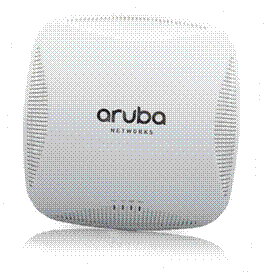
Multifunctional and affordable Aruba 210 series wireless access points (APs) maximize mobile device performance in medium-density, high- performance Wi-Fi environments. These compact and cost-effective dual-radio APs deliver wireless data rates of up to 1.3 Gbps to 5-GHz devices with 802.11ac technology. They also support 3x3 MIMO with three spatial streams as well as 2.4-GHz 802.11n clients at data rates up to 450 Mbps. The AP-215 and IAP-215 models have three integrated omni- directional downtilt antennas per radio, while the AP-214 and IAP-214 support external, detachable dual-band antennas using three RP-SMA connectors. |
|
|
|
Features and Benefits |
|
|
|
Unique Benefits
- The 210 series features patented ClientMatch technology to eliminate sticky client behavior while users roam. ClientMatch continuously gathers session performance metrics from mobile devices. - If a mobile device moves away from an AP or if RF interference impedes performance, ClientMatch automatically steers the device to a better AP.
- ACC lets WLANs to perform at peak efficiency by minimizing interference from 3G/4G LTE networks, distributed antenna systems and commercial small cell/femtocell equipment.
- The 210 series supports priority handling and policy enforcement for unified communication apps, including Microsoft Lync with encrypted videoconferencing, voice, chat and desktop sharing. Choose your Operating Mode The 210 series supports your choice of operating modes to meet unique management and deployment requirements
For large installations across multiple sites, the Aruba Activate service significantly reduces deployment time by automating device provisioning, firmware upgrades, and inventory management. With Aruba Activate, Instant APs are factory- shipped to any site and configure themselves when powered up. AP 210 Series Specifications
- 2.4-GHz (450 Mbps max rate) and 5-GHz (1.3 Gbps max rate) radios, each with 3x3 MIMO and three integrated omni-directional downtilt antennas..
- 2.4-GHz (450 Mbps max rate) and 5-GHz (1.3 Gbps max rate) radios, each with 3x3 MIMO and three combined, diplexed (dual-band) external RP-SMA antenna connectors. Advanced Features
- Adaptive Radio Management (ARM) technology automatically assigns channel and power settings, provides airtime fairness and ensures that APs stay clear of all sources of RF interference to deliver reliable, high-performance WLANs. - 210 series APs can be configured to provide part-time or dedicated air monitoring for spectrum analysis and wireless intrusion protection, VPN tunnels to extend corporate resources to remote locations, and wireless mesh connections where Ethernet drops are not available.
- Capable of part-time or dedicated air monitoring, the spectrum analyzer remotely scans the 2.4-GHz and 5-GHz radio bands to identify sources of RF interference.
- Integrated wireless intrusion protection offers thread protection and mitigation, and eliminates the need for separate RF sensors and security appliances. - IP reputation and security services identify, classify, and block malicious files, URL and IPs, providing comprehensive protection against advanced online threats. - Integrated Trusted Platform Module (TPM) for secure storage of credentials and keys. - SecureJack-capable for secure tunneling of wired Ethernet traffic Operating Modes
Wireless Radio Specifications
- 2.4000 GHz to 2.4835 GHz - 5.150 GHz to 5.250 GHz - 5.250 GHz to 5.350GHz - 5.470 GHz to 5.725GHz - 5.725 GHz to 5.850GHz
- 802.11b: Direct-sequence spread-spectrum (DSSS) - 802.11a/g/n/ac: Orthogonal frequency-division multiplexing (OFDM)
- 802.11b: BPSK, QPSK, CCK - 802.11a/g/n/ac: BPSK, QPSK, 16-QAM, 64-QAM, 256-QAM
- 2.4-GHz band: +23 dBm (18 dBm per chain) - 5-GHz band: +23 dBm (18 dBm per chain) - NOTE: conducted transmit power levels exclude antenna gain. For total (EIRP) transmit power, add antenna gain
- 802.11b: 1, 2, 5.5, 11 - 802.11a/g: 6, 9, 12, 18, 24, 36, 48, 54 - 802.11n: 6.5 to 450 (MCS0 to MCS23) - 802.11ac: 6.5 to 1,300 (MCS0 to MCS9, NSS = 1 to 3)
Antennas
Other Interfaces
- Auto-sensing link speed and MDI/MDX - 802.3az Energy Efficient Ethernet (EEE) - PoE-PD: 48 Vdc (nominal) 802.3af or 802.3at PoE
- Power/system status - Ethernet link status (ENET) - Radio status (two; RAD0, RAD1)
Power
- Excludes power consumed by external USB device (and internal overhead); this could add up to 6 watts (PoE) or 5.5 watts (DC) for 5W/1A USB device
- USB port is disabled when using an 802.3af PoE power source; for unrestricted operation with PoE power, use an 802.3at compliant source
Mounting
- Mounting brackets (2) for attaching to 9/16-inch or 15/16-inch T-bar drop-tile ceiling
- AP-220-MNT-C1: Aruba AP mount kit contains two ceiling-grid rail adapters for flat rails
- AP-220-MNT-C2: Aruba AP mount kit contains two ceiling-grid rail adapters for Interlude and Silhouette style rails - AP-220-MNT-W1: Aruba AP mount kit contains one basic flat-surface wall/ceiling mount bracket - AP-200-MNT-W3: Aruba AP mount kit contains one secure flat-surface wall/ceiling mount cradle Mechanical
- 180 mm x 180 mm x 45 mm (W x D x H) - 610 g
- 220 mm x 225 mm x 55 mm (W x D x H) - 860 g Environmental
- Temperature: 0° C to +50° C (+32° F to +122° F) - Humidity: 5% to 95% non-condensing
- Temperature: -40° C to +70° C (-40° F to +158° F) Regulatory
For more country-specific regulatory information and approvals, please see your Aruba representative Reliability MTBF: 538,975 hours (61.5 years) at +25° C operating temperature Regulatory Model Numbers
Certifications
Warranty
Minimum software Versions
|
|
|
Configuration
|
Ordering Guide |
| ||||||||||||
|
|
|
| |||||||||||
|
Step 1: Select AP Model |
|
| |||||||||||
|
Description |
Part Number |
Configuration Impact | |||||||||||
|
Controller-based Access Points |
|
| |||||||||||
|
Aruba AP-214 802.11n/ac Dual 3x3:3 Radio Antenna Connectors AP |
JW168A |
Add PoE injector or AC adapter, antennas | |||||||||||
|
Aruba AP-215 802.11n/ac Dual 3x3:3 Radio Integrated Antenna AP |
JW170A |
Add PoE injector or AC adapter | |||||||||||
|
Aruba AP-214 FIPS/TAA-compliant 802.11n/ac Dual 3x3:3 Radio Antenna Connectors AP |
JW169A |
Add PoE injector or AC adapter, antennas | |||||||||||
|
Aruba AP-215 FIPS/TAA-compliant 802.11n/ac Dual 3x3:3 Radio Integrated Antenna AP |
JW171A |
Add PoE injector or AC adapter | |||||||||||
|
Instant Access Points |
|
| |||||||||||
|
Aruba Instant IAP-214 (RW) 802.11n/ac Dual 3x3:3 Radio Antenna Connectors AP |
JW222A |
Add PoE injector or AC adapter, antennas | |||||||||||
|
Aruba Instant IAP-214 (US) 802.11n/ac Dual 3x3:3 Radio Antenna Connectors AP |
JW223A |
Add PoE injector or AC adapter, antennas | |||||||||||
|
Aruba Instant IAP-214 (JP) 802.11n/ac Dual 3x3:3 Radio Antenna Connectors AP |
JW221A |
Add PoE injector or AC adapter, antennas | |||||||||||
|
Aruba Instant IAP-214 (IL) 802.11n/ac Dual 3x3:3 Radio Antenna Connectors AP |
JW220A |
Add PoE injector or AC adapter, antennas | |||||||||||
|
Aruba Instant IAP-215 (RW) 802.11n/ac Dual 3x3:3 Radio Integrated Antenna AP |
JW228A |
Add PoE injector or AC adapter | |||||||||||
|
Aruba Instant IAP-215 (US) 802.11n/ac Dual 3x3:3 Radio Integrated Antenna AP |
JW229A |
Add PoE injector or AC adapter | |||||||||||
|
Aruba Instant IAP-215 (JP) 802.11n/ac Dual 3x3:3 Radio Integrated Antenna AP |
JW227A |
Add PoE injector or AC adapter | |||||||||||
|
Aruba Instant IAP-214 (JP) FIPS/TAA 802.11n/ac Dual 3x3:3 Radio Ant Connectors AP |
JY737A |
Add PoE injector or AC adapter, antennas | |||||||||||
|
Aruba Instant IAP-215 (JP) FIPS/TAA 802.11n/ac Dual 3x3:3 Radio Integrated Ant AP |
JY738A |
Add PoE injector or AC adapter | |||||||||||
|
Aruba Instant IAP-215 (IL) 802.11n/ac Dual 3x3:3 Radio Integrated Antenna AP |
JW226A |
Add PoE injector or AC adaptor | |||||||||||
|
NOTE: All models ship with ceiling rail adapters (for flat rails) in the box. | |||||||||||||
|
|
|
| |||||||||||
|
Step 2: Add Powering Accessories (Optional) |
|
| |||||||||||
|
Description |
Part Number |
Configuration Impact | |||||||||||
|
PD-3510G-AC 15.4W 802.3af PoE 10/100/1000Base-T Ethernet Midspan Injector |
JW627A |
Add AC power cable | |||||||||||
|
PD-9001GR-AC 30W 802.3at PoE+ 10/100/1000 Ethernet Indoor Rated Midspan Injector |
JW629A |
Add AC power cable | |||||||||||
|
AP-AC-12V30A 12V/30W AC/DC Desktop Style 1.7/4.0/9.5mm Circular 90 Deg Plug DoE Level VI Adapter |
JX989A |
Add AC power cable | |||||||||||
|
AP-DC-CAR 12V/18W Indoor AP Car Power US Only Adapter Kit |
JW631A |
For US and Japan only | |||||||||||
|
Select three-prong AC power cord for injector or AC adapter (no power cable needed for universal adapter): | |||||||||||||
|
PC-AC-ARG Argentina 220V AC 10A 2-meter AC Power Cord |
JW113A |
| |||||||||||
|
PC-AC-AUS Australian AC Power Cord |
JW114A |
| |||||||||||
|
PC-AC-BR Brazil AC Power Cord |
JW115A |
| |||||||||||
|
PC-AC-CHN China AC Power Cord |
JW116A |
| |||||||||||
|
PC-AC-DEN Denmark 220V AC 10A 2-meter AC Power Cord |
JW117A |
| |||||||||||
|
PC-AC-EC Continental European/Schuko AC Power Cord |
JW118A |
| |||||||||||
|
PC-AC-IN India AC Power Cord |
JW119A |
| |||||||||||
|
PC-AC-IL Israel 250V AC 10A 2-meter AC Power Cord |
JW120A |
| |||||||||||
|
PC-AC-IT Italian AC Power Cord |
JW121A |
| |||||||||||
|
PC-AC-JP Japanese AC Power Cord |
JW122A |
| |||||||||||
|
PC-AC-KOR Korea AC Power Cord |
JW123A |
| |||||||||||
|
PC-AC-NA North America AC Power Cord |
JW124A |
| |||||||||||
|
PC-AC-SWI Switzerland 220V AC 10A 2-meter AC Power Cord |
JW125A |
| |||||||||||
|
PC-AC-TW Taiwan AC Power Cord |
JW126A |
| |||||||||||
|
PC-AC-UK UK AC Power Cord |
JW127A |
| |||||||||||
|
PC-AC-ZA South Africa 250V AC 10A 2-meter AC Power Cord |
JW128A |
| |||||||||||
|
| |||||||||||||
|
Step 3: Add Mount Accessories (Optional) | |||||||||||||
|
Description |
Part Number | ||||||||||||
|
AP-220-MNT-C2 2x Ceiling Grid Rail Adapter for Interlude and Silhouette Mt Kit |
JW045A | ||||||||||||
|
AP-MNT-CM1 Industrial Grade Indoor Access Point Metal Suspended Ceiling Rail Mount Kit |
JX961A | ||||||||||||
|
AP-220-MNT-W1 Flat Surface Wall/Ceiling Black AP Basic Flat Surface Mount Kit |
JW046A | ||||||||||||
|
AP-220-MNT-W1W Flat Surface Wall/Ceiling White AP Basic Flat Surface Mount Kit |
JW047A | ||||||||||||
|
AP-220-MNT-W3 White Low Profile Box Style Secure Large AP Flat Surface Mount Kit |
JY706A | ||||||||||||
|
|
|
| |||||||||||
|
Step 4: Select Antennas (AP-214 Only) | |||||||||||||
|
Description |
Part Number |
Qty |
Interface(s) |
Target Environment |
Mounting | ||||||||
|
AP-214 antenna interface: 3x RP-SMA female, concurrent dual-band. | |||||||||||||
|
AP-ANT-1W 2.4-2.5GHz (4dBi)/4.9-5.875GHz (6dBi) Hi Gain Dual-band Omni-Dir Indoor Antenna |
JW009A |
3 |
1x RP-SMA male connector |
Indoor |
Direct-mount | ||||||||
|
AP-ANT-13B 2.4-2.5GHz (4.4dBi)/4.9-5.9GHz (3.3dBi) Downtilt Smallest Omni-Dir Single Antnna |
JW001A |
3 |
1x RP-SMA male pigtail |
Indoor |
Direct, using pigtails | ||||||||
|
AP-ANT-16 2.4-2.5Ghz (3.9dBi)/4.9-5.9GHz (4.7dBi) 3 Elmt MIMO Ant w/Downtilt Omni-Dir Antenna |
JW003A |
1 |
3x RP-SMA male pigtail |
Indoor |
Direct, using pigtails | ||||||||
|
AP-ANT-19 2.4/5G Dual Band Omni-Dir 3dBi/6dBi Indr/Otdr RPSMA Cnctr Ant w/36in Intgrtd Cable |
JW004A |
3 |
1x RP-SMA male pigtail |
Indoor/outdoor |
Direct, using pigtails | ||||||||
|
AP-ANT-20W 2.4-2.5GHz (2dBi)/4.9-5.875GHz (2dBi) Compact Omni-Dir DMt Indr White Antenna |
JW011A |
3 |
1x RP-SMA male connector |
Indoor |
Direct-mount | ||||||||
|
AP-ANT-35A Dual Band 90x90deg 5dBi +/- 45 and V Pol 3 Element MIMO 3xRPSMA Pigtail Antenna |
JW015A |
1 |
3x RP-SMA male pigtail |
Indoor/outdoor |
Direct, using pigtails | ||||||||
|
AP-ANT-38 Dual Band 60x60deg 8dBi +/- 45 and V Pol 3 Element MIMO 3xRPSMA Pigtail Antenna |
JW016A |
1 |
3x RP-SMA male pigtail |
Indoor/outdoor |
Direct, using pigtails | ||||||||
|
| |||||||||||||
|
|
|
|
|
|
| ||||||||
|
Step 5: Add Antenna Mount Kit (Optional) | |||||||||||||
|
Description |
Part Number |
Comments | |||||||||||
|
AP-ANT-MNT-3 AP-ANT-25A/28/35A/38 Azimuth and Elevation Adjustable Mount Kit |
JW020A |
Compatible with AP-ANT-25A, AP-ANT-28, AP-ANT-35A and AP-ANT-38 | |||||||||||
|
| |||||||||||||
|
Step 6: Add Cosmetic Snap-on Cover (AP-215 Only, Optional) | |||||||||||||
|
Description |
Part Number |
Comments | |||||||||||
|
215-CVR-20 20-pk for AP-215 with Holes for LED Indicators White Non-glossy Snap-on Covers |
JW074A |
1 kit per 20 access points | |||||||||||
|
| |||||||||||||
Technical Specifications
| ||||||||||||||||||||||||||||||||||||||||||||||||||||||||||||||||||||||||||||||||||||||||||||||||
|
| ||||||||||||||||||||||||||||||||||||||||||||||||||||||||||||||||||||||||||||||||||||||||||||||||
|
Maximum capability of the hardware provided (excluding antenna gain). Maximum transmit power is limited by local regulatory settings. | ||||||||||||||||||||||||||||||||||||||||||||||||||||||||||||||||||||||||||||||||||||||||||||||||
|
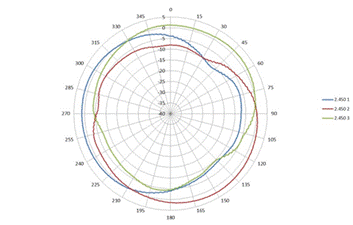
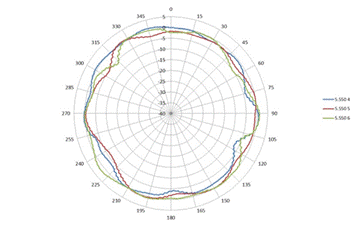
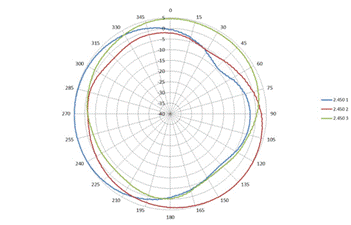
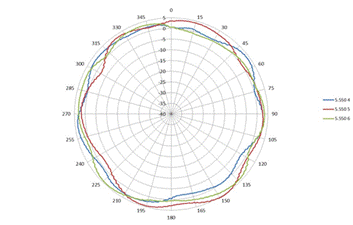
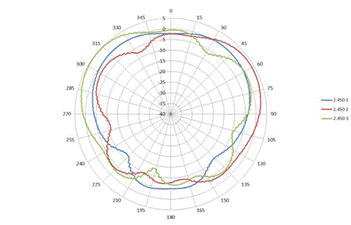
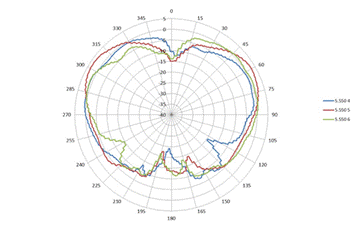
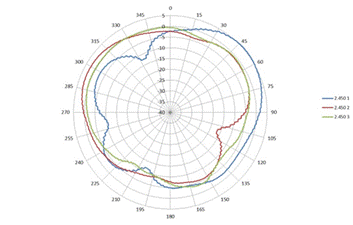
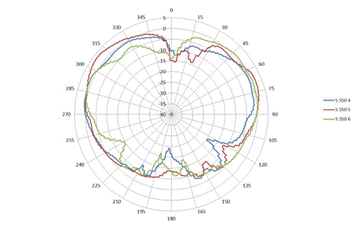
Antenna Pattern Plots | |
|
Horizontal or azimuth plane (top view, 0 degrees downtilt) | |
|
|
|
|
2.450 GHz |
5.550 GHz |
|
| |
|
Horizontal or azimuth plane (top view, 30 degrees downtilt) |
|
|
|
|
|
2.450 GHz |
5.550 GHz |
|
| |
|
Elevation plane (side view, 0 degrees angle) |
|
|
|
|
|
2.450 GHz |
5.550 GHz |
|
| |
|
Elevation plane (side view, 90 degrees angle) |
|
|
|
|
|
2.450 GHz |
5.550 GHz |
|
|
|
Summary of Changes
|
Date |
Version History |
Action |
Description of Change | ||||||||||||||||||
|
06-Mar-2017 |
From Version 2 to 3 |
Changed |
Updates made on Overview and Configuration sections | ||||||||||||||||||
|
07-Nov-2016 |
From Version 1 to 2 |
Added |
Models added: JY737A; JY738A | ||||||||||||||||||
|
01-Nov-2016 |
Version 1 |
Created |
Document creation. | ||||||||||||||||||
| |||||||||||||||||||||


