




























HPE Aruba 205H Hospitality Series Access Points: технические характеристики и документация
В архивеOverview
|
Aruba 205H Hospitality Series Access Points | |
|
High-performance dual-radio 802.11ac access points for hospitality and branch deployments | |
|
| |
|
|
|
|
| |
|
Product overview | |
|
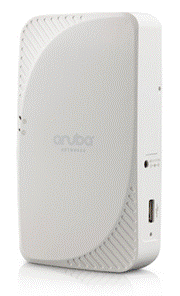
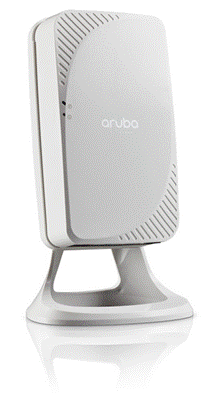
The multifunctional and affordable AP-205H access point (AP) combines high-performance wireless mobility with wired Gigabit Ethernet access in a surprisingly compact device This compact and cost-effective dual-radio AP easily mounts to a standard data wall-box and uses the existing structured cabling system to provide secure wired and wireless network access in dormitories, classrooms, hotels, medical clinics and multitenant environments. In addition, using a unique mount kit accessory, the AP-205H can easily be converted to a desk mounted AP to provide the same benefits for branch offices and teleworkers. Capable of delivering high-performance Wi-Fi services to multiple rooms, the 205H simplifies RF coverage planning and reduces WLAN deployment costs. The AP-205H is built to provide years of trouble-free operation and is backed by Aruba's limited lifetime warranty. The 205H delivers wireless data rates of up to 867 Mbps to 5-GHz devices with 802.11ac technology leveraging two spatial MIMO streams while simultaneously supporting 2.4-GHz 802.11n clients with data rates of up to 400 Mbps. The integrated antennas of the 205H are optimized for the deployments with the AP mounted vertically on either a wall or desk. The antenna patterns are slightly directional, focusing RF energy to and from the area facing the front of the AP. Three local Gigabit Ethernet ports are available to securely attach wired devices to your network. One of these ports is also capable of supplying PoE power to the attached device. The 205H itself receives power from either an AC-to-DC adapter accessory or from the switch it attaches to, using PoE via the uplink Gigabit Ethernet port. | |
|
| |
|
Features and Benefits | |
|
| |
|
Unique Benefits | |
|
| |
|
Two devices in one Advanced Cellular Coexistence (ACC) Wi-Fi client optimization Quality of service for unified communication apps Choose your operating mode
Simplify deployment with Aruba Activate | |
|
| |
|
Aruba 205H Specifications
Advanced Features
- Adaptive Radio Management (ARM) technology automatically assigns channel and power settings, provides airtime fairness and ensures that APs stay clear of all sources of RF interference to deliver reliable, high-performance WLANs. - The 205H can be configured to provide part-time or dedicated air monitoring for spectrum analysis and wireless intrusion protection, VPN tunnels to extend remote locations to corporate resources, and wireless mesh connections where Ethernet drops are not available.
- Capable of part-time or dedicated air monitoring, the spectrum analyzer remotely scans the 2.4-GHz and 5-GHz radio bands to identify sources of RF interference
- With an OpenDNS service subscription, Aruba Instant RAPs deliver integrated web filtering, malware and botnet protection to every device connected to the WLAN - Integrated Trusted Platform Module (TPM) for secure storage of credentials and keys - SecureJack-capable for secure tunneling of wired Ethernet traffic
Operating Modes
Wireless Radio Specifications
- 2.4000GHz to 2.4835 GHz - 5.150 to 5.250 GHz - 5.250 to 5.350 GHz - 5.470 to 5.725 GHz - 5.725 to 5.850 GHz
- 802.11b: Direct-sequence spread-spectrum (DSSS) - 802.11a/g/n/ac: Orthogonal frequency-division multiplexing (OFDM)
- 802.11b: BPSK, QPSK, CCK - 802.11a/g/n/ac: BPSK, QPSK, 16-QAM, 64-QAM, 256-QAM
- 5-GHz band: +21 dBm (18 dBm per chain) - 2.4-GHz band: +21 dBm (18 dBm per chain) - Power may be restricted to comply with local regulatory rules
- 802.11b: 1, 2, 5.5, 11 - 802.11a/g: 6, 9, 12, 18, 24, 36, 48, 54 - 802.11n: 6.5 to 300 (MCS0 to MCS15) - 802.11ac: 6.5 to 867 (MCS0 to MCS9, NSS = 1 to 2)
Encrypted Throughput
Antennas • Four integrated semi-directional antennas for 2x2 MIMO with maximum antenna gain of 4.5 dBi in 2.4 GHz and
Other Interfaces
- Auto-sensing link speed and MDI/MDX - 802.3az Energy Efficient Ethernet (EEE) - PoE-PD (input): 48 Vdc (nominal) 802.3af/at PoE
- Auto-sensing link speed and MDI/MDX - 802.3az Energy Efficient Ethernet (EEE) - One port: PoE-PSE (output): 48 Vdc (nominal) 802.3af PoE
- Aruba Beacon USB radio module - 3G/4G cellular modems - Device battery charging port - Capable of supplying up to 1A/5 watts of power to an attached device
- Power/system status - PoE-PSE status
- Factory reset (when activated during device power up) - LED control: toggle off/normal
Power
- DC: AP-AC-48V36C (48V/36 watts) - PoE: PD-9001GR-AC (802.3at)
- DC: unrestricted mode (USB: 5 watts max, PoE-PSE: 15.4 watts max) - 802.3at PoE: reduced mode (USB disabled when PoE-PSE enabled, PoE-PSE reduced power budget: 10 watts max) - 802.3af PoE: restricted (USB and PoE-PSE disabled)
- DC: 12 watts max, plus 16.5 watts max for PoE-PSE and 5.5 watts max for USB - 802.3at PoE: 13 watts max, plus 11.5 watts max for PoE-PSE or 6 watts max for USB - 802.3af PoE: 13 watts max
Mounting
- AP-205H-MNT2: Mount plate and insert for use with dual gang box (most North America variations covered) - AP-205H-MNTR: Aruba 205H Access Point desk mount conversion kit – includes desk mount and RJ45 jumper
Mechanical
- 86 mm (W) x 40 mm (D) x 150 mm (H), 3.38” (W) x 1.57” (D) x 5.90” (H) - 375 g/13.22 oz
- 115 mm (W) x 63 mm (D) x 167 (H), 4.52” (W) x 2.4” (D) x 6.57” (H) - 500 g/17.63 oz
Environmental
- Temperature: 0° C to +40° C (+32° F to +104° F) - Humidity: 5% to 95% non-condensing
- Temperature: -40° C to +70° C (-40° F to +158° F)
Regulatory
For more country-specific regulatory information and approvals, please see your Aruba representative.
Reliability
Regulatory Model Number
Certifications
Warranty
Minimum Software Versions
| |
Configuration
|
Ordering Guide |
| ||
|
|
|
| |
|
Step 1: Select AP Model |
|
| |
|
Description |
Part Number |
Configuration Impact | |
|
Aruba AP-205H Hospitality 802.11ac Dual 2x2:2 Radio Integrated Antenna AP |
JW166A |
Add optional PoE injector, AC adapter or mount accessory | |
|
Aruba AP-205H FIPS/TAA-compliant Hospitality 802.11ac Dual 2x2:2 Radio Integrated Antenna AP |
JW167A |
Add optional PoE injector, AC adapter or mount accessory | |
|
Aruba Instant IAP-205H (RW) Hospitality 802.11ac Dual 2x2:2 Radio Integrated Antenna AP |
JW216A |
| |
|
Aruba Instant IAP-205H (US) Hospitality 802.11ac Dual 2x2:2 Radio Integrated Antenna AP |
JW217A |
| |
|
Aruba Instant IAP-205H (JP) Hospitality 802.11ac Dual 2x2:2 Radio Integrated Antenna AP |
JW218A |
| |
|
Aruba Instant IAP-205H (IL) Hospitality 802.11ac Dual 2x2:2 Radio Integrated Antenna AP |
JW219A |
| |
|
Aruba Instant IAP-205H (EG) 802.11n/ac 2x2:2 Dual Radio Integrated Antenna AP |
JY858A |
| |
|
|
|
| |
|
Step 2: Add Powering Accessories (Optional) |
|
| |
|
Description |
Part Number |
Configuration Impact | |
|
PD-3510G-AC 15.4W 802.3af PoE 10/100/1000Base-T Ethernet Midspan Injector |
JW627A |
Add AC power cable | |
|
PD-9001GR-AC 30W 802.3at PoE+ 10/100/1000 Ethernet Indoor Rated Midspan Injector |
JW629A |
Add AC power cable | |
|
AP-AC-48V36C 48V/36W AC/DC Desktop Style 1.35/3.5/9.5mm Circular 90 Deg Plug DoE Level VI Adapter |
JX991A |
Add AC power cable | |
|
Add three-prong AC power cord for injector or AC adapter: | |||
|
PC-AC-ARG Argentina 220V AC 10A 2-meter AC Power Cord |
JW113A |
| |
|
PC-AC-AUS Australian AC Power Cord |
JW114A |
| |
|
PC-AC-BR Brazil AC Power Cord |
JW115A |
| |
|
PC-AC-CHN China AC Power Cord |
JW116A |
| |
|
PC-AC-DEN Denmark 220V AC 10A 2-meter AC Power Cord |
JW117A |
| |
|
PC-AC-EC Continental European/Schuko AC Power Cord |
JW118A |
| |
|
PC-AC-IN India AC Power Cord |
JW119A |
| |
|
PC-AC-IL Israel 250V AC 10A 2-meter AC Power Cord |
JW120A |
| |
|
PC-AC-IT Italian AC Power Cord |
JW121A |
| |
|
PC-AC-JP Japanese AC Power Cord |
JW122A |
| |
|
PC-AC-KOR Korea AC Power Cord |
JW123A |
| |
|
PC-AC-NA North America AC Power Cord |
JW124A |
| |
|
PC-AC-SWI Switzerland 220V AC 10A 2-meter AC Power Cord |
JW125A |
| |
|
PC-AC-TW Taiwan AC Power Cord |
JW126A |
| |
|
PC-AC-UK UK AC Power Cord |
JW127A |
| |
|
PC-AC-ZA South Africa 250V AC 10A 2-meter AC Power Cord |
JW128A |
| |
|
| |||
|
Step 3: Add Mount Accessories (Optional) | |||
|
Description |
Part Number | ||
|
AP-205H-MNT2 AP Mount Kit for AP-205H Dual Gang Wall Box Mount Adapter |
JW041A | ||
|
AP-205H-MNTR with Desk Mount and RJ45 Jumper RAP Conversion Kit |
JW042A | ||
|
|
| ||
|
Step 4: Add Other (Optional) | |||
|
Description |
Part Number | ||
|
AP-CBL-SER AP Proprietary DB9 Female Serial Adapter Cable |
JW071A | ||
|
|
| ||
|
|
| ||
|
|
| ||
|
| |||
Technical Specifications
| |||||||||||||||||||||||||||||||||||||||||||||||||||||||||||||
| |||||||||||||||||||||||||||||||||||||||||||||||||||||||||
|
| |||||||||||||||||||||||||||||||||||||||||||||||||||||||||
|
Numbers above exclude antenna gain. Table shows maximum capability of the radios. Transmit power may be restricted in software to comply with local regulatory rules. | |||||||||||||||||||||||||||||||||||||||||||||||||||||||||
|
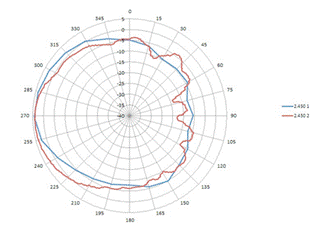
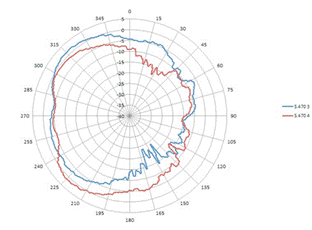
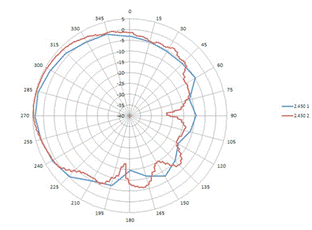
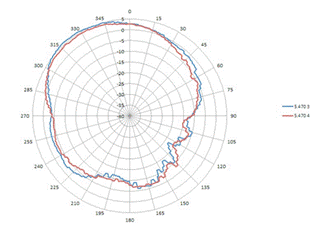
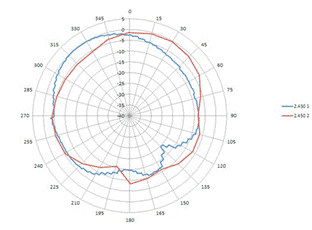
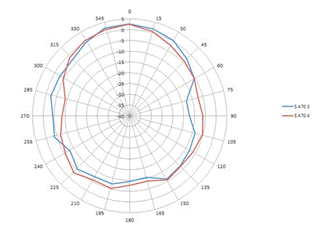
Antenna Pattern Plots | |
|
Horizontal or Azimuth plane (top view, AP front facing left) | |
|
|
|
|
2.4 GHz |
5 GHz |
|
| |
|
Elevation plane (side view, AP front facing left) |
|
|
|
|
|
2.4 GHz |
5 GHz |
|
| |
|
Elevation plane (front view) |
|
|
|
|
|
2.4 GHz |
5 GHz |
|
| |
Summary of Changes
|
Date |
Version History |
Action |
Description of Change | ||||||||||||||||||
|
06-Mar-2017 |
From Version 2 to 3 |
Changed |
Updates made on Features and Benefits and Configuration sections | ||||||||||||||||||
|
07-Nov-2016 |
From Version 1 to 2 |
Added |
Model added: JY858A | ||||||||||||||||||
|
01-Nov-2016 |
Version 1 |
Created |
Document creation. | ||||||||||||||||||
| |||||||||||||||||||||


