




























HPE Aruba 203H Series Hospitality Access Points: технические характеристики и документация
В архивеOverview
|
Aruba 203H Series Hospitality Access Points |
|
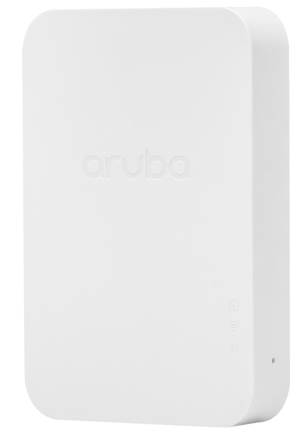
Cost-effective 802.11ac access point for branch offices and hospitality environments This cost-effective IEEE 802.11ac access point with single or dual radio mode delivers high performance Wi-Fi networks for hospitality and branch offices, while minimizing costs for low to moderate density areas.
The compact Aruba 203H Unified Hospitality Access Point is software configurable to operate in either 1x1 dual radio mode, or 2x2 single radio mode. It supports up to 867Mbps in the 5GHz band or up to 400Mbps in the 2.4 GHz band in single radio 2x2 mode. In dual radio 1x1 mode, the maximum data rates for the 203H AP are up to 433Mbps in the 5GHz band and 200Mbps in the 2.4GHz band.
The 203H AP can be easily mounted to a standard data wall-box using the existing structured cabling system or converted to a desk mounted AP using an optional mounting kit. With its flexible deployment options, the 203H is designed to deliver high-speed Wi-Fi for cost-sensitive, medium-density environments. It ensures the most cost-effective Wi-Fi connectivity for indoor premises including hotel rooms, dormitories, small offices and remote workstations.
Powered by PoE, the 203H AP minimizes power consumption with rich features that further facilitates a highly efficient and reliable wireless network. The 802.11ac 203H AP combines wireless and wired access in a single compact device. The local Gigabit Ethernet port can securely attach wired devices to your network. Additionally, the USB host interface on the AP allows the plug-in of Aruba BLE radio modules to enable advanced location and indoor wayfinding, and proximity-based push notification services. |
|
|
|
|
|
Aruba 203H Series Hospitality Access Points |
|
|
Standard Features
|
Unique Benefits
- The 203H ships with everything you need to deploy as a wall-mounted (hospitality) AP, attaching directly to a standard single-gang data wall-box. The 203H can also be easily converted to a desk mounted (remote) AP, using an optional accessory stand.
- The 203H can be deployed in either controller-based (ArubaOS) or controller-less (InstantOS) deployment mode.
- The 203H AP is software configurable to operate in either 1x1 dual radio mode, or 2x2 single radio dual-band mode. - Supports up to 867Mbps in the 5GHz band (with 2SS/VHT80 clients) or up to 400Mbps in the 2.4 GHz band (with 2SS/VHT40 clients). In 1x1 dual radio mode, these max speeds are up to 433Mbps and 200Mbps respectively.
- Enables location-based services and other capabilities. - USB BLE radio module securely attaches to AP
- Adaptive Radio Management (ARM) technology automatically assigns channel and power settings, provides airtime fairness and ensures that APs stay clear of all sources of RF interference to deliver reliable, high-performance WLANs - The 203H can be configured to provide part-time or dedicated air monitoring for wireless intrusion protection, VPN tunnels to extend remote locations to corporate resources, and wireless mesh connections where Ethernet drops are not available.
- Integrated wireless intrusion protection offers threat protection and mitigation, and eliminates the need for separate RF sensors and security appliances. - IP reputation and security services identify, classify, and block malicious files, URLs and IPs, providing comprehensive protection against advanced online threats.
- AppRF technology leverages deep packet inspection to classify and block, prioritize, or limit bandwidth for thousands of applications in a range of categories.
- Supports priority handling and policy enforcement for unified communication apps, including Microsoft Skype for Business with encrypted videoconferencing, voice, chat and desktop sharing |
|
|
|
203H Access Point Specifications
|
|
|
|
WIFI Antennas
- Combining the patterns of each of the antennas of the MIMO radios (in 2x2 mode), the peak gain of the effective per-antenna pattern is 3.8dBi in 2.4GHz and 4dBi in 5GHz. |
|
|
|
Mounting
|
|
|
|
Choose Your Operating Mode Aruba APs offer a choice of deployment and operating modes to meet your unique management and deployment requirements:
For large installations across multiple sites, the Aruba Activate service significantly reduces deployment time by automating device provisioning, firmware upgrades, and inventory management. With Aruba Activate, APs in Instant mode can configure themselves when powered up. |
|
|
|
Other Interfaces
- Auto-sensing link speed and MDI/MDX - 802.3az Energy Efficient Ethernet (EEE) - PoE-PD (input): 48 Vdc (nominal) 802.3af/at PoE
- Auto-sensing link speed and MDI/MDX - 802.3az Energy Efficient Ethernet (EEE)
- USB host interface (Type A connector) - For Aruba LS-BT1USB BLE radio modules only
- Power/system status - Radio status - Local network port status
- Factory reset (when activated during device power up) - LED control: toggle off/normal
|
|
|
|
Warranty
|
|
|
|
Minimum Software Versions
|
|
|
Configuration Information
|
Step 1: Select AP model | ||
|
Remarks |
Description |
SKU |
|
|
Aruba AP-203H (RW) Flex-radio 802.11ac 2x2 Unified Hospitality AP with Internal Antennas |
JY693A |
|
|
Aruba AP-203H (RW) TAA Flex-radio 802.11ac 2x2 Unified Hospitality AP with Internal Antennas |
JY694A |
|
|
Aruba AP-203H (US) Flex-radio 802.11ac 2x2 Unified Hospitality AP with Internal Antennas |
JY695A |
|
|
Aruba AP-203H (US) TAA Flex-radio 802.11ac 2x2 Unified Hospitality AP with Internal Antennas |
JY696A |
|
|
Aruba AP-203H (JP) Flex-radio 802.11ac 2x2 Unified Hospitality AP with Internal Antennas |
JY697A |
|
|
Aruba AP-203H (JP) TAA Flex-radio 802.11ac 2x2 Unified Hospitality AP with Internal Antennas |
JY698A |
|
|
Aruba AP-203H (IL) Flex-radio 802.11ac 2x2 Unified Hospitality AP with Internal Antennas |
JY699A |
|
|
Aruba AP-203H (IL) TAA Flex-radio 802.11ac 2x2 Unified Hospitality AP with Internal Antennas |
JY700A |
|
|
Aruba AP-203H (EG) Flex-radio 802.11ac 2x2 Unified Hospitality AP with Internal Antennas |
JY974A |
|
|
Aruba AP-203H (EG) TAA Flex-radio 802.11ac 2x2 Unified Hospitality AP with Internal Antennas |
JY975A |
|
|
203H Central Managed Unified Access Points |
|
|
|
Aruba CM AP-203H (RW) Flex-radio 802.11ac 2x2 Unified Hospitality AP with Internal Antennas |
JY693ACM |
|
|
Aruba CM AP-203H (US) Flex-radio 802.11ac 2x2 Unified Hospitality AP with Internal Antennas |
JY695ACM |
|
Notes: |
All models ship with a single gang wall-box mount bracket in the box All models are orderable in multiples of 10 units only Add POE power source |
|
|
| ||
|
Step 2: Add powering accessories (optional) | ||
|
Notes: |
Add AC power cord |
|
|
|
Compatible with 203H AP models |
|
|
|
AP-POE-AFGE 1-Port GbE 802.3af 15.4W midspan injector |
R6P68A |
|
|
Aruba PD-3510G-AC 15.4W 802.3af PoE 10/100/1000Base-T Ethernet Midspan Injector |
JW627A |
|
|
Compatible with 203HC AP models |
|
|
|
Aruba CM PD-3501G-AC 15.4W 802.3af PoE 10/100/1000Base-T Ethernet Midspan Injector |
JW627ACM |
|
|
Add 3-prong (C13) AC power cord for POE injector or AC adapter |
|
|
|
PC-AC-ARG AC power cord 250V/10A 1.8m C13 to IRAM 2073 |
JW113A |
|
|
PC-AC-AUS AC power cord 250V/10A 1.8m C13 to AS3112 |
JW114A |
|
|
PC-AC-BR AC power cord 250V/10A 1.8m C13 to NBR 14136 |
JW115A |
|
|
PC-AC-CHN AC power cord 250V/10A 1.8m C13 to GB2099 |
JW116A |
|
|
PC-AC-DEN AC power cord 250V/10A 1.8m C13 to AFSNIT 107-2-D1 |
JW117A |
|
|
PC-AC-EC AC power cord 250V/10A 1.8m C13 to CEE7/7 |
JW118A |
|
|
PC-AC-IN AC power cord 250V/6A 1.8m C13 to IS1293 |
JW119A |
|
|
PC-AC-IL AC power cord 250V/10A 1.8m C13 to SI32 |
JW120A |
|
|
PC-AC-IT AC power cord 250V/10A 1.8m C13 to CEI 23-50 |
JW121A |
|
|
PC-AC-JPN AC power cord 125V/12A 1.8m C13 to JISC 8303 |
JW122A |
|
|
PC-AC-KOR AC power cord 250V/7A 1.8m C13 to KSC 8305 |
JW123A |
|
|
PC-AC-NA AC power cord 125V/10A 1.8m C13 to NEMA 5-15P |
JW124A |
|
|
PC-AC-SWI AC power cord 220V/10A 1.8m C13 to SEV 1011 |
JW125A |
|
|
PC-AC-TW AC power cord 125V/7A 1.8m C13 to CNS 10917 |
JW126A |
|
|
PC-AC-UK AC power cord 250V/10A 1.8m C13 to BS1363 |
JW127A |
|
|
PC-AC-ZA AC power cord 250V/10A 1.8m C13 to SANS 164-1 |
JW128A |
|
| ||
|
Step 3: Add mount accessories (optional) | ||||
|
Remarks |
Description |
SKU | ||
|
|
Compatible with 203H AP models |
| ||
|
|
AP-203H-MNT1 Kit with Spare Single-gang Wall-box Mount Adapter for 203H Series AP |
JY701A | ||
|
|
AP-203H-MNTW Kit with Optional Wall or Dual-gang Box Mount Adapter for 203H Series AP |
JY703A | ||
|
|
AP-203H-MNTD Kit with Optional Desk Mount Adapter for 203H Series AP |
JY704A | ||
|
|
Compatible with 203HC AP models |
| ||
|
|
Aruba CM AP-203H-MNT1 Kit with Spare Single-gang Wall-box Mount Adapter for 203H Series AP |
JY701ACM | ||
|
|
Aruba CM AP-203H-MNTW Kit with Optional Wall or Dual-gang Box Mount Adapter for 203H Series AP |
JY703ACM | ||
|
|
Aruba CM AP-203H-MNTD Kit with Optional Desk Mount Adapter for 203H Series AP |
JY704ACM | ||
|
Notes: |
203H AP Unit ships with Single Gang Mount Bracket (JY701A) |
| ||
|
| ||||
|
Step 4: Add USB BLE radio module (optional) | ||||
|
|
Aruba LS-BT1USB-5 5-pack of USB Powered Aruba Beacons |
JW315A | ||
|
|
Aruba LS-BT1USB-50 50-pack of USB Powered Aruba Beacons |
JW316A | ||
|
| ||||
|
Step 5: Add other accessories (optional) | ||||
|
|
Compatible with 203H AP models |
| ||
|
|
AP-MOD-SERU Micro-USB TTL3.3V to RJ45 RS232 AP Console Adapter Module |
R6Q99A | ||
|
|
AP-CBL-SERU Micro-USB TTL3.3V to USB2.0 AP Console Adapter Cable |
JY728A | ||
|
|
Compatible with 203HC AP models |
| ||
|
|
Aruba CM AP-CBL-SERU AP console adapter cable for custom micro-USB console port |
JY728ACM | ||
|
Notes: |
Custom console port adapter |
| ||
|
| ||||
|
Step 8: Add Software (Optional) | ||||
|
Remarks |
Description |
SKU | ||
|
|
Aruba Central AP Foundation 1 year Subscription E-STU |
Q9Y58AAE | ||
|
|
Aruba Central AP Foundation 3 year Subscription E-STU |
Q9Y59AAE | ||
|
|
Aruba Central AP Foundation 5 year Subscription E-STU |
Q9Y60AAE | ||
|
|
Aruba Central AP Foundation 7 year Subscription E-STU |
Q9Y61AAE | ||
|
|
Aruba Central AP Foundation 10 year Subscription E-STU |
Q9Y62AAE | ||
|
|
Aruba Central AP Advanced 1yr Subscription E-STU |
Q9Y63AAE | ||
|
|
Aruba Central AP Advanced 3yr Subscription E-STU |
Q9Y64AAE | ||
|
|
Aruba Central AP Advanced 5yr Subscription E-STU |
Q9Y65AAE | ||
|
|
Aruba Central AP Advanced 7yr Subscription E-STU |
Q9Y66AAE | ||
|
|
Aruba Central AP Advanced 10yr Subscription E-STU |
Q9Y67AAE | ||
|
Notes: |
Add the Central Cloud Skus to the Aruba Catalog as Standalone: |
| ||
|
|
Aruba Central On-Premises AP Foundation 1 year Subscription E-STU |
R6U63AAE | ||
|
|
Aruba Central On-Premises AP Foundation 3 year Subscription E-STU |
R6U64AAE | ||
|
|
Aruba Central On-Premises AP Foundation 5 year Subscription E-STU |
R6U65AAE | ||
|
|
Aruba Central On-Premises AP Foundation 7 year Subscription E-STU |
R6U66AAE | ||
|
|
Aruba Central On-Premises AP Foundation 10 year Subscription E-STU |
R6U67AAE | ||
|
Notes: |
Add the Central On-Prem Skus to the Aruba Catalog as Standalone: |
| ||
|
| ||||
Technical Specifications
| ||||||||||||||||||||||||||||||||||||||||||||||||||||||||||||||||||||||||||||||||||||||||||||||||
|
Notes: Table shows the maximum capability of the hardware provided (excluding antenna gain). Maximum transmit power is limited by local regulatory settings. | ||||||||||||||||||||||||||||||||||||||||||||||||||||||||||||||||||||||||||||||||||||||||||||||||
|
WIFI Radio Specifications
- 5GHz 802.11ac 2x2 MIMO OR 2.4GHz 802.11n 2x2 MIMO Notes: 256-QAM modulation (802.11ac) supported by the 2.4GHz radio as well - 5GHz 802.11ac 1x1 AND 2.4GHz 802.11n 1x11
- 2.400 to 2.4835GHz - 5.150 to 5.250GHz - 5.250 to 5.350GHz - 5.470 to 5.725GHz - 5.725 to 5.850GHz
- 802.11b: Direct-sequence spread-spectrum (DSSS) - 802.11a/g/n/ac: Orthogonal frequency-division multiplexing (OFDM)
- 802.11b: BPSK, QPSK, CCK - 802.11a/g/n/ac: BPSK, QPSK, 16-QAM, 64-QAM, 256-QAM
- 2.4GHz band: +18 dBm per chain, +21 dBm aggregate (2x2 mode) - 5GHz band: +16 dBm per chain, +19 dBm aggregate (2x2 mode) Notes: Conducted transmit power levels exclude antenna gain. For total (EIRP) transmit power, add antenna gain
- 802.11b: 1, 2, 5.5, 11 - 802.11a/g: 6, 9, 12, 18, 24, 36, 48, 54 - 802.11n: 6.5 to 300 (MCS0 to MCS15) - 802.11ac: 6.5 to 867 (MCS0 to MCS9, NSS = 1 to 2 for VHT20/40/80)
|
|
|
|
Encrypted Throughput
|
|
|
|
Mechanical
- 86mm (W) x 26.5mm (D) x 140mm (H) - 225g
- 115mm (W) x 47mm (D) x 165mm (H) - 290g |
|
|
|
Power Sources and Consumption
|
|
|
|
Environmental
- Temperature: 0° C to +40° C (+32° F to +104° F) - Humidity: 5% to 93% non-condensing
- Temperature: -40° C to +70° C (-40° F to +158° F) |
|
|
|
Regulatory
For more country-specific regulatory information and approvals, please see your Aruba representative. |
|
|
|
Reliability
|
|
|
|
Regulatory Model Numbers
|
|
|
|
Certifications
|
|
|
Summary of Changes
|
Date |
Version History |
Action |
Description of Change |
|
15-Mar-2021 |
Version 9 |
Changed |
SKUs were added in Configuration Information section. |
|
08-Sep-2020 |
Version 8 |
Changed |
Configuration Information section was updated. New SKUs were added. |
|
04-Nov-2019 |
Version 7 |
Changed |
Configuration Information section was updated New SKUs were added. |
|
01-Oct-2018 |
Version 6 |
Changed |
SKU descriptions updated. |
|
18-Dec-2017 |
Version 5 |
Changed |
Minor changes made on Features and Benefits |
|
16-Oct-2017 |
Version 4 |
Changed |
Minor edits on Features and Benefits |
|
27-Jun-2017 |
Version 3 |
Changed |
Features and Benefits updated |
|
13-Feb-2017 |
Version 2 |
Change |
Changes made in Configuration section |
|
06-Feb-2017 |
Version 1 |
New |
New QuickSpecs |
Copyright
|
|
| ||||||||||||
|
|
|
© Copyright 2021 Hewlett Packard Enterprise Development LP. The information contained herein is subject to change without notice. The only warranties for Hewlett Packard Enterprise products and services are set forth in the express warranty statements accompanying such products and services. Nothing herein should be construed as constituting an additional warranty. Hewlett Packard Enterprise shall not be liable for technical or editorial errors or omissions contained herein.
To learn more, visit: http://www.hpe.com/networking
a00000837enw - 15813 - Worldwide - V9 - 15-March-2021 | ||||||||||||



