




























HPE UPS Management Module: технические характеристики и документация
Overview
|
HPE UPS Management Module | ||
|
| ||
|
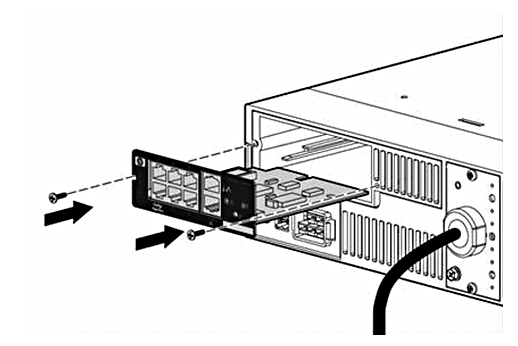
The HPE UPS Management Module enables you to monitor and manage power environments through comprehensive control of HPE UPSs. The HPE UPS Management Module can support either a single UPS configuration or provides additional power protection with support for dual redundant UPS configuration for no-single-point-of-failure. The additional serial ports will provide greater power management control and flexible monitoring. The management module can be configured to send alert traps to HPE Systems Insight Manager and other SNMP management programs or used as a standalone management system. This flexibility enables you to monitor and manage UPSs through the network. To facilitate day-to-day maintenance tasks, the embedded management software provides detailed system logs. The HPE UPS Management Module provides remote management of a UPS by connecting the UPS directly to the network. Configuration & Management of the UPS from anywhere and at anytime via a standard web browser. | ||
|
| ||
|
|
|
|
|
| ||
|
Models | |
|
HPE Management Card for XR UPS |
AF401A |
|
HPE RJ45-DB89 DCE Female 5 Pack Serial Adapter |
AF402A |
|
| |
|
Kit Contents |
|
Standard Features
|
HPE UPS Management Module |
The HPE UPS Management Module enables you to configure, monitor and manage power environments through comprehensive control of individual HPE UPSs. Access the management module:
The management module can be configured to send alert traps to HPE Systems Insight Manager and other SNMP management programs or used as a standalone management system. This flexibility enables you to monitor and manage the UPS through the network connector; the serial connector located on the front of the management module is only used for configuration. To facilitate day-to-day maintenance tasks, the firmware provides detailed system logs. Use the management module firmware to:
| |
|
| ||
|
Product Features |
| |
|
| ||
|
Highlights |
Use HPE Systems Insight Manager to:
| |
|
| ||
|
Security Considerations Overview |
|
|
| |
|
Warranty |
HPE UPS Management Modules are backed by a limited 3-year warranty |
Service and Support
|
HPE Pointnext operational Information |
For HPE Pointnext operational (hardware & software) information, as well as orderable part numbers, please refer to the following web site: https://www.hpe.com/us/en/support.html |
|
| |
|
Parts and Materials |
Hewlett Packard Enterprise will provide HPE-supported replacement parts and materials necessary to maintain the covered hardware product in operating condition, including parts and materials for available and recommended engineering improvements. Parts and components that have reached their maximum supported lifetime and/or the maximum usage limitations as set forth in the manufacturer's operating manual, product quick-specs, or the technical product data sheet will not be provided, repaired, or replaced as part of these services. The defective media retention service feature option applies only to Disk or eligible SSD/Flash Drives replaced by Hewlett Packard Enterprise due to malfunction. |
Related Options
|
HPE Pointnext operational services |
HPE Install Rack and Rack Options Service |
U2871E |
Technical Specifications
|
Mechanical Dimensions (WxHxD) |
4.40 x 1.50 x 4.50 in (111.9 x 38.5 x 114.0 cm) |
|
Unit Weight |
1.0 lb (0.46 kg) |
|
Shipping Dimensions (WxHxD) |
8.5 x 2.3 x 9.7 in (21.59 x 5.84 x 24.62 cm) |
|
Shipping Weight |
2.0 lb (0.92 kg) |
|
Operating Temperature |
50° to 104°F (10° to 40°C) |
|
Operating Relative Humidity (%) |
20% to 80 % relative humidity non-condensing |
|
Operating Elevation |
0 to 10,000 ft (0 to 3048 m) |
|
Storage Temperature |
-4° to 140°F (-20° to 60°C) |
|
Storage Relative Humidity (%) |
5% to 95% relative humidity non-condensing |
|
Storage Elevation |
0 to 49,000 ft (0 to 14935 m) |
|
Web Browser Client |
|
|
Plug-in |
Macromedia Flash Player 7.0 (available at the Macromedia website (http://www.macromedia.com)) |
|
Monitor Resolution |
|
|
| |
|
Supported UPS |
Availability |
VA Rating |
Watts |
U Height |
Load Seg. |
UPS Part Numbers |
|
R36000/3 (3-Phase UPS) |
Yes |
36000 |
36000 |
Pre-mounted in 10k G2 42Urack |
HPE RP36000/3 36000VA Three Phase INTL Uninterruptible Power System |
AF439A |
|
R12000/3 (3-Phase UPS) |
Yes |
12000 |
12000 |
6 |
HPE R12000/3 12000VA Three Phase INTL 6U Rackmount Uninterruptible Power System |
AF430A |
|
R8000/3 (3-Phase UPS) |
Yes |
8000 |
8000 |
6 |
HPE R8000/3 8000kVA Three Phase INTL 6U Rackmount Uninterruptible Power System |
AF432A |
|
R1500 G2 |
Yes |
1500 |
1050 |
1 |
HPE R1500 G2 1440VA Low Voltage NA 1U Rackmount Uninterruptible Power System |
AF419A |
|
R3000 - Low Voltage |
Yes |
2880 |
2700 |
2 |
3 |
AF422A, AF425A |
|
R3000 - High Voltage |
Yes |
3000 |
2700 |
2 |
3 |
AF423A, AF414A, AF424A (Replaces non-RoHs compliant part number 192186-002) |
|
R5500 |
Yes |
5000 |
4500 |
3 |
2 |
AF426A |
|
R5500 Intl |
Yes |
6000 |
5400 |
3 |
2 |
AF416A |
|
R1500xr |
Legacy |
1500 |
|
2u |
2 |
204404-001, -291, -B31 |
|
R3000xr - Low Voltage |
Legacy |
2880 |
2700 |
2 |
3 |
192186-001, -291 |
|
R3000xr - High Voltage |
Legacy |
3000 |
2700 |
2 |
3 |
192186-002, -B31, -B32, -B33, AR1, -292, J4367-7001, J4367-70004, 5065-7258, 5065-7260 |
|
R5500xr |
Legacy |
5000 |
4500 |
3 |
2 |
326529-D71, -B31 |
|
T1000xr |
Legacy |
1000 |
700 |
na |
2 |
204155-001, -B31, 312803-291 |
|
T1500xr |
Legacy |
1440 |
1050 |
na |
2 |
204155-002, -291, -B32 |
|
T2200xr |
Legacy |
1920 |
1600 |
na |
3 |
204451-001, -002, -291, -B31 |
|
|
|
Operating System |
Service Pack |
Platform |
Platform |
Platform |
|
Windows |
|
|
|
|
|
Windows Server 2008 R2 - Enterprise Edition, DataCenter, Standard |
SP1 |
x |
| |
|
Windows Server 2008 R2 - Enterprise Edition, DataCenter, Standard |
|
|
x |
|
|
Windows Server 2008 - Enterprise Edition, DataCenter, Standard |
SP2 |
x |
x |
x |
|
Windows Server 2003 R2 - Enterprise Edition, Standard |
SP2 |
x |
x |
x |
|
Windows Server 2003 - Enterprise Edition, Standard |
SP2 |
x |
x |
x |
|
Windows Small Business Server 2008 |
SP2 |
x |
x |
x |
|
Windows Small Business Server 2003 R2 |
SP2 |
x |
x |
x |
|
Windows 7 - Enterprise |
|
x |
x |
|
|
Windows Vista - Enterprise |
SP2 |
x |
x |
|
|
Windows XP Professional |
SP3 |
x |
x |
|
|
Linux |
|
|
|
|
|
Red Hat Enterprise Linux 5 |
U7 |
x |
x |
x |
|
Red Hat Enterprise Linux 5 |
U5 |
x |
x |
x |
|
Red Hat Enterprise Linux 4 |
U8 |
x |
x |
x |
|
SUSE Linux Enterprise Server 11 |
U1 |
x |
x |
x |
|
SUSE Linux Enterprise Server 10 |
SP3 |
x |
x |
x |
|
HP-UX |
|
|
|
|
|
HP-UX 11i v3 - (see note1 & required patches) |
|
|
|
x |
|
HP-UX 11i v2 - (see note1 & required patches) |
|
|
|
x |
|
VMware |
|
|
|
|
|
ESX Server 4.1 |
|
|
x |
|
|
ESX Server 4.0 |
U1 |
|
x |
|
|
ESX Server 3.5 |
U5 |
x |
|
|
|
Browsers |
|
|
|
|
|
Windows Internet Explorer 8 |
|
x |
x |
x |
|
Windows Internet Explorer 7 |
SP2 |
x |
x |
x |
|
Windows Internet Explorer 6 |
SP1 |
x |
x |
x |
|
HP-UX Mozilla 1.6x |
|
x |
|
|
|
HP-UX Mozilla 1.4 |
|
|
|
x |
|
Linux Firefox 3.0.18 |
|
x |
x |
x |
|
Notes | ||||
|
1) Supported on PA-RISC | ||||
|
|
|
Environment-friendly Products and Approach |
End-of-life Management and Recycling |
Hewlett Packard Enterprise offers end-of-life Hewlett Packard Enterprise product return, trade-in, and recycling programs in many geographic areas. For trade-in information, please go to https://www.hpe.com/us/en/about/environment/product-recycling.html. To recycle your product, please go to: https://www.hpe.com/us/en/about/environment/product-recycling.html or contact your nearest Hewlett Packard Enterprise sales office. Products returned to Hewlett Packard Enterprise will be recycled, recovered, or disposed of in a responsible manner. The EU WEEE directive (2002/95/EC) requires manufacturers to provide treatment information for each product type for use by treatment facilities. This information (product disassembly instructions) is posted on the Hewlett Packard Enterprise web site at: https://www.hpe.com/us/en/about/environment/product-recycling.html. These instructions may be used by recyclers and other WEEE treatment facilities as well as HPE OEM customers who integrate and re-sell Hewlett Packard Enterprise equipment. |
|
| ||
Summary of Changes
|
Date |
Version History |
Action |
Description of Change | ||||||||||||||||||
|
24-Oct-2018 |
Version 13 |
Changed |
Rebranding | ||||||||||||||||||
|
04-Nov-2011 |
Version 12 |
Changed |
Changes were made in Technical Specifications. | ||||||||||||||||||
|
20-Jun-2011 |
Version 11 |
Changed |
Models and Related Options product descriptions were revised Product Highlights was changed to Standard Features Warranty was moved to Standard Features Web Interface Requirements were moved to Technical Specifications | ||||||||||||||||||
|
21-June-2010 |
Version 10 |
Changed |
HP Care Pack Information was revised in Service and Support, HP Care Pack and Warranty Information. | ||||||||||||||||||
|
11-Sep-2008 |
Version 9 |
Changed |
Change made in the HP-UX section of the Technical Specifications section only. | ||||||||||||||||||
|
11-Apr-2008 |
Version 8 |
Changed |
Changes made in the Technical Specifications section only. | ||||||||||||||||||
|
12-Nov-2007 |
Version 7 |
Changed |
Changes made in the Technical Specifications/Related Options, and Technical Specifications/Supported Related Options sections. | ||||||||||||||||||
|
05-Sep-2007 |
Version 6 |
Added |
Added the Environment-friendly Products and Approach object to the Technical Specifications section. | ||||||||||||||||||
|
06-Jul-2007 |
Version 5 |
Changed |
Changes made in the Technical Specifications section only. | ||||||||||||||||||
|
25-Mar-2007 |
Version 4 |
Changed |
Changes made throughout the entire QuickSpecs. | ||||||||||||||||||
|
20-Feb-2007 |
Version 3 |
Changed |
Changes made within the Related Options section only. | ||||||||||||||||||
|
16-Feb-2007 |
Version 2 |
Changed |
The Introduction object and Related Options sections were rewritten. | ||||||||||||||||||
|
16-Feb-2007 |
Version 1 |
Created |
New QuickSpecs | ||||||||||||||||||
| |||||||||||||||||||||


