




























HP DAT Tape Drives: технические характеристики и документация
В архивеOverview
|
HP DAT Tape Drives |
|
HP DAT drives are based on the Digital Data Storage (DDS)
format. In fact, DAT is the most successful tape backup technology of all time
with more than 18 million DAT drives shipped since its introduction in 1989, and
with a current world-wide installed base of over 6 million drives. HP has long
been the market leader in DAT technology. |
|
|
|
What's New |
|
Yosemite Server Backup Basic has replaced Data Protector Express Basic as the software (downloadable) included with the HP DAT tape drives. |
|
|
|
|
| |
|
| ||
|
|
| |
|
| ||
|
| ||
|
HP DAT 160 SCSI Tape Drive |
Protecting the needs of small or medium business, delivering up to 160GB compressed data per cartridge and speeds of around 50GB/hr (assuming 2:1 data compression) The HP DAT 160 SCSI drive is available with a native SCSI interface in a range of models including internal to fit servers, workstations and rack-mount kits, external modules. | |
|
| ||
|
| ||
|
DAT 160 SCSI External Tape Drive | ||
|
| ||
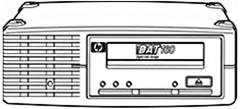
|
HP DAT 160 USB Tape Drive |
Protecting the needs of small or medium business, delivering up to 160GB compressed data per cartridge and speeds of around 50GB/hr (assuming 2:1 data compression) The USB 2.0 interface provides plug-and-play connectivity, enabling backup to be initiated from straight out-of-the-box in less than 60 seconds. |
|
| |
|
| |
|
DAT
160 USB Internal Tape Drive | |
|
| |
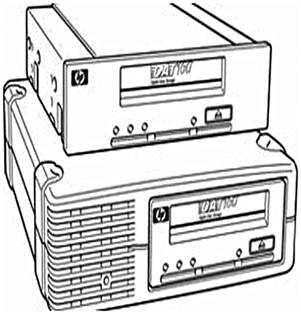
|
|
|
|
| |
|
| |
|
| |
|
| |
|
|
|
|
| |
|
| |
|
|
Features
|
Key Features |
|
|
| |
|
Customer Benefits |
|
Product Highlights
|
DDS Technology |
DDS/DAT continues to be the unit volume leader in the tape drive market for small and medium businesses with a current installed base of over 6 million units and over 18 million DAT drives shipped since its introduction in 1989. This remarkable tape technology continues to flourish because it meets the needs of the SMB market for cost-effective, reliable backup better than any other low end tape technology available. DDS/DAT is based on an open standard format for data interchange. The influential DAT manufacturers group presides over this open standard with verification processes that ensure compliance. With multiple manufacturers developing and shipping DDS/DAT products, customers benefit from increased competition, which leads to better prices, faster development and more choice. DDS format for DAT is a helical scan format where data is written diagonally across the width of the tape. The advantage is that, by allowing subsequent tracks to have different writing angles and to overlap, a much greater capacity can be achieved for a given length of tape because no guard bands are necessary. The data format also allows for fast location of tracks and data. To achieve this, the rotating drum is tilted at a slight angle (6°) from the vertical. The drum has four heads (two write heads and two read heads), located at 90° intervals. For each rotation of the drum, two tracks are written. The read heads verify the data that has been written (recorded) and the drive rewrites if necessary. The open format ensures interchangeability between different DDS format drives. HP has been involved in the design and development of DAT drives since the beginning and applies these many years of experience to its current line of DAT products. Not only does an investment in DAT technology provide the security of a format with a history of outstanding reliability, the legacy of backward compatibility also provides the potential for future expansion without compromising your investment in the technology. The target market for DAT continues to be direct-attach backup. In small and medium sized businesses cost of ownership, ease of use and a proven history (i.e. low risk) are paramount. DAT technology provides the capacity and performance needed in a tape backup solution for workstations and entry-level servers. Specific
Note on DAT 160 |
|
| |
|
Backwards Compatibility |
HP DAT tape drives are backward read-write compatible with previous generations, thus:
|
|
| |
|
Proven Reliability |
HP DAT drives have proven to be exceptionally reliable. The drives have demonstrated exceptional performance with customers over many years and across different generations and this has under pinned their popularity. The drives are designed with reliability in mind and with the security of customer's data as a priority. Hardware reliability is typically measured as MTBF (Mean Time Between Failures) associated with duty cycles which suggests the amount the drive is typically used e.g. 100% duty cycle means the drive is used for 24 hours per day. As a result of field data, the specification for HP DDS products is stated as 125,000 hours at 100% duty cycle, or 1 million hours at a more typical 12% duty cycle (drive used on average for 3 hours per day). Unlike other manufactures' DAT drives, this specification is not generated in the laboratory with limited numbers of prototype drives and assumptions on customer use; it is generated from real customer data for the products concerned. |
|
| |
|
Automated Head Cleaning/Intelligent cleaning |
HP DDS derives benefit from an automatic head cleaning "sweeper" that can be used during the write or read recovery procedure to dislodge debris from the tape path and recording heads and drive. This feature reduces the need to use a DDS cleaning cartridge for manual cleaning. Intelligent cleaning determines the cleaning provided by a cleaning cartridge when loaded by monitoring the drive performance when in use. If the drive is performing well, a routine maintenance clean is performed. If the drive has degraded performance the cleaning is automatically made more robust to recover the drive to optimum performance. |
|
| |
|
Interfaces |
HP offers a range of interface options with our DAT Tape Drives in order to meet the varying needs of our customers. HP DAT drives are available with a choice of: the standard SCSI interface where legacy SCSI connectivity is required, and USB 2.0 interface for universal plug and play connectivity. Native USB The USB (Universal Systems Bus) interface was conceived out of a need to simplify computer peripheral device connection. It has been so successful that the majority of computer systems and servers shipped today offer multiple native USB 2.0 ports. HP is the first company to develop a native USB DDS/DAT tape drive. Where other "USB tape drives" rely on a USB converter, HP's USB interface is fully integrated with the drive and uses the SCSI command set within the USB payload. The benefit of this implementation is that it gives the drive full SCSI functionality and the flexibility of USB without the additional cost of a converter. By offering native USB 2.0 DAT drives, HP aims to provide customers with a number of benefits:
|
|
| |
|
Compression |
DDS uses built-in hardware compression using the 'DCLZ' data compression algorithm. Data compression is host-selectable with the default that compression is turned on. Typical data compression is 2:1, but actual compression depends on the type of data being compressed and can be more or less than 2:1. |
|
| |
|
Rack-Mount Tape Options |
HP DAT SCSI and USB drives are supported on the
HP 1U and 3U Rack-Mount Kits . The 3U Rack-Mount Kit allows up to four internal
DAT drives to be installed in 3U of rack space, while the 1U Rack-Mount Kit holds
two DAT drives in 1U of space. 1U rack-mount kits use standard internal DAT USB
and SCSI drives for a low-cost solution. 3U rack-mount kits use standard internal
DAT SCSI drives. |
|
| |
|
HP OBDR (One-Button Disaster Recovery) |
With HP One-Button Disaster Recovery, you can quickly, reliably and simply restore your entire ProLiant system just by inserting the most recent backup tape and pushing one button on the tape drive. Your HP DAT drive will restore your operating system, configuration, applications, drivers and data files. There's no longer a need to search for software disks and manuals. And with downtime reduced, the costs of recovery are minimized too. There's no need to make a new set of disaster recovery disks each time the network configuration is altered or a peripheral is added. Recovering from a disaster manually at a stressful time makes for an error-prone process. The sheer simplicity of HP One-Button Disaster Recovery means less human error. Backup and disaster recovery preparation -- previously two separate tasks -- become one process. OBDR is simply the best disaster recovery product for small to medium systems. For a current list of servers, workstations, and software that support OBDR, check the tape backup compatibility pages at: http://www.hp.com/go/obdr |
|
| |
|
Included software |
The HP DAT tape drives include the option to
download Yosemite Server Backup Basic backup and recovery software. It is an easy-to-use
backup and recovery application that is installed in minutes and includes all
the features needed to protect a single machine by backup to a HP Storage tape
drive. Yosemite Server Backup Basic includes pre-defined and customizable media
rotation schemes so you can define when you backup and how long your backups are
retained, while easily managing your DAT data cartridges. Yosemite Server Backup
Basic supports all the features of the DAT tape drives. The Data Protector Express
Basic Bare Metal Disaster Recovery (BMDR) feature supports the One Button Disaster
Recovery capability of the DAT tape drives for fast and automated recovery of
a ProLiant server after a major disaster. Backup data compression can be turned
on or off as part of the backup job specifications. |
|
Data Protector backup and recovery software |
If the HP DAT tape drive is for a large environment that requires UNIX support and/or enterprise class application and feature support then HP Data Protector is the recommended backup and recovery software. There is no upgrade path from Data Protector Express Basic or Data Protector Express to Data Protector. If current or future requirements will require Data Protector, this software should be installed from day 1. For more information and evaluation software please visit: http://www.hp.com/go/dataprotector. |
|
| |
|
HP Library and Tape Tools (L&TT) |
HP DAT drives are supported on HP's industry-leading diagnostic tool -- HP Library and Tape Tools (L&TT). L&TT is a single, convenient program that's a snap to install and simple to operate. L&TT's intuitive user interface eliminates the need for training and deploys in less than five minutes. This robust diagnostic tool is designed for both the experienced professional and the untrained administrator. It ensures product integrity through self-diagnostics and fast resolution to device concerns. To download and obtain additional information on L&TT go to http://www.hp.com/support/tapetools |
|
| |
|
HP DDS Media |
HP's test program for HP DAT media is probably the most thorough and comprehensive in the industry. HP data cartridges must satisfy an exhaustive battery of additional tests that relate directly to real life situations, where real data and real businesses are at stake. Over 1 million test hours on media and drives per year ensure that HP data cartridges will always offer maximum reliability even in the most extreme conditions. HP recommends that customers always use HP branded media to ensure stress-free backup and complete peace of mind. |
Compatibility
|
HP's extensive compatibility testing program assures that HP DAT drives work with leading servers, operating systems, and backup applications -- and not just those sold by HP. HP DAT drives work seamlessly in many environments, making them especially suitable if you have a mixed system environment. For the latest list of servers, workstations, operating systems, and backup software that support HP DAT drives, check the tape backup compatibility pages at: http://www.hp.com/storage/SPOCK. |
|
|
|
|
|
|
| |
|
HP Server and Workstation Compatibility with SCSI drives |
HP DAT SCSI drives are compatible with HP ProLiant servers, HP 9000 servers, Integrity Servers, Alpha Servers and HP Workstations, as well as many third-party servers. HP DAT SCSI drives are supported on the following classes of HP systems:
For details of which tape drive models work with which systems, including third-party systems, visit http://www.hp.com/storage/SPOCK for the latest hardware compatibility information. |
|
| |
|
HP Server Compatibility
with |
HP DAT USB drives are compatible with HP ProLiant servers and HP workstations, as well as many third-party servers. HP DAT USB drives are supported on the following classes of HP systems:
For details of which tape drive
models work with which systems, including third-party systems, visit http://www.hp.com/storage/SPOCK
for the latest hardware compatibility information. |
|
| |
|
|
|
|
OS Support for SCSI DAT drives |
Microsoft® Windows®,
Novell NetWare, HP-UX, Linux (various distributions), HP Tru64, HP OVMS, IBM AIX,
Sun Solaris, and other operating systems |
|
OS Support for USB DAT drives |
Microsoft® Windows®,
Linux (various distributions) |
|
| |
|
|
|
|
Backup Software Support for SCSI drives |
HP Data Protector Software,
Yosemite Server Backup Basic (option to download), HP Data Protector Express Basic
HP Data Protector Express Software, Symantec Backup Exec, CA BrightStor ARCServe
Backup and other backup applications |
|
Backup Software Support for USB drives |
Yosemite Server Backup Basic
(option to download), HP Data Protector Express Basic , HP Data Protector Express,
CA BrightStor ARCServe Backup, Symantec Backup Exec, and other backup applications |
Service and Support, HP Care Pack, and Warranty Information
|
Warranty and Services Included with the HP DAT Products |
Hewlett-Packard provides a 3-year, next-day, product exchange, limited warranty, for all DAT Tape Drives (excluding the DAT24 USB Tape Drive), plus 9x5 phone--support for the duration of the warranty. For more information about HP's Global Limited Warranty and Technical Support, visit: www.hp.com/storage/warranty |
|
| |
|
HP Care Pack |
HP Care Pack Services: Packaged server and storage
services for increased uptime, productivity and ROI
|
|
| |
|
Recommended HP |
3 years HP Support Plus 24
http://h20195.www2.hp.com/V2/GetPDF.aspx/5981-6638EEE |
|
| |
|
Recommended Deployment |
HP Installation Service.
Service Features:
http://h71028.www7.hp.com/ERC/downloads/5981-9356EN.pdf |
|
| |
|
Important Notice for Tape Drives Installed in a 1U or 3U Rack Mount Kit |
NOTE: These Care Packs do not apply to Tape Drives mounted in a 1U or 3U Rack Mount Kit. The HP Rack Mount Kit Care Pack covers all possible configurations of Tape Drives. Hence the Care Packs for 1U & 3U Rack Mount Kit covers all drives purchased with the Rack Mount Kit. Please
follow the following URL for the correct Care Pack Services and descriptions. |
|
| |
|
Important Notice for Internal Tape Drives Installed in an HP Server |
NOTE: These Care Packs do not apply to Internal Tape Drives because they do not have Care Packs associated with them if they are mounted in an HP Server. Hence the Care Packs for the HP Server covers all drives purchased with the Rack Mount Kit. Please
follow the following URL for the correct Care Pack Services and descriptions. |
|
| |
|
|
|
|
| |
|
Optional HP Care Pack Services that will enhance
your HP product experience.
http://h20195.www2.hp.com/V2/GetPDF.aspx/5981-6638EN.pdf | |
|
| |
|
eSupport |
HP eSupport is a portfolio of technology-based services that assist you with managing your business environment - from the desktop to the data center. Support
Portal Features include:
Access to certain features of the support portal requires an HP service agreement. To access the support portal, visit http://www.hp.com/support. |
|
| |
|
Customer Technical Training |
HP Education Services |
|
| |
|
HP Services Awards |
HP Technology Services continues to be recognized for service and support excellence by customers, partners, industry organizations and publications around the world. Recent honors and award reflect our services team's dedications, technical expertise, professionalism and uncompromising commitment to customer satisfaction. |
|
| |
|
Additional Services Information |
To learn more on HP ProLiant servers, HP BladeSystem servers and HP storage products, please contact your HP sales representative or HP Authorized Channel Partner. Or visit: www.hp.com/services/proliant or www.hp.com/services/bladesystem or http://www.hp.com/services/storage |
Kit Contents
|
HP StorageWorks DAT 160 Tape Drives |
|
|
Model |
Part Number |
|
|
|
|
HP StoreEver DAT 160 SCSI Internal Tape Drive |
Q1573B |
|
DAT 160 SCSI Internal Tape
Drive, installation poster, HP StorageWorks CD (containing electronic user's guide
and drivers), Yosemite Server Backup Basic (option to download), SCSI ribbon cable
(68-pin wide HD LVD), HP DAT 160 data cartridge, HP DAT 160 cleaning cartridge.
|
|
|
HP StoreEver DAT 160 SCSI External Tape Drive |
Q1574B |
|
DAT 160 SCSI External Tape Drive, installation poster, HP StorageWorks CD (containing electronic user's guide and drivers), Yosemite Server Backup Basic (option to download), SCSI cable (68-pin Wide VHD-HD LVD), LVD/SE SCSI multi-mode terminator, power cord, HP DAT 160 data cartridge, HP DAT 160 cleaning cartridge. |
|
|
HP StoreEver DAT 160 USB Internal Tape Drive |
Q1580B |
|
DAT 160 USB Internal Tape Drive,
installation poster, HP StorageWorks CD (containing electronic user's guide and
drivers), Yosemite Server Backup Basic (option to download), standard USB cable,
USB cable for internal ProLiant connect, USB cable for internal connect to an
Intel motherboard header, screws, HP DAT 160 data cartridge, HP DAT 160 cleaning
cartridge. |
|
|
HP StoreEver DAT 160 USB External Tape Drive |
Q1581B |
|
DAT 160 USB External Tape Drive, installation poster, HP StorageWorks CD (containing electronic user's guide and drivers), Yosemite Server Backup Basic (option to download), integral USB cable, power cord, HP DAT 160 data cartridge, HP DAT 160 cleaning cartridge. |
|
|
HP StoreEver DAT 160 USB in 1U Rack-mount Kit |
AG703C |
|
Single DAT 160 integrated in
a 1U USB Rack-Mount enclosure with power supply and fan (up to 2 half-height tape
drives supported), installation poster, HP StorageWorks CD (containing electronic
user's guide and drivers), Yosemite Server Backup Basic (option to download),
integral USB cable, power cord, rail kit, HP DAT 160 data cartridge, HP DAT 160
cleaning cartridge. |
|
|
| |
Options
|
NOTE: This is a list of related options. Some may be discontinued. |
| ||
|
Host Bus Adapters, Controllers, and Accessories for ProLiant Servers |
HP SC11Xe Ultra320 Single Channel/
PCIe x4 SCSI Host Bus Adapter |
412911-B21 | |
|
HP H222 Host Bus Adapter |
650926-B21 | ||
|
HP Smart Array P222/512 FBWC
6Gb 1-port Int/1-port Ext SAS Controller |
631667-B21 | ||
|
HP Smart Array P212/ZM 1-ports
Int/1-ports Ext PCIe x8 SAS Controller |
462828-B21 | ||
|
|
| ||
|
|
Please visit: http://www.hp.com/storage/SPOCK for a complete list of DAT tape drive compatibility with ProLiant servers and other industry standard servers. | ||
|
| |||
|
Controllers for Third-Party Servers |
HP SC11Xe Ultra320 Single Channel/ PCIe x4 SCSI Host Bus Adapter |
412911-B21 |
|
| ||
|
|
| |
|
| ||
|
Media |
HP DDS-2 8 GB Data Cartridge (120m) |
C5707A |
|
HP DDS-3 24 GB Data Cartridge (125m) |
C5708A | |
|
HP DDS-4 40 GB Data Cartridge (150m) |
C5718A | |
|
HP DAT 72 Data Cartridge (170m) |
C8010A | |
|
HP DAT 160 160GB Data Cartridge |
C8011A | |
|
HP DAT 320 320GB Data Cartridge |
Q2032A | |
|
HP DDS/DAT Cleaning Cartridge |
C5709A | |
|
HP DAT 320 Cleaning Cartridge |
Q2039A | |
|
HP DDS/DAT Cleaning Cartridge II |
C8015A | |
|
| ||
|
Rack-Mount Options |
HP StoreEver 1U SAS Rack-mount
Kit |
AE459B | |
|
HP StoreEver 3U SAS Rack-mount
Kit |
AG576B | ||
|
HP StoreEver 1U SCSI Rack-mount
Kit |
A7445C | ||
|
HP StoreEver 1U USB Rack-mount
Kit |
A8007B | ||
|
HP USB Cable/Panel Option Kit
ALL |
396114-B21 | ||
|
HP StoreEver 3U SCSI Rack-mount
Kit |
274338-B22 | ||
|
| |||
|
SCSI Cable Kits |
VHDCI/Wide 12 Ft. Cable |
341177-B21 |
|
HP 0.5m HDTS68 M/M Multimd SCSI Cable |
C2978B | |
|
HP 1m HDTS68 M/M Multimd SCSI Cable |
C2911C | |
|
HP 2.5m HDTS68 M/M Multimd SCSI Cable |
C2924C | |
|
HP 1m VHDTS68/HDTS68 M/M Multimd SCSI Cable |
C2361B | |
|
HP 2.5m VHDTS68/HDTS68 M/M Multi SCSI Cable |
C2362B | |
|
HP 5m VHDTS68/HDTS68 M/M Multimd SCSI Cable |
C2365B | |
|
HP 10m VHDTS68/HDTS68 M/M Multim SCSI Cable |
C2363B | |
|
| ||
|
SAS Cable Kits |
HP Mini-SAS Cable for DAT Internal
Tape Drive |
AP747A |
|
HP SAS External-Min 1x-2M Cable
Assembly Kit |
AE466A | |
|
HP 1U SAS Ext-Min 1x-4M Cable
Assembly Kit |
AE468A | |
|
HP SAS Min-Min 1x-2M Cable
Assembly Kit |
AE470A | |
|
HP SAS MIN-MIN 1X-4M Cable
Assembly Kit |
AE465A | |
|
HP 1U SAS TP I-E 3HDDs X 1Tape
Drive X4M Server Cable Assembly Kit |
AE464A | |
|
HP SAS MIN-MIN 3X1X-5M Cable
Assembly Kit |
AG452A |
Technical Specifications
|
Dimensions |
|
DAT 160 | |
|
Form Factor |
|
Half-height, 5¼ inches (internal and array module) | |
|
|
|
| |
|
Physical (HxWxD)
|
|
1.6
x 5.7 x 7 in | |
|
Physical (HxWxD)
|
|
1.6
x 5.7 x 7.2 in | |
|
Physical (HxWxD)
|
|
2.6
x 7.1 x 9.3 in | |
|
|
|
| |
|
|
|
| |
|
|
|
| |
|
Shipping (HxWxD)
|
|
6.3
x 9.25 x 9.05 in | |
|
Shipping (HxWxD) |
|
6.3
x 9.25 x 9.05 in | |
|
|
|
| |
|
Shipping (HxWxD)
|
|
8.85
x 12.6 x 11.02 in | |
|
Shipping (HxWxD) |
|
8.85
x 12.6 x 11.02 in | |
|
|
|
| |
|
| |||
|
Weight |
|
DAT 160 | |
|
|
|
| |
|
Out of box SCSI/USB Internal |
|
2.1 lb (.95 kg) | |
|
|
|
| |
|
Out of box SCSI/ USB External |
|
4.2 lb (1.90 kg) | |
|
|
|
| |
|
Shipping USB/SCSI Internal |
|
3.2 lb (1.44 kg) | |
|
|
|
| |
|
Shipping USB/SCSI External |
|
6.4 lb (2.9 kg) | |
|
|
|
| |
|
|
|
| |
|
| |||
|
Capacity |
|
DAT 160 | |
|
Native |
|
80GB | |
|
Compressed |
|
160GB | |
|
Buffer Size |
|
16 MB | |
|
| |||
|
Performance |
|
DAT 160 | |
|
Sustained Transfer Rate (native) Where 1KB = 1,000 Bytes |
|
6.9 MB/s* | |
|
Sustained Transfer Rate (with 2:1 data compression) Where 1KB = 1,000 Bytes |
|
13.8 MB/s* | |
|
Burst Transfer Rate (SAS interface) Where 1KB = 1,000 Bytes |
|
3 Gb/s | |
|
Burst Transfer Rate (SCSI interface) Where 1KB = 1,000 Bytes |
|
6.9
MB/s | |
|
Burst Transfer Rate (USB interface)Where 1KB = 1,000 Bytes |
|
40 MB/s | |
|
Data Access Time |
|
50 s | |
|
Average Load Time |
|
35 s | |
|
Average Unload Time |
|
35 s | |
|
Rewind Time |
|
92 s (end to end) | |
|
| |||
|
Reliability |
|
DAT 160 | |
|
MTBF |
|
125,000 hours at 100% duty cycle | |
|
Uncorrected Error Rate |
|
1x10-17 bits read | |
|
| |||
|
Media |
|
DAT 160 | |
|
Recommended media |
|
DAT
160 | |
|
Backward read-write compatibility |
|
DAT
72 (170m) | |
|
| |||
|
Tape Format |
|
DAT 160 | |
|
Recording Method |
|
8 mm helical scan | |
|
Recording Format |
|
DAT 160, DAT 72, DDS-4 | |
|
Data Compression |
|
Lempel-Ziv (DCLZ) | |
|
Error Detection/Correction |
|
Reed-Solomon | |
|
Data Encoding Method |
|
Partial Response Maximum Likelihood (PRML) | |
|
| |||
|
Interface |
|
DAT 160 | |
|
|
|
| |
|
|
|
| |
|
SCSI Interface |
|
SCSI-3 Ultra 160 LVD | |
|
SCSI Connector |
|
Internal: 68-pin wide HD LVD | |
|
USB Interface |
|
USB 2.0 | |
|
USB Connector |
|
USB standard series B receptacle | |
|
Termination - is only required for the SCSI product |
No terminator is required for
internal model (assumes use of terminated cable). | ||
|
| |||
|
Power Specifications |
|
DAT 160 | |
|
Power Requirements (SCSI-2 internal, hot-plug, and array module) |
|
n/a | |
|
Power Requirements (USB, SCSI-3 internal and SAS and array module) |
|
+5V
± 5% (100mV Max ripple) @1.1A | |
|
Power Requirements (external) |
|
100 to 240 VAC, 50-60 Hz, auto-ranging | |
|
Power consumption (SAS) (average) |
|
10.3 Watts | |
|
Power consumption (SCSI) (average) |
|
10.3 Watts | |
|
Power consumption (USB) (average) |
|
10.3 Watts | |
|
| |||
|
Environmental Specifications |
Relative Humidity |
Storage |
5% to 95% |
|
|
|
Operating |
20% to 80% |
| |
|
Temperature Range |
Storage |
-40° to 158° F/(-40° to 70° C) | ||
|
|
Operating |
41° to 104° F/(5° to 40° C) | ||
|
| ||||
|
Standards Compliance |
cCSAus Certification to C22.2, No. 60950, TÜV EN60950 (IEC 60950), FCC and CE Declaration of Conformity, C-TICK Approved (AS/NZS CISPR22), VCCI Approved, RRL Approved, BSMI Approved, GOSH Approved |
|
| |
|
DAT 72 drive LED Indicators (with 2 LED indicators) |
|
Tape LED |
Clean LED |
Meaning |
|
Tape Ready Signal |
On steady |
Off |
The data cartridge is loaded and the drive is ready. | |
|
Tape Loading Signal |
Flashing slowly |
Off |
The cartridge is loading or unloading, or power-on self-test is in progress | |
|
Tape Activity Signal |
Flashing rapidly |
Off |
The cartridge is loaded, activity is occurring. | |
|
Media Caution Signal |
Off
or |
Flashing slowly |
If the media caution signal is displayed:
| |
|
Error Condition Signal |
Off |
On steady |
HP DAT drives perform a comprehensive self-test during power-up. If a hard error causes the self-test to fail, the clean light changes to steady amber. Run HP Library & Tape Tools to help diagnose the problem. | |
|
OBDR Signal |
Both
flashing slowly |
The tape drive is in disaster recovery mode, restoring the operating system. | ||
|
| ||||
|
DAT 160 drive LED Indicators |
Ready LED |
Clean LED |
Tape LED |
Drive LED |
Meaning | |
|
Tape Ready Signal |
On steady |
Off |
Off |
Off |
The data cartridge is loaded and the drive is ready. | |
|
Tape Loading Signal |
Flashing slowly |
Off |
Off |
Off |
The cartridge is loading or unloading, or power-on self-test is in progress | |
|
Tape Activity Signal |
Flashing rapidly |
Off |
Off |
Off |
The cartridge is loaded, activity is occurring. | |
|
Cleaning Advisory Signal |
Off
or |
Flashing slowly |
Off |
Off |
If the cleaning advisory signal is displayed:
| |
|
Media Caution Signal |
Off
or |
Off |
Flashing slowly |
Off |
If the media caution signal is displayed:
| |
|
Drive Caution Signal |
Off
or |
Off |
Off |
Flashing slowly |
If the drive caution signal is displayed:
| |
|
Error Condition Signal |
Off |
On steady |
HP DAT drives perform a comprehensive self-test during power-up. If a hard error causes the self-test to fail, the clean light changes to steady amber. Run HP Library & Tape Tools to help diagnose the problem. | |||
|
OBDR Signal |
Pulsing (2 flashes followed by a pause) |
The tape drive is in disaster recovery mode, restoring the operating system. | ||||
|
| ||||||
Summary of Changes
|
|
|
|
|
|
|
|
|
|
|
|
|
|
|
|
Date |
Version History |
Action |
Description of Change: |
|
13-Feb-2015 |
From Version 41 to 42 |
Retire |
QS was Obsolete, PM Laura Loredo asked to retire. |
|
29-Aug-2013 |
From Version 40 to 41 |
Changed |
Changes were made throughout the QuickSpec |
|
29-Mar-2013 |
From Version 39 to 40 |
Removed |
Removed HP DAT 40 and DAT 320 Tape Drive information from entire QS. |
|
|
|
Changed |
Overview:Updated What's New with: Yosemite Server Backup Basic has replaced Data Protector Express Basic as the software (downloadable) included with the HP DAT tape drives. Features: Updated Key Features section. Product Highlights: Updated DDS Technology section. |
|
05-Oct-2012 |
From Version 38 to 39 |
Changed |
Change made to URL in Service and Support, HP Care Pack and Warranty Information section. |
|
21-Sep-2012 |
From Version 37 to 38 |
Changed |
Change made to URL in Service and Support, HP Care Pack and Warranty Information section. |
|
13-Aug-2012 |
From Version 36 to 37 |
Changed |
Changes made throughout the QuickSpec. |
|
08-Jun-2011 |
From Version 35 to 36 |
Removed |
Removed StorageWorks throughout the document. |
|
29-Apr-2011 |
From Version 34 to 35 |
Changed |
Updated the following: Product Highlights, changed SKM to ESKM and updated the url. |
|
15-Apr-2011 |
From Version 33 to 34 |
Changed |
HP StorageWorks DAT 160 and 320 Tape Drive descriptions were revised. |
|
12-Nov-2010 |
From Version 32 to 33 |
Changed |
Rack-Mount Tape Options was modified URL was added to Easy and economical upgrade of the included software to Data Protector Express SCSI Offline Hot-Swap Technology was removed from Product Highlights HP StorageWorks Tape Array 5300 Field Rack was removed from Rack-Mount Options |
|
27-Sep-2010 |
From Version 31 to 32 |
Changed |
Key Features and Customer Benefits were moved into Features Software in the Box was changed to Included software and Easy and economical upgrade of the included software to Data Protector Express and Data Protector backup and recovery software were added in Product Highlights Revisions were made throughout Service and Support, HP Care Pack, and Warranty Information Kit Contents was completely revised Part numbers for IU Rack-Mount, 1U SCSI Rack-Mount, 1U USB Rack-Mount and 3U SAS Rack-Mount Kits were changed HP Data Protector Express Basic was added to Backup Software Support for SAS, SCSI and USB Drives in Compatibility Models were removed from the Overview Host Bus Adapters and Controllers for AlphaServers was removed from Options SCSI Cable LVD, HVD or SE (Multimd) HDTS68 Controller 5m and 10m were removed from SCSI Cable Kits |
|
16-Nov-2009 |
From Version 30 to 31 |
Changed |
Changes made throughout the entire document. |
|
21-Apr-2009 |
From Version 29 to 30 |
Changed |
Changed the title to included "DAT". |
|
30-Mar-2009 |
From Version 28 to 29 |
Changed |
Completely revised SAS Cable Kits in the Options section. |
|
26-Jan-2008 |
From Version 27 to 28 |
Changed |
Change made to the first Overview image. |
|
25-Jan-2008 |
From Version 26 to 27 |
Added |
"For tape drives and media, 1 GB = 1 billion bytes. Actual formatted capacity is less." was added as the last line in the Copy Right information. |
|
12-Nov-2007 |
From Version 25 to 26 |
Changed |
Changes made throughout the entire document. |
|
06-Aug-2007 |
From Version 24 to 25 |
Changed |
Changes made to the North America and Canada QuickSpecs only. |
|
20-Jul-2007 |
From Version 23 to 24 |
Changed |
The Key Features object in the Overview section, Software in Box object in the Product Highlights section, and the Kit Contents section received sections focusing on the Title change of the document. |
|
19-Jun-2007 |
From Version 22 to 23 |
Changed |
Changes made throughout the entire document. |
|
07-Jun-2007 |
From Version 21 to 22 |
Added |
Added EMEA version. |
|
09-Feb-2007 |
From Version 20 to 21 |
Removed |
Removed DAT 24 from throughout the entire QuickSpec. |
|
26-Jan-2007 |
From Version 19 to 20 |
Changed |
Changes made throughout the entire QuickSpec except for the Compatibility and Service and Support sections. Most changes included the Removal of all references to "Hot-Plug". |
|
08-Dec-2006 |
From Version 18 to 19 |
Changed |
Changes made throughout the Service and Support section only. |
|
13-Oct-2006 |
From Version 17 to 18 |
Changed |
The information for the DAT24 SCSI related to the Interface Object in the Technical Specifications Section was changed to N/A. |
|
01-Sep-2006 |
From Version 16 to 17 |
Changed |
Updated the following sections: Overview, Product Highlights, Kit Contents and Technical Specifications. |
|
26-May-2006 |
From Version 15 to 16 |
Changed |
Changed the Images for the External Models. |
|
20-Mar-2006 |
From Version 14 to 15 |
Changed |
Changes made throughout the entire document. |
|
17-Mar-2006 |
From Version 13 to 14 |
Changed |
Changes made throughout the entire document, including the removal of DAT 24 SCSI. |
|
26-Sep-2005 |
From Version 12 to 13 |
Changed |
Changes made throughout the entire document. |
|
12-Sep-2005 |
From Version 11 to 12 |
Changed |
Changes made throughout the entire document. |
|
27-Jun-2005 |
From Version 10 to 11 |
Changed |
This QuickSpec was completely rewritten for this announcement. |
|
19-Apr-2005 |
From Version 9 to 10 |
Changed |
Fixed PDF Print Problem |
|
08-Apr-2005 |
From Version 8 to 9 |
Changed |
Minor changes made in Product Highlights, Compatibility and Options. |
|
28-Feb-2005 |
From Version 7 to 8 |
Changed |
Minor changes made throughout the entire document. |
|
15-Oct-2004 |
From Version 6 to 7 |
Added |
DAT 72 Tape Drive DAT 72 Rack-mount NOTE: Single drive installed in a 1U Rack-mount kit. A7443A |
|
|
|
|
DAT 72 Tape Drive DAT 72 Rack-mount NOTE: Single drive installed in a 1U Rack-mount kit. A7443A |
|
04-Aug-2004 |
From Version 5 to 6 |
Changed |
Changes made throughout the entire document. |
|
26-May-2004 |
From Version 4 to 5 |
Removed |
Backwards CompatibilityHP DDS tape drives are backward read-write compatible with previous DDS generations, thus: DAT 72 also reads and writes DDS-3 and DDS-4 (and reads DDS-2) DAT 40 also reads and writes DDS-3 and DDS-2 (and reads DDS-1 90m tapes)* DAT 24 also reads and writes DDS-1 and DDS-2 NOTE: The DAT 40 hot-plug drive is an exception. This drive is read-write compatible with DDS-3 and read compatible with DDS-2. |
|
|
|
|
Backwards CompatibilityHP DDS tape drives are backward read-write compatible with previous DDS generations, thus: DAT 72 also reads and writes DDS-3 and DDS-4 (and reads DDS-2) DAT 40 also reads and writes DDS-3 and DDS-2 (and reads DDS-1 90m tapes)* DAT 24 also reads and writes DDS-1 and DDS-2 NOTE: The DAT 40 hot-plug drive is an exception. This drive is read-write compatible with DDS-3 and read compatible with DDS-2. |
|
24-May-2004 |
From Version 3 to 4 |
Added |
The following Note has been added to several available models: *NOTE: 0D1 will appear after this part number on your sales order if factory integration is indicated. |
|
17-May-2004 |
From Version 2 to 3 |
Changed |
Changes made to the Models, Product Highlights, Compatibility, and Kit Contents sections. |
|
24-Mar-2004 |
From Version 1 to 2 |
Changed |
Changes made throughout the entire QuickSpec. |
|
© Copyright 2013 Hewlett-Packard Development Company, L.P. The information contained herein is subject to change without notice. Microsoft and Windows are US registered trademarks of Microsoft Corporation. Intel is a US registered trademark of Intel Corporation. Unix is a registered trademark of The Open Group. The only warranties for HP products and services are set forth in the express warranty statements accompanying such products and services. Nothing herein should be construed as constituting an additional warranty. HP shall not be liable for technical or editorial errors or omissions contained herein. For tape drives and media, 1 GB = 1 billion bytes. Actual formatted capacity is less.
|