HPE Storage Fibre Channel Switch C-series SN6010C: технические характеристики и документация
В архивеOverview
|
HPE Storage Fibre Channel Switch C-series SN6010C |
|
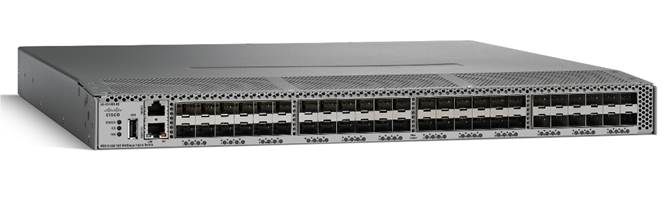
HPE Storage Fibre Channel Switch C-series SN6010C 16Gb (MDS 9148S) |
|
The HPE Storage Fibre Channel Switch C-series SN6010C 16Gb (MDS 9148S) is a high-performance, flexible, cost-effective platform providing high-density, line-rate16-Gbps ports for storage networking deployments in small, medium-sized, and large enterprise environments. The HPE Storage Fibre Channel Switch C-series SN6010C offers outstanding value by providing high-availability, flexibility, and ease of use at a cost-effective price in a compact one-rack-unit (1RU) form factor. With the ability to expand from 12 to 48 ports in 12-port increments, the SN6010C offers the densities required to scale from an entry-level departmental switch to top-of-rack switch to edge connectivity in enterprise SANs. The HPE Storage Fibre Channel Switch C-series SN6010C delivers a non-blocking architecture, with all 48 16-Gbps ports operating at line rate concurrently.
The HPE Storage Fibre Channel Switch C-series SN6010C supports the C-series Device Manager quick configuration wizard, which allows it to be deployed quickly and easily in networks of any size. Powered by C-series MDS 9000 NX-OS Software, it includes storage networking features and functions and is compatible with C-series SN8500C/SN8700C (MDS 9700) Series Multilayer Directors, C-series MDS 9100 series Multilayer Fabric Switches, MDS 9200 series Multi-service Switches, and MDS 9300 series Multilayer Fabric Switches providing transparent, end-to-end service delivery in core-edge deployments. |
|
|
|
|
|
HPE Storage Fibre Channel Switch C-series SN6010C |
|
|
Standard Features
|
Key Features and Benefits
- Up to 768 Gbps of aggregate bandwidth in a 1 rack unit (RU) - Up to 48 autosensing Fibre channel ports capable of speeds of 4/8/16 Gbps - Pay as you grow flexibility with on-demand port activation licenses
- N-Port ID Virtualization (NPIV) technology to provide independent management for each virtual machine - N-Port Virtualization (NPV) and fabric-port (F-port) channeling features to enable scaling of SANs without reaching Fibre Channel domain ID limits
- Designed for environments in which downtime is unacceptable - Non-disruptive software upgrades, dual hot swappable power supplies, and hot swappable fans - VSANs for fault isolation and PortChannels for Inter-Switch Link (ISL) resiliency
- Supports SAN plug and play capability - Built in storage network management - Reduced total cost of ownership |
|
|
|
Industry leading 16-Gb Performance Capability The switch offers full non-blocking 16-Gbps Fibre Channel performance on 48 line-rate ports and an aggregate bandwidth of 768 Gbps in each direction in a 1 Rack unit form factor. |
|
|
|
Scalability The HPE Storage Fibre Channel Switch C-series SN6010C comes in three preconfigured models of 12 or 48 ports. The 12-port SN6010C models may be upgraded onsite to enable additional ports in 12-port increments by adding the SN6010C 12-port FC Upgrade License for total scalability of 48 ports. |
|
|
|
Cost Effective Intelligent Storage networking The HPE Storage Fibre Channel Switch C-series SN6010C comes standard in a compact, extremely cost-effective design that simplifies deployment and administration of small and medium-scale storage-area networks (SANs) and as an edge switch in a larger enterprise. Please note that some services listed require the optional MDS 9100 Enterprise Package License. |
|
|
|
N-Port ID Virtualization NPIV) N-Port ID Virtualization (NPIV), a standard Fibre Channel protocol feature, individual virtual machines assume a full identity on the SAN so that Fibre Channel services such as zoning, Quality of Service (QoS), performance monitoring, and security can be provided to each virtual machine. |
|
|
|
VSANs VSAN, an industry standard for fabric virtualization capabilities, enables more efficient storage network use by creating hardware-based isolated environments within a single physical SAN fabric or switch. Up to 32 VSANs are supported per switch. Each VSAN can be zoned as a typical SAN and maintains its own fabric services and management domains for added scalability and resilience. VSANs allow the cost of SAN infrastructure to be shared among more users, while helping ensure segregation of traffic and retaining independent control of configuration on a VSAN-by-VSAN basis. |
|
|
|
PortChannels PortChannels allow users to aggregate up to 16 physical ISLs into a single logical bundle, providing optimized bandwidth use across all links. The bundle can consist of any port from the switch, helping ensure that the bundle remains active even in the event of a port failure. |
|
|
|
FlexAttach The FlexAttach feature gives HPE Storage Fibre Channel Switch C-series SN6010C customers the flexibility to add, move, or replace servers easily without the need to reconfigure SAN switches or storage arrays. It provides this flexibility by virtualizing the SAN identity of a server, which enables a server to retain its SAN identity even if the server is moved or replaced. | |
|
| |
|
Quality of Service (QoS) The Quality of Service (QoS) feature allows traffic to be classified into four distinct levels for service differentiation. QoS can be applied to help ensure that Fibre Channel data traffic for latency-sensitive applications receives higher priority over throughput-intensive applications such as data warehousing. | |
|
| |
|
F-port trunking and channeling The F-port trunking feature enables multiple VSANs to be transported on the uplink from a HPE Storage Fibre Channel Switch C-series SN6010C operating in NPV mode to the core switch. This feature will allow the consolidation of uplinks ports necessary for extending VSAN connectivity to the NP device. The F-port channeling feature enables up to 16 physical uplinks between a SN6010C switch operating in NPV mode and the core switch to be bundled into a PortChannel. Advanced traffic management features, such as fabricwide quality of service (QoS) and Inter-VSAN Routing (IVR), among others, are included with the optional HPE MDS 9100 Enterprise Package License. |
|
|
|
|
|
IVR (MDS 9000 NX-OS Software Release 6.2.9) VSANs and Inter-VSAN routing (IVR) enable deployment of large-scale multisite and heterogeneous SAN topologies. Integrated VSANs in port-level hardware allow any port in a system or in a fabric to be partitioned into any VSAN. Integrated IVR provides line-rate routing between any of the ports in a system or in a fabric without the need for external routing appliances. |
|
|
|
|
|
High Availability The SN6010C switch is designed for environments in which downtime is unacceptable. It offers:
|
|
|
|
|
|
Simplified Storage Management The HPE Storage Fibre Channel Switch C-series SN6010C comes standard with three principal modes of management: the C-series MDS 9000 Family CLI, the Quick Configuration Wizard, and the Cisco Data Center Network Manager (DCNM). |
|
|
|
|
|
Command Line Interface (CLI) The C-series MDS 9000 Family CLI is easy to learn and delivers broad management capabilities. The C-series MDS 9000 Family CLI is an extremely efficient and direct interface designed to provide optimal capabilities to administrators in enterprise environments. |
|
|
|
|
|
Quick Configuration Wizard The Quick Configuration Wizard helps eliminate management complexity and creates a readily available SAN environment for small- and midsized-business (SMB) applications. The wizard allows server access to storage to be set up quickly and easily in a single step using an intuitive GUI. |
|
|
|
Interoperability Offers compatibility with a broad range of Hewlett Packard Enterprise servers and operating systems, as well as disk and tape storage devices; see current compatibility matrix. |
|
|
|
Diagnostics
|
|
|
|
Software Components, Included NX-OS HPE Storage Fibre Channel Switch C-series SN6010C includes the Cisco MDS 9000 NX-OS Software operating system version 6.2(9) or higher, Cisco Data Center Network Manager (Essentials Edition), and a set of configuration, maintenance and diagnostics tools. It also includes VSAN support, PortChannels, extended fabrics, and hardware-enforced zoning. Cisco Data Center Network Manager Cisco Data Center Network Manager (Essentials Edition) is a responsive, easy-to-use Java application that simplifies management across multiple switches and fabrics. Cisco Data Center Network Manager enables administrators to perform vital tasks such as topology discovery, fabric configuration and verification, LUN security, monitoring, and fault resolution. All functions are available through a secure interface, which enables remote management from any location. Cisco Data Center Network Manager may be used independently or in conjunction with third-party management applications. Cisco provides an extensive API for integration with third-party and user developed management tools. Additional advanced features are available with HPE's DCNM SN6000C license mentioned below. Notes: Starting NX-OS 9.2(1), DCNM is renamed as Nexus Dashboard Fabric Controller (NDFC). Read more at, https://www.cisco.com/c/en/us/products/collateral/cloud-systems-management/prime-data-center-network-manager/san-innovation-ndfc-so.html Cisco Smart Licensing and Subscription Licenses Starting from Cisco NX-OS 9.2(2), Smart Licensing Using Policy is available for HPE C-Series switches. This enables the customer to purchase subscription-based licenses for a period of time. For more information, refer to Cisco MDS Licensing Guide, Smart Licensing Using Policy: https://www.cisco.com/c/en/us/td/docs/dcn/mds9000/sw/9x/configuration/licensing/cisco-mds-9000-nx-os-licensing-guide-9x/smart-licensing-using-policy.html?dtid=osscdc000283 |
|
|
|
Software Components, Optional
HPE SN6010C 12-Port Upgrade License The flexibility of the HPE Storage Fibre Channel Switch C-series SN6010C is provided by the C-series SN6010C 12-port 16Gb FC Upgrade license, which allows the addition of twelve 16-Gbps ports. This upgrade license is appropriate for the switches that have 12 active ports by default (K2Q16A and R0Q97A). Notes: This port upgrade license, D4U60AAE, is EOL and inventory is limited. Recommend maximizing quantities purchased to activate additional switch ports while you can. |
|
HPE SN6000C Data Center Network Manager E-LTU The "Standard" Cisco Data Center Network Manager (Essentials Edition) software that is included at no charge with the SN6610C Switch provides basic switch configuration and troubleshooting capabilities. HPE's C-series Data Center Network Manager (DCNM) License (for the SN6000C Fibre Channel Switches) extends Cisco Data Center Network Manager by advanced features such as historical performance data collection for network traffic hot-spot analysis, centralized management services and advanced application integration. Notes: Starting NX-OS 9.2(1), DCNM is renamed as Nexus Dashboard Fabric Controller (NDFC). Read more at, https://www.cisco.com/c/en/us/products/collateral/cloud-systems-management/prime-data-center-network-manager/san-innovation-ndfc-so.html HPE SN6000C Enterprise Package License HPE's C-series MDS switches have a set of advanced traffic engineering and advanced security features that are recommended for all Enterprise SANs. These features are bundled together in a management application called the HPE MDS 9100 Enterprise Package. Please refer to Cisco's MDS Enterprise Package Data Sheet for more information: https://www.cisco.com/c/en/us/products/collateral/storage-networking/mds-9000-software-licensing/product_data_sheet09186a00801ca6ac.html HPE C-series Advantage License (Subscription License: 1/3/5 yrs) The HPE C-series Advantage License is a combination of Cisco Data Center Network Manager and Enterprise Package licenses. It comes with 1, 3, or 5 year terms and provisioned through Cisco Smart Licensing. Notes: NX-OS 9.2(2) is the minimum required version for C-series Advantage Licenses. |
|
|
Service and Support
|
Warranty (1-1-1) Hardware Warranty; 1-year parts; 1-year on-site (8x5, next business day response) and 1-year labor. Notes: The hardware warranty covers firmware and embedded non-saleable software. Hardware or Software product installation is not included in the warranty, but is available and highly recommended. |
|
|
|
HPE Services No matter where you are in your transformation journey, you can count on HPE Services to deliver the expertise you need when, where and how you need it. From planning to deployment, ongoing operations and beyond, our experts can help you realize your digital ambitions. https://www.hpe.com/services
|
|
Consulting services No matter where you are in your journey to hybrid cloud, experts can help you map out your next steps. From determining what workloads should live where, to handling governance and compliance, to managing costs, our experts can help you optimize your operations. https://www.hpe.com/services/consulting SAN Fabric Integration and Migration service HPE Data Storage Services - SAN Fabric Integration and Migration simplifies the introduction of and migration to new HPE C-series SAN fabric devices. It helps maximize the value of your investment in your new HPE C-series SAN fabric devices by leveraging HPE Services expertise and best practices. https://www.hpe.com/psnow/doc/a50011015enw
|
|
HPE Managed Services HPE runs your IT operations, providing services that monitor, operate, and optimize your infrastructure and applications, delivered consistently and globally to give you unified control and let you focus on innovation. HPE Managed Services | HPE
|
|
Operational services Optimize your entire IT environment and drive innovation. Manage day-to-day IT operational tasks while freeing up valuable time and resources. Meet service-level targets and business objectives with features designed to drive better business outcomes. https://www.hpe.com/services/operational
|
|
|
|
Recommended Services HPE Tech Care Service HPE Tech Care Service is the operational support service experience for HPE products. The service goes beyond traditional support by providing access to product specific experts, an AI driven digital experience, and general technical guidance to not only reduce risk but constantly search for ways to do things better. HPE Tech Care Service delivers a customer-centric, AI driven, and digitally enabled customer experience to move your business forward. HPE Tech Care Service is available in three response levels. Basic, which provides 9x5 business hour availability and a 2-hour response time. Essential which provides a 15-minute response time 24x7 for most enterprise level customers, and Critical which includes a 6-hour repair commitment where available and outage management response for severity 1 incidents. https://www.hpe.com/services/techcare |
|
HPE Complete Care Service HPE Complete Care Service is a modular, edge-to-cloud IT environment service designed to help optimize your entire IT environment and achieve agreed upon IT outcomes and business goals through a personalized experience. All delivered by an assigned team of HPE Services experts. HPE Complete Care Service provides:
https://www.hpe.com/services/completecare
|
|
|
|
Other related services from HPE Services HPE Lifecycle Services HPE Lifecycle Services provide a variety of options to help maintain your HPE systems and solutions at all stages of the product lifecycle. A few popular examples include:
https://www.hpe.com/services/lifecycle
|
|
|
|
HPE SAN Deployment Service Hewlett Packard Enterprise delivers complete design and implementation services for Fibre Channel, FCoE, FCIP, SAS, and iSCSI SAN connectivity components. Learn more: https://www.hpe.com/psnow/doc/5981-8527enw?jumpid=in_lit-psnow-red
|
|
HPE Installation Service Provides for the basic hardware installation of HPE branded servers, storage devices and networking options to assist you in bringing your new hardware into operation in a timely and professional manner.
Learn more: https://h20195.www2.hpe.com/v2/Getdocument.aspx?docname=5981-9356enw
|
|
HPE Education Services Training and certification designed for IT and business professionals across all industries. Broad catalogue of course offerings to expand skills and proficiencies in topics ranging from cloud and cybersecurity to AI and DevOps. Create learning paths to expand proficiency in a specific subject. Schedule training in a way that works best for your business with flexible continuous learning options.
https://www.hpe.com/services/training |
|
Defective Media Retention An option available with HPE
Consult your HPE Sales Representative or Authorized Channel Partner of choice for any additional questions and services options.
|
|
|
|
Parts and Materials HPE will provide HPE-supported replacement parts and materials necessary to maintain the covered hardware product in operating condition, including parts and materials for available and recommended engineering improvements.
Parts and components that have reached their maximum supported lifetime and/or the maximum usage limitations as set forth in the manufacturer's operating manual, product QuickSpecs, or the technical product data sheet will not be provided, repaired, or replaced as part of these services. How to purchase services Services are sold by Hewlett Packard Enterprise and Hewlett Packard Enterprise Authorized Service Partners:
|
|
|
|
AI Powered and Digitally Enabled Support Experience Achieve faster time to resolution with access to product-specific resources and expertise through a digital and data driven customer experience. Sign into the HPE Support Center experience, featuring streamlined self-serve case creation and management capabilities with inline knowledge recommendations. You will also find personalized task alerts and powerful troubleshooting support through an intelligent virtual agent with seamless transition when needed to a live support agent.
https://support.hpe.com/hpesc/public/home/signin |
|
|
|
Consume IT on your terms HPE GreenLake edge-to-cloud platform brings the cloud experience directly to your apps and data wherever they are-the edge, colocations, or your data center. It delivers cloud services for on-premises IT infrastructure specifically tailored to your most demanding workloads. With a pay-per-use, scalable, point-and-click self-service experience that is managed for you, HPE GreenLake edge-to-cloud platform accelerates digital transformation in a distributed, edge-to-cloud world.
To learn more about HPE Services, please contact your Hewlett Packard Enterprise sales representative or Hewlett Packard Enterprise Authorized Channel Partner. Contact information for a representative in your area can be found at "Contact HPE" https://www.hpe.com/us/en/contact-hpe.html For more information: http://www.hpe.com/services |
|
|
Configuration Information
|
The HPE Storage Fibre Channel Switch C-series SN6010C 16Gb comes preconfigured with 12 or 48 autosensing Fibre Channel ports capable of 16, 8 and 4 Gbps in a compact 1RU form factor chassis. An On-Demand Port Activation license is available for "pay as you grow" expansion in 12-port increments for up to 48 Fibre Channel ports. The port slots are empty and optical transceivers are required to utilize the ports. Shortand Long Range optical transceiver options (SFPs) are available and must be ordered separately. |
|
Step 1 - Base Configuration (Select one) |
|
Description |
SKU |
|
HPE SN6010C 16Gb 12-port 16Gb Short Wave SFP+ Fibre Channel Switch |
R0Q97A* |
|
HPE SN6010C 12-port 16Gb Fibre Channel Switch |
K2Q16A* |
|
HPE SN6010C 48-port 16Gb Fibre Channel Switch |
K2Q17A |
|
Notes: - *These switches have 12 ports activated out of 48 total ports. We suggest activating all desired ports now using the Port Upgrade (POD) license below. - This 16Gb POD License is End-of-Life (EOL) and inventory is limited; therefore, we recommend customers purchase maximum quantities of the POD license when purchasing either of the HPE SN6010C 16Gb FC Switches above. | |
|
| |
|
Step 2 - Optional Software | |
|
On Demand Port Activation License | |
|
HPE SN6010C 12-port 16Gb Fibre Channel Upgrade E-LTU |
D4U60AAE |
|
Notes: This 16Gb POD License is End-of-Life (EOL). Inventory is limited therefore we recommend customers purchase maximum quantities of the POD license when purchasing either of HPE SN6010C 16Gb FC Switches above. | |
|
|
|
|
Management Software |
|
|
HPE SN6000C Advantage 1-year E-LTU |
R9N32AAE |
|
HPE SN6000C Advantage 3-year E-LTU |
R9N36AAE |
|
HPE SN6000C Advantage 5-year E-LTU |
R9N40AAE |
|
Notes: Advantage license is a combination of Nexus Dashboard Fabric Controller (Data center Network Manager) and Enterprise Package |
|
|
HPE SN6000C DCNM Switch E-LTU |
R4F89AAE |
|
HPE SN6000C Enterprise Package E-LTU |
A7515AAE |
|
| |
|
Step 3 - Options | |
|
Select each required option with quantities specified: | |
|
16Gb FC Transceivers |
|
|
HPE C-series 16 Gb Fibre Channel SW SFP+ Transceiver |
C8S72A |
|
HPE C-series 16 Gb Fibre Channel LW SFP+ Transceiver |
C8S73A |
|
| |
|
8 Gb FC Transceivers | |
|
HPE MDS 9000 8Gb FC SFP+ Short Range Transceiver |
AJ906A |
|
Notes: Each port on the HPE Storage Fibre Channel Switch C-series SN6010C may be configured to accept Short or Long Wave SFP optical transceivers. When ordering additional transceivers for the SN6010C, remember that all the active ports must be populated with above SFP optical transceivers only. (No substitutes allowed) Using other transceivers may void product warranty. The bundled switch (R0Q97A) comes with 12 16Gb SFPs populated by default. | |
|
| |
|
HPE OM3 LC-LC Optical Cables |
|
|
Description |
SKU |
|
HPE LC to LC Multi-mode OM3 2-Fiber 0.5m 1-Pack Fiber Optic Cable |
AJ833A |
|
HPE LC to LC Multi-mode OM3 2-Fiber 1.0m 1-Pack Fiber Optic Cable |
AJ834A |
|
HPE LC to LC Multi-mode OM3 2-Fiber 2.0m 1-Pack Fiber Optic Cable |
AJ835A |
|
HPE LC to LC Multi-mode OM3 2-Fiber 5.0m 1-Pack Fiber Optic Cable |
AJ836A |
|
HPE LC to LC Multi-mode OM3 2-Fiber 15.0m 1-Pack Fiber Optic Cable |
AJ837A |
|
HPE LC to LC Multi-mode OM3 2-Fiber 30.0m 1-Pack Fiber Optic Cable |
AJ838A |
|
HPE LC to LC Multi-mode OM3 2-Fiber 50.0m 1-Pack Fiber Optic Cable |
AJ839A |
|
|
|
|
HPE PremierFlex OM4+ Fiber Optic Cables |
|
|
HPE Premier Flex MPO/MPO Multi-mode OM4 12 Fiber 10m Cable |
QK729A |
|
HPE Premier Flex MPO/MPO Multi-mode OM4 8 Fiber 50m Cable |
QK731A |
|
HPE Premier Flex LC/LC Multi-mode OM4 2 Fiber 1m Cable |
QK732A |
|
HPE Premier Flex LC/LC Multi-mode OM4 2 Fiber 2m Cable |
QK733A |
|
HPE Premier Flex LC/LC Multi-mode OM4 2 Fiber 5m Cable |
QK734A |
|
HPE Premier Flex LC/LC Multi-mode OM4 2 Fiber 15m Cable |
QK735A |
|
HPE Premier Flex LC/LC Multi-mode OM4 2 Fiber 30m Cable |
QK736A |
|
HPE Premier Flex LC/LC Multi-mode OM4 2 Fiber 50m Cable |
QK737A |
|
| |
Technical Specifications
|
Family Information
| ||||||||||||||||||||||||||||||||||||||||
Notes: For additional switch support information, refer to the C-series FC Switch Connectivity Stream on the Single Point of Connectivity Knowledge (SPOCK) website at: https://h20272.www2.hpe.com/spock/. You must sign up for a Hewlett Packard Enterprise Passport to enable access. Once logged in, click Switches under Other Hardware in the last navigation panel of the window to access the Fibre Channel Switch Streams. Click on the C-Series FC Switch Connectivity Stream to open the document.
| ||||||||||||||||||||||||||||||||||||||||
|
| ||||||||||||||||||||||||||||||||||||||||
|
Minimum software requirements MDS 9000 NX-OS Software Release 6.2(9) | ||||||||||||||||||||||||||||||||||||||||
|
Performance and port configuration
|
||||||||||||||||||||||||||||||||||||||||
|
|
|
Security
- Hardware-enforced zoning - Logical-unit-number (LUN) zoning and read-only zones
- SSHv2 - SNMPv3 - IP ACLs |
|
|
|
Compatibility Fibre Channel protocols
|
|
|
|
|
|
|
Advanced Services Please note that some services require the optional Enterprise Package license to be activated.
|
|
|
|
Fabric Services
|
|
|
|
Diagnostic and Troubleshooting
|
|
|
|
Management
- Out-of-band 10/100/1000 Ethernet port - EIA/TIA-232 serial console port - In-band Fibre Channel over IP (FCIP)
- CLI - SNMP - SMI-S
- RBAC using RADIUS or TACACS+ authentication, authorization, and accounting (AAA) functions - VSAN-based roles - SSHv2 - SNMPv3 |
|
|
|
Management Applications
|
|
|
|
Availability
|
|
|
|
Serviceability
|
|
|
|
|
Environmental
|
|
|
|
Power and Cooling
- With 4-Gbps optics (48 ports fully populated): 99W with 0.89A at 110 VAC and 0.45A at 220 VAC - With 8-Gbps optics (48 ports fully populated): 101W with 0.90A at 110 VAC and 0.46A at 220 VAC - 100W (on base model config running 16G 100% traffic load at 25C)
|
|
|
|
Safety
|
|
|
|
EMC
|
|
|
Summary of Changes
|
Date |
Version History |
Action |
Description of Change |
|
03-Sep-2024 |
Version 28 |
Changed |
Service and Support section was updated. |
|
15-Apr-2024 |
Version 27 |
Changed |
Rebranding Series Name applied |
|
26-Feb-2024 |
Version 26 |
Changed |
Overview, Standard Features, Configuration Information and Technical Specifications sections were updated. Added EOL note for POD License. Maintenace. |
|
13-Nov-2023 |
Version 25 |
Changed |
HPE Services Rebranding |
|
04-Apr-2022 |
Version 24 |
Changed |
Added NDFC and Subscription licenses |
|
04-Oct-2021 |
Version 23 |
Changed |
Service and Support section was updated Obso SKU was removed |
|
02-Aug-2021 |
Version 22 |
Changed |
Service and Support section was updated. |
|
17-Aug-2020 |
Version 21 |
Changed |
Added SN8700C product family information |
|
03-Aug-2020 |
Version 20 |
Changed |
QuickSpecs layout was updated and Branding Refresh was applied. |
|
01-Jun-2020 |
Version 19 |
Changed |
Modified K2Q17A SKU description and notes |
|
03-Feb-2020 |
Version 18 |
Changed |
Added DCNM Switch based license |
|
15-Jul-2019 |
Version 17 |
Changed |
Family Information and Configuration Information sections were updated. |
|
03-Jun-2019 |
Version 16 |
Changed |
Added new bundled switch offering and updated services information |
|
03-Dec-2018 |
Version 15 |
Changed |
Product Highlights, Service and Support and Configuration Information sections were updated. |
|
01-Oct-2018 |
Version 14 |
Changed |
Overview were revised. |
|
02-Jul-2018 |
Version 13 |
Changed |
Added SN6610C Switch details. |
|
06-Nov-2017 |
Version 12 |
Changed |
Updated all software license product names and part numbers to reflect move to e-licensing, updated branding of products. |
|
07-Aug-2017 |
Version 11 |
Changed |
Updated Services and Warranty urls, updated hardware dimensions and specifications, added flow-based QOS. |
|
11-Nov-2016 |
Version 10 |
Changed |
Changes applied to the entire document. |
|
21-Oct-2016 |
Version 9 |
Changed |
Changed made to the Product Highlights section. |
|
08-Apr-2016 |
Version 8 |
Changed |
Removed references to MDS 8Gb Fabric Switch for HP BladeSystem as products are, now, obsolete and updated Spock url. |
|
20-Nov-2015 |
Version 7 |
Changed |
Removing all rebranding references. |
|
06-Nov-2015 |
Version 6 |
Changed |
Corrected the buffer credit information. |
|
18-Sep-2015 |
Version 5 |
Changed |
Removed SN6000C switches as obsolete. |
|
10-Apr-2015 |
Version 4 |
Changes |
Corrected the part numbers for the 16Gb FC SFPs. |
|
20-Feb-2015 |
Version 3 |
Changed |
Removed MDS9222i as obsolete, corrected name of DCNM license, other minor formatting updates. |
|
12-Dec-2014 |
Version 2 |
Changed |
Changed Header name to HP SN6010C 16Gb Fibre Channel Switch (MDS9148S). |
|
01-Dec-2014 |
Version 1 |
New |
New QuickSpecs |
Copyright
|
|
| |||||
|
|
|
© Copyright 2024 Hewlett Packard Enterprise Development LP. The information contained herein is subject to change without notice. The only warranties for Hewlett Packard Enterprise products and services are set forth in the express warranty statements accompanying such products and services. Nothing herein should be construed as constituting an additional warranty. Hewlett Packard Enterprise shall not be liable for technical or editorial errors or omissions contained herein.
c04444844 - 15075 - Worldwide - V28 - 03-September-2024 |