




























HPE SN3800M Switch: технические характеристики и документация
В архивеOverview
|
HPE SN3800M Switch |
|
|
|
With an increasing need to access data faster and accommodate growing workloads, rising levels of east-west traffic, and new storage arrays based on flash storage technologies, a high bandwidth, low-latency, zero packet loss network becomes paramount. The HPE SN3800M Switch offer a 100GbE-based network platform capable of delivering unbelievable networking speed and agility to keep pace with the most intense workloads small- to large-scale enterprises can produce. With port speeds spanning 10 Gb/s to 100 Gb/s and 64 ports at 100GbE and a switching capacity of 8.33Bpps from 64ports at 100GbE, the switch enables non-blocking throughput at wire-speed transfers-across all packet sizes. All this enables the SN3800M to deliver 12.8 Tbps throughput and an uncompromising low cut-through latency in a compact 2RU form factor. The M-Series are perfect for aggregation (super-spine) or Top-Of-Rack (TOR) deployments and optimized for virtualized environments, hyperconverged infrastructure, and storage deployments.
With HPE M-Series Ethernet switches give you the right network bandwidth with consistent performance for high-performance and storage workloads. Delivering the highest feature set at the right price allows you to get the most out of your Ethernet infrastructure to best support a variety of use cases, including media and entertainment; streaming video, financial services industry, virtualized data centers, and next generation storage, including software-defined storage and NVMe flash. With HPE M-Series switches, you can:
HPE SN3000M series of Ethernet switches are built on Spectrum-2 with capabilities:
|
|
|
|
SN3800M is available in following models:
Power-to-Connector and Connector-to-Power Airflow Separate ONIE and ONYX™ SKU option |
|
|
|
| |||
|
| |||
|
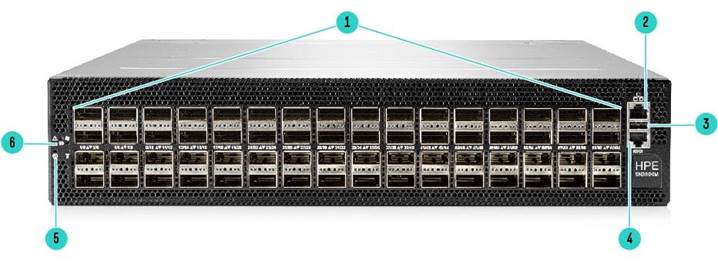
HPE M-Series SN3800M - Front View | |||
|
1 |
1-64 10GbE to 100GbE QSFP+/QSFP28 ports |
4 |
IOIOI RS232 Serial Console Port: 115200 BAUD |
|
2 |
MGMT0 100MbE to 1000GbE Port |
5 |
Status LEDs |
|
3 |
USB 2.0 |
6 |
Password Reset Button pressed for more than 15 Seconds. |
|
| |||
|
| |||
|
| |||
|
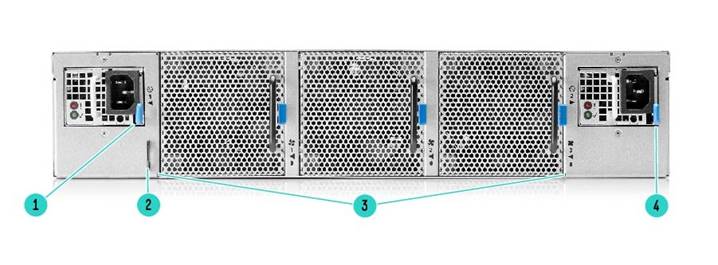
HPE M-Series SN3800M - Rear View | |||
|
1 |
Hot Swappable Power Supply 1 (FRU) |
3 |
Hot Swappable FANs(1 to 3) FRU |
|
2 |
Inventory Pull-Out Tab |
4 |
Hot Swappable Power Supply 2 (FRU) |
|
| |||
|
Key Features and Benefits | |
|
|
|
| |
|
Models | |
|
HPE M-Series SN3800M Ethernet Switch Models |
SKU |
|
HPE SN3800M 100GbE 64QSFP28 Power to Connector Airflow Switch |
R3B15A |
|
|
|
HPE SN3800M 100GbE 64QSFP28 ONIE Power to Connector Airflow Switch |
R3A95A |
|
|
|
HPE SN3800M 100GbE 64QSFP28 ONIE Connector to Power Airflow Switch |
R3A96A |
|
|
|
HPE SN3800M 100GbE 64QSFP28 ONIE Power to Connector Airflow DC Switch |
R3A99A |
|
|
|
HPE SN3800M 100GbE 64QSFP28 ONIE Connector to Power Airflow DC Switch |
R3B12A |
|
|
|
| |
Standard Features
HPE M-Series SN3800M Ethernet Switch Models
|
||
|
| ||
|
User Interfaces: Command Line & Web Interface
|
||
|
| ||
|
System Management | ||
|
Management Interface Management interfaces are used in order to provide access to switch management user interfaces (e.g. CLI, WebUI). HPE Switch Management supports out-of-band (OOB) dedicated interfaces (e.g. mgmt0, mgmt1) and in-band dedicated interfaces. In addition, HPE M-Series Switches feature a standard 115200 baud rate RJ45 serial port that provides access to the CLI. | ||
|
| ||
|
NTP, Clock & Time Zones Network Time Protocol (NTP) is a networking protocol for clock synchronization between computer systems over packet-switched, variable-latency data networks. NTP is intended to synchronize all participating computers to within a few milliseconds of Coordinated Universal Time (UTC) and is designed to mitigate the effects of variable network latency. | ||
|
| ||
|
PTP IEEE Standard for a Precision Clock Synchronization Protocol for Networked Measurement and Control Systems (standard number 1588) defines the means to achieve time synchronization in the orders of sub microseconds. | ||
|
| ||
| ||
|
Saving, Loading & restore to factory defaults of the Configuration Files HPE Smart Fabric Orchestrator The HPE Smart Fabric Orchestrator validates the integrity, interoperability and compliance of HPE storage, servers and network fabric infrastructures before or during deployment, eliminating human errors during any configurations update or adding new devices. The pre-upgrade check option verifies and reports what components in your SAN need an update to meet the specified version requirement, further assisting in keeping the SAN and fabric infrastructure in ideal health by making informed decisions with better supportability and predictability. The Single Point of Connectivity Knowledge (SPOCK) checks are done against the HPE SPOCK database file currently installed in the Smart Fabric Orchestrator. Checks are easy, with simple mouse-hover color indicators for the components. | ||
|
|
|
Logging Logging of system events in several severity level over a configurable period of time. |
|
|
|
End-to-end Fabric management with NEO® NEO™ management platform extends management throughout the entire fabric, with end-to-end capabilities for both switches and NICs. Use NEO to enable even greater visibility into the complete data transport path, from the server, through the network fabric and to the server/client. |
|
|
|
Debugging Support save sysdmp file collects configuration, status, counters, log files, What-Just-Happened logs, and WireShark traces for Ethernet modules to enable timely review of problems and facilitate service support. There are 31 per port packet counters and an additional 22 discard packet classification counters to help you identify why there are packet processing problems, should they occur |
|
|
|
What Just Happened (WJH) As an innovative network telemetry technology, 'What Just Happened' (WJH) monitors and alerts on data plane anomalies to reduce system downtime. With built-in capabilities to inspect packets across all ports at line-rate, multi-terabit speeds, WJH avoids time-consuming data collection and manual searches for network problems. In addition, a streaming WJH telemetry application, supported by NEO™ and other management applications, can be installed as a Docker container. |
|
|
|
Link Diagnostic Per Port Enables an insight into the physical layer components - see information such as a cable status (plugged/unplugged), speed mismatch, auto-negotiation failures, signal quality failures, link training failures, forward error code mismatch, etc. |
|
|
|
Signal Degradation Monitoring A system can monitor the bit error rate (BER) in order to ensure a quality of the link and take an automatic action to disable offending ports. |
|
|
|
Telemetry Sampling (histograms) - a network administrator can enable a sampling of the port buf¬fer occupancy, record occupancy changes over time, and provide information for differ¬ent levels of buffer occupancy, and amount of time the buffer has been occupied during the observation period. Thresholds - thresholds may be enabled per port to record the network time when port buffer occupancy crosses the defined threshold and when buffer occupancy drops below it. |
|
|
|
User Management and Security
|
|
|
|
Cryptographic (X.509, IPSec) and Encryption Configuring, generating and modifying x.509 certificates used in the system. |
|
|
|
802.1x Protocol Authenticate hosts (or supplicants) and to allow connection only to a list of allowed hosts pre-configured on an authentication server |
|
|
|
Network Management Interfaces SNMP, JSON & XML Puppet Agent built-in agent for the open-source "Puppet" configuration change management system |
|
|
|
Additional Management & Automation Features
|
|
|
|
Linux Docker Containers - Run your applications as a Linux docker image embedded in the switch flash:
|
|
|
|
Software Components, Standard, Base Models |
|
Ethernet Switching |
|
Interface Isolation Group interfaces in sets where traffic from each port is isolated from other interfaces in the group. |
|
|
|
Link Aggregation Group (LAG) Several same speed links are combined into a single logical entity with the accumulated bandwidth of the originating ports |
|
|
|
MLAG Extending the implementation of the LAG to more than a single chassis provides another level of redundancy that extends from the link level to the node level. Up to two switches are supported in an MLAG configuration |
|
|
|
VLANs L2 segment of the network which defines a broadcast domain and is identified by a tag added to all Ethernet frames running within the domain |
|
|
|
Voice VLAN Provide QoS to voice and data traffic in a scenario where a terminal is connected to an IP phone which is in turn connected to the port on the switch |
|
|
|
QinQ Segregate the traffic of different customers in their infrastructure, while still giving the customer a full range of VLANs for their internal use by adding a second 802.1Q VLAN tag to an already tagged frame |
|
|
|
Spanning Tree Rapid Spanning Tree Protocol (RSTP) provides for rapid recovery of connectivity following the failure of a bridge/bridge port or a LAN. The following are supported: BPDU Filter, BPDU Guard, Loop Guard, Root Guard, MSTP and RPVST |
|
|
|
Virtual routing and forwarding functions (VRFs) Virtual routing and forwarding (VRF) is a technology included in IP (Internet Protocol) network routers that allows multiple instances of a routing table to exist in a router and work simultaneously. This increases functionality by allowing network paths to be segmented without using multiple devices. Because traffic is automatically segregated, VRF also increases network security. Currently, Onyx™ supports 64 VRF instances |
|
|
|
OpenFlow - Support for OpenFlow 1.3 OpenFlow is a network protocol that facilitates direct communication between network systems via Ethernet. Software Defined Networks (SDN) allows a centralist management of network equipment. OpenFlow allows the SDN controller to manage SDN equipment. The OpenFlow protocol allows communication between the OpenFlow controller and OpenFlow agent. |
|
|
|
VXLAN VXLAN (Virtual eXtensible Local Area Network) addresses the requirements of the L2 and L3 data center network infrastructure in the presence of virtual networks in a multi-tenant environment. It runs over the existing networking infrastructure and provides a means to "stretch" a L2 broadcast domain over a layer 3 network. |
|
|
|
IGMP Snooping Snooping and updating tables based on the IGMP protocol used by hosts and adjacent routers on IP networks to establish multicast group memberships |
|
|
|
Link Layer Discovery Protocol (LLDP) A vendor-neutral Link Layer protocol in the Internet Protocol Suite used by network devices for advertising their identity, capabilities, and neighbors on a IEEE 802 LAN |
|
|
|
Quality of Service (QoS) QoS Classification, QoS ReWrite, Queuing and Scheduling, RED & ECN are supported |
|
Access Control List An Access Control List (ACL) is a list of permissions attached to an object, to filter or match switches packets. When the pattern is matched at the hardware lookup engine, a specified action (e.g. permit/deny) is applied Other QOS features:
|
|
|
|
Port Mirroring Port mirroring enables data plane monitoring functionality which allows the user to send an entire traffic stream for testing. |
|
|
|
sFlow sFlow (ver. 5) is a procedure used for statistical monitoring of traffic in networks. MLNX-OS supports an sFlow sampling mechanism (agent), which includes collecting traffic samples and data from counters. The sFlow datagrams are then sent to a central collector. |
|
|
|
RDMA over Converged Ethernet (RoCE) Remote Direct Memory Access (RDMA) is the remote memory management capability that allows server to server data movement directly between application memory spaces without CPU involvement. Simplified RoCEv2 switch configuration automation supported by just one command: roce {lossy | semi-lossless | lossless} |
|
|
|
Priority Flow Control Provides an enhancement to the existing pause mechanism in Ethernet. The global Ethernet pause option stops all traffic on a link. PFC creates eight separate virtual links on the physical link and allows any of these links to be paused and restarted independently, enabling the network to create a no-drop class of service for virtual links. |
|
|
|
Shared Buffers All successfully received packets by a switch are stored on internal memory from the time they are received until the time they are transmitted. The SN3000M family's 48MB packet buffer is dynamically allocated and fully shared between all physical ports. This dynamic shared buffer configuration is applied to provide lossless services, superior micro-burst absorption, and to ensure adaptive flow fairness between ports and priorities. |
|
|
|
Storm Control Storm Control is a feature which can be enabled on L2 Ethernet ports and port-channels to monitor inbound traffic to prevent disruptions caused by a broadcast, multicast, or unicast traffic storm on the physical interfaces |
|
|
|
Store-and-Forward Store-and-Forward is used to describe a functionality where a switch receives a complete packet, stores it, and only then forwards it. Since the switch makes forwarding decisions based on the destination address which is at the header of the packet, the switch can make the forwarding decision before receiving the complete packet. This process is called cut-through, as the switch forwards part of the packet before receiving the complete packet. Cut-through and store-and-forward modes are configurable as a switch global or per port option. |
|
|
|
IP Routing |
|
IP Interfaces The following 3 types of IP interfaces are supported:
|
|
|
|
IPv6 IP version 6 (IPv6) is a routing protocol which succeeds IPv4. With the expansion of the Internet and data bases IPv6 addresses consist of 128 bits whose purpose is to allow networks to include a significantly higher number of nodes by increasing the pool of available unique IP addresses. IPv6 packets alleviate overhead and allow for future customizability. |
|
|
|
OSPF Open Shortest Path First (OSPF) is a link-state routing protocol for IP networks. It uses a link state routing algorithm and falls into the group of interior routing protocols, operating within a single autonomous system (AS). |
|
|
|
BGP Border Gateway Protocol (BGP) is an exterior gateway protocol which is designed to transfer routing information between routers. It maintains and propagates a table of routes which designates network reachability among autonomous systems (ASs). |
|
|
|
BFD Infrastructure Many protocols uses slow Hello mechanisms and failure is detection usually seconds after the problem occurs. The BFD goal is to provide low overhead short duration detection of failures between adjacent nodes and single mechanism that can be used for liveness detection over any media. |
|
|
|
Policy Rules |
|
Route Map Route maps define conditions for redistributing routes between routing protocols. A route map clause is identified by a name, filter type (permit or deny) and a sequence number. Clauses with the same name are components of a single route map; the sequence number determines the order in which the clauses are compared to a route. |
|
|
|
IP Prefix-List Prefix-list is a list of entries, each of which can match one or more IP prefixes. A prefix-list is usually used to match a specific IP prefix, mostly in relation to IP route destinations. |
|
|
|
Multicast (IGMP and PIM) Protocol independent multicast (PIM) is a collection of protocols that deal with efficient delivery of IP multicast (MC) data. Those protocols are published in the series of RFCs and define different ways and aspects of multicast data distribution. PIM protocol family includes PIM dense mode (PIM-DM), PIM sparse mode (PIM-SM, which is not supported on Mellanox platforms), Bidirectional PIM (PIM-BIDIR) and Bootstrap router (BSR) protocol.
PIM builds and maintains multicast routing tables based on the unicast routing information provided by unicast routing tables that can be maintained statically or dynamically by IP routing protocols like OSPF and BGP. |
|
|
|
VRRP The Virtual Router Redundancy Protocol (VRRP) is a computer networking protocol that provides for automatic assignment of available IP routers to participating hosts. This increases the availability and reliability of routing paths via automatic default gateway selections on an IP subnetwork. |
|
|
|
MAGP Multi-active gateway protocol (MAGP) is aimed to solve the default gateway problem when a host is connected to a set of switch routers (SRs) via MLAG.
The network functionality in that case requires that each SR is an active default gateway router to the host, thus reducing hops between the SRs and directly forwarding IP traffic to the L3 cloud regardless which SR traffic comes through. |
|
|
|
DHCP Relay Since Dynamic Host Configuration Protocol must work correctly even before DHCP clients have been configured, the DHCP server and DHCP client need to be connected to the same network.
In larger networks, this is not always practical because each network link contains one or more DHCP relay agents. These DHCP-R agents receive messages from DHCP clients and forward them to DHCP servers thus extending the reach of the DHCP beyond the local network. |
|
|
|
Feature Summary |
|
Layer 3 Feature Set |
Network Virtualization
Quality of Service (QoS)
Security
Synchronization
Docker Container
Software Defined Network (SDN)
|
|
Layer 2 Feature Set |
Monitoring & Telemetry
Management and Automation
|
|
|
Service and Support
|
Warranty (3-3-3) Hardware Warranty; 3-year parts; 3-year on-site (standard business hours, next business day response) and 3-year labor. NOTE: The hardware warranty covers firmware. For extended hardware support and installation information, please see the "Services and Support" Section. |
|
|
|
Service and Support |
|
Achieve maximum return from your IT investment Get the expertise you need at every step of your IT journey with HPE Pointnext services and support. We help you lower your risks and costs using proven best practices, automation and methodologies that have been tested and refined by HPE experts through thousands of deployments globally. With Advisory Services, we focus on your business outcomes and goals, partnering with you to design your transformation and build a roadmap tuned to your unique challenges. Our Professional and Operational Services can be leveraged to speed up time-to-production, boost performance and accelerate your business. HPE Pointnext specializes in flawless and on-time implementation, on-budget execution, and creative configurations that get the most out of software and hardware alike. |
|
|
|
Consume IT on your terms HPE GreenLake Flex Capacity combines the simplicity, agility, and economics of public cloud with the security and performance benefits of on-premises IT. You determine your own "Right Mix" of Hybrid IT and workload placement without having to use. With its agile pay-per-use service, HPE GreenLake Flex Capacity can help your IT organization:
|
|
|
|
Connect your devices Unlock all of the benefits of your technology investment by connecting your products to Hewlett Packard Enterprise. Reduce down time, increase diagnostic accuracy and have a single consolidated view of your environment. By connecting, you will receive 24x7monitoring, pre-failure alerts, automatic call logging, and automatic parts dispatch. HPE Proactive Care Service and HPE Datacenter Care Service customers will also benefit from proactive activities to help prevent issues and increase optimization. All of these benefits are already available to you with your server storage and networking products, securely connected to HPE support. Learn more about getting connected at http://www.hpe.com/services/getconnected |
|
|
|
Free up resources with Operational Services from HPE Pointnext Choose from the recommended services for customers purchasing from Hewlett Packard Enterprise or an authorized reseller are quoted using Hewlett Packard Enterprise order configuration tools. |
|
|
|
HPE Datacenter Care helps customers to address the pressing needs of IT today and smoothly transform to a more agile cloud-like IT operations model. We help run and monitor your IT by offloading the day to day routine tasks, helping customers be more predictive and proactive, and saving time with one place to call with for all of their IT. Datacenter Care is available as both tailored statement of work and as a packaged service for 3, 4, and 5 year terms.
Partner with an assigned account team backed by local and global experts, access HPE enhanced call experience with priority access, use specialized support for complex, technologies, choose hardware and software support for your devices, implement proactive monitoring to stay ahead of issues , and access HPE IT best practices and IP. HPE Datacenter Care advantage options are available to add to your agreement to give you specialized expertise for performance, security, back up analysis, and much more. |
|
|
|
HPE Proactive Care gives customers an enhanced call experience. When your products are connected to HPE, Proactive Care helps prevent problems and maintains IT stability by utilizing personalized proactive reports with recommendations and advice.
HPE Proactive Care is available in 3, 4 and 5 year terms with a choice of response levels: Next Business day (NBD), 24x7 with a 4 hour response, and 24x7 with 6 hour call to repair (CTR). This service combines both reactive support when there is a problem with an enhanced call experience and start to finish case management with proactive reporting and advice. https://www.hpe.com/h20195/v2/GetPDF.aspx/4AA3-8855ENW.pdf |
|
|
|
HPE Proactive Care Advanced incorporates all the deliverables of HPE Proactive Care plus includes personalized support from a local, assigned Account Support Manager who will share best practice advice and personalized recommendations designed to help improve availability and performance to help increase stability and reduce unplanned downtime. Leverage your system's ability to connect to HPE for pre-failure alerts, automatic call logging and parts dispatch. For business critical incidents, Proactive Care Advanced offers critical event management to help reduce mean time to resolution. HPE Service Credits are included to redeem for technical and operational services. HPE Proactive Care Advanced is offered in 3, 4, and 5 year terms with a choice of response levels: Next Business day (NBD), 24x7 with a 4 hour response, and 24x7 with 6 hour call to repair (CTR). https://www.hpe.com/h20195/v2/getdocument.aspx?docname=4AA5-3259ENW
NOTE: HPE Proactive Care and HPE Proactive Care Advanced require that the customer connect their devices to HPE to help make the most of these services and receive all the deliverables. |
|
|
|
HPE Foundation Care - (choose the response level that meets your needs) HPE Foundation Care helps when there is a problem and is available in 3, 4, and 5 year terms with a choice of response levels: Next Business day (NBD), 24x7 with a 4 hour response, and 24x7 with 6 hour call to repair (CTR).
NOTE: that Call-To-Repair Service connects you to HPE 24 hours a day, seven days a week for assistance on resolving issues -this includes our highest level commitment to repair hardware within six hours after opening your case and respond to software questions within two hours. Simplify your support experience and make HPE your first call to help resolve hardware or software problems. https://www.hpe.com/h20195/V2/GetDocument.aspx?docname=4AA4-8876ENW&cc=us&lc=en |
|
|
|
Other related services from HPE Pointnext |
|
Parts and Materials HPE will provide HPE-supported replacement parts and materials necessary to maintain the covered hardware product in operating condition, including parts and materials for available and recommended engineering improvements.
Parts and components that have reached their maximum supported lifetime and/or the maximum usage limitations as set forth in the manufacturer's operating manual, product quick-specs, or the technical product data sheet will not be provided, repaired, or replaced as part of these services. |
|
|
|
Defective Media Retention is an option available with HPE Datacenter Care, HPE Proactive Care, Proactive Care Advanced, and HPE Foundation Care and applies only to Disk or eligible SSD/Flash Drives replaced by HPE due to malfunction. |
|
|
|
HPE Installation and Start-up Service Provides for the hardware installation and startup of HPE branded M-Series switches with ONYX™ OS, according to the product specifications. The HPE service delivery technician will assist you in bringing your new hardware into operation in a timely and professional manner. https://www.hpe.com/h20195/v2/Getdocument.aspx?docname=a00025816enw |
|
|
|
HPE Hardware Installation Provides for the basic hardware installation of HPE branded M-Series ONIE switches to assist you in bringing your new hardware into operation in a timely and professional manner. https://www.hpe.com/h20195/v2/Getdocument.aspx?docname=5981-9356enw | ||||
|
| ||||
|
HPE Service Credits offers flexible services and technical skills to meet your IT demands as your business evolves. With a menu of services, you can access additional resources and specialist skills to help you maintain peak performance of your IT. HPE Service Credits help you proactively respond to your dynamic IT and business needs. | ||||
|
| ||||
|
HPE Education Services provides comprehensive training designed to expand the skills of your IT staff and keep them up to speed with the latest technologies.
Consult your HPE Sales Representative or Authorized Channel Partner of choice for any additional questions and support options.
| ||||
|
|
Configuration Information
|
Step 1 - Base Configuration | ||
|
Select one Model: |
Part Number | |
|
HPE SN3800M 100GbE 64QSFP28 Power to Connector Airflow Switch |
R3B15A | |
|
| |
|
HPE SN3800M 100GbE 64QSFP28 ONIE Power to Connector Airflow Switch |
R3A95A | |
|
| |
|
HPE SN3800M 100GbE 64QSFP28 ONIE Connector to Power Airflow Switch |
R3A96A | |
|
| |
|
HPE SN3800M 100GbE 64QSFP28 ONIE Power to Connector Airflow DC Switch |
R3A99A | |
|
| |
|
HPE SN3800M 100GbE 64QSFP28 ONIE Connector to Power Airflow DC Switch |
R3B12A | |
|
| |
|
Model Description |
| |
|
HPE M-series SN3800M (P2C) 100GbE 64QSFP28 Switch |
| |
NOTE: Requires optical transceivers listed below. NOTE: For M-Series SN3800M ONIE SKUs (R3A95A, R3A96A) refer to Transceivers & Cables supported by the NOS used. |
||
|
| ||
|
Step 2 - Options Refer to HPE M-Series SPOCK Connectivity Stream for latest M-series ONYX™ interconnect support matrix | ||
|
Transceivers - for M-series SN3800M ONYX™ switches |
||
|
Note # |
Transceivers |
SKU |
|
|
HPE M-series 100GbE QSFP28 SR4 100m Transceiver |
Q2F19A |
|
|
HPE M-series 100GbE QSFP28 1310nm PSM4 500m Transceiver |
Q8J73A |
|
|
HPE M-series 40GbE QSFP28 SR4 100m Transceiver |
Q7F11A |
|
5, 6 |
HPE 100Gb QSFP28 LC SWDM4 Multi-mode 100m Transceiver |
R0R40A |
|
2 |
HPE M-series 10GbE SFP+ SR MM 300m Transceiver |
Q6M30A |
|
2, 7, 8 |
HPE 10GBASE-T SFP+ RJ45 30m XCVR |
R0R41A |
|
2 |
HPE 25Gb SFP28 SR 30m Transceiver |
R0R42A |
|
2 |
HPE BladeSystem c-Class 10Gb SFP+ SR Transceiver |
455883-B21 |
|
4 |
HPE 7.6m/25ft CAT5 RJ45 M/M Ethernet C/O Cable |
C7539A |
|
2 |
HPE X130 10G SFP+ LC SR Transceiver |
JD092B |
|
2 |
HPE X130 10G SFP+ LC LR Transceiver |
JD094B |
|
2 |
HPE X130 10G SFP+ LC ER 40km Transceiver |
JG234A |
|
1, 2 |
HPE X130 10G SFP+ LC LH 80km Transceiver |
JG915A |
|
Note # |
Transceivers |
SKU |
|
|
HPE X140 40G QSFP+ MPO MM 850nm CSR4 300m Transceiver |
JG709A |
|
|
HPE X140 40G QSFP+ LC LR4L 2km SM Transceiver |
JL286A |
|
|
HPE X140 40G QSFP+ LC LR4 SM 10km 1310nm Transceiver |
JG661A |
|
|
HPE BladeSystem c-Class 40Gb QSFP+ MPO SR4 100m Transceiver |
720187-B21 |
|
|
HPE X140 40G QSFP+ LC BiDi 100m MM Transceiver |
JL251A |
|
|
HPE 40Gb QSFP+ Bidirectional Transceiver |
841716-B21 |
|
2 |
HPE X190 25G SFP28 LC SR 100m MM Transceiver |
JL293A |
|
2 |
HPE 25Gb SFP28 Short Wave 1-pack Pull Tab Optical Transceiver |
Q2P64A |
|
2 |
HPE 25Gb SFP28 Short Wave Extended Temperature 1-pack Pull Tab Optical Transceiver |
Q2P64B |
|
2 |
HPE X130 10G SFP+ LC SR Transceiver |
JD092B |
|
|
HPE X140 40G QSFP+ MPO SR4 Transceiver |
JG325B |
|
2 |
HPE 25Gb SFP28 SR 100m Transceiver |
845398-B21 |
|
2 |
HPE QSFP28 to SFP28 Adapter |
845970-B21 |
|
|
HPE X150 100G QSFP28 LC LR4 10km SM Transceiver |
JL275A |
|
|
HPE X150 100G QSFP28 CWDM4 2km SM Transceiver |
JH673A |
|
5, 6 |
HPE X150 100G QSFP28 LC SWDM4 100m MM Transceiver |
JH419A |
|
5 |
HPE 100Gb QSFP28 Bidirectional Transceiver |
845972-B21 |
|
5 |
HPE 100GB QSFP28 BIDIRECTIONAL XCVR |
855817-B21 |
|
| ||
|
Note # |
Direct Attach Copper Cables (DAC) |
SKU |
|
3 |
HPE BladeSystem c-Class 40G QSFP+ to 4x10G SFP+ 3m Direct Attach Copper Splitter Cable |
721064-B21 |
|
|
HPE FlexNetwork X240 40G QSFP+ QSFP+ 1m Direct Attach Copper Cable |
JG326A |
|
|
HPE FlexNetwork X240 40G QSFP+ QSFP+ 3m Direct Attach Copper Cable |
JG327A |
|
|
HPE FlexNetwork X240 40G QSFP+ QSFP+ 5m Direct Attach Copper Cable |
JG328A |
|
3 |
HPE 100GbE QSFP28 to 4x25GbE SFP28 1m Direct Attach Copper Cable |
Q9S72A |
|
3 |
HPE FlexNetwork X240 40G QSFP+ to 4x10G SFP+ 1m Direct Attach Copper Splitter Cable |
JG329A |
|
3 |
HPE FlexNetwork X240 40G QSFP+ to 4x10G SFP+ 3m Direct Attach Copper Splitter Cable |
JG330A |
|
3 |
HPE FlexNetwork X240 40G QSFP+ to 4x10G SFP+ 5m Direct Attach Copper Splitter Cable |
JG331A |
|
|
HPE BladeSystem c-Class 40G QSFP+ to QSFP+ 3m Direct Attach Copper Cable |
720199-B21 |
|
|
HPE BladeSystem c-Class 40G QSFP+ to QSFP+ 5m Direct Attach Copper Cable |
720202-B21 |
|
|
HPE X242 40G QSFP+ to QSFP+ 1m Direct Attach Copper Cable |
JH234A |
|
|
HPE X242 40G QSFP+ to QSFP+ 3m Direct Attach Copper Cable |
JH235A |
|
|
HPE X242 40G QSFP+ to QSFP+ 5m Direct Attach Copper Cable |
JH236A |
|
3 |
HPE X240 QSFP28 4xSFP28 1m Direct Attach Copper Cable |
JL282A |
|
3 |
HPE X240 QSFP28 4xSFP28 3m Direct Attach Copper Cable |
JL283A |
|
3 |
HPE X240 QSFP28 4xSFP28 5m Direct Attach Copper Cable |
JL284A |
|
|
HPE 100GbE QSFP28 to 4x25GbE SFP28 1m Direct Attach Copper Cable |
Q9S72A |
|
|
HPE 100Gb QSFP28 to 4x25Gb SFP28 3m Direct Attach Copper Cable |
845416-B21 |
|
Note # |
Direct Attach Copper Cables (DAC) |
SKU | |
|
|
HPE 100Gb QSFP28 to QSFP28 5m Direct Attach Copper Cable |
845408-B21 | |
|
|
HPE 100Gb QSFP28 to QSFP28 0.5m Direct Attach Copper Cable |
R1N34A | |
|
|
Aruba 100G QSFP28 to QSFP28 1m Direct Attach Copper Cable |
R0Z25A | |
|
|
Aruba 100G QSFP28 to QSFP28 5m Direct Attach Copper Cable |
R0Z26A | |
|
|
HPE X240 100G QSFP28 to QSFP28 1m Direct Attach Copper Cable |
JL271A | |
|
|
HPE X240 100G QSFP28 to QSFP28 3m Direct Attach Copper Cable |
JL272A | |
|
|
HPE X240 100G QSFP28 to QSFP28 5m Direct Attach Copper Cable |
JL273A | |
|
|
HPE 100Gb QSFP28 to QSFP28 3m Direct Attach Copper Cable |
845406-B21 | |
|
3 |
HPE BladeSystem c-Class 40G QSFP+ to 4x10G SFP+ 3m Direct Attach Copper Splitter Cable |
721064-B21 | |
|
|
HPE FlexNetwork X240 40G QSFP+ QSFP+ 1m Direct Attach Copper Cable |
JG326A | |
|
|
HPE FlexNetwork X240 40G QSFP+ QSFP+ 3m Direct Attach Copper Cable |
JG327A | |
|
|
HPE FlexNetwork X240 40G QSFP+ QSFP+ 5m Direct Attach Copper Cable |
JG328A | |
|
3 |
HPE 100GbE QSFP28 to 4x25GbE SFP28 1m Direct Attach Copper Cable |
Q9S72A | |
|
3 |
HPE FlexNetwork X240 40G QSFP+ to 4x10G SFP+ 1m Direct Attach Copper Splitter Cable |
JG329A | |
|
3 |
HPE FlexNetwork X240 40G QSFP+ to 4x10G SFP+ 3m Direct Attach Copper Splitter Cable |
JG330A | |
|
3 |
HPE FlexNetwork X240 40G QSFP+ to 4x10G SFP+ 5m Direct Attach Copper Splitter Cable |
JG331A | |
|
|
HPE BladeSystem c-Class 40G QSFP+ to QSFP+ 3m Direct Attach Copper Cable |
720199-B21 | |
|
|
HPE BladeSystem c-Class 40G QSFP+ to QSFP+ 5m Direct Attach Copper Cable |
720202-B21 | |
|
|
HPE X242 40G QSFP+ to QSFP+ 1m Direct Attach Copper Cable |
JH234A | |
|
|
HPE X242 40G QSFP+ to QSFP+ 3m Direct Attach Copper Cable |
JH235A | |
|
|
HPE X242 40G QSFP+ to QSFP+ 5m Direct Attach Copper Cable |
JH236A | |
|
3 |
HPE X240 QSFP28 4xSFP28 1m Direct Attach Copper Cable |
JL282A |
|
|
3 |
HPE X240 QSFP28 4xSFP28 3m Direct Attach Copper Cable |
JL283A |
|
|
3 |
HPE X240 QSFP28 4xSFP28 5m Direct Attach Copper Cable |
JL284A |
|
|
|
HPE 100GbE QSFP28 to 4x25GbE SFP28 1m Direct Attach Copper Cable |
Q9S72A |
|
|
|
HPE 100Gb QSFP28 to 4x25Gb SFP28 3m Direct Attach Copper Cable |
845416-B21 |
|
|
|
HPE 100Gb QSFP28 to QSFP28 5m Direct Attach Copper Cable |
845408-B21 |
|
|
|
HPE 100Gb QSFP28 to QSFP28 0.5m Direct Attach Copper Cable |
R1N34A |
|
|
|
Aruba 100G QSFP28 to QSFP28 1m Direct Attach Copper Cable |
R0Z25A |
|
|
|
Aruba 100G QSFP28 to QSFP28 5m Direct Attach Copper Cable |
R0Z26A |
|
|
|
HPE X240 100G QSFP28 to QSFP28 1m Direct Attach Copper Cable |
JL271A |
|
|
|
HPE X240 100G QSFP28 to QSFP28 3m Direct Attach Copper Cable |
JL272A |
|
|
|
HPE X240 100G QSFP28 to QSFP28 5m Direct Attach Copper Cable |
JL273A |
|
|
|
HPE 100Gb QSFP28 to QSFP28 3m Direct Attach Copper Cable |
845406-B21 |
|
|
| |||
|
Note # |
Active Optical Cable (AOC) |
SKU |
|
3 |
HPE 40GbE QSFP+ to 4x10GbE SFP+ 5m Active Optical Cable |
Q9S66A |
|
2 |
HPE 25GbE SFP28 to SFP28 3m Smart Active Optical Cable |
Q9S67A |
|
2 |
HPE 25GbE SFP28 to SFP28 5m Smart Active Optical Cable |
Q9S68A |
|
2 |
HPE 25GbE SFP28 to SFP28 10m Smart Active Optical Cable |
Q9S69A |
|
2 |
HPE 25GbE SFP28 to SFP28 15m Smart Active Optical Cable |
Q9S70A |
|
|
HPE 100GbE QSFP28 to QSFP28 5m Active Optical Cable |
Q9S71A |
|
|
HPE BladeSystem c-Class QSFP+ to 4x10G SFP+ 15m Active Optical Cable |
721076-B21 |
|
|
HPE BladeSystem c-Class 40G QSFP+ to QSFP+ 15m Active Optical Cable |
720211-B21 |
|
|
HPE 100Gb QSFP28 to QSFP28 7m Active Optical Cable |
845410-B21 |
|
|
HPE 100Gb QSFP28 to QSFP28 15m Active Optical Cable |
845414-B21 |
|
|
HPE QSFP28 to 4x25Gb SFP28 7m Active Optical Cable |
845420-B21 |
|
|
HPE QSFP28 to 4x25Gb SFP28 15m Active Optical Cable |
845424-B21 |
|
Configuration Rules and NOTES: NOTE: 1: JG915A - Storage connectivity support for this transceiver is limited to 40Km NOTE: 2: HPE QSA28 (QSFP28 to SFP28) adapter (845970-B21) is compatible with all M-Series switches and is required with this transceiver to convert a QSFP+/QSFP28 slot to a single SFP+/SFP28 slot for 25G or 10G operation with this switch model. NOTE: 3: The SN2010M 25G DAC connectivity to another M-Series switch or 3rd party switch is limited to a 0.5m DAC cable. End device connectivity may use 1m or a 3m (26 gauge) DAC. NOTE: 4: This RJ45 crossover cable is compatible and supported for use when directly connecting the two M-Series switch MGMT ports. When configuring MLAG and also utilizing in-band management, the MGMT0 ports of the two switches should be connected. NOTE: 5: The interoperable 845972-B21 and 855817-B21 HPE 100Gb QSFP28 Bidirectional XCVRs do not interoperate with the JH419A and R0R40A transceivers. NOTE: 6: 100Gbe SWDM4 LC transceivers JH419A and R0R40A are interoperable. NOTE: 7: 10Gbase-T SFP+ RJ45 transceiver supports maximum length 30M CAT6a cable due to power density. NOTE 8: ONYX-3.8.2204 and later revisions are required for support of R0R41A in a QSA28 in SN3800M switches. | ||
|
| ||
|
Supported Optical Cables for all M-Series switch models | |
|
Description |
SKU |
|
HPE Premier Flex MPO/MPO Multi-mode OM4 12 fiber 10m Cable |
QK729A |
|
HPE Premier Flex MPO/MPO Multi-mode OM4 8 fiber 50m Cable |
QK731A |
|
HPE Premier Flex LC/LC Multi-mode OM4 2 fiber 1m Cable |
QK732A |
|
HPE Premier Flex LC/LC Multi-mode OM4 2 fiber 2m Cable |
QK733A |
|
HPE Premier Flex LC/LC Multi-mode OM4 2 fiber 5m Cable |
QK734A |
|
HPE Premier Flex LC/LC Multi-mode OM4 2 fiber 15m Cable |
QK735A |
|
HPE Premier Flex LC/LC Multi-mode OM4 2 fiber 30m Cable |
QK736A |
|
HPE Premier Flex LC/LC Multi-mode OM4 2 fiber 50m Cable |
QK737A |
|
HPE LC to LC Multi-mode OM3 2-Fiber 0.5m 1-Pack Fiber Optic Cable |
AJ833A |
|
HPE LC to LC Multi-mode OM3 2-Fiber 1.0m 1-Pack Fiber Optic Cable |
AJ834A |
|
HPE LC to LC Multi-mode OM3 2-Fiber 2.0m 1-Pack Fiber Optic Cable |
AJ835A |
|
HPE LC to LC Multi-mode OM3 2-Fiber 5.0m 1-Pack Fiber Optic Cable |
AJ836A |
|
HPE LC to LC Multi-mode OM3 2-Fiber 15.0m 1-Pack Fiber Optic Cable |
AJ837A |
|
HPE LC to LC Multi-mode OM3 2-Fiber 30.0m 1-Pack Fiber Optic Cable |
AJ838A |
|
HPE LC to LC Multi-mode OM3 2-Fiber 50.0m 1-Pack Fiber Optic Cable |
AJ839A |
|
HPE Premier Flex MPO/MPO OM4 100m (12ft) Cable |
H6Z30A |
|
HPE Multi Fiber Push On to 4 x Lucent Connector 5m Cable |
K2Q46A |
|
HPE Multi Fiber Push On to 4 x Lucent Connector 15m Cable |
K2Q47A |
|
HPE Premier Flex MPO/MPO Multi-mode OM4 12 Fiber 1m Cable |
Q1H63A |
|
HPE Premier Flex MPO/MPO Multi-mode OM4 12 Fiber 2m Cable |
Q1H64A |
|
HPE Premier Flex MPO/MPO Multi-mode OM4 12 Fiber 5m Cable |
Q1H65A |
|
HPE Premier Flex MPO/MPO OM4 12f 15m Cbl |
Q1H66A |
|
HPE Premier Flex MPO/MPO Multi-mode OM4 12 Fiber 30m Cable |
Q1H67A |
|
HPE Premier Flex MPO to 4xLC 30m Cbl |
Q1H68A |
|
HPE Premier Flex MPO to 4 x Lucent Connector 50m Cable |
Q1H69A |
|
HPE 2M Single-Mode LC/LC FC Cable |
AK345A |
|
HPE 5M Single-Mode LC/LC FC Cable |
AK346A |
|
| |
Technical Specifications
|
Family Information (M-series SN2000 series) | ||||||
|
|
HPE SN2010M |
HPE SN2100M |
HPE SN2410bM |
HPE SN2410M |
HPE SN2700M | |
|
Description |
Ideal ½ width ToR 1/10/25/40/50/100 GbE |
Ideal ½ width ToR 10/25/40/50/100GbE |
1/10GbE ToR 40/50/100GbE |
10/25GbE ToR 40/50/100GbE |
40/50/100GbE spine and aggregation ToR | |
|
Ports Speeds |
18 x 1/10/25GBE + 4x40/100GbE |
16x40/100GbE 64x10/25GbE |
48x10GbE + 8x40/100GbE |
48x10/25GbE + 8x40/100GbE |
32x40/100GbE 64x10/25GbE | |
|
Minimum Configuration |
18 + 4 Ports |
8 Ports - pay as you grow with 8 additional port option |
24x10 GbE + 4x100 GbE Ports - pay as you grow 24/4 additional port option |
24x10/25 GbE + 4x100 GbE Ports - pay as you grow 24/4 additional port option |
16 Ports - pay as you grow with 16 additional port option | |
|
Size |
1U ( ½ 19" wide) |
1U ( ½ 19" wide) |
1U |
1U |
1U | |
|
Switching Capacity |
1.7Tb/s |
3.2Tb/s |
2.56Tb/s |
4Tb/s |
6.4Tb/s | |
|
Processing Capacity |
1.26Bpps |
2.38Bpps |
1.93Bpps |
2.97Bpps |
4.76Bpps | |
|
Forwarding Technology |
Cut Through and Store-and-forward |
Cut Through and Store-and-forward |
Cut Through and Store-and-forward |
Cut Through and Store-and-forward |
Cut Through and Store-and-forward | |
|
Latency |
300ns |
300ns |
300ns |
300ns |
300ns | |
|
Typical Power Consumption |
57W |
94W |
165W |
165W |
150W | |
|
Energy Efficiency |
full load: 91.3% @ 115Vac/60Hz , 92.6% @ 230Vac/50Hz |
full load: 91.3% @ 115Vac/60Hz , 92.6% @ 230Vac/50Hz |
80 Plus Gold
|
80 Plus Gold
|
80 Plus Gold
| |
|
Supported Operating Systems** |
ONYX™ |
ONYX™ & ONIE |
ONYX™ |
ONYX™ & ONIE |
ONYX™ & ONIE | |
|
System Memory |
8GB |
8GB |
8GB |
8GB |
8GB | |
|
SSD Memory |
16GB |
16GB |
32GB |
32GB |
32GB | |
|
Packet Buffer |
16MB |
16MB |
16MB |
16MB |
16MB | |
|
1GbE Mgmt Ports |
1 RJ45 |
1 RJ45 |
2 RJ45 |
2 RJ45 |
2 RJ45 | |
|
Serial Ports |
1 RJ45 |
1 RJ45 |
1 RJ45 |
1 RJ45 |
1 RJ45 | |
|
USB Ports |
1 Mini USB |
1 Mini USB |
1 |
1 |
1 | |
|
Airflow |
Power-to-Connector and Connector-to-Power airflow |
Power-to-Connector and Connector-to-Power airflow |
Power-to-Connector and Connector-to-Power airflow; hot swappable |
Power-to-Connector and Connector-to-Power airflow; hot swappable |
Power-to-Connector and Connector-to-Power airflow; hot swappable | |
|
Power Supplies |
2 (1+1 redundant) not replaceable |
2 (1+1 redundant) not replaceable |
2 (1+1 redundant) hot-swappable |
2 (1+1 redundant) hot-swappable |
2 (1+1 redundant) hot-swappable | |
|
| ||||||
|
|
HPE SN2010M |
HPE SN2100M |
HPE SN2410bM |
HPE SN2410M |
HPE SN2700M | ||||
|
Fans |
2 fans not replaceable |
2 fans not replaceable |
4 (N+1 redundant) hot-swappable |
4 (N+1 redundant) hot-swappable |
4 (N+1 redundant) hot-swappable | ||||
|
Power Supplies |
Frequency: 50-60Hz Input range: 100-264 AC Input current 4.5-2.9A |
Frequency: 50-60Hz Input range: 100-264 AC Input current 4.5-2.9A |
Frequency: 50-60Hz Input range: 100-264 AC Input current 4.5-2.9A |
Frequency: 50-60Hz Input range: 100-264 AC Input current 4.5-2.9A |
Frequency: 50-60Hz Input range: 100-264 AC Input current 4.5-2.9A | ||||
|
Size |
1.72'' x 7.87'' x 20''(43.9mm x 200mm x 508mm) |
1.72'' x 7.87'' x 20''(43.9mm x 200mm x 508mm) |
1.72'' x 17.24'' x 17''(43.9mm x 438mm x 436mm) |
1.72'' x 17.24'' x 17''(43.9mm x 438mm x 436mm) |
1.72'' x 16.84'' x 27''(43.9mm x 427.8mm x 686mm) | ||||
|
Weight |
4.53kg (10Lb) |
4.53kg (10Lb) |
8.52kg (18.8Lb) |
8.52kg (18.8Lb) |
11.1kg (24.5Lb) | ||||
|
NOTE: **There are separate M-Series SKUs for ONIE and ONYX™ switch models. | |||||||||
|
| |||||||||
|
Family Information (M-series SN3000 series) | |||||||||
|
|
HPE SN3700cM |
HPE SN3800M | |||||||
|
Description |
40/100GbE ToR and Spine |
40/100GbE Superspine * | |||||||
|
Ports Speeds |
32x40/100GbE 128x10/25GbE |
64 x 40/100GbE * 128x10/25GbE | |||||||
|
Minimum Configuration |
32 QSFP28 ports |
64 QSFP28 ports | |||||||
|
Size |
1U |
2U | |||||||
|
Switching Capacity |
6.4Tb/s |
12.8Tb/s | |||||||
|
Processing Capacity |
4.76Bpps |
8.33Bpps | |||||||
|
Forwarding Technology |
Cut Through and Store-and-forward |
Cut Through and Store-and-forward | |||||||
|
Latency |
425ns |
850ns | |||||||
|
Supported Operating Systems** |
ONYX™ & ONIE |
ONYX™ & ONIE | |||||||
|
System Memory |
8GB |
8GB | |||||||
|
SSD Memory |
32GB |
32GB | |||||||
|
Packet Buffer |
42MB |
42MB | |||||||
|
1GbE Mgmt Ports |
1 RJ45 |
1 RJ45 | |||||||
|
Serial Ports |
1 RJ45 |
1 RJ45 | |||||||
|
USB Ports |
1 |
1 | |||||||
|
Airflow |
Power-to-Connector (P2C) and Connector-to-Power (C2P) airflow; hot swappable |
Power-to-Connector (P2C) and Connector-to-Power (C2P) airflow; hot swappable | |||||||
|
Power Supplies |
2 (1+1 redundant) hot-swappable |
2 (1+1 redundant) hot-swappable | |||||||
|
Fans |
4 (N+1 redundant) hot-swappable |
3 (N+1 redundant) hot-swappable | |||||||
|
Power Supplies |
Frequency: 50-60Hz Input range: 100-264 AC Input current 3.5-2.9A |
Frequency: 50-60Hz Input range: 100-264 AC Input current 3.5-2.9A | |||||||
|
Size |
1.72'' x 16.84'' x 22'' (43.9mm x 427.8mm x 559mm) |
3.46'' x 16.84'' x 22'' (88mm x 428mm x 559mm) | |||||||
|
Weight |
11.1kg (24.5Lb) |
16.72kg (37lb) | |||||||
|
NOTE: * SN3800M 40GbE support with Onyx™ will be available with an Onyx™ update after initial launch. NOTE: ** Separate switch models for SN3800M and SN3700cM with factory installed Onyx™ and for ONIE boot loader switches without factory installed NOS. | |||||||||
|
| |||||||||
|
|
HPE SN3800M 100GbE 64QSFP28 Switch |
HPE SN3800M 100GbE 64QSFP28 Switch |
|
Description |
100GbE Aggregation /ToR switch |
100GbE Aggregation /ToR switch |
|
Ports Speeds |
64x40/100GbE * 128x10/25GbE |
64x40/100GbE * 128x10/25GbE |
|
Minimum Configuration |
64 Ports |
64 Ports |
|
Size |
2U |
2U |
|
Switching Capacity |
12.8Tb/s |
12.8Tb/s |
|
Processing Capacity |
8.33Bpps |
8.33Bpps |
|
Forwarding Technology |
Cut Through |
Cut Through |
|
Latency |
850ns |
850ns |
|
Supported Operating Systems |
ONYX™ |
ONIE (3rd party OS) |
|
System Memory |
8GB |
8GB |
|
SSD Memory |
32GB |
32GB |
|
Packet Buffer |
42MB |
42MB |
|
1Gb Mgmt Ports |
1 RJ45 |
1 RJ45 |
|
Serial Ports |
1 RJ45 |
1 RJ45 |
|
USB Ports |
1 |
1 |
|
Airflow |
Power to connector only; hot swappable |
Power to connector and Connector to power; hot swappable |
|
Power Supplies |
2 (1+1 redundant) hot-swappable |
2 (1+1 redundant) hot-swappable |
|
Energy Efficiency |
80 Plus Platinum
|
80 Plus Platinum
|
|
Fans |
3 (N+1 redundant) hot-swappable |
3 (N+1 redundant) hot-swappable |
|
Power Supplies |
Frequency: 50-60Hz Input range: 100-264 AC Input current 4.5-2.9A |
Frequency: 50-60Hz Input range: 100-264 AC Input current 4.5-2.9A |
|
Size |
3.46'' x 16.84'' x 22'' (88mm x 428mm x 559mm) |
3.46'' x 16.84'' x 22'' (88mm x 428mm x 559mm) |
|
Weight |
163.72kg (37lb) |
163.72kg (37lb) |
|
NOTE: * SN3800M 40GbE support with Onyx™ will be available with an Onyx™ update after initial launch. |
|
|
|
Environment |
|
Operating temperature 0°C to 40°C Non-Operating temperature 40ºC to 70ºC Operating relative humidity (operational) 5% to 85%, noncondensing Operating Altitude 0 - 3050m RoHS compliant |
|
|
|
Electrical characteristics |
|
Frequency 50/60 Hz |
|
Voltage 100 - 264 VAC |
|
|
|
Safety CB, CE, cTUVus, CU EN 60950-1:2006+A11:2009+A1:2010+A12:2011+AC:2011+A2:2013, IEC 60950-1:2005 (Second Edition) + AMD 1:2009 + AMD 2:2013 and EN 60950-1:2006 + A11:2009 + A1:2010 + A12:2011 + AC:2011 + A2:2013, UL 60950-1:2007 R10.14, CAN/CSA C22.2 No. 60950 -1-07+A1:2011+A2:2014, IEC 60950-1 Ed. 2.0 :2005 + Am 1:2009+ Am 2:2013, LV CU TR 004/2011 and EMC CU TR 020/2011 |
|
|
EMC CE, ICES, FCC, RCM, VCCIEN 55032:2012 + AC(13) class A, EN 55024:2010, EN 61000-3-2:2014, EN 61000-3-3: 2013, EN 61000-4-2: 2002, EN 61000-4-3: 2006+A1(08)+A2(10), EN 61000-4-4: 2004+A1(10), EN 61000-4-5: 2006, EN 61000-4-6: 2014 EN 61000-4-11:2004, CFR 47, FCC Part 15:2017, Sub-part B:2019 Class A, ICES-003, Issue 6: 2016 Class A, VCCI-CISPR 32: 2016, Class A, AZ/NZS CISPR 32:2015 Class A, KN22:2009 class A/ KN24:2009 [Will be supported in the future] |
|
|
|
Acoustic: High-speed fan: : SN3700cM - 73.2 dB(A) |
|
|
|
Typical power with passive cables (ATIS): SN3700cM 242W SN3800M 620W |
|
|
|
Standards |
SNMP MIBs |
SNMP MIBs |
|
802.1D Bridging and Spanning Tree |
RFC 4001 INET-ADDRESS-MIB |
RFC 4292 IP-FORWARD-MIB |
|
802.1p QOS |
IANAifType-MIB |
RFC 2790 HOST-RESOURCES-MIB |
|
802.1Q VLAN Tagging |
RFC 2863 IF-MIB |
RFC 1213 |
|
802.1w Rapid Spanning Tree |
RFC 4318 RSTP-MIB |
SNMPV2-CONF |
|
802.1s Multiple Spanning Tree Protocol |
LLDP-MIB 802.1AB-2005 |
RFC 2579 SNMPV2-TC MIB |
|
802.1AB Link Layer Discovery Protocol |
RFC 4363 Q-BRIDGE-MIB |
RFC 3417 SNMPV2-TM MIB |
|
802.1Qaz ETS |
RFC 4188 BRIDGE-MIB |
RFC 3826 SNMP-USM-AES-MIB |
|
802.1Qbb PFC |
RFC 4133 ENTITY-MIB |
Mellanox SMI MIB |
|
802.3ad Link Aggregation with LACP |
RFC 3433 ENTITY-SENSOR-MIB |
Mellanox IF-VPI-MIB |
|
802.3ba |
RFC 4268 ENTITY-STATE-MIB |
Mellanox enhanced ENTITY-MIB |
|
802.3x Flow Control |
RFC 2572 SNMP-MPD-MIB |
Mellanox Power-Cycle-MIB |
|
1000BASE-KX |
RFC 4293 IP-MIB |
Mellanox SW-Update-MIB |
|
802.3ae 10 Gigabit Ethernet |
RFC 4022 TCP-MIB |
Mellanox Config-MIB |
|
|
RFC 4113 UDP-MIB |
|
|
| ||
Summary of Changes
|
Date |
Version History |
Action |
Description of Change |
|
06-Apr-2020 |
Version 2 |
Changed |
Overview, Configuration Information and Technical Specifications sections were updated. |
|
03-Feb-2020 |
Version 1 |
New |
New QuickSpecs |
|
|
|
| ||||||||
|
|
| ||||||||
|
|
|
© Copyright 2020 Hewlett Packard Enterprise Development LP. The information contained herein is subject to change without notice. The only warranties for Hewlett Packard Enterprise products and services are set forth in the express warranty statements accompanying such products and services. Nothing herein should be construed as constituting an additional warranty. Hewlett Packard Enterprise shall not be liable for technical or editorial errors or omissions contained herein.
a00067748enw - 16434 - Worldwide - V2 - 06-April-2020 | ||||||||


