




























HPE C-series SN6500C Multiservice Switch: технические характеристики и документация
В архивеOverview
|
HPE C-series SN6500C Multiservice Switch HPE SN6500C 16Gb FC/FCIP/FCoE Multi-service Switch (MDS9250i) |
|
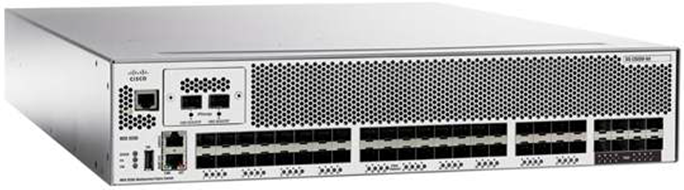
The HPE SN6500C 16Gb Multi-service Switch (MDS 9250i) brings the most flexible storage networking capability available in the fabric switch market today. Sharing a consistent architecture with the MDS 9700 (SN8500C) Directors, The HPE SN6500C 16Gb Multi-service Switch integrates both Fibre Channel and IP Storage Services in a single system to allow maximum flexibility in user configurations. With 20 16-Gbps Fibre Channel ports active by default, two 10 Gigabit Ethernet IP Storage Services ports, and 8 10 Gigabit Ethernet FCoE ports, the SN6500C 16Gb Multi-service switch is a comprehensive package, ideally suited for enterprise storage networks that require high performance SAN extension or cost-effective IP Storage connectivity for applications such as Business Continuity using Fibre Channel over IP or iSCSI host attachment to Fibre Channel storage devices. Also, using the eight 10 Gigabit Ethernet FCoE ports, the SN6500C 16Gb Multi-service Switch attaches to directly connected FCoE and Fibre Channel storage devices and supports multi-tiered unified network fabric connectivity directly over FCoE. |
|
|
|
|
|
HPE SN6500C 16Gb Multi-service Switch |
|
|
Standard Features
|
Key Features and Benefits |
|
Please note that some features require the optional HPE SN6500C Enterprise Package license to be activated
- Supports up to forty 16-Gbps Fibre Channel interfaces for high performance storage area network (SAN) connectivity plus two 10 Gigabit Ethernet ports for Fibre Channel over IP (FCIP) and Small Computer System Interface over IP (iSCSI) storage services plus eight 10 Gigabit Ethernet FCoE ports. - The SN6500C 16Gb Multi-service Switch comes with 20 ports of 16Gb FC enabled by default and scales up to 40 ports of 16Gb FC with a port upgrade license shown below.
- High-performance ISLs: SN6500C supports up to 16 Fibre Channel ISLs in a single PortChannel. Links can span any port on any module in a chassis for added scalability and resilience. Up to 256 buffer to-buffer credits can be assigned to a single Fibre Channel port to extend storage networks over long distances.
- On-board crypto processing engine supports secure IEEE standard Advanced Encryption Standard (AES) 256-bit algorithms - IPsec for Data in Transit over IP networks
- Uses virtual SAN (VSAN) technology for hardware-enforced, isolated environments within a single physical fabric. - Access control lists (ACLs) for hardware-based intelligent frame processing. - Advanced traffic-management features such as Fibre Channel Congestion Control (FCC) and fabric-wide quality of service (QoS) to facilitate migration from SAN islands to enterprise-wide storage networks.
Sophisticated diagnostics
|
|
|
|
FCIP for remote SAN Extensions Data distribution, data protection, and business continuance services are significant components of today's information-centric businesses. The ability to efficiently replicate critical data on a global scale not only ensures a higher level of data protection for valuable corporate information, but also increases utilization of backup resources and lowers total cost of storage ownership. The HPE SN6500C 16Gb Multi-service Switch uses the open-standard FCIP protocol to break the distance barrier of current Fibre Channel solutions and enable interconnection of SAN islands over extended distances. |
|
|
|
Advanced FCIP Features to Facilitate Business Continuance and Disaster Recovery The HPE SN6500C 16Gb Multi-service Switch is designed to support robust business continuance services using FCIP for remote connectivity in conjunction with a suite of advanced features, such as VSANs and hardware-assisted FCIP compression and encryption. |
|
|
|
VSANs and IVR Enhance SAN Security and Stability VSANs allow more efficient storage network utilization by creating hardware-based isolated environments within a single physical SAN fabric or switch. Each VSAN can be zoned as a typical SAN and maintains its own fabric services for added scalability and resilience. With the optional HPE SN6500C Enterprise Package license enabled, The HPE SN6500C 16Gb Multi-service Switch supports Inter-VSAN Routing (IVR), the industry's first routing functionality for Fibre Channel. IVR allows selective transfer of data traffic between specific initiators and targets on different VSANs while maintaining isolation of control traffic within each VSAN. |
|
|
|
High Performance SAN Extension with Compression The HPE SN6500C 16Gb Multi-service Switch supports hardware-based FCIP compression to maximize the effective WAN bandwidth of SAN extension solutions. The SN6500C 16Gb Multi-service Switch achieves up to a 43:1 compression ratio, with typical ratios of 4:1 over a wide variety of data sources. |
|
|
|
Advanced Traffic Management for High-Performance, Resilient Fabrics
|
|
|
|
Industry's Most Advanced Diagnostics and Troubleshooting Tools The HPE Cisco MDS 9000 Family integrates the industry's most advanced analysis and diagnostic tools. Power-on self-test (POST) and online diagnostics provide proactive health monitoring. The HPE SN6500C 16Gb Multi-service Switch implements diagnostic capabilities such as Fibre Channel Traceroute for detailing the exact path and timing of flows and Switched Port Analyzer (SPAN) to intelligently capture network traffic. Once traffic has been captured, it can then be analyzed with the Cisco Fabric Analyzer, an embedded Fibre Channel analyzer. Comprehensive port- and flow-based statistics facilitate sophisticated performance analysis and service-level agreement (SLA) accounting. |
|
|
|
Comprehensive Solution for Robust Network Security Please note that some features require The HPE SN6500C Enterprise Package software license to be activated. The HPE SN6500C 16Gb Multi-service Switch offers an extensive security framework to protect highly sensitive data crossing today's enterprise networks. The SN6500C 16Gb Multi-service Switch employs intelligent packet inspection at the port level, including the application of ACLs for hardware enforcement of zones, VSANs, and advanced Port Security features. Extended zoning capabilities are enabled to ensure that LUNs are accessible only by specific hosts (LUN zoning), to limit SCSI read command for a certain zone (read-only zoning), and to restrict broadcasts to only the selected zones (broadcast zones). VSANs are used to achieve higher security and greater stability by providing complete isolation among devices that are connected to the same physical SAN. In addition, Fibre Channel Security Protocol (FC-SP) provides switch-switch and host switch Diffie-Hellman Challenge Handshake Authentication Protocol (DH-CHAP) authentication supporting RADIUS or TACACS+, to ensure that only authorized devices access protected storage networks. Finally, for both FCIP and iSCSI deployment, the comprehensive IPsec protocol suite delivers secure authentication, data integrity, and hardware-based encryption. |
|
|
|
Ease of Management The HPE SN6500C 16Gb Multi-service Switch comes standard with three principal modes of management: the C-series MDS 9000 Family CLI, the Quick Configuration Wizard, and the Cisco Data Center Network Manager. |
|
|
|
Command Line Interface (CLI) The C-series MDS 9000 Family CLI is easy to learn and delivers broad management capabilities. The C-series MDS 9000 Family CLI is an extremely efficient and direct interface designed to provide optimal capabilities to administrators in enterprise environments. |
|
|
|
Quick Configuration Wizard The Quick Configuration Wizard helps eliminate management complexity and creates a readily available SAN environment for small- and midsized-business (SMB) applications. The wizard allows server access to storage to be set up quickly and easily in a single step using an intuitive GUI. |
|
|
|
iSCSI for Cost Effective Extension of SAN Storage to Ethernet Attached Servers Many IT managers have been hesitant to extend SAN access beyond their mission-critical applications to midrange data center applications because of the complexity and cost involved in upgrading large numbers of midrange servers to Fibre Channel. The HPE SN6500C 16Gb Multi-service Switch addresses these limitations by enabling IT organizations to extend their storage networks using cost-effective Ethernet infrastructure. All the benefits of SANs, including increased storage utilization, centralized backups, easier addition of incremental storage capacity, management simplification, and reduced overall total cost of ownership (TCO), can be extended to a new range of applications. Because the HPE SN6500C 16Gb Multi-service Switch is an integral component of the HPE C-series MDS 9000 Family, Ethernet attached servers will enjoy the same SAN scalability, availability, manageability, and intelligent services as those servers connected directly to a Fibre Channel SAN, while maintaining the cost and ease-of-use benefits of Ethernet and IP. |
|
|
|
Product Family Models
- Intelligent, multi-protocol 8-slot Director with up to 768 64/32/16/8 Gb Fibre Channel ports in a single chassis. Also, the HPE SN8500C/SN8700C 48-port 32Gb FC Module and the included Fabric 3 modules provide up to 768 ports of full 32Gbps line-rate performance across all ports.
- Intelligent, multi-protocol 8-slot Director with up to 384 64/32/16/8 Gb Fibre Channel ports in a single chassis. Also, the HPE SN8500C/SN8700C 48-port 32Gb FC Module and the included Fabric 3 modules provide up to 384 ports of full 32Gbps line-rate performance across all ports.
- Intelligent, multi-protocol 4-slot Director with up to 192 64/32/16/8/4 Gb Fibre Channel ports in a single chassis. Also, the HPE SN8500C/SN8700C 48-port 32Gb FC Module and the included Fabric 3 modules provide up to 192 ports of full 32Gbps line-rate performance across all ports.
- Intelligent multi-protocol Fabric Switch with twenty fixed 16/8 Gb Fibre Channel ports, two fixed 10 Gigabit Ethernet FCIP ports, and eight fixed 10 Gigabit Ethernet FCoE ports. Provides up to forty active 16/8 Gb Fibre Channel ports through a port upgrade license.
- With up to 48 Auto-Sensing 16/8/4 Gb Fibre Channel ports - "Pay as you grow" scalability starting at 12 ports
- With up to 32 Auto-Sensing 32/16/8 Gb Fibre Channel ports - "Pay as you grow" scalability starting at 8 ports
- With up to 48 Auto-Sensing 32/16/8 Gb Fibre Channel ports - "Pay as you grow" scalability starting at 24 ports
- With up to 96 Auto-Sensing 32/16/8 Gb Fibre Channel ports - "Pay as you grow" scalability starting at 48 ports |
|
|
|
Software Components, Standard NX-OS The HPE SN6500C 16Gb Multi-service Switch includes the HPE MDS 9000 NX-OS Software operating system version 6.2(7) or higher, Cisco Data Center Network Manager (Essentials Edition), and a suite of configuration, maintenance and diagnostics tools. It also includes VSAN support, PortChannels, extended fabrics, hardware-enforced zoning, and non-disruptive firmware upgrade capability.
Cisco Data Center Network Manager Cisco Data Center Network Manager (Essentials Edition) is a responsive, easy-to-use Java application that simplifies management across multiple switches and fabrics. Cisco Data Center Network Manager enables administrators to perform vital tasks such as topology discovery, fabric configuration and verification, LUN security, monitoring, and fault resolution. All functions are available through a secure interface, which enables remote management from any location. Cisco Data Center Network Manager may be used independently or in conjunction with third-party management applications. Cisco provides an extensive API for integration with third-party and user developed management tools. Additional advanced features are available with HPE's DCNM SN6500C license mentioned below. |
|
|
|
Software Components, Optional |
|
HPE Data Center Network Manager E-LTU The "Standard" Cisco Data Center Network Manager (Essentials Edition) software that is included at no charge with the SN6500C Switch provides basic switch configuration and troubleshooting capabilities. HPE's C-series Data Center Network Manager (DCNM) License extends Cisco Data Center Network Manager by advanced features such as historical performance data collection for network traffic hot-spot analysis, centralized management services and advanced application integration. By default, a 30-day trial license (with advanced features) is enabled on the switch. Customers must purchase the HPE SN6500C DCNM E-LTU license (server-based or switch-based license) to continue to utilize the advanced DCNM features. |
|
|
|
HPE SN6500C Enterprise Package E-LTU The HPE C-series MDS switches have a set of advanced traffic engineering and advanced security features that are recommended for all Enterprise SANs. These features are bundled together in a management application called the HPE SN6500C Enterprise Package License to Use (E-LTU). Please refer to Cisco's MDS Enterprise Package Data Sheet for more information: http://www.cisco.com/c/en/us/products/collateral/storage-networking/mds-9000-software-licensing/product_data_sheet09186a00801ca6ac.html |
|
|
|
HPE SN6500C Mainframe FICON E-LTU The Cisco MDS 9000 Family Mainframe Package is a comprehensive collection of features required for using SN6500C 16Gb Multi-service Fabric Switches in mainframe storage networks, including FICON protocol and CUP management, switch cascading, fabric binding, and intermixing. These features are available through the HPE SN6500C Mainframe FICON License To Use (E-LTU) with NX-OS version 6.2(11c) firmware for the SN6500C. |
|
|
|
HPE SN6500C 20-port Fibre Channel Upgrade E-LTU This License is required to enable an additional 20 FC ports on the SN6500C 16Gb Multi-service Switch. |
|
|
Service and Support
|
Warranty (1-1-1)Hardware Warranty; 1-year parts; 1-year on-site (8x5, next business day response) and 1-year labor. (1-1-2)The hardware warranty covers firmware and embedded non-saleable software. |
|
|
|
HPE Pointnext - Service and Support Get the most from your HPE Products. Get the expertise you need at every step of your IT journey with HPE Pointnext Services. We help you lower your risks and overall costs using automation and methodologies that have been tested and refined by HPE experts through thousands of deployments globally. HPE Pointnext Advisory Services, focus on your business outcomes and goals, partnering with you to design your transformation and build a roadmap tuned to your unique challenges. Our Professional and Operational Services can be leveraged to speed up time-to-production, boost performance and accelerate your business. HPE Pointnext specializes in flawless and on-time implementation, on-budget execution, and creative configurations that get the most out of software and hardware alike. |
|
|
|
Consume IT on your terms HPE GreenLake brings the cloud experience directly to your apps and data wherever they are-the edge, colocations, or your data center. It delivers cloud services for on-premises IT infrastructure specifically tailored to your most demanding workloads. With a pay-per-use, scalable, point-and-click self-service experience that is managed for you, HPE GreenLake accelerates digital transformation in a distributed, edge-to-cloud world.
Managed services to run your IT operations HPE GreenLake Management Services provides services that monitor, operate, and optimize your infrastructure and applications, delivered consistently and globally to give you unified control and let you focus on innovation. |
|
|
|
Free up resources with Operational Services from HPE Pointnext HPE delivers services for IT by using proven best practices as well as automation and methodologies that have been tested and refined by HPE experts and artificial intelligence through thousands of deployments globally. Choose from the recommended services for customers purchasing from Hewlett Packard Enterprise or an authorized reseller. Services are quoted using Hewlett Packard Enterprise order configuration tools.
Recommended Services
HPE Pointnext Tech Care. HPE Pointnext Tech Care is the new operational service experience for HPE products. Tech Care goes beyond traditional support by providing access to product specific experts, an AI driven digital experience, and general technical guidance to not only reduce risk but constantly search for ways to do things better. HPE Pointnext Tech Care has been reimagined from the ground up to support a customer-centric, AI driven, and digitally enabled customer experience to move your business forward. HPE Pointnext Tech Care is available in three response levels. Basic, which provides 9x5 business hour availability and a 2 hour response time. Essential which provides a 15 minute response time 24x7 for most enterprise level customers, and Critical which includes a 6 hour repair commitment where available and outage management response for severity 1 incidents.
https://www.hpe.com/services/techcare
|
|
HPE Pointnext Complete Care HPE Pointnext Complete Care is a modular, edge-to-cloud IT environment service that provides a holistic approach to optimizing your entire IT environment and achieving agreed upon IT outcomes and business goals through a personalized and customer-centric experience. All delivered by an assigned team of HPE Pointnext Services experts. HPE Pointnext Complete Care provides:
https://www.hpe.com/services/completecare |
|
|
|
Other related services from HPE Pointnext HPE SAN Deployment Service Hewlett Packard Enterprise delivers complete design and implementation services for Fibre Channel, FCoE, FCIP, SAS, and iSCSI SAN connectivity components.
Learn more: http://h20195.www2.hpe.com/V2/GetPDF.aspx/5981-8527EN.pdf
HPE Installation Service Provides for the basic hardware installation of HPE branded servers, storage devices and networking options to assist you in bringing your new hardware into operation in a timely and professional manner.
Learn more: https://h20195.www2.hpe.com/v2/Getdocument.aspx?docname=5981-9356enw
HPE Service Credits Offers flexible services and technical skills to meet your IT demands as your business evolves. With a menu of services, you can access additional resources and specialist skills to help you maintain peak performance of your IT. HPE Service Credits help you proactively respond to your dynamic IT and business needs
HPE Education Services Provides comprehensive training designed to expand the skills of your IT staff and keep them up to speed with the latest technologies.
Consult your HPE Sales Representative or Authorized Channel Partner of choice for any additional questions and support options. |
|
|
|
Parts and Materials Hewlett Packard Enterprise will provide HPE-supported replacement parts and materials necessary to maintain the covered hardware product in operating condition, including parts and materials for available and recommended engineering improvements.
Parts and components that have reached their maximum supported lifetime and/or the maximum usage limitations as set forth in the manufacturer's operating manual, product QuickSpecs, or the technical product data sheet will not be provided, repaired, or replaced as part of these services.
Defective Media Retention An option available with HPE Pointnext Complete Care and HPE Pointnext Tech Care and applies only to Disk or eligible SSD/Flash Drives replaced by HPE due to malfunction. |
|
|
|
AI Powered and Digitally Enabled Support Experience Achieve faster time to resolution with access to product-specific resources and expertise through a brand-new digital and data driven customer experience. Sign into the customer engagement platform, featuring modern self-serve case creation and management capabilities with inline knowledge recommendations. You will find powerful troubleshooting support through a new intelligent virtual agent with seamless transition when needed to a live support agent. https://support.hpe.com/hpesc/public/home/signin
HPE Support Center The HPE Support Center is a personalized online support portal with access to information, tools and experts to support HPE business products. Submit support cases online, chat with Hewlett Packard Enterprise experts, access support resources or collaborate with peers.
Learn more http://www.hpe.com/support/hpesc
Hewlett Packard Enterprise Support Center Mobile App* allows you to resolve issues yourself or quickly connect to an agent for live support. Now, you can get access to personalized IT support anywhere, anytime. HPE Insight Remote Support and HPE Support Center are available at no additional cost with a HPE warranty, HPE Support Service or HPE contractual support agreement. Notes :*HPE Support Center Mobile App is subject to local availability |
|
|
|
For more information
To learn more on HPE Storage Services, please contact your Hewlett Packard Enterprise sales representative or Hewlett Packard Enterprise Authorized Channel Partner. Contact information for a representative in your area can be found at "Contact HPE" https://www.hpe.com/us/en/contact-hpe.html HPE Support Services are sold by Hewlett Packard Enterprise and Hewlett Packard Enterprise Authorized Service Partners:
|
|
|
Configuration Information
|
Step 1 - Base Configuration | |
|
Select one: |
|
|
Description |
SKU |
|
Model SN6500C 16Gb Multi-service Switch |
|
|
HPE SN6500C 16Gb FC/FCIP/FCoE Multi-service Switch |
E7Y64A |
|
Fibre Channel Port Transceivers |
|
|
HPE C-series 16 Gb Fibre Channel SW SFP+ Transceiver |
C8S72A |
|
HPE C-series 16 Gb Fibre Channel LW SFP+ Transceiver |
C8S73A |
|
HPE C-series 10GbE Short Range SFP+ Transceiver |
AP783A |
|
HPE C-series 10GbE Long Range SFP+ Transceiver |
E7Y65A |
|
HPE MDS 9000 8Gb FC SFP+ Short Range Transceiver |
AJ906A |
|
HPE MDS 9000 8Gb FC SFP+ Long Range Transceiver |
AJ907A |
|
Optional Software |
|
|
HPE SN6500C 20-port 16Gb Fibre Channel Upgrade E-LTU |
D4U17AAE |
|
HPE SN6500C DCNM Switch E-LTU |
R4F90AAE |
|
HPE SN6500C Enterprise Package E-LTU HPE SN6500C Mainframe FICON E-LTU |
A7516AAE T4409AAE |
|
Cables |
|
|
HPE PremierFlex OM4+ Fiber Optic Cables |
|
|
HPE Premier Flex MPO/MPO Multi-mode OM4 12 Fiber 10m Cable |
QK729A |
|
HPE Premier Flex MPO/MPO Multi-mode OM4 8 Fiber 50m Cable |
QK731A |
|
HPE Premier Flex LC/LC Multi-mode OM4 2 Fiber 1m Cable |
QK732A |
|
HPE Premier Flex LC/LC Multi-mode OM4 2 Fiber 2m Cable |
QK733A |
|
HPE Premier Flex LC/LC Multi-mode OM4 2 Fiber 5m Cable |
QK734A |
|
HPE Premier Flex LC/LC Multi-mode OM4 2 Fiber 15m Cable |
QK735A |
|
HPE Premier Flex LC/LC Multi-mode OM4 2 Fiber 30m Cable |
QK736A |
|
HPE Premier Flex LC/LC Multi-mode OM4 2 Fiber 50m Cable |
QK737A |
|
HPE OM3 LC-LC Optical Cables |
|
|
HPE LC to LC Multi-mode OM3 2-Fiber 0.5m 1-Pack Fiber Optic Cable |
AJ833A |
|
HPE LC to LC Multi-mode OM3 2-Fiber 1.0m 1-Pack Fiber Optic Cable |
AJ834A |
|
HPE LC to LC Multi-mode OM3 2-Fiber 2.0m 1-Pack Fiber Optic Cable |
AJ835A |
|
HPE LC to LC Multi-mode OM3 2-Fiber 5.0m 1-Pack Fiber Optic Cable |
AJ836A |
|
HPE LC to LC Multi-mode OM3 2-Fiber 15.0m 1-Pack Fiber Optic Cable |
AJ837A |
|
HPE LC to LC Multi-mode OM3 2-Fiber 30.0m 1-Pack Fiber Optic Cable |
AJ838A |
|
HPE LC to LC Multi-mode OM3 2-Fiber 50.0m 1-Pack Fiber Optic Cable |
AJ839A |
|
| |
Technical Specifications
|
Family Information |
|
HPE SN8700C 4-slot/8-slot/16-slot 16/32/64Gb FC Director |
HPE SN6620C 32Gb Fabric Switch |
HPE SN6610C 32Gb Fabric Switch |
HPE SN6010C 16Gb Fabric Switch |
HPE SN6630C 32Gb Fabric Switch | |
|
Switch Type |
Multilayer Director |
Multilayer Fabric Switch |
Multilayer Fabric Switch |
Multilayer Fabric Switch |
Multilayer Fabric Switch |
|
Maximum ports |
4-slot: 192 16/32/64 Gbps Fibre Channel ports 8-slot: 384 16/32/64 Gbps Fibre Channel ports 16-slot: 768 16/32/64 Gbps Fibre Channel ports |
Up to 48 32 Gbps Fibre Channel ports |
Up to 32 32 Gbps Fibre Channel ports |
Up to 48 16 Gbps Fibre Channel ports |
Up to 96 32 Gbps Fibre Channel ports |
|
Number of slots per chassis |
Four/Eight/Sixteen |
One fixed |
One fixed and one expansion slot |
One fixed |
One fixed |
|
Notes: For additional switch support information, refer to the C-series FC Switch Connectivity Stream on the Single Point of Connectivity Knowledge (SPOCK) website at: https://h20272.www2.hpe.com/spock/. You must sign up for a Hewlett Packard Enterprise Passport to enable access. Once logged in, click switches under Other Hardware in the last navigation panel of the window to access the Fibre Channel Switch Streams. Click on the C-Series FC Switch Connectivity Stream to open the document. |
|
|
|
Minimum software requirements NX-OS 6.2(5a) or later |
|
|
|
Fibre Channel protocols (Fibre Channel standards)
|
- Class 2 - Class 3 - Class F
- E - F - FL - B
- SD - ST - TE |
|
|
|
Protocols
- RFC 791 IPv4 - RFC 793, 1323 TCP - RFC 894 IP/Ethernet - RFC 1041 IP/802 - RFC 792, 950, 1256 ICMP - RFC 1323 TCP performance enhancements - RFC 2338 VRRP - RFC 2460, 4291 IPv6 - RFC 2463, 4443 ICMPv6 - RFC 2461, 2462 IPv6 neighbor discovery and stateless auto-configuration - RFC 2464 IPv6/Ethernet - RFC 3270, 3980 iSCSI - RFC 3643, 3821 FCIP
- IEEE Std 802.3-2005 Ethernet - IEEE Std 802.1Q-2005 VLAN - IPSec - RFC 2401, 4301 security architecture for IP - RFC 2403, 2404 HMAC - RFC 2405, 2406, 2451, 4303 IP ESP - RFC 2407, 2408 ISAKMP - RFC 2412 OAKLEY Key Determination Protocol - RFC 3566, 3602, 3686 AES
- RFC 2409 IKEv1 - RFC 4306 IKEv2 |
|
|
|
Features and functions
- Name server - Internet Storage Name Server (iSNS) - Registered State Change Notification (RSCN) - Login services - Fabric Configuration Server (FCS) - Public loop - Broadcast - In-order delivery
- VSANs - Inter-VSAN Routing (IVR) - PortChannel with Multipath Load Balancing - QoS - flow-based, zone-based - FICON XRC (z/OS Global Mirror)
- Power-on-self-test (POST) diagnostics - Cisco Generic Online Diagnostics (GOLD) - Internal port loopbacks - SPAN and Remote SPAN - Fibre Channel Traceroute - Fibre Channel Ping - Fibre Channel Debug - Cisco Fabric Analyzer - Syslog - Online system health - Port-level statistics - Real Time Protocol Debug
- VSANs - Access Control Lists - Per-VSAN role-based access control - Fibre Channel Zoning o N_Port WWN o N_Port FC-ID o Fx_Port WWN o Fx_Port WWN and interface index o Fx_Port domain ID and interface index o Fx_Port domain ID and port number - iSCSI zoning o iSCSI name o IP address |
|
- Fibre Channel Security Protocol (FC-SP) o DH-CHAP switch-switch authentication o DH-CHAP host-switch authentication - Port Security and Fabric Binding - IPSec for FCIP and iSCSI - IKEv1 and IKEv2 - Management access o SSH v2 implementing AES o SNMPv3 implementing AES - SFTP
- Configuration file management - No disruptive software upgrades for Fibre Channel interfaces - Cisco Call Home - Power-management LEDs - Port beaconing - System LED - SNMP traps for alerts - Network boot |
|
|
|
Performance
- 64 per port (shared-mode ports) - Up to 256 per port (dedicated-mode ports with optional HPE SN6500C Enterprise Package license activated)
- 20 to 40 16/8-Gbps Fibre Channel ports and 10 ports of 10-Gbps Ethernet
- Up to 1050
- Up to sixteen physical links
- Up to 6 per port |
|
|
|
Cards, ports, slots |
Base: |
Fixed configuration with 40 auto-sensing 16/8-Gbps Fibre Channel ports, 10 10-Gb Ethernet ports | |
|
Expansion: |
n/a | ||
|
Network Management |
Please note that some services require the optional HPE SN6500C Enterprise Package license
- Out-of-band 10/100 Gigabit Ethernet port - RS-232 serial console port - In-band IP-over-Fibre Channel - In-band FICON CUP over Fibre Channel
- CLI-via console and Ethernet ports - SNMPv3-via Ethernet port and in-band IP-over-Fibre Channel access - Storage Networking Industry Association (SNIA) Storage Management Initiative Specification (SMI-S) - FICON CUP
- Per-VSAN role-based access control using RADIUS and TACACS+ based authentication, authorization, and accounting (AAA) functions - SFTP - SSH v2 implementing AES - SNMPv3 implementing AES
- Cisco MDS 9000 Family CLI - Cisco Prime DCNM - Cisco Device Manager
|
||
|
Reliability and Availability |
|
||
|
Programming Interfaces |
|
||
|
Approvals and Compliance |
- CE Marking - UL 60950 - CAN/CSA-C22.2 No. 60950 - EN 60950 - IEC 60950 - TS 001 - AS/NZS 3260 - IEC60825 - EN60825 - 21 CFR 1040
- FCC Part 15 (FR 47) Class A - ICES-003 Class A - EN 55022 Class A - CISPR 22 Class A - AS/NZS 3548 Class A - VCCI Class A - EN 55024 - EN 50082-1 - EN 61000-6-1 - EN 61000-3-2 - EN 61000-3-3
- 140-2 Level 3 (for Multiservice FIPS Module - DS-X9304-18FK |
||
|
Power and Cooling |
- AC input characteristics o 100 to 240 VAC (10% range) o 50-60Hz (nominal) Airflow: - 200 linear feet per minute (lfm) through system fan assembly - Cisco recommends that you maintain a minimum air space of 2.5 inches (6.4 cm) between walls and the chassis air vents and a minimum separation of 6 inches (15.2 cm) between two chassis to prevent overheating. |
||
|
Environmental |
Temperature, ambient operating |
32° to 104° F (0° to 40° C) | |
|
Temperature, ambient non-operating and storage |
40°F to 158° F (-40°C to 75° C) | ||
|
Relative humidity, ambient (non-condensing) operating |
10% to 90% | ||
|
Relative humidity, ambient (non-condensing) non-operating and storage |
10% to 95% | ||
|
Altitude, operating |
-197 to 6500 feet (-60 to 2000 meter) | ||
|
Dimensions (HxWxD) |
|
||
|
|
Summary of Changes
|
Date |
Version History |
Action |
Description of Change |
|
04-Oct-2021 |
Version 16 |
Changed |
Service and Support section was updated Obso SKU was removed |
|
02-Aug-2021 |
Version 15 |
Changed |
Standard Features, Service and Support and Technical Specifications sections were updated. |
|
17-Aug-2020 |
Version 14 |
Changed |
Added SN8700C product family information |
|
03-Aug-2020 |
Version 13 |
Changed |
QuickSpecs layout was updated and Branding Refresh was applied. |
|
03-Feb-2020 |
Version 12 |
Changed |
Added DCNM Switch based license |
|
15-Jul-2019 |
Version 11 |
Changed |
Configuration Information section was updated. |
|
03-Dec-2018 |
Version 10 |
Changed |
DCNM information was updated Product Highlights, and Service and Support, sections were revised. |
|
02-Jul-2018 |
Version 9 |
Changed |
Added SN6610C switch details. |
|
06-Nov-2017 |
Version 8 |
Changed |
Added new electronic licenses. Product Highlights, Configuration Information, Service and Support, and Technical Specifications were revised. |
|
18-Nov-2016 |
Version 7 |
Changed |
Removed references to SN8000C 8Gb Directors as products are, now, obsolete. Updated some urls and content where software licenses are required. |
|
08-Apr-2016 |
Version 6 |
Changed |
Removed references to MDS 8Gb Fabric Switch for HP BladeSystem as products are, now, obsolete. Also, updated Spock url. |
|
21-Aug-2015 |
Version 5 |
Changed |
Added FICON support for SN6500C (MDS 9250i) switch with NX-OS 6.2(11c) firmware. Removed SN6000C switches due to be obsolete Sep'15. |
|
20-Feb-2015 |
Version 4 |
Changed |
Removed MDS9222i as obsolete, included Spock info, fixed typo. |
|
05-Dec-2014 |
Version 3 |
Changed |
Changes made to the Configuration Info and Products Highlights Sections. |
|
26-Sep-2014 |
Version 2 |
Changed |
Changes made thought all QuickSpecs |
|
18-Aug-2014 |
Version 1 |
New |
New QuickSpecs |
Copyright
|
|
| ||||||||||||
|
|
|
© Copyright 2021 Hewlett Packard Enterprise Development LP. The information contained herein is subject to change without notice. The only warranties for Hewlett Packard Enterprise products and services are set forth in the express warranty statements accompanying such products and services. Nothing herein should be construed as constituting an additional warranty. Hewlett Packard Enterprise shall not be liable for technical or editorial errors or omissions contained herein.
c04347448 - 15025 - Worldwide - V16 - 04-October-2021 | ||||||||||||



