




























Brocade 16Gb SAN Switch for HPE BladeSystem c-Class: технические характеристики и документация
В архивеOverview
|
Brocade 16Gb SAN Switch for HPE BladeSystem c-Class | |
|
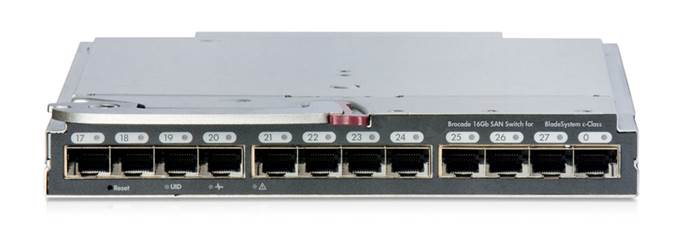
The Brocade 16Gb SAN Switch for HPE BladeSystem c-Class represents an easy to manage next generation embedded Fibre Channel switch with 16 Gbps Fibre Channel performance. It hot-plugs into the back of the HPE BladeSystem c-Class Enclosure and its integrated design frees up rack space, enables shared power and cooling, and reduces cabling and small form-factor pluggables. Enhanced trunking support with external switches provides higher bandwidth to enable demanding applications and high density server virtualization. The Power Pack+ software option enables you to manage data flow to maintain optimized application performance. In addition, both internal and external facing ports auto-sense lower bandwidth components for flexibility and investment protection (4, 8 or 16 Gbps for external ports and 8 or 16 Gbps for internal ports) and an upgrade license enables you to 'pay as you grow'. The Brocade 16Gb SAN Switch for HPE BladeSystem c-Class saves space and cost, significantly simplifies the SAN environment, enables easier deployment and management, and delivers the performance required for emerging higher throughput applications. | |
|
| |
|
| |
|
Brocade 16Gb SAN Switch for HPE BladeSystem c-Class | |
|
| |
|
Integrated SAN connectivity |
|
|
16 Gbps storage networking |
|
|
Non-blocking architecture |
|
|
ISL Trunking performance enhancements |
|
|
Adaptive Networking Services |
|
|
Access Gateway mode |
|
|
Broad range of management tools and SMI-s conformance |
|
|
Available in three models with a scalable licensing option |
|
|
| |
|
What's New | |
| |
Product Highlights
|
Advanced Fabric Services |
- Fabric Vision - ISL Trunking - Fabric Watch** - Extended Fabrics* - Advanced Performance Monitoring**
NOTE**: Partial support in Access Gateway mode (see the Access Gateway Administrator´s guide for full details) | ||
|
| |||
|
Manageability |
| ||
|
| |||
|
Interoperability |
Brocade Access Gateway mode enables the Brocade 16Gb SAN Switch for HPE BladeSystem c-Class switch to interoperate with other SAN fabrics running supported firmware. While in Access Gateway mode, the device must be connected to an NPIV-enabled edge switch or director. Supported edge environments are listed in the Brocade Fabric OS® release notes. | ||
|
| |||
|
Software Components, Standard | |||
|
Access Gateway* |
Brocade Access Gateway Mode enables seamless connectivity for the Brocade 16Gb SAN Switch for HPE BladeSystem c-Class to other supported SAN fabrics, enhances scalability and simplifies manageability. Utilizing N_Port ID Virtualization (NPIV) standards, Brocade Access Gateway eliminates switch/domain considerations. NOTE: *Brocade Access Gateway mode does not support many switch-related features, including most features in the Power Pack+ bundle. Please refer to the Fabric OS Release Notes and Access Gateway Administrator's Guide for details. | ||
|
| |||
|
Frame Filtering |
A special B-Series ASIC-based capability that enables new applications and features. The switch has the ability to "view" the first 64-bytes of the Fibre Channel frame. At this time, Frame Filtering enables advanced capabilities such as Advanced Zoning and Advanced Performance Monitoring (optional). | ||
|
| |||
|
Advanced Zoning |
Zoning (Port and Worldwide Name), as well as Access Control, are enforced by hardware within the ASIC that provides the same simple administration previously enforced only with software. Hardware enforcement enables the highest level of zoning enforcement without any impact to performance. Administrators can organize a physical fabric into logical groups and prevent unauthorized access by devices outside the Zone. | ||
|
| |||
|
WebTools |
Enables organizations to monitor and manage single Fibre Channel switches and monitor small SAN fabrics. Tasks can be performed through a Java-capable Web browser from a standard laptop, desktop PC or workstation from any location within the enterprise. | ||
|
| |||
|
EGM |
Enhanced Group Management (EGM) is a FOS license that is included with all B-Series switches and enables multi-switch operations. It helps automate operations across multiple switches to save time and streamline repetitive operations, which are typically prone to error. EGM drives consistency across fabrics, while minimizing the risk associated with potential downtime due to configuration mismatches. EGM provides streamlined troubleshooting for more effective fabric monitoring and diagnosis. SAN Network Advisor Professional, Professional Plus and Enterprise enable EGM functionality. Customers have EGM functionality enabled within the hardware product and need only to make the decision around which SAN Network Advisor application is right for them. | ||
|
| |||
|
Dynamic Path Selection |
Improves performance by dynamically routing data traffic across multiple links and trunk groups. | ||
|
| |||
|
Secure Fabric OS |
Secure Fabric OS features have been fully integrated into the base Fabric OS since v5.3.0. These comprehensive security features for SAN fabrics provide policy-based security protection for more predictable change management, assured configuration integrity and reduced risk of downtime. Security methods supported include digital certificates and digital signatures, multiple levels of password protection, strong password encryption and Public Key Infrastructure (PKI)-based authentication, and 128-bit encryption of the switch's private key used for digital signatures. These features enable organizations to customize SAN security to meet specific policy requirements and work in conjunction with Advanced Zoning to further secure access to the SAN, simplify storage management, and reduce provisioning time. | ||
|
| |||
|
Adaptive Networking Services |
Adaptive Networking services optimize fabric behavior and ensure ample bandwidth for mission-critical applications. The tools currently include Quality of Service (QoS), Ingress Rate Limiting, Traffic Isolation, and Top Talkers. By assigning zones a high, medium, or low priority, QoS allocates bandwidth in the event of congestion to expedite high-priority traffic and keep all traffic flowing. Ingress Rate Limiting restricts data flow from less-critical hosts at preset bandwidths. Traffic Isolation assigns high-bandwidth data flows to specific ISLs. And Top Talkers measures the top bandwidth-consuming traffic in real time for a specific physical or virtual device, or end to end across the fabric. NOTE: Adaptive Networking Services are included by default in the switch firmware and do not require a separate license | ||
|
| |||
|
Server Application Optimization |
Server Application Optimization (SAO) improves overall application performance for physical servers and virtual machines. SAO, when deployed with Brocade Fibre Channel HBAs, extends Brocade Adaptive Networking from the Brocade SAN fabric to the server infrastructure. This delivers application-level, fine-grain Quality of Service (QoS) management to the HBAs and related server applications. NOTE: SAO requires Brocade HBA installed in the server | ||
|
| |||
|
Software Components, Optional | |||
|
Power Pack+ Software Bundle |
The Power Pack+ Software Bundle includes:
NOTE: * Not supported in Access Gateway mode NOTE: The Power Pack+ Software Bundle includes Fabric Vision, Fabric Watch, ISL Trunking, Extended Fabric and Advanced Performance Monitor. NOTE: Adaptive Networking and Server Application Optimization features are included by default in the switch firmware and do not require a separate license | ||
|
| |||
|
Fabric Vision |
Fabric Vision offers innovative diagnostic, monitoring and management capabilities to help accelerate new application deployments, address SAN problems before they impact operations and reduce operational costs. It Includes
Fabric Vision will be included by default in all HPE StoreFabric B-series Fibre Channel switches and Directors bundled with Power Pack+ (with FOS 7.2.0a and later). In all other cases, Fabric Vision can be enabled on HPE StoreFabric B-series Fibre Channel switches and Directors in any one of the following ways
| ||
|
| |||
|
ISL Trunking |
For high performance and seamless failover, this optional license logically groups up to eight E-ports (switch mode) or F-ports (Access Gateway mode) to provide a high bandwidth trunk between two Brocade or HPE B-Series switches. Each switch needs its own license. The fabric operating system views the trunk as a single, high bandwidth ISL resource (up to 128 Gbps when routing connections between 16 Gbps capable switches). Connections are load-balanced across the individual links, which comprise the logical trunk group. | ||
|
| |||
|
Fabric Watch |
Fabric Watch enables each switch to monitor the health of the SAN for potential faults-and automatically alert network managers to problems before they become failures. Fabric Watch tracks a variety of SAN fabric elements, events, and counters. Monitoring fabric-wide events, ports, SFPs, and environmental parameters permits early fault detection and isolation as well as performance measurement. Each switch in the SAN needs its own Fabric Watch license. NOTE: Fabric Watch has been obsoleted in FOS 7.4.0 and later. Users can migrate their Fabric Watch settings to the Fabric Vison licensed Monitoring and Performance Suite (MAPS) prior to upgrading. | ||
|
| |||
|
Advanced Performance Monitoring |
This enabling technology helps administrators monitor application data traffic from a SID (Source ID) to a DID (Destination ID), so they can fine-tune and scale the fabric more efficiently. Plus, Advanced Performance Monitoring includes the ability for early warning detection of hot spots within the fabric, a powerful tool for maximizing SAN performance. | ||
|
| |||
|
Extended Fabrics |
Extends the native Fibre-Channel traffic up to 590 km. Extended Fabrics increases the scalability, reliability, and performance benefits of Fibre Channel Storage Area Networks (SANs) beyond the native 10 km distance specified by the Fibre Channel standard. | ||
|
| |||
|
SAN Network Advisor Professional |
HPE SAN Network Advisor Professional is a management application available at no-charge and comes with B-series SAN Switches and:
It is targeted for SMB customers that use FOS based SAN fabrics and require a management solution for smaller SANs based fabrics. SMB customers that initially start off with SAN Network Advisor Professional and have a small SAN environment may over time feel the need for an enterprise-class product (SAN Network Advisor Professional+ or SAN Network Advisor Enterprise) as their environments start to grow in size and complexity, and as they start to uptake more enterprise-class functionality (such as Fibre Channel Routing, FCIP, etc.). A non-disruptive upgrade path is available from SAN Network Advisor Professional to SAN Network Advisor Professional+ or SAN Network Advisor Enterprise. | ||
|
| |||
|
SAN Network Advisor Enterprise and Professional+ |
HPE SAN Network Advisor Enterprise and Professional+ are the enterprise-class products that support FOS products as well as FOS and M-EOS products together. SAN Network Advisor Enterprise provides complete SN8000B 8-Slot Director and DC SAN Backbone Director management including enterprise-class features/environments such as FICON, Fibre Channel Routing, FCIP, adaptive networking, etc while HPE SAN Network Advisor Professional+ provides the same feature set except for support for the SN8000B 8-Slot Director, DC SAN Backbone Director, and FICON. HPE SAN Network Advisor Enterprise delivers unprecedented scalability, up to 100 fabrics and 15,000 switch ports, while HPE SAN Network Advisor Professional+ scales to 36 SAN Fabrics and 2560 switch ports. To accommodate growth, there is an upgrade available to SAN Network Advisor Enterprise from SAN Network Advisor Professional Plus. Both offerings provide brand-new features including Adaptive Networking features for quality of service, ingress rate limiting and traffic isolation zones. | ||
|
| |||
|
HPE Smart SAN for 3PAR |
HPE Smart SAN, optional software for HP 3PAR, makes end-to-end SAN configuration and management simple and reduces the probability of errors through automation. It is an application embedded in SAN components (array, hosts and switches) that enables 3PAR arrays to orchestrate configuration, settings and policies across the SAN. Smart SAN is supported with B-series Switches, HPE StoreFabric Fibre Channel adapters (HBAs) and 3PAR storage. HPE Smart SAN for 3PAR through its Target Driven Peer Zoning (TDPZ) feature enables customers to automate peer zoning, resulting in the creation of fewer zones and enables configuration of zones in minutes and not in hours. Through automation, it reduces the probability of errors and potential downtime. NOTE: Supports B-series 16Gb and 8Gb FC switches with FOS 7.4.0a or later. NOTE: A list of supported HPE FC Adapters can be found at http://www.hpe.com/storage/spock NOTE: Supports 3PAR StoreServ storage with 3.2.2 or later with only 16Gb target ports on HPE 3PAR StoreServ storage. | ||
|
| |||
|
BladeSystem compatibility | |||
|
The Brocade 16 Gb SAN Switch for HPE BladeSystem c-Class must be deployed within the HPE BladeSystem c-Class infrastructure and is compatible only with HPE BladeSystem c-Class Enclosures. | |||
|
NOTE: The HPE BladeSystem c7000 Platinum Enclosure is required to permit 16 Gbps speed on the internal ports. Other HPE BladeSystem c7000 Enclosures will have a maximum speed of 8 Gbps. | |||
|
HPE ProLiant Servers |
ProLiant BLc server blades (ProLiant BLc server blades with support for 8Gb and 16Gb Fibre Channel Mezzanine cards - Please refer to the server and mezzanine card QuickSpecs for details) | ||
|
HPE FC HBA Mezzanines |
8Gb and 16Gb HPE Fibre Channel Mezzanine cards for Bladesystem c-Class are supported
| ||
|
HPE BladeSystem c-Class Enclosures |
HPE BladeSystem c7000 Enclosure | ||
|
| |||
|
Switch interoperability | |||
|
HPE B-Series Switches, Directors, and Routers |
16 Gb Fibre Channel Switches and Directors |
| |
|
8 Gb Switches |
| ||
|
Virtual Connect |
| ||
|
Multi-Protocol Routers and Gateways |
| ||
Service and Support, HPE Care Pack, and Warranty Information
|
Warranty |
(1-1-1) Hardware Warranty - One-year on-site warranty, normal business hours, next business day response, installation not included. | |
|
| ||
|
Services Included with Product Purchase |
The Power Pack+ Software Bundle includes one year of Hewlett Packard Enterprise standard business hours, standard business days Software Support (includes software technical support and software product and documentation updates). | |
|
| ||
|
HPE Service and Support |
Services to accelerate time to results | |
|
HPE Storage Services bring you a rich portfolio of consulting and support services designed to add value to our core storage products and solutions. We have the know-how and experience to put storage technology to work for you. We work closely with you as your strategic partner, leveraging our full services portfolio to make sure that everything works to optimize your enterprise. Choose from services aligned to our storage product offerings and lifecycle. From mission-critical onsite services to innovative web-based remote support, you choose the precise level of attention and support your business demands. HPE Technology Services for BladeSystem Protect your business beyond warranty with HPE Pointnext operational services HPE Foundation Care services offer scalable reactive support-packages for HPE BladeSystem and software. You can choose the type and level of service that is most suitable for your IT and business needs. HPE Proactive Care delivers high levels of system availability through proactive service management and advanced technical response. | ||
|
| ||
|
Discover, plan, and design |
Choose from a rich portfolio of services to make the most of Brocade 16Gb SAN Switch for HPE Blade System c-Class, so you can efficiently and affordably consolidate, manage, and extract value from unstructured data. Start here to understand your HPE 16Gb SAN Switch for HPE Blade System c-Class options. Plan with confidence with services designed to help you detail the complete solution and specify the right storage area network (SAN) solutions technology. HPE Backup Recovery Efficiency Analysis - Assessment of how efficiently backup components are being used as the amount of data to be backed up continues to grow exponentially via analysis intelligence and a snapshot of your current backup environment. https://www.hpe.com/h20195/v2/getpdf.aspx/4aa3-8490enw.pdf HPE Backup Recovery Impact Analysis - Focus placed on service requirements and design as the key to success for gaining a clear understanding of the role of increasingly diverse data protection strategies. https://www.hpe.com/h20195/v2/getpdf.aspx/4aa4-1175enw.pdf HPE Backup Recovery Modernization - Initial discovery, interviews, reference architecture design, proposal content development, vendor grading, and final recommendations carried out so as to require minimal resources and locations on your part. https://www.hpe.com/h20195/v2/getpdf.aspx/4aa4-1199enw.pdf | |
|
| ||
|
Deploy and integrate |
Mitigate risk and accelerate storage implementation with services to improve capacity utilization to reduce costs as you establish information management standards applicable to backup, replication, and archiving needs. HPE Install Storage Blade Service - This easy-to-buy, easy-to-use HPE Pointnext operational service helps ensure that your new Hewlett Packard Enterprise hardware is installed smoothly, efficiently, and with minimal disruption of your IT and business operations. https://h20392.www2.hpe.com/portal/swdepot/index.do HPE Proactive Select - A flexible way to purchase services to fit your environment with an extensive menu of HPE Proactive Select event and technical services, such as onsite firmware upgrades, health checks, assessments, and education http://h20195.www2.hp.com/V2/GetPDF.aspx/4AA2-3842ENW.pdf HPE Installation and Startup Services for HPE BladeSystem c-Class Infrastructure c3000 or C7000 enclosures - Provides for hardware installation (c-Class ProLiant and Integrity server blades, storage blades, Ethernet Interconnects and Virtual Connect) and software installation and startup of a BladeSystem c7000 or c3000 Infrastructure in a single enclosure including deployment of OS (two servers), HPE Insight Control and Server Deployment (RDP). https://www.hpe.com/h20195/v2/getpdf.aspx/4aa0-5964enw.pdf | |
|
| ||
|
Operate and support |
Choose the right support to maximize uptime, free up your resources, and achieve improved value-as you get the most out of the existing IT assets while accelerating time-to-revenue. HPE Proactive Care 24x7 - Hardware and software support services designed specifically for your technology with rapid access to Advanced Solution Center Specialists plus firmware and software management and best practice advice https://www.hpe.com/h20195/v2/getpdf.aspx/4aa3-8855enw.pdf HPE Proactive Care Personalized Support - An option-if you have HPE Proactive Care- to bring increased personalization of the Proactive Care support experience through the assignment of an Account Service Manager (ASM) who provides IT best practice advice to help address IT issues and projects. https://www.hpe.com/h20195/v2/getpdf.aspx/4aa4-3446enw.pdf HPE Education Services - Comprehensive training for new, as well as experienced, storage administrators designed to expand your skills and keep you up to speed with the latest storage and virtualization technology from HPE Storage. https://education.hpe.com/us/en/training/consulting.html | |
|
| ||
|
Optimized Care - Delivers the highest levels of performance and stability through deployment and proactive management practices |
Choose from levels of operate and support care Additional options | |
|
| ||
|
Standard Care - maintains high level of uptime, along with expert help to cut the cost and complexity of implementation and support |
3-Year HPE 24x7 4 hour response, Proactive Care Service Additional options | |
|
| ||
|
Remote |
HPE Insight Remote Support-Available at no additional cost to all warranty, HPE Pointnext operational Service and service agreement customers, uses proven technology to deliver secure, reliable 24x7 remote monitoring, diagnosis and problem resolution. | |
|
| ||
|
For more information |
https://www.hpe.com/us/en/support.html To learn more on HPE Storage Services, please contact your Hewlett Packard Enterprise sales representative or Hewlett Packard Enterprise Authorized Channel Partner HPE Pointnext operational services are sold by Hewlett Packard Enterprise and Hewlett Packard Enterprise Authorized Service Partners:
| |
|
| ||
Configuration Information
|
Step 1 – Base Configurations | ||
|
Select one: |
Part Number | |
|
Brocade 16Gb/16 SAN Switch for HPE BladeSystem c-Class |
C8S45A | |
|
| |
|
Brocade 16Gb/28 SAN Switch for HPE BladeSystem c-Class |
C8S46A | |
|
| |
|
Brocade 16Gb/28 SAN Switch Pwr Pk+ for HPE BladeSystem c-Class |
C8S47A | |
|
| |
|
| ||
|
Step 2 – Additional Options | ||
|
Select each type of required options with quantities specified: | ||
|
Hardware: |
| |
|
Model Name |
Model Description |
Part Number |
|
16 Gb Optical Transceivers (SFP+) |
HPE B-series 16Gb SFP+ Short Wave Transceiver |
QK724A |
|
HPE B-series 16Gb SFP+ Long Wave 10km Transceiver |
QK725A | |
|
HPE B-series 16Gb LW 25km FC SFP 1-pack Transceiver |
H6Z29A | |
|
8 Gb Optical Transceivers (SFP+) |
HPE 8Gb Shortwave B-series Fibre Channel 1 Pack SFP+ Transceiver |
AJ716B |
|
HPE 8Gb Long Wave B-series 10km Fibre Channel 1 Pack SFP+ Transceiver |
AJ717A | |
|
HPE B-series 8Gb Extended Long Wave 25km Fibre Channel SFP+ Transceiver 1 Pack |
AW538A | |
|
Optical cables |
PremierFlex OM4 type cables |
|
|
HPE Premier Flex LC/LC Multi-mode OM4 2 fiber 1m Cable |
QK732A | |
|
HPE Premier Flex LC/LC Multi-mode OM4 2 fiber 2m Cable |
QK733A | |
|
HPE Premier Flex LC/LC Multi-mode OM4 2 fiber 5m Cable |
QK734A | |
|
HPE Premier Flex LC/LC Multi-mode OM4 2 fiber 15m Cable |
QK735A | |
|
HPE Premier Flex LC/LC Multi-mode OM4 2 fiber 30m Cable |
QK736A | |
|
HPE Premier Flex LC/LC Multi-mode OM4 2 fiber 50m Cable |
QK737A | |
|
LC-LC for between 4/8 Gb and 4/8 Gb Fibre Channel devices |
| |
|
HPE LC to LC Multi-mode OM3 2-Fiber 0.5m 1-Pack Fiber Optic Cable |
AJ833A | |
|
HPE LC to LC Multi-mode OM3 2-Fiber 1.0m 1-Pack Fiber Optic Cable |
AJ834A | |
|
HPE LC to LC Multi-mode OM3 2-Fiber 2.0m 1-Pack Fiber Optic Cable |
AJ835A | |
|
HPE LC to LC Multi-mode OM3 2-Fiber 5.0m 1-Pack Fiber Optic Cable |
AJ836A | |
|
HPE LC to LC Multi-mode OM3 2-Fiber 15.0m 1-Pack Fiber Optic Cable |
AJ837A | |
|
HPE LC to LC Multi-mode OM3 2-Fiber 30.0m 1-Pack Fiber Optic Cable |
AJ838A | |
|
HPE LC to LC Multi-mode OM3 2-Fiber 50.0m 1-Pack Fiber Optic Cable |
AJ839A | |
|
| ||
|
Software: | ||
|
Power Pack+ Software Bundle |
Brocade 16Gb Embedded Switch Power Pack+ E-LTU |
TC464AAE |
|
NOTE: Physical License - TC464A |
| |
|
(For upgrading Full Fabric 16 Gb SAN Switch for HPE BladeSystem c-Class to Power Pack+). Includes bundled license for
NOTE: Adaptive Networking and Server Application Optimization features will be included by default in all Fabric OS releases for this switch and do not require a separate license |
| |
|
Optional Software |
Brocade 8/16Gb Embedded FC Switch 12-port Upgrade E-LTU |
T5517AAE |
|
NOTE: Physical License - T5517A |
| |
|
HPE 8/16Gb Embedded Switch Fabric Vision E-LTU |
TC514AAE | |
|
NOTE: Physical License - TC514A |
| |
|
Brocade 16Gb Embedded Switch Power Pack+ E-LTU |
TC464AAE | |
|
HPE B-series Entry Switch ISL Trunking E-LTU |
T5527AAE | |
|
NOTE: Physical License - T5527A |
| |
|
Brocade 16Gb Embedded Switch Power Pack+ E-LTU |
TC464AAE | |
|
Brocade 16Gb Embedded Switch Power Pack+ E-LTU |
TC464AAE | |
|
HPE B-series SAN Network Advisor Enterprise Software E-LTU |
TC352BAE | |
|
NOTE: Physical License – TC352B |
| |
|
HPE B-series SAN Network Advisor Professional Plus Software E-LTU |
TC353BAE | |
|
NOTE: Physical License – TC353B |
| |
|
HPE B-series SAN Network Advisor Professional Plus Upgrade Software E-LTU |
TC354BAE | |
|
NOTE: Physical License – TC354B |
| |
|
NOTE: * In order to obtain Fabric Watch, Advanced Performance Monitoring or Extended Fabrics Software, a purchase of the TC464AAE or (Physical License TC464A) Power Pack+ Software Bundle is required. |
| |
|
NOTE: Some HPE B-series software licenses are now available through the Electronic Delivery (E-Delivery) mechanism. The E-Delivery software licenses with new part numbers listed in this document are functionally equivalent to the corresponding physical licenses with different part numbers. Some software licenses in this document are represented by two part numbers, the first of which is the E-Delivery version (ending with AAE) and the second is the physical version. |
| |
Family Comparison
|
Features |
8/8 SAN Switch Base and 8/8 SAN Switch |
8/24 SAN Switch Base | ||
|
Targeted Environment |
Workgroups, Departments |
Workgroups, Departments | ||
|
Fibre Channel Port Bandwidth |
8Gbit/sec |
8Gbit/sec | ||
|
Aggregate device |
64-192 Gbit/sec |
128 – 192 Gbit/sec | ||
|
OS Support |
NOTE: Please Refer to SAN Design Guide | |||
|
Storage system support |
3PAR StoreServ, StoreVirtual 4000, P9000/XP, P6000/EVA, P2000/MSA | |||
|
FC Ports |
8 Enabled |
16 Enabled | ||
|
SFP |
B-series |
B-series | ||
|
Advanced |
Optional Upgrade |
Included with Power Pack+ or Optional Upgrade | ||
|
Adaptive Networking |
Included |
Included | ||
|
Form factor |
1U |
1U | ||
|
Zoning Software |
Yes (Included) |
Yes (Included) | ||
|
Hot plug, redundant |
No |
No | ||
|
Hot plug fans |
No |
No | ||
|
| ||||
|
Features |
SN3000B 16Gb FC Switch and SN3000B 16Gb FC Power Pack+ |
SN6000B 16Gb FC Switch and SN6000B 16Gb FC Power Pack+ |
SN6500B 16Gb FC Switch and SN6500B 16Gb FC Power Pack+ | |
|
Targeted Environment |
Workgroups, Departments |
Workgroups, Departments |
Workgroups, Departments | |
|
Fibre Channel Port Bandwidth |
16Gbit/sec |
16Gbit/sec |
16Gbit/sec | |
|
Aggregate device |
192-384 Gbit/sec |
384-768 Gbit/sec |
768-1536 Gbit/sec | |
|
OS Support |
NOTE: Please Refer to SAN Design Guide | |||
|
Storage system support |
3PAR StoreServ, StoreVirtual 4000, P9000/XP, P6000/EVA, P2000/MSA | |||
|
FC Ports |
12-24 Enabled |
24 or 48 Enabled |
48 or 96 Enabled | |
|
SFP |
B-series |
B-series |
B-series | |
|
Advanced Trunking |
Included with Power Pack+ |
Included with Power Pack+ or Optional Upgrade |
Included with Power Pack+ or Optional Upgrade | |
|
Adaptive Networking |
Included |
Included |
Included | |
|
Form factor |
1U |
1U |
2U | |
|
Zoning Software |
Yes (Included) |
Yes (Included) |
Yes | |
|
Hot plug, redundant |
Optional |
Yes |
Yes | |
|
Hot plug fans |
Yes |
Yes (integrated with power supply) |
Yes | |
|
| ||||
|
Features |
8/24 Bundled FC Switch |
SN6000B 16Gb Bundled FC Switch | ||
|
Targeted Environment |
Workgroups, Departments |
Workgroups, Departments | ||
|
Fibre Channel Port Bandwidth |
8Gbit/sec |
16Gbit/sec | ||
|
Aggregate device |
128 - 192Gbit/sec |
384-768Gbit/sec | ||
|
OS Support |
NOTE: Please Refer to SAN Design Guide | |||
|
Storage system support |
3PAR StoreServ, StoreVirtual 4000, P9000/XP, P6000/EVA, P2000/MSA | |||
|
FC Ports |
16 Enabled |
24 or 48 Enabled | ||
|
SFP |
B-series, 16 units included in the box |
B-series, 24 units included in the box | ||
|
Advanced |
Included with Power Pack+ or Optional Upgrade |
Included with Power Pack+ or Optional Upgrade | ||
|
Adaptive Networking |
Included |
Included | ||
|
Form factor |
1U |
1U | ||
|
Zoning Software |
Yes (Included) |
Yes (Included) | ||
|
Hot plug, redundant |
No |
Yes | ||
|
Hot plug fans |
No |
Yes (integrated with power supply) | ||
|
| ||||
|
Features |
SN8000B 8-Slot SAN Director Power Pack+ |
SN8000B 4-Slot SAN Director and 4-Slot SAN Director Power Pack+ | ||
|
Targeted Environment |
Cloud Optimized Data Centers |
Cloud Optimized Data Centers | ||
|
Port Bandwidth |
Up to 16Gbit/sec |
Up to 16Gbit/sec | ||
|
Aggregate device bandwidth |
10.2 Tbit/sec |
5.1 Tbit/sec | ||
|
OS Support |
NOTE: Please Refer to SAN Design Guide | |||
|
Storage system |
3PAR StoreServ, StoreVirtual 4000, P9000/XP, P6000/EVA, P2000/MSA | |||
|
Ports |
Up to 512 |
Up to 256 | ||
|
SFP |
B-series |
B-series | ||
|
Advanced Trunking |
Included with Power Pack |
Included with Power Pack or Optional Upgrade | ||
|
Adaptive Networking |
Included |
Included | ||
|
Form factor |
14U |
9U | ||
|
Zoning Software |
Yes (included) |
Yes (included) | ||
|
Hot plug, redundant power supplies |
Yes |
Yes | ||
|
Hot plug fans |
Yes |
Yes | ||
|
| ||||
|
Features |
Brocade 16Gb SAN Switch for HPE c-Class BladeSystem |
Brocade 8Gb SAN Switch for HPE c-Class BladeSystem |
Brocade 16Gb Fibre Channel SAN Switch Module for HPE Synergy | |
|
Targeted Environment |
Enterprise, Datacenters, Workgroups, Departments |
Workgroups, Departments |
Enterprise, Datacenters, Workgroups, Departments | |
|
Port Bandwidth |
16Gbit/sec |
8Gbit/sec |
16 Gbit/sec | |
|
Aggregate device |
448 Gbit/sec (24 ports x 16Gb/s) |
192 Gbit/sec |
576 Gb/s (36 ports x 16 Gb/s) | |
|
OS Support |
NOTE: Please Refer to SAN Design Guide | |||
|
Storage system support |
3PAR StoreServ, StoreVirtual 4000, P9000/XP, P6000/EVA, P2000/MSA | |||
|
Ports |
12 external /16 internal |
8 external /16 internal |
8 SFP+ external, 4 QSFP external /12 internal | |
|
SFP |
B-series |
B-series |
B-series | |
|
Advanced |
Included with Power Pack+ or Optional Upgrade |
Included with Power Pack+ or Optional Upgrade |
Included with Power Pack+ or Optional Upgrade | |
|
Adaptive Networking |
Included |
Included |
Included | |
|
Form factor |
Embedded |
Embedded |
Embedded | |
|
Zoning Software |
Yes (Included) |
Yes (Included) |
Yes (Included) | |
|
Hot plug, redundant |
Yes, in BladeSystem Enclosure |
Yes, in BladeSystem Enclosure |
Yes, in Synergy Frame | |
|
Hot plug fans |
Yes, in BladeSystem Enclosure |
Yes, in BladeSystem Enclosure |
Yes, in Synergy Frame | |
|
| ||||
|
Features |
1606 Extension SAN Switch |
SN4000 SAN Extension Switch | ||
|
Targeted Environment |
Data Centers |
Data Centers | ||
|
Fibre Channel Port Bandwidth |
8Gbit/sec |
16 Gbit/sec | ||
|
Ethernet |
1Gbit/sec Ethernet |
1/10/40 Gbit/sec Ethernet | ||
|
FCIP/FICON |
Yes, optional license required for FICON |
Yes, optional license required for FICON | ||
|
OS Support |
NOTE: Please Refer to SAN Design Guide | |||
|
Storage system support |
3PAR StoreServ, StoreVirtual 4000, P9000/XP, P6000/EVA, P2000/MSA | |||
|
FC Ports |
4 or 16 Enabled |
24 Enabled | ||
|
Ethernet Ports |
2 or 6 Enabled |
16 ports 1/10GbE Enabled 2 – 40GbE ports | ||
|
SFP |
B-series |
B-series | ||
|
Advanced |
Included with Power Pack+ or Optional Upgrade |
Included with Power Pack+ | ||
|
Adaptive Networking |
Included |
Included | ||
|
Form factor |
1U |
2U | ||
|
Zoning Software |
Yes (Included) |
Yes (Included) | ||
|
Hot plug, redundant |
Yes |
Yes | ||
|
Hot plug fans |
Yes |
Yes | ||
Technical Specifications
|
Fibre Channel ports |
16 Internal (downlink) ports; 12 External (uplink) ports - universal (E, F, N, D) ports | ||
|
Performance |
16 Gbps line speed, full duplex | ||
|
Switch core |
Non-blocking | ||
|
Fabric latency |
700 nSec. Latency increases as input port speed is lower than the output port speed. | ||
|
Maximum frame size |
2112-byte payload | ||
|
Classes of service |
Class 2, Class 3, Class F (inter-switch frames) | ||
|
Port types |
D_Port (Diagnostic port), E_Port, F_Port; optional port type control | ||
|
Data traffic types |
Fabric switches supporting unicast | ||
|
Media types |
Hot-pluggable, B-Series Branded Small Form Factor Pluggable (SFP), LC connector; Short-Wave Laser (SWL), Long-Wave Laser (LWL); Extended Long-Wave Laser (ELWL); distance depends on fiber-optic cable and port speed. Supports SFP (4/2/1 Gbit/sec) and/or SFP+ (8/4/2 Gbit/sec) optical transceivers. | ||
|
Laser |
Short-wave, long-wave, and extended long wave laser transceivers (SFP's) are supported | ||
|
Fabric services |
Simple Name Server, Registered State Change Notification (RSCN). Includes Advanced WebTools Enhanced group Management and Advanced Zoning. Optional fabric services include: Adaptive Networking, Fabric Watch, ISL Trunking, Advanced Performance Monitoring, and Extended Fabrics. | ||
|
Options |
SFP media, port upgradeable licensing, advanced management software licensing | ||
|
Supported software |
Telnet, SNMP (FE MIB, FC Management MIB), HPE Systems Insight Manager, HPE Storage Essentials, HPE Onboard Administrator for BladeSystem, Advanced WebTools, Enhanced Group Management, , Advanced Zoning, SAN Network Advisor, Fabric Watch, and Advanced Performance Monitoring | ||
|
Management access |
WebTools, SMI-s provider, SNMP, Telnet, and Secure Telnet | ||
|
Diagnostics |
Cable diagnostic (D_Port), including electrical/optical loopback, link traffic/latency/distance | ||
|
Dimensions |
Depth |
10.57 in. | |
|
Height |
1.1 in. | ||
|
Width |
7.59 in. | ||
|
Weight |
Approx. 3.3 lb - without media | ||
|
Environment |
System Inlet Temperature |
Operating |
10° to 35°C (50° to 95°F) at sea level with an altitude derating of 1.0°C per every 305m (1.8°F per every 1000ft) above sea level to a maximum of 3050m (10,000ft), no direct sustained sunlight. Maximum rate of change is 10°C/Hr (18°F/Hr ). The upper limit may be limited by the type and number of options installed. |
|
Non-operating |
-30° to 60°C (-22° to 140°F). Maximum rate of change is 20°C/Hr (36°F/Hr). | ||
|
Relative Humidity |
Operating |
10 to 90% relative humidity (Rh), 28°C (82.4°F) maximum wet bulb temperature, non-condensing. | |
|
Non-operating |
5 to 95% relative humidity (Rh), 38.7°C (101.7°F) maximum wet bulb temperature, non-condensing. | ||
|
Altitude |
Operating |
3050 m (10,000 ft). This value may be limited by the type and number of options installed. Maximum allowable altitude change rate is 457 m/min (1500 ft/min). | |
|
Non-operating |
9144 m (30,000 ft). Maximum allowable altitude change rate is 457 m/min (1500 ft/min). | ||
|
Vibration |
Operating |
1 G, 10-500 Hz, 60 minutes per axis | |
|
Non-operating |
2 G, 10-500 Hz, 30 minutes | ||
|
Shock |
Operating |
Half-sine-wave shock, 40 G, 2 ms duration, in each direction of three mutually perpendicular axes. | |
|
Non-operating |
Half-sine-wave shock, 140 G, 2 ms duration, in each direction of three mutually perpendicular axes; and square-wave shock up to 80 G, 180 inches/s velocity change, in each direction of three mutually perpendicular axes. | ||
Summary of Changes
|
Date |
Version History |
Action |
Description of Change | ||||||||||||||||||
|
01-Oct-2018 |
Version 9 |
Changed |
Updates applied to document. | ||||||||||||||||||
|
23-Oct-2017 |
Version 8 |
Changed |
Care Pack naming and Service and Support- Parts and Materials updated. | ||||||||||||||||||
|
07-Jun-2016 |
Version 7 |
Changed |
Changes made to the Overview, Tecjnical Specifications, Family Comparison and Product Highlights sections | ||||||||||||||||||
|
09-Jan-2015 |
Version 6 |
Changed |
Removed the reference to the HPE Integrity Server on the Product Highlights Section | ||||||||||||||||||
|
10-Jun-2014 |
Version 5 |
Changed |
Text was formatted in Configuration Information section | ||||||||||||||||||
|
17-Jan-2014 |
Version 4 |
Changed |
Updated the following: Product Highlights - Advanced Fabric Services - added new note for Fabric Watch and Advanced Performance Monitoring and Secure Fabric OS; Software Components, Optional - added new note for Advanced Performance Monitoring and Fabric Watch; Configuration Information - Step 2 - additional options - added HPE B-series 16Gb Long Wave 25km Fibre Channel SFP+ 1 Pack, H6Z29A | ||||||||||||||||||
|
09-Dec-2013 |
Version 3 |
Changed |
Brocade 8Gb and 16Gb SAN Switch for HPE BladeSystem c-Class Fabric Vision LTU was added to Optional Software in Configuration Information HPE 8/40 SAN Switch and 8/40 SAN Switch Power Pack+ was removed from Family Information | ||||||||||||||||||
|
15-Oct-2013 |
Version 2 |
Added |
Fabric Vision was added to Product Highlights | ||||||||||||||||||
|
11-Sep-2013 |
Version 1 |
Created |
New QuickSpecs | ||||||||||||||||||
| |||||||||||||||||||||


