




























HPE Safebreach: технические характеристики и документация
В архивеOverview
|
SafeBreach | |
|
The SafeBreach Breach and Attack Simulation Platform enables organizations to answer the most fundamental yet challenging - question when it comes to cybersecurity risks: "How secure are we?" SafeBreach safely simulates breach scenarios across the entire cyber kill chain to 1) identify gaps and weaknesses in a customer's environment; 2) prove where security measures are working as expected; 3) get a healthy measure of ROI on investments in firewalls, anti-virus, and other security technologies; and, 4) ultimately prevent data breaches from happening. There are two components to the SafeBreach Breach and Attack Simulation Platform: 1) SafeBreach simulators that play the role of the "virtual hacker", and, 2) SafeBreach Management Console that aggregates and analyzes results of simulations. Every SafeBreach simulation is executed on and between cloud, network and endpoint simulators, ensuring there is no destructive impact or risk to production systems, data, applications, or other resources.
Simulations are based on thousands of real hacker breach methods like ransomware, brute force, covert data exfiltration and more in the SafeBreach Hacker's PlaybookTM. Developed by SafeBreach LabsTM - our elite team of ethical hackers and security researchers - the Hacker's PlaybookTM is continually updated and expanded with new methods, and can be enhanced with threat intelligence indicators of compromise to emulate specific adversaries of concern for the customer (i.e. by nation-state or known adversaries who target verticals like Financial Services, Healthcare, or Retailers).
SafeBreach software products are available on HPE Catalog via HPE Complete program. | |
|
| |
|
HPE Complete- Resell of Third Party Branded Products HPE Complete is a resource enabling the purchase of best in class third party branded products with the added reliability of Hewlett Packard Enterprise's interop assurance for a complete validated solution, all via one HPE purchase order. | |
|
| |
|
Benefits
For more information please refer HPE Complete on HPE.com |
|
|
| |
|
Hewlett Packard Enterprise is making the following SafeBreach SKUs available via HPE Complete: | |
|
Models Description |
Part Number |
|
SafeBreach Management Console SKU | |
|
SafeBreach Management Console 1yr Subscription LTU |
R1C76A |
|
SafeBreach Simulator SKU | |
|
SafeBreach Simulator 1yr Subscription LTU |
R1C75A |
|
| |
Standard Features
|
Comprehensive breach and attack simulations
|
|
|
|
Remediation and integration
|
|
|
|
Leading security research support
|
|
|
|
Benefits
|
|
|
Configuration Information
|
The SafeBreach configuration are as follows: | |||
|
Step - 1 Select Management Console | |||
|
SafeBreach Management Console | |||
|
SafeBreach Management Console 1yr Subscription LTU |
R1C76A | ||
|
NOTE: The Management Console is the user interface and the orchestrator that feeds the simulators the breach methods. To run simulations a step 2 simulator subscription is also required. Management consoles can run on premise and in the cloud, see Table 1 for guidance and Table 2 for system requirements. | |||
|
| |||
|
Step-2 Select Simulator Subscriptions | |||
|
SafeBreach Simulator | |||
|
SafeBreach Simulator 1yr Subscription LTU |
R1C75A | ||
|
NOTE: Identify the following in your network:
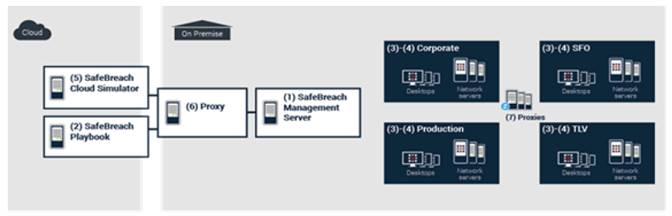
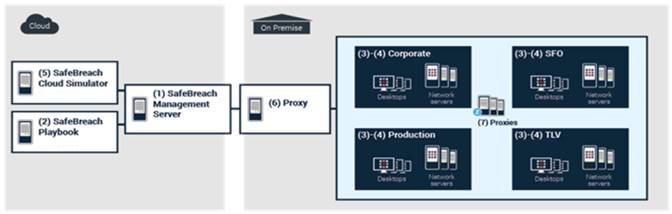
NOTE: Simulators are required for each network segmentation that needs breach simulations performed. The number of simulators required is dependent on the network architecture and how many segments need breach simulations performed. Simulators talk simulator to simulator across a given network segment and do not access actual user data. One Management console can orchestrate multiple simulators. Order the number of SKUs based on the number of network segmentations needing assessment. See Figures 1 and 2 for example deployments. |
|||
|
| |||
|
Table 1: SafeBreach Management Console Deployment options | |||
|
Deploy |
Advantages |
Infrastructure Requirements | |
|
In the Cloud |
|
|
|
|
On Premise |
|
|
|
|
| |||
|
Table 2: Minimal Software and Hardware requirements | ||
|
Component |
Requirements |
Supported Platforms |
|
Cloud SafeBreach Management Server |
System configuration and hardware requirements are handled by SafeBreach Number in Deployment Model: 1 |
- |
|
On-Premise SafeBreach Management Server Production environments SafeBreach supports <50 simulators |
VM configuration:
Number in Deployment Model: 1 |
|
|
SafeBreach Network Simulator |
VM configuration:
Number in Deployment Model: As required |
|
|
SafeBreach Host Simulator |
Hardware requirements:
NOTE: Total RAM required for the endpoint depends on memory consumption of other already installed applications
NOTE:The number of cores affects the overall execution time.
Number in Deployment Model: As required |
|
|
SafeBreach Cloud Simulator |
Provided by SafeBreach
Number in Deployment Model: 1 |
- |
|
SafeBreach Cloud Services A number of services, including SafeBreach Playbook and update services |
Hostname: https://safebreach.com/resource-center IP Address: 18.220.125.82 Number in Deployment Model: 1 |
- |
|
| ||
|
|
|
Figure 1 On premise Management Console example deployment |
|
NOTE: :For firewall rule requirements, see the SafeBreach Platform Deployment Guide The virtual appliances are configured by default to use DHCP for IP assignment. Static IP assignment is possible, if required If there are any difficulties with the above recommendations, please contact SafeBreach |
|
|
|
|
|
Figure 2 Management Console Server in the Cloud |
|
NOTE: When the SafeBreach Management Server runs in the cloud, SafeBreach provides the server as well as its hostname and IP address The virtual appliances are configured by default to use DHCP for IP assignment. Static IP assignment is possible, if required. If there are any difficulties with the above recommendations, please contact SafeBreach |
|
|
Service and Support
|
Service and Support for SafeBreach products are provided directly by SafeBreach. For any support and generic queries please email to support@SafeBreach.com. SafeBreach licensors service delivery organization will be responsible for responding with a call, assigning a severity level to the call, and determining the service Severity Level acceptable to Hewlett Packard Enterprise customer.
The support request will be processed by SafeBreach in accordance with the Severity Level agreed upon. |
|
|
|
Warranty Software For a period of ninety (90) days from the Start Date, SafeBreach warrants (a) that the media on which the software is delivered will be free of defects in material and workmanship, and (b) the software will operate substantially as set forth in the applicable SafeBreach specifications when used in accordance with the terms of the SafeBreach software license. End User's exclusive remedy and the entire liability of SafeBreach and its suppliers under this limited warranty will be replacement of the software media. Except for the foregoing, the software is provided AS IS. This limited warranty extends only to the End User as the original licensee. See other Warranty Limitations and Restrictions below |
|
|
|
Restrictions SafeBreach warranties as set forth herein ("Warranty") are contingent on proper use of the SafeBreach branded hardware and software ("Products") and do not apply if (a) the Products have been modified without the written approval of SafeBreach, (b) the Products' serial number label is removed, (c) the Product has been damaged or subjected to abnormal physical or electrical stress, abnormal environmental conditions, misuse, negligence, or accident, or (d) the Product is licensed for beta, evaluation, testing or demonstration purposes. In order to ensure proper operation of SafeBreach products, it is required that all SafeBreach systems utilize only SafeBreach supplied optical transceiver components. SafeBreach reserves the right to void warranty and service support offerings if optical transceiver components other than those supplied by SafeBreach are used in the operation of SafeBreach products. The terms of the Warranty are limited to the remedies as set forth in this Warranty. This warranty is provided in lieu of all other rights, conditions and warranties. SafeBreach makes no other express or implied warranty with respect to the software, hardware, products, documentation or SafeBreach support, including, without limitation, any warranty of merchantability, fitness for a particular purpose and non-infringement of third party rights. SafeBreach does not warrant that any products will be error-free, or that any defects that may exist in its products can be corrected. In no event shall SafeBreach be liable for cost of procurement of substitute goods, lost profits or any other special, indirect, consequential or incidental damages (including but not limited to lost data), however caused whether or not SafeBreach has been advised of the possibility of such damages. Some jurisdictions do not allow limitation or exclusion of liability for consequential or incidental damages, so that limitation or exclusion may not apply. |
|
|
|
Return Policy for Resellers Stocking of SafeBreach products are not recommended. Please purchase accurate quantity required to fulfil the customer order. |
|
|
Summary of Changes
|
Date |
Version History |
Action |
Description of Change |
|
03-Sep-2019 |
Version 4 |
Changed |
sections were updated and product name updated |
|
03-Dec-2018 |
Version 3 |
Changed |
Revised the SKUs which are offered from 34 to 2 Overview, Models and Configuration Information sections were Updated. |
|
04-Dec-2017 |
Version 2 |
Changed |
Added Quickstart SKU |
|
25-Sep-2017 |
Version 1 |
New |
New QuickSpecs |
|
|
|
| ||||||||
|
|
| ||||||||
|
|
|
© Copyright 2019 Hewlett Packard Enterprise Development LP. The information contained herein is subject to change without notice. The only warranties for Hewlett Packard Enterprise products and services are set forth in the express warranty statements accompanying such products and services. Nothing herein should be construed as constituting an additional warranty. Hewlett Packard Enterprise shall not be liable for technical or editorial errors or omissions contained herein.
Microsoft and Windows NT are US registered trademarks of Microsoft Corporation. Intel is a US registered trademark of Intel Corporation. Unix is a registered trademark of The Open Group.
a00021864enw - 16039 - Worldwide - V4 - 03-September-2019 | ||||||||


