




























HPE StoreEasy 3000 Gateway Storage Blade: технические характеристики и документация
В архивеOverview - StoreEasy 3850 GBS
|
HPE StoreEasy 3850 Gateway Blade Storage |
|
|
|
HPE StoreEasy 3850 Gateway Blade Storage is a new breed of optimized, efficient, secure, and highly available file services gateway to address the file storage challenges of customers' medium to large organizations and their SAN environments. HPE StoreEasy 3850 Gateway Blade Storage, built on industry leading HPE ProLiant DNA and Microsoft Windows Storage Server, integrates easily into new and existing SAN environments with a straightforward, consistent management experience for IT generalists or storage administrators. Using the HPE StoreEasy 3850 Gateway Blade, organizations can leverage unused block capacity for file serving and maximize their SAN investment. |
|
|
|
What's New |
|
|
Models | |
|
HPE StoreEasy 3850 Gateway Blade Storage | |
|
The HPE StoreEasy 3850 Gateway Blade Storage gives you the capability to add file services from your C3000 or C7000 Blade Enclosure to your array or Fibre Channel SAN. The StoreEasy 3850 is built upon a ProLiant BL460c Gen9 Blade server. | |
|
HPE StoreEasy 3850 Gateway Storage Blade |
K2R72A |
|
HPE StoreEasy 3850 WSS2016 Gateway Blade Storage |
Q0F53A |
|
| |
|
|
| |||||||
|
|
| |||||||
|
|
|
| ||||||
|
|
|
|
|
| ||||
|
|
|
|
|
| ||||
|
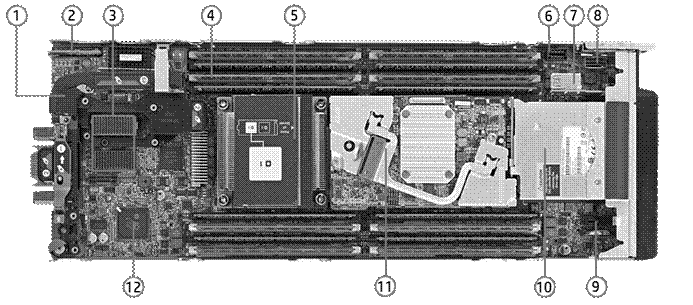
StoreEasy 3850 Gateway Blade Storage - Internal View | ||||||||
|
1. |
FlexibleLOM adapter |
7. |
USB 3.0 and TPM | |||||
|
2. |
Nand Flash & Micro SD |
8. |
Embedded SATA Connector | |||||
|
3. |
Mezzanine Slots (x16 PCI 3.0) |
9. |
Solid State Device Connector | |||||
|
4. |
Sixteen (16) DDR4 DIMM slots (8 per processor) |
10. |
Two hot-plug drive bays | |||||
|
5. |
Up to two (2) Intel® Xeon® E5-2600 v3 family processors |
11. |
N/A | |||||
|
6. |
HPE BLc 12W Smart Storage Battery connector |
12. |
iLO Management Engine | |||||
|
|
|
|
|
| ||||
|
|
|
|
|
| ||||
|
|
|
|
|
| ||||
|
|
|
|
|
| ||||
Features and Benefits - StoreEasy 3850 GBS
|
Optimized: Built for enterprise-class file serving |
The HPE StoreEasy 3850 Gateway Blade comes with pre-configured hardware and either Microsoft Windows Storage Server 2016 or 2012 R2. Get your file gateway out of the box and online fast with tools that simplify installation and curb common configuration errors. HPE StoreEasy Dashboard consolidates all key status information such as capacity utilization, performance, and health in a single interface reducing the need to navigate multiple tools and interfaces for system management. Low capacity warning email alerts available to help minimize disruption. |
|
|
|
|
Efficient: Saves you money and time |
The HPE StoreEasy 3850 Gateway Blade supports large numbers of users and connected devices thanks to a high-performance file serving controller. Utilize a broad range of file access protocols, including iSCSI block access and Microsoft Hyper-V and SQL Server application storage over SMB. Achieve an average of 50-60 percent space savings with granular data deduplication. In Windows Storage Server 2016-based StoreEasy 3850 Gateway Blades, an enhanced deduplication engine supports large files, up to 1 TB, and file systems up to 64 TB. Built-in file sync and share enables employees, mobile workers and distributed teams to access their work files from any Internet-connected desktop, smartphone, or tablet. Organizations can apply policies to wipe devices remotely and enforce lock screen passwords to protect data on employee devices. Use advanced data management to automatically improve use of resources, comply with data retention policies, and enhance protection of sensitive files. Reduce your branch office WAN usage with Hosted BranchCache, which automatically caches frequently accessed corporate data center files locally. |
|
|
|
|
Secure: Protect your data always |
The HPE StoreEasy 3850 Gateway Blade protects data while at rest with file system encryption, and while it is being transferred with SMB encryption and signing. File Classification Infrastructure can dynamically identify files based on sensitivity and implement sophisticated access controls based on your organization's requirements using Active Directory Rights Management Services. Install and run endpoint protection, such as an antivirus, on the system itself-reducing the cost and complexity of connecting to an external endpoint protection server. Prevent against data loss with Volume Shadow Copy Service online snapshots and support for agent-based backup software. Opt to back up your file data to Microsoft Azure using your Azure subscription to protect against disasters and catastrophic failures. Also, enable simplified and cost efficient compliance archiving with iTernity Compliant Archive Solution (iCAS), now validated to meet the United States Securities and Exchange Commission (SEC) 17a-4(f) requirements. |
|
|
|
|
Highly Available: Prevent business and user disruption |
The HPE StoreEasy 3850 Gateway Blade increases uptime with standard features such as near continuous health monitoring with HPE Active Health System, mirrored operating system solid-state drives (SSDs), and advanced memory protection. Confidently deploy large file systems with file system online self-healing that reduces the need to take systems offline. With online verification and precise, rapid repair reduce downtime from file corruption from days or hours to minutes. Take advantage of Double-Take Availability software for critical data protection with real-time byte-level replication. In the event of a failure, recover the data-with a minimum of loss-from the replicated data repository. Software installation files now included with free 14-day evaluation license. Get support from file storage experts with 3-Year Parts, 3-Year Labor, and 3-Year Onsite support with next business day response. All StoreEasy products also include one year of 9x5 software telephone support for the Windows Storage Server operating system(s). |
Standard Features - StoreEasy 3850 GBS
|
Operating System (s) |
Microsoft Windows Storage Server 2016 or 2012 R2, Standard Edition (depends on model) with HPE enhanced value and unique features
- SMB 3.X.X protocol: Leverage high performance continually available file shares to deliver feature-rich storage for business-critical applications and virtual servers using advanced new functionality. - SMB 3.1.1 protocol: Enhances security between SMB clients and StoreEasy. When both a client and StoreEasy connect over SMB 3.1.1, SMB signing and encryption protects against an attacker tampering with or eavesdropping on any network packets. SMB 3.1.1 with AES-128-GCM, the latest fixed cryptographic algorithm, showed a 2x performance improvement compared with SMB 3.0 using AES-128-CCM in certain scenarios such as copying large files over an encrypted SMB connection. - SMB 3.X.X Multi-channel: Enable aggregation of network bandwidth and network fault tolerance when multiple paths are available between SMB clients and file servers. - SMB 3.1.1. Multichannel and Multi-NIC Cluster Networks: Allows the use of multiple NICs on the same cluster network subnet and automatically enables SMB Multichannel. This allows customers to maximize throughput of SMB 3.1.1 network traffic. - NFS v4.1: Server for NFS has been updated to support continuous availability. These improvements make it possible to reliably store and run VMware ESX on a virtual machine that is running Windows Server by using the NFS v4.1 protocol to share files. Additional improvements in failover clustering take advantage of better resilience to hardware and software outages that may afflict individual cluster nodes. At the same time, failover clustering isolates VMware ESX hypervisor hosts from intermittent glitches during failovers. - iSCSI: Some applications require block storage. iSCSI Target Server can provide these applications with continuously available block storage. Since the storage is remotely accessible it can also consolidate block storage for central or branch office locations. By using boot-capable NICs or a software loader, you can deploy hundreds of diskless servers. This is ideal for large deployments of identical operating system images, such as a Hyper-V server farm or High Performance Computing (HPC) clusters.
- Storage Quotas: Quotas allow you to limit the space that is allowed for a volume or folder, and they can be automatically applied to new folders that are created on a volume. You can also define quota templates that can be applied to new volumes or folders. - File screening: File screens help you control the types of files that user can store on a file server. You can limit the extension that can be stored on your shared files. For example, you can create a file screen that does not allow files with an MP3 extension to be stored in personal shared folders on a file server. - File Classification Infrastructure: File Classification Infrastructure provides insight into your data by automating classification processes so that you can manage your data more effectively. You can classify files and apply policies based on this classification. Example policies include dynamic access control for restricting access to files, file encryption, and file expiration. Files can be classified automatically by using file classification rules or manually by modifying the properties of a selected file or folder. - File Management Tasks: File Management Tasks enables you to apply a conditional policy or action to files based on their classification. The conditions of a file management task include the file location, the classification properties, the date the file was created, the last modified date of the file, or the last time the file was accessed. The actions that a file management task can take include the ability to expire files, encrypt files, or run a custom command. - Storage reports: Storage reports are used to help you identify trends in disk usage and how your data is classified. You can also monitor a selected group of users for attempts to save unauthorized files.
- Data deduplication within Windows Storage Server 2016 has specific improvements for deduping large volumes and large files - up to 64 TB and 1TB respectively. In WSS 2012 R2, it was recommended to run deduplication on volumes under 10TB in size. WSS 2016's deduplication engine will run multiple threads in parallel using multiple I/0 queues on a single volume and thereby improve the performance for deduping large volumes.
NOTE: Windows Server 2016 and Windows Storage Server 2016 are built on the same code base. Windows Server 2012 R2 and Windows Storage Server 2012 R2 are built on the same code base. Applications certified for Windows Server are expected to have the same application compatibility profile on Windows Storage Server. Windows Server and Windows Storage Server have the same application frameworks, services and plumbing to support running the full breadth of Window-compatible applications. Applications that rely upon certain roles that are removed from Windows Storage Server 2016 and 2012 R2, such as fax server, active directory domain controller or terminal services will not be able to leverage those roles. Independent Software Vendors (ISVs) ultimately decide what versions and editions of Windows Server or Windows Storage Server are supported by their products and users should review ISV compatibility and support information before purchasing. HPE StoreEasy customers should review the End User License Agreement (EULA) to see the types of applications that are permitted for installation. All versions of Windows Storage Server can join Active Directory domains, but cannot be a domain controller.
|
|
| |
|
Processor / Cache Memory |
Intel Xeon E5-2609v3 (1.9GHz/6-core/15MB/85W) Processor (SKU K2R72A) Intel Xeon E5-2609v4 (1.7GHz/8-core/15MB/85W) Processor (SKU Q0F53A) | |
|
| ||
|
Memory |
Type |
DDR4 Registered (RDIMM) standard |
|
Standard |
32GB (4 x 8GB) | |
|
DIMM Sockets |
16 | |
|
| ||
|
Network Controller |
NIC Ports |
2 |
|
Controller |
One (1) FlexibleLOM connector providing a choice for one (1) of the supported 10Gb/20Gb FlexibleLOMs | |
|
|
NOTE: Supports FCoE, TCP/IP offload engine, hardware-based accelerated iSCSI, iSCSI boot, and autosensing 10Gb/1Gb Ethernet.
One (1) HPE FlexFabric 20Gb 2-port 650FLB FlexibleLOM
Standard iLO Network Controller: | |
|
| ||
| ||
|
|
|
Storage Controller |
Controller |
HPE Dynamic Smart Array B140i Controller |
|
|
RAID |
0/1 |
|
|
NOTE: THE HPE 3850 Gateway Blade Storage has an integrated storage controller that is only used to connect to the two internal SSDs that contain the OS. External user storage is connected by Fibre Channel, SAS or iSCSI | |
|
| ||
|
Storage |
Hard Drives |
|
|
|
||
|
Internal |
Two 2.5" (Small Form Factor) hot-plug bays
| |
|
External |
Designed to attach to Fibre Channel, SAS, or iSCSI based storage (iSCSI initiator included in OS) | |
|
| ||
|
Power Supply |
Powered by c-Class Blade Enclosure | |
|
| ||
|
System Fans |
Within c-Class Blade Enclosure | |
|
| ||
|
Form Factor |
Half-height server blade that installs into the HPE BladeSystem c3000 and c7000 enclosures | |
Optional Software - StoreEasy 3850 GBS
|
Double-Take Availability |
Protect your critical HPE StoreEasy data with Double-Take Availability's real-time byte-level replication. In the event of a failure, recover the data-with a minimum of loss-from the replicated data repository. For more information read the Technical White Paper.
|
|
iCAS software by iTernity |
Get open, flexible, and expandable long-term archiving with iTernity Compliant Archive Solution (iCAS). Together, HPE StoreEasy and iCAS are your key to legally compliant data archiving. For more information on iTernity iCAS go to: http://www.iternity.com/HPE-icas_en.html |
SAN / Array Compatibility - StoreEasy 3850 GBS
|
Host Bus Adapter (HBA) Support |
HPE StoreEasy 3850 Gateway Blade Storage products are designed to be connected to a storage by adding a Fibre Channel HBA, SAS Controller, or by using an iSCSI initiator. HBA/Controller selection will be based on existing infrastructure and/or desired array support. Please see compatible HBAs/Controllers listed in the 'Options' section below. | |
|
|
| |
|
HPE SAN / Array Support |
HPE 3PAR |
http://h18006.www1.hp.com/storage/disk_storage/3par/index.html |
|
HPE StoreVirtual |
http://h18000.www1.hp.com/products/QuickSpecs/13254_div/13254_div. | |
|
HPE P9000/XP |
http://h18006.www1.hp.com/storage/xparrays.html | |
|
HPE P6000/EVA |
http://h18006.www1.hp.com/products/storageworks/eva/index.html | |
|
HPE P2000/MSA |
http://h18000.www1.hp.com/products/QuickSpecs/13551_na/ | |
|
|
| |
|
HPE StoreEasy 3850 Gateway Blade Storage products and third-party storage arrays/SAN interoperability statement Hewlett Packard Enterprise will provide support for the HPE StoreEasy 3850 products when connected to third-party storage arrays, but Hewlett Packard Enterprise will not provide support on third-party storage arrays/SAN unless specifically called out in an HPE Support contract. Hewlett Packard Enterprise may support the third-party SAN environment attached to HPE StoreEasy 3850 product when specifically under contract with HPE, but that SAN coverage does not extend to supporting the SAN connectivity of the third-party array. If you call HPE Services and the problem is determined to be caused by a third-party storage array or the storage arrays' connectivity into a non-Hewlett Packard Enterprise supported SAN, you will be directed to contact the third-party storage array supplier for support. Please refer to the third-party supplier for information relating to specific support of their storage arrays with Windows Storage Server 2016 and Windows Storage Server 2012 R2 Standard Edition. | ||
Models (Pre-configured) - StoreEasy 3850 GBS
|
This model come with factory-installed drives and the Microsoft Windows Storage Server 2012 Standard Edition operating system pre-installed |
| |||||||||
|
Choose a Pre-configured Model |
| |||||||||
|
|
|
| ||||||||
|
HPE StoreEasy 3850 WSS2016 Gateway Blade Storage |
Q0F53A |
| ||||||||
|
|
| |||||||||
|
Specifications |
|
| ||||||||
|
Operating System |
Microsoft Windows Storage Server 2016, Standard |
| ||||||||
|
Processor |
Intel Xeon E5-2609v4 (1.7GHz/8-core/15MB/85W) Processor |
| ||||||||
|
Memory |
32 GB (4 x 8GB Single Rank x4 DDR4-2400 CAS-15-15-15 Registered Memory) |
| ||||||||
|
Storage Controller |
HPE Dynamic Smart Array B140i Controller (used for OS drive only) |
| ||||||||
|
Internal Storage |
2 x 6G SATA SFF SSDs for Operating System (connected to B140i and configured as RAID 1 mirrored pair) |
| ||||||||
|
Network Ports |
One (1) FlexibleLOM connector providing a choice for one (1) of the supported 2-port 10Gb/20Gb FlexibleLOMs |
| ||||||||
|
Expansion Slots |
2 x PCIe 3.0 mezzanine |
| ||||||||
|
Form Factor |
Half-height C-class blade |
| ||||||||
|
|
| |||||||||
|
HPE StoreEasy 3850 Gateway Storage Blade |
K2R72A |
| ||||||||
|
|
| |||||||||
|
Specifications |
|
| ||||||||
|
Operating System |
Microsoft Windows Storage Server 2012 R2, Standard |
| ||||||||
|
Processor |
Intel Xeon E5-2609v3 (1.9GHz/6-core/15MB/85W) Processor |
| ||||||||
|
Memory |
32 GB (4 x 8GB Single Rank x4 DDR4-2133 CAS-15-15-15 Registered Memory) |
| ||||||||
|
Storage Controller |
HPE Dynamic Smart Array B140i Controller (used for OS drive only) |
| ||||||||
|
Internal Storage |
2 x 6G SATA SFF SSDs for Operating System (connected to B140i and configured as RAID 1 mirrored pair) |
| ||||||||
|
Network Ports |
One (1) FlexibleLOM connector providing a choice for one (1) of the supported 2-port 10Gb/20Gb FlexibleLOMs |
| ||||||||
|
Expansion Slots |
2 x PCIe 3.0 mezzanine |
| ||||||||
|
Form Factor |
Half-height C-class blade |
| ||||||||
|
Add a second processor |
|
| ||||||||
|
|
Intel Xeon E5-2609v4 (1.7GHz/8-core/15MB/85W) Processor |
819837-B21 |
| |||||||
|
|
HP BL460c Gen9 Intel® Xeon® E5-2609v3 (1.9GHz/6-core/15MB/85W) Processor Kit
NOTE: A second processor must be installed (in processor slot 2) to have access to the second expansion slot (expansion slot 2). |
726997-B21 |
| |||||||
|
|
|
|
| |||||||
|
|
| |||||||||
|
Add More Memory |
|
| ||||||||
|
|
| |||||||||
|
|
Registered DIMMs (RDIMMs) |
|
| |||||||
|
HP 8GB (1x8GB) Single Rank x4 DDR4-2133 CAS-15-15-15 Registered Memory Kit |
726718-B21 |
| ||||||||
|
HP 16GB (1x16GB) Dual Rank x4 DDR4-2133 CAS-15-15-15 Registered Memory Kit |
726719-B21 |
| ||||||||
|
HP 32GB (1x32GB) Dual Rank x4 DDR4-2133 CAS-15-15-15 Registered Memory Kit |
728629-B21 |
| ||||||||
|
NOTE: The above memory kits can be ordered only with HP StoreEasy 3850 Gateway Blade Storage (sku K2R72A) |
|
| ||||||||
|
|
|
| ||||||||
|
HP 8GB (1x8GB) Single Rank x8 DDR4-2400 CAS-17-17-17 Registered Memory Kit |
805347-B21 |
| ||||||||
|
HP 16GB (1x16GB) Single Rank x4 DDR4-2400 CAS-17-17-17 Registered Memory Kit |
805349-B21 |
| ||||||||
|
HP 32GB (1x32GB) Dual Rank x4 DDR4-2400 CAS-17-17-17 Registered Memory Kit |
805351-B21 |
| ||||||||
|
NOTE: The above memory kits can be ordered only with HP StoreEasy 3850 WSS2016 Gateway Blade Storage (sku Q0F53A) |
|
| ||||||||
|
NOTE: The HPE StoreEasy 3850 Gateway Blade or HPE StoreEasy 3850 WSS2016 Gateway Blade comes standard with 32GB (4 x 8GB) of memory installed. For some installations, a customer may want to replace the 32GB memory that ships standard. The 8GB, 16GB and 32GB Memory kit SKUs listed are supported as shown and can be ordered as an option for field installation only. |
|
| ||||||||
|
NOTE: HPE memory from previous generation servers (DDR3) is not compatible with this server. HPE SmartMemory is required to realize the memory performance improvements and enhanced functionality listed in this document for Gen9. For additional information, please see the HPE SmartMemory QuickSpecs at: https://www.hpe.com/h20195/v2/GetHTML.aspx?docname=c04111535 |
|
| ||||||||
|
|
| |||||||||
|
Add additional options |
|
| ||||||||
|
|
|
|
| |||||||
|
FlexibleLOM Adapter |
NOTE: The StoreEasy 3850 Gateway Blade supports one (1) FlexibleLOM that is installed in the FlexibleLOM connectors. |
|
| |||||||
|
|
|
|
| |||||||
|
|
20Gb FlexibleLOM Adapters |
|
| |||||||
|
|
HP FlexFabric 20Gb 2-port 630FLB Adapter NOTE:
Please see QuickSpecs for technical specifications and additional information
at
https://www.hpe.com/h20195/v2/GetDocument. |
700065-B21 |
| |||||||
|
|
HP FlexFabric 20Gb 2-port 650FLB Adapter NOTE:
Please see QuickSpecs for technical specifications and additional information
at https://www.hpe.com/h20195/v2/GetDocument.
|
700763-B21 |
| |||||||
|
|
10Gb FlexibleLOM Adapters |
|
| |||||||
|
|
HP FlexFabric 10Gb 2-port 536FLB Adapter NOTE:
Please see QuickSpecs for technical specifications and additional information
at
https://www.hpe.com/h20195/v2/GetDocument. |
766490-B21 |
| |||||||
|
|
HP Ethernet 10Gb 2-port 560FLB Adapter NOTE: Please see QuickSpecs for technical specifications and additional information at https://www.hpe.com/h20195/v2/GetHTML.aspx?docname=c04111516 |
655639-B21 |
| |||||||
|
|
|
|
| |||||||
|
|
NOTE: A 10 Gigabit Ethernet adapter supports linking at 1Gbps or 10Gbps when connected to an interconnect module with 10Gb Ethernet downlinks. |
|
| |||||||
|
|
| |||||||||
|
|
NOTE: The cards listed below are either Type A or Type B mezzanine cards. Type A must be installed in mezzanine expansion slot 1 on single processor systems. Type A can be installed in mezzanine expansion slot 1 or 2 on dual processor systems. Type B must be installed in mezzanine expansion slot 2. A second processor must be installed (in processor slot 2) to have access to the second mezzanine expansion slot).
|
|
| |||||||
|
|
|
|
| |||||||
|
Fibre Channel HBA |
HP LPe1605 16Gb Fibre Channel HBA for BladeSystem c-Class NOTE: Please see QuickSpecs for technical specifications and additional information at https://www.hpe.com/h20195/v2/getpdf.aspx/c04315132.pdf?ver=2 |
718203-B21 |
| |||||||
|
|
HP QMH2672 16Gb Fibre Channel Host Bus Adapter NOTE:
Please see QuickSpecs for technical specifications and additional information
at https://www.hpe.com/h20195/v2/GetDocument. |
710608-B21 |
| |||||||
|
|
HP LPe1205A 8Gb Fibre Channel Host Bus Adapter for BladeSystem c-Class NOTE:
Please
see QuickSpecs for technical specifications and additional information
at https://www.hpe.com/h20195/v2/GetDocument. |
659818-B21 |
| |||||||
|
|
|
|
| |||||||
|
|
| |||||||||
|
Storage Controllers |
HP Smart Array P244br/1GB FBWC 12Gb 2-ports Int SAS Controller |
749680-B21 |
| |||||||
|
HP Smart Array P246br/1GB FBWC 12Gb 4-ports Int SAS Controller |
726793-B21 |
| ||||||||
|
|
| |||||||||
|
20Gb Ethernet Mezzanine Cards |
HP FlexFabric 20Gb 2-port 630M Adapter
NOTE:
This is a Type A mezzanine adapter (works in Type A and Type B mezzanine
slots). Please see QuickSpecs for technical specifications and additional
information at
https://www.hpe.com/h20195/v2/GetDocument. |
700076-B21 |
| |||||||
|
|
HP FlexFabric 20Gb 2-port 650M Adapter NOTE:
This is a Type A mezzanine adapter (works in Type A and Type B mezzanine
slots). Please see QuickSpecs for technical specifications and additional
information at
https://www.hpe.com/h20195/v2/GetDocument. |
700767-B21 |
| |||||||
|
|
|
|
| |||||||
|
|
| |||||||||
|
10Gb Ethernet Mezzanine Cards |
HP FlexFabric 10Gb 2-port 534M Adapter NOTE:
This is a Type A mezzanine adapter (works in Type A and Type B mezzanine
slots). Please see QuickSpecs for technical specifications and additional
information at https://www.hpe.com/h20195/v2/GetDocument. |
700748-B21 |
| |||||||
|
|
HP Ethernet 10Gb 2-port 560M Adapter
NOTE: This is a Type A mezzanine adapter (works in Type A and Type B mezzanine slots). Please see QuickSpecs for technical specifications and additional information at https://www.hpe.com/h20195/v2/GetHTML.aspx?docname=c04111516 |
665246-B21 |
| |||||||
|
|
| |||||||||
|
1Gb Ethernet Mezzanine Cards |
HP Ethernet 1Gb 4-port 366M Adapter
NOTE: This is a Type A mezzanine adapter (works in Type A and Type B mezzanine slots). Please see QuickSpecs for technical specifications and additional information at https://www.hpe.com/h20195/v2/GetHTML.aspx?docname=c04111456 |
615729-B21 |
| |||||||
|
|
| |||||||||
|
InfiniBand Mezzanine Cards |
NOTE: When an InfiniBand adapter is installed in mezzanine slot 1, only one port is active (regardless of operating mode). When installed in mezzanine slot 2, both ports are active. |
|
| |||||||
|
|
NOTE: InfiniBand QDR and FDR speeds are only supported on the HPE BladeSystem c7000 Enclosure. For additional information, please see the HPE BladeSystem c7000 Enclosure and InfiniBand QuickSpecs at: https://www.hpe.com/h20195/v2/GetHTML.aspx?docname=c04126044 |
|
| |||||||
|
|
NOTE: The QDR InfiniBand adapter may be installed in either mezzanine slot of the server. |
|
| |||||||
|
|
HP InfiniBand FDR/Ethernet 10Gb/40Gb 2-port 544+M Adapter |
764283-B21 |
| |||||||
|
|
NOTE: The FDR InfiniBand adapter must be installed in mezzanine slot 1 for FDR mode and may be installed in either mezzanine slot if operated in any other mode. |
|
| |||||||
|
|
HP InfiniBand FDR 2-port 545M Adapter |
702213-B21 |
| |||||||
|
|
| |||||||||
|
StoreEasy System Recovery DVD |
HPE StoreEasy XX50 Recovery Software Media Kit |
P4A92A |
| |||||||
|
|
HPE StoreEasy XX50 WSS2016 Recovery Software Media Kit |
Q0F58A |
| |||||||
|
|
The HPE StoreEasy XX50 Recovery Software Media Kits contains a System Recovery DVD that is used to re-install the factory operating system image. Booting the system from the System Recovery DVD will restore the operating system image and logical drive to the factory default state. This enables recovery of the system if all other means to boot the system fail. Refer to the StoreEasy 3000 Administrator Guide for more information on performing a System Recovery.
NOTE: If
desired the StoreEasy XX50 Recovery Software can be downloaded from
The HPE Software Depot at no charge, so that the user can create their
own System Recovery DVD or System Recovery USB flash drive. The Recovery
Software(s) are available here: https://h20392.www2.hp.com/portal/swdepot/displayProductInfo. https://h20392.www2.hpe.com/portal/swdepot/displayProductInfo.
|
|
| |||||||
|
|
NOTE: For more information on how to perform a system recovery on a StoreEasy 3850 refer to the StoreEasy 3000 Administrator's Guide. The guide can be downloaded from http://www.hp.com/support . Search for the StoreEasy product model in the drivers and download section. |
|
| |||||||
|
|
NOTE: All data on the original operating system logical drive is erased during the System Recovery process. Back up any data on the operating system drives before performing the System Recovery if possible. NOTE: While the System Recovery process makes every attempt to preserve the existing data volumes, you should have a backup of your data before recovering the system. |
|
| |||||||
|
|
| |||||||||
|
HPE Security |
HP Trusted Platform Module Option |
488069-B21 |
| |||||||
|
|
HPE Trusted Platform Module 2.0 Kit |
745823-B21 |
| |||||||
|
|
NOTE: The TPM (Trusted Platform Module) is a microcontroller chip that can securely store artifacts used to authenticate the server platform. These artifacts can include passwords, certificates and encryption keys. Windows® BitLocker™ Drive Encryption (BitLocker) is a data protection feature available in Windows Storage Server 2012 R2 or 2016. BitLocker leverages the enhanced security capabilities of a Trusted Platform Module (TPM) version 1.2. The TPM works with BitLocker to help protect user data and to ensure that StoreEasy 3850 Gateway has not been tampered with while the system was offline. For more information about TPM, including a white paper, go to: www.hp.com/go/TPM. |
|
| |||||||
Technical Specifications - StoreEasy 3850 GBS
|
StoreEasy 3850 Gateway Blade Storage |
Dimensions (H x W x D) |
7.11 x 2.18 x 20.37 in (18.07 x 5.54 x 51.76 cm) | |
|
Weight |
Maximum: all processors, 16 DIMMs, hard drives, mezzanine cards, and two flash cache batteries installed) |
14.00 lb (6.33 kg) | |
|
Minimum: one processor and 2 DIMMs installed |
10.50 lb (4.75 kg) | ||
|
Power Specifications |
For power specifications including input requirements, BTU rating, and power supply output, please see the:
To review typical system power ratings use the HPE Power Advisor which is available via the online tool located at http://www.hp.com/go/hppoweradvisor. | ||
|
NOTE: For optimal cooling and system performance the BL460c Gen9 Server Blade requires the c7000 enclosure to be configured with 10 fans and the c3000 enclosure to be configured with 6 fans. | |||
|
System Inlet Temperature |
Operating |
10° to 35°C (50° to 95°F) at sea level with an altitude derating of 1.0°C per every 305 m (1.8°F per every 1,000 ft) above sea level to a maximum of 3,050 m (10,000 ft), no direct sustained sunlight. Maximum rate of change is 10°C/hr (18°F/hr). The upper limit may be limited by the type and number of options installed. System performance may be reduced if operating with a fan fault or above 30°C (86°F). | |
|
Non-operating |
-30° to 60°C (-22° to 140°F). Maximum rate of change is 20°C/hr (36°F/hr). | ||
|
Extended Ambient Operating Support |
For Approved hardware configurations, the supported system inlet range is extended to be: 5° to 10°C (41° to 50°F) and 35° to 40°C (95° to 104°F) at sea level with an altitude derating of 1.0°C per every 175 m (1.8°F per every 574 ft) above 900 m (2953 ft) to a maximum of 3050 m (10,000 ft) | ||
|
|
NOTE: Qualifications for extended ambient configurations are detailed at: https://www.hpe.com/servers/ASHRAE
| ||
|
Relative Humidity |
Operating |
10 to 90% relative humidity (Rh), 28°C (82.4°F) maximum wet bulb temperature, non-condensing. | |
|
Non-operating |
5 to 95% relative humidity (Rh), 38.7°C (101.7°F) maximum wet bulb temperature, non-condensing. | ||
|
|
|
| |
|
Altitude |
Operating |
3,050 m (10,000 ft). This value may be limited by the type and number of options installed. Maximum allowable altitude change rate is 457 m/min (1,500 ft/min). | |
|
Non-operating |
9,144 m (30,000 ft). Maximum allowable altitude change rate is 457 m/min (1,500 ft/min). | ||
|
|
| ||
|
Acoustic Noise |
For acoustic noise specifications, please see the HPE BladeSystem c-Class Enclosures QuickSpecs located at: | ||
|
| |||
|
HPE Dynamic Smart Array B140i Controller |
Disk Drive Interface |
6Gb/s SATA (Serial ATA) | |
|
Server Interface |
Embedded x4 PCIe 2.0 | ||
|
SAS Connectors Cache Memory |
2 internal SATA ports None | ||
|
SAS Speed Logical Drives Supported |
6Gb/s SATA links Up to 10 logical volumes (2 physical drives) | ||
|
Host Memory Addressing |
64-bit, supporting greater than 4GB server memory space | ||
|
Hot Plug Support RAID Support |
Yes RAID 1 (Mirroring) RAID 0 (Striping) | ||
|
Other |
Upgradeable firmware with recovery ROM | ||
|
| |||
|
| |||
|
HPE FlexFabric 10Gb |
Type |
Integrated dual-port KR 10Gb FlexibleLOM with FlexFabric (Flex-10, FCoE, hardware-based iSCSI, iSCSI boot, TCP/IP offload engine, and autosensing 1Gb/10Gb Ethernet capability) | |
|
Network Processor |
QLogic 57840S with integrated MAC/PHY | ||
|
Data Transfer Method |
x8 PCI Express 3.0 | ||
|
Network Transfer Rate |
Two ports, each at 20Gbps full duplex; 40Gbps aggregate full duplex theoretical bandwidth | ||
|
IEEE Compliance |
802.1p, 802.1q, 802.1qau, 802.3ad, 802.3ae, 802.3ap (10GBase-KX4) and 802.3x | ||
|
Standard Features |
Full hardware offload of iSCSI and FCoE storage protocol processing for highest performance converged Ethernet data and storage networks. Dual-port 10GbE Flex-10 FlexibleLOM network adapter that provides the flexibility to choose the type of LOM to meet growing infrastructure needs Industry-leading throughput and latency performance Supports HPE's Flex-10 blade interconnect technology User configurable bandwidth settings when combined with the 10Gb Flex-10 Virtual Connect module. From 100Mb/s to10Gb/s on up to four "Physical Function" NICs per port, in increments of 100Mb/s for NIC. The combined bandwidth of NICs cannot exceed port bandwidth i.e. 10 Gb. Up to 40Gb/s bi-directional near line rate throughput Hardware acceleration and offloads for stateless TCP/IP, TCP Offload Engine (TOE) Improved small packet performance Support for Preboot eXecution Environment (PXE) Integrated PHY and MAC Supports for SR-IOV Support for Network Partitioning (NPAR) | ||
|
HPE FlexFabric 20Gb |
Type |
Integrated dual-port KR2 20Gb FlexibleLOM with FlexFabric (Flex-20, FCoE, RoCE, Tunnel Offload with VXLAN/NVGRE, hardware-based iSCSI, iSCSI boot, TCP/IP offload engine, and autosensing Ethernet speed capability)
| |
|
Network Processor |
Emulex XE-104
| ||
|
Data Transfer Method |
x8 PCI Express 3.0 | ||
|
Network Transfer Rate |
Two ports, each at 40 Gbps bi-directional; 80 Gbps aggregate bi-directional theoretical bandwidth | ||
|
IEEE Compliance |
802.3ae, 802.1Q, 802.3x, 802.1p, 802.3ad/LACP, 802.1AB(LLDP), 802.1Qbg, 802.1Qbb, 802.1Qaz, 802.3ap | ||
|
Standard Features |
Dual 20Gb ports provide up to 80Gb bi-directional per adapter Multi-speed adapter operates at either 20GbE or 10GbE Converges FCoE or RoCE with LAN traffic on a single Ethernet wire Tunnel Offload support for VXLAN and NVGRE RDMA over Converged Ethernet (RoCE) for greater server efficiency and lower latency (6125XLG only) Advanced storage offload processing freeing up valuable CPU cycles Supports UEFI and legacy boot options Mixed Storage - supports NIC + FCoE on one port, and NIC + iSCSI on the other Concurrent Storage - concurrently supports NIC, FCoE, and iSCSI storage functions on the same port (NIC + FCoE + iSCSI) Industry-leading throughput and latency performance Supports HPE's Flex-20 blade interconnect technology Over eight million small packets/s, ideal for web/mobile applications, mobile messaging, and social media User configurable bandwidth settings when combined with the 20Gb Flex-20 Virtual Connect module. From 100Mb/s to10Gb/s on up to four "Physical Function" NICs per port, in increments of 100Mb/s for NIC. The combined bandwidth of NICs cannot exceed port bandwidth i.e. 20 Gb/s. Greater bandwidth with PCIe 3.0 Jumbo Frames support Supports Wake On LAN (WOL) Support for Preboot eXecution Environment (PXE) Support for Microsoft Windows SMB Direct Optimized host virtualization density with SR-IOV support | ||
|
| |||
|
| |||
Summary of Changes
|
Date |
Version History |
Action |
Description of Change |
|
05-Feb-2018 |
From Version 18 to 19 |
Changed |
Models Pre-configured section was revised. |
|
07-Aug-2017 |
From Version 17 to 18 |
Changed |
Changes made to the Standard Features Section |
|
03-Apr-2017 |
From Version 16 to 17 |
Changed |
Changes made to the Models Section |
|
28-Nov-2016 |
From Version 15 to 16 |
Changed |
Changes made to the entire document |
|
Deleted |
Removed all SE 3840 references from the document | ||
|
14-Ocy-2016 |
From Version 14 to 15 |
Changed |
Rebranding edition applied |
|
28-Sept-2015 |
From Version 13 to 14 |
Changed |
Changes made to the What´s New and Models Sections |
|
17-Jul-2015 |
From Version 12 to 13 |
Added |
Added the 16Gb Ethernet Mezzanine Adapter |
|
26-Jun-2015 |
From Version 11 to 12 |
Changed |
Changed the name from “HP StoreEasy 3850 Gateway Blade†to “HP StoreEasy 3850 Gateway Blade Storage†Changed were made to the SAN Array Compatibility, Standard Features and Features and Benefits Sections. |
|
01-Jun-2015 |
From Version 10 to 11 |
Changed |
Added the HPE StoreEasy 3850 Gateway Blade |
|
07-Nov-2014 |
From Version 9 to 10 |
Removed |
Removed all HPE StoreEasy 3830 Gateway references. (obsolete), |
|
22-Aug-2014 |
From Version 8 to 9 |
Changed |
Updated the following: Models (Pre-configured) â€" added StoreEasy Windows Storage Server 2012 R2 Upgrade section |
|
03-Jul-2014 |
From version 7 to 8 |
Changed |
Optional software â€"replaced link in the HPE LiveVault section. The Update information (not content) from Version 6 to 7 was lost |
|
03-Jul-2014 |
From Version 6 to 7 |
Changed |
Optional Software was revised. |
|
09-May-2014 |
From Version 5 to 6 |
Changed |
Storage Controllers and Recommended Services were revised. |
|
18-Apr-2014 |
From Version 4 to 5 |
Changed |
Updated the following: Standard Features - Operating Systems - changed "SMB 3.0" to "SMB 3"; changed "16 terabytes" to "64 terabytes" in VHDX bullet; updated Data Depublication sub-section; updated HPE LiveVault sub-section; Models (Pre-configured) - added Infiniband Mezzanine Adapters section, 644160-B21, 644161-B22, 702213-B21 with notes and links; Storage Controllers - added P731m/512 FBWC, 698536-B21; HPE Fibre Channel - added LPe1605, 718203-B21 and note; removed Windows Storage Server 2012 R2 Upgrade; completely updated the HPE Networking section; Storage Controllers - added P731m 512FBWC, 698536-B21; added P731m 2GB RBWC, 698536-B21 and removed BC377A and BC390AAE; completely replaced HPE Fibre Channel section. |
|
31-Mar-2014 |
From Version 3 to 4 |
Changed |
Complete revision |
|
10-Jun-2013 |
From Version 2 to 3 |
Changed |
Changes were made in the following sections: Whats New- Updated Section Features and Benefits- Updates made to entire section Standard Features- Updated the Operating System section Optional Software- Changed the HPE Data Protector software and HPE Autonomy Live Valu |
|
21-Dec-2012 |
From Version 1 to 2 |
Changed |
Changes were made in the following sections: Models (Pre-Configured) : Step 1, Add a Processor and updated Storage Controllers. |
|
| ||||||||||||||||||
| ||||||||||||||||||


