




























HPE D2220sb Storage Blade: технические характеристики и документация
В архивеOverview
|
HPE D2220sb Storage Blade | |||
|
| |||
|
Do you need a direct attached or shared storage solution within your BladeSystem enclosure? Direct attached storage Two ways to create shared storage with the D2220sb The HPE 3840 Gateway Storage Blade is a flexible storage server solution for BladeSystem environments. Combine the HPE 3840 Gateway Storage Blade with the D2220sb Storage Blade to enable file serving and iSCSI shared storage inside the BladeSystem enclosure. | |||
|
| |||
|
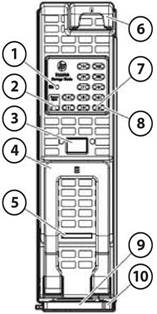
1. |
UID LED |
6. |
Product information tag |
|
2. |
Drawer Open LED |
7. |
Drive fault LED |
|
3. |
Hot-plug drive drawer release button |
8. |
Drive activity LED |
|
4. |
Hot-plug drive drawer handle |
9. |
Storage blade release latch* |
|
5. |
Health status LED bar |
10. |
Storage blade release button* |
|
NOTE*: Removing the storage blade from the enclosure removes power from the hard drives. | |||
|
| |||
|
What's New |
|
Product Highlights
|
Key Features |
Features of the D2220sb include: |
|
SFF (SAS/SATA/SAS SSD/SATA SSD) support - Delivering data transfer rates up to 6 Gb/s for SAS, SATA, SAS SSD, SATA SSD | |
| |
|
| |
|
Mix and Match of Hard Drive Types |
D2220sb supports mixing of different drive types (SAS/SATA, SSD/HDD) in a single enclosure. However, please note also that an array can be created across only one drive type. |
|
| |
|
Universal hot plug Hard Drive |
Form factor is for use across multiple HPE ProLiant servers, disk enclosures and storage systems. With compatibility across many enterprise platforms, you are free to deploy and re-deploy these drives to quickly deliver increased storage capacity, migrate data between systems, and easily manage spare drives. |
|
| |
|
LED Indicators |
Front panel LEDs indicate drive activity and system health status. |
|
| |
|
Density |
The D2220sb fits into a half height bay on the BladeSystem c3000 and c7000 Enclosure. |
|
| |
|
Fault Tolerance |
Using the internal Smart Array P420i controller with 2 GB flash-backed write cache, the D2220sb can be configured for RAID levels 0, 1, 1 + 0, 5, and 6 (RAID ADG) |
|
| |
|
Manageability |
All Smart Array products utilize a standard set of management and utility software. These tools minimize Total Cost of Ownership (TCO) by reducing training requirements and technical expertise necessary to install and maintain the HPE server storage. |
|
| |
|
Fault Prevention |
The following features offer detection of possible failures before they occur, allowing preventive action to be taken:
|
|
| |
|
D2220sb Blade server support matrix | |||||||||||||||||||||||||||||||||||||||||||||||||
| |||||||||||||||||||||||||||||||||||||||||||||||||
|
NOTE*: For BL465c Gen8 , SPLD/CPLD FW 0x40 or higher is required to support D2220sb. NOTE**: BL460c Gen9 and WS460 Gen9 must use the integrated B140i SATA controller or Smart Array P246br for storage internal to the server. Minimum list of firmware versions required for installation of D2220sb: Smart Array P246br 2.14, Smart Array P420i (D2220sb controller) 6.34, D2220sb 1.02, BIOS 1.32, Intelligent Provisioning 2.10. HPE Service Pack for ProLiant (SPP) 2015.04 provides all the necessary updates for support of D2220sb with BL460c Gen9. NOTE: D2220sb is not supported with Gen10 Server Blades | |||||||||||||||||||||||||||||||||||||||||||||||||
|
Operating Systems |
Windows Server: 2008 R2, 2012, 2016 | ||||||||||||||||||||||||||||||||||||||||||||||||
|
NOTE: For more information on HPE's Certified and Supported ProLiant Servers for OS and Virtualization Software and latest listing of software drivers available for your server, please visit our Support Matrix at: http://h17007.www1.hpe.com/us/en/enterprise/servers/supportmatrix/redhat_linux.aspx#.WdzVuFtSyK8. | |||||||||||||||||||||||||||||||||||||||||||||||||
|
| |||||||||||||||||||||||||||||||||||||||||||||||||
|
Software Suite |
Systems Insight Manager
HPE Smart Storage Administrator (HPE SSA)
HPE Option ROM Configuration for Arrays (ORCA)
HPE Array Diagnostic Utility (ADU)
| ||||||||||||||||||||||||||||||||||||||||||||||||
Service and Support
|
Warranty |
Protected by HPE Services and a worldwide network of Hewlett Packard Enterprise Authorized Channel Partners. D2220sb has three-year parts only limited global warranty (3-0-0). Certain restrictions and exclusions apply. | |
|
Hard drive Pre-Failure Warranty: When used with any one of the Smart Array Family controllers and monitored under HPE Systems Insight Manager (v4.20 or later), HPE hard drives are supported by a Pre-Failure (replacement) Warranty. Hard drives have a one year warranty. | ||
|
| ||
|
Service and Support |
Technology
Services for increased uptime, productivity and ROI HPE Technology Services delivers confidence, reduces risk and helps customers realize agility and stability. Connect to HPE to help prevent problems and solve issues faster. HPE Support Services enable you to choose the right service level, length of coverage and response time as you purchase your new server, giving you full entitlement to the support for need for your IT and business. Protect your business beyond warranty What HPE Storage Technology Services can do for you Choose the right level of support, deployment and integration services | |
|
| ||
|
Optimized Care- delivers best performance and stability through deployment and proactive management practices |
HPE Proactive Care 24x7- for a higher return on your storage investment, Proactive Care delivers hardware and software support services designed specifically for your technology; rapid access to Advanced Solution Center Specialists plus, Firmware/Software management and best practice advice. Customers can optimize the return on their IT investment and realize the advantage of running their business critical applications on virtualized infrastructure. Plus, HPE Proactive Select 20 credits per year, select from an extensive menu of consultancy and technical services, such as onsite firmware upgrades, health checks, assessments, and education. | |
|
| ||
|
Recommended level of support: - delivers best performance and stability through deployment and proactive management practices |
HPE Proactive Care* with 24x7 coverage, three year Support Service HPE Proactive Care gives customers an enhanced call experience. When your products are connected to HPE, Proactive Care helps prevent problems and maintains IT stability by utilizing personalized proactive reports with recommendations and advice This Service combines three years proactive reporting and advice with our 24x7 coverage, four hour hardware response time when there is a problem. This service also includes collaborative software support for Independent Software Vendors (ISVs), (Red Hat, VMWare, Microsoft, etc.) running on your HPE servers https://www.hpe.com/h20195/v2/GetPDF.aspx/4AA3-8855ENW.pdf NOTE*: HPE Proactive Care requires that the customer connect their devices to make the most of these services and receive all the deliverables. | |
|
Optional Services that will enhance your HPE product experience. |
| |
|
HPE BladeSystem c3000 Infrastructure (ICE + OS) Installation & Startup |
For customers who need professionally integrated hardware and software BladeSystem implementation: |
|
|
The HPE Installation and Startup Service for HPE BladeSystem c-Class Infrastructure provides for the installation of an HPE BladeSystem c-Class enclosure, c-Class ProLiant and Integrity server blades, storage blades, SAN switch blades, Virtual Connect modules (Ethernet and Fibre Channel), Ethernet network interconnects, and Infiniband, as well as deployment and basic configuration of HPE Insight Control Environment for HPE BladeSystem software.
- Expedited installation, provided all service prerequisites are met prior to commencement of service
https://www.hpe.com/h20195/V2/GetPDF.aspx/4AA0-5964ENW |
| |
|
|
| |
|
HPE Entry Storage Data Migration Service for Windows |
For customers who need to safely migrate Windows data within their TCP/IP networks with minimal impact to their operations: |
|
|
If you have a need to migrate data between Windows servers within your TCP/IP network. Or you have a need to migrate storage for your Windows servers. Or both. And you need to accomplish these migrations efficiently while minimizing risk at the same time. HPE Entry Storage Data Migration Service for Windows offers you a cost competitive and convenient way to accommodate data migration triggered by a need to refresh or consolidate storage, or to create different storage tiers. This service offers a migration cost in line with the costs of storage products in small and medium-sized storage environments. The service is delivered via a skilled HPE service specialist with special consideration for data availability, integrity, and ongoing operational performance during the transfer process. https://www.hpe.com/h20195/v2/GetPDF.aspx/4AA2-4734ENW.pdf |
| |
|
|
| |
|
Parts and Materials |
HPE will provide HPE-supported replacement parts and materials necessary to maintain the covered hardware product in operating condition, including parts and materials for available and recommended engineering improvements. Parts and components that have reached their maximum supported lifetime and/or the maximum usage limitations as set forth in the manufacturer's operating manual, product quick-specs, or the technical product data sheet will not be provided, repaired, or replaced as part of these services. The defective media retention service feature option applies only to Disk or eligible SSD/Flash Drives replaced by HPE due to malfunction. |
|
|
|
| |
|
Implementation |
Installation: |
|
| |
|
Related Services |
HPE Storage Efficiency Analysis: The HPE Storage Efficiency Analysis provides customers with a view of their storage infrastructure and operating environment; highlighting recommendations for improvements. The report provides extensive insight about the existing storage environment, opportunities for efficiency gains, asset aging and replacement through interaction with key decision makers. HPE Technology Services Support Credits offer flexible services and technical skills to meet your changing IT demands. With a menu of service that is tailored to suit your needs, you get additional resources and specialist skills to help you maintain peak performance of your IT. Offered as annual credits, you can plan your budgets while proactively responding to your dynamic business. HPE Datacenter Care service HPE Datacenter Care helps improve IT stability and security, increase the value of IT, and enable agility and innovation. It is a structured framework of repeatable, tested, and globally available services "building blocks." You can deploy, operate, and evolve your datacenter wherever you are on your IT journey. With HPE Datacenter Care, you benefit from a personalized relationship with HPE via a single point of accountability for HPE and others' products. For more information, visit http://www.hpe.com/services/datacentercare HPE Flexibly Capacity, a building block of HPE Datacenter Care is a pay per use model for on premise infrastructure, giving you the technology you want, the ability to manage capacity when you need it, with no upfront payment. Flexible Capacity provides the needed room to grow your environment, but only pay for actual metered use. Technology transitions with refresh can be built in, and infrastructure and services are billed monthly, enabling you to align costs to business use. |
|
| |
|
For more information |
http://www.hpe.com/services |
Configuration Information
|
Step 1: D2220sb Storage Blade Configuration | ||
|
Models |
HPE D2220sb Configure-to-order Storage Blade |
QW918A |
|
NOTE: Includes 3yr NBD Parts-Only Warranty Service |
| |
|
HPE D2220sb Build-to-order Storage Blade |
QW917A | |
|
NOTE: Includes 3yr NBD Parts-Only Warranty Service |
| |
Options
|
HPE Hard Drives |
HPE D2220sb storage blades support all small form factor (SFF) SAS and SATA HDDs and SSDs currently certified in HPE Smart Carriers. Any exceptions to this qualification will be listed on this page by drive description and part number |
|
|
Drive Qualification Exceptions: |
Part Number | |
|
At this time there are no exceptions to list. Please note that as new drives options are added to the options portfolio there may be a delay in their availability for quoting as a part of the system. |
n/a
| |
|
NOTE: Maximum storage capacity per storage blade will vary depending upon drive size and RAID type applied. |
| |
|
NOTE: For Technical Specifications and additional information on hard disk drives: https://www.hpe.com/h20195/v2/GetDocument.aspx?docname=a00001287enw (Worldwide) NOTE: For Technical Specifications and additional information on solid state drives: https://www.hpe.com/h20195/v2/GetDocument.aspx?docname=a00001288enw (Worldwide) |
| |
|
NOTE: Using hard drives in unsupported configurations will result in voiding the warranty and could result in damage to the drive and/or loss of data. |
Storage
|
| |||
|
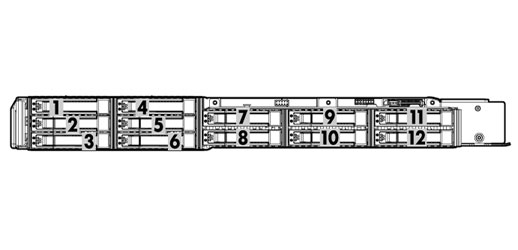
Top view of the D2220sb, with the drive drawer opened | |||
|
Hard Drives | |||
|
SAS Hot Plug SFF Enterprise (ENT) Drives | |||
|
|
Quantity |
Position |
|
|
|
12 |
1-12 |
Smart Array P420i Controller |
Technical Specifications
|
HPE D2220sb Storage Blade |
Dimensions (HxWxD) |
5.471cm x 18.070cm x 51.659cm (2.154" x7.114" x 20.338") | |||
|
Weight (unloaded) |
4.18 KG (9.22 lbs) |
| |||
|
Weight (loaded) |
7.10 KG (15.65 lbs) |
| |||
|
Protocol Support |
6Gb/s SAS |
| |||
|
O/S Support |
Defined by specific HPE array controller or SAS/ adapter used; please refer to the QuickSpecs and/or User Guide of the specific array controller or adapter | ||||
|
LED Indicators |
UID | ||||
|
System Health LED | |||||
|
Drive LED Indicators (on drive trays) |
Drive LED (top) - On-line/Activity | ||||
|
Drive Failure LED (bottom) - Drive Fault/Locate | |||||
|
Relative Humidity (non-condensing) |
Operating |
20% to 80% | |||
|
Shipping |
5% to 95% | ||||
|
Temperature Range |
Operating |
50° to 95° F (10° to 35° C°) | |||
|
Shipping |
-22° to 140° F (-30° to 60° C) | ||||
|
NOTE: To maintain proper cooling and airflow, a drive blank or drive must occupy all bays during operation. | |||||
|
Power Consumption |
12V/11A | ||||
|
| |||||
|
Smart Array P420i Controller |
Disk Drive and Enclosure Interface |
6G SAS (Serial Attached SCSI) | |||
|
SAS Connectors |
2 internal (SFF8484) x4 wide port connectors | ||||
|
Cache Memory Speed |
Embedded 72-bit DDR3 FBWC provides up to 4.2 GB/s maximum bandwidth. | ||||
|
SAS Speed |
x8 6G SAS | ||||
|
Cache Memory |
2 GB embedded flash-backed write cache; ECC protection, battery-backed, and transportable | ||||
|
Logical Drives Supported |
Up to 32 logical drives | ||||
|
Maximum Logical Drive Capacity |
24TB SAS or SATA | ||||
|
Host Memory Addressing |
64-bit, supporting greater than 4GB server memory space | ||||
|
RAID Support |
RAID 6 with ADG (Advanced Data Guarding) | ||||
|
RAID 5 (Distributed Data Guarding) | |||||
|
RAID 1+0 (Striping & Mirroring) | |||||
|
RAID 0 (Striping) | |||||
|
Upgradeable Firmware |
Upgradeable Firmware with recovery ROM feature | ||||
|
| |||||
|
Environment-friendly Products and Approach |
End-of-life Management and Recycling |
Hewlett Packard Enterprise offers end-of-life Hewlett Packard Enterprise product return, trade-in, and recycling programs in many geographic areas. For trade-in information, and to recycle your product, please go to: https://www.hpe.com/us/en/about/environment/product-recycling.html or contact your nearest Hewlett Packard Enterprise sales office. Products returned to Hewlett Packard Enterprise will be recycled, recovered or disposed of in a responsible manner. The EU WEEE directive (2002/95/EC) requires manufacturers to provide treatment information for each product type for use by treatment facilities. This information (product disassembly instructions) is posted on the Hewlett Packard Enterprise web site. These instructions may be used by recyclers and other WEEE treatment facilities as well as Hewlett Packard Enterprise OEM customers who integrate and re-sell Hewlett Packard Enterprise equipment. | |||
|
| |||||
Summary of Changes
|
Date |
Version History |
Action |
Description of Change | ||||||||||||||||||
|
05-Nov-2018 |
Version 15 |
Changed |
Sections were updated. | ||||||||||||||||||
|
25-Sep-2017 |
Version 14 |
Changed |
Changes made to the Options and Overview Sections | ||||||||||||||||||
|
05-Jun-2017 |
Version 13 |
Changed |
Changes made throughout the QuickSpecs | ||||||||||||||||||
|
19-Feb-2016 |
Version 12 |
Changed |
Updated the entire document | ||||||||||||||||||
|
16-Oct-2015 |
Version 11 |
Changed |
Changes made to the Product Highlights and Options Sections | ||||||||||||||||||
|
05-Jun-2015 |
Version 10 |
Changed |
Changes made to the Product Highlights and Options Sections | ||||||||||||||||||
|
24-Apr-2015 |
Version 9 |
Changed |
Removed Obsolete SKU´s (697574-B21 & 653078-B21) Changes made to the Overview, Configuration Info and Option Sections. | ||||||||||||||||||
|
05-Dec-2014 |
Version 8 |
Changed |
Changed on the Options Section; Removed Obsolete SKUs | ||||||||||||||||||
|
18-Mar-2014 |
Version 7 |
Changed |
Hard Drives was revised. | ||||||||||||||||||
|
20-Dec-2013 |
Version 6 |
Changed |
Updated the following: Two ways to create shared storage with the D2220sb; What's new Key Features; Software Suite - Systems Insight Manager (Array Configuration Utility -ACU changed to Smart Storage Administrator - SSA); Warranty - removed space; Configuration Information - Step 1 - removed part of note; Options - HPE Hard Drives - added 1.2TB 6G SAS SFF - 718160-B21 | ||||||||||||||||||
|
10-Sep-2013 |
Version 5 |
Changed |
Changes made to the following sections Overview - What's New Product Highlights - Fault Tolerance | ||||||||||||||||||
|
08-Jun-2013 |
Version 4 |
Added |
6G SATA and SAS ME Hot Plug SFF (2.5-inch) Enterprise Mainstream Solid State Drives were added. | ||||||||||||||||||
|
26-Apr-2013 |
Version 2 |
Changed |
Updated the following - Product Highlights - D2220sb blade server support matrix - added WS460c Gen8; Operating Systems - Windows Server - added 2012 | ||||||||||||||||||
|
25-Mar-2013 |
Version 1 |
Created |
New QuickSpecs | ||||||||||||||||||
| |||||||||||||||||||||


