HPE MSA 1050 Storage: технические характеристики и документация
В архивеOverview
|
HPE MSA 1050 SAN Storage |
|
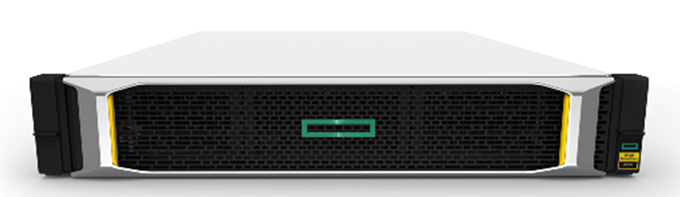
The HPE MSA 1050 SAN Storage brings affordable flash storage down to ever lower customer segments. The MSA 1050 is designed to meet entry-level storage requirements and budgetary constraints. With the lowest storage array price points in the HPE Storage portfolio and field-proven ProLiant compatibility, the MSA 1050 is the platform of choice for smaller SAS, iSCSI and FC deployments. The HPE MSA 1050 features 8Gb Fibre Channel, 12 Gb SAS, and 1GbE and 10GbE iSCSI at previously unattainable entry price points.
The array allows users to take advantage of the latest storage technologies in simple and efficient ways by providing a good balance between performance and budget resulting in a highly favorable $/GB return on their investment. HPE MSA Storage has been the industry-leading entry storage Fibre Channel platform for the past eight years, with nearly 500,000 storage systems sold worldwide.
Starting at under $5,500* USD, the MSA 1050 provides affordable application acceleration. It's seriously simple and affordable flash-ready storage to help you get the most performance for the lowest cost.
Factory-configured, dual controller array with 4 host ports of either 8Gb FC, 1GbE, 10GbE or 12Gb SAS protocols Small Form Factor (SFF) or Large Form Factor (LFF) models available
MSA continues its heritage of providing affordable, easy to use shared storage without a big learning curve Intuitive setup and management for ProLiant administrators. New look-and-feel will fit right in with your Gen10 ProLiant servers
Leverage flash storage with easy to use, easy to maintain tiering and read cache technologies No storage expertise necessary, system dynamically responds to workload changes, so you don't have to
Add new HDDs or disk expansions to your MSA 1050 Upgrade system to the MSA 2050 through data-in-place upgrade: a simple 15-minute upgrade! No time-consuming migrations required Notes: *US Street Price (MSA 1050 base unit, dual 1GbE iSCSI controllers, four 300GB HDDs); prices are subject to change without notice. |
|
|
|
 |
|
HPE MSA 1050 SAN Storage |
|
|
|
| |||
|
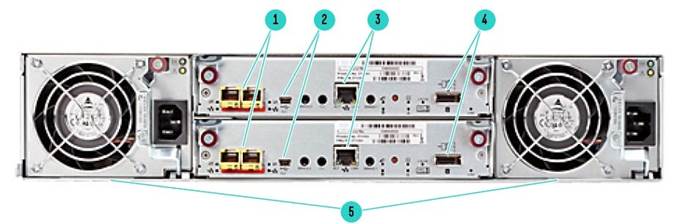
HPE MSA 1050 SAN Storage - Rear View | |||
|
1. |
Host Connection Ports (2) * |
4. |
Expansion Port |
|
2. |
CLI Port (mini USB) |
5 |
AC power supply |
|
3. |
Management Ethernet Port |
|
|
|
Notes: *8 FC, / 1 and/or 10GbE iSCSI or 12Gb SAS | |||
|
| |||
|
What's New in the MSA 1050 array family
|
|||
|
| |||
|
MSA 1050 Storage Models | |
|
Description |
SKU |
|
HPE MSA 1050 8Gb Fibre Channel Dual Controller LFF Storage |
Q2R18B |
|
HPE MSA 1050 8Gb Fibre Channel Dual Controller SFF Storage |
Q2R19B |
|
HPE MSA 1050 12Gb SAS Dual Controller LFF Storage |
Q2R20B |
|
HPE MSA 1050 12Gb SAS Dual Controller SFF Storage |
Q2R21B |
|
HPE MSA 1050 1GbE iSCSI Dual Controller LFF Storage |
Q2R22B |
|
HPE MSA 1050 1GbE iSCSI Dual Controller SFF Storage |
Q2R23B |
|
HPE MSA 1050 10GbE iSCSI Dual Controller LFF Storage |
Q2R24B |
|
HPE MSA 1050 10GbE iSCSI Dual Controller SFF Storage |
Q2R25B |
|
| |
Standard Features
|
HPE MSA 1050 SAN Storage | |
|
Array | |
|
Access Type |
Block |
|
Form Factor |
2U, SFF or LFF |
|
Number of controllers per array |
2 |
|
Number of host ports per array |
4 |
|
FC host connectivity |
8Gb |
|
iSCSI host connectivity |
1Gb or 10Gb |
|
SAS host connectivity |
6Gb or 12Gb |
|
Max Read cache per array |
4TB |
|
Data (read/write) cache + system memory per array |
12GB |
|
Pool Capacity (with Large Pool Support) |
562 TB (512 TiB) |
|
RAID Levels supported |
RAID 0*, 1, 5, 6, 10 Notes: *Read Cache Only |
|
Enclosures | |
|
Expansion Drive Enclosures |
0-3 enclosures |
|
LFF/SFF array/enclosure mixing |
Supported |
|
Maximum number of drives per array enclosure |
24 SFF/12 LFF |
|
Maximum number of drives per drive enclosure |
24 SFF/12 LFF |
|
Drive enclosure interface type |
6Gb SAS |
|
Drives | |
|
Maximum total HDDs per array |
96 SFF / 48 LFF |
|
Maximum total SSDs per array |
96 SFF / 48 LFF |
|
Max raw capacity per array enclosure |
76.8 TB SFF / 168TB LFF |
|
Max raw capacity per drive enclosure |
76.8 TB SFF / 168TB LFF |
|
Max raw capacity per array |
307.2TB SFF / 672TB LFF |
|
Drive Capacities | |
|
SFF SSDs |
800GB, 960GB, 1.6TB, 1.92TB, 3.2TB |
|
LFF SSDs |
800GB, 960GB, 1.92TB |
|
SFF HDDs |
15K: 600GB, 900GB 10K: 600GB, 1.2TB, 1.8TB, 2.4TB |
|
LFF HDDs |
7.2K: 4TB, 6TB, 8TB, 10TB, 12TB, 14TB |
|
Software Features | |
|
Thin Technologies |
Thin Provisioning, Space Reclamation, Thin Rebuild |
|
Tiering |
Performance Tier, Standard Tier, Archive Tier |
|
Replication |
Snapshots (512), Volume Copy, Remote Snaps |
|
Quality of Service |
Virtual Tier Affinity |
|
Additional Features | |
|
Maximum number of volumes |
512 |
|
Maximum number of snapshots |
512 |
|
Maximum number of hosts |
512 |
|
Maximum number of initiators |
1024 |
|
Customer self-installable |
Yes |
|
Customer self-repairable |
Yes |
|
Customer self-upgradeable |
Yes |
|
Health Check analytics |
Yes |
|
|
|
|
|
All MSA 1050 models offer a common set of valuable features
- Includes SFF or LFF array chassis, depending on model - Two FC, iSCSI or SAS controllers, depending on model - Two host ports per controller - Each controller supports 8 Gb FC, 1GbE iSCSI, 10GbE iSCSI or 12Gb SAS host connectivity, depending on model - 6 GB cache per controller. (4GB Read/Write plus 2GB System) - Battery-free cache backup with super capacitors and compact flash
|
|
|
|
Application Solutions The HPE MSA 1050 SAN Storage is the ideal solution for customers running Oracle, Microsoft, SAP environments and those customers who are deploying virtual server technologies like VMware and Hyper-V. The MSA 1050 delivers enterprise functionality that enhances virtual environments, simplifies management, and reduces costs. Easy to deploy, scale and maintain, HPE MSA 1050 Arrays ensure that crucial business data remains available.
Hewlett Packard Enterprise has developed best-in-class expertise in Oracle, Microsoft, SAP, and Virtualization Hypervisor technology through extensive testing with the HPE MSA 1050, HPE servers, and management software; high availability and disaster recovery solutions; and backup and recovery on the Oracle, Microsoft, and SAP application platforms. |
|
|
|
Learn more To learn more about specific HPE Storage Solutions that are built with Oracle, Microsoft, SAP and Virtualization environments in mind, visit the solution sites supporting each of these applications. HPE MSA Storage hyperlink to: http://www.hpe.com/storage/MSA |
|
|
|
Product Technology MSA 1050 Models MSA 1050 Storage offers 8 factory configured models:
|
|
|
|
Modular Chassis 2U rack height. 12 LFF or 24 SFF drive bays, accommodating SSDs, SAS and SAS MDL Drives Notes: The MSA 1050 does not support single controller configurations. Single-controller support is provided only when a controller fails over to its partner controller. |
|
|
|
Available Drives The MSA 1050 Storage systems support a wide variety of the MSA 3.5-inch LFF drives, and the MSA 2.5-inch SFF drives.
|
|
|
|
Optional Disk Enclosures Just as the user has a choice of chassis for the array enclosure (LFF or SFF drive bays), they also have a choice of expansion disk enclosures accommodating either drive size. Both the MSA 2050 LFF Disk Enclosure and MSA 2050 SFF Disk Enclosure can be hot-added to an operating array. SFF and LFF Array enclosures and Disk Enclosures can be mixed without limitations. |
|
|
|
MSA 2050 LFF Disk Enclosure. This 2U enclosure is designed to support twelve HPE Storage LFF drives and accepts MSA dual-ported 12Gb SSD, Enterprise SAS or SAS Midline (MDL) hard drives. The pre-configured MSA 2050 LFF Disk Enclosure has two I/O modules and supports the MSA 1050 dual controller arrays.
|
|
|
|
HPE MSA 2050 SFF Disk Enclosure This 2U enclosure is designed to support twenty four HPE Storage 2.5-inch SFF drive bays and accepts MSA dual ported 12Gb SSD, Enterprise SAS, or SAS Midline (MDL) hard drives. The pre-configured MSA 2050 SFF Disk Enclosure has two I/O modules and supports the MSA 1050 dual controller arrays.
LFF and/or SFF Disk Enclosures can be mixed up to the maximum of 3 total Disk Enclosures |
|
|
|
Scalability The MSA 1050 array configurations are designed to allow an installation to begin with smaller capacity and be able to grow gradually as needed. The flexibility of SSD, Enterprise SAS or SAS Midline (MDL) drives technology, form factors, sizes, speeds, and costs per GB allows a system to easily fit in almost any budget.
|
|
|
|
Disk Group A Disk Group is a collection of disks in a given redundancy mode (RAID 1, 5, 6, 10). Disk Group RAID level and size can be created based on performance and/or capacity requirements. Multiple Disk Groups can be allocated into a storage pool for use with the Virtual Storage features. |
|
|
|
LUNs The MSA 1050 arrays support 512 volumes and up to 512 snapshots in a system. All of these volumes can be mapped to LUNs. Maximum LUN sizes up to 140TB (128 TiB). Thin Provisioning allows the user to create the LUNs independent of the physical storage. |
|
|
|
Storage Pools Storage pools are comprised of one or more Disk Groups. A volume's data on a given LUN can now span all disk drives in a pool. When capacity is added to a system, users will benefit from the performance of all spindles in that pool.
The MSA 1050 supports large, flexible Volumes with sizes up to 128TiB and facilitates seamless capacity expansion. As pools are expanded data automatically reflows to balance capacity utilization on all drives. |
|
|
|
RAID 0, 1, 5, 6, 10 The MSA 1050 features several important additional RAID levels. RAID 6 offers the highest level of RAID protection. It allocates two sets of parity data across drives and allows simultaneous write operations. It can withstand two simultaneous drive failures without downtime or data loss. RAID 10 is mirroring and striping without parity and allows large Disk Groups to be created with high performance and mirroring for fault tolerance. RAID 5 combines the block striping and parity. Because data and parity are striped across all of the disks, no single disk is a bottleneck. Striping also allows users to reconstruct data in case of a disk failure. RAID 0 (Striping) is supported for Read Cache only. |
|
|
|
Configuration and Management Tools Management access, out-of-band, Storage Management Utility (SMU), CLI. Interface Types: USB 100/1000 Ethernet. Protocols Supported SNMP, SMI-S, SSH, SMTP, FTP, SFTP, HTTP, HTTPS, Telnet. |
|
|
|
Web Browser support The MSA 1050 arrays come integrated with web browser and CLI based software for storage and RAID management, setup, configuration, and troubleshooting. The MSA 1050 management supports Microsoft Internet Explorer, Mozilla Firefox, and Google Chrome. |
|
|
|
Hot Plug Expansion and Replacement Support All MSA 1050 models support hot plug expansion and replacement of redundant controllers, enclosures, fans, power supplies, and I/O modules for simple, fast installation and maintenance. Hot add expansion of disk enclosures is also supported. |
|
|
|
HPE Server Compatibility The MSA 1050 supports most HPE ProLiant and BladeSystems servers including
Notes: depends on protocol. |
|
|
|
3rd Party server support The MSA 1050 supports most multi-vendor industry standard Intel and AMD based (x86) servers. Hewlett Packard Enterprise requires the Third-Party Server to be logged and listed on the Microsoft Windows Server Catalog.
|
|
|
|
OS Support Refer to the Hewlett Packard Enterprise support statements for complete current OS version support: http://www.hpe.com/storage/spock
Notes: depends on protocol. |
|
|
|
Advanced Virtualized Features Storage on the MSA 1050 is all virtualized including Automated Tiering of Enterprise SAS (Standard Tier) and Midline SAS (Archive Tier), Read Cache and Wide-Striping. Sub-LUN Tiering from SAS Midline to Enterprise SAS drives is also a standard feature. Notes: The MSA 1050 supports virtual storage only. Linear storage is not supported on the MSA 1050. The purchase of an Advanced Virtualization Upgrade license is not required for virtual storage on the MSA 1050. The Advanced Virtualization Upgrade functionality is included in the base MSA 1050 system as a standard feature. |
|
|
|
Advanced Data Services Suite The HPE MSA Advanced Data Services Suite can be purchased as an option on the MSA 1050 Storage systems. The optional Advanced Data Services Suite includes the following functionality:
|
|
|
|
Performance Tiering and Archive Tiering Disk tiers are comprised of aggregating 1 or more Disk Groups of similar physical disks. The MSA 1050 supports 3 distinct tiers:
The MSA 1050 supports sub-LUN tiering and automated data movement between tiers. The MSA 1050 automated tiering engine moves data between available tiers based on the access characteristics of that data. Frequently accessed "pages" will migrate to the highest available tier delivering maximum I/O´s to the application.
Configurations which have a mixture of both SSDs and HDDs within the same system being used as a capacity Tier (excluding SSD Read Cache), will require the Advanced Data Service Suite LTU. This rule applies to the system level and therefore the license is required regardless of whether the drives are configured for auto-tiering within the same Pool. All-SSD configurations and SSD Read Cache extension do not require a license on the MSA 1050 array. |
|
|
|
Snapshot and Volume Copy
|
|
|
|
Remote Snap
Notes: One Advanced Data Services Suite License per array is required for replication. For example, if you have two MSA arrays performing replication (from Primary system to Remote System), you will need a total of 2 licenses. |
|
|
|
HPE OneView for VMware vCenter HPE OneView for VMware vCenter is a component within the HPE OneView plug-in for vCenter. It enables vSphere administrators to quickly obtain context-aware information and manage supported HPE storage devices like the MSA in their VMware vSphere environment directly from within vCenter. This plug-in operates independently of the core HPE OneView product and does not require a license to use. By providing a clear relationship between VM's, datastores and storage, the VMware administrator's productivity increases, as does the ability to ensure quality of service. Roles for administrators can be defined on an individual basis, providing the ability to apply specific permissions for both view and control functions.
HPE OneView for VMware vCenter supports mixed array environments including MSA Storage, and other HPE Storage systems including 3PAR Storage, Nimble Storage, StoreVirtual and StoreOnce.
When deployed with MSA Storage, HPE OneView provides the following:
Create/Expand/Delete a Datastore Create a Virtual Machine from a template
HPE OneView for VMware vCenter is downloadable from Software Depot: https://h20392.www2.hpe.com/portal/swdepot/displayProductInfo.do?productNumber=HPVPR |
|
|
|
HPE OneView for System Center HPE OneView for Microsoft System Center provides a comprehensive integration of HPE Storage, HPE Servers, HPE Blade System and HPE Virtual Connect with Microsoft System Center. HPE OneView for System Center enables management and monitoring of HPE MSA Storage running in Microsoft environment with a single pane-of-glass view to events/alerts, capacity and health dashboards and detailed virtual infrastructure information. It provides seamless integration with Microsoft System Center Operations Manager (SCOM) enabling predefined discovery and monitoring policies, event processing rules and topology views for HPE Storage including the MSA Storage Systems. When deployed with the MSA 1050 array, HPE OneView for System Center provides the following:
HPE OneView for System Center is downloadable at no charge from Software Depot: https://h20392.www2.hpe.com/portal/swdepot/displayProductInfo.do?productNumber=System_Center |
|
|
|
vStorage API for Array Integration (VAAI) The vStorage API for Array Integration (VAAI) is one of the storage application programming interface (API) sets in vSphere. VAAI is an API storage partners can leverage to enhance performance of virtual machine (VM) management operations by delegating these operations to the storage array. With hardware offload, ESX/ESXi hosts perform certain operations faster and consumes less server CPU, memory resources, and storage port/storage fabric bandwidth. VAAI includes high performance and scalable VM data path primitives. Storage Hardware Primitives for VAAI
UNMAP reclaims space that is no longer on a thinly provisioned VMFS volume |
|
|
|
LDAP Support LDAP (Lightweight Directory Access Protocol) is an industry standard application protocol for accessing and maintaining distributed directory information services over an IP network. LDAP provides the ability to authenticate MSA users with a central directory.
|
|
|
|
I/O Workload Functionality A new user interface element called "I/O Workload" has been added to the main screen on MSA's WBI home screen for GL270 or later firmware. The MSA array controllers keep track of a substantial amount of data pertaining to the I/O dynamics at a logical page level (4MB chunks). From this data, it is possible to provide some visibility to what percent (%) of I/O's are being processed by what percent (%) of the overall array's capacity across a 7 day timeline. While some workloads have "transient" data access patterns, many workloads have steady access patterns on small portions of the array's capacity. This produces "hot" pages in the array which remain hot a large amount of the array's uptime. Users would see substantial benefits if these pages could be served from the fastest media in the array (ideally SSDs). As has been described in the MSA's tiering functionality, the MSA array's tiering engine will work to position the hottest pages on the fastest media at any given time. The new I/O Workload graph will show a line labeled Capacity and a line plot for each selected workload percentage (100%, 80%, or Other% value). Below are two examples of user scenarios where the I/O Workload Graph might be useful and how to utilize the data the graph provides.
- Once the MSA array is installed and has had workloads running against it for a week's time, the I/O Workload data will give a representation of what Capacity is servicing 100% of I/O and 80% of I/O. Users may select a custom % value if desired. In a new installation or in an installation with no SSD tier installed, the 80% line is a reasonable starting point for an SSD tier. Based on SSD RAID settings, customers can then calculate a good starting point with regard to SSD tier sizing based on that week's workload. While not a hard-fast rule, it is a good starting point. These values should also be compared to the Best Practices "rule of thumb" which suggest that 5-15% of the array's capacity should be SSDs for tiered solutions. |
- For arrays running with SSDs installed (tiered or read cache), the I/O Workload graph will have a dotted line which shows the installed SSD capacity. The I/O Workload graphs can be checked periodically to see where the 80% I/O line is with regard to the SSD capacity line. While there are no hard and fast rules which indicate good/bad situations, users can use the graph with other system performance tools to better understand specific dynamics of their installation and the normal dynamics of a system in the day-to-day activities for a specific environment.
Interpreting the I/O Workload graphs allow users to strike a balance between the SSD costs versus performance benefits. For example, some customers may be willing to have a couple of days where peak usage is far above the SSD capacity line as it may be acceptable to have slower performance as the system uses HDDs for a larger percentage of the workload I/O. This may be perfectly acceptable for systems sized to optimize $/TB due to budget constraints. Other users may want to optimize the system such that a sizeable percentage of daily I/O have the opportunity to reside on SSD media (sized to 80% or 90%). When combined with other performance monitoring tools, the new I/O Workload function gives users some representation as to how the workloads and the MSA are working together in a user's real-world environment. |
|
|
|
HPE Complete -Zerto HPE MSA Storage users can leverage Zerto Virtual Replication to replicate applications and data from one MSA array to another MSA array. Popular use cases include departmental MSA storage replicated to enterprise storage, enterprise storage replicated into MSA array, or protect MSA workloads into the cloud.
Zerto operates on the hypervisor level and includes orchestration and automation built-in to enable faster recovery of workloads (RTO in minutes) at much lower Recovery Point Objective (RPO of seconds) available through other data protection tools like backup. Zerto is also a workload mobility tool and allow IT to confidently move workloads and data across heterogeneous storage or cloud. Ordering, configuring and installing Zerto is simple. Zerto is licensed by number of Virtual Machines that are being protected or moved. For mobility use cases, order the appropriate number of migration licenses needed. For replication use cases, order the appropriate quantity of Zerto Virtual Replication licenses using a combination of the tiered licenses plus the corresponding maintenance part numbers. The license is independent of source and target array size, type or capacity being replicated. See the HPE Complete/Zerto Quickspec for a complete list of part numbers. A corresponding MSA Advanced Data Services LTU is not required for data replication when using Zerto Virtual Replication. An MSA Advanced Data Services LTU would be required if deploying MSA array-based replication. Zerto installs as a virtual machine under VMware or Hyper-V or in the Cloud as a VM in AWS and Azure in minutes Zerto does not install any components in the guest operating system and does not depend on any specific configuration of the storage or use MSA array or VMware snapshots to replicate and recover applications. Zerto virtual replication is available on HPE Catalog via HPE Complete program. For more information on the HPE Complete - Zerto solution, visit; https://h20195.www2.hpe.com/v2/getdocument.aspx?docname=a00006013enw |
|
|
|
HPE Complete - Arxscan Arxscan is an HPE Complete Partner delivering innovative software that drives value through unique enterprise data center monitoring and reporting. Arxscan provides infrastructure monitoring for Storage, Network, Servers and Applications. Arxscan is fully supported on the HPE MSA 1050, 2050 and 2052 storage arrays, and is available for purchase directly from HPE. Arxscan's intuitive dashboard delivers an unprecedented view of how organizations store, distribute and protect their data, providing relevant views around device quality and performance metrics. Benefits include:
For more information regarding Arxscan software, please refer to HPE Complete on HPE.com |
|
|
|
MSA Health Check Tool MSA Health Check is a cloud-based tool that provides users insight into the general health of their MSA array. The tool uses a powerful rules-based analytics engine which can predict failures before they happen. The MSA Health Check tool performs a full sweep of analytics and checking thousands of data points from sensors inside the MSA array. The analytics engine will pick up common failure signatures and check against MSA best practices producing a simple, easy to digest PDF report with status and suggested courses of action to correct anything found in the scan. The tool is free of charge to HPE MSA customers. The MSA Health Check tool is supported across all current MSA 1050/2050/2052 arrays as well as the prior two generations of arrays (MSA P2000 G3 and MSA 1040/2040/2042). The tool is available immediately at: http://www.hpe.com/storage/MSAHealthCheck |
|
|
Service and Support
|
Warranty Three-year limited warranty, parts exchange Next Business day delivery Disk enclosures, Hard drives, and Options for the MSA 1050 carry their own warranty. Refer to Hewlett Packard Enterprise Limited Warranty Statement for more information.
The MSA 1050 has been designed with customer self-repairable parts to minimize repair time and provide greater flexibility in performing defective parts replacement. Please refer to Hewlett Packard Enterprise limited warranty Statement and parts replacement instructions for further details. Notes: The warranty of the hard drive options purchased with the MSA 1050 models is different for SAS hard drives versus SAS MDL. SAS hard drive options have a three year warranty and SAS MDL have a one year warranty. Firmware updates beyond the 3 year warranty period requires a support contract. |
|
|
|
Solid State Drives (SSD) Warranty 3/0/0 warranty; Customer Self Repair (CSR) subject to maximum usage and or maximum supported lifetime limitations, whichever occurs first. Maximum Supported Lifetime is the period in years set to equal the warranty for the device. Maximum usage limit is the maximum amount of data that can be written to the device before reaching the device's write endurance limit. |
|
|
|
HPE Services No matter where you are in your digital transformation journey, you can count on HPE Services to deliver the expertise you need when, where and how you need it. From planning to deployment, ongoing operations and beyond, our experts can help you realize your digital ambitions. https://www.hpe.com/services
|
|
|
|
Consulting Services No matter where you are in your journey to hybrid cloud, experts can help you map out your next steps. From determining what workloads should live where, to handling governance and compliance, to managing costs, our experts can help you optimize your operations. https://www.hpe.com/services/consulting
|
|
|
|
HPE Managed Services HPE runs your IT operations, providing services that monitor, operate, and optimize your infrastructure and applications, delivered consistently and globally to give you unified control and let you focus on innovation. HPE Managed Services | HPE
|
|
|
|
Operational services Optimize your entire IT environment and drive innovation. Manage day-to-day IT operational tasks while freeing up valuable time and resources. Meet service-level targets and business objectives with features designed to drive better business outcomes. https://www.hpe.com/services/operational
|
|
|
|
HPE Complete Care Service HPE Complete Care Service is a modular, edge-to-cloud IT environment service designed to help optimize your entire IT environment and achieve agreed upon IT outcomes and business goals through a personalized experience. All delivered by an assigned team of HPE Services experts. HPE Complete Care Service provides:
https://www.hpe.com/services/completecare
|
|
|
|
HPE Tech Care Service HPE Tech Care Service is the operational support service experience for HPE products. The service goes beyond traditional support by providing access to product specific experts, an AI driven digital experience, and general technical guidance to not only reduce risk but constantly search for ways to do things better. HPE Tech Care Service delivers a customer-centric, AI driven, and digitally enabled customer experience to move your business forward. HPE Tech Care Service is available in three response levels. Basic, which provides 9x5 business hour availability and a 2-hour response time. Essential which provides a 15-minute response time 24x7 for most enterprise level customers, and Critical which includes a 6-hour repair commitment where available and outage management response for severity 1 incidents. https://www.hpe.com/services/techcare
|
|
|
|
HPE Lifecycle Services HPE Lifecycle Services provide a variety of options to help maintain your HPE systems and solutions at all stages of the product lifecycle. A few popular examples include:
Notes:
To review the list of Lifecycle Services available for your product
go to:
For a list of the most frequently purchased services using service credits, see the HPE Service Credits Menu
|
|
|
|
Other Related Services from HPE Services: HPE Education Services Training and certification designed for IT and business professionals across all industries. Broad catalogue of course offerings to expand skills and proficiencies in topics ranging from cloud and cybersecurity to AI and DevOps. Create learning paths to expand proficiency in a specific subject. Schedule training in a way that works best for your business with flexible continuous learning options. https://www.hpe.com/services/training |
|
|
|
Defective Media Retention An option available with HPE Complete Care Service and HPE Tech Care Service and applies only to Disk or eligible SSD/Flash Drives replaced by HPE due to malfunction. Consult your HPE Sales Representative or Authorized Channel Partner of choice for any additional questions and services options. |
|
|
|
Parts and Materials HPE will provide HPE-supported replacement parts and materials necessary to maintain the covered hardware product in operating condition, including parts and materials for available and recommended engineering improvements. Parts and components that have reached their maximum supported lifetime and/or the maximum usage limitations as set forth in the manufacturer's operating manual, product quick-specs, or the technical product data sheet will not be provided, repaired, or replaced as part of these services. |
|
|
|
How to Purchase Services Services are sold by Hewlett Packard Enterprise and Hewlett Packard Enterprise Authorized Service Partners:
|
|
|
|
AI Powered and Digitally Enabled Support Experience Achieve faster time to resolution with access to product-specific resources and expertise through a digital and data driven customer experience Sign into the HPE Support Center experience, featuring streamlined self-serve case creation and management capabilities with inline knowledge recommendations. You will also find personalized task alerts and powerful troubleshooting support through an intelligent virtual agent with seamless transition when needed to a live support agent. https://support.hpe.com/hpesc/public/home/signin |
|
|
|
Consume IT On Your Terms HPE GreenLake edge-to-cloud platform brings the cloud experience directly to your apps and data wherever they are-the edge, colocations, or your data center. It delivers cloud services for on-premises IT infrastructure specifically tailored to your most demanding workloads. With a pay-per-use, scalable, point-and-click self-service experience that is managed for you, HPE GreenLake edge-to-cloud platform accelerates digital transformation in a distributed, edge-to-cloud world.
To learn more about HPE Services, please contact your Hewlett Packard Enterprise sales representative or Hewlett Packard Enterprise Authorized Channel Partner. Contact information for a representative in your area can be found at "Contact HPE" https://www.hpe.com/us/en/contact-hpe.html For more information http://www.hpe.com/services |
|
|
|
Related Services
HPE Hardware Installation Provides for the basic hardware installation of HPE branded servers, HPE storage including the MSA 1050 devices and networking options to assist you in bringing your new hardware into operation in a timely and professional manner. |
|
|
|
HPE Installation and Startup Service Provides for the installation and startup of HPE technology including BladeSystems, C-Class enclosure, HPE ProLiant c-Class and Integrity server blades, storage blades, SAN switch blades, HPE Virtual Connect modules (Ethernet and Fibre Channel), Ethernet network interconnects, and InfiniBand, as well as the installation of one supported operating system type (Windows® or Linux). Included the HPE MSA 1050. |
|
|
|
HPE Factory Express for Servers and Storage HPE Factory Express offers configuration, customization, integration and deployment services for HPE servers and storage products. Customers can choose how their factory solutions are built, tested, integrated, shipped and deployed.
Factory Express offers service packages for simple configuration, racking, installation, complex configuration and design services as well as individual factory services, such as image loading, asset tagging, and custom packaging. HPE products supported through Factory Express include a wide array of servers and storage: HPE Integrity, HPE ProLiant, HPE Apollo, HPE ProLiant Server Blades, HPE BladeSystem, HPE 9000 servers as well as the HPE MSA Storage, HPE 3PAR Storage, HPE XP, rack-mount tape libraries and configurable network switches. |
|
|
Configuration Information
|
Step 1 - MSA 1050 Base Configurations Pre-Configured Systems |
|
Description |
SKU | |
|
HPE MSA 1050 8Gb Fibre Channel Dual Controller LFF Storage |
Q2R18B | |
|
Notes: Includes LFF Array Chassis, two MSA 1050 FC 2-port controllers, 4 8Gb SW FC SFPs installed, two .7m PDU cords (IEC C14), one rack-mount kit | ||
|
HPE MSA 1050 8Gb Fibre Channel Dual Controller SFF Storage |
Q2R19B | |
|
Notes: Includes SFF Array Chassis, two MSA 1050 FC 2-port controllers, 4 8Gb SW FC SFPs installed, two .7m PDU cords (IEC C14), one rack-mount kit | ||
|
HPE MSA 1050 12Gb SAS Dual Controller LFF Storage |
Q2R20B | |
|
Notes: Includes LFF Array Chassis, two MSA 1050 SAS 2-port controllers, two .7m PDU cords (IEC C14), one rack-mount kit, SFPs not needed with SAS controllers | ||
|
HPE MSA 1050 12Gb SAS Dual Controller SFF Storage |
Q2R21B | |
|
Notes: Includes SFF Array Chassis, two MSA 1050 SAS 2-port controllers, two .7m PDU cords (IEC C14), one rack-mount kit, SFPs not needed with SAS controllers | ||
|
HPE MSA 1050 1GbE iSCSI Dual Controller LFF Storage |
Q2R22B | |
|
Notes: Includes LFF Array Chassis, two MSA 1050 1GbE 2-port controllers, 4 1Gb RJ-45 iSCSI SFPs installed, two .7m PDU cords (IEC C14), one rack-mount kit | ||
|
HPE MSA 1050 1GbE iSCSI Dual Controller SFF Storage |
Q2R23B | |
|
Notes: Includes SFF Array Chassis, two MSA 1050 1GbE 2-port controllers, 4 1Gb RJ-45 iSCSI SFPs installed, two .7m PDU cords (IEC C14), one rack-mount kit | ||
|
HPE MSA 1050 10GbE iSCSI Dual Controller LFF Storage |
Q2R24B | |
|
Notes: Includes LFF Array Chassis, two MSA 1050 10GbE 2-port controllers, 4 10Gb SW iSCSI SFPs installed, two .7m PDU cords (IEC C14), one rack-mount kit. Direct attached copper cables are supported in 10GbE Controller systems | ||
|
HPE MSA 1050 10GbE iSCSI Dual Controller SFF Storage |
Q2R25B | |
|
Notes: Includes SFF Array Chassis, two MSA 1050 10GbE 2-port controllers, 4 10Gb SW iSCSI SFPs installed, two .7m PDU cords (IEC C14), one rack-mount kit. Direct attached copper cables are supported in 10GbE Controller systems. | ||
|
| ||
|
Step 2 - Select Your Drives | ||
|
MSA HDDs and SSDs drives are for use with MSA Storage Systems only. Customers can mix SSD, SAS, and SAS MDL drives in the same array enclosure and disk enclosure | ||
|
SFF SSDs | ||
|
HPE MSA 800GB 12G SAS Mixed Use SFF (2.5in) 3yr Warranty Solid State Drive |
N9X96A | |
|
HPE MSA 1.6TB 12G SAS Mixed Use SFF (2.5in) 3yr Warranty Solid State Drive |
N9X91A | |
|
HPE MSA 3.2TB 12G SAS Mixed Use SFF (2.5in) 3yr Warranty Solid State Drive |
N9X92A | |
|
HPE MSA 960GB SAS 12G Read Intensive SFF (2.5in) 3yr Wty SSD |
R0Q35A | |
|
HPE MSA 1.92TB SAS 12G Read Intensive SFF (2.5in) 3yr Wty SSD |
R0Q37A | |
|
Notes: Configurations which have a mixture of both SSDs and HDDs within the same system being used as a capacity Tier (excluding SSD Read Cache), will require the Advanced Data Service Suite LTU. This rule applies to the system level and therefore the license is required regardless of whether the drives are configured for auto-tiering within the same Pool. All SSD configurations and SSD Read Cache extension do not require a license on the MSA1050 array. | ||
|
| ||
|
Description |
SKU |
|
SFF HDDs | |
|
12G SFF 15K SAS HDDs |
|
|
HPE MSA 600GB 12G SAS 15K SFF(2.5in) Dual Port Enterprise 3yr Warranty Hard Drive |
J9F42A |
|
HPE MSA 900GB 12G SAS 15K SFF (2.5in) Enterprise 3yr Warranty Hard Drive |
Q1H47A |
|
12G SFF 10K SAS HDDs |
|
|
HPE MSA 600GB 12G SAS 10K SFF(2.5in) Dual Port Enterprise 3yr Warranty Hard Drive |
J9F46A |
|
HPE MSA 1.2TB 12G SAS 10K SFF(2.5in) Dual Port Enterprise 3yr Warranty Hard Drive |
J9F48A |
|
HPE MSA 1.8TB 12G SAS 10K SFF (2.5in) 512e Enterprise 3yr Warranty Hard Drive |
J9F49A |
|
HPE MSA 2.4TB 12G SAS 10K SFF (2.5in) Enterprise 512e 3yr Warranty Hard Drive |
Q2R41A |
|
LFF SSDs | |
|
HPE MSA 800GB 12G SAS Mixed Use LFF (3.5in) Converter Carrier 3yr Wty Solid State Drive |
P9M80A |
|
HPE MSA 960GB SAS 12G Read Intensive LFF (3.5in) 3yr Wty SSD |
R0Q36A |
|
HPE MSA 1.92TB SAS 12G Read Intensive LFF (3.5in) 3yr Wty SSD |
R0Q38A |
|
Notes: Configurations which have a mixture of both SSDs and HDDs within the same system being used as a capacity Tier (excluding SSD Read Cache), will require the Advanced Data Service Suite LTU. This rule applies to the system level and therefore the license is required regardless of whether the drives are configured for auto-tiering within the same Pool. All SSD configurations and SSD Read Cache extension do not require a license on the MSA2050 array. | |
|
LFF HDDs |
|
|
12G LFF 7.2K SAS Midline Drives |
|
|
HPE MSA 4TB 12G SAS 7.2K LFF (3.5in) Midline 1yr Warranty Hard Drive |
K2Q82A |
|
HPE MSA 6TB 12G SAS 7.2K LFF(3.5in) Midline 1yr Warranty Hard Drive |
J9F43A |
|
HPE MSA 8TB 12G SAS 7.2K LFF (3.5in) 512e Midline 1yr Warranty Hard Drive |
M0S90A |
|
HPE MSA 10TB 12G SAS 7.2K rpm LFF (3.5in) Midline 512e 1yr Wty Hard Drive |
P9M82A |
|
HPE MSA 12TB 12G SAS 7.2K LFF (3.5in) Midline 512e 1yr Warranty Hard Drive |
Q2R42A |
|
HPE MSA 14TB SAS 12G Midline 7.2K LFF (3.5in) 1yr Wty 512e HDD |
R0Q21A |
|
6-Pack Drive Bundles | |
|
SFF Drive Bundles |
|
|
HPE MSA 7.2TB SAS 12G Enterprise 10K SFF (2.5in) 3yr Wty 512n 6-pack HDD Bundle |
R0P85A |
|
Notes: Contains 6 x MSA 1.2TB 12G SAS 10K SFF Enterprise HDDs (J9F48A) |
|
|
HPE MSA 10.8TB SAS 12G Enterprise 10K SFF (2.5in) 3yr Wty 512e 6-pack HDD Bundle |
R0P86A |
|
Notes: Contains 6 x MSA 1.8TB 12G SAS 10K SFF Enterprise HDDs (J9F49A) |
|
|
HPE MSA 14.4TB SAS 12G Enterprise 10K SFF (2.5in) 3yr Wty 512e 6-pack HDD Bundle |
R0P87A |
|
Notes: Contains 6 x MSA 2.4TB 12G SAS 10K SFF Enterprise HDDs (Q2R41A) |
|
|
HPE MSA 3.6TB SAS 12G Enterprise 15K SFF (2.5in) 3yr Wty 512n 6-pack HDD Bundle |
R0P88A |
|
Notes: Contains 6 x MSA 600GB 12G SAS 15K SFF Enterprise HDDs (J9F42A) |
|
|
HPE MSA 5.4TB SAS 12G Enterprise 15K SFF (2.5in) 3yr Wty 512n 6-pack HDD Bundle |
R0P89A |
|
Notes: Contains 6 x MSA 900GB 12G SAS 15K SFF Enterprise HDDs (Q1H47A) |
|
|
Description |
SKU |
|
LFF Drive Bundles |
|
|
HPE MSA 48TB SAS 12G Midline 7.2K LFF (3.5in) 1yr Wty 512e 6-pack HDD Bundle |
R0P90A |
|
Notes: Contains 6 x MSA 8TB 12G SAS 7.2K LFF Midline HDDs (M0S90A) |
|
|
HPE MSA 60TB SAS 12G Midline 7.2K LFF (3.5in) 1yr Wty 512e 6-pack HDD Bundle |
R0P91A |
|
Notes:: Contains 6 x MSA 10TB 12G SAS 7.2K LFF Midline HDDs (P9M82A) |
|
|
HPE MSA 72TB SAS 12G Midline 7.2K LFF (3.5in) 1yr Wty 512e 6-pack HDD Bundle |
R0P92A |
|
Notes: Contains 6 x MSA 12TB 12G SAS 7.2K LFF Midline HDDs (Q2R42A) |
|
|
HPE MSA 84TB SAS 12G Midline 7.2K LFF (3.5in) 1yr Wty 512e 6-pack HDD Bundle |
R0Q22A |
|
Notes: Contains 6 x MSA 14TB 12G SAS 7.2K LFF Midline HDDs (R0Q21A) |
|
|
| |
|
Step 3 - Options Disk Enclosures | |
|
HPE MSA 2050 LFF Disk Enclosure |
Q1J06B |
|
HPE MSA 2050 SFF Disk Enclosure |
Q1J07B |
|
Notes: Each drive enclosure includes one rack-mount kit and two 0.5m MiniSAS to MiniSAS cables Add up to 3 additional drive enclosures MSA 2050 LFF Disk Enclosure can be connected to either the MSA 1050 SFF or LFF dual controller systems. MSA 2050 SFF Disk Enclosure can be connected to either the MSA 1050 SFF or LFF dual controller systems. | |
|
SAS Cables | |
|
HPE External Mini SAS 1m Cable ALL |
407337-B21 |
|
HPE External Mini SAS 2m Cable |
407339-B21 |
|
Notes: Connecting MSA 1050 Controller to a disk enclosure if a longer cable is desired. |
|
|
Power Cords | |
|
HPE C13 - C14 WW 250V 10Amp 2.0m Jumper Cord |
A0K02A |
|
HPE C13 - C14 WW 250V 10Amp Flint Gray 2.0m Jumper Cord |
AF573A |
|
HPE C13 - AS3112-3 AU 250V 10Amp 2.5m Power Cord |
AF569A |
|
HPE C13 - BS-1363A UK/HK/SG 250V 10Amp 1.83m Power Cord |
AF570A |
|
HPE C13 - C14 WW 250V 10A Gray 0.7m Jumper Cord |
A0K03A |
|
HPE C13 - CEE-VII EU 250V 10Amp 1.83m Power Cord |
AF568A |
|
HPE C13 - CNS-690 TW 110V 13Amp 1.83m Power Cord |
AF561A |
|
HPE C13 - DK-2.5A DK 250V 10Amp 1.83m Power Cord |
AF566A |
|
HPE C13 - GB-1002 CN 250V 10Amp 1.83m Power Cord |
AF557A |
|
HPE C13 - IRAM -2073 AR 250V 10A 2.5m Power Cord |
AF558A |
|
HPE C13 - IS-1293 IN 240V 6Amp LV 2.0m Power Cord |
AF562A |
|
HPE C13 - JIS C8303 JP 100V 12Amp 2.0m Power Cord |
AF572A |
|
HPE C13 - KSC- 8305 KR 250V 10Amp 1.83m Power Cord |
AF560A |
|
HPE C13 - NBR-14136 BR 250V 10Amp 1.83m Power Cord |
AF591A |
|
HPE C13 - Nema 5-15P US/CA 110V 10Amp 1.83m Power Cord |
AF556A |
|
Description |
SKU | |
|
HPE C13 - SABS-164 ZA 250V 10Amp 2.5m Power Cord |
AF567A | |
|
HPE C13 - SEV 1011 CH 250V 10Amp 1.83m Power Cord |
AF565A | |
|
HPE C13 - SI-32 IL 250V 10Amp 1.83m Power Cord |
AF564A | |
|
HPE C13-NEMA 6-15P 10A/250V 3.6m Black Power Cord |
A0N33A | |
|
Notes: Two PDU cables: one 142263-008 (Black) and one 1422633-013 (Grey), ship standard with all AC-powered enclosures. | ||
|
| ||
|
Step 4 | ||
|
Step 4a - Choose Supported Options For Fibre Channel Infrastructure PremierFlexOM4 type cables | ||
|
HPE Premier Flex LC/LC Multi-mode OM4 2 Fiber 1m Cable |
QK732A | |
|
HPE Premier Flex LC/LC Multi-mode OM4 2 Fiber 2m Cable |
QK733A | |
|
HPE Premier Flex LC/LC Multi-mode OM4 2 Fiber 5m Cable |
QK734A | |
|
HPE Premier Flex LC/LC Multi-mode OM4 2 Fiber 15m Cable |
QK735A | |
|
HPE Premier Flex LC/LC Multi-mode OM4 2 Fiber 30m Cable |
QK736A | |
|
HPE Premier Flex LC/LC Multi-mode OM4 2 Fiber 50m Cable |
QK737A | |
|
OM3 FC LC-LC cables | ||
|
HPE LC to LC Multi-mode OM3 2-Fiber 0.5m 1-Pack Fiber Optic Cable |
AJ833A | |
|
HPE LC to LC Multi-mode OM3 2-Fiber 1.0m 1-Pack Fiber Optic Cable |
AJ834A | |
|
HPE LC to LC Multi-mode OM3 2-Fiber 2.0m 1-Pack Fiber Optic Cable |
AJ835A | |
|
HPE LC to LC Multi-mode OM3 2-Fiber 5.0m 1-Pack Fiber Optic Cable |
AJ836A | |
|
HPE LC to LC Multi-mode OM3 2-Fiber 15.0m 1-Pack Fiber Optic Cable |
AJ837A | |
|
HPE LC to LC Multi-mode OM3 2-Fiber 30.0m 1-Pack Fiber Optic Cable |
AJ838A | |
|
HPE LC to LC Multi-mode OM3 2-Fiber 50.0m 1-Pack Fiber Optic Cable |
AJ839A | |
|
Step 4b - Choose Supported Options For 10GbE Infrastructure | ||
|
Direct Attach Copper Cables | ||
|
Aruba 10G SFP+ to SFP+ 1m Direct Attach Copper Cable |
J9281D | |
|
Aruba 10G SFP+ to SFP+ 3m Direct Attach Copper Cable |
J9283D | |
|
Aruba 10G SFP+ to SFP+ 7m Direct Attach Copper Cable |
J9285D | |
|
HPE BladeSystem c-Class 10GbE SFP+ to SFP+ 3m Direct Attach Copper Cable |
487655-B21 | |
|
HPE BladeSystem c-Class 10GbE SFP+ to SFP+ 5m Direct Attach Copper Cable |
537963-B21 | |
|
HPE FlexNetwork X240 10G SFP+ to SFP+ 0.65m Direct Attach Copper Cable |
JD095C | |
|
HPE FlexNetwork X240 10G SFP+ to SFP+ 1.2m Direct Attach Copper Cable |
JD096C | |
|
HPE FlexNetwork X240 10G SFP+ to SFP+ 3m Direct Attach Copper Cable |
JD097C | |
|
HPE FlexNetwork X240 10G SFP+ to SFP+ 5m Direct Attach Copper Cable |
JG081C | |
|
HPE FlexNetwork X240 10G SFP+ SFP+ 7m Direct Attach Copper Cable |
JC784C | |
|
Step 4c - Choose Supported Options For SAS Infrastructure | |
|
Supported options | |
|
Description |
SKU |
|
Mini-SAS HD to Mini-SAS HD Fanout Cables |
|
|
HPE Mini SAS High Density to Dual 2-lane Mini SAS High Density External Fanout 1 Meter Cable |
K2Q99A |
|
HPE Mini SAS High Density to Dual 2-lane Mini SAS High Density External Fanout 2 Meter Cable |
K2R00A |
|
HPE Mini SAS High Density to Dual 2-lane Mini SAS High Density External Fanout 4 Meter Cable |
K2R01A |
|
Notes: Recommended to utilize Fanout cables when connecting to SAS HBAs for maximum future flexibility without downtime. | |
|
Mini SAS Cables |
|
|
HPE 1.0m External Mini SAS High Density to Mini SAS Cable |
716189-B21 |
|
HPE 2.0m External Mini SAS High Density to Mini SAS Cable |
716191-B21 |
|
Notes: These cables are used to connect 6Gb SAS initiator to MSA 1050 SAS controller. These are not used for connecting to a disk enclosure. | |
|
HPE External 1.0m (3ft) Mini-SAS HD 4x to Mini-SAS HD 4x Cable |
716195-B21 |
|
HPE External 2.0m (6ft) Mini-SAS HD 4x to Mini-SAS HD 4x Cable |
716197-B21 |
|
Notes: These cables are used to connect 12Gb SAS initiator to MSA 1050 SAS controller. These are not used for connecting to a disk enclosure. | |
|
HPE 4.0m External Mini SAS High Density to Mini SAS Cable |
716193-B21 |
|
Notes: This cable is used to connect 6Gb SAS initiator to MSA 1050 SAS controller. This is not used for connecting to a disk enclosure. | |
|
HPE External 4.0m (13ft) Mini-SAS HD 4x to Mini-SAS HD 4x Cable |
716199-B21 |
|
Notes: This cable is used to connect 12Gb SAS initiator to MSA 1050 SAS controller. This is not used for connecting to a disk enclosure. | |
|
SAS Controllers/HBAs |
|
|
HPE Smart Array E208e-p SR Gen10 (8 External Lanes/No Cache) 12G SAS PCIe Plug-in Controller |
804398-B21 |
|
HPE Smart Array P408e-p SR Gen10 (8 External Lanes/4GB Cache) 12G SAS PCIe Plug-in Controller |
804405-B21 |
|
| |
|
Step 5 - Software | |
|
The MSA Advanced Data Services Suite software is available as an option on the MSA 1050. |
|
|
HPE MSA Advanced Data Services Suite LTU |
Q0H99A |
|
HPE MSA Advanced Data Services Suite E-LTU |
Q0H99AAE |
|
Notes: The Advanced Data Services Suite includes a Performance Tiering LTU, 512 Snapshot Software LTU, and the Remote Snap Software LTU. Individual Software titles are not available for sale on the MSA 1050. Configurations which have a mixture of both SSDs and HDDs within the same system being used as a capacity Tier (excluding SSD Read Cache), will require the Advanced Data Service Suite LTU. This rule applies to the system level and therefore the license is required regardless of whether the drives are configured for auto-tiering within the same Pool. All SSD configurations and SSD Read Cache extension do not require a license on the MSA2050 array. | |
|
| |
Technical Specifications
|
MSA 1050 | |
|
Power Requirements | |
|
Input Power Requirements (typical-running I/O) SFF/LFF arrays |
110VAC 3.20A, 343W; 220VAC 1.67A,337W |
|
Max Input Power |
100-240 VAC, 50/60 Hz., 4.20-1.77A |
|
Heat Dissipation |
1174 BTU/hr |
|
Temperature And Humidity Ranges | |
|
Operating Temperature |
41°F to 104°F (5°C to 40°C) |
|
Shipping Temperature |
-40°F to 158°F (-40°C to 70°C) |
|
Operating Humidity |
10% to 90% RH @ 104°F (40°C) non-condensing |
|
Non-Operating Humidity |
Up to 93% RH @ 104°F (40°C) |
|
Declared Acoustic Noise Levels | |
|
Sound Power |
A weighted sound power LWAd=6,75 B |
|
Sound Pressure |
A weighted sound pressure LpAm - 55dB |
|
Shock And Vibration | |
|
Shock, Operational |
3G's for 11 milliseconds |
|
Shock, Non-Operational |
Per NEBS GR-63-CORE UNPACKAGED EQUIPMENT SHOCK CRITERIA (4.3.2) |
|
Vibration, Operational |
5-500Hz, 0.14 Grms shaped |
|
Vibration, Non-Operational |
3-365-3Hz, 1.22 Grms,z-axis,0.85 Grms, X&Y axis shaped spectrum |
|
Physical | |
|
Height |
3.5 in/ 8.9 cm |
|
Depth (excluding cables) (back of ear to back of controller handle) |
SFF 24-bay array: 19.5 in / 49.5 cm LFF 12-bay array: 22.5in. / 57.2 cm |
|
Width (body only) |
17.6 in / 44.7 cm (w/ ears 19 in / 48.26 cm) |
|
Weight (Includes chassis and 2 controllers) |
MSA 1050 LFF chassis: 40.6 lbs (18.4kg) |
|
|
|
|
|
Performance The performance figures provided here are for reference as many variables exist between array configurations, workloads, hard drive types, disk group setup parameters and host system setup. Hewlett Packard Enterprise has traditionally published a set of end-to-end MSA performance specifications that are fed into HPE Sizer tools which are based on conservative real-world configurations. For consistency, the MSA performance numbers have been documented in both Benchmark and End-to-End Performance tables. These numbers are subject to change without notice. | ||||||||||||||||||||||||
| ||||||||||||||||||||||||
|
Notes: End-to-End performance 1 Performance results were generated using internal HPE test tools. Number and type of applications, drive type and number of drives, operating system used, and the number of hosts will affect overall performance. This table is provided strictly as a test-lab comparison using VE270 firmware. 2 Dual Controller configuration, (4) SSDs, RAID: 1, two drives per Disk Group; one Disk Group per pool, 2 volumes per pool, block size: 8k, average latency under 5ms, Windows Server 2016 host, 8Gb FC connect to array 3 Dual Controller configuration, (36) 15k HDD, RAID: 5, nine drives per Disk Group, 2 Disk Groups per pool, 2 volumes per pool, block size: 256k, average latency under 30ms, Windows Server 2016 host, 8Gb FC connect to array 4 Sequential performance numbers were generated using segmented sequential workloads. For segmented sequential workloads with a queue depth greater than 1, each sequential stream is targeted to operate on a separate LBA range. Other types of sequential workloads that target specific LBA ranges may achieve higher results. | ||||||||||||||||||||||||
|
| ||||||||||||||||||||||||
|
| ||||||||||||||||||||||||
| ||||||||||||||||||||||||||||||||||||||||||||||||||||||||||||||||||||||||||||||||||||||||||||||||||||||||||||||||||||||||||||||||||||||||||||||||||||||||||||||||||||||||||||||||||||||||||||||||||||||||||||||||||||||||
|
Notes: - Number and type of applications, drive type and number of drives, operating system used, and the number of hosts will affect overall performance. This table is provided strictly as a test-lab comparison. These numbers reflect a full array configuration with the maximum number of front-end ports and controllers. The test results shown for the HPE MSA 1050 are designed to give a conservative reference point for comparisons. o 1Sequential tests (MB/s) are based on 256K block sizes and random tests (IOPS) are based on 8K block sizes run against the storage. For sequential workloads with a queue depth greater than 1, each sequential stream is targeted to operate on a separate LBA range. Other types of sequential workloads that target specific LBA ranges may achieve higher results. o 2Fibre Channel results were measured using 8 Gb FC Host Bus Adapters. SAS results were measured using 6 Gb SAS Host Bus Adapters. 10 GbE iSCSI results were measured using 10GbE iSCSI Host Bus Adapters. 1 GbE iSCSI results were measured using 1GbE network interface controllers (NICs). o 3MSA 1050 RAID 10 Hard Disk Drive random results: Dual Controller configuration, (96) 15K HDD, 12 drives per disk group, 4 disk groups per pool, 2 volumes per pool. o 4MSA 1050 RAID 10 Hard Disk Drive) sequential results: Dual Controller configuration, (48) 15K HDD, 12 drives per disk group, 2 disk groups per pool, 2 volumes per pool. o 5MSA 1050 RAID 5 Hard Disk Drive random results: Dual Controller configuration, (96) 15K HDD, 12 drives per disk group, 4 disk groups per pool, 2 volumes per pool. o 6MSA 1050 RAID 5 Hard Disk Drive sequential results: Dual Controller configuration, (36) 15K HDD, 9 drives per disk group, 2 disk groups per pool, 2 volumes per pool. o 7MSA 1050 RAID 6 Hard Disk Drive random results: Dual Controller configuration, (96) 15K HDD, 12 drives per disk group, 4 disk groups per pool, 2 volumes per pool. o 8MSA 1050 RAID 6 Hard Disk Drive sequential results: Dual Controller configuration, (40) 15K HDD, 10 drives per disk group, 2 disk groups per pool, 2 volumes per pool. o 9MSA 1050 RAID 1 Solid State Drive (SSD) results: Dual Controller configuration, (4) SSDs, 2 SSDs per disk group, 1 disk group per pool, 2 volumes per pool. o 10MSA 1050 RAID 5 Solid State Drive results: Dual Controller configuration, (6) SSDs, 3 SSDs per disk group, 1 disk group per pool, 2 volumes per pool. o 11MSA 1050 RAID 6 Solid State Drive results: Dual Controller configuration, (8) SSDs, 4 SSDs per disk group, 1 disk group per pool, 2 volumes per pool. | ||||||||||||||||||||||||||||||||||||||||||||||||||||||||||||||||||||||||||||||||||||||||||||||||||||||||||||||||||||||||||||||||||||||||||||||||||||||||||||||||||||||||||||||||||||||||||||||||||||||||||||||||||||||||
|
| ||||||||||||||||||||||||||||||||||||||||||||||||||||||||||||||||||||||||||||||||||||||||||||||||||||||||||||||||||||||||||||||||||||||||||||||||||||||||||||||||||||||||||||||||||||||||||||||||||||||||||||||||||||||||
|
MSA 1050 Regulatory Info | ||||||||||||||||||||||||||||||||||||||||||||||||||||||||||||||||||||||||||||||||||||||||||||||||||||||||||||||||||||||||||||||||||||||||||||||||||||||||||||||||||||||||||||||||||||||||||||||||||||||||||||||||||||||||
|
Safety
|
||||||||||||||||||||||||||||||||||||||||||||||||||||||||||||||||||||||||||||||||||||||||||||||||||||||||||||||||||||||||||||||||||||||||||||||||||||||||||||||||||||||||||||||||||||||||||||||||||||||||||||||||||||||||
|
| ||||||||||||||||||||||||||||||||||||||||||||||||||||||||||||||||||||||||||||||||||||||||||||||||||||||||||||||||||||||||||||||||||||||||||||||||||||||||||||||||||||||||||||||||||||||||||||||||||||||||||||||||||||||||
|
Electromagnetic Compatibility
|
||||||||||||||||||||||||||||||||||||||||||||||||||||||||||||||||||||||||||||||||||||||||||||||||||||||||||||||||||||||||||||||||||||||||||||||||||||||||||||||||||||||||||||||||||||||||||||||||||||||||||||||||||||||||
|
| ||||||||||||||||||||||||||||||||||||||||||||||||||||||||||||||||||||||||||||||||||||||||||||||||||||||||||||||||||||||||||||||||||||||||||||||||||||||||||||||||||||||||||||||||||||||||||||||||||||||||||||||||||||||||
|
RoHS and WEEE RoHS-6/6 Compliance, China RoHS, WEEE | ||||||||||||||||||||||||||||||||||||||||||||||||||||||||||||||||||||||||||||||||||||||||||||||||||||||||||||||||||||||||||||||||||||||||||||||||||||||||||||||||||||||||||||||||||||||||||||||||||||||||||||||||||||||||
|
| ||||||||||||||||||||||||||||||||||||||||||||||||||||||||||||||||||||||||||||||||||||||||||||||||||||||||||||||||||||||||||||||||||||||||||||||||||||||||||||||||||||||||||||||||||||||||||||||||||||||||||||||||||||||||
|
Country Approvals United States, Australia/New Zealand, Canada, China (PRC), European Union, Germany (GS Mark), Japan, South Korea, Taiwan | ||||||||||||||||||||||||||||||||||||||||||||||||||||||||||||||||||||||||||||||||||||||||||||||||||||||||||||||||||||||||||||||||||||||||||||||||||||||||||||||||||||||||||||||||||||||||||||||||||||||||||||||||||||||||
|
| ||||||||||||||||||||||||||||||||||||||||||||||||||||||||||||||||||||||||||||||||||||||||||||||||||||||||||||||||||||||||||||||||||||||||||||||||||||||||||||||||||||||||||||||||||||||||||||||||||||||||||||||||||||||||
Summary of Changes
|
Date |
Version History |
Action |
Description of Change |
|
13-Nov-2023 |
Version 19 |
Changed |
HPE Service Rebranding |
|
21-Nov-2022 |
Version 18 |
Changed |
Configuration Information section was updated |
|
04-Oct-2021 |
Version 17 |
Changed |
Service and Support section was updated |
|
18-Jan-2021 |
Version 16 |
Changed |
Removed all "A" SKUs for arrays and expansion enclosure models and other textual edits. |
|
03-Aug-2020 |
Version 15 |
Changed |
Adjusted regional availability of the "B" SKUs. |
|
04-May-2020 |
Version 14 |
Changed |
Overview, Standard Features and Configuration Information sections were updated |
|
02-Mar-2020 |
Version 13 |
Changed |
Added "B" variants for EMEA countries only. Removed EOL SKUs. |
|
07-Oct-2019 |
Version 12 |
Changed |
Added Arxscan support |
|
06-May-2019 |
Version 11 |
Changed |
14TB HDD and Bundle added Max capacity of array increase. |
|
02-Apr-2019 |
Version 10 |
Changed |
RAID 0 added. Edits made throughout the QuickSpecs |
|
04-Mar-2019 |
Version 9 |
Changed |
Added Drive 6 Packs Added Read Intensive SSDs Removed EOL HDDs and DAC cables Added Windows Server 2019 Support Overview, Standard Features, Software and Configuration Information sections were updated. |
|
15-Oct-2018 |
Version 8 |
Changed |
SKUs descriptions were updated. |
|
04-Sep-2018 |
Version 7 |
Added |
Added HPE Storage File Controller support. Added HPE Complete/Zerto replication support. |
|
06-Aug-2018 |
Version 6 |
Changed |
Standard Features, Software, Configuration Information, and Technical Specifications. |
|
02-Jul-2018 |
Version 5 |
Added |
Added Performance Improvements and LDAP Support. |
|
05-Mar-2018 |
Version 4 |
Added |
Added End-to-End Performance Metrics. |
|
05-Feb-2018 |
Version 3 |
Added |
Added new MSA 2.4TB 12G SAS 10K SFF and 12TB 12G SAS 7,2K LFF hard drives. |
|
Changed |
Features, Software, Configuration Information, and Technical Specifications. | ||
|
06-Nov-2017 |
Version 2 |
Changed |
Changes made throughout the QuickSpecs. |
|
25-Sept2017 |
Version 1 |
New |
New QuickSpecs |
Copyright
|
|
| |||||
|
|
|
© Copyright 2023 Hewlett Packard Enterprise Development LP. The information contained herein is subject to change without notice. The only warranties for Hewlett Packard Enterprise products and services are set forth in the express warranty statements accompanying such products and services. Nothing herein should be construed as constituting an additional warranty. Hewlett Packard Enterprise shall not be liable for technical or editorial errors or omissions contained herein.
Microsoft and Windows NT are US registered trademarks of Microsoft Corporation. Intel is a US registered trademark of Intel Corporation. Unix is a registered trademark of The Open Group.
a00005875enw - 15896 - Worldwide - V19 - 13-November-2023 |