




























HPE MSA 1040 Storage: технические характеристики и документация
В архивеOverview
|
HPE MSA 1040 Storage |
|
|
|
The HPE MSA 1040 Storage is designed for entry-level market needs, features 8Gb Fibre Channel, 12 Gb SAS, and 1GbE and 10GbE iSCSI at previously unattainable entry price points. The array allows users to take advantage of the latest storage technologies in simple and efficient ways by providing a good balance between performance and budget resulting in a highly favorable $/GB return on their investment. - HPE MSA 2042 Performance Automated Tiering LTU - HPE MSA 512-Snapshot Software LTU - HPE MSA Remote Snap Software LTU |
|
|
|
| |||
|
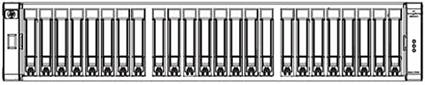
HPE MSA 1040 Storage (SFF) | |||
|
| |||
|
| |||
|
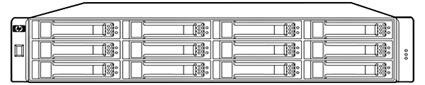
HPE MSA 1040 Storage (LFF) | |||
|
| |||
|
| |||
|
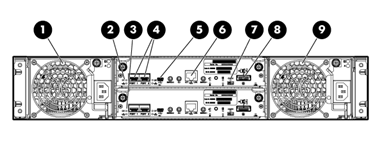
MSA 1040, shown with 2 controllers installed | |||
|
1. |
Power supply 1 |
2. |
Controller Module A |
|
3. 5. 7. 9.
|
Controller Module B CLI Port (mini USB) Cache Status LED Power Supply |
4. 6. 8. |
CLI Port (mini USB) Network Management Port SAS Expansion Port |
|
|
|
|
|
Models
|
HPE MSA 1040 Storage |
MSA 1040 Pre-Configured Models |
|
|
HP MSA 1040 2-port Fibre Channel Dual Controller LFF Storage1 |
E7V99A | |
|
HP MSA 1040 2-port Fibre Channel Dual Controller SFF Storage2 |
E7W00A | |
|
HP MSA 1040 2-port SAS Dual Controller LFF Storage3 |
K2Q90A | |
|
HP MSA 1040 2-port SAS Dual Controller SFF Storage4 |
K2Q89A | |
|
HP MSA 1040 2-port 1G iSCSI Dual Controller LFF Storage5 |
E7W01A | |
|
HP MSA 1040 2-port 1G iSCSI Dual Controller SFF Storage6 |
E7W02A | |
|
HP MSA 1040 2-port 10G iSCSI Dual Controller LFF Storage7 |
E7W03A | |
|
HP MSA 1040 2-port 10G iSCSI Dual Controller SFF Storage8 |
E7W04A | |
|
NOTE: 1Includes LFF Array Chassis + two MSA 1040 FC 2-port controllers, SFPs installed, drives not included. 2Includes SFF Array Chassis + two MSA 1040 FC 2-port controllers, SFPs installed, drives not included. 3Includes LFF Array Chassis + two MSA 1040 SAS 2-port controllers, drives not included. 4Includes SFF Array Chassis + two MSA 1040 SAS 2-port controllers, drives not included. 5Includes LFF Array Chassis + two MSA 1040 1GbE 2-port controllers, SFPs installed, drives not included. 6Includes SFF Array Chassis + two MSA 1040 1GbE 2-port controllers, SFPs installed, drives not included. 7Includes LFF Array Chassis + two MSA 1040 10GbE 2-port controllers, SFPs installed, drives not included, direct attached copper cables are supported in 10GbE Controller systems. 8Includes SFF Array Chassis + two MSA 1040 10GbE 2-port controllers, SFPs installed, drives not included, direct attached copper cables are supported in 10GbE Controller systems. |
| |
|
|
|
|
|
Smart Buys |
Smart Buys are pre-discounted SKU’s available in participating North and South American countries. Please check with your local authorized partner for availability. |
|
|
Smart Buy Drive Kits |
| |
|
HP MSA 300GB 12G SAS 10K SFF(2.5in) Dual Port Enterprise 3yr Warranty Hard Drive |
J9F44SB | |
|
HP MSA 600GB 12G SAS 10K SFF(2.5in) Dual Port Enterprise 3yr Warranty Hard Drive |
J9F46SB | |
|
HP MSA 1.2TB 12G SAS 10K SFF(2.5in) Dual Port Enterprise 3yr Warranty Hard Drive |
J9F48SB | |
|
HP MSA 1.8TB 12G SAS 10K SFF (2.5in) 512e Enterprise 3yr Warranty Hard Drive |
J9F49SB | |
|
HP MSA 200GB 12G ME SAS SFF (2.5in) Enterprise Mainstream 3yr Warranty Solid State Drive |
K2Q45SB | |
|
Smart Buy MSA 1040 Storage System |
| |
|
HP MSA 1040 2-port Fibre Channel Dual Controller LFF Storage/S-Buy |
E7V99SB | |
|
HP MSA 1040 2-port Fibre Channel Dual Controller SFF Storage/S-Buy |
E7W00SB | |
|
HP MSA 1040 2-port 1G iSCSI Dual Controller LFF Storage/S-Buy |
E7W01SB | |
|
HP MSA 1040 2-port 1G iSCSI Dual Controller SFF Storage/S-Buy |
E7W02SB | |
|
HP MSA 1040 2-port 10G iSCSI Dual Controller LFF Storage/S-Buy |
E7W03SB | |
|
HP MSA 1040 2-port 10G iSCSI Dual Controller SFF Storage/S-Buy |
E7W04SB | |
|
HP MSA 1040 1Gb iSCSI w/12 300GB SAS 10K SFF (2.5in) Hard Drive Bundle/S-Buy |
K2Q05SB | |
|
HP MSA 1040 1Gb iSCSI w/12 900GB SAS 10K SFF (2.5in) Hard Drive Bundle/S-Buy |
K2Q06SB | |
|
HP MSA 1040 10Gb iSCSI w/12 300GB SAS 10K SFF (2.5in) Hard Drive Bundle/S-Buy |
K2Q07SB | |
|
HP MSA 1040 10Gb iSCSI w/12 900GB SAS 10K SFF (2.5in) Hard Drive Bundle/S-Buy |
K2Q08SB | |
|
Smart Buy Disk Enclosures |
| |
|
HP D2700 Disk Enclosure/S-Buy |
AJ941SB | |
|
|
|
|
Features
|
All MSA 1040 models offer a common set of valuable features: |
Non-disruptive on-line controller code upgrade (requires dual controllers w/ multi-pathing software) Upgradable by design. Owners of a P2000 G3 array are able to do data-in-place upgrades to the new MSA 1040 array. This unique ability protects the earlier investments in drives, and JBODs. NOTE: Certain limitations are applicable- please review MSA 1040-2040 Upgrade Technical Whitepaper before upgrading your P2000 G3 systems http://www.hpe.com/h20195/v2/GetDocument.aspx?docname=4AA4-6830ENW |
|
Application Solutions |
The HPE MSA 1040 Storage is the ideal solution for customers running Oracle, Microsoft, SAP environments and those customers who are deploying virtual server technologies like VMware, Hyper-V. The MSA 1040 delivers enterprise functionality that enhances virtual environments, simplifies management, and reduces costs. Easy to deploy, scale and maintain, HPE MSA 1040 Arrays ensure that crucial business data remains available.
|
|
Learn more |
To learn more about specific HPE Storage Solutions that are built with Oracle, Microsoft, SAP and Virtualization environments in mind, visit the solution sites supporting each of these applications. HPE MSA Storage hyperlink to: http://www.hp.com/go/MSA HPE Storage for Oracle hyperlink to: http://www.hp.com/storage/oracle |
Family Information
|
|
MSA 1040 | |||||||||||||||||||||||||||||||||||||||||||||||||||||||||||||||||||||||||||||||||||||||||||||||||||
|
Capacity Maximum Additional Drive Enclosures |
LFF: | |||||||||||||||||||||||||||||||||||||||||||||||||||||||||||||||||||||||||||||||||||||||||||||||||||
|
Pool Capacity |
GL200: 169 TB (154 TiB) GL210: 219 TB (200 TiB) GL220: 329 TB (300 TiB) GL220 with Large Pool Support: 562 TB (512 TiB) NOTE: 1) The above pool capacities by firmware release apply to virtual storage only 2) The above capacities are usable capacity/pool. Each MSA system can support two pools. Therefore each MSA storage system can have double the usable capacity listed above | |||||||||||||||||||||||||||||||||||||||||||||||||||||||||||||||||||||||||||||||||||||||||||||||||||
|
Cache |
6 GB per controller NOTE: 6GB cache includes Data (Read/Write) cache = 4GB and Metadata and System OS cache = 2GB | |||||||||||||||||||||||||||||||||||||||||||||||||||||||||||||||||||||||||||||||||||||||||||||||||||
|
Total LUNs |
512 Thin Provisioning allows you to create the LUNs independent of the physical storage | |||||||||||||||||||||||||||||||||||||||||||||||||||||||||||||||||||||||||||||||||||||||||||||||||||
|
Host Interconnect |
2 x 8Gb Fibre Channel ports per controller 2x 12Gb SAS ports per controller | |||||||||||||||||||||||||||||||||||||||||||||||||||||||||||||||||||||||||||||||||||||||||||||||||||
|
Maximum Drives |
48 LFF/99 SFF | |||||||||||||||||||||||||||||||||||||||||||||||||||||||||||||||||||||||||||||||||||||||||||||||||||
|
Maximum Host Supported |
64 in v2 UI 512 in v3 UI | |||||||||||||||||||||||||||||||||||||||||||||||||||||||||||||||||||||||||||||||||||||||||||||||||||
|
Standard Software |
Snapshots (64) | |||||||||||||||||||||||||||||||||||||||||||||||||||||||||||||||||||||||||||||||||||||||||||||||||||
|
Optional Software |
Remote Snap (linear storage only) | |||||||||||||||||||||||||||||||||||||||||||||||||||||||||||||||||||||||||||||||||||||||||||||||||||
|
| ||||||||||||||||||||||||||||||||||||||||||||||||||||||||||||||||||||||||||||||||||||||||||||||||||||
|
Product Technology | ||||||||||||||||||||||||||||||||||||||||||||||||||||||||||||||||||||||||||||||||||||||||||||||||||||
|
MSA 1040 Models |
MSA 1040 Storage offers 4 factory configured models: MSA 1040 12Gb SAS with 2-ports per controller | |||||||||||||||||||||||||||||||||||||||||||||||||||||||||||||||||||||||||||||||||||||||||||||||||||
|
Modular Chassis |
2U rack height. 12 Large Form Factor or 24 Small Form Factor drive bays, accommodating SAS and SAS MDL Drives | |||||||||||||||||||||||||||||||||||||||||||||||||||||||||||||||||||||||||||||||||||||||||||||||||||
|
Optional Disk Enclosures |
Just as the user has a choice of chassis for the array head (LFF and SFF drive bays), so also do they have a choice of expansion disk enclosures accommodating either drive size. The MSA LFF and the SFF disk enclosures can be hot-added to an operating array. SFF and LFF Array heads and Disk Enclosures can be mixed without limitations. The MSA 1040 storage systems have supported various SFF and LFF disk enclosures over time. The latest disk enclosures to be supported on the MSA 1040 platform are the MSA 2050 SFF Disk Enclosure and the MSA 2050 LFF Disk Enclosures. The MSA 2050 SFF and LFF enclosures can be added to existing MSA 1040 storage systems for expansion disk capacity. The MSA 2050 SFF and LFF disk enclosures can be intermixed with the D2700 SFF disk enclosure and/or the MSA 2040 LFF disk enclosure when connected to the MSA 1050 base system. The MSA 2050 SFF and LFF disk enclosures are the recommended enclosures to be used for capacity expansion on the MSA 2040 storage system. | |||||||||||||||||||||||||||||||||||||||||||||||||||||||||||||||||||||||||||||||||||||||||||||||||||
|
LFF Disk Enclosures MSA 2040 LFF Disk Enclosure. This 2U unit has twelve LFF (3.5-inch) drive bays and accepts for MSA dual-ported SAS, SEDs and SAS MDL drives. The pre-configured HPE MSA 2040 LFF Drive Enclosure (M0S96A) has two I/O modules and supports both single and dual controller arrays.
MSA 2050 LFF Disk Enclosure. This 2U enclosure is designed to support twelve HPE Storage LFF drives and accepts MSA dual-ported 12Gb SSD and SAS Midline hard drives. The pre-configured MSA 2050 LFF Disk Enclosure (Q1J06A) has two I/O modules and supports the MSA 1040 dual controller arrays.
|
||||||||||||||||||||||||||||||||||||||||||||||||||||||||||||||||||||||||||||||||||||||||||||||||||||
|
SFF Disk Enclosures HP D2700 Disk Enclosure (AJ941A) is designed to support twenty five HPE Storage or ProLiant 2.5-inch Universal form factor (SFF) 12Gb, SSD, SAS, SEDs or SAS MDL hard drives. It ships standard with dual I/O modules installed.
HPE MSA 2050 SFF Disk Enclosure (Q1J07A) This 2U enclosure is designed to support twenty four HPE Storage 2.5-inch SFF drive bays and accepts MSA dual ported 12Gb SSD, Enterprise SAS, or SAS Midline hard drives. The pre-configured MSA 2050 SFF Disk Enclosure has two I/O modules and supports the MSA 1040 dual controller arrays.
|
||||||||||||||||||||||||||||||||||||||||||||||||||||||||||||||||||||||||||||||||||||||||||||||||||||
|
Scalability |
The MSA 1040 Arrays are designed to allow an installation to begin with smaller capacity and be able to grow gradually as needed. The flexibility of SAS or SAS MDL drives technology, form factors, sizes, speeds, and costs per GB allows a system to easily fit in almost any budget.
| |||||||||||||||||||||||||||||||||||||||||||||||||||||||||||||||||||||||||||||||||||||||||||||||||||
|
Vdisks
Disk Group
|
The Vdisk nomenclature is being replaced by Disk Group. In the Linear Storage and in the SMU V2 you will see reference to Vdisk in the Virtual Storage and the SMU V3 you will see Disk Group. Vdisk and Disk Group are essentially the same. Vdisks have additional RAID types (RAID 0, 3) available only in the CLI. A Disk Group is a collection of disks in a given redundancy mode (RAID 1, 5, 6, 10, 50). It is equivalent to a Vdisk in Linear Storage and utilizes the same proven fault tolerant technology used by Linear Storage. Disk Group RAID level and size can be created based on performance and/or capacity requirements. With GL200 or newer firmware multiple Disk Groups can be allocated into a Storage Pool for use with the Virtual Storage features. | |||||||||||||||||||||||||||||||||||||||||||||||||||||||||||||||||||||||||||||||||||||||||||||||||||
|
LUNs
Storage Pools |
The MSA 1040 arrays support 512 volumes and up to 512 snapshots in a system. All of these volumes can be mapped to LUNs. Maximum LUN sizes up to 140TB (128TiB), the LUNs size are dependent on the storage architecture: Linear vs. Virtualized. Thin Provisioning allows the user to create the LUNs independent of the physical storage.
The GL200 firmware or newer introduces Storage Pools - which are comprised of one or more Disk Groups. LUNs are no longer be restricted to a single Vdisk as with Linear Storage. A volume’s data on a given LUN can now span all disk drives in a pool. When capacity is added to a system, users will benefit from the performance of all spindles in that pool. Leveraging Storage Pools, the MSA 2040 supports large, flexible Volumes with sizes up to 128TiB and facilitates seamless capacity expansion. As volumes are expanded data automatically reflows to balance capacity utilization on all drives. | |||||||||||||||||||||||||||||||||||||||||||||||||||||||||||||||||||||||||||||||||||||||||||||||||||
|
RAID 0, 1, 3, 5, 6, 10, 50 |
In addition to the usual RAID levels, the MSA 1040 features several important additional levels. RAID 6 is the highest level of RAID protection. It allocates two sets of parity data across drives and allows simultaneous write operations. It can withstand two simultaneous drive failures without downtime or data loss. RAID 10 is mirroring and striping without parity. RAID 50 combines the block striping and parity of RAID 5 with the straight block striping of RAID 0, yielding higher performance than RAID 5 through the addition of RAID 0, particularly during writes. | |||||||||||||||||||||||||||||||||||||||||||||||||||||||||||||||||||||||||||||||||||||||||||||||||||
|
Performance |
The preliminary performance figures provided here are for your reference as many variables exist between array configurations, workloads, hard drive types, vdisk setup parameters and host system setup. All Performance information is measure using Linear Storage.
NOTE: 1) SSD’s were used in a dual controller configuration of 4 vdisks consisting of two disks per vdisk and 1 volume per host. 4 hosts directly attached to the HPE MSA 1040 array were used in this test configuration (results cannot be expected with a single host). | |||||||||||||||||||||||||||||||||||||||||||||||||||||||||||||||||||||||||||||||||||||||||||||||||||
| ||||||||||||||||||||||||||||||||||||||||||||||||||||||||||||||||||||||||||||||||||||||||||||||||||||
|
NOTE: 2) 300 GB 15K SAS drives were used in a dual controller configuration of 8 vdisks consisting of twelve disks per vdisk, 3.3 TB volumes, and 2 volumes per host. 4 hosts directly attached to the HPE MSA 1040 arrays were used in this test configuration (results cannot be expected with a single host). | ||||||||||||||||||||||||||||||||||||||||||||||||||||||||||||||||||||||||||||||||||||||||||||||||||||
|
Configuration and Management Tools |
HPE Storage Management Utility (SMU). Management access, out-of-band: WEB GUI, CLI. Interface Types: USB, 100/1000 Ethernet. Protocols Supported SNMP, SMI-S, SSL, SSH, SMTP, FTP, HTTP, Telnet | |||||||||||||||||||||||||||||||||||||||||||||||||||||||||||||||||||||||||||||||||||||||||||||||||||
|
Hot Plug Expansion and Replacement Support |
All MSA 1040 models support hot plug expansion and replacement of redundant controllers, enclosures, fans, power supplies, and I/O modules for simple, fast installation and maintenance. Hot add expansion of disk enclosures is also supported. | |||||||||||||||||||||||||||||||||||||||||||||||||||||||||||||||||||||||||||||||||||||||||||||||||||
|
Snapshot and Clone |
All MSA 1040 arrays come standard with 64 snaps, 512 snaps available. This controller based functionality offers higher levels of data protection, enables an almost instant recovery from data failure or corruption and offers alternative development testing of 'offline' production data and the ability to backup snapped/cloned data. | |||||||||||||||||||||||||||||||||||||||||||||||||||||||||||||||||||||||||||||||||||||||||||||||||||
|
| ||||||||||||||||||||||||||||||||||||||||||||||||||||||||||||||||||||||||||||||||||||||||||||||||||||
|
Overview |
The MSA 1040 arrays come integrated with web browser and CLI based software for storage and RAID management, setup, configuration, and troubleshooting. This reduces the cost of ownership by reducing the training and technical expertise necessary to install and maintain your HPE storage solution. |
|
Server Compatibility |
Supports most HPE ProLiant and BladeSystems including
|
|
Industry Standard servers support |
|
|
OS Support |
Refer to the Hewlett Packard Enterprise support statements for complete current OS version support: http://www.hp.com/storage/spock
|
|
Web Browser support |
|
|
HPE StoreFront Manager for Microsoft |
HPE StoreFront Manager for Microsoft enables management and monitoring of HPE MSA Storage running in Microsoft Hyper-V environment with a single pane-of-glass view to events/alerts, capacity and health dashboards and detailed virtual infrastructure information. It integrates seamlessly with Microsoft System Center Operations Manager (SCOM) and provides Microsoft administrators the following: It supports heterogeneous HPE Storage environment including MSA 2040, 1040, HPE StoreVirtual, HPE 3PAR StoreServ, HPE StoreOnce, HPE StoreEasy, HPE XP, HPE EVA and HPE StoreEver Storage. When deployed with the MSA 2040 array, HPE StoreFront Manager provides the following:
HPE
StoreFront Manager for Microsoft for MSA Storage is downloadable from
Software Depot: https://h20392.www2.hp.com/portal/swdepot/displayProductInfo. |
Optional Software
|
Advanced Data Services Software Suite |
All software for the MSA platform is now included as a standard feature on the MSA 2042 at no extra charge. The MSA 2042 includes the Advanced Data Services Software Suite which includes the following software titles 1. HPE MSA 2040 Performance Automated Tiering LTU 2. HPE MSA 2040 512 Snapshot Software LTU 3. HPE MSA Remote Snap Software LTU | ||||||||
|
|
HPE MSA Advanced Data Services Suite LTU |
Q0H99A | |||||||
|
|
HPE MSA Advanced Data Services Suite E-LTU |
Q0H99AAE | |||||||
|
|
See below for a detailed description of each of these software features |
| |||||||
|
HPE MSA 1040 Advanced Virtualized Features
|
A Virtualized Storage array is an extension to the Linear Storage building blocks (Vdisks)
Data is virtualized not only across a single Vdisk, as in Linear implementation, but also across multiple Disk Groups and additionally now across multiple Tiers of storage with different performance capabilities.
No new MSA 1040 hardware is required to take advantage of Virtualized Storage features available at a very low price point. | ||||||||
|
|
HPE MSA 1040 Adv Virtualized Upg LTU |
D4T78A | |||||||
|
|
HPE MSA 1040 Adv Virtualized Upg E-LTU |
D4T78AAE | |||||||
|
MSA Performance Tiering
|
Disk tiers are comprised of aggregating 1 or more Disk Groups of similar physical disks. The MSA 1040 supports 3 distinct tiers: 1. A Performance tier with SSDs 2. A Standard SAS tier with Enterprise SAS HDDs 3. An Archive tier utilizing Midline SAS HDDs. Beginning with GL220 or newer firmware, the MSA 2040 now supports sub-LUN tiering and automated data movement between tiers. The MSA automated tiering engine moves data between available tiers based on the access characteristics of that data. Frequently accessed “pages” will migrate to the highest available tier delivering maximum I/O´s to the application (Performance Tiering). Another feature to the MSA 2040 tiering engine is Archive Tiering where “cold” or not frequently accessed data can be moved to lower performance tiers. Pages are migrated between tiers automatically such that I/O’s are optimized in real-time. The Archive Tiering functionality is provided at no charge on the MSA 1040 platform beginning with GL220 or newer firmware. The Performance Tiering capability utilizing a fault tolerant SSD Disk Group is a paid feature and requires the below SKU to enable it. Creating an SSD virtual disk group for both read and write capabilities requires a Performance Auto Tiering License. AutoTiering from SAS MDL (Archive Tier) to Enterprise SAS (Standard Tier) drives is provided with the Advanced Virtualization license specified above. To utilize a Performance SSD tier requires BOTH the Advanced Virtualization license and the Performance Auto Tiering license. | ||||||||
|
HPE OneView for VMware vCenter
|
HPE OneView for VMware vCenter is a component within the HPE OneView plug-in for vCenter. It provides VMware administrators that are using VMware's vSphere management console (vCenter) with the ability to see how virtual machines are mapped to datastores and individual MSA Storage volumes. By providing these clear relationships between VM's, datastores and storage, the VMware administrator's productivity increases, as does the ability to ensure quality of service. Roles for administrators can be defined on an individual basis, providing the ability to apply specific permissions for both view and control functions.
- Create/Expand/Delete a Datastore - Create a Virtual Machine from a template - VMClone for linear storage
HPE
OneView for VMware vCenter is downloadable from Software Depot: https://h20392.www2.hp.com/portal/swdepot/displayProductInfo. | ||||||||
|
VMware Site Recovery Manager(SRM) |
VMware vCenter Site Recovery Manager (SRM) is an extension to VMware vCenter that delivers business-continuity and disaster-recovery solution that helps you plan, test, and execute the recovery of vCenter virtual machines. SRM can discover and manage replicated datastores, and automate migration of inventory from one vCenter to another. Site Recovery Manager integrates with the underlying replication product through a Storage Replication Adapter (SRA). The SRM is available only for linear storage. HPE MSA 2040 Site Recovery Adapter (SRA) The MSA 2040 SRA, a free-to-use plugin, is the program that integrates the VMware vCenter SRM with HPE MSA 2040 arrays. It enables full-featured use of the VMware SRM. It is a host-software component installed on a Microsoft Windows Server that enables disaster recovery management (DRM) software on the host to communicate and control certain aspects of the replication feature in storage systems connected to the server. It allows the VMware SRM software to automatically coordinate virtual machine failover and failback between a protected data center and a disaster recovery site by employing a disaster recovery solution called Remote Snap. A perfect combination of the Remote Snap replication and VMware SRM provides an unfailing automated solution for implementing and testing the disaster recovery between sites located across geographies. It enables communication between the HPE MSA Remote Snap replication functionality that is embedded in HPE MSA 2040 systems. Users are required to acquire Remote Snap license for their local and remote HPE MSA 2040 arrays to use the HPE MSA SRA. Site Recovery Manager Requirements/Dependencies:
Requires purchase of MSA 2040 Remote Snap licenses (one for each site) | ||||||||
|
vStorage API for Array Integration (VAAI) |
The vStorage API for Array Integration (VAAI) is one of the storage application programming interface (API) sets in vSphere. VAAI is an API storage partners can leverage to enhance performance of virtual machine (VM) management operations by delegating these operations to the storage array. With hardware offload, ESX/ESXi hosts perform certain operations faster and consume less server CPU and memory resources, and also storage port and storage fabric bandwidth. VAAI includes high performance and scalable VM data path primitives.
| ||||||||
|
Snapshot and Volume Copy Software for the MSA 1040 |
Product Features | ||||||||
|
Data Protection
| |||||||||
|
Data Testing
| |||||||||
|
MSA 1040 Snapshot and Clone: | |||||||||
|
|
|
| |||||||
|
HPE MSA Remote Snap Software |
| ||||||||
|
NOTE: One license per array is required for replication. For example, if you have two MSA arrays performing replication (from Primary system to Remote System), you will need 2 Advanced Data Services licenses. |
| ||||||||
|
Product Features |
No-single-point-of-failure solution to increase the availability of your customers data | ||||||||
|
| |||||||||
|
Customer Benefits |
Disaster Recovery | ||||||||
|
Replication technology has typically been used to address disaster recovery issues. Disaster recovery is still the driving business case behind replication. Remote replication can be implemented from the production site to one or more remote sites across a campus, across town, across a state or across the country. When a disaster strikes the primary location, the applications can be brought up at the remote site and continue processing against the replicated copies. When the primary site is back online, the replication can be reversed and when the data is resynchronized, processing can be switched back to the primary site and business can continue. In the past, if an e-mail system experienced a disaster it was an "oh well" moment. The loss of a day or more of e-mail was not considered important. Today, e-mail is a critical component of many companies' business plans and recovering e-mail after a disaster quickly and completely is required. | |||||||||
|
Maintenance | |||||||||
|
HPE Remote Snap software can also be used to solve other business needs. For instance, E-mail servers may need periodic maintenance that can take hours to complete. With remote replication in place, the downtime can be minimal (as long as it takes to bring the remote peer of the primary e-mail server online). The primary server can be worked on (patches, hardware upgrades, etc.) and then brought back online and into production. A whole datacenter can be failed over to a remote site on purpose to perform maintenance on generators, air conditioning, etc. Replication can also be used to perform a datacenter move with minimal downtime (fail everything to the DR site, move the production datacenter to its new location then fail the DR site back to the new datacenter). | |||||||||
|
Storage Based | |||||||||
|
Data replication is performed at the storage subsystem controller level and is totally transparent to the host, alleviating unnecessary host cycles to perform the data mirroring functions. Unlike a fabric based or host based solution, the storage based solution dedicates its resources to managing the replication process between arrays, with minimal impact to applications, other data or devices on the SAN. | |||||||||
|
Bi-Directional | |||||||||
|
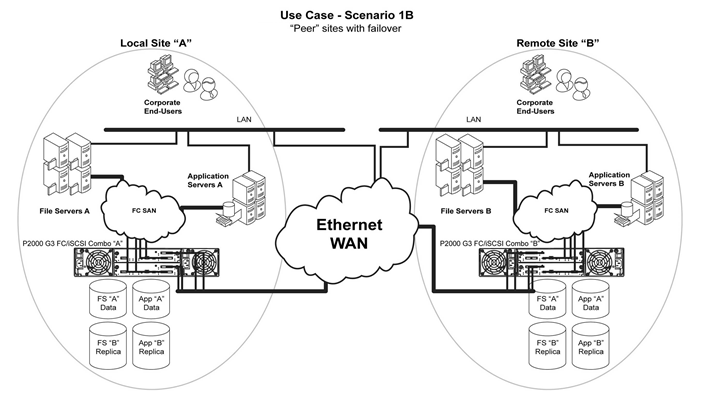
The bidirectional HPE MSA 1040 Array solution addresses the growing need among businesses to ensure continuous availability of applications that are critical to daily business operations. HPE MSA 1040 enables two sites in a remote replication connection to use each other as a destination to maintain replicated copies of online data. This maximizes resource utilization while enabling business continuance, even in the event of disaster. | |||||||||
|
Disaster Tolerance | |||||||||
|
The MSA 1040 Arrays utilize snapshot data online and in real time to a remote MSA 1040 through a local or extended storage area network (SAN). Additionally, data replication can be bidirectional, meaning that a storage array can be both a source and a destination. A particular LUN can be replicated in only one direction between the two storage arrays. Write I/O data sent to the source is replicated by HPE MSA 1040 Array to the destination. A pair of properly configured HPE MSA 1040 arrays is a replication solution that guarantees data integrity in the event of a storage system or site failure. | |||||||||
|
First initial copy | |||||||||
|
When a DR site is initially created an initial copy of the data from the source volume to the target volume must occur. The MSA 1040 array allows this first copy to take place locally. After completion the disks can me manually moved to the remote location. Subsequent changes will only remotely copy the changed blocks. | |||||||||
|
SAN Extensions | |||||||||
|
HPE MSA 1040 Array provides the capability to replicate data over direct Fibre Channel. The distances supported over dark fiber are determined by the speed of the dark fiber connection and the technology used to communicate over the dark fiber. | |||||||||
|
Path failover (MPIO)
|
Multipath failover (MPIO) is supported on all operating systems | ||||||||
|
HPE StoreEasy 3000 Gateway Storage |
Add more value to your MSA 1040 array | ||||||||
|
HPE MSA combined with HPE StoreEasy 3850 Gateway Storage enables you to consolidate block and file storage onto a single, high-performance system - giving your business the flexibility to meet changing business needs on-demand. The HPE StoreEasy 3850 delivers efficient, secure, and highly available file services that help address your changing file-serving needs. It reduces your cost of ownership by simplifying management, increasing resource utilization, centralizing growth, and protecting data. HPE StoreEasy 3850 provides a simple and consistent experience for managing block and file storage for multiple workloads centrally. NOTE: For more information visit: http://www.hp.com/go/StoreEasy
| |||||||||
Service and Support, HPE Care Pack, and Warranty Information
|
Warranty |
Three-year
limited warranty, parts exchange Next Business day delivery NOTE: Firmware updates beyond the 3 year warranty period requires a support contract. |
|
| |
|
Solid State Drives (SSD) |
3/0/0 warranty; Customer Self Repair (CSR) subject to maximum usage and or maximum supported lifetime limitations, whichever occurs first. Maximum Supported Lifetime is the period in years set to equal the warranty for the device. Maximum usage limit is the maximum amount of data that can be written to the device before reaching the device's write endurance limit NOTE: SSDs used for replacement will be of equal or greater capacity and are designed to meet or exceed the original SSD warranty. Replacement drive/s could be of the same model drive or of a different model qualified to operate interchangeably inside the MSA array. Warranties of these components are unaffected by any substitution. |
|
| |
|
Service and Support |
Services to accelerate time to results |
|
| |
|
Connect your devices
|
Unlock all of the benefits of your technology investment by connecting your products to HP Enterprise. Achieve up to 77%1 reduction in down time, near 100%2 diagnostic accuracy and a single consolidated view of your environment. By connecting, you will receive 24x7monitoring, pre-failure alerts, automatic call logging, and automatic parts dispatch. HPE Proactive Care Service and HPE Datacenter Care Service customers will also benefit from proactive activities to help prevent issues and increase optimization. All of these benefits are already available to you with your server storage and networking products, securely connected to HPE support. 1 IDC whitepaper - The Business Value of Connected Support from HP, March 2015 2 HP CSC reports 2014 - 2015 |
|
| |
|
Optimized Care |
HPE Proactive Care with 6 hour call-to-repair commitment, three year Support Service HPE Proactive Care gives customers an enhanced call experience plus helps preventing problems and maintains IT stability by utilizing tailored, proactive reports with recommendations and advice when your products are connected to HPE. This Service combines three years’ proactive reporting and advice with our highest level of hardware support - HPE’s 24x7, six hour hardware call-to-repair. HPE is the only leading manufacturer who makes this level of coverage available as a standard service offering for your most valuable storage systems. https://www.hpe.com/h20195/v2/GetPDF.aspx/4AA3-8855ENW.pdf |
|
| |
|
Standard Care |
HPE Proactive Care with 24x7 coverage, three year Support Service HPE Proactive Care gives customers an enhanced call experience plus helps preventing problems and maintains IT stability by utilizing personalized proactive reports with recommendations and advice when your products are connected to HPE. This Service combines three years’ proactive reporting and advice with our 24x7 coverage, four hour hardware response time when there is a problem. https://www.hpe.com/h20195/v2/GetPDF.aspx/4AA3-8855ENW.pdf |
|
| |
|
Basic Care |
HPE Foundation Care 24x7, three-year Support Service HPE Foundation Care 24x7 gives you access to HPE 24 hours a day, seven days a week for assistance on resolving issues. This service includes need based Hardware onsite response within four hours. Simplify your support experience and make HPE your first call to help resolve hardware or software problems. https://www.hpe.com/h20195/V2/GetDocument.aspx?docname=4AA4-8876ENW&cc=us&lc=en |
|
| |
|
Related Services |
Choose from a rich portfolio of services to make the most of MSA 2042 SAN Storage so you can efficiently and affordably consolidate, manage, and extract value from unstructured data. HPE Services can help you discover needs and create a plan for simplifying the environment, reducing risk, and maximizing your storage investments HPE MSA Family Disk Array Installation and Startup Service - Implement right from the start, as Hewlett Packard Enterprise experts install, test, and configure your hardware and software onsite. We deliver a tailored storage deployment properly integrated into your environment. http://h20195.www2.hpe.com/V2/GetPDF.aspx/4AA0-3048ENW.pdf HPE Storage Data Migration Services - End-to-end data migration service providing seamless discovery, assessment, planning, and design, completely customizable to your organization's storage area network or network attached storage environment and using innovative software to help you migrate to HPE storage quickly and efficiently. HPE Storage Efficiency Analysis - The HPE Storage Efficiency Analysis provides customers with a view of their storage infrastructure and operating environment; highlighting recommendations for improvements. The report provides extensive insight about the existing storage environment, opportunities for efficiency gains, asset aging and replacement through interaction with key decision makers |
|
| |
|
For more information |
http://www8.hpe.com/us/en/business-services/it-services/storage-services.html To learn more on HPE Storage Services, please contact your Hewlett Packard Enterprise sales representative or HPE Authorized Channel Partner HPE Support Services are sold by Hewlett Packard Enterprise and Hewlett Packard Enterprise Authorized Service Partners. |
Configuration Information
|
Configure to Order Program Information | |
|
Hewlett Packard Enterprise has a very successful Configure to Order program for the MSA 1040 family. The MSA 1040 models and options may be factory installed in a rack with switches, disk enclosures and hard drives. The MSA 1040 arrays may be integrated with ProLiant servers or as standalone storage. | |
|
| |
|
Step 1 - MSA 1040 - Base Configuration |
|
|
Select one model: |
|
|
Model Name |
SKUs |
|
HP MSA 1040 2-port Fibre Channel Dual Controller LFF Storage1 |
E7V99A |
|
HP MSA 1040 2-port Fibre Channel Dual Controller SFF Storage2 |
E7W00A |
|
HP MSA 1040 2-port SAS Dual Controller LFF Storage3 |
K2Q90A |
|
HP MSA 1040 2-port SAS Dual Controller SFF Storage4 |
K2Q89A |
|
HP MSA 1040 2-port 1G iSCSI Dual Controller LFF Storage5 |
E7W01A |
|
HP MSA 1040 2-port 1G iSCSI Dual Controller SFF Storage6 |
E7W02A |
|
HP MSA 1040 2-port 10G iSCSI Dual Controller LFF Storage7 |
E7W03A |
|
HP MSA 1040 2-port 10G iSCSI Dual Controller SFF Storage8 |
E7W04A |
|
NOTE: 1Includes LFF Array Chassis + two MSA 1040 FC 2-port controllers, SFPs installed, drives not included 2Includes SFF Array Chassis + two MSA 1040 FC 2-port controllers, SFPs installed, drives not included 3Includes LFF Array Chassis + two MSA 1040 SAS 2-port controllers, drives not included 4Includes SFF Array Chassis + two MSA 1040 SAS 2-port controllers, drives not included 5Includes LFF Array Chassis + two MSA 1040 1GbE 2-port controllers, SFPs installed, drives not included 6Includes SFF Array Chassis + two MSA 1040 1GbE 2-port controllers, SFPs installed, drives not included 7Includes LFF Array Chassis + two MSA 1040 10GbE 2-port controllers, SFPs installed, drives not included, direct attached copper cables are supported in 10GbE Controller systems 8Includes SFF Array Chassis + two MSA 1040 10GbE 2-port controllers, SFPs installed, drives not included, direct attached copper cables are supported in 10GbE Controller systems |
|
|
| |
|
Step 2 - Options |
|
|
Select each option with quantities specified. |
|
|
Step 2a - SAS or SAS MDL Drive Options |
SKUs |
|
MSA 1040 Drives: |
|
|
SAS Drives (SFF 2.5-inch) |
|
|
12G SFF 15K SAS HDDs |
|
|
HP MSA 300GB 12G SAS 15K SFF (2.5in) Enterprise 3yr Warranty Hard Drive |
J9F40A |
|
HP MSA 600GB 12G SAS 15K SFF (2.5in) Enterprise 3yr Warranty Hard Drive |
J9F42A |
|
HPE MSA 900GB 12G SAS 15K SFF (2.5in) Enterprise 3yr Warranty Hard Drive |
Q1H47A |
|
12G SFF 10K SAS HDDs |
| |
|
HP MSA 300GB 12G SAS 10K SFF(2.5in) Dual Port Enterprise 3yr Warranty Hard Drive |
J9F44A | |
|
HP MSA 600GB 12G SAS 10K SFF(2.5in) Dual Port Enterprise 3yr Warranty Hard Drive |
J9F46A | |
|
HP MSA 1.2TB 12G SAS 10K SFF(2.5in) Dual Port Enterprise 3yr Warranty Hard Drive |
J9F48A | |
|
HP MSA 1.8TB 12G SAS 10K SFF (2.5in) 512e Enterprise 3yr Warranty Hard Drive |
J9F49A | |
|
HPE MSA 2.4TB 12G SAS 10K SFF (2.5in) Enterprise 512e 3yr Warranty Hard Drive |
Q2R41A | |
|
NOTE: 512e drives require MSA 1040/2040 firmware version GL200P002 or newer |
| |
|
12G SFF 7.2K SAS MDL HDDs |
| |
|
HP MSA 1TB 12G SAS 7.2K SFF (2.5in) 512e Midline 1yr Warranty Hard Drive |
J9F50A | |
|
HP MSA 2TB 12G SAS 7.2K SFF (2.5in) 512e Midline 1yr Warranty Hard Drive |
J9F51A | |
|
NOTE: 512e drives require MSA 1040/2040 firmware version GL200P002 or newer |
| |
|
Solid State Drives (SSDs) (SFF 2.5-inch) |
| |
|
12G SFF SAS SSDs (Mixed Use) |
| |
|
HPE MSA 400GB 12G SAS Mixed Use SFF (2.5in) 3yr Warranty Solid State Drive |
N9X95A | |
|
HPE MSA 800GB 12G SAS Mixed Use SFF (2.5in) 3yr Warranty Solid State Drive |
N9X96A | |
|
HPE MSA 1.6TB 12G SAS Mixed Use SFF (2.5in) 3yr Warranty Solid State Drive |
N9X91A | |
|
HPE MSA 3.2TB 12G SAS Mixed Use SFF (2.5in) 3yr Warranty Solid State Drive |
N9X92A | |
|
|
| |
|
MSA Large Form Factor (LFF) SAS MDL DP drives for MSA 1040 Array |
| |
|
12G LFF 7.2K SAS Midline (MDL) HDDs |
| |
|
HPE MSA 12TB 12G SAS 7.2K LFF (3.5in) Midline 512e 1yr Warranty Hard Drive |
Q2R42A | |
|
HPE MSA 10TB 12G SAS 7.2K LFF (3.5in) Midline 512e 1yr Wty Hard Drive |
P9M82A | |
|
HP MSA 8TB 12G SAS 7.2K LFF (3.5in) 512e Midline 1yr Warranty Hard Drive |
M0S90A | |
|
HP MSA 6TB 12G SAS 7.2K LFF(3.5in) Midline 1yr Warranty Hard Drive |
J9F43A | |
|
HP MSA 4TB 12G SAS 7.2K LFF (3.5in) Midline 1yr Warranty Hard Drive |
K2Q82A | |
|
NOTE: 512e drives require MSA 1040/2040 firmware version GL200P002 or newer |
| |
|
|
| |
|
MSA Large Form Factor (LFF) SAS DP drives for MSA 1040 Array |
| |
|
12G LFF SAS SSDs (SFF Solid State Drives in LFF Converters) |
| |
|
HPE MSA 400GB 12G SAS Mixed Use LFF (3.5in) Converter Carrier 3yr Wty Solid State Drive |
P9M79A | |
|
HPE MSA 800GB 12G SAS Mixed Use LFF (3.5in) Converter Carrier 3yr Wty Solid State Drive |
P9M80A | |
|
|
| |
|
Step 2b - Drive Enclosure Options | ||
|
Use either LFF or SFF disk enclosures with either Large or Small Form Factor array heads. Each enclosure ships with two .5m mini-SAS to mini-SAS cables. | ||
|
HP MSA 2040 Energy Star LFF Disk Enclosure |
M0S96A | ||
|
HP D2700 Disk Enclosure |
AJ941A | ||
|
HPE MSA 2050 LFF Disk Enclosure |
Q1J06A | ||
|
HPE MSA 2050 SFF Disk Enclosure |
Q1J07A | ||
|
NOTE: • The MSA 2050 LFF and SFF Disk Enclosures requires GL225 firmware, or newer. • The use of MSA 2050 LFF and SFF Disk Enclosures with MSA 1040/2040/2042 storage requires requires GL225 array controller firmware, or newer.
|
| ||
|
Step 2c - SAS Cable Options | |
|
miniSAS to miniSAS Cables: | |
|
HP External Mini SAS 1m Cable ALL |
407337-B21 |
|
HP External Mini SAS 2m Cable |
407339-B21 |
|
| |
|
Step 3 - Other MSA 1040 Options | |
|
Choose optional AC Power Cords (2 required) | |
|
HP ProLiant 12 ft Power Cord |
227099-001 |
|
Power Cord, (Australia/China/New Zealand) |
227098-001 |
|
Power Cord, (Central Europe) |
157215-001 |
|
Power Cord, (United Kingdom/Hong Kong) |
157216-001 |
|
Power Cord, (Switzerland) |
157219-001 |
|
Power Cord, (Italy) |
157217-001 |
|
Power Cord, (Denmark) |
157218-001 |
|
Power Cord, (Japan) |
139867-001 |
|
Power Cord, (South East Asia/India) |
157220-001 |
|
| |
|
Step 4 - Choose Supported Options For Fibre Channel Infrastructure | ||
|
|
|
|
|
PremierFlexOM4 type cables |
HP Premier Flex LC/LC Multi-mode OM4 2 fiber 1m Cable |
QK732A |
|
HP Premier Flex LC/LC Multi-mode OM4 2 fiber 2m Cable |
QK733A | |
|
HP Premier Flex LC/LC Multi-mode OM4 2 fiber 5m Cable |
QK734A | |
|
HP Premier Flex LC/LC Multi-mode OM4 2 fiber 15m Cable |
QK735A | |
|
HP Premier Flex LC/LC Multi-mode OM4 2 fiber 30m Cable |
QK736A | |
|
HP Premier Flex LC/LC Multi-mode OM4 2 fiber 50m Cable |
QK737A | |
|
|
| |
|
OM3 FC LC-LC cables |
HP LC to LC Multi-mode OM3 2-Fiber 0.5m 1-Pack Fiber Optic Cable |
AJ833A |
|
HP LC to LC Multi-mode OM3 2-Fiber 1.0m 1-Pack Fiber Optic Cable |
AJ834A | |
|
HP LC to LC Multi-mode OM3 2-Fiber 2.0m 1-Pack Fiber Optic Cable |
AJ835A | |
|
HP LC to LC Multi-mode OM3 2-Fiber 5.0m 1-Pack Fiber Optic Cable |
AJ836A | |
|
HP LC to LC Multi-mode OM3 2-Fiber 15.0m 1-Pack Fiber Optic Cable |
AJ837A | |
|
HP LC to LC Multi-mode OM3 2-Fiber 30.0m 1-Pack Fiber Optic Cable |
AJ838A | |
|
HP LC to LC Multi-mode OM3 2-Fiber 50.0m 1-Pack Fiber Optic Cable |
AJ839A | |
|
| ||
|
Step 4 - Choose Supported Options For SAS Infrastructure | ||
|
Supported options |
Mini-SAS HD to Mini-SAS Fanout Cables |
|
|
|
HP Mini SAS High Density to Dual 2-lane Mini SAS External Fanout 1 Meter Cable |
K2R02A |
|
|
HP Mini SAS High Density to Dual 2-lane Mini SAS External Fanout 2 Meter Cable |
K2R03A |
|
|
HP Mini SAS High Density to Dual 2-lane Mini SAS External Fanout 4 Meter Cable |
K2R04A |
|
|
NOTE: Recommended to utilize Fanout cables when connecting to SAS HBAs for maximum future flexibility without downtime. The Fanout cables are not supported on the MSA 2040 |
|
|
|
|
|
|
|
Mini-SAS HD to Mini-SAS HD Fanout Cables |
|
|
|
HP Mini SAS High Density to Dual 2-lane Mini SAS High Density External Fanout 1 Meter Cable |
K2Q99A |
|
|
HP Mini SAS High Density to Dual 2-lane Mini SAS High Density External Fanout 2 Meter Cable |
K2R00A |
|
|
HP Mini SAS High Density to Dual 2-lane Mini SAS High Density External Fanout 4 Meter Cable |
K2R01A |
|
|
NOTE: Recommended to utilize Fanout cables when connecting to SAS HBAs for maximum future flexibility without downtime. The Fanout cables are not supported on the MSA 2040 |
|
|
|
|
|
|
|
Mini-SAS HD to Mini-SAS Cables |
|
|
HP 1.0m External Mini SAS High Density to Mini SAS Cable NOTE: This cable is used to connect 6Gb SAS initiator to MSA 2040 SAS controller. This is not used for connecting to a disk enclosure. |
716189-B21 | |
|
HP 2.0m External Mini SAS High Density to Mini SAS Cable |
716191-B21 | |
|
HP 4.0m External Mini SAS High Density to Mini SAS Cable |
716193-B21 | |
|
NOTE: Recommended to utilize standard cable when connecting to Blade enclosure switches. |
| |
|
|
| |
|
Mini-SAS HD to Mini-SAS HD Cables |
| |
|
HP External 1.0m (3ft) Mini-SAS HD 4x to Mini-SAS HD 4x Cable |
716195-B21 | |
|
HP External 2.0m (6ft) Mini-SAS HD 4x to Mini-SAS HD 4x Cable |
716197-B21 | |
|
HP External 4.0m (13ft) Mini-SAS HD 4x to Mini-SAS HD 4x Cable |
716199-B21 | |
|
|
| |
|
SAS Controllers |
||
|
|
HPE Smart Array P408e-m SR Gen10 12G SAS Mezzanine Controller |
804381-B21 |
|
|
HP Smart Array P441/4GB FBWC 12Gb 2-ports Ext SAS Controller |
726825-B21 |
|
|
HPE Smart Array P408e-p SR Gen10 12G SAS PCIe Plug-in Controller |
804405-B21 |
|
|
HP Smart Array P441/4GB FBWC 12Gb 2-ports Ext SAS Controller |
726782-B21 |
|
|
|
|
|
|
Switches |
|
|
|
HP 6Gb SAS Switch Single Pack for HP BladeSystem c-Class |
BK763A |
|
|
HP 6Gb SAS Switch Dual Pack for HP BladeSystem c-Class |
BK764A |
|
Step 4b - Choose Supported Options For 10GbE Infrastructure | ||
|
Copper Cable
|
HP BladeSystem c-Class 10GbE SFP+ to SFP+ 0.5m Direct Attach Copper Cable |
487649-B21 |
|
HP BladeSystem c-Class 10GbE SFP+ to SFP+ 1m Direct Attach Copper Cable |
487652-B21 | |
|
HP BladeSystem c-Class 10GbE SFP+ to SFP+ 3m Direct Attach Copper Cable |
487655-B21 | |
|
HP BladeSystem c-Class 10GbE SFP+ to SFP+ 5m Direct Attach Copper Cable |
537963-B21 | |
|
HP BladeSystem c-Class 10GbE SFP+ to SFP+ 7m Direct Attach Copper Cable |
487658-B21 | |
|
|
|
|
|
DAC Cable |
HPE X242 10G SFP+ to SFP+ 1m Direct Attach Copper Cable |
J9281B |
|
HPE X242 10G SFP+ to SFP+ 3m Direct Attach Copper Cable |
J9283B | |
|
HPE X242 10G SFP+ to SFP+ 7m Direct Attach Copper Cable |
J9285B | |
|
HPE FlexNetwork X240 10G SFP+ to SFP+ 0.65m Direct Attach Copper Cable |
JD095C | |
|
HPE FlexNetwork X240 10G SFP+ to SFP+ 1.2m Direct Attach Copper Cable |
JD096C | |
|
HPE FlexNetwork X240 10G SFP+ to SFP+ 3m Direct Attach Copper Cable |
JD097C | |
|
HPE FlexNetwork X240 10G SFP+ to SFP+ 5m Direct Attach Copper Cable |
JG081C | |
|
HPE FlexNetwork X240 10G SFP+ SFP+ 7m Direct Attach Copper Cable |
JC784C | |
|
|
|
|
|
iSCSI Adapters |
NOTE: OS Specific software iSCSI initiators are supported on NICs which conform to the IEEE Ethernet Standards. Review SPOCK for any changes to the hardware iSCSI adapters which are supported: http://www.hp.com/storage/spock |
|
|
| ||
|
Step 5 - Software | ||
|
Software |
The MSA advanced virtualization functionalities are available as salable options for new and existing MSA 1040 owners. A firmware upgrade may be required NOTE: The Advanced Data Services Suite includes a Performance Tiering LTU, 512 Snapshot Software LTU, and the Remote Snap Software LTU. |
|
|
|
|
|
|
|
HPE MSA Advanced Data Services Suite LTU |
Q0H99A |
|
|
HPE MSA Advanced Data Services Suite E-LTU |
Q0H99AAE |
|
|
HPE MSA 1040 Adv Virtualized Upg LTU |
D4T78A |
|
|
HPE MSA 1040 Adv Virtualized Upg E-LTU |
D4T78AAE |
Technical Specifications
|
MSA 1040 |
POWER REQUIREMENTS | |
|
Input Power Requirements |
110VAC 3.20A, 343W; 220VAC 1.67A,337W | |
|
Max Input Power |
100-240 VAC, 50/60 Hz., 4.20-1.77A | |
|
Heat Dissipation |
1174 BTU/hr | |
|
TEMPERATURE AND HUMIDITY RANGES | ||
|
Operating Temperature |
41°F to 104°F (5°C to 40°C) | |
|
Shipping Temperature |
-40°F to 158°F (-40°C to 70°C) | |
|
Operating Humidity |
10% to 90% RH @ 104°F (40°C) non-condensing | |
|
Non-Operating Humidity |
Up to 93% RH @ 104°F (40°C) | |
|
DECLARED ACOUSTIC NOISE LEVELS | ||
|
Sound Power |
A weighted sound power LWAd=6,75 B | |
|
Sound Pressure |
A weighted sound pressure LpAm - 55dB | |
|
SHOCK AND VIBRATION | ||
|
Shock, Operational |
3G's for 11 milliseconds | |
|
Shock, Non-Operational |
Per NEBS GR-63-CORE UNPACKAGED EQUIPMENT SHOCK CRITERIA (4.3.2) | |
|
Vibration, Operational |
5-500Hz, 0.14 Grms shaped | |
|
Vibration, Non-Operational |
3-365-3Hz, 1.22 Grms,z-axis,0.85 Grms, X&Y axis shaped spectrum | |
|
PHYSICAL | ||
|
Height |
3.5 in/ 8.9 cm | |
|
Depth (excluding cables) (back of ear to back of controller handle) |
MSA 1040 SFF 24-bay array: 19.5 in / 49.5 cm | |
|
Width (body only) |
17.6 in / 44.7 cm (w/ ears 19 in / 48.26 cm) | |
|
Chassis Weight |
MSA 1040 LFF chassis: 31 lbs. (DC-pwr model: 32.6 lbs) | |
|
| ||
|
MSA 1040 Controllers: |
User Interface |
Status and activity provided via management interfaces. Status Indicators on front of Controller |
|
RAID Support |
0, 1, 3, 5, 6, 10, 50 | |
|
Cache Memory |
4GB Read/Write. ECC protection with backup to Flash memory (indefinite backup) | |
|
Cache Backup |
ECC protection with back up to flash memory (indefinite backup) | |
|
Upgradeable Firmware |
yes | |
|
Disk Drive and Enclosure Protocol Support |
6 Gb SAS - Serial Attached SCSI | |
|
Host Ports |
2 x 8Gb Fibre Channel per controller | |
|
Expansion Port |
SAS (SFF8088) 4x lane 6 Gb SAS | |
|
Weight, controller |
MSA 1040 Controllers 4.8 lbs. | |
|
MSA 1040 |
Safety |
UL 60950-1 (USA) |
|
CAN/CSA-C22.2 No.60950-1-03 (Canada) | ||
|
EN 60950-1 (European Union) | ||
|
GS mark (Germany) | ||
|
IEC 60950-1 (International) | ||
|
CCC Mark (power supply only, China PRC) | ||
|
Electromagnetic Compatibility |
VCCI:2008-04 Class A (Japan) | |
|
FCC 15:109(g) Class A (USA) | ||
|
ICES-003:2004 Class A (Canada) | ||
|
EN55022 : (European Union Class A); CISPR 22 (International Class A) | ||
|
EN61000-3-2 : (Harmonics) (European Union) | ||
|
EN61000-3-3 : (Flicker) (European Union) | ||
|
EN 55024 (European Union, Immunity, Class A);CISPR 24 (International Immunity, Class A) | ||
|
AS/NZS CISPR 22, Class A (Australia, New Zealand) | ||
|
CNS 13438 Taiwan, Class A (Taiwan) | ||
|
KN22 Class A (Emissions Class A); KN24 (Immunity) (S Korea) | ||
|
RoHS and WEEE |
RoHS-6/6 Compliance, China RoHS, WEEE | |
|
Country Approvals |
United States ,Australia/New Zealand, Canada, China (PRC), European Union, Germany (GS Mark), Japan, South Korea, Taiwan |
Summary of Changes
|
Date |
Version History |
Action |
Description of Change: | ||||||||||||||||||
|
05-Mar-2018 |
From Version 22 to 23 |
Added |
Added MSA 2050 SFF and LFF Disk Enclosures as supported options on the MSA 1040 storage systems. | ||||||||||||||||||
|
05-Feb-2018 |
From Version 21 to 22 |
Added |
Added new Drive Capacities. | ||||||||||||||||||
|
Changed |
Maximum Capacity with SFF and LFF drives. | ||||||||||||||||||||
|
06-Nov-2017 |
From Version 20 to 21 |
Changed |
Changes were made throughout the QuickSpecs | ||||||||||||||||||
|
27-Mar-2017 |
From Version 19 to 20 |
Changed |
Changes were made throughout the QuickSpecs | ||||||||||||||||||
|
13-Feb-2017 |
From Version 18 to 19 |
Changed |
Changes were made throughout the QuickSpecs | ||||||||||||||||||
|
26-Sept-2016 |
From Version 17 to 18 |
Changed |
Changes made to the Configuration Information, Family Information and Features Sections | ||||||||||||||||||
|
15-Aug-2016 |
From Version 16 to 17 |
Changed |
Changes were made throughout the QuickSpecs | ||||||||||||||||||
|
13-May-2016 |
From Version 15 to 16 |
Changed |
Changes made to the Configuration Info and Models Sections. | ||||||||||||||||||
|
11-Mar-2016 |
From Version 14 to 15 |
Changed |
Changed made to the What´s New, Models and Family Info Sections. | ||||||||||||||||||
|
16-Feb-2016 |
From Version 13 to 14 |
Changed |
Changes made to the Optional Software, Configuration information, Features and Service and Support Sections | ||||||||||||||||||
|
04-Dec-2015 |
From Version 12 to 13 |
Changed |
Corrected the description of the StoreEasy gateway SKU | ||||||||||||||||||
|
23-Oct-2015 |
From Version 11 to 12 |
Changed |
Changes were made throughout the QuickSpecs. | ||||||||||||||||||
|
18-Sept-2015 |
From Version 10 to 11 |
Changed |
Changes made to the Configuration Information Section. | ||||||||||||||||||
|
21-Aug-2015 |
From Version 9 to 10 |
Changed |
Changes were made throughout the QuickSpecs. | ||||||||||||||||||
|
17-Jul-2015 |
From Version 8 to 9 |
Changed |
Changed the Models, Family Info and Configuration information Sections | ||||||||||||||||||
|
26-Jun-2015 |
From version 7 to 8 |
Changed |
Changes made to the Optional Software, Family Information, Features and Overview Sections | ||||||||||||||||||
|
01-Jun-2015 |
From Version 6 to 7 |
Changed |
Changes were made throughout the QuickSpecs. | ||||||||||||||||||
|
03-Apr-2015 |
From Version 5 to 6 |
Changed |
Changes made to the What´s New, Family Info and Config Info. Sections. | ||||||||||||||||||
|
30-Mar-2015 |
From version 4 to 5 |
Changed |
SKUs descriptions updated, Obsolete SKUs removed | ||||||||||||||||||
|
Added |
Introducing support for 12G SFF and LFF w Hard Disk Drives | ||||||||||||||||||||
|
01-Dec-2014 |
From Version 3 to 4 |
Changed |
Changes were made throughout the QuickSpecs. | ||||||||||||||||||
|
29-Sep-2014 |
From Version 2 to 3 |
Changed |
Changes were made throughout the QuickSpecs | ||||||||||||||||||
|
14-Apr-2014 |
From Version 1 to 2 |
Changed |
Corrected the HTML Changes document. | ||||||||||||||||||
| |||||||||||||||||||||


