HPE IP KVM Console Switch G2 with Virtual Media & CAC: технические характеристики и документация
В архивеOverview
|
HPE IP KVM Console Switch G2 with Virtual Media & CAC | |||
|
The HPE IP Console Switch G2 with Virtual Media and Common Access Card (CAC) support is a key component in managing the heterogeneous data center and along with the IP Viewer software allows remote access to multiple servers running various operating systems. Virtual Media capability allows a removable drive or ISO image to be remotely mapped to an attached server in the data center or a remote office for software installations and upgrades. An intuitive User Interface provides menus for configuration, virtual media, display, and even security and upgrades from the local console. The term CAC stands for Common Access Card, also known as "Smart Cards". The CAC allows government agency and other company employees to keep all of their network access information on a card (about the size of a credit card) that is read by either an external USB reader or a port on the PC/server. These appliances adds support for reading and transmitting USB CCID Generic Smart Card/CAC data from user station (local or remote) to end server. | |||
|
| |||
|
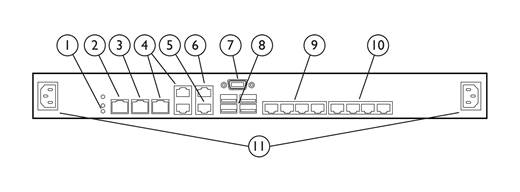
1x1Ex8 HPE IP Console Switch G2 with Virtual Media & CAC | |||
|
| |||
|
1. |
Power supply status indicator LEDs |
7. |
Local console VGA |
|
2. |
LAN 1 |
8. |
Local console USB ports |
|
3. |
LAN2 |
9. |
Target device ports (1-4) |
|
4. |
S1, S2, and S3 (reserved for future use) |
10. |
Target device ports (5-8) |
|
5. |
Tiering chain port |
11. |
Power Connectors A & B |
|
6. |
RJ-45 serial setup port |
|
|
|
| |||
|
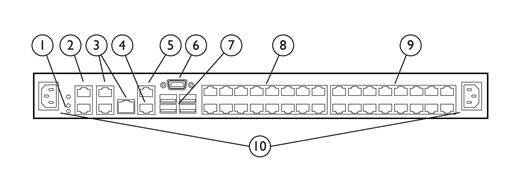
2x1Ex16 or 4x1Ex32 HPE IP Console Switch G2 with Virtual Media & CAC | ||||||
|
| ||||||
|
1. |
Power supply status indicator LEDs |
6. |
Local console VGA | |||
|
2. |
LAN 2 and LAN 2 |
7. |
Local console USB ports | |||
|
3. |
S1, S2, and S3 (reserved for future use) |
8. |
Target device ports (1-16) | |||
|
4. |
Tiering chain port |
9. |
Target device ports (7-32) | |||
|
5. |
RJ-45 serial setup port |
10. |
Power connectors A & B | |||
|
| ||||||
|
What's New | ||||||
|
New high speed USB interface adapter with CAC and virtual media compatibility | ||||||
|
| ||||||
|
Models | ||||||
|
HPE IP Console Switch G2 |
HPE 1x1Ex8 KVM IP Console Switch G2 with Virtual Media CAC Software |
AF620A | ||||
|
HPE 2x1Ex16 KVM IP Console Switch G2 with Virtual Media CAC Software |
AF621A | |||||
|
| ||||||
|
Additional HPE IP KVM Console Switch G2 with Virtual Media and CAC models | ||||||
|
HPE 4x1Ex32 KVM IP Console Switch G2 with Virtual Media CAC Software |
AF622A | |||||
|
| ||||||
|
At A Glance |
- Up to 32 target server ports per switch increases flexibility
- New video compression allows 1600x1200 @ 60hz or 1680 x 1050 @ 60hz 16-bit color for remote sessions without impacting performance - Increases cable distances at higher resolutions
- CAC support to the server - Dual-stack IPv6 with stateless auto configuration - Keyboard, video, mouse and virtual media activity is fully encrypted using 128-bit SSL, AES, DES, or DES3 for remote sessions - Remote console sessions to the data center can be shared by other remote users. Stealth mode can also be used by administrators to monitor remote sessions without announcing it for security reasons
- Microsoft Active Directory integration using LDAP is standard - Local security database on switch is also available for non LDAP implementations
- Administrators can map local media on a workstation to a remote server in the data center or remote office to easily perform application installations or upgrades - A USB CD-ROM, USB DVD, USB floppy drive, or USB key can be attached directly to the HPE IP Console Switch G2 with Virtual Media & CAC and mapped to an attached server - When used locally with the HPE 1U Rackmount Keyboard with USB or the HPE LCD8500, RKM USB drives can be connected to the front USB port on the keyboard for increased ease of use - Virtual media support requires the use of Virtual Media Interface Adapters
- New interface adapters support virtual media and provide CAC on ProLiant servers - Virtual Media Interface Adapters support USB 1.1 full speed.
- Two levels of tiering are available to support up to 1024 servers. When all tiers are comprised of virtual media compatible console switches and interface adapters, virtual media can be mapped to a server on any tier
- Supports HPE IP Console Switches with Virtual Media, HPE Server Console Switches G2 with Virtual Media, HPE Serial Console Servers, and legacy Cat5 based HPE IP Console Switches - Supports remote virtual media sessions - Compatible with Windows and Linux clients - No software to install on target servers |
Standard Features
|
Target Applications and Markets |
|
Network Administrators, System Administrators, Engineering Managers, Chief Information Officers, and Managers of Information Systems are all among the users who will see benefits from using the HPE family of console switches.
|
|
|
|
Features |
|
New Features:
Standard Features:
- Rear Rack Mount - HPE Console Switches may be mounted behind a HPE 1U Rackmount Keyboard, or the LCD8500 rack mounted console with slide rails provided with the switch. - Side Mount - Rails are provided for mounting the unit to the side of rack cabinets with side mounting capability
- USB 1.1 full speed protocol on both Virtual Media Interface Adapters - System also supports AF603A and AF604A
- PS/2 - USB mouse and keyboard - True VT100 Serial Console Support - BladeSystems support via front diagnostics connector
- HPE 1U Rackmount Keyboard with USB - HPE LCD8500 Rackmount Keyboard Monitor Notes: For more information please visit: https://www.hpe.com/us/en/integrated-systems/rack-power-cooling.html |
|
|
|
Tiered Configurations |
|
Tiering is the ability to connect one or more switches under a single switch at the top as in a pyramid. Tiering allows an administrator to access larger numbers of servers from a single local or remote console. The HPE IP Console Switch G2 with Virtual Media & CAC will support up to 2 levels of tiering under certain conditions
Notes: For more information on tiering HPE IP Console Switches please visit: https://www.hpe.com/us/en/integrated-systems/rack-power-cooling.html. |
|
|
|
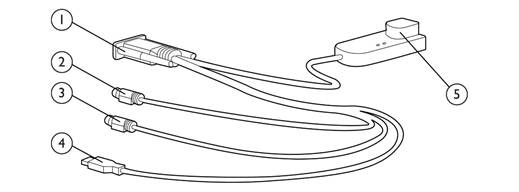
PS2/USB Virtual Media, CAC Interface Adapter (PN: AF624A) | |||
|
| |||
|
1. |
Video connector |
4. |
USB connector (for Virtual Media only) |
|
2. |
Mouse connector |
5. |
RJ-45 connector |
|
3. |
Keyboard connector |
|
|
|
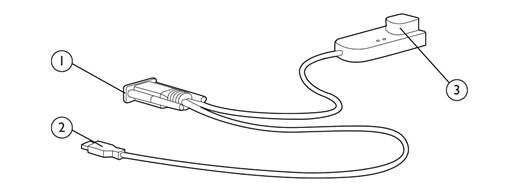
USB Virtual Media, CAC Interface Adapter (PN: AF629A) | |||
|
| |||
|
1. |
Video connector |
3. |
RJ-45 connector |
|
2. |
USB connector |
|
|
|
| |||
|
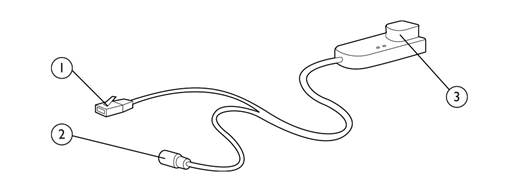
HPE KVM CNSL SRL/PWR G2 ITFC ADPTR (PN: AF625A) | |||
|
| |||
|
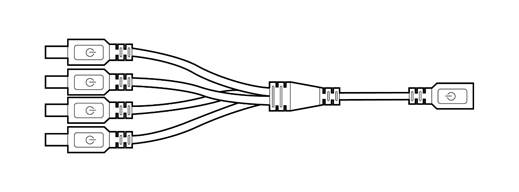
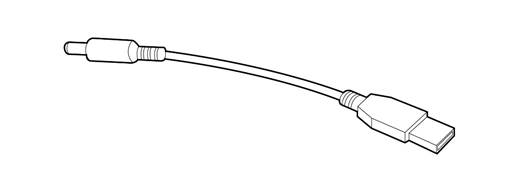
USB Coax Power Connector Cable which replaces AC Power Adapter | |||
|
| |||
|
| |||
|
1. |
RJ-45 serial connector (to RJ-45/DB9 adapter or to a Cisco appliance) |
3. |
RJ-45 connector (for CAT5 to switch) |
|
2. |
Power connector (mate to USB power connector or power supply) |
|
|
HPE Server Support
|
KVM Support |
|
HPE ProLiant Server Support |
|
All HPE ProLiant servers running any operating system are supported on all HPE IP Console Switches. |
|
|
|
HPE Integrity Server Support |
|
Integrity Server support is dependent on operating system and hardware configurations. For systems capable of displaying VGA graphics the USB Interface Adapters may be used. Some Integrity Servers may require an optional graphics adapter. |
|
|
|
HPE Unix Server Support |
|
HP9000 Servers can be managed using the Serial Interface G2 Adapter (PN: AF625A) connected to the RS-232 management port providing serial connection through the HPE IP Console Switch. |
|
Notes: For additional information on supported options for the HPE Integrity and HP9000 Servers please consult the HP9000, Integrity and carrier-grade servers Configuration Guide. |
|
|
|
HPE Serial Console Servers may also be used to support serially managed servers and devices. |
|
|
|
KVM Support with virtual media (requires Virtual Media Interface Adapter) |
|
HPE ProLiant Server Support for virtual media |
|
All HPE ProLiant servers capable of supporting USB storage devices and USB drive keys and running Microsoft Windows 2003 or later, RedHat 4 or later, or SLES 10 or later are supported. Requires Virtual Media Interface Adapter connected to a HPE Console Switch with Virtual Media. |
|
|
|
HPE Integrity Server Support for virtual media |
|
For systems running Windows 2003 capable of displaying VGA graphics the USB Virtual Media Interface Adapter may be used. Some Integrity Servers may require an optional graphics adapter. |
|
Notes: Some hardware configurations and/or operating systems may only transfer virtual media at USB 1.1 speeds. |
Service and Support
|
HPE Services No matter where you are in your digital transformation journey, you can count on HPE Services to deliver the expertise you need when, where and how you need it. From planning to deployment, ongoing operations and beyond, our experts can help you realize your digital ambitions. https://www.hpe.com/services
|
|
|
|
Consulting Services No matter where you are in your journey to hybrid cloud, experts can help you map out your next steps. From determining what workloads should live where, to handling governance and compliance, to managing costs, our experts can help you optimize your operations. https://www.hpe.com/services/consulting
|
|
|
|
HPE Managed Services HPE runs your IT operations, providing services that monitor, operate, and optimize your infrastructure and applications, delivered consistently and globally to give you unified control and let you focus on innovation. HPE Managed Services | HPE
|
|
|
|
Operational services Optimize your entire IT environment and drive innovation. Manage day-to-day IT operational tasks while freeing up valuable time and resources. Meet service-level targets and business objectives with features designed to drive better business outcomes. https://www.hpe.com/services/operational
|
|
|
|
HPE Complete Care Service HPE Complete Care Service is a modular, edge-to-cloud IT environment service designed to help optimize your entire IT environment and achieve agreed upon IT outcomes and business goals through a personalized experience. All delivered by an assigned team of HPE Services experts. HPE Complete Care Service provides:
https://www.hpe.com/services/completecare
|
|
|
|
HPE Tech Care Service HPE Tech Care Service is the operational support service experience for HPE products. The service goes beyond traditional support by providing access to product specific experts, an AI driven digital experience, and general technical guidance to not only reduce risk but constantly search for ways to do things better. HPE Tech Care Service delivers a customer-centric, AI driven, and digitally enabled customer experience to move your business forward. HPE Tech Care Service is available in three response levels. Basic, which provides 9x5 business hour availability and a 2-hour response time. Essential which provides a 15-minute response time 24x7 for most enterprise level customers, and Critical which includes a 6-hour repair commitment where available and outage management response for severity 1 incidents. https://www.hpe.com/services/techcare
|
|
|
|
HPE Lifecycle Services HPE Lifecycle Services provide a variety of options to help maintain your HPE systems and solutions at all stages of the product lifecycle. A few popular examples include:
Notes:
To review the list of Lifecycle Services available for your product
go to: For a list of the most frequently purchased services using service credits, see the HPE Service Credits Menu
|
|
|
|
Other Related Services from HPE Services: HPE Education Services Training and certification designed for IT and business professionals across all industries. Broad catalogue of course offerings to expand skills and proficiencies in topics ranging from cloud and cybersecurity to AI and DevOps. Create learning paths to expand proficiency in a specific subject. Schedule training in a way that works best for your business with flexible continuous learning options. https://www.hpe.com/services/training |
|
|
|
Defective Media Retention An option available with HPE Complete Care Service and HPE Tech Care Service and applies only to Disk or eligible SSD/Flash Drives replaced by HPE due to malfunction. Consult your HPE Sales Representative or Authorized Channel Partner of choice for any additional questions and services options. |
|
|
|
Parts and Materials HPE will provide HPE-supported replacement parts and materials necessary to maintain the covered hardware product in operating condition, including parts and materials for available and recommended engineering improvements. Parts and components that have reached their maximum supported lifetime and/or the maximum usage limitations as set forth in the manufacturer's operating manual, product quick-specs, or the technical product data sheet will not be provided, repaired, or replaced as part of these services. |
|
|
|
How to Purchase Services Services are sold by Hewlett Packard Enterprise and Hewlett Packard Enterprise Authorized Service Partners:
|
|
|
|
AI Powered and Digitally Enabled Support Experience Achieve faster time to resolution with access to product-specific resources and expertise through a digital and data driven customer experience Sign into the HPE Support Center experience, featuring streamlined self-serve case creation and management capabilities with inline knowledge recommendations. You will also find personalized task alerts and powerful troubleshooting support through an intelligent virtual agent with seamless transition when needed to a live support agent. https://support.hpe.com/hpesc/public/home/signin |
|
|
|
Consume IT On Your Terms HPE GreenLake edge-to-cloud platform brings the cloud experience directly to your apps and data wherever they are-the edge, colocations, or your data center. It delivers cloud services for on-premises IT infrastructure specifically tailored to your most demanding workloads. With a pay-per-use, scalable, point-and-click self-service experience that is managed for you, HPE GreenLake edge-to-cloud platform accelerates digital transformation in a distributed, edge-to-cloud world.
To learn more about HPE Services, please contact your Hewlett Packard Enterprise sales representative or Hewlett Packard Enterprise Authorized Channel Partner. Contact information for a representative in your area can be found at "Contact HPE" https://www.hpe.com/us/en/contact-hpe.html For more information www.hpe.com/services |
|
|
Related Options
|
Interface Adapters for Virtual Media and CAC |
HPE KVM Console USB 2.0 Virtual Media CAC Interface Adapter |
AF629A |
|
|
|
|
|
Interface Adapters for Serial Connectivity |
HPE KVM Console Serial/Power G2 Interface Adapter |
AF625A |
|
|
|
|
|
Interface Adapters |
HPE KVM Console USB/Display Port Interface Adapter |
AF654A |
|
|
| |
|
HPE LCD8500 1U Rackmount Console Kit Models |
HPE LCD8500 1U US Rackmount Console Kit |
AF630A |
|
HPE LCD8500 1U UK Rackmount Console Kit |
AF631A | |
|
HPE LCD8500 1U FR Rackmount Console Kit |
AF633A | |
|
HPE LCD8500 1U JP Rackmount Console Kit |
AF642A | |
|
HPE LCD8500 1U INTL Rackmount Console Kit |
AF644A | |
|
|
|
|
|
CAT5e Cables |
HPE 6ft Qty 8 KVM CAT5 Cable |
263474-B22 |
|
HPE 12ft Qty 8 KVM CAT5 Cable |
263474-B23 | |
|
|
|
|
|
HPE Tech Care |
HPE Install Rack and Rack Options Service |
U2871E |
Technical Specifications
|
HPE IP Console Switch G2 with Virtual Media & CAC |
Dimensions |
Height |
1.72 in (4.36 cm) | |||||||||||||||||||||||||||||||||||||||||||||||||||||||||||||||||||||||||||||||||||||||||||||||||||
|
Width |
17 in (43.8 cm) | |||||||||||||||||||||||||||||||||||||||||||||||||||||||||||||||||||||||||||||||||||||||||||||||||||||
|
Depth |
9.2 in (23.68 cm) | |||||||||||||||||||||||||||||||||||||||||||||||||||||||||||||||||||||||||||||||||||||||||||||||||||||
|
Weight |
7.0 lb (3.2 kg) 8 & 16 Port, 7.6 lb (3.4 kg) 32 Port | |||||||||||||||||||||||||||||||||||||||||||||||||||||||||||||||||||||||||||||||||||||||||||||||||||||
|
Power Requirements |
Rated Voltage |
100 to 240V AC | ||||||||||||||||||||||||||||||||||||||||||||||||||||||||||||||||||||||||||||||||||||||||||||||||||||
|
Rated Frequency |
50 to 60 Hz | |||||||||||||||||||||||||||||||||||||||||||||||||||||||||||||||||||||||||||||||||||||||||||||||||||||
|
Rated Input Current |
0.5 to 0.25A | |||||||||||||||||||||||||||||||||||||||||||||||||||||||||||||||||||||||||||||||||||||||||||||||||||||
|
Input Power |
100W (max) | |||||||||||||||||||||||||||||||||||||||||||||||||||||||||||||||||||||||||||||||||||||||||||||||||||||
|
Heat |
340 BTU/hr (max) | |||||||||||||||||||||||||||||||||||||||||||||||||||||||||||||||||||||||||||||||||||||||||||||||||||||
|
Temperature Range |
Maximum Ambient Operating Temperature |
50° to 122° F (10° to 50° C) | ||||||||||||||||||||||||||||||||||||||||||||||||||||||||||||||||||||||||||||||||||||||||||||||||||||
|
Ambient Storage and |
68° to 158° F (20° to 70° C) | |||||||||||||||||||||||||||||||||||||||||||||||||||||||||||||||||||||||||||||||||||||||||||||||||||||
|
Temperature |
Operating |
50° to 122° F (10° to 50° C) | ||||||||||||||||||||||||||||||||||||||||||||||||||||||||||||||||||||||||||||||||||||||||||||||||||||
|
Transit |
-22° to 158° F (-20° to 70° C) | |||||||||||||||||||||||||||||||||||||||||||||||||||||||||||||||||||||||||||||||||||||||||||||||||||||
|
Storage |
-4° to 158° F (-20° to 70° C) | |||||||||||||||||||||||||||||||||||||||||||||||||||||||||||||||||||||||||||||||||||||||||||||||||||||
|
Relative Humidity |
Operating |
20% to 80% | ||||||||||||||||||||||||||||||||||||||||||||||||||||||||||||||||||||||||||||||||||||||||||||||||||||
|
Non-operating |
5% to 95% | |||||||||||||||||||||||||||||||||||||||||||||||||||||||||||||||||||||||||||||||||||||||||||||||||||||
|
Video Modes Supported |
VGA, SVGA, XGA |
| ||||||||||||||||||||||||||||||||||||||||||||||||||||||||||||||||||||||||||||||||||||||||||||||||||||
|
Network Speed |
10/100/1000 Mb/s |
| ||||||||||||||||||||||||||||||||||||||||||||||||||||||||||||||||||||||||||||||||||||||||||||||||||||
|
| ||||||||||||||||||||||||||||||||||||||||||||||||||||||||||||||||||||||||||||||||||||||||||||||||||||||
|
CAT 5 Cable lengths and Video Resolution Restrictions | ||||||||||||||||||||||||||||||||||||||||||||||||||||||||||||||||||||||||||||||||||||||||||||||||||||||
| ||||||||||||||||||||||||||||||||||||||||||||||||||||||||||||||||||||||||||||||||||||||||||||||||||||||
|
| ||||||||||||||||||||||||||||||||||||||||||||||||||||||||||||||||||||||||||||||||||||||||||||||||||||||
|
Environment-friendly Products and Approach - End-of-life Management and Recycling Hewlett Packard Enterprise offers end-of-life product return, trade-in, and recycling programs, in many geographic areas, for our products. Products returned to Hewlett Packard Enterprise will be recycled, recovered or disposed of in a responsible manner. The EU WEEE Directive (2012/19/EU) requires manufacturers to provide treatment information for each product type for use by treatment facilities. This information (product disassembly instructions) is posted on the Hewlett Packard Enterprise web site. These instructions may be used by recyclers and other WEEE treatment facilities as well as Hewlett Packard Enterprise OEM customers who integrate and re-sell Hewlett Packard Enterprise equipment. | ||||||||||||||||||||||||||||||||||||||||||||||||||||||||||||||||||||||||||||||||||||||||||||||||||||||
Summary of Changes
|
Date |
Version History |
Action |
Description of Change |
|
|
04-Dec-2023 |
Version 16 |
Changed |
Service and Support Section was updated |
|
|
15-Nov-2021 |
Version 15 |
Changed |
Service and Support Section was updated |
|
|
01-Oct-2018 |
Version 14 |
Changed |
Overview were revised. |
|
|
02-Jul-2018 |
Version 13 |
Changed |
Models Section was Updated |
|
|
05-Mar-2018 |
Version 12 |
Changed |
Overview and Standard Features were revised. |
|
|
23-Oct-2017 |
Version 11 |
Changed |
Care Pack naming and Service and Support- Parts and Materials updated. |
|
|
31-Mar-2016 |
Version 10 |
Changed |
Related Options section was revised. |
|
|
31-Mar-2014 |
Version 9 |
Changed |
The part number for HP KVM Console USB Virtual Media CAC Interface Adapter was changed and HP KVM USB2 1-pack Interface Adapter was removed from Interface Adapters for Virtual Media. |
|
|
20-Nov-2013 |
Version 8 |
Changed |
The title has changed. |
|
|
27-Jan-2011 |
Version 7 |
Removed |
Removed a NOTE. |
|
|
20-Jun-2011 |
Version 6 |
Changed |
Model and Related Options product descriptions were revised Product Features was changed to Standard Features HPE Services operational, and Warranty Information was removed from Service and Support |
|
|
06-Apr-2011 |
Version 5 |
Changed |
Corrected a part number on one of the Images. |
|
|
16-Feb-2011 |
Version 4 |
Removed |
BladeSystem p-Class KVM Interface Adapter - 1 pack and Serial Interface adapter - 1 Pack with power supply were removed from Interface Adapters. |
|
|
05-Apr-2010 |
Version 3 |
Changed |
The Overview text was updated |
|
|
24-Mar-2010 |
Version 2 |
Changed |
QuickSpecs was updated |
|
|
16-Nov-2009 |
Version 1 |
New |
New QuickSpecs |
|
Copyright
|
|
| |||||
|
|
|
© Copyright 2023 Hewlett Packard Enterprise Development LP. The information contained herein is subject to change without notice. The only warranties for Hewlett Packard Enterprise products and services are set forth in the express warranty statements accompanying such products and services. Nothing herein should be construed as constituting an additional warranty. Hewlett Packard Enterprise shall not be liable for technical or editorial errors or omissions contained herein.
c04168374 - 13474 - Worldwide - V16 - 04-December-2023 |