




























HPE Standard Analog KVM: технические характеристики и документация
В архивеOverview
|
HPE Standard Analog KVM |
|
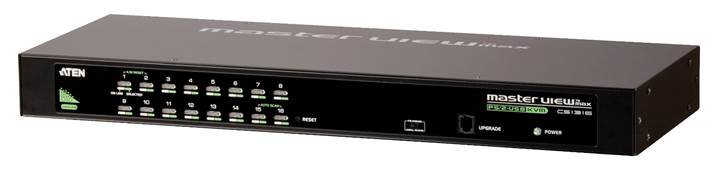
The ATEN G2 Standard Series Analog KVM Switch for HPE offers a cost-effective solution for consolidated server access, management, and control in desktop and rack-mount environments. Target device selection is easy with 3 options: port selection through push-buttons on the switch, hotkey combinations from the keyboard, or a menu-driven on-screen display. This switch easily connects servers with KVM consoles such as the HPE LCD8500 1U Rackmount Console kit, or with other external monitor, keyboard, and mouse configurations.
The ATEN G2 switch combines multi-platform OS support with a selection of models featuring 4, 8, or 16 ports. This switch features two-level password security for authorized users to view and control connected devices, while allowing creation of up to 4 user profiles and an administrator profile. All ATEN G2 KVM Switch models are backed by HPE Tech Care extensions, which match the server's warranty and service levels at no additional cost. |
|
|
|
|
|
HPE Standard Analog KVM |
|
|
|
Why buy an ATEN switch from HPE?
|
|
|
|
Models | |
|
ATEN G2 Analog KVM Switches for HPE Servers |
|
|
ATEN CS1304 G2 0x1x4 Analog KVM Switch for HPE Servers |
Q1F44A |
|
ATEN CS1308 G2 0x1x8 Analog KVM Switch for HPE Servers |
Q1F45A |
|
ATEN CS1316 G2 0x1x16 Analog KVM Switch for HPE Servers |
Q1F46A |
|
| |
|
What's in the box Each ATEN G2 Analog KVM Switch for HPE ships with the following items:
|
|
|
| |
|
| |||
|
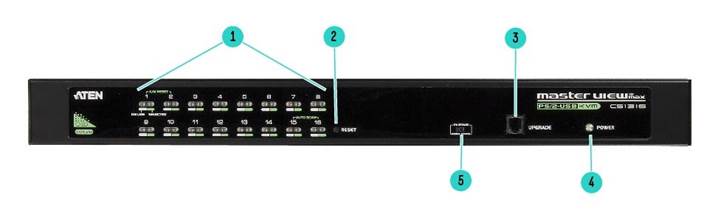
HPE Standard Analog KVM - Front View | |||
|
1. |
Port LEDs (4, 8, or 16 LEDs depending on model) |
4. |
Power LED |
|
2. |
Reset Button |
5. |
Firmware upgrade recovery switch |
|
3. |
Firmware upgrade port (RJ-11 female) |
|
|
|
Notes: This is a photo of the 16 port switch, CS1316. CS1304, CS1308, CS1316 share the same layout. The only differences are CS1304 has 4 KVM ports / LEDs; while CS1308 has 8 KVM ports / LEDs and CS1316 has 16 KVM ports / LEDs | |||
|
| |||
|
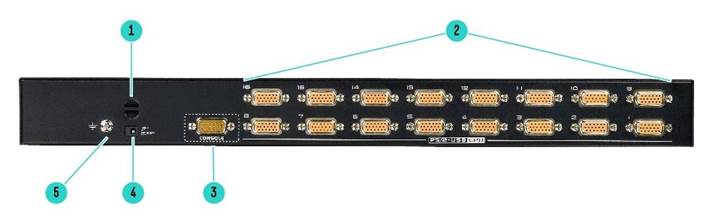
HPE Standard Analog KVM - Rear View | |||
|
| |||
|
1. |
Cable tie slot | ||
|
2. |
Server ports (SPHD-15 female): 4, 8, or 16 ports depending on model | ||
|
3. |
KVM Console port (SPHD-18 male) | ||
|
4. |
Power jack | ||
|
5. |
Grounding terminal | ||
|
Notes: This is a photo of the 16 port switch, CS1316. CS1304, CS1308, CS1316 share the same layout. The only differences are CS1304 has 4 KVM ports / LEDs; while CS1308 has 8 KVM ports / LEDs and CS1316 has 16 KVM ports / LEDs | |||
|
| |||
|
|
|
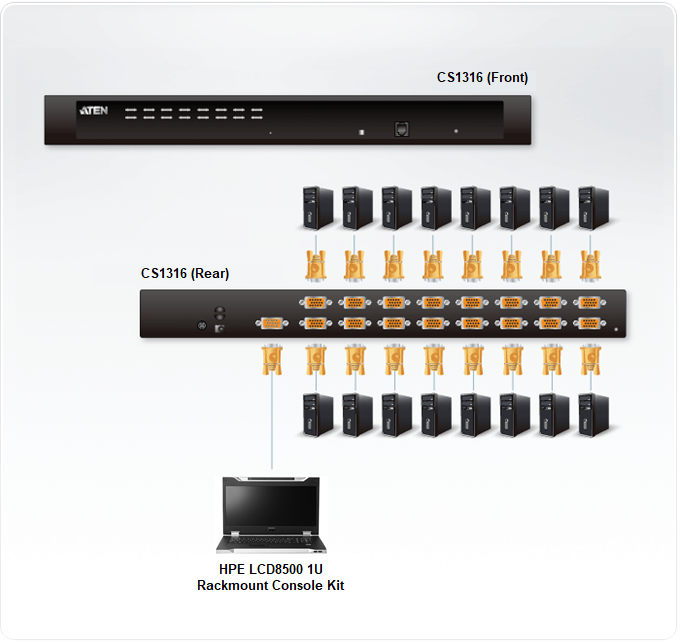
Connecting servers to the KVM Switch Diagram |
|
Notes: Servers or other target computers with VGA or DisplayPort outputs for video, and USB outputs for mouse/keyboard can be connected to one of the SPHD-15 Server Ports (4, 8, or 16 depending on switch model) with an SPHD to VGA/USB or SPHD to DisplayPort/USB cable. Notes: KVM consoles such as HPE LCD8500 1U Rackmount Console kit or a traditional monitor/keyboard/mouse can be connected to the switch's KVM Console port (SPHD-18) with the included console cable. Notes: See Related Options section for cable SKU numbers |
|
|
|
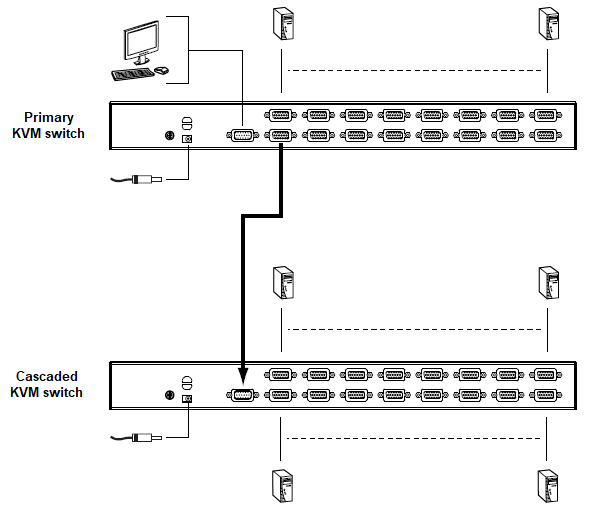
Using HPE KVM Analog Switch in a Tiered Configuration To control even more computers, additional switches can be cascaded from the primary HPE Analog KVM Switch. For the 16 port version, up to 16 additional switches can be cascaded, supporting control of up to 256 computers from a single primary console in a completed installation. The connection from the primary KVM switch Console Port to the cascaded KVM switch can be accomplished with the Console Cable (included with every switch) plus an ATEN 2L-5202U VGA/USB to SPHD-15 1.8m Interface Cable (Q5T68A). The below diagram shows a CS1316 cascade diagram with a single KVM switch on layer 2, a configuration which supports 31 PCs (15 PCs connected to primary KVM switch, and an additional 16 PCs connected to the second "cascaded" KVM switch, for a total of 31 connected PCs). Please refer to the user manual for more details. |
|
|
|
KVM Analog Switch Tiered Configuration Diagram |
|
|
|
XXXXXX-X21 is SKU designation formed by a common six digit part number and a -X21 suffix that identifies a SKU that is available across multiple server family lines. Refer to the table below to find the SKU suffix that applies to the specific server product line this option can be ordered with. | ||
|
-B21 |
-H21 |
-K21 |
|
COMPUTE Server Line |
SPECIALIZED COMPUTE Server Line |
STORAGE Line |
|
HPE Cloudline CL2100/CL2200/CL2800/CL3100/CL4100/CL5200/CL5800 Servers HPE Composable Cloud for ProLiant DL HPE ProLiant BL460c/BL660c Servers HPE ProLiant DL20/DL160/DL180 Servers HPE ProLiant DL325/DL360/DL380/DL385/DL560/DL580 Servers HPE ProLiant DX360/DX380 Servers HPE ProLiant MicroServer HPE ProLiant for Microsoft Azure Stack HPE ProLiant ML30/ML110/ML350 Servers HPE Synergy 480/660 Systems HPE ProLiant DX170r/DX190r, DX2000 Servers HPE ProLiant DX560 Gen10 server HPE ProLiant DX4200 Gen10 server
|
HPE Apollo 35/40/70 Systems HPE Apollo 2000/6000 Servers HPE XL170r/XL190r/XL270d (Apollo 6500) Gen10 Server for BlueData Software HPE Converged System 300/500/700/750 HPE Edgeline Systems and Servers HPE Integrity BL860c i6/BL870c i6/BL890c i6 Server Blades HPE Integrity MC990 X Server HPE Integrity rx2800 i6 Server HPE Integrity Superdome HPE SGI 8600 System HPE Solutions for SAP HANA (TDI) |
HPE Apollo 4200 Gen9/Gen10 Servers HPE Apollo 4200 Gen10 LFF Server for BlueData Software HPE Apollo 4510 Gen10 System HPE D2220sb/D2500sb Storage Blade HPE D3000/D6020/D8000 Disk Enclosures HPE Scalable Object Storage with Scality RING HPE SimpliVity 2600 HPE SimpliVity 325/380 Gen10 HPE Storage File Controllers HPE StoreEasy 1460/1560/1650/1660/1860
Disclaimer: This may not be a complete listing of applicable servers |
Standard Features
|
HPE Standard Analog KVM switches are suitable for installation in most IT environments
|
|
|
|
Easy Access and Control: HPE Standard Analog KVM Switches support three different methods to select your target device
|
|
|
|
HPE Standard Analog KVM switches allow users to access up to 256 servers through a single KVM installation
|
|
|
|
Strong Security: HPE Standard Analog KVM Switches provide security features to prevent unauthorized users
|
|
|
|
Features and Benefits
|
|
|
|
Operating System Support | ||
|
Operating System: |
Version: | |
|
Windows |
2000 and higher | |
|
Windows Server |
2008 R2, 2012 R2, 2019 | |
|
Linux |
Red Hat |
7.1 and higher |
|
RHEL |
7.6 | |
|
SLES |
12 SP3 | |
|
SuSE |
8.2 and higher | |
|
Mandriva (Mandrake) |
9.0 and higher | |
|
ESXi |
6.7 | |
|
UNIX |
AIX |
4.3 and higher |
|
FreeBSD |
4.2 and higher | |
|
Sun Solaris |
Solaris 11.3 | |
|
Novell |
Netware |
5.0 and higher |
|
Mac |
OS 9 and higher | |
|
Ubuntu |
16.04 | |
|
CentOS |
7 | |
|
OpenSUSE |
13.2 | |
|
|
Service and Support
|
HPE Pointnext - Service and Support Get the most from your HPE Products. Get the expertise you need at every step of your IT journey with HPE Pointnext Services. We help you lower your risks and overall costs using automation and methodologies that have been tested and refined by HPE experts through thousands of deployments globally. HPE Pointnext Advisory Services, focus on your business outcomes and goals, partnering with you to design your transformation and build a roadmap tuned to your unique challenges. Our Professional and Operational Services can be leveraged to speed up time-to-production, boost performance and accelerate your business. HPE Pointnext specializes in flawless and on-time implementation, on-budget execution, and creative configurations that get the most out of software and hardware alike.
Consume IT on your terms HPE GreenLake brings the cloud experience directly to your apps and data wherever they are-the edge, colocations, or your data center. It delivers cloud services for on-premises IT infrastructure specifically tailored to your most demanding workloads. With a pay-per-use, scalable, point-and-click self-service experience that is managed for you, HPE GreenLake accelerates digital transformation in a distributed, edge-to-cloud world.
Managed services to run your IT operations HPE GreenLake Management Services provides services that monitor, operate, and optimize your infrastructure and applications, delivered consistently and globally to give you unified control and let you focus on innovation.
|
|
|
|
Recommended Services HPE Pointnext Tech Care. HPE Pointnext Tech Care is the new operational service experience for HPE products. Tech Care goes beyond traditional support by providing access to product specific experts, an AI driven digital experience, and general technical guidance to not only reduce risk but constantly search for ways to do things better. HPE Pointnext Tech Care has been reimagined from the ground up to support a customer-centric, AI driven, and digitally enabled customer experience to move your business forward. HPE Pointnext Tech Care is available in three response levels. Basic, which provides 9x5 business hour availability and a 2 hour response time. Essential which provides a 15 minute response time 24x7 for most enterprise level customers, and Critical which includes a 6 hour repair commitment where available and outage management response for severity 1 incidents. https://www.hpe.com/services/techcare
HPE Pointnext Complete Care HPE Pointnext Complete Care is a modular, edge-to-cloud IT environment service that provides a holistic approach to optimizing your entire IT environment and achieving agreed upon IT outcomes and business goals through a personalized and customer-centric experience. All delivered by an assigned team of HPE Pointnext Services experts. HPE Pointnext Complete Care provides:
https://www.hpe.com/services/completecare
|
|
|
|
Warranty When you need it, use outstanding HPE support services for your whole data center environment. With HPE Pointnext operational services, have the security of knowing that your KVM Switch will be covered at the same service level and coverage period as your HPE server. ATEN G2 Analog KVM Switches are backed by a 3-year warranty, which covers depot repair of the switch, or direct replacement of the switch. |
|
|
|
For more information To learn more on services for HPE Options, please contact your Hewlett Packard Enterprise sales representative or Hewlett Packard Enterprise Authorized Channel Partner. Or visit: https://www.hpe.com/us/en/support.html or https://www.hpe.com/us/en/services/operational.html |
|
|
Related Options
|
Related Options: | |
|
Server to switch interface cable |
|
|
ATEN 2L-5202U VGA/USB to SPHD-15 1.8m 1-pack Interface Cable |
Q5T68A |
|
Notes: Primary interface cable to connect server port on switch to the VGA and USB outputs on a target server/device |
|
|
ATEN 2L-5202U4 VGA/USB to SPHD-15 1.8m 4-pack Interface Cable |
Q5T69A |
|
Notes: 4 pack of the primary interface cable to connect server port on switch to the VGA and USB outputs on a target server/device |
|
|
ATEN CV190 DisplayPort/USB to SPHD-15 1.8m 1-pack Interface Cable |
Q5T70A |
|
Notes: primary interface cable to connect server port on switch to the DisplayPort and USB outputs on a target server/device |
|
|
LCD KVM Console |
|
|
HPE LCD8500 1U US Rackmount Console Kit |
AF630A |
|
HPE LCD8500 1U UK Rackmount Console Kit |
AF631A |
|
HPE LCD8500 1U DE Rackmount Console Kit |
AF632A |
|
HPE LCD8500 1U FR Rackmount Console Kit |
AF633A |
|
HPE LCD8500 1U JP Rackmount Console Kit |
AF642A |
|
HPE LCD8500 1U RU Rackmount Console Kit |
AF643A |
|
HPE LCD8500 1U INTL Rackmount Console Kit |
AF644A |
|
HPE LCD8500 1U US TAA Rackmount Console Kit |
AF645A |
|
| |
|
IEC locking jumper cords |
|
|
HPE C13 - C14 WW 250V 10Amp 0.7m Black Locking Power Cord |
Q0P67A |
|
HPE C13 - C14 WW 250V 10Amp 1.4m Black Locking Power Cord |
Q0P68A |
|
HPE C13 - C14 WW 250V 10Amp 2m Black Locking Power Cord |
Q0P69A |
|
HPE C13 - C14 WW 250V 10Amp 3m Black Locking Power Cord |
Q0P70A |
|
Notes: These are single pack cables |
|
|
HPE C13 - C14 WW 250V 10Amp 0.7m Black 6-pack Locking Power Cord |
Q0Q02A |
|
HPE C13 - C14 WW 250V 10Amp 1.4m Black 6-pack Locking Power Cord |
Q0Q03A |
|
HPE C13 - C14 WW 250V 10Amp 2m Black 6-pack Locking Power Cord |
Q0Q04A |
|
HPE C13 - C14 WW 250V 10Amp 3m Black 6-pack Locking Power Cord |
Q0Q05A |
|
Notes: These are 6 - packs of cables |
|
|
| |
|
HPE Tech Care |
|
|
HPE Install Rack and Rack Options Service |
U2871E |
|
| |
Technical Specifications
|
Function |
CS1304 |
CS1308 |
CS1316 | |||
|
Computer Connections |
4 |
8 |
16 | |||
|
Port selection |
Multi-lingual On Screen Display (OSD), Hot-key, Push-button | |||||
|
Connectors |
Console Port |
Keyboard |
1 x SPHD-18 Male (Yellow) | |||
|
Video | ||||||
|
Mouse | ||||||
|
KVM Ports |
Keyboard |
4 x SPHD-15 Female (Yellow) |
8 x SPHD-15 Female (Yellow) |
16 x SPHD-15 Female (Yellow) | ||
|
Video | ||||||
|
Mouse | ||||||
|
F/W Upgrade |
1 x RJ-11 Female (Black) | |||||
|
Power |
1 x DC Jack | |||||
|
Push-buttons |
Port selection |
4 |
8 |
16 | ||
|
Firmware upgrade recovery switch |
Left for Normal operation, right for Recover operation | |||||
|
LEDs |
On Line |
4 (Orange) |
8 (Orange) |
16 (Orange) | ||
|
Selected |
4 (Green) |
8 (Green) |
16 (Green) | |||
|
Power |
1 (Dark Green) | |||||
|
Emulation |
Keyboard/Mouse |
USB | ||||
|
Video |
Maximum resolution of 2048 x 1536; DDC2B | |||||
|
Scan Interval |
1 to 255 Seconds | |||||
|
Power Consumption |
DC 5.3 V; 5 W |
DC 5.3 V; 5 W |
DC 5.3 V; 6.6 W | |||
|
Environment |
Operating Temperature |
0-50°C | ||||
|
Storage Temperature |
-20-60°C | |||||
|
Humidity |
0-80% RH, Non-condensing | |||||
|
Physical Properties
|
Housing |
Metal | ||||
|
Weight |
(4.16 lbs) 1.89 kg |
(4.16 lbs) 1.89 kg |
(4.63 lbs) 2.10 kg | |||
|
Dimensions (L x W x H) |
43.72 x 16.13 x 4.40 cm |
43.72 x 16.13 x 4.40 cm |
43.72 x 16.13 x 4.40 cm | |||
|
1.73 x 17.21 x 6.35 in |
1.73 x 17.21 x 6.35 in |
1.73 x 17.21 x 6.35 in | ||||
|
|
|
Environment-friendly Products and Approach - End-of-life Management and Recycling Hewlett Packard Enterprise offers end-of-life product return, trade-in, and recycling programs, in many geographic areas, for our products. Products returned to Hewlett Packard Enterprise will be recycled, recovered or disposed of in a responsible manner. The EU WEEE Directive (2012/19/EU) requires manufacturers to provide treatment information for each product type for use by treatment facilities. This information (product disassembly instructions) is posted on the Hewlett Packard Enterprise web site. These instructions may be used by recyclers and other WEEE treatment facilities as well as Hewlett Packard Enterprise OEM customers who integrate and re-sell Hewlett Packard Enterprise equipment. |
|
|
Summary of Changes
|
Date |
Version History |
Action |
Description of Change |
|
15-Nov-2021 |
Version 2 |
Changed |
Service and Support Section was updated |
|
02-Dec-2019 |
Version 1 |
New |
New QuickSpecs |
Copyright
|
|
| ||||||||||||
|
|
|
© Copyright 2021 Hewlett Packard Enterprise Development LP. The information contained herein is subject to change without notice. The only warranties for Hewlett Packard Enterprise products and services are set forth in the express warranty statements accompanying such products and services. Nothing herein should be construed as constituting an additional warranty. Hewlett Packard Enterprise shall not be liable for technical or editorial errors or omissions contained herein.
a00073556enw - 16504 - Worldwide - V2 - 15-November-2021 | ||||||||||||



