HPE Virtual Connect FlexFabric-20/40 F8 Module: технические характеристики и документация
В архивеOverview
|
HPE Virtual Connect FlexFabric-20/40 F8 Module for c-Class BladeSystem | |||
|
HPE Virtual Connect FlexFabric-20/40 F8 Modules are the simplest, most flexible way to connect virtualized server blades to data or storage networks. VC FlexFabric-20/40 F8 modules eliminate up to 95% of network sprawl at the server edge with one device that converges traffic inside enclosures and directly connects to external LANs and SANs. Using Flex-10 and Flex-20 technology with Fibre Channel over Ethernet and accelerated iSCSI, these modules converge traffic over high-speed 10Gb/20Gb connections to servers with HPE FlexFabric Adapters. Each redundant pair of Virtual Connect FlexFabric modules provide eight adjustable downlink connections ( six Ethernet and two Fibre Channel, or six Ethernet and two iSCSI or eight Ethernet) to dual-port 10Gb/20Gb FlexFabric Adapters on each server. Up to twelve uplinks with eight Flexport and four QSFP+ interfaces, without splitter cables, are available for connection to upstream Ethernet and Fibre Channel switches. Including splitter cables up to 24 uplinks are available for connection to upstream Ethernet and Fibre Channel. VC FlexFabric-20/40 F8 modules avoid the confusion of traditional and other converged network solutions by eliminating the need for multiple Ethernet and Fibre Channel switches, extension modules, cables and software licenses. Also, Virtual Connect wire-once connection management is built-in enabling server adds, moves and replacement in minutes instead of days or weeks. | |||
|
| |||
|
| |||
|
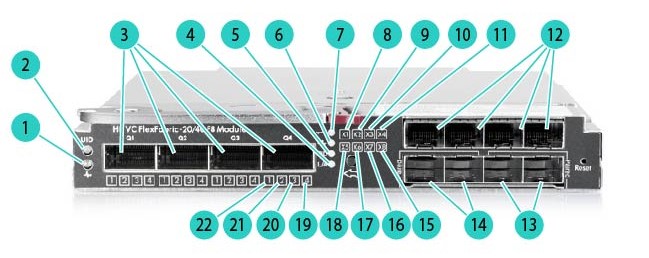
Figure 1 Virtual Connect FlexFabric-20/40 F8 Module Front Bezel | |||
|
1. |
Module status |
12. |
X1-X4 Flexports |
|
2. |
Module locator (UID) |
13. |
X7-X8 paired Flexports |
|
3. |
Q1-Q4 QSFP+ 40Gb ports |
14. |
X5-X6 paired Flexports |
|
4. |
L/A |
15. |
X8 port status |
|
5. |
PID |
16. |
X7 port status |
|
6. |
FC mode |
17. |
X6 port status |
|
7. |
Ethernet |
18. |
X5 port status |
|
8. |
X1 port status |
19. |
4th 10Gb port status for QSFP+ Q4 in 4x10 mode |
|
9. |
X2 port status |
20. |
3rd 10Gb port status for QSFP+ Q4 in 4x10 mode |
|
10. |
X3 port status |
21. |
2nd 10Gb port status for QSFP+ Q4 in 4x10 mode |
|
11. |
X4 port status |
22. |
1st 10Gb port status for QSFP+ Q4 in 4x10 mode |
|
| |||
|
What's New
- Support for latest browser versions - CLI/GUI to disable TLS 1.0/1.1, and/or enabling all TLS versions in non-FIPS mode - Addressing security vulnerabilities and several other bug fixes If you are planning to use VC 4.60 firmware in a VCEM environment, an upgrade to VCEM 7.6 is recommended. | |
|
| |
|
Models | |
|
HPE Virtual Connect FlexFabric-20/40 F8 Module for c-Class BladeSystem |
691367-B21 |
|
HPE Virtual Connect FlexFabric-20/40 F8 Module for c-Class BladeSystem with TAA |
691367-B22 |
|
| |
Standard Features
|
Supported Products |
|
Compatibility HPE BladeSystem c-Class Virtual Connect Firmware v4.50 and the HPE Virtual Connect FlexFabric-20/40 F8 Module support the following hardware. |
|
HPE Servers HPE
ProLiant and Integrity server blades with their supported Ethernet adapters
and the following server blades with supported FlexFabric (integrated
or mezzanine) and Flex-10 based Ethernet Adapters
Notes: BL860c and BL870c are not supported effective VC 4.30 |
|
HPE Network Adapters FlexFabric adapter:
Ethernet and Flex-10 Ethernet adapters:
Notes: Consult individual server blade QuickSpecs for specific adapter support. | |
|
HPE BladeSystem c-Class Enclosures
|
|
|
Virtual Connect Firmware Virtual
Connect Firmware v4.50 is recommended with the following release sets
for HPE ProLiant and HPE Integrity environments.
-
Recommended
HPE Smart Update Firmware:
|
|
|
| |
|
Mezzanines | |
|
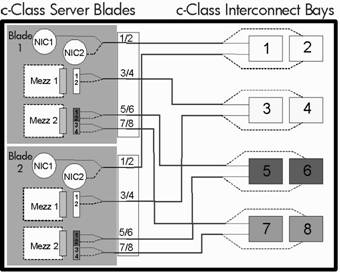
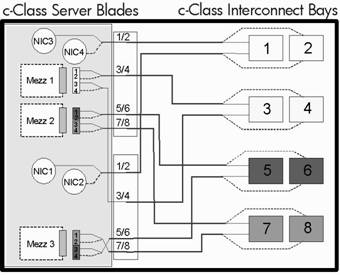
c7000 Port Mapping Port mapping differs slightly between full height and half height server blades due to the support for additional Mezzanine cards on the full height version.
| |
|
|
|
|
Half Height Server Blade |
Full Height Server Blade |
|
| |
|
HPE BladeSystem c7000 Enclosure | ||||||||||||||||||||||||||||||
|
Notes: - Virtual Connect FlexFabric-20/40 F8 modules are supported on c7000 enclosures with the following SKUs: 5XXXXX-B21, 6XXXXX-B21, and 7XXXXX-B21. Hewlett Packard Enterprise recommends a c7000 enclosure with a 10-fan configuration when HPE Virtual Connect FlexFabric-20/40 F8 modules are installed. - The following tables show a number of supported configurations for an HPE BladeSystem c7000 Enclosure with Virtual Connect FlexFabric-20/40 F8 Modules. Not all possible combinations are shown here. A maximum of 6 VC FlexFabric-20/40 F8 modules are allowed in each enclosure. A total of 16 Ethernet and 16 VC-FC type modules can be installed in a multi-enclosure domain. Each FlexFabric module counts as one Ethernet and one VC-FC module. Combinations of FlexFabric, VC-Enet and VC-FC modules are allowed as long as the 16-module limit for each module type (Ethernet and FC) is not exceeded in the domain. - If more than two VC FlexFabric-20/40 F8 Modules are installed in an enclosure, the ambient temperature cannot exceed 30C or physical damage may result. - VC FlexFabric modules are not supported in HPE BladeSystem c3000 enclosures. | ||||||||||||||||||||||||||||||
| ||||||||||||||||||||||||||||||
| ||||||||||||||||||||||||||||||
| ||||||||||||||||||||||||||||||
| ||||||||||||||||||||||||||||||
| ||||||||||||||||||||||||||||||
| ||||||||||||||||||||||||||||||
| ||||||||||||||||||||||||||||||
| ||||||||||||||||||||||||||||||
| ||||||||||||||||||||||||||||||
| ||||||||||||||||||||||||||||||
| ||||||||||||||||||||||||||||||
| ||||||||||||||||||||||||||||||
| ||||||||||||||||||||||||||||||
| ||||||||||||||||||||||||||||||
|
Notes: - 1Requires HPE ProLiant BL Gen8 server blades with FlexLOMs. - 2Supports Ethernet only when connected to server blades without embedded Dual-Port FlexFabric10/20 Converged Network Adapter. - 3Requires full-height servers. | ||||||||||||||||||||||||||||||
|
| ||||||||||||||||||||||||||||||
| ||||||||||||||||||||||||||||||
|
Notes: Direct Attach Copper cables listed in the options section below are fully supported by Hewlett Packard Enterprise. HPE recommends use of these cables. If not identified as a "supported" DAC, VC will allow the connection to proceed if the discovery process indicates the cable meets the following criteria: connector=copper pigtail; transceiver code=active cable or passive cable; speed >=10Gb; length between 1m and 7m, inclusive. The connection is logged as an unsupported cable. Prior to requesting support from HPE, a DAC from the supported list must be used to validate the issue | ||||||||||||||||||||||||||||||
|
| ||||||||||||||||||||||||||||||
|
Cables Types for Fibre Channel interface | ||||||||||||||||||||||||||||||
| ||||||||||||||||||||||||||||||
|
| ||||||||||||||||||||||||||||||
|
Stacking Configuration Stacking links are used to interconnect Virtual Connect Ethernet/FlexFabric Modules when using more than one enclosure or when using more than two Virtual Connect Ethernet/FlexFabric Modules in a single enclosure. The following provides recommended configurations.
Notes: Two (2) internal 20Gb links are provided between Virtual Connect FlexFabric-20/40 F8 modules in horizontally adjacent bays. |
|
|
|
Product Features |
|
Performance
|
|
Management
|
|
Options
|
|
|
Service and Support
|
HPE Technology Services
HPE Foundation Care services offer scalable reactive support-packages for Hewlett Packard Enterprise industry-standard servers and software. You can choose the type and level of service that is most suitable for your IT and business needs. HPE Foundation Care offers hardware and basic software support with enhanced call management. If you are running business critical environments, Hewlett Packard Enterprise offers Proactive Care. This service helps you deliver high levels of system availability through proactive service management and advanced technical response. |
|
|
|
|
|
Recommended HPE Pointnext operational services for your HPE product |
|
|
Optimized Care 3- Year HPE Foundation Care CTR HPE Foundation Care Call-To-Repair Service connects you to HPE around the clock for assistance on resolving issues -this includes our commitment to repair hardware within six hours after opening your case and response to software questions within two hours.
This easy-to-buy, easy-to-use HPE Pointnext operational service helps ensure that your new Hewlett Packard Enterprise hardware is installed smoothly, efficiently, and with minimal disruption of your IT and business operations |
|
|
Standard Care 3-Year HPE Foundation Care 24x7 HPE Foundation Care 24x7 connects you to HPE around the clock for assistance on resolving issues - hardware onsite response within four hours and software call back within two hours after opening your case. https://www.hpe.com/h20195/V2/GetDocument.aspx?docname=4AA4-8876ENW
This easy-to-buy, easy-to-use HPE Pointnext operational service helps ensure that your new Hewlett Packard Enterprise hardware is installed smoothly, efficiently, and with minimal disruption of your IT and business operations |
|
|
Related Services HPE Installation and Startup Service for HPE BladeSystem c-Class Enhanced Network Provides for the configuration and testing of BladeSystem Ethernet interconnect switches and Virtual Connect to facilitate proper implementation of network protocols and access to advanced features. https://www.hpe.com/h20195/v2/getpdf.aspx/4aa0-5969enw.pdf Provides a flexible way to purchase HPE best-in-class consultancy and technical services. You can buy Proactive Select Service Credits when you purchase your hardware and then use the credits over the next 12 months. https://www.hpe.com/h20195/v2/getpdf.aspx/4aa2-3842enn
|
|
|
|
|
|
Insight Online/Insight Remote Support HPE Insight Remote Support provides 24 X 7 remote monitoring, proactive notifications, and problem resolution. This comes at no additional cost with your HPE solution. Learn more about Insight Remote Support http://www.hpe.com/info/insightremotesupport/docs and Insight Online http://www.hpe.com/info/insightonline
| |
|
| |
|
HPE Support Center Personalized online support portal with access to information, tools and experts to support Hewlett Packard Enterprise business products. Submit support cases online, chat with Hewlett Packard Enterprise experts, access support resources or collaborate with peers. Learn more http://www.hpe.com/info/hpesc
The HPE Support Center Mobile App* allows you to resolve issues yourself or quickly connect to an agent for live support. Now, you can get access to personalized IT support anywhere, anytime.
HPE Insight Remote Support and HPE Support Center are available at no additional cost with a Hewlett Packard Enterprise warranty, HPE Pointnext operational or Hewlett Packard Enterprise contractual support agreement.
Notes: *HPE Support Center Mobile App is subject to local availability. | |
|
| |
|
Parts and Materials Hewlett Packard Enterprise will provide HPE-supported replacement parts and materials necessary to maintain the covered hardware product in operating condition, including parts and materials for available and recommended engineering improvements.
Parts and components that have reached their maximum supported lifetime and/or the maximum usage limitations as set forth in the manufacturer's operating manual, product quick-specs, or the technical product data sheet will not be provided, repaired, or replaced as part of these services.
The defective media retention service feature option applies only to Disk or eligible SSD/Flash Drives replaced by Hewlett Packard Enterprise due to malfunction. | |
|
| |
|
Warranty Server Blade Interconnect Limited Warranty includes 1 year Parts, 1 year Labor, 1-year on-site support.
Additional information regarding worldwide limited warranty and technical support is available at: http://h17007.www1.hpe.com/us/en/enterprise/servers/warranty/ | |
|
| |
|
Service Coverage The HPE Virtual Connect FlexFabric-20/40 F8 Module for c-Class BladeSystem include 3 years 9x5 Next Business Day hardware support. HPE Virtual Connect Enterprise Manager licenses include one year of 24x7 HPE Software Technical Support and Update Service. If you have requirements for longer durations of service, quicker response times or more comprehensive services, HPE Pointnext operational services for the HPE Virtual Connect FlexFabric-20/40 F8 Module for c-Class BladeSystem is available to uplift or extend your coverage. | |
|
| |
|
For more information To learn more on HPE ProLiant servers and HPE BladeSystem servers, please contact your Hewlett Packard Enterprise sales representative or Hewlett Packard Enterprise Authorized Channel Partner. Or visit: http://www.hpe.com/services/bladesystem | |
|
| |
Related Options
|
Copper Cables |
|
|
HPE BladeSystem c-Class 10GbE SFP+ to SFP+ 3m Direct Attach Copper Cable |
487655-B21 |
|
HPE BladeSystem c-Class 10GbE SFP+ to SFP+ 5m Direct Attach Copper Cable |
537963-B21 |
|
Notes: Not supported with Quad to SFP adapter (SKU: 720193-B21) |
|
|
HPE C-series SFP+ to SFP+ Active Copper 7.0m Direct Attach Cable |
QK701A |
|
HPE C-series SFP+ to SFP+ Active Copper 10.0m Direct Attach Cable |
QK702A |
|
HPE FlexNetwork X240 10G SFP+ to SFP+ 0.65m Direct Attach Copper Cable |
JD095C |
|
HPE FlexNetwork X240 10G SFP+ to SFP+ 1.2m Direct Attach Copper Cable |
JD096C |
|
HPE FlexNetwork X240 10G SFP+ to SFP+ 3m Direct Attach Copper Cable |
JD097C |
|
HPE FlexNetwork X240 10G SFP+ to SFP+ 5m Direct Attach Copper Cable |
JG081C |
|
HPE FlexNetwork X240 10G SFP+ SFP+ 7m Direct Attach Copper Cable |
JC784C |
|
Notes: Not supported with Quad to SFP adapter (SKU: 720193-B21) |
|
|
HPE B-series SFP+ to SFP+ Active Copper 1.0m Direct Attach Cable |
AP818A |
|
Notes: Equivalent to Brocade 10Gbps Direct Attached SFP+Copper Cable - 1m (PN XBR-TWX-0101). |
|
|
HPE B-series SFP+ to SFP+ Active Copper 3.0m Direct Attach Cable |
AP819A |
|
Notes: Equivalent to Brocade 10Gbps Direct Attached SFP+Copper Cable -3m (PN XBR-TWX-0301). |
|
|
HPE B-series SFP+ to SFP+ Active Copper 5.0m Direct Attach Cable |
AP820A |
|
Notes: Equivalent to Brocade 10Gbps Direct Attached SFP+Copper Cable-5m (PN XBR-TWX-0501). |
|
|
Notes: In addition to the supported HPE and non-HPE Copper cables above, Virtual Connect provides "allowed" connections using third party cables that meet the following criteria: connector=copper pigtail; transceiver code=active cable or passive cable; speed equal or less than 10Gb; length between 1m and 7m, inclusive. All "allowed" DACs are connected and logged. Prior to requesting support from Hewlett Packard Enterprise, a DAC from the supported list above must be used to verify a cable issue is not involved. | |
|
| |
|
Ethernet Optical Transceivers |
|
|
HPE BladeSystem c-Class 10Gb SFP+ SR Transceiver |
455883-B21 |
|
HPE BladeSystem c-Class 10Gb SFP+ LR Transceiver |
455886-B21 |
|
Notes: Requires single-mode fiber |
|
|
HPE BladeSystem c-Class Virtual Connect 1G SFP SX Transceiver |
453151-B21 |
|
HPE BladeSystem CClass Virtual Connect 1G SFP RJ45 Transceiver |
453154-B21 |
|
Notes: All above transceivers are supported only SFP+ interfaces excluding Quad to SFP adapter (SKU: 720193-B21) |
|
|
| |
|
Fibre Channel Optical Transceivers & Cables |
|
|
HPE B-series 8Gb Shortwave Fibre Channel 1 Pack SFP+ Transceiver |
AJ716B |
|
HPE B-series 8Gb Long Wave 10km Fibre Channel 1 Pack SFP+ Transceiver |
AJ717A |
|
HPE LC to LC Multi-mode OM3 2-Fiber 0.5m 1-Pack Fiber Optic Cable |
AJ833A |
|
HPE LC to LC Multi-mode OM3 2-Fiber 1.0m 1-Pack Fiber Optic Cable |
AJ834A |
|
HPE LC to LC Multi-mode OM3 2-Fiber 2.0m 1-Pack Fiber Optic Cable |
AJ835A |
|
HPE LC to LC Multi-mode OM3 2-Fiber 5.0m 1-Pack Fiber Optic Cable |
AJ836A |
|
HPE LC to LC Multi-mode OM3 2-Fiber 15.0m 1-Pack Fiber Optic Cable |
AJ837A |
|
HPE LC to LC Multi-mode OM3 2-Fiber 30.0m 1-Pack Fiber Optic Cable |
AJ838A |
|
HPE LC to LC Multi-mode OM3 2-Fiber 50.0m 1-Pack Fiber Optic Cable |
AJ839A |
|
10GBase-T SFP+ Transceivers |
|
|
HPE 10GBase-T SFP+ Transceiver |
813874-B21 |
|
QSFP+ Transceivers and cables |
|
|
HPE BladeSystem c-Class 40Gb QSFP+ MPO SR4 100m Transceiver |
720187-B21 |
|
HPE BladeSystem c-Class QSFP+ to SFP+ Adapter |
720193-B21 |
|
Notes: The following are unsupported: 1Gb SFP, passive DAC longer than 5M and active DAC longer than 10M |
|
|
HPE Premier Flex MPO/MPO Multi-mode OM4 12 fiber 10m Cable |
QK729A |
|
HPE Premier Flex MPO/MPO Multi-mode OM4 8 fiber 50m Cable |
QK731A |
|
HPE Premier Flex MPO/MPO OM4 100m (12ft) Cable |
H6Z30A |
|
HPE 40Gb QSFP+ Bidirectional Transceiver
|
841716-B21 |
|
QSFP+ Copper cables |
|
|
HPE BladeSystem c-Class 40G QSFP+ to QSFP+ 3m Direct Attach Copper Cable |
720199-B21 |
|
HPE BladeSystem c-Class 40G QSFP+ to QSFP+ 5m Direct Attach Copper Cable |
720202-B21 |
|
HPE FlexNetwork X240 40G QSFP+ QSFP+ 1m Direct Attach Copper Cable |
JG326A |
|
HPE FlexNetwork X240 40G QSFP+ QSFP+ 3m Direct Attach Copper Cable |
JG327A |
|
HPE FlexNetwork X240 40G QSFP+ QSFP+ 5m Direct Attach Copper Cable |
JG328A |
|
HPE BladeSystem c-Class 40G QSFP+ to 4x10G SFP+ 3m Direct Attach Copper Splitter Cable |
721064-B21 |
|
HPE FlexNetwork X240 40G QSFP+ to 4x10G SFP+ 1m Direct Attach Copper Splitter Cable |
JG329A |
|
HPE FlexNetwork X240 40G QSFP+ to 4x10G SFP+ 3m Direct Attach Copper Splitter Cable |
JG330A |
|
HPE FlexNetwork X240 40G QSFP+ to 4x10G SFP+ 5m Direct Attach Copper Splitter Cable |
JG331A |
|
Notes: In addition to the supported HPE and non-HPE Copper cables above. |
|
|
QSFP+ AOC cables |
|
|
HPE BladeSystem c-Class 40G QSFP+ to QSFP+ 15m Active Optical Cable |
720211-B21 |
|
HPE BladeSystem c-Class QSFP+ to 4x10G SFP+ 15m Active Optical Cable |
721076-B21 |
|
| |
|
Service and Support Offerings | |
|
Notes: Some options, including the HPE Virtual Connect FlexFabric-20/40 F8 Module for c-Class BladeSystem, are not covered under the c7000 enclosure HPE Pointnext operational. The HPE Virtual Connect FlexFabric-20/40 F8 Module for c-Class BladeSystem include 3 years 9x5 Next Business Day support. Care Pack service level support should always be uplifted to match existing BladeSystem service level. | |
|
Foundation Care Services |
|
|
HPE 3 year Foundation Care 24x7 Virtual Connect Flex Fabric Service |
U4PH1E |
|
HPE 3 year Foundation Care Call to Repair Virtual Connect Flex Fabric Service |
U4PH4E |
|
Installation Services |
|
|
HPE BladSys c7000 Encd Network Startup Service |
UE603E |
|
HPE Installation AddOn/In Option Service |
UH745E |
|
Notes: Additional HPE Pointnext operational services can be found at: http://www.hpe.com/info/cpc |
|
|
| |
Technical Specifications
|
Shipping Dimensions |
| ||
|
Length |
13.88 in (352.55 mm) |
| |
|
Width |
10.63 in (270.00 mm) |
| |
|
Height |
64.75 in (120.65 mm) |
| |
|
Shipping Weight |
Approximately2.7Kg (6.0 Lbs) |
| |
|
Product Specifications Hardware |
| ||
|
Performance |
Line-rate, full-duplex 1.2 Tbps bridging fabric |
| |
|
Non-blocking architecture |
| ||
|
Maximum transmission unit (MTU) of up to 9216 bytes (jumbo frames) |
| ||
|
Connectors and Cabling |
16 x 10/20Gb downlinks through the midplane |
| |
|
Indicators |
Recessed Momentary Reset Switch |
| |
|
Weight |
2.05Kg (4.5 Lbs) |
| |
|
Latency |
1.0 µs on Ethernet only ports |
| |
|
External FC Port Type |
Configured as Node port s (N_Port), |
| |
|
Classes of Service |
Class 2 and Class 3 Fibre Channel services |
| |
|
Scalability |
Does not contribute to the total switch limit. |
| |
|
Buffer Credits |
8 buffer credits per port, ASIC embedded memory |
| |
|
Environmental Ranges |
Temperature Range |
| |
|
Specification |
10C to 35C (50F to 95F)* |
| |
|
Temperature Range** |
| ||
|
Operating |
10C to 35C (50F to 95F) |
| |
|
Shipping |
Shipping -40C to 60C (-40F to 140F) |
| |
|
Storage |
-20°C to 60°C (-4F to 140°F) |
| |
|
Maximum wet bulb temperature |
30C (80F) |
| |
|
Relative Humidity (noncondensing)*** |
| ||
|
Operating |
10% to 90% |
| |
|
Shipping |
10% to 90% |
| |
|
CAUTION: - *To avoid damage to the equipment, if more than two HPE Virtual Connect FlexFabric-20/40 F8 Modules are installed in a c7000 enclosure, the ambient operating temperature cannot exceed 30C (86F). - **All temperature ratings shown are for sea level. An altitude derating of 1°C per 304.8 m (1.8°F per 1,000 ft) to 3048 m (10,000 ft) is applicable. No direct sunlight allowed. Upper operating limit is 3,048m (10,000 ft) or 70 Kpa/10.1 psia. Upper non-operating limit is 9,144 m (30,000 ft) or 30.3 KPa/4.4 psia. - ***Storage maximum humidity of 95% is based on a maximum temperature of 45°C (113°F). Altitude maximum for storage corresponds to a pressure minimum of 70 KPa. |
| ||
|
Power Specification |
12V @ 13.75A (165 W) |
| |
|
| |||
|
Product Specifications Software | |||
|
Security Features
|
|||
|
Trunking, Failover and Other Networking Features
| |||
|
VLAN Features
| |||
|
Industry Standard NPIV Support The Virtual Connect FlexFabric module works by first converting FCoE traffic from multiple Flex Fabric Adapter ports to native Fibre Channel and then aggregating it over a single N-port uplink through the use of N_port_ID virtualization (NPIV). NPIV allows multiple distinguishable identities (multiple port WWNs or port IDs) over a single N-port connection. All Fibre Channel SAN switch vendors have support for NPIV in their latest firmware release. By conforming to the NPIV standard, SAN equipment interoperability simplified. The Virtual Connect FlexFabric Module can aggregate traffic from up to 255 physical and virtual servers per Fibre Channel uplink port and up to 255 virtual server connections per single downlink port. | |||
|
Data Center Connectivity Each Virtual Connect FlexFabric module supports up to 8 SAN fabrics and is typically connected to Fibre Channel switches that have been configured to run in NPIV mode. The 8 FC configurable uplink ports are speed selectable from 2, 4, or 8Gb/s. |
|
Management Features
|
|
|
|
Management and Standards Support |
|
Standards
|
|
|
|
Safety and Compliance |
|
Safety Certifications
|
|
|
|
Electromagnetic Emissions Certifications FCC Part 15 Class A
|
|
|
|
Environment-friendly Products and Approach End-of-life Management and Recycling Hewlett Packard Enterprise offers end-of-life Hewlett Packard Enterprise product return, trade-in, and recycling programs in many geographic areas. For trade-in information, please go to: http://www.hpe.com/info/recycle. To recycle your product, please go to: http://www.hpe.com/info/recycle or contact your nearest Hewlett Packard Enterprise sales office. Products returned to Hewlett Packard Enterprise will be recycled, recovered or disposed of in a responsible manner.
The EU WEEE directive (2002/95/EC) requires manufacturers to provide treatment information for each product type for use by treatment facilities. This information (product disassembly instructions) is posted on the Hewlett Packard Enterprise web site at: http://www.hpe.com/info/recycle. These instructions may be used by recyclers and other WEEE treatment facilities as well as Hewlett Packard Enterprise OEM customers who integrate and re-sell Hewlett Packard Enterprise equipment. |
|
|
Summary of Changes
|
Date |
Version History |
Action |
Description of Change |
|
17-Aug-2020 |
Version 12 |
Changed |
Related Options section was updated. Rebranding applied to document. |
|
13-Nov-2018 |
Version 11 |
Changed |
Supported Products section was updated. |
|
Removed |
Obsolete SKUs were deleted: 487649-B21, 487658-B21, J9281B, J9283B, J9285B, 455889-B21, J9150A, J9151A, J9152A, AJ715A, 720190-B21, 730907-B21, 721067-B21, 720208-B21, 721073-B21. | ||
|
23-Oct-2017 |
Version 10 |
Changed |
Care Pack naming and Service and Support- Parts and Materials updated. |
|
04-Sep-2017 |
Version 9 |
Changed |
Overview and Supported Products sections were updated. |
|
08-May-2017 |
Version 8 |
Changed |
Supported Products section was updated. URLs in QuickSpecs were updated to hpe.com |
|
16-Dec-2016 |
Version 7 |
Changed |
Overview and Related Options sections were updated. |
|
Added |
SKU was added in Related Options section: 813874-B21 | ||
|
Removed |
Obsolete SKUs were deleted from Related Options section: J9300A, J9301A, J9302A, AP784A, AP785A, A7446B, AN211A. | ||
|
10-Jun-2016 |
Version 6 |
Changed |
Overview, Supported Products, Standard Features, and Related Options sections were updated. Images were updated to Hewlett Packard Enterprise compliant. |
|
Added |
SKU added in Related Options sections: 813874-B21 | ||
|
13-Feb-2015 |
Version 5 |
Changed |
Overview, Supported Products and Related Options sections were updated |
|
Added |
SKUs added on Related Options: 721070-B21, 721073-B21, 721076-B21. | ||
|
10-Oct-2014 |
Version 4 |
Changed |
Hewlett Packard Enterprise servers and HPE Networks Adapters in supported products, and Standard Features sections were updated |
|
13-Aug-2014 |
Version 3 |
Changed |
Changes were made throughout What's new, Compatibility, HPE Network Adapters and Virtual Connect Firmware sections. |
|
08-Aug-2014 |
Version 2 |
Changed |
Two SKUs were added to the Related Options section in Product Bulletin version. |
|
10-Jun-2014 |
Version 1 |
Created |
New QuickSpecs |
Copyright
|
|
| ||||||||||||
|
|
|
© Copyright 2020 Hewlett Packard Enterprise Development LP. The information contained herein is subject to change without notice. The only warranties for Hewlett Packard Enterprise products and services are set forth in the express warranty statements accompanying such products and services. Nothing herein should be construed as constituting an additional warranty. Hewlett Packard Enterprise shall not be liable for technical or editorial errors or omissions contained herein.
| ||||||||||||