HPE Virtual Connect 16Gb 24-port Fibre Channel Module for c-Class BladeSystem: технические характеристики и документация
В архивеOverview
|
HPE Virtual Connect 16Gb 24-port Fibre Channel Module for c-Class BladeSystem |
| ||||
|
The HPE Virtual Connect 16Gb 24-port Fibre Channel Module for c-Class BladeSystem is a new class of blade interconnect that simplifies server connections by cleanly separating the server enclosure from the SAN. It simplifies the process of connecting servers to fibre channel networks by reducing cables and your SAN switch management domain, and by allowing you to change servers in just minutes. You can reduce costs and simplify connections to SANs, consolidate your network connections and enable administrators to add, replace and recover server resources on-the-fly. Being standards-based it looks like a pass-thru device to the fibre channel network, yet provides all the key benefits of integrated switching including high performance 16Gb uplinks to the SAN. The integrated design frees up rack space, reduces power and cooling requirements, and reduces cables and small form-factor pluggable transmitters. Enhanced N-port trunking support with external Brocade switches provides higher bandwidth to enable demanding applications and high density server virtualization. The HPE Virtual Connect 16Gb 24-port Fibre Channel Module is protected by HPE Services 3-Years Next Business Day 9x5 Hardware Support. |
|||||
|
|
|||||
|
|
|||||
|
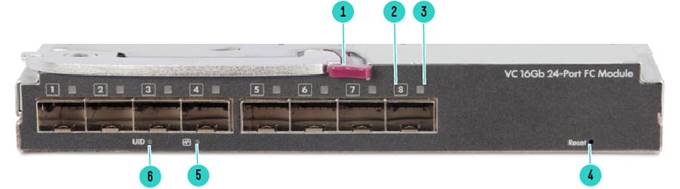
Figure 1 HPE Virtual Connect 16Gb 24-Port Fibre Channel Module Front View |
| ||||
|
1. |
Ejector |
4. |
Reset Pinhole |
| |
|
2. |
Port ID Indicator |
5. |
Module Status Indicator |
| |
|
3. |
Port Link/Activity Indicator |
6. |
Module Locator (UID) |
| |
|
|
| ||||
|
Models |
| ||||
|
HPE Virtual Connect 16Gb 24-port Fibre Channel Module for c-Class BladeSystem |
P08475-B21 |
| |||
|
|
| ||||
|
| |||||
Standard Features
|
Supported Products |
|
Compatibility Due to changes in support model, new HW SKUs are being introduced to facilitate tracking. The old SKUs 751465-B21 and 778720-B21 are being deprecated and will no longer be orderable. The new SKU will be supported on Virtual Connect Firmware v4.63 and VCSU 1.13.1 and later. For customers using OneView, the new SKU will only be supported on OV 4.20 and later. For customers on older OneView releases, the new SKU will be supported via the patch releases 4.00.11 and 4.10.02. Customers will have to be on the supported VCM and OneView releases in order to use the modules with new SKUs. |
|
HPE BladeSystem ProLiant and Integrity Servers HPE ProLiant Servers:
HPE Integrity Servers:
For
the latest
additional information on required firmware versions and to download
firmware upgrades, see the Hewlett Packard Enterprise website: https://www.hpe.com/us/en/products/servers/smart-update.html |
|
Fibre Channel Host Bus Adapters (HBA)
|
|
HPE ProLiant BL c-Class Server Blade Enclosures HPE BladeSystem c-Class c7000 Enclosure with Onboard Administrator:
Notes: - The HPE BladeSystem c7000 Platinum Enclosure is required to permit 16 Gbps speed on the internal ports. Other HPE BladeSystem c7000 Enclosures will have a maximum speed of 8 Gbps. - The Virtual Connect 16Gb 24-port Fibre Chanel modules are supported on c7000 enclosures with the following SKUs: 5XXXXX-B21, 6XXXXX-B21, and 7XXXXX-B21. 5XXXXX-XXX has been discontinued, but the module is supported in these deployed enclosures. -
VC
16Gb 24-port modules are not supported in BladeSystem c3000 enclosures. For
the latest additional information on required firmware versions and
to download firmware upgrades, see the Hewlett Packard Enterprise website:
https://www.hpe.com/us/en/products/servers/smart-update.html |
|
HPE B-Series Switches
|
|
Virtual Connect Enterprise Manager Supported by Virtual Connect Enterprise Manager (VCEM) 7.4.1 and higher for centralized connection and workload management for hundreds of Virtual Connect domains. Learn more at: http://www.hpe.com/info/vcem HPE Service Pack for ProLiant Gen 9 Servers: Version 2014.09.0 or greater. The HPE Service Pack for ProLiant (SPP) with HPE Smart Update Manager (HPE SUM) as the deployment engine provides a comprehensive approach to firmware and system software maintenance. The SPP is a comprehensive collection of firmware and system software components, all tested together as a single solution stack that include drivers, agents, utilities, firmware packages for HPE ProLiant servers, controllers, storage, blades and enclosures, and other options. It is available on all supported HPE ProLiant Gen 9 and Gen 8 servers (HPE ProLiant SL/ML/DL/BL 100, 200, 300, 500, 700, 900 servers, and HPE CloudSystem Matrix) in addition to earlier generation HPE ProLiant servers. The SPP is released with most major HPE ProLiant server releases. To access the latest HPE Service Pack for ProLiant click here: https://www.hpe.com/us/en/products/servers/smart-update.html |
|
|
|
Supported Configurations | ||||
|
| ||||
|
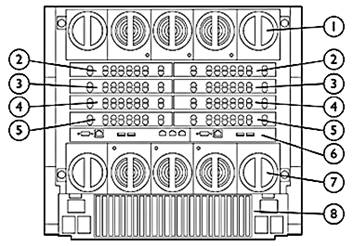
HPE BladeSystem c7000 Enclosure - Rear View | ||||
|
1. |
Upper Fan System |
5. |
Interconnect Bays 7 / 8 | |
|
2. |
Interconnect Bays 1 /2 |
6. |
On Board Administrator | |
|
3. |
Interconnect Bays 3 / 4 |
7. |
Lower Fan System | |
|
4. |
Interconnect Bays 5 / 6 |
8. |
Rear Redundant Power Complex | |
|
| ||||
|
Mezzanines | ||||
|
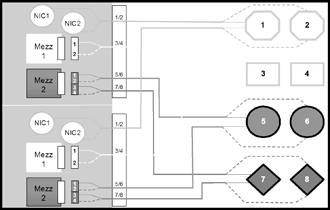
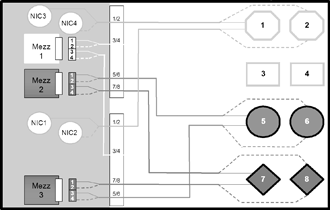
Port Mapping Port mapping differs slightly between full height and half height server blades due to the support for additional Mezzanine cards on the full height version.
Hewlett Packard Enterprise has simplified the processes of mapping Mezzanine ports to switch ports by providing intelligent management tools via the Onboard Administrator and HPE Insight Manager Software. The Onboard Administrator Guide, Enclosure Setup and Installation Guide provides detailed information on port mapping. | ||||
|
|
| |||
|
c7000 Half Height Server Blade |
c7000 Full Height Server Blade | |||
|
| ||||
|
The following are supported configurations for the HPE Virtual Connect 16Gb 24-Port Fibre Channel Module. Please note that other interconnect options can be installed in the enclosure, but they do not inherit the benefits of Virtual Connect. Switches and Pass-Thru modules will operate per their default configurations. Any moves, additions, or changes to servers which are connected to non-Virtual Connect modules will require reconfiguration on the LAN and/or SAN. The Virtual Connect Manager will only manage Virtual Connect Modules. | ||||||||||||||||||
|
HPE BladeSystem c7000 Enclosure | ||||||||||||||||||
|
Notes: The following tables show a number of typical, supported configurations for an HPE BladeSystem c7000 Enclosure. | ||||||||||||||||||
| ||||||||||||||||||
|
| ||||||||||||||||||
| ||||||||||||||||||||
|
| ||||||||||||||||||||
|
Product Features | ||||||||||||||||||||
|
Performance
Management
Virtual server profiles
| ||||||||||||||||||||
|
Trunking
Notes:
Trunking
is supported by external Brocade SAN switches, and can be configured
only on the external Brocade switch, not on the Virtual Connect Fibre
Channel module. Options
|
|
Stacking Configuration Stacking is only supported on Virtual Connect Ethernet Modules. The Virtual Connect Fibre Channel modules are managed via the Virtual Connect Ethernet Modules. The Virtual Connect firmware is dynamically mirrored between modules so all configuration data is updated simultaneously in a stack. Fibre Channel data packets are not transmitted between modules in a stacked configuration. |
|
|
|
Product Specifications Software |
|
Industry Standard NPIV Support The Virtual Connect Fibre Channel module works by aggregating multiple FC HBA ports over a single N-port uplink through the use of N_port_ID virtualization (NPIV). NPIV allows multiple distinguishable identities (multiple port WWNs and port IDs) over a single N-port connection. Most Fibre Channel SAN switch vendors have support for NPIV in their latest firmware release. By conforming to the NPIV standard, SAN equipment interoperability simplified. The Virtual Connect Fibre Channel Module Provides basic 4:1, 8:1, or 16:1 NPIV Fibre Channel concentration. |
|
Data Center Connectivity Each Virtual Connect Fibre Channel module supports up to 8 SAN fabrics and is typically connected to a Fibre Channel switch that has been configured to run in NPIV mode. The 8 uplink ports are speed selectable from 16, 8 or 4Gb/s. The setup wizard allows SAN administrators to name the fabric that servers will connect into and set the oversubscription rate. Fibre Channel boot parameters and WWN administration are configurable options that can be integrated into server profiles.
|
|
Management Features
|
|
|
Service and Support
|
Service and Support HPE Technology Services for Industry Standard Servers HPE Technology Services delivers confidence, reduces risk and helps customers realize agility and stability. Connect to HPE to help prevent problems and solve issues faster. Our support technology lets you to tap into the knowledge of millions of devices and thousands of experts to stay informed and in control, anywhere, any time. Protect your business beyond warranty with HPE Pointnext operational services HPE Pointnext operational services enable you to order the right service level, length of coverage and response time as you purchase your new server, giving you full entitlement for the term you select. |
|
|
|
Recommended HPE Pointnext operational services for your HPE product |
|
Optimized Care Foundation Care CTR, three-year Care Pack Service HPE Foundation Care Call-To-Repair Service connects you to Hewlett Packard Enterprise 24 hours a day, seven days a week for assistance on resolving issues -this includes our highest level commitment to repair hardware within six hours after opening your case and respond to software questions within two hours. Hewlett Packard Enterprise is the only leading manufacturer who makes this level of coverage available as a standard service offering for your most valuable servers. Collaborative software support is included and provides troubleshooting assistance on industry leading software running on your server. Simplify your support experience and make HPE your first call for hardware or software questions. https://www.hpe.com/h20195/V2/GetDocument.aspx?docname=4AA4-8876ENW&cc=us&lc=en |
|
Standard Care Foundation Care 24x7, three-year Care Pack Service HPE Foundation Care 24x7 connects you to Hewlett Packard Enterprise 24 hours a day, seven days a week for assistance on resolving issues. Hardware onsite response within four hours if needed; collaborative software included in this Care Pack service provides troubleshooting assistance on industry leading software running on your HPE server. Simplify your support experience and make HPE your first call for hardware or software questions. https://www.hpe.com/h20195/V2/GetDocument.aspx?docname=4AA4-8876ENW&cc=us&lc=en |
|
Related Services HPE Installation and Startup Service for HPE BladeSystem c-Class Enhanced Network
HPE Installation of ProLiant Add On Options Service
Additional HPE Pointnext operational services can be found at: http://ssc.hpe.com/portal/site/ssc/ |
|
|
|
Get connected to HPE to improve your support experience Connecting products to Hewlett Packard Enterprise will help prevent problems with 24x7monitoring, prefailure alerts, automatic call logging, and parts dispatch. With Connected products, you can have a dashboard to manage your IT anywhere, anytime, from any device. |
|
|
|
HPE Support Center Personalized online support portal with access to information, tools and experts to support Hewlett Packard Enterprise business products. Submit support cases online, chat with HPE experts, access support resources or collaborate with peers. Learn more http://www.hpe.com/info/hpesc The HPE Support Center Mobile App allows you to resolve issues yourself or quickly connect to an agent for live support. Now, you can get access to personalized IT support anywhere, anytime. Notes: HPE Support Center Mobile App is subject to local availability. |
|
|
|
Parts and materials Hewlett Packard Enterprise will provide HPE-supported replacement parts and materials necessary to maintain the covered hardware product in operating condition, including parts and materials for available and recommended engineering improvements. Parts and components that have reached their maximum supported lifetime and/or the maximum usage limitations as set forth in the manufacturer's operating manual, product QuickSpecs, or the technical product data sheet will not be provided, repaired, or replaced as part of these services.
The defective media retention service feature option applies only to Disk or eligible SSD/Flash Drives replaced by HPE due to malfunction. |
|
|
|
Warranty Server Blade Interconnect Limited Warranty includes 1 year Parts, 1 year Labor, 1-year on-site |
|
|
|
Service Coverage HPE Virtual Connect 16Gb 24-port Fibre Channel Module and HPE Virtual Connect 16Gb 24-Port Fibre Channel TAA Module for c-Class BladeSystem include 3 years 9x5 Next Business Day hardware support. If you have requirements for longer durations of service, quicker response times or more comprehensive services, HPE Pointnext operational services for the HPE Virtual Connect 16Gb 24-port Fibre Channel Module and HPE Virtual Connect 16Gb 24-Port Fibre Channel TAA Module are available to uplift or extend your coverage. |
|
|
|
For more information To learn more on HPE services, please contact your Hewlett Packdard Enterprise sales representative or Hewlett Packard Enterprise Authorized Channel Partner. Or visit: http://www.hpe.com/services/bladesystem |
|
|
Related Options
|
Transceivers |
|
|
16Gb Optical Transceivers (SFP+) |
|
|
HPE B-series 16Gb SFP+ Short Wave Transceiver |
QK724A |
|
8Gb Optical Transceivers (SFP+) |
|
|
HPE B-series 8Gb Shortwave Fibre Channel 1 Pack SFP+ Transceiver |
AJ716B |
|
| |
|
Optical Cables |
|
|
PremierFlex OM4 type cables |
|
|
HPE Premier Flex LC/LC Multi-mode OM4 2 fiber 1m Cable |
QK732A |
|
HPE Premier Flex LC/LC Multi-mode OM4 2 fiber 2m Cable |
QK733A |
|
HPE Premier Flex LC/LC Multi-mode OM4 2 fiber 5m Cable |
QK734A |
|
HPE Premier Flex LC/LC Multi-mode OM4 2 fiber 15m Cable |
QK735A |
|
HPE Premier Flex LC/LC Multi-mode OM4 2 fiber 30m Cable |
QK736A |
|
HPE Premier Flex LC/LC Multi-mode OM4 2 fiber 50m Cable |
QK737A |
|
LC-LC for between 4/8 Gb and 4/8 Gb Fibre Channel devices |
|
|
HPE LC to LC Multi-mode OM3 2-Fiber 0.5m 1-Pack Fiber Optic Cable |
AJ833A |
|
HPE LC to LC Multi-mode OM3 2-Fiber 1.0m 1-Pack Fiber Optic Cable |
AJ834A |
|
HPE LC to LC Multi-mode OM3 2-Fiber 2.0m 1-Pack Fiber Optic Cable |
AJ835A |
|
HPE LC to LC Multi-mode OM3 2-Fiber 5.0m 1-Pack Fiber Optic Cable |
AJ836A |
|
HPE LC to LC Multi-mode OM3 2-Fiber 15.0m 1-Pack Fiber Optic Cable |
AJ837A |
|
HPE LC to LC Multi-mode OM3 2-Fiber 30.0m 1-Pack Fiber Optic Cable |
AJ838A |
|
HPE LC to LC Multi-mode OM3 2-Fiber 50.0m 1-Pack Fiber Optic Cable |
AJ839A |
|
| |
|
Service and Support Offerings | |
|
Notes: Some options, including HPE Virtual Connect 16Gb 24-port Fibre Channel Module and HPE Virtual Connect 16Gb 24-Port Fibre Channel TAA Module for c-Class BladeSystem, are not covered under the c7000 enclosure HPE Pointnext operational. HPE Virtual Connect 16Gb 24-port Fibre Channel Module and HPE Virtual Connect 16Gb 24-Port Fibre Channel TAA Module for c-Class BladeSystem include 3 years 9x5 Next Business Day support. Care Pack service level support should always be uplifted to match existing BladeSystem service level. | |
|
Foundation Care Services |
|
|
HPE 3 year Foundation Care 24x7 Virtual Connect 16Gb 24-Port Service |
U8AL6E |
|
HPE 3 year Foundation Care Call to Repair Virtual Connect 16Gb 24-Port Service |
U8AL9E |
|
Installation Services |
|
|
HPE BladSys c7000 Encd Network Startup Service |
UE603E |
|
HPE Installation AddOn/In Option Service |
UH745E |
|
Additional HPE Pointnext operational services can be found at: http://www.hpe.com/info/cpc |
|
|
| |
Technical Specifications
|
Shipping Dimensions |
| ||
|
Length |
16.25in (412.75mm |
| |
|
Width |
11.875in (301.62mm) |
| |
|
Height |
3.5 in (88.9mm) |
| |
|
Shipping Weight |
2.268kg (5.0 lbs) |
| |
|
Product Specifications Hardware |
| ||
|
Performance |
16 Gb/sec line speed, full duplex |
| |
|
Bandwidth |
424 MB, Full Duplex @ 2-Gbps 3408 MB, Full Duplex @ 16-Gbps |
| |
|
Aggregate Bandwidth |
Up to 768 Gbps (24 ports x 16 Gbps x 2 for full duplex) |
| |
|
Fabric Latency |
700 nSec. Latency increases as input port speed is lower than the output port speed. |
| |
|
Number of Fibre Channel Ports |
8 external 4/8/16-Gbps ports |
| |
|
External Port Type |
Configured as Node port s (N_Port), |
| |
|
Internal Port Type |
Configured as Fabric Node port (N_Port), |
| |
|
Classes of Service |
Class 2 and Class 3 Fibre Channel services |
| |
|
Scalability |
Does not contribute to the total switch limit. See the SAN Design Guide for latest supported configurations. |
| |
|
Buffer Credits |
8 buffer credits per port, ASIC embedded memory |
| |
|
Connectors and Cabling |
SFP+ optical hot-pluggable transceiver with LC connector |
| |
|
Indicators |
Port ID Indicator Module Status Indicator Port Link/Activity Indicator Module Locator (UID) |
| |
|
Dimensions |
Width |
7.59 in (192.79mm) |
|
|
Depth |
10.57 in (268.48mm) |
| |
|
Height |
1.1 in (27.94mm) |
| |
|
Weight |
1.497kg (3.3 lbs) |
| |
|
Environmental Ranges |
Specification |
10C to 35C (50F to 95F) |
|
|
Temperature Range |
| ||
|
Operating |
10C to 35C (50F to 95F) |
| |
|
Shipping |
-40C to 60C (-40F to 140F) |
| |
|
Storage |
-20°C to 60°C (-4F to 140°F) |
| |
|
Maximum wet bulb temperature |
30C (80F) |
| |
|
Relative humidity (noncondensing)** |
| ||
|
Operating |
10% to 90% |
| |
|
Shipping |
10% to 90% |
| |
|
Storage |
10% to 95% |
| |
|
Specification |
10C to 35C (50F to 95F) |
| |
|
Notes: **Storage maximum humidity of 95% is based on a maximum temperature of 45°C (113°F). Altitude maximum for storage corresponds to a pressure minimum of 70 KPa. |
| ||
|
Power Specification |
12V @ 4.65A (56 W) |
| |
|
| |||
|
Management and Standards Support | |||
|
Standards
|
|||
|
| |||
|
Safety and Compliance | |||
|
Safety Certifications
|
|||
|
| |||
|
Electromagnetic Emissions Certifications FCC Part 15 Class A
|
|||
|
| |||
|
Environment-friendly Products and Approach - End-of-life Management and Recycling Hewlett Packard Enterprise offers end-of-life Hewlett Packard Enterprise product return, trade-in, and recycling programs in many geographic areas. For trade-in information, please go to: http://www.hpe.com/info/recycle. To recycle your product, please go to: http://www.hpe.com/info/recycle or contact your nearest Hewlett Packard Enterprise sales office. Products returned to Hewlett Packard Enterprise will be recycled, recovered or disposed of in a responsible manner.
| |||
|
| |||
Summary of Changes
|
Date |
Version History |
Action |
Description of Change |
|
17-Aug-2020 |
Version 8 |
Changed |
Related Options sections was updated. Rebranding applie to document. |
|
05-Nov-2018 |
Version 7 |
Changed |
Overview and Supported Products sections were updated. |
|
Added |
SKUs added: P08475-B21, P08476-B21. | ||
|
Removed |
SKUs deleted: 751465-B21, 778720-B21. | ||
|
23-Oct-2017 |
Version 6 |
Changed |
Care Pack naming and Service and Support- Parts and Materials updated. |
|
04-Sep-2017 |
Version 5 |
Changed |
Supported Products section was updated. |
|
08-May-2017 |
Version 4 |
Changed |
Supported Products section was updated. URLs were updated to hpe.com |
|
12-Dec-2016 |
Version 3 |
Changed |
Supported Products sections. |
|
26-Oct-2016 |
Version 2 |
Changed |
Branding edition. |
|
09-Feb-2015 |
Version 1 |
Created |
New QuickSpecs |
Copyright
|
|
| ||||||||||||
|
|
|
© Copyright 2020 Hewlett Packard Enterprise Development LP. The information contained herein is subject to change without notice. The only warranties for Hewlett Packard Enterprise products and services are set forth in the express warranty statements accompanying such products and services. Nothing herein should be construed as constituting an additional warranty. Hewlett Packard Enterprise shall not be liable for technical or editorial errors or omissions contained herein.
c04498595 - 15115 - Worldwide - V8 - 17-August-2020 | ||||||||||||