HPE Ethernet 10Gb 2-port 570M Adapter: технические характеристики и документация
В архивеOverview
|
HPE
Ethernet 10Gb 2-port 570M Adapter |
||
|
The HPE Ethernet 10Gb 2-port 570M Adapter Onload server adapter is based on the Solarflare next generation 10GbE controller, Solarflare SFC9120, and delivers unmatched message rates with low latency and jitter over standard Ethernet along with the lowest CPU utilization and power consumption, enabling the industry's best performance and scalability for financial services and other enterprise data centers.The HPE 570M supports high performance networking features such as VLAN tagging, low latency interrupts, TCP and UDP checksum offloading, MSI-X, NIC teaming (bonding), Receive Side Scaling (RSS), jumbo frames, and PXE boot. |
||
|
|
||
|
HPE
Ethernet 10Gb 2-port 570M Adapter |
||
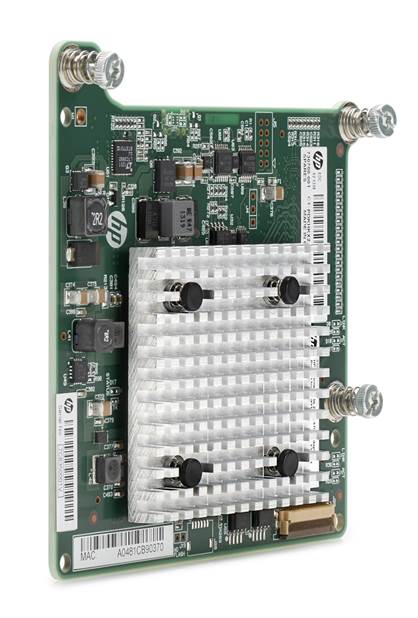
Platform Information
|
Models |
||
|
HPE Ethernet 10Gb 2-port 570M Adapter |
718935-B21 |
|
|
NOTE: This adapter on each server blade connects to a 10 Gb interconnect in bays 3-8 (HP BladeSystem c7000 Enclosure) or bays 2-4 (HP BladeSystem c3000 Enclosure). NOTE: This adapter requires a minimum of 2 GB of server memory. |
||
|
Kit Contents |
Quick
install card Product warranty statement |
|
|
|
||
|
Compatibility - Supported Servers |
HPE
ProLiant BL460c Gen8
|
|
|
|
|
Compatibility - Supported Interconnect Modules |
HPE
6120XG Blade Switch NOTE: 10GbE converged connectivity is supported in all HPE 6120XG, HPE 6125XG series switches, Cisco B22 Fabric Extender and HPE 10GbE Pass-Thru modules. All other supported interconnects and switches are limited to 16GbE per connection for Ethernet-only traffic. |
Standard Features
|
At a Glance Features |
|
|
|
|
|
Throughput-Theoretical Bandwidth |
This adapter delivers 20 Gb/s bi-directional Ethernet transfer rate per port (40 Gb/s per adapter), providing the network performance needed to improve response times and alleviate bottlenecks. |
|
|
|
|
802.1p QoS Tagging |
IEEE quality of service (QoS) 802.1p tagging allows the adapter to mark or tag frames with a priority level across a QoS-aware network for improved traffic flow. |
|
|
|
|
802.1Q VLANs |
IEEE 802.1Q virtual local area network (VLAN) protocol allows each physical port of this adapter to be separated into multiple virtual NICs for added network segmentation and enhanced security and performance. VLANs increase security by isolating traffic between users. Limiting the broadcast traffic to within the same VLAN domain also improves performance. |
|
|
|
|
Active Health System |
Supports HPE Active Health System - monitors and records changes in the server hardware and configuration enabling customers to have accurate information that will assist in diagnosing problems and delivering rapid resolution when server failures occur. |
|
|
|
|
HPE Sea Of Sensors |
Support for the HPE Sea of Sensors which is a collection of 32 sensors that automatically track thermal activity - heat - across the server. When temperatures get too high, sensors can kick on fans and make other adjustments to reduce energy usage. What makes it better is the upgrade from all six fans kicking on at one time to a new system where only one kicks on - the one in proximity of the area that started heating up - thus reducing the amount of energy used for cooling. |
|
|
|
|
Interrupt Coalescing |
Interrupt coalescing (interrupt moderation) groups multiple packets, thereby reducing the number of interrupts sent to the host. This process optimizes host efficiency, leaving the CPU available for other duties. |
|
|
|
|
Jumbo Frames |
This adapter supports Jumbo Frames (also known as extended frames), permitting up to a 9,500 byte (KB) transmission unit (MTU) when running Ethernet I/O traffic. This is over six times the size of a standard 1500-byte Ethernet frame. With Jumbo Frames, networks can achieve higher throughput performance and greater CPU utilization. These attributes are particularly useful for database transfer and tape backup operations. |
|
|
|
|
Management Support |
This adapter ships with agents that can be managed from HPE Systems Insight Manager or other management application that support SNMP. |
|
|
|
|
Message Signaled Interrupt (Extended) (MSI-X) |
Message Signaled Interrupt (Extended) provides performance benefits for multi-core servers by load balancing interrupts between CPUs/cores. |
|
|
|
|
Network Adapter Teaming |
This adapter support for NIC teaming helps IT administrators increase network fault tolerance and increased network bandwidth, the team of adapters can work together as a single virtual adapter, providing support for several different types of teaming enabling IT administrators to optimize availability, improve performance and help reduce costs. |
|
|
|
|
Optimized for Virtualization |
I/O Virtualization support for VMware NetQueue and Microsoft VMQ helps meet the performance demands of consolidated virtual workloads. |
|
|
|
|
Preboot eXecution Environment (PXE) |
Support for PXE enables automatic deployment of computing resources remotely from anywhere. It allows a new or existing server to boot over the network and download software, including the operating system, from a management/ deployment server at another location on the network.Additionally, PXE enables decentralized software distribution and remote troubleshooting and repairs. |
|
|
|
|
TCP/UDP/IP |
For overall improved system response, this adapter supports standard TCP/IP offloading techniques including: TCP/IP, UDP checksum offload (TCO) moves the TCP and IP checksum offloading from the CPU to the network adapter. Large send offload (LSO) or TCP segmentation offload (TSO) allows the TCP segmentation to be handled by the adapter rather than the CPU. |
|
|
|
|
Time Sync Implementatations (PTP) |
Synchronization of system clocks throughout a network, achieving clock accuracy in the sub-microsecond range, making it suitable for measurement and control systems. |
|
|
|
|
Warranty |
Maximum:
The remaining warranty of the HPE product in which it is installed (to
a maximum three-year, limited warranty). |
Service and Support
|
Service and Support |
NOTE: This adapter is covered under HPE Support Services/ Service Contract applied to the HPE ProLiant Server or enclosure. No separate HPE Support Services need to be purchased.
|
|
|
|
|
Warranty and Support Services |
Warranty and Support Services will extend to include HPE options configured with your server or storage device. The price of support service is not impacted by configuration details. HPE sourced options that are compatible with your product will be covered under your server support at the same level of coverage allowing you to upgrade freely. Installation for HPE options is available as needed. To keep support costs low for everyone, some high value options will require additional support. Additional support is only required on select high value workload accelerators, fibre switches, InfiniBand and UPS options 12KVA and over. Coverage of the UPS battery is not included under TS support services; standard warranty terms and conditions apply. |
|
|
|
|
Protect your business beyond warranty with HPE Support Services |
HPE Technology Services delivers confidence, reduces risk and helps customers realize agility and stability. Connect to HPE to help prevent problems and solve issues faster. HPE Support Services enable you to choose the right service level, length of coverage and response time as you purchase your new server, giving you full entitlement to the support you need for your IT and business. Protect your product, beyond warranty. . |
|
|
|
|
Parts and Materials |
Hewlett Packard Enterprise will provide HPE-supported replacement parts and materials necessary to maintain the covered hardware product in operating condition, including parts and materials for available and recommended engineering improvements. Parts and components that have reached their maximum supported lifetime and/or the maximum usage limitations as set forth in the manufacturer's operating manual, product quick-specs, or the technical product data sheet will not be provided, repaired, or replaced as part of these services. The defective media retention service feature option applies only to Disk or eligible SSD/Flash Drives replaced by HPE due to malfunction. . |
|
|
|
|
For more information |
Visit the Hewlett Packard Enterprise Service and Support website. |
Technical Specifications
|
General Specifications |
Network Processor |
Solarflare (SFC 9120) |
|
|
Data Rate |
Two ports, each at 20 Gb/s bi-directional; 40 Gb/s aggregate bi-directional theoretical bandwidth |
||
|
Onboard Memory |
PCI Express 3.0 (Gen 3) x8 |
||
|
Form Factor |
Type A Mezzanine Card |
||
|
IEEE Compliance |
802.3, 802.3x, 802.3ad, 802.3p/802.1q, 802.3ae |
||
|
|
|||
|
Power and Environmental Specifications |
Power |
7.5W maximum |
|
| Temperature - Operating | 5° to 55° C (41° to 131° F) | ||
| Humidity - Operating | 10% to 90% non-condensing | ||
|
Emissions classification |
FCC Class A |
||
|
Agency approvals |
USA:
FCC (CFR 47 part 15) and UL 60950 |
||
|
RoHS Compliance |
6 of 6 |
||
|
Safety |
UL Mark (USA and Canada) |
||
|
CE Mark |
|||
|
EN 60590 |
|||
|
|
|||
|
Operating System and Virtualization Support |
NOTE:
For more operating system support & certification information, please
visit: http://h17007.www1.hpe.com/us/en/enterprise/servers/supportmatrix/ |
||
|
|
|||
|
Environment-friendly Products and Approach - End-of-lie Management and Recyclingh |
Hewlett Packard Enterprise offers end-of-life product return, trade-in, and recycling programs, in many geographic areas, for our products. Products returned to Hewlett Packard Enterprise will be recycled, recovered or disposed of in a responsible manner. The EU WEEE Directive (2012/19/EU) requires manufacturers to provide treatment information for each product type for use by treatment facilities. This information (product disassembly instructions) is posted on the Hewlett Packard Enterprise web site. These instructions may be used by recyclers and other WEEE treatment facilities as well as Hewlett Packard Enterprise OEM customers who integrate and re-sell Hewlett Packard Enterprise equipment. |
||
Summary of Changes
|
Date |
Version History |
Action |
Description of Change |
||||||||||||||||||
|
27-Mar-2017 |
From Version 4to 5 |
Changed |
Overview section updated. |
||||||||||||||||||
|
05-Dec-2016 |
From Version 3 to 4 |
Changed |
Technical Specifications section was updated. |
||||||||||||||||||
|
Removed |
Obsolete
SKU was deleted: |
||||||||||||||||||||
|
20-May-2016 |
From Version 2 to 3 |
Changed |
Sections were updated in QuickSpecs. |
||||||||||||||||||
|
17-Dec-2015 |
From Version 1 to 2 |
Changed |
Overview and Related Options sections were updated. |
||||||||||||||||||
|
Removed |
Obsolete
SKUs were deleted: |
||||||||||||||||||||
|
|||||||||||||||||||||