




























HPE BladeSystem c7000 Enclosure: технические характеристики и документация
В архивеOverview
|
HPE BladeSystem c7000 Enclosure | |||
|
|
| ||
|
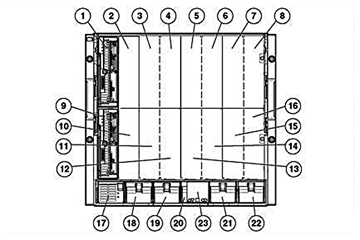
HPE BladeSystem c7000 Enclosure - Front View |
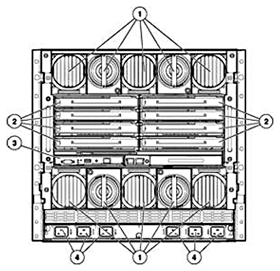
HPE BladeSystem c7000 Enclosure - Rear View | ||
|
1-16. |
Device Bays 1-16 |
1. |
Active Cool 200 Fans and Fan Bays |
|
17-22. |
Power Supply Bays 1-6 |
2. |
Interconnect Module Bays |
|
23. |
Insight Display |
3. |
BladeSystem Onboard Administrator (left) and optional redundant Onboard Administrator (right) |
|
4. |
Power Inputs (single-phase 200-240V AC model shown) | ||
|
| |||
Standard Features
|
HPE BladeSystem c-Class c7000 Enclosure |
An HPE BladeSystem solution starts with either a BladeSystem c7000 or c3000 enclosure. For the c7000 enclosure, key enclosure options include hot-plug power supplies, power input module, hot-plug HPE Active Cool Fans, and an optional redundant BladeSystem Onboard Administrator module. Once the enclosure and its key components have been selected, the following components can be added: interconnect modules, HPE ProLiant or Integrity server blades, expansion blades, and HPE OneView or Insight Control management software. For information on these options please visit: https://www.hpe.com/us/en/integrated-systems/bladesystem.html
Each c7000 enclosure is built with the following functions:
An BladeSystem Onboard Administrator management module is built in to the enclosure with the following functions:
A BladeSystem c7000 enclosure provides the following benefits:
| |
|
| ||
|
HPE BladeSystem c-Class c3000 Enclosure |
For customers that need a smaller blade system, the HPE BladeSystem c-Class c3000 Enclosure is the perfect solution. Supporting up to 8 blades and 4 interconnects, the c3000 enclosure provides an ideal solution for small and medium businesses and remote sites. For more information please visit: https://www.hpe.com/us/en/integrated-systems/bladesystem.html | |
|
| ||
|
HPE ProLiant & Integrity Server Blades |
Delivering best-in-class performance, choice and reliability on Intel® Xeon® and Intel® Itanium ® processors for Windows, Linux, Solaris, OpenVMS or HP-UX based servers; the HPE portfolio of server blades supports a variety of application requirements for scale-out architectures. Hewlett Packard Enterprise offers one-, two-, four- , or eight processor server blades, with the widest range of performance, and form factors. For more information please visit: https://www.hpe.com/us/en/integrated-systems/bladesystem.html. | |
|
| ||
|
HPE Storage Blade |
Do you need a direct attached storage solution within your BladeSystem enclosure? Direct attached storage
The D2500sb Storage Blade delivers direct attached storage to the HPE ProLiant BL460c Gen10 , with support for up to 12 (twelve) hot plug small form factor (SFF) SAS or SATA hard disk drives or SAS/SATA SSDs. The enclosure backplane provides a PCI Express connection to the adjacent c-Class server blade and enables high performance storage access without any additional cables. The D2500sb Storage Blade includes an internal Smart Array controller with 2GB flash-backed write cache, for increased performance and data protection. Up to eight D2500sb storage devices can be supported in a single BladeSystem c7000 enclosure. NOTE: The D2220sb is compatible only with Gen8 and Gen9 server blades. For more information, please visit: https://www.hpe.com/h20195/v2/GetHTML.aspx?docname=c04111399. | |
|
| ||
|
Dynamic Power Capping |
HPE Dynamic Power Capping is the industry's first power capping solution that lets you reclaim trapped power and cooling capacity without putting electrical infrastructure or server performance at risk. The enclosure Dynamic Power Cap will be shared amongst all of the installed devices and individual server caps will be changed to match the server load. This will optimize the performance of the servers while ensuring that the enclosure stays below the cap value. See more in your Onboard Administrator documentation. | |
|
| ||
|
Rack Airflow Requirements |
Rack 10000 G2 series cabinets NOTE: For operation with the -48VDC input module, the G2 1000 Series Rack Extension is required to allow DC power cabling to be installed. | |
|
Third-party racks | ||
|
CAUTION: If a third-party rack is used, observe the following additional requirements to ensure adequate airflow and to prevent damage to the equipment: | ||
- Minimum rail length: 635 mm (25 in) - Maximum rail length: 864 mm (34 in) | ||
|
CAUTION: Always use blanking panels to fill all remaining empty front panel U-spaces in the rack. This arrangement ensures proper airflow. Using a rack without blanking panels results in improper cooling that can lead to thermal damage. | ||
|
| ||
|
Factory Express Portfolio for Servers and Storage |
HPE Factory Express offers configuration, customization, integration and deployment services for Hewlett Packard Enterprise servers and storage products. Customers can choose how their factory solutions are built, tested, integrated, shipped and deployed. | |
|
| ||
|
HPE Simple Configurator |
HPE One Config Simple (OCS) is a guided self-service tool to help sales and non-technical people provide customers with initial configurations in 3 to 5 minutes. You may then send the configuration on for configuration help, or use in your existing ordering processes. If you require "custom" rack configuration or configuration for products not available in OCS, please contact HPE's Customer Business Center or an Authorized Partner for assistance. https://h22174.www2.hpe.com/SimplifiedConfig/Welcome. | |
|
| ||
|
HPE OneView Software |
The
HPE OneView architecture combines server, storage, and networking with
control of datacenter
environmentals
into a single, integrated management platform. Architected to deliver
lifecycle
management
for the complete Converged Infrastructure, it facilitates collaboration,
removes friction, collapses cycle times, eliminates error-prone work,
and accelerates time to value. HPE OneView combines management of servers
and virtual connect with open integration to automate and customize
existing tools and processes. With OneView, you'll work smarter-with
greater visibility and control-and fully capitalize on the benefits
of a Converged Infrastructure. | |
|
| ||
|
HPE Insight Management software |
Insight Management |
Managing the growing number of servers can be complex and expensive for your organization. IT managers need to address changing business needs with tools that meet the challenges of managing today's complex Datacenters. http://www.hpe.com/info/servermanagement
Customers will receive an Insight Control or Insight Dynamics license entitlement certificate via physical shipment or email. The license entitlement certificate must be redeemed online or via fax in order to obtain the license activation key(s). |
|
Service Pack for ProLiant (SPP) |
Customers should use the HPE Service Pack for ProLiant (SPP) to perform firmware, driver, and related software updates: https://www.hpe.com/servers/spp/ | |
|
HPE Integrated Lights-Out (iLO) |
HPE Integrated Lights-Out (iLO) simplifies server setup, health monitoring, power and thermal control, and lights-out remote administration of ProLiant ML, DL, and BL servers. HPE iLO functions without additional software and can be accessed from any location via a web browser. HPE iLO works hand-in-hand with HPE Systems Insight Manager, Insight Control and Insight Dynamics for ProLiant, helping customers unleash the value of the ProLiant platform and deliver the highest possible quality of IT service. For more information, visit: http://www.hpe.com/info/ilo | |
|
HPE Insight Control |
HPE Insight Control, a product option, delivers essential infrastructure management that can help save time and money by making it easy to deploy, monitor, remote control, and optimize your IT infrastructure through a single, simple management console. For more information, see http://www.hpe.com/info/servermanagement.. | |
|
HPE Matrix Operating Environment |
The HPE Matrix Operating Environment (Matrix OE) for ProLiant and Integrity servers is an integrated command center that helps you instantly adjust to dynamic business demands. This advanced infrastructure management software lets you reduce the cost of common data center tasks by up to 40 percent while keeping pace with your changing business. | |
|
| ||
|
HPE Power Advisor |
The
HPE
Power Advisor
is a tool provided by Hewlett Packard Enterprise to assist in the estimation
of power consumption at power up of a system and proper selection of
components including power supplies at a system, rack, and multi-rack
level. A variety of additional features are also provided including
a condensed bill of materials, a cost of owner ship calculator, and
a power report. The HPE Power Advisor allows for the mixing of rack,
tower, blade, and other products in a single environment. | |
|
| ||
|
Warranty |
Warranty - This product is covered by a global limited warranty and supported by HPE Services and a worldwide network of Hewlett Packard Enterprise Authorized Channel Partners. Hardware diagnostic support and repair is available for three years from date of purchase. Support for software and initial setup is available for 90 days from date of purchase. Additional support may be covered under the warranty or available for an additional fee. Enhancements to warranty services are available through HPE Pointnext operational services or customized service agreements.
| |
Service and Support
|
Service and Support |
HPE Technology Services for Industry Standard Servers
Protect your business beyond warranty with HPE Pointnext operational services HPE Pointnext operational services enable you to order the right service level, length of coverage and response time as you purchase your new server, giving you full entitlement for the term you select. |
|
| |
|
Connect your devices to HPE: |
Unlock all of the benefits of your technology investment by connecting your products to HPE. Achieve up to 77% reduction in down time, near 100% diagnostic accuracy and a single consolidated view of your environment. By connecting, you will receive 24x7monitoring, pre-failure alerts, automatic call logging, and automatic parts dispatch. HPE Proactive Care Service and HPE Datacenter Care Service customers will also benefit from proactive activities to help prevent issues and increase optimization. All of these benefits are already available to you with your server storage and networking products, securely connected to Hewlett Packard Enterprise support. |
|
| |
|
HPE Support Center |
Personalized online support portal with access to information, tools and experts to support Hewlett Packard Enterprise business products. Submit support cases online, chat with Hewlett Packard Enterprise experts, access support resources or collaborate with peers. Learn more: https://www.hpe.com/us/en/services/it-support.html The HPE Support Center Mobile App allows you to resolve issues yourself or quickly connect to an agent for live support. Now, you can get access to personalize IT support anywhere, anytime. HPE Insight Remote Support and HPE Support Center are available at no additional cost with an Hewlett Packard Enterprise warranty, HPE Pointnext operational or Hewlett Packard Enterprise contractual support agreement. NOTE: HPE Support Center Mobile App is subject to local availability. |
|
| |
|
Parts and Materials |
Hewlett Packard Enterprise will provide HPE-supported replacement parts and materials necessary to maintain the covered hardware product in operating condition, including parts and materials for available and recommended engineering improvements.
Parts and components that have reached their maximum supported lifetime and/or the maximum usage limitations as set forth in the manufacturer's operating manual, product quick-specs, or the technical product data sheet will not be provided, repaired, or replaced as part of these services.
The defective media retention service feature option applies only to Disk or eligible SSD/Flash Drives replaced by Hewlett Packard Enterprise due to malfunction. |
|
| |
|
For more information |
To learn more on HPE ProLiant servers and HPE BladeSystem servers, please contact your Hewlett Packard Enterprise sales representative or Hewlett Packard Enterprise Authorized Channel Partner. Or visit: https://www.hpe.com/us/en/integrated-systems/bladesystem.html |
Configuration Information Factory Integrated Models
|
NOTE: This section lists some of the required and optional steps to configure a Factory Integrated Model. To ensure only valid configurations are ordered, Hewlett Packard Enterprise recommends contacting your local sales representative for information on Factory Integrated Model product offerings and requirements. | ||
|
Step 1: Select desired model, configuration, and quantity of HPE ProLiant server and expansion blades per enclosure (required) | ||
|
NOTE: Each BladeSystem c7000 Enclosure holds up to 16 half-height server blades, 8 full-height server blades, and/or 8 expansion blades per enclosure (not exceeding 16 total blades). | ||
|
| ||
|
Step 2: Determine the HPE BladeSystem c-Class Enclosure(s) and choose options (required) | ||
|
Select the base server blade enclosure configuration (required) | ||
|
HPE BladeSystem BLc7000 c-Class Server Blade Enclosures |
NOTE: The enclosures listed below include an Onboard Administrator with KVM and four (4) hot-plug Active Cool 200 Fans. The power module, power supply kits, power cables, interconnects, additional fans, etc. are added per the steps below. NOTE: The enclosures listed below include the required blanking panels (device bay, interconnect module, fan, power, and redundant OA module) as required per the ordered configuration. If the configuration is modified at a later date, additional blanking panels (ordered separately) may be required. | |
|
HPE BLc7000 Configure-to-order Platinum Enclosure with ROHS Trial Insight Control License |
681844-B21 | |
|
HPE Integrity BLc7000 CTO Enclosure |
AD361D | |
|
NOTE: The AD361D enclosure is suggested for configurations primarily used with Integrity blades. |
| |
|
NOTE: The TAA-compliant enclosure listed below includes two (2) Onboard Administrators with KVM, six (6) hot-plug power supplies, and ten (10) hot-plug Active Cool 200 Fans. Additional components are added per the steps below. |
| |
|
HPE BLc7000 TAA-compliant Configure-to-order Platinum Enclosure with 2x Onboard Admin 6x PS 10x Fans |
681844-B22 | |
|
NOTE: HPE offers multiple Trade Agreement Act (TAA) compliant configurations to meet the needs of US Federal Government customers. These products are either manufactured or substantially transformed in a designated country. |
| |
|
Select the enclosure power and cooling options (required) | ||
|
HPE c-Class Power Systems |
c-Class Power Modules (1 per enclosure) |
|
|
HPE BLc7000 Single Phase FIO Intelligent Power Module |
677595-B21 | |
|
NOTE: This power module is for single phase, high-line 200-240VAC applications and has six blue IEC-320 C20 power connectors that accept IEC C19-C20 power cables. |
| |
|
HPE BLc7000 1 PH FIO Power Module Option |
413379-B21 | |
|
NOTE: This power module is for single phase, high-line 200-240VAC applications and has six IEC-320 C20 power connectors that accept IEC C19-C20 power cables. One WW 250W C19-C20 2.0m (non-iPDU) cable is included per supported power supply. Supported power supplies are listed here. |
| |
|
HPE BLc7000 3 PH Intl FIO Power Module Option |
413381-B21 | |
|
NOTE: This power module is for three phase, high-line 200-240VAC international applications and has two 3.05m (10 ft) power cables with IEC-309 200/346 V - 240/415 V, 5-Pin, 6h, 16A connectors. |
| |
|
HPE BLc7000 3 PH NA/JP FIO Power Module Option |
413380-B21 | |
|
NOTE: This power module is for three phase, high-line 200-208VAC North America and Japan applications and has two 3.05m (10 ft) power cables with NEMA L15-30p connectors. |
| |
|
HPE BLc7000 -48V DC Power Input Module |
AH331A | |
|
NOTE: This power module is for -36VDC to -72VDC applications and has 45DG 4AWG 1/4 2H terminal lug connectors. It is used with the HPE 2250W -48VDC Hot Plug Power Supply Kit, AH332A. See the "c-Class Power Supply" section below for the power supply kits. |
| |
|
HPE HVDC 1PH AC Power Module BLc FIO Option |
753623-B21 | |
|
NOTE: This power module is for 277VAC and 380VDC applications and has six APP Saf-D-Grid connectors. It is used with the HPE 2650W Universal Hot Plug Power Supply Kits (753618-B21 or 753619-B21). See the "c-Class Power Supply" section below for the power supply kits. NOTE: Cables are not included and may be ordered separately; see cable options J6X03A (277VAC applications) and J6X00A (277VAC or 380VDC applications). |
| |
|
c-Class Power Supply (Up to 6) |
| |
|
NOTE: HPE highly recommends using the HPE Power Advisor tool to ensure the number of power supply options you have selected can fully support your BladeSystem configuration and to review maximum system power ratings for facilities planning purposes. HPE Power Advisor is available at: http://www.hpe.com/info/hppoweradvisor |
| |
|
HPE 2650W Performance Platinum Hot Plug Power Supply Kit |
733459-B21 | |
|
NOTE: This power supply kit enables HPE Power Discovery Services when used with the HPE BLc7000 Single Phase FIO Intelligent Power Module 677595-B21. See the "c-Class Power Modules" section above for the power modules. |
| |
|
HPE 2650W Performance Universal Hot Plug Power Supply Kit |
753618-B21 | |
|
NOTE: This power supply kit disables HPE Power Discovery Services. NOTE: Cables are not included and may be ordered separately; see cable options J6X03A (277VAC applications) and J6X00A (277VAC or 380VDC applications). |
| |
|
HPE 2650W Performance -48VDC Platinum Hot Plug Power Supply Kit |
789934-B21 | |
|
NOTE: This power supply kit disables HPE Power Discovery Services. |
| |
|
HPE Cooling Options |
c-Class Active Cool 200 Fan (Up to 6) |
|
|
NOTE: A minimum of 4 Active Cool 200 Fans is required to a maximum of 10 Active Cool 200 Fans. The enclosure selected in Step 2 already includes 4 fans allowing up to 6 additional. NOTE: Ten Active Cool 200 Fans are strongly recommended for maximum cooling efficiency and redundancy, reduced power consumption, and reduced noise. NOTE: For the complete list of fan requirements and recommendations, see the “Server Blade and Fan Population Guidelines” section of this document. | ||
|
HPE BLc7000 Enclosure HPE Single Active Cool Fan Option Kit |
412140-B21 | |
|
| ||
|
Step 3: Select a software bundle (optional) | ||
|
HPE Insight Software |
NOTE: The Insight Control licenses listed below support HPE ProLiant c-Class server blades. NOTE: Insight Control is not supported with Gen10 server blades.
|
|
|
| ||
|
Step 4: Select a redundant BladeSystem Onboard Administrator (optional) | ||
|
HPE c-Class Enclosure Options |
HPE BLc7000 Onboard Administrator with KVM Option |
456204-B21 |
|
NOTE: The HPE c7000 Onboard Administrator (OA) supports the mixing with the HPE c7000 OA with KVM. The HPE c7000 OA with KVM must be the active OA to provide the enclosure KVM feature. The KVM menu has an OA CLI button at the bottom, which allows an OA administrator to log into the OA and be able to force a takeover so the OA with KVM will become the standby OA. The OA Firmware Sync feature cannot be used to update mismatched OA modules. Mismatched OA firmware versions between the original c7000 OA and c7000 OA with KVM require the administrator to use the GUI or CLI to update the OA from a file (http, ftp, tftp, local client file using the GUI or USB key containing the OA firmware file). NOTE: HPE BladeSystem c3000 and c7000 Enclosures support G1 through Gen9 ProLiant and Integrity server blades, subject to support requirements of the Onboard Administrator. If configuring an enclosure with only Gen9 server blades, Onboard Administrator firmware 4.11 or greater is required. If configuring an enclosure with a mix of Gen9 and earlier server blades, G6 to Gen9 is supported and requires Onboard Administrator firmware 4.30 or greater. In addition to these requirements, the Onboard Administrator firmware must be a version that supports all the components in the enclosure. Hewlett Packard Enterprise recommends the current firmware whenever possible for maximum compatibility and stability. Updating the Onboard Administrator firmware may also require other subsystem firmware upgrades. For further information, please see the HPE Service Pack for ProLiant (SPP) website and the HPE Support Center documents “HPE ProLiant Server Blades - Compatibility with HPE BladeSystem c7000 and c3000 Enclosures and Firmware” and other documents related to ProLiant Gen9 Servers and Onboard Administrator firmware issues. |
| |
|
| ||
|
Step 5: Select 1 or more interconnect modules for each enclosure (required) | ||
|
The following is a list of various HPE BladeSystem c-Class interconnect modules (Virtual Connect, Ethernet, Fibre Channel, InfiniBand, and SAS interconnects). A pair of interconnects must be ordered if redundancy is required. For detailed interconnect options, consult the specific interconnect QuickSpecs: https://www.hpe.com/h20195/v2/getpdf.aspx/c04284204.pdf?ver=10 NOTE: Interconnect bays 1 and 2 support the network (i.e. Ethernet capable) interconnects. These bays connect to the included network adapter ports in the server blades (either embedded ports on G7 and earlier server blades or FlexibleLOM adapter(s) on Gen8 and later server blades) via the NonStop passive midplane. An enclosure must be configured with at least a network interconnect in interconnect bay 1. NOTE: Interconnect bays 3 through 8 support all interconnects. These bays connect to the mezzanine slots in the server blades via the NonStop passive midplane. Interconnect bays 3 and 4 must contain the same type of interconnect (network, SAN, SAS, etc) as they connect to the same mezzanine slot. Likewise for interconnect bays 5, 6, 7, and 8. NOTE: Options to specific c-Class interconnects are not included in the list below. Consult the individual interconnect QuickSpecs to obtain part numbers for interconnect options such as cables, SFPs, etc. | ||
|
HPE BladeSystem |
HPE Virtual Connect FlexFabric-20/40 F8 Module for c-Class BladeSystem |
691367-B21 |
|
NOTE: Virtual Connect FlexFabric-20/40 F8 modules are supported on c7000 enclosures with the following SKUs: 5XXXXX-B21, 6XXXXX-B21, and 7XXXXX-B21. NOTE: A c7000 enclosure with a 10 fan configuration is required when one or more HPE Virtual Connect FlexFabric-20/40 F8 module(s) are installed. |
| |
|
HPE Virtual Connect FlexFabric-20/40 F8 Module for c-Class BladeSystem with TAA |
691367-B22 | |
|
NOTE: Virtual Connect FlexFabric-20/40 F8 modules are supported on c7000 enclosures with the following SKUs: 5XXXXX-B21, 6XXXXX-B21, and 7XXXXX-B21. NOTE: A c7000 enclosure with a 10 fan configuration is required when one or more HPE Virtual Connect FlexFabric-20/40 F8 module(s) are installed. |
| |
|
HPE Virtual Connect Flex-10/10D Module for c-Class BladeSystem |
638526-B21 | |
|
HPE Virtual Connect FlexFabric 10/24 Enterprise Edition BLc7000 Option |
605865-B21 | |
|
NOTE: 605865-B21 includes 2 x HPE Virtual Connect FlexFabric 10Gb/24-port modules plus 1 x VCEM BL-c7000 enclosure license. Customer will receive a printed license entitlement certificate and 2 Virtual Connect modules as a single deliverable. The license entitlement certificate must be redeemed online or via fax to obtain the VCEM license activation key. |
| |
|
HPE Virtual Connect FlexFabric 10Gb/24-port Module for c-Class BladeSystem |
571956-B21 | |
|
HPE 10GbE Ethernet Pass-Thru Module for c-Class BladeSystem |
538113-B21 | |
|
HPE 10GbE Ethernet Pass-Thru TAA-compliant Module II for c-Class BladeSystem |
854194-B22 | |
|
HPE Cisco B22HP Fabric Extender for BladeSystem c-Class |
641146-B21 | |
|
HPE Cisco B22HP Fabric Extender with 16 FET for BladeSystem c-Class |
657787-B21 | |
|
NOTE: 657787-B21 includes 16 Cisco Fabric Extender Transceivers. These transceivers can be used to connect the Fabric Extender with a parent Nexus 5000 over optical cable up to 100 meters using OM3 grade fiber. |
| |
|
HPE 10GBase-T SFP+ Transceiver |
813874-B21 | |
|
Mellanox SX1018HP Ethernet Switch for c-Class BladeSystem |
689638-B21 | |
|
HPE Virtual Connect Flex-10/10D Module Enterprise Edition for BLc7000 Option |
662048-B21 | |
|
NOTE: 662048-B21 includes 2 x HPE Virtual Connect Flex-10/10D modules plus 1 x VCEM enclosure license. Customer will receive a printed license entitlement certificate and 2 Virtual Connect modules as a single deliverable. The license entitlement certificate must be redeemed online or via fax to obtain the VCEM license activation key. |
| |
|
HPE 6125G/XG Ethernet Blade Switch |
658250-B21 | |
|
HPE SAS Switch |
NOTE: The HPE 6Gb SAS switches are supported on c7000 enclosures with the following SKUs: 5XXXXX-B21, 6XXXXX-B21, and 7XXXXX-B21. |
|
|
HPE 6Gb SAS Switch Single Pack for HPE BladeSystem c-Class |
BK763A | |
|
HPE 6Gb SAS Switch Dual Pack for HPE BladeSystem c-Class |
BK764A | |
|
HPE BladeSystem |
NOTE: HPE Fibre Channel interconnect switches and modules supporting up to a 4Gbps internal port downlink speed (connection speed from the server blades to the interconnect) (SKUs 403626-B21) are supported on all c7000 enclosures. NOTE: HPE Fibre Channel interconnect switches and modules supporting up to an 8Gbps internal port downlink speed (connection speed from the server blades to the interconnect) (SKUs 466482-B21, AJ820C, AJ821C, AJ822C, AW563A, and AW564A) are supported on all c7000 enclosures. NOTE: HPE Fibre Channel interconnect switches and modules supporting up to a 16Gbps internal port downlink speed (connection speed from the server blades to the interconnect) (SKUs C8S45A, C8S46A, C8S47A, 751465-B21, and 778720-B21) are supported on c7000 enclosures with the following SKUs: 5XXXXX-B21, 6XXXXX-B21, and 7XXXXX-B21. A c7000 Platinum enclosure (SKUs 6XXXXX-B21 and 7XXXXX-B21) is required to permit the 16Gbps speed on the internal downlink ports. A c7000 enclosure with SKU 5XXXXX-B21 will operate the internal ports up to 8Gbps. | |
|
HPE Virtual Connect 16Gb 24-port Fibre Channel Module for c-Class BladeSystem |
751465-B21 | |
|
HPE Virtual Connect 16Gb 24-port Fibre Channel TAA Module for c-Class BladeSystem |
778720-B21 | |
|
HPE 4GB Fibre Channel Pass-thru Module for c-Class BladeSystem |
403626-B21 | |
|
HPE Virtual Connect 8Gb 24-port Fibre Channel Module for c-Class BladeSystem |
466482-B21 | |
|
Brocade 8/12c SAN Switch for BladeSystem c-Class |
AJ820C | |
|
Brocade 8/24c SAN Switch for BladeSystem c-Class |
AJ821C | |
|
Brocade 8/24c Power Pack+ SAN Switch for BladeSystem c-Class |
AJ822C | |
|
Brocade 16Gb/28 SAN Switch for HPE BladeSystem c-Class |
C8S46A | |
|
Brocade 16Gb/28 SAN Switch for BladeSystem c-Class |
C8S46B | |
|
Brocade 16Gb/16 SAN Switch for HPE BladeSystem c-Class |
C8S45B | |
|
Brocade 16Gb/28 SAN Switch Power Pack+ for HPE BladeSystem c-Class |
C8S47A | |
|
Brocade 16Gb/28 SAN Switch Power Pack+ for BladeSystem c-Class |
C8S47B | |
|
Brocade 8/16Gb Embedded FC Switch 12-port Upgrade LTU |
T5517A | |
|
HPE BladeSystem InfiniBand Interconnects |
NOTE: The HPE QDR InfiniBand Switches are supported on c7000 enclosures with the following SKUs: 5XXXXX-B21, 6XXXXX-B21, and 7XXXXX-B21. | |
|
HPE 4X FDR InfiniBand Switch Module for c-Class BladeSystem |
648312-B21 | |
|
| ||
|
Step 6: Select rack (optional) | ||
|
NOTE: For information on the full line of HPE Data Center Racks and rack accessories, please see https://www.hpe.com/info/rackandpower. | ||
|
| ||
|
Step 7: Select rack power distribution unit (PDU) (optional) | ||
|
NOTE: A pair of PDUs must be ordered for AC feed redundancy. | ||
|
HPE Power Distribution Units (PDUs) |
HPE Basic Power Distribution Units (bPDUs) |
|
|
HPE G2 Basic 4.9kVA/L6-30P 24A/208V Outlets (36) C13 (6) C19/Vertical NA/JP PDU |
P9Q42A | |
|
HPE G2 Basic 7.3kVA/60309 3-wire 32A/230V Outlets (36) C13 (6) C19/Vertical INTL PDU |
P9Q46A | |
|
HPE G2 Basic Modular 8.3kVA/CS8265C 40A/208V Outlets (6) C19/1U Horizontal NA/JP PDU |
P9Q47A | |
|
HPE G2 Basic 3Ph 8.6kVA/L15-30P 24A/208V Outlets (30) C13 (6) C19/Vertical NA/JP PDU |
P9Q53A | |
|
HPE G2 Basic 3Ph 8.6kVA/L21-30P 24A/208V Outlets (24) C13 (3) C19 (3) 5-20R/Vertical NA/JP PDU |
P9Q55A | |
|
HPE G2 Basic 3Ph 11kVA/60309 5-wire 16A/230V Outlets (36) C13 (6) C19/Vertical INTL PDU |
P9Q58A | |
|
HPE G2 Basic Modular 3Ph 8.6kVA/L15-30P 24A/208V Outlets (6) C19/1U Horizontal NA/JP PDU |
P9Q52A | |
|
HPE G2 Basic Modular 3Ph 14.4kVA/CS8365C 40A/208V Outlets (6) C19/1U Horizontal NA/JP PDU |
P9Q59A | |
|
HPE G2 Basic Modular 3Ph 17.3kVA/60309 60A 4-wire 48A/208V Outlets (6) C19/1U Horizontal NA/JP PDU |
P9Q60A | |
|
HPE G2 Basic Modular 3Ph 11kVA/60309 5-wire 16A/230V Outlets (6) C19/1U Horizontal INTL PDU |
P9Q57A | |
|
HPE G2 Basic Modular 3Ph 22kVA/60309 5-wire 32A/230V Outlets (6) C19/1U Horizontal INTL PDU |
P9Q63A
| |
|
| ||
|
Step 8: Select an uninterruptible power system (UPS) (optional) | ||
|
NOTE: Additional HPE Uninterruptable Power Systems (UPSs) are available than those listed here. For a complete list of all HPE UPSs and additional information, please visit https://www.hpe.com/info/rackandpower. | ||
|
HPE Uninterruptible Power Systems (UPSs)
|
R5000 Uninterruptible Power System (UPS) |
|
|
HPE R5000 3U L630 High Voltage NA/JP Uninterruptible Power System |
AF460A | |
|
HPE R5000 3U IEC309-32A High Voltage INTL Uninterruptible Power System |
AF461A | |
|
R7000 Uninterruptible Power System (UPS) |
| |
|
HPE R7000 4U 50A High Voltage NA/JP Uninterruptible Power System |
AF462A | |
|
HPE R7000 4U IEC-32A High Voltage INTL Uninterruptible Power System |
AF463A | |
|
HPE R12000/3 Uninterruptible Power System (UPS) |
| |
|
HPE R12000/3 12000VA Three Phase NA 6U Rackmount Uninterruptible Power System |
AF429A | |
|
HPE R12000/3 12000VA Three Phase INTL 6U Rackmount Uninterruptible Power System |
AF430A | |
|
| ||
|
Step 9: Select power cords (optional) | ||
|
NOTE: For additional power cable information, please visit: https://h20195.www2.hpe.com/v2/Getdocument.aspx?docname=4AA6-6836ENW | ||
|
HPE Intelligent Power Distribution Units Power cords |
NOTE: Order with HPE Single Phase FIO Intelligent Power Module for c-Class BladeSystem (677595-B21). These power cables enable Power Discovery Services communications between the HPE BladeSystem c7000 Enclosure and HPE Intelligent PDUs. NOTE: These power cables are designated by bright blue IEC connectors. | |
|
HPE 2.0m 250V 16A C19-C20 WW Single IPD Enabled Jumper Cord |
TK738A | |
|
HPE Power Distribution Units Power cords |
HPE C19 - C20 WW 250V 16Amp Flint Gray 1.20m Jumper Cord |
AF575A |
|
HPE C19 - C20 WW 250V 16Amp Flint Gray 2.0m Jumper Cord |
AF574A | |
|
HPE C19 - C20 WW 250V 16Amp 2.5m Jumper Cord |
295633-B22 | |
|
HPE C19-C20 IN 250V 2.5m Blk Jumper Cord |
R1C66A | |
|
Additional HPE power Cords |
HPE High Line Power Cords 200 - 240V AC |
|
|
HPE C19 - Nema L6-20P NA/JP 250V 20Amp High Voltage 3.6m Power Cord |
AF593A | |
|
HPE C19 - CEE-VII EU 250V 16Amp 3.6m Power Cord |
AF576A | |
|
HPE C19 - GB-1002 CN 250V 16Amp 2.5m Power Cord |
AF584A | |
|
HPE High Voltage Power Cords 277V AC, 380V DC |
| |
|
NOTE: Power cable J6X00A is intended for 277VAC or 380VDC APP Saf-D-Grid to APP Saf-D-Grid applications. NOTE: Power cable J6X03A is intended for 277VAC APP Saf-D-Grid to LS-25 applications. |
| |
|
HPE SAFDGRID-SAFDGRID 277V 15Amp DC 2.0m Jumper Cord |
J6X00A | |
|
HPE SAFDGRID-LS-25 277V 15Amp AC 2.0m Jumper Cord |
J6X03A | |
Related Options
|
HPE Enclosure Options |
HPE BLc7000 Onboard Administrator with KVM Option |
456204-B21 | ||
|
NOTE: The HPE c7000 Onboard Administrator (OA) supports the mixing with the HPE c7000 OA with KVM. The HPE c7000 OA with KVM must be the active OA to provide the enclosure KVM feature. The KVM menu has an OA CLI button at the bottom, which allows an OA administrator to log into the OA and be able to force a takeover so the OA with KVM will become the standby OA. The OA Firmware Sync feature cannot be used to update mismatched OA modules. Mismatched OA firmware versions between the original c7000 OA and c7000 OA with KVM require the administrator to use the GUI or CLI to update the OA from a file (http, ftp, tftp, local client file using the GUI or USB key containing the OA firmware file). |
| |||
|
HPE BLc7000 10000 Series Rack Shipping Bracket Option |
433718-B21 | |||
|
NOTE: The shipping bracket is required when shipping a c7000 enclosure when installed in a rack. It is not required for normal operation. |
| |||
|
HPE c-Class BladeSystem Miscellaneous Blanks Option Kit |
412148-B21 | |||
|
NOTE: Contains 1 each of c3000/c7000 Active Cool Fan blank, c3000/c7000 interconnect module blank, c7000 Onboard Administrator blank, c3000 local KVM blank, c3000 power supply blank, c7000 power supply blank, c3000 DVD blank, and a c3000 mini-divider. |
| |||
|
HPE c-Class BladeSystem Bay Blank with Coupler Option |
412150-B21 | |||
|
NOTE: This is option contains one half-height device blank and a coupler that can be used for the c3000 and c7000 enclosures. |
| |||
|
HPE Power Supplies |
NOTE: HPE highly recommends using the HPE Power Advisor tool to ensure the number of power supply options you have selected can fully support your BladeSystem configuration and to review maximum system power ratings for facilities planning purposes. HPE Power Advisor is available at: https://www.hpe.com/info/hppoweradvisor |
| ||
|
HPE 2650W Performance Platinum Hot Plug Power Supply Kit |
733459-B21 | |||
|
NOTE: This power supply kit enables HPE Power Discovery Services when used with the HPE BLc7000 Single Phase FIO Intelligent Power Module 677595-B21. See the "c-Class Power Modules" section above for the power modules. |
| |||
|
HPE 2650W Performance Universal Hot Plug Power Supply Kit |
753618-B21 | |||
|
NOTE: This power supply kit disables HPE Power Discovery Services. NOTE: Cables are not included and may be ordered separately; see cable options J6X03A (277VAC applications) and J6X00A (277VAC or 380VDC applications). |
| |||
|
HPE 2650W Performance -48VDC Platinum Hot Plug Power Supply Kit |
789934-B21 | |||
|
NOTE: This power supply kit disables HPE Power Discovery Services. |
| |||
|
HPE Cooling Options |
HPE c-Class Active Cool Fan |
| ||
|
HPE BLc7000 Enclosure HPE Single Active Cool Fan Option Kit |
412140-B21 | |||
|
NOTE: A minimum of 4 Active Cool 200 Fans is required to a maximum of 10 Active Cool 200 Fans. NOTE: Ten Active Cool 200 Fans are strongly recommended for maximum cooling efficiency and redundancy, reduced power consumption, and reduced noise. NOTE: For the complete list of fan requirements and recommendations, see the “Server Blade and Fan Population Guidelines” section of this document. |
| |||
|
HPE BladeSystem |
NOTE: For detailed interconnect options, consult the specific interconnect QuickSpecs: NOTE: Interconnect bays 1 and 2 support the network (i.e. Ethernet capable) interconnects. These bays connect to the included network adapter ports in the server blades (either embedded ports on G7 and earlier server blades or FlexibleLOM adapter(s) on Gen8 and later server blades) via the NonStop passive midplane. An enclosure must be configured with at least a network interconnect in interconnect bay 1. NOTE: Interconnect bays 3 through 8 support all interconnects. These bays connect to the mezzanine slots in the server blades via the NonStop passive midplane. Interconnect bays 3 and 4 must contain the same type of interconnect (network, SAN, SAS, etc) as they connect to the same mezzanine slot. Likewise for interconnect bays 5, 6, 7, and 8. NOTE: Options to specific c-Class interconnects are not included in the list below. Consult the individual interconnect QuickSpecs to obtain part numbers for interconnect options such as cables, SFPs, etc. |
| ||
|
HPE Virtual Connect FlexFabric-20/40 F8 Module for c-Class BladeSystem |
691367-B21 | |||
|
NOTE: Virtual Connect FlexFabric-20/40 F8 modules are supported on c7000 enclosures with the following SKUs: 5XXXXX-B21, 6XXXXX-B21, and 7XXXXX-B21. NOTE: A c7000 enclosure with a 10 fan configuration is required when one or more HPE Virtual Connect FlexFabric-20/40 F8 Module(s) are installed. |
| |||
|
HPE Virtual Connect FlexFabric-20/40 F8 Module for c-Class BladeSystem with TAA |
691367-B22 | |||
|
NOTE: Virtual Connect FlexFabric-20/40 F8 modules are supported on c7000 enclosures with the following SKUs: 5XXXXX-B21, 6XXXXX-B21, and 7XXXXX-B21. NOTE: A c7000 enclosure with a 10 fan configuration is required when one or more HPE Virtual Connect FlexFabric-20/40 F8 Module(s) are installed. |
| |||
|
HPE Virtual Connect Flex-10/10D Module for c-Class BladeSystem |
638526-B21 | |||
|
HPE Virtual Connect FlexFabric 10/24 Enterprise Edition BLc7000 Option |
605865-B21 | |||
|
NOTE: 605865-B21 includes 2 x HPE Virtual Connect FlexFabric 10Gb/24-port modules plus 1 x VCEM BL-c7000 enclosure license. Customer will receive a printed license entitlement certificate and 2 Virtual Connect modules as a single deliverable. The license entitlement certificate must be redeemed online or via fax to obtain the VCEM license activation key. |
| |||
|
HPE Virtual Connect FlexFabric 10Gb/24-port Module for c-Class BladeSystem |
571956-B21 | |||
|
HPE 10GbE Ethernet Pass-Thru Module for c-Class BladeSystem |
538113-B21 | |||
|
HPE Cisco B22HP Fabric Extender for BladeSystem c-Class |
641146-B21 | |||
|
HPE Cisco B22HP Fabric Extender with 16 FET for BladeSystem c-Class |
657787-B21 | |||
|
HPE Virtual Connect Flex-10/10D Module Enterprise Edition for BLc7000 Option |
662048-B21 | |||
|
NOTE: 662048-B21 includes 2 x HPE Virtual Connect Flex-10/10D modules plus 1 x VCEM enclosure license. Customer will receive a printed license entitlement certificate and 2 Virtual Connect modules as a single deliverable. The license entitlement certificate must be redeemed online or via fax to obtain the VCEM license activation key. |
| |||
|
HPE 6125G/XG Ethernet Blade Switch |
658250-B21 | |||
|
HPE BladeSystem |
NOTE: For detailed interconnect options, consult the specific interconnect QuickSpecs: NOTE: Interconnect bays 3 through 8 support all interconnects. These bays connect to the mezzanine slots in the server blades via the NonStop passive midplane. Interconnect bays 3 and 4 must contain the same type of interconnect (network, SAN, SAS, etc) as they connect to the same mezzanine slot. Likewise for interconnect bays 5, 6, 7, and 8. NOTE: Options to specific c-Class interconnects are not included in the list below. Consult the individual interconnect QuickSpecs to obtain part numbers for interconnect options such as cables, SFPs, etc. NOTE: HPE Fibre Channel interconnect switches and modules supporting up to an 8Gbps internal port downlink speed (connection speed from the server blades to the interconnect) (SKUs 466482-B21, AJ820C, AJ821C, AJ822C, AW563A, and AW564A) are supported on all c7000 enclosures. NOTE: HPE Fibre Channel interconnect switches and modules supporting up to a 16Gbps internal port downlink speed (connection speed from the server blades to the interconnect) (SKUs C8S45A, C8S46A, C8S47A, 751465-B21, and 778720-B21) are supported on c7000 enclosures with the following SKUs: 5XXXXX-B21, 6XXXXX-B21, and 7XXXXX-B21. A c7000 Platinum enclosure (SKUs 6XXXXX-B21 and 7XXXXX-B21) is required to permit the 16Gbps speed on the internal downlink ports. A c7000 enclosure with SKU 5XXXXX-B21 will operate the internal ports up to 8Gbps. | |||
|
HPE Virtual Connect 16Gb 24-port Fibre Channel Module for c-Class BladeSystem |
P08475-B21 | |||
|
HPE Virtual Connect 16Gb 24-port Fibre Channel TAA Module for c-Class BladeSystem |
P08476-B21 | |||
|
HPE 4GB Fibre Channel Pass-thru Module for c-Class BladeSystem |
403626-B21 | |||
|
HPE Virtual Connect 8Gb 24-port Fibre Channel Module for c-Class BladeSystem |
466482-B21 | |||
|
Brocade 8/12c SAN Switch for BladeSystem c-Class |
AJ820C | |||
|
Brocade 8/24c SAN Switch for BladeSystem c-Class |
AJ821C | |||
|
Brocade 8/24c Power Pack+ SAN Switch for BladeSystem c-Class |
AJ822C | |||
|
Brocade 16Gb/28 SAN Switch for BladeSystem c-Class |
C8S46B | |||
|
Brocade 16Gb/28 SAN Switch Power Pack+ for BladeSystem c-Class |
C8S47B | |||
|
Brocade 8/16Gb Embedded FC Switch 12-port Upgrade LTU |
T5517A | |||
|
NOTE: Licensed per switch. |
| |||
|
HPE SAS Switch |
NOTE: For detailed interconnect options, consult the specific interconnect QuickSpecs: |
| ||
|
HPE 6Gb SAS Switch Single Pack for HPE BladeSystem c-Class |
BK763A | |||
|
HPE 6Gb SAS Switch Dual Pack for HPE BladeSystem c-Class |
BK764A | |||
|
HPE BladeSystem InfiniBand Interconnects |
NOTE: For detailed interconnect options, consult the specific interconnect QuickSpecs: https://www.hpe.com/h20195/v2/getpdf.aspx/c04284204.pdf?ver=10. | |||
|
HPE 4X FDR InfiniBand Switch Module for c-Class BladeSystem |
648312-B21 | |||
|
| ||||
|
HPE OneView Software |
HPE OneView Physical Media Kit LTU |
E5Y37A | ||
|
HPE OneView Advanced licenses for bundling with BladeSystem enclosures |
| |||
|
HPE OneView Advanced with iLO Advanced (c7000 enclosure required on same purchase order) |
| |||
|
NOTE: The following HPE OneView part numbers can only be used when ordered on the same order as a BladeSystem c7000 enclosure. |
| |||
|
HPE OneView including 3yr 24x7 Support Enclosure FIO Bundle 16-server LTU |
E5Y41A | |||
|
HPE OneView including 3yr 24x7 Support Enclosure Bundle Track 16-server LTU |
E5Y42A | |||
|
NOTE: Server provisioning (via 'HPE Insight Control server provisioning') is licensed as part of HPE OneView Advanced and provides multi-server OS and driver provisioning. Media kit #BD883A can be ordered for a physical copy of this software (USB flash drive). |
| |||
|
| ||||
|
HPE Insight Software |
Insight Control |
|||
|
NOTE: Insight Control is not supported with Gen10 server blades. NOTE: Licenses ship without media. The Insight Management Media Kit can be ordered separately, or can be downloaded at: https://www.hpe.com/info/insightmanagement.. |
| |||
|
NOTE: HPE Insight Control 7.2 introduced Insight Control server provisioning, a new capability ideal for multi-server OS and firmware provisioning to ProLiant and BladeSystem servers. Insight Control server provisioning is included and licensed as part of HPE Insight Control. A media kit, "HPE Insight Control server provisioning USB media kit" (# BD883A), including a USB, is available for customers who require a physical copy of the media loaded with Insight Control server provisioning software. Please note that this media kit is separate and in addition to the HPE Insight Management DVD Media Kit (C6N31A). |
| |||
|
NOTE: The HPE Insight Management Media Kit (C6N31A) contains DVDs without licenses. Contains HPE Systems Insight Manager, HPE Insight Control, HPE Matrix Operating Environment, and Virtual Connect Enterprise Manager software. Uses an integrated installer to perform quick and accurate software installation and updates. |
| |||
|
| ||||
|
HPE Virtual Connect Enterprise Manager |
HPE Virtual Connect Enterprise Manager including 1yr 24x7 Support Single c7000 Enclosure LTU |
459864-B21 | ||
|
NOTE: This license (459864-B21) allows One BL-c7000 enclosure to be managed with VCEM. Customer will receive a printed license entitlement certificate via physical shipment. The license entitlement certificate must be redeemed online or via fax to obtain the license activation key(s). Includes one year of 24 x 7 HPE Software Technical Support and Update Service. NOTE: For additional license kits, please visit: https://www.hpe.com/h20195/v2/GetHTML.aspx?docname=c04154443 (Worldwide) | ||||
|
| ||||
|
HPE c-Class Storage Blades |
HPE D2220sb Build-to-order Storage Blade |
QW917A | ||
|
NOTE: Includes 3yr NBD Parts-Only Warranty Service |
| |||
|
HPE D2220sb Configure-to-order Storage Blade |
QW918A | |||
|
NOTE: Includes 3yr NBD Parts-Only Warranty Service |
| |||
|
NOTE: The D2220sb requires a c7000 Enclosure configuration with 10 fans. | ||||
|
HPE D2500sb Configure-to-order Storage Blade |
868909-B21 | |||
|
NOTE: Includes 3yr NBD Parts-Only Warranty Service NOTE: The D2220sb requires a c7000 Enclosure configuration with 10 fans. |
| |||
|
| ||||
|
HPE Expansion Blades |
HPE BLc PCI Expansion Blade |
448018-B21 | ||
|
| ||||
|
HPE Power Cords- |
NOTE: For power cable information, please visit: | |||
|
HPE Intelligent Power Distribution Units Power cords |
| |||
|
NOTE: Order with HPE Single Phase FIO Intelligent Power Module for c-Class BladeSystem (677595-B21). These power cables enable Power Discovery Services communications between the HPE BladeSystem c7000 Enclosure and HPE Intelligent PDUs. NOTE: These power cables are designated by bright blue IEC connectors. | ||||
|
HPE 2.0m 250V 16A C19-C20 WW Single IPD Enabled Jumper Cord |
TK738A | |||
|
HPE C19 - C20 Jumper Cords |
||||
|
HPE C19 - C20 WW 250V 16Amp Flint Gray 1.20m Jumper Cord |
AF575A | |||
|
HPE C19 - C20 WW 250V 16Amp Flint Gray 2.0m Jumper Cord |
AF574A | |||
|
HPE C19 - C20 WW 250V 16Amp 2.5m Jumper Cord |
295633-B22 | |||
|
HPE High Line Power Cords 200 - 240V AC |
||||
|
HPE C19 - Nema L6-20P NA/JP 250V 20Amp High Voltage 3.6m Power Cord |
AF593A | |||
|
HPE C19 - CEE-VII EU 250V 16Amp 3.6m Power Cord |
AF576A | |||
|
HPE C19 - GB-1002 CN 250V 16Amp 2.5m Power Cord |
AF584A | |||
|
HPE 240 VAC 4.5M Unterminated End NA Power Cord |
E7806A | |||
|
HPE High Voltage Power Cords 277V AC, 380V DC |
| |||
|
NOTE: Power cable J6X00A is intended for 277VAC or 380VDC APP Saf-D-Grid to APP Saf-D-Grid applications. NOTE: Power cable J6X03A is intended for 277VAC APP Saf-D-Grid to LS-25 applications. |
| |||
|
HPE SAFDGRID-SAFDGRID 277V 15Amp DC 2.0m Jumper Cord |
J6X00A | |||
|
HPE SAFDGRID-LS-25 277V 15Amp AC 2.0m Jumper Cord |
J6X03A | |||
|
| ||||
|
HPE Uninterruptible Power Systems (UPSs) |
NOTE: Additional HPE Uninterruptable Power Systems (UPSs) are available than those listed here. For a complete list of all HPE UPSs and additional information, please visit https://www.hpe.com/info/rackandpower. | |||
|
R5000 Uninterruptible Power System (UPS) |
| |||
|
HPE R5000 3U L630 High Voltage NA/JP Uninterruptible Power System |
AF460A | |||
|
HPE R5000 3U IEC309-32A High Voltage INTL Uninterruptible Power System |
AF461A | |||
|
R7000 Uninterruptible Power System (UPS) |
| |||
|
HPE R5KVA and R7KVA 3U Extended Runtime Module |
AF464A | |||
|
HPE R7000 4U 50A High Voltage NA/JP Uninterruptible Power System |
AF462A | |||
|
HPE R7000 4U IEC-32A High Voltage INTL Uninterruptible Power System |
AF463A | |||
|
HPE R12000/3 Uninterruptible Power System (UPS) |
| |||
|
HPE R12000/3 12000VA Three Phase NA 6U Rackmount Uninterruptible Power System |
AF429A | |||
|
HPE R12000/3 12000VA Three Phase INTL 6U Rackmount Uninterruptible Power System |
AF430A | |||
|
HPE Parallel 3 Phase Uninterruptible Power Systems (UPS RP36000/3) |
| |||
|
| ||||
|
HPE Power Distribution Units (PDUs) |
NOTE: A pair of PDUs must be ordered for AC feed redundancy. | |||
|
HPE Basic Power Distribution Units (bPDUs) |
| |||
|
HPE G2 Basic 4.9kVA/L6-30P 24A/208V Outlets (36) C13 (6) C19/Vertical NA/JP PDU |
P9Q42A | |||
|
HPE G2 Basic 7.3kVA/60309 3-wire 32A/230V Outlets (36) C13 (6) C19/Vertical INTL PDU |
P9Q46A | |||
|
HPE G2 Basic Modular 8.3kVA/CS8265C 40A/208V Outlets (6) C19/1U Horizontal NA/JP PDU |
P9Q47A
| |||
|
HPE G2 Basic 3Ph 8.6kVA/L15-30P 24A/208V Outlets (30) C13 (6) C19/Vertical NA/JP PDU |
P9Q53A
| |||
|
HPE G2 Basic 3Ph 8.6kVA/L21-30P 24A/208V Outlets (24) C13 (3) C19 (3) 5-20R/Vertical NA/JP PDU |
P9Q55A
| |||
|
HPE G2 Basic 3Ph 11kVA/60309 5-wire 16A/230V Outlets (36) C13 (6) C19/Vertical INTL PDU |
P9Q58A
| |||
|
HPE G2 Basic Modular 3Ph 8.6kVA/L15-30P 24A/208V Outlets (6) C19/1U Horizontal NA/JP PDU |
P9Q52A
| |||
|
HPE G2 Basic Modular 3Ph 14.4kVA/CS8365C 40A/208V Outlets (6) C19/1U Horizontal NA/JP PDU |
P9Q59A
| |||
|
| ||||
|
HPE Tape Backup |
HPE G2 Basic Modular 3Ph 11kVA/60309 5-wire 16A/230V Outlets (6) C19/1U Horizontal INTL PDU |
P9Q57A
| ||
|
HPE G2 Basic Modular 3Ph 22kVA/60309 5-wire 32A/230V Outlets (6) C19/1U Horizontal INTL PDU |
P9Q63A | |||
|
HPE StoreEver LTO-6 Ultrium 6250 External Tape Drive |
EH970A | |||
|
| ||||
|
HPE Rack Options |
NOTE: For additional information regarding Rack Options, please see the following URL: https://www.hpe.com/info/rackandpower. | |||
|
HPE TFT7600 G2 KVM Console and Monitor NOTE: For additional information regarding KVM switches, Serial Console servers, rack mount monitors, keyboards and all related options please see the following URL: https://www.hpe.com/servers/kvm | ||||
|
HPE IP Console Switch G2 with Virtual Media & CAC |
| |||
|
HPE 1x1Ex8 KVM IP Console Switch G2 with Virtual Media CAC Software |
AF620A | |||
|
HPE 2x1Ex16 KVM IP Console Switch G2 with Virtual Media CAC Software |
AF621A | |||
|
HPE 4x1Ex32 KVM IP Console Switch G2 with Virtual Media CAC Software |
AF622A | |||
|
HPE KVM Interface Adapters |
| |||
|
HPE KVM Console USB Interface Adapter |
AF628A | |||
|
HPE KVM Console USB 2.0 Virtual Media CAC Interface Adapter |
AF629A | |||
|
HPE KVM Console Serial/Power G2 Interface Adapter |
AF625A | |||
|
HPE Packaged Support (Care Pack) Services |
NOTE: Some options, including Fibre Channel and InfiniBand switches for the HPE c-Class BladeSystem, are not covered under the c7000 enclosure HPE Pointnext operational and carry separate HPE Pointnext operational. Care Pack service level support for these options should always be uplifted to match existing storage or server service level. Please view the option QuickSpecs or contact your Hewlett Packard Enterprise sales representative or Hewlett Packard Enterprise Authorized ServiceOne partner for Care Pack information. | |||
|
Proactive Care Services |
| |||
|
HPE 3 year Proactive Care 24x7 c7000 Enclosure Service |
U3C33E | |||
|
HPE 3 year Proactive Care Call to Repair c7000 Enclosure Service |
U3C36E | |||
|
HPE 3 year Proactive Care 24x7 c7000 Enclosure with Insight Control Service |
U3P10E | |||
|
HPE 3 year Proactive Care Call to Repair c7000 Enclosure with Insight Control Service |
U3P13E | |||
|
NOTE: Insight Control is not supported with Gen10 server blades. |
| |||
|
Installation & Start-up Services |
| |||
|
HPE BladeSystem c7000 Infrastructure Startup Service |
UE602E | |||
|
HPE BladSys c7000 Encd Network Startup Service |
UE603E | |||
|
HPE Hardware Install c-Class Enclosure and Server Blade Service |
UE494E | |||
|
HPE Installation during Non Standard Hours c7000 Enclosure + Blade Service |
UG870E | |||
|
HPE Flexible Care Pack Services for your Integrity BladeSystem Enclosure |
| |||
|
NOTE: Please contact your Hewlett Packard Enterprise sales representative or Hewlett Packard Enterprise Authorized ServiceONE partner for additional Flexible Care Pack information. | ||||
|
Mission Critical Services |
| |||
|
Integrity Blade svr enclosure HW Support |
HA111A3#6Q6 | |||
|
Integrity Blade svr enclosure HW Support |
HA112A3#6Q6 | |||
|
Installation & Start-up Services |
||||
|
HPE Support - bl860c Enclosure Inst SVC |
HA114A1#57A | |||
|
HP Startup BladSys c-Class Encd Ntwk SVC |
HA124A1#56H | |||
Power Input Module and Power Supply Specifications
|
NOTE: HPE highly recommends using the HPE Power Advisor tool to ensure the number of power supply options you have selected can fully support your BladeSystem configuration and to review maximum system power ratings for facilities planning purposes. HPE Power Advisor is available at: http://www.hpe.com/info/hppoweradvisor | |||||||||||||||||||||
|
Power Input Module Specifications | |||||||||||||||||||||
|
Power Input Module1 |
Power |
HPE Power Discovery Services |
Rated Input Voltage |
Input Frequency |
Supported Power Supply Kits7 |
Supported c7000 Enclosures11 | |||||||||||||||
|
HPE BLc7000 Single Phase FIO Intelligent Power Module |
6x IEC-320 C20 |
Supported3 |
200-240 VAC |
50-60 Hz |
2650W Platinum9,10a 2400W Platinum8,9,10b 2400W Gold8,9,10c 2250W9,10d |
4XXXXX-B21 4XXXXX-B22 4XXXXX-B23 5XXXXX-B21 6XXXXX-B21 7XXXXX-B21 | |||||||||||||||
|
HPE BLc7000 1 PH FIO Power Module Option |
6x IEC-320 C20 power |
Not supported | |||||||||||||||||||
|
Three Phase AC NA/JPN (413380-B21)9 |
Two 3.05m (10 ft) power cables with NEMA L15-30p connectors |
200-208 VAC 3-phase delta | |||||||||||||||||||
|
HPE BLc7000 3 PH Intl FIO Power Module Option |
Two 3.05m (10 ft) power cables with IEC-309 220/380 V - 240/415 V, |
380-415 VAC | |||||||||||||||||||
|
HPE BLc7000 -48V DC Power Input Module |
45DG 4AWG 1/4 2H terminal lugs |
40-60 VDC |
N/A |
2250W -48VDC | |||||||||||||||||
|
HPE HVDC 1PH AC Power Module BLc FIO Option |
6x APP Saf-D-Grid receptacle connectors12 |
277 VAC, |
50-60 Hz (AC), N/A (DC) |
2650W Universal | |||||||||||||||||
|
1. See the “Technical Specifications” section for additional power specifications. 2.The blue power connectors indicate HPE Power Discovery Services capability. 3.HPE Power Discovery Services are enabled when used with an Intelligent Power Distribution Unit (iPDU), iPDU cables, and the Platinum power supply kits 733460-B21, 733459-B21, 517521-B21, or 588603-B21. See the iPDU, iPDU cable, and c-Class Power Supply sections for these options. 4.Accept IEC C19-C20 and C19-C20 Intelligent Power Distribution Unit (iPDU) power cables. One WW 250W C19-C20 2.0m (non-iPDU) power cable is included per supported power supply. iPDU power cables are ordered separately. 5.Accept IEC C19-C20 power cables. One WW 250W C19-C20 2.0m power cable is included per supported power supply. 6.Rated 220 to 240 VAC line-to-neutral. The enclosure will not operate from higher line-to-line voltage with the WYE wall plug configuration. This power input module is configured to provide 220 to 240 VAC to the power supplies. 7.Each enclosure must include only one type of power supply. Mixing of power supplies is not supported, except during hot swaps to different level or higher efficient power supplies. The Onboard Administrator will exhibit a mismatch error due to mixed power supplies until all power supplies are matched. 8.Maximum output per power supply is 2450W. 9.The three-phase power input modules (413380-B21 and 413381-B21) require a minimum of 6 fans and 3 power supplies. For full redundancy, 6 power supplies are required. 10.Supported HPE power supply kits include: a.2650W Platinum: 733460-B21 (6-pack) and 733459-B21 (single). b.2400W Platinum: 517521-B22 (6-pack) and 588603-B21 (single). c.2400W Gold: 517521-B21 (6-pack) and 499243-B21 (single). d.2250W: 412138-B21 (single). 11.The Onboard Administrator firmware must be at least the minimum version that supports all components installed within the enclosure. 12.Power cables with APP Saf-D-Grid connectors are ordered separately. | |||||||||||||||||||||
|
Power Supply Specifications | |||||||||||||||||||||
|
HPE 2650 Watt Platinum Hot Plug Power Supply | |||||||||||||||||||||
|
Part Number |
733459-B21 (single), 733460-B21 (6-pack) | ||||||||||||||||||||
|
Input Voltage Range (Vrms) |
200-240 | ||||||||||||||||||||
|
Frequency Range (Nominal) (Hz) |
50 / 60 | ||||||||||||||||||||
|
Nominal Input Voltage (Vrms) |
200 |
208 |
220 |
230 |
240 | ||||||||||||||||
|
Maximum Rated Output Wattage (Watts) |
2650 | ||||||||||||||||||||
|
Nominal Input Current (Arms) |
14.5 |
13.9 |
13.1 |
12.5 |
12.0 | ||||||||||||||||
|
Maximum Rated Input Wattage (Watts) |
2898 |
2901 |
2904 |
2887 |
2884 | ||||||||||||||||
|
Maximum Rated VA (Volt-Amp) |
2896 |
2888 |
2887 |
2882 |
2878 | ||||||||||||||||
|
Efficiency (%) at Maximum Rated Output Wattage |
91.2 |
91.3 |
91.4 |
91.8 |
91.9 | ||||||||||||||||
|
Power Factor (Minimum) |
0.98 | ||||||||||||||||||||
|
Leakage Current (mA) |
0.97 |
1.01 |
1.06 |
1.11 |
1.16 | ||||||||||||||||
|
Maximum Inrush Current (A peak) |
100 | ||||||||||||||||||||
|
Maximum Inrush Current duration (mS) |
10 | ||||||||||||||||||||
|
Maximum British Thermal Unit Rating (BTU/Hr) |
9888 |
9899 |
9910 |
9850 |
9840 | ||||||||||||||||
|
| |||||||||||||||||||||
|
HPE 2400 Watt Platinum Hot Plug Power Supply | |||||||||||||||||||||
|
Part Number |
588603-B21 (single), 517521-B22 (6-pack) | ||||||||||||||||||||
|
Input Voltage Range (Vrms) |
200-240 | ||||||||||||||||||||
|
Frequency Range (Nominal) (Hz) |
50 / 60 | ||||||||||||||||||||
|
Nominal Input Voltage (Vrms) |
200 |
208 |
220 |
230 |
240 | ||||||||||||||||
|
Maximum Rated Output Wattage (Watts) |
2450 | ||||||||||||||||||||
|
Nominal Input Current (Arms) |
13.9 |
13.4 |
12.6 |
12.0 |
11.4 | ||||||||||||||||
|
Maximum Rated Input Wattage (Watts) |
2692 |
2692 |
2678 |
2678 |
2663 | ||||||||||||||||
|
Maximum Rated VA (Volt-Amp) |
2778 |
2778 |
2762 |
2762 |
2747 | ||||||||||||||||
|
Efficiency (%) at Maximum Rated Output Wattage |
91 |
91 |
91.5 |
91.5 |
92 | ||||||||||||||||
|
Power Factor (Minimum) |
0.98 | ||||||||||||||||||||
|
Leakage Current (mA) |
0.97 |
1.01 |
1.06 |
1.11 |
1.16 | ||||||||||||||||
|
Maximum Inrush Current (A peak) |
100 | ||||||||||||||||||||
|
Maximum Inrush Current duration (mS) |
10 | ||||||||||||||||||||
|
Maximum British Thermal Unit Rating (BTU/Hr) |
9186 |
9186 |
9136 |
9136 |
9086 | ||||||||||||||||
|
HPE 2400 Watt Gold Hot Plug Power Supply | |||||||||||||||||||||
|
Part Number |
499243-B21 (single), 517521-B21 (6-pack) | ||||||||||||||||||||
|
Input Voltage Range (Vrms) |
200-240 | ||||||||||||||||||||
|
Frequency Range (Nominal) (Hz) |
50 / 60 | ||||||||||||||||||||
|
Nominal Input Voltage (Vrms) |
200 |
208 |
220 |
230 |
240 | ||||||||||||||||
|
Maximum Rated Output Wattage (Watts) |
2450 | ||||||||||||||||||||
|
Nominal Input Current (Arms) |
14.15 |
13.58 |
12.81 |
12.23 |
11.70 | ||||||||||||||||
|
Maximum Rated Input Wattage (Watts) |
2742 |
2737 |
2730 |
2724 |
2720 | ||||||||||||||||
|
Maximum Rated VA (Volt-Amp) |
2830 |
2825 |
2817 |
2812 |
2807 | ||||||||||||||||
|
Efficiency (%) at Maximum Rated Output Wattage |
87.5 |
87.7 |
87.9 |
88.1 |
88.2 | ||||||||||||||||
|
Power Factor (Minimum) |
0.98 | ||||||||||||||||||||
|
Leakage Current (mA) |
0.97 |
1.01 |
1.06 |
1.11 |
1.16 | ||||||||||||||||
|
Maximum Inrush Current (A peak) |
100 | ||||||||||||||||||||
|
Maximum Inrush Current duration (mS) |
5 | ||||||||||||||||||||
|
Maximum British Thermal Unit Rating (BTU/Hr) |
9356 |
9338 |
9313 |
9295 |
9280 | ||||||||||||||||
|
| |||||||||||||||||||||
|
HPE 2250 Watt -48VDC Hot Plug Power Supply | |||||||||||||||||||||
|
Part Number |
AH332A (single) | ||||||||||||||||||||
|
Input Voltage Range (V DC) |
40-60 | ||||||||||||||||||||
|
Frequency Range (Nominal) (Hz) |
N/A | ||||||||||||||||||||
|
Nominal Input Voltage (Vrms) |
48 | ||||||||||||||||||||
|
Maximum Rated Output Wattage (Watts) |
2250 | ||||||||||||||||||||
|
Nominal Input Current (Arms) |
53.15 | ||||||||||||||||||||
|
Maximum Rated Input Wattage (Watts) |
2523 | ||||||||||||||||||||
|
Maximum Rated VA (Volt-Amp) |
2523 | ||||||||||||||||||||
|
Efficiency (%) at Maximum Rated Output Wattage |
89.2 | ||||||||||||||||||||
|
Power Factor (Minimum) |
1.00 | ||||||||||||||||||||
|
Leakage Current (mA) |
N/A | ||||||||||||||||||||
|
Maximum Inrush Current (A peak) |
200 | ||||||||||||||||||||
|
Maximum Inrush Current duration (mS) |
5 | ||||||||||||||||||||
|
Maximum British Thermal Unit Rating (BTU/Hr) |
8607 | ||||||||||||||||||||
|
HPE 2650 Watt Universal Hot Plug Power Supply | |||||||||||||||||||||
|
Part Number |
753618-B21 (single), 753619-B21 (6-pack) | ||||||||||||||||||||
|
Input Voltage Range (Vrms) |
277 VAC, 380 VDC | ||||||||||||||||||||
|
Frequency Range (Nominal) (Hz) |
50 / 60 (AC), N/A (DC) | ||||||||||||||||||||
|
Nominal Input Voltage (Vrms) |
277 VAC |
380 VDC | |||||||||||||||||||
|
Maximum Rated Output Wattage (Watts) |
2650 | ||||||||||||||||||||
|
Nominal Input Current (A rms) |
10.40 |
7.51 | |||||||||||||||||||
|
Maximum Rated Input Wattage (Watts) |
2868 |
2853 | |||||||||||||||||||
|
Maximum Rated VA (Volt-Amp) |
2881 |
2853 | |||||||||||||||||||
|
Efficiency (%) at Maximum Rated Output Wattage |
92.4 |
92.9 | |||||||||||||||||||
|
Power Factor (Minimum) |
0.996 (AC), 1.000 (DC) | ||||||||||||||||||||
|
Leakage Current (mA) |
1.16 |
N/A | |||||||||||||||||||
|
Maximum Inrush Current (A peak) |
100 | ||||||||||||||||||||
|
Maximum Inrush Current duration (mS) |
10 | ||||||||||||||||||||
|
Maximum British Thermal Unit Rating (BTU/Hr) |
9785 |
9735 | |||||||||||||||||||
|
HPE 2650 Watt -48VDC Hot Plug Power Supply | |||||||||||||||||||||
|
Part Number |
789934-B21 (Single), 753619 (6-pack) | ||||||||||||||||||||
|
Input Voltage Range ( V dc ) |
-40 to -72 | ||||||||||||||||||||
|
Frequency Range (Nominal) ( Hz ) |
N/A | ||||||||||||||||||||
|
Nominal Input Voltage ( V dc ) |
-40 |
-48 |
-72 | ||||||||||||||||||
|
Maximum Rated Output Wattage Rating |
2650 |
2650 |
2650 | ||||||||||||||||||
|
Nominal Input Current ( A ) |
-72.74 |
-60.18 |
-39.96 | ||||||||||||||||||
|
Maximum Rated Input Wattage Rating ( Watts ) |
2909 |
2889 |
2877 | ||||||||||||||||||
|
Maximum Rated Input VA Rating (Volt-Amp) |
2909 |
2889 |
2877 | ||||||||||||||||||
|
Efficiency ( % ) |
91.1 |
91.7 |
92.1 | ||||||||||||||||||
|
Power Factor (Minimum) |
1.000 |
1.000 |
1.000 | ||||||||||||||||||
|
Leakage Current ( mA ) |
N/A | ||||||||||||||||||||
|
Maximum Inrush Current (A peak ) |
200 | ||||||||||||||||||||
|
Maximum Inrush Current duration ( mS ) |
5 | ||||||||||||||||||||
|
Maximum British Thermal Unit Rating ( BTU-Hr ) |
9927 |
9857 |
9817 | ||||||||||||||||||
|
Hold Up Time (ms) |
0.5 |
0.5 |
0.5 | ||||||||||||||||||
Fan Bay and Device Bay Numbering and Population Guidelines
|
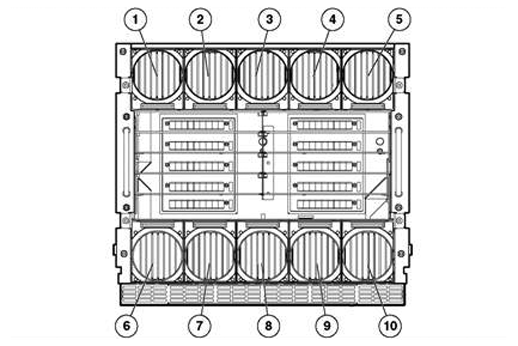
Fan bay numbering | ||||||||||||||||||||||||||||||
|
| ||||||||||||||||||||||||||||||
|
Fans must be placed in the following bays | ||||||||||||||||||||||||||||||
|
Number of Fans |
Fan Bays Used | |||||||||||||||||||||||||||||
|
4 |
4, 5, 9, 10 | |||||||||||||||||||||||||||||
|
6 |
3, 4, 5, 8, 9, 10 | |||||||||||||||||||||||||||||
|
8 |
1, 2, 4, 5, 6, 7, 9, 10 | |||||||||||||||||||||||||||||
|
10 |
1, 2, 3, 4, 5, 6, 7, 8, 9, 10 | |||||||||||||||||||||||||||||
|
| ||||||||||||||||||||||||||||||
|
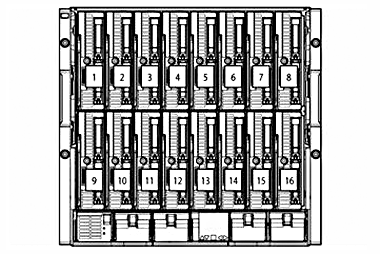
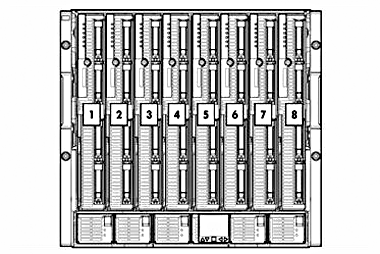
Half-height device bay numbering | ||||||||||||||||||||||||||||||
|
| ||||||||||||||||||||||||||||||
|
1. Device Bay 1 |
9. Device Bay 9 | |||||||||||||||||||||||||||||
|
2. Device Bay 2 |
10. Device Bay 10 | |||||||||||||||||||||||||||||
|
3. Device Bay 3 |
11. Device Bay 11 | |||||||||||||||||||||||||||||
|
4. Device Bay 4 |
12. Device Bay 12 | |||||||||||||||||||||||||||||
|
5. Device Bay 5 |
13. Device Bay 13 | |||||||||||||||||||||||||||||
|
6. Device Bay 6 |
14. Device Bay 14 | |||||||||||||||||||||||||||||
|
7. Device Bay 7 |
15. Device Bay 15 | |||||||||||||||||||||||||||||
|
8. Device Bay 8 |
16. Device Bay 16 | |||||||||||||||||||||||||||||
|
| ||||||||||||||||||||||||||||||
|
Full-height device bay numbering | ||||||||||||||||||||||||||||||
|
| ||||||||||||||||||||||||||||||
|
1. Device Bay 1 |
5. Device Bay 5 | |||||||||||||||||||||||||||||
|
2. Device Bay 2 |
6. Device Bay 6 | |||||||||||||||||||||||||||||
|
3. Device Bay 3 |
7. Device Bay 7 | |||||||||||||||||||||||||||||
|
4. Device Bay 4 |
8. Device Bay 8 | |||||||||||||||||||||||||||||
|
| ||||||||||||||||||||||||||||||
|
Full-height and half-height blade mixed configurations | ||||||||||||||||||||||||||||||
|
| ||||||||||||||||||||||||||||||
|
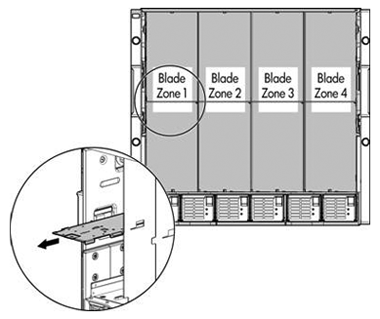
The c7000 enclosure is divided into 4 zones by the vertical support metalwork. Within each zone a removable divider is used to support half height devices. To install a full-height blade in any zone this divider must be removed. As a consequence a zone can only contain either full-height server blades or half-height server blades. NOTE: Expansion blades can be installed in the same zone as both full-height, single-wide and half-height blades. For more information, please see the "Expansion blades" later in this document. | ||||||||||||||||||||||||||||||
|
The following device bays are located in each zone: | ||||||||||||||||||||||||||||||
|
Zone |
Half-Height Device Bays |
Full-Height Device Bays | ||||||||||||||||||||||||||||
|
1 |
1, 9, 2, 10 |
1, 2 | ||||||||||||||||||||||||||||
|
2 |
3, 11, 4, 12 |
3, 4 | ||||||||||||||||||||||||||||
|
3 |
5, 13, 6, 14 |
5, 6 | ||||||||||||||||||||||||||||
|
4 |
7, 15, 8, 16 |
7, 8 | ||||||||||||||||||||||||||||
|
| ||||||||||||||||||||||||||||||
|
Expansion blades | ||||||||||||||||||||||||||||||
|
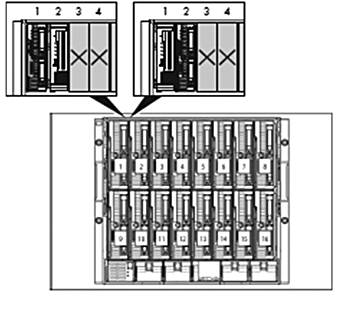
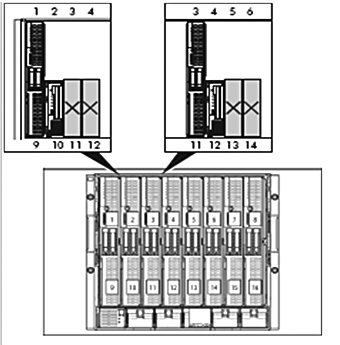
Expansion blades consist of storage blades, tape blades, and the PCI Expansion Blade. Up to 8 expansion blades are supported per HPE BladeSystem c-Class c7000 Enclosure. Expansion blades may be installed in the same zone as half-height and full-height, single-wide server blades. Expansion blades are not supported with full-height, double-wide server blades. An expansion blade is installed directly adjacent to a server blade, also known as a partner server blade. Expansion blade population rule best practices are detailed below. For additional expansion blade rules and guidelines, please see the documentation that ships with the enclosure and expansion blade. Hewlett Packard Enterprise recommends consulting your Hewlett Packard Enterprise sales representative to confirm the validity of any configuration. | ||||||||||||||||||||||||||||||
|
|
| |||||||||||||||||||||||||||||
|
Figure 1 |
Installing an expansion blade adjacent to a half-height server blade. |
Figure 2 |
Installing a single expansion blade adjacent to a full-height, single-wide server blade. | |||||||||||||||||||||||||||
|
Expansion blade population best practices for half-height server blades
Expansion blade population best practices for full-height, single-wide server blades:
| ||||||||||||||||||||||||||||||
|
Device bay and fan population guidelines | ||||||||||||||||||||||||||||||
|
The device bay and fan bay population rule best practices are provided below. Hewlett Packard Enterprise recommends consulting your Hewlett Packard Enterprise sales representative to confirm the validity of any configuration.
| ||||||||||||||||||||||||||||||
|
Summary: | ||||||||||||||||||||||||||||||
| ||||||||||||||||||||||||||||||
|
NOTE: Ten fans are strongly recommended in all configurations for maximum cooling efficiency and redundancy, reduced power consumption, and reduced noise. NOTE: Please see the complete detailed list below of device bay and fan bay population rule best practices. | ||||||||||||||||||||||||||||||
|
Details: | ||||||||||||||||||||||||||||||
a. A minimum of 6 fans are required for any enclosure configured with a three-phase power input module. The fans are installed in fan bays 3, 4, 5, 8, 9, and 10. b. A minimum of 8 fans are required if at least one switch module is installed in interconnect bay 1, 3, 5, or 7 and at least one switch module is installed in interconnect bay 2, 4, 6, or 8. This does not apply to pass-thru modules. The fans are installed in fan bays 1, 2, 4, 5, 6, 7, 9, and 10. c. Ten fans are required for a configuration with: i. One or more HPE Virtual Connect FlexFabric-20/40 F8 Modules. ii. One or more D2220sb or D2500sb Storage Blades. iii. More than half of the enclosure device bays are occupied and any quantity of D2200sb or D2500sb Storage Blades are present. iv. Nine or more BL460c G1 and/or BL460c G5 Server Blades. | ||||||||||||||||||||||||||||||
Technical Specifications
|
HPE BladeSystem |
Dimensions |
Height |
17.4 in (442 mm) | ||
|
Width |
17.6 in (447.04 mm) | ||||
|
Depth |
32 in (813 mm) | ||||
|
Shipping Dimensions |
Height |
29.88 in (759 mm) | |||
|
Width |
23.88 in (607 mm) | ||||
|
Depth |
39.88 in (1013 mm) | ||||
|
Enclosure Weight |
Unboxed |
148 lb (67 kg) | |||
|
Shipping |
191 lb (87 kg) | ||||
|
NOTE: The enclosure weight above includes only an empty enclosure- servers, the power input module, power supplies, fans, interconnect modules, and Onboard Administrator(s) are not included. The weight for the power input module, power supplies, fans, and Onboard Administrator(s) is listed below. Please see the specific server blade and interconnect module QuickSpecs for their respective weight. | |||||
|
Power Input Module Weight |
3 lbs (1.4 kg) | ||||
|
Power Supply Weight |
6 lbs (2.7 kg) | ||||
|
HPE Active Cool 200 Fan Weight (minimum 4, maximum 10) |
4 lbs (1.8 kg) | ||||
|
Onboard Administrator Weight |
3 lbs (1.4 kg) | ||||
|
Maximum Enclosure Weight (approximate) |
Unboxed |
482 lb (219 kg) | |||
|
Shipping |
525 lb (238 kg) | ||||
|
NOTE: The approximate maximum enclosure weight above includes 16 server blades fully configured, the power input module, six power supplies, ten fans, eight interconnect modules, and two Onboard Administrators. | |||||
|
Temperature Range |
Operating |
50° to 95° F (10° to 35° C) | |||
|
Non-Operating |
-22° to 140° F (-30° to 60° C) | ||||
|
Relative Humidity |
Operating |
10 to 90% relative humidity (Rh), 28°C (82.4°F) maximum wet bulb temperature, non-condensing. | |||
|
Non-Operating |
5 to 95% relative humidity (Rh), 38.7°C (101.7°F)maximum wet bulb temperature, non-condensing. | ||||
|
NOTE: Operating temperature has an altitude derating of 1.8° F (1° C) per 1,000 ft (304.8 m). No direct sunlight. Upper operating limit is 10,000 ft (3,048 m) or 70Kpa/10.1 psia. Upper non-operating limit is 30,000 ft (9,144 m) or 30.3 KPa/4.4 psia. Storage maximum humidity of 95% is based on a maximum temperature of 113° F (45° C). Altitude maximum for storage is 70 KPa. NOTE: For detailed environmental and other installation requirements, please see the “HPE BladeSystem c-Class Site Planning Guide” at http://www.hpe.com/support/hpesc. | |||||
|
| |||||
|
Power |
NOTE: HPE highly recommends using the HPE Power Advisor tool to ensure the number of power supply options you have selected can fully support your BladeSystem configuration and to review maximum system power ratings for facilities planning purposes. HPE Power Advisor is available at: http://www.hpe.com/info/hppoweradvisor. | ||||
|
Single Phase AC Power Input Module |
Power connection |
677595-B21: 6x IEC-320 C20 blue power connectors NOTE: The blue power connectors indicate HPE Power Discovery Services capability. HPE Power Discovery Services are enabled when used with an Intelligent Power Distribution Unit (iPDU), iPDU cables, and a Platinum power supply kit. NOTE: One WW 250W C19-C20 2.0m power cable is included per power supply. iPDU power cables are ordered separately. | |||
|
Rated input voltage |
200 to 220 VAC | ||||
|
Rated input frequency |
50 to 60 Hz | ||||
|
Number of power supplies supported |
Minimum: One (1) Maximum: Six (6) | ||||
|
2250W Power Supply |
Maximum output (per power supply) |
2250W | |||
|
Maximum output (total for six power supplies) |
13,050W | ||||
|
Maximum input current (per power supply) |
13.1 A at 200 VAC | ||||
|
Maximum input power (per power supply) |
2621 VA | ||||
|
2400W Gold Power Supply (517521-B21, 6-pack) (499243-B21, single) |
Maximum output (per power supply) |
2450W | |||
|
Maximum output (total for six power supplies) |
14,210W | ||||
|
Maximum input current (per power supply) |
13.9 A at 200 VAC | ||||
|
Maximum input power (per power supply) |
2780 VA | ||||
|
2400W Platinum Power Supply (517521-B22, 6-pack) (588603-B21, single) |
Maximum output (per power supply) |
2450W | |||
|
Maximum output (total for six power supplies) |
14,210W | ||||
|
Maximum input current (per power supply) |
13.2 A at 200 VAC | ||||
|
Maximum input power (per power supply) |
2640 VA | ||||
|
2650W Platinum Power Supply (733460-B21, 6-pack) (733459-B21, single) |
Maximum output (per power supply) |
2650W | |||
|
Maximum output (total for six power supplies) |
15,370W | ||||
|
Maximum input current (per power supply) |
14.4 A at 200 VAC | ||||
|
Maximum input power (per power supply) |
2880 VA | ||||
|
Three Phase AC NA/JPN Power Input Module (413380-B21) |
Power connection |
Two 3.05m (10 ft) power cables with NEMA L15-30p connectors | |||
|
Rated input voltage |
200 to 208 VAC line to line 3-phase delta | ||||
|
Rated input frequency |
50 to 60 Hz | ||||
|
Number of power supplies supported |
Minimum: Three (3) Maximum: Six (6) | ||||
|
2250W Power Supply |
Maximum output (per power supply) |
2250W | |||
|
Maximum output (total for six power supplies) |
13,050W | ||||
|
Maximum input current per line cord |
22.8 A at 200 VAC | ||||
|
Maximum input power per line cord |
7863 VA | ||||
|
2400W Gold Power Supply (517521-B21, 6-pack) (499243-B21, single) |
Maximum output (per power supply) |
2450W | |||
|
Maximum output (total for six power supplies) |
14,210W | ||||
|
Maximum input current per line cord |
24.2 A at 200 VAC | ||||
|
Maximum input power per line cord |
8352 VA | ||||
|
2400W Platinum Power Supply (517521-B22, 6-pack) (588603-B21, single) |
Maximum output (per power supply) |
2450W | |||
|
Maximum output (total for six power supplies) |
14,210W | ||||
|
Maximum input current per line cord |
22.9 A at 200 VAC | ||||
|
Maximum input power per line cord |
7920 VA | ||||
|
2650W Platinum Power Supply (733460-B21, 6-pack) (733459-B21, single) |
Maximum output (per power supply) |
2650W | |||
|
Maximum output (total for six power supplies) |
15,370W | ||||
|
Maximum input current per line cord |
25 A at 200 VAC | ||||
|
Maximum input power per line cord |
8640 VA | ||||
|
Three Phase AC International Power Input Module |
Power connection |
Two 3.05m (10 ft) power cables with IEC-309 220/380 V - 240/415 V, 5-Pin, 6h, 16A connectors | |||
|
Rated input voltage |
380 to 415 VAC line to line | ||||
|
Rated input frequency |
50 to 60 Hz | ||||
|
Number of power supplies supported |
Minimum: Three (3) Maximum: Six (6) | ||||
|
2250W Power Supply |
Maximum output (per power supply) |
2250W | |||
|
Maximum output (total for six power supplies) |
13,050W | ||||
|
Maximum input current per line cord |
11.9 A at 220/380 VAC | ||||
|
Maximum input power per line cord |
7854 VA | ||||
|
2400W Gold Power Supply (517521-B21, 6-pack) (499243-B21, single) |
Maximum output (per power supply) |
2450W | |||
|
Maximum output (total for six power supplies) |
14,210W | ||||
|
Maximum input current per line cord |
12.6 A at 220/380 VAC | ||||
|
Maximum input power per line cord |
8316 VA | ||||
|
2400W Platinum Power Supply (517521-B22, 6-pack) (588603-B21, single) |
Maximum output (per power supply) |
2450W | |||
|
Maximum output (total for six power supplies) |
14,700W | ||||
|
Maximum input current per line cord |
12.2 A at 220/380 VAC 11.2 A at 240/415 VAC | ||||
|
Maximum input power per line cord |
8064 VA | ||||
|
2650W Platinum Power Supply (733460-B21, 6-pack) (733459-B21, single) |
Maximum output (per power supply) |
2650W | |||
|
Maximum output (total for six power supplies) |
15,370W | ||||
|
Maximum input current per line cord |
13.1 A at 220/380 VAC 12 A at 240/415 VAC | ||||
|
Maximum input power per line cord |
8646 VA | ||||
|
-48VDC Power Input Module |
Power connection |
Terminal lug: 45DG 4AWG 1/4 2H | |||
|
Rated input voltage |
40 to 60 VDC | ||||
|
Number of power supplies supported |
Minimum: One (1) Maximum: Six (6) | ||||
|
2250W -48VDC Power Supply |
Maximum output (per power supply) |
2250W | |||
|
Maximum output (total for six power supplies) |
13,050W | ||||
|
Maximum input current (per power supply) |
75A | ||||
|
2650W -48VDC Power Supply (789934-B21) |
Maximum input power per supply
|
2700W
| |||
|
Maximum output (per power supply) |
2650W
| ||||
|
Maximum output (total for six power supplies)
|
15,370W
| ||||
|
Maximum input current (per power supply)
|
73A
| ||||
|
Maximum input power per supply |
2892W
| ||||
|
High Voltage Power Input Module |
Power connection |
6x APP Saf-D-Grid receptacle connectors NOTE: Power cables with APP Saf-D-Grid connectors are ordered separately. | |||
|
Rated input voltage |
277 VAC, 380 VDC | ||||
|
Rated input frequency |
50 to 60 Hz (AC), N/A (DC) | ||||
|
Number of power supplies supported |
Minimum: One (1) Maximum: Six (6) | ||||
|
2650W Universal Power Supply (753619-B21, 6-pack) (753618-B21, single) |
Maximum output (per power supply) |
2650W | |||
|
Maximum output (total for six power supplies) |
15,370W | ||||
|
Maximum input current (per power supply) |
10.5 A at 277 VAC 7.6 A at 380 VDC | ||||
|
Acoustic Noise |
Listed are the declared A-Weighted sound power levels (LWAd) and declared average bystander position A-Weighted sound pressure levels (LpAm) when the product is operating in a 23°C ambient environment. Noise emissions were measured in accordance with ISO 7779 (ECMA 74) and declared in accordance with ISO 9296 (ECMA 109). | ||||
|
Idle |
| ||||
|
LWAd |
7.1 Bels | ||||
|
LpAm |
54 dBA | ||||
|
Operating |
| ||||
|
LWAd |
7.2 Bels | ||||
|
LpAm |
54 dBA | ||||
|
| |||||
|
Option Kits |
Power Supply Option Shipping Dimensions |
Height |
8.75 in (223 mm) | ||
|
Width |
8.63 in (219 mm) | ||||
|
Depth |
35.13 in (892 mm) | ||||
|
Weight |
8.5 lbs (3.85 kg) | ||||
|
Fan Option Shipping Dimensions |
Height |
8.75 in (223 mm) | |||
|
Width |
9.75 in (248 mm) | ||||
|
Depth |
15.88 in (403 mm) | ||||
|
Weight |
4.0 lbs (1.8 kg) | ||||
|
BladeSystem Onboard Administrator Option Shipping Dimensions |
Height |
2.50 in (63.5 mm) | |||
|
Width |
9.88 in (251 mm) | ||||
|
Depth |
13.50 in (343 mm) | ||||
|
Weight |
4.0 lbs (1.8 kg) | ||||
|
| |||||
|
Environmental-friendly Products and Approach |
End-of-life Management and Recycling |
Hewlett Packard Enterprise offers end-of-life Hewlett Packard Enterprise product return, trade-in, and recycling programs in many geographic areas. For trade-in information, please go to http://www.hpe.com/info/recycle. To recycle your product, please go to: http://www.hpe.com/info/recycle or contact your nearest Hewlett Packard Enterprise sales office. Products returned to Hewlett Packard Enterprise will be recycled, recovered or disposed of in a responsible manner. The EU WEEE directive (2002/95/EC) requires manufacturers to provide treatment information for each product type for use by treatment facilities. This information (product disassembly instructions) is posted on the Hewlett Packard Enterprise web site at: http://www.hpe.com/info/recycle. These instructions may be used by recyclers and other WEEE treatment facilities as well as Hewlett Packard Enterprise OEM customers who integrate and re-sell Hewlett Packard Enterprise equipment. | |||
Summary of Changes
|
Date |
Version History |
Action |
Description of Change | ||||||||||||||||
|
15-Apr-2019 |
Version 79 |
Changed |
Configuration Information Factory Integrated Models and Related Options sections were updated. | ||||||||||||||||
|
Added |
SKUs added: P9Q42A, P9Q46A, P9Q47A, P9Q53A, P9Q55A, P9Q58A, P9Q52A, P9Q59A, P9Q60A, P9Q63A, P08476-B21. | ||||||||||||||||||
|
Removed |
SKUs deleted: AF520A, AF535A, AF525A, AF522A, AF523A, AF526A, AF527A, AF538A, AF431A, AF432A, E7804A, AF580A, 778720-B21, C8S45A, 805755-B21, E7804A, AF580A, AF431A, AF432A, AF618A, AF619A, 512489-B21. | ||||||||||||||||||
|
03-Dec-2018 |
Version 78 |
Changed |
Overview, Standard Features, Configuration Information - Factory Integrated Models, and Related Options sections were updated. | ||||||||||||||||
|
Added |
SK(U added: R1C66A | ||||||||||||||||||
|
Removed |
SKU was deleted: 763850-B21 | ||||||||||||||||||
|
01-Oct-2018 |
Version 77 |
Changed |
Updates applied in document. | ||||||||||||||||
|
04-Sep-2018 |
Version 76 |
Added |
SKUs added in Configuration Information section: C8S46B, C8S45B, C8S47B. | ||||||||||||||||
|
Removed |
Obsolete SKUs were deleted: TK744A, TK745A,TK739A, TK740A, TK741A, TK742A, TK743A, E7805A, AF592A, 359615-031, AF577A, AF579A, AF581A, AF582A, AF583A, AF585A, AF438A, AF439A, AF436A, AF437A, C0L99A. | ||||||||||||||||||
|
04-Jun-2018 |
Version 75 |
Changed |
Standard Features, Pre-configured Models, Configuration Information Factory Integrated Models, Related Options, and Fan Bay and Device Bay Numbering and Population Guidelines sections were updated. | ||||||||||||||||
|
Added |
SKU added in Related Options section: 868909-B21. | ||||||||||||||||||
|
Removed |
Obsolete SKUs were deleted: BW946A, D9N47A, D9N51A, D9N53A, D9N58A, D9N62A, D9N54A, D9N59A, G9Z07A, D9N50A, D9N57A, D9N60A, E2D53A, AF585A, AF512A, 252663-B33, AF518A, BW903A, 681842-B21, 681840-B21, 733460-B21, 517521-B22, 588603-B21, 753619-B21, 789935-B21, 517520-B21, 658247-B21, 406740-B21, 648311-B21, J6W98A, J6W99A, J6X01A, J6X02A. | ||||||||||||||||||
|
05-Feb-2018 |
Version 74 |
Added |
SKU added in Configuration Information Integrated Models section: | ||||||||||||||||
|
Removed |
OBS SKU was deleted: | ||||||||||||||||||
|
06-Nov-2017 |
Version 73 |
Changed |
Standard Features section was updated. | ||||||||||||||||
|
Removed |
Obsolete SKUs were deleted: | ||||||||||||||||||
|
23-Oct-2017 |
Version 72 |
Changed |
Care Pack naming and Service and Support- Parts and Materials updated. | ||||||||||||||||
|
25-Sep-2017 |
Version 71 |
Changed |
Configuration Information Factory Integrated Models section was updated. | ||||||||||||||||
|
17-Jul-2017 |
Version 70 |
Changed |
Standard Features, Pre-Configured Models, Configuration Information Factory Integrated Models, and Related Options, sections were updated. | ||||||||||||||||
|
Removed |
Obsolete SKUs were deleted: | ||||||||||||||||||
|
12-Jun-2017 |
Version 69
|
Added |
SKU added in Configuration Information Integrated Models section: | ||||||||||||||||
|
Removed |
Obsolete SKUs were deleted: C6N33ABE, C6N32ABE, 689638-B21. | ||||||||||||||||||
|
03-Apr-2017 |
Version 68 |
Changed |
URLs in document were updated. | ||||||||||||||||
|
Removed |
Obsolete SKUs were deleted: | ||||||||||||||||||
|
13-Feb-2017 |
Version 67 |
Changed |
Information in QuickSpecs was updated. | ||||||||||||||||
|
Removed |
Obsolete SKUs were deleted: 517521-B21, 499243-B21, AH332A, 516733-B21, AW563A, AW564A, 505959-B21, AF537A, 499243-B21, AH332A, 516733-B21, AW563A, AW564A, 505959-B21, BD883A, BS580B. | ||||||||||||||||||
|
25-Mar-2016 |
Version 66 |
Changed |
SKUs updated in Configuration Information - Factory Integrated Models and Related Options, from: AJ820B, AJ821B, AJ822B; to: AJ820C, AJ821C, AJ822C. | ||||||||||||||||
|
Removed |
Obsolete SKU was deleted: 489184-B21 | ||||||||||||||||||
|
15-Jan-2016 |
Version 65 |
Changed |
Overview and Related Options sections were updated. | ||||||||||||||||
|
Added |
Added two OneView option SKUs E5Y41A and E5Y42A. | ||||||||||||||||||
|
Removed |
Obsolete SKUs deleted: | ||||||||||||||||||
|
28-Sep-2015 |
Version 64 |
Changed |
Configuration Information Factory Integrated Models and Related Options sections were updated. | ||||||||||||||||
|
Added |
SKUs added in Related Options section: 813874-B21, 805755-B21 | ||||||||||||||||||
|
Removed |
Obsolete SKUs were deleted: E5Y41AAE, AZ871A, AZ878A AF616A, 505958-B21, AZ872A, AZ879A, AF617A, TC317A, AZ873A, AZ880A, U6W98E, QW914A, AZ874A, AZ881A, AZ870A, QW915A, AZ875A, AZ883A, AZ877A, AQ697B, AZ876A, AZ884A, AZ885A, AZ870A | ||||||||||||||||||
|
17-Aug-2015 |
Version 63 |
Changed |
What’s New was updated with HPE 2650W -48VDC Power Supply Kit for BladeSystem c7000 Enclosure. Service and Support section was revised. Configuration Information Factory Integrated Models, Related Options, Power Input Module and Power Supply Specifications, and Technical Specifications were revised. | ||||||||||||||||
|
9-Feb-2015 |
Version 62 |
Changed |
Overview, Service and Support, Configuration Information Factory Integrated Models and Related Options sections were updated | ||||||||||||||||
|
Added |
SKUs Added on HPE BladeSystem c-Class Network Interconnects: 751465-B21, 778720-B21, 466482-B21 | ||||||||||||||||||
|
Removed |
Obsolete SKUs removed: AF536A, AT120A | ||||||||||||||||||
|
19-Dec-2014 |
Version 61 |
Changed |
Notes were updated throughout the QuickSpecs | ||||||||||||||||
|
21-Nov-2014 |
Version 60 |
Changed |
Sub-header was added: Fan Bay and Device Bay Numbering Populating Guidelines. Device bay and fan population guidelines were updated | ||||||||||||||||
|
7-Nov-2014 |
Version 59 |
Changed |
Overview, Pre-configured Models and Configuration Information Factory Integrated Models sections were updated | ||||||||||||||||
|
25-Sep-2014 |
Version 58 |
Changed |
Changes were made throughout the QuickSpecs. | ||||||||||||||||
|
9-Sep-2014 |
Version 57 |
Changed |
Changes were made throughout the QuickSpecs. | ||||||||||||||||
|
18-Aug-2014 |
Version 56 |
Changed |
Overview, Related Options and Technical Specifications sections were updated | ||||||||||||||||
|
Added |
SKUs added on configuration Information Factory Integrated Models section: 753623-B21, 753618-B21, 753619-B21, C6N33ABE, SKUs added on related options section: J6W98A, J6W99A, J6X00A, J6X01A, J6X02A, J6X03A Power Input Module and Power Supply Specifications section added | ||||||||||||||||||
|
24-Jun-2014 |
Version 55 |
Changed |
Overview, Configuration Information Factory Integrated Models, Related Option, Device Bay and Fan Bay Numbering and Population Guidelines, Technical Specifications sections were updated | ||||||||||||||||
|
Removed |
SKU 691380-B21 was deleted, HPE Power Distribution Units SKUs were deleted | ||||||||||||||||||
|
Added |
HPE Data Center Racks SKUs on Configuration Information Factory Integrated Models section, HPE Power Distribution Units SKUs were added | ||||||||||||||||||
|
10-Jun-2014 |
Version 54 |
Changed |
Changes were made throughout the QuickSpecs. | ||||||||||||||||
|
31-Mar-2014 |
Version 53 |
Added |
HPE OneView Software was added. | ||||||||||||||||
|
10-Dec-2013 |
Version 52 |
Changed |
Changes were made throughout the QuickSpecs. | ||||||||||||||||
|
11-Oct-2013 |
Version 51 |
Changed |
Changes made to Step 5 & 6 of Configuration Information and to the Related Options section. | ||||||||||||||||
|
13-Sep-2013 |
Version 50 |
Changed |
Models, throughout Configuration Information - Factory Integrated Models, and Related Options were revised. | ||||||||||||||||
|
30-Aug-2013 |
Version 49 |
Changed |
Changes made in the Configuration Information, Related Options and Technical Specifications sections. | ||||||||||||||||
|
14-Jun-2013 |
Version 48 |
Changed |
2650 Watts Platinum Hot Plug Power Supply was added HPE BladeSystem Power Sizer was removed | ||||||||||||||||
|
10-Jun-2013 |
Version 47 |
Changed |
Changes made in the following sections: Service and Support Configuration Information - Steps 2 & 5 Related Options | ||||||||||||||||
|
28-Mar-2013 |
Version 46 |
Changed |
Changes made in the North America and Canada versions only. | ||||||||||||||||
|
15-Mar-2013 |
Version 45 |
Changed |
Changed name of product throughout document. Changes made in the HPE Insight Management software, Configuration Information: Steps 2 - 7 and Related Options sections | ||||||||||||||||
|
1-Mar-2013 |
Version 44 |
Removed |
Related Options: Removed TC276AAE, 436222-B21 and TC277AAE from the HPE Insight Software section. | ||||||||||||||||
|
19-Feb-2013 |
Version 42 |
Added |
Added the What's New section Increased mid-plane bandwidth Intelligent Infrastructure 2400W Platinum Hot Plug Power Supply (80 PLUS certified) Single Phase Intelligent Power Module Location Discovery Services Support for HPE Insight Control 7.2 and higher releases | ||||||||||||||||
|
Changed |
Changed name of product throughout document. Changed name of HPE DSB400c Storage Blade to HPE D2200sb Storage Blade throughout document. Completely revised the Service and Support sections. Changes made in the HPE Insight Management software, Configuration Information: Steps 2 - 7 and Related Options sections | ||||||||||||||||||
|
14-Dec-2012 |
Version 41 |
Changed |
Changed SB40c to D2200sb throughout the QuickSpecs. Changes made to Insight Management section. Completely revised the Service and Support sections. Changes made throughout the Configuration Information and Related Options sections | ||||||||||||||||
|
24-Sep-2012 |
Version 40 |
Changed |
Changes were made in HPE BladeSystem c-Class Overview, Configuration Information Factory Integrated Models and Related Options sections. | ||||||||||||||||
|
31-Aug-2012 |
Version 39 |
Changed |
Changes made throughout the QuickSpecs. | ||||||||||||||||
|
14-May-2012 |
Version 38 |
Changed |
Changes made in the Related Options section. | ||||||||||||||||
|
26-Mar-2012 |
Version 37 |
Changed |
Changes made to the HPE Optical Drives. | ||||||||||||||||
|
6-Mar-2012 |
Version 36 |
Added |
Added in the reference to G8. | ||||||||||||||||
|
9-Jan-2012 |
Version 35 |
Removed |
Removed a reference to G8. | ||||||||||||||||
|
14-Nov-2011 |
Version 34 |
Changed |
Insight Management and HPE Insight Foundation were revised in HPE Insight management software Optimized, Standard and Basic Care Packages were updated in Service and Support HPE Tape Backup was revised in Related Options Note was added to Power Cords | ||||||||||||||||
|
29-Sep-2011 |
Version 33 |
Changed |
Revisions made in the Configuration Information and Related Options sections. | ||||||||||||||||
|
26-Sep-2011 |
Version 32 |
Changed |
Power Supplies, Cisco MDS 9124e Fabric Switch for HPE c-Class BladeSystem, HPE Ultrium Tape Blades and HPE Pointnext operational services were revised. | ||||||||||||||||
|
30-Aug-2011 |
Version 31 |
Changed |
Power Distribution Units were revised in Configuration Information Factory Integrated Models Product descriptions were revised throughout Related Options | ||||||||||||||||
|
29-Jun-2011 |
Version 30 |
Changed |
Changes were made within North America and Canada only. | ||||||||||||||||
|
24-Jun-2011 |
Version 29 |
Changed |
Changes were made throughout, including removing HPE SAS Switches from Related Options and adding HPE USB Keyboard and Mouse to HPE Rack Options. | ||||||||||||||||
|
23-Jun-2011 |
Version 28 |
Changed |
Link was corrected in Service and Support. | ||||||||||||||||
|
3-Jun-2011 |
Version 27 |
Changed |
Changes were made within North America and Canada only. | ||||||||||||||||
|
29-Apr-2011 |
Version 26 |
Changed |
Changes made to revise the Service and Support section along with other changes to the Overview, Configuration Information and Related Options sections. | ||||||||||||||||
|
14-Feb-2011 |
Version 25 |
Changed |
HPE BladeSystem BLc7000 c-Class Server Blade Enclosures, HPE Insight Software, HPE Virtual Connect Enterprise Manager, HPE Uninterruptible Power Systems, HPE Rack Series and HPE Tape Backup product descriptions were revised HPE Virtual Connect FlexFabric 10/24 Enterprise Edition for BladeSystem c7000 and HPE Virtual Connect FlexFabric 10Gb/24-port Module for c-Class BladeSystem were added to HPE BladeSystem c-Class Network Interconnects HPE SB40c with (4) 300GB SAS SFF Bundle was added to HPE c-Class Storage Blades TFT7600 Rackmount Keyboard Monitor, USB Interface Adapter - 1 Pack, USB Virtual Media Interface Adapter and Serial Interface adapter - 1 pack with power supply were removed from HPE Rack Options | ||||||||||||||||
|
8-Oct-2010 |
Version 24 |
Changed |
HPE Tape Backup and HPE Pointnext operational services were revised Service and Support was added HPE Optical Drives was added to Related Options 10642G2 and 10647G2 1200 mm Shock Racks were added to HPE Rack Series HPE TFT7600 G2 KVM Console Rackmount Keyboard Monitors were added to HPE Rack Options HPE 1/10Gb Virtual Connect Ethernet Module for c-Class BladeSystem was removed from HPE BladeSystem c-Class Network Interconnects 2x1x16 IP Console Switch with Virtual Media was removed from HPE KVM Switch Options HPE Disk Backup was removed from Related Options | ||||||||||||||||
|
2-Jul-2010 |
Version 23 |
Removed |
HPE Virtual Connect FlexFabric 10/24 Enterprise Edition for BladeSystem c7000 was removed from HPE BladeSystem c-Class Network Interconnects. | ||||||||||||||||
|
25-Jun-2010 |
Version 22 |
Removed |
Removed a reference to an unavailable product. | ||||||||||||||||
|
21-Jun-2010 |
Version 21 |
Changed |
HPE BLc Virtual Connect FlexFabric 10Gb/24-port Module Option and HPE Virtual Connect FlexFabric 10/24 Enterprise Edition for BladeSystem c7000 were added and HPE BladeSystem c-Class Virtual Connect 1Gb SX SFP Option Kit and RJ-45 SFP Option Kit, HPE GbE2c Layer 2/3 Ethernet Blade Switch Advanced Functionality Software, HPE 1:10 GbE BLc Advanced Functionality Software, HPE 10Gb Ethernet BL-c Switch and HPE 10GbE BLc Advanced Functionality Software were removed from HPE BladeSystem c-Class Network Interconnects HPE 6X 2400W Platinum Efficiency FIO Power Supply and HPE 2400W Platinum Hot-Plug Power Supply were added to HPE Power Supplies NOTE was added to Step 4 HPE 4Gb Virtual Connect Fibre Channel Module for c-Class BladeSystem, HPE Brocade 4/12 SAN Switch and 4/12 SAN Switch Upgrade LTU and HPE Brocade 4/24 SAN Switch and 4/24 SAN Switch Power Pack were removed HPE Insight Control, No Media 1-Server License including 1 year of 24x7 Technical Support and Updates was removed from HPE Insight Software HPE StorageWorks MSL2024 2 LTO-2 Ultrium 448 SCSI Drive Library, HPE StorageWorks MSL4048 1 LTO-3 Ultrium 960 SCSI Drive Library and 960 4 GB FC Library and HPE StorageWorks Virtual Library Systems were removed from HPE Tape Backup | ||||||||||||||||
|
19-Feb-2010 |
Version 20 |
Changed |
HPE Power Supplies, HPE Insight Control, HPE Enclosure, HPE Cooling Options, HPE Uninterruptible Power Systems, HPE Tape Backup and HPE Disk Backup were revised throughout the QuickSpecs. | ||||||||||||||||
|
25-Nov-2009 |
Version 19 |
Changed |
Minor edits were made within the QuickSpecs. | ||||||||||||||||
|
16-Nov-2009 |
Version 18 |
Changed |
Changes were made throughout the QuickSpecs. | ||||||||||||||||
|
2-Oct-2009 |
Version 17 |
Changed |
Changes made throughout the QuickSpecs except for the Storage and Technical Specifications sections. | ||||||||||||||||
|
14-Aug-2009 |
Version 16 |
Changed |
Revised Step 5 of the Configuration Information Factory Integrated Models section Added a NOTE for HPE c7000 Onboard Administrator with KVM to Step 4 of the Configuration Information Factory Integrated Models section and c7000 Enclosure Options in the Related Options section Removed HPE c7000 Redundant Onboard Administrator Options from Step 4 of the Configuration Information Factory Integrated Models section and c7000 Enclosure Options in the Related Options section | ||||||||||||||||
|
17-Jul-2009 |
Version 15 |
Changed |
Revisions were made in the HPE BladeSystem c-Class Overview section, Configuration Information Factory Integrated Models section and to the Related Options section. | ||||||||||||||||
|
3-Jul-2009 |
Version 14 |
Changed |
Corrected Part Number for HPE BLc7000 Insight Control suite for Linux 16 License in Step 3 of the Configuration Information Factory Integrated Models section. | ||||||||||||||||
|
2-Jun-2009 |
Version 13 |
Added |
All c7000 enclosures support both models of Onboard Administrator to NOTE in Step 4 of the Configuration Information Factory Integrated Models section Part numbers starting with 507 to NOTE in HPE BladeSystem InfiniBand Interconnects in Step 5 of the Configuration Information Factory Integrated Models section NOTE to HPE c7000 Redundant Onboard Administrator Options for c7000 Enclosure Options in the Related Options section | ||||||||||||||||
|
Changed |
Updated HPE BladeSystem Power Sizer in the HPE BladeSystem c-Class Overview section Tape Blades were changed to HPE Ultrium Tape Blades in the Related Options section | ||||||||||||||||||
|
29-Apr-2009 |
Version 12 |
Changed |
Changes affected the North America and Canada versions only. Just the date and version were changed in the Worldwide version. | ||||||||||||||||
|
27-Apr-2009 |
Version 11 |
Changed |
Changes were made throughout the QuickSpecs. | ||||||||||||||||
|
30-Mar-2009 |
Version 10 |
Added |
Active Cool 200 Fan and HPE ProLiant Onboard Administrator throughout the QuickSpecs HPE StorageWorks 3Gb SAS BL Switch and HPE 4x QRD IB Switch Module for HPE c-Class BladeSystem to Step 5 of the Configuration Information Factory Integrated Models section and Related Options section HPE 14.4 kVA Modular PDU to Step 6 of the Configuration Information Factory Integrated Models section | ||||||||||||||||
|
Changed |
Completely revised Insight Control Suites throughout the QuickSpecs and Server Management Stand Alone Products in the HPE BladeSystem c-Class Overview and Related Options sections and Core Infrastructure Management and URL for HPE BladeSystem Power Sizer in the HPE BladeSystem c-Class Overview section Revisions were made throughout Step 2 of the Configuration Information section Removed NOTE from HPE BladeSystem c-Class c7000 Enclosure in the HPE BladeSystem c-Class Overview section and 10642 G2 (42U) Rear Extension Kit and HPE Modular Cooling System from the Related Options section | ||||||||||||||||||
|
26-Jan-2009 |
Version 9 |
Added |
NOTE for HPE 2400W High Efficiency Hot Plug Power Supply in Step 2 of the Configuration Information Factory Integrated Models and Related Options sections HPE StorageWorks SB920c Tape Blade to HPE c-Class Tape Blades in the Related Options section HPE Airflow Optimization section to the Related Options | ||||||||||||||||
|
Changed |
HPE Insight Control Environment for Linux section of HPE Insight Control Environment for BladeSystem Management Suites in the Related Options section Updated HPE Rack 10000 G2 Series in the Related Options section Minor formatting and grammatical changes were made within Step 5 of the Configuration Information Factory Integrated Models and the Technical Specifications sections | ||||||||||||||||||
|
17-Nov-2008 |
Version 8 |
Changed |
Changes were made to the following sections: Overview: What's New At A Glance HPE BladeSystem c-Class Overview: Rack Airflor Requirements Server Management Stand Alone Software Configuration Information Factory Integrated Models Step Two Step Five Step Six Related Options Changes were made throughout this section Technical Specifications HPE Blade System Power | ||||||||||||||||
|
15-Sep-2008 |
Version 7 |
Added |
SAS Enterprise drives have a 3 year warranty regardless of the system in which they are installed to the Warranty section of the At A Glance HPE 1:10 GbE BLc Advanced Functionality Software HPE 10Gb Ethernet BL-c Switch HPE GbE2c Layer 2/3 Ethernet Blade Switch Advanced Functionality Software | ||||||||||||||||
|
Changed |
Server Management Stand Alone Software Product NOTES section for the following: HPE Insight Control Environment for BladeSystem Management Suite HPE Virtual Connect Enterprise Manager HPE PCI Expansion Blades HPE c-Class Tape Blades HPE StorageWorks All-in-One Storage Systems Rack 10000 G2 Series Tape Libraries Power Cords Completely revised the Uninterruptible Power Systems - Rack Width Dimension for the HPE BladeSystem c7000 Server Blade Enclosure | ||||||||||||||||||
|
8-Aug-2008 |
Version 6 |
Added |
2m/6ft IEC C20-C19 jumper cord to the c-Class Power Supply section in Step 2 of the Configuration Information Factory Integrated Models and to the c7000 Power Options section of the Related Options HPE 17.3 kVA Modular PCU and HP22 kVA Modular PDU to the HPE Modular Power Distribution Units section in Step 6 of the Configuration Information Factory Integrated Models-48V DC Power to Power Cords in the Power section of the Technical Specifications | ||||||||||||||||
|
Changed |
Power Cords section in the Related Options HPE Single Phase and 3-Phase UPS sections in the Related Options | ||||||||||||||||||
|
14-Jul-2008 |
Version 5 |
Changed |
Changes were made to the following sections: HPE BladeSystem c-Class Overview/Insight Control Environment for BladeSystem Management Suite HPE BladeSystem c-Class Overview/Server Management Stand Alone Software Product - ProLiant Essentials Configuration Information Factory Integrated Models/HPE BladeSystem c-Class SAN Interconnects Configuration Information Factory Integrated Models/PDU cords Related Options/HPE BladeSystem c-Class SAN Interconnects Related Options/HPE Insight Control Environment for BladeSystem Management Suite Related Options/Server Management Stand Alone Software Product - ProLiant Essentials Related Options/Power Cords | ||||||||||||||||
|
Removed |
Options were removed from the following sections: Related Options/Tape Libraries Related Options/HPE KVM Switch Options Technical Specifications/Power | ||||||||||||||||||
|
12-May-2008 |
Version 4 |
Changed |
Changes were made throughout the Overview, HPE BladeSystem c-Class Overview, Configuration Information and Related Options sections. | ||||||||||||||||
|
11-Feb-2008 |
Version 3 |
Changed |
Changes were made throughout the QuickSpecs. | ||||||||||||||||
|
05-Oct-2007 |
Version 2 |
Changed |
Updated the description for part number AF916A. | ||||||||||||||||
|
12-Sep-2007 |
Version 1 |
Created |
New QuickSpecs | ||||||||||||||||
| |||||||||||||||||||


