HP Virtual Connect 8Gb 24-Port Fibre Channel Module for c-Class BladeSystem: технические характеристики и документация
В архивеOverview
|
HPE Virtual Connect 8Gb 24-Port Fibre Channel Module for c-Class BladeSystem | ||||
|
| ||||
|
| ||||
|
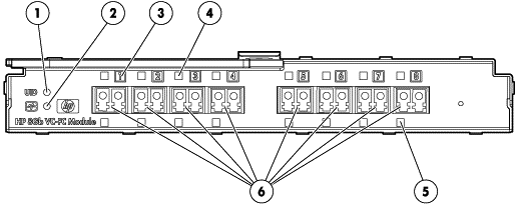
Figure 1 HPE Virtual Connect 8Gb 24-Port Fibre Channel Module Front Bezel | ||||
|
1. |
UID Indicator |
4. |
Link Status Indicator | |
|
2. |
Module Health Indicator |
5. |
Port Activity Indicator | |
|
3. |
Port Number and Status Indicator |
6. |
Ports 1-8 (8 Gb Fibre Channel) | |
|
| ||||
|
Models | ||||
|
HPE Virtual Connect 8Gb 24-port Fibre Channel Module for c-Class BladeSystem |
466482-B21 | |||
Compatibility
|
Compatibility | |
|
HPE BladeSystem ProLiant and Integrity Servers |
HPE ProLiant and Integrity Servers: |
|
HPE ProLiant and Integrity BL c-Class |
The HPE BladeSystem c3000 and c7000 Enclosures have been designed up front with the Virtual Connect Architecture in mind incorporating the HPE Onboard Administrator, ILO Management, and HPE Management tools inside the Virtual Connect framework. |
Supported Products
|
Supported Configurations | |||||||||||||||||||||
|
| |||||||||||||||||||||
|
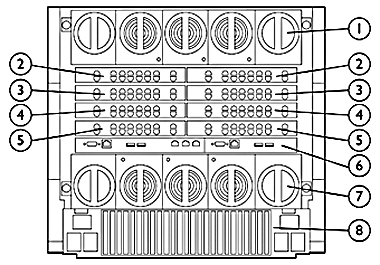
HPE BladeSystem c7000 Enclosure - Rear View | |||||||||||||||||||||
|
1. |
Upper Fan System |
5. |
Interconnect Bays 7 / 8 | ||||||||||||||||||
|
2. |
Interconnect Bays 1 / 2 |
6. |
On Board Administrator | ||||||||||||||||||
|
3. |
Interconnect Bays 3 / 4 |
7. |
Lower Fan System | ||||||||||||||||||
|
4. |
Interconnect Bays 5 / 6 |
8. |
Rear Redundant Power Complex | ||||||||||||||||||
|
| |||||||||||||||||||||
|
| |||||||||||||||||||||
|
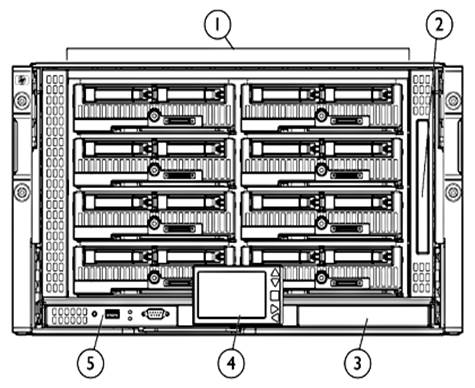
HPE BladeSystem c3000 Enclosure - Front View | |||||||||||||||||||||
|
1. |
Device Bays 1 thru 8 |
4. |
Insight Display | ||||||||||||||||||
|
2. |
Enclosure DVD Drive |
5. |
Active Onboard Administrator | ||||||||||||||||||
|
3. |
Standby Onboard Administrator (reserved for Future) |
|
| ||||||||||||||||||
|
| |||||||||||||||||||||
|
| |||||||||||||||||||||
|
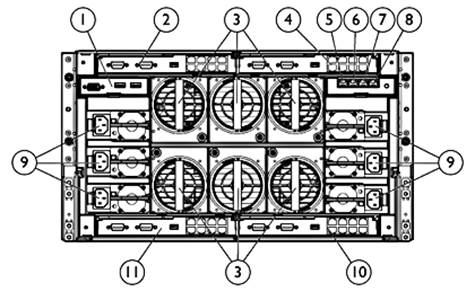
HPE BladeSystem c3000 Enclosure - Rear View | |||||||||||||||||||||
|
1. |
Local KVM interface (reserved for future) |
7. |
iLO/Onboard Administrator Port | ||||||||||||||||||
|
2. |
Interconnect Bay 1 |
8. |
iLO/Onboard Administrator Port 2 (reserved for future) | ||||||||||||||||||
|
3. |
Active Cool Fans |
9. |
Power Supplies | ||||||||||||||||||
|
4. |
Interconnect Bay 2 |
10. |
Interconnect Bay 4 | ||||||||||||||||||
|
5. |
Enclosure Up-link and Service Port |
11. |
Interconnect Bay 3 | ||||||||||||||||||
|
6. |
Enclosure Down-link |
|
| ||||||||||||||||||
|
| |||||||||||||||||||||
|
Mezzanines | |||||||||||||||||||||
|
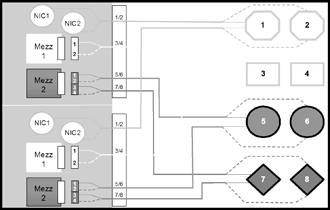
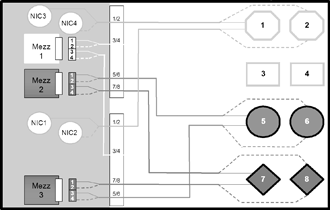
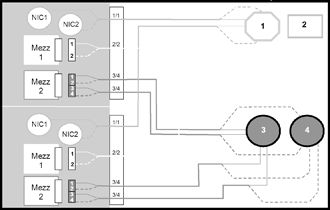
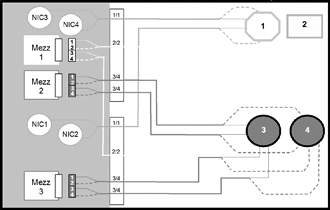
Port Mapping |
Port mapping differs slightly between full height and half height server blades due to the support for additional Mezzanine cards on the full height version. | ||||||||||||||||||||
|
|
| ||||||||||||||||||||
|
c7000 Half Height Server Blade |
c7000 Full Height Sever Blade | ||||||||||||||||||||
|
|
| ||||||||||||||||||||
|
c3000 Half Height Server Blade |
c3000 Full Height Sever Blade | ||||||||||||||||||||
|
| |||||||||||||||||||||
|
The following are supported configurations for the HPE Virtual Connect 8Gb 24-Port Fibre Channel Module. Please note that other interconnect options can be installed in the enclosure, but they do not inherit the benefits of Virtual Connect. Switches and Pass-Thru modules will operate per their default configurations. Any moves, adds, or changes to servers which are connected to non-Virtual Connect modules will require reconfiguration on the LAN and/or SAN. The Virtual Connect Manager will only manage Virtual Connect Modules. | |||||||||||||||||||||
| |||||||||||||||||||||
|
| |||||||||||||||||||||
| |||||||||||||||||||||
|
| |||||||||||||||||||||
| |||||||||||||||||||||
|
| |||||||||||||||||||||
|
HPE BladeSystem c7000 Enclosure | |||||||||||||||||||||
|
NOTE: The following tables show a number of typical, supported configurations for an HPE BladeSystem c7000 Enclosure. | |||||||||||||||||||||
|
|
|
| |||||||||||||||||||
|
[Bay 1] VC-Enet |
[Bay 2] Empty | ||||||||||||||||||||
|
|
| ||||||||||||||||||||
|
[Bay 1] VC-Enet |
[Bay 2] VC-Enet | ||||||||||||||||||||
|
|
| ||||||||||||||||||||
|
[Bay 1] VC-Enet |
[Bay 2] VC-Enet | ||||||||||||||||||||
|
|
| ||||||||||||||||||||
|
[Bay 1] VC-Enet |
[Bay 2] VC-Enet | ||||||||||||||||||||
|
|
| ||||||||||||||||||||
|
[Bay 1] VC-Enet |
[Bay 2] VC-Enet | ||||||||||||||||||||
|
|
| ||||||||||||||||||||
|
[Bay 1] VC-Enet |
[Bay 2] Empty | ||||||||||||||||||||
|
|
| ||||||||||||||||||||
|
[Bay 1] VC-Enet |
[Bay 2] VC-Enet | ||||||||||||||||||||
|
|
| ||||||||||||||||||||
|
[Bay 1] VC-Enet |
[Bay 2] VC-Enet | ||||||||||||||||||||
|
|
| ||||||||||||||||||||
|
[Bay 1] VC-Enet* |
[Bay 2] VC-Enet | ||||||||||||||||||||
|
* This configuration is only applicable for enclosures with full-height servers. | |||||||||||||||||||||
|
|
| ||||||||||||||||||||
|
[Bay 1] VC-Enet |
[Bay 2] VC-Enet | ||||||||||||||||||||
|
|
| ||||||||||||||||||||
|
[Bay 1] VC-Enet |
[Bay 2] VC-Enet | ||||||||||||||||||||
|
|
| ||||||||||||||||||||
|
[Bay 1] VC-Enet |
[Bay 2] VC-Enet | ||||||||||||||||||||
|
|
| ||||||||||||||||||||
|
[Bay 1] VC-Enet |
[Bay 2] VC-Enet | ||||||||||||||||||||
|
|
| ||||||||||||||||||||
|
[Bay 1] VC-Enet |
[Bay 2] VC-Enet | ||||||||||||||||||||
|
| |||||||||||||||||||||
|
HPE BladeSystem c3000 Enclosure | |||||||||||||||||||||
|
NOTE: The following tables show a number of typical, supported configurations for an HPE BladeSystem c3000 Enclosure. | |||||||||||||||||||||
|
|
|
| |||||||||||||||||||
|
[Bay 1] VC-Enet |
[Bay 2] VC-Enet | ||||||||||||||||||||
|
|
| ||||||||||||||||||||
|
[Bay 1] VC-Enet |
[Bay 2] VC-Enet | ||||||||||||||||||||
|
|
| ||||||||||||||||||||
|
[Bay 1] VC-Enet |
[Bay 2] VC-Enet | ||||||||||||||||||||
|
| |||||||||||||||||||||
|
Maximum Cable Distance (Meters) for Multi-mode Fiber Shortwave | |||||||||||||||||||||
|
|
Multi-mode Fiber Type | ||||||||||||||||||||
|
Fiber Channel Data Rate |
OM1 |
OM2 |
OM3 |
OM4 | |||||||||||||||||
|
8Gbps |
21 m |
50 m |
150 m |
190 m | |||||||||||||||||
|
4Gbps |
70 m |
150 m |
380 m |
400 m | |||||||||||||||||
|
2Gbps |
150 m |
300 m |
500 m |
| |||||||||||||||||
|
| |||||||||||||||||||||
|
Stacking Configuration |
Stacking is only supported on Virtual Connect Ethernet Modules. The Virtual Connect Fibre Channel modules are managed via the Virtual Connect Ethernet Modules. The Virtual Connect firmware is dynamically mirrored between modules so all configuration data is updated simultaneously in a stack. Fibre Channel data packets are not transmitted between modules in a stacked configuration. | ||||||||||||||||||||
Standard Features
|
Product Features |
Performance
Management
Virtual server profiles
Options
- https://www.hpe.com/us/en/products/integrated-systems/virtual-connect.html - https://www.hpe.com/us/en/product-catalog/detail/pip.hpe-virtual-connect-enterprise-manager-software.3601866.html |
Service and Support, HPE Care Pack and Warranty Information
|
Service and Support |
HPE Technology Services for Industry Standard Servers and BladeSystem Protect your business beyond warranty with HPE Pointnext operational services HPE Foundation Care services offer scalable reactive support-packages for Hewlett Packard Enterprise servers and software. You can choose the type and level of service that is most suitable for your IT and business needs. HPE Proactive Care delivers high levels of system availability through proactive service management and advanced technical response. HPE Datacenter Care provides highly flexible environmental support to address unique customer business needs. |
|
Recommended HPE Pointnext operational Services for your HPE product | |
|
Optimized Care |
3-Year HPE 6-hour Call to Repair Response, Proactive Care HPE Installation and Startup Service for HPE BladeSystem c-Class Infrastructure for c7000 enclosure |
|
Standard Care |
3-Year HPE 24x7 4-hour response, Proactive Care Service HPE Installation and Startup Service for HPE BladeSystem c-Class Infrastructure for c7000 enclosure HPE Installation and Startup Service for HPE BladeSystem c-Class Enhanced Network |
|
Related Services |
HPE Proactive Care Personalized Support - Environmental Option HPE Proactive Select Service Additional HPE Pointnext operational services can be found at:http://h20565.www2.hpe.com/portal/site/hpsc/ |
|
Insight Online/Insight Remote Support |
HPE
Insight Remote Support provides 24 X 7 remote monitoring, proactive
notifications, and problem resolution. This comes at no additional cost
with your HPE solution. Learn more about Insight Remote Support http://h20565.www2.hpe.com/portal/site/hpsc/public/psi/home?sp4ts.oid=5211911&ac. NOTE: Insight Remote Support is a prerequisite for Proactive Care. All blades within a single HPE BladeSystem enclosure must be at the same service level. |
|
HPE Support Center |
Personalized online support portal with access to information, tools and experts to support Hewlett Packard Enterprise business products. Submit support cases online, chat with HPE experts, access support resources or collaborate with peers. Learn more http://h20565.www2.hpe.com/portal/site/hpsc/ The HPE Support Center Mobile App allows you to resolve issues yourself or quickly connect to an agent for live support. Now, you can get access to personalized IT support anywhere, anytime. NOTE: HPE Support Center Mobile App is subject to local availability. |
|
Parts and materials |
Hewlett Packard Enterprise will provide HPE-supported replacement parts and materials necessary to maintain the covered hardware product in operating condition, including parts and materials for available and recommended engineering improvements.
Parts and components that have reached their maximum supported lifetime and/or the maximum usage limitations as set forth in the manufacturer's operating manual, product quick-specs, or the technical product data sheet will not be provided, repaired, or replaced as part of these services.
The defective media retention service feature option applies only to Disk or eligible SSD/Flash Drives replaced by Hewlett Packard Enterprise due to malfunction. |
|
Warranty |
Server Blade Interconnect Limited Warranty includes 1-year Parts, 1-year Labor, 1-year on-site |
|
For more information |
To learn more on HPE ProLiant servers and HPE BladeSystem servers, please contact your Hewlett Packard Enterprise sales representative or Hewlett Packard Enterprise Authorized Channel Partner. Or visit: |
Related Options
|
Optional Network Cabling |
| |
|
Hardware |
| |
|
8 Gb Optical Transceivers (SFPs) |
Short Wave |
|
|
HPE 8Gb Shortwave B-series Fibre Channel 1 Pack SFP+ Transceiver |
AJ716B | |
|
Long Wave |
| |
|
HPE 8Gb Long Wave B-series 10km Fibre Channel 1 Pack SFP+ Transceiver |
AJ717A | |
|
Optical cables |
LC-LC for between 4/8 Gb and 4/8 Gb Fibre Channel devices |
|
|
HPE LC to LC Multi-mode OM3 2-Fiber 0.5m 1-Pack Fiber Optic Cable |
AJ833A | |
|
HPE LC to LC Multi-mode OM3 2-Fiber 1.0m 1-Pack Fiber Optic Cable |
AJ834A | |
|
HPE LC to LC Multi-mode OM3 2-Fiber 2.0m 1-Pack Fiber Optic Cable |
AJ835A | |
|
HPE LC to LC Multi-mode OM3 2-Fiber 5.0m 1-Pack Fiber Optic Cable |
AJ836A | |
|
HPE LC to LC Multi-mode OM3 2-Fiber 15.0m 1-Pack Fiber Optic Cable |
AJ837A | |
|
HPE LC to LC Multi-mode OM3 2-Fiber 30.0m 1-Pack Fiber Optic Cable |
AJ838A | |
|
HPE LC to LC Multi-mode OM3 2-Fiber 50.0m 1-Pack Fiber Optic Cable |
AJ839A | |
|
| ||
|
Service and Support Offerings |
NOTE: HPE Pointnext operational services for the c7000 and c3000 Enclosures cover the enclosure, power supplies and fans. HPE Virtual Connect 8Gb 24-Port Fibre Channel Module for c-Class BladeSystem are also covered by the c7000 and c3000 enclosures PointNext services. |
|
|
NOTE: Some options, including Fibre Channel and InfiniBand switches for the HPE c-Class BladeSystem, are not covered under the c7000/c3000 enclosure PointNext and carry separate PointNext. PointNext service level support for these options should always be uplifted to match existing storage or server service level. |
| |
|
Proactive Care Services for the c7000 Enclosure |
| |
|
HPE 3 year Proactive Care 24x7 c7000 Enclosure Service |
U3C33E | |
|
HPE 3 year Proactive Care Call to Repair c7000 Enclosure Service |
U3C36E | |
|
HPE 3 year Proactive Care 24x7 c7000 Enclosure with Insight Control Service |
U3P10E | |
|
HPE 3 year Proactive Care Call to Repair c7000 Enclosure with Insight Control Service |
U3P13E | |
|
Proactive Care Services for the c3000 Enclosure |
| |
|
HPE 3 year Proactive Care 24x7 c3000 Enclosure Service |
U3C42E | |
|
HPE 3 year Proactive Care Call to Repair c3000 Enclosure Service |
U3C45E | |
|
HPE 3 year Proactive Care 24x7 c3000 Enclosure with Insight Control Service |
U3P19E | |
|
HPE 3 year Proactive Care Call to Repair c3000 Enclosure with Insight Control Service |
U3P22E | |
|
Installation and Start-up Services recommended for the c7000 |
| |
|
HPE BladeSystem c7000 Infrastructure Startup Service |
UE602E | |
|
HPE BladSys c7000 Encd Network Startup Service |
UE603E | |
|
Installation and Start-up Services recommended for the c3000 |
| |
|
HPE BladeSystem c3000 Infrastructure Startup Service |
UF817E | |
|
HPE BladeSystem c3000 + OS Startup Service |
UF818E | |
|
HPE BladSys c3000 Encd Network Startup Service |
UF814E | |
|
Additional HPE Pointnext operational services can be found at: |
| |
Technical Specifications
|
Shipping Dimensions |
Length |
352.55 mm (13.88 in) |
| ||||
|
Width |
270.00 mm (10.63 in) |
| |||||
|
Height |
120.65 mm (4.75 in) |
| |||||
|
Shipping Weight |
2.0 kg (4.4 lb) |
| |||||
|
Product Specifications Hardware |
Performance |
8 Gb/sec line speed, full duplex | |||||
|
Bandwidth |
424 MB, Full Duplex @ 2-Gbps | ||||||
|
Aggregate Bandwidth |
Up to 384 Gbps (24 ports x 8 Gbps x 2 for full duplex) | ||||||
|
Fabric Latency (intra-switch) |
700 nSec. Latency increases as input port speed is lower than the output port speed. | ||||||
|
Number of Fibre Channel Ports |
8 external 2/4/8-Gbps ports | ||||||
|
External Port Type |
Configured as Node port s (N_Port), | ||||||
|
Internal Port Type |
Configured as Fabric Node port (N_Port), | ||||||
|
Classes of Service |
Class 2 and Class 3 Fibre Channel services | ||||||
|
Scalability |
Does not contribute to the total switch limit. See the SAN Design Guide for latest supported configurations. | ||||||
|
Buffer Credits |
8 buffer credits per port, ASIC embedded memory | ||||||
|
Connectors and Cabling |
SFP+ optical hot-pluggable transceiver with LC connector | ||||||
|
Indicators |
Module locator (UID) | ||||||
|
Dimensions |
Length |
10.5 in (267.7 mm) | |||||
|
Width |
7.5 in (92.79 mm) | ||||||
|
Height |
1.1 in (27.94 mm) | ||||||
|
Weight |
1.27 kg (2.8 lb) |
| |||||
|
Environmental Ranges |
Specification |
10° to 35°C (50° to 95°F) | |||||
|
Temperature Range |
| ||||||
|
Operating |
10° to 35°C (50° to 95°F) | ||||||
|
Shipping |
-40° to 60°C (-40° to 140°F) | ||||||
|
Storage |
-20° to 60°C (-4° to 140°F) | ||||||
|
Maximum wet bulb temperature |
30°C (80°F) | ||||||
|
Relative humidity (noncondensing)** |
| ||||||
|
Operating |
10% to 90% | ||||||
|
Shipping |
10% to 90% | ||||||
|
Storage |
10% to 95% | ||||||
|
Specification |
10° to 35°C (50° to 95°F) | ||||||
|
Power Specification |
12V @ 3A (36W) |
| |||||
|
| |||||||
|
Product Specifications Software |
Industry Standard NPIV Support |
The Virtual Connect Fibre Channel module works by aggregating multiple FC HBA ports over a single N-port uplink through the use of N_port_ID virtualization (NPIV). NPIV allows multiple distinguishable identities (multiple port WWNs and port IDs) over a single N-port connection. Most Fibre Channel SAN switch vendors have support for NPIV in their latest firmware release. By conforming to the NPIV standard, SAN equipment interoperability simplified. The Virtual Connect Fibre Channel Module Provides basic 4:1, 8:1, or 16:1 NPIV Fibre Channel concentration. | |||||
|
Data Center Connectivity |
Each Virtual Connect Fibre Channel module supports up to 8 SAN fabrics and is typically connected to a Fibre Channel switch that has been configured to run in NPIV mode. The 8 uplink ports are speed selectable from 2, 4 or 8Gb/s. | ||||||
|
Management Features |
An HPE Virtual Connect Ethernet Module must be present in order to configure the VC FC Modules. This provides a complete Virtual Connect Environment for the server connections. | ||||||
|
| |||||||
|
Management and Standards Support |
Standards |
ANCI T11 N_Port ID Virtualization | |||||
|
| |||||||
|
Safety and |
Safety Certifications |
UL/CUL Recognition to UL/CSA 60950-1 | |||||
|
| |||||||
|
Electromagnetic Emissions Certifications FCC Part 15 Class A |
FCC Part 15 Class A | ||||||
|
EN 55022 Class A (CISPR22 Class A) | |||||||
|
VCCI Class A | |||||||
|
AS/NZS 3548 Class A or AS/NZS CISPR22 Class A | |||||||
|
MIC Class A | |||||||
|
CE Marking | |||||||
|
| |||||||
|
Environment-friendly |
End-of-life Management and Recycling |
Hewlett Packard Enterprise offers end-of-life Hewlett Packard Enterprise product return, trade-in, and recycling programs in many geographic areas. For trade-in information, please go to: https://www.hpe.com/us/en/about/environment/product-recycling.html. To recycle your product, please go to: https://www.hpe.com/us/en/about/environment/product-recycling.html or contact your nearest Hewlett Packard Enterprise sales office. Products returned to Hewlett Packard Enterprise will be recycled, recovered, or disposed of in a responsible manner. | |||||
|
| |||||||
Summary of Changes
|
Date |
Version History |
Action |
Description of Change | ||||||||||||||||||
|
24-Oct-2018 |
Version 7 |
Changed |
Updates were applied to all sections. | ||||||||||||||||||
|
Removed |
Obsolete SKUs were deleted: AJ715A, U6W98E. | ||||||||||||||||||||
|
30-Aug-2013 |
Version 6 |
Added |
Added Supported Products Section - HP BladeSystem c3000 Enclosure. | ||||||||||||||||||
|
10-Jun-2013 |
Version 5 |
Changed |
Changes made within Overview, Service & Support and Related Options sections | ||||||||||||||||||
|
Added |
Added Compatibility and Standard Features sections. | ||||||||||||||||||||
|
Removed |
Removed AT A Glance Section. | ||||||||||||||||||||
|
22-Jun-2012 |
Version 4 |
Changed |
Changes made within the Supported Products and Related Options sections. | ||||||||||||||||||
|
27-May-2011 |
Version 3 |
Added |
Brocade 804 8Gb FC HBA was added to HP BladeSystem ProLiant and Integrity Servers. | ||||||||||||||||||
|
02-Jul-2010 |
Version 2 |
Added |
HP Integrity BL8x0c i2 Server Blades require OA version 3.0 or later note was added to HP ProLiant and Integrity BL c-Class Server Blade Enclosures. | ||||||||||||||||||
|
27-Apr-2009 |
Version 1 |
Created |
New QuickSpecs | ||||||||||||||||||
| |||||||||||||||||||||