




























HP BladeSystem PCI Expansion Blade: технические характеристики и документация
В архиве
  |
Overview
|
HP BladeSystem PCI Expansion Blade | |||
|
The HP BladeSystem PCI Expansion Blade provides PCI card expansion slots to an adjacent c-Class server blade (known as a partner server blade). This blade expansion unit uses the c-Class midplane to pass standard PCI signals between adjacent enclosure bays allowing a c-Class blade server to add off-the-shelf PCI-X or PCIe cards. Up to eight PCI Expansion Blades are supported per c7000 enclosure and four per c3000 enclosure. Detailed expansion blade population best practices are provided in the c3000 and c7000 enclosure QuickSpecs available at www.hp.com/go/bladesystem. The c-Class blade enclosure includes the capability for the signal communication from the server blade to the PCI Expansion Blade across the midplane. No external cables or additional options are required except when using the HP ProLiant BL620c G7 Server Blade. When partnering a PCI Expansion Blade with a HP ProLiant BL620c G7 Server Blade, an HP PCI Express Mezzanine Pass-Thru Card for BladeSystem c-Class (431643-B21) is required. This card is installed in the mezzanine 3 connector in the server blade for the first PCI Expansion Blade installation and a second card in installed in the mezzanine 2 connector if a second PCI Expansion Blade is required. The number of PCI Expansion Blades supported per server blade depends on the server blade form factor. Most half-height, single-wide server blades support one PCI Expansion Blade including the HP ProLiant BL460c Gen8 and BL465c Gen8 Server Blades. Most full-height, single-wide server blades support two PCI Expansion Blades including the HP ProLiant BL620c G7, BL660c Gen8, and BL685c G7 Server Blades. Full-height, double-wide or larger server blades do not support the PCI Expansion Blade, such as the HP ProLiant BL680c G7 Server Blade. At least one PCI Expansion Blade is used for each supported c-Class server blade needing PCI card expansion. See the server support matrix below for the supported server blades and the number of PCI Expansion Blade(s) allowed per server. NOTE:
Any PCI card from third-party manufacturers that operates in HP ProLiant ML and
HP ProLiant DL servers should work in the PCI Expansion Blade. HP does not offer
warranty or support for third-party PCI manufactured products. | |||
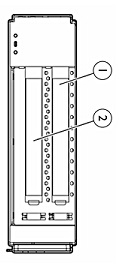 | |||
| 1. | PCI
Card #1 | 2. | PCI Card #2 |
| | |||
| Models | ||
| NOTE: Order one or two PCI Expansion Blade(s) for each supported server blade needing standard PCI-X or PCIe expansion slots. See the server support matrix below for the supported server blades and the number of PCI Expansion Blade(s) allowed per server. | ||
| HP PCI Expansion Blade NOTE: Ships with one pre-installed PCI-X connector board. Also includes one PCIe connector board which requires installation. NOTE: This option is not supported on the HP ProLiant BL680c G7 and HP Integrity BL860c i2, BL860c i4, BL870c i2, BL870c i4, BL890c i2, and BL890c i4 Server Blades. |
448018-B21 | |
| Upgrade Options | ||
| PCI Express Mezzanine Pass-Thru card | PCI Express Mezzanine Pass-Thru
card NOTE: The PCI Express Mezzanine Pass-Thru Card is required to support the PCI Expansion Blade with the ProLiant BL620c G7 Server Blade. Up to two PCI Expansion Blades are supported per BL620c G7 server; one PCI Express Mezzanine Pass-Thru Card is required per each PCI Expansion Blade. | 431643-B21 |
|
|
Standard Features
| Key Features | The PCI Expansion Blade supports the following types of cards:
In addition to the above, please note the following:
|
| | |
| LED Indicators | Front panel LEDs indicates power and system health status. |
|
| |
| Density |
The PCI Expansion Blade fits into a half -height bay in the BladeSystem c3000 and c7000 Enclosure. Up to eight PCI Expansion Blades are supported per c7000 enclosure and four per c3000 enclosure. |
|
| |
| Manageability |
The PCI Expansion Blade and its PCI boards are managed by the adjacent server blade and its operating system. |
|
| |
| Product Kit Contents | PCI Expansion Blade with two PCI connector boards (one PCI-X and one PCI Express), warranty card, and installation guide. |
|
| |
| Warranty |
The PCI Expansion Blade is protected by HP Services and a worldwide network of resellers and service providers. 3-year parts, 3-year Labor and 3-year on-site limited global warranty. Certain restrictions and exclusions apply. HP provides no warranty for third-party PCI cards, and HP provides no support of the use of third-party PCI cards within the PCI Expansion Blade. HP does not provides support for any HP branded PCI cards in the PCI Expansion blade. |
| PCI Expansion Blade server support matrix (shipping ProLiant server blades) | |||||
Server
Blade | Form Factor | Number
of PCI Expansion Blades Supported | Pass
Thru-Card* Required | Mezzanine
slot to support the 1st Pass-Thru Card | Mezzanine
slot to support the 2nd Pass-Thru Card |
| HP ProLiant Server Blades | |||||
| BL460c Gen8 | Half-height,
single-wide | 1 | No | n/a | n/a |
| BL460c Gen9 | Not
supported | n/a
| n/a
| n/a
| |
| BL465c Gen8 | 1 | No | n/a | ||
| BL620c G7 | Full-height,
single-wide | 2 | Yes | 3
| 2 |
| BL660c Gen8 | 2 | No | n/a | n/a | |
| BL685c G7 | 2 | No | n/a | n/a | |
| BL680c G7 | Full-height,
double-wide | Not
supported | n/a | n/a | n/a |
| HP Integrity Server Blades | |||||
| BL860c i2 | Full-height,
single-wide | Not
supported | n/a | n/a | n/a |
| BL860c i4 | Not supported | n/a | n/a | n/a | |
| BL870c i2 | Full-height,
double-wide | Not
supported | n/a | n/a | n/a |
| BL870c i4 | Not supported | n/a | n/a | n/a | |
| BL890c i2 | Full-height,
quad-wide | Not
supported | n/a | n/a | n/a |
| BL890c i4 | Not supported | n/a | n/a | n/a | |
| * The PCI Express Mezzanine Pass-Thru Card (431643-B21). | |||||
|
|
Service and Support
| Service and Support | HP Care Pack
Services: Packaged server and storage services for increased uptime, productivity
and ROI
|
| | |
| Recommended HP Care Pack Services for optimal satisfaction with your HP product | |
| Recommended Services | Hardware Options
Support
http://h20195.www2.hp.com/V2/GetPDF.aspx/5982-6547EEE.pdf |
| HP recommends Proactive Care for your BladeSystem servers, enclosures and components to prevent problems with proactive advice and assistance, resolve issues and rapidly recover by connecting to HP's enhanced call experience and advanced technical expertise. | |
| HP Installation and Startup
of HP ProLiant Servers
http://h20195.www2.hp.com/V2/GetPDF.aspx/5982-7572ENN.pdf | |
| | |
| Optional HP Care Pack Services that will enhance your HP product experience | |
| Optional Services | HP Proactive
Select Service |
| | |
| eSupport |
HP eSupport is a portfolio of technology-based services that assist you
with managing your business environment - from the desktop to the data
center.
Access to certain features of the support portal requires an HP service
agreement. To access the support portal, visit: http://www.hp.com/support |
|
|
|
| Customer Technical Training |
In today's cost-conscious business environment, IT professionals, developers, consultants and users face an interesting challenge: how to keep up with the latest technologies and expand important skills while delivering profitable results on current projects. To help address this challenge, HP offers innovative training solutions that help keep you up-to-date on virtualization, server, storage, Insight Control, Citrix, Microsoft® and open source/Linux-related topics-while spending less time away from business-critical activities. |
|
|
|
| HP Services Awards |
HP Technology Services continues to be recognized for service and support excellence by customers, partners, industry organizations and publications around the world. Recent honors and award reflect our services team's dedications, technical expertise, professionalism and uncompromising commitment to customer satisfaction. |
|
|
|
| Additional Services Information |
To learn more on HP ProLiant servers, HP BladeSystem servers and HP storage products, please contact your HP sales representative or HP Authorized Channel Partner. Or visit: www.hp.com/services/proliant or www.hp.com/services/bladesystem or http://www.hp.com/services/storage |
|
|
Technical Specifications
| HP PCI Expansion Blade |
Dimensions |
Height |
2.207 in (5.61 cm) |
| Depth |
20.058 in (50.95 cm) | ||
| Width |
7.154 in (18.17 cm) | ||
|
Weight |
Maximum |
10.0 lbs (4.54 kg) | |
| Temperature Range* | Operating | 10° to 35° C (50° to 95° F) | |
| Non-Operating |
-40° to 60° C (-40° to 140° F) | ||
| Storage | -20° to 60° C (-4° to 140° F) | ||
| Maximum Wet Bulb Temperature |
-30° C (86° F) | ||
|
Operating |
10% to 90% | ||
|
Relative Humidity** |
Shipping | 10% to 90% | |
| Storage | 10% to 95% | ||
| * All temperature
ratings shown are for sea level. An altitude derating of 1°C per 304.8
m (1.8° F per 1,000 ft) to 3048 m (10,000 ft) is applicable. No direct
sunlight allowed. Upper operating limit is 3,048 m (10,000 ft) or 70 Kpa/10.1
psia. Upper non-operating limit is 9,144 m (30,000 ft) or 30.3 KPa/4.4 psia. **Storage maximum humidity of 95% is based on a maximum temperature of 45° C (113° F). Altitude maximum for storage corresponds to a pressure minimum of 70 KPa. |
|||
|
|
|||
| Environment-friendly Products and Approach | End-of-life Management and Recycling |
Hewlett-Packard offers end-of-life HP product return, trade-in, and recycling programs in many geographic areas. For trade-in information, please go to http://www.hp.com/go/green. To recycle your product, please go to: http://www.hp.com/go/green or contact your nearest HP sales office. Products returned to HP will be recycled, recovered or disposed of in a responsible manner. The EU WEEE directive (2002/95/EC) requires manufacturers to provide treatment information for each product type for use by treatment facilities. This information (product disassembly instructions) is posted on the Hewlett Packard web site at: http://www.hp.com/go/green. These instructions may be used by recyclers and other WEEE treatment facilities as well as HP OEM customers who integrate and re-sell HP equipment. | |
|
|
Summary of Changes
| Date | Version History | Action | Description of Change: |
| 16-Jan-2015 | From Version 14 to 15 | Changed | Standard Features section was updated |
| 10-Oct-2014 | From Version 13 to 14 | Changed | Overview and Standard Features sections were updated |
| 17-Sep-2014 | From Version 12 to 13 | Changed | Changes made throughout the entire QuickSpecs |
| 18-Apr-2014 | From Version 11 to 12 | Changed | Changes made in Service and Support section. |
| 12-Oct-2012 | From Version 10 to 11 | Changed | Change made to URL in Service and Support section. |
| 14-Nov-2011 | From Version 9 to 10 | Changed | Changes were made in Service and Support. |
| 23-Jun-2011 | From Version 8 to 9 | Changed | Link was corrected in Service and Support. |
| © Copyright 2015 Hewlett-Packard Development Company, L.P. The information contained herein is subject to change without notice. The only warranties for HP products and services are set forth in the express warranty statements accompanying such products and services. Nothing herein should be construed as constituting an additional warranty. HP shall not be liable for technical or editorial errors or omissions contained herein. |