




























HP UPS Network Module: технические характеристики и документация
В архивеOverview
|
HP UPS Network Module |
|
|
|
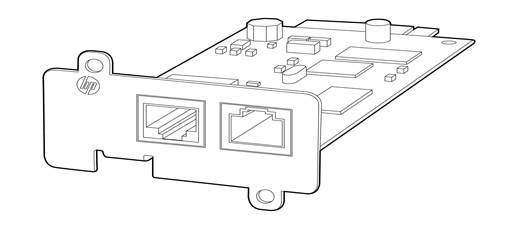
The new HP UPS Network Module allows an HP Uninterruptible Power System (UPS) to be directly connected to the network for remote monitoring and management of either a single UPS, or two UPSs in a redundant configuration. The UPS Network Module works with the HP Power Protector clients and can be configured to send alert traps to HP Systems Insight Manager and other SNMP management programs or used as a standalone management system. This flexibility enables you to monitor and manage UPSs through the network. To facilitate day-to-day maintenance tasks, the embedded management software provides detailed system logs. |
|
|
|
|
|
|
|
Models | |
|
HP UPS Network Module MINI-SLOT Kit |
AF465A |
|
| |
|
Kit Contents |
|
Standard Features
|
HP UPS Network Module |
The HP UPS Network Module enables you to configure, monitor and manage power environments through comprehensive control of individual HP UPSs.
The UPS Network Module can be configured to send alert traps to HP Systems Insight Manager and other SNMP management programs or used as a standalone management system. This flexibility enables you to monitor and manage the UPS through the network connector; the serial connector located on the front of the management module is only used for configuration. To facilitate day-to-day maintenance tasks, the firmware provides detailed system logs.
|
|
| |
|
Product Features |
|
|
| |
|
Highlights |
Use HP Systems Insight Manager to:
|
|
| |
|
Security |
|
|
| |
|
HP Care Pack Information |
For HP Care Pack (hardware & software) information, as well as orderable part numbers, please refer to the following web site: http://h18005.www1.hp.com/services/carepaq/index.html |
|
| |
|
Warranty |
HP UPS Network Modules are backed by a limited 3-year warranty |
Web Interface Requirements
|
Operating System |
Service Pack |
Platform |
Platform |
Platform |
|
Windows |
|
|
|
|
|
Windows Server 2012 Standard |
|
|
x |
|
|
Windows Server 2011 Standard |
|
|
x |
|
|
Windows Server 2008 R2 - Enterprise Edition, DataCenter, Standard |
SP1 |
|
x |
x |
|
Windows Server 2008 - Enterprise Edition, DataCenter, Standard |
SP2 |
|
x |
x |
|
Windows Server 2003 R2 - Enterprise Edition, DataCenter, Standard |
SP2 |
x |
x |
|
|
Windows Server 2003 - Enterprise Edition, DataCenter, Standard |
SP1 |
x |
|
x |
|
Windows Small Business Server 2011 |
|
|
x |
|
|
Windows Small Business Server 2008 |
|
|
x |
|
|
Windows Small Business Server 2008 |
SP2 |
x |
x |
|
|
Windows Small Business Server 2003 R2 Premium |
|
|
|
|
|
Windows 8 - Enterprise, Premium, Professional, Ultimate, Basic |
|
x |
x |
|
|
Windows 7 - Enterprise, Premium, Professional, Ultimate, Basic |
SP1 |
|
x |
|
|
Windows Vista - Enterprise, Ultimate, Business |
SP2 |
x |
x |
|
|
Windows XP Professional |
SP3 |
x |
|
|
|
Linux |
|
|
|
|
|
Red Hat Enterprise Linux 6 |
U1 |
x |
x |
|
|
Red Hat Enterprise Linux 6 |
U2 |
x |
x |
|
|
Red Hat Enterprise Linux 6 |
U3 |
x |
x |
|
|
Red Hat Enterprise Linux 5 |
U6 |
x |
x |
x |
|
Red Hat Enterprise Linux 5 |
U7 |
x |
x |
|
|
Red Hat Enterprise Linux 5 |
U8 |
x |
x |
x |
|
Red Hat Enterprise Linux Base Server 5 |
U4 |
x |
x |
x |
|
Red Hat Enterprise Linux Advanced Platform 5 |
U4 |
x |
x |
x |
|
SUSE Linux Enterprise Server 11 |
SP2 |
x |
x |
x |
|
SUSE Linux Enterprise Server 11 |
SP1 |
x |
x |
x |
|
SUSE Linux Enterprise Server 10 |
SP4 |
x |
x |
x |
|
Fedora Core 15 |
|
x |
x |
|
|
Fedora Core 14 |
|
x |
x |
|
|
OpenSuse 11 |
U4 |
x |
x |
|
|
OpenSuse 11 |
U2 |
x |
x |
|
|
Debian 6 (Squeeze) |
|
x |
x |
|
|
Debian 6 (Lenny) |
|
x |
x |
|
|
Ubuntu 11.04 |
|
x |
x |
|
|
Ubuntu 10.10 |
|
x |
x |
|
|
Ubuntu 11.04 LTS |
|
x |
x |
|
|
HP-UX |
|
|
|
|
|
HP-UX 11i v3 |
|
|
|
|
|
HP-UX 11i v2 |
|
|
|
|
|
VMware |
|
|
|
|
|
vSphere Hypervisor ESX 4.1 |
U2 |
|
x |
|
|
vSphere Hypervisor ESXi 4.1 |
U2 |
|
x |
|
|
vSphere Hypervisor ESXi 4.0 |
U4 |
|
x |
|
|
vSphere Hypervisor ESXi 4.0 |
U4 |
|
x |
|
|
vSphere Hypervisor ESXi 5.0 |
U1 |
|
x |
|
|
vSphere Hypervisor ESXi 5.1 |
|
|
x |
|
|
Microsoft Hyper V (HPPP Client Only) |
|
|
|
|
|
Hyper V Server 2008 R2 |
|
|
x |
|
|
Hyper V Server 2008 |
|
|
x |
|
|
Xen |
|
|
|
|
|
Citrix XenServer 6.0 |
|
x |
x |
|
|
Citrix XenServer 5.6 |
|
x |
x |
|
|
OpenSource Xen2.6 on RHEL 5 |
|
|
x |
|
|
OpenSource Xen3.2 on Debian 5 |
|
|
x |
|
|
KVM |
|
|
|
|
|
KVM 0.12.1.2 on RHEL 6 and Debian 5 |
|
|
x |
|
|
|
|
|
|
|
|
Browsers |
|
|
|
|
|
Windows Internet Explorer 7, 8, and 9 |
|
x |
x |
|
|
HP-UX Firefox 2.0.0.x |
|
|
|
|
|
Linux Firefox 3.5.x (Native to Linux) |
|
x |
x |
|
|
Windows Firefox 11 |
|
x |
x |
|
|
Windows Firefox 4 |
|
x |
x |
|
|
Windows Firefox 3.6.15 |
|
x |
x |
|
|
Chrome 10.x |
|
x |
x |
|
|
Opera 11 |
|
x |
x |
|
|
| ||||
|
UPS Hardware Support | ||||||
|
Supported UPS |
Availability |
VA Rating |
Watts |
U Height |
Load Seg. |
UPS Part Numbers |
|
R1500 G3 |
Yes |
1140 |
1050 |
1 |
2 |
AF469A, AF470A, AF471A |
|
R/T3000 G2 Low Volt |
Yes |
2880 |
2700 |
2 |
2 |
AF466A |
|
R/T3000 G2 High Volt |
Yes |
3300 |
3000 |
2 |
2 |
AF467A, AF468A |
Service and Support
|
Service and Support |
HP Technology Services |
|
| |
|
Recommended HP Care Pack Services for optimal satisfaction with your HP product | |
|
Recommended Services |
3-Year HP 24x7 4 hour Response, Hardware Support Onsite Service |
|
HP ProLiant Server Hardware Installation | |
|
| |
|
Related HP Care Pack Services to enhance your HP product experience | |
|
Related Services |
3-Year HP 6 hour Hardware Support Onsite Call-to-Repair Service |
|
HP Proactive Select Service | |
|
| |
|
Insight Remote Support |
Delivers secure remote monitoring and support for HP servers and storage, 24x7 at no additional cost. Available as part of HP Warranty, Care Pack and Service Contract offers. |
|
| |
|
Parts and materials |
HP will provide HP-supported replacement parts and materials necessary to maintain the covered hardware product in operating condition, including parts and materials for available and recommended engineering improvements. Supplies and consumable parts will not be provided as part of this service; standard warranty terms and conditions apply. Parts and components that have exceeded their maximum supported lifetime and/or the maximum usage limitations as set forth in the manufacturer's operating manual or the technical product data sheet will not be provided, repaired or replaced as part of this service. |
|
| |
|
Coverage |
For ProLiant servers and storage systems, this service covers HP-branded hardware options qualified for the server, purchased at the same time or afterward, internal to the enclosure, as well as external monitors up to 22" and tower UPS products; these items will be covered at the same service level and for the same coverage period as the server unless the maximum supported lifetime and/or the maximum usage limitation has been exceeded. Coverage of the UPS battery is not included; standard warranty terms and conditions apply. |
|
| |
|
For more information |
To learn more on services for HP ESSN Options, please contact your HP sales representative or HP Authorized Channel Partner. Or visit: http://www.hp.com/services/proliant or http://www.hp.com/services/bladesystem |
Technical Specifications
|
Mechanical Dimensions (WxHxD) |
5.1 x 2.4 x 1.6 inches (130 x 60 x 40 mm) |
|
Unit Weight |
1.0 lb (.46 kg) |
|
Shipping Dimensions (WxHxD) |
8.5 x 2.3 x 9.7 in (21.59 x 5.84 x 24.62 cm) |
|
Shipping Weight |
2.0 lb (.92 kg) |
|
Operating Temperature |
50° to 104° F (10° to 40° C) |
|
Operating Relative Humidity (%) |
20% to 80 % relative humidity non-condensing |
|
Operating Elevation |
0 to 10,000 ft (0 to 3048 m) |
|
Storage Temperature |
-4° to 140° F (-20° to 60° C) |
|
Storage Relative Humidity (%) |
5% to 95 % relative humidity non-condensing |
|
Storage Elevation |
0 to 49,000 ft (0 to 14935 m) |
|
| |
|
Environment-friendly Products and Approach |
End-of-life Management and Recycling |
Hewlett-Packard offers end-of-life HP product return, trade-in, and recycling programs in many geographic areas. For trade-in information, please go to: http://www.hp.com/go/green. To recycle your product, please go to: http://www.hp.com/go/green or contact your nearest HP sales office. Products returned to HP will be recycled, recovered or disposed of in a responsible manner. |
Summary of Changes
|
Date |
Version History |
Action |
Description of Change: |
|
23-Oct-2015 |
From Version 6 to 7 |
Changed |
Overview section was revised. |
|
19-Nov-2012 |
From Version 5 to 6 |
Changed |
Updated the Operating Systems chart. |
|
15-Jun-2012 |
From Version 4 to 5 |
Changed |
Revisions made in the Web Interface Requirements section. |
|
06-Apr-2012 |
From Version 3 to 4 |
Changed |
VMware was revised in Web Interface Requirements. |
|
02-Sep-2011 |
From Version 2 to 3 |
Changed |
Client Operating System Support chart was revised in Web Interface Requirements. |
|
01-Jul-2011 |
From Version 1 to 2 |
Changed |
Changes made in the Standard Features and Web Interface Requirements sections. |
|
© Copyright 2015 Hewlett-Packard Development Company, L.P. |