




























HPE ArubaOS 8.0: технические характеристики и документация
В архивеOverview
|
ArubaOS 8.0 |
|
|
|
|
|
Product overview |
|
|
|
|
|
The smarter operating system for today's mobile workplace Mobile devices, IoT and business critical applications are enabling mobile workers to be more productive and efficient - but at the same time driving up the demands on the network. ArubaOS is the operating system for all Aruba Mobility Controllers, Virtual Mobility Controllers, Mobility Master and controller-managed wireless access points. With an extensive set of integrated technologies and capabilities, ArubaOS 8 delivers unified wired and wireless access, seamless roaming, enterprise grade security and an always-on network with the required performance, user experience and reliability to support high density environments. The Mobility Master is a new component of the Aruba architecture that enables customers to take advantage of advanced features that require central coordination and for networks to scale due to increased demand for mobile and IoT devices. It also replaces the prior functions of the master controller and can be either deployed as a VM or an x86 hardware appliance. The Mobility Master provides automatic RF optimization and enables hitless failover in an unlikely event of a controller outage. Aruba's current customers with Mobility Controllers can upgrade from ArubaOS version 6 to version 8 and immediately benefit from some of the new features and capabilities. For more advanced features such as 3rd party integration, customers will need to add a Mobility Master into their deployment. For a list of detailed features on ArubaOS 8 refer to the release notes available here. |
|
|
|
|
|
|
|
|
Features and Benefits |
|
|
|
|
|
THE FOLLOWING TECHNOLOGIES IN ARUBAOS 8 ARE ONLY SUPPORTED IN THE MOBILITY MASTER |
|
|
Feature |
Benefit |
|
AirMatch |
Aruba further enhances the Adaptive Radio Management (ARM) technology with AirMatch - the new automated channel optimization, transmit power adjustment and channel width tuning system that utilizes dynamic machine learning intelligence to automatically generate the optimal view of the entire WLAN network. |
|
Controller Clustering |
By supporting up to 12 controllers in one cluster, Controller Clustering enables a seamless experience across giant campuses, in the event of failure or significant crowd density. |
|
MultiZone |
The new MultiZone feature in Mobility Master allows IT organizations to have multiple separate secure networks while using the same AP in the same physical location. |
|
NBAPIs |
Mobility Master has a full set of northbound APIs that enable deep visibility into the network. The NBAPIs provide RF health metrics, app utilization, device type and user data in an easy to integrate format. 3rd party applications can receive information from the controller and analyze all these metrics for better visibility and monitoring. |
|
In-service module upgrade |
The Mobility Master introduces the ability to dynamically update individual service modules (AppRF, AirGroup, ARM, AirMatch, NBAPI, UCM, WebCC and IP classification) that are residing on the Mobility Master, without requiring an entire system reboot. |
|
ClientMatch |
Aruba's patented ClientMatch technology eliminates sticky clients and boosts Wi-Fi performance by ensuring that clients associate with the best access point. It also groups the MU-MIMO clients together for simultaneous transmission to multiple devices, improving the overall WLAN capacity. |
|
AppRF |
AppRF technology, part of the optional ArubaOS Policy Enforcement Firewall (PEF) module, brings application awareness to WLANs. It enables IT to prioritize applications for each user and scales for BYOD transaction and device density. |
|
AirGroup technology |
AirGroup makes it easy to share Apple TVs, printers, Google Chromecast, and other DNS-advertised devices across subnets. Simple configuration options ensure that all devices can see each other while advanced options reduce the scope of sharing based on physical location, time of day, role and self-provisioned sharing islands. |
|
Adaptive Radio Management (ARM) |
Adaptive Radio Management (ARM) dynamically adjusts the RF environment to maximize Wi-Fi stability and predictability, ensuring optimal performance for all clients and apps, including Microsoft Skype for Business voice, video, desktop sharing and chat flows. |
|
RFProtect module |
To protect network resources from wireless threats and optimize network performance, ArubaOS 8 integrates the industry's leading rogue AP containment and classification solution - the ArubaOS RFProtect module. RFProtect module integrates wireless security into the network infrastructure without requiring a separate system of RF sensors and security appliances, enabling government-grade wireless intrusion protection. NOTE: this is an optional licensed feature. |
|
Advanced cryptography |
The ArubaOS Advanced Cryptography (ACR) module brings military-grade Suite B cryptography to Aruba Mobility Controllers, enabling user mobility and secure access to networks that handle sensitive, confidential and classified information. Approved by the U.S. National Security Agency (NSA), Suite B improves performance and eliminates unwieldy workflows and strict handling requirements. |
|
Virtual Intranet Access (VIA) client |
VIA is a free hybrid IPsec/SSL VPN that automatically scans and selects the best secure connection to the corporate network. Unlike traditional VPN software, VIA offers a Zero touch end-user experience and automatically configures WLAN settings on client devices. VIA is completely Wi-Fi-aware. |
|
Clarity |
IT organizations can have visibility into non-RF metrics (RADIUS, DHCP and DNS server) which not only gives them end-to-end visibility into a wireless user experience, but also provides them with the ability to foresee connectivity issues before users are even impacted. In addition to looking at real traffic flowing through the network, Clarity also enables WLAN administrators to simulate traffic to identify service outages and performance issues before users experience them. This proactive workflow can either be on-demand or scheduled across thousands of locations. NOTE: this is an optional licensed feature. |
|
|
|
|
Simplified Operation In contrast to ArubaOS 6 where it operates on a flat configuration model containing global and local configuration, ArubaOS 8 uses a centralized, multi-tier architecture under a new UI that provides a clear separation between management, control, and forwarding functions. The entire configuration for both the Mobility Master and managed devices is configured from a centralized location- providing better visibility and monitoring as well as simplifying and streamlining the configuration process and minimizing repetition. The new UI in ArubaOS 8 comes with a modern look and quick workflow which is much simpler to use. The following features in ArubaOS 8 simplify network operations: Centralized licensing with Pools: IT team can manage all their licenses from a centralized location with centralized licensing either from the Mobility Master or the master controller. In the new AOS 8 we have extended this capability to include centralized licensing with Pools. For some customers who have separate funding for different groups inside their corporation, they have the option of simply assigning licenses for each group to manage and consume themselves. Zero touch provisioning (ZTP): ZTP automates the deployment of APs and managed devices. Plug-n-play allows for fast and easy deployment and simplified operations, reduces cost and limits provisioning errors. ZTP was introduced in 7xxx Mobility Controllers and now in ArubaOS 8 we are extending the capability to include 72xx Mobility Controllers. The Mobility Controller receives its local configuration, global configuration, and license limits from the master controller or the Mobility Master and provisions itself automatically. |
|
|
|
|
|
Enabling Unified Access Aruba allows any user, regardless of physical location, whether wired or wireless, to securely access the enterprise network with an always-on, consistent experience. Uniform security and access policies are applied to users in headquarters, branch offices, home offices and on the road. Users and devices join the network through simple lightweight access devices or software, which securely and automatically connect to the Mobility Controllers. |
|
|
|
|
|
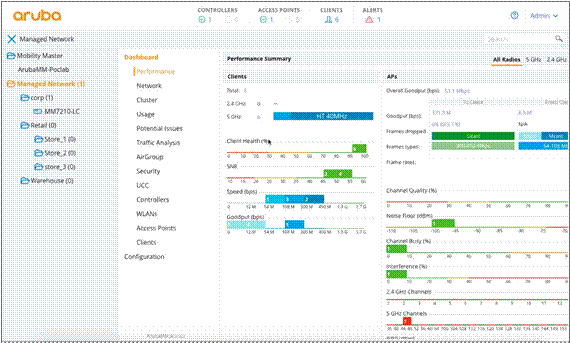
Figure 1: ArubaOS 8 new UI |
|
|
|
|
|
UNIFIED ACCESS FRAMEWORK |
|
|
User connectivity method |
|
|
AP connection method |
- Ethernet - Wireless WAN (EVDO, HSDPA)
|
|
Traffic forwarding |
|
|
Wi-Fi encryption |
|
|
Integration with existing networks |
|
|
|
|
|
Powered by ArubaOS 8, Mobility Controllers manage Aruba access devices and access software. They also manage software images, configurations and user connection states, and enforce policies. The entire infrastructure - wireless and wired - is controlled through a single pane of glass by Aruba AirWave, which lets IT manage the application and device experience of users across several generations of multivendor networks. With visibility into everything that affects wireless and mobility service-level agreements (SLAs), AirWave lets you proactively plan for capacity, visualize client performance and troubleshoot application issues before you get a helpdesk ticket. |
|
|
|
|
|
Architected for Seamless Mobility Enterprise users increasingly require network access while moving from location to location. For Wi-Fi networks, ArubaOS provides seamless connectivity as users move throughout the network. With roaming handoff times of 2-3 milliseconds, delay-sensitive and persistent applications such as voice and video are uninterrupted. ArubaOS integrates proxy mobile IP and proxy DHCP functions, letting users roam between subnets, ports, APs, and controllers without special client software. This ensures seamless performance even when users wander far afield of the AP to which they initially connected as they move throughout the network doing their jobs. VLAN pooling is another powerful access edge feature that simplifies network design. Instead of pulling VLANs to the network edge, they are centralized in the Mobility Controller and tunneled to APs. This has major advantages, including reduced network configuration complexity and spanning tree diameter. User membership of VLANs is load-balanced to maintain optimal network performance as large groups of users move about the network. Aruba's unified access approach also extends the enterprise to remote locations - over private WANs or using the public Internet - giving users the same access experience regardless of location. To connect users who are away from enterprise network infrastructure, Mobility Controllers operate as standard VPN concentrators, linking remote users through the same access and security framework as other enterprise users. When leveraging the Mobility Master, seamless roaming in large campuses is enabled through Controller Clustering. Users do not experience any delays moving in a large campus while on mission critical applications such as Skype for Business calls. All of the controllers in a cluster work together to manage the users. A user can roam across 10,000 APs without ever getting a new IP address, re-authenticating, or losing firewall state information. |
|
|
|
|
|
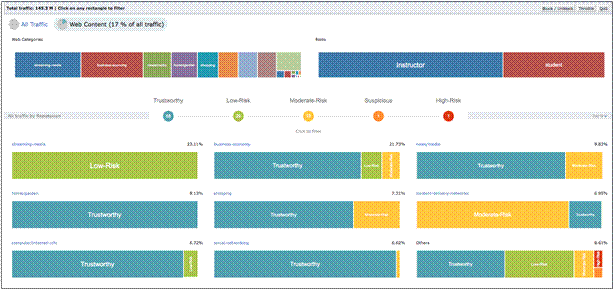
Wireless Security Throughout the Network To secure the enterprise network, ArubaOS 8 performs authentication, access control, and encryption for users and devices. With Aruba's architecture, authentication is standard and can be implemented for wired and wireless networks. For wireless, 802.1X is one component of the WPA2 and 802.11i protocols widely recognized as state-of-the-art for Wi-Fi security. ArubaOS uniquely supports AAA FastConnect, which allows the encrypted portions of 802.1X authentication exchanges to be terminated on the Mobility Controller, allowing it to federate between different identity stores, including RADIUS and LDAP. Supporting PEAP-MSCHAPv2, PEAP-GTC, and EAP-TLS, AAA FastConnect removes the requirement for external authentication servers to be 802.1X-capable. For clients without WPA, VPN or other security software, Aruba supports a web-based captive portal that provides secure browser-based authentication. Captive portal authentication is encrypted using SSL, and can support both registered users with a login and password or guest users who supply only an email address. To protect against unsanctioned wireless devices, Aruba's rogue AP classification algorithms allow the system to accurately differentiate between threatening rogue APs connected to the network and nearby interfering APs. Once classified as rogue, these APs can be automatically disabled through the wireless and wired network. Rogue AP classification and containment is available within base ArubaOS and does not require additional Mobility Controller licensing. Since the web has become an essential yet dangerous place, we want to be able to quickly determine the type of sites users are visiting and gauge the relative threat that these sites pose to the network and its users. In order to do that in the most accurate and up-to-date way possible, ArubaOS 8 includes an optional subscription Web content policy and reputation for URL filtering, IP reputation, and geolocation, which can be used to block and rate limit with appropriate policies. AOS 8 only supports URL filtering and URL reputation at this moment. For comprehensive wireless intrusion protection, the RFProtect module for Mobility Controllers enables protection against ad hoc networks, man-in-the-middle attacks, denial of-service (DoS) attacks and many other threats, while enabling wireless intrusion signature detection. |
|
|
|
|
|
ARUBAOS 8 ENTERPRISE SECURITY FRAMEWORK |
|
|
Authentication types |
|
|
Authentication servers |
- Tested authentication server interoperability: - Microsoft Active Directory (AD) - Microsoft IAS and NPS RADIUS servers - Cisco ACS, ISE servers - Juniper Steel Belted RADIUS, Unified Access servers - RSA ACE/Server - Infoblox - Interlink RADIUS Server - FreeRADIUS |
|
Encryption protocols |
- RC4 128-bit - RSA 1024-bit - RSA 2048-bit
|
|
Programmable encryption engine |
Permits future encryption standards to be supported through software updates |
|
Web-based captive portal (SSL) |
Allows flexibility in authentication methods |
|
Integrated guest access management |
Provides secure guest access options |
|
Site-to-site VPN |
IPsec tunnel is established between Mobility Controller and IPsec devices. Authentication support for X.509 PKI, IKEv2, IKE PSK, IKE aggressive mode. |
|
|
|
|
|
|
|
|
|
|
|
|
|
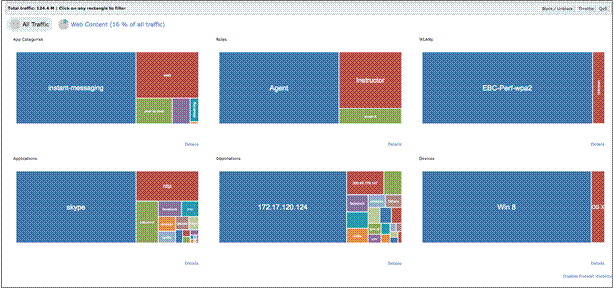
Figure 2: WebCC dashboard |
|
|
|
|
|
Application-Aware Visibility and Role Based Security The ArubaOS PEF license enhances user-centric security, application visibility, and control. It brings the power of a next-generation mobility firewall to the wireless edge, where most users traffic first touches the network. It uses Deep Packet Inspection (DPI) to classify and optimize traffic and gives you full traffic visibility through a simple dashboard. PEF simplifies and enhances access security by adding full identity based security with integrated firewall controls applied on a per-user basis at the wireless edge. This allows ArubaOS to create a security perimeter around each user or device, tightly controlling how that user or device may access enterprise network resources. AppRF, part of the PEF license, brings application awareness and control to the WLAN. By providing visibility into the types of traffic running on the Wi-Fi network, AppRF allows administrators to understand what user traffic is consuming the vital air resource. AppRF also provides unprecedented control over that traffic, allowing flexible and powerful controls that allow administrators to pick which traffic is permitted in the air for over 2,500 applications, by which users, and at what priority. Now in ArubaOS 8 we are extending the AppRF capabilities by adding the capability for customers to define custom application and application categories - AppRF Customization. This will enable customers to apply a policy for the custom category and all applications associated with that category and apply prioritization custom application traffic to get better user experience without needing to wait for Aruba to implement the customization in a future software release. |
|
|
|
|
|
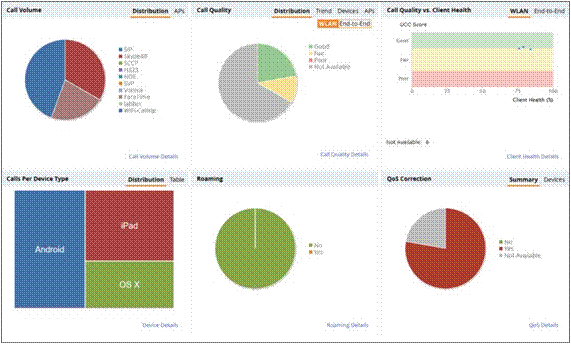
Enhancing User Experience for Unified Communications Collaboration (UCC) Today's workforce prefers the freedom and collaboration of mobile UCC. The Aruba UCC solution provides a better user experience by automatically classifying and monitoring network quality for the following applications: Apple FaceTime, Alcatel Lucent New Office Environment (NOE), Microsoft Lync/Skype for Business, Cisco Jabber, Cisco Skinny Call Control Protocol (SCCP), Spectralink Voice Priority (SVP), SIP, H.323, Vocera, and Cellular Wi-Fi Calling. The Aruba Skype for Business solution leverages SDN integration with Microsoft Skype for Business and AppRF technology to apply quality of service (QoS) and better visibility to ensure a predictable unified communications experience. ArubaOS 8 further enhances the UCC solution and introduces the following UCC features:
As Wi-Fi calling becomes more prevalent, you need to prepare and re-evaluate your internal Wi-Fi network design, handoffs, QoS, and RF coverage goals. ArubaOS 8 improves indoor Wi-Fi coverage and applies quality of service, blocks or throttles calls and gives visibility into client health, providing a carrier-grade voice experience for customers. In addition to enhancing high quality of service, Aruba also offers visibility into Wi-Fi calling on a per-user, per-device and a per-carrier basis. |
|
|
|
|
|
APP AWARE VISIBILITY AND ROLE BASED SECURITY |
|
|
Feature |
Benefit |
|
Global or role-based policies |
Simplicity to control all user traffic with a single command, flexibility to control exactly which users can run what apps. |
|
Over 2,500 applications |
Highly granular visibility and control. |
|
19 application categories |
Simplify control over different types of traffic. |
|
Enforce quality-of-service (QoS) tags |
Prioritize one application over another |
|
Block unwanted applications |
Conserve bandwidth and stop unwanted activities. |
|
Rate limits for applications or application categories |
Permit non-essential traffic while preventing it from overwhelming mission critical applications. |
|
|
|
|
|
|
|
Figure 3: UCC dashboard on AOS 8 |
|
|
|
|
|
Enterprise-Grade Adaptive WLAN Anytime, anywhere access for mobile devices and applications is a requirement in today's business world. Reliably delivering that access requires a WLAN that actively manages radio frequency (RF) spectrum in step with the dynamic mobile environment itself. Adaptive Radio Management (ARM) technology, is a proven, patented technology that uses automatic infrastructurebased controls to manage the entire RF spectrum. ARM dynamically adjusts the RF environment to maximize Wi-Fi stability and predictability, ensuring optimal performance for all clients and applications, including visibility and control of individual Microsoft Skype for Business voice, video, desktop sharing and chat flows. With ARM, users get a consistently positive user experience - with no IT intervention. ArubaOS 8 further enhances the Adaptive Radio Management (ARM) technology with AirMatch - the new RF optimization system. AirMatch in the Mobility Master, is designed with the modern RF environment in mind. AirMatch is tuned for noisy and high density environments with scarce clean or free air space. It gathers RF statistics for the past 24 hours and proactively optimizes the network for the next day. With the automated channel, channel widths and transmit power optimization, AirMatch ensures even channel use, assists in interference mitigation and maximizes system capacity. |
|
|
|
|
|
AirMatch Benefits |
|
|
Even Channel assignment |
Provides even distribution of radios across available channels, interference mitigation and maximized system capacity. |
|
Dynamic Channel width adjustment |
Dynamically adjusts between 20MHz, 40MHz and 80MHz to match the density of your environment. |
|
Automatic transmit power adjustment |
Examines the entire WLAN coverage and automatically adjusts the transmit power of APs to ensure the best coverage and user experience.. |
|
|
|
|
Improved Reliability and User Experience Massive traffic is hitting the network from mobile devices, IoT and critical applications. Users expect no interruption in their mobile experience with controller failure or when they are moving in a large campus. ArubaOS 8 provides a robust set of high availability capabilities listed below designed to minimize downtime in the event of a controller failure. In the Mobility Master, the Controller Clustering allows for up to 12 controllers to be clustered in a campus WLAN deployment and provides hitless failover. Users will not notice any issues in the rare event of a controller failure. Voice calls, video, and data transfers would all continue without noticeable impact. User session information is shared across controllers in the cluster, ensuring there is no single point of failure for any user. |
|
|
|
|
|
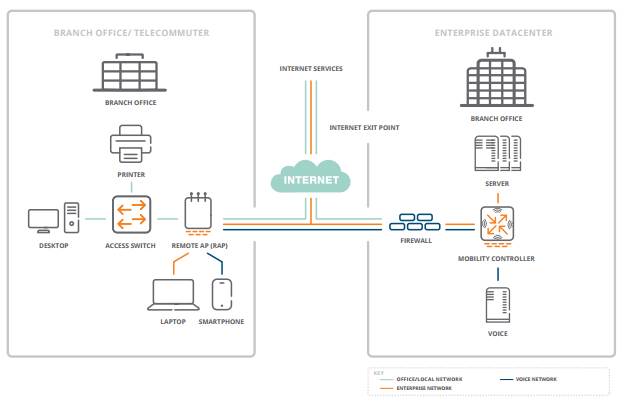
Remote Networking for Branch Offices and Teleworkers Aruba remote and branch networking solutions provide a simple, secure, and cost-effective way to extend the corporate network to offices, clinics, stores, SOHOs and telecommuters. ArubaOS integrates dedicated branch features on the Mobility Controller, including VPN termination on Mobility Controllers based in the campus or data center, and WAN services on Mobility Controllers deployed as a branch gateway. Mobility Controllers in the campus handle all complex configuration, management, software updates, authentication, intrusion detection, and remote site termination tasks; while Mobility Controllers in the branch handle gateway tasks such as policy-based routing, compression, and local network functions. In smaller branch or remote use cases, corporate networks can be extended with affordable Remote Access Points (RAPs) or on-the-go with Aruba Virtual Intranet Access (VIA) VPN services. |
|
|
|
|
|
High Availability Deployment Modes |
|
|
Active/Active (1:1) |
Each Mobility Controller typically serves 50% of its rated capacity. The first acts as a standby for APs served by second controller and vice-versa. If a controller fails, its APs failover to the other controller, ensuring high-availability to all APs. |
|
Active/Standby (1+1) |
One Mobility Controller terminates all the APs, while the other controller acts as a standby. If the primary controller goes down, APs move to standby controller. |
|
N+1 |
Multiple active Mobility Controllers are backed-up by single standby controller. |
|
|
|
|
Feature |
Benefit |
|
AP establish simultaneous communication channel with both active and standby Mobility Controller. |
Instantaneous failover to redundant Mobility Controller when first fails. |
|
During a failover, the APs do not turn their radios off and on. |
SSID always available. |
|
The solution works across Layer 3 networks |
No special topologies needed. |
|
Client state sync |
Credentials are cached, eliminating need to reauthenticate and overload RADIUS server. |
|
N+1 oversubscription |
Simplifies configuration and reduces number of Mobility Controllers needed. |
|
|
|
|
TELECOMMUTERS WITH REMOTE ACCESS POINTS |
|
|
Zero-touch provisioning |
Administrators can deploy RAPs without any preconfiguration. Simply ship it to the end user. |
|
Wired and wireless |
Users connect to RAPs via wired Ethernet, Wi-Fi or both. |
|
Flexible authentication |
802.1X, captive portal, MAC address authentication per-port and per-user. |
|
Centralized management |
No local configuration is performed on APs - Configuration and management are done by the Mobility Controller. |
|
3G/4G LTE WAN connection |
RAPs support USB wireless WAN adapters (EV-DO, HSDPA) for primary or backup Internet connectivity. |
|
FlexForward traffic forwarding |
|
|
Enterprise-grade security |
RAPs authenticate to Mobility Controllers using X.509 certificates and then establish secure IPsec tunnels. |
|
Uplink bandwidth reservation |
Defines reserved bandwidth for loss-sensitive application protocols such as voice. |
|
Local diagnostics |
In the event of a call to the help desk, local users can browse to a predefined URL to access full RAP diagnostics. |
|
Remote mesh portal |
A RAP may also act as a mesh portal, providing wireless links to downstream APs. |
|
Supported APs |
RAP-3, RAP-100 series, RAP-155, AP-105, AP-220 series, AP-130 series, AP-110 series, AP-100 series, AP-90 series, AP-175 series |
|
Minimum required link speed |
64 kbps per SSID |
|
Encryption protocol (RAP to Mobility Controller) |
AES-CBC-256 (inside IPsec ESP) |
|
|
|
|
|
|
|
Aruba RAPs provide secure mobile connectivity to branch and home offices. |
|
|
|
|
|
Simple, Secure Connectivity for Traveling Professionals Users who need access to enterprise resources while away from the office typically rely on VPN client software, which connects to a VPN concentrator located in an enterprise DMZ. With Aruba, remote VPN users are treated like any other user. They leverage the same access policies and service definitions used at headquarters or a branch office RAP deployment. Mobility Controllers act as VPN concentrators, eliminating the need for a parallel access infrastructure. ArubaOS is compatible with several popular VPN clients and the VPN clients built into major client operating systems. It also provides the optional VIA client, which can be installed on Android, iOS, Mac OS X and Windows devices. By merging access networks together, policy and access configuration is unified, the user experience is improved, helpdesk calls are reduced, and IT expenses are lowered. |
|
|
|
|
|
Secure Connectivity for Remote Access |
|
|
Tested client support |
|
|
VPN protocols |
|
|
Authentication |
|
|
|
|
|
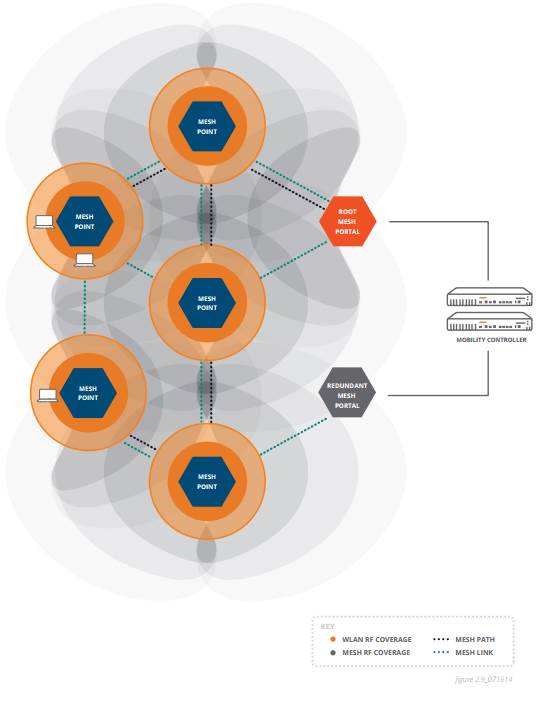
Secure Enterprise Mesh The Aruba secure enterprise mesh solution provides a flexible, wire-free design allowing APs to be placed wherever they are needed - indoors and outdoors. The absence of fiber or cable runs significantly reduces network installation costs and requires fewer Ethernet ports. The solution fully integrates with the Aruba unified access framework, enabling a single, enterprise-wide network wherever users roam. The secure enterprise mesh is based on programmable software and does not require specialized hardware; any Aruba indoor or ruggedized outdoor 802.11n or 802.11ac AP can function as a mesh AP. The secure enterprise mesh can support all enterprise wireless needs including Wi-Fi access, concurrent wireless intrusion protection, wireless backhaul, LAN bridging, and point-to-multipoint connectivity, all with a single common infrastructure. This is an excellent solution for connectivity applications, including inter-building connectivity, outdoor campus mobility, wire-free offices, and wire-line back-up; security applications, such as video and audio monitoring, alarms and duress signals, and industrial applications and sensor networks. Through cooperative control technology, Aruba uses an intelligent link management algorithm to optimize traffic paths and links. Mesh APs communicate with their neighbors and advertise a number of RF and link attributes - such as link cost, path cost, node cost, loading - that allow them to make intelligent selection of the best path to take for the application. Mesh paths and links automatically adjust in the event of high-loads or interference. Further, application tags for voice and video traffic are shared to ensure latency sensitive traffic is prioritized over data. The cooperative control technology also provides self-healing functionality for the mesh network in the event of a blocked path or AP failure. |
|
|
|
|
|
Aruba Secure Enterprise Mesh Solution |
|
|
|
|
|
Aruba Secure Enterprise Mesh Solution |
|
|
Broad application support |
Wi-Fi access, concurrent wireless intrusion protection, wireless backhaul, LAN bridging, and point-to-multipoint connectivity. |
|
Unified network access |
Integrates mesh networks with campus and branch office WLANs. Users roam seamlessly between campus and branch Wi-Fi and mesh networks. |
|
Cooperative control |
Intelligent RF link management determines optimal performance path and allows the network to self-organize. |
|
Self-healing |
Resilient self-healing mesh overcomes a broken path or AP failure. |
|
Mesh clustering |
Supports scalability by allowing a large mesh to be segmented into highly-available clusters. |
|
Centralized encryption |
Data encrypted end-to-end, from client to core, protecting the network even if a mesh AP is stolen. |
|
Centralized management |
All mesh nodes are configured and controlled centrally by Mobility Controllers. No local management is required. |
|
Extensive graphical support tools |
Full network visualization includes coverage heat maps, automatic link budget calculation, floor plans, and maps with network topology. |
|
Standards-based design |
Secure enterprise mesh based on design principles from IEEE 802.11s. |
|
|
|
|
Management, Configuration and Troubleshooting Mobility Controller configuration, management, and troubleshooting are provided through a browser-based GUI and a command line interface that will be familiar to any network administrator. ArubaOS also integrates with AirWave, which eases management during all stages of the WLAN lifecycle - from planning and deploying to monitoring, analyzing and troubleshooting. AirWave also provides long-term trending and analysis, helpdesk integration tools, and customizable reporting. All APs and Mobility Controllers, even those distributed in branch or regional offices, can be centrally configured and managed from a single console. To ease configuration of common tasks, intuitive task-based wizards guide the network administrator through every step of the process. Mobility Controllers can be deployed in 1:1 and 1:n VRRP- based redundant configurations with redundant data center support. When deployed in Layer 3 topologies, the OSPF routing protocol enables automatic route learning and route distribution for fast convergence. |
|
|
|
|
|
Wireless Network Management and Configuration |
|
|
Web-based configuration |
Allows any administrator with a standard web browser to manage the system. |
|
Command line |
Console and SSH |
|
Syslog |
Supports multiple servers, multiple levels, and multiple facilities |
|
SNMP v2c |
Yes |
|
SNMP v3 |
Enhances standard SNMP with cryptographic security. |
|
Centralized configuration of Mobility Controllers |
A designated master Mobility Controller can configure and manage several downstream local controllers. |
|
VRRP |
Supports high availability between multiple Mobility Controllers. |
|
Redundant data center support |
Yes - access devices can be configured with IP addresses for backup controllers. |
|
OSPF |
Yes - stub mode support for learning default route or injecting local routes into an upstream router. |
|
Rapid spanning tree protocol |
Yes - provides fast Layer 2 convergence. |
|
|
|
|
ArubaOS Support for IPV6 With the depletion of available IPv4 addresses, organizations are now planning for or have already begun deployments of IPv6 within their networks. While IPv4 and IPv6 both define how data is transmitted over networks, IPv6 adds a much larger address space than IPv4 and can support billions of unique IP addresses. As organizations transition from IPv4 to IPv6, network equipment must support dual-stack interoperability of IPv6 within an IPv4 network or full deployments within a pure IPv6 environment. ArubaOS facilitates the deployment of Mobility Controllers and APs in today's IPv6 and dual-stack environments. Nearly all functions with the exception of IPsec can be deployed in native IPv6 mode. Every aspect of management, monitoring, and firewalling are fully IPv6-aware. |
|
|
|
|
|
IPV6 Support |
|
|
IPV6 IPsec |
Yes |
|
Management over IPv6 |
GRE, SSH, Telnet, SCP, Web UI, FTP,TFTP, Syslog, SNMP |
|
IPv6 DHCP server |
Yes |
|
Captive portal over IPv6 |
Yes |
|
Support IPv6 VLAN interface address on Mobility Controller |
Yes |
|
Support AP-Mobility Controller communication over IPv6 |
Yes |
|
USGv6 certified firewall |
Yes |
|
|
|
|
Context-Aware Controls Support for 802.11e and Wi-Fi Multimedia (WMM) ensures wireless QoS for delay-sensitive applications with mapping between WMM tags and internal hardware queues. Mobility Controllers enable mapping of 802.1p and IP DiffServ tags to hardware queues for wired-side QoS and can be instructed to apply certain 802.1p and IP DiffServ tags to different applications on demand. With the addition of the Aruba PEF module, voice-over-IP protocols - including Lync, session initiation protocol (SIP), Spectralink Voice Priority (SVP), Alcatel New Office Environment (NOE), Vocera and skinny call control protocol (SCCP) - are followed within the Aruba Mobility Controller. Aruba's application fingerprinting technology enables Mobility Controllers to follow encrypted signaling protocols. Once these streams are identified, Aruba WLANs prioritize them for delivery on the wireless channel and trigger voice-related features. These voice-related features can include commands like postpone ARM scanning for the duration of a call and prioritize roaming for clients that are engaged in an active call. This is critical to enabling the large-scale deployment of enterprise voice communications over Wi-Fi. Additionally, ArubaOS now includes device fingerprinting technology, allowing network administrators to assign network policies on device types in addition to applications and users. Device fingerprinting delivers greater control over which devices are allowed to access the network and how these devices can be used. ArubaOS can accurately identify and classify mobile devices such as the Apple iPad, iPhone, or iPod as well as devices running the Android or BlackBerry operating systems. This information can be shared with AirWave for enhanced network visibility for all network users, regardless of location or mobile device. |
|
|
|
|
|
Context Aware Control Network |
|
|
T-SPEC/TCLAS |
Yes |
|
WMM |
Yes |
|
WMM priority mapping |
Yes |
|
U-APSD (Unscheduled Automatic Power-Save Delivery) |
Yes |
|
IGMP snooping for efficient multicast delivery |
Yes |
|
Application and device fingerprinting |
Yes |
Technical Specifications
|
Certifications | |
|
|
|
|
|
|
|
|
|
Standards Supported |
|
|
|
|
|
General switching and routing
QoS and policies
Wireless
Management and traffic analysis
Security and encryption
|
|
|
|
|
Summary of Changes
|
Date |
Version History |
Action |
Description of Change | ||||||||||||||||||
|
05-Dec-2016 |
Version 1 |
Created |
Document creation. | ||||||||||||||||||
| |||||||||||||||||||||


