




























HPE Aruba ClearPass Universal Profiler: технические характеристики и документация
В архивеOverview
|
Aruba ClearPass Universal Profiler Software |
|
Identify everything connected to wired and wireless networks |
|
|
|
Product overview |
|
|
|
As every connected device today is a potential attack point, knowing what is on your network is the first step to securing your data. It's no longer acceptable to estimate the total number of devices on your network and whether they are IT-managed laptops, unmanaged smartphones or IoT devices. And given that the number of IoT devices is expected to grow into the billions, knowing what's on the network has become IT's biggest challenge. IoT devices may be deployed by IT, facilities, or even brought in from home by employees, so understanding what they are and how they're being used is critical. In fact, as hackers figure out how to exploit vulnerabilities, knowing what should be on a network and what is not allowed is needed for both internal and external compliance, regardless of the industry. The Aruba ClearPass Universal Profiler is designed to automatically give you that granular visibility into all connected devices, even controllers and switches. A customizable dashboard lets you see categories and families of devices and individual attributes for everything connected. No agents or initial investment in a network access control (NAC) or policy management solution is needed. And, as security requirements change, it's easy to migrate from pure profiling to a comprehensive policy and enforcement solution, when needed. This is something that the competition can't offer. |
|
|
|
Key Benefits |
|
|
|
|
Features and Benefits |
|
|
|
Real-Time Discovery And Fingerprinting |
|
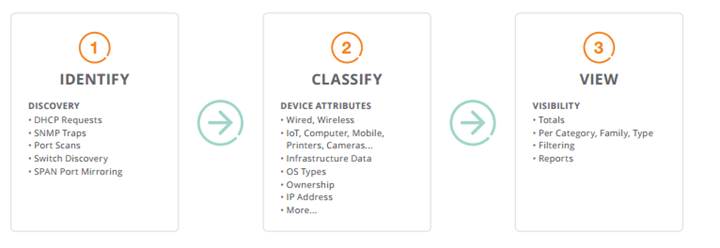
The ClearPass Universal Profiler automatically identifies all devices on your network by leveraging DHCP, SNMP, and other methods on both wired and wireless, with minimal set-up—even in multi-vendor environments. In addition to an initial discovery, Universal Profiler identifies any new devices and the attributes that change on existing devices, too. It's never been easier to gather information about device categories, manufacturers, connection methods, OS types and version numbers, and IP addresses. You now have the visibility needed for security and network performance optimization that allows your business to thrive while delivering a secure and reliable user experience. |
|
|
|
|
|
Granular device discovery, categorization and visibility |
|
|
|
Visibility From One Central Location |
|
The ClearPass Universal Profiler also delivers an intuitive web-based interface that is simple to administer, shows device totals and devices per category, host names, device vendor information, and if the devices are online or off. Visual graphs make it easy to track what's on the network and allows you to drill down to see device specific attributes. All from your office or while on the road. A filtering option easily lets you find the one device that may require extra attention - maybe it shouldn't be on the network, or is exhibiting suspect security behavior. Or perhaps you want to find out a little more about a new IoT device that is connected to a wired port in a remote office. No more hunting for devices across multiple tools. |
|
|
|
Profiling Is Your Security Launch Point |
|
Just as vulnerability scans are critical to identifying security gaps within servers and other resources, identifying all IP-enabled devices is critical from a security standpoint, and for audit and compliance requirements. What you do with the profiling information is what makes the difference. Device visibility is easily applied to adjust policies on existing firewalls, SIEM, UBA, and other solutions.
For more comprehensive controls, a simple migration path from Aruba ClearPass Universal Profiler to the Aruba ClearPass Policy Manager ensures that automated policy enforcement is easily implemented for real-time access security. Managed, unmanaged and IoT devices are allowed onto a network based on category, OS version, ownership, or other attributes. |
|
|
|
Key Features |
- Type - printer, HVAC sensor, laptop, IV Pump, and more - Model name - MAC address - IP address - NIC vendor - Operating system type and version number - Associated switch port - VLAN
|
|
|
|
Ordering Guidance |
|
The ClearPass Universal Profiler will be available via subscription licenses that include support. For simplicity, there will be a single part number that covers licensing for 100 devices. For example, for deployments that contain 2,060 devices, the guidance is to order 21 instances of the part number below. This allows the ClearPass Universal Profiler software to run on a virtual appliance. |
|
|
|
System Requirements |
|
The ClearPass Universal Profiler will only be available in a virtual appliance format. VMware ESX is the supported platform. Based on the number of devices discovered within an environment, there are three sizing recommendations for a virtual appliance (specifications provided upon request):
|
|
|
Configuration
|
Ordering Information | |
|
|
|
|
Description |
Part Number |
|
Aruba ClearPass Universal Profiler 100 Endpoint Licenses 1yr Subscription E-STU |
JY914AAE |
|
Aruba ClearPass Universal Profiler 100 Endpoint Licenses 3yr Subscription E-STU |
JY981AAE |
|
|
|
|
|
|
|
For more information on Aruba's Universal Profiler, visit http://www.arubanetworks.com/products/security/network-access-control/clearpass-universal-profiler/. | |
|
| |
Summary of Changes
|
Date |
Version History |
Action |
Description of Change | ||||||||||||||||||
|
06-Feb-2016 |
Version 1 |
Created |
Document creation. | ||||||||||||||||||
| |||||||||||||||||||||


