




























Arista Network Management Software: технические характеристики и документация
В архивеOverview
|
Arista Extensible Operating System |
|
|
|
|
|
|
|
Product overview |
|
Arista Extensible Operating System (EOS) is a fully programmable and highly modular, Linux-based network operation system that is core of Arista cloud networking solutions for enterprise data centers and cloud networks. Through its programmability, EOS enables a set of software applications that deliver workflow automation, high availability, unprecedented network visibility and analytics and rapid integration with a wide range of third-party applications for virtualization, management, automation and orchestration services. |
|
|
|
Cloud Scale Architecture Scales
from 100 to 100,000+ compute and storage nodes. The resilient operating
system based on the SysDB publish/subscribe state sharing foundation
and evolving to NetDB for a network-wide software infrastructure is
for centralizing and streaming the network state for improved visibility. Open and Programmable Offering numerous programmability options, Arista EOS enables programmatic control of the network. Rich, well-structured set of APIs, including: eAPI JSON based RPC, providing REST-like interface using native CLI commands. It offers tight integration with Puppet, Chef and Ansible. CloudVision automates workflows of network tasks through the portal. High Availability Reduce maintenance windows with Arista Smart System Upgrade (SSU). Live patching and upgrade of individual processes within EOS during normal switch operation. Custom monitoring, failover and load balancing with third-party integration for custom monitoring, failover and load balancing. Simplified provisioning for switches with Zero Touch Provisioning and Replacement. Increased Visibility The increased visibility into application performance and network-wide monitoring capabilities is for industry standards and customer specific solutions. Get simplified Tap Aggregation with the Arista Data Analyzer (DANZ), Latency Analyzer (LANZ), MapReduce Tracer, Path Tracer, Health Tracer, Container Tracer and sFlow monitoring. Arista EcoSystem integration with VMware, OpenStack, Palo Alto Networks, Microsoft, and many others. |
|
|
|
CloudVision Highlights |
|
|
|
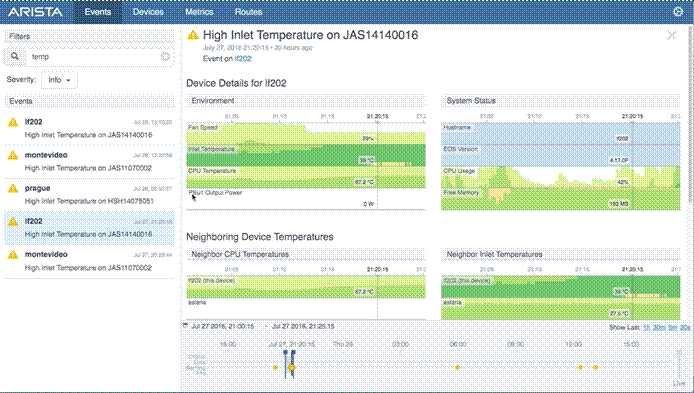
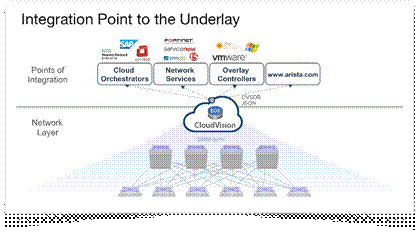
Cloud Automation for Everyone Arista EOS CloudVision simplifies complex time and resource intensive tasks in a turnkey software solution designed to help customers move to a more automated, cloud-like infrastructure. EOS as a Network-Wide Service CloudVision is built on the same open standards-based and fully programmable Arista EOS. With CloudVision, the EOS state database model is expanded to a network- wide view with NetDB. This central database abstracts the physical network to enable simpler network-wide automation and visibility. Complements the Cloud CloudVision is Arista's platform for physical network integration with third party services. This includes integration with cloud orchestration platforms such as OpenStack, network overlay controllers such as VMware NSX , and network services solutions such as Palo Alto Networks, F5, or ServiceNow. Using open, standards-based APIs such as OVSDB and JSON, CloudVision helps to both simplify and scale this integration through an abstracted network view and a single point of integration. Workflow Automation Workflow monitoring and provisioning is controlled centrally with pre-integrated tool sets for provisioning, change management, network-wide upgrades & rollback, network monitoring, network virtualization, and visibility services. Network Telemetry CloudVision brings a modern approach to network telemetry and a replacement for legacy polling mechanisms. CloudVision Analytics engines and CloudVision Telemetry Apps take full advantage of the state streaming infrastructure of EOS and NetDB to give Arista customers an unprecedented level of visibility into their network operations. Arista has pioneered the networking industry with its software defined cloud networking approach, built on the programmable interfaces, publish-subscribe state separation, resilient fault containment, and self-healing attributes of Arista EOS®. CloudVision extends the same architectural approach of EOS across the network for state, provisioning, change management, and network telemetry. This enables enterprises to move to cloud-class automation without needing any significant internal development. CloudVision is a network-wide approach for workload orchestration and workflow automation delivering a turnkey solution for cloud networking. The CloudVision platform is a software suite of services that deliver further operational simplification of the Arista physical infrastructure. The CloudVision services fall into three primary functional areas:
|
|
|
|
Arista CloudVision |
|
With CloudVision, the physical network continues to operate in a familiar model, following the Universal Cloud Network design principles. The well-known control and data plane features continue to be distributed in each physical device. The same command-line (CLI) and API's are available to the operator. However, CloudVision enhances the traditional operational model with a central instance of virtual EOS that provides an aggregate view of the physical network. This instance provides both a centralized network database, as well as a web-based portal for network-wide automation and real time visibility with state streaming analytics. |
|
|
|
|
|
Features and Benefits |
|
|
|
CloudVision provides the following features and benefits: Centralized View of the Network. Just as EOS leverages a central state database on each individual switch, CloudVision provides a network-wide state database for real-time network state in one consolidated location. This foundation provides operational efficiency gains by moving from a manual box-by- box approach to an automated network-wide operational model. Controller Integration. A simplified approach for integration with third party overlay controllers is essential in today's combined physical and virtual world. CloudVision supports a variety of overlay and orchestration controllers, including VMware NSX, OpenStack, and any other OVSDB-based controllers and aggregates the network to provide a single point of integration to these controllers. This gives customers the flexibility of choice in their orchestration and overlay approach and the single point of integration helps scale the performance of the controller for network topology changes in a virtual environment. Topology Abstraction. The details of the physical network topology include platform, configuration, and protocol nuances across the topology. Third party solutions often need additional software integration work to account for these details. And even subtle changes to the topology can affect the controller operation. CloudVision is an abstraction layer that simplifies the integration with controllers and third party tools, allowing them to ignore the nuanced details of the network and then focus on the things they do best. Hardware and Software Abstraction. Does the northbound controller integrate with the new hardware platform? Or new switching feature? Which software version is certified with a northbound controller? A third party controller can be certified to work against CloudVision and not be as dependent on the hardware or software versions running in the actual network. So the controller interoperability and operations remain the same even after the network is upgraded. Macro-Segmentation Services (MSS). CloudVision is a central point for services integration to the physical network through the MSS framework. With MSS, network services like security policy can be dynamically instantiated in the network in an open approach and without changing operational or administrative security models. Simple and Scalable VXLAN. CloudVision's VXLAN Control Service (VCS) is a plug-and-play approach for aggregating network-wide VXLAN state for efficient control plane learning as well as integration with network overlay controllers. State Streaming Telemetry. Traditional polling mechanisms such as SNMP do not provide the fine grain visibility required in today's cloud datacenter networks. They are limited in scope and lack the data analytics required to monitor networks at cloud scale. CloudVision Telemetry provides real-time streaming of state from devices for analytics at a network-wide scope. This provides visibility for both live monitoring and historic forensic troubleshooting. Automated Provisioning. For initial deployments through ongoing configuration changes, CloudVision reduces the time to deploy network changes and the likelihood of human- induced errors. Simple to use ‘Configlets' provide config modularity and consistent re-use across devices. A GUI-based ZTP server is included for automated deployments as well as zero touch device replacement and a ConfigBuilder provides a flexible method for customizing configurations. Snapshot Views for Change Management. Stop manually comparing network state device-by-device via the CLI. Let CloudVision visually present a summarized view of the network state differences, giving the operator the ability to quickly assess and diagnose network inconsistencies across change controls. Smart System Upgrade (SSU) with a Network-Wide Scope. Leverage underlying EOS features like SSU maintenance mode and leaf SSU combined into an automated workflow for performing software image upgrades across a group of devices. This automation helps to simplify the common and manual operational task of a software upgrade, ultimately reducing the time needed for a maintenance window. Network Rollback. On occasion, the operator might need to quickly restore the network to a previously known state. A manual, device by device rollback can be time-consuming and error prone. CloudVision addresses this with an automated framework to rollback the network configuration and software versions to a previous point in time. Compliance Dashboard. To improve operational security, CloudVision provides visibility of device and container level compliance to both configuration and image standards. Open API Integration. RESTful APIs for all CloudVision functionality that can be used for scripting as well as integration with other management platforms and workflow tools. News Resources via Arista.com. Security vulnerability alerts, visibility end of sale and end of life notices as well as field notices can be delivered from arista.com through the portal allowing customers a single resource for reviewing Arista notifications. |
|
|
|
CloudVision Solution |
|
The CloudVision solution is comprised of two components: the CloudVision eXchange and the CloudVision Portal. These two components work in conjunction to provide the platform for both orchestration and automation as follows:
|
|
|
|
CloudVision eXchange Features | ||||||||||||||||||||
|
The following table summarizes the main features of Arista's CloudVision eXchange. For more information about the availability of these features by release please refer to http://www.arista.com/en/products/eos/eos-cloudvision
| ||||||||||||||||||||
|
|
|
CloudVision Portal Features | ||||||||||||||||||||||||||
|
The following table summarizes the main features of Arista's CloudVision Portal. For more information about the availability of these features by release please refer to http://www.arista.com/en/products/eos/eos-cloudvision
| ||||||||||||||||||||||||||
|
|
|
|
|
|
Configuration
|
CloudVision Ordering Information | |||||
|
| |||||
|
CloudVision is available as a software subscription via the following two feature set offerings:
| |||||
|
| |||||
| |||||
|
| |||||
|
Product Number | |||||
|
CloudVision Software License SKUs |
Scope | ||||
|
SS-CV-SWITCH-1M |
Per Device (1 unit) per 1 month | ||||
|
SS-CV-S150-1M |
Up to 150 switches per 1 month | ||||
|
SS-CV-S500-1M |
Up to 500 switches per 1 month | ||||
|
SS-CV-ENT-1M |
Enterprise (unlimited # of switches) per 1 month | ||||
|
|
| ||||
|
CloudVision Lite Software License SKUs |
Scope | ||||
|
SS-CV-LT-SWITCH-1M |
Per Device (1 unit) per 1 month (Applicable to Fixed switches only) | ||||
|
|
| ||||
|
CloudVision Physical Appliance SKUs |
Scope | ||||
|
DCA-CV-100 |
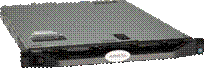
1 unit CloudVision Physical Appliance, Model 100 (Includes CVX & CVP Server). No CV device licenses. | ||||
|
|
| ||||
|
Service and Support
Arista A-Care service offerings are available to provide you with world-class support when you need it. A-Care service offerings provide coverage for all Arista products including CloudVision. For more details see: http://www.arista.com/en/service | |||||
Technical Specifications
|
CloudVision System Requirements | ||||||||||||||||
|
The following describes the requirements for the hardware on which CloudVision is installed.
| ||||||||||||||||
|
|
Summary of Changes
|
Date |
Version History |
Action |
Description of Change | ||||||||||||||||||
|
07-Nov-2016 |
Version 1 |
Created |
Document creation. | ||||||||||||||||||
| |||||||||||||||||||||



|
Headquarters |
Support support@arista.com 408-547-5502 866-476-0000 |
Sales sales@arista.com 408-547-5501 866-497-0000 | ||
|
|
|
| ||