




























HPE StoreEasy 1650 Expanded Storage: технические характеристики и документация
В архивеOverview
|
HPE StoreEasy 1650 Expanded Storage |
| |||
|
|
| |||
|
HPE StoreEasy 1650 Expanded Storage products offers revolutionary storage density, with more than double the storage capacity of competitors for addressing bulk file storage use cases in a 2U form factor. Eight or six-core processing (depending on model selected), up to 280TB internal data storage capacity, and ready for external expandability enhance this ultra-dense 2U storage solution for small, medium, or large IT environments. StoreEasy 1650 Expanded models come with Windows Storage Server 2016 pre-installed on two M.2 Solid State Disks in internal PCIe slot. The StoreEasy 1650 Expanded Storage is built on an Apollo 4200 Gen9 Server and includes a rail kit and cable management arm. |
| |||
|
|
| |||
|
|
| |||
|
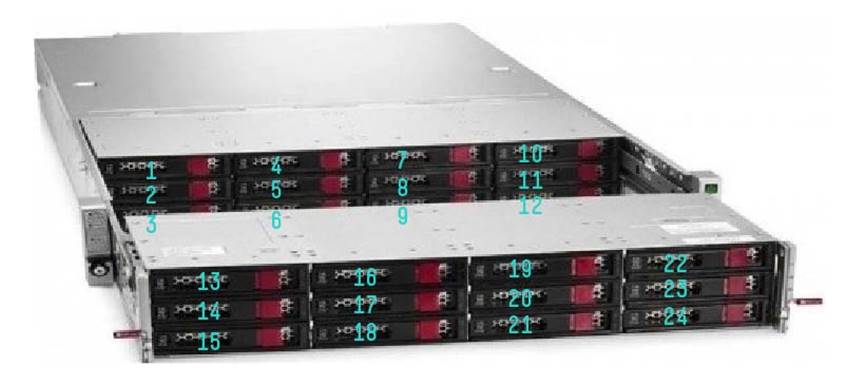
HPE StoreEasy 1650 Expanded Storage - Front View |
| |||
|
| ||||
|
1-12 |
Front row of LFF drives |
13-24 |
Second row of LFF Drives | |
|
|
| |||
|
| |||
|
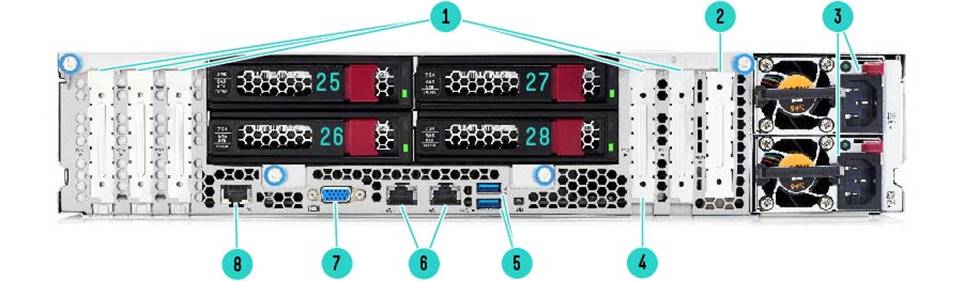
HPE StoreEasy 1650 Expanded Storage - Rear view | |||
|
| |||
|
1 |
PCI Slots |
6 |
Embedded 2x1GbE Ethernet |
|
2 |
Flexible LOM Slot |
7 |
Rear VGA (Video) Port |
|
3 |
HPE Flexible Slot Power Supply |
8 |
Dedicated iLO Management Port |
|
4 |
Dual M.2 Solid Slate Disks |
25-28 |
LFF Drives |
|
5 |
USB 3.0 Ports |
|
|
|
| |||
|
What's New | |||
|
Hewlett Packard Enterprise has introduced new 6th-generation StoreEasy platforms (HPE StoreEasy 1X60 Storage) that replace most StoreEasy 5th generation models. For more information, go to: https://h20195.www2.hpe.com/v2/getdocument.aspx?docname=a00041171enw | |||
|
| |||
|
Models |
| ||||||
|
HPE StoreEasy 1650 Expanded WSS2016 Storage |
Q0F50A | ||||||
|
| |||||||
|
Processor | |||||||
|
Intel® Xeon® E5-2609v4 (1.7GHz/8-core/20MB/85W) Processor |
| ||||||
|
Memory | |||||||
|
Type |
DDR4 Registered (RDIMM) | ||||||
|
Maximum (by O/S license) |
24TB | ||||||
|
Standard |
16GB (2 x 8GB) | ||||||
|
DIMM Sockets |
16 | ||||||
|
Network Controller | |||||||
|
NIC ports |
2 | ||||||
|
Controller |
HPE 361i Adapter 1Gb Ethernet 2-port plus optional HPE Flexible LOM for 10GbE,10Gb or 40Gb Infiniband | ||||||
|
Expansion Slots(Standard) | |||||||
|
Expansion Slots # |
Technology |
Bus Width |
Connector Width |
Form Factor |
Notes | ||
|
1 |
PCIe 3.0 |
x8 |
X8 |
Low profile |
Proc 1 | ||
|
2 |
PCIe 3.0 |
x16 |
x16 |
Low profile |
Dual M.2 SSDs | ||
|
5 |
PCIe 3.0 |
x16 |
x16 |
Low Profile |
Proc 2 | ||
|
6 |
PCIe 3.0 |
x8 |
x8 |
Low Profile |
Proc 2 | ||
|
7 |
PCIe 3.0 |
X16 |
X16 |
Low Profile |
Proc 2 | ||
|
Default bus assignment (in decimal). Inserting cards with PCI bridges may alter the actual bus assignment number. Indicates the number of physical electrical lanes running to the connector. NOTE: When populating the second optional riser slot, the second processor must be installed. NOTE: All slots support PCIe cards to 150W or more depending on card but an additional Power Cord Option is required (PN 669777-B21). See Option Section below for offering. | |||||||
|
| |||||||
|
Storage Controller HPE Flexible Smart Array P840ar/2G FIO Controller; HPE Dynamic Smart Array B140i Controller (only used for OS SSDs | ||
|
Controller(s) RAID (for data drives using Smart Array controller) 6, 60, 1, 10, 1 ADM, 10 ADM | ||
|
Internal SAS connectors 2 | ||
|
External SAS connectors None | ||
|
Storage | ||
|
Hard Drives Internal (28) Twelve 3.5" (Large Form Factor) hot-plug bays in front and rear rows and (2) Two 2.5" (Small Form Factor) hot-plug bays in rear | ||
|
External Support for D3600, D3700, D6000 and D6020 (requires an additional Smart Array controller than the standard SA P840ar) | ||
|
Maximum Storage Capacity (raw) |
Internal SATA 336TB | |
|
Internal SAS 336TB | ||
|
Internal plus External 4.9PBs 28 x 12TB HDDs internal+384 x 12TB HDDs using 40 D3600s (requires 4 P441s) | ||
|
Power Supply 800 Watts Platinum, hot-plug redundant | ||
|
Power Cords Two high voltage power cords (IEC C13 to C14) standard NOTE: All StoreEasy 1650 Expanded models ship with a standard 6-foot IEC C-13/C-14 jumper cord (A0K02A). This jumper cord is also included with each standard AC power supply option kit. If a different power cord is required, please check the https://www.hpe.com/us/en/integrated-systems/rack-power-cooling.html. | ||
|
System Fans 8 hot-plug redundant fans, standard for 1 processor; 10 hot-plug redundant fans standard, for 2 processors | ||
|
Form Factor 2U rack mount (includes rail kit and cable management arm) | ||
|
Additional options See the corresponding ProLiant QuickSpecs for additional options. StoreEasy 1650 Expanded (Apollo 4200 Gen9): https://www.hpe.com/h20195/v2/GetDocument.aspx?docname=c04616495 NOTE: Options offered in the HPE ProLiant servers listed above will work in the respective StoreEasy product if supported on Windows Server 2016 Standard Edition. Because StoreEasy is a storage product, not every possible option available in the equivalent ProLiant server is listed in the StoreEasy 1000 QuickSpecs. Options that are shown in this document are the most common ones needed for the primary StoreEasy usage model as a file storage product. | ||
|
Operating System Upgrade Kits | ||
|
HPE WSS2016 Standard Edition Upgrade Kit |
Q0F57A | |
|
Current or previous generation StoreEasy 1000 systems running either Windows Storage Server 2012 or Windows Storage Server 2012 R2 Standard Edition Operating System can be upgraded to the Windows Storage Server 2016, Standard Edition Operating System by purchasing Q0F57A. This upgrade kit contains the physical media containing the new OS image and a new Microsoft Certificate of Authenticity (COA) label that must be affixed to StoreEasy 1000 once the OS upgrade is complete. The new COA label is required to provide legal proof or purchase of the new OS. NOTE: Because of the requirement to affix a new WSS2012 R2 or WSS2016 COA label to the product after upgrade, the OS upgrade image cannot be provided as a software download. | ||
|
| ||
|
Features and benefits Focus on your business, not your file storage HPE StoreEasy 1000 Storage systems come with pre-configured hardware and the Microsoft Windows Storage Server 2016 operating system for purpose-built file storage. HPE-enhanced Initial Configuration Tasks Wizard: StoreEasy installation and network configuration wizards simplify installation and prevent network configuration errors for faster deployment. The StoreEasy Dashboard consolidates all key status information such as capacity utilization, performance, and health in a single interface and reduces the need to navigate multiple tools and interfaces for system monitoring. Low capacity warning email alerts now available to minimize disruption. The StoreEasy Pool Manager is a best practice driven storage provisioning tool that automatically discovers system storage and recommends the most efficient setup for optimum performance, optimum capacity, or a balanced configuration based on the available storage. Best practices driven storage provisioning tool discovers system storage and recommends the most efficient setup for optimum performance, optimum capacity or a balanced configuration based on the available storage. The StoreEasy Tools menu within Windows Server manager to access the most commonly accessed tools and tasks that an administrator uses for day-to-day management of StoreEasy. The StoreEasy Tools menu provides management of storage pools, snapshots, emails alerts, enclosure settings, and firmware updates. It also includes access to the Deduplication Evaluation tool, storage viewer and the initial configuration task wizard. StoreEasy hard drive bundles make it easier for you to buy, deploy and provision additional storage capacity over the life of the product. |
|
|
|
Optimized: Tailored for file storage Windows Storage Server 2016 includes a set of new and enhanced features, in addition to all of the existing features around advanced security and data services in previous-generation Windows Storage Server operating systems. StoreEasy 1000 systems based on WSS 2016 have an improved deduplication engine that supports individual files up to 1TB in size and file systems up to 64TB in size. Additionally, new security and encryption technologies provide stronger protection against man-in-the-middle attacks. The Microsoft Windows Storage Server 2016 Standard Edition operating system includes a robust range of file serving and storage capabilities. It addresses heterogeneous environments and enables more efficient storage utilization. It delivers a similar level of performance and reliability as more expensive storage solutions and offers support for both file (CIFS/SMB and NFS) and block (iSCSI) protocols, allows for a flexible mix of configurations, and includes advanced data management tools. WSS2016 leverages your Windows Server management skill sets and tools including Active Directory, PowerShell and System Center. Extensive protocol support: SMB (2.0, 2.1, 3.0, 3.02 and 3.1.1), NFS (v2, v3, v4.1), WebDAV, HTTP/HTTPS, FTP/FTPS, ISCSI NOTE: The SMB 3.1.1 protocol is supported on Windows Server 2016, Windows Storage Server 2016 and Windows 10 operating systems.
|
NOTE: Windows Server 2016 and Windows Storage Server 2016 are built on the same code base. Applications certified for Windows Server are expected to have the same application compatibility profile on Windows Storage Server. Windows Storage Server and Windows Server have the same application frameworks, services and plumbing to support running the full breadth of Windows-compatible applications. Applications that rely upon certain roles that are removed from Windows Storage Server 2016, such as fax server, Active Directory domain controller, or terminal services will not be able to leverage those roles. Independent Software Vendors (ISVs) ultimately decide what versions and editions of Windows are supported by their products and users should review ISV compatibility and support information before purchasing. StoreEasy customers should review the End User License Agreement (EULA) to see the types of applications that are permitted for installation. All Windows Storage Server 2016 systems can join Active Directory domains, but cannot be a domain controller. More Information on Windows Storage Server 2016 can be found here: https://blogs.technet.microsoft.com/storageserver/2016/10/14/announcing-windows-storage-server-2016/ |
|
|
|
Efficient: Saves you money and time Achieve an average of 50 percent space savings with granular data deduplication and compression. Data deduplication enables Windows Storage Server 2016 to store more data in less physical space for greater storage efficiency. Data deduplication uses variable size chunking and compression, which deliver optimization ratios of 2:1 for general file servers and up to 20:1 for virtualization data. Evaluate your deduplication savings with the included deduplication evaluation tool which allows you to determine the expected savings that you would get if deduplication is enabled on a particular volume. The Deduplication evaluation tool supports local drives and mapped or unmapped remote shares. Data deduplication within Windows Storage Server 2016 has specific improvements for deduplicating large volumes and large files - up to 64 TB and 1TB respectively. In previous versions of Windows Storage Server, it was recommended to run deduplication on volumes under 10TB in size. WSS 2016's deduplication engine will run multiple threads in parallel using multiple I/O queues on a single volume and thereby improve the performance for deduping large volumes. With Work Folders users can store and access work files on personal computers and devices, often referred to as bring-your-own device (BYOD), in addition to corporate PCs. Users gain a convenient location to store work files, and they can access them from anywhere. Organizations maintain control over corporate data by storing the files on centrally managed file servers, and optionally specifying user device policies such as encryption and lock-screen passwords. Work Folders can be deployed with existing deployments of Folder Redirection, Offline Files, and home folders. Work Folders stores user files in a folder on the server called a sync share. You can specify a folder that already contains user data, which enables you to adopt Work Folders without migrating servers and data or immediately phasing out your existing solution. Work Folders is supported on Windows 10, Windows 8.1, Windows 8, Windows 7, Apple iOS and Android devices. New for Windows Storage Server 2016 version of Work Folders, when a Windows 10 client makes any changes to a file those changes are immediately synched to Work Folders and the client notified. The file sync and share feature enables mobile workers to access their files from anywhere, and provides corporate data controls including data encryption, data wipe, user lock screen password enforcement, file classification, and storage quotas Use advanced data management to automatically improve use of resources, comply with data retention policies, and enhance protection of sensitive files. Consolidate multiple workloads and IT services in a single platform with included support for a broad range of file access protocols, Microsoft® Hyper-V and SQL Server application storage, iSCSI block access, and IT infrastructure services such as print, Domain Name System (DNS), and DHCP. DFS Namespaces: Enables you to group shared folders that are located on different servers into one or more logically structured namespaces. Each namespace appears to users as a single shared folder with a series of subfolders. However, the underlying structure of the namespace can consist of numerous file shares that are located on different servers and in multiple sites. Hosted Branch Cache: Using client/server architecture, Windows 7/8 client computers can cache content on the local network via the Hosted Cache running on the StoreEasy 1000 Storage. Other clients who need the same content retrieve it directly from the Hosted Cache. |
|
|
|
Secure: Protect your data always StoreEasy 1000 Storage protects data while at rest with file system encryption and BitLocker Drive Encryption, and while it is being transferred with SMB encryption and signing. Use File Classification Infrastructure to dynamically identify files based on sensitivity and implement sophisticated access controls using Active Directory Rights Management Services. Volume Shadow Copy Service: Creates point-in-time copies (snapshots) of files and folders at predetermined time intervals that can then be accessed from client computers. Distributed File System Replication (DFS-R): Enables you to efficiently replicate folders (including those referred to by a DFS namespace path) across multiple servers and sites. DFS Replication uses a compression algorithm known as remote differential compression (RDC). RDC detects changes to the data in a file, and it enables DFS Replication to replicate only the changed file blocks instead of the entire file. Install and run endpoint protection, such as an antivirus, on the system itself-reducing the cost and complexity of connecting to an external endpoint protection server. Prevent against data loss with Volume Shadow Copy Service online snapshots and support for agent-based backup software. Opt for simplified and cost-efficient compliant archiving with iTernity Compliant Archive Solution (iCAS), validated to meet the United States Securities and Exchange Commission (SEC) 17a-4(f) requirements and available through HPE Complete. |
|
|
|
Highly Available: Prevent business and user disruption Increase uptime with such standard features as near continuous health monitoring with HPE Active Health System, mirrored OS drives, redundant fans (not available on all models) and power, and advanced memory protection.
Confidently deploy large file systems leveraging file system online self-healing, online verification, and precise and rapid repair that massively reduces downtime from file corruption.
Take advantage of Double-Take Availability software for critical data protection with real-time byte-level replication. In the event of a failure, recover the data-with a minimum of loss-from the replicated data repository. Software installation files now included with free 14-day evaluation license.
Get support from file storage experts with 3-Year Parts, 3-Year Labor, and 3-Year Onsite support with next business day response. All StoreEasy products also include one year of 9x5 software telephone support for the Windows Storage Server operating system. |
|
|
Configuration information
|
Carbonite Availability Powered by Double-Take Protect your critical HPE StoreEasy data with Carbonite Availability's real-time byte-level replication. In the event of a failure, recover the data-with a minimum of loss-from the replicated data repository. For more information visit the HPE Complete Carbonite Availability product page. | |
|
| |
|
iCAS software by iTernity Get open, flexible, and expandable long-term archiving with iTernity Compliant Archive Solution (iCAS). Together, HPE StoreEasy and iCAS are your key to legally compliant data archiving. For more information visit the HPE Complete iTernity iCAS product page. | |
|
| |
|
Specifications for all HPE StoreEasy 1650 Expanded WSS2016 CTO Storage model | |
|
Processor |
One Intel® Xeon® E5-2609v4 Processor (1.7GHz/8-core/20MB/85W) with option to add a 2nd processor |
|
Memory |
16GB (2 x 8GB Single Rank x4 DDR4-2400 CAS-15-15-15 Registered Memory ) |
|
Storage Controller |
HPE Flexible Smart Array P840ar/2G FIO Controller |
|
Internal Drive Support |
Twenty eight 3.5" (Large Form Factor) hot-plug drive bays (24 in front and 4 in rear), 2 x Solid State Disks on M.2 Enablement Kit in rear PCIe slot used for OS drives |
|
Network Port(s) |
1Gb Ethernet 2-port 361i Adapter |
|
Expansion Slots |
4x PCIe |
|
Power |
2 x 800W Platinum |
|
Form Factor |
2U rack |
|
Operating System |
Microsoft® Windows Storage Server 2016, Standard Edition |
|
Licenses |
HPE iLO Advanced including 1yr 24x7 Technical Support and Updates Single Server License for more information, visit: https://h20195.www2.hpe.com/v2/getdocument.aspx?docname=c04154343 |
|
| |
|
Steps for Configure-to-order model Step 1: Choose a Base Model The StoreEasy 1650 Expanded comes with two Solid State Disks on a M.2 Enablement Kit in PCIe slot factory-configured as RAID 1 with the WSS2016 OS pre-installed (depending on model selected). The StoreEasy 1650 Expanded can ship with just the OS drives and no data drives. If data drives are needed, select the drives for factory integration. NOTE: HPE recommends that the internal data drives for these models be the same type and capacity. | |||
|
StoreEasy 1650 Expanded WSS2016 Storage |
Q0F50A | ||
|
NOTE: This model does not include pre-configured data drives. Data drives can be added for factory integration. | |||
|
| |||
|
Step 2: Choose required internal storage and optional external storage drives | |||
|
Drive Options |
Minimum Number of Drives Required |
0 | |
|
Maximum Number of Drives Allowed |
28 | ||
|
StoreEasy 1650 Expanded LFF Drive Bundles |
| ||
|
HPE StoreEasy 16TB SAS LFF (3.5in) Low profile 4-pack HDD Bundle |
N9Y43A | ||
|
NOTE: Bundle contains 4 x HPE 4TB 12G SAS 7.2K rpm LFF (3.5-inch) Low Profile Midline 1yr Warranty Hard Drive (SKU# 833928-B21). | |||
|
HPE StoreEasy 32TB SAS LFF (3.5in) Low profile 4-pack HDD Bundle |
N9Y45A | ||
|
NOTE: Bundle contains 4 x HPE 8TB 12G SAS 7.2K rpm LFF (3.5-inch) Low Profile Midline 1yr Warranty Hard Drive (SKU#834031-B21). | |||
|
HPE StoreEasy 32TB SATA LFF (3.5in) Low profile 4-pack HDD |
N9Y46A | ||
|
NOTE: Bundle contains 4 x HPE 8TB 6G SATA 7.2K rpm LFF (3.5-inch) Low Profile Midline 1yr Warranty Hard Drive (SKU#834028-B21). | |||
|
HPE StoreEasy 40TB SAS LFF (3.5in) Low profile 4-pack HDD |
Q0F61A | ||
|
NOTE: Bundle contains 4 x HPE 10TB 12G SAS 7.2K rpm LFF (3.5-inch) Low Profile Midline 1yr Warranty Hard Drive (SKU#857646-B21). | |||
|
HPE StoreEasy 40TB SATA LFF (3.5in) Low Profile 4-pack HDD Bundle |
Q0F62A | ||
|
NOTE: Bundle contains 4 x HPE 10TB 6G SATA 7.2K rpm LFF (3.5-inch) Low Profile Midline 1yr Warranty Hard Drive (SKU#857650-B21). | |||
|
HPE StoreEasy 48TB SATA LFF (3.5in) Low Profile Carrier 4-pack HDD Bundle |
Q2S06A | ||
|
NOTE: Bundle contains 4 x HPE 12TB 6G SATA 7.2K rpm LFF (3.5-inch) LP 1yr Wty Helium 512e Digitally Signed Firmware HDD (SKU# 881787-B21). | |||
|
D3000 or D6000 Disk Enclosures The StoreEasy 1650 Expanded support all of the HPE D3000, D6000 and D6020 Disk Enclosures to add additional capacity. A Smart Array with external Ports must be added to the StoreEasy 1650 Expanded to add external Disk Enclosures. (See the HPE D3000, D6000 or D6020 Disk Enclosure QuickSpecs for more information) | |||
|
| |||
|
Step 3: Choose optional external storage controller SAS Controllers HPE Smart Array Controllers | |||
|
HPE Smart Array P441/4GB FBWC 12Gb 2-ports Ext SAS Controller |
726825-B21 | ||
|
HPE Smart Host Bus Adapters | |||
|
HPE H241 12Gb 2-ports Ext Smart Host Bus Adapter |
726911-B21 | ||
|
| |||
|
Step 4: Choose optional second Network Adapter NOTE: HPE 361i 1GbEthernet 2-port Network Adapter is included in all of the StoreEasy 1650 Expanded models. Recommended option for additional network connectivity is HPE Ethernet 10Gb 2-port 560SFP+ Adapter - SKU#665249-B21. | |
|
1 Gigabit Ethernet adapters Broadcom chipset-based with RSS,VMQ, VMWNQ, VMDq, MSI-X,EEE features1 | |
|
HPE Ethernet 1Gb 4-port 331T Adapter |
647594-B21 |
|
HPE Ethernet 1Gb 2-port 332T Adapter |
615732-B21 |
|
10/25 Gigabit Ethernet adapters | |
|
NOTE: A minimum of two Gigabytes (2 GB) of system memory is required per each adapter. | |
|
Intel chipset-based with RSS, VMQ, VMWNQ, VMDq, MSI-X,EEE features1 | |
|
HPE Ethernet 10Gb 2-port 560SFP+ Adapter |
665249-B21 |
|
HPE Ethernet 10Gb 2-port 561T Adapter |
716591-B21 |
|
HPE Ethernet 10Gb 2-port 562SFP+ Adapter |
727055-B21 |
|
QLogic chipset-based with RSS,VMQ, VMWNQ, VMDq, MSI-X features1 | |
|
HPE Ethernet 10Gb 2-port 530SFP Adapter |
652503-B21 |
|
HPE Ethernet 10Gb 2-port 530T Adapter |
656596-B21 |
|
Mellanox chipset-based with RDMA, RSS, VMQ, VMWNQ,MSI-X,EEE features1 | |
|
HPE Ethernet 10Gb 2-port 546SFP+ Adapter |
779793-B21 |
|
HPE Ethernet 10/25Gb 2-port 640SFP28 Adapter |
817753-B21 |
|
FlexibleLOM Adapters NOTE: FlexibleLOM Adapters provide flexibility in meeting networking needs now and adapt to any future requirements without using a standard PCIe slot. These options are field upgradeable, integrate seamlessly with the StoreEasy system architecture and form factor. Only one FlexibleLOM can be added to the StoreEasy 1650 Expanded. | |
|
Emulex chipset-based with RDMA, RSS, VMQ, VMWNQ, MSI-X features1 | |
|
HPE FlexFabric 10Gb 2-port 556FLR-SFP+ Adapter |
727060-B21 |
|
Intel chipset-based with RSS, VMQ, VMWNQ, VMDq, MSI-X,EEE features1 | |
|
HPE Ethernet 10Gb 2-port 561FLR-T Adapter |
700699-B21 |
|
HPE Ethernet 10Gb 2-port 560FLR-SFP+ Adapter |
665243-B21 |
|
HPE Ethernet 1Gb 4-port 366FLR Adapter |
665240-B21 |
|
HPE Ethernet 10Gb 2-port 562FLR-SFP+ Adapter |
727054-B21 |
|
Mellanox chipset-based with RDMA, RSS, VMQ, VMWNQ, MSI-X features1 | |
|
HPE Ethernet 10Gb 2-port 546FLR-SFP+ Adapter |
779799-B21 |
|
HPE Ethernet 10/25Gb 2-port 640FLR-SFP28 Adapter |
817749-B21 |
|
QLogic chipset-based with RSS,VMQ, VMWNQ, VMDq, MSI-X features1 | |
|
HPE FlexFabric 10Gb 2-port 533FLR-T Adapter |
700759-B21 |
|
HPE FlexFabric 10Gb 2-port 534FLR-SFP+ Adapter |
700751-B21 |
|
HPE FlexFabric 10Gb 4-port 536FLR-T Adapter |
764302-B21 |
|
1. Features description RSS: Receive side scaling (RSS) is a network driver technology that enables the efficient distribution of network receive processing across multiple CPUs in multiprocessor systems. EEE (Green Ethernet) : Reduces power consumption during periods of low activity. I/0 AT: I/O Acceleration Technology (I/OAT), developed by Intel, is a set of features particularly designed to reduce the receiver-side packet processing overhead. MSI-X: For PCI 3.0, a device can support up to 2,048 different messages. Devices that support PCI 3.0 MSI-X feature a dynamically programmable hardware table that contains entries for each of the interrupt sources in the device. Each entry in this table can be programmed with one of the messages that are allocated to a device, and can be independently masked. VMDq : Virtual Machine Device Queues (VMDq) is a technology that allows the network adapter to create multiple separate queues, distributing the processing load across multiple cores. VMWNQ: Enables VMs in your VMWare environment to take advantage of 10GbE, without this capability the max you can get is about 3 - 4 Gb. VMQ : VMQ, in a Hyper-V implementation, uses hardware packet filtering to deliver packet data from an external virtual machine network directly to virtual machines, which reduces the overhead of routing packets and copying them from the management operating system to the virtual machine. This improves network performance to the VMs. RDMA: Remote Direct Memory Access (RDMA) is a technology that allows computers in a network to exchange data in main memory without involving the processor, cache, or operating system of either computer. Like locally-based Direct Memory Access (DMA), RDMA improves throughput and performance because it frees up resources. RDMA also facilitates a faster data transfer rate. iSCSIa : iSCSI acceleration reduces CPU utilization by up to 8x. | |
|
| |
|
Infiniband Adapters NOTE: Direct Attach Cable (DAC) for copper environments or fiber transceivers and cables for fiber-optic environments must be purchased separately. Please see the related NIC QuickSpecs for Technical Specifications and additional information : https://www.hpe.com/us/en/servers/networking.html | |
|
HPE InfiniBand FDR/Ethernet 10Gb/40Gb 2-port 544+QSFP Adapter |
764284-B21 |
|
HPE InfiniBand FDR/Ethernet 10Gb/40Gb 2-port 544+FLR-QSFP Adapter |
764285-B21 |
|
HPE 100Gb 1-port OP101 QSFP28 x16 PCIe Gen3 with Intel Omni-Path Architecture Adapter |
829335-B21 |
|
| |
|
Step 5: Choose optional second processor | |
|
HPE Apollo 4200 Gen9 Intel Xeon E5-2609v4 (1.7GHz/8-core/20MB/85W) Processor Kit |
830716-B21 |
|
NOTE: Second processor can be added as an ad-hoc item and will not be factory integrated | |
|
| |
|
Step 6: Choose optional extra memory kit | |
|
NOTE: Add the same type memory to the product that is shipped standard with the product | |
|
Registered DIMMs (RDIMMs) for E5-2600v4 Series | |
|
HPE 8GB (1x8GB) Single Rank x8 DDR4-2400 CAS-17-17-17 Registered Memory Kit |
805347-B21 |
|
HPE 16GB (1x16GB) Single Rank x4 DDR4-2400 CAS-17-17-17 Registered Memory Kit |
805349-B21 |
|
NOTE: The above memory kit needs to be ordered only with StoreEasy 1650 Expanded WSS2016 CTO model | |
|
| |
|
Step 7: Choose optional Security option | |
|
HPE Trusted Platform Module 2.0 Kit |
745823-B21 |
|
HPE Trusted Platform Module Option |
488069-B21 |
|
| |
|
Step 8: Choose optional System Recovery option | |
|
HPE StoreEasy XX50 WSS2016 Recovery Software Kit |
Q0F58A |
|
The HPE StoreEasy XX50 Expanded Recovery Software Media Kit contains a System Recovery DVD that is used to re-install the factory operating system image. Booting the system from the System Recovery DVD will restore the operating system image and logical drive to the factory default state. This enables recovery of the system if all other means to boot the system fail. Refer to the StoreEasy 1000 Administrator Guide for more information on performing a System Recovery.
NOTE: If desired the StoreEasy 1650 Expanded Recovery Software can be downloaded from HPE's Software Depot at no charge, so that the user can create their own System Recovery DVD or System Recovery USB flash drive. The Recovery Software(s) are available here: https://h20392.www2.hpe.com/portal/swdepot/displayProductInfo.do?productNumber=P4A92-11002 https://h20392.www2.hpe.com/portal/swdepot/displayProductInfo.do?productNumber=Q0F58-11001 NOTE: For more information on how to perform a system recovery on a StoreEasy 1650 Expanded refer to the StoreEasy 1000 Administrator's Guide. The guide can be downloaded from http://www.hpe.com/support. Select HPE Support Center and search for the StoreEasy product model in the drivers and download section. NOTE: All data on the original operating system logical drive is erased during the System Recovery process. Back up any data on the operating system drives before performing the System Recovery if possible. While the System Recovery process makes every attempt to preserve the existing data volumes, you should have a backup of your data before recovering the system. | |
|
| |
Service and Support
|
Warranty HPE StoreEasy 1650 Expanded Storage products come with a standard 3-3-3 warranty (3 years parts exchange, 3 years labor and 3 years onsite, next business day response). Software media is warranted to be free of physical defect for a period of 90 days from delivery. |
|
|
|
Services Included with the Product One year of Hewlett Packard Enterprise Software Support for the Windows Storage Server OS, standard 9x5 business hours (software advisory and remedial software telephone support, and media and documentation distribution service). |
|
|
|
Windows Storage Server 2016 Support Statement Standard support for the Microsoft Windows Storage Server 2016 operating system includes (but is not limited to) initial configuration, troubleshooting of operating system installation and/or recovery issues, hardware and driver problems, and system-specific / storage-centric features (Volume / File system creation; File/Folder/Share Permissions; Active Directory integration.; DFS-R; DFS-N; failover clustering; quotas; deduplication; NFS, SMB, iSCSI protocols; performance tuning; etc.). HPE Support Services will not troubleshoot a Microsoft Operating System feature that has been deprecated or has limited functionality as per design by Microsoft. HPE Support Services will not troubleshoot third-party software or issues related to Microsoft Active Directory Services that are external to the HPE StoreEasy system that may be hindering implementation of Active Directory integration and/or clustering services. In those cases, customers should resolve issues with their third-party software vendor and/or by opening a support case with Microsoft directly. |
|
|
|
Services to accelerate time to results Hewlett Packard Enterprise Storage Services bring you a rich portfolio of consulting and support services designed to add value to our core storage products and solutions. We have the know-how and experience to put storage technology to work for you. We work closely with you as your strategic partner, leveraging our full services portfolio to make sure that everything works to optimize your enterprise. Choose from services aligned to our storage product offerings and lifecycle. From mission-critical onsite services to innovative web-based remote support, you choose the precise level of attention and support your business demands. |
|
|
|
Discover, plan, and design Choose from a rich portfolio of services to make the most of HPE StoreEasy Storage, so you can efficiently and affordably consolidate, manage, and extract value from unstructured data. Hewlett Packard Enterprise Services can help you discover needs and create a plan for simplifying the environment, reducing risk, and maximizing your storage investments HPE Backup Recovery Efficiency Analysis - Assessment of how efficiently backup components are being used as the amount of data to be backed up continues to grow exponentially via analysis intelligence and a snapshot of your current backup environment. HPE Backup Recovery Impact Analysis - Focus placed on service requirements and design as the key to success for gaining a clear understanding of the role of increasingly diverse data protection strategies. HPE Backup Recovery Modernization - Initial discovery, interviews, reference architecture design, proposal content development, vendor grading, and final recommendations carried out so as to require minimal resources and locations on your part. https://h20195.www2.hpe.com/v2/GetDocument.aspx?docname=4aa5-1698enw HPE Storage Cloud Design Service - Build a scalable, low-cost enterprise storage environment with inherent cloud benefits to meet big data needs. |
|
|
|
Deploy and integrate We can help you configure, set up, and efficiently use your HPE StoreEasy Storage, as well as help migrate data, improve capacity utilization, and establish information management standards used across backup, replication, and archiving needs. HPE StoreEasy 1000/3000 Storage Installation and Startup Service -Expert system installation and setup by a Hewlett Packard Enterprise technical specialist designed to reduce implementation time and cost, with your basic questions about the service answered during the included orientation session. HPE Storage Data Migration Services - End-to-end data migration service providing seamless discovery, assessment, planning, and design, completely customizable to your organization's storage area network or network attached storage environment and using innovative software to help you migrate to Hewlett Packard Enterprise storage quickly and efficiently. https://www.hpe.com/us/en/services/datacenter-hybrid-services.html HPE Storage and Data Consultant Residency Service - Strategic augmentation of your current environment with Hewlett Packard Enterprise resources who become your trusted advisor to provide answers that are right for your storage and backup environment. HPE Proactive Select - A flexible way to purchase services to fit your environment with an extensive menu of Hewlett Packard Enterprise Proactive Select event and technical services, such as onsite firmware upgrades, health checks, assessments, and education. https://h20195.www2.hpe.com/v2/Getdocument.aspx?docname=4AA2-6112ENW |
|
|
|
Operate and support Choose the right support to maximize uptime, free up your resources, and achieve improved value-as you get the most out of the existing IT assets while accelerating time-to-revenue. HPE Proactive Care 24x7 - Hardware and software support services designed specifically for your technology with rapid access to Advanced Solution Center Specialists plus firmware and software management and best practice advice HPE Proactive Care Personalized Support - An option-if you have HPE Proactive Care- to bring increased personalization of the Proactive Care support experience through the assignment of an Account Service Manager (ASM) who provides IT best practice advice to help address IT issues and projects. https://www.hpe.com/us/en/services/proactive-care-central-enable.html HPE Support Plus 24 - Support for environments where proactive help from Hewlett Packard Enterprise is not required, with 24x7 hardware and software support onsite that includes third-party support with a maximum four-hour onsite response. HPE Education Services - Comprehensive training for new, as well as experienced, storage administrators designed to expand your skills and keep you up to speed with the latest storage and virtualization technology from Hewlett Packard Enterprise Storage. |
|
|
|
Optimized Care - Delivers the highest levels of performance and stability through deployment and proactive management practices Choose from three levels of operate and support care HPE Proactive Care 24x7-Plus, 20 credits per year Additional options - HPE Proactive Care Personalized Support (once per Proactive Care support new environment), an additional day of Hewlett Packard Enterprise Personalized Support, and 10 additional HPE Proactive Select credits per year |
|
|
|
Standard Care-maintains high level of uptime, along with expert help to cut the cost and complexity of implementation and support HPE Proactive Care 24x7-Plus, 10 credits per year Additional options - HPE Proactive Care Personalized Support (once per Proactive Care support new environment), an additional day of Hewlett Packard Enterprise Personalized Support, and 10 additional HPE Proactive Select credits per year |
|
|
|
Basic Care-Minimum recommended support Support Plus 24- Plus, 10 credits per year Additional options - 10 HPE Proactive Select credits per year |
|
|
|
Remote Support Automation HPE Insight Remote Support-Available at no additional cost to all warranty, HPE Pointnext operational Service and service agreement customers, uses proven technology to deliver secure, reliable 24x7 remote monitoring, diagnosis and problem resolution. https://www.hpe.com/us/en/services/remote-it-support.html |
|
|
|
For more information http://www.hpe.com/services/storage https://www.hpe.com/us/en/support.htmlTo learn more on HPE Storage Services, please contact your Hewlett Packard Enterprise sales representative or Hewlett Packard Enterprise Authorized Channel Partner HPE Pointnext operational services are sold by Hewlett Packard Enterprise and Hewlett Packard Enterprise Authorized Service Partners:
|
|
|
|
Parts and Materials Hewlett Packard Enterprise will provide HPE-supported replacement parts and materials necessary to maintain the covered hardware product in operating condition, including parts and materials for available and recommended engineering improvements.
Parts and components that have reached their maximum supported lifetime and/or the maximum usage limitations as set forth in the manufacturer's operating manual, product quick-specs, or the technical product data sheet will not be provided, repaired, or replaced as part of these services.
The defective media retention service feature option applies only to Disk or eligible SSD/Flash Drives replaced by Hewlett Packard Enterprise due to malfunction. |
|
|
Technical Specifications
|
StoreEasy 1650 Expanded |
|
Dimensions LFF Drives: 3.44 x 17.63 x 32 in (8.75 x 44.8 x 81.28 cm) NOTE: Dimensions without Bezel. |
|
System Inlet Temperature |
|
Standard Operating Support 10° to 35°C (50° to 95°F) at sea level with an altitude derating of 1.0°C per every 305 m (1.8°F per every 1000 ft) above sea level to a maximum of 3050 m (10,000 ft), no direct sustained sunlight. Maximum rate of change is 20°C/hr (36°F/hr). The upper limit and rate of change may be limited by the type and number of options installed. System performance during standard operating support may be reduced if operating with a fan fault or above 30°C (86°F). |
|
Extended Ambient Operating Support For approved hardware configurations, the supported system inlet range is extended to be: 5° to 10°C (41° to 50°F) and 35° to 40°C (95° to 104°F) at sea level with an altitude derating of 1.0°C per every 175 m (1.8°F per every 574 ft) above 900 m (2953 ft) to a maximum of 3050 m (10,000 ft). The approved hardware configurations for this system are listed at the URL: http://www.hpe.com/servers/ashrae. For approved hardware configurations, the supported system inlet range is extended to be: 40° to 45°C (104° to 113°F) at sea level with an altitude derating of 1.0°C per every 125 m (1.8°F per every 410 ft) above 900 m (2953 ft) to a maximum of 3050 m (10,000 ft). The approved hardware configurations for this system are listed at the URL: http://www.hpe.com/servers/ashrae. System performance may be reduced if operating in the extended ambient operating range or with a fan fault. |
|
|
|
Relative Humidity |
|
Operating Minimum to be the higher (more moisture) of -12°C (10.4°F) dew point or 8% relative humidity. Maximum to be the lower (less moisture) of 24°C (75.2°F) dew point or 90% relative humidity. |
|
Non-operating (non-condensing) 5 to 95% relative humidity (Rh), 38.7°C (101.7°F) maximum wet bulb temperature, non-condensing. |
|
|
|
Altitude |
|
Operating 3050 m (10,000 ft). This value may be limited by the type and number of options installed. Maximum allowable altitude change rate is 457 m/min (1500 ft/min). |
|
Non-operating 9144 m (30,000 ft). Maximum allowable altitude change rate is 457 m/min (1500 ft/min). |
|
|
|
Acoustic Noise Listed are the declared A-Weighted sound power levels (LWAd) and declared average bystander position A-Weighted sound pressure levels (LpAm) when the product is operating in a 23°C ambient environment. Noise emissions were measured in accordance with ISO 7779 (ECMA 74) and declared in accordance with ISO 9296 (ECMA 109). | |
|
Idle L WAd |
4.0 B Entry LFF 4.1 B Entry 4.2 B Base 5.7 B Base LFF 4.3 B Perf |
|
Idle L pAm |
23 dBA Entry LFF 24 dBA Entry 24 dBA Base 39 dBA Base LFF 25 dBA Perf |
|
Operating L WAd |
4.3 B Entry LFF 4.6 B Entry 4.8 B Base 5.9 B Base LFF 5.6 B Perf |
|
Operating L pAm |
25 dBA Entry LFF 29 dBA Entry 30 dBA Base 31 dBA Base LFF 39 dBA Perf |
|
NOTE: The Listed sound levels apply to standard shipping configurations (Entry LFF, Entry, Base, Base LFF and Performance models) additional options may result in increased sound levels. The Base LFF model leverages our High Efficiency Fans, other models are shipping with standard fan options. | |
|
| |
|
Emissions Classification (EMC) FCC Rating Class A Normative Standards CISPR 22; EN55022; EN55024; FCC CFR 47, Pt 15; ICES-003; CNS13438; GB9254; K22;K24; EN 61000-3-2; EN 61000-3-3; EN 60950-1; IEC 60950-1 NOTE: Product conformance to cited product specifications is based on sample (type) testing, evaluation, or assessment. This product or family of products is eligible to bear the appropriate compliance logos and statements. NOTE: The Listed sound levels apply to standard shipping configurations. Additional options may result in increased sound levels. | |
|
| |
|
HPE Dynamic Smart Array B140i Controller | ||
|
Number of PCI links |
Four | |
|
PCI link rate |
4Gb/s | |
|
Storage protocol support |
SATA | |
|
SAS/SATA peak data transfer rate |
6Gb/s | |
|
Number of SAS/SATA links |
10 links | |
|
SAS/SATA connectivity |
2x4 connectors; 2x1 connectors | |
|
Expander support |
No | |
|
Drives supported (max) |
Up to 10 Internal Drives | |
|
RAID support |
0, 1, 10, 5 SATA | |
|
Software management |
HPE SSA, SMH, SIM | |
|
Warranty |
Server warranty | |
|
HPE Secure Encryption license |
Not Supported | |
|
HPE SmartCache License |
Not Supported | |
|
HPE Smart Storage Administrator |
Supported | |
|
| ||
|
HPE Ethernet 1Gb 2-port 36li Adapter | ||
|
Network Interface |
10Base-T/100Base-TX/1000Base-TX | |
|
Compatibility |
IEEE 802.3 10Base-T | |
|
IEEE 802.3ab 1000Base-T | ||
|
IEEE 802.3u 100Base-TX | ||
|
Data Transfer Method |
PCI Express, two lanes (x2) | |
|
Controller |
BCM5719 | |
|
Network Transfer Rate |
10Base-T (Half-Duplex) |
10 Mb/s per port, 40 Mb/s combined |
|
10Base-T (Full-Duplex) |
20 Mb/s per port, 80 Mb/s combined | |
|
100Base-TX (Half- Duplex) |
100 Mb/s per port, 400 Mb/s combined | |
|
100Base-TX (Full- Duplex) |
200 Mb/s per port, 800 Mb/s combined | |
|
1000Base-TX (Half and Full-Duplex) |
1000Mb/s per port, 4000 Mb/s combined | |
|
1000Base-TX (Full- Duplex) |
2000Mb/s per port, 8000 Mb/s combined | |
|
Connector |
Four RJ-45 | |
|
Cable Support |
10 Base-T |
Categories 3, 4 or 5 UTP; up to 328 ft (100 m) |
|
10/100/1000 Base-TX |
Category 5 or higher UTP; up to 328 ft (100 m) | |
|
| ||
Summary of Changes
|
Date |
Version History |
Action |
Description of Change |
|
02-Apr-2019 |
Version 4 |
Changed |
Configuration Information section was updated. |
|
07-Jan-2019 |
Version 3 |
Changed |
Removed all WSS2012 R2 SKUs and specifications Overview, Models Configuration Information and Service and Support sections were updated |
|
03-Dec-2018 |
Version 2 |
Changed |
Configuration Information and Service and Support sections were updated |
|
05-Nov-2018 |
Version 1 |
New |
New QuickSpecs. For previous versions of 1650 and obsolete StoreEasy models please check previous QuickSpecs: https://h20195.www2.hpe.com/v2/GetDocument.aspx?docname=c04111444 |
|
|
| |||||||||
|
|
| ||||||||
|
|
|
© Copyright 2019 Hewlett Packard Enterprise Development LP. The information contained herein is subject to change without notice. The only warranties for Hewlett Packard Enterprise products and services are set forth in the express warranty statements accompanying such products and services. Nothing herein should be construed as constituting an additional warranty. Hewlett Packard Enterprise shall not be liable for technical or editorial errors or omissions contained herein. Intel® and Xeon® are registered trademarks of Intel Corporation in the U.S. and other countries.
Microsoft®, Windows®, and Windows Server® are U.S. registered trademarks of the Microsoft group of companies. For hard drives, 1GB = 1 billion bytes. Actual formatted capacity is less
a00056654enw - 16336 - Worldwide - V4 - 02-April-2019 | ||||||||


