HPE StoreEasy 1000 Storage with the StoreEasy Management Console: технические характеристики и документация
В архивеOverview
|
HPE StoreEasy 1000 Storage with the HPE StoreEasy Management Console Seventh generation (1470, 1570, 1670, 1670 Expanded, 1870) |
|
Whether you are a small, medium, or large distributed organization with remote offices, you need reliable, cost-efficient storage that can keep pace with users and growing volumes of file data without getting in the way of how your organization operates. If you need an easy-to-manage centralized space for securely storing documents, images, audio, and video files, look no further than HPE StoreEasy 1000 Storage: flexible, efficient, and reliable network-attached storage, right-sized for your organization's needs and budget, without compromising on quality or capabilities.
Built from the foundation of the most secure industry-standard servers and running Microsoft's Windows Server IoT 2022 for Storage Standard Edition operating system, HPE StoreEasy 1000 Storage appliances deliver a radically simplified administration experience through HPE StoreEasy management console, lower-cost internal capacity expansion, and better performance options for resource-intensive workloads. More security protections built-in and included as standard help you better protect your customers, employees, and organization against loss, corruption, and breaches.
Start by choosing which operating system is the best fit for your IT environment. Then pick from a variety of pre-configured models that include the compute, capacity, and connectivity options most organizations need in a NAS solution, or tailor your performance and options with one of the configure-to-order models. |
|
|
|
What's New
|
|
Notes: To know more about, the sixth generation StoreEasy 1000 Storage models 1460, 1560, 1660, 1660 Expanded, and 1860, please click here.
|
|
|
|
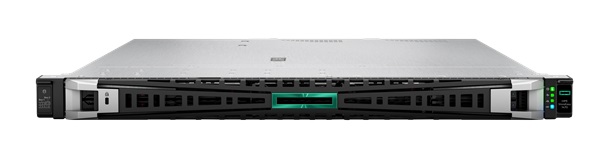
HPE StoreEasy 1470 Storage HPE StoreEasy 1470 Storage solutions deliver multi-protocol file serving and application storage in a compact and affordable 1U rack-mount form factor that's perfect for a small workgroup, small business, or remote office. All HPE StoreEasy 1470 models come with the operating system pre-installed on the four internal LFF drives.
| |
|
| |
|
HPE StoreEasy 1470 Storage | |
|
| |
|
Models | |
|
|
|
|
Description |
SKU |
|
HPE StoreEasy 1470 8TB SATA Performance Storage with Microsoft Windows Server IoT 2022 |
S2A19A |
|
HPE StoreEasy 1470 16TB SATA Performance Storage with Microsoft Windows Server IoT 2022 |
S2A20A |
|
HPE StoreEasy 1470 32TB SATA Performance Storage with Microsoft Windows Server IoT 2022 |
S2A21A |
|
HPE StoreEasy 1470 48TB SATA Performance Storage with Microsoft Windows Server IoT 2022 |
S2A22A |
|
HPE StoreEasy 1470 8TB SATA Storage with Microsoft Windows Server IoT 2022 |
S2A23A |
|
HPE StoreEasy 1470 16TB SATA Storage with Microsoft Windows Server IoT 2022 |
S2A24A |
|
| |
|
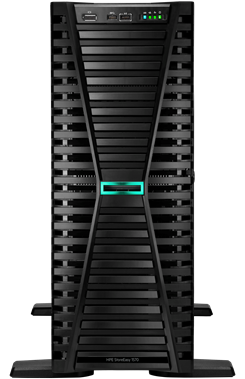
HPE StoreEasy 1570 Storage HPE StoreEasy 1570 Storage solutions are built on a compact and affordable tower form factor package and deliver multi-protocol file serving and application storage to environments that don't have rack space, including small workgroups, small businesses, and remote offices. All HPE StoreEasy 1570 models come with the operating system pre-installed on the four internal LFF drives.
| |
|
| |
|
HPE StoreEasy 1570 Storage | |
|
| |
|
Models | |
|
|
|
|
Description |
SKU |
|
HPE StoreEasy 1570 8TB SATA Performance Storage with Microsoft Windows Server IoT 2022 |
S2A25A |
|
HPE StoreEasy 1570 16TB SATA Performance Storage with Microsoft Windows Server IoT 2022 |
S2A26A |
|
HPE StoreEasy 1570 32TB SATA Performance Storage with Microsoft Windows Server IoT 2022 |
S2A27A |
|
HPE StoreEasy 1570 8TB SATA Storage with Microsoft Windows Server IoT 2022 |
S2A28A |
|
HPE StoreEasy 1570 16TB SATA Storage with Microsoft Windows Server IoT 2022 |
S2A29A |
|
| |
|
HPE StoreEasy 1670 Storage | |
|
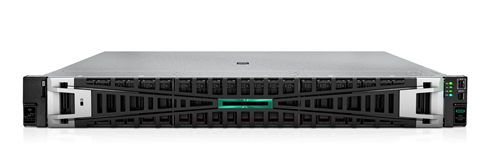
HPE StoreEasy 1670 Storage solutions deliver high internal capacity (with up to 16 LFF hot-plug drive slots) and external expandability in a 2U rack-mount form factor for small, medium, or large IT environments. All HPE StoreEasy 1670 models come with the operating system pre-installed on mirrored NVMe boot device. | |
|
| |
|
HPE StoreEasy 1670 Storage | |
|
| |
|
Models | |
|
|
|
|
Description |
SKU |
|
HPE StoreEasy 1670 32TB SAS Storage with Microsoft Windows Server IoT 2022 |
S2A30A |
|
HPE StoreEasy 1670 64TB SAS Storage with Microsoft Windows Server IoT 2022 |
S2A31A |
|
HPE StoreEasy 1670 Storage with Microsoft Windows Server IoT 2022 |
S2A32A |
|
HPE StoreEasy 1670 Performance Storage with Microsoft Windows Server IoT 2022 |
S2A34A |
|
| |
|
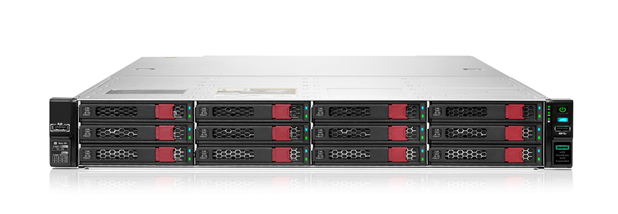
HPE StoreEasy 1670 Expanded Storage The HPE StoreEasy 1670 Expanded Storage is a density-optimized (with 28 LFF hot-plug drive slots) 2U rack-mount form factor platform ideal for bulk file and secondary storage workloads. The StoreEasy 1670 Expanded model comes with the operating system pre-installed on mirrored NVMe boot device.
| |
|
| |
|
HPE StoreEasy 1670 Expanded Storage | |
|
| |
|
Model | |
|
|
|
|
Description |
SKU |
|
HPE StoreEasy 1670 Expanded Storage with Microsoft Windows Server IoT 2022 |
S2A35A |
|
| |
|
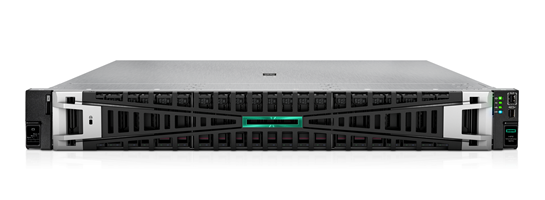
HPE StoreEasy 1870 Storage HPE StoreEasy 1870 Storage solutions deliver enterprise-class performance (with up to 32 SFF hot-plug drive slots in a 2U rack-mount form factor) for hybrid flash configurations and latency-sensitive file share or application workloads. All HPE StoreEasy 1870 models come with the operating system pre-installed on mirrored NVMe boot device.
| |
|
| |
|
HPE StoreEasy 1870 Storage | |
|
| |
|
Models | |
|
|
|
|
Description |
SKU |
|
HPE StoreEasy 1870 Storage with Microsoft Windows Server IoT 2022 |
S2A36A |
|
HPE StoreEasy 1870 Performance Storage with Microsoft Windows Server IoT 2022 |
S2A37A |
|
| |
|
Notes: To know more about, the seventh generation StoreEasy 1000 Storage models 1470, 1570, 1670, 1670 Expanded, and 1870, please below
| |
|
| |
|
HPE StoreEasy 1000 Storage Sixth generation (1460, 1560, 1660, 1660 Expanded, and 1860) |
|
HPE StoreEasy 1000 Storage Seventh generation is now available. Please refer to StoreEasy 1000 Storage seventh generation if you are looking for the above. This section describes the existing StoreEasy Sixth generation models.
|
|
|
|
|
|
|
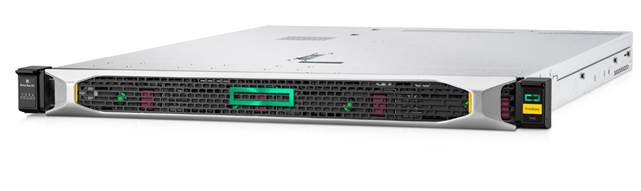
HPE StoreEasy 1460 Storage HPE StoreEasy 1460 Storage solutions deliver multi-protocol file serving and application storage in a compact and affordable 1U rack-mount form factor that's perfect for a small workgroup, small business, or remote office. All HPE StoreEasy 1460 models come with the operating system pre-installed on the four internal LFF drives.
|
|
|
|
HPE StoreEasy 1460 Storage |
|
|
|
|
|
HPE StoreEasy 1660 Storage | |
|
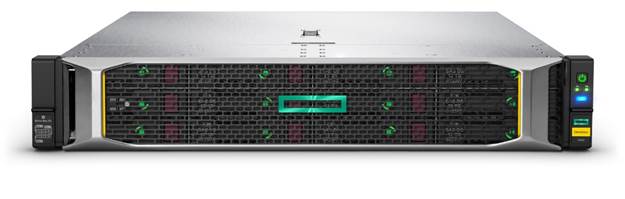
HPE StoreEasy 1660 Storage solutions deliver high internal capacity (with up to 16 LFF hot-plug drive slots) and external expandability in a 2U rack-mount form factor for small, medium, or large IT environments. All HPE StoreEasy 1660 models come with the operating system pre-installed on mirrored solid state drives. | |
|
| |
|
HPE StoreEasy 1660 Storage | |
|
| |
|
Models | |
|
|
|
|
Description |
SKU |
|
HPE StoreEasy 1660 32TB SAS Storage with Microsoft Windows Server IoT 2019 |
R7G22B |
|
HPE StoreEasy 1660 64TB SAS Storage with Microsoft Windows Server IoT 2019 |
R7G23B |
|
HPE StoreEasy 1660 Storage with Microsoft Windows Server IoT 2019 |
S0E00A |
|
HPE StoreEasy 1660 Storage with Microsoft Windows Server IoT 2019 |
R7G24B |
|
HPE StoreEasy 1660 32TB SAS Storage with Microsoft Windows Server IoT 2019 |
R7G22B |
|
HPE StoreEasy 1660 64TB SAS Storage with Microsoft Windows Server IoT 2019 |
R7G23B |
|
| |
|
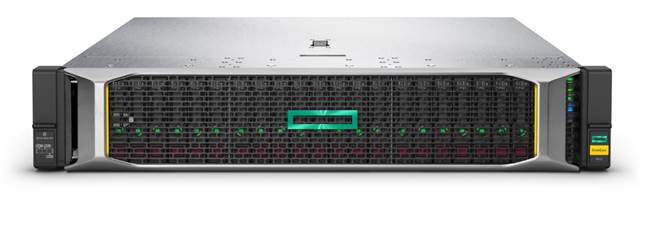
HPE StoreEasy 1860 Storage HPE StoreEasy 1860 Storage solutions deliver enterprise-class performance (with up to 26 SFF hot-plug drive slots in a 2U rack-mount form factor) for hybrid flash configurations and latency-sensitive file share or application workloads. All HPE StoreEasy 1860 models come with the operating system pre-installed on mirrored solid state drives.
| |
|
| |
|
HPE StoreEasy 1860 Storage | |
|
| |
|
Models | |
|
|
|
|
Description |
SKU |
|
HPE StoreEasy 1860 Storage with Microsoft Windows Server IoT 2019 |
R7G28B |
|
| |
|
Notes: To know more about, the sixth generation StoreEasy 1000 Storage models 1460, 1560, 1660, 1660 Expanded, and 1860, below | |
|
| |
Standard Features
|
HPE StoreEasy 1000 Storage lets you focus on your business, not your file storage
- HPE StoreEasy management console enables IT administrators to monitor and manage their HPE StoreEasy 1000 appliance quickly and easily, regardless of their familiarity with the underlying Windows Server operating system. - Use the web-based interface to manage and monitor system health, capacity, performance, hardware events, quotas, snapshots, authentication, network services, and more. - Easily identify maintenance windows with both point-in-time and historical utilization views of throughput and traffic. - Simplify capacity planning with a granular historical utilization dashboard that helps predict when expansion is needed and provides a clear view of growth rate and usage trends. - Updates to the latest version through the HPE Support Center at any time during the warranty period of your HPE StoreEasy 1000 Storage system. You can leverage automatic updates within the application to take advantage of new features as soon as they are available, or you can stage updates for your next system maintenance window.
|
|
|
|
The pre-installed operating system is tailored for file storage
HPE StoreEasy 1000 Storage comes with a specially licensed Microsoft Windows Server operating system: Microsoft Windows Server IoT 2022 Standard Edition. It includes a robust range of file serving and storage capabilities while leveraging your Windows Server management skill set and tools, including AdminCenter, PowerShell and System Center. It addresses heterogeneous environments with support for CIFS/SMB (2.0, 2.1, 3.0, 3.02 and 3.1.1), NFS (v2, v3, v4.1), WebDAV, HTTP/HTTPS, FTP/FTPS, and iSCSI protocols. And it enables more efficient storage utilization and protection with support for file quotas, screening, and classification, plus built-in deduplication and replication engines.
New features introduced in Microsoft Windows Server IoT 2022 for Storage are focused on security and bridging on-premises environments with Azure services, enabling HPE StoreEasy 1000 Storage to complement cloud applications and storage. With Windows Server IoT 2022 for Storage, you can integrate Azure services such as Azure Backup, Azure File Sync, disaster recovery, and much more. Windows Server IoT 2022 for Storage also introduces new storage migration and analytics tools, updated threat protection, and enhanced security capabilities. The SMB protocol in Windows Server IoT has enhanced to support AES-256 encryption and SMB compression to improve the security and efficiently transfer the data. Finally, HPE StoreEasy 1000 Storage systems with Windows Server IoT 2022 for Storage can host DNS and DHCP services, increasing the number of roles the system can perform vs. previous operating system editions and adding even more solution value to small / remote and medium business environments.
When installed on HPE StoreEasy 1000 Storage systems, Microsoft Windows Server IoT 2022 Standard Edition includes an unlimited Client Access License (CAL) but does come with some restrictions vs. mainstream Microsoft Windows Server versions. |
|
The following summarizes HPE StoreEasy 1000 Storage supported features and roles: |
|
|
|
Microsoft Windows Server IoT 2022 for Storage Standard Edition | |
|
Maximum CPU cores and VM* Rights |
16 cores per system + 2 VM |
|
# Disks per controller (see HPE Product Specifications for Specific constraints for each controller) |
238 |
|
Maximum SMB Connections |
16,777,216 |
|
File Server Resource Manager (FSRM) |
Yes |
|
Domain Join |
Yes |
|
File Classification Infrastructure (FCI) |
Yes |
|
Windows Server Backup |
Yes |
|
DFS-Replication |
Yes (100TB maximum) |
|
Storage Replica |
Yes (limited to 1 x 2TB volume, 1 partnership, 1 resource group) |
|
Azure File Sync |
Yes |
|
Azure Backup |
Yes |
|
Shared block storage (iSCSI Target Server / Storage Provider) |
Yes |
|
Storage Spaces, Storage Spaces Direct, and Volume Replication |
No |
|
Deduplication |
Yes |
|
Deduplication for ReFS |
Yes |
|
BranchCache - Hosted Cache |
Yes |
|
Hyper-V Virtualization |
Host + 2VM* (Shielded VMs not included) |
|
Clustering (including AD/DNS) |
Not supported on StoreEasy 1000 Storage |
|
Networking Infrastructure Roles (DHCP & DNS) |
Yes |
|
Active Directory roles including Domain Controller (RODC) |
No |
|
Active Directory (Domain Controller, Certificate Services, Federation services, Rights Management) |
No |
|
Application Server, Network Policy, Remote Desktop Broker, WDS and Fax Server |
No |
|
Windows Server Migration Tools |
Yes |
|
Windows Storage Migration Service |
Yes |
|
Windows Server System Insights |
Yes |
|
Enhanced Windows Defender Advanced Threat Protection (ATP) |
Yes |
|
Secured-Core server |
Yes |
|
Azure Arc |
Yes |
|
SMB Compression (requires server communicating to be Windows Server 2022 or client to be Windows 11 for Business and Windows Admin Center) |
Yes |
|
AES-256 encryption with support for SMB |
Yes |
|
Windows Admin Center (with auto updates) |
Yes |
|
Hardware Root of Trust (requires TPM 2.0) |
Yes |
|
HTTPS and TLS 1.3 Enabled by Default |
Yes |
|
Notes: *Requires separate software license for each VM | |
|
Notes: - Microsoft Windows Server 2022 and Microsoft Windows Server IoT 2022 for Storage are built on the same code base. Storage-centric (backup, replication, antivirus, etc.) applications certified for Windows Server 2022 are expected to have the same application compatibility profile on Windows Server IoT 2022 for Storage. Windows Server IoT for Storage and Windows Server have the same application frameworks, services, and plumbing to support running the full breadth of Windows-compatible applications but do have unique licensing features and restrictions. Customers should review the End User License Agreement (EULA) to see what server roles are listed as unsupported and the types of applications that are permitted for installation on HPE StoreEasy 1000 Storage systems. Applications that rely upon certain roles that are removed from (or are listed in the EULA as unsupported on) Windows Server IoT 2019 for Storage, such as fax server, terminal services, Application Server, Network Policy Server, Remote Desktop Broker, Windows Deployment Services, and Active Directory domain controller (all HPE StoreEasy 1000 Storage systems can join an Active Directory domain, but they cannot be a domain controller or perform Certificate Services, Federation Services, or Rights Management) will not be able to leverage those roles. Independent Software Vendors (ISVs) ultimately decide what versions and editions of Windows are supported by their products and users should review ISV compatibility and support information before purchasing. - Microsoft Windows Server IoT 2022 for Storage is currently scheduled to remain under Microsoft Mainstream Support (which includes incident support, security update support, and the ability to request non-security updates) until January 2027. Learn more about Microsoft's Fixed Lifecycle and support policy at: https://docs.microsoft.com/en-us/lifecycle/policies/fixed
More Information on Microsoft Windows Server IoT 2022 for Storage can be found here: https://learn.microsoft.com/en-us/windows/iot/server/windows-server
|
|
|
|
Protect your data and your investment
|
|
|
|
Expansion with HPE MSA SAN Storage or D3X10 Disk Enclosures
All HPE StoreEasy models support external storage using HPE MSA SAN Storage or D3X10 Disk Enclosure product families. A Fibre Channel, SAS, or iSCSI connection must be added to support MSA SAN Storage (note that high-availability clustering is not supported) while a Smart Array controller with external ports must be added to support external Disk Enclosures. The maximum number of disk enclosures supported is 8, a limit imposed by the disk enclosures and controllers. See the MSA SAN Storage and D3X10 Disk Enclosure, QuickSpecs for more information. |
|
|
|
Archiving with iTernity Compliant Archive Software Get open, flexible, and expandable long-term archiving with iTernity Compliant Archive Solution (iCAS). iTernity iCAS is validated to meet the United States Securities and Exchange Commission (SEC) 17a-4(f) requirements. Together, HPE StoreEasy 1000 Storage and iCAS are your key to legally-compliant data archiving.
For more information on how to obtain the iCAS for archiving visit the HPE Complete iTernity iCAS product page. |
|
|
|
Expansion with HPE MSA SAN Storage or D3X10 Disk Enclosure All HPE StoreEasy models support external storage using HPE MSA SAN Storage or D3X10 / D6020 Disk Enclosure product families. A Fibre Channel, SAS, or iSCSI connection must be added to support MSA SAN Storage (note that high-availability clustering is not supported) while a Smart Array controller with external ports must be added to support external Disk Enclosures. The maximum number of disk enclosures supported is 8, a limit imposed by the disk enclosures and controllers. See the MSA SAN Storage, D3X10 Disk Enclosure, and D6020 Disk Enclosure, QuickSpecs for more information. |
|
|
Service and Support
|
Warranty HPE StoreEasy 1470, 1570, 1670, 1670 Expanded, and 1870 Storage systems come with a standard 3-3-3 warranty (3 years parts exchange, 3 years labor and 3 years onsite, next business day response). Software media is warranted to be free of physical defects for a period of 90 days from delivery. |
|
|
|
Services Included with the Product One year of Hewlett Packard Enterprise Software Support for the Microsoft Windows Server IoT 2022 for Storage Standard Edition operating system, standard 9x5 business hours (software advisory and remedial software telephone support, and media and documentation distribution service). |
|
|
|
Microsoft Operating System Support Statement Standard support for the Microsoft Windows Server IoT 2022 for Storage Standard Edition operating system installed on HPE StoreEasy 1000 Storage includes (but is not limited to) initial configuration, troubleshooting of operating system installation and/or recovery issues, hardware and driver problems, and system-specific / storage-centric features (Volume / File system creation; File/Folder/Share Permissions; Active Directory integration.; DFS-R; DFS-N; quotas; deduplication; NFS, SMB, iSCSI protocols; performance tuning; etc.). Microsoft Clustering Services is not supported on HPE StoreEasy 1000 Storage. HPE Support Services will also not troubleshoot a Microsoft Operating System feature that has been deprecated or has limited functionality as per design by Microsoft. HPE Support Services will not troubleshoot third-party software or issues related to Microsoft Active Directory Services that are external to the HPE StoreEasy system that may be hindering implementation of Active Directory integration. In those cases, customers should resolve issues with their third-party software vendor and/or by opening a support case with Microsoft directly. |
|
|
|
HPE Services No matter where you are in your digital transformation journey, you can count on HPE Services to deliver the expertise you need when, where and how you need it. From planning to deployment, ongoing operations and beyond, our experts can help you realize your digital ambitions. https://www.hpe.com/services
|
|
|
|
Consulting Services No matter where you are in your journey to hybrid cloud, experts can help you map out your next steps. From determining what workloads should live where, to handling governance and compliance, to managing costs, our experts can help you optimize your operations. https://www.hpe.com/services/consulting
|
|
|
|
HPE Managed Services HPE runs your IT operations, providing services that monitor, operate, and optimize your infrastructure and applications, delivered consistently and globally to give you unified control and let you focus on innovation. HPE Managed Services | HPE
|
|
|
|
Operational services Optimize your entire IT environment and drive innovation. Manage day-to-day IT operational tasks while freeing up valuable time and resources. Meet service-level targets and business objectives with features designed to drive better business outcomes. https://www.hpe.com/services/operational
|
|
|
|
HPE Complete Care Service HPE Complete Care Service is a modular, edge-to-cloud IT environment service designed to help optimize your entire IT environment and achieve agreed upon IT outcomes and business goals through a personalized experience. All delivered by an assigned team of HPE Services experts. HPE Complete Care Service provides:
https://www.hpe.com/services/completecare
|
|
|
|
HPE Tech Care Service HPE Tech Care Service is the operational support service experience for HPE products. The service goes beyond traditional support by providing access to product specific experts, an AI driven digital experience, and general technical guidance to not only reduce risk but constantly search for ways to do things better. HPE Tech Care Service delivers a customer-centric, AI driven, and digitally enabled customer experience to move your business forward. HPE Tech Care Service is available in three response levels. Basic, which provides 9x5 business hour availability and a 2-hour response time. Essential which provides a 15-minute response time 24x7 for most enterprise level customers, and Critical which includes a 6-hour repair commitment where available and outage management response for severity 1 incidents. https://www.hpe.com/services/techcare
|
|
|
|
HPE Lifecycle Services HPE Lifecycle Services provide a variety of options to help maintain your HPE systems and solutions at all stages of the product lifecycle. A few popular examples include:
Notes:
To review the list of Lifecycle Services available for your product
go to:
For a list of the most frequently purchased services using service credits, see the HPE Service Credits Menu
|
|
|
|
Discover, plan, and design Choose from a rich portfolio of services to make the most of HPE StoreEasy Storage, so you can efficiently and affordably consolidate, manage, and extract value from unstructured data. Hewlett Packard Enterprise Services can help you discover needs and create a plan for simplifying the environment, reducing risk, and maximizing your storage investments |
|
HPE Backup Recovery Impact Analysis Focus placed on service requirements and design as the key to success for gaining a clear understanding of the role of increasingly diverse data protection strategies.
HPE Storage Cloud Design Service Build a scalable, low-cost enterprise storage environment with inherent cloud benefits to meet big data needs. |
|
|
|
Deploy and integrate We can help you configure, set up, and efficiently use your HPE StoreEasy Storage, as well as help migrate data, improve capacity utilization, and establish information management standards used across backup, replication, and archiving needs. |
|
|
|
HPE StoreEasy 1000 Storage Installation and Startup Service Expert system installation and setup by a Hewlett Packard Enterprise technical specialist designed to reduce implementation time and cost, with your basic questions about the service answered during the included orientation session. https://h20195.www2.hpe.com/v2/Getdocument.aspx?docname=4AA2-6112ENW |
|
|
|
HPE File Data Migration Services Available in convenient packaged offerings, HPE File Data Migration Service is designed to help facilitate the file migration process when migrating data to eligible HPE File Storage solutions and provide a flexible way to migrate your organization's critical data and minimize impact on your operations. https://www.hpe.com/psnow/doc/4aa6-7249enw?jumpid=in_hpesitesearch |
|
|
|
HPE Service Credits Offer flexible services and technical skills to meet your IT demands as your business evolves. With a menu of services, you can access additional resources and specialist skills to help you maintain peak performance of your IT. HPE Service Credits help you proactively respond to your dynamic IT and business needs. |
|
|
|
Other Related Services from HPE Services: HPE Education Services Training and certification designed for IT and business professionals across all industries. Broad catalogue of course offerings to expand skills and proficiencies in topics ranging from cloud and cybersecurity to AI and DevOps. Create learning paths to expand proficiency in a specific subject. Schedule training in a way that works best for your business with flexible continuous learning options. https://www.hpe.com/services/training |
|
|
|
Defective Media Retention An option available with HPE Complete Care Service and HPE Tech Care Service and applies only to Disk or eligible SSD/Flash Drives replaced by HPE due to malfunction.
Consult your HPE Sales Representative or Authorized Channel Partner of choice for any additional questions and services options. |
|
|
|
Parts and Materials HPE will provide HPE-supported replacement parts and materials necessary to maintain the covered hardware product in operating condition, including parts and materials for available and recommended engineering improvements.
Parts and components that have reached their maximum supported lifetime and/or the maximum usage limitations as set forth in the manufacturer's operating manual, product QuickSpecs, or the technical product data sheet will not be provided, repaired, or replaced as part of these services. |
|
|
|
How to Purchase Services Services are sold by Hewlett Packard Enterprise and Hewlett Packard Enterprise Authorized Service Partners:
|
|
|
|
AI Powered and Digitally Enabled Support Experience Achieve faster time to resolution with access to product-specific resources and expertise through a digital and data driven customer experience
Sign into the HPE Support Center experience, featuring streamlined self-serve case creation and management capabilities with inline knowledge recommendations. You will also find personalized task alerts and powerful troubleshooting support through an intelligent virtual agent with seamless transition when needed to a live support agent. https://support.hpe.com/hpesc/public/home/signin |
|
|
|
Consume IT On Your Terms HPE GreenLake edge-to-cloud platform brings the cloud experience directly to your apps and data wherever they are-the edge, colocations, or your data center. It delivers cloud services for on-premises IT infrastructure specifically tailored to your most demanding workloads. With a pay-per-use, scalable, point-and-click self-service experience that is managed for you, HPE GreenLake edge-to-cloud platform accelerates digital transformation in a distributed, edge-to-cloud world.
To learn more about HPE Services, please contact your Hewlett Packard Enterprise sales representative or Hewlett Packard Enterprise Authorized Channel Partner. Contact information for a representative in your area can be found at "Contact HPE" https://www.hpe.com/us/en/contact-hpe.html
For more information http://www.hpe.com/services
|
|
|
Configuration Information
|
HPE StoreEasy 1470 Storage | |||||||||||||||||||||||||||||
| |||||||||||||||||||||||||||||
|
| |||||||||||||||||||||||||||||
| |||||||||||||||||||||||||||||
Notes: Options listed in the steps below are limited to those recommended for use with StoreEasy 1470 Storage models.
For more information on the complete set of compatible options, please reference the ProLiant DL320 Gen11 QuickSpecs at: https://www.hpe.com/psnow/doc/a50004315enw.pdf
| |||||||||||||||||||||||||||||
|
| |||||||||||||||||||||||||||||
|
Step 1: Choose your HPE StoreEasy 1470 Storage model | |||||||||||||||||||||||||||||
|
All HPE StoreEasy 1470 SKUs are pre-configured Build-to-Order (BTO) models with a small RAID10 partition across the four factory-installed drives for the pre-installed operating system (remaining space is available to be configured as file storage capacity). All models can be factory-racked, but all options in the configuration steps below are not factory integrated and are shipped separately.
Notes: - All SKU descriptions are based on raw storage capacity, not available user storage. - As a best practice, HPE recommends only RAID10 or RAID6 for data partitions. - The StoreEasy 1470 Storage performance models (S2A19A, S2A20A, S2A21A, and S2A22A) use hardware RAID for higher performance - The StoreEasy 1470 Storage models (S2A23A and S2A24A) feature software RAID for better economics.
| |||||||||||||||||||||||||||||
|
Description |
SKU | ||||||||||||||||||||||||||||
|
HPE StoreEasy 1470 8TB SATA Performance Storage with Microsoft Windows Server IoT 2022 |
S2A19A | ||||||||||||||||||||||||||||
|
Notes: (4 x 2TB SATA 6G Midline 7.2K LFF HDDs) |
| ||||||||||||||||||||||||||||
|
HPE StoreEasy 1470 16TB SATA Performance Storage with Microsoft Windows Server IoT 2022 |
S2A20A | ||||||||||||||||||||||||||||
|
Notes: (4 x 4TB SATA 6G Midline 7.2K LFF HDDs) |
| ||||||||||||||||||||||||||||
|
HPE StoreEasy 1470 32TB SATA Performance Storage with Microsoft Windows Server IoT 2022 |
S2A21A | ||||||||||||||||||||||||||||
|
Notes: (4 x 8TB SATA 6G Midline 7.2K LFF HDDs) |
| ||||||||||||||||||||||||||||
|
Description |
SKU | |
|
HPE StoreEasy 1470 48TB SATA Performance Storage with Microsoft Windows Server IoT 2022 |
S2A22A | |
|
Notes: (4 x 12TB SATA 6G Midline 7.2K LFF HDDs) |
| |
|
HPE StoreEasy 1470 8TB SATA Storage with Microsoft Windows Server IoT 2022 |
S2A23A | |
|
Notes: (4 x 2TB SATA 6G Midline 7.2K LFF HDDs) |
| |
|
HPE StoreEasy 1470 16TB SATA Storage with Microsoft Windows Server IoT 2022 |
S2A24A | |
|
Notes: (4 x 4TB SATA 6G Midline 7.2K LFF HDDs) |
| |
|
| ||
|
| ||
|
Step 2: Choose additional memory kit(s) (optional) |
| |
|
HPE 16GB (1x16GB) Single Rank x8 DDR5-4800 CAS-40-39-39 EC8 Registered Smart Memory Kit |
P43322-K21 | |
|
Notes: There are a total maximum of 16 DIMM slots. All HPE StoreEasy 1470 models come with one 16GB DIMM standard | ||
|
| ||
|
| ||
|
Step 3: Choose a riser kit to add a PCIe slot (optional) |
| |
|
HPE ProLiant DL320 Gen11 x16 FHHL Riser Kit |
P52753-B21 | |
|
Notes: Expands the number of available PCIe slots from 1 to 2. | ||
|
| ||
|
| ||
|
Step 4: Choose an external storage controller to connect to external enclosures (optional)
| ||
|
HPE Smart Array SAS Controllers | ||
|
HPE Smart Array E208e-p SR Gen10 (8 External Lanes/No Cache) 12G SAS PCIe Plug-in Controller |
804398-B21 | |
|
| ||
|
Step 5: Choose additional network adapter(s) (optional) | ||
|
Notes: SFP and SFP+ Adapters do not include a transceiver by default. SFP transceiver(s) or direct connect cable(s) should be ordered according to the transceiver and cable compatibility matrix found at: https://www.hpe.com/psnow/doc/A00002507ENW.pdf?jumpid=in_lit-psnow-getpdf | ||
|
PCIe Network Adapters | ||
|
Description |
SKU | |
|
Broadcom BCM57504 Ethernet 10/25Gb 4-port SFP28 Adapter for HPE |
P26264-B21 | |
|
Intel E810-XXVDA2 Ethernet 10/25Gb 2-port SFP28 Adapter for HPE |
P08443-B21 | |
|
Intel E810-XXVDA4 Ethernet 10/25Gb 4-port SFP28 Adapter for HPE |
P08458-B21 | |
|
Broadcom BCM57416 Ethernet 10Gb 2-port BASE-T Adapter for HPE |
P26253-B21 | |
|
Broadcom BCM57412 Ethernet 10Gb 2-port SFP+ Adapter for HPE |
P26259-B21 | |
|
Broadcom BCM57414 Ethernet 10/25Gb 2-port SFP28 Adapter for HPE |
P26262-B21 | |
|
Mellanox MCX631102AS-ADAT Ethernet 10/25Gb 2-port SFP28 Adapter for HPE |
P42044-B21 | |
|
Broadcom BCM5719 Ethernet 1Gb 4-port BASE-T Adapter for HPE |
P51178-B21 | |
|
| ||
|
| ||
|
Step 6: Choose second power supply (optional) | ||
|
Description |
SKU | |
|
HPE 500W Flex Slot Platinum Hot Plug Low Halogen Power Supply Kit |
865408-B21 | |
|
| ||
|
Step 7: Choose a System Recovery Media Kit (optional) | |
|
Description |
SKU |
|
HPE StoreEasy 1X70 Recovery Software Media Kit with Microsoft Windows Server IoT 2022 |
S2A09A |
|
Notes: - HPE StoreEasy 1X70 Recovery Software Media Kits contain a System Recovery USB key that is used to re-install the factory operating system image. Booting the system from the System Recovery media will restore the operating system image and logical drive to the factory default state. This enables recovery of the system if all other means to boot the system fail. Refer to the HPE StoreEasy 1X70 Administrator Guide for more information on performing a System Recovery. - Alternatively, the HPE StoreEasy 1X70 Recovery Software image can be downloaded from the HPE's Software Depot at no charge. More information is available here: https://myenterpriselicense.hpe.com/cwp-ui/free-software/. - For more information on how to perform a system recovery on a HPE StoreEasy 1470 refer to the HPE StoreEasy 1X70 Administrator's Guide. The guide can be downloaded from http://www.hpe.com/support. Select HPE Support Center and search for the HPE StoreEasy system model in the drivers and download section. - All data on the original operating system logical drive is erased during the System Recovery process. Back up any data on the operating system drives before performing the System Recovery if possible. While the System Recovery process makes every attempt to preserve the existing data volumes, you should have a backup of your data before recovering the system. | |
|
| |
|
HPE StoreEasy 1570 Storage | ||||||||||||||||||||||||||||
| ||||||||||||||||||||||||||||
|
| ||||
| ||||
Notes: Options listed in the steps below are limited to those recommended for use with StoreEasy 1570 Storage models.
For more information on the complete set of compatible options, please reference the ProLiant ML110 Gen11 QuickSpecs at: https://www.hpe.com/psnow/doc/a00054055enw.pdf
| ||||
|
| ||||
|
| |
|
Step 1: Choose your HPE StoreEasy 1570 Storage model | |
|
All HPE StoreEasy 1570 SKUs are pre-configured Build-to-Order (BTO) models with a small RAID10 partition across the four factory-installed drives for the pre-installed operating system (remaining space is available to be configured as file storage capacity). All options in the configuration steps below are not factory integrated and are shipped separately. Notes: - All SKU descriptions are based on raw storage capacity, not available user storage. - The StoreEasy 1570 Storage performance models (S2A25A, S2A26A, and S2A27A) use hardware RAID for higher performance - The StoreEasy 1570 Storage models (S2A28A and S2A29A) feature software RAID for better economics. - As a best practice, HPE recommends only RAID10 or RAID6 for data partitions.
| |
|
Description |
SKU |
|
HPE StoreEasy 1570 8TB SATA Performance Storage with Microsoft Windows Server IoT 2022 |
S2A25A |
|
Notes: (4 x 2TB SATA 6G Midline 7.2K LFF HDDs) |
|
|
HPE StoreEasy 1570 16TB SATA Performance Storage with Microsoft Windows Server IoT 2022 |
S2A26A |
|
Notes: (4 x 4TB SATA 6G Midline 7.2K LFF HDDs) |
|
|
HPE StoreEasy 1570 32TB SATA Performance Storage with Microsoft Windows Server IoT 2022 |
S2A27A |
|
Notes: (4 x 8TB SATA 6G Midline 7.2K LFF HDDs) |
|
|
Description |
SKU | ||
|
HPE StoreEasy 1570 8TB SATA Storage with Microsoft Windows Server IoT 2022 |
S2A28A | ||
|
Notes: (4 x 2TB SATA 6G Midline 7.2K LFF HDDs) |
| ||
|
HPE StoreEasy 1570 16TB SATA Storage with Microsoft Windows Server IoT 2022 |
S2A29A | ||
|
Notes: (4 x 4TB SATA 6G Midline 7.2K LFF HDDs) |
| ||
|
| |||
|
| |||
|
Step 2: Choose additional memory kit(s) (optional) |
| ||
|
Description |
SKU | ||
|
HPE 16GB (1x16GB) Single Rank x8 DDR5-4800 CAS-40-39-39 EC8 Registered Smart Memory Kit |
P43322-K21 | ||
|
Notes: There are 6 DIMM slots available on the HPE StoreEasy 1570. All HPE StoreEasy 1570 models come with one processor and one 16GB DIMM standard. | |||
|
| |||
|
| |||
|
Step 3: Choose a second drive cage (optional) |
| ||
|
Description |
SKU | ||
|
HPE ProLiant ML110 Gen11 4LFF Drive Cage Kit |
P53482-B21 | ||
|
Notes: Adding the 2nd LFF drive cage requires adding the 2nd power supply (865408-B21). | |||
|
| |||
|
| |||
|
Step 4: Choose drives for the second drive cage (optional)
| |||
|
HPE single drive options |
| ||
|
Description |
SKU | ||
|
HPE 1TB SATA 6G Business Critical 7.2K LFF LP 1-year Warranty Multi Vendor HDD |
861686-K21 | ||
|
HPE 2TB SATA 6G Business Critical 7.2K LFF LP 1-year Warranty Multi Vendor HDD |
861681-K21 | ||
|
HPE 4TB SATA 6G Business Critical 7.2K LFF LP 1-year Warranty Multi Vendor HDD |
861683-K21 | ||
|
HPE 6TB SATA 6G Business Critical 7.2K LFF LP 1-year Warranty 512e Multi Vendor HDD |
861742-K21 | ||
|
HPE 8TB SATA 6G Business Critical 7.2K LFF LP 1-year Warranty 512e Multi Vendor HDD |
834028-K21 | ||
|
HPE 10TB SATA 6G Business Critical 7.2K LFF LP 1-year Warranty 512e ISE Multi Vendor HDD |
P53557-K21 | ||
|
HPE 12TB SATA 6G Business Critical 7.2K LFF LP 1-year Warranty Helium 512e Multi Vendor HDD |
881787-K21 | ||
|
HPE 14TB SATA 6G Business Critical 7.2K LFF LP 1-year Warranty Helium 512e Multi Vendor HDD |
P09165-K21 | ||
|
HPE 16TB SATA 6G Business Critical 7.2K LFF LP 1-year Warranty Helium 512e ISE Multi Vendor HDD |
P23449-K21 | ||
|
HPE 18TB SATA 6G Business Critical 7.2K LFF LP 1-year Warranty Helium 512e ISE Multi Vendor HDD |
P37678-K21 | ||
|
HPE 20TB SATA 6G Business Critical 7.2K LFF LP 1-year Warranty Helium 512e ISE Multi Vendor HDD |
P53554-K21 | ||
|
Notes: As a best practice, HPE recommends ordering and installing 4 LFF drives for the 2nd drive cage that match the same capacity and type already installed in the first drive cage. | |||
|
| |||
|
| |||
|
Step 5: Choose additional network adapter(s) (optional) | |||
|
Notes: SFP and SFP+ Adapters do not include a transceiver by default. SFP transceiver(s) or direct connect cable(s) should be ordered according to the transceiver and cable compatibility matrix found at: https://www.hpe.com/psnow/doc/A00002507ENW.pdf?jumpid=in_lit-psnow-getpdf | |||
|
PCIe Network Adapters | ||
|
Description |
SKU | |
|
Intel E810-XXVDA2 Ethernet 10/25Gb 2-port SFP28 Adapter for HPE |
P08443-B21 | |
|
Intel E810-XXVDA4 Ethernet 10/25Gb 4-port SFP28 Adapter for HPE |
P08458-B21 | |
|
Broadcom BCM57416 Ethernet 10Gb 2-port BASE-T Adapter for HPE |
P26253-B21 | |
|
Broadcom BCM57412 Ethernet 10Gb 2-port SFP+ Adapter for HPE |
P26259-B21 | |
|
Broadcom BCM57414 Ethernet 10/25Gb 2-port SFP28 Adapter for HPE |
P26262-B21 | |
|
Mellanox MCX631102AS-ADAT Ethernet 10/25Gb 2-port SFP28 Adapter for HPE |
P42044-B21 | |
|
Broadcom BCM5719 Ethernet 1Gb 4-port BASE-T Adapter for HPE |
P51178-B21 | |
|
| ||
|
| ||
|
Step 6: Choose a second power supply (optional) | ||
|
Description |
SKU | |
|
HPE 500W Flex Slot Platinum Hot Plug Low Halogen Power Supply Kit |
865408-B21 | |
|
| ||
|
| ||
|
Step 7: Choose a System Recovery Media Kit (optional) | ||
|
Description |
SKU | |
|
HPE StoreEasy 1X70 Recovery Software Media Kit with Microsoft Windows Server IoT 2022 |
S2A09A | |
|
Notes: - HPE StoreEasy 1X70 Recovery Software Media Kits contain a System Recovery USB key that is used to re-install the factory operating system image. Booting the system from the System Recovery media will restore the operating system image and logical drive to the factory default state. This enables recovery of the system if all other means to boot the system fail. Refer to the HPE StoreEasy 1X70 Administrator Guide for more information on performing a System Recovery. - Alternatively, the HPE StoreEasy 1X70 Recovery Software image can be downloaded from the HPE's Software Depot at no charge. More information is available here: https://myenterpriselicense.hpe.com/cwp-ui/free-software/. - For more information on how to perform a system recovery on a HPE StoreEasy 1570 refer to the HPE StoreEasy 1X70 Administrator's Guide. The guide can be downloaded from http://www.hpe.com/support . Select HPE Support Center and search for the HPE StoreEasy system model in the drivers and download section. - All data on the original operating system logical drive is erased during the System Recovery process. Back up any data on the operating system drives before performing the System Recovery if possible. While the System Recovery process makes every attempt to preserve the existing data volumes, you should have a backup of your data before recovering the system. | ||
|
| ||
|
HPE StoreEasy 1670 Storage | |||||||||||||||||||||||||||
|
| |||||||||||||||||||||||||||
| |||||||||||||||||||||||||||
|
| |||||||||||||||||||||||||||
| |||||||||||||||||||||||||||
|
| |||||||||||||||||||||||||||
|
Notes: Options listed in the steps below are limited to those recommended for use with StoreEasy 1670 Storage models.
For more information on the complete set of compatible options, please reference the ProLiant DL380 Gen11 QuickSpecs at: https://www.hpe.com/psnow/doc/a50004307enw.pdf | |||||||||||||||||||||||||||
|
| |||||||||||||||||||||||||||
|
| |||||||||||||||||||||||||||
|
Step 1: Choose your HPE StoreEasy 1670 Storage model
| |||||||||||||||||||||||||||
|
Fixed configuration models | |||||||||||||||||||||||||||
|
These HPE StoreEasy 1670 SKUs are pre-configured Build-to-Order (BTO) models with the operating system pre-installed on mirrored solid-state drives and include eight data drives factory-installed in front slots (leaving four open front LFF slots for expansion). These models can be factory-racked, but all options in the configuration steps below (including additional data drives) are not factory integrated and are shipped separately.
Notes: - All SKUs descriptions are based on raw storage capacity, not available user storage. - Hewlett Packard Enterprise recommends as a best practice that data drives added to LFF slots be the same type and capacity. - The operating system is mirrored on NS204i-u NVMe boot device | |||||||||||||||||||||||||||
|
Description |
SKU | ||||||||||||||||||||||||||
|
HPE StoreEasy 1670 32TB SAS Storage with Microsoft Windows Server IoT 2022 |
S2A30A | ||||||||||||||||||||||||||
|
Notes: (8 x 4TB SAS 12G Midline 7.2K LFF HDDs) |
| ||||||||||||||||||||||||||
|
Description |
SKU | |
|
HPE StoreEasy 1670 64TB SAS Storage with Microsoft Windows Server IoT 2022 |
S2A31A | |
|
Notes: (8 x 8TB SAS 12G Midline 7.2K LFF HDDs) |
| |
|
| ||
|
Configurable models These HPE StoreEasy 1670 SKUs are Configure-to-Order (CTO) models with the operating system pre-installed on mirrored solid-state drives and do not include data drives standard. These models can be factory-racked, and most added options (including data drives) can be factory integrated.
Notes: Hewlett Packard Enterprise recommends as a best practice that the internal data drives for the CTO models be the same type and capacity. | ||
|
Description |
SKU | |
|
HPE StoreEasy 1670 Storage with Microsoft Windows Server IoT 2022 |
S2A32A | |
|
HPE StoreEasy 1670 Performance Storage with Microsoft Windows Server IoT 2022 |
S2A34A | |
|
Notes: The operating system is mirrored on NS204i-u NVMe boot device |
| |
|
| ||
|
| ||
|
Step 1: Choose additional memory kit(s) (optional)
|
| |
|
Description |
SKU | |
|
HPE 16GB (1x16GB) Single Rank x8 DDR5-4800 CAS-40-39-39 EC8 Registered Smart Memory Kit |
P43322-K21 | |
|
Notes: - All the HPE StoreEasy 1670 models come with one processor standard. The maximum total number of DIMMS for StoreEasy 1670 is 16 DIMMs, and all StoreEasy 1670 are shipped with 1x 16GB DIMM from factory standard. - StoreEasy 1670 does not offer second processor. Addition of second processor will violate the Microsoft Windows Server IoT 2022 license as maximum number of license core is 16. - Please refer memory population for more detail
| ||
|
| ||
|
| ||
|
Step 2: Choose a drive cage to add LFF slots (optional)
| ||
|
Description |
SKU | |
|
HPE ProLiant DL380 Gen11 4LFF SAS/SATA 12G LP Midplane Drive Cage Kit |
P48809-B21 | |
|
Notes: Expands the total number of Large Form Factor (3.5") drive slots from 12 to 16. | ||
|
| ||
|
| ||
|
Step 3: Choose internal storage drives (optional)
| ||
|
Drive Options |
| |
|
Maximum number of internal LFF drives supported
|
||
|
| ||
|
HPE StoreEasy 1670 LFF Drive Bundles | ||
|
Business Critical (Midline) - 12G SAS | ||
|
Description |
SKU | |
|
HPE StoreEasy 8TB SAS Business Critical LFF (3.5in) LP 1yr Wty 4-pack Multi Vendor HDD Bundle |
S0E04A | |
|
Notes: Contains 4 x HPE 2TB SAS 12G 7.2K LFF LP HDDs (reference SKU 833926-K21) |
| |
|
Description |
SKU | ||
|
HPE StoreEasy 16TB SAS Business Critical LFF (3.5in) LP 1yr Wty 4-pack Multi Vendor HDD Bundle |
S0E05A | ||
|
Notes: Contains 4 x HPE 4TB SAS 12G 7.2K LFF LP HDDs (reference SKU 833928-K21) |
| ||
|
HPE StoreEasy 24TB SAS Business Critical LFF (3.5in) LP 1yr Wty 4-pack Multi Vendor HDD Bundle |
S0E06A | ||
|
Notes: Contains 4 x HPE 6TB SAS 12G 7.2K LFF LP HDDs (reference SKU 861746-K21) |
| ||
|
HPE StoreEasy 48TB SAS Business Critical LFF (3.5in) LP 1yr Wty 4-pack Multi Vendor HDD Bundle |
S0E07A | ||
|
Notes: Contains 4 x HPE 12TB SAS 12G 7.2K LFF LP HDDs (reference SKU 881781-K21) |
| ||
|
HPE StoreEasy 64TB SAS Business Critical LFF (3.5in) LP 1yr Wty 4-pack Multi Vendor HDD Bundle |
S0E08A | ||
|
Notes: Contains 4 x HPE 16TB SAS 12G 7.2K LFF LP HDDs (reference SKU P23608-K21) |
| ||
|
| |||
|
HDDs | |||
|
Low Profile Carrier Business Critical (Midline) - 12G SAS | |||
|
Description |
SKU | ||
|
HPE 2TB SAS 12G Business Critical 7.2K LFF LP 1-year Warranty Multi Vendor HDD |
833926-K21 | ||
|
HPE 4TB SAS 12G Business Critical 7.2K LFF LP 1-year Warranty Multi Vendor HDD |
833928-K21 | ||
|
HPE 8TB SAS 12G Business Critical 7.2K LFF LP 1-year Warranty 512e Multi Vendor HDD |
834031-K21 | ||
|
HPE 6TB SAS 12G Business Critical 7.2K LFF LP 1-year Warranty 512e Multi Vendor HDD |
861746-K21 | ||
|
HPE 10TB SAS 12G Business Critical 7.2K LFF LP 1-year Warranty 512e ISE Multi Vendor HDD |
P53556-K21 | ||
|
HPE 12TB SAS 12G Business Critical 7.2K LFF LP 1-year Warranty Helium 512e Multi Vendor HDD |
881781-K21 | ||
|
HPE 14TB SAS 12G Business Critical 7.2K LFF LP 1-year Warranty Helium 512e Multi Vendor HDD |
P09155-K21 | ||
|
HPE 16TB SAS 12G Business Critical 7.2K LFF LP 1-year Warranty Helium 512e ISE Multi Vendor HDD |
P23608-K21 | ||
|
HPE 18TB SAS 12G Business Critical 7.2K LFF LP 1-year Warranty Helium 512e ISE Multi Vendor HDD |
P37669-K21 | ||
|
HPE 20TB SAS 12G Business Critical 7.2K LFF LP 1-year Warranty Helium 512e ISE Multi Vendor HDD |
P53553-K21 | ||
|
| |||
|
Low Profile Carrier Business Critical (Midline) - 6G SATA | |||
|
Description |
SKU | ||
|
HPE 1TB SATA 6G Business Critical 7.2K LFF LP 1-year Warranty Multi Vendor HDD |
861686-K21 | ||
|
HPE 4TB SATA 6G Business Critical 7.2K LFF LP 1-year Warranty Multi Vendor HDD |
861683-K21 | ||
|
HPE 6TB SATA 6G Business Critical 7.2K LFF LP 1-year Warranty 512e Multi Vendor HDD |
861742-K21 | ||
|
HPE 8TB SATA 6G Business Critical 7.2K LFF LP 1-year Warranty 512e Multi Vendor HDD |
834028-K21 | ||
|
HPE 10TB SATA 6G Business Critical 7.2K LFF LP 1-year Warranty 512e ISE Multi Vendor HDD |
P53557-K21 | ||
|
HPE 12TB SATA 6G Business Critical 7.2K LFF LP 1-year Warranty Helium 512e Multi Vendor HDD |
881787-K21 | ||
|
HPE 14TB SATA 6G Business Critical 7.2K LFF LP 1-year Warranty Helium 512e Multi Vendor HDD |
P09165-K21 | ||
|
HPE 16TB SATA 6G Business Critical 7.2K LFF LP 1-year Warranty Helium 512e ISE Multi Vendor HDD |
P23449-K21 | ||
|
HPE 18TB SATA 6G Business Critical 7.2K LFF LP 1-year Warranty Helium 512e ISE Multi Vendor HDD |
P37678-K21 | ||
|
|
| ||
|
SSDs |
| ||
|
Read Intensive - 24G SAS - LFF Solid State Drives |
| ||
|
Description |
SKU | ||
|
HPE 7.68TB SAS 24G Read Intensive LFF LPC Multi Vendor SSD |
P49040-K21 | ||
|
Notes: The recommended maximum number of data SSDs for the HPE StoreEasy 1670 is 8; however, there is nothing architecturally that prevents the use of more than 16 SSDs. | |||
|
| |||
|
Step 4: Choose an external storage controller to connect to external enclosures (optional)
|
|
|
HPE Smart Array SAS Controllers |
|
|
Description |
SKU |
|
HPE Smart Array E208e-p SR Gen10 (8 External Lanes/No Cache) 12G SAS PCIe Plug-in Controller |
804398-B21 |
|
| ||
|
| ||
|
Step 5: Choose additional network adapter(s) (optional) | ||
|
Notes: SFP and SFP+ Adapters do not include a transceiver by default. SFP transceiver(s) or direct connect cable(s) should be ordered according to the transceiver and cable compatibility matrix found at: https://www.hpe.com/psnow/doc/A00002507ENW.pdf?jumpid=in_lit-psnow-getpdf | ||
|
PCIe Network Adapters | ||
|
Description |
SKU | |
|
Broadcom BCM57416 Ethernet 10Gb 2-port BASE-T Adapter for HPE |
P26253-B21 | |
|
Broadcom BCM57412 Ethernet 10Gb 2-port SFP+ Adapter for HPE |
P26259-B21 | |
|
Broadcom BCM57504 Ethernet 10/25Gb 4-port SFP28 Adapter for HPE |
P26264-B21 | |
|
Intel E810-XXVDA2 Ethernet 10/25Gb 2-port SFP28 Adapter for HPE |
P08443-B21 | |
|
Intel E810-XXVDA4 Ethernet 10/25Gb 4-port SFP28 Adapter for HPE |
P08458-B21 | |
|
Mellanox MCX631102AS-ADAT Ethernet 10/25Gb 2-port SFP28 Adapter for HPE |
P42044-B21 | |
|
Broadcom BCM5719 Ethernet 1Gb 4-port BASE-T Adapter for HPE |
P51178-B21 | |
|
| ||
|
| ||
|
| ||
|
Step 6: Choose a System Recovery Media Kit (optional)
| ||
|
Description |
SKU | |
|
HPE StoreEasy 1X70 Recovery Software Media Kit with Microsoft Windows Server IoT 2022 |
S2A09A | |
|
Notes: - HPE StoreEasy 1X70 Recovery Software Media Kits contain a System Recovery USB key that is used to re-install the factory operating system image. Booting the system from the System Recovery media will restore the operating system image and logical drive to the factory default state. This enables recovery of the system if all other means to boot the system fail. Refer to the HPE StoreEasy 1X70 Administrator Guide for more information on performing a System Recovery. - Alternatively, the HPE StoreEasy 1X70 Recovery Software image can be downloaded from the HPE's Software Depot at no charge. More information is available here: https://myenterpriselicense.hpe.com/cwp-ui/free-software/. | ||
|
- For more information on how to perform a system recovery on a HPE StoreEasy 1670 refer to the HPE StoreEasy 1X70 Administrator's Guide. The guide can be downloaded from http://www.hpe.com/support. Select HPE Support Center and search for the HPE StoreEasy system model in the drivers and download section. - All data on the original operating system logical drive is erased during the System Recovery process. Back up any data on the operating system drives before performing the System Recovery if possible. While the System Recovery process makes every attempt to preserve the existing data volumes, you should have a backup of your data before recovering the system. | ||
|
| ||
|
HPE StoreEasy 1670 Expanded Storage | ||||||||||||||||||||||||||||||||
Notes: Options listed in the steps below are limited to those recommended for use with StoreEasy 1670 Expanded Storage models. For more information on the complete set of compatible options, please reference the Apollo 4200 Gen10 Plus QuickSpecs at: https://www.hpe.com/psnow/doc/a50002573enw.pdf
| ||||||||||||||||||||||||||||||||
|
| ||||||||||||||||||||||||||||||||
|
| ||||||||||||||||||||||||||||||||
|
Step 1: Choose your HPE StoreEasy 1670 Expanded Storage model | ||||||||||||||||||||||||||||||||
|
HPE StoreEasy 1670 Expanded Storage SKUs are Configure-to-Order (CTO) models with the operating system pre-installed on mirrored solid state drives and do not include data drives standard. They can be factory-racked, and most added options (including data drives) can be factory integrated. Notes: Hewlett Packard Enterprise recommends as a best practice that data drives added to the LFF slots be of same type and capacity. | ||||||||||||||||||||||||||||||||
|
Description |
SKU | |||||||||||||||||||||||||||||||
|
HPE StoreEasy 1670 Expanded Storage with Microsoft Windows Server IoT 2022 |
S2A35A | |||||||||||||||||||||||||||||||
|
| ||||||||||||||||||||||||||||||||
|
| ||||||||||||||||||||||||||||||||
|
Step 2: Choose a second processor (optional) |
| |||||||||||||||||||||||||||||||
|
Description |
SKU | |||||||||||||||||||||||||||||||
|
Intel Xeon-Silver 4309Y 2.8GHz 8-core 105W Processor Kit for HPE Apollo 4200 Gen10 Plus |
P42908-B21 | |||||||||||||||||||||||||||||||
|
| ||||||||||||||||||||||||||||||||
|
|
| |||||||||||||||||||||||||||||||
|
Step 3: Choose additional memory kit(s) (optional) |
|
|
Description |
SKU |
|
HPE 16GB (1x16GB) Dual Rank x8 DDR4-3200 CAS-22-22-22 Registered Smart Memory Kit |
P06031-K21 |
|
Notes: There are 12 DIMM slots per processor for a total maximum of 24 DIMM slots. HPE StoreEasy 1670 Expanded models come with one processor and two 16GB DIMMs standard. | |
|
| |
|
| |
|
Step 4: Choose internal storage drives (optional)
| |
|
Drive Options Maximum number of internal LFF drives supported: 28 | |
|
| |
|
HPE single drive options | |
|
HDDs | |
|
Low Profile Carrier Business Critical (Midline) - 12G SAS | |
|
Description |
SKU |
|
HPE 14TB SAS 12G Business Critical 7.2K LFF LP 1-year Warranty Helium 512e Multi Vendor HDD |
P09155-K21 |
|
HPE 16TB SAS 12G Business Critical 7.2K LFF LP 1-year Warranty Helium 512e ISE Multi Vendor HDD |
P23608-K21 |
|
HPE 18TB SAS 12G Business Critical 7.2K LFF LP 1-year Warranty Helium 512e ISE Multi Vendor HDD |
P37669-K21 |
|
HPE 20TB SAS 12G Business Critical 7.2K LFF LP 1-year Warranty Helium 512e ISE Multi Vendor HDD |
P53553-K21 |
|
| |
|
Low Profile Carrier Business Critical (Midline) - 6G SATA | |
|
Description |
SKU |
|
HPE 14TB SATA 6G Business Critical 7.2K LFF LP 1-year Warranty Helium 512e Multi Vendor HDD |
P09165-K21 |
|
HPE 16TB SATA 6G Business Critical 7.2K LFF LP 1-year Warranty Helium 512e ISE Multi Vendor HDD |
P23449-K21 |
|
HPE 18TB SATA 6G Business Critical 7.2K LFF LP 1-year Warranty Helium 512e ISE Multi Vendor HDD |
P37678-K21 |
|
HPE 20TB SATA 6G Business Critical 7.2K LFF LP 1-year Warranty Helium 512e ISE Multi Vendor HDD |
P53554-K21 |
|
|
|
|
SSDs |
|
|
Mixed Use - SAS | |
|
Description |
SKU |
|
HPE 960GB SAS 12G Mixed Use LFF LPC Value SAS Multi Vendor SSD |
P37009-K21 |
|
| |
|
Read Intensive - 6G SATA | |
|
HPE 960GB SATA 6G Read Intensive LFF LPC Multi Vendor SSD |
P47808-K21 |
|
Notes: - HPE Smart Array SR SmartCache is included with the standard HPE Smart Array P816i-a SR Gen10 Storage Controller. With the addition of at least one SSD (HPE recommends two 12G SAS Mixed Use SSDs), it can add a flash acceleration tier to the HPE StoreEasy 1670 Expanded to help increase performance for the most frequently accessed files. For more detailed information about HPE Smart Array SR SmartCache go to: https://www.hpe.com/us/en/product-catalog/detail/pip.5364342.html - For options outside of those listed above, carefully select LFF low profile carrier (LP) hard disk drives and Low Profile Converter (LPC) solid state drives. | |
|
| |
|
Step 5: Choose an external storage controller to connect to external enclosures (optional)
| |||
|
HPE Smart Array SAS Controllers |
| ||
|
Description |
SKU | ||
|
HPE Smart Array E208e-p SR Gen10 (8 External Lanes/No Cache) 12G SAS PCIe Plug-in Controller |
804398-B21 | ||
|
HPE Smart Array P408e-p SR Gen10 (8 External Lanes/4GB Cache) 12G SAS PCIe Plug-in Controller |
804405-B21 | ||
|
HPE Smart Array SR Secure Encryption (Data at Rest Encryption/per Server Entitlement) E-LTU |
Q2F26AAE | ||
|
Notes: - If you wish to enable Data at Rest Encryption on the HPE StoreEasy 1670 Expanded using the included Smart Array P816i-a or with an optional Smart Array P408e-p listed above, you must order the optional HPE Smart Array SR Secure Encryption E-LTU (SKU Q2F26AAE). - HPE Smart Array SR SmartCache is included with the standard HPE Smart Array P816i-a SR Gen10 Storage Controller (no licensing is required). For more detailed information about HPE Smart Array SR SmartCache go to: https://www.hpe.com/us/en/product-catalog/detail/pip.5364342.html
| |||
|
HPE Special Reminder Before enabling encryption on the Smart Array controller module on this system, you must ensure that your intended use of the encryption complies with relevant local laws, regulations and policies, and approvals or licenses must be obtained if applicable.
For any compliance issues arising from your operation/usage of encryption within the Smart Array controller module which violates the above-mentioned requirement, you shall bear all the liabilities wholly and solely. Hewlett Packard Enterprise will not be responsible for any related liabilities. For more information see the HPE Smart Array SR Secure Encryption QuickSpecs. Notes: For additional details and Smart Array controller options, please see HPE Smart Array Gen10 Controllers Data Sheet. | |||
|
| |||
|
Step 6: Choose additional network adapter(s) (optional)
| |||
|
Notes: SFP and SFP+ Adapters do not include a transceiver by default. SFP transceiver(s) or direct connect cable(s) should be ordered according to the transceiver and cable compatibility matrix found at: https://www.hpe.com/psnow/doc/A00002507ENW.pdf?jumpid=in_lit-psnow-getpdf | |||
|
PCIe Network Adapters |
| ||
|
Description |
SKU | ||
|
Broadcom BCM57416 Ethernet 10Gb 2-port BASE-T Adapter for HPE |
P26253-B21 | ||
|
Broadcom BCM57412 Ethernet 10Gb 2-port SFP+ Adapter for HPE |
P26259-B21 | ||
|
Broadcom BCM57504 Ethernet 10/25Gb 4-port SFP28 Adapter for HPE |
P26264-B21 | ||
|
Intel E810-XXVDA2 Ethernet 10/25Gb 2-port SFP28 Adapter for HPE |
P08443-B21 | ||
|
Intel E810-XXVDA4 Ethernet 10/25Gb 4-port SFP28 Adapter for HPE |
P08458-B21 | ||
|
Mellanox MCX631102AS-ADAT Ethernet 10/25Gb 2-port SFP28 Adapter for HPE |
P42044-B21 | ||
|
Broadcom BCM5719 Ethernet 1Gb 4-port BASE-T Adapter for HPE |
P51178-B21 | ||
|
Intel I350-T4 Ethernet 1Gb 4-port BASE-T Adapter for HPE |
P21106-B21 | ||
|
Notes: If more than one PCIe card is added, a second processor is required to provide access to the remaining PCIe slots. | |||
|
| |||
|
| |||
|
Step 7: Choose a System Recovery Media Kit (optional) | |
|
HPE StoreEasy 1X70 Recovery Software Media Kit with Microsoft Windows Server IoT 2022 |
S2A09A |
|
|
|
|
Notes: - HPE StoreEasy 1X70 Recovery Software Media Kits contain a System Recovery USB key that is used to re-install the factory operating system image. Booting the system from the System Recovery media will restore the operating system image and logical drive to the factory default state. This enables recovery of the system if all other means to boot the system fail. Refer to the HPE StoreEasy 1X70 Administrator Guide for more information on performing a System Recovery. - Alternatively, the HPE StoreEasy 1X70 Recovery Software image can be downloaded from the HPE's Software Depot at no charge. More information is available here: https://myenterpriselicense.hpe.com/cwp-ui/free-software/. - For more information on how to perform a system recovery on a StoreEasy 1670 Expanded refer to the HPE StoreEasy 1X70 Administrator's Guide. The guide can be downloaded from http://www.hpe.com/support . Select HPE Support Center and search for the HPE StoreEasy system model in the drivers and download section. - All data on the original operating system logical drive is erased during the System Recovery process. Back up any data on the operating system drives before performing the System Recovery if possible. While the System Recovery process makes every attempt to preserve the existing data volumes, you should have a backup of your data before recovering the system. | |
|
| |
|
| |
|
HPE StoreEasy 1870 Storage
| ||||||||||||||||||||||||||||||
|
| ||||||||||||||||||||||||||||||
| ||||||||||||||||||||||||||||||
|
| ||||||||||||||||||||||||||||||
| ||||||||||||||||||||||||||||||
|
| ||||||||||||||||||||||||||||||
| ||||||||||||||||||||||||||||||
|
| ||||||||||||||||||||||||||||||
|
Notes: Options listed in the steps below are limited to those recommended for use with StoreEasy 1870 Storage models.
For more information on the complete set of compatible options, please reference the ProLiant DL380 Gen11 QuickSpecs at: https://www.hpe.com/psnow/doc/a50004307enw.pdf | ||||||||||||||||||||||||||||||
|
| ||||||||||||||||||||||||||||||
|
| ||||||||||||||||||||||||||||||
|
Step 1: Choose your HPE StoreEasy 1870 Storage model
| ||||||||||||||||||||||||||||||
|
Configurable models | ||||||||||||||||||||||||||||||
|
These HPE StoreEasy 1870 SKUs are Configure-to-Order (CTO) models with the operating system pre-installed on mirrored solid state drives and do not include data drives standard. These models can be factory-racked, and most added options (including data drives) can be factory integrated.
Notes: Hewlett Packard Enterprise recommends as a best practice that the internal data drives for the CTO models be the same type and capacity. | ||||||||||||||||||||||||||||||
|
Description |
SKU | |||||||||||||||||||||||||||||
|
HPE StoreEasy 1870 Storage with Microsoft Windows Server IoT 2022 |
S2A36A | |||||||||||||||||||||||||||||
|
HPE StoreEasy 1870 Performance Storage with Microsoft Windows Server IoT 2022 |
S2A37A | |||||||||||||||||||||||||||||
|
| ||||||||||||||||||||||||||||||
|
| ||||||||||||||||||||||||||||||
|
|
| |||||||||||||||||||||||||||||
|
Step 2: Choose additional memory kit(s) (optional) |
| |
|
Description |
SKU | |
|
HPE 32GB (1x32GB) Dual Rank x8 DDR5-4800 CAS-40-39-39 EC8 Registered Smart Memory Kit |
P43328-K21 | |
|
Notes: - All HPE StoreEasy 1870 models come with one processor standard. The maximum total number of DIMMS for StoreEasy 1870 is 16 DIMMs, and all StoreEasy 1870 are shipped with 1x 32GB DIMM from factory. - StoreEasy 1870 does not offer second processor. Additional of second processor will violate the Microsoft Windows Server IoT 2022 license as maximum number of license core is 16. - Please refer memory population for more detail
| ||
|
| ||
|
| ||
|
Step 3: Choose a drive cage to add SFF slots (optional) |
| |
|
Description |
SKU | |
|
HPE ProLiant DL380 Gen11 8SFF x1 Tri-Mode 24G U.3 BC Midplane Drive Cage Kit |
P48815-B21 | |
|
Notes: If the optional drive cages are selected, the total 32 drives can be selected | ||
|
| ||
|
| ||
|
Step 4: Choose internal storage drives (optional)
| ||
|
| ||
|
HPE StoreEasy 1870 SFF Drive Bundles
|
| |
|
Basic Carrier Mission Critical (Enterprise) - 12G SAS |
| |
|
Description |
SKU | |
|
HPE StoreEasy 4.8TB SAS Mission Critical SFF (2.5in) BC 3yr Wty 4-pack Multi Vendor HDD Bundle |
S0E01A | |
|
Notes: Contains 4 x HPE 1.2TB SAS 12G Enterprise 10K SFF HDDs (reference SKU P28586-K21) |
| |
|
HPE StoreEasy 9.6TB SAS Mission Critical SFF (2.5in) BC 3yr Wty 4-pack Multi Vendor HDD Bundle |
S0E02A | |
|
Notes: Contains 4 x HPE 2.4TB SAS 12G Enterprise 10K SFF HDDs (reference SKU P28352-K21) |
| |
|
HPE StoreEasy 8TB SAS Business Critical SFF (2.5in) BC 1yr Wty 4-pack Multi Vendor HDD Bundle |
S0E03A | |
|
Notes: Contains 4 x HPE 2TB SAS 12G Business Critical 7.2K SFF 512e HDD (reference SKU P28505-K21) |
| |
|
|
| |
|
HDDs |
| |
|
Basic Carrier Mission Critical (Enterprise) - 12G SAS |
| |
|
Description |
SKU | |
|
HPE 300GB SAS 12G Mission Critical 15K SFF BC 3-year Warranty Multi Vendor HDD |
P28028-K21 | |
|
HPE 2.4TB SAS 12G Mission Critical 10K SFF BC 3-year Warranty 512e Multi Vendor HDD |
P28352-K21 | |
|
HPE 1.2TB SAS 12G Mission Critical 10K SFF BC 3-year Warranty Multi Vendor HDD |
P28586-K21 | |
|
HPE 300GB SAS 12G Mission Critical 10K SFF BC 3-year Warranty Multi Vendor HDD |
P40430-K21 | |
|
HPE 900GB SAS 12G Mission Critical 15K SFF BC 3-year Warranty Multi Vendor HDD |
P40432-K21 | |
|
|
| |
|
SSDs |
| |
|
Basic Carrier Mixed Use - SATA (max 24) |
| |
|
Description |
SKU | |
|
HPE 480GB SATA 6G Mixed Use SFF BC Multi Vendor SSD |
P40502-K21 | |
|
Description |
SKU |
|
HPE 960GB SATA 6G Mixed Use SFF BC Multi Vendor SSD |
P40503-K21 |
|
HPE 1.92TB SATA 6G Mixed Use SFF BC Multi Vendor SSD |
P40504-K21 |
|
HPE 3.84TB SATA 6G Mixed Use SFF BC Multi Vendor SSD |
P40505-K21 |
|
HPE 960GB SATA 6G Mixed Use SFF BC Self-encrypting 5400M SSD |
P58244-K21 |
|
|
|
|
SSDs |
|
|
Basic Carrier Mixed Use -SAS (max 24) |
|
|
Description |
SKU |
|
HPE 1.92TB SAS 12G Mixed Use SFF BC Value SAS Multi Vendor SSD |
P40511-K21 |
|
HPE 960GB SAS 12G Mixed Use SFF BC Value SAS Multi Vendor SSD |
P40510-K21 |
|
Notes: - HPE Smart Array SR SmartCache is included with the standard HPE Smart Array SR932i-p SR Gen11 Storage Controller. With the addition of at least one SSD (HPE recommends two 12G SAS Mixed Use SSDs), it can add a flash acceleration tier to the HPE StoreEasy 1870 to help increase performance for the most frequently accessed files. For more detailed information about HPE Smart Array SR SmartCache go to: https://www.hpe.com/us/en/product-catalog/detail/pip.5364342.html - The recommended maximum number of SAS SSDs for the HPE StoreEasy 1870 is 24. | |
|
| |
|
| |
|
Step 5: Choose an external storage controller to connect to external enclosures (optional)
| |
|
HPE Smart Array SAS Controllers |
|
|
Description |
SKU |
|
HPE Smart Array E208e-p SR Gen10 (8 External Lanes/No Cache) 12G SAS PCIe Plug-in Controller |
804398-B21 |
|
HPE Smart Array SR Secure Encryption (Data at Rest Encryption/per Server Entitlement) E-LTU |
Q2F26AAE |
|
Notes: If you wish to enable Data at Rest Encryption on the HPE StoreEasy 1870 using the included Smart Array P816i-a or with an optional Smart Array P408e-p listed above, you must order the optional HPE Smart Array SR Secure Encryption E-LTU (SKU Q2F26AAE). | |
|
HPE Special Reminder Before enabling encryption on the Smart Array controller module on this system, you must ensure that your intended use of the encryption complies with relevant local laws, regulations and policies, and approvals or licenses must be obtained if applicable. For any compliance issues arising from your operation/usage of encryption within the Smart Array controller module which violates the above-mentioned requirement, you shall bear all the liabilities wholly and solely. Hewlett Packard Enterprise will not be responsible for any related liabilities.
For more information see the HPE Smart Array SR Secure Encryption QuickSpecs. | |
|
| |
|
| |
|
Step 6: Choose additional network adapter(s) (optional) | |
|
Notes: SFP and SFP+ Adapters do not include a transceiver by default. SFP transceiver(s) or direct connect cable(s) should be ordered according to the transceiver and cable compatibility matrix found at: https://www.hpe.com/psnow/doc/A00002507ENW.pdf?jumpid=in_lit-psnow-getpdf | |
|
| |
|
PCIe Network Adapters | |
|
Description |
SKU |
|
Intel E810-XXVDA2 Ethernet 10/25Gb 2-port SFP28 Adapter for HPE |
P08443-B21 |
|
Intel E810-XXVDA4 Ethernet 10/25Gb 4-port SFP28 Adapter for HPE |
P08458-B21 |
|
Broadcom BCM57416 Ethernet 10Gb 2-port BASE-T Adapter for HPE |
P26253-B21 |
|
Broadcom BCM57412 Ethernet 10Gb 2-port SFP+ Adapter for HPE |
P26259-B21 |
|
Broadcom BCM57414 Ethernet 10/25Gb 2-port SFP28 Adapter for HPE |
P26262-B21 |
|
Mellanox MCX631102AS-ADAT Ethernet 10/25Gb 2-port SFP28 Adapter for HPE |
P42044-B21 |
|
Broadcom BCM5719 Ethernet 1Gb 4-port BASE-T Adapter for HPE |
P51178-B21 |
|
| |
|
Step 7: Choose a System Recovery Media Kit (optional) | |
|
Description |
SKU |
|
HPE StoreEasy 1X70 Recovery Software Media Kit with Microsoft Windows Server IoT 2022 |
S2A09A |
|
Notes: - HPE StoreEasy 1X70 Recovery Software Media Kits contain a System Recovery USB key that is used to re-install the factory operating system image. Booting the system from the System Recovery media will restore the operating system image and logical drive to the factory default state. This enables recovery of the system if all other means to boot the system fail. Refer to the HPE StoreEasy 1X70 Administrator Guide for more information on performing a System Recovery. - Alternatively, the HPE StoreEasy 1X70 Recovery Software image can be downloaded from the HPE's Software Depot at no charge. More information is available here: https://myenterpriselicense.hpe.com/cwp-ui/free-software/. - For more information on how to perform a system recovery on a HPE StoreEasy 1870 refer to the HPE StoreEasy 1X70 Administrator's Guide. The guide can be downloaded from http://www.hpe.com/support . Select HPE Support Center and search for the HPE StoreEasy system model in the drivers and download section. - All data on the original operating system logical drive is erased during the System Recovery process. Back up any data on the operating system drives before performing the System Recovery if possible. While the System Recovery process makes every attempt to preserve the existing data volumes, you should have a backup of your data before recovering the system. | |
|
| |
|
| |
|
HPE StoreEasy 1000 Storage with the HPE StoreEasy Management Console Sixth generation (1460, 1560, 1660, 1660 Expanded, and 1860)
| ||||||||||||||||||||||||||||||||||||||||||||||||||||||||||
|
Notes: - Microsoft Windows Server 2019 and Microsoft Windows Server IoT 2019 for Storage are built on the same code base. Storage-centric (backup, replication, antivirus, etc.) applications certified for Windows Server 2019 are expected to have the same application compatibility profile on Windows Server IoT 2019 for Storage. Windows Server IoT for Storage and Windows Server have the same application frameworks, services, and plumbing to support running the full breadth of Windows-compatible applications but do have unique licensing features and restrictions. Customers should review the End User License Agreement (EULA) to see what server roles are listed as unsupported and the types of applications that are permitted for installation on HPE StoreEasy 1000 Storage systems. Applications that rely upon certain roles that are removed from (or are listed in the EULA as unsupported on) Windows Server IoT 2019 for Storage, such as fax server, terminal services, Application Server, Network Policy Server, Remote Desktop Broker, Windows Deployment Services, and Active Directory domain controller (all HPE StoreEasy 1000 Storage systems can join an Active Directory domain, but they cannot be a domain controller or perform Certificate Services, Federation Services, or Rights Management) will not be able to leverage those roles. Independent Software Vendors (ISVs) ultimately decide what versions and editions of Windows are supported by their products and users should review ISV compatibility and support information before purchasing. - Microsoft Windows Server IoT 2019 for Storage is currently scheduled to remain under Microsoft Mainstream Support (which includes incident support, security update support, and the ability to request non-security updates) until January 2024. Learn more about Microsoft's Fixed Lifecycle and support policy at https://docs.microsoft.com/en-us/lifecycle/policies/fixed
More Information on Microsoft Windows Server IoT 2019 for Storage can be found here: https://docs.microsoft.com/en-us/windows/iot-core/windows-server |
|
|
|
Protect your data and your investment
|
|
|
|
HPE StoreEasy 1460 Storage | |||||||||||||||||||||||||||||
| |||||||||||||||||||||||||||||
|
| |||||||||||||||||||||||||||||
| |||||||||||||||||||||||||||||
Notes: Options listed in the steps below are limited to those recommended for use with StoreEasy 1460 Storage models. For more information on the complete set of compatible options, please reference the ProLiant DL360 Gen10 QuickSpecs at: https://www.hpe.com/psnow/doc/a00008159enw.pdf
| |||||||||||||||||||||||||||||
|
| |||||||||||||||||||||||||||||
|
Step 1: Choose your HPE StoreEasy 1460 Storage model | |||||||||||||||||||||||||||||
|
All HPE StoreEasy 1460 SKUs are pre-configured Build-to-Order (BTO) models with a small RAID10 partition across the four factory-installed drives for the pre-installed operating system (remaining space is available to be configured as file storage capacity). All models can be factory-racked, but all options in the configuration steps below are not factory integrated and are shipped separately. Notes: - All SKU descriptions are based on raw storage capacity, not available user storage. - The new StoreEasy 1460 Storage models (R7G16B, R7G17B, and R7G18B) feature software RAID for better economics. - The existing StoreEasy 1460 Storage models (R7G16A, R7G17A, and R7G18A) now described as Performance models, use hardware RAID for higher performance. - As a best practice, HPE recommends only RAID10 or RAID6 for data partitions. | |||||||||||||||||||||||||||||
|
| |||||||||||||||||||||||||||||
|
Step 2: Choose a second processor (optional) |
| ||||||||||||||||||||||||||||
|
Intel Xeon-Bronze 3204 (1.9GHz/6-core/85W) Processor Kit for HPE ProLiant DL360 Gen10 |
P02565-B21 | ||||||||||||||||||||||||||||
|
| |||||||||||||||||||||||||||||
|
Step 3: Choose additional memory kit(s) (optional) |
| ||||||||||||||||||||||||||||
|
HPE 16GB (1x16GB) Dual Rank x8 DDR4-2933 CAS-21-21-21 Registered Smart Memory Kit |
P00922-K21 | ||||||||||||||||||||||||||||
|
Notes: - There are 12 DIMM slots per processor for a total maximum of 24 DIMM slots. All HPE StoreEasy 1460 models come with one processor and one 16GB DIMM standard. - Dual-processor HPE StoreEasy 1460 systems must have the same number and type of memory DIMMs installed for each processor. | |||||||||||||||||||||||||||||
|
| |||||||||||||||||||||||||||||
|
Step 4: Choose a riser kit to add a PCIe slot (optional) |
| |
|
HPE DL360 Gen10 Low Profile Riser Kit |
867982-B21 | |
|
Notes: Expands the number of available PCIe slots from 2 to 3, and also requires addition of a second processor. | ||
|
| ||
|
Step 5: Choose an external storage controller to connect to external enclosures (optional)
| ||
|
HPE Smart Array SAS Controllers | ||
|
HPE Smart Array E208e-p SR Gen10 (8 External Lanes/No Cache) 12G SAS PCIe Plug-in Controller |
804398-B21 | |
|
HPE Smart Array P408e-p SR Gen10 (8 External Lanes/4GB Cache) 12G SAS PCIe Plug-in Controller |
804405-B21 | |
|
HPE Smart Array SR Secure Encryption (Data at Rest Encryption/per Server Entitlement) E-LTU |
Q2F26AAE | |
|
Notes: - If you wish to enable Data at Rest Encryption on the HPE StoreEasy 1460 using with an optional Smart Array P408e-p listed above, you must order the optional HPE Smart Array SR Secure Encryption E-LTU (SKU Q2F26AAE). - HPE Smart Array SR SmartCache is optional and must be licensed separately. Since it requires at least one SSD (and HPE recommends at least two SSDs), an external storage controller plus external storage would also be required to enable it on StoreEasy 1460 Storage. For more detailed information about HPE Smart Array SR SmartCache go to: https://www.hpe.com/us/en/product-catalog/detail/pip.5364342.html
| ||
|
HPE Special Reminder Before enabling encryption on the Smart Array controller module on this system, you must ensure that your intended use of the encryption complies with relevant local laws, regulations and policies, and approvals or licenses must be obtained if applicable.
For any compliance issues arising from your operation/usage of encryption within the Smart Array controller module which violates the above-mentioned requirement, you shall bear all the liabilities wholly and solely. Hewlett Packard Enterprise will not be responsible for any related liabilities.
For more information see the HPE Smart Array SR Secure Encryption QuickSpecs. | ||
|
| ||
|
Step 6: Choose additional network adapter(s) (optional) | ||
|
Notes: SFP and SFP+ Adapters do not include a transceiver by default. SFP transceiver(s) or direct connect cable(s) should be ordered according to the transceiver and cable compatibility matrix found at: https://www.hpe.com/psnow/doc/A00002507ENW.pdf?jumpid=in_lit-psnow-getpdf | ||
|
PCIe Network Adapters | ||
|
Description |
SKU | |
|
HPE Ethernet 10Gb 2-port BASE-T BCM57416 Adapter |
813661-B21 | |
|
HPE Ethernet 10Gb 2-port SFP+ BCM57414 Adapter |
P08421-B21 | |
|
HPE Ethernet 10Gb 2-port BASE-T X550-AT2 Adapter |
817738-B21 | |
|
HPE Ethernet 1Gb 2-port BASE-T BCM5720 Adapter |
615732-B21 | |
|
HPE Ethernet 1Gb 4-port BASE-T BCM5719 Adapter |
647594-B21 | |
|
| ||
|
Step 7: Choose the HPE Trusted Platform Module (optional) | ||
|
Description |
SKU | |
|
HPE Trusted Platform Module 2.0 Gen10 Option |
864279-B21 | |
|
Notes: HPE StoreEasy systems can have a TPM module (of any type) installed only once. It cannot be replaced with any other TPM module. | ||
|
| ||
|
Step 8: Choose second power supply (optional) | |
|
Description |
SKU |
|
HPE 500W Flex Slot Platinum Hot Plug Low Halogen Power Supply Kit |
865408-B21 |
|
| |
|
Step 9: Choose a System Recovery Media Kit (optional) | |
|
Description |
SKU |
|
HPE StoreEasy 1X60 Recovery Software Media Kit with Microsoft Windows Server IoT 2019 |
R7G47D |
|
Notes: - HPE StoreEasy 1X60 Recovery Software Media Kits contain a System Recovery USB key that is used to re-install the factory operating system image. Booting the system from the System Recovery media will restore the operating system image and logical drive to the factory default state. This enables recovery of the system if all other means to boot the system fail. Refer to the HPE StoreEasy 1X60 Administrator Guide for more information on performing a System Recovery. - Alternatively, the HPE StoreEasy 1X60 Recovery Software image can be downloaded from the HPE's Software Depot at no charge. More information is available here: https://myenterpriselicense.hpe.com/cwp-ui/free-software/. - For more information on how to perform a system recovery on a HPE StoreEasy 1460 refer to the HPE StoreEasy 1X60 Administrator's Guide. The guide can be downloaded from http://www.hpe.com/support . Select HPE Support Center and search for the HPE StoreEasy system model in the drivers and download section. - All data on the original operating system logical drive is erased during the System Recovery process. Back up any data on the operating system drives before performing the System Recovery if possible. While the System Recovery process makes every attempt to preserve the existing data volumes, you should have a backup of your data before recovering the system. | |
|
| |
|
HPE StoreEasy 1660 Storage | |||||||||||||||||||||||||||
Notes: R7G24B provides option to select the boot drives and OCP network card, whereas S0E00A comes with preconfigured boot drives and OCP network card. | |||||||||||||||||||||||||||
|
| |||||||||||||||||||||||||||
| |||||||||||||||||||||||||||
Notes: R7G24B requires to purchase mandatory option network card. Please refer network card for R7G24B. | |||||||||||||||||||||||||||
|
| |||||||||||||||||||||||||||
|
Notes: Options listed in the steps below are limited to those recommended for use with StoreEasy 1660 Storage models.
For more information on the complete set of compatible options, please reference the ProLiant DL380 Gen10 Plus QuickSpecs at: https://www.hpe.com/psnow/doc/a50002553enw.pdf OR the ProLiant DL380 Gen10 QuickSpecs at: https://www.hpe.com/psnow/doc/a00008180enw.pdf | |||||||||||||||||||||||||||
|
| |||||||||||||||||||||||||||
|
| |||||||||||||||||||||||||||
|
Step 1: Choose your HPE StoreEasy 1660 Storage model
| |||||||||||||||||||||||||||
|
Fixed configuration models | |||||||||||||||||||||||||||
|
These HPE StoreEasy 1660 SKUs are pre-configured Build-to-Order (BTO) models with the operating system pre-installed on mirrored solid state drives and include eight data drives factory-installed in front slots (leaving four open front LFF slots for expansion). These models can be factory-racked, but all options in the configuration steps below (including additional data drives) are not factory integrated and are shipped separately.
Notes: - All SKUs descriptions are based on raw storage capacity, not available user storage. - The StoreEasy 1660 models R7G22B, R7G23B, and R7G24B are built from HPE ProLiant DL380 Gen10 Plus technologies including the HPE MegaRAID Gen10 Plus Controller. - The prior StoreEasy 1660 models R7G21A, R7G22A, R7G23A, R7G24A, and R7G25A were built from HPE ProLiant DL380 Gen10 technologies including the HPE Smart Array SR Gen10 Controller. - Hewlett Packard Enterprise recommends as a best practice that data drives added to LFF slots be the same type and capacity. - The operating system is mirrored on two SFF (2.5") solid state drives in a rear drive cage, leaving all three standard PCIe slots available for expansion.
| |||||||||||||||||||||||||||
|
Description |
SKU | ||||||||||||||||||||||||||
|
HPE StoreEasy 1660 32TB SAS Storage with Microsoft Windows Server IoT 2019 |
R7G22B | ||||||||||||||||||||||||||
|
Notes: (8 x 4TB SAS 12G Midline 7.2K LFF HDDs) |
| ||||||||||||||||||||||||||
|
HPE StoreEasy 1660 64TB SAS Storage with Microsoft Windows Server IoT 2019 |
R7G23B | ||||||||||||||||||||||||||
|
Notes: (8 x 8TB SAS 12G Midline 7.2K LFF HDDs) |
| ||||||||||||||||||||||||||
|
| |||||||||||||||||||||||||||
|
Configurable models These HPE StoreEasy 1660 SKUs are Configure-to-Order (CTO) models with the operating system pre-installed on mirrored solid state drives and do not include data drives standard. These models can be factory-racked, and most added options (including data drives) can be factory integrated. Notes: Hewlett Packard Enterprise recommends as a best practice that the internal data drives for the CTO models be the same type and capacity. | |||||||||||||||||||||||||||
|
Description |
SKU | ||||||||||||||||||||||||||
|
HPE StoreEasy 1660 Storage with Microsoft Windows Server IoT 2019 |
S0E00A | ||||||||||||||||||||||||||
|
HPE StoreEasy 1660 Storage with Microsoft Windows Server IoT 2019 |
R7G24B | ||||||||||||||||||||||||||
|
Notes: The operating system is mirrored on two SFF (2.5") solid state drives in a rear drive cage, leaving all three standard PCIe slots available for expansion.
|
| ||||||||||||||||||||||||||
|
Step 1A: Choose boot drives (only for R7G24B) | |||||||||||||||||||||||||||
|
Description |
SKU | ||||||||||||||||||||||||||
|
HPE 480GB SATA 6G Mixed Use SFF BC Multi Vendor SSD |
P40502-K21 | ||||||||||||||||||||||||||
|
HPE 960GB SATA 6G Mixed Use SFF BC Multi Vendor SSD |
P40503-K21 | ||||||||||||||||||||||||||
|
Step 1B: Choose a network card (only for R7G24B) | |||||||||||||||||||||||||||
|
Description |
SKU | ||||||||||||||||||||||||||
|
Broadcom BCM57416 Ethernet 10Gb 2-port BASE-T OCP3 Adapter for HPE |
P10097-B21 | ||||||||||||||||||||||||||
|
Broadcom BCM57414 Ethernet 10/25Gb 2-port SFP28 OCP3 Adapter for HPE |
P10115-B21 | ||||||||||||||||||||||||||
|
Broadcom BCM57412 Ethernet 10Gb 2-port SFP+ OCP3 Adapter for HPE |
P26256-B21 | ||||||||||||||||||||||||||
|
Intel I350-T4 Ethernet 1Gb 4-port BASE-T OCP3 Adapter for HPE |
P08449-B21 | ||||||||||||||||||||||||||
|
Broadcom BCM57416 Ethernet 10Gb 2-port BASE-T OCP3 Adapter for HPE |
P10097-B21 | ||||||||||||||||||||||||||
|
| |||||||||||||||||||||||||||
|
Step 2: Choose a second processor (optional)
| |||||||||||||||||||||||||||
|
Description |
SKU | ||||||||||||||||||||||||||
|
R7G22B, R7G23B, R7G24B, and S0E00A only |
| ||||||||||||||||||||||||||
|
Intel Xeon-Silver 4309Y 2.8GHz 8-core 105W Processor for HPE |
P36920-B21 | ||||||||||||||||||||||||||
|
| |||||||||||||||||||||||||||
|
Step 3: Choose additional memory kit(s) (optional)
|
|
|
Description |
SKU |
|
R7G22B, R7G23B, R7G24B, and S0E00A only |
|
|
HPE 16GB (1x16GB) Dual Rank x8 DDR4-3200 CAS-22-22-22 Registered Smart Memory Kit |
P06031-K21 |
|
Notes: - All HPE StoreEasy 1660 models come with one processor standard. R7G22B, R7G23B, R7G24B, and S0E00A come with 16 DIMM slot per processor for a total maximum of 32 DIMM slots, while all other StoreEasy 1660 SKUs come with 12 DIMM slots per processor for a total maximum of 24 DIMM. - Dual-processor HPE StoreEasy 1660 systems must have the same number and type of memory DIMMs installed for each processor. - Please refer to the memory population specification for R7G22B, R7G23B, R7G24B, S0E00A, and R7G28B
| |
|
| |
|
Step 4: Choose a riser kit to add PCIe slots (optional)
| |
|
Description |
SKU |
|
R7G22B, R7G23B, and R7G24B only | |
|
HPE DL38X Gen10 Plus x8/x16/x8 Secondary Riser Kit |
P14587-B21 |
|
Notes: Adds three PCIe slots; also requires addition of a second processor. | |
|
| |
|
Step 5: Choose a drive cage to add LFF slots (optional)
| |
|
Description |
SKU |
|
R7G22B, R7G23B, R7G24B, and S0E00A only | |
|
HPE ProLiant DL38X Gen10 Plus 4LFF SAS/SATA 12G LP Midplane Drive Cage Kit |
P26919-B21 |
|
Notes: Expands the total number of Large Form Factor (3.5") drive slots from 12 to 16. | |
|
| |
|
Step 6: Choose internal storage drives (optional)
Note: The drives below are only compatible with R7G22B, R7G23B, R7G24B, and S0E00A. They are not compatible with any other StoreEasy 1660 Storage SKUs which all uses Smart Carrier drives listed on page 67.
| |
|
Drive Options |
|
|
Maximum number of internal LFF drives supported
|
|
|
HPE StoreEasy 1660 LFF Drive Bundles | |
|
Low Profile Carrier Business Critical (Midline) - 12G SAS | |
|
Description |
SKU |
|
R7G22B, R7G23B, R7G24B, and S0E00A only | |
|
HPE StoreEasy 8TB SAS Business Critical LFF (3.5in) LP 1yr Wty 4-pack Multi Vendor HDD Bundle |
S0E04A |
|
Notes: Contains 4 x HPE 2TB SAS 12G 7.2K LFF LP HDDs (reference SKU 833926-K21) |
|
|
HPE StoreEasy 16TB SAS Business Critical LFF (3.5in) LP 1yr Wty 4-pack Multi Vendor HDD Bundle |
S0E05A |
|
Notes: Contains 4 x HPE 4TB SAS 12G 7.2K LFF LP HDDs (reference SKU 833928-K21) |
|
|
HPE StoreEasy 24TB SAS Business Critical LFF (3.5in) LP 1yr Wty 4-pack Multi Vendor HDD Bundle |
S0E06A |
|
Notes: Contains 4 x HPE 6TB SAS 12G 7.2K LFF LP HDDs (reference SKU 861746-K21) |
|
|
Description |
SKU | |||
|
HPE StoreEasy 48TB SAS Business Critical LFF (3.5in) LP 1yr Wty 4-pack Multi Vendor HDD Bundle |
S0E07A | |||
|
Notes: Contains 4 x HPE 12TB SAS 12G 7.2K LFF LP HDDs (reference SKU 881781-K21) |
| |||
|
HPE StoreEasy 64TB SAS Business Critical LFF (3.5in) LP 1yr Wty 4-pack Multi Vendor HDD Bundle |
S0E08A | |||
|
Notes: Contains 4 x HPE 16TB SAS 12G 7.2K LFF LP HDDs (reference SKU P23608-K21) |
| |||
|
| ||||
|
HDDs | ||||
|
Low Profile Carrier Business Critical (Midline) - 12G SAS | ||||
|
Description |
SKU | |||
|
R7G22B, R7G23B, R7G24B, and S0E00A only | ||||
|
HPE 2TB SAS 12G Business Critical 7.2K LFF LP 1-year Warranty Multi Vendor HDD |
833926-K21 | |||
|
HPE 4TB SAS 12G Business Critical 7.2K LFF LP 1-year Warranty Multi Vendor HDD |
833928-K21 | |||
|
HPE 8TB SAS 12G Business Critical 7.2K LFF LP 1-year Warranty 512e Multi Vendor HDD |
834031-K21 | |||
|
HPE 6TB SAS 12G Business Critical 7.2K LFF LP 1-year Warranty 512e Multi Vendor HDD |
861746-K21 | |||
|
HPE 12TB SAS 12G Business Critical 7.2K LFF LP 1-year Warranty Helium 512e Multi Vendor HDD |
881781-K21 | |||
|
HPE 14TB SAS 12G Business Critical 7.2K LFF LP 1-year Warranty Helium 512e Multi Vendor HDD |
P09155-K21 | |||
|
HPE 16TB SAS 12G Business Critical 7.2K LFF LP 1-year Warranty Helium 512e ISE Multi Vendor HDD |
P23608-K21 | |||
|
HPE 18TB SAS 12G Business Critical 7.2K LFF LP 1-year Warranty Helium 512e ISE Multi Vendor HDD |
P37669-K21 | |||
|
HPE 20TB SAS 12G Business Critical 7.2K LFF LP 1-year Warranty Helium 512e ISE Multi Vendor HDD |
P53553-K21 | |||
|
Low Profile Carrier Business Critical (Midline) - 6G SATA |
| |||
|
Description |
SKU |
| ||
|
R7G22B, R7G23B, R7G24B, and S0E00A only |
| |||
|
HPE 1TB SATA 6G Business Critical 7.2K LFF LP 1-year Warranty Multi Vendor HDD |
861686-K21 |
| ||
|
HPE 4TB SATA 6G Business Critical 7.2K LFF LP 1-year Warranty Multi Vendor HDD |
861683-K21 |
| ||
|
|
|
| ||
|
SSDs |
|
| ||
|
Description |
SKU |
| ||
|
R7G22B, R7G23B, R7G24B, and S0E00A only |
| |||
|
HPE 960GB SATA 6G Read Intensive LFF LPC Multi Vendor SSD |
P47808-K21 |
| ||
|
HPE 7.68TB SAS 24G Read Intensive LFF LPC Multi Vendor SSD |
P49040-K21 |
| ||
|
Notes: The recommended maximum number of data SSDs for the HPE StoreEasy 1660 is 8; however, there is nothing architecturally that prevents the use of more than 8 SSDs. |
| |||
|
|
| |||
|
Step 7: Choose an external storage controller to connect to external enclosures (optional)
|
| |||
|
HPE Smart Array SAS Controllers |
| |||
|
Description |
SKU | |||
|
HPE Smart Array E208e-p SR Gen10 (8 External Lanes/No Cache) 12G SAS PCIe Plug-in Controller |
804398-B21 | |||
|
HPE Smart Array P408e-p SR Gen10 (8 External Lanes/4GB Cache) 12G SAS PCIe Plug-in Controller |
804405-B21 | |||
|
HPE Smart Array SR Secure Encryption (Data at Rest Encryption/per Server Entitlement) E-LTU |
Q2F26AAE | |||
|
Notes: - If you wish to enable Data at Rest Encryption on the HPE StoreEasy 1660 using the included Smart Array P816i-a or with an optional Smart Array P408e-p listed above, you must order the optional HPE Smart Array SR Secure Encryption E-LTU (SKU Q2F26AAE). | |||
|
- While HPE Smart Array SR SmartCache is included with the standard HPE Smart Array P816i-a SR Gen10 Storage Controller, it must be licensed separately for additional controllers. For more detailed information about HPE Smart Array SR SmartCache go to: https://www.hpe.com/us/en/product-catalog/detail/pip.5364342.html | |||
|
| |||
|
HPE Special Reminder: Before enabling encryption on the Smart Array controller module on this system, you must ensure that your intended use of the encryption complies with relevant local laws, regulations and policies, and approvals or licenses must be obtained if applicable.
For any compliance issues arising from your operation/usage of encryption within the Smart Array controller module which violates the above-mentioned requirement, you shall bear all the liabilities wholly and solely. Hewlett Packard Enterprise will not be responsible for any related liabilities.
For more information see the HPE Smart Array SR Secure Encryption QuickSpecs. | |||
|
| |||
|
Step 8: Choose additional network adapter(s) (optional)
| |||
|
Notes: SFP and SFP+ Adapters do not include a transceiver by default. SFP transceiver(s) or direct connect cable(s) should be ordered according to the transceiver and cable compatibility matrix found at: https://www.hpe.com/psnow/doc/A00002507ENW.pdf?jumpid=in_lit-psnow-getpdf | |||
|
PCIe Network Adapters | |||
|
Description |
SKU | ||
|
R7G22B, R7G23B, R7G24B, and S0E00A only | |||
|
Broadcom BCM57416 Ethernet 10Gb 2-port BASE-T Adapter for HPE |
P26253-B21 | ||
|
Broadcom BCM57412 Ethernet 10Gb 2-port SFP+ Adapter for HPE |
P26259-B21 | ||
|
| |||
|
Step 9: Choose the HPE Trusted Platform Module (optional)
| |||
|
Description |
SKU | ||
|
R7G22B, R7G23B, R7G24B, and S0E00A only | |||
|
HPE Trusted Platform Module 2.0 Gen10 Plus Black Rivets Kit |
P13771-B21 | ||
|
Notes: HPE StoreEasy systems can have a TPM module (of any type) installed only once. It cannot be replaced with any other TPM module. | |||
|
| |||
|
Step 10: Choose a System Recovery Media Kit (optional)
| |||
|
Description |
SKU | ||
|
HPE StoreEasy 1X60 Recovery Software Media Kit with Microsoft Windows Server IoT 2019 |
R7G47D | ||
|
Notes: - HPE StoreEasy 1X60 Recovery Software Media Kits contain a System Recovery USB key that is used to re-install the factory operating system image. Booting the system from the System Recovery media will restore the operating system image and logical drive to the factory default state. This enables recovery of the system if all other means to boot the system fail. Refer to the HPE StoreEasy 1X60 Administrator Guide for more information on performing a System Recovery.
| |||
|
- Alternatively, the HPE StoreEasy 1X60 Recovery Software image can be downloaded from the HPE's Software Depot at no charge. More information is available here: https://myenterpriselicense.hpe.com/cwp-ui/free-software/. - For more information on how to perform a system recovery on a HPE StoreEasy 1660 refer to the HPE StoreEasy 1X60 Administrator's Guide. The guide can be downloaded from http://www.hpe.com/support . Select HPE Support Center and search for the HPE StoreEasy system model in the drivers and download section. - All data on the original operating system logical drive is erased during the System Recovery process. Back up any data on the operating system drives before performing the System Recovery if possible. While the System Recovery process makes every attempt to preserve the existing data volumes, you should have a backup of your data before recovering the system |
|
|
|
HPE StoreEasy 1860 Storage
| |||||||||||||||||||||||||||||||
| |||||||||||||||||||||||||||||||
|
| |||||||||||||||||||||||||||||||
|
| |||||||||||||||||||||||||||||||
|
Step 1: Choose your HPE StoreEasy 1860 Storage model
| |||||||||||||||||||||||||||||||
|
Configurable models | |||||||||||||||||||||||||||||||
|
These HPE StoreEasy 1860 SKUs are Configure-to-Order (CTO) models with the operating system pre-installed on mirrored solid state drives and do not include data drives standard. These models can be factory-racked, and most added options (including data drives) can be factory integrated. Notes: - Hewlett Packard Enterprise recommends as a best practice that the internal data drives for the CTO models be the same type and capacity. - The new StoreEasy 1860 model R7G28B is built from ProLiant DL380 Gen10 Plus technologies including the HPE MegaRAID Gen10 Plus Controller - The prior StoreEasy 1860 models R7G28A and R7G29A were built from ProLiant DL380 Gen10 technologies including the HPE Smart Array SR Gen10 Controller | |||||||||||||||||||||||||||||||
|
Description |
SKU | ||||||||||||||||||||||||||||||
|
HPE StoreEasy 1860 Storage with Microsoft Windows Server IoT 2019 |
R7G28B | ||||||||||||||||||||||||||||||
|
| |||||||||||||||||||||||||||||||
|
Step 1A: Choose boot drives (only for R7G28B) |
| ||||||||||||||||||||||||||||||
|
Description |
SKU | ||||||||||||||||||||||||||||||
|
HPE 480GB SATA 6G Mixed Use SFF BC Multi Vendor SSD |
P40502-K21 | ||||||||||||||||||||||||||||||
|
HPE 960GB SATA 6G Mixed Use SFF BC Multi Vendor SSD |
P40503-K21 | ||||||||||||||||||||||||||||||
|
| |||||||||||||||||||||||||||||||
|
Step 1B: Choose a network card (only for R7G28B) |
| |
|
Description |
SKU | |
|
Broadcom BCM57416 Ethernet 10Gb 2-port BASE-T OCP3 Adapter for HPE |
P10097-B21 | |
|
Broadcom BCM57414 Ethernet 10/25Gb 2-port SFP28 OCP3 Adapter for HPE |
P10115-B21 | |
|
Broadcom BCM57412 Ethernet 10Gb 2-port SFP+ OCP3 Adapter for HPE |
P26256-B21 | |
|
Intel I350-T4 Ethernet 1Gb 4-port BASE-T OCP3 Adapter for HPE |
P08449-B21 | |
|
Notes: - The operating system is mirrored on two SFF (2.5") solid state drives in a rear drive cage - R7G28B all three standard PCIe slots are available for expansion
| ||
|
| ||
|
| ||
|
Step 2: Choose a second processor (optional)
|
| |
|
Description |
SKU | |
|
R7G28B only |
| |
|
Intel Xeon-Silver 4309Y 2.8GHz 8-core 105W Processor for HPE |
P36920-B21 | |
|
| ||
|
Step 3: Choose additional memory kit(s) (optional) |
| |
|
Description |
SKU | |
|
R7G28B only |
| |
|
HPE 32GB (1x32GB) Dual Rank x4 DDR4-3200 CAS-22-22-22 Registered Smart Memory Kit |
P06033-K21 | |
|
Notes: - All HPE StoreEasy 1860 models come with one processor standard. R7G28B comes with 16 DIMM slots per processor for a total maximum of 32 DIMM slots. - R7G28B comes with 1 x 32GB DIMM standard. - Please refer memory population for R7G28B
| ||
|
| ||
|
Step 4: Choose a riser kit to add PCIe slots (optional) |
| |
|
Description |
SKU | |
|
HPE DL38X Gen10 Plus x8/x16/x8 Secondary Riser Kit |
P14587-B21 | |
|
| ||
|
Step 5: Choose a drive cage to add SFF slots (optional) |
| |
|
Description |
SKU | |
|
R7G28B only |
| |
|
HPE ProLiant DL300 Gen10 Plus 2U 8SFF x1 Tri-Mode 24G U.3 BC Front Drive Cage Kit |
P27194-B21 | |
|
HPE ProLiant DL38X Gen10 Plus 8SFF x1 Tri-Mode 24G U.3 BC Midplane Drive Cage Kit |
P27193-B21 | |
|
Notes: If the optional drive cages are selected, the optional MegaRAID MR416-i-p controller is required | ||
|
| ||
|
Step 6: Choose internal storage drives (optional)
| ||
|
Drive Options Maximum number of internal SFF drives supported
|
||
|
HPE StoreEasy 1860 SFF Drive Bundles
|
| ||
|
Basic Carrier Mission Critical (Enterprise) - 12G SAS |
| ||
|
Description |
SKU | ||
|
R7G28B only |
| ||
|
HPE StoreEasy 4.8TB SAS Mission Critical SFF (2.5in) BC 3yr Wty 4-pack Multi Vendor HDD Bundle |
S0E01A | ||
|
Notes: Contains 4 x HPE 1.2TB SAS 12G Enterprise 10K SFF HDDs (reference SKU P28586-K21) |
| ||
|
HPE StoreEasy 9.6TB SAS Mission Critical SFF (2.5in) BC 3yr Wty 4-pack Multi Vendor HDD Bundle |
S0E02A | ||
|
Notes: Contains 4 x HPE 2.4TB SAS 12G Enterprise 10K SFF HDDs (reference SKU P28352-K21) |
| ||
|
HPE StoreEasy 8TB SAS Business Critical SFF (2.5in) BC 1yr Wty 4-pack Multi Vendor HDD Bundle |
S0E03A | ||
|
Notes: Contains 4 x HPE 2TB SAS 12G Business Critical 7.2K SFF 512e HDD (reference SKU P28505-K21) |
| ||
|
HDDs |
| ||
|
Basic Carrier Mission Critical (Enterprise) - 12G SAS |
| ||
|
Description |
SKU | ||
|
R7G28B only |
| ||
|
HPE 300GB SAS 12G Mission Critical 15K SFF BC 3-year Warranty Multi Vendor HDD |
P28028-K21 | ||
|
HPE 2.4TB SAS 12G Mission Critical 10K SFF BC 3-year Warranty 512e Multi Vendor HDD |
P28352-K21 | ||
|
HPE 1.2TB SAS 12G Mission Critical 10K SFF BC 3-year Warranty Multi Vendor HDD |
P28586-K21 | ||
|
HPE 300GB SAS 12G Mission Critical 10K SFF BC 3-year Warranty Multi Vendor HDD |
P40430-K21 | ||
|
HPE 900GB SAS 12G Mission Critical 15K SFF BC 3-year Warranty Multi Vendor HDD |
P40432-K21 | ||
|
|
| ||
|
SSDs |
| ||
|
Description |
SKU | ||
|
Basic Carrier Mixed Use - 12G SAS |
| ||
|
HPE 1.92TB SAS 12G Mixed Use SFF BC Value SAS Multi Vendor SSD |
P40511-K21 | ||
|
HPE 960GB SAS 12G Mixed Use SFF BC Value SAS Multi Vendor SSD |
P40510-K21 | ||
|
Basic Carrier Read Intensive - 12G SAS |
| ||
|
HPE 1.92TB SAS 12G Read Intensive SFF BC Value SAS Multi Vendor SSD |
P40507-K21 | ||
|
HPE 3.84TB SAS 12G Read Intensive SFF BC Value SAS Multi Vendor SSD |
P40508-K21 | ||
|
| |||
|
Step 7: Choose an external storage controller to connect to external enclosures (optional) | |||
|
HPE Smart Array SAS Controllers |
| ||
|
Description |
SKU | ||
|
HPE Smart Array E208e-p SR Gen10 (8 External Lanes/No Cache) 12G SAS PCIe Plug-in Controller |
804398-B21 | ||
|
HPE Smart Array P408e-p SR Gen10 (8 External Lanes/4GB Cache) 12G SAS PCIe Plug-in Controller |
804405-B21 | ||
|
| |||
|
Step 8: Choose additional network adapter(s) (optional) | |||
|
Notes: SFP and SFP+ Adapters do not include a transceiver by default. SFP transceiver(s) or direct connect cable(s) should be ordered according to the transceiver and cable compatibility matrix found at: https://www.hpe.com/psnow/doc/A00002507ENW.pdf?jumpid=in_lit-psnow-getpdf | |||
|
| |||
|
PCIe Network Adapters | |
|
Description |
SKU |
|
R7G28B |
|
|
Broadcom BCM57416 Ethernet 10Gb 2-port BASE-T Adapter for HPE |
P26253-B21 |
|
Description |
SKU |
|
Broadcom BCM57412 Ethernet 10Gb 2-port SFP+ Adapter for HPE |
P26259-B21 |
|
| |
|
Step 9: Choose the HPE Trusted Platform Module (optional) | |
|
Description |
SKU |
|
R7G28B only |
|
|
HPE Trusted Platform Module 2.0 Gen10 Plus Black Rivets Kit |
P13771-B21 |
|
Notes: HPE StoreEasy systems can have a TPM module (of any type) installed only once. It cannot be replaced with any other TPM module. | |
|
| |
|
Step 10: Choose a System Recovery Media Kit (optional) | |
|
Description |
SKU |
|
HPE StoreEasy 1X60 Recovery Software Media Kit with Microsoft Windows Server IoT 2019 |
R7G47D |
|
Notes: - HPE StoreEasy 1X60 Recovery Software Media Kits contain a System Recovery USB key that is used to re-install the factory operating system image. Booting the system from the System Recovery media will restore the operating system image and logical drive to the factory default state. This enables recovery of the system if all other means to boot the system fail. Refer to the HPE StoreEasy 1X60 Administrator Guide for more information on performing a System Recovery. - Alternatively, the HPE StoreEasy 1X60 Recovery Software image can be downloaded from the HPE's Software Depot at no charge. More information is available here: https://myenterpriselicense.hpe.com/cwp-ui/free-software/. - For more information on how to perform a system recovery on a HPE StoreEasy 1860 refer to the HPE StoreEasy 1X60 Administrator's Guide. The guide can be downloaded from http://www.hpe.com/support . Select HPE Support Center and search for the HPE StoreEasy system model in the drivers and download section. - All data on the original operating system logical drive is erased during the System Recovery process. Back up any data on the operating system drives before performing the System Recovery if possible. While the System Recovery process makes every attempt to preserve the existing data volumes, you should have a backup of your data before recovering the system. | |
|
| |
|
HPE StoreEasy 1X60 Storage Upgrade Kit to Microsoft Windows Server IoT 2022 for Storage Standard Edition Operating System
| |||||||
| |||||||
|
|
| ||||||
|
List of HPE StoreEasy 1X60 Storage System Products Compatible with the Upgrade Kit |
| ||||||
|
Obsolete Products* Notes: *No longer available for purchase, informational only |
| ||||||
|
|||||||
|
Notes: - The Microsoft Windows Server IoT 2022 for Storage Standard Edition upgrade kit (physical media is included) will re-image the operating system and revert the StoreEasy system to a factory default state. User data on the operating system partition will be destroyed in the upgrade process, so backup / migration / restore planning should be executed manually. - The Microsoft Windows Server IoT 2022 for Storage Standard Edition upgrade kit also contains a new Microsoft Certificate of Authenticity (COA) sticker that must be physically applied to the StoreEasy system as part of the upgrade process (limit one system per upgrade kit). | |||||||
|
| |||||||
|
Description |
SKU | ||||||
|
HPE StoreEasy 1X60 Standard Edition Upgrade Kit with Windows Server IoT 2022 |
S1U90A | ||||||
|
| |||||||
|
The following summarizes HPE StoreEasy 1000 Storage supported features and roles with Microsoft Windows Server 2022 IoT for Storage standard Edition |
|
|
|
Microsoft Windows Server IoT 2022 for Storage Standard Edition | |
|
Maximum # CPU cores and VM Rights |
16 cores per system + 2 VM |
|
Maximum Memory |
48TB (24TB in 2019) |
|
# Disks per controller (see HPE Product Specifications for Specific constraints for each controller) |
238 |
|
Maximum SMB Connections |
16,777,216 |
|
#Users (CALS) |
Unlimited |
|
Embedded OS installed in-factory required |
Yes |
|
File Sharing (SMB & NFS) |
Yes |
|
Windows Server Backup |
Yes |
|
DFS-Replication |
Yes |
|
File Classification Infrastructure (FCI) |
Yes |
|
File Server Resource Manager (FSRM) |
Yes |
|
Domain Join |
Yes |
|
Shared block storage (iSCSI Target Server / Storage Provider) |
Yes |
|
OEM Customizable Out of Box Experience |
Yes |
|
Storage Spaces (requires HBA controller) |
Not Supported on HPE StoreEasy 1000 |
|
Deduplication |
Yes |
|
BranchCache - Hosted Cache |
Yes |
|
Hyper-V Virtualization |
Host + 2VM* (Shielded VMs not included) |
|
Clustering (including AD/DNS) |
Not supported on HPE StoreEasy 1000 |
|
Simplified Cluster Setup |
Not supported on HPE StoreEasy 1000 |
|
Networking Infra (DHCP & DNS) |
Yes |
|
Storage Spaces Direct and Volume Replication |
No |
|
Storage Replica |
Limited to 1 x 2TB volume, 1 partnership, 1 resource group |
|
AD Roles including Domain Controller (RODC) |
No |
|
Active Directory (Domain Controller, Certificate Services, Federation services, Rights Management) |
No |
|
Application Server, Network Policy, Remote Desktop Broker, WDS and Fax Server |
No |
|
Windows Server Migration Tools |
Yes |
|
Windows Storage Migration Service |
Yes |
|
Windows Server Insight Tools |
Yes |
|
Enhanced Windows Defender Advanced Threat Protection (ATP) |
Yes |
|
Azure File Sync |
Yes |
|
Azure Backup |
Yes |
|
| |
|
New features in Windows Server IoT 2022 | |
|
Secured-Core server |
Yes |
|
Azure Arc* |
Yes |
|
SMB Compression (requires server communicating to be Windows Server 2022 or client to be Windows 11 for Business and Windows Admin Center) |
Yes |
|
AES-256 encryption with support for SMB |
Yes |
|
Windows Admin Center (with auto updates) |
Yes |
|
Hardware Root of Trust (requires TPM 2.0) |
Yes |
|
HTTPS and TLS 1.3 Enabled by Default |
Yes |
|
Notes: *Requires separate software license for each VM | |
|
Notes: - Microsoft Windows Server 2022 and Microsoft Windows Server IoT 2022 for Storage are built on the same code base. Storage-centric (backup, replication, antivirus, etc.) applications certified for Windows Server 2022 are expected to have the same application compatibility profile on Windows Server IoT 2022 for Storage. Windows Server IoT for Storage and Windows Server have the same application frameworks, services, and plumbing to support running the full breadth of Windows-compatible applications but do have unique licensing features and restrictions. Customers should review the End User License Agreement (EULA) to see what server roles are listed as unsupported and the types of applications that are permitted for installation on HPE StoreEasy 1000 Storage systems. Applications that rely upon certain roles that are removed from (or are listed in the EULA as unsupported on) Windows Server IoT 2022 for Storage, such as fax server, terminal services, Application Server, Network Policy Server, Remote Desktop Broker, Windows Deployment Services, and Active Directory domain controller (all HPE StoreEasy 1000 Storage systems can join an Active Directory domain, but they cannot be a domain controller or perform Certificate Services, Federation Services, or Rights Management) will not be able to leverage those roles. Independent Software Vendors (ISVs) ultimately decide what versions and editions of Windows are supported by their products and users should review ISV compatibility and support information before purchasing. - Microsoft Windows Server IoT 2022 for Storage is currently scheduled to remain under Microsoft Mainstream Support (which includes incident support, security update support, and the ability to request non-security updates) until January 2027. Learn more about Microsoft's Fixed Lifecycle and support policy at https://docs.microsoft.com/en-us/lifecycle/policies/fixed
More Information on Microsoft Windows Server IoT 2022 for Storage can be found here: https://learn.microsoft.com/en-us/windows/iot/server/windows-server |
|
|
|
HPE StoreEasy 1X60 Storage Upgrade Kit to Microsoft Windows Server IoT 2019 for Storage Standard Edition Operating System
| ||||||||
| ||||||||
|
|
| |||||||
|
List of HPE StoreEasy 1X60 Storage System Products Compatible with the Upgrade Kit |
| |||||||
|
Obsolete Products* Notes: *No longer available for purchase, informational only |
| |||||||
|
| |||||||
|
|
| |||||||
|
Notes: - The Microsoft Windows Server IoT 2019 for Storage Standard Edition upgrade kit (physical media is not included) will re-image the operating system and revert the StoreEasy system to a factory default state. User data on the operating system partition will be destroyed in the upgrade process, so backup / migration / restore planning should be executed manually. - The Microsoft Windows Server IoT 2019 for Storage Standard Edition upgrade kit also contains a new Microsoft Certificate of Authenticity (COA) sticker that must be physically applied to the StoreEasy system as part of the upgrade process (limit one system per upgrade kit). | ||||||||
|
| ||||||||
|
Description |
SKU | |||||||
|
HPE StoreEasy Standard Edition Upgrade Kit with Microsoft Windows Server IoT 2019 |
R7G45B | |||||||
|
| ||||||||
Technical Specifications
| ||||||||||||||||||||||||||||||||||||
|
| ||||||||||||||||||||||||||||||||||||
|
| ||||||||||||||||||||||||||||||||||||
| ||||||||||||||||||||||||||||||||||||
|
| ||||||||||||||||||||||||||||||||||||
|
| ||||||||||||||||||||||||||||||||||||
| ||||||||||||||||||||||||||||||||||||
|
| ||||||||||||||||||||||||||||||||||||
|
| ||||||||||||||||||||||||||||||||||||
| ||||||||||||||||||||||||||||||||||||||||||||||||||||||||||||
|
| ||||||||||||||||||||||||||||||||||||||||||||||||||||||||||||
|
| ||||||||||||||||||||||||||||||||||||||||||||||||||||||||||||
| ||||||||||||||||||||||||||||||||||||||||||||||||||||||||||||
|
| ||||||||||||||||||||||||||||||||||||||||||||||||||||||||||||
|
| ||||||||||||||||||||||||||||||||||||||||||||||||||||||||||||
| ||||||||||||||||||||||||||||||||||||||||||||||||||||||||||||
|
| ||||||||||||||||||||||||||||||||||||||||||||||||||||||||||||
|
| ||||||||||||||||||||||||||||||||||||||||||||||||||||||||||||
| ||||||||||||||||||||||||||||||||||||||||||||||||||||||||||||
|
| ||||||||||||||||||||||||||||||||||||||||||||||||||||||||||||
| |||||||||||||||||||||||||||||||||||||||||||||||||||||||
| |||||||||||||||||||||||||||||||||||||||||||||||||||||||
|
| |||||||||||||||||||||||||||||||||||||||||||||||||||||||
|
| |||||||||||||||||||||||||||||||||||||||||||||||||||||||
| ||||||||||||||||||||||||||||||
|
| ||||||||||||||||||||||||||||||
|
| ||||||||||||||||||||||||||||||
|
Additional options See the corresponding ProLiant and Apollo 4000 QuickSpecs for additional compatible options.
| ||||||||||||||||||||||||||||||
https://www.hpe.com/psnow/doc/a50004315enw.pdf
https://www.hpe.com/psnow/doc/a00054055enw.pdf
https://www.hpe.com/psnow/doc/a50004307enw.pdf
https://www.hpe.com/psnow/doc/a50002573enw.pdf
|
||||||||||||||||||||||||||||||
|
Notes: Options offered in the HPE ProLiant and Apollo servers listed above will work in respective HPE StoreEasy products if supported on Windows Server 2022 Standard Edition.
Because HPE StoreEasy is a storage system, not every possible option available in the equivalent ProLiant server is listed in the HPE StoreEasy 1000 QuickSpecs. Options that are shown in this document are the most common and recommended ones needed for the primary HPE StoreEasy usage model as a file storage system. | ||||||||||||||||||||||||||||||
|
| ||||||||||||||||||||||||||||||
| |||||||||||||||||||||||
|
| |||||||||||||||||||||||
| |||||||||||||||||||||||||||||||||||||||||||||||||
|
| |||||||||||||||||||||||||||||||||||||||||||||||||
| ||||||||||||||||||||||||||||||||||||||||||||||||||||||||||||||||||||||
|
| ||||||||||||||||||||||||||||||||||||||||||||||||||||||||||||||||||||||
|
| ||||||||||||||||||||||||||||||||||||||||||||||||||||||||||||||||||||||
| |||||||||||||||||||||||||||||||||||||||||||||||||||||||||||||||||||||||||
|
| |||||||||||||||||||||||||||||||||||||||||||||||||||||||||||||||||||||||||
| |||||||||||||||||||||||||||||||||||||||||||||||||||
|
| |||||||||||||||||||||||||||||||||||||||||||||||||||
| |||||||||||||||||||||||||||||||||||||||||||||||||||
|
| |||||||||||||||||||||||||||||||||||||||||||||||||||
| ||||||||||||||||||||||||||||||||||||||||||||||||||||||
|
| ||||||||||||||||||||||||||||||||||||||||||||||||||||||
| ||||||||||||||||||||||||||||||||||||||||||||||||||||||
|
| ||||||||||||||||||||||||||||||||||||||||||||||||||||||
|
| ||||||||||||||||||||||||||||||||||||||||||||||||||||||
| ||||||||||||||||||||||||||||||||||||||||||||||||||||||
|
| ||||||||||||||||||||||||||||||||||||||||||||||||||||||
|
| ||||||||||||||||||||||||||||||||||||||||||||||||||||||
| ||||||||||||||||||||||||||||||||||||||||||||||||
|
| ||||||||||||||||||||||||||||||||||||||||||||||||
| ||||||||||||||||||||||||||||||||||||||||||||||||
|
| ||||||||||||||||||||||||||||||||||||||||||||||||
| ||||||||||||||||||||||||||||||||||||||||||||||||
|
| ||||||||||||||||||||||||||||||||||||||||||||||||
| ||||||||||||||||||||||||||||||||||||||||||||||||
|
| ||||||||||||||||||||||||||||||||||||||||||||||||
| ||||||||||||||||||||||||||||||||||||||||||||||||||||||||||||||||||||||||||||||||||||||||||||||||||||
|
| ||||||||||||||||||||||||||||||||||||||||||||||||||||||||||||||||||||||||||||||||||||||||||||||||||||
|
| ||||||||||||||||||||||||||||||||||||||||||||||||||||||||||||||||||||||||||||||||||||||||||||||||||||
| ||||||||||||||||||||||||||||||
|
| ||||||||||||||||||||||||||||||
|
| ||||||||||||||||||||||||||||||
|
Additional options See the corresponding ProLiant and Apollo 4000 QuickSpecs for additional compatible options.
| ||||||||||||||||||||||||||||||
https://www.hpe.com/psnow/doc/a00008159enw.pdf
https://www.hpe.com/psnow/doc/a00021851enw.pdf
https://www.hpe.com/psnow/doc/a50002553enw.pdf
https://www.hpe.com/psnow/doc/a00056091enw.pdf
|
||||||||||||||||||||||||||||||
|
Notes: Options offered in the HPE ProLiant and Apollo servers listed above will work in respective HPE StoreEasy products if supported on Windows Server 2019 Standard Edition.
Because HPE StoreEasy is a storage system, not every possible option available in the equivalent ProLiant server is listed in the HPE StoreEasy 1000 QuickSpecs. Options that are shown in this document are the most common and recommended ones needed for the primary HPE StoreEasy usage model as a file storage system. | ||||||||||||||||||||||||||||||
|
| ||||||||||||||||||||||||||||||
| |||||||||||||||||||||||
|
| |||||||||||||||||||||||
| |||||||||||||||||||||||||||||||||||||||||||||||||
|
| |||||||||||||||||||||||||||||||||||||||||||||||||
| ||||||||||||||||||||||||||||||||||||||||||||||||||||||||||||||||||||||
|
| ||||||||||||||||||||||||||||||||||||||||||||||||||||||||||||||||||||||
|
| ||||||||||||||||||||||||||||||||||||||||||||||||||||||||||||||||||||||
| |||||||||||||||||||||||||||||||||||||||||||||||||||||||||||||||||||||||||
|
| |||||||||||||||||||||||||||||||||||||||||||||||||||||||||||||||||||||||||
| |||||||||||||||||||||||||||||||||||||||||||||||||||
|
| |||||||||||||||||||||||||||||||||||||||||||||||||||
|
| |||||||||||||||||||||||||||||||||||||||||||||||||||
|
HPE Smart Array For latest information on HPE Smart Array Gen10 Controllers for HPE ProLiant DL, ML and Apollo Servers please refer to their QuickSpecs. (E208i-a,E208i-p,E208e-p,P408i-a,P408i-p,P408e-p,P816i-a) |
|
|
|
Environment-friendly Products and Approach - End-of-life Management and Recycling Hewlett Packard Enterprise offers end-of-life product return, trade-in, and recycling programs, in many geographic areas, for our products. Products returned to Hewlett Packard Enterprise will be recycled, recovered or disposed of in a responsible manner.
The EU WEEE directive (2002/95/EC) requires manufacturers to provide treatment information for each product type for use by treatment facilities. This information (product disassembly instructions) is posted on the Hewlett Packard Enterprise web site. These instructions may be used by recyclers and other WEEE treatment facilities as well as Hewlett Packard Enterprise OEM customers who integrate and re-sell Hewlett Packard Enterprise equipment. |
|
|
Summary of Changes
|
Date |
Version History |
Action |
Description of Change |
|
03-Jun-2024 |
Version 46 |
Changed |
Configuration Information section was updated |
|
06-May-2024 |
Version 45 |
Changed |
Technical Specifications section was updated |
|
18-Mar-2024 |
Version 44 |
Changed |
Overview, Standard Features, Service and Support, Configuration Information and Technical Specifications sections were updated. |
|
08-Jan-2024 |
Version 43 |
Changed |
Configuration Information and Technical Specifications sections were updated. |
|
04-Dec-2023 |
Version 42 |
Changed |
Configuration Information section was updated |
|
13-Nov-2023 |
Version 41 |
Changed |
Overview and Configuration Information sections were updated. HPE Service Rebranding |
|
06-Nov-2023 |
Version 40 |
Changed |
Overview and Configuration Information sections were updated |
|
21-Aug-2023 |
Version 39 |
Changed |
Overview, and Configuration Information sections were updated |
|
10-Jul-2023 |
Version 38 |
Changed |
Overview, Standard Features, Service and Support, Configuration Information and Technical Specifications sections were updated. Added new StoreEasy 1660 SKU, StoreEasy 1x60 upgrade kit information. |
|
06-Feb-2023 |
Version 37 |
Changed |
Configuration Information section was updated |
|
21-Nov-2022 |
Version 36 |
Changed |
Configuration Information section was updated |
|
03-Oct-2022 |
Version 35 |
Changed |
Configuration Information and Technical Specifications sections were updated. |
|
06-Sep-2022 |
Version 34 |
Changed |
Overview, Configuration Information and Technical Specifications sections were updated. |
|
18-Jul-2022 |
Version 33 |
Changed |
Standard Features and Configuration Information sections were updated. SKUs |
|
05-Jul-2022 |
Version 32 |
Changed |
Added StoreEasy 1460 and 1560 new "B" SKUs |
|
07-Mar-2022 |
Version 31 |
Changed |
Standard Features, Configuration Information and Technical Specifications sections were updated. Obso SKUs were removed. |
|
07-Feb-2022 |
Version 30 |
Changed |
Configuration Information and Technical Specifications sections were updated. Obso SKUs were removed. |
|
15-Nov-2021 |
Version 29 |
Changed |
Overview, Standard Features, Configuration Information and Technical Specifications sections were updated. Obso SKUs were removed. |
|
18-Oct-2021 |
Version 28 |
Changed |
Service and Support section was updated. |
|
07-Sep-2021 |
Version 27 |
Changed |
Service and Support and Configuration Information sections were updated. |
|
02-Aug-2021 |
Version 26 |
Changed |
Standard Features and Configuration Information sections were updated. |
|
06-Jul-2021 |
Version 25 |
Changed |
Standard Features and Configuration Information sections were updated. |
|
07-Jun-2021 |
Version 24 |
Changed |
Overview and Configuration Information sections were updated. |
|
04-May-2021 |
Version 23 |
Changed |
Standard Features section was updated. |
|
06-Apr-2021 |
Version 22 |
Changed |
Standard Features, Configuration Information and Technical Specifications sections were updated. |
|
01-Mar-2021 |
Version 21 |
Changed |
Overview, Service and Support, Configuration Information and Technical Specifications sections were updated. |
|
01-Feb-2021 |
Version 20 |
Changed |
Configuration Information section was updated |
|
07-Dec-2020 |
Version 19 |
Changed |
Overview, Service and Support, Configuration Information and Technical Specifications sections were updated. |
|
05-Oct-2020 |
Version 18 |
Changed |
Overview, and Configuration Information sections were updated. |
|
03-Aug-2020 |
Version 17 |
Changed |
Overview, Standard Features, Features and Benefits, Configuration Information and Service and Support sections were updated. |
|
06-Jul-2020 |
Version 16 |
Changed |
Overview, Configuration Information and Technical Specifications sections were updated |
|
01-Jun-2020 |
Version 15 |
Changed |
Overview, Configuration Information and Technical Specifications sections were updated |
|
06-Apr-2020 |
Version 14 |
Changed |
Configuration Information Section was updated |
|
02-Mar-2020 |
Version 13 |
Changed |
Overview, Configuration Information and Technical Specifications sections were updated. |
|
Date |
Version History |
Action |
Description of Change |
|
02-Dec-2019 |
Version 12 |
Changed |
Configuration Information section was updated. |
|
07-Oct-2019 |
Version 11 |
Changed |
Overview and Configuration Information sections were updated |
|
03-Sep-2019 |
Version 10 |
Added |
Added HPE StoreEasy 1660 Expanded Storage including configuration information. |
|
10-Jun-2019 |
Version 9 |
Changed |
Overview, Features and Benefits and Configuration Information sections were updated. |
|
06-May-2019 |
Version 8 |
Changed |
Configuration Information section was updated |
|
04-Mar-2019 |
Version 7 |
Changed |
Configuration Information Section was updated. |
|
04-Feb-2019 |
Version 6 |
Changed |
Overview, Standard Features, Features and Benefits, Configuration Information and Service and Support sections were updated. |
|
03-Dec-2018 |
Version 5 |
Changed |
Standard Features, Configuration Information and Service and Support sections were revised. |
|
04-Jun-2018 |
Version 4 |
Changed |
Overview, Standard Features, HPE StoreEasy 1660 configuration information, HPE StoreEasy 1860 configuration information, and Technical Specifications were updated. |
|
16-Apr-2018 |
Version 3 |
Changed |
Optimized: Tailored for file storage and Optional Software were revised. |
|
02-Apr-2018 |
Version 2 |
Changed |
Overview and multiple SKU description were updated. |
|
05-Mar-2018 |
Version 1 |
New |
New QuickSpecs. |
Copyright
|
|
| |||||
|
|
|
© Copyright 2024 Hewlett Packard Enterprise Development LP. The information contained herein is subject to change without notice. The only warranties for Hewlett Packard Enterprise products and services are set forth in the express warranty statements accompanying such products and services. Nothing herein should be construed as constituting an additional warranty. Hewlett Packard Enterprise shall not be liable for technical or editorial errors or omissions contained herein.
Windows is a US registered trademark of Microsoft Corporation. Intel is a US registered trademark of Intel Corporation.
For hard drives, 1 GB = 1 billion bytes. Actual formatted capacity is less.
a00041171enw - 16156 - Worldwide - V46 - 03-June-2024 |