




























HPE StoreAll 8000 Storage: технические характеристики и документация
В архивеOverview
|
HPE StoreAll 8000 Storage |
|
|
|
HPE StoreAll 8000 Storage is the latest generation of hyperscale, harnessed, instant, economic storage to tame and mine your content explosion. HPE StoreAll increases your return on information, infrastructure, and individuals by enabling you to effectively store, retain, protect, manage, access, AND extract value from continuously growing unstructured data. |
|
|
|
What's New |
|
|
|
|
Features and Benefits | |
|
Hyperscale: Massive scalability without complexity |
Seamlessly scale out with HPE StoreAll Storage to billions of files and objects. |
|
Deploy established and new generation cloud archive applications with data access via a broad range of included file protocols and native OpenStack Object Storage API. | |
|
Manage HPE StoreAll Storage and your data from a single, central, web-based Management Console. | |
|
|
|
|
Harnessed: Structure for unstructured data |
Enable data governance policy adherence with retention services and WORM file immutability. |
|
Conduct forensics for timely administrator action with pervasive auditing of file system events. | |
|
Add meaning to your data with embedded custom metadata tagging using StoreAll Express Query. | |
|
Proactively manage long term data durability with integrated data integrity validation. | |
|
|
|
|
Instant: Up to 100,000X faster analytics and search |
Make metadata informed storage administration decisions orders of magnitude more quickly using StoreAll Express Query-powered reporting. |
|
Enhance applications by integrating with the StoreAll Express Query REST API, and avoid the cost and complexity of an external metadata database. | |
|
|
|
|
Economic: Scale down costs of storing data over time |
HPE StoreAll Storage optimizes your costs throughout the data lifecycle with policy-based tiering. |
|
Modularly add capacity and performance as your archive expands with the pay-as-you-grow architecture. | |
|
Leverage the rich set of all inclusive software features for data retention, protection, optimization, and management. | |
|
| |
|
Common Specifications | |
|
Protocols |
SMB/CIFS, NFS, FTP and FTPS, HTTP and HTTPS, WebDAV, StoreAll REST API File Compatibility Mode, OpenStack Object Storage API, ICAP, NDMP |
|
Storage Capacity |
16 petabytes maximum across multiple pairs of Nodes |
|
Data Services Features |
Data Retention Policies, WORM, Constant Validation, Snapshots, Continuous Remote Replication, Tiering, Rebalancing, Express Query, Quotas, Reporting, and Auditing included |
Standard Features - HPE StoreAll 8800 Storage
|
HPE StoreAll 8800 Couplet configured |
HPE StoreAll 8800 Couplet configured with ENT SAS and MDL SAS Capacity Blocks |
HPE StoreAll 8800 Couplet configured |
|
|
|
|
|
| ||
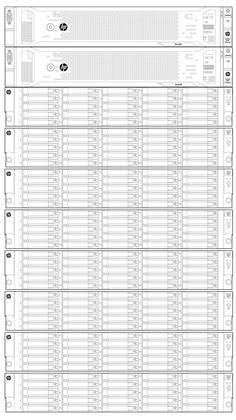
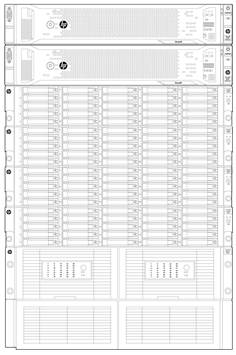
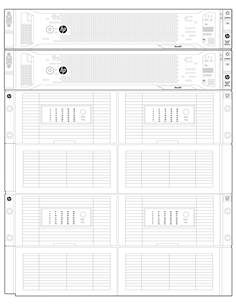
|
StoreAll 8800 Storage Node |
Operating System: |
HPE StoreAll OS v6.6 preinstalled |
|
Form Factor: |
2U rack mount | |
|
Processor: |
Two Intel® Xeon® Processor E5-2620 | |
|
Memory: |
48GB PCL3-10600 (DDR3-1333) | |
|
Network Controller: |
One 4-port 1GbE included; reserved for a discrete management network if a discrete management network is desired | |
|
Storage Controller: |
One Smart Array P420i for mirrored internal OS disk drives; two StoreAll P1228 RAID Controllers for user data in Capacity Blocks | |
|
Disk Drives: |
Two mirrored 300 GB 10K SFF ENT SAS HDDs for StoreAll OS only | |
|
Cooling Fans: |
Six hot plug and redundant | |
|
Power Supplies: |
Two 1200W Common Slot Platinum Plus hot plug and redundant | |
|
Power Cords: |
Two C13-C14 PDU | |
|
Management Features: |
Integrated Lights-Out 4 with Advanced License included | |
|
| ||
|
MDL SAS Capacity Block |
Form Factor: |
5U rack mount |
|
Interconnect: |
SAS | |
|
Disk Drives: |
36 or 70 2 TB, 3 TB, or 4TB 7.2K LFF MDL SAS HDDs depending on model | |
|
Storage Layout: |
Two pools of eight HDDs, two pools of nine HDDs, and two spare HDDs for Partial Capacity Block models; four pools of eight HDDs, four pools of nine HDDs, and two spare HDDs for Full Capacity Block models | |
|
RAID Level: |
RAID 6 (6+2 and 7+2) | |
|
| ||
|
ENT SAS Capacity Block |
Form Factor: |
2U rack mount |
|
Interconnect: |
SAS | |
|
Disk Drives: |
25 450GB or 900GB 10K SFF ENT SAS HDDs depending on model | |
|
Storage Layout: |
Four pools of six HDDs plus one spare HDD | |
|
RAID Level: |
RAID 5 (5+1) |
Configuration Instructions - HPE StoreAll 8800 Storage
|
It is recommended that the HPE StoreAll Storage Best Practices technical white paper (4AA4-4790ENW) be reviewed and the anticipated workload be understood prior to configuring HPE StoreAll 8800 Storage. | |
|
| |
|
Step 1: Choose number of Nodes (minimum 2) | |
|
HP StoreAll 8800 Storage Node |
H6Z60A |
|
| |
|
Step 2: Select Network Controllers (2 required) | |
|
HP NC552SFP 10Gb 2-port Ethernet Server Adapter |
614203-B21 |
|
HPE NC365T 4-port Ethernet Server Adapter |
593722-B21 |
|
|
|
|
HPE NC552SFP 10Gb 2-port Ethernet Server Adapters (614203-B21) require Direct Attach Cables (DACs) for copper environments or fiber transceivers and cables for fiber optic environments. There are multiple options that must match the facility network. The correct option must be selected if the facility does not already have the needed DACs or fiber transceivers. At least one DAC or fiber transceiver is required per Node to connect to the facility network. | |
|
HPE BladeSystem c-Class 10Gb SFP+ SR Transceiver |
455883-B21 |
|
HPE BladeSystem c-Class 10Gb SFP+ LR Transceiver |
455886-B21 |
|
HPE BladeSystem c-Class 10Gb SFP+ LRM Transceiver |
455889-B21 |
|
HPE BladeSystem c-Class 10GbE SFP+ to SFP+ 0.5m Direct Attach Copper Cable |
487649-B21 |
|
HPE BladeSystem c-Class 10GbE SFP+ to SFP+ 1m Direct Attach Copper Cable |
487652-B21 |
|
HPE BladeSystem c-Class 10GbE SFP+ to SFP+ 3m Direct Attach Copper Cable |
487655-B21 |
|
HPE BladeSystem c-Class 10GbE SFP+ to SFP+ 7m Direct Attach Copper Cable |
487658-B21 |
|
| |
|
Step 3: Select Capacity Block (minimum 1, maximum 2) | |
|
HP StoreAll 8800 11TB 25 450GB SFF 10K ENT SAS HDD 6Gb Capacity Block |
H6Z70A |
|
HP StoreAll 8800 11TB w/25 450GB SFF 10K ENT SAS HDD 6G Expansion Capacity Block (E7W08A) |
|
|
HP StoreAll 8800 22TB 25 900GB SFF 10K ENT SAS HDD 6Gb Capacity Block |
H6Z71A |
|
HP StoreAll 8800 22TB w/25 900GB SFF 10K ENT SAS HDD 6G Expansion Capacity Block (E7W09A) |
|
|
HP StoreAll 8800 2TB LFF 7.2K MDL SAS HDD 6G Partial Capacity Block |
H6Z61A |
|
HP StoreAll 8800 2TB LFF 7.2K MDL SAS HDD Bundle (H6Z67A) |
|
|
HP StoreAll 8800 3TB LFF 7.2K MDL SAS HDD 6G Partial Capacity Block |
H6Z62A |
|
HP StoreAll 8800 3TB LFF 7.2K MDL SAS HDD Bundle (H6Z68A) |
|
|
HP StoreAll 8800 4TB LFF 7.2K MDL SAS HDD 6G Partial Capacity Block |
H6Z63A |
|
HP StoreAll 8800 4TB LFF 7.2K MDL SAS HDD Bundle (H6Z69A) |
|
|
HP StoreAll 8800 140TB 70 2TB LFF 7.2K MDL SAS HDD 6Gb Full Capacity Block |
H6Z64A |
|
Includes 70 2TB 7.2K LFF MDL SAS HDDs in a 5U rack mount enclosure; usable capacity at the file system level is approximately 92 TiB |
|
|
HP StoreAll 8800 210TB 70 3TB LFF 7.2K MDL SAS HDD 6Gb Full Capacity Block |
H6Z65A |
|
Includes 70 3TB 7.2K LFF MDL SAS HDDs in a 5U rack mount enclosure; usable capacity at the file system level is approximately 138 TiB |
|
|
HP StoreAll 8800 280TB 70 4TB LFF 7.2K MDL SAS HDD 6Gb Full Capacity Block |
H6Z66A |
|
Includes 70 4TB 7.2K LFF MDL SAS HDDs in a 5U rack mount enclosure; usable capacity at the file system level is approximately 184 TiB |
|
|
| |
|
Step 4: Select ENT SAS Expansion Capacity Block (minimum 0, maximum 6) | |
|
HP StoreAll 8800 11TB w/25 450GB SFF 10K ENT SAS HDD 6G Expansion Capacity Block |
E7W08A |
|
Includes 25 450GB 10K SFF ENT SAS HDDs in a 2U rack mount enclosure; usable capacity at the file system level is approximately 7.8 TiB |
|
|
HP StoreAll 8800 22TB w/25 900GB SFF 10K ENT SAS HDD 6G Expansion Capacity Block |
E7W09A |
|
Includes 25 900GB 10K SFF ENT SAS HDDs in a 2U rack mount enclosure; usable capacity at the file system level is approximately 15.6 TiB |
|
|
| |
|
Step 5: Choose system options | |
|
The following options are available: |
|
|
|
|
|
Drive Bundles for MDL SAS Partial Capacity Blocks |
|
|
MDL SAS HDD Bundles are optional and provide additional LFF 7.2K MDL SAS HDD capacity for MDL SAS Partial Capacity Blocks. A maximum of one can be added to each MDL SAS Partial Capacity Block (H6Z61A, H6Z62A, and H6Z63A). |
|
|
HP StoreAll 8800 2TB LFF 7.2K MDL SAS HDD Bundle |
H6Z67A |
|
HP StoreAll 8800 2TB LFF 7.2K MDL SAS HDD 6G Partial Capacity Block (H6Z61A) |
|
|
HP StoreAll 8800 3TB LFF 7.2K MDL SAS HDD Bundle |
H6Z68A |
|
HP StoreAll 8800 3TB LFF 7.2K MDL SAS HDD 6G Partial Capacity Block (H6Z62A) |
|
|
HP StoreAll 8800 4TB LFF 7.2K MDL SAS HDD Bundle |
H6Z69A |
|
HP StoreAll 8800 4TB LFF 7.2K MDL SAS HDD 6G Partial Capacity Block (H6Z63A) |
|
|
|
|
|
Fibre Channel HBA for backup offload |
|
|
Backup traffic can be offloaded from the cluster and client network to a Fibre Channel SAN using an HBA. A maximum of one add-in Fibre Channel HBA is supported per Node for this purpose only. | |
|
HPE 82Q 8Gb 2-port PCIe Fibre Channel Host Bus Adapter |
AJ764A |
|
|
|
|
Rack |
|
|
The default rack for HPE StoreAll 8800 Storage in Hewlett Packard Enterprise configuration tools is an HPE 642 Intelligent Series Rack. A KVM Console and KVM Switch will be automatically added when factory rack integration is selected. | |
|
|
|
|
Network Switch for Rack |
|
|
The cluster and client network required for the HPE StoreAll 8800 Storage Nodes can either use available facility switches, HPE StoreAll Storage dedicated switches installed within the Rack, or a combination of the two. The components below are recommended for an HPE StoreAll Storage dedicated cluster and client 10GbE network installed within the Rack. | |
|
HPE FlexFabric 5920AF 24XG Switch |
JG296A |
|
HP 5920AF-24XG Front (port-side) to Back (power-side) Airflow Fan Tray |
JG298A |
|
HPE 58x0AF 650W AC Power Supply |
JC680A |
|
Connection of 10GbE Network Controller ports to the Network Switch | |
|
HPE BladeSystem c-Class 10Gb SFP+ SR Transceiver |
455883-B21 |
|
HPE X130 10G SFP+ LC SR Transceiver |
JD092B |
|
HP 2m Premier Flex LC/LC 1 Pack Optical Cable |
BK839A |
|
Connection of the Integrated Lights-Out port to the Network Switch | |
|
HPE X120 1G SFP RJ45 T Transceiver |
JD089B |
|
HPE RJ45 to RJ45 Cat5e Black M/M 7.6ft 1-pack Data Ethernet Cable |
C7535A |
Options - HPE StoreAll 8800 Storage
|
Connection of 10GbE Network Controller ports to the Network Switch | |
|
HPE BladeSystem c-Class 10Gb SFP+ SR Transceiver |
455883-B21 |
|
HPE X130 10G SFP+ LC SR Transceiver |
JD092B |
|
HPE Premier Flex LC/LC Multi-mode OM4 2 fiber 2m Cable |
QK733A |
|
Connection of the Integrated Lights-Out port to the Network Switch | |
|
HPE X120 1G SFP RJ45 T Transceiver |
JD089B |
|
HPE RJ45 to RJ45 Cat5e Black M/M 7.6ft 1-pack Data Ethernet Cable |
C7535A |
|
Trunk between Switches within the Rack (required when two Switches are selected to avoid a single point of failure) | |
|
HPE X130 10G SFP+ LC SR Transceiver |
JD092B |
|
HPE Premier Flex LC/LC Multi-mode OM4 2 fiber 1m Cable |
QK732A |
|
Connection of dedicated network to facility network
| |
|
HPE Premier Flex LC/LC Multi-mode OM4 2 Fiber 5m Cable |
QK734A |
|
HPE Premier Flex LC/LC Multi-mode OM4 2 Fiber 15m Cable |
QK735A |
|
HPE Premier Flex LC/LC Multi-mode OM4 2 Fiber 30m Cable |
QK736A |
|
|
Specifications - HPE StoreAll 8800 Storage
|
Specifications for HPE StoreAll 8800 Storage Couplet with MDL SAS Capacity Block(s) |
Minimum Couplet |
Maximum Couplet |
Each Node |
Each Partial Capacity Block |
Each Full Capacity Block |
|
Current (Amps @ 100 VAC) |
47.0 |
61.8 |
20.0 |
7.0 |
10.9 |
|
Current (Amps @ 200 VAC) |
26.2 |
40.3 |
9.8 |
6.6 |
10.4 |
|
Rated Input Power (Watts @ 100 VAC) |
4420 |
5898 |
1860 |
700 |
1089 |
|
Rated Input Power (Watts @ 200 VAC) |
6085 |
7546 |
2696 |
693 |
1077 |
|
Max Thermal (BTU/hr @ 100 VAC) |
9446 |
14276 |
3530 |
2386 |
3608 |
|
Max Thermal (BTU/hr @ 200 VAC) |
11562 |
16546 |
4600 |
2362 |
3673 |
|
Weight (lbs) |
362 |
760 |
60.0 |
242.3 |
320 |
|
Weight (kgs) |
165 |
345 |
27.3 |
110 |
145 |
|
Form Factor (rack units) |
9U |
14U |
2U |
5U |
5U |
|
| |||||
|
Specifications for HPE StoreAll 8800 Storage Couplet with ENT SAS Capacity Block(s) |
Minimum Couplet |
Maximum Couplet |
Each Node |
Each Capacity Block and Expansion |
|
|
Current (Amps @ 100 VAC) |
42.2 |
57.6 |
20.0 |
2.2 | |
|
Current (Amps @ 200 VAC) |
21.8 |
37.2 |
9.8 |
2.2 | |
|
Rated Input Power (Watts @ 100 VAC) |
3950 |
5560 |
1860 |
230 | |
|
Rated Input Power (Watts @ 200 VAC) |
5619 |
7208 |
2696 |
227 | |
|
Max Thermal (BTU/hr @ 100 VAC) |
7845 |
13340 |
3530 |
785 | |
|
Max Thermal (BTU/hr @ 200 VAC) |
9975 |
15400 |
4600 |
775 | |
|
Weight (lbs) |
175 |
559.2 |
60.0 |
54.9 | |
|
Weight (kgs) |
79.5 |
253.8 |
27.3 |
24.9 | |
|
Form Factor (rack units) |
6U |
20U |
2U |
2U | |
|
| |||||
|
Specifications for HPE StoreAll 8800 Storage Couplet with ENT SAS Capacity Blocks and a MDL SAS Capacity Block |
Minimum Couplet |
Maximum Couplet |
|
|
Current (Amps @ 100 VAC) |
49.2 |
59.8 | |
|
Current (Amps @ 200 VAC) |
28.4 |
38.8 | |
|
Rated Input Power (Watts @ 100 VAC) |
4650 |
5729 | |
|
Rated Input Power (Watts @ 200 VAC) |
6312 |
7377 | |
|
Max Thermal (BTU/hr @ 100 VAC) |
10231 |
13808 | |
|
Max Thermal (BTU/hr @ 200 VAC) |
12337 |
15973 | |
|
Weight (lbs) |
417 |
660 | |
|
Weight (kgs) |
190 |
299 | |
|
Form Factor (rack units) |
11U |
17U |
|
NOTE: Rated Input Power is intended to be used for circuit sizing purposes, accounting for maximum current draw under circumstances such as power up or service events. Sustained power consumption during operation will depend on configuration options, environment and the workload. The typical power consumption is substantially lower than the stated figures
|
Standard Features - HPE StoreAll 8200 Gateway Storage
|
|
|
|

|
StoreAll 8200 Gateway Node |
Operating System: |
HPE StoreAll OS v6.6 preinstalled |
|
Form Factor: |
2U rack mount | |
|
Processor: |
Two Intel® Xeon® Processor E5-2620 | |
|
Memory: |
48GB PCL3-10600 (DDR3-1333) | |
|
Network Controller: |
One 4-port 1GbE included; reserved for a discrete management network if a discrete management network is desired | |
|
Storage Controller: |
One Smart Array P420i for mirrored internal OS disk drives; one 2-port HPE 82Q 8Gb 2-port PCIe Fibre Channel Host Bus Adapter for array attach | |
|
Disk Drives: |
Two mirrored 300 GB 10K SFF ENT SAS HDDs for StoreAll OS only | |
|
Supported Disk Arrays: |
HPE 3PAR StoreServ 7000, 8000 and 10000 Storage via Fibre Channel | |
|
Cooling Fans: |
Six hot plug and redundant | |
|
Power Supplies: |
Two 1200W Common Slot Platinum Plus hot plug and redundant | |
|
Power Cords: |
Two C13-C14 PDU | |
|
Management Features: |
Integrated Lights-Out 4 with Advanced License included |
Configuration Instructions - HPE StoreAll 8200 Gateway Storage
|
It is recommended that the HPE StoreAll Storage Best Practices technical white paper (4AA4-4790ENW) be reviewed and the anticipated workload be understood prior to configuring HPE StoreAll 8200 Gateway Storage. | |
|
| |
|
Step 1: Choose number of Nodes (minimum 2) | |
|
HP StoreAll 8200 Gateway Storage Node |
H6Z59A |
|
Includes one 2-port HPE 82Q 8Gb 2-port PCIe Fibre Channel Host Bus Adapter for attach to supported |
|
|
| |
|
Step 2: Select Network Controllers (2 required) | |
|
HP NC552SFP 10Gb 2-port Ethernet Server Adapter |
614203-B21 |
|
HPE NC365T 4-port Ethernet Server Adapter |
593722-B21 |
|
|
|
|
HPE NC552SFP 10Gb 2-port Ethernet Server Adapters (614203-B21) require Direct Attach Cables (DACs) for copper environments or fiber transceivers and cables for fiber optic environments. There are multiple options that must match the facility network. The correct option must be selected if the facility does not already have the needed DACs or fiber transceivers. At least one DAC or fiber transceiver is required per Node to connect to the facility network. | |
|
HPE BladeSystem c-Class 10Gb SFP+ SR Transceiver |
455883-B21 |
|
HPE BladeSystem c-Class 10Gb SFP+ LR Transceiver |
455886-B21 |
|
HPE BladeSystem c-Class 10Gb SFP+ LRM Transceiver |
455889-B21 |
|
HPE BladeSystem c-Class 10GbE SFP+ to SFP+ 0.5m Direct Attach Copper Cable |
487649-B21 |
|
HPE BladeSystem c-Class 10GbE SFP+ to SFP+ 1m Direct Attach Copper Cable |
487652-B21 |
|
HPE BladeSystem c-Class 10GbE SFP+ to SFP+ 3m Direct Attach Copper Cable |
487655-B21 |
|
HPE BladeSystem c-Class 10GbE SFP+ to SFP+ 7m Direct Attach Copper Cable |
487658-B21 |
|
| |
|
Step 3: Choose system options | |
|
The following options are available: |
|
|
|
|
|
Fibre Channel HBA for backup offload |
|
|
Backup traffic can be offloaded from the cluster and client network to a Fibre Channel SAN using an HBA. A maximum of one | |
|
HPE 82Q 8Gb 2-port PCIe Fibre Channel Host Bus Adapter |
AJ764A |
|
|
|
|
Rack |
|
|
The default rack for HPE StoreAll 8200 Gateway Storage in Hewlett Packard Enterprise configuration tools is an HPE 642 Intelligent Series Rack. A KVM Console and KVM Switch will be automatically added when factory rack integration is selected. HPE StoreAll 8200 Gateway Storage is also support in 42U standard and extended racks, 36U racks, and 22U racks. | |
|
|
|
|
Network Switch for Rack |
|
|
The cluster and client network required for the HPE StoreAll 8200 Gateway Storage Nodes can either use available facility switches, HPE StoreAll Storage dedicated switches installed within the Rack, or a combination of the two. The components below are recommended for an HPE StoreAll Storage dedicated cluster and client 10GbE network installed within the Rack. | |
|
HPE FlexFabric 5920AF 24XG Switch |
JG296A |
|
HP 5920AF-24XG Front (port-side) to Back (power-side) Airflow Fan Tray |
JG298A |
|
HPE 58x0AF 650W AC Power Supply |
JC680A |
|
Connection of 10GbE Network Controller ports to the Network Switch | |
|
HPE BladeSystem c-Class 10Gb SFP+ SR Transceiver |
455883-B21 |
|
HPE X130 10G SFP+ LC SR Transceiver |
JD092B |
|
HPE Premier Flex LC/LC Multi-mode OM4 2 fiber 2m Cable |
QK733A |
|
Connection of the Integrated Lights-Out port to the Network Switch | |
|
HPE X120 1G SFP RJ45 T Transceiver |
JD089B |
|
HPE RJ45 to RJ45 Cat5e Black M/M 7.6ft 1-pack Data Ethernet Cable |
C7535A |
Options - HPE StoreAll 8200 Gateway Storage
|
Trunk between Switches within the Rack (required when two Switches are selected to avoid a single point of failure) | |
|
HPE X130 10G SFP+ LC SR Transceiver |
JD092B |
|
HPE Premier Flex LC/LC Multi-mode OM4 2 fiber 1m Cable |
QK732A |
|
Connection of dedicated network to facility network
| |
|
HPE Premier Flex LC/LC Multi-mode OM4 2 Fiber 5m Cable |
QK734A |
|
HPE Premier Flex LC/LC Multi-mode OM4 2 Fiber 15m Cable |
QK735A |
|
HPE Premier Flex LC/LC Multi-mode OM4 2 Fiber 30m Cable |
QK736A |
| |
Specifications - HPE StoreAll 8200 Gateway Storage
|
Specifications for pair of HPE StoreAll 8200 Gateway Storage Nodes |
|
|
|
Current (Amps @ 100 VAC) |
40.0 | |
|
Current (Amps @ 200 VAC) |
19.6 | |
|
Rated Input Power (Watts @ 100 VAC) |
3720 | |
|
Rated Input Power (Watts @ 200 VAC) |
5392 | |
|
Max Thermal (BTU/hr @ 100 VAC) |
7060 | |
|
Max Thermal (BTU/hr @ 200 VAC) |
9200 | |
|
Weight (lbs) |
120 | |
|
Weight (kgs) |
54.6 | |
|
Form Factor (rack units) |
4U |
|
NOTE: Rated Input Power is intended to be used for circuit sizing purposes, accounting for maximum current draw under circumstances such as power up or service events. Sustained power consumption during operation will depend on configuration options, environment and the workload. The typical power consumption is substantially lower than the stated figures
|
Service and Support, HPE Care Pack, and Warranty Information
|
|
|
Warranty |
|
HPE StoreAll 8000 Storage comes with a standard 3/3/3 warranty (3 years parts exchange, 3 years labor, 3 years onsite, and next business day response). Software media is warranted to be free of physical defects for a period of 90 days from delivery. |
|
|
|
Services included |
One year Software Support, standard 9x5 business hours (software advisory and remedial software telephone support, new version license rights, and media and documentation distribution service) |
|
| |
|
Service and support |
Technology Services for increased uptime, productivity and ROI |
|
| |
|
Optimized Care |
HPE 24x7 Proactive Care Advanced Service, that builds and incorporates on HPE Proactive Care service and also gives customers personalized technical and operational advice from an assigned, local Account Support Manager for personalized technical collaboration, flexible access to specialist skills to help optimize business critical IT, and enhanced Critical Incident Management to help so the business is not affected if there is a system or device outage
Optional Add-On Service: 3 Year (or) 1 Year HPE Proactive Select Service Credits |
|
| |
|
Standard Care (minimum recommended support) |
HPE 24x7 Proactive Care Service plus 20 HPE Proactive Select credits per year (choose from an extensive menu of consulting and technical services such as onsite firmware upgrades, health checks, assessments, and education) |
|
| |
|
Implementation |
HPE StoreAll Implementation Service provides customized product deployment consistent with Hewlett Packard Enterprise product specifications for HPE StoreAll 8000 Storage. |
|
| |
|
Get connected and get back to business |
HPE Storage Technology Services provide the path to get your HPE Storage solutions and your business connected to Hewlett Packard Enterprise. Once connected, our experts are able to scan your system and run health checks, then use that data to create personalized reports and recommendations for actions to take to prevent problems and downtime. |
|
| |
|
For more information |
To learn more about Hewlett Packard Enterprise Storage Services visit http://www.hp.com/services/storage or contact your Hewlett Packard Enterprise representative. HPE Pointnext operational services are sold by Hewlett Packard Enterprise and Hewlett Packard Enterprise Authorized Services Partners:
|
|
| |
|
Parts and Materials |
Hewlett Packard Enterprise will provide HPE-supported replacement parts and materials necessary to maintain the covered hardware product in operating condition, including parts and materials for available and recommended engineering improvements. Parts and components that have reached their maximum supported lifetime and/or the maximum usage limitations as set forth in the manufacturer's operating manual, product quick-specs, or the technical product data sheet will not be provided, repaired, or replaced as part of these services. The defective media retention service feature option applies only to Disk or eligible SSD/Flash Drives replaced by Hewlett Packard Enterprise due to malfunction. |
Summary of Changes
|
|
|
|
|
|
|
|
|
|
|
|
|
|
|
|
Date |
Version History |
Action |
Description of Change: |
|
23-Oct-2017 |
Version 7 |
Changed |
Care Pack naming and Service and Support- Parts and Materials updated. |
|
20-Nov-2015 |
From Version 5 to 6 |
Changed |
Update info on the supported 3PAR Storserv platforms with HP StoreAll 8200 gateway storage |
|
30-Mar-2015 |
From Version 4 to 5 |
Changed |
Changed made to the Overview, Standard Features, Configuration and Service and support Sections |
|
22-Aug-2014 |
From Version 3 to 4 |
Changed |
Updated the following: Specifications - 8200 Gateway Storage - replaced "max power" with "rated input"; and added NOTE |
|
18-Jul-2014 |
From Version 2 to 3 |
Changed |
Specifications charts were revised. |
|
3-Jun-2014 |
From Version 1 to 2 |
Changed |
Changes were made throughout the QuickSpecs |
|
30-Ded-2013 |
Version 1 |
Created |
Document created |
| ||||||||||||||||||||||


