




























HPE Aruba Network Visualizer SDN Application Series: технические характеристики и документация
В архивеOverview
|
Aruba Network Visualizer SDN Application Series |
|
|
|
Models | |
|
Aruba Network Visualizer Application E-LTU |
JL091AAE |
|
| |
|
Key features |
|
|
|
|
Product overview |
|
Networks are growing in complexity to meet customer and user expectations for BYOD, high performance, resiliency, and flexibility. Often the methods used to investigate issues are disruptive, time-consuming, and have unintended consequences. The Aruba Network Visualizer Software Defined Networking (SDN) Application utilizes Aruba VAN SDN Controller software to provide dynamic traffic capture with real-time, detailed network monitoring - allowing for fast network diagnosis and verification - and a rapid transition from incident to fix. The Network Visualizer integration with ClearPass identifies infected devices thus providing better security. |
|
|
|
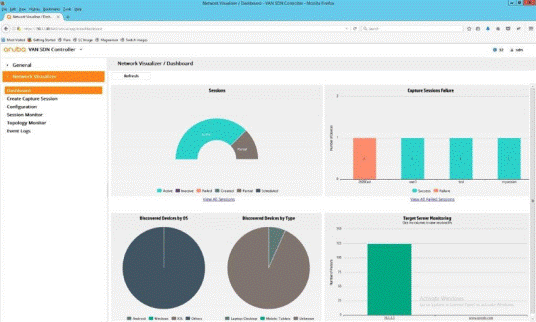
Network Visualizer Dashboard |
|
|
|
Features and Benefits |
|
Active Directory integration Custom traffic selection criteria Real-time traffic capture Automated mirror session deployment Multiple traffic capture destinations Traffic analytics summary |
|
|
|
Warranty and Support |
|
Limited electronic and business-hours telephone support is available from Hewlett Packard Enterprise. To reach our support centers, refer to http://www.hpe.com/networking/ contact-support. For details on the duration of support provided with your product purchase, refer to http://www.hpe.com/networking/warrantysummary |
|
|
|
Software Releases |
|
To find software for your product, refer to http://www.hpe.com/networking/support. For details on the software releases available with your product purchase, refer to http://www.hpe.com/networking/warrantysummary |
|
|
Technical Specifications
|
Aruba Network Visualizer Application E-LTU (JL091AAE)
|
Platform required |
Server: Aruba VAN SDN Controller software |
|
Minimum system requirements |
Server: 3.0GHz Intel® Xeon® or Intel® Core™ 2 Quad processor or equivalent 8GB RAM memory 1000Mbps NIC | |
|
Recommended software |
Server: Ubuntu 14.04 LTS 64-bit | |
|
Notes |
Minimum Aruba VAN SDN Controller version
|
|
|
Services |
Refer to the Hewlett Packard Enterprise website at http://www.hpe.com/networking/services for details on the service-level descriptions and product numbers. For details about services and response times in your area, please contact your local Hewlett Packard Enterprise sales office. | |
|
|
|
|
Summary of Changes
|
Date |
Version History |
Action |
Description of Change |
|
10-Mar-2017 |
From Version 4 to 5 |
Changed |
Document name and content updated with Aruba information |
|
29-Apr-2016 |
From Version 3 to 4 |
Changed |
SKU descriptions updated |
|
31-Mar-2016 |
From Version 2 to 3 |
Changed |
Product overview and Technical Specifications updated |
|
22-Jul-2015 |
From Version 1 to 2 |
Changed |
Error fixed on Technical Specifications |
| ||||||||||||||||||


