HPE FlexFabric 5950 Switch Series: технические характеристики и документация
В архивеOverview
|
HPE FlexFabric 5950 Switch Series | |
|
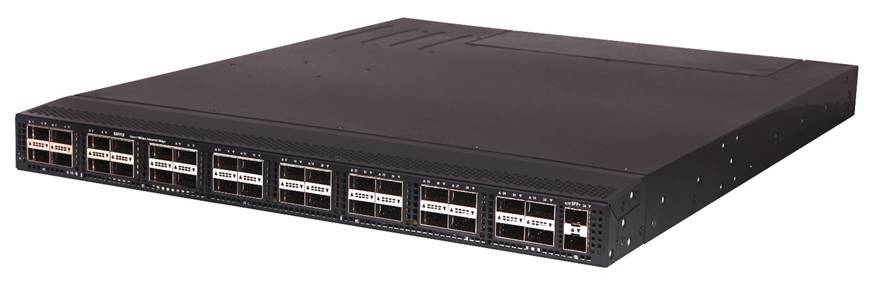
The HPE FlexFabric 5950 Switch Series is a family of high-density, ultra-low-latency, top-of-rack (ToR) switches that is part of the Hewlett Packard Enterprise (HPE) FlexNetwork architecture's HPE FlexFabric solution.
Ideally suited for deployment at the aggregation or server access layer of large enterprise data centers, the HPE 5950 Switch Series is also powerful enough for deployment at the core layer of medium-sized enterprises.
With the increase in virtualized applications and server-to-server traffic, customers now require spine and ToR switch innovations that will meet their needs for higher-performance server connectivity, convergence of Ethernet and storage traffic, the capability to handle virtual environments, and ultra-low-latency all in a single device- the HPE FlexFabric 5950 Switch Series. | |
|
| |
|
| |
|
HPE FlexFabric 5950 Switch Series | |
|
| |
|
Models | |
|
HPE FlexFabric 5950 32QSFP28 Switch |
JH321A |
|
| |
|
Key features | |
| |
|
| |
Standard Features
|
Data center optimized
the HPE FlexFabric 5950 Switch Series enables scaling of the server edge with 100GbE, 40GbE, 25GbE and 10GbE spine and ToR deployments to new heights with flexible form factor options.
cut-through and nonblocking architecture delivers low latency (~1 microsecond for 100GbE) for very demanding enterprise applications; the switch delivers high-performance switching capacity and wire-speed packet forwarding
Hewlett Packard Enterprise (HPE) Intelligent Resilient Fabric (IRF) technology simplifies the architecture of server access networks; up to ten HPE 5950 switches can be combined to deliver unmatched scalability of virtualized access layer switches and flatter two-tier networks using IRF, which reduces cost and complexity
Comware v7 software's modular design and multiple processes bring native high stability, independent process monitoring, and restart; the OS also allows individual software modules to be upgraded for higher availability and supports enhanced serviceability functions like hitless software upgrades with IRF-based ISSU
enhanced for data center hot-cold aisle deployment with reversible airflow-for either front-to-back or back-to-front airflow
Internal redundant and hot-pluggable power supplies and dual fan trays enhance reliability and availability
provide reversible airflow and advanced chassis power management
provides support for IEEE 802.1Qbb Priority Flow Control (PFC), Data Center Bridging Exchange (DCBX), IEEE 802.1Qaz Enhanced Transmission Selection (ETS), Explicit Congestion Notification (ECN) for converged FCoE, iSCSI and RoCE environments.
with frame sizes of up to 9,416 bytes on 100GbE ports, allows high-performance remote backup and disaster-recovery services to be enabled
VXLAN Layer 2 gateway support for up to 4k tunnels
OVSDB support for dynamic VXLAN configuration |
|
|
|
Additional information
improves energy efficiency through the use of the latest advances in silicon development; shuts off unused ports and utilizes variable-speed fans, reducing energy costs |
|
|
|
Convergence
defines a standard extension of LLDP that stores values for parameters such as QoS and VLAN to configure automatically network devices such as IP phones |
|
|
|
Quality of Service (QoS) Powerful QoS features
including Strict Priority (SP), WRR, WDRR, WFQ, SP+WRR, SP+WDRR, SP+WFQ, Configurable Buffer, Time range, Queue Shaping, CAR with 8kbps granularity.
packet filtering at L2 (Layer 2) through L4 (Layer 4); flow classification based on source MAC address, destination MAC address, source IP (IPv4/IPv6) address, destination IP (IPv4/IPv6) address, port, protocol, and VLAN. |
|
|
|
Layer 3 routing
allow quick failover of router ports
makes routing decisions based on policies set by the network administrator
enables multiple equal-cost links in a routing environment to increase link redundancy and scale bandwidth
provides routing of IPv4 at media speed; supports static routes, RIP and RIPv2, OSPF, BGP, and IS-IS
delivers faster convergence; uses this link-state routing Interior Gateway Protocol (IGP), which supports ECMP, NSSA, and MD5 authentication for increased security and graceful restart for faster failure recovery
delivers an implementation of the Exterior Gateway Protocol (EGP) utilizing path vectors; uses TCP for enhanced reliability for the route discovery process; reduces bandwidth consumption by advertising only incremental updates; supports extensive policies for increased flexibility; scales to very large networks
uses a path vector Interior Gateway Protocol (IGP), which is defined by the ISO organization for IS-IS routing and extended by IETF RFC 1195 to operate in both TCP/IP and the OSI reference model (Integrated IS-IS)
provides simple manually configured IPv6 routing
maintains separate stacks for IPv4 and IPv6 to ease the transition from an IPv4-only network to an IPv6-only network design
extends RIPv2 to support IPv6 addressing
provides OSPF support for IPv6
extends BGP-4 to support Multiprotocol BGP (MBGP), including support for IPv6 addressing
extends IS-IS to support IPv6 addressing
allows IPv6 packets to traverse IPv4-only networks by encapsulating the IPv6 packet into a standard IPv4 packet; supports manually configured, 6to4, and Intra-Site Automatic Tunnel Addressing Protocol (ISATAP) tunnels; is an important element for the transition from IPv4 to IPv6
allows custom filters for increased performance and security; supports ACLs, IP prefix, AS paths, community lists, and aggregate policies
enables link connectivity monitoring and reduces network convergence time for RIP, OSPF, BGP, IS-IS, VRRP, MPLS, and IRF
provides robust support of multicast protocols
provides routing of IPv6 at media speed; supports static routing, RIPng, OSPFv3, BGP4+ for IPv6, and IS-ISv6 |
|
|
|
Layer 2 switching
supports static, dynamic, and reverse ARP and ARP proxy
provides intelligent congestion management via PAUSE frames
provides IEEE 802.3ad Link Aggregation of up to 256 groups of 32 ports; support for LACP, LACP Local Forwarding First, and LACP Short-time provides a fast, resilient environment that is ideal for the data center
supports STP (IEEE 802.1D), Rapid STP (RSTP, IEEE 802.1w), and Multiple STP (MSTP, IEEE 802.1s)
provides support for 4,096 VLANs based on port
provides support for IGMP Snooping, Fast-Leave, and Group-Policy; IPv6 IGMP Snooping provides Layer 2 optimization of multicast traffic
provides full DHCP Snooping support for DHCP Snooping Option 82, DHCP Relay Option 82, DHCP Snooping Trust, and DHCP Snooping Item Backup |
|
|
|
Layer 3 services
determines the MAC address of another IP host in the same subnet; supports static ARPs; gratuitous ARP allows detection of duplicate IP addresses; proxy ARP allows normal ARP operation between subnets or when subnets are separated by a Layer 2 network
simplifies the management of large IP networks and supports client and server; DHCP Relay enables DHCP operation across subnets
provides support for Connectivity Fault Management (IEEE 802.1AG) and Ethernet in the First Mile (IEEE 802.3AH); provides additional monitoring that can be used for fast fault detection and recovery |
|
|
|
Management
- File copy allows users to copy switch files to and from a USB flash drive
stores easily to the flash image
facilitate centralized discovery, monitoring, and secure management of networking devices
isolates management traffic from user data plane traffic for complete isolation and total reachability, no matter what happens in the data plane
enables traffic on a port to be simultaneously sent to a network analyzer for monitoring
is available through a command-line interface (CLI)
advertises and receives management information from adjacent devices on a network, facilitating easy mapping by network management applications
provides scalable ASIC-based wirespeed network monitoring and accounting with no impact on network performance; this allows network operators to gather a variety of sophisticated network statistics and information for capacity planning and real-time network monitoring purposes
leverages RADIUS to link a custom list of CLI commands to an individual network administrator's login; an audit trail documents activity
provides independent primary and secondary operating system files for backup while upgrading
provides a secure, easy-to-use CLI for configuring the module via SSH or a switch console; provides direct real-time session visibility
provides local and remote logging of events via SNMP (v2c and v3) and syslog; provides log throttling and log filtering to reduce the number of log events generated
provides management access through a modem port and terminal interface, as well as in-band and out-of-band Ethernet ports; provides access through terminal interface, Telnet, or secure shell (SSH)
reduces training time and expenses, and increases productivity in multivendor installations
restricts access to critical configuration commands; offers multiple privilege levels with password protection; ACLs provide Telnet and SNMP access; local and remote syslog capabilities allow logging of all access
provides a central repository for system and network information; aggregates all logs, traps, and debugging information generated by the system and maintains them in order of severity; outputs the network information to multiple channels based on user-defined rules
HPE Intelligent Management Center (IMC) centrally configures, updates, monitors, and troubleshoots
mirrors ingress/egress ACL-selected traffic from a switch port or VLAN to a local or remote switch port anywhere on the network |
|
|
|
Security
provide IP Layer 3 filtering based on source/destination IP address/subnet and source/destination TCP/UDP port number
eases switch management security administration by using a password authentication server
encrypts all transmitted data for secure remote CLI access over IP networks
controls port-based access for authentication and accountability
allows access only to specified MAC addresses, which can be learned or specified by the administrator |
|
|
|
Warranty and support
see http://www.hpe.com/networking/warrantysummary for warranty and support information included with your product purchase.
to find software for your product, refer to http://www.hpe.com/networking/support; for details on the software releases available with your product purchase, refer to http://www.hpe.com/networking/warrantysummary |
|
|
|
Manageability
- Tracks all the accounting associated with the admission and allocation process of all the buffers and queues across the ingress and egress ports - Microburst congestion detection - Rich congestion analytics - Buffer congestion state and statistics
provides complete control of the switch with a familiar CLI
- Ingress and egress port monitoring enable network problem solving - Traceroute and ping enable testing of network connectivity
allow multiple configuration files to be stored to a flash image
provides wire-speed traffic accounting and monitoring
facilitate centralized discovery, monitoring, and secure management of networking devices
isolates management traffic from user data plane traffic for complete isolation and total reachability, no matter what happens in the data plane
delivered through a secure command-line interface (CLI) over Telnet and SSH; Role-Based Access Control (RBAC) provides multiple levels of access; Configuration Rollback and multiple configurations on the flash provide ease of operation; remote visibility is provided with sFlow and SNMP v1/v2/v3, and is fully supported in HPE Intelligent Management Center (IMC)
provides hitless software upgrades with IRF-based In Services Software Upgrade (ISSU) and hitless patching of the modular operating system
synchronize timekeeping among distributed time servers and clients; Support for Network Time Protocol (NTP). |
|
|
|
Resiliency and high availability
enables an HPE FlexFabric to deliver resilient, scalable, and secured data center networks for physical and virtualized environments; groups up to ten HPE 5950 switches in an IRF configuration, allowing them to be configured and managed as a single switch with a single IP address; simplifies ToR deployment and management, reducing data center deployment and operating expenses
increases network uptime through faster recovery from failed links
provides high link availability in multiple VLAN environments by allowing multiple spanning trees
allows groups of two routers to dynamically back each other up to create highly available routed environments
allows patches and new service features to be installed without restarting the equipment, increasing network uptime and facilitating maintenance
enables link connectivity monitoring and reduces network convergence time for RIP, OSPF, BGP, IS-IS, VRRP, MPLS, and IRF
monitors link connectivity and shuts down ports at both ends if unidirectional traffic is detected, preventing loops in STP-based networks
allows routers to indicate to others their capability to maintain a routing table during a temporary shutdown and significantly reduces convergence times upon recovery; supports OSPF, BGP, and IS-IS |
|
|
Configuration Information
|
BTO Models | ||
|
|
Standard Switch Enclosures |
|
|
Rule # |
Description |
SKU |
|
1, 2, 3, 5, 6, 7, 8, 9, 10, |
HPE FlexFabric 5950 32QSFP28 Switch |
JH321A |
|
|
|
|
|
|
Configuration Rules |
|
|
1 |
The following 40G Transceivers install into this switch: |
|
|
|
HPE X140 40G QSFP+ LC LR4 SM 10km 1310nm Transceiver |
JG661A |
|
|
HPE X140 40G QSFP+ LC BiDi 100m MM Transceiver |
JL251A |
|
|
HPE X140 40G QSFP+ MPO SR4 Transceiver |
JG325B |
|
|
HPE X140 40G QSFP+ MPO MM 850nm CSR4 300m Transceiver |
JG709A |
|
|
HPE X140 40G QSFP+ LC LR4L 2km SM Transceiver |
JL286A |
|
|
HPE FlexNetwork X240 40G QSFP+ QSFP+ 1m Direct Attach Copper Cable |
JG326A |
|
|
HPE FlexNetwork X240 40G QSFP+ QSFP+ 3m Direct Attach Copper Cable |
JG327A |
|
|
HPE FlexNetwork X240 40G QSFP+ QSFP+ 5m Direct Attach Copper Cable |
JG328A |
|
|
HPE FlexNetwork X240 40G QSFP+ to 4x10G SFP+ 1m Direct Attach Copper Splitter Cable |
JG329A |
|
|
HPE FlexNetwork X240 40G QSFP+ to 4x10G SFP+ 3m Direct Attach Copper Splitter Cable |
JG330A |
|
|
HPE FlexNetwork X240 40G QSFP+ to 4x10G SFP+ 5m Direct Attach Copper Splitter Cable |
JG331A |
|
|
HPE X2A0 40G QSFP+ to QSFP+ 7m Active Optical Cable |
JL287A |
|
|
HPE X2A0 40G QSFP+ to QSFP+ 10m Active Optical Cable |
JL288A |
|
|
HPE X2A0 40G QSFP+ to QSFP+ 20m Active Optical Cable |
JL289A |
|
2 |
The following 10G Transceivers install into this Switch: |
|
|
|
HPE X2A0 10G SFP+ to SFP+ 7m Active Optical Cable |
JL290A |
|
|
HPE X2A0 10G SFP+ to SFP+ 10m Active Optical Cable |
JL291A |
|
|
HPE X2A0 10G SFP+ to SFP+ 20m Active Optical Cable |
JL292A |
|
3 |
The following QSFP28 Transceivers install into this switch: |
|
|
|
HPE X150 100G QSFP28 MPO SR4 100m MM Transceiver |
JL274A |
|
|
HPE X150 100G QSFP28 LC LR4 10km SM Transceiver |
JL275A |
|
|
HPE X150 100G QSFP28 MPO PSM4 500m SM Transceiver |
JH420A |
|
|
HPE X150 100G QSFP28 CWDM4 2km SM Transceiver |
JH673A |
|
|
HPE X150 100G QSFP28 LC SWDM4 100m MM Transceiver |
JH419A |
|
|
HPE X240 100G QSFP28 to QSFP28 1m Direct Attach Copper Cable |
JL271A |
|
|
HPE X240 100G QSFP28 to QSFP28 3m Direct Attach Copper Cable |
JL272A |
|
|
HPE X2A0 100G QSFP28 to QSFP28 7m Active Optical Cable |
JL276A |
|
|
HPE X2A0 100G QSFP28 to QSFP28 10m Active Optical Cable |
JL277A |
|
|
HPE X2A0 100G QSFP28 to QSFP28 20m Active Optical Cable |
JL278A |
|
|
HPE X240 100G QSFP28 to QSFP28 5m Direct Attach Copper Cable |
JL273A |
|
|
HPE X240 QSFP28 4xSFP28 1m Direct Attach Copper Cable |
JL282A |
|
|
HPE X240 QSFP28 4xSFP28 3m Direct Attach Copper Cable |
JL283A |
|
5 |
The following Transceivers install into this switch's SFP+ Ports: (Use BTO only when adding to switch) |
|
|
|
HPE X130 10G SFP+ LC SR Transceiver |
JD092B |
|
|
HPE X130 10G SFP+ LC LR Transceiver |
JD094B |
|
|
HPE FlexNetwork X240 10G SFP+ to SFP+ 0.65m Direct Attach Copper Cable |
JD095C |
|
|
HPE FlexNetwork X240 10G SFP+ to SFP+ 1.2m Direct Attach Copper Cable |
JD096C |
|
|
HPE FlexNetwork X240 10G SFP+ to SFP+ 3m Direct Attach Copper Cable |
JD097C |
|
|
HPE FlexNetwork X240 10G SFP+ to SFP+ 5m Direct Attach Copper Cable |
JG081C |
|
6 |
The following Transceivers install into this switch's Management (SFP) Ports: (Use BTO only when adding to switch) |
|
|
|
HPE X120 1G SFP LC SX Transceiver |
JD118B |
|
|
HPE X120 1G SFP LC LX Transceiver |
JD119B |
|
|
HPE X120 1G SFP RJ45 T Transceiver |
JD089B |
|
|
HPE X120 1G SFP LC LH100 Transceiver |
JD103A |
|
7 |
The following Transceivers install into this switch's Management (SFP) Ports: (Use BTO only when adding to switch) |
|
|
|
HPE X115 100M SFP LC FX Transceiver |
JD102B |
|
|
HPE X110 100M SFP LC LX Transceiver |
JD120B |
|
8 |
The following 40G Transceiver installs into this switch's QSFP+ Ports with PHY: (Use BTO only when adding to switch) |
|
|
|
HPE X140 40G QSFP+ LC ER4 40km SM Transceiver |
JL306A |
|
9 |
The following 10G Transceiver installs into this switch's SFP+ Ports: (Use BTO only when adding to switch) |
|
|
|
HPE X130 10G SFP+ LC ER 40km Transceiver |
JG234A |
|
10 |
The following Transceivers install into this switch's SFP+ Ports: (Use BTO only when adding to switch) |
|
|
|
HPE X130 10G SFP+ LC LH 80km Transceiver |
JG915A |
|
Notes: |
OCA Only Model Selection Form - HPE Offering > DataCenter Networking > FlexFabric Switches - Access: 5950 Switch Series |
|
|
| ||
|
Rack Level Integration CTO Models |
|
| |
|
|
CTO Switch Chassis |
| |
|
Rule # |
Description |
SKU | |
|
1, 2, 3, 5, 6, 7, 8, 9, 12 |
HPE FlexFabric 5950 32QSFP28 Switch |
JH321A | |
|
|
|
| |
|
|
Configuration Rules |
| |
|
1 |
The following 40G Transceivers install into this switch: |
| |
|
|
HPE X140 40G QSFP+ LC LR4 SM 10km 1310nm Transceiver |
JG661A | |
|
|
HPE X140 40G QSFP+ LC BiDi 100m MM Transceiver |
JL251A | |
|
|
HPE X140 40G QSFP+ MPO SR4 Transceiver |
JG325B | |
|
|
HPE X140 40G QSFP+ MPO MM 850nm CSR4 300m Transceiver |
JG709A | |
|
|
HPE X140 40G QSFP+ LC LR4L 2km SM Transceiver |
JL286A | |
|
|
HPE FlexNetwork X240 40G QSFP+ QSFP+ 1m Direct Attach Copper Cable |
JG326A | |
|
|
HPE FlexNetwork X240 40G QSFP+ QSFP+ 3m Direct Attach Copper Cable |
JG327A | |
|
|
HPE FlexNetwork X240 40G QSFP+ QSFP+ 5m Direct Attach Copper Cable |
JG328A | |
|
|
HPE FlexNetwork X240 40G QSFP+ to 4x10G SFP+ 1m Direct Attach Copper Splitter Cable |
JG329A | |
|
|
HPE FlexNetwork X240 40G QSFP+ to 4x10G SFP+ 3m Direct Attach Copper Splitter Cable |
JG330A | |
|
|
HPE FlexNetwork X240 40G QSFP+ to 4x10G SFP+ 5m Direct Attach Copper Splitter Cable |
JG331A | |
|
|
HPE X2A0 40G QSFP+ to QSFP+ 7m Active Optical Cable |
JL287A | |
|
|
HPE X2A0 40G QSFP+ to QSFP+ 10m Active Optical Cable |
JL288A | |
|
|
HPE X2A0 40G QSFP+ to QSFP+ 20m Active Optical Cable |
JL289A | |
|
2 |
The following 10G Transceivers install into this Switch: |
| |
|
|
HPE X2A0 10G SFP+ to SFP+ 7m Active Optical Cable |
JL290A | |
|
|
HPE X2A0 10G SFP+ to SFP+ 10m Active Optical Cable |
JL291A | |
|
|
HPE X2A0 10G SFP+ to SFP+ 20m Active Optical Cable |
JL292A | |
|
3 |
The following QSFP28 Transceivers install into this switch: |
| |
|
|
HPE X150 100G QSFP28 MPO SR4 100m MM Transceiver |
JL274A | |
|
|
HPE X150 100G QSFP28 LC LR4 10km SM Transceiver |
JL275A | |
|
|
HPE X150 100G QSFP28 MPO PSM4 500m SM Transceiver |
JH420A | |
|
|
HPE X150 100G QSFP28 CWDM4 2km SM Transceiver |
JH673A | |
|
|
HPE X150 100G QSFP28 LC SWDM4 100m MM Transceiver |
JH419A | |
|
|
HPE X240 100G QSFP28 to QSFP28 1m Direct Attach Copper Cable |
JL271A | |
|
|
HPE X240 100G QSFP28 to QSFP28 3m Direct Attach Copper Cable |
JL272A | |
|
|
HPE X2A0 100G QSFP28 to QSFP28 7m Active Optical Cable |
JL276A | |
|
|
HPE X2A0 100G QSFP28 to QSFP28 10m Active Optical Cable |
JL277A | |
|
|
HPE X2A0 100G QSFP28 to QSFP28 20m Active Optical Cable |
JL278A | |
|
|
HPE X240 100G QSFP28 to QSFP28 5m Direct Attach Copper Cable |
JL273A | |
|
|
HPE X240 QSFP28 4xSFP28 1m Direct Attach Copper Cable |
JL282A | |
|
|
HPE X240 QSFP28 4xSFP28 3m Direct Attach Copper Cable |
JL283A | |
|
5 |
The following Transceivers install into this switch's SFP+ Ports: (Use #0D1 or #B01 if switch is CTO) - if applicable |
|
|
|
HPE X130 10G SFP+ LC SR Transceiver |
JD092B |
|
|
HPE X130 10G SFP+ LC LR Transceiver |
JD094B |
|
|
HPE X130 10G SFP+ LC ER 40km Transceiver |
JG234A |
|
|
HPE FlexNetwork X240 10G SFP+ to SFP+ 0.65m Direct Attach Copper Cable |
JD095C |
|
|
HPE FlexNetwork X240 10G SFP+ to SFP+ 1.2m Direct Attach Copper Cable |
JD096C |
|
|
HPE FlexNetwork X240 10G SFP+ to SFP+ 3m Direct Attach Copper Cable |
JD097C |
|
|
HPE FlexNetwork X240 10G SFP+ to SFP+ 5m Direct Attach Copper Cable |
JG081C |
|
6 |
The following are supported in fiber mgmt ports (if applicable) and front facing SFP+/SFP28 interfaces: Transceivers install into this switch's (SFP+) Ports: (Use BTO only when adding to switch) |
|
|
|
HPE X120 1G SFP LC SX Transceiver |
JD118B |
|
|
HPE X120 1G SFP LC LX Transceiver |
JD119B |
|
|
HPE X120 1G SFP RJ45 T Transceiver |
JD089B |
|
|
HPE X120 1G SFP LC LH100 Transceiver |
JD103A |
|
7 |
The following Transceivers install into this switch's Management (SFP) Ports: (Use #0D1 or #B01 if switch is CTO) - if applicable |
|
|
|
HPE X115 100M SFP LC FX Transceiver |
JD102B |
|
|
HPE X110 100M SFP LC LX Transceiver |
JD120B |
|
8 |
The following 40G Transceiver installs into this switch's QSFP+ Ports with PHY: (Use #0D1 or #B01 if switch is CTO) - if applicable |
|
|
|
HPE X140 40G QSFP+ LC ER4 40km SM Transceiver |
JL306A |
|
9 |
The following 10G Transceiver installs into this switch's SFP+ Ports: (Use #0D1 or #B01 if switch is CTO) - if applicable |
|
|
|
HPE X130 10G SFP+ LC ER 40km Transceiver |
JG234A |
|
12 |
The following Transceivers install into this switch's SFP+ Ports: Use #0D1 or #B01 if switch is CTO) - if applicable |
|
|
|
HPE X130 10G SFP+ LC LH 80km Transceiver |
JG915A |
|
Notes: |
Clic UNB - If an option is ordered with #0D1/#B01, then the switch must have #0D1 option. |
|
|
| ||
|
Enter the following menu selections as integrated to the CTO Model X server above if order is factory built. |
| |
|
Switch Options |
| |
|
|
Modules |
|
|
Rule # |
Description |
SKU |
|
3, 8, 11 |
HPE 5950 16-port QSFP+ Module |
JH405A |
|
|
|
|
|
2, 8, 9, 11, |
HPE 5950 8-port QSFP28 Module |
JH406A |
|
|
|
: |
|
1, 2, 7, 8, 9, 10, 11, 12, 15 |
HPE FlexFabric 5950 24-port SFP28 and 2-port QSFP28 Module |
JH450A |
|
|
|
|
|
1, 2, 7, 8, 11, 12, 15 |
HPE 5930 24-port SFP+ and 2-port QSFP+ Module |
JH180A |
|
|
|
|
|
2, 9, 11 |
HPE FlexFabric 5950 8-port QSFP28 MACsec Module |
JH957A | |
|
|
|
| |
|
1, 2, 7, 8, 11, 12, 15 |
HPE 5930 24-port SFP+ and 2-port QSFP+ with MACsec Module |
JH181A | |
|
|
|
| |
|
2, 8, 11 |
HPE 5930 24-port 10GBASE-T and 2-port QSFP+ with MACsec Module |
JH182A | |
|
|
|
| |
|
2, 8, 11 |
HPE 5930 8-port QSFP+ Module |
JH183A | |
|
|
|
| |
|
1, 2, 7, 8, 11, 12, 15, 17 |
HPE 5930 24-port Converged Port and 2-port QSFP+ Module |
JH184A | |
|
|
|
| |
|
|
Configuration Rules |
| |
|
Rule # |
Description |
SKU | |
|
1 |
The following Transceivers install into this Module's SFP+ Ports: (Use #0D1 or #B01 if switch is CTO) - if applicable |
| |
|
|
HPE X130 10G SFP+ LC SR Transceiver |
JD092B | |
|
|
HPE X130 10G SFP+ LC LR Transceiver |
JD094B | |
|
|
HPE FlexNetwork X240 10G SFP+ to SFP+ 0.65m Direct Attach Copper Cable |
JD095C | |
|
|
HPE FlexNetwork X240 10G SFP+ to SFP+ 1.2m Direct Attach Copper Cable |
JD096C | |
|
|
HPE FlexNetwork X240 10G SFP+ to SFP+ 3m Direct Attach Copper Cable |
JD097C | |
|
|
HPE FlexNetwork X240 10G SFP+ to SFP+ 5m Direct Attach Copper Cable |
JG081C | |
|
2 |
The following 40G Transceivers install into this Module's QSFP+ Ports: (Use #0D1 or #B01 if switch is CTO) - if applicable |
| |
|
|
HPE X140 40G QSFP+ LC LR4 SM 10km 1310nm Transceiver |
JG661A | |
|
|
HPE X140 40G QSFP+ LC BiDi 100m MM Transceiver |
JL251A | |
|
|
HPE X140 40G QSFP+ MPO SR4 Transceiver |
JG325B | |
|
|
HPE X140 40G QSFP+ MPO MM 850nm CSR4 300m Transceiver |
JG709A | |
|
|
HPE X140 40G QSFP+ LC LR4L 2km SM Transceiver |
JL286A | |
|
|
HPE FlexNetwork X240 40G QSFP+ QSFP+ 1m Direct Attach Copper Cable |
JG326A | |
|
|
HPE FlexNetwork X240 40G QSFP+ QSFP+ 3m Direct Attach Copper Cable |
JG327A | |
|
|
HPE FlexNetwork X240 40G QSFP+ QSFP+ 5m Direct Attach Copper Cable |
JG328A | |
|
|
HPE FlexNetwork X240 40G QSFP+ to 4x10G SFP+ 1m Direct Attach Copper Splitter Cable |
JG329A | |
|
|
HPE FlexNetwork X240 40G QSFP+ to 4x10G SFP+ 3m Direct Attach Copper Splitter Cable |
JG330A | |
|
|
HPE FlexNetwork X240 40G QSFP+ to 4x10G SFP+ 5m Direct Attach Copper Splitter Cable |
JG331A | |
|
3 |
The following 40G Transceivers install into this Module's QSFP+ Ports: (Use #0D1 or #B01 if switch is CTO) - if applicable |
| |
|
|
HPE X140 40G QSFP+ LC LR4 SM 10km 1310nm Transceiver |
JG661A | |
|
|
HPE X140 40G QSFP+ LC BiDi 100m MM Transceiver |
JL251A | |
|
|
HPE X140 40G QSFP+ MPO SR4 Transceiver |
JG325B | |
|
|
HPE X140 40G QSFP+ MPO MM 850nm CSR4 300m Transceiver |
JG709A | |
|
|
HPE X140 40G QSFP+ LC LR4L 2km SM Transceiver |
JL286A | |
|
|
HPE FlexNetwork X240 40G QSFP+ QSFP+ 1m Direct Attach Copper Cable |
JG326A | |
|
|
HPE FlexNetwork X240 40G QSFP+ QSFP+ 3m Direct Attach Copper Cable |
JG327A | |
|
|
HPE FlexNetwork X240 40G QSFP+ QSFP+ 5m Direct Attach Copper Cable |
JG328A | |
|
Rule # |
Description |
SKU | ||
|
7 |
The following 10G Transceivers install into this Module's SFP+ Ports: (Use #0D1 or #B01 if switch is CTO) - if applicable |
| ||
|
|
HPE X2A0 10G SFP+ to SFP+ 7m Active Optical Cable |
JL290A | ||
|
|
HPE X2A0 10G SFP+ to SFP+ 10m Active Optical Cable |
JL291A | ||
|
|
HPE X2A0 10G SFP+ to SFP+ 20m Active Optical Cable |
JL292A | ||
|
8 |
The following 40G Transceivers install into this Module's QSFP+ Ports: (Use #0D1 or #B01 if switch is CTO) - if applicable |
| ||
|
|
HPE X2A0 40G QSFP+ to QSFP+ 7m Active Optical Cable |
JL287A | ||
|
|
HPE X2A0 40G QSFP+ to QSFP+ 10m Active Optical Cable |
JL288A | ||
|
|
HPE X2A0 40G QSFP+ to QSFP+ 20m Active Optical Cable |
JL289A | ||
|
9 |
The following 100G Transceivers install into this Module's QSFP28 Ports: (Use #0D1 or #B01 if switch is CTO) - if applicable |
| ||
|
|
HPE X150 100G QSFP28 MPO SR4 100m MM Transceiver |
JL274A | ||
|
|
HPE X150 100G QSFP28 LC LR4 10km SM Transceiver |
JL275A | ||
|
|
HPE X150 100G QSFP28 MPO PSM4 500m SM Transceiver |
JH420A | ||
|
|
HPE X150 100G QSFP28 CWDM4 2km SM Transceiver |
JH673A | ||
|
|
HPE X2A0 100G QSFP28 to QSFP28 7m Active Optical Cable |
JL276A | ||
|
|
HPE X2A0 100G QSFP28 to QSFP28 10m Active Optical Cable |
JL277A | ||
|
|
HPE X2A0 100G QSFP28 to QSFP28 20m Active Optical Cable |
JL278A | ||
|
|
HPE X240 100G QSFP28 to QSFP28 1m Direct Attach Copper Cable |
JL271A | ||
|
|
HPE X240 100G QSFP28 to QSFP28 3m Direct Attach Copper Cable |
JL272A | ||
|
|
HPE X240 100G QSFP28 to QSFP28 5m Direct Attach Copper Cable |
JL273A | ||
|
|
HPE X240 QSFP28 4xSFP28 1m Direct Attach Copper Cable |
JL282A | ||
|
|
HPE X240 QSFP28 4xSFP28 3m Direct Attach Copper Cable |
JL283A | ||
|
10 |
The following SFP28 Transceivers install into this Module's SFP28 Ports: (Use #0D1 or #B01 if switch is CTO) - if applicable |
| ||
|
|
HPE X190 25G SFP28 LC SR 100m MM Transceiver |
JL293A | ||
|
|
HPE X240 25G SFP28 to SFP28 1m Direct Attach Copper Cable |
JL294A | ||
|
|
HPE X240 25G SFP28 to SFP28 3m Direct Attach Copper Cable |
JL295A | ||
|
|
HPE X240 25G SFP28 to SFP28 5m Direct Attach Copper Cable |
JL296A | ||
|
|
HPE X2A0 25G SFP28 to SFP28 3m Active Optical Cable |
JH955A | ||
|
|
HPE X2A0 25G SFP28 to SFP28 5m Active Optical Cable |
JH956A | ||
|
|
HPE X2A0 25G SFP28 to SFP28 7m Active Optical Cable |
JL297A | ||
|
|
HPE X2A0 25G SFP28 to SFP28 10m Active Optical Cable |
JL298A | ||
|
|
HPE X2A0 25G SFP28 to SFP28 20m Active Optical Cable |
JL299A | ||
|
11 |
The following 40G Transceiver installs into this switch's QSFP+ Ports with PHY: (Use #0D1 or #B01 if switch is CTO) - if applicable |
| ||
|
|
HPE X140 40G QSFP+ LC ER4 40km SM Transceiver |
JL306A | ||
|
12 |
The following 10G Transceiver installs into this Module's SFP+ Ports: (Use #0D1 or #B01 if switch is CTO) - if applicable |
| ||
|
|
HPE X130 10G SFP+ LC LH 80km Transceiver |
JG915A | ||
|
|
HPE X130 10G SFP+ LC ER 40km Transceiver |
JG234A | ||
|
15 |
The following Transceivers install into this Module's (SFP28) Ports: (Use #0D1 or #B01 if switch is CTO) - if applicable |
| ||
|
|
HPE X120 1G SFP LC SX Transceiver |
JD118B | ||
|
|
HPE X120 1G SFP LC LX Transceiver |
JD119B | ||
|
|
HPE X120 1G SFP RJ45 T Transceiver |
JD089B | ||
|
|
HPE X120 1G SFP LC LH100 Transceiver |
JD103A | ||
|
17 |
The following FC Transceivers install into this Module's SFP+/FC Ports: (Use #0D1 or BTO if switch is CTO) - if applicable |
| ||
|
|
HPE H-series 8Gb Short Wave Fibre Channel SFP+ 1 Pack Transceiver |
AJ718A | ||
|
| ||||
|
Transceivers |
|
| ||
|
Remarks |
Description |
SKU | ||
|
|
SFP Transceivers |
| ||
|
|
HPE X115 100M SFP LC FX Transceiver |
JD102B | ||
|
|
HPE X110 100M SFP LC LX Transceiver |
JD120B | ||
|
|
HPE X120 1G SFP LC SX Transceiver |
JD118B | ||
|
|
HPE X120 1G SFP LC LX Transceiver |
JD119B | ||
|
|
HPE X120 1G SFP RJ45 T Transceiver |
JD089B | ||
|
|
HPE X120 1G SFP LC LH100 Transceiver |
JD103A | ||
|
|
SFP+ Transceivers |
| ||
|
|
HPE X130 10G SFP+ LC SR Transceiver |
JD092B | ||
|
|
HPE X130 10G SFP+ LC LR Transceiver |
JD094B | ||
|
|
HPE X130 10G SFP+ LC ER 40km Transceiver |
JG234A | ||
|
|
HPE X2A0 10G SFP+ to SFP+ 7m Active Optical Cable |
JL290A | ||
|
|
HPE X2A0 10G SFP+ to SFP+ 10m Active Optical Cable |
JL291A | ||
|
|
HPE X2A0 10G SFP+ to SFP+ 20m Active Optical Cable |
JL292A | ||
|
|
HPE FlexNetwork X240 10G SFP+ to SFP+ 0.65m Direct Attach Copper Cable |
JD095C | ||
|
|
HPE FlexNetwork X240 10G SFP+ to SFP+ 1.2m Direct Attach Copper Cable |
JD096C | ||
|
|
HPE FlexNetwork X240 10G SFP+ to SFP+ 3m Direct Attach Copper Cable |
JD097C | ||
|
|
HPE FlexNetwork X240 10G SFP+ to SFP+ 5m Direct Attach Copper Cable |
JG081C | ||
|
|
FC SFP+ Transceivers |
| ||
|
|
HPE H-series 8Gb Short Wave Fibre Channel SFP+ 1 Pack Transceiver |
AJ718A | ||
|
|
SFP28 Transceivers |
| ||
|
|
HPE X190 25G SFP28 LC SR 100m MM Transceiver |
JL293A | ||
|
|
HPE X240 25G SFP28 to SFP28 1m Direct Attach Copper Cable |
JL294A | ||
|
|
HPE X240 25G SFP28 to SFP28 3m Direct Attach Copper Cable |
JL295A | ||
|
|
HPE X240 25G SFP28 to SFP28 5m Direct Attach Copper Cable |
JL296A | ||
|
|
HPE X2A0 25G SFP28 to SFP28 3m Active Optical Cable |
JH955A | ||
|
|
HPE X2A0 25G SFP28 to SFP28 5m Active Optical Cable |
JH956A | ||
|
|
HPE X2A0 25G SFP28 to SFP28 7m Active Optical Cable |
JL297A | ||
|
|
HPE X2A0 25G SFP28 to SFP28 10m Active Optical Cable |
JL298A | ||
|
|
HPE X2A0 25G SFP28 to SFP28 20m Active Optical Cable |
JL299A | ||
|
|
QSFP+ Transceivers |
| ||
|
|
HPE X140 40G QSFP+ LC LR4 SM 10km 1310nm Transceiver |
JG661A | ||
|
|
HPE X140 40G QSFP+ LC BiDi 100m MM Transceiver |
JL251A | ||
|
|
HPE X140 40G QSFP+ MPO SR4 Transceiver |
JG325B | ||
|
|
HPE X140 40G QSFP+ MPO MM 850nm CSR4 300m Transceiver |
JG709A | ||
|
|
HPE X140 40G QSFP+ LC LR4L 2km SM Transceiver |
JL286A | ||
|
|
HPE X140 40G QSFP+ LC ER4 40km SM Transceiver |
JL306A | ||
|
Notes: |
Supported on PHY switch ports |
| ||
|
|
HPE FlexNetwork X240 40G QSFP+ QSFP+ 1m Direct Attach Copper Cable |
JG326A | ||
|
|
HPE FlexNetwork X240 40G QSFP+ QSFP+ 3m Direct Attach Copper Cable |
JG327A | ||
|
|
HPE FlexNetwork X240 40G QSFP+ QSFP+ 5m Direct Attach Copper Cable |
JG328A | ||
|
|
HPE FlexNetwork X240 40G QSFP+ to 4x10G SFP+ 1m Direct Attach Copper Splitter Cable |
JG329A | ||
|
|
HPE FlexNetwork X240 40G QSFP+ to 4x10G SFP+ 3m Direct Attach Copper Splitter Cable |
JG330A | ||
|
|
HPE FlexNetwork X240 40G QSFP+ to 4x10G SFP+ 5m Direct Attach Copper Splitter Cable |
JG331A | ||
|
|
HPE X2A0 40G QSFP+ to QSFP+ 7m Active Optical Cable |
JL287A | ||
|
|
HPE X2A0 40G QSFP+ to QSFP+ 10m Active Optical Cable |
JL288A | ||
|
|
HPE X2A0 40G QSFP+ to QSFP+ 20m Active Optical Cable |
JL289A | ||
|
|
QSFP28 Transceivers |
| ||
|
|
HPE X150 100G QSFP28 MPO SR4 100m MM Transceiver |
JL274A | ||
|
|
HPE X150 100G QSFP28 LC LR4 10km SM Transceiver |
JL275A | ||
|
|
HPE X150 100G QSFP28 MPO PSM4 500m SM Transceiver |
JH420A | ||
|
|
HPE X150 100G QSFP28 CWDM4 2km SM Transceiver |
JH673A | ||
|
|
HPE X150 100G QSFP28 LC SWDM4 100m MM Transceiver |
JH419A | ||
|
|
HPE X240 100G QSFP28 to QSFP28 1m Direct Attach Copper Cable |
JL271A | ||
|
|
HPE X240 100G QSFP28 to QSFP28 3m Direct Attach Copper Cable |
JL272A | ||
|
|
HPE X240 100G QSFP28 to QSFP28 5m Direct Attach Copper Cable |
JL273A | ||
|
|
HPE X2A0 100G QSFP28 to QSFP28 7m Active Optical Cable |
JL276A | ||
|
|
HPE X2A0 100G QSFP28 to QSFP28 10m Active Optical Cable |
JL277A | ||
|
|
HPE X2A0 100G QSFP28 to QSFP28 20m Active Optical Cable |
JL278A | ||
|
|
HPE X240 QSFP28 4xSFP28 1m Direct Attach Copper Cable |
JL282A | ||
|
|
HPE X240 QSFP28 4xSFP28 3m Direct Attach Copper Cable |
JL283A | ||
|
| ||||
|
Cables |
|
| ||
|
Rule # |
Description |
SKU | ||
|
|
Multi-Mode Cables |
| ||
|
|
HPE LC to LC Multi-mode OM3 2-Fiber 0.5m 1-Pack Fiber Optic Cable |
AJ833A | ||
|
|
HPE LC to LC Multi-mode OM3 2-Fiber 1.0m 1-Pack Fiber Optic Cable |
AJ834A | ||
|
|
HPE LC to LC Multi-mode OM3 2-Fiber 2.0m 1-Pack Fiber Optic Cable |
AJ835A | ||
|
|
HPE LC to LC Multi-mode OM3 2-Fiber 5.0m 1-Pack Fiber Optic Cable |
AJ836A | ||
|
|
HPE LC to LC Multi-mode OM3 2-Fiber 15.0m 1-Pack Fiber Optic Cable |
AJ837A | ||
|
|
HPE LC to LC Multi-mode OM3 2-Fiber 30.0m 1-Pack Fiber Optic Cable |
AJ838A | ||
|
|
HPE LC to LC Multi-mode OM3 2-Fiber 50.0m 1-Pack Fiber Optic Cable |
AJ839A | ||
|
|
HPE Premier Flex LC/LC Multi-mode OM4 2 fiber 1m Cable |
QK732A | ||
|
|
HPE Premier Flex LC/LC Multi-mode OM4 2 fiber 2m Cable |
QK733A | ||
|
|
HPE Premier Flex LC/LC Multi-mode OM4 2 fiber 5m Cable |
QK734A | ||
|
|
HPE Premier Flex LC/LC Multi-mode OM4 2 fiber 15m Cable |
QK735A | ||
|
|
HPE Premier Flex LC/LC Multi-mode OM4 2 fiber 30m Cable |
QK736A | ||
|
|
HPE Premier Flex LC/LC Multi-mode OM4 2 fiber 50m Cable |
QK737A | ||
|
|
MPO Cables |
| ||
|
|
HPE Multi Fiber Push On to 4 x Lucent Connector 5m Cable |
K2Q46A | ||
|
|
HPE Multi Fiber Push On to 4 x Lucent Connector 15m Cable |
K2Q47A | ||
|
|
HPE Premier Flex MPO/MPO Multi-mode OM4 12 fiber 10m Cable |
QK729A | ||
|
|
HPE Premier Flex MPO/MPO Multi-mode OM4 8 fiber 50m Cable |
QK731A | ||
|
|
HPE Premier Flex MPO/MPO OM4 100m (12ft) Cable |
H6Z30A | ||
|
|
Internal Power Supplies |
| ||
|
|
For JH321A System (std 0 // max 2) User Selection (min 1 // max 2) per switch |
| ||
|
1, 2 |
HPE 58x0AF 650W AC Power Supply |
JC680A | ||
|
|
|
| ||
|
|
HPE 58x0AF 650W AC Power Supply PDU Cable NA/JP/TW |
JC680A#B2B | ||
|
|
|
| ||
|
|
HPE 58x0AF 650W AC Power Supply PDU Cable ROW |
JC680A#B2C | ||
|
|
|
| ||
|
|
HPE 58x0AF 650W AC Power Supply US220v |
JC680A#B2E | ||
|
|
|
| ||
|
|
HPE A58x0AF 650W AC Power Supply |
JC680A#AC3 | ||
|
|
|
| ||
|
1 |
HPE FlexFabric Switch 650W 48V Hot Plug NEBS-compliant DC Power Supply |
JH336A | ||
|
|
|
| ||
|
|
Configuration Rules |
| ||
|
1 |
If 2 power supplies are selected they must be the same SKU number. |
| ||
|
2 |
Localization (Wall Power Cord) required on orders without #B2B, #B2C (PDU Power Cord) . (See Localization Menu) Notes: When Switches/Routers are Factory Racked, Then #B2B, or #B2C should be the Defaulted Power Cable option on the Switches/Routers. |
| ||
|
Notes: |
Drop down under power supply should offer the following options and results: Switch/Router to PDU Power Cord - #B2B in NA, Mexico, Taiwan, and Japan or #B2C ROW. (Watson Default B2B or B2C for Rack Level CTO) Switch/Router/Power Supply to Wall Power Cord - Localized Option (Watson Default for BTO and Box Level CTO) High Volt Switch/Router/Power Supply to Wall Power Cord - #B2E Option. (Offered only in North America, Mexico, Taiwan, and Japan) No Localized Power Cord Selected - #AC3 Option |
| ||
|
| ||||
|
Switch Options |
| |||
|
Rule # |
Description |
SKU | ||
|
|
Fan Trays |
| ||
|
|
For JH321A System (std 0 // max 6) User Selection (min 6 // max 6) per switch | |||
|
|
|
| ||
|
1, 2 |
HPE X711 Front (Port Side) to Back (Power Side) Airflow High Volume 2 Fan Tray |
JH388A | ||
|
1, 2 |
HPE X712 Back (Power Side) to Front (Port Side) Airflow High Volume 2 Fan Tray |
JH389A | ||
|
1 |
HPE 5930 4-slot Back (Power Side) to Front (Port Side) Airflow Fan Tray |
JH185A | ||
|
1 |
HPE 5930 4-slot Front (Port Side) to Back (Power Side) Airflow Fan Tray |
JH186A | ||
|
|
Configuration Rules |
| ||
|
1 |
Fan Trays cannot be mixed in the same switch enclosure |
| ||
|
2 |
This fan tray is only supported on JH321A |
| ||
|
Notes: |
If there is any empty space below the switch in a rack when using Back to Front Fan Trays, JG389A and JH185A, the rack will receive an Air Plenum kit that takes up 1U of additional space in the rack. The Air Plenum kit is not required on fully configured racks. This only applies for CTO Rack Level Integration. The Air Plenum Kit is a non-saleable SKU, and is brought in automatically for CTO Factory Rack Level Integration. |
| ||
|
| ||||
Related Options
|
HPE FlexFabric 5950 32QSFP28 Switch (JH321A) accessories |
| ||
|
Remarks |
Description |
SKU | |
|
|
Transceivers |
| |
|
|
HPE X115 100M SFP LC FX Transceiver |
JD102B | |
|
|
HPE X110 100M SFP LC LX Transceiver |
JD120B | |
|
|
HPE X120 1G SFP RJ45 T Transceiver |
JD089B | |
|
|
HPE X120 1G SFP LC SX Transceiver |
JD118B | |
|
|
HPE X120 1G SFP LC LX Transceiver |
JD119B | |
|
|
HPE X120 1G SFP RJ45 T Transceiver |
JD089B | |
|
|
HPE X120 1G SFP LC SX Transceiver |
JD118B | |
|
|
HPE X120 1G SFP LC LX Transceiver |
JD119B | |
|
|
HPE X130 10G SFP+ LC SR Transceiver |
JD092B | |
|
|
HPE X130 10G SFP+ LC LR Transceiver |
JD094B | |
|
|
HPE X130 10G SFP+ LC ER 40km Transceiver |
JG234A | |
|
|
HPE FlexNetwork X240 10G SFP+ to SFP+ 0.65m Direct Attach Copper Cable |
JD095C | |
|
|
HPE FlexNetwork X240 10G SFP+ to SFP+ 1.2m Direct Attach Copper Cable |
JD096C | |
|
|
HPE FlexNetwork X240 10G SFP+ to SFP+ 3m Direct Attach Copper Cable |
JD097C | |
|
|
HPE FlexNetwork X240 10G SFP+ to SFP+ 5m Direct Attach Copper Cable |
JG081C | |
|
|
HPE X2A0 10G SFP+ to SFP+ 7m Active Optical Cable |
JL290A | |
|
|
HPE X2A0 10G SFP+ to SFP+ 10m Active Optical Cable |
JL291A | |
|
|
HPE X2A0 10G SFP+ to SFP+ 20m Active Optical Cable |
JL292A | |
|
|
HPE X140 40G QSFP+ MPO SR4 Transceiver |
JG325B | |
|
|
HPE X140 40G QSFP+ MPO MM 850nm CSR4 300m Transceiver |
JG709A | |
|
|
HPE X140 40G QSFP+ LC LR4 SM 10km 1310nm Transceiver |
JG661A | |
|
|
HPE FlexNetwork X240 40G QSFP+ QSFP+ 1m Direct Attach Copper Cable |
JG326A | |
|
|
HPE FlexNetwork X240 40G QSFP+ QSFP+ 3m Direct Attach Copper Cable |
JG327A | |
|
|
HPE FlexNetwork X240 40G QSFP+ QSFP+ 5m Direct Attach Copper Cable |
JG328A | |
|
|
HPE FlexNetwork X240 40G QSFP+ to 4x10G SFP+ 1m Direct Attach Copper Splitter Cable |
JG329A | |
|
|
HPE FlexNetwork X240 40G QSFP+ to 4x10G SFP+ 3m Direct Attach Copper Splitter Cable |
JG330A | |
|
|
HPE FlexNetwork X240 40G QSFP+ to 4x10G SFP+ 5m Direct Attach Copper Splitter Cable |
JG331A | |
|
|
HPE X140 40G QSFP+ LC BiDi 100m MM Transceiver |
JL251A | |
|
|
HPE X140 40G QSFP+ LC LR4L 2km SM Transceiver |
JL286A | |
|
|
HPE X2A0 40G QSFP+ to QSFP+ 7m Active Optical Cable |
JL287A | |
|
|
HPE X2A0 40G QSFP+ to QSFP+ 10m Active Optical Cable |
JL288A | |
|
|
HPE X2A0 40G QSFP+ to QSFP+ 20m Active Optical Cable |
JL289A | |
|
|
HPE X140 40G QSFP+ LC ER4 40km SM Transceiver |
JL306A | |
|
|
HPE X150 100G QSFP28 MPO SR4 100m MM Transceiver |
JL274A | |
|
|
HPE X150 100G QSFP28 LC LR4 10km SM Transceiver |
JL275A | |
|
|
HPE X150 100G QSFP28 LC SWDM4 100m MM Transceiver |
JH419A | |
|
|
HPE X150 100G QSFP28 MPO PSM4 500m SM Transceiver |
JH420A | |
|
|
HPE X2A0 100G QSFP28 to QSFP28 7m Active Optical Cable |
JL276A | |
|
|
HPE X2A0 100G QSFP28 to QSFP28 10m Active Optical Cable |
JL277A | |
|
|
HPE X2A0 100G QSFP28 to QSFP28 20m Active Optical Cable |
JL278A | |
|
|
HPE X240 100G QSFP28 to QSFP28 1m Direct Attach Copper Cable |
JL271A | |
|
|
HPE X240 100G QSFP28 to QSFP28 3m Direct Attach Copper Cable |
JL272A | |
|
|
HPE X240 100G QSFP28 to QSFP28 5m Direct Attach Copper Cable |
JL273A | |
|
|
HPE X240 QSFP28 4xSFP28 1m Direct Attach Copper Cable |
JL282A | |
|
|
HPE X240 QSFP28 4xSFP28 3m Direct Attach Copper Cable |
JL283A | |
|
|
HPE X150 100G QSFP28 CWDM4 2km SM Transceiver |
JH673A | |
|
Remarks |
Description |
SKU | |
|
|
Power supply |
| |
|
|
HPE 58x0AF 650W AC Power Supply |
JC680A | |
|
|
HPE FlexFabric Switch 650W 48V Hot Plug NEBS-compliant DC Power Supply |
JH336A | |
|
|
Fan tray |
| |
|
|
HPE X711 Front (Port Side) to Back (Power Side) Airflow High Volume 2 Fan Tray |
JH388A | |
|
|
HPE X712 Back (Power Side) to Front (Port Side) Airflow High Volume 2 Fan Tray |
JH389A | |
|
| |||
Technical Specifications
|
HPE FlexFabric 5950 32QSFP28 Switch (JH321A) | ||
|
I/O ports and slots |
32 QSFP28 100GbE ports | |
|
2 SFP+ 1/10GbE ports | ||
|
Additional ports and slots |
1 RJ-45 serial console port | |
|
1 RJ-45 out-of-band management port | ||
|
1 USB 2.0 | ||
|
Power supplies |
2 power supply slots 1 minimum power supply required (ordered separately) | |
|
Fan tray |
6 fan tray slots The customer must order fan trays, as fan trays are not included with the switch. This system requires same-direction airflow fan trays to function properly. The system should not be operated with only five fan trays for more than 24 hours. The system should not be operated without a fan tray for more than two minutes. The system should not be operated outside of the temperature range of 32°F (0°C) to 113°F (45°C). Failure to comply with these operating requirements may void the product warranty. | |
|
Physical characteristics |
Dimensions |
17.32(w) x 25.98(d) x 1.72(h) in (44.00 x 54.00 x 4.36 cm) |
|
Weight |
37.48 lb (17 kg) shipping weight | |
|
Full configuration weight |
33.07 lb (15 kg) | |
|
Memory and processor |
1 GB flash; Packet buffer size: 16 MB, 4 GB SDRAM | |
|
Performance |
10 Gbps Latency |
< 1 μs (64-byte packets) |
|
Throughput |
up to 3169 Mpps | |
|
Routing/Switching capacity |
3200 Gbps | |
|
Routing table size |
128000 entries (IPv4), 64000 entries (IPv6) | |
|
MAC address table size |
136000 entries | |
|
Environment |
Operating temperature |
32°F to 113°F (0°C to 45°C) |
|
Operating relative humidity |
10% to 95%, noncondensing | |
|
Acoustic |
Low-speed fan: 62.8 dB, High-speed fan: 78.2 dB | |
|
Electrical characteristics |
Frequency |
50/60 Hz |
|
Maximum heat dissipation |
955/1689 BTU/hr (1007.53/1781.9 kJ/hr) | |
|
Voltage |
90 - 264 VAC, rated -40 to -75 VDC, rated (depending on power supply chosen) | |
|
Maximum power rating |
495 W | |
|
Idle power |
280 W | |
|
Notes: |
Idle power is the actual power consumption of the device with no ports connected. Maximum power rating and maximum heat dissipation are the worst-case theoretical maximum numbers provided for planning the infrastructure with fully loaded PoE (if equipped), 100% traffic, all ports plugged in, and all modules populated. | |
|
Safety |
UL 60950-1; EN 60825-1 Safety of Laser Products-Part 1; EN 60825-2 Safety of Laser Products-Part 2; IEC 60950-1; CAN/CSA-C22.2 No. 60950-1; Anatel; ULAR; GOST; EN 60950-1/A11; FDA 21 CFR Subchapter J; NOM; ROHS Compliance | |
|
Emissions |
VCCI Class A; EN 55022 Class A; ICES-003 Class A; ANSI C63.4 2003; AS/NZS CISPR 22 Class A; EN 61000-3-2:2006; EN 61000-3-3:1995 +A1:2001+A2:2005; EMC Directive 2004/108/EC; FCC (CFR 47, Part 15) Class A; ANSI/TIA-1057 LLDP Media Endpoint Discovery (LLDP-MED) | |
|
Immunity |
Generic |
ETSI EN 300 386 V1.3.3 |
|
EN |
EN 55024:1998+ A1:2001 + A2:2003 | |
|
ESD |
EN 61000-4-2; IEC 61000-4-2 | |
|
Radiated |
EN 61000-4-3; IEC 61000-4-3 | |
|
EFT/Burst |
EN 61000-4-4; IEC 61000-4-4 | |
|
Surge |
EN 61000-4-5; IEC 61000-4-5 | |
|
Conducted |
EN 61000-4-6; IEC 61000-4-6 | |
|
Power frequency magnetic field |
IEC 61000-4-8; EN 61000-4-8 | |
|
Voltage dips and interruptions |
EN 61000-4-11; IEC 61000-4-11 | |
|
Harmonics |
EN 61000-3-2, IEC 61000-3-2 | |
|
Flicker |
EN 61000-3-3, IEC 61000-3-3 | |
|
Management |
IMC - Intelligent Management Center; command-line interface; out-of-band management; SNMP Manager; Telnet; FTP | |
|
Notes: |
The customer must order a power supply, as the device does not come with one. At least one JC680A is required. | |
|
Services |
Refer to the Hewlett Packard Enterprise website at http://www.hpe.com/networking/services for details on the service-level descriptions and product numbers. For details about services, and response times in your area, please contact your local Hewlett Packard Enterprise sales office. | |
|
|
|
Standards and protocols Applies to all products in series |
|
BGP
|
|
|
|
MIBs
|
|
|
|
General protocols
|
|
|
|
IPv6
|
|
|
|
Network management
|
|
|
|
Device management
|
|
|
|
QoS/CoS
|
|
|
|
OSPF
|
|
|
|
Security
|
|
|
Summary of Changes
|
Date |
Version History |
Action |
Description of Change |
|
03-Aug-2020 |
Version 22 |
Changed |
SKU descriptions were updated. |
|
09-Dec-2019 |
Version 21 |
Changed |
Configuration Information and Related Options were updated. Obsolete SKUs were removed. New SKUs were added. |
|
03-Sep-2019 |
Version 20 |
Changed |
Configuration Information and Related Options were updated. Obsolete SKUs were removed. New SKUs were added. |
|
06-May-2019 |
Version 19 |
Changed |
SKU JL250A was removed. Obsolete SKUs were removed. |
|
04-Feb-2019 |
Version 18 |
Changed |
Removed Box Level CTO SSP Section and logic from menu and configurators |
|
16-Nov-2018 |
Version 17 |
Changed |
Technical Specifications updated |
|
01-Oct-2018 |
Version 16 |
Changed |
Recommended and Extended markings removed from the document. |
|
04-Sep-2018 |
Version 15 |
Changed |
Configuration section updated |
|
06-Aug-2018 |
Version 14 |
Changed |
Configuration section updated |
|
07-May-2018 |
Version 13 |
Added |
SKU added: JH419A |
|
02-Apr-2018 |
Version 12 |
Changed |
Configuration section updated |
|
05-Feb-2018 |
Version 11 |
Changed |
Changes made on Features and benefits, Configuration and Technical Specifications |
|
03-Jul-2017 |
Version 10 |
Changed |
Configuration section updated |
|
05-Jun-2017 |
Version 9 |
Changed |
SKU added: JH673A Features and benefits updated |
|
08-May-2017 |
Version 8 |
Changed |
Edits made on Configuration section |
|
06-Mar-2017 |
Version 7 |
Changed |
SKUs added: JL437A; JL438A; JL439A Configuration section updated |
|
09-Jan-2017 |
Version 6 |
Added |
SKUs added: JL293A, JH420A |
|
05-Dec-2016 |
Version 5 |
Added |
Models added: JH402A; JH404ASKUs added: JH405A; JH406A; JH450A; JL294A; JL295A |
|
05-Sep-2016 |
Version 4 |
Changed |
SKUs added: JL273A Configuration section updated |
|
01-Aug-2016 |
Version 3 |
Added |
SKUs added: JL271A, JL272A, JL274A, JL275A, JL276A, JL277A, JL278A, JL287A, JL288A, JL289A, JL290A, JL291A, JL292A, JL250A, JL286A |
|
10-Jun-2016 |
Version 2 |
Changed |
Minor edits on Technical Specifications |
|
06-Jun-2016 |
Version 1 |
New |
New QuickSpecs |
Copyright
|
|
| ||||||||||||
|
|
|
© Copyright 2020 Hewlett Packard Enterprise Development LP. The information contained herein is subject to change without notice. The only warranties for Hewlett Packard Enterprise products and services are set forth in the express warranty statements accompanying such products and services. Nothing herein should be construed as constituting an additional warranty. Hewlett Packard Enterprise shall not be liable for technical or editorial errors or omissions contained herein.
To learn more, visit: http://www.hpe.com/networking
c05051989 - 15575 - Worldwide - V22 - 03-August-2020 | ||||||||||||