HPE Storage Switch M-series SN3420M: технические характеристики и документация
|
Shape the Future of QuickSpecs - Your Input Matters | |
|
HPE Storage Switch M-series SN3420M with NVIDIA Cumulus® Linux QuickSpecs
M-series SN3420M with NVIDIA Cumulus® Linux is based on the 2nd generation of NVIDIA SpectrumTM switches, purpose-built for leaf/spine/super-spine data center applications. M-series SN3420M with NVIDIA Cumulus® Linux is based on the 2nd generation of NVIDIA SpectrumTM switches, purpose-built for leaf/spine/super-spine data center applications. Allowing maximum flexibility, the 1U SN3420M provides port speeds spanning from 1 GbE to 100 GbE, and a port density that enables full-rack connectivity to any server. SN3420M provides an on chip fully-shared 42 MB packet buffer, and flexible port use in addition to advanced capabilities. The uplink ports allow a variety of blocking ratios to suit any application requirement. The SN3420M is ideal for building cloud-scale layer-2 and layer-3 networks. The SN3420M platform delivers high performance, consistent low latency along with support for advanced software defined networking features, making it the ideal choice for web scale IT, cloud, hyperconverged storage and data analytics applications. |
|
|
HPE M-Series with NVIDIA Cumulus® Linux family of Ethernet switches are capable of addressing today's data center's complex networking requirements, growth, and expansion and are perfect for Top-of-Rack (TOR) deployments and optimized for virtualized environments, hyperconverged infrastructure, and storage deployments. HPE M-Series Ethernet switches give you the right network bandwidth with consistent zero-packet loss performance for high-performance and storage workloads.
With an increasing need to access data faster and accommodate growing workloads, rising levels of east-west traffic, and new storage arrays based on flash storage technologies, a high bandwidth, low-latency, a zero-packet loss network becomes paramount. The HPE SN3420M Switch with NVIDIA Cumulus® Linux offers a mix of SFP28 and QSFP28 connectivity for Top-of-Rack applications requiring matched downlink to uplink bandwidth. NVIDIA Cumulus® network platforms are capable of delivering exceptional networking speed and agility to keep pace with the most intense workloads small to large scale enterprises can produce. With port speeds spanning 1 Gb/s to 100 Gb/s and a switching capacity of 4.8 Tb/s from 48 ports at 25 GbE and 12 ports at 100 GbE. This switch provides non-blocking throughput at wire-speed transfers-across all packet sizes. The SN3420M delivers a landmark 3.58 Bpps processing capacity and an uncompromising ultra-low true cut-through latency.
Delivering the highest feature set at the right price allows you to get the most out of your Ethernet infrastructure to best support a variety of use cases, including media and entertainment; streaming video, financial services industry, virtualized data centers, and next generation storage, including software-defined storage and NVMe® flash. HPE SN3420M switches are available with factory integrated NVIDIA Cumulus® Linux for immediate deployment. With HPE M-Series switches, you can: - Optimize Storage- modernize your network to eliminate limitations and bottlenecks that can be caused by the addition of flash storage - Enjoy Efficient Network Performance-avoid packet loss, provide predictable performance with line-rate packet delivery across all ports and all packet sizes - Realize Breakthrough Economics-make better use of your data center resources with the highest port density per rack unit and the industry's lowest power consumption - Accelerate Business Innovation-utilize 1/10/40 Gbps Ethernet connectivity for existing workloads and enhance connectivity utilizing built-in 25/100 Gbps capabilities to respond quickly to business needs and to stay on the leading edge of Ethernet switching technology
HPE SN3420M Ethernet switches are based on the high-performance 25 GbE NRZ encoding capable Spectrum-2 ASIC and are ideally suited for both Top-of-Rack leaf and fixed configuration spines with capabilities: - Ethernet port speeds from 1 Gbps to 100 Gbps - 12 100/40 GbE QSFP28 ports and 48 x1/10/25 GbE SFP28 ports
|
|
|
- 42 MB of fully-shared packet buffering - 512K on-chip, dynamically shared forwarding table - Deep visibility with 512k general purpose counters - In-band network telemetry - Feature-rich layer 2 and layer 3 forwarding - Ultra-low latency with true cut through performance, Zero-packet loss performance with NVMe TCP and RoCEV2 RDMA, DCBX, PFC, ECN support | |
|
| |
|
Models
| |
|
HPE M-Series SN3420M Ethernet Switch Model | |
|
| |
|
Description |
SKU |
|
HPE 25 GbE 48SFP28 12QSFP28 Power to Connector Airflow Switch SN3420M with NVIDIA Cumulus |
S2T77A |
|
- HPE 48SFP28 12QSFP28 P2C Sw SN3420M w/NVD | |
|
Notes: HPE switch SKUs with factory installed NVIDIA Cumulus® Linux cannot be converted to HPE ONYX or ONIE switch SKUS. | |
|
| |
|
HPE M-Series SN3420M - Front (Connector) View | |
|
| |
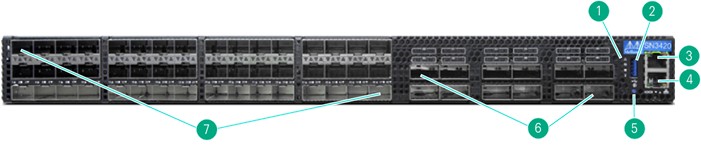
|
Item |
Description |
Item |
Description |
|
1 |
Status LEDs (System; Fan; Power Supply; Unit Identifier) |
5 |
Password Reset Button - refer to the Single User Mode Boot Recovery section in the Cumulus Linux User Guide |
|
2 |
USB Type A 3.0 compliant (USB 1.0 not supported) |
6 |
49-56 40/100 GbE QSFP28 ports |
|
3 |
MGMT0 100 Mb/s to 1 Gb/s Port |
7 |
1-48 1/10/25 GbE SFP28 ports |
|
4 |
IOIOI RS232 Serial Console Port: 115200 BAUD |
|
|
|
|
|
HPE M-Series SN3420M - Rear (Power) View |
|
|

|
Item |
Description |
Item |
Description | |
|
1 |
Power Supply 1 |
3 |
FANs (1 left to 5 right) | |
|
2 |
Inventory Information Pull-Out Tab |
4 |
Power Supply 2 | |
|
Notes: The SN3420M chassis, power supplies and fans are included as field-replaceable switch. |
|
|
|
Key Features and Benefits
|
|
- SN3420M switches are ideal for modern server and storage networks, supporting DAC, AOC, and optical breakout cables. The 48 SFP28 and 12 QSFP28 ports deliver predictable performance and zero-packet loss at line-rate across each port and packet size. - The 12 100 GbE NRZ encoded ports in the SN3420M switches can be split to two (split-2) 50 GbE ports, or to four (or less) 1/10/25 GbE NRZ encoded ports, using a splitter cable. |
|
|
|
All 12 QSFP28 ports 49-60 support x4 or x2 breakout |
|
- SN3420M can be deployed to support 1 GbE and 10 GbE ports, including 10 Gbase-T RJ45 transceivers, and is designed to be able to evolve over time to support 25, 40, 50, 100 GbE speeds. This helps future-proof your network architecture and allows for implementing significant speed upgrades to the architecture over time. - SN3420M provides ultra-low cut-through latency port-to-port. This is advantageous for flash storage, which moved the latency bottleneck from storage media to the network, as well as for the bursty nature of today's software-defined and cloud-driven data center traffic flows. - M-series SN3420M provide high port density in a single rack unit, allowing for higher capacity and efficiency, simplifying scale-out environments and saving on total cost of ownership. Unique breakout cables fan out individual switch ports to multiple device ports. - Provides wire-rate performance with zero-packet loss across all frame sizes, avoiding any negative impact on applications that could occur with frame loss as unexpected packet loss is unacceptable in modern data centers, especially within a storage network. - Capable of forwarding 100% capacity wire rate performance with zero-packet loss across all ports concurrently at 25 GbE and 100 GbE speeds while transferring data across both Layer 2 and Layer 3 networks. - Designed to use less electric power than competing switches, providing one of the industry's lowest power draws, producing less heat than competing products, providing reduced OpEX cost. - Provides enough switching bandwidth to transport all ports at 25 GbE and 100 GbE bandwidth concurrently. This allows the switches to avoid head-of-line blocking which can reduce a switches overall performance and throughput. |
|
|
|
NVIDIA® Cumulus Linux
|
|
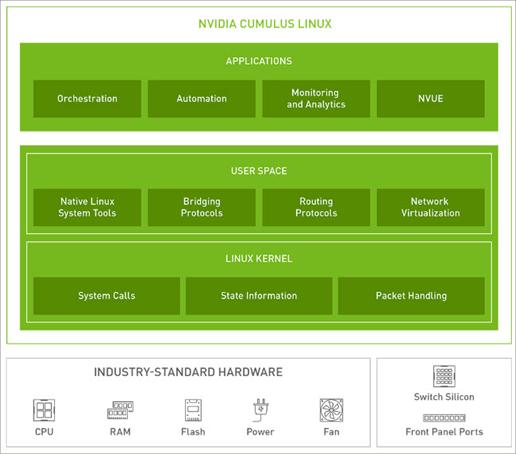
Cumulus Linux is a powerful open network operating system enabling advanced automation, customization and scalability using web-scale principles like the world's largest data centers. It accelerates networking functions and provides choice from an extensive list of supported switch models including NVIDIA SpectrumTM based switches. Cumulus Linux was built for automation, scalability and flexibility, allowing you to build data center and campus networks that ideally suit your business needs. Cumulus Linux is the only open network OS that allows you to build affordable and efficient network operations like the world's largest data center operators, unlocking web scale networking for businesses of all sizes. |

|
The ideal solution for your network challenges, Cumulus Linux enables modern data center architecture, while providing a transition path for traditional data center architecture, with support for layer 2, layer 3, and overlay networks. This open approach enables a wide range of solutions. Centralized, remote management of AI deployments enables over-the-air software updates, remote debugging, and system monitoring, as well as other features like self-healing systems. These remote management features make maintenance and upkeep easier, and AI more accessible and practical for locations that are difficult to access or far from headquarters. This results in faster, more comprehensive insights that can drive real-time decisions. |
|
|
|
Deployment Models: L3 network, L2 network, Clos, Out-of-band management, Overlay network,
Use cases: Containers, Big data, Private cloud, Network virtualization, DevOps / automation, Monitoring and analytics, Hyperconverged infrastructure |
|
|
|
Key Features |
|
Unnumbered Interfaces: Automation gets even easier with this simplified Internet Protocol (IP) approach for Border Gateway Protocol (BGP) and Open Shortest Path First (OSPF). All you need is one IP template for leaf nodes and one for spine nodes. BGP Unnumbered, the only difference between a BGP unnumbered configuration and the BGP numbered configuration is that the BGP neighbor is as an interface (instead of an IP address). There is no need to configure an IP address on the interface between the two peers on each side. Redistribute Neighbor (RDNBR): Get virtual machine (VM) and host mobility by plugging your server into any RDNBR switch and making it layer 3-discoverable on the fabric. If you need to move the server, there's no need to reconfigure. Prescriptive Topology Manager (PTM): Efficiently go from whiteboard to physical cable. With PTM, you can program your data center to verify connections and resolve issues faster. Virtual Routing and Forwarding: Run multiple network paths without the need for multiple switches, giving you traffic isolation and network segmentation for multiple devices. Ethernet Virtual Private Networks (EVPN): The most advanced capabilities available for EVPN allow legacy layer-2 applications to operate over next-generation layer-3 networks. NVIDIA User Experience (NVUE): A full command-line interface (CLI) object model of Cumulus Linux enables advanced programmability, extensibility, and usability. Digital twins: NVIDIA Air makes physical deployments seamless by validating and simplifying deployments and upgrades in a virtual network. |
|
|
|
|
|
User Interface: Command Line With the NVIDIA User Experience (NVUE) object-oriented management tool, Cumulus Linux customers can go beyond the CLI and unify their network management with the rest of the data center management. NVUE enables any APIs to tie into NOS management, including REST, gRPC, RestConf, NetConf, and OpenConfig. Additionally, NVUE is Git-based, enabling Diff, revert, apply, branch, and stash behaviors. NVUE's configuration is simple: one YAML file ties all Linux configurations together, making it easy to copy configurations from switch to switch. |
|
|
|
Operating System Install and Upgrade - Server-style upgrade/patching across minor releases, server-style process restart/termination - Support for zero touch OS installation using ONIE loaded on industry-standard switches - Standard mechanism for authentication, authorization, and accounting with TACACS+
|
|
Extensibility - Cumulus Linux works with any language supported in Linux today, including scripting with Bash, Perl, Python, and Ruby |
|
Hardware Management - The switch hardware abstraction layer accelerates Linux kernel networking constructs in hardware, including the routing table, ARP table, bridge FOB, IP/EB tables, bonds, VLANs, and VXLAN bridges - Hardware management also includes jumbo frames support and environmental management - Forwarding table profiles on the ASIC provide flexible partitioning of resources
|
|
Layer 3 Features - IPv4/v6 routing suite including OSPFv2, OSPFv3, and BGPv4/v6 - RDMA over Converged Ethernet (RoCEv2) support for Layer 2 and Layer 3 - Virtual routing and forwarding (VRF) and VRF route leaking - Equal-cost multi-path (ECMP) and ECMP resilient hashing for IPv4 and IPv6 traffic - Bidirectional forwarding detection (BFD) across all platform and interface types, IPv4 and IPv6, BGP and OSPF, VXLAN, BGP conditional route advertisement - Protocol-independent multicast (PIM, PIM-SM, PIM-SSM) - Policy-based routing - Generic routing encapsulation (GRE) tunneling - Precision time protocol (PTP) Boundary Clock - VNI scaling: supports 6 bridges with up to 1,000 VNls - GTP Hashing - Adaptive Routing with RoCEv2
|
|
Layer 2 features - Bridge management with STP (IEEE 802.1d). RSTP (IEEE 802.1 W), PVRST, PVST, bridge assurance, BPDU guard, and BPDU filter - VLANs. VLAN trunks (IEEE 802.1q). LACP (IEEE 802.3adl. LACP bypass, unicast/broadcast storm control, LLDP, CDP, IPv6 neighbor discovery, and IPv6 route advertisement - MLAG (Multi-Chassis Link Aggregation) - IGMPv2/v3 snooping, MLDv1/v2 snooping, Optimized Multicast Flooding (OMF) - Virtual router redundancy (VRR - active-active first hop redundancy protocol) - LLDP DCB IEEE TLVs
|
|
Network Virtualization - VXLAN support - VXLAN Routing - symmetric and asymmetric - L2 gateway services integration with VMware NSX - VXLAN head end replication - VXLAN active-active bridging with MLAG - Controller-less network virtualization with EVPN |
|
Management - Object-oriented APl-compatible switch management with NVIDIA User Experience (NVUE) - ISSU: in-service software upgrades - Warm boot on bonds - Native Linux management tools, such as OpenSSH, SCP, and FTPS - Automated install and provisioning: zero touch install and zero touch provisioning - Management VRF - DHCP and v4/v6 DHCP relays - Authentication with LDAP and authorization with sudo NTP - Interface configuration management (ifupdown2) - Advanced management/orchestration through third-party add-on packages - Snapshot and rollback of the entire system to eliminate risk from system updates |
|
Monitoring and Troubleshooting - Monitor traffic patterns and preemptive capacity planning with buffer monitoring - Traditional monitoring with SNMPv2 and SNMPv3 and network-specific MIBs, hardware monitoring via watchdog, analytics with SPAN, ERSPAN, ACL-based counters, DOM optics data, thermal sensors, real time queue depth, and buffer utilization reporting
- The cl-support script generates a compressed archive file (.txz) of useful information for troubleshooting. The system either creates the archive file automatically or you can create the archive file manually. The system creates the cl-support archive file automatically for the following reasons:
- sFlow monitoring for system statistics and network traffic - The NVIDIA Firmware Tool (MFT) mlxlink tool is integrated into Cumulus and is used to check and debug link status and related issues. The tool can be used on different links and cables (passive, active, transceiver and backplane) - What Just Happened (WJH) provides real time visibility into network problems and has two components:
|
|
Security - Access control lists (ACLs) L2-L4 classification through IP/EP tables and CPU protection through hardware enforced ACL-based rate limiting DoS control - Authenticate and authorize attached devices with 802.1x - Kernel Address Space Randomization
|
|
QoS - Link PAUSE - Classification based on Class of Service (CoS) (IEEE 802.1p) or DSCP (queuing, scheduling-DWRR and Strict Priority - and buffer allocation) - Ingress ACL-based classification/policing - Priority flow control and explicit congestion notification (ECN) - Dynamic buffer configuration as default
|
|
Cumulus VX and NVIDIA AIR - Getting started with Cumulus Linux is easy. Customers can explore, test, and prototype the technology
- Download the free NVIDIA Cumulus VX appliance, supported virtual appliance to test and stage production rollouts
|
|
Third-party Packages - Orchestration: Ansible, CFEngine, Chef, and Puppet - Monitoring: Collectd, Ganglia, Graphite, Nagios/lcinga, and NetSNMP - You can use Cumulus Linux to run the Docker container platform. You can install Docker Engine directly on a Cumulus Linux switch and run Docker containers natively on the switch |
|
|
|
|
|
Warranty (3-3-3) Hardware Warranty; 3-year parts; 3-year on-site (standard business hours, next business day response) and 3-year labor. Notes: The hardware warranty covers firmware. For extended hardware support and installation information, please see the "Services and Support" Section. |
|
|
|
HPE Services No matter where you are in your transformation journey, you can count on HPE Services to deliver the expertise you need when, where and how you need it. From planning to deployment, ongoing operations and beyond, our experts can help you realize your digital ambitions. https://www.HPE.com/services
|
|
Consulting services No matter where you are in your journey to hybrid cloud, experts can help you map out your next steps. From determining what workloads should live where, to handling governance and compliance, to managing costs, our experts can help you optimize your operations. https://www.HPE.com/services/consulting
|
|
HPE Managed Services HPE runs your IT operations, providing services that monitor, operate, and optimize your infrastructure and applications, delivered consistently and globally to give you unified control and let you focus on innovation. HPE Managed Services | HPE
|
|
Operational services Optimize your entire IT environment and drive innovation. Manage day-to-day IT operational tasks while freeing up valuable time and resources. Meet service-level targets and business objectives with features designed to drive better business outcomes. https://www.HPE.com/services/operational |
|
|
|
Recommended Services HPE Tech Care Service HPE Tech Care Service is the operational support service experience for HPE products. The service goes beyond traditional support by providing access to product specific experts, an AI-driven digital experience, and general technical guidance to not only reduce risk but constantly search for ways to do things better. HPE Tech Care Service delivers a customer-centric, AI-driven, and digitally enabled customer experience to move your business forward. HPE Tech Care Service is available in three response levels. Basic, which provides 9x5 business hour availability and a 2-hour response time. Essential, which provides a 15-minute response time 24x7 for most enterprise level customers, and Critical, which includes a 6-hour repair commitment where available and outage management response for severity 1 incidents.
https://www.HPE.com/services/techcare |
|
HPE Complete Care Service HPE Complete Care Service is a modular, edge-to-cloud IT environment service designed to help optimize your entire IT environment and achieve agreed upon IT outcomes and business goals through a personalized experience. All delivered by an assigned team of HPE Services experts. HPE Complete Care Service provides: - A complete coverage approach - edge to cloud - An assigned HPE team - Modular and fully personalized engagement - Enhanced Incident Management experience with priority access - Digitally enabled and AI-driven customer experience
https://www.HPE.com/services/completecare |
|
|
|
Other related services from HPE Services
HPE Installation and Start-up Service Provides for the hardware installation and startup of HPE branded M-Series switches with operating system, according to the product specifications. The HPE service delivery technician will assist you in bringing your new hardware into operation in a timely and professional manner. https://www.HPE.com/h20195/v2/Getdocument.aspx?docname=a00025816enw
HPE Hardware Installation Provides for the basic hardware installation of HPE branded M-Series ONIE switches to assist you in bringing your new hardware into operation in a timely and professional manner. https://www.HPE.com/h20195/v2/Getdocument.aspx?docname=5981-9356enw
HPE Lifecycle Services HPE Lifecycle Services provide a variety of options to help maintain your HPE systems and solutions at all stages of the product lifecycle. A few popular examples include: - Lifecycle Install and Startup Services: Various levels for physical installation and power on, remote access setup, installation and startup, and enhanced installation services with the operating system. - HPE Firmware Update Analysis Service: Recommendations for firmware revision levels for selected HPE products, taking into account the relevant revision dependencies within your IT environment. - HPE Firmware Update Implementation Service: Implementation of firmware updates for selected HPE server, storage, and solution products, taking into account the relevant revision dependencies within your IT environment. - Implementation assistance services: Highly trained technical service specialists to assist you with a variety of activities, ranging from design, implementation, and platform deployment to consolidation, migration, project management, and onsite technical forums. - HPE Service Credits: Access to prepaid services for flexibility to choose from a variety of specialized service activities, including assessments, performance maintenance reviews, firmware management, professional services, and operational best practices.
For a list of the most frequently purchased services using service credits, see the HPE Service Credits Menu |
|
HPE Education Services Training and certification designed for IT and business professionals across all industries. Broad catalogue of course offerings to expand skills and proficiencies in topics ranging from cloud and cybersecurity to AI and DevOps. Create learning paths to expand proficiency in a specific subject. Schedule training in a way that works best for your business with flexible continuous learning options.
https://www.HPE.com/services/training
Defective Media Retention An option available with HPE
Consult your HPE Sales Representative or Authorized Channel Partner of choice for any additional questions and services options. |
|
|
|
Parts and Materials HPE will provide HPE-supported replacement parts and materials necessary to maintain the covered hardware product in operating condition, including parts and materials for available and recommended engineering improvements.
Parts and components that have reached their maximum supported lifetime and/or the maximum usage limitations as set forth in the manufacturer's operating manual, product QuickSpecs, or the technical product data sheet will not be provided, repaired, or replaced as part of these services.
How to purchase services Services are sold by Hewlett Packard Enterprise and Hewlett Packard Enterprise Authorized Service Partners: - Services for customers purchasing from HPE or an enterprise reseller are quoted using HPE order configuration tools. - Customers purchasing from a commercial reseller can find services at https://ssc.HPE.com/portal/site/ssc/ |
|
|
|
AI Powered and Digitally Enabled Support Experience Achieve faster time to resolution with access to product-specific resources and expertise through a digital and data driven customer experience.
Sign into the HPE Support Center experience, featuring streamlined self-serve case creation and management capabilities with inline knowledge recommendations. You will also find personalized task alerts and powerful troubleshooting support through an intelligent virtual agent with seamless transition when needed to a live support agent.
https://support.HPE.com/hpesc/public/home/signin |
|
|
|
Consume IT on your terms HPE GreenLake edge-to-cloud platform brings the cloud experience directly to your apps and data wherever they are-the edge, colocations, or your data center. It delivers cloud services for on-premises IT infrastructure specifically tailored to your most demanding workloads. With a pay-per-use, scalable, point-and-click self-service experience that is managed for you, HPE GreenLake edge-to-cloud platform accelerates digital transformation in a distributed, edge-to-cloud world. - Get faster time to market - Save on TCO, align costs to business - Scale quickly, meet unpredictable demand - Simplify IT operations across your data centers and clouds
To learn more about HPE Services, please contact your Hewlett Packard Enterprise sales representative or Hewlett Packard Enterprise Authorized Channel Partner. Contact information for a representative in your area can be found at "Contact HPE" https://www.HPE.com/us/en/contact-HPE.html
For more information: http://www.HPE.com/services |
|
|
|
Model Description
| ||||||||
| ||||||||
|
Notes: SN3420M with NVIDIA Cumulus® Linux requires transceivers listed below | ||||||||
|
| ||||||||
|
Step 1 - Base Configuration Select one Model | ||||||||
|
Description |
SKU | |||||||
|
HPE 25 GbE 48SFP28 12QSFP28 Power to Connector Airflow Switch SN3420M with NVIDIA Cumulus® |
S2T77A | |||||||
|
- HPE 48SFP28 12QSFP28 P2C Sw SN3420M NVD, AC power | ||||||||
|
| ||||||||
|
Step 2 - Options Refer to HPE M-Series Switches SPOCK Connectivity Stream for latest SN3420M with NVIDIA Cumulus® Linux interconnect support matrix | ||||||||
|
| ||||||||
|
Transceivers - for M-series SN3420M NVIDIA Cumulus® Linux switches | ||||||||
|
Note # |
Descriptions |
SKU | ||||||
|
|
HPE 100 GbE QSFP28 SR4 100 m Transceiver |
Q2F19A | ||||||
|
|
HPE Storage 100 GbE QSFP28 SR4 Extended Temperature Pull Tab Transceiver |
S2T35A | ||||||
|
|
HPE Aruba Networking 100G SR1.2 QSFP28 LC 100 m MMF Transceiver |
S4B44A | ||||||
|
|
HPE 100 GbE QSFP28 500 m 1310 mm PSM4 Transceiver |
Q8J73A | ||||||
|
5, 6 |
HPE 100 GB QSFP28 LC SWDM4 Multi-mode 100 m Transceiver |
R0R40A | ||||||
|
2 |
HPE 10 GbE SFP+ SR Multi-mode 300 m Transceiver |
Q6M30A | ||||||
|
2 |
HPE 10 GB SFP+ Short Wave 1-pack Pull Tab Optical Transceiver |
Q2P65A | ||||||
|
2, 7, 8 |
HPE 10GBASE-T SFP+ RJ45 30 m 1-pack Transceiver |
R0R41B | ||||||
|
2 |
HPE 25 GB SFP28 SR 30 m Transceiver |
R0R42A | ||||||
|
2 |
HPE BladeSystem c-Class 10 GB SFP+ SR Transceiver |
455883-B21 | ||||||
|
2 |
HPE Aruba Networking 1G SFP RJ45 T 100 m Cat5e TAA Transceiver |
R9Q45A | ||||||
|
2 |
HPE Aruba Networking 25G SFP28 LC LR 10 km SMF Transceiver |
JL486A | ||||||
|
2 |
HPE 25 GbE SFP28 LR 10 km 1-pack Extended Temperature Pull Tab Transceiver |
S6B58A | ||||||
|
2 |
HPE Aruba Networking 10G SFP+ LC LR 10 km SMF Transceiver |
J9151E | ||||||
|
2 |
HPE Aruba Networking 10G SFP+ LC ER 40 km SMF Transceiver |
J9153D | ||||||
|
2 |
HPE 10 GbE SFP+ LR 10 km 1-pack Extended Temperature Pull Tab Transceiver |
S6B57A | ||||||
|
2 |
HPE Networking X130 10G SFP+ LC SR Transceiver |
JD092B | ||||||
|
2 |
HPE Networking X130 10G SFP+ LC LR Transceiver |
JD094B | ||||||
|
Note # |
Descriptions |
SKU | ||||||
|
2 |
HPE Networking X130 10G SFP+ LC ER 40 km Transceiver |
JG234A | ||||||
|
1, 2 |
HPE Networking X130 10G SFP+ LC LH 80 km Transceiver |
JG915A | ||||||
|
|
HPE Networking X140 40G QSFP+ CSR4 300 m Transceiver |
JG709A | ||||||
|
|
HPE Networking X140 40G QSFP+ LC LR4L 2 km SM Transceiver |
JL286A | ||||||
|
|
HPE Networking X140 40G QSFP+ LC LR4 SM 10 km 1310nm Transceiver |
JG661A | ||||||
|
|
HPE Aruba Networking 40G QSFP+ LC ER4 40 km SMF Transceiver |
Q9G82A | ||||||
|
|
HPE BladeSystem c-Class 40 GB QSFP+ MPO SR4 100 m Transceiver |
720187-B21 | ||||||
|
|
HPE Networking X140 40G QSFP+ LC BiDi 100 m MM Transceiver |
JL251A | ||||||
|
|
HPE 40 GB QSFP+ Bidirectional Transceiver |
841716-B21 | ||||||
|
2 |
HPE Networking X190 25G SFP28 LC SR 100 m MM Transceiver |
JL293A | ||||||
|
2 |
HPE 25 GB SFP28 Short Wave Extended Temperature 1-pack Pull Tab Optical Transceiver |
Q2P64B | ||||||
|
|
HPE Aruba Networking 25G SFP28 LC eSR 400 m MMF Transceiver |
JL485A | ||||||
|
|
HPE Networking X140 40G QSFP+ MPO SR4 Transceiver |
JG325B | ||||||
|
|
HPE Aruba Networking 40G QSFP+ MPO SR4 Transceiver |
R9F97A | ||||||
|
2 |
HPE 25 GB SFP28 SR 100 m Transceiver |
845398-B21 | ||||||
|
2 |
HPE Aruba Networking 25G SFP28 LC LR 10 km SMF Transceiver |
JL486A | ||||||
|
2 |
HPE QSFP28 to SFP28 Adapter |
845970-B21 | ||||||
|
|
HPE Networking X150 100G QSFP28 LC LR4 10 km SM Transceiver |
JL275A | ||||||
|
|
HPE Networking X150 100G QSFP28 CWDM4 2 km SM Transceiver |
JH673A | ||||||
|
5, 6 |
HPE Networking X150 100G QSFP28 LC SWDM4 100 m MM Transceiver |
JH419A | ||||||
|
5 |
HPE 100 GB QSFP28 Bidirectional Transceiver |
845972-B21 | ||||||
|
12 |
HPE 100 GbE QSFP28 LC DR1 500 m 1-pack Transceiver |
R8M61A | ||||||
|
|
HPE Alletra 6000 2x100Gb QSFP28 MPO SR4 100 m FIO Transceiver |
R7D08A | ||||||
|
|
HPE Alletra 6000 2x100Gb QSFP28 MPO SR4 100 m Transceiver |
R7D12A | ||||||
|
2 |
HPE Alletra 6000 2x10Gb SFP+ SR FIO Transceiver |
R7D05A | ||||||
|
2 |
HPE Alletra 6000 2x10Gb SFP+ SR Transceiver |
R7D09A | ||||||
|
2 |
HPE Alletra 6000 2x25Gb SFP28 SR 100 m FIO Transceiver |
R7D07A | ||||||
|
2 |
HPE Alletra 6000 2x25Gb SFP28 SR 100 m Transceiver |
R7D11A | ||||||
|
| ||||||||
|
Direct Attach Copper Cables (DAC) | ||||||||
|
Notes # |
Descriptions |
SKU | ||||||
|
|
HPE 7.6 m /25ft CAT5 RJ45 M/M Ethernet C/O Cable |
C7539A | ||||||
|
|
HPE Networking Comware X240 40G QSFP+ QSFP+ 1 m Direct Attach Copper Cable |
JG326A | ||||||
|
|
HPE Networking Comware X240 40G QSFP+ QSFP+ 3 m Direct Attach Copper Cable |
JG327A | ||||||
|
|
HPE Networking Comware X240 40G QSFP+ QSFP+ 5 m Direct Attach Copper Cable |
JG328A | ||||||
|
3 |
HPE 100 GbE QSFP28 to 4x25GbE SFP28 1 m Direct Attach Copper Cable |
Q9S72A | ||||||
|
3 |
HPE Networking Comware X240 40G QSFP+ to 4x10G SFP+ 1 m Direct Attach Copper Splitter Cable |
JG329A | ||||||
|
3 |
HPE Networking Comware X240 40G QSFP+ to 4x10G SFP+ 3 m Direct Attach Copper Splitter Cable |
JG330A | ||||||
|
3 |
HPE Networking Comware X240 40G QSFP+ to 4x10G SFP+ 5 m Direct Attach Copper Splitter Cable |
JG331A | ||||||
|
|
HPE BladeSystem c-Class 10 GbE SFP+ to SFP+ 3 m Direct Attach Copper Cable |
487655-B21 | ||||||
|
|
HPE Networking X242 40G QSFP+ to QSFP+ 1 m Direct Attach Copper Cable |
JH234A |
| |||||
|
|
HPE Networking X242 40G QSFP+ to QSFP+ 3 m Direct Attach Copper Cable |
JH235A |
| |||||
|
Note # |
Descriptions |
SKU |
| |||||
|
|
HPE Networking X242 40G QSFP+ to QSFP+ 5 m Direct Attach Copper Cable |
JH236A |
| |||||
|
3 |
HPE Networking X240 QSFP28 4xSFP28 1 m Direct Attach Copper Cable |
JL282A |
| |||||
|
3 |
HPE Networking X240 QSFP28 4xSFP28 3 m Direct Attach Copper Cable |
JL283A |
| |||||
|
3 |
HPE Networking X240 QSFP28 4xSFP28 5 m Direct Attach Copper Cable |
JL284A |
| |||||
|
2 |
HPE Aruba Networking 25G SFP28 to SFP28 0.65 m Direct Attach Cable |
JL487A |
| |||||
|
2 |
HPE Aruba Networking 25G SFP28 to SFP28 3 m Direct Attach Copper Cable |
JL488A |
| |||||
|
2 |
HPE Aruba Networking 25G SFP28 to SFP28 5 m Direct Attach Copper Cable |
JL489A |
| |||||
|
2 |
HPE Aruba Networking 25G SFP28 to SFP28 3 m Direct Attach Copper Cable |
R9F92A |
| |||||
|
2 |
HPE Aruba Networking 25G SFP28 to SFP28 5 m Direct Attach Copper Cable |
R9F93A |
| |||||
|
|
HPE Aruba Networking 100G QSFP28 to QSFP28 1 m Direct Attach Copper Cable |
R0Z25A |
| |||||
|
|
HPE Aruba Networking 100G QSFP28 to QSFP28 5 m Direct Attach Copper Cable |
R0Z26A |
| |||||
|
2 |
HPE 25 GB SFP28 to SFP28 0.5 m Direct Attach Copper Cable |
R4G18A |
| |||||
|
2 |
HPE 25 GB SFP28 to SFP28 1 m Direct Attach Copper Cable |
R4G19A |
| |||||
|
2 |
HPE 25 GB SFP28 to SFP28 3 m Direct Attach Copper Cable |
844477-B21 |
| |||||
|
2 |
HPE 25 GB SFP28 to SFP28 5 m Direct Attach Copper Cable |
844480-B21 |
| |||||
|
2 |
HPE Aruba Networking 100G QSFP28 to QSFP28 3 m Direct Attach Copper Cable |
JL307A |
| |||||
|
|
HPE Aruba Networking 100G QSFP28 to QSFP28 1 m Direct Attach Copper Cable |
R9F77A |
| |||||
|
|
HPE Aruba Networking 100G QSFP28-QSFP28 3 m Direct Attach Copper Cable |
R9F74A |
| |||||
|
|
HPE Aruba Networking 100G QSFP28 to QSFP28 5 m Direct Attach Copper Cable |
R9F78A |
| |||||
|
|
HPE 100 GB QSFP28 to 4x25Gb SFP28 3 m Direct Attach Copper Cable |
845416-B21 |
| |||||
|
|
HPE 100 GB QSFP28 to QSFP28 5 m Direct Attach Copper Cable |
845408-B21 |
| |||||
|
|
HPE Networking X240 100G QSFP28 1 m DAC Cable |
JL271A |
| |||||
|
|
HPE Networking X240 100G QSFP28 3 m DAC Cable |
JL272A |
| |||||
|
|
HPE Networking X240 100G QSFP28 5 m DAC Cable |
JL273A |
| |||||
|
|
HPE Aruba Networking 10G SFP+ to SFP+ 7 m Direct Attach Copper Cable |
J9285D | ||||||
|
|
HPE 100 GB QSFP28 to QSFP28 3 m Direct Attach Copper Cable |
845406-B21 | ||||||
|
|
HPE 100 GB QSFP28 to QSFP28 0.5 m Direct Attach Copper Cable |
R8M59A | ||||||
|
2 |
HPE Alletra 6000 2x10Gb SFP+ to SFP+ 3 m Direct Attach Copper Cable |
R7D16A | ||||||
|
2 |
HPE Alletra 6000 2x25Gb SFP28 to SFP28 3 m Direct Attach Copper Cable |
R7D17A | ||||||
|
|
HPE Alletra 6000 2x100Gb QSFP28 to QSFP28 3 m Direct Attach Copper Cable |
R7D18A | ||||||
|
|
HPE Aruba Networking 10G SFP+ to SFP+ 3 m Direct Attach Copper Cable |
R9F84A | ||||||
|
| |||
|
Active Optical Cable (AOC) | |||
|
Notes # |
Descriptions |
SKU | |
|
3 |
HPE 40 GbE QSFP+ to 4x10GbE SFP+ 5 m Active Optical Cable |
Q9S66A | |
|
2 |
HPE 25 GbE SFP28 to SFP28 3 m Smart Active Optical Cable |
Q9S67A | |
|
2 |
HPE 25 GbE SFP28 to SFP28 5 m Smart Active Optical Cable |
Q9S68A | |
|
2 |
HPE 25 GbE SFP28 to SFP28 10 m Smart Active Optical Cable |
Q9S69A | |
|
2 |
HPE 25 GbE SFP28 to SFP28 15 m Smart Active Optical Cable |
Q9S70A | |
|
|
HPE 100 GbE QSFP28 to QSFP28 5 m Active Optical Cable |
Q9S71A | |
|
2 |
HPE Aruba Networking 25G SFP28 to SFP28 7 m Active Optical Cable |
R9F95A | |
|
|
HPE Aruba Networking 100G QSFP28 to QSFP28 2 m Active Optical Cable |
R9F76A | |
|
|
HPE Aruba Networking 100G QSFP28 to QSFP28 7 m Active Optical Cable |
R9F79A | |
|
|
HPE Aruba Networking 100G QSFP28 to QSFP28 15 m Active Optical Cable |
R9F80A | |
|
|
HPE Aruba Networking 100G QSFP28 to QSFP28 30 m Active Optical Cable |
R9F81A | |
|
Note # |
Descriptions |
SKU | |
|
|
HPE BladeSystem c-Class QSFP+ to 4x10G SFP+ 15 m Active Optical Cable |
721076-B21 | |
|
|
HPE BladeSystem c-Class 40G QSFP+ to QSFP+ 15 m Active Optical Cable |
720211-B21 | |
|
|
HPE 100 GB QSFP28 to QSFP28 7 m Active Optical Cable |
845410-B21 | |
|
|
HPE 100 GB QSFP28 to QSFP28 15 m Active Optical Cable |
845414-B21 | |
|
|
HPE QSFP28 to 4x25Gb SFP28 7 m Active Optical Cable |
845420-B21 | |
|
|
HPE QSFP28 to 4x25Gb SFP28 15 m Active Optical Cable |
845424-B21 | |
|
|
HPE Storage 100 GbE QSFP28 to QSFP28 5 m Extended Temperature Active Optical Cable |
S2T38A | |
|
|
HPE 100 GbE QSFP28 2 m Extended Temperature Active Optical Cable |
S6B63A | |
|
15 |
Aruba 100G QSFP28 LC FR1 SMF 2 km Transceiver |
S1D17A/R9B63A | |
|
|
HPE Storage 100 GbE QSFP28 to QSFP28 10 m Extended Temperature Active Optical Cable |
S2T39A | |
|
|
HPE Storage 100 GbE QSFP28 to QSFP28 15 m Extended Temperature Active Optical Cable |
S2T40A | |
|
|
HPE Storage 100 GbE QSFP28 to QSFP28 25 m Extended Temperature Active Optical Cable |
S2T41A | |
|
| |||
|
M-series 200 GbE pluggables - DAC/AOC/Optical transceivers |
| ||
|
Notes # |
Descriptions |
SKU | |
|
9 |
HPE 200 GB QSFP56 to QSFP56 0.5 m Direct Attach Copper Cable |
R5Z76A | |
|
9 |
HPE 200 GB QSFP56 to QSFP56 1 m Direct Attach Copper Cable |
R5Z77A | |
|
9 |
HPE 200 GB QSFP56 to QSFP56 2 m Direct Attach Copper Cable |
R5Z78A | |
|
9 |
HPE 200 GB QSFP56 to QSFP56 2.5 m Direct Attach Copper Cable |
R5Z79A | |
|
9 |
HPE 200 GB QSFP56 to QSFP56 5 m Active Optical Cable |
R5Z80A | |
|
9 |
HPE 200 GB QSFP56 to QSFP56 10 m Active Optical Cable |
R5Z81A | |
|
9 |
HPE 200 GB QSFP56 to QSFP56 15 m Active Optical Cable |
R5Z82A | |
|
9,10 |
HPE 200 GB QSFP56 MPO SR4 100 m Transceiver |
R5Z83A | |
|
9,11 |
HPE 200 GB QSFP56 LC CWDM4 FR4 Transceiver |
R5Z84A | |
|
9,14 |
HPE 200 GB QSFP56 to 2x100Gb QSFP56 3 m Active Optical Cable |
R6F24A | |
|
9,14 |
HPE 200 GB QSFP56 to 2x100Gb QSFP56 5 m Active Optical Cable |
R6F25A | |
|
9,14 |
HPE 200 GB QSFP56 to 2x100Gb QSFP56 15 m Active Optical Cable |
R6F26A | |
|
9,13 |
HPE 200 GB QSFP56 to 4x50/25 GB SFP56 2.5 m Direct Attach Copper Cable |
R6F27A | |
|
14 |
HPE 200 GbE QSFP56 to 2xQSFP56 2 m Direct Attach Copper Cable |
R8M57A | |
|
14 |
HPE 200 GbE QSFP56 to 2xQSFP56 2.5 m Direct Attach Copper Cable |
R8M58A | |
|
13 |
HPE 400 GbE QSFP-DD to 4xQSFP56 1 m Direct Attach Copper Cable |
R8M55A | |
|
13 |
HPE 400 GbE QSFP-DD to 4xQSFP56 2 m Direct Attach Copper Cable |
R8M56A | |
|
Notes: 1. JG915A - Storage connectivity support for this transceiver is limited to 40 km. 2. HPE QSA28 (QSFP28 to SFP28) adapter (845970-B21) is compatible with all M-Series switches and is required with this transceiver to convert a QSFP+/QSFP28 slot to a single SFP+/SFP28 slot for 25G or 10G operation with this switch model. 3. The SN2010M 25G DAC connectivity to another M-Series switch or 3rd party switch is limited to a 0.5 m DAC cable. End device connectivity may use 1 m or a 3 m (26 gauge) DAC. 4. This RJ45 crossover cable is compatible and supported for use when directly connecting the two M-Series switch MGMT ports. When configuring MLAG and also utilizing in-band management, the MGMT0 ports of the two switches shall be connected (with MLAG the MGMT0 ports shall be reachable from each switch). 5. The 845972-B21 HPE 100 Gb QSFP28 Bidirectional XCVR does not interoperate with the JH419A and R0R40A HPE 100 Gb QSFP28 LC SWDM4 MM 100 m transceivers. 6. 100 Gbe SWDM4 LC transceivers JH419A and R0R40A are interoperable. 7. 10 Gbase-T SFP+ RJ45 transceiver supports maximum length 30 m CAT6a cable. This 10Gabse-T transceiver is not qualified for use at 1 GbE and shall be operated only at 10 GbE. 8. Cumulus 5.9 and later revisions are required for support of R0R41B in the SN3420M and with a QSA28 in SN3420M, SN3700CM, SN3700M, and SN4600cM switches. Prior to Cumulus 5.9, SN3420M limits R0R41B support to Ports 1-6, Cumulus 5.9 expands support to ports 1-48. R0R41B transceiver supports maximum length 30 m CAT6a cable. R0R41B 10Gabse-T transceiver is not qualified for use at 1 GbE and shall be operated only at 10 GbE. 9. Cumulus 5.9.2 and later revisions are required for support of the QSA28 and QSFP56 200G pluggable with the SN3700M, SN3700cM, SN3420M, SN2100M, SN2010M and SN4600cM switches. 10. R5Z83A operates at 200 GbE, 100 GbE, and 4x50 GbE breakout. Operation at 4 x25/10GGbE breakout is not supported. Use a 100 GbE transceiver for this breakout application. 11. R5Z84A requires a single mode duplex LC cable. 12. The R8M61A class 6 power requirements limit use in the SN3700cM to ports 1, 2, 31, 32; SN3700M has no power transceiver class 6 port use limit. 13. All cable ports must be set as NRZ or PAM4. A mix between the two technologies is not supported. 14. All cable ports must be set as PAM4, NRZ is not supported. 15. The S1D17A/R9B63A power requirements support use in the SN4700 ports swp1-32; SN3700M ports swp1-32; SN3700cM ports swp1-2, swp31-32; SN3420M ports swp53, swp55, swp57, swp59; SN4600cM ports swp49-64 | |
|
| |
|
Supported Optical Cables for all M-Series switch models | |
|
Descriptions |
SKU |
|
HPE Premier Flex MPO12/MPO12 Multi-mode OM4 10 m Fiber Cable |
QK729A |
|
HPE Premier Flex MPO12/MPO12 Multi-mode OM4 50 m Fiber Cable |
QK731A |
|
HPE Premier Flex LC/LC Multi-mode OM4 2 Fiber 1 m Cable |
QK732A |
|
HPE Premier Flex LC/LC Multi-mode OM4 2 Fiber 2 m Cable |
QK733A |
|
HPE Premier Flex LC/LC Multi-mode OM4 2 Fiber 5 m Cable |
QK734A |
|
HPE Premier Flex LC/LC Multi-mode OM4 2 Fiber 15 m Cable |
QK735A |
|
HPE Premier Flex LC/LC Multi-mode OM4 2 Fiber 30 m Cable |
QK736A |
|
HPE Premier Flex LC/LC Multi-mode OM4 2 Fiber 50 m Cable |
QK737A |
|
HPE LC to LC Multi-mode OM3 2-Fiber 0.5 m 1-Pack Fiber Optic Cable |
AJ833A |
|
HPE LC to LC Multi-mode OM3 2-Fiber 1.0 m 1-Pack Fiber Optic Cable |
AJ834A |
|
HPE LC to LC Multi-mode OM3 2-Fiber 2.0 m 1-Pack Fiber Optic Cable |
AJ835A |
|
HPE LC to LC Multi-mode OM3 2-Fiber 5.0 m 1-Pack Fiber Optic Cable |
AJ836A |
|
HPE LC to LC Multi-mode OM3 2-Fiber 15.0 m 1-Pack Fiber Optic Cable |
AJ837A |
|
HPE LC to LC Multi-mode OM3 2-Fiber 30.0 m 1-Pack Fiber Optic Cable |
AJ838A |
|
HPE LC to LC Multi-mode OM3 2-Fiber 50.0 m 1-Pack Fiber Optic Cable |
AJ839A |
|
HPE Premier Flex MPO12/MPO12 Multi-mode OM4 100 m Fiber Cable |
H6Z30A |
|
HPE Premier Flex MPO8 to 4xLC Multi-mode OM4 5 m Fiber Cable |
K2Q46A |
|
HPE Premier Flex MPO8 to 4xLC Multi-mode OM4 15 m Fiber Cable |
K2Q47A |
|
HPE Premier Flex MPO12/MPO12 Multi-mode OM4 1 m Fiber Cable |
Q1H63A |
|
HPE Premier Flex MPO12/MPO12 Multi-mode OM4 2 m Fiber Cable |
Q1H64A |
|
HPE Premier Flex MPO12/MPO12 Multi-mode OM4 5 m Fiber Cable |
Q1H65A |
|
HPE Premier Flex MPO12/MPO12 Multi-mode OM4 15 m Fiber Cable |
Q1H66A |
|
HPE Premier Flex MPO12/MPO12 Multi-mode OM4 30 m Fiber Cable |
Q1H67A |
|
HPE Premier Flex MPO8 to 4xLC Multi-mode OM4 30 m Fiber Cable |
Q1H68A |
|
HPE Premier Flex MPO8 to 4xLC Multi-mode OM4 50 m Fiber Cable |
Q1H69A |
|
HPE 5 m Single-Mode LC/LC Fibre Channel Cable |
AK346A |
|
Descriptions |
SKU |
|
HPE Premier Flex MPO12/MPO12 APC Single-mode 50 m 1-pack Cable |
R6F28A |
|
HPE Premier Flex MPO12/MPO12 APC Single-mode 100 m 1-pack Cable |
R6F29A |
|
HPE Premier Flex MPO12/MPO12 APC Single-mode 300 m 1-pack Cable |
R6F30A |
|
HPE Premier Flex MPO12/MPO12 APC Single-mode 500 m 1-pack Cable |
R6F31A |
|
HPE Premier Flex Wide Band LC/LC Multi-mode OM5 100 m Fiber Cable |
R9M64A |
|
HPE Premier Flex Wide Band LC/LC Multi-mode OM5 150 m Fiber Cable |
R9M65A |
|
HPE Premier Flex Wide Band MPO8/MPO8 Multi-mode OM5 100 m Fiber Cable |
R9M62A |
|
HPE Premier Flex MPO16 APC/2xMPO8 MM 5 m Cable |
S1H57A |
|
HPE Premier Flex MPO16 APC/2xMPO8 MM 10 m Cable |
S1H58A |
|
HPE Storage Premier Flex MPO16 APC/4XMPO4 MM 5 m Cable |
S2T36A |
|
HPE Storage Premier Flex MPO16 APC/4xMPO4 MM 10 m Cable |
S2T37A |
|
HPE Premier Flex MPO16/MPO16 APC MM 2 m Cable |
R4D51A |
|
HPE Premier Flex MPO16/MPO16 APC MM 5 m Cable |
R4D52A |
|
HPE Premier Flex MPO16/MPO16 APC MM 10 m Cable |
R4D53A |
|
HPE Premier Flex MPO16/MPO16 APC MM 15 m Cable |
R4D54A |
|
HPE Premier Flex MPO16/MPO16 APC MM 30 m Cable |
R4D55A |
|
HPE Premier Flex MPO16 APC/8xLC MM 5 m Cable |
R4D56A |
|
HPE Premier Flex MPO16 APC/8xLC MM 10 m Cable |
R4D57A |
|
HPE Premier Flex MPO16 APC/8xLC MM 15 m Cable |
R4D58A |
|
HPE Premier Flex MPO16 APC/8xLC MM 30 m Cable |
R4D59A |
|
HPE Premier Flex MPO8 APC/4xLC Single-mode 15 m Cable |
R4D60A |
|
HPE Premier Flex MPO8 APC/4xLC Single-mode 30 m Cable |
R4D61A |
|
HPE Premier Flex MPO8 APC/4xLC Single-mode 2 m Cable |
R4D62A |
|
HPE Premier Flex MPO8 APC/4xLC Single-mode 5 m Cable |
R4D63A |
|
HPE Premier Flex MPO8 APC/4xLC Single-mode 10 m Cable |
R4D64A |
|
Note: The following 4 single-mode cables have APC connectors for use with the S6B55A and R8M60B transceivers. They are not compatible with the S6B51A or S6B53A. | |
|
Descriptions |
SKU |
|
HPE Premier Flex MPO8/MPO8 APC Single-mode 2 m Cable |
S6B70A |
|
HPE Premier Flex MPO8/MPO8 APC Single-mode 5 m Cable |
S6B71A |
|
HPE Premier Flex MPO8/MPO8 APC Single-mode 15 m Cable |
S6B72A |
|
HPE Premier Flex MPO8/MPO8 APC Single-mode 30 m Cable |
S6B73A |
|
Note: The following 6 multi-mode cables have APC connectors for use with the S6B51A, S6B56A, and S6B53A transceivers. Connector damage occurs if they are inserted into a transceiver's MPO connector. | |
|
HPE Premier Flex MPO8/MPO8 APC MM 1 m Cable |
S6B64A |
|
HPE Premier Flex MPO8/MPO8 APC MM 2 m Cable |
S6B65A |
|
HPE Premier Flex MPO8/MPO8 APC MM 5 m Cable |
S6B66A |
|
HPE Premier Flex MPO8/MPO8 APC MM 15 m Cable |
S6B67A |
|
HPE Premier Flex MPO8/MPO8 APC MM 30 m Cable |
S6B68A |
|
HPE Premier Flex MPO8/MPO8 APC MM 50 m Cable |
S6B69A |
|
Note: - The following 2 multi-mode splitter cables have APC connectors for use with the S6B51A, S6B56A, and S6B53A transceivers. Connector damage occurs if they are inserted into a transceiver's MPO connector. - These 2x splitter cables are configured for the following use cases:
|
|
|
HPE Premier Flex MPO8/2xMPO4 APC MM 5 m Cable |
S6B74A |
|
HPE Premier Flex MPO8/2xMPO4 APC MM 15 m Cable |
S6B75A |
|
| |
|
Family Information (M-series with NVIDIA Cumulus® Linux)
| ||||||||||||||||||||||||||||||||||||||||||||||||||||||||||||||||||||||||||||||||||||||||||||||||||||||||||||||||||||||||||||||
| ||||||||||||||||||||||||||||||||||||||||||||||||||||||||||||||||||||||||||||||||||||||||||||||||||||||||||||||||||||||||||||||
|
| ||||||||||||||||||||||||||||||||||||||||||||||||||||||||||||||||||||||||||||||||||||||||||||||||||||||||||||||||||||||||||||||
Notes: **There are separate M-Series SKUs for ONIE, ONYXTM and NVIDIA Cumulus® switch models. | ||||||||||||||||||||||||||||||||||||||||||||||||||||||||||||||||||||||||||||||||||||||||||||||||||||||||||||||||||||||||||||||
|
| ||||||||||||||||||||||||||||||||||||||||||||||||||||||||||||||||||||||||||||||||||||||||||||||||||||||||||||||||||||||||||||||
|
| ||||||||||||||||||||||||||||||||||||||||||||||||||||||||||||||||||||||||||||||||||||||||||||||||||||||||||||||||||||||||||||||
|
| |||||||||||||||||||||||||||||||||||||||||||||||||||||||||||||||||||||||||||||||||||||||||||||||||||||||||||||||||||||||||||||
|
|
| |||||||||||||||||||||||||||||||||||||||||||||||||||||||||||||||||||||||||||||||||||||||||||||||||||||||||||||||||||||||||||||
|
|
| |||||||||||||||||||||||||||||||||||||||||||||||||||||||||||||||||||||||||||||||||||||||||||||||||||||||||||||||||||||||||||||
|
| |||||||||||||||||||||||||||||||||||||||||||||||||||||||||||||||||||||||||||||||||||||||||||||||||||||||||||||||||||||||||||||
|
|
| |||||||||||||||||||||||||||||||||||||||||||||||||||||||||||||||||||||||||||||||||||||||||||||||||||||||||||||||||||||||||||||
|
Ethernet Ports Maximum High-Power Support
|
| |||||||||||||||||||||||||||||||||||||||||||||||||||||||||||||||||||||||||||||||||||||||||||||||||||||||||||||||||||||||||||||
|
- SN3420M
- SN3700cM
|
| |||||||||||||||||||||||||||||||||||||||||||||||||||||||||||||||||||||||||||||||||||||||||||||||||||||||||||||||||||||||||||||
|
- SN3700M
- SN4600cM
- SN4700M
- SN2010M
- SN2100M
|
|
|
| |
|
|
|
|
Safety CB, CE, cTUVus, CU EN 60950-1:2006+A11:2009+A1:2010+A12:2011+AC:2011+A2:2013, IEC 60950-1:2005 (Second Edition) + AMD 1:2009 + AMD 2:2013 and EN 60950-1:2006 + A11:2009 + A1:2010 + A12:2011 + AC:2011 + A2:2013, UL 60950-1:2007 R10.14, CAN/CSA C22.2 No. 60950 -1-07+A1:2011+A2:2014, IEC 60950-1 Ed. 2.0:2005 + Am 1:2009+ Am 2:2013, LV CU TR 004/2011 and EMC CU TR 020/2011 |
|
|
|
|
EMC CE, ICES, FCC, RCM, VCCIEN 55032:2012 + AC(13) class A, EN 55024:2010, EN 61000-3-2:2014, EN 61000-3-3: 2013, EN 61000-4-2: 2002, EN 61000-4-3: 2006+A1(08)+A2(10), EN 61000-4-4: 2004+A1(10), EN 61000-4-5: 2006, EN 61000-4-6: 2014 EN 61000-4-11:2004, CFR 47, FCC Part 15:2017, Sub-part B:2019 Class A, ICES-003, Issue 6: 2016 Class A, VCCI-CISPR 32: 2016, Class A, AZ/NZS CISPR 32:2015 Class A, KN22:2009 class A/ KN24:2009 |
|
|
|
|
|
Acoustic
High-speed fan: - SN3420M - 67.6 dB(A) |
|
|
|
|
|
Typical power with passive cables (ATIS): - SN3420M
|
|
|
|
|
|
HPE Power Advisor To address a need to accurately estimate power requirements and to ensure the appropriate levels of power and cooling and power-related operating costs, HPE created theHPE Power Advisor utility. The HPE Power Advisor utility provides accurate and meaningful estimates of the power needs for HPE servers, storage, and switches including M-series Ethernet switches. |
|
|
|
Standards - 802.1D Bridging and Spanning Tree - 802.1p QOS - 802.1Q VLAN Tagging - 802.1 W Rapid Spanning Tree - 802.1s Multiple Spanning Tree Protocol - 802.1AB Link Layer Discovery Protocol - 802.1Qaz ETS - 802.1Qbb PFC - 802.3ad Link Aggregation with LACP - 802.3ba - 802.3x Flow Control - 1000BASE-KX - 802.3ae 10 Gigabit Ethernet |
|
|
|
SNMP MIBs Due to licensing restrictions, Cumulus Linux does not install all MIBs. For the MIBs that Cumulus Linux does not install, you must add the "non-free" archive to /etc/apt/sources.list. To see which MIBs are on your switch, run ls /usr/share/snmp/mibs/.
| |||||||||||||||||||||||||||||||||||||||||||||||||||||||||
|
|
| ||||||||||||||||||||||||||||||||||||||||||||||||||||||||
|
Date |
Version History |
Action |
Description of Change |
|
02-Feb-2026 |
Version 7 |
Added |
- Added new Step 2 - Options content, including S1D17A/R9B63A port-support guidance for SN4700, SN3700M, SN3700cM, SN3420M, and SN4600cM switches. - Added table entries documenting new multi-SKU MPO16 APC/8xLC and MPO8 APC/4xLC cable families with updated part numbers. |
|
Changed |
- Standardized product naming in Models section-added the corrected "HPE 25GbE 48SFP28 12QSFP28 Power to Connector Airflow Switch SN3420M with NVIDIA Cumulus" and removed older inconsistent variants. - Updated Supported Optical Cables for all M-Series switch models to align with current portfolio: added multiple new MPO12/MPO8, OM4/OM5, APC, and LC/LC cable SKUs; removed superseded cable descriptions to maintain naming accuracy and consistency. (Grouped-dozens of item-level edits.) - Updated APC single-mode cable portfolio: added 50 m, 100 m, 300 m, and 500 m MPO12/MPO12 APC cables; removed legacy fiber cable variants and duplicate entries to ensure alignment with approved naming. - Revised MPO16, MPO8, and hybrid breakout cable listings-added new APC/MM and APC/SM cables across lengths; removed outdated OM4 and older MPO-to-LC and MPO-to-MPO variants for accuracy and completeness. (Grouped.) | ||
|
01-Dec-2025 |
Version 6 |
Added |
- Added new transceiver SKUs in Step 2 - Options section: S6B58A (25 GbE LR), S6B57A (10 GbE LR), S6B63A (100 GbE AOC), and S1D17A/R9B63A (100G QSFP28 LC FR1). - Expanded Supported Optical Cables section with new single-mode and multi-mode APC cables and splitter cables, including SKUs S6B64A-S6B75A. - Introduced Ethernet Ports Maximum High Power Support table detailing port Power Classes. |
|
06-Oct-2025 |
Version 5 |
Changed |
HPE Rebranding FY25 |
|
Removed |
Obsolete SKU removed - JW148A | ||
|
02-Jun-2025 |
Version 4 |
Changed |
Configuration Information section was updated Obsolete SKUs were removed - 720199-B21 / 720202-B21 |
|
03-Jun-2024 |
Version 3 |
Changed |
Overview, Configuration Information and Technical Specifications sections were updated |
|
01-Apr-2024 |
Version 2 |
Changed |
Overview and Configuration Information sections were updated |
|
04-Mar-2024 |
Version 1 |
New |
New QuickSpecs |
|
|
|
Shape the Future of QuickSpecs - Your Input Matters | |
|
|
|
| |
|
|
|
Chat now | |
|
|
|
© Copyright 2026 Hewlett Packard Enterprise Development LP. The information contained herein is subject to change without notice. The only warranties for Hewlett Packard Enterprise products and services are set forth in the express warranty statements accompanying such products and services. Nothing herein should be construed as constituting an additional warranty. Hewlett Packard Enterprise shall not be liable for technical or editorial errors or omissions contained herein.
a50007023enw - 17133 - Worldwide - V7 - 02-February-2026 | |
|
|
|
HEWLETT PACKARD ENTERPRISE HPE.com |
|