




























HPE KVM Server Console Switch G2 with Virtual Media & CAC: технические характеристики и документация
Overview
|
HPE KVM Server Console Switch G2 with Virtual Media & CAC | |||
|
The HPE Server Console Switch with Virtual Media is a key component in managing the data center. Connections for two local consoles (a console represents one keyboard, monitor and mouse) allow access to multiple servers running various operating systems. Virtual Media capability allows a USB drive attached directly to the server console switch to be mapped to an attached server for installations and upgrades. The local console user interface provides menus for configuration, virtual media, display, and even security and upgrades. In tiered environments the Server Console Switch with Virtual Media can allow an administrator to manage up to 1024 servers across two tiers from a single console. When tiered with additional HPE Console Switches with Virtual Media application installations and upgrades can be pushed through to any server on any of the two tiers from a single console. The HPE Server Console Switch with Virtual Media is backwards compatible with all HPE Cat5 based Server Console Switches and interface adapters. Standard rack mounting of the HPE Server Console Switches will take up 1U (1.75") of front panel rack space. However, the Switches can also be mounted behind the HPE LCD8500 KVM Console Kit or in a "zero U" profile by mounting in the side rails of the rack. | |||
|
| |||
|
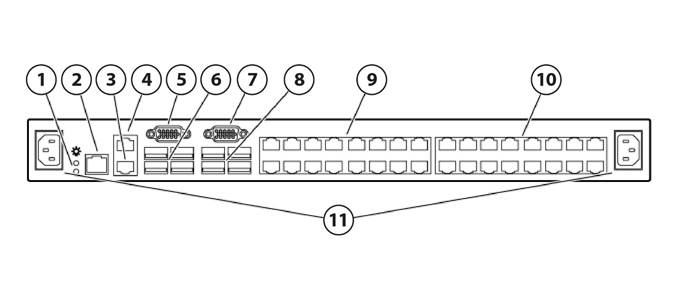
0x2x16 or 0x2x32 HPE Server Console Switch G2 with Virtual Media & CAC | |||
|
| |||
|
1. |
Power supply status indicator LEDs |
7. |
Console B VGA connector |
|
2. |
LAN connector |
8. |
Console B USB ports |
|
3. |
Tiering chain port |
9. |
Target device ports (1-16) |
|
4. |
RJ-45 serial setup port |
10. |
Target device ports (17-32) |
|
5. |
Console A VGA connector |
11. |
Power connectors A & B |
|
6. |
Console A USB ports |
|
|
|
| |||
|
Models | ||
|
HPE Server Console G2 Switch |
HPE 0x2x16 KVM Server Console Switch G2 with Virtual Media CAC Software |
AF618A |
|
HPE 0x2x32 KVM Server Console Switch G2 with Virtual Media CAC Software |
AF619A | |
|
| ||
|
At A Glance | ||
- More target server per switch increases flexibility
- Increases cable distances at higher resolutions
- CAC support to the server - Dual-stack IPv6 with stateless auto configuration
- Microsoft Active Directory integration using LDAP is standard - Local security database on switch is also available for non LDAP implementations
- Administrators can map local media to a target server in the data center to easily perform application installations or upgrades - A USB CD-ROM, USB DVD, USB floppy drive, or USB key can be attached directly to the HPE Server Console Switch G2 with Virtual Media & CAC and mapped to an attached server - When used locally with the HPE 1U Rackmount Keyboard with USB or the HPE LCD8500 USB drives can be connected to the front USB port on the keyboard for increased ease of use - Virtual media support requires the use of Virtual Media Interface Adapters
- Interface adapters support virtual media and provide CAC on ProLiant servers - Virtual Media Interface Adapters with CAC support are USB 1.1 full speed.
- Two levels of tiering are available to support up to 1024 servers. When all tiers are comprised of virtual media compatible console switches and interface adapters, virtual media can be mapped to a server on any tier
- Supports HPE Server Console Switches with Virtual Media for remote switch management which can be used in the lights-out datacenter - HPE Serial Console Servers, and legacy Cat5 based HPE IP Console Switches - Compatible with Windows and Linux clients - No software to install on target servers | ||
Standard Features
|
Target Applications and Markets |
|
Network Administrators, System Administrators, Engineering Managers, Chief Information Officers, and Managers of Information Systems are all among the users who will see benefits from using the HPE family of server console switches.
|
|
|
|
Features |
|
New Features:
- Widescreen video support modes include; 1680 x 1050, 1440 x 900, 1280 x 800, 1024 x 640, 800 x 500
- For the digital appliances, the local ports will be represented by one ACI connection and one local KVM connection. The two ports will be independent of one another (i.e. not pre-emptive or shared). - For the analog appliance, the local ports are represented by an ACI connection and two sets of local KVM connections. One of the KVM connections is tied to the ACI connection, so that KVM connection cannot be used if the ACI is connected. The second KVM connection is independent of the ACI and first KVM connections/paths.
Standard Features:
- Side Mount - Rails are provided for mounting the unit to the side of rack cabinets with side mounting capability. - Rear Rack Mount - HPE Console Switches may be mounted behind a HPE LCD8500 KVM Console Kit with slide rails provided with the switch.
- USB 2.0 protocol and speed supported on both Virtual Media Interface Adapters.
- PS/2 - USB mouse and keyboard - VT100 serial console support - BladeSystems p-Class support via front diagnostics connector
- HPE 1U Rackmount Keyboard with USB - HPE LCD8500 KVM Console Kit NOTE: For more information please visit: https://www.hpe.com/us/en/integrated-systems/rack-power-cooling.html |
|
|
|
Tiered Configurations |
|
Tiering is the ability to connect one or more switches under a single switch at the top as in a pyramid. Tiering allows an administrator to access larger numbers of servers from a single local or remote console. The HPE IP Console Switch G2 with Virtual Media & CAC will support up to 2 levels of tiering under certain conditions
NOTE: For more information on tiering HPE Server Console Switches please visit: https://www.hpe.com/us/en/integrated-systems/rack-power-cooling.html |
|
|
|
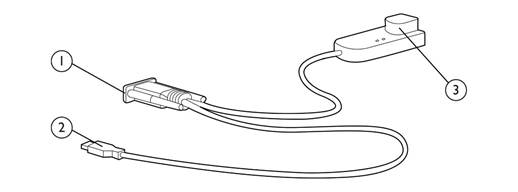
USB Virtual Media, CAC Interface Adapter (PN: AF629A) | |||
|
| |||
|
1. |
Video connector |
3. |
RJ-45 connector |
|
2. |
USB connector |
|
|
|
| |||
|
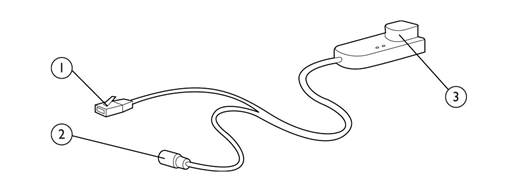
HPE KVM CNSL SRL/PWR G2 ITFC ADPTR (PN: AF625A) | |||
|
| |||
|
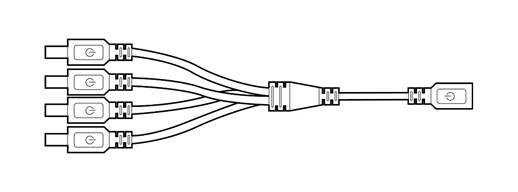
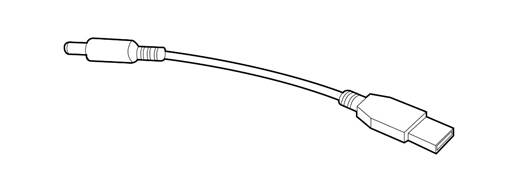
USB Coax Power Connector Cable which replaces AC Power Adapter | |||
|
| |||
|
| |||
|
1. |
RJ-45 serial connector (to RJ-45/DB9 adapter or to a Cisco appliance) |
3. |
RJ-45 connector (for CAT5 to switch) |
|
2. |
Power connector (mate to USB power connector or power supply) |
|
|
HPE Server Support
|
KVM Support |
|
HPE ProLiant Server Support |
|
All HPE ProLiant servers running any operating system are supported on all HPE Server Console Switches. |
|
|
|
HPE Integrity Server Support |
|
Integrity Server support is dependent on operating system and hardware configurations. For systems capable of displaying VGA graphics the USB Interface Adapter (PN 336047-B21) may be used. Some Integrity Servers may require an optional graphics adapter. With some operating systems the Serial Interface G2 Adapter (PN: AF625A) may be connected to the RS-232 management port to provide serial connection through the HPE Server Console Switch and the HPE IP Console Switch. |
|
|
|
HPE Unix Server Support |
|
HP9000 Servers can be managed using the Serial Interface G2 Adapter (PN: AF625A) connected to the RS-232 management port providing serial connection through the HPE Server Console Switch and the HPE IP Console Switch. |
|
NOTE: For additional information on supported options for the HPE Integrity and HP9000 Servers please consult the HP9000, Integrity and carrier-grade servers Configuration Guide. |
|
|
|
HPE Serial Console Servers may also be used to support serially managed servers and devices. |
|
|
|
KVM Support with virtual media (requires Virtual Media Interface Adapter) |
|
HPE ProLiant Server Support for virtual media |
|
All HPE ProLiant servers capable of supporting USB storage devices and USB drive keys and running Microsoft Windows 2003 or later, RedHat 4 or later, or SLES 10 or later are supported. Requires Virtual Media Interface Adapter connected to a HPE Console Switch with Virtual Media. |
|
|
|
HPE Integrity Server Support for virtual media |
|
For systems running Microsoft Windows 2003 or later capable of displaying VGA graphics the USB Interface Adapters with Virtual Media may be used. Some Integrity Servers may require an optional graphics adapter. |
|
NOTE: Some hardware configurations and/or operating systems may only transfer virtual media at USB 1.1 speeds. |
Service and Support
|
Three-year limited warranty, including hardware diagnostic support, pre-failure warranty (coverage of hard drives, memory and processors). The warranty is fully supported by HPE Services and a worldwide network of resellers and service providers. In addition 90-day's getting started software telephone support may be covered under the warranty or available for an additional fee. Enhancements to warranty services are available through HPE Pointnext operational services. NOTE: Limited warranty is 3 year parts only.
A full range of HPE Pointnext operational hardware and software services are available including:
HPE Pointnext operational services include Hewlett Packard Enterprise branded hardware options qualified for the server, purchased at the same time or afterwards, internal to the enclosure, as well as 22" and smaller external monitors and tower UPS options up to 3KVA. 22" and smaller external monitors will be covered at the same service level and coverage period as the server. For servers or storage systems installed within a rack, service also covers all HPE qualified rack options installed within the same rack. NOTE: For more information on HPE Pointnext operational services, contact any of our worldwide sales offices or resellers or visit our worldwide Web site on the internet at: http://h20565.www2.hpe.com/portal/site/hpsc/ NOTE: For more complete information on HPE Services offerings, customers and resellers, please visit us at: https://www.hpe.com/us/en/support.html NOTE: Additional information regarding worldwide limited warranty and technical support is available at: http://h20564.www2.hpe.com/hpsc/wc/public/home | |
|
| |
|
Parts and Materials |
Hewlett Packard Enterprise will provide HPE-supported replacement parts and materials necessary to maintain the covered hardware product in operating condition, including parts and materials for available and recommended engineering improvements.
Parts and components that have reached their maximum supported lifetime and/or the maximum usage limitations as set forth in the manufacturer's operating manual, product quick-specs, or the technical product data sheet will not be provided, repaired, or replaced as part of these services.
The defective media retention service feature option applies only to Disk or eligible SSD/Flash Drives replaced by Hewlett Packard Enterprise due to malfunction. |
Related Options
|
Interface Adapters for Virtual Media and CAC (USB 1.1 Full-Speed) |
HPE KVM Console USB 2.0 Virtual Media CAC Interface Adapter |
AF629A |
|
Interface Adapters for Serial Connectivity |
HPE KVM Console Serial/Power G2 Interface Adapter |
AF625A |
|
NOTE: Includes Interface Adapter, splitter, USB power cable, and power supply. |
| |
|
Interface Adapters |
HPE KVM Console USB Interface Adapter |
AF628A |
|
HPE BladeSystem c-Class KVM Interface Adapter |
AF605A | |
|
HPE KVM Console USB/Display Port Interface Adapter |
AF654A | |
|
NOTE: Supports HPE BladeSystems c-Class products only. |
| |
|
Cables |
HPE 6ft Qty 8 KVM CAT5 Cable |
263474-B22 |
|
HPE 12ft Qty 8 KVM CAT5 Cable |
263474-B23 | |
|
HPE LCD8500 Rackmount Console Kit |
HPE LCD8500 1U US Rackmount Console Kit |
AF630A |
|
HPE LCD8500 1U UK Rackmount Console Kit |
AF631A | |
|
HPE LCD8500 1U INTL Rackmount Console Kit |
AF644A | |
|
HPE LCD8500 1U FR Rackmount Console Kit |
AF633A | |
|
HPE LCD8500 1U JP Rackmount Console Kit |
AF642A | |
|
HPE LCD8500 1U DE Rackmount Console Kit |
AF632A | |
|
HPE LCD8500 1U RU Rackmount Console Kit |
AF643A | |
|
HPE LCD8500 1U US TAA Rackmount Console Kit |
AF645A | |
|
| ||
|
HPE Foundation Care |
HPE Install Rack and Rack Options Service |
U2871E |
Technical Specifications
|
HPE Server Console Switch with Virtual Media |
Dimensions |
Height |
1.72 in (4.36 cm) | |||||||||||||||||||||||||||||||||||||||||||||||||||||||||||||||||||||||||||||||||||||||||||||||||||
|
Width |
17 in (43.8 cm) | |||||||||||||||||||||||||||||||||||||||||||||||||||||||||||||||||||||||||||||||||||||||||||||||||||||
|
Depth |
9.2 in (23.68 cm) | |||||||||||||||||||||||||||||||||||||||||||||||||||||||||||||||||||||||||||||||||||||||||||||||||||||
|
Weight |
7.0 lb (3.2 kg) 8 & 16 Port, 7.6 lb (3.4 kg) 32 Port | |||||||||||||||||||||||||||||||||||||||||||||||||||||||||||||||||||||||||||||||||||||||||||||||||||||
|
Power Requirements |
Rated Voltage |
100 to 240V AC | ||||||||||||||||||||||||||||||||||||||||||||||||||||||||||||||||||||||||||||||||||||||||||||||||||||
|
Rated Frequency |
50 to 60 Hz | |||||||||||||||||||||||||||||||||||||||||||||||||||||||||||||||||||||||||||||||||||||||||||||||||||||
|
Rated Input Current |
0.5 to 0.25A | |||||||||||||||||||||||||||||||||||||||||||||||||||||||||||||||||||||||||||||||||||||||||||||||||||||
|
Input Power |
60W (max) | |||||||||||||||||||||||||||||||||||||||||||||||||||||||||||||||||||||||||||||||||||||||||||||||||||||
|
Heat |
200 BTU/hr (max) | |||||||||||||||||||||||||||||||||||||||||||||||||||||||||||||||||||||||||||||||||||||||||||||||||||||
|
Temperature Range |
Maximum Ambient Operating Temperature |
50° to 122° F (10° to 50° C) | ||||||||||||||||||||||||||||||||||||||||||||||||||||||||||||||||||||||||||||||||||||||||||||||||||||
|
Ambient Storage and |
68° to 158° F (20° to 70° C) | |||||||||||||||||||||||||||||||||||||||||||||||||||||||||||||||||||||||||||||||||||||||||||||||||||||
|
Temperature |
Operating |
50° to 122° F (10° to 50° C) | ||||||||||||||||||||||||||||||||||||||||||||||||||||||||||||||||||||||||||||||||||||||||||||||||||||
|
Transit |
-22° to 158° F (-20° to 70° C) | |||||||||||||||||||||||||||||||||||||||||||||||||||||||||||||||||||||||||||||||||||||||||||||||||||||
|
Storage |
-4° to 158° F (-20° to 70° C) | |||||||||||||||||||||||||||||||||||||||||||||||||||||||||||||||||||||||||||||||||||||||||||||||||||||
|
Relative Humidity |
Operating |
20% to 80% | ||||||||||||||||||||||||||||||||||||||||||||||||||||||||||||||||||||||||||||||||||||||||||||||||||||
|
Non-operating |
5% to 95% | |||||||||||||||||||||||||||||||||||||||||||||||||||||||||||||||||||||||||||||||||||||||||||||||||||||
|
Video Modes Supported |
VGA, SVGA, XGA |
| ||||||||||||||||||||||||||||||||||||||||||||||||||||||||||||||||||||||||||||||||||||||||||||||||||||
|
| ||||||||||||||||||||||||||||||||||||||||||||||||||||||||||||||||||||||||||||||||||||||||||||||||||||||
|
CAT 5 Cable lengths and Video Resolution Restrictions | ||||||||||||||||||||||||||||||||||||||||||||||||||||||||||||||||||||||||||||||||||||||||||||||||||||||
| ||||||||||||||||||||||||||||||||||||||||||||||||||||||||||||||||||||||||||||||||||||||||||||||||||||||
|
| ||||||||||||||||||||||||||||||||||||||||||||||||||||||||||||||||||||||||||||||||||||||||||||||||||||||
|
Environment-friendly Products and Approach - End-of-life Management and Recycling |
Hewlett Packard Enterprise offers end-of-life product return, trade-in, and recycling programs, in many geographic areas, for our products. Products returned to Hewlett Packard Enterprise will be recycled, recovered or disposed of in a responsible manner.
The EU WEEE Directive (2012/19/EU) requires manufacturers to provide treatment information for each product type for use by treatment facilities. This information (product disassembly instructions) is posted on the Hewlett Packard Enterprise web site. These instructions may be used by recyclers and other WEEE treatment facilities as well as Hewlett Packard Enterprise OEM customers who integrate and re-sell Hewlett Packard Enterprise equipment. |
Summary of Changes
|
Date |
Version History |
Action |
Description of Change |
|
01-Oct-2018 |
Version 14 |
Changed |
Overview was revised. |
|
02-Jul-2018 |
Version 13 |
Changed |
Related Options & Technical Specifications sections were updated |
|
05-Mar-2018 |
Version 12 |
Changed |
Overview and Standard Features were revised. |
|
23-Oct-2017 |
Version 11 |
Changed |
Care Pack naming and Service and Support- Parts and Materials updated. |
|
31-Mar-2016 |
Version 10 |
Changed |
Related Options section was revised. |
|
02-Oct-2015 |
Version 9 |
Changed |
Overview, Standard Features, and Related Options were revised. |
|
31-Mar-2014 |
Version 8 |
Changed |
HPE KVM Console USB Virtual Media CAC Interface Adapter and HPE KVM CAT5 1-pack USB Interface Adapter part numbers were revised. |
|
20-Nov-2013 |
Version 7 |
Changed |
The title has changed. |
|
08-Jun-2013 |
Version 6 |
Changed |
Overview was revised and Interface Adapters for Virtual Media (USB 2.0 High-Speed) was added. |
|
27-Jan-2012 |
Version 5 |
Removed |
Removed a NOTE. |
|
20-Jun-2011 |
Version 4 |
Changed |
Model and Related Options product descriptions were revised. Product Features was changed to Standard Features. HPE Pointnext operational, and Warranty Information was removed from Service and Support. |
|
06-Apr-2011 |
Version 3 |
Changed |
Corrected a part number on one of the Images. |
|
16-Feb-2011 |
Version 2 |
Removed |
BladeSystem p-Class KVM Interface Adapter - 1 pack and Serial Interface adapter - 1 Pack with power supply was removed from Interface Adapters. |
|
16-Nov-2009 |
Version 1 |
New |
New QuickSpecs. |
| ||||||||||||||||||


